







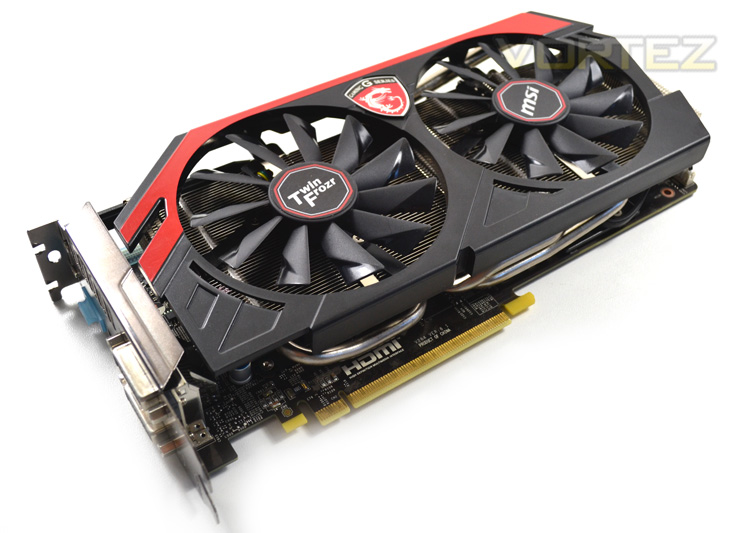
Today we sample MSI’s GTX 760 from the new ‘gaming’ range of graphics cards complete with their Twin Frozr cooler.
Product on Review: N760 TF 2GD5/OC

Manufacturer and Sponsor: MSI
Street Price: £215.99 at time of review
The MSI Twin Frozr cooler has been around for a number of years in one form or another and has consistently been revised to cope with the increasing heat load produced by powerful graphics card. The Gaming series of components from MSI is the new premium’ range of components, not just graphics cards but motherboards too, which encompasses all the things we love about MSI. Brute power is just one area of inclusion. Cooling performance and acoustic control are two other areas that are often sacrificed to unleash that brute power but not with the MSI Gaming range. The Twin Frozr cooling design is married to MSI’s Military spec components ensuring that the end product has everything you require from a top drawer PC component.
The GTX760 is perhaps set to be this year’s most popular GPU if past records are anything to go by. Both the GTX560 and 660 are among the most popular GPU’s in use (according to Steam Survey) so it stands to reason that this midrange success story will continue with the GTX760. With 6 SMX units from the ground breaking Kepler GK104 core used on the GTX770 and GTX680, we know this core is a capable performer even in reference guise. Add a sprinkling of MSI magic on top of this and we might just have a mid-range GPU that is capable of trumping the competition.
About MSI
Micro-Star International Co., Ltd (MSI) was established in August 1986 in Jhonghe, Taipei by 5 founders, one of the world’s largest information technology manufacturers with more than 12,700 employees, including those in Taipei headquarters, Baoan Plant (Shenzhen), Kunshan Plant and sales staff around the world.
MSI started from the motherboard and graphics card industries and extended into consumer and commerical electronics including notebooks, All-in-One PCs, servers, workstations, industrial PCs, household appliances, car infotainment products, barebone systems, multimedia, communication devices, and others.
MSI started from the motherboard and graphics card industries and extended into consumer and commerical electronics including notebooks, All-in-One PCs, servers, workstations, industrial PCs, household appliances, car infotainment products, barebone systems, multimedia, communication devices, and others.
Specification
Graphics Engine NVIDIA GeForce GTX 760
Bus Standard PCI Express x16 3.0
Memory Type GDDR5
Memory Size(MB) 2048
Memory Interface 256 bits
Core Clock Speed (MHz)1085 (Boost Clock: 1150) (OC mode)
Memory Clock Speed(MHz)6008
DVI Output2 (Dual-link DVI-I x 1, Dual-link DVI-D x 1)
HDMI-Output1 (version 1.4a)
DisplayPort1 (version 1.2)
HDMI Support Y
Dual-link DVI Y
Display Output (Max Resolution) 2560×1600
DirectX Version Support 11.1 API (feature level 11_0)
OpenGL Version Support 4.3
SLI Support Y, 3-ways
Card Dimension(mm) 260x126x38 mm
Bus Standard PCI Express x16 3.0
Memory Type GDDR5
Memory Size(MB) 2048
Memory Interface 256 bits
Core Clock Speed (MHz)1085 (Boost Clock: 1150) (OC mode)
Memory Clock Speed(MHz)6008
DVI Output2 (Dual-link DVI-I x 1, Dual-link DVI-D x 1)
HDMI-Output1 (version 1.4a)
DisplayPort1 (version 1.2)
HDMI Support Y
Dual-link DVI Y
Display Output (Max Resolution) 2560×1600
DirectX Version Support 11.1 API (feature level 11_0)
OpenGL Version Support 4.3
SLI Support Y, 3-ways
Card Dimension(mm) 260x126x38 mm
Based on the same GK104 found on the GTX680, the GTX760 contains 1152 CUDA cores at a clockspeed of 980Mhz. This clockspeed coupled with GPU Boost 2.0 will allow the card to typically boost overclock to 1033MHz. The GTX760 also comes equipped with 2GB of GDDR5 and features four 64-bit memory controllers (256-bit). This memory is clocked to 6008Mhz (effective) however if previous results are anything to go by, this tasty memory will overclock much further than reference speeds so expect to see some good improvements in our overclocking section.
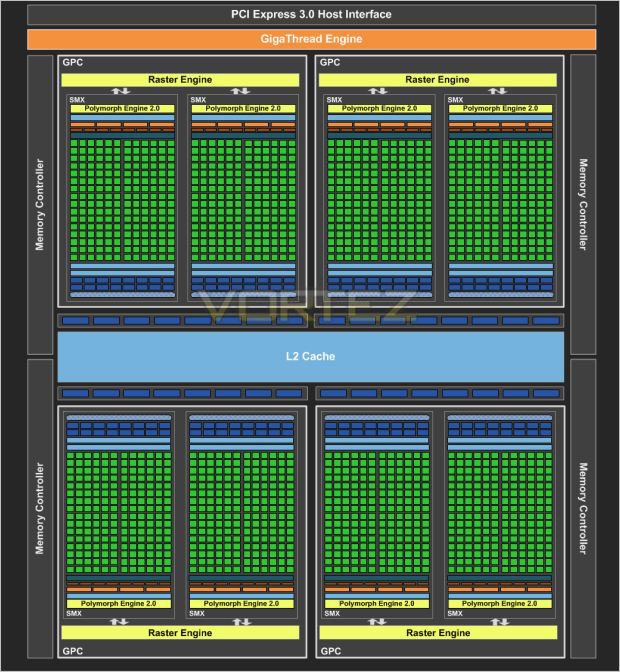
Above is an 8 Core Kepler. NVIDIA tell us that 2 of the cores would be disabled either by disabling 1 graphics processing cluster all together or just one core from two of the clusters.
Kepler Core
The GTX760 is equipped with a GK104 core is fabricated on the 28nm process with every component was designed with power efficiency in mind to ensure the GPU gave the best performance-per-watt possible.
While the 28nm manufacturing process holds the bulk of the power saving features, the way the new architecture works is also key to furthering Kepler’s power reduction. SMX, an evolution of the SM from Fermi is NVIDIA’s new streaming multiprocessor:
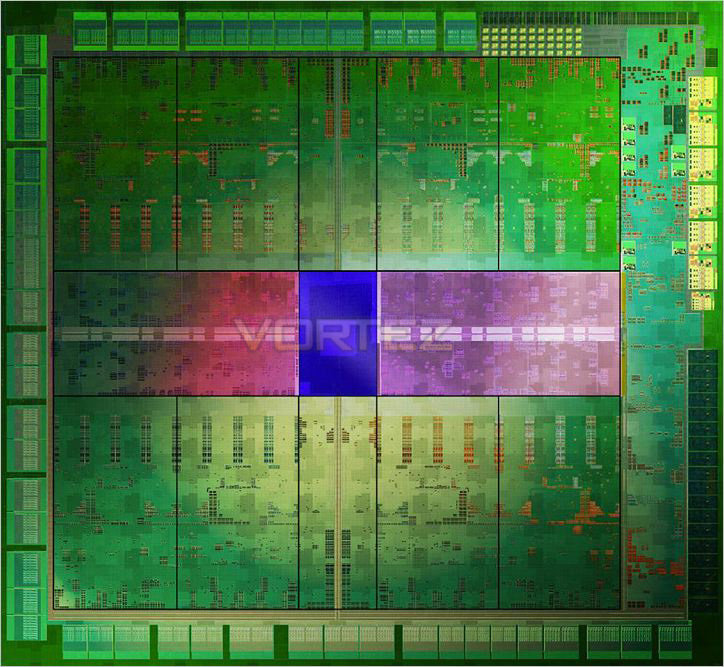
Each SMX runs at the graphics clock speed rather than 2x that speed as previously but because the GK104 has 1536 CUDA cores (8xSMX), over Fermi’s (GF110) 512 CUDA cores (16xSM), Kepler allows the GTX760 to operate at twice the performance per watt measurement compared to the GTX560.
To feed each SMX, each unit has four warp schedulers, each capable of firing off two instructions per warp, every clock. With a redesigned scheduling function, the GTX760 is a lot less complex and much more streamlined allowing the compiler to determine which instructions will be issued and can provide this information direct to the hardware block rather than going around the houses using Multi-port decode and a register scoreboard along with the dependency check before the information gets issued. This method is both quicker and more importantly, more power efficient.
Perhaps the biggest change from Fermi to Kepler was the omission of the old Shader Clock. The shader clock was getting tired as it was part of the old Tesla architecture which was implemented as an area optimisation. Because of the way Kepler executes instructions at a much more streamlined manner and at a higher clock rate, fewer copies of the execution unit need be made.
Another improvement over Fermi with the introduction of SMX is the redesigned Polymorph engine (2.0). The Polymorph engine takes card of the tessellation workload of the GTX770. The design of the Polymorph engine is to ensure that the tessellation we see on screen has little (as possible) impact on the rendering performance. What you may find bizarre though is that NVIDIA have cut the Polymorph engine count in half to 8 from Fermi’s 16 yet claim it is almost twice as quick. This is thanks to the improved core an memory clockpeed.
With both a higher core clockspeed based on older (but still very fast) GK104 core and of course that blisteringly fast memory, the GTX760 looks set to replace not only the GTX660Ti, but also offer a viable, yet cheaper alternative to the HD7950 GPU.
GPU Boost 2.0
GPU Boost caused a bit of a stir when it was first introduced because it did away with the traditional ‘absolute’ method of dictating MHz. Rather it worked by overclocking the card by different means. To achieve an overclock using GPU Boost, one increased the MHz and Voltage as per usual however the card would then ‘Boost’ when placed under load. So rather than having a fixed clockpseed, the GPU adjusts the clockspeed depending on load, ensuring the power is there when you need it rather than it being full on all of the time, thus saving power consumption and heat production by having the card overclock dynamically.
GPU Boost 2.0 is an evolution of this idea. The techs at NVIDIA have determined that GPU power was unnecessarily limiting performance when GPU temperatures was low. Instead of boosting GPU performance based on a power target, it is now based upon temperature with this temperature threshold being 80 degrees Celsius.
Because the boosting is now determined by temperature, noise levels are also reduced as NVIDIA claim the GTX cards deliver a better acoustic profile.
So to summarise, overclocking the card using GPU boost 2.0 means adjusting the temperature threshold, for example from 80c to 85c. The GPU clockspeed will then gradually increase until it reaches this new temperature and will be dynamically adjusted on-the-fly to stay within this threshold. Because of this it is much more difficult to claim one GPU is faster than another without having both working under precisely the same operating conditions.
It therefore should go without saying (but we will say it anyway) that the colder your card runs, the faster it should theoretically operate as a colder card allows overvolting and thus even higher clockspeeds.
GPU Boost 2.0 also features overvoltage control. NVIDIA make no bones that enabling this function will damage the long term operability of the graphics card and as with AMD’s overdrive, you have to acknowledge this fact before you can unlock the cards voltage control. We applaud NVIDIA for this because they have acknowledged that enthusiasts, like us here at Vortez, like to push hardware to the max and without voltage control, the whole process becomes so much more uninteresting and much more difficult.
So, because GTX760’s boost clock and voltage level are now tied to the GPU’s temperature, the voltage can be dialled higher which in turn will allow the GPU to attain higher clockspeed values. Obviously, increasingly board voltage, as with most other products, will gradually degrade the GPU through electron migration causing a premature death of the GPU. Voltage support will be offered on a board partner by partner basis however, we would be extremely surprised if it wasn’t enabled in every GTX760’s VBIOS.
We will see how GPU Boost 2.0 performs in our overclocking section later in the review.
GeForce Experience
GeForce Experience is a new application from NVIDIA that optimizes your PC in two key ways. First, it maximizes your game performance and game compatibility by automatically downloading the latest GeForce Game Ready drivers. Second, GeForce Experience intelligently optimizes graphics settings for all your favorite games based on your hardware configuration.
Some enthusiasts will view (excuse the pun) altering settings to get the very best from a game one of the ‘fun’ elements of owning a powerful graphics card. Others just want to play their game of choice without the endless testing and benchmarking to determine what settings work best. Many don’t have the inclination or indeed the time to learn what effect each setting has upon the games visual elements.It soon becomes a bind when upon a new driver release those settings which were great before can be bettered (or lowered) for a better gaming experience. FXAA, TSAA, MMAA or simply AA. Low, medium, high, ultra texture settings along with overall visual settings can be all too confusing when configuring a games visuals and while it would be easy to just crank everything up to maximum and hoping for the best, this all too often results in choppy, unplayable gaming ruining the gaming experience.
NVIDIA’s GeForce Experience removes much of the guess work when configuring a game thereby giving users the means to jump straight into the game with the best optimised settings for there hardware.
This handy utility will also keep your GPU updated with the latest driver that can be set to automatically download, ready to be installed as soon as they are available and also it gives you access to the beta drivers.
How does it work?
GeForce experience requires an internet connection which, once connected to the NVIDIA Cloud datacenter will download optimal game settings that are tailored to your PC based upon CPU, GPU and monitor resolution.
Low end hardware will have the visuals reduced to improve framerates while high end hardware will inevitably have higher settings assigned. This is all done with a click of a button which ensures that the game not only looks great but perhaps more importantly, plays smoothly.
Testing of the settings are done by NVIDIA themselves who benchmark the game, set a framerate target to ensure smooth gameplay then adjust the settings to ensure both framerate and smooth gameplay are optimised.
In our own tests, the utility worked well and is great for those who want to jump straight into the game with the minimal of fuss and furore of adjusting GPU settings.
Our one complaint is that the supported games list requires expanding. While most of the popular ga
Packaging & Accessories
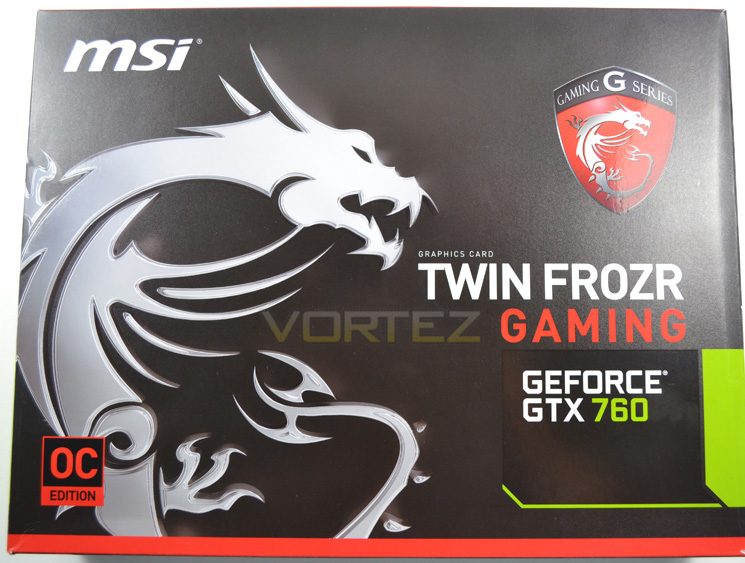
The GTX760 from MSI is wrapped up in an attractive box featuring the dragon emblem synonymous with their Gaming range. The red accents highlighting the box also draw your attention and if you weren’t already aware, the large ‘G Series’ badge confirms this graphics card is a Gaming Series premium product.
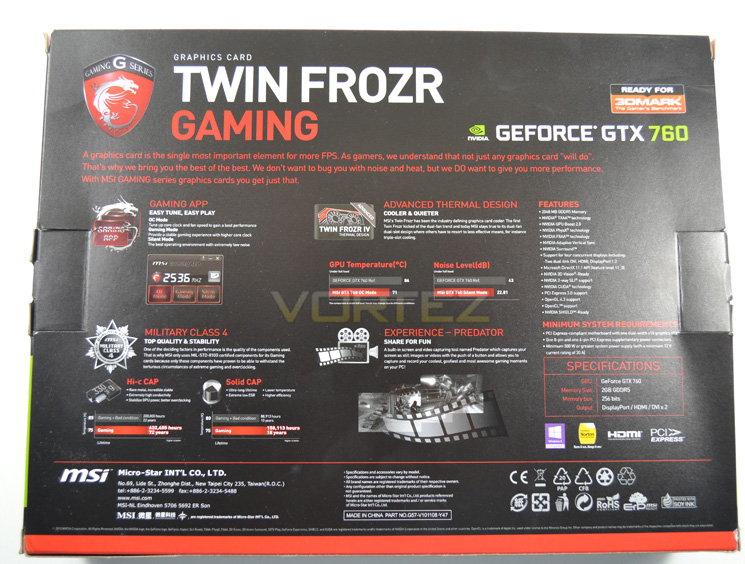
Flipping the box over we find MSI have gone to great lengths to tell us what makes a gaming series GPU so special. Military Class components, advanced thermal design, gaming app and predator screen capture software are all included in the package description along with a full specification and feature list. Perfect.
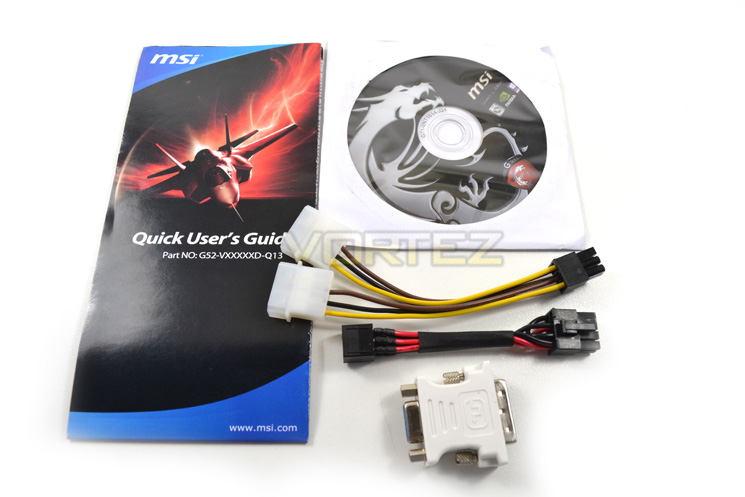
The accessory list is short but sweet featuring a driver/application CD, user guide, , VGA-DVI adaptor, twin MOLEX- 6pin power adaptor along with a 6pin-8pin power adaptor.
First Look
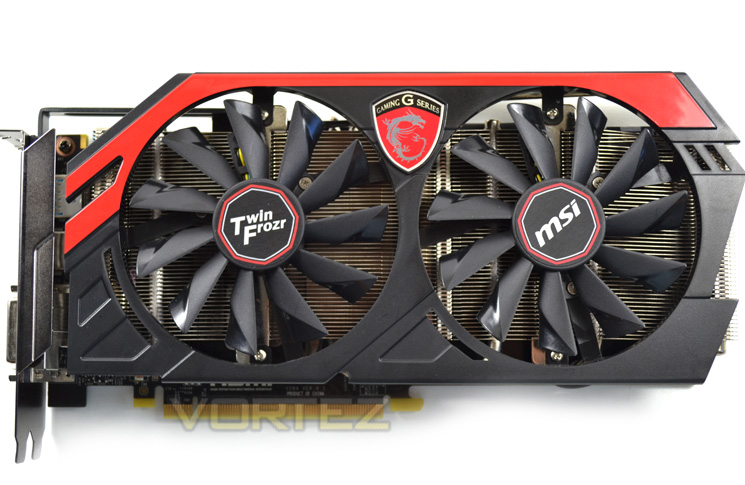
Red and black is perhaps the most popular colour scheme for a gaming PC today and MSI have appropriately taken this scheme as their own for their Gaming range. The card is very attractive it has to be said with a redesigned fan shroud complete with red accents covering the fantastic Twin Frozr cooling design.
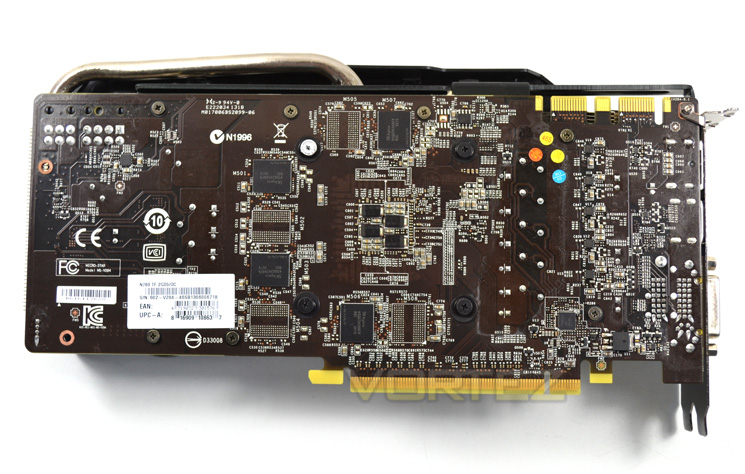
MSI still have not quite grasped the concept of a black PCB, instead sticking with their own black (a very dark brown). Granted in most lighting conditions this will appear black but is it really too much trouble to improve the PCB silk screening process? We do hope MSI take this on board as pitched up against other manufacturers, the brown PCB found on MSI products sadly cheapens the product aesthetics somewhat.
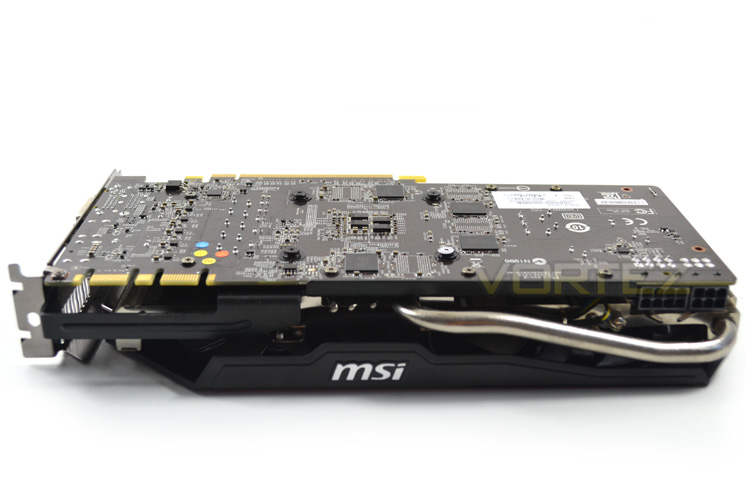
From a profile view, we find the card has a single heatpipe sprouting from the leading edge. The heatpipe is however not obtrusive and doesn’t prevent access to the power ports.
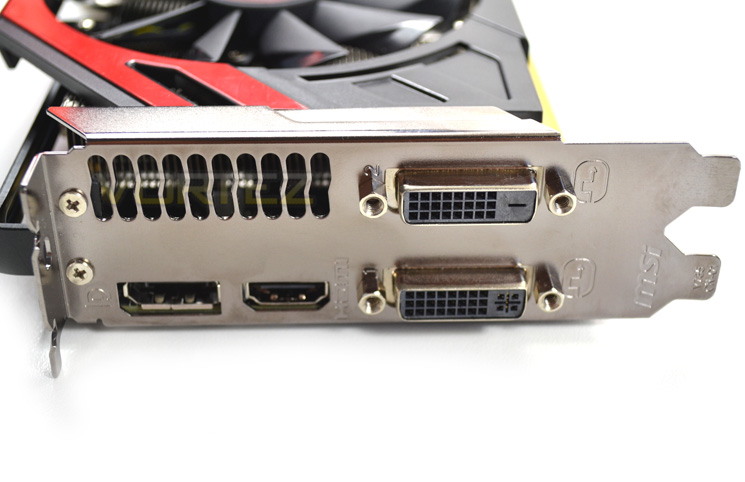
The input/output area is standard NVIDIA with both DVI-D and DVI-I along with a single DisplayPort and HDMI 1.4a.
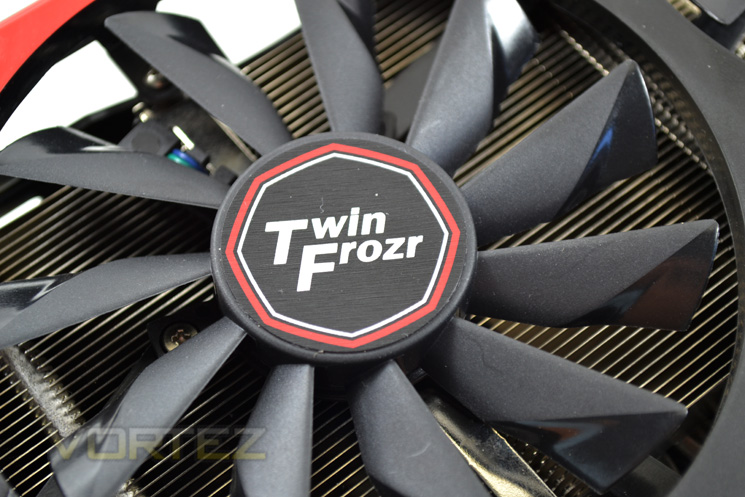
The twin fans of the cooler feature a propeller design with the edges of each blade set to a more aggressive angle. This keeps noise to a minimum without sacrificing performance.
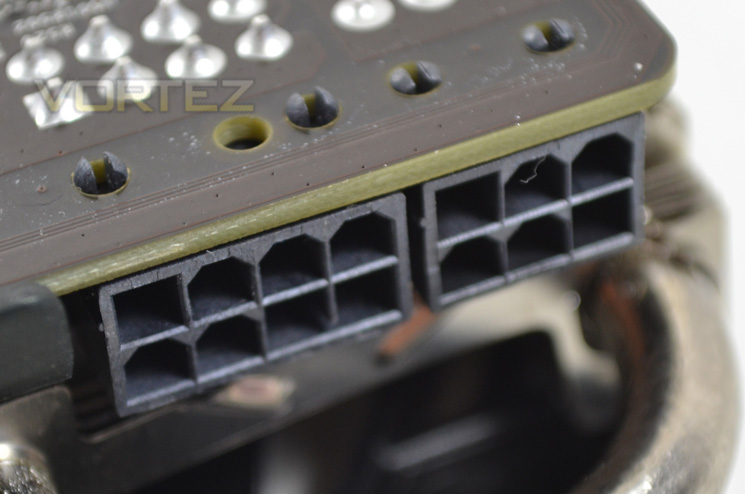
Unlike the reference design which uses a 6+6pin power design, the MSI GTX760 Gaming Series requires an 8+6 pin setup. MSI have thoughtfully included an adaptor for this purpose should your PSU not have the required power cable. The card requires a PSU with a 500W output with a current rating of 30A or higher.
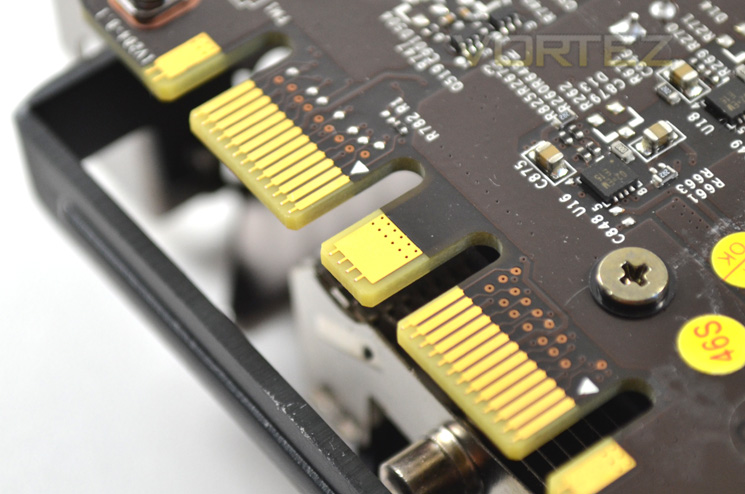
As with the reference design, the MSI GTX760 has twin SLI tabs meaning the card is multi SLI capable if you intended on pairing up more than one GTX760 with this card.
Closer Look
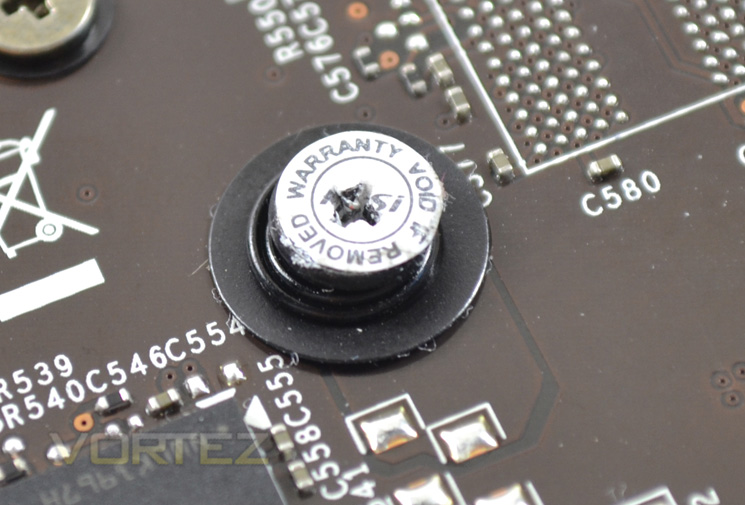
A worrying trend we are seeing with many GPU manufacturers today is the re-introduction of ‘warranty void’ stickers preventing the removal of heatsinks. This creates two problems. You will void the warranty if you want to replace the stock TIM and you will also void the warranty if you replace the air cooler with a watercooling block.
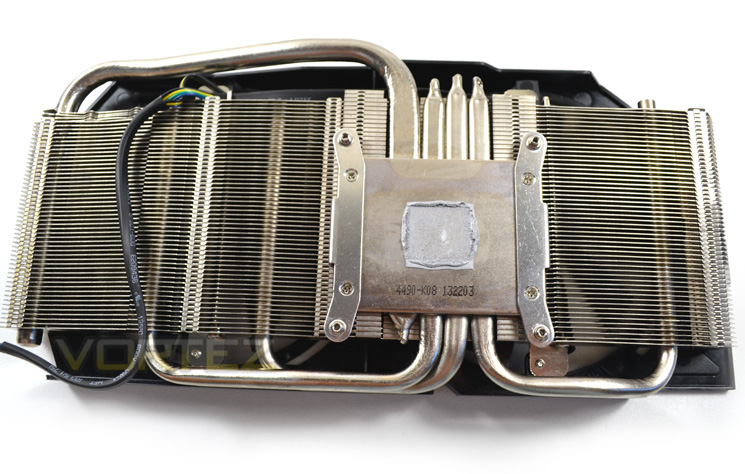
Breaking the seal, we get to see the cooler in all its glory. The Twin Frozr design has been changed slightly over the years yet remains true to its ‘twin fan’ design. Each fan sits atop of a separate fin array, connected in the centre by a nickel plated base plate. There are a total of four ‘superpipe’ heatpipes which dissipate heat evenly across the heatsink. A further evolution included in this design is the heatpipe deflector, deflecting airflow directly onto the heatpipes furthering the efficiency of the Twin Frozr cooler.
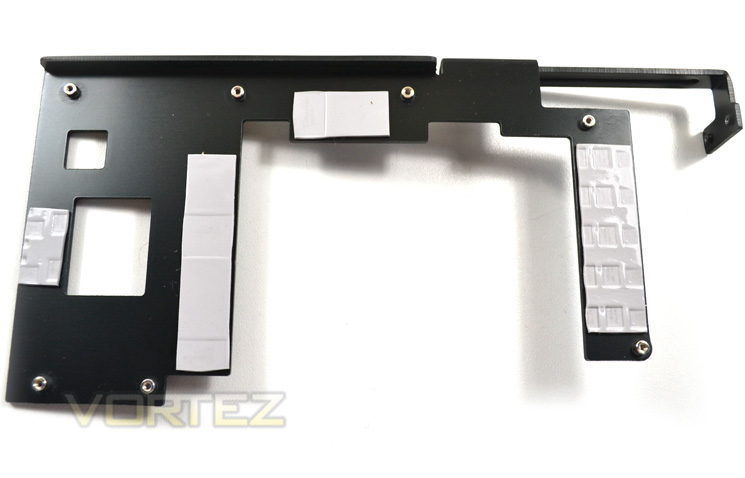
While the main cooler only has direct contact with the GPU core, a midplate acts both as a brace preventing PCB bowing and also direct cooling to both the VRM area and memory chips.
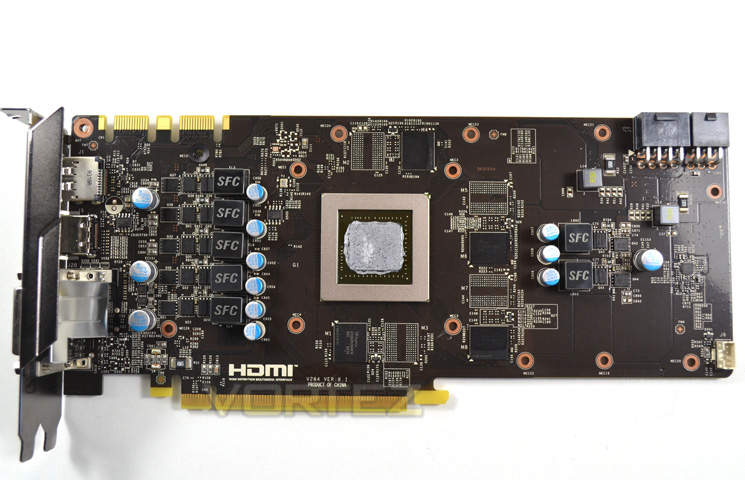
The PCB is much longer than the short reference PCB design. The MSI PCB also features memory chips on both sides of the PCB with space enough for a further 2GB (a 4GB model is also available).
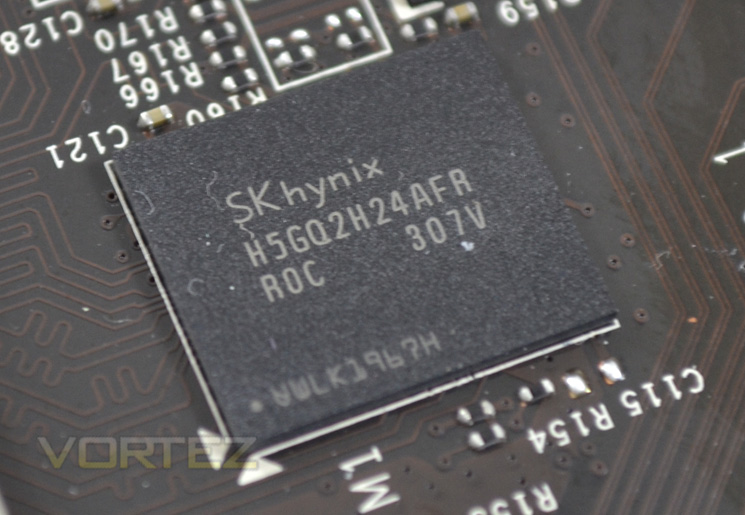
The memory carries the product code of H5GQ2H24AFR R0C which tells us this memory is the same type used on the reference design which we know is very good memory indeed, allowing extreme overclocks with relative ease.
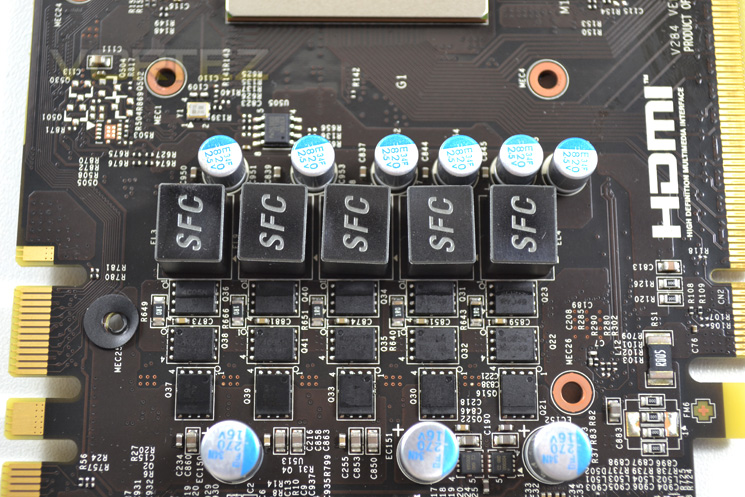
The VRM area has an extra power phase over the reference design with a 5+2 instead of 4+2 configuration. Each of the components soldered to the PCB are from the Military class IV stable.
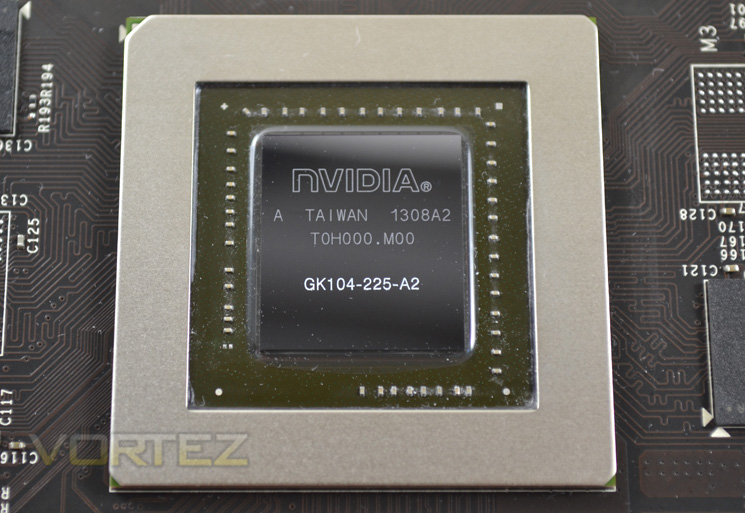
The final piece in the jigsaw is the beating heart of the GTX760, the 6 SMX GK104 core.
Test Setup
How we test graphics cards
Testing a graphics card is an extremely lengthy process. We sometimes see reviews where a graphic card has been tested using out of date equipment, out of date games and out of date drivers. While the latter can be excused due to the sheer amount of driver updates making a thorough review impossible we will however notify the reader when we have used a different driver to the normal for example a pre-release driver. For the most part however we will always use the same hardware and where possible the same drivers unless a newer driver rectifies an issue we have encountered or significantly improves performance to such an extent that continuing with an outdated driver is not feasible.
Frame Time Analysis
We have also seen the emergence of frame time analysis. We covered this in a separate article here: GPU Reviews: Why Frame Time Analysis is important so we won’t go into the reasoning again but to summarise, our testing comprises both FPS testing and perhaps arguably more importantly, frame time analysis. We also look at overall performance by equating averages across the games and finally before concluding our review we take a look at value for money.
HardwareWith the latest Intel chipset release we decided to update our ageing X58 setup to the new X79 chipset. Not only that but we will be using the flagship Core i7-3960X Extreme Edition processor clocked to 4.5GHz to ensure we have no CPU bottlenecks. With 16GB of ram on board there should be minimal paging so the benchmarks we run today will hopefully give a true reflection of the graphics card’s performance.
High End Graphics cards on test:
MSI GTX760 Twin Frozr Gaming 2GB GDDR5
(Forceware 320.49)GIGABYTE GTX780 Windforce x3 OC 3GB GDDR5(Forceware 320.49)
GAINWARD GTX780 PHANTOM ‘GLH’ 3GB GDDR5(Forceware 320.49)
INNO3D GTX760 ICHILL HERCULEZ 2GB GDDR5(Forceware 320.49)
GIGABYTE GTX770 WINDFORCE 3X OC 2GB GDDR5(Forceware 320.49)
ZOTAC GTX760 2GB GDDR5(Forceware 320.39)
NVIDIA GTX760 2GB GDDR5(Forceware 320.39)
]NVIDIA GTX760 2GB GDDR5 SLI(Forceware 320.39)
SAPPHIRE DUAL-X HD7950 3GB GDDR5 (Catalyst 13.6 beta)
CLUB 3D HD7970 royalAce 3GB GDDR5 (Catalyst 13.6 beta)
GAINWARD PHANTOM GTX 770 2GB GDDR5 (Forceware 320.18)
NVIDIA GeForce GTX 770 2GB GDDR5 (Forceware 320.18)
NVIDIA GeForce GTX 780 3GB GDDR5 (Forceware 320.18)
NVIDIA GeForce GTX 690 4GB GDDR5 (Forceware 314.22)
NVIDIA GeForce GTX TITAN 6GB GDDR5 (Forceware 314.22)
NVIDIA GeForce GTX TITAN SLI 12GB(2x6GB) GDDR5 (Forceware 314.22)
NVIDIA GTX680 2GB GDDR5 (Forceware 314.22)
AMD HD7970 3GB GDDR5 (AMD CAT 13.3 beta)
Motherboard: ASUS P9X79 Pro
CPU: Intel Core i7-3960X Extreme Edition @ 4.5GHz
RAM – 16GB (4x4GB) Corsair Vengeance (Red) DDR3 @ 1866MHz 9-10-9-27
Power Supply – Thortech Thunderbolt Plus 1200W
Hard Drive – Kingston HyperX 240GB
Cooler – Corsair H100
CPU: Intel Core i7-3960X Extreme Edition @ 4.5GHz
RAM – 16GB (4x4GB) Corsair Vengeance (Red) DDR3 @ 1866MHz 9-10-9-27
Power Supply – Thortech Thunderbolt Plus 1200W
Hard Drive – Kingston HyperX 240GB
Cooler – Corsair H100
Benchmarks
If you are a regular reader of our reviews you will know we like to test the latest hardware with the latest games and benchmarks on the market. Here are the games we have chosen:
Battlefield 3
Crysis 3
Far Cry 3
BioShock Infinite
DiRT: Showdown
The Elder Scrolls: Skyrim
Crysis 3
Far Cry 3
BioShock Infinite
DiRT: Showdown
The Elder Scrolls: Skyrim
We also take into consideration the benchmarkers out there so have included 3 of the more popular synthetic benchmarks available:
Unigine: Valley
Unigine: Heaven 4
Futuremark 3DMark Firestrike
Unigine: Heaven 4
Futuremark 3DMark Firestrike
Let’s see how today’s graphics card performed…
Temperature, Acoustics and Power Consumption
Power Consumption
To test for power consumption we use the included iPower Meter found with our Thortech PSU. As system load figures obviously differ from idle it is extremely difficult to get an accurate figure of system draw and then simply take this figure away from the overall amount because each game will generate varying levels of CPU and hard drive activity. Dynamic power adjustments which fluctuate in game will also affect accurate power figures thus rendering any such power consumption calculations redundant at worst and approximate at best.
We will therefore take our system readings averaged over a benchmark run of Tessmark (100% load) and after 20 minutes of being idle in Windows 7. These can then be used as a comparison to other graphics cards to determine how much more or less power you can expect a GPU to consume.
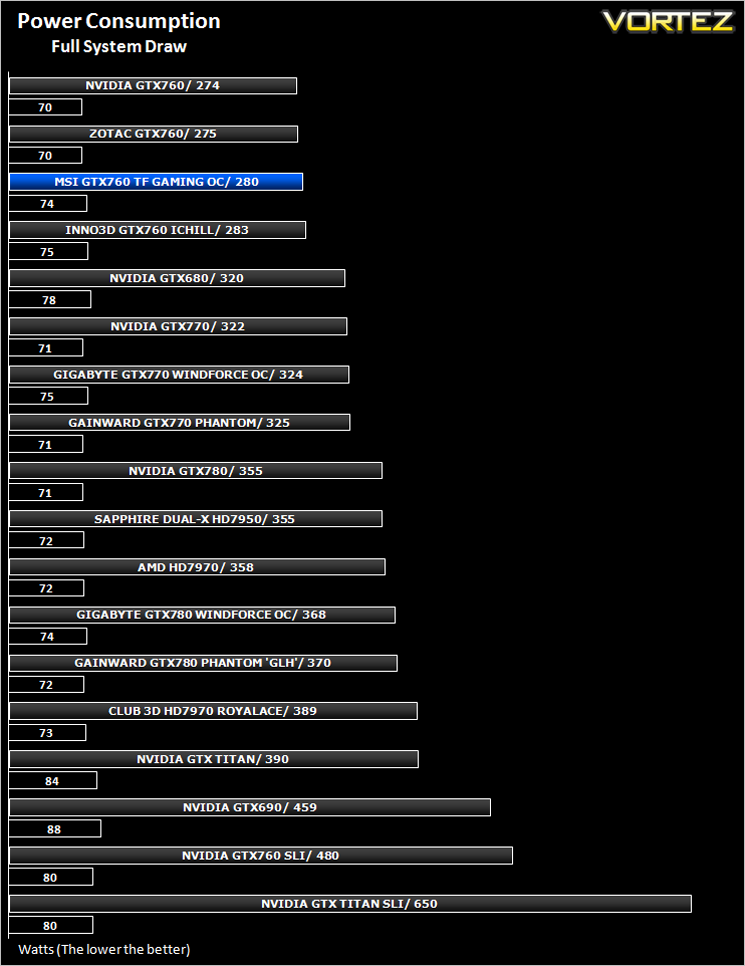
Power consumption was on a par with the other GTX760s on test which is very respectable considering the factory overclock and twin cooling design.
Temperature
To test temperatures we measured idle temperatures after booting windows, letting all applications finish loading and ran a few benchmarks. Once the benchmarks were complete we left the card to reach a cooling plateau where we then took the idle temperatures. For the load tests, we would normally run Furmark for 20 minutes, taking the absolute maximum temperature attained however we found that this throttled the card and resulted in spurious results. So we set Heaven running continuously for 20 minutes and used this as a temperature result as the card did not throttle with this application.
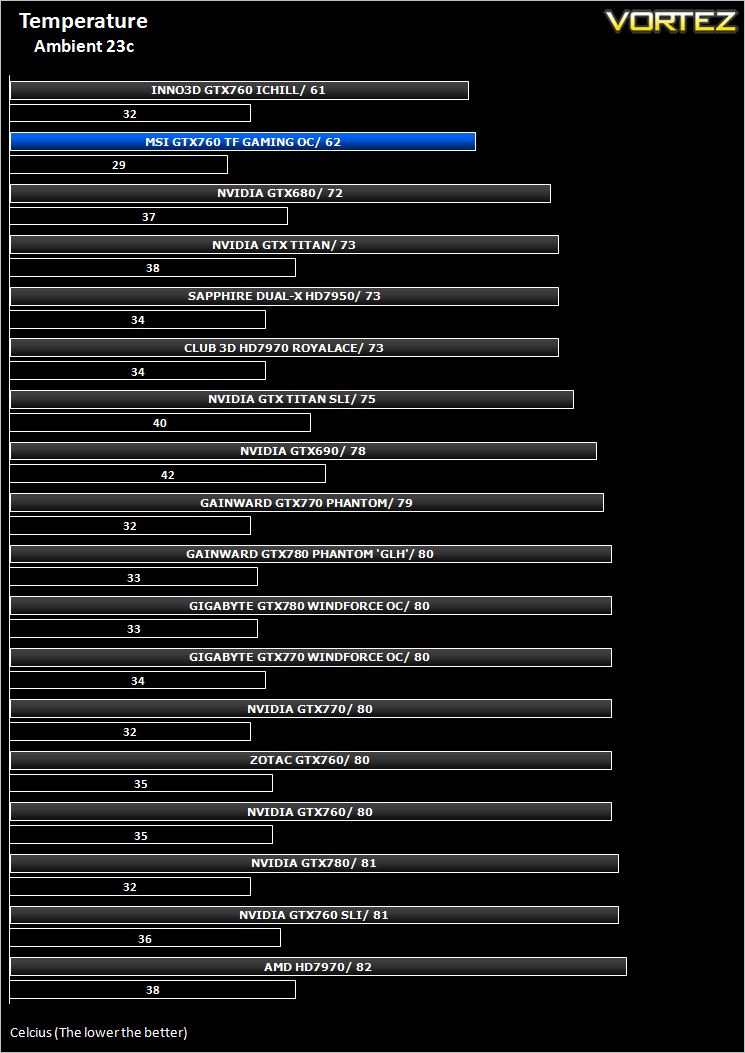
Thanks to the Twin Frozr cooling design, the MSI GTX760 Gaming Series card scored very well in the department.
Acoustics
You could be mistaken for believing the GPU was not powered up such is the lack of noise this graphics card exhibits. While subjective, we’re certain nobody could claim this to be anywhere close to being a noisy graphics card.
Let’s see how the card performs in our suite of benchmarks…
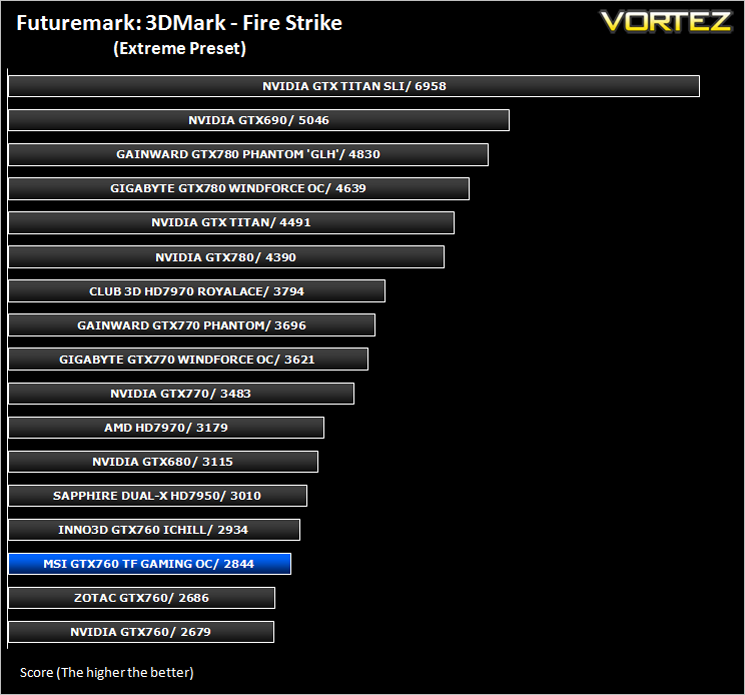
Futuremark 3DMark Fire Strike (Synthetic)
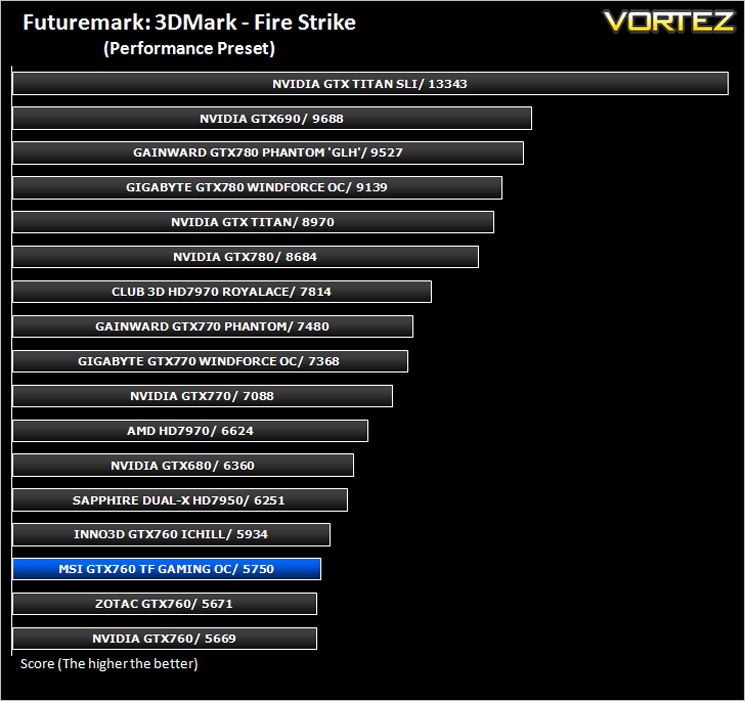
Fire Strike is the new showcase DirectX 11 benchmark designed for high-performance gaming PCs. It is Futuremark’s most ambitious and technical benchmark ever, featuring real-time graphics rendered with detail and complexity far beyond what is found in other benchmarks and games today.
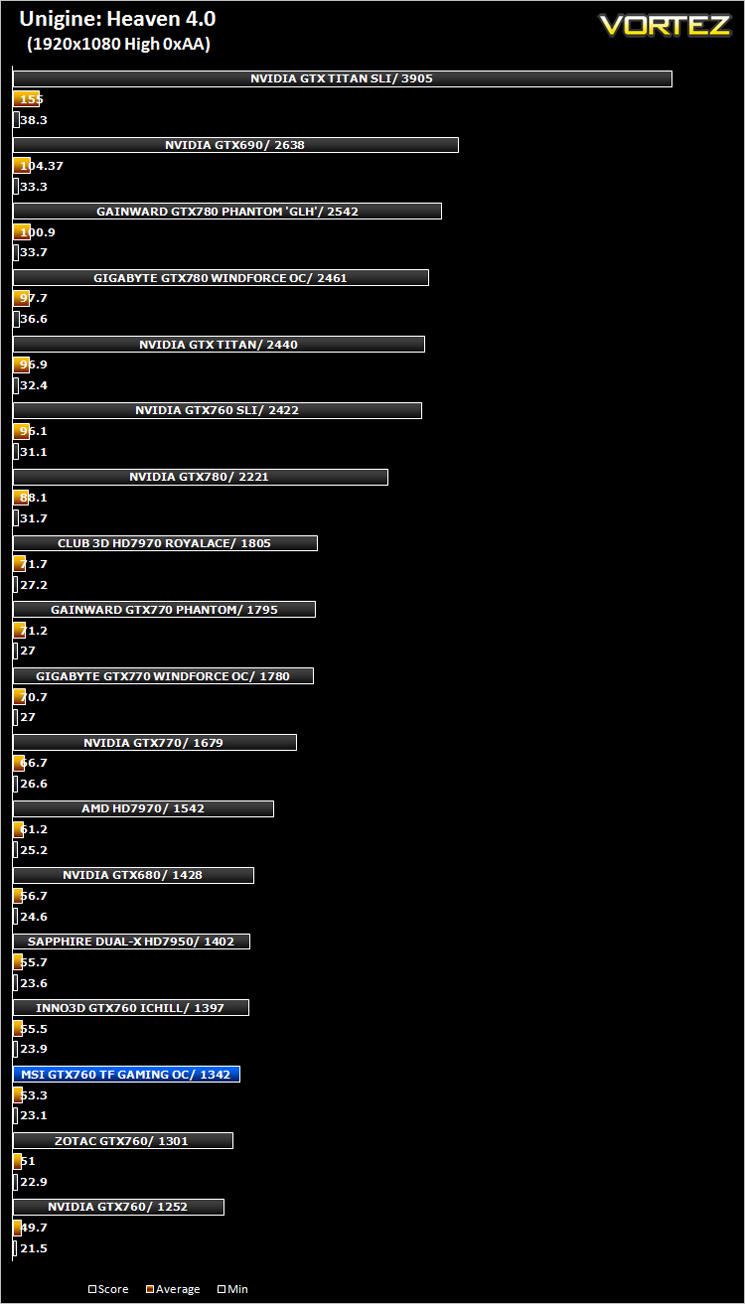
Unigine: Heaven 4 (Synthetic)
Heaven Benchmark with its current version 4.0 is a GPU-intensive benchmark that hammers graphics cards to the limits. This powerful tool can be effectively used to determine the stability of a GPU under extremely stressful conditions, as well as check the cooling system’s potential under maximum heat output. It provides completely unbiased results and generates true in-game rendering workloads across all platforms.
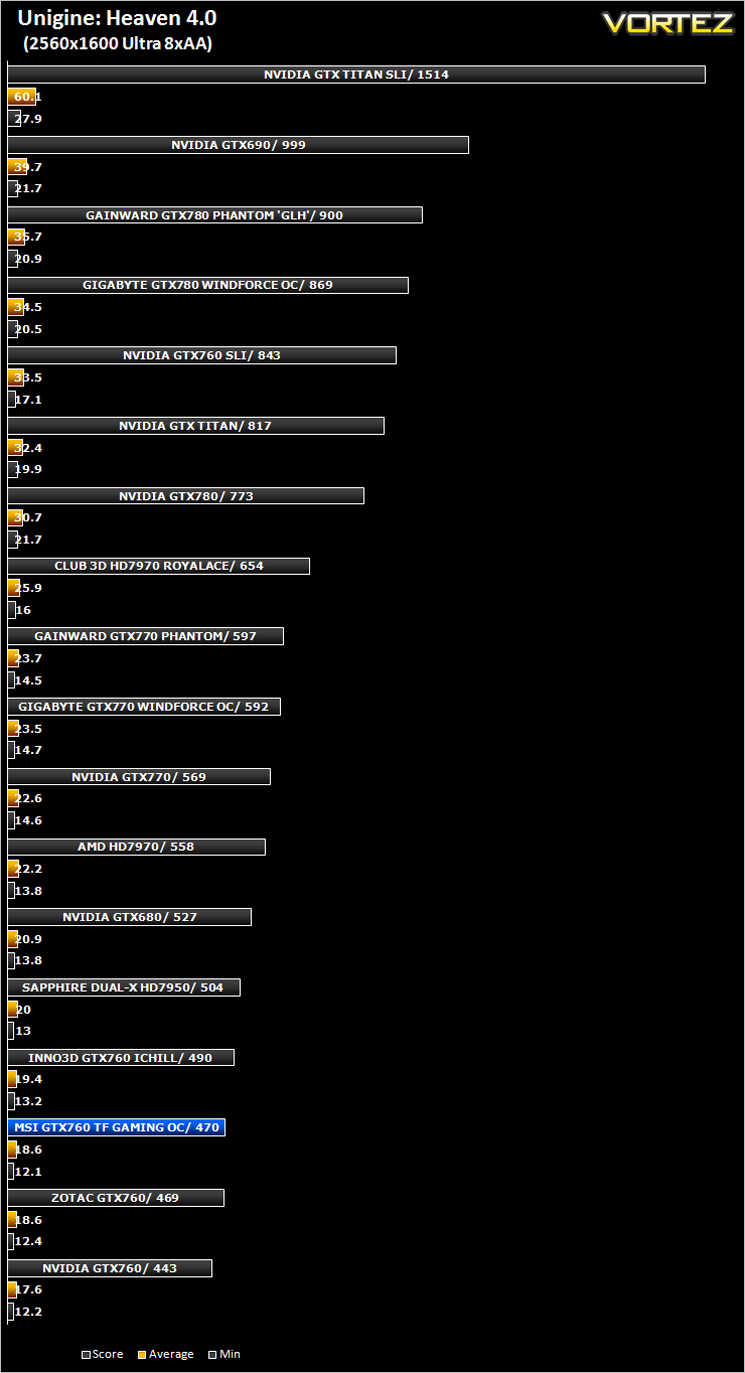
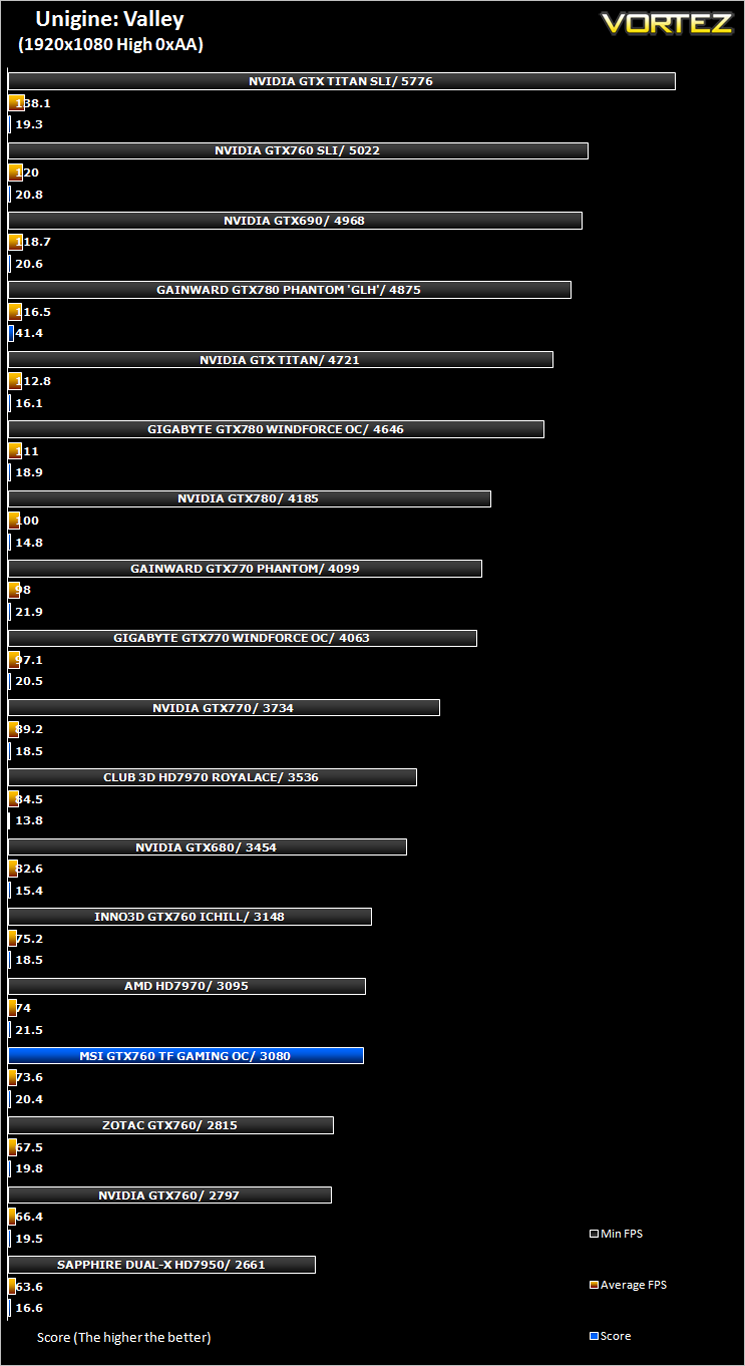
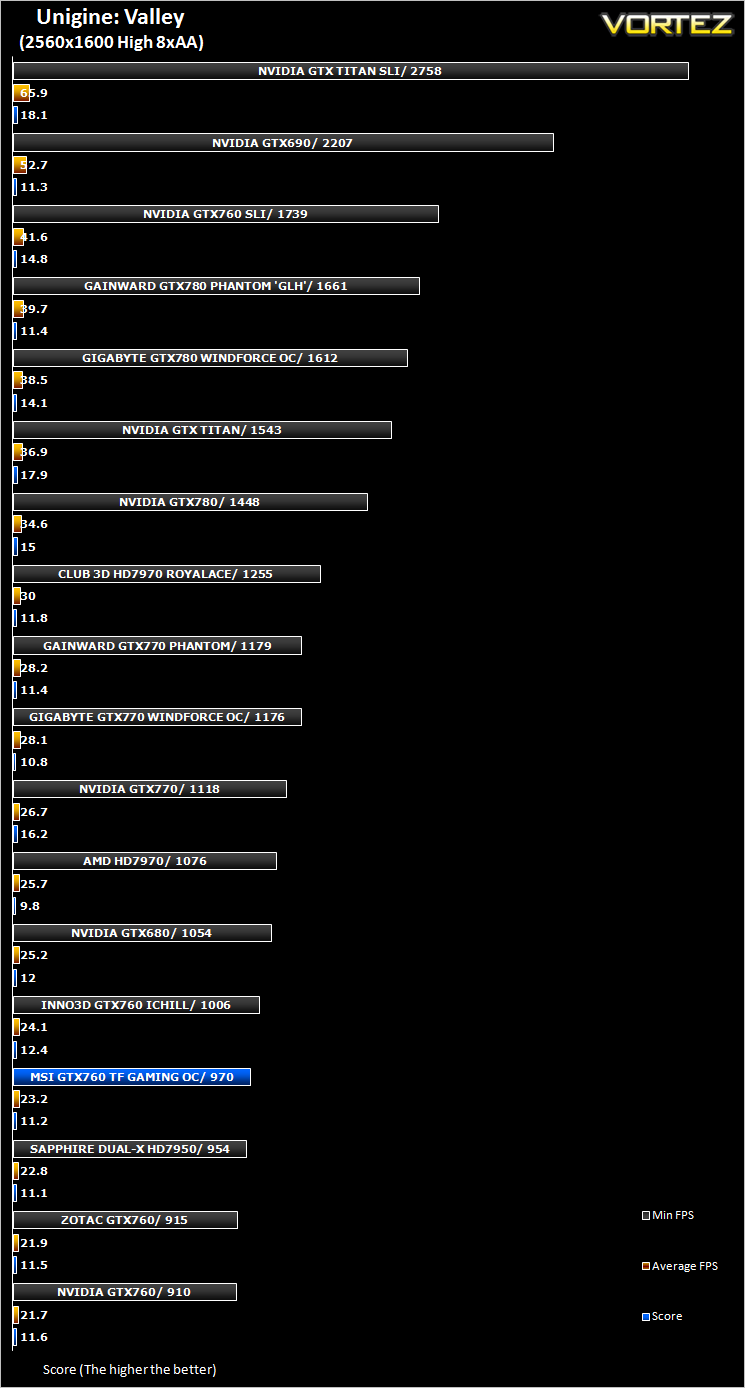
Unigine: Valley (Synthetic)
Valley Benchmark is a new GPU stress-testing tool from the developers of the very popular and highly acclaimed Heaven Benchmark. The forest-covered valley surrounded by vast mountains amazes with its scale from a bird’s-eye view and is extremely detailed down to every leaf and flower petal. This non-synthetic benchmark powered by the state-of-the art UNIGINE Engine showcases a comprehensive set of cutting-edge graphics technologies with a dynamic environment and fully interactive modes available to the end user.
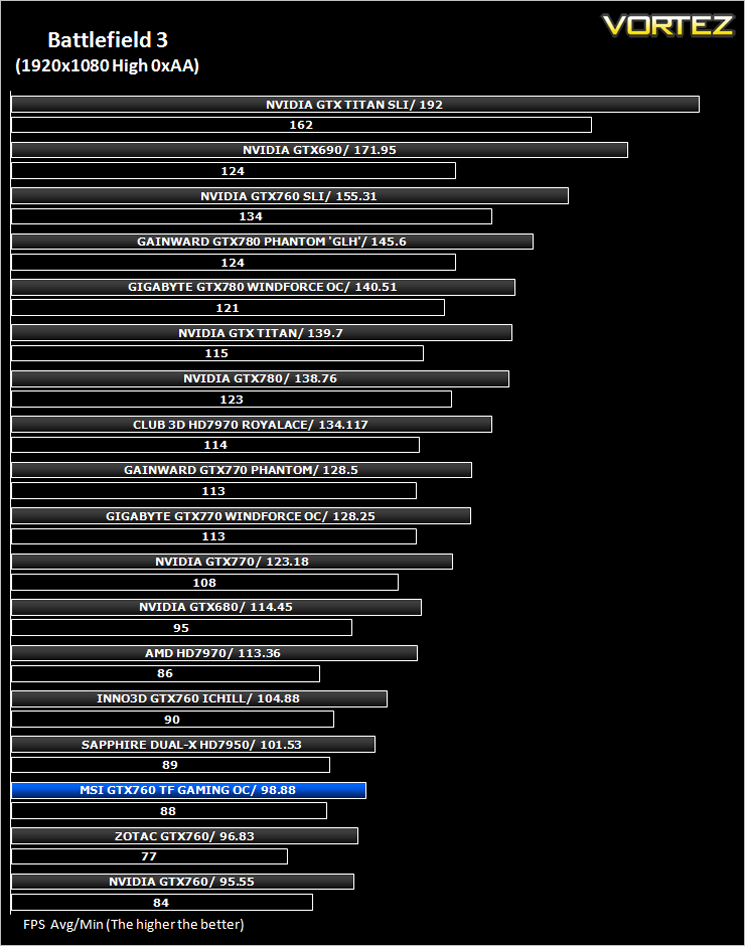
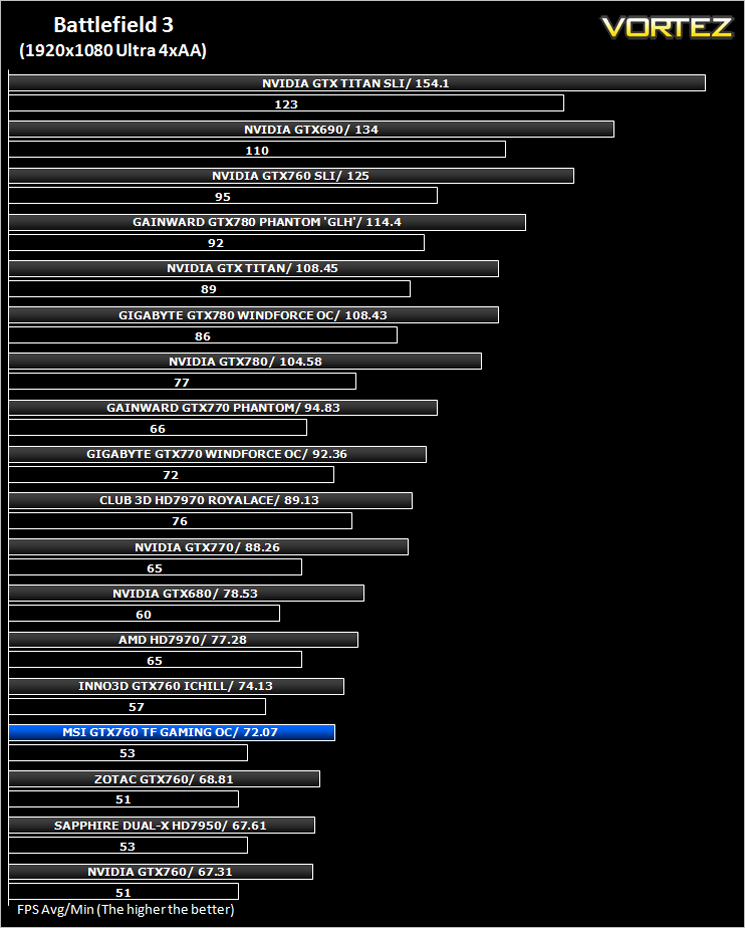
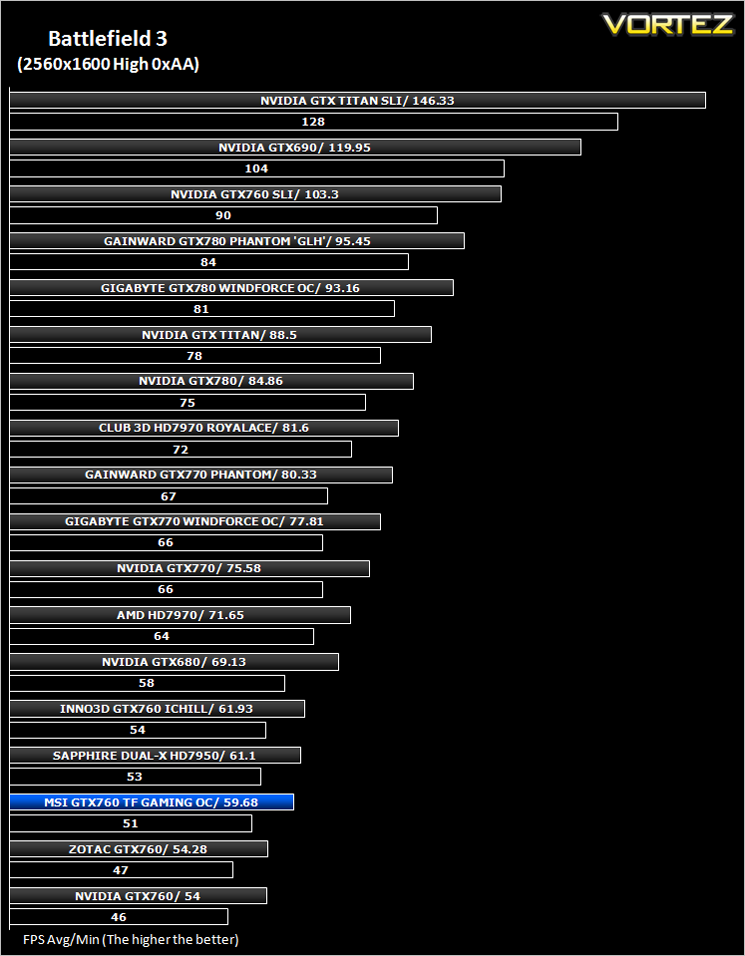
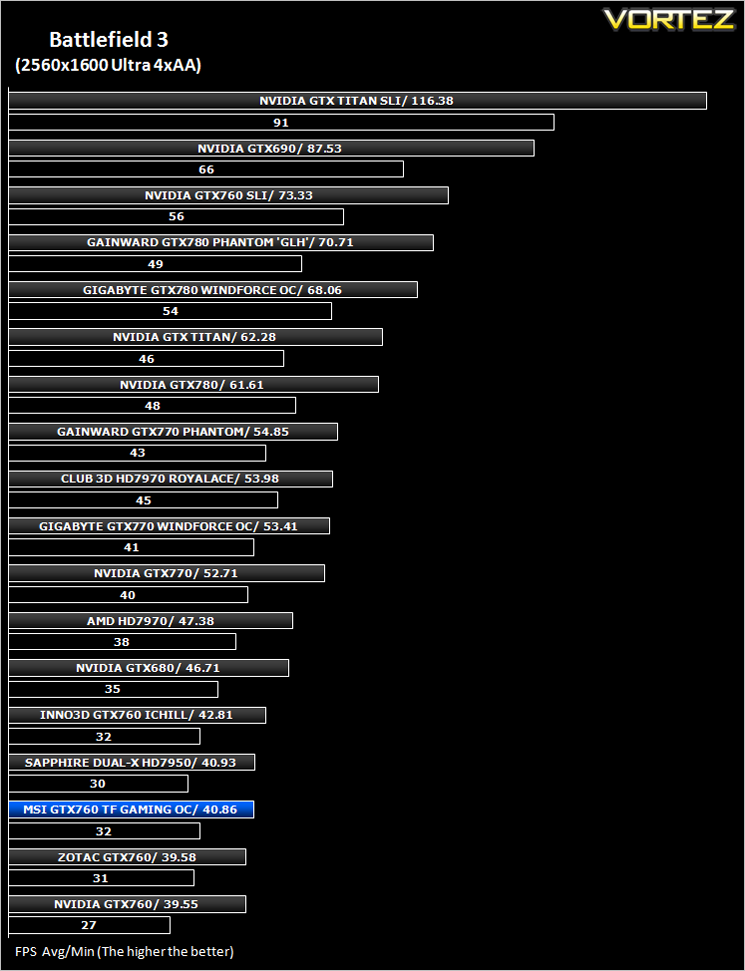
Battlefield 3 (FPS)
Battlefield 3 leaps ahead of its time with the power of Frostbite™ 2, the next installment of DICE’s cutting-edge game engine. This state-of-the-art technology is the foundation on which Battlefield 3 is built, delivering enhanced visual quality, a grand sense of scale, massive destruction, dynamic audio and incredibly lifelike character animations. As bullets whiz by, walls crumble, and explosions throw you to the ground, the battlefield feels more alive and interactive than ever before. In Battlefield 3, players step into the role of the elite U.S. Marines where they will experience heart-pounding missions across diverse locations including Paris, Tehran and New York.
Average and minimum frames per second were measured using Fraps during the parking lot scene on Operation Sword Breaker. High and Ultra presets were loaded at both resolutions.
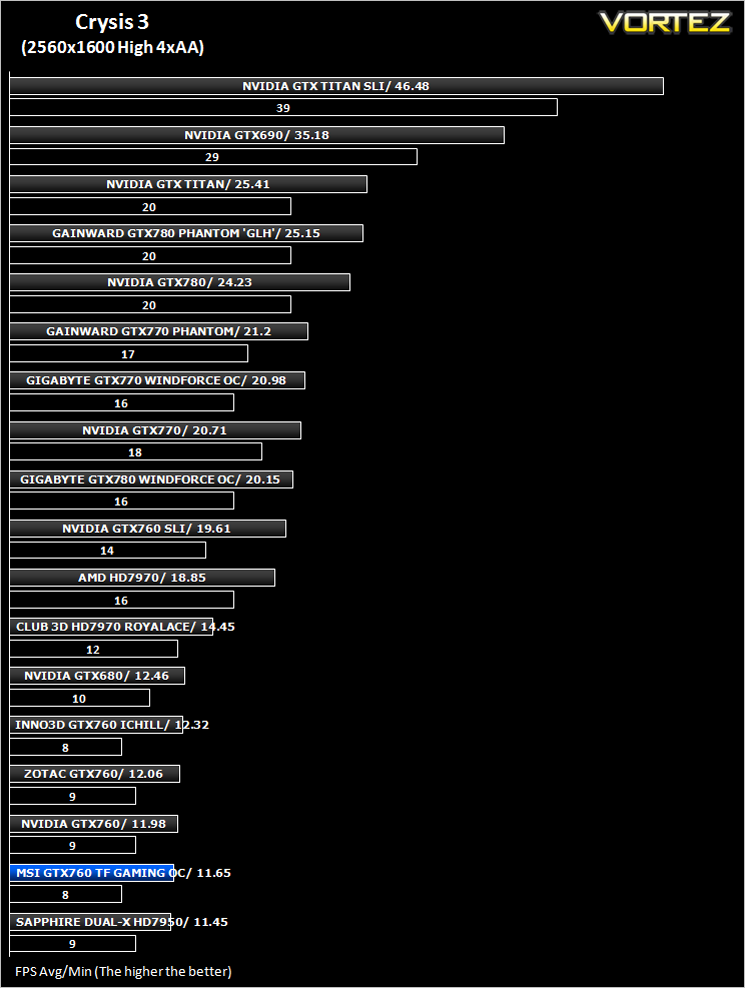
Crysis 3 (FPS)
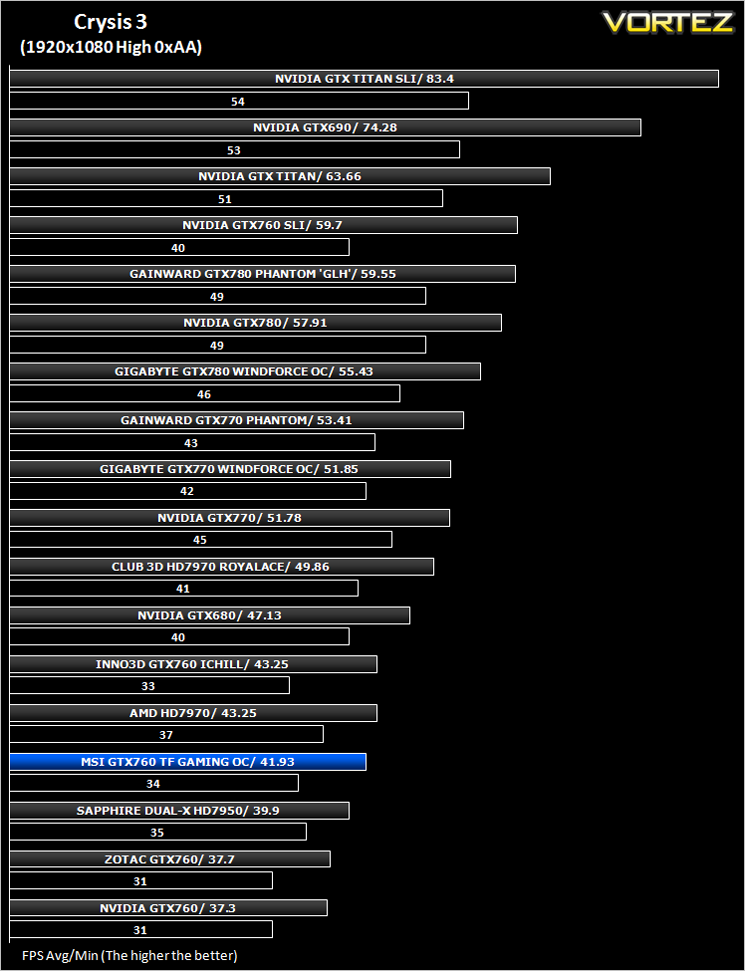
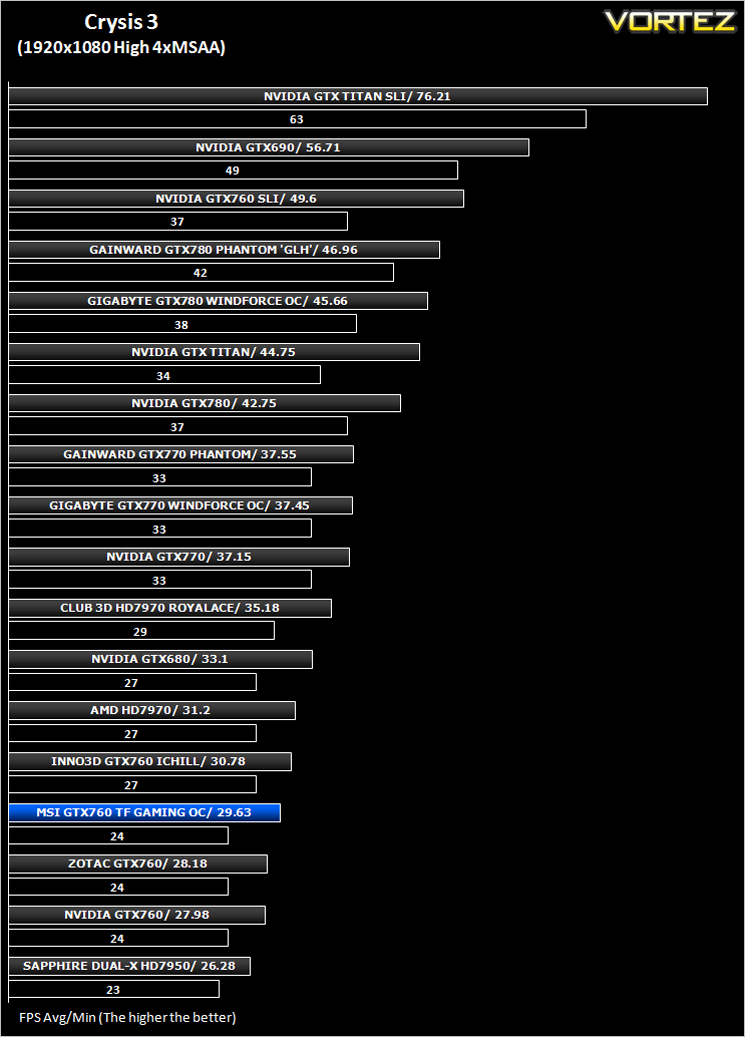
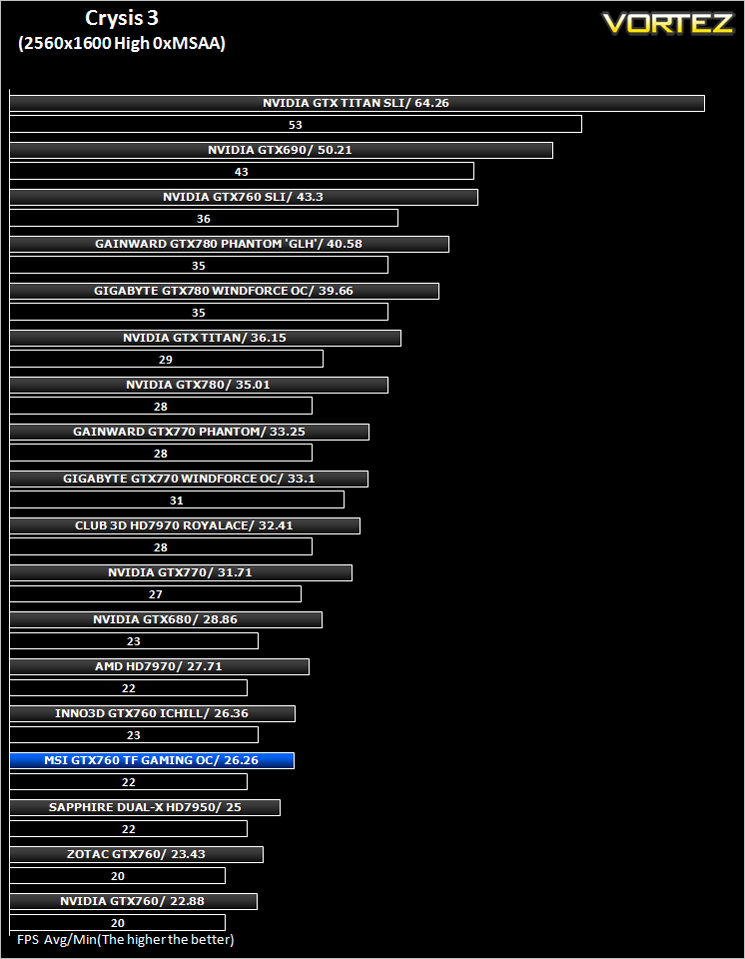
Crysis 3 from Electronic Arts is the fourth instalment of the Crysis franchise and sequel to Crysis 2. It uses the CryEngine 3 gaming engine which is perhaps the most advanced gaming engine to date and therefore the most demanding. The meme ‘Can it run Crysis’ has never been so apparent…
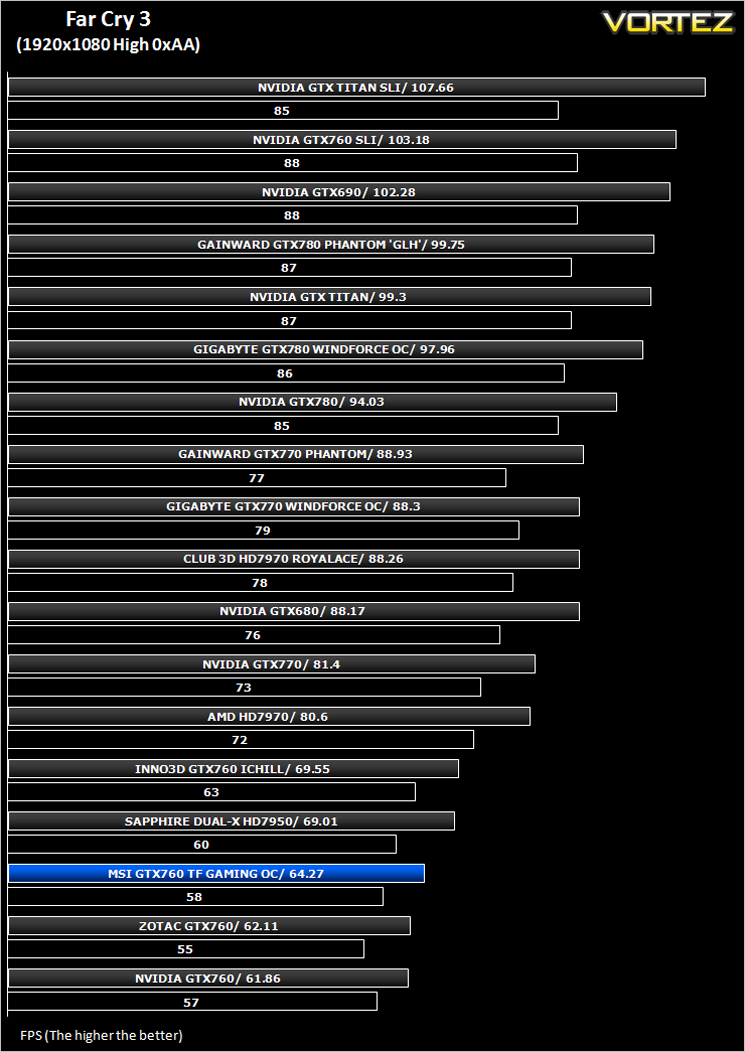
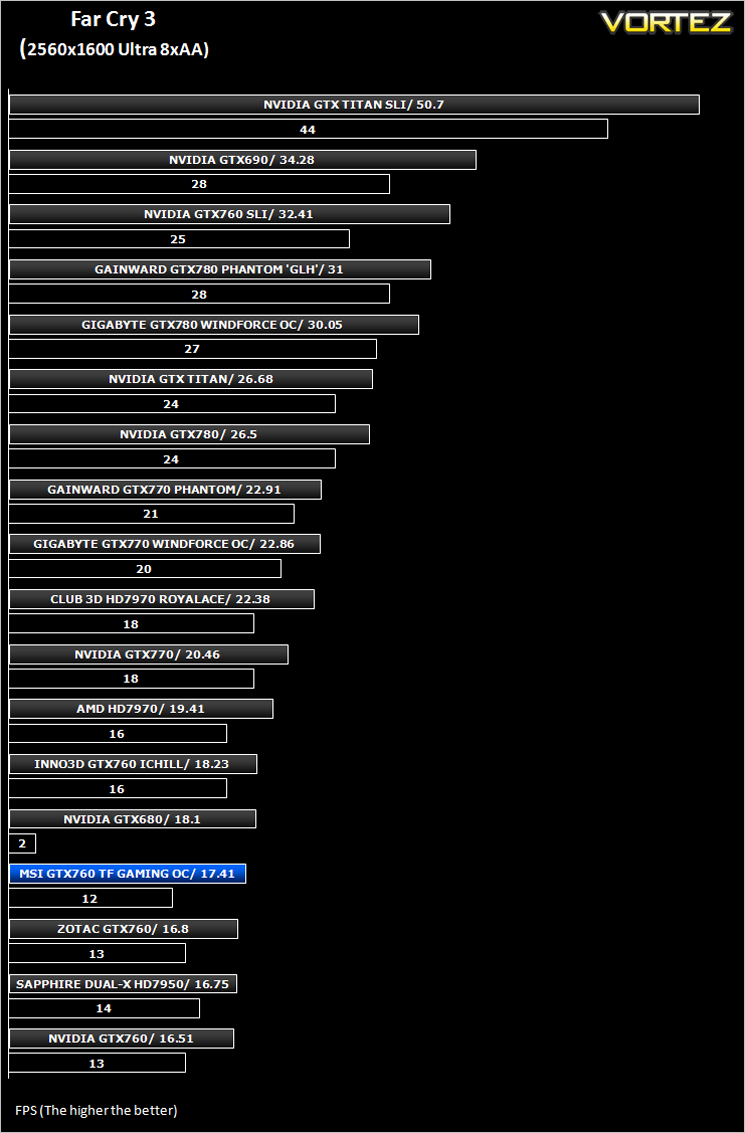
Far Cry 3 (FPS)
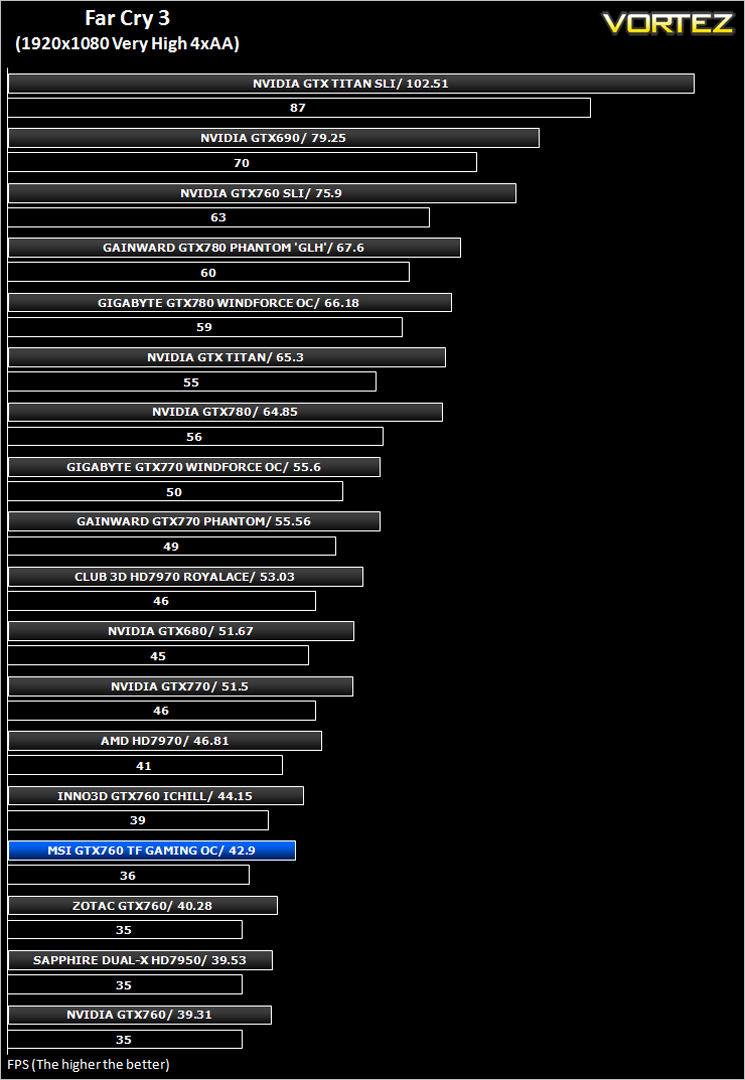
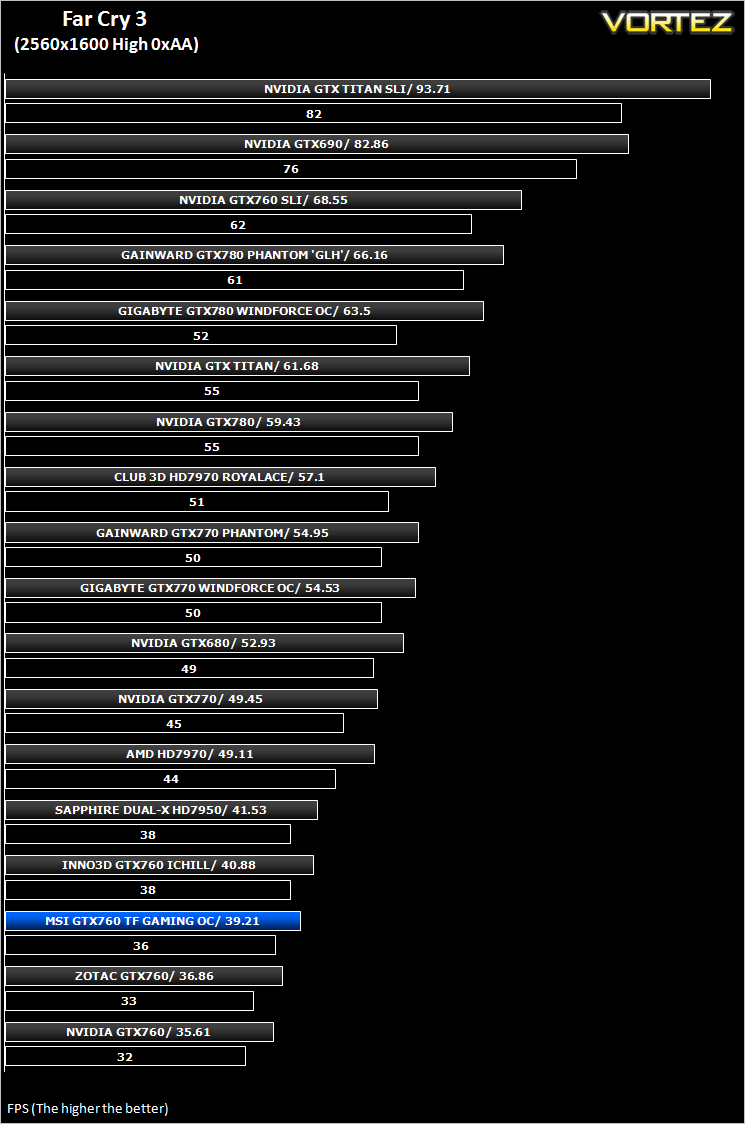
Far Cry 3 is a tropical survival shooter video game from Ubisoft Montreal and Massive studios. It’s open world design has similar traits to it’s forbear Far Cry 2 but it does it all so much better. With stunning visuals and settings to bring a PC to it’s knee’s, this game is so much more than the ‘just another console port’ it was reported to be.
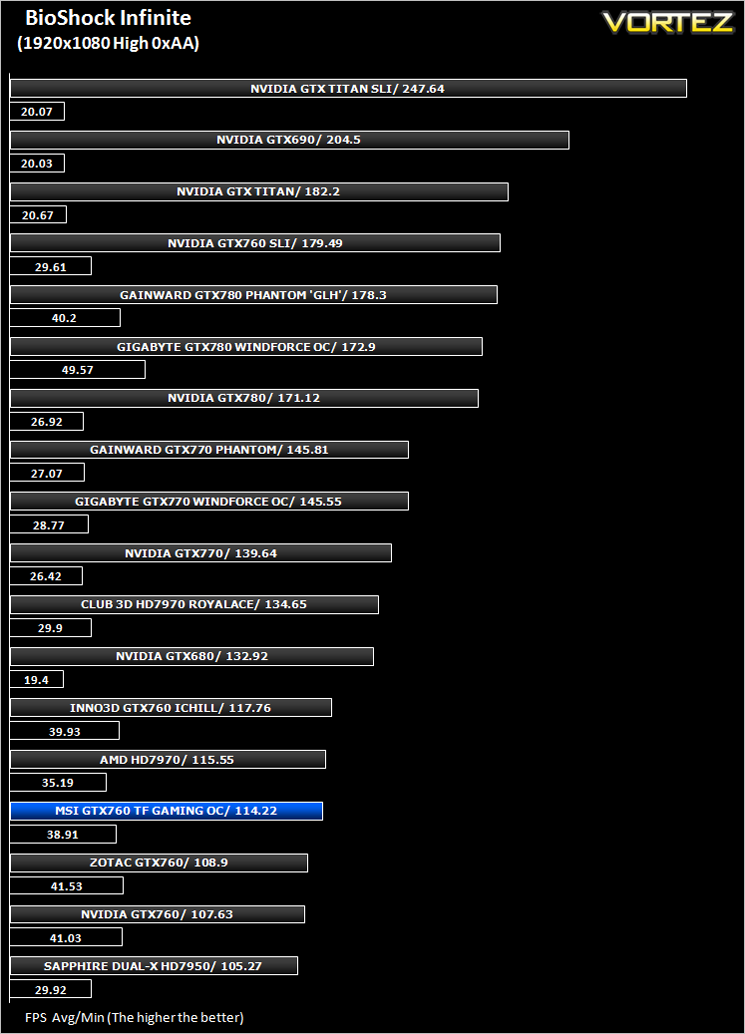
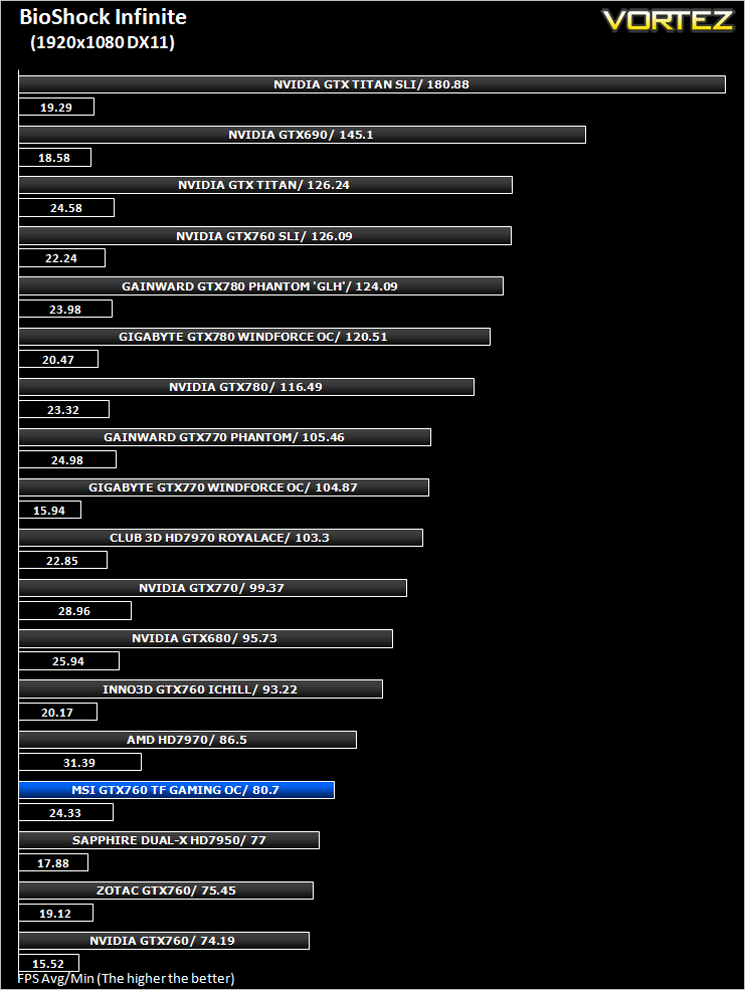
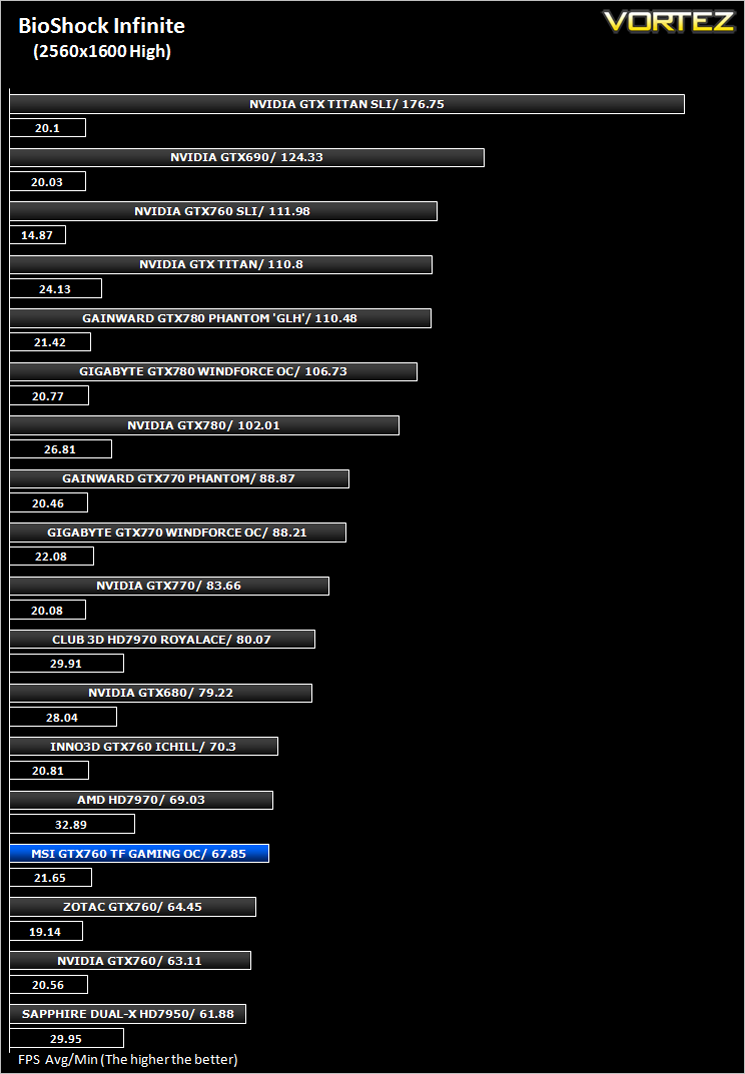
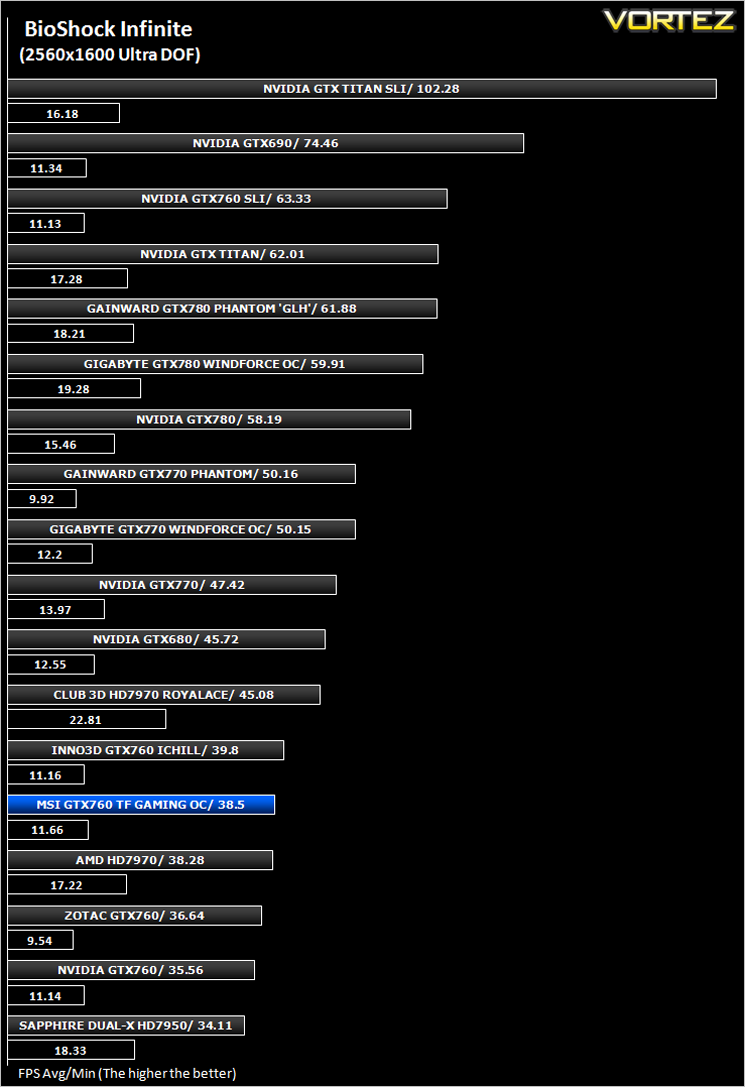
BioShock Infinite (FPS)
Set in 1912 during the growth of American exceptionalism, BioShock Infinite is a thrid person shooter developed by Irrational games and published by 2K Games. It is the third instalment of the BioShock franchise. the game utilises the Unreal Engine 3, modifying it with their own lighting engine to present a visually stunning experience like no other.
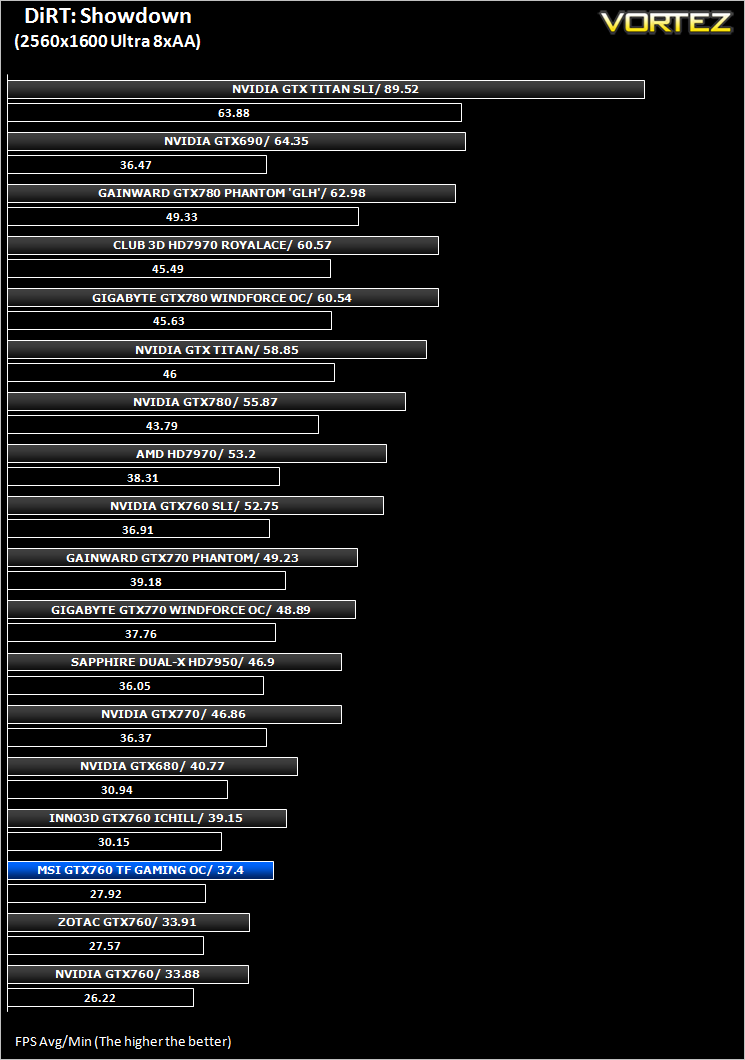
DiRT: Showdown (FPS)
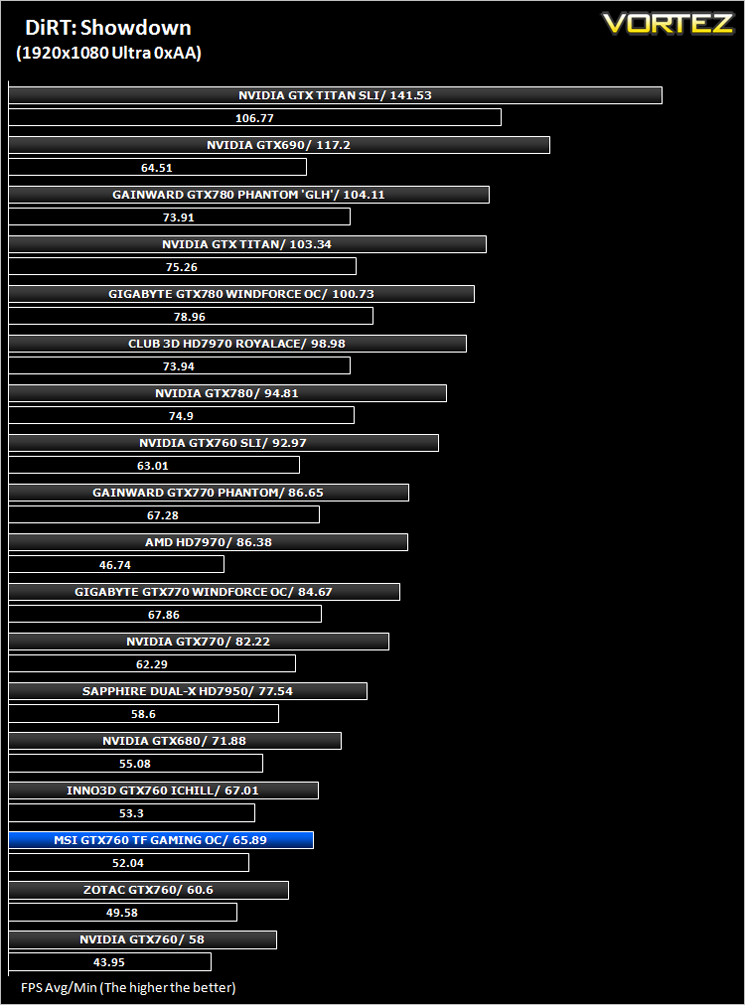
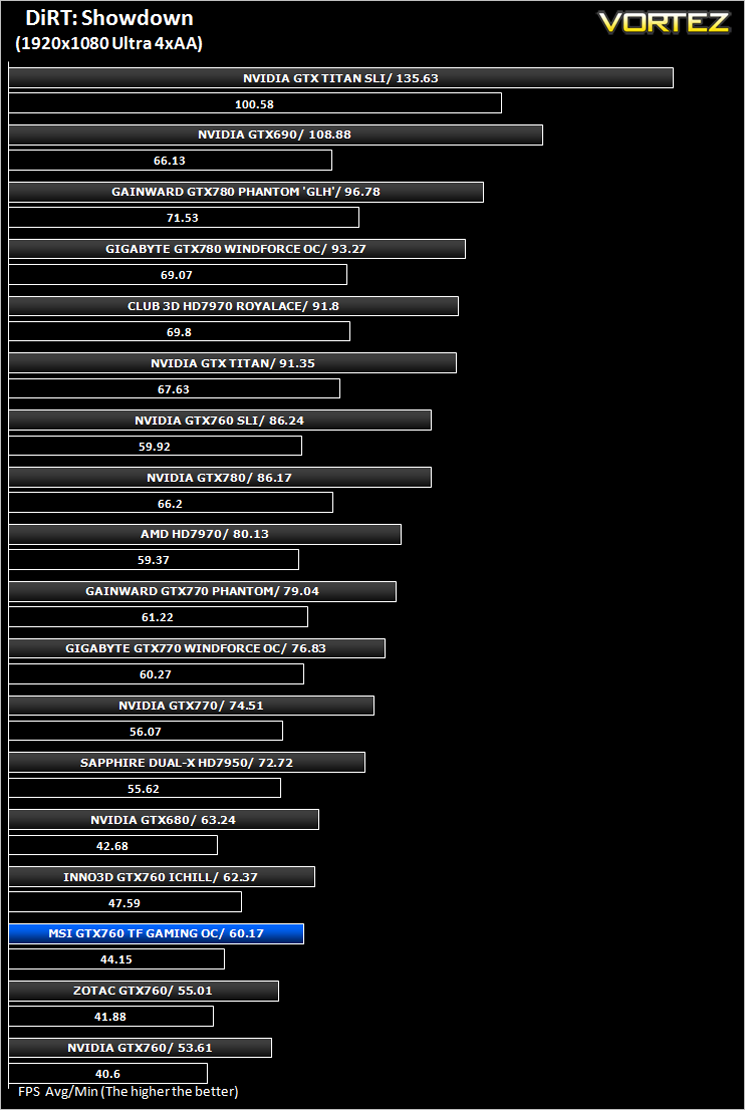
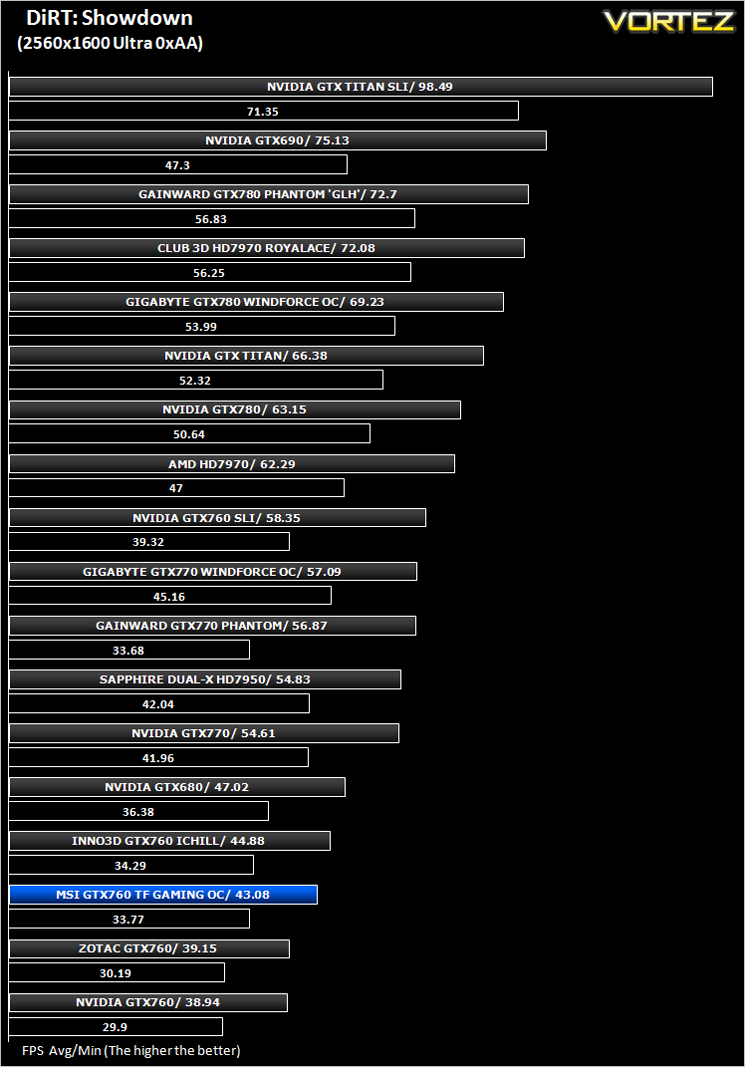
DiRT Showdown is the new arcade racing game from the team that brought you the award-winning DiRT series, uncaged in 2012. Pick up and play controls combine with electrifying events, frenzied crowds and stunning graphics to deliver high octane, dive in and drive thrills from event one.
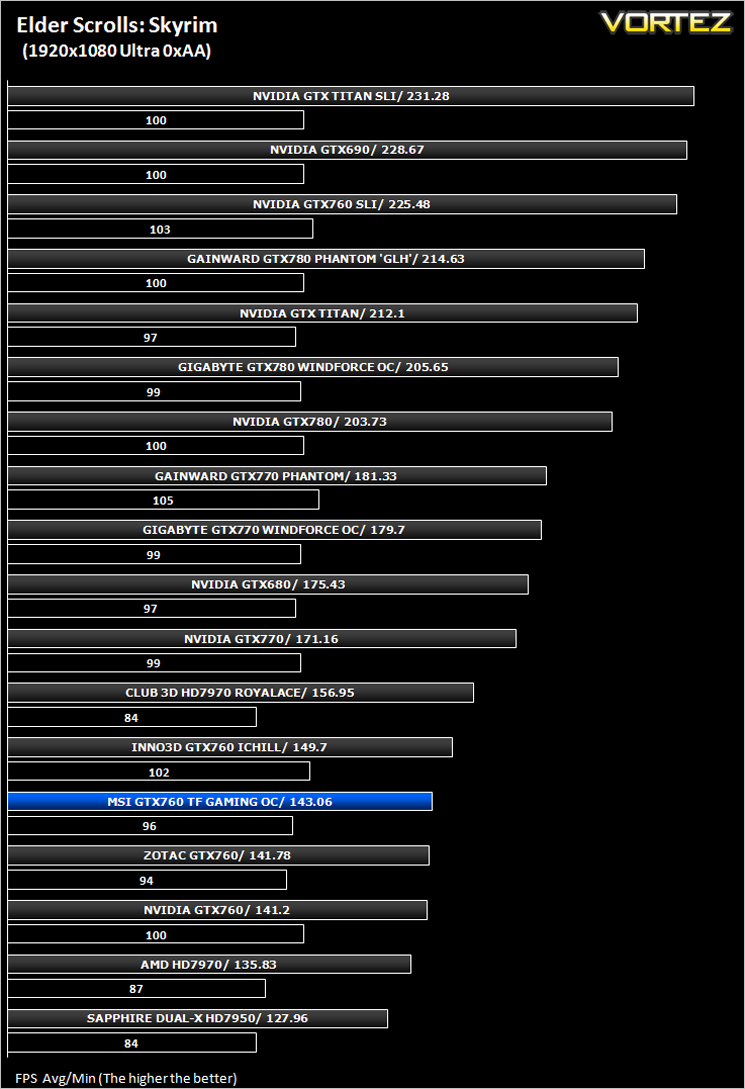
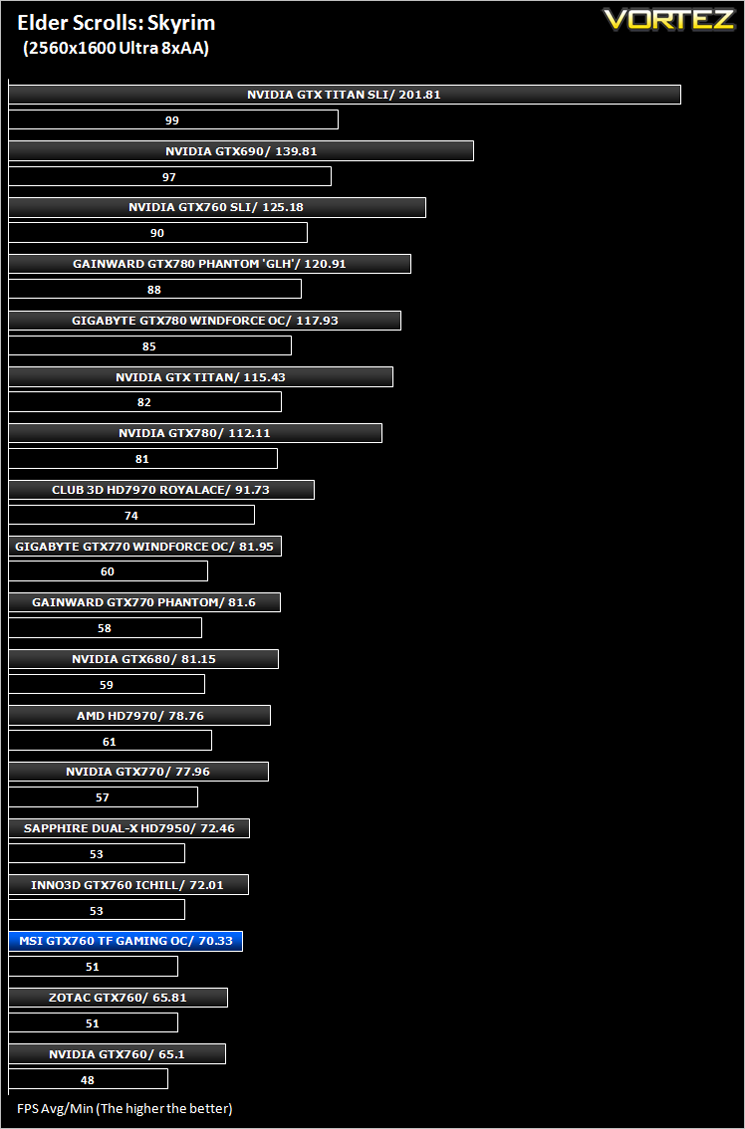
The Elder Scrolls: Skyrim (FPS)
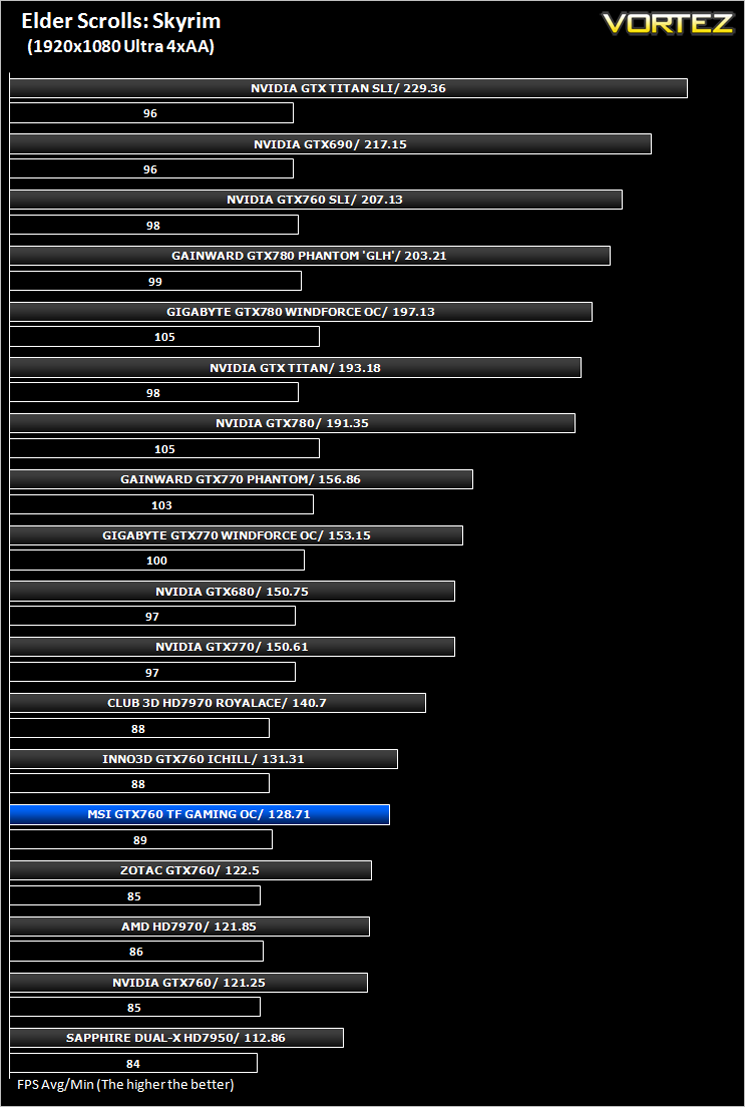
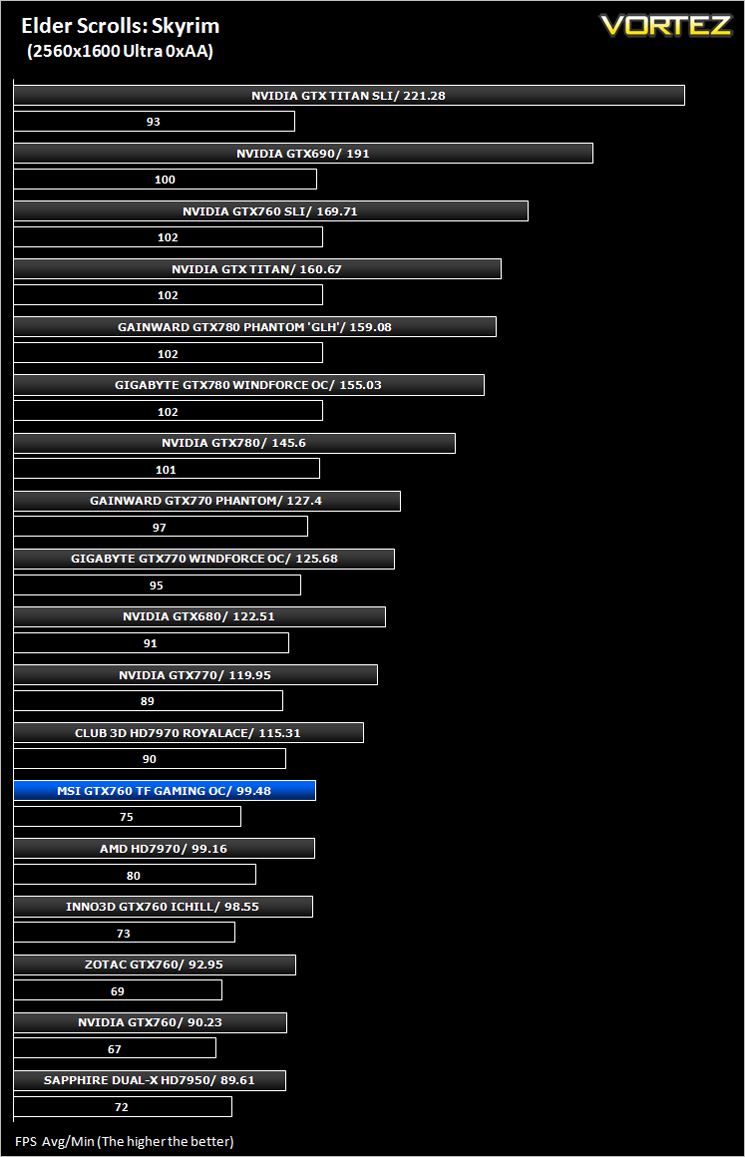
Skyrim is not a direct successor to the very popular Oblivion. Instead it takes place 200 years after the events of Oblivion. The non-linear playing that made the Elder Scrolls such a popular series does however make a return along with the beautiful scenery the encompasses the world of Skyrim.
Average and minimum frames per second were measured using Fraps during the drop down passage to Riverwood. V-sync was disabled to allow fluctuating (higher the 60) FPS for these runs. It is however recommended that v-sync is left enabled during normal gameplay due to the games dynamics.
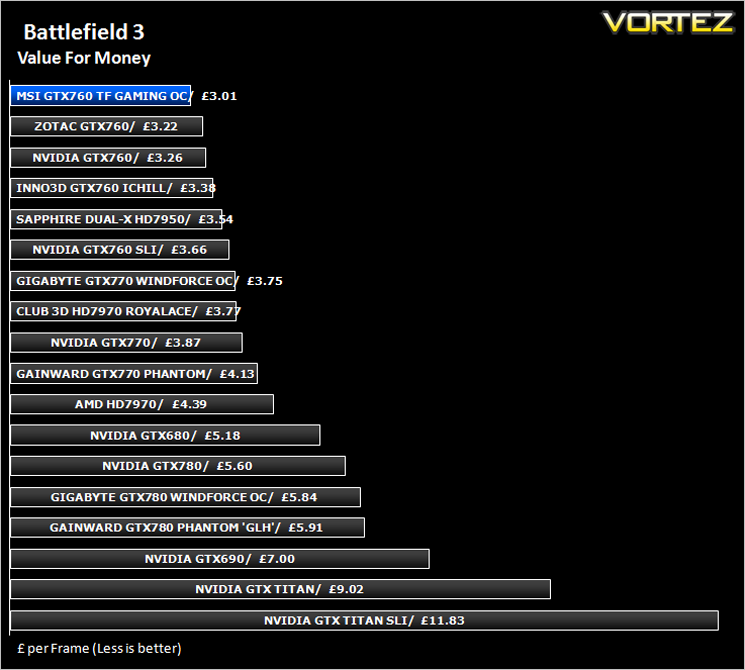
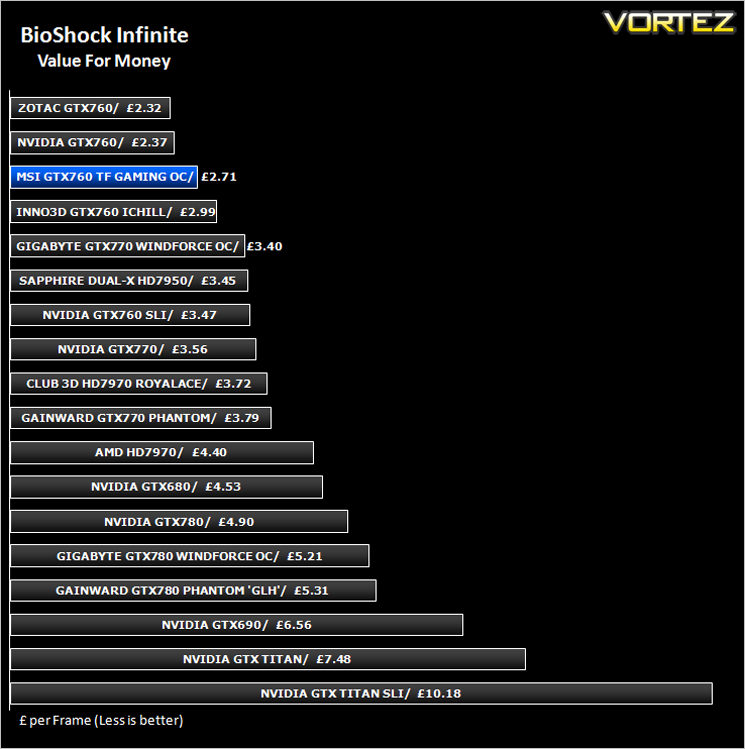
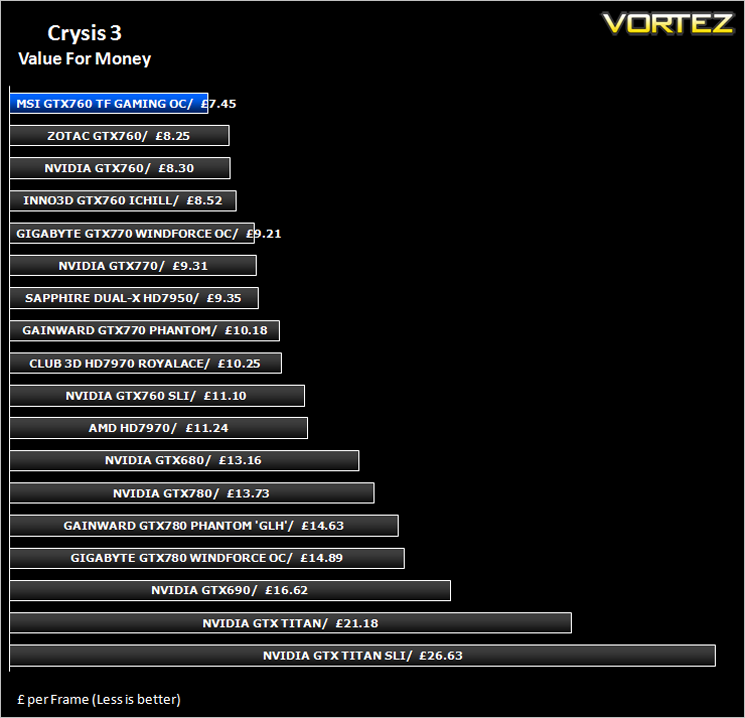
Value For Money
We make a simple calculation for this set of results. For each game we add all of the resulting FPS totals together and then divide by the four sets to give us an overall performance figure. While the figures alone do not give you an accurate picture of how the card will perform in any given scenario, they do tell you, when averaged, which GPU is the more capable across all of the benchmarks and settings tested.
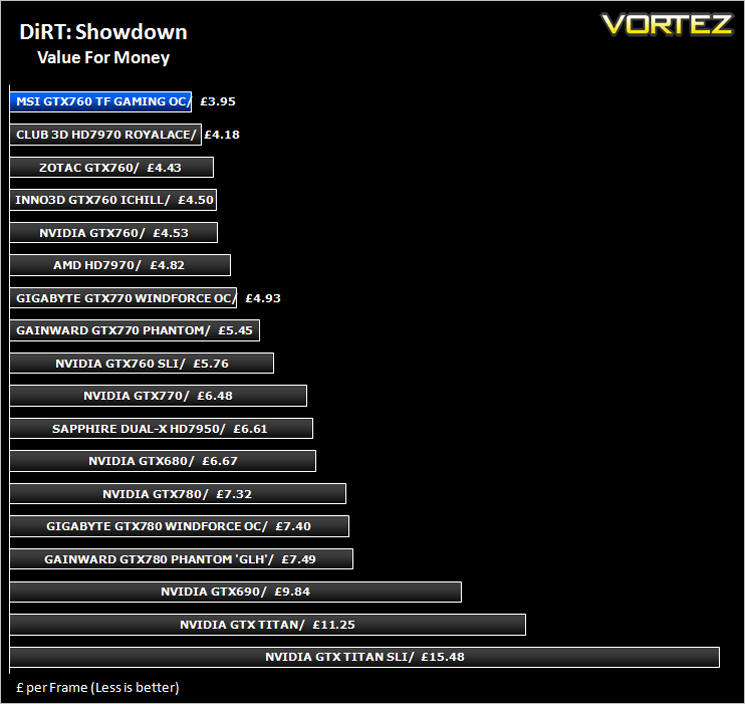
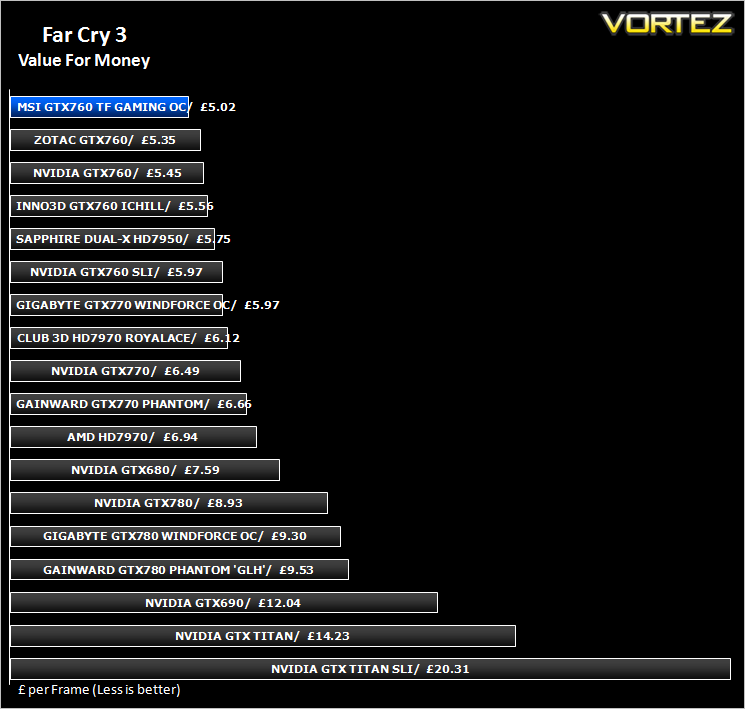
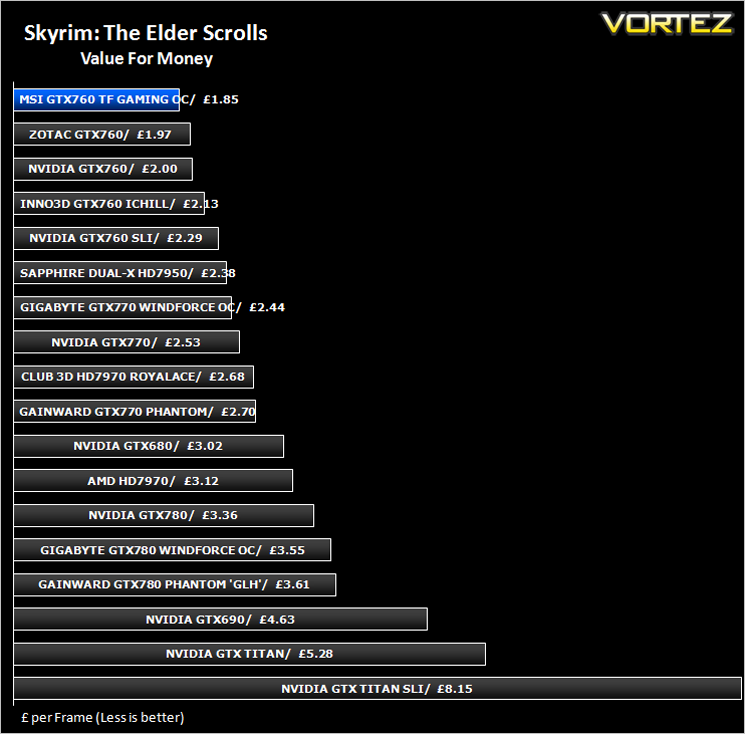
Gaming Experience (Frame Time Analysis)
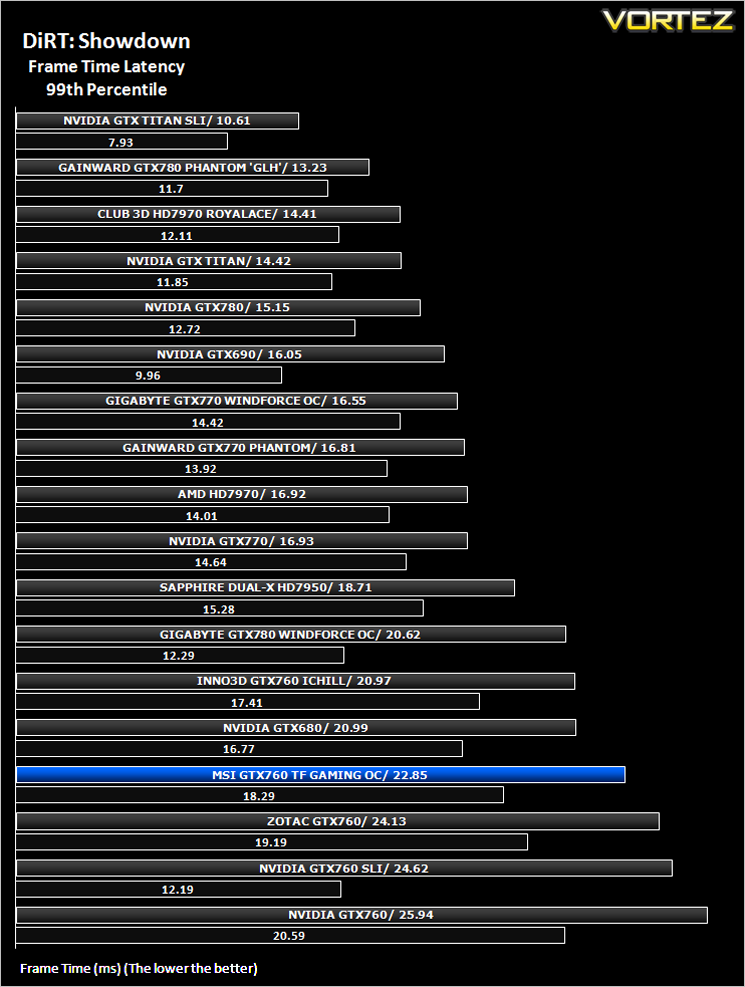
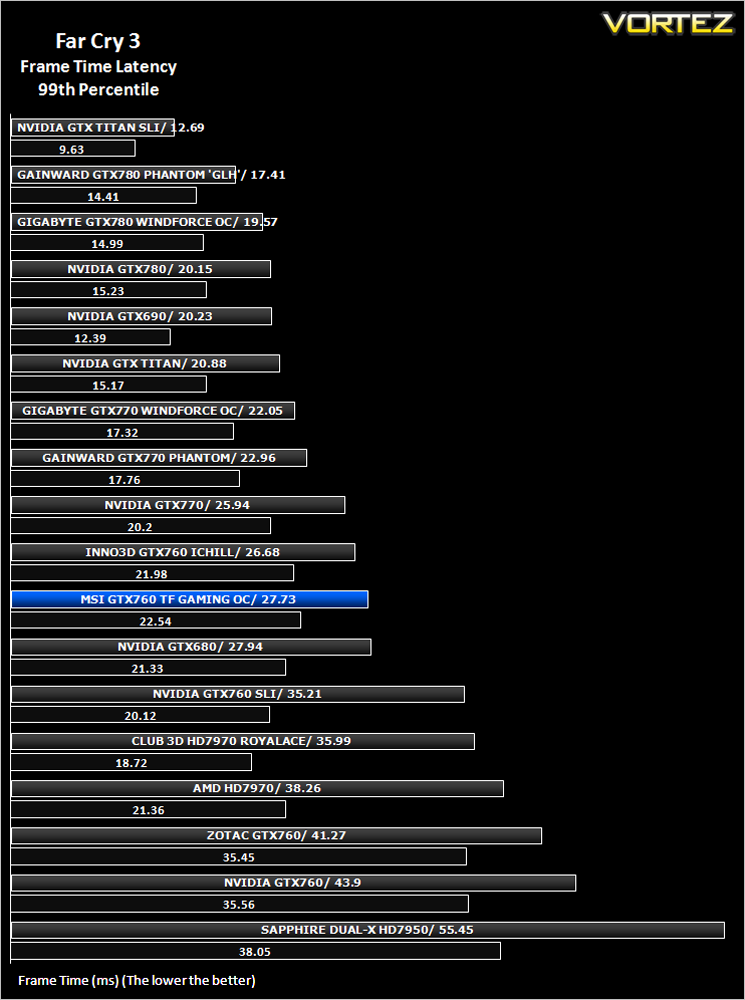
Here we take a look at both average (black) and 99th Percentile (coloured) response times of the graphics cards. It is highly unlikely a user will notice any micro stutter (also incorrectly referred to as lag but the effect can be interpreted to be similar) at anything below 30ms but every gamers perception differs.
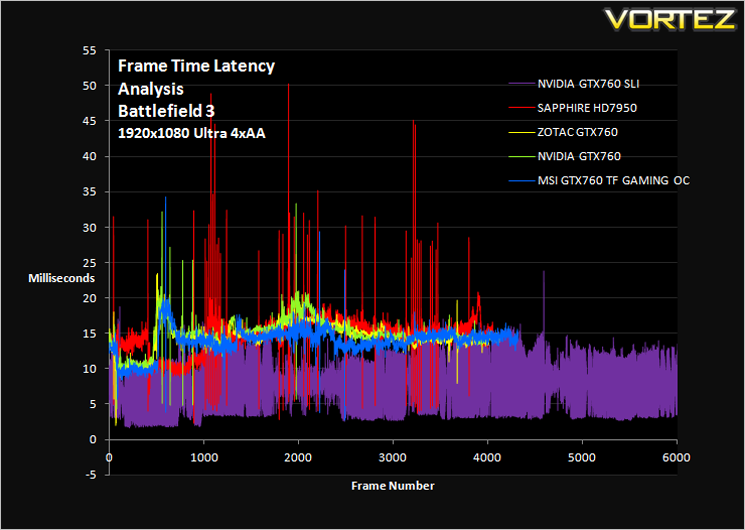
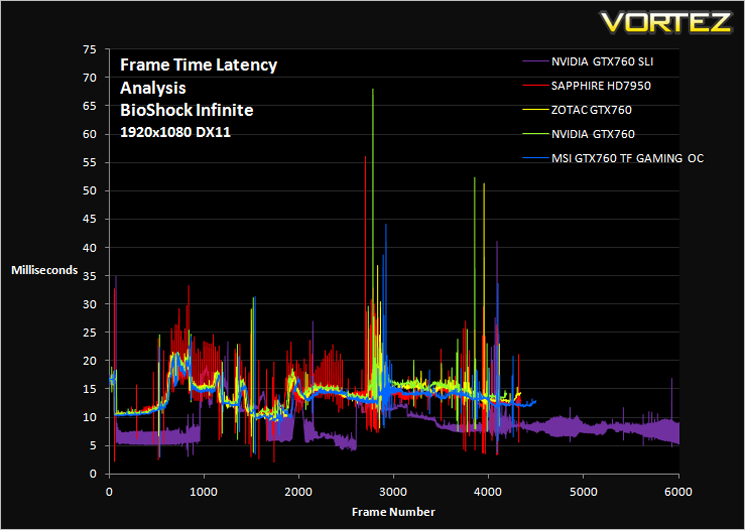
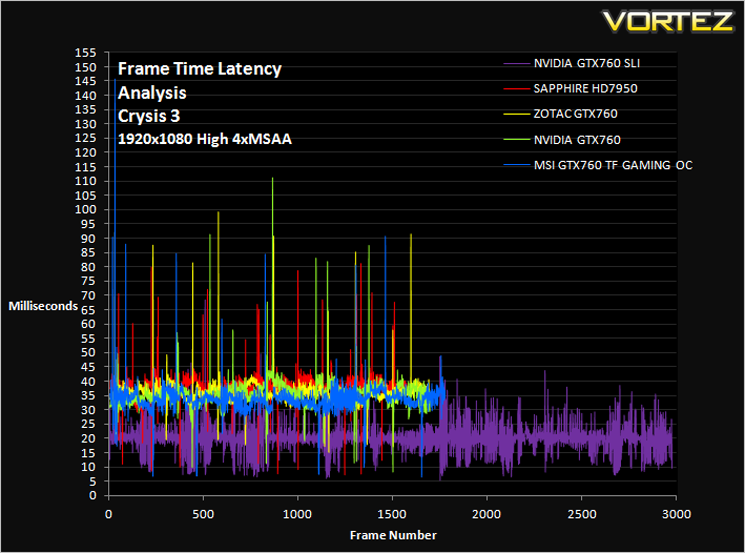
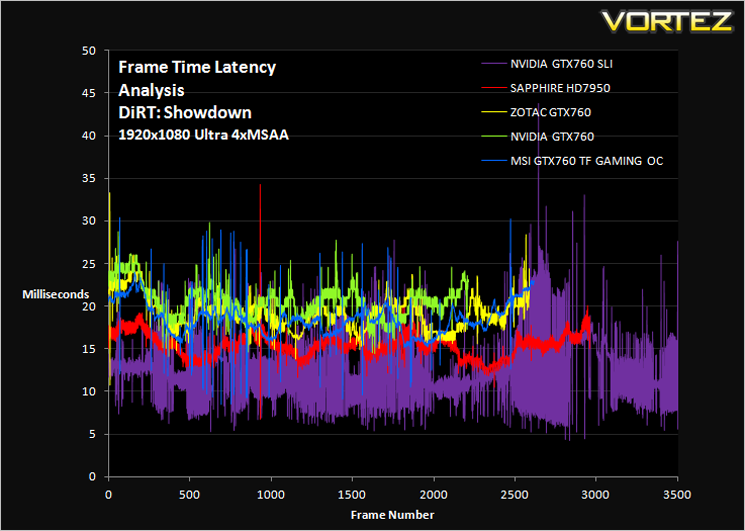
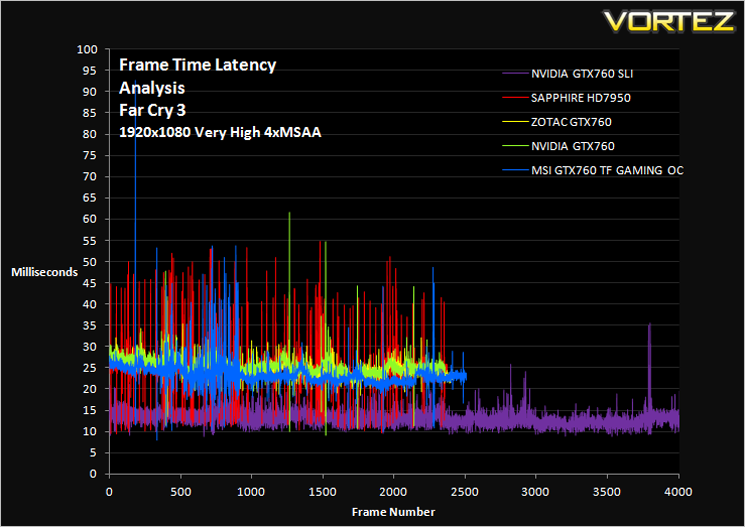
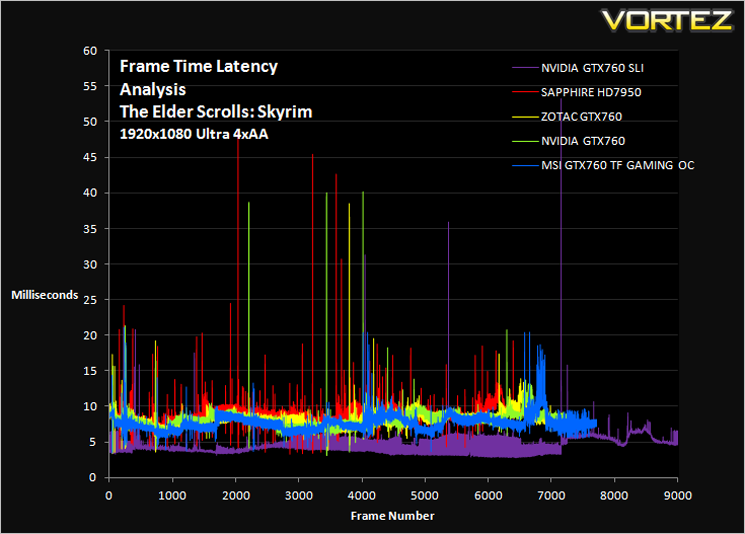
Comment
The graphs above may appear very daunting however, what you want to see is a smooth line (not fuzzy) with very few peaks and troughs. While you are unlikely to notice peaks and troughs below 30ms, any peak above 30ms may be seen as a stutter during gameplay. This will however depend greatly on your own perceptions. Multi card setups are more likely to show frame lag due to the nature of cross communicating to render frames.
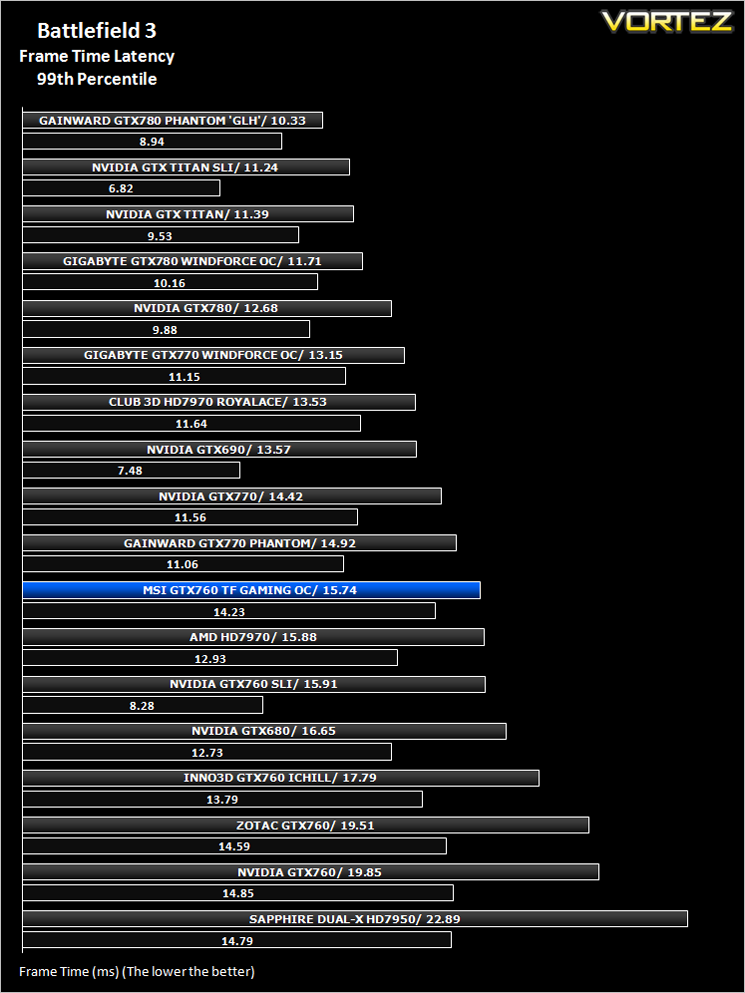
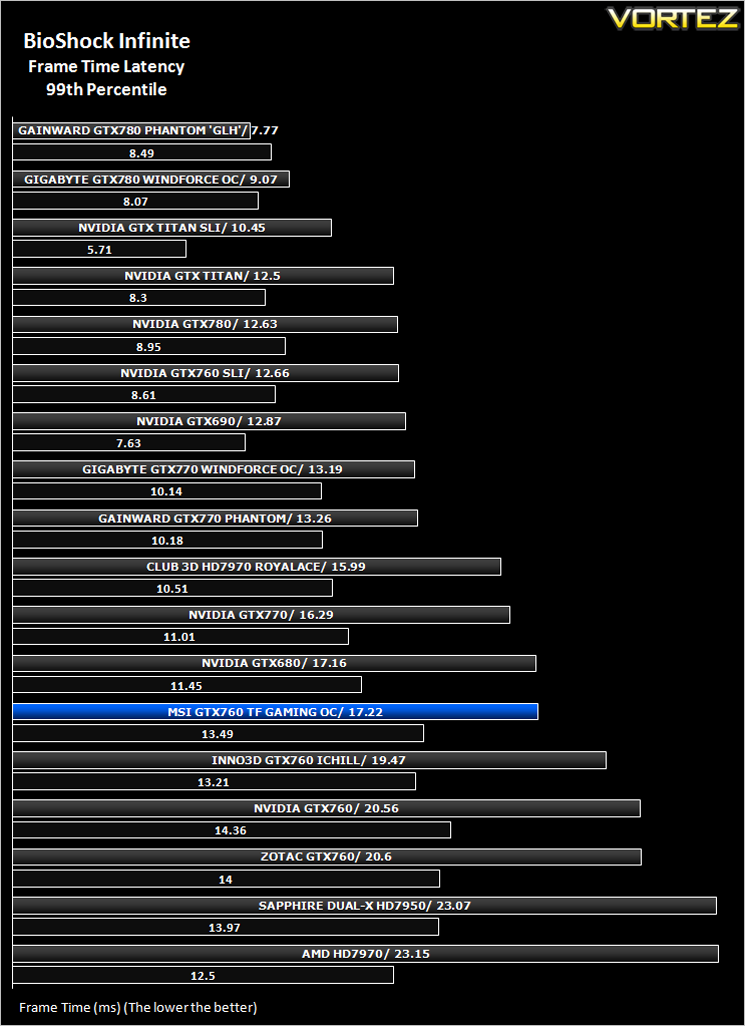
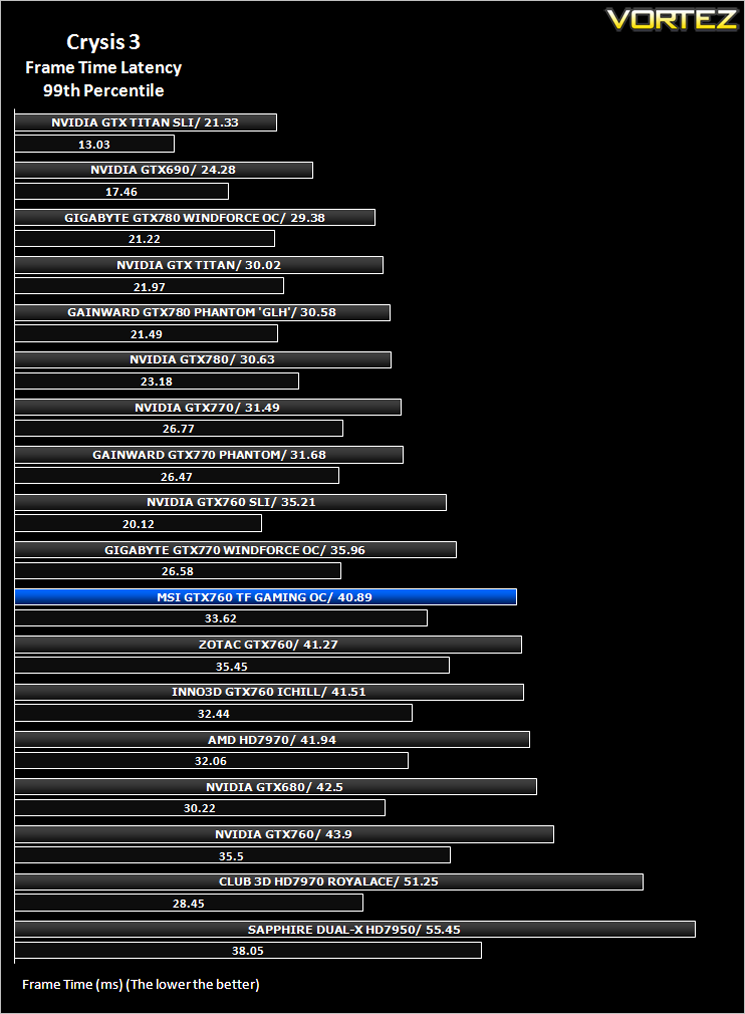
Average and 99th Percentile response times (Frame Time Analysis)
Here we take a look at both average (black) and 99th Percentile (coloured) response times of the graphics cards. It is highly unlikely a user will notice any micro stutter (also incorrectly referred to as lag but the effect can be interpreted to be similar) at anything below 30ms but every gamers perception differs.
[fullimage=23045]
Overclocking (GPU BOOST 2.0)
For overclocking our NVIDIA cards we will be using EVGA’s Precision too (ver. 4.1) as this gives us all of the options we require. Should you desire, then MSI’s own Afterburner is equally good.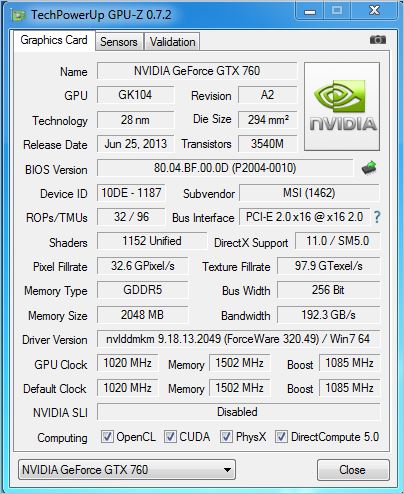
Above is a screenshot of GPU-Z showing the reference (factory overclocked) speeds and reference boost clocks
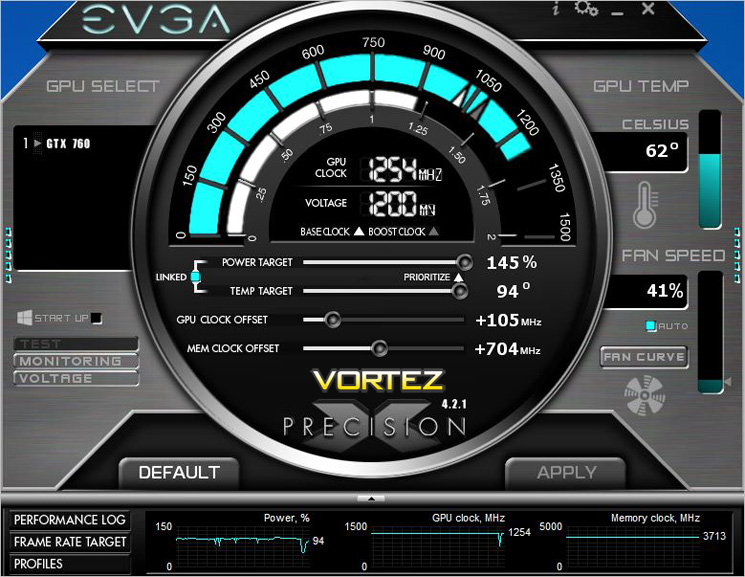
Overclocking a card which is already overclocked from the factory usually limits the amount of overclocking headroom remaining. We found this to be true to a certain extent with the core. While it did freely overclock, gaining 100% stability proved more difficult. The card would happily bench at a GPU BOOST speed of 1300MHz however this was not stable and thus we had to reduce the clockspeed to a BOOST speed of 1254MHz which we are classing as our stable overclock speed.
The memory was however a different story. We managed to push the memory by a further 704MHz resulting in a massive 1854MHz (7416MHz effective GDDR5).
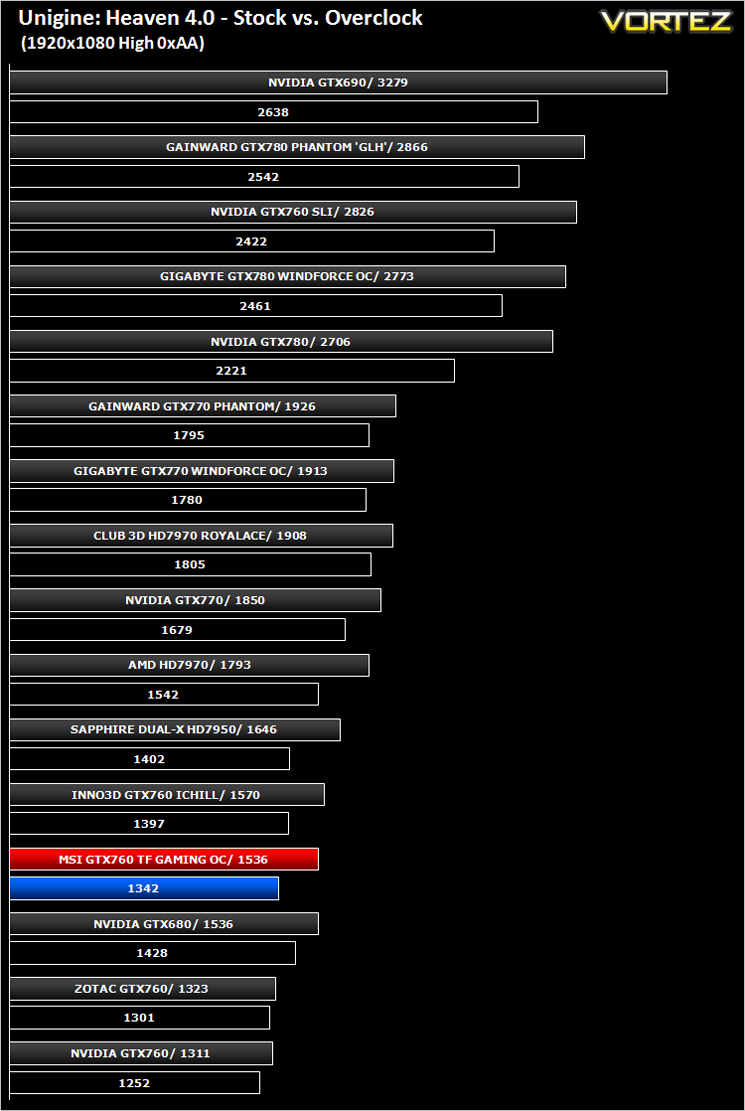
After settling on our stable clockspeed which was verified by multiple runs of Unigine Heaven and 3DMark we benchmarked the overclock and compared it to stock results with Unigine Heaven 4.0 to evaluate the benefits of overclocking the GPU.
Conclusion
It’s been a while since we had an MSI GPU through our doors and after sampling today’s GPU we hope the gap between their products won’t be so long next time because if this card is anything to go by, MSI have retained the qualities which make them a leader among GPU manufacturers.The GTX760 Twin Frozr Gaming Series OC is quite a mouthful to say yet conversely is also mouth watering for those looking for performance on a budget. Overclockers UK currently have this card on a very special offer for just £215.99 (at the time of review) which makes it one of the cheapest GTX760s available today. This in turn allowed the MSI card to top our Value for money charts. You should not however be fooled into thinking this is a stack ‘em high-sell ‘em cheap kind of product because it oozes quality from every aspect.
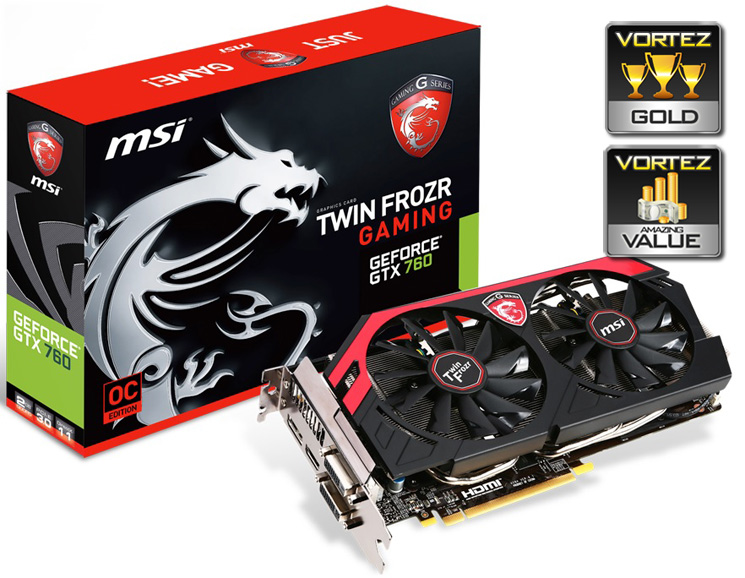
The aesthetics are great with our only complaint being the dark brown (not black) PCB. Its extremely quiet in operation and offers good performance at today’s most popular resolution (1920x1080p). While it may not be quite as fast as some of the competitions interpretation of the GTX760, it strikes the perfect balance between cost and performance which at this level of the market is what counts most. For this reason we are awarding the The GTX760 Twin Frozr Gaming Series OC both our Gold and Value awards.
To summarise:
Factory overclocked and cooled by the powerful Twin Frozr heatsink it should come as no surprise this graphics card comes highly recommended.
Pros
+ Very Quiet
+ Factory overclocked
+ Great looking
+ Competitive price
Cons
– Dark Brown PCB
+ Very Quiet
+ Factory overclocked
+ Great looking
+ Competitive price
Cons
– Dark Brown PCB

Click here for an explanation of our awards at Vortez.net.


