







The third of our NVIDIA GTX 970 reviews see’s MSI’s GAMING 4G graphics card complete with 4GB of GDDR5, Twin Frozr 5 cooling and overclocked from the factory.

Product on Review MSI GTX 970 GAMING 4G
Manufacturer & Sponsor: MSI
Street Price: £293.99 GBP
MSI have long been a stalwart of quality products which has made them a firm favourite for both enthusiasts and system builders alike. Performance users love the brand not only because of the quality of components used but because they are silent and very well cooled. The MSI GTX 970 GAMING 4G is one such product that encompasses these values, especially with regard to the cooling with the near silent, redesigned TWIN FROZR V which as the name suggests is the fifth incarnation of their custom heatsink/cooling assembly which we have lauded over in the past. As you will see, this version is no different in this respect.
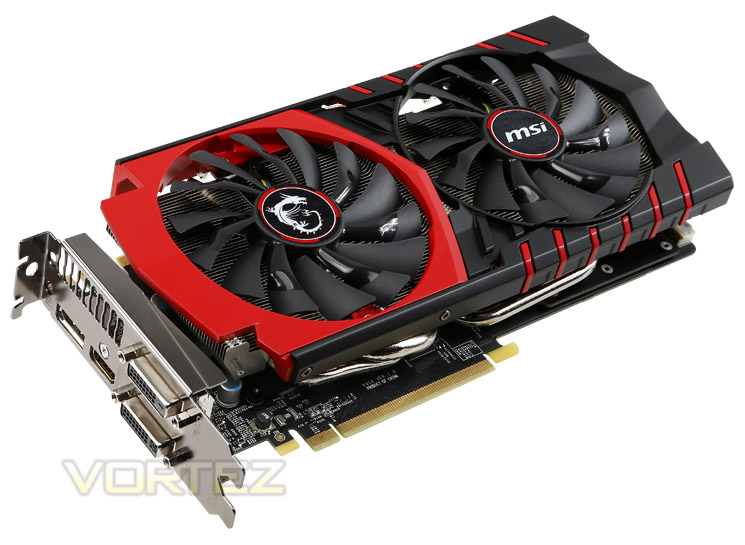
The GTX 970 finds itself sitting below the GTX 980 and also ever so slightly below the AMD R9-290X in terms of out-right performance. NVIDIA however are keen to point out the power saving features of the GPU along with MSI’s cooling ability. We have seen this before with both of MSI’s competitors the overclocked GIGABYTE Windforce GTX 970 and ASUS STRIX GTX 970 – so with the MSI GTX 970 Gaming 4G’s clockspeed sitting between these two graphics cards we wouldn’t expect any performance differential. It could even be suggested that your decision upon which graphics card to buy will likely end up being a choice between brand loyalty or even styling/colour! We will however give you the low-down on what makes this graphics card a serious competitor.
About MSI.
MSI started from the motherboard and graphics card industries and extended into consumer and commerical electronics including notebooks, All-in-One PCs, servers, workstations, industrial PCs, household appliances, car infotainment products, barebone systems, multimedia, communication devices, and others. With innovation and style as its core value, customer satisfaction and premium service as its goal, MSI will definitely be the most brilliant star in the global brands!
Specification
– GeForce GTX 970
– GPU: GeForce GTX 970 (GM204)
– Core Base Clock: 1140MHz
– Core Boost Clock: 1279MHz
– Memory Clock: 7010MHz
– Memory Size: 4096MB GDDR5
– Bus Type: PCI Express 3.0
– Memory Bus: 256-bit
– CUDA Cores: 1664
– DirectX 12: Yes
– DVI Port: 2x Dual-Link DVI, 1x DisplayPort & 1x HDMI
– DisplayPort: Yes
– HDCP: Yes
– HDMI: Yes
– Power: 1x 8-Pin & 1x 6-Pin
– 450W PSU Required
– 150W TDP
– Warranty: 3yr
Features
MORE PERFORMANCE
MSI GAMING Graphics Cards give you more performance out of the box. Whether it’s a pre-overclocked model or you use the Gaming App, you can just get right in the game and enjoy more performance. Overclocking through the MSI Gaming App is covered by warranty to take away your worries. Get in there and start winning!
TWIN FROZR V – COOLER, QUIETER, BETTER GAMING
With every new generation of GPUs comes more performance. With every new generation of MSI Twin Frozr we give you less noise and heat!. We’ve listened to all your requests and the new Twin Frozr V is smaller, features stronger fans, generates less noise, keeps your graphics card and its components cooler and matches perfectly with your MSI GAMING motherboard including some funky LED lightning. We’ve spent 18 months on the development of the Twin Frozr V, including field testing in gaming cafés to ensure the cards have the quality and stability to give you the FPS you need.
GAMING APP
The latest version of the MSI Gaming App is expanded with MSI Scenamax technology (under the EyeRest tab) to provide you easy access to image quality improving technology in the easy comfort of the MSI Gaming App.
OC Mode
Maximum Performance through higher clock speeds and increased fan performance
Gaming Mode (Default)
The best balance between in-game performance and thermal
Silent Mode
The best environment for minimal fan noise
MSI Gaming app EyeRest Tab
Quickly adjust display settings to your visual needs. Expand the tab by clicking on the “eyecon” and select your preferred setting.
Eye Rest Mode
Helps you sleep and rest better by reducing the blue light balance of your screen to let your body acclimatize to the night time.
Gaming Mode
More intense colors and increased contrast let’s you live the gaming life as the creators meant it.
Movie Mode
Dynamically adjusts Gamma and Contrast ratios for the clearest movie viewing experience
Easy for Gaming, better for your eyes.
TWIN FROZR V
MSI’s Twin Frozr series has been the definition of graphics card coolers in the PC industry. Kicking off the dual-fan trend, MSI today stays true to its design offering the best thermal and acoustic performance in its class.
Two powerful 10cm radius Torx Fans provide massive airflow thanks to the new dispersion blade, instantly reducing noise by about 5% compared to previous generation’s designs. This reduces temperatures by about 10°C at maximum fan speed compared to the Twin Frozr IV Advanced.
Under those fans lies a massive heat-sink with Airflow Control Technology which covers 90% of the fans diameter. Connected to the GPU is MSI’s special SuperSU Architecture which allows the SuperPipes and regular size heat pipes to do their work more effectively.
– Voxel Global Illumination Technology (VXGI)
– NVIDIA® Super Resolution technology
– NVIDIA® GameWorks technology
– NVIDIA® GameStream technology
– NVIDIA® TXAA Technology
– NVIDIA GPU Boost 2.0
– NVIDIA PhysX® Technology
– NVIDIA FXAA Technology
– NVIDIA Adaptive Vertical Sync
– NVIDIA Surround
– Support for four concurrent displays including: Two dual-link DVI, HDMI and DisplayPort 1.2
– Microsoft DirectX 12
– NVIDIA® 3D Vision® Ready
– NVIDIA SLI® Ready Technology
– NVIDIA CUDA® technology
– PCI Express 3.0 support
– OpenGL 4.4 support
– OpenCL support
– NVIDIA SHIELD Ready
– NVIDIA G-Sync Ready
MSI GAMING Graphics Cards give you more performance out of the box. Whether it’s a pre-overclocked model or you use the Gaming App, you can just get right in the game and enjoy more performance. Overclocking through the MSI Gaming App is covered by warranty to take away your worries. Get in there and start winning!
TWIN FROZR V – COOLER, QUIETER, BETTER GAMING
With every new generation of GPUs comes more performance. With every new generation of MSI Twin Frozr we give you less noise and heat!. We’ve listened to all your requests and the new Twin Frozr V is smaller, features stronger fans, generates less noise, keeps your graphics card and its components cooler and matches perfectly with your MSI GAMING motherboard including some funky LED lightning. We’ve spent 18 months on the development of the Twin Frozr V, including field testing in gaming cafés to ensure the cards have the quality and stability to give you the FPS you need.
GAMING APP
The latest version of the MSI Gaming App is expanded with MSI Scenamax technology (under the EyeRest tab) to provide you easy access to image quality improving technology in the easy comfort of the MSI Gaming App.
OC Mode
Maximum Performance through higher clock speeds and increased fan performance
Gaming Mode (Default)
The best balance between in-game performance and thermal
Silent Mode
The best environment for minimal fan noise
MSI Gaming app EyeRest Tab
Quickly adjust display settings to your visual needs. Expand the tab by clicking on the “eyecon” and select your preferred setting.
Eye Rest Mode
Helps you sleep and rest better by reducing the blue light balance of your screen to let your body acclimatize to the night time.
Gaming Mode
More intense colors and increased contrast let’s you live the gaming life as the creators meant it.
Movie Mode
Dynamically adjusts Gamma and Contrast ratios for the clearest movie viewing experience
Easy for Gaming, better for your eyes.
TWIN FROZR V
MSI’s Twin Frozr series has been the definition of graphics card coolers in the PC industry. Kicking off the dual-fan trend, MSI today stays true to its design offering the best thermal and acoustic performance in its class.
Two powerful 10cm radius Torx Fans provide massive airflow thanks to the new dispersion blade, instantly reducing noise by about 5% compared to previous generation’s designs. This reduces temperatures by about 10°C at maximum fan speed compared to the Twin Frozr IV Advanced.
Under those fans lies a massive heat-sink with Airflow Control Technology which covers 90% of the fans diameter. Connected to the GPU is MSI’s special SuperSU Architecture which allows the SuperPipes and regular size heat pipes to do their work more effectively.
– Voxel Global Illumination Technology (VXGI)
– NVIDIA® Super Resolution technology
– NVIDIA® GameWorks technology
– NVIDIA® GameStream technology
– NVIDIA® TXAA Technology
– NVIDIA GPU Boost 2.0
– NVIDIA PhysX® Technology
– NVIDIA FXAA Technology
– NVIDIA Adaptive Vertical Sync
– NVIDIA Surround
– Support for four concurrent displays including: Two dual-link DVI, HDMI and DisplayPort 1.2
– Microsoft DirectX 12
– NVIDIA® 3D Vision® Ready
– NVIDIA SLI® Ready Technology
– NVIDIA CUDA® technology
– PCI Express 3.0 support
– OpenGL 4.4 support
– OpenCL support
– NVIDIA SHIELD Ready
– NVIDIA G-Sync Ready
DSR & MFAA
Dynamic Super-Resolution
Super Sampling Anti-Aliasing (SSAA) isn’t a new concept, but its adoption in games or graphics hardware over the years has been patchy due how processor-intensive the process is. It relies on sampling the scene at a resolution much higher than your native screen resolution and then blending pixels together to output a ‘normal’ resolution frame, reducing ‘jaggies’. It’s often colloquially referred to as the ‘king of AA techniques’, but has given way to MSAA, MLAA and NVIDIA’s own FXAA, each of which are faster and less computationally expensive even if the quality isn’t as good.
Progress in graphics technology and horsepower has meant that a game which would bring a GPU to its knees five years ago can be comfortably played on mid-range hardware these days, whilst top-tier hardware push frame rates well into the hundreds. That’s a lot of horsepower going to waste when it could, if the game supported it, be used to improve image quality significantly.
Relatively recently enthusiasts have used a homebrew technique to increase the resolution which a game engine renders at, and then apply post-processing techniques to reduce the output resolution down to the monitor’s native. Known as downsampling, it’s essentially a form of SSAA. Unfortunately it’s very hit-and-miss, often relying of 3rd-party applications and prone to throwing up OS-level errors; and of course it’s very computationally expensive. However the rewards – beautiful images from older game engines – make the effort worth it.
Today GPUs such as the GTX 780Ti and Titan are being produced which are capable of and designed for 4K resolutions in even modern titles. However most gamers still use 1080p monitors on a day-to-day basis, making a $500+ GPU obscene overkill for all but the most taxing of titles. Because of this NVIDIA are going to start to support downsampling at the driver level through a method they’re calling Dynamic Super-Resolution (DSR).
Composite scene, DSR sample on right
Using DSR (which can be enabled automatically through GeForce Experience or the driver application) the game is rendered at a higher resolution and then downscaled to the monitor native resolution. Unlike previous methods however tt’s fully integrated into the driver, meaning not only ubiquitous game support but also a far more stable process than the bespoke solutions previously used.
Whilst the potential image quality benefits are significant it’s also worth noting that DSR would be an excellent measure of assessing whether your setup is capable of supporting a higher resolution monitor in gaming. The performance impact of the downsampling process is apparently only 1-2% (i.e less than a frame per second), so the framerates you get running DSR at 4K on your 1080p monitor should be extremely close to those you get for 4K natively. We’re not sure if NVIDIA intended this, but we’ll certainly take it.
DSR is part of NVIDIA’s launch driver for the GTX 980 and 970, but will also be rolled down to Kepler in the near future. The current implementation is still a little rough around the edges and NVIDIA haven’t supplied a software means of easily showing the downsampled output frame as all in-engine screenshots will be at the supersample resolution, but it shows a great deal of promise.
Multi-Frame Anti-Aliasing
Optimised anti-aliasing techniques is one of the ways GPU manufacturers have sought to differentiate themselves beyond pure frame rates and GFLOP statistics. Recognising that MSAA was insufficient to the needs of shader-based rendering and SSAA was too expensive both AMD and NVIDIA have generated their own methods to combat aliasing, to greater or lesser success. NVIDIA’s most well-known iteration is Fast Approximate Anti-Aliasing (FXAA), initially requiring in-engine implementation but later enabled at the driver level. More recently Temporal Anti-Aliasing was debuted, cleaning up an image based on frame-by-frame changes to pixels around edges. Each has their pros and cons; a good way to get into a fight on enthusiast boards is to claim that one method is flat out better than the other.
Today Multi-Frame Anti-Aliasing (MFAA, not to be mistaken for AMD’s Morphological Filtering AA) is being announced as a Maxwell-exclusive feature. As the name suggests MFAA is a post-processing anti-aliasing technique which operates by analysing a frame within the context of the previous frame, checking aliasing and rendering colours based on a proprietary algorithm in hardware.
The foundation of MFAA is multi-pixel programmable sampling, a means by which the matrix of sampling positions can be randomised to reduce data processing artefacts caused by repeating the same sample position from frame-to-frame.
MFAA seeks to be as good as MSAA, but without the performance impact algorithms and with image characteristics that are substantially different from FXAA. The latter has garnered a reputation for slightly blurring images, reducing the overall image quality, and so an effective alternative is probably due at this point.
Sadly MFAA is not quite ready for prime-time and will be issued as part of a driver update at a later date. The obvious question-mark is just how high the image quality presented is, and if it can operate well when the differences between frames is relatively large. However NVIDIA have clarified that the technique will work in tandem with alternate-frame rendering, an SLI mode available when using two or more matched NVIDIA GPUs.
Packaging & Accessories
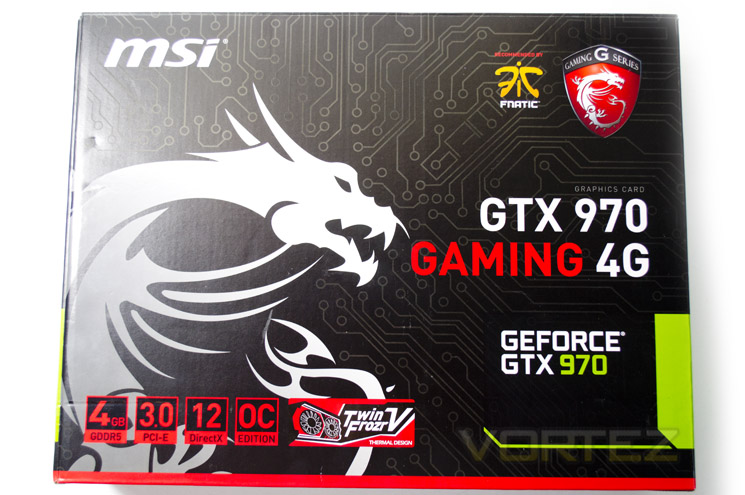
The outer packaging looks very familiar to anyone who has purchased an MSI product in the past. The red, black and white colour scheme, synonymous with the MSI GAMING range, along with the dragon emblem works well together without being over the top.
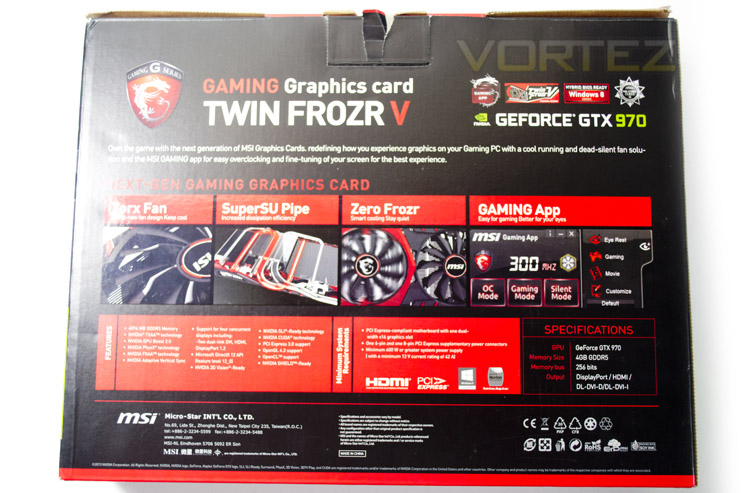
The rear of the package talks briefly about the four most prominent features of the GAMING 4G, namely Torx Fan, SuperSU Pipe, Zero Frozr and Gaming App. There is also a list of minimum requirements required to run this graphics card along with your standard NVIDIA GTX 970 features.
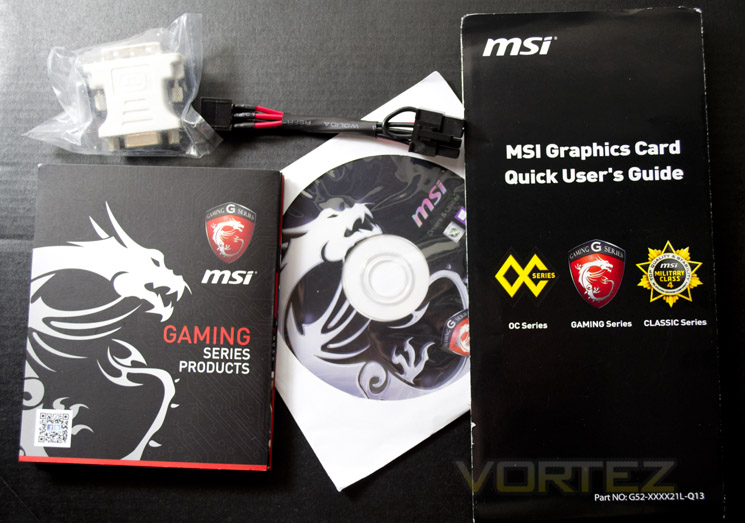
Theirs not a great deal of accessories included with the graphics card but you will find both a product catalogue and installation guide along with a PCIe power adaptor and driver/utility CD.
First Look
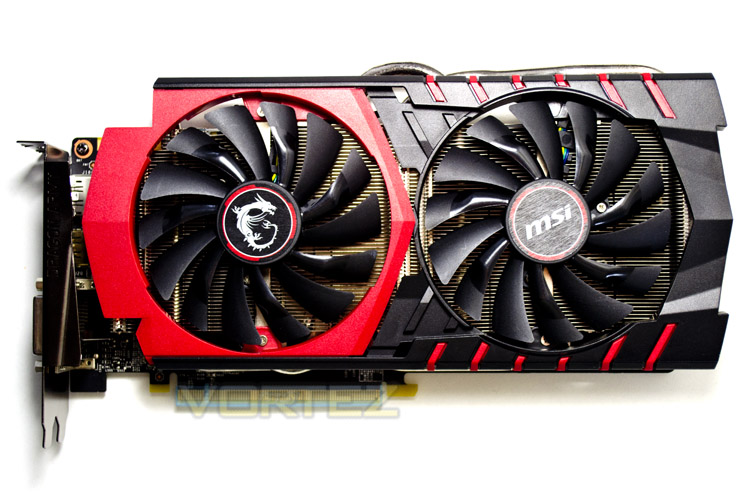
The new Twin Frozr V dominates the card’s aesthetics which is no bad thing as the design perfectly matches the GAMING range of motherboards so will look great when paired with one of those components or any black and red theme for that matter. When we first looked on the card we weren’t entirely sold on the red surround on one fan, instead preferring symmetry but it has since grown on us and the red inserts only serve to accentuate the overall look of the card.
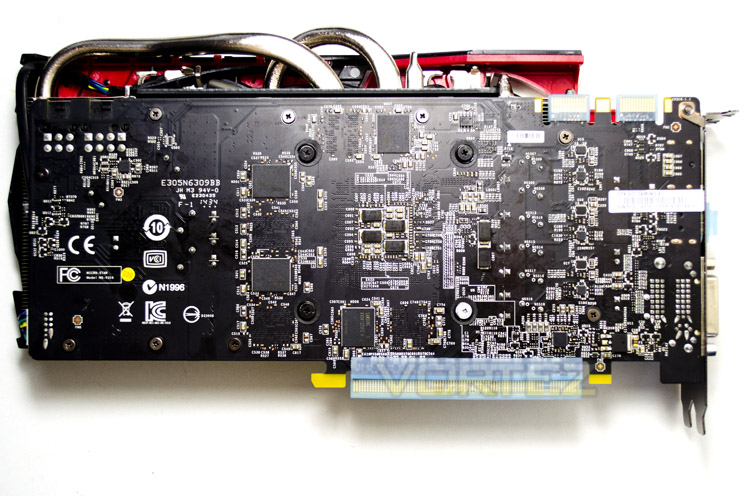
The power circuit board is an oily black however there is no backplate to protect the components, included the exposed memory chips I’m afraid which is a shame as the competition have opted to include one on their products of a similar ilk.
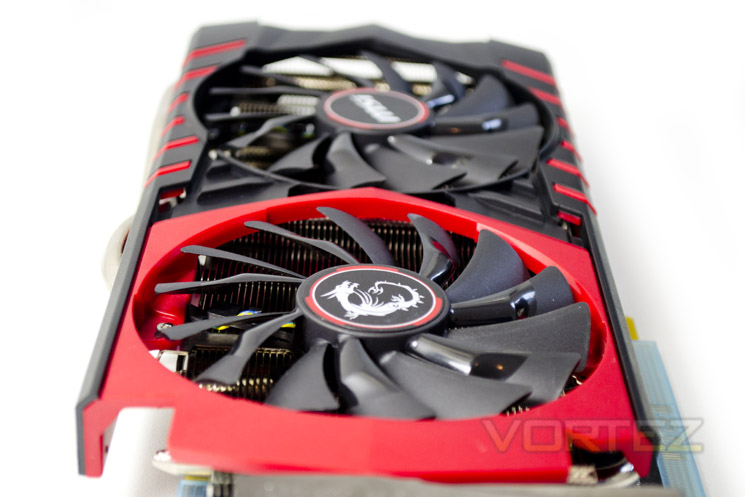
This graphics card measures 275mm in length and 115mm in width while it retains the dual slot design of other GTX 970 examples.
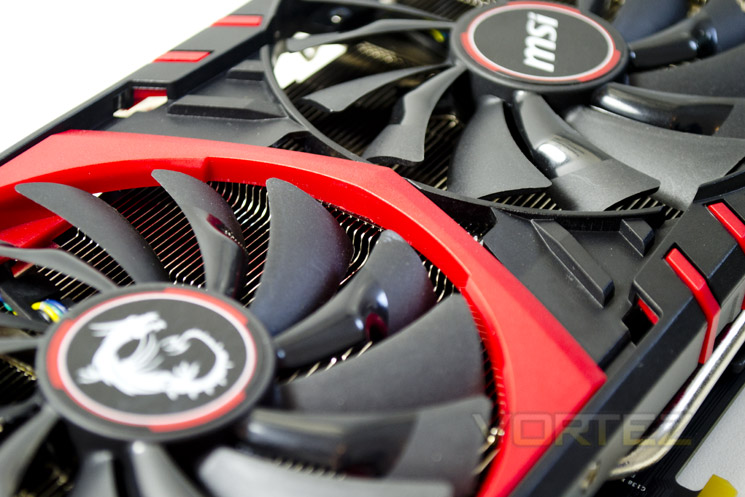
A key selling point and a major feature of the MSI GTX 970 Gaming is the inclusion of the Torx fans which are angled more aggressively at the tips to enhance airflow while still remaining very quiet.
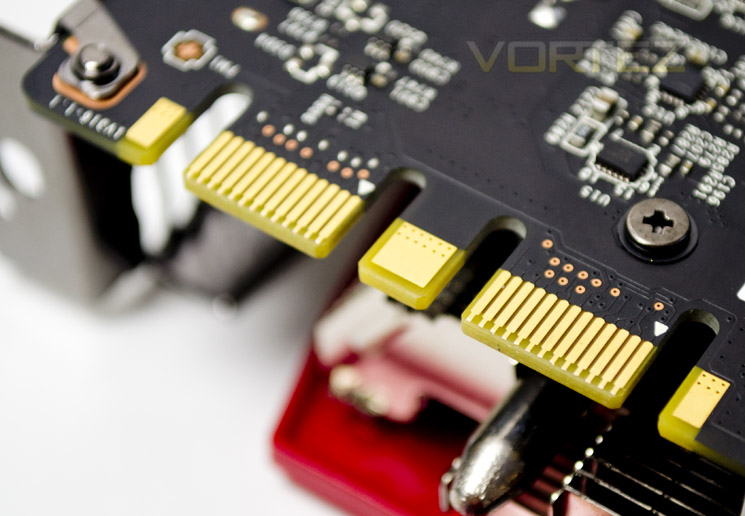
As this is a high end model you would expect nothing less than Multi-SLI capability so MSI are only happy to oblige in this respect.
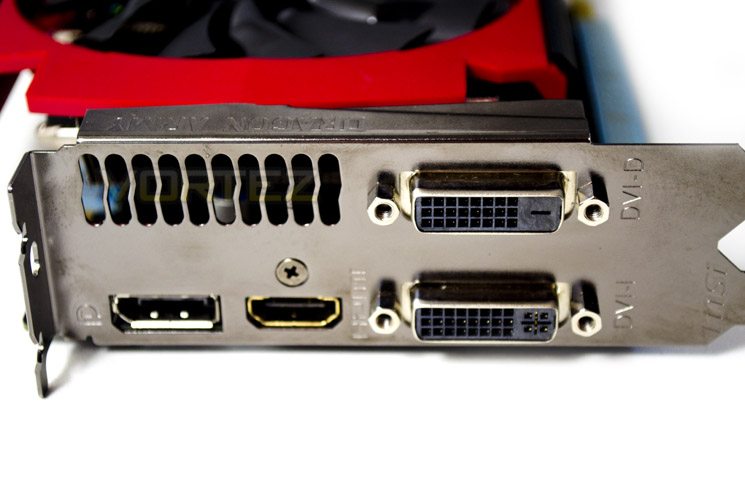
The IO area is a standard affair with HDMI and DP supported along with DVI-D and DVI-I ports available.
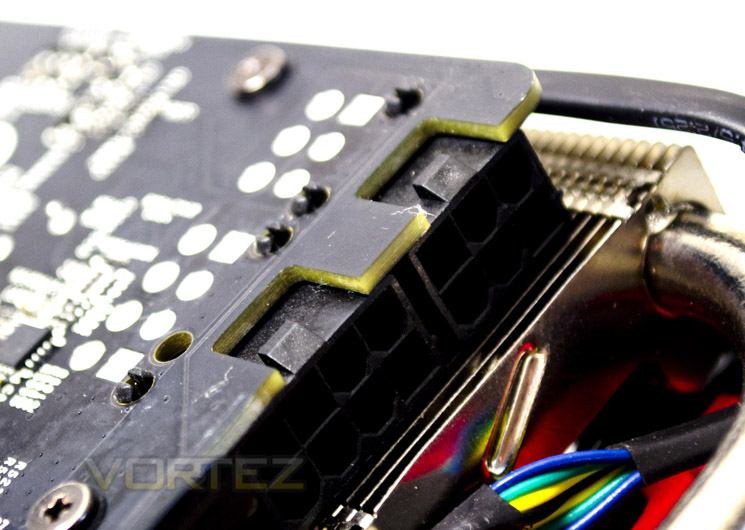
Rounding of our first look section we find that this card demands both 8+6pin PCIe cables with a PSU capable of delivering 600w with 42A available on the 12v rail.
Closer Look
[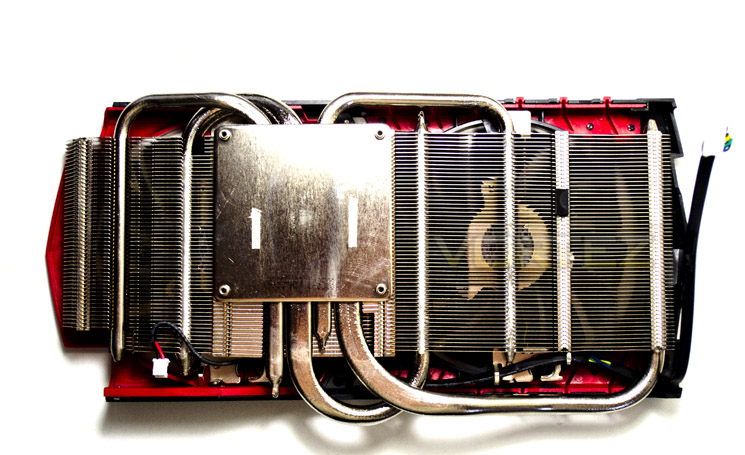
Removal of the heatsink was an easy process as it was simply attached to the PCB via 4 spring loaded screws with the remainder being to hold the mid brace and VRM heatsink in place. The new TWIN FROZR V design looks very similar to previous incarnations however MSI tell use this version comes with a SuperSU pipe for increased heat dissipation. It will have to perform very well if it is to out compete the two other competing cards as they ran very cool.
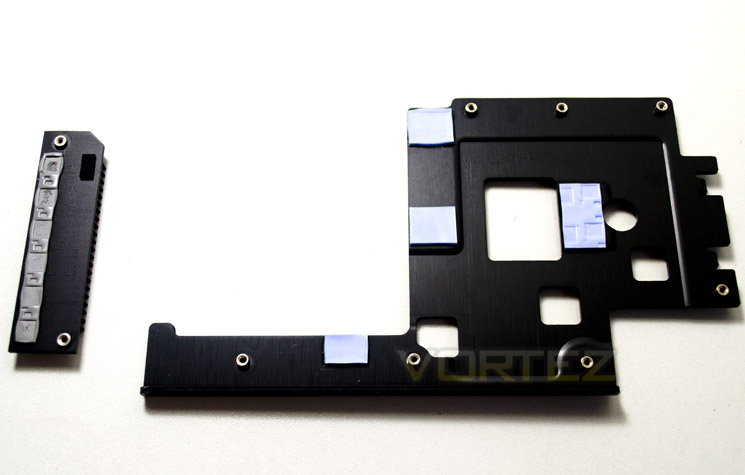
The Gaming 4G comprises of 3 separate heatsinks. the first being the Twin Frozr V but the midriff also has a metal brace both to strengthen the card but also to dissipate heat from the memory chips. the final piece of the jigsaw is the VRM heatsink. MSI are to be congratulated for cooling all of the components individually but this also begs the question – why no backplate?
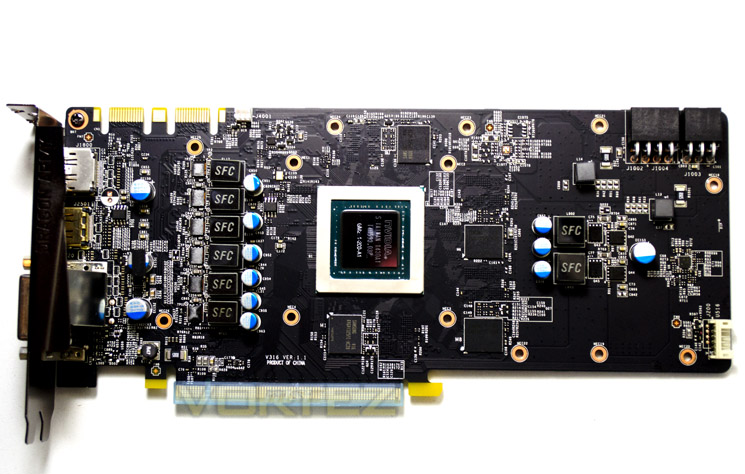
With the heatsinks removed we get our first look at the naked PCB which apart from the on-board components sticks to the reference design. We see that there are more chokes (bigger VRM) and the memory chips missing are found on the reverse.
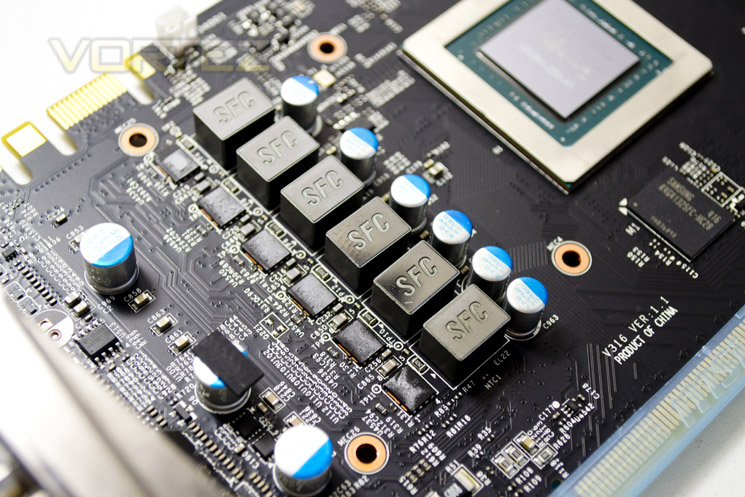
The VRM is oversized for a GTX 970 and features the 3 ‘Military spec’, MIL-STD-810G certified components comprising of HI-C capacitors, Super ferrite core chokes and sof course, solid capacitors all round.
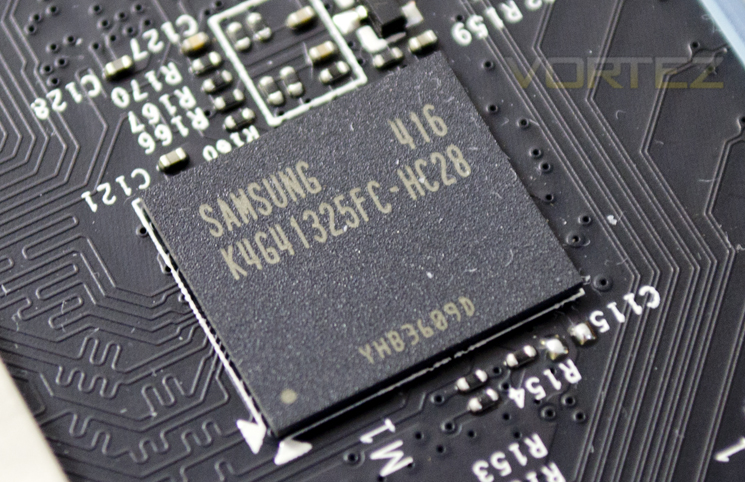
The memory chips are stamped with SAMSUNG K4G41325FC-HC28 which tells us these chips come as a 4GB package and are rated to run at 3500MHz (7000MHz effective speed) at 1.5v.
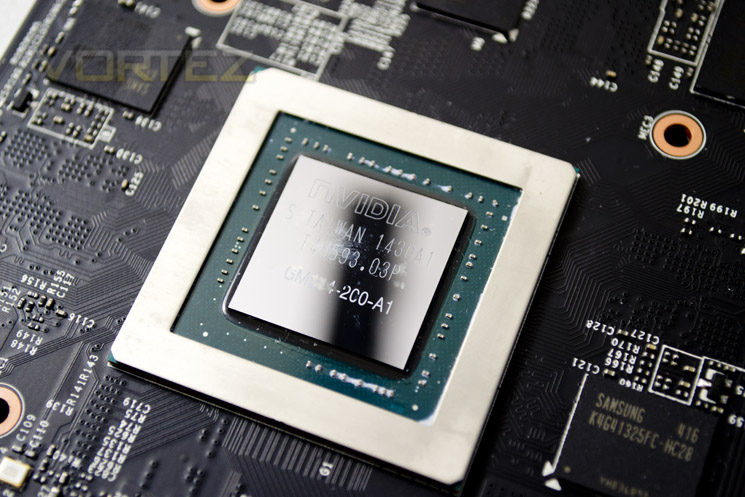
The GTX 970 Maxwell core on this model is overclocked from the reference specification to 1140MHz which sits neatly between both GIGABYTE and ASUS overclocked GTX 970s, sadly we again do not see any overclock applied to the memory but from experience we know that there should be plenty of headroom in those Samsung chips.
Test Setup & Methodology
How we test graphics cardsTesting a graphics card is an extremely lengthy process. We sometimes see reviews where a graphic card has been tested using out of date equipment, out of date games and even out of date drivers. While the latter can be excused due to the sheer amount of driver updates making a thorough review impossible we will however notify the reader when we have used a different driver to the normal for example a pre-release driver. For the most part however we will always use the same hardware and latest drivers so this does certainly need to be taken into consideration when viewing our testing results. Each game and benchmark is tested times with the lowest and highest scores omitted out of the 5 results and the average then taken from the three remaining to give us our final result for each resolution and setting used.
HardwareWith the latest Intel chipset release we decided to update our ageing X79 setup to the very latest X99 chipset. Not only that but we will be using the flagship Core i7-5960X Extreme Edition processor clocked to a realistic, achieveable 4GHz to ensure we have no CPU bottlenecks. With 16GB (4x4GB) of GDDR4 at 2666MHz and a 500GB SSD there should be minimal paging so the benchmarks we run today will hopefully give a true reflection of the graphics card’s performance.
High End Graphics cards on test:
MSI GTX 970 GAMING 4G
(Forceware 344.75) GIGABYTE G1 GAMING SOC GTX 970(Forceware 344.75)
ASUS STRIX GTX 970 4GB GDDR5(Forceware 340.60)
NVIDIA GTX 980 4GB GDDR5(Forceware 340.52)
SAPPHIRE TRI-X R9-290X 4GB GDDR5(Catalyst 14.3)
Special thanks go to Intel, Corsair, MSI and AOC for providing the extreme spec components used for our test bench:
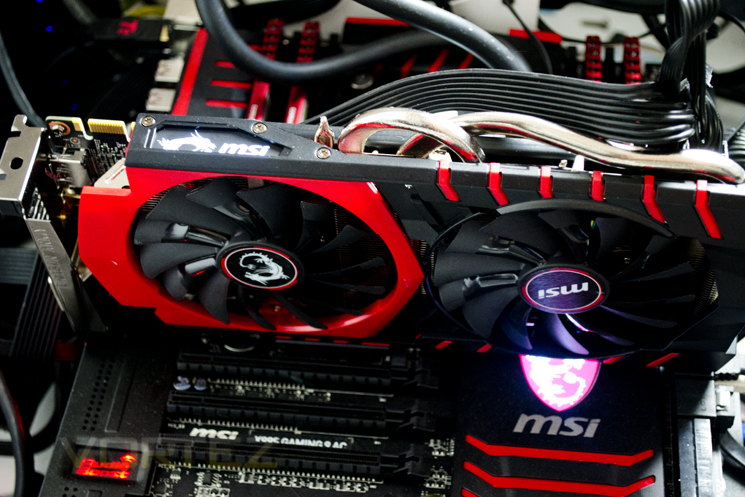
Motherboard: MSI X99S GAMING 9 AC
CPU: Intel Core i7-5960X Extreme Edition @ 4GHz
RAM – 16GB (4x4GB) Corsair LPX Vengeance (Red) DDR3 @ 2666MHz 16-17-17-35 C1
Power Supply – CORSAIR RM Series™ RM1000
Hard Drive – CORSAIR Force Series™ LX 512GB SATA 3 6Gb/s SSD
Cooler – CORSAIR Hydro Series™ H105 240mm Extreme Performance Liquid CPU Cooler
Monitor – AOC 28″ 4K U2868 PQU
CPU: Intel Core i7-5960X Extreme Edition @ 4GHz
RAM – 16GB (4x4GB) Corsair LPX Vengeance (Red) DDR3 @ 2666MHz 16-17-17-35 C1
Power Supply – CORSAIR RM Series™ RM1000
Hard Drive – CORSAIR Force Series™ LX 512GB SATA 3 6Gb/s SSD
Cooler – CORSAIR Hydro Series™ H105 240mm Extreme Performance Liquid CPU Cooler
Monitor – AOC 28″ 4K U2868 PQU
Benchmarks
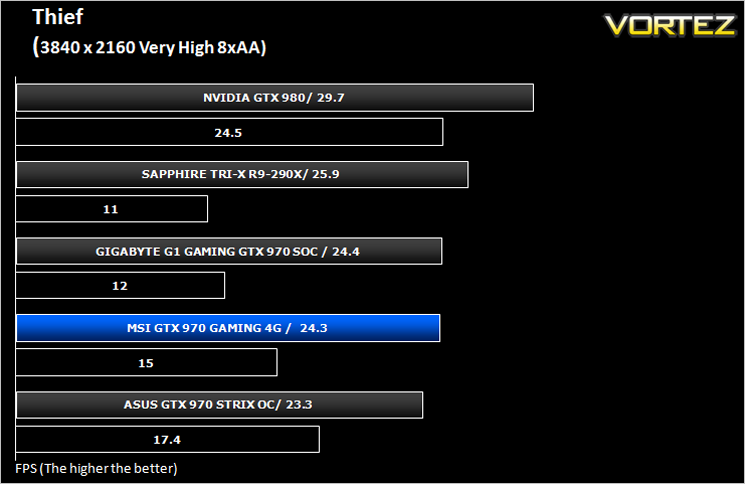
If you are a regular reader of our reviews you will know we like to test the latest hardware with the latest games and benchmarks on the market. Here are the games we have chosen:
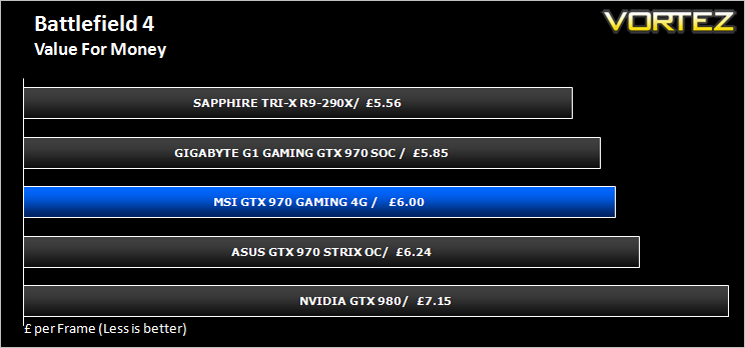
Battlefield 4
Watchdogs
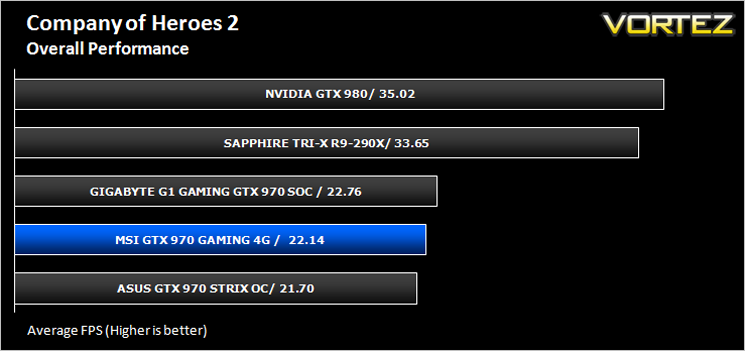
Company of Heroes 2
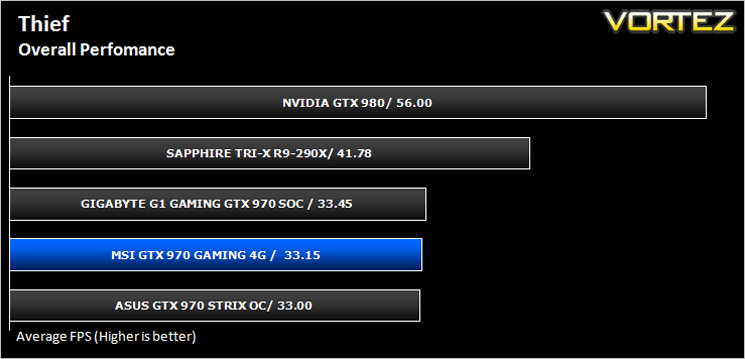
Thief
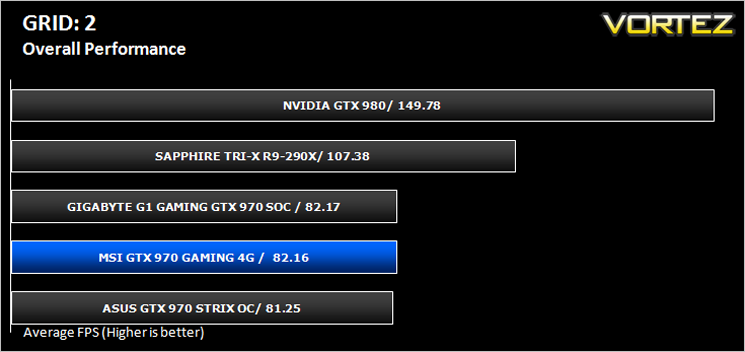
GRID: 2
Metro: Last Light
Watchdogs
Company of Heroes 2
Thief
GRID: 2
Metro: Last Light
We also take into consideration the benchmarkers out there so have included 3 of the more popular synthetic benchmarks available:
Unigine: Valley
Unigine: Heaven 4
Futuremark 3DMark Firestrike
Unigine: Heaven 4
Futuremark 3DMark Firestrike
Let’s see how today’s graphics card performed…
Temperature, Acoustics and Power Consumption
Power ConsumptionTo test for power consumption we take a measurement from the plug socket. It is important to note that the figures below represent total system power use and not just the GPU. The CPU was always in a fixed state (4GHz overclock) so did not affect the additional power load when the GPU was placed under 100% load using Furmark which was ran for 15 minutes at which point a load reading was taken. Idle readings were taken 5 minutes after system boot to ensure any background services and applications had loaded.
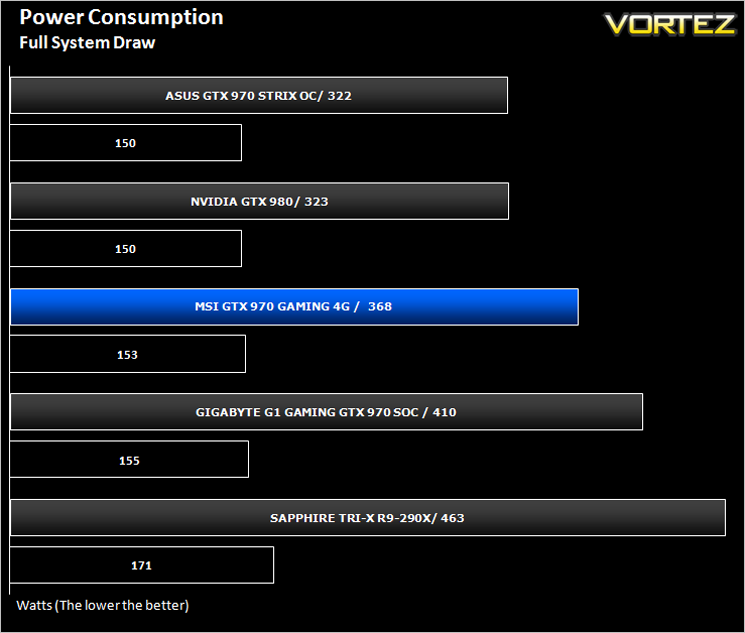
The MSI GTX 970 Gaming 4G is neither power efficient or a power hungry monster finding itself right in the middle of the competition.
Temperature
To test temperatures we measured idle temperatures after booting windows, letting all applications finish loading and ran a few benchmarks. Once the benchmarks were complete we left the card to reach a cooling plateau where we then took the idle temperatures. For the load tests, we would normally run Furmark for 20 minutes, taking the absolute maximum temperature attained however we found that this throttled the card and resulted in spurious results. So we set Heaven running continuously for 20 minutes and used this as a temperature result.
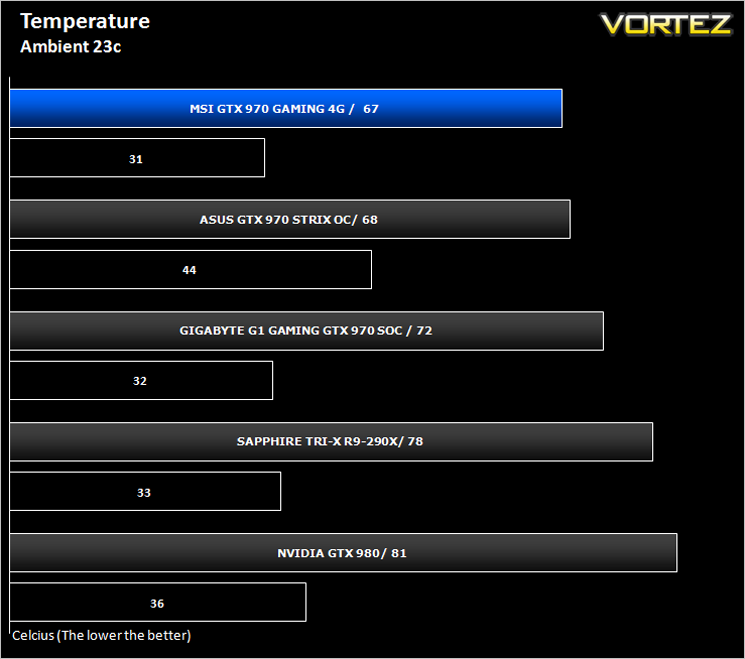
Both ASUS and GIGABYTE cards on test ran very cool but we were shocked to find the MSI bested both in idle and fully loaded scenarios. A stonking performance from the Twin Frozr V heatsink design!
Acoustics
Unsurprisingly the MSI card was very quiet. The Twin Frozr series have all been relatively quiet but we are happy to report the best just got that little bit better (quieter). Helped by the fact the fans will stop spinning when idle, it is fair to say that this card is nigh on zero dB. Even under load conditions the card raised little more than a murmur. We had to raise the fans to 100% to clearly hear the fines which in fairness were a little ‘whiney’ at this level.
Overclocking
For overclocking today’s sample we will be using MSI’s Afterburner tool as this gives us all of the options we require included the additional voltage controls.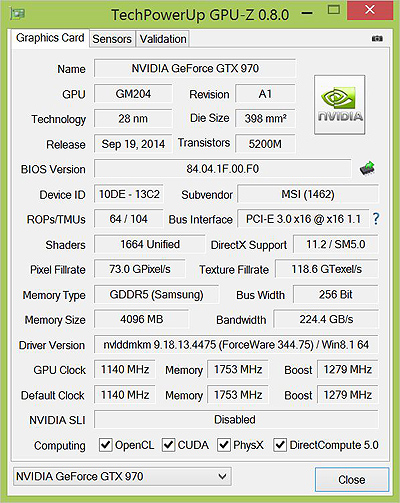
Above is a screenshot of GPU-Z showing the reference (factory overclocked) settings.
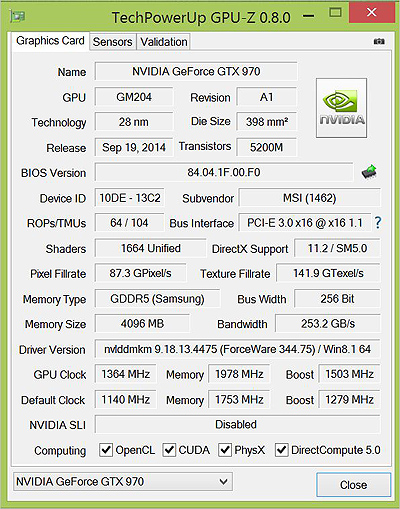
…and manually attained overclock speeds.
We know the GTX 970 overclocks fairly well however we were surprised that the MSI beat both the ASUS and GIGABYTE cards by a fair margin on both core and memory. Hitting 1364MHz on the core (1503MHz boost!) and close to 8000MHz on the memory was a fantastic achievement which raised the performance up significantly.
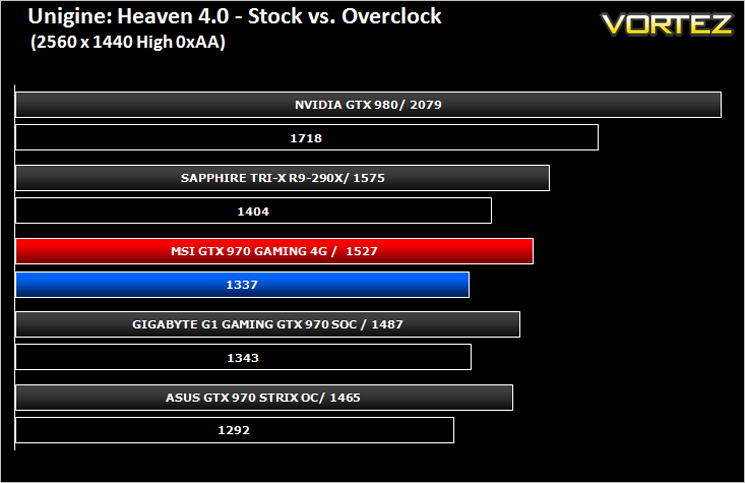
Above we can see the resulting performance increase of the overclock via Unigine Heaven 4.0.
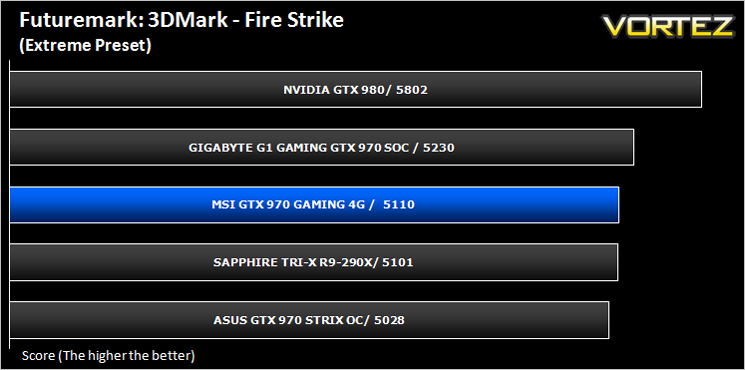
Futuremark 3DMark Fire Strike (Synthetic)
Fire Strike is the new showcase DirectX 11 benchmark designed for high-performance gaming PCs. It is Futuremark’s most ambitious and technical benchmark ever, featuring real-time graphics rendered with detail and complexity far beyond what is found in other benchmarks and games today.
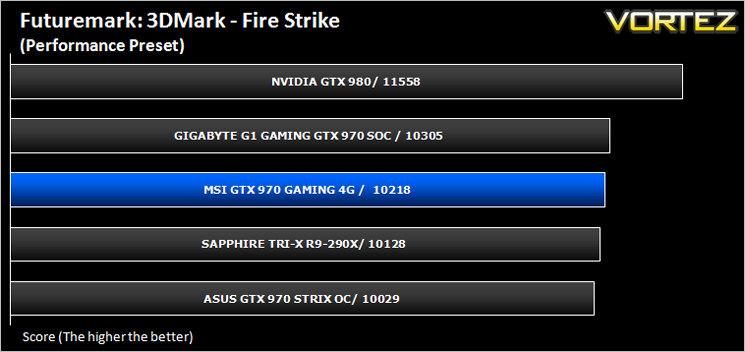
Unigine: Heaven 4 (Synthetic)
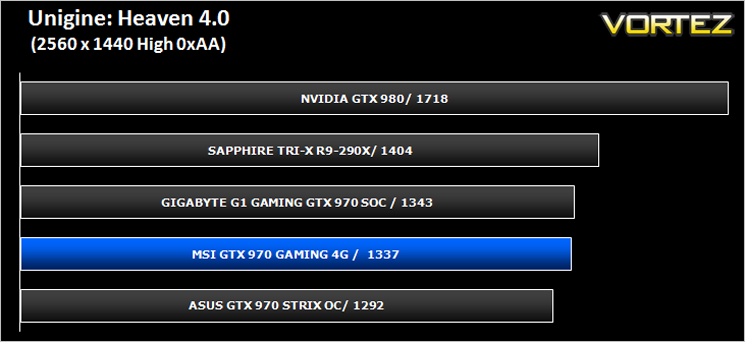
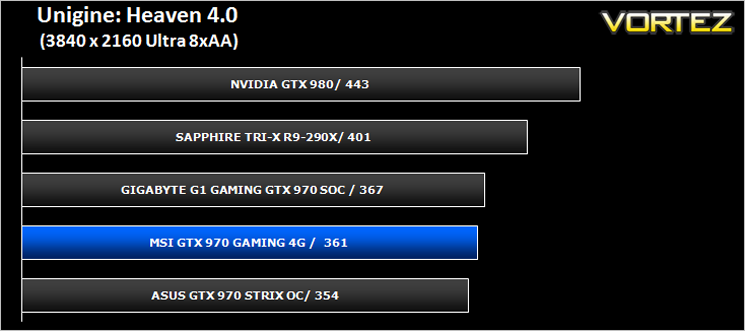
Heaven Benchmark with its current version 4.0 is a GPU-intensive benchmark that hammers graphics cards to the limits. This powerful tool can be effectively used to determine the stability of a GPU under extremely stressful conditions, as well as check the cooling system’s potential under maximum heat output. It provides completely unbiased results and generates true in-game rendering workloads across all platforms.
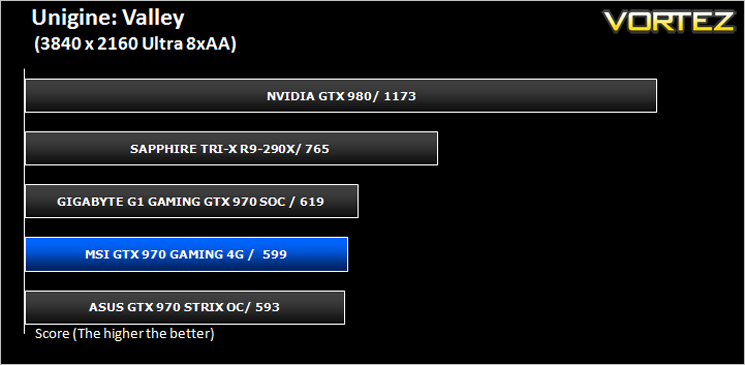
Unigine: Valley (Synthetic)
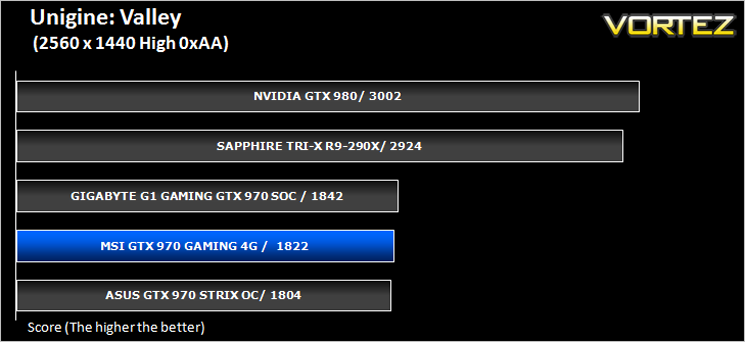
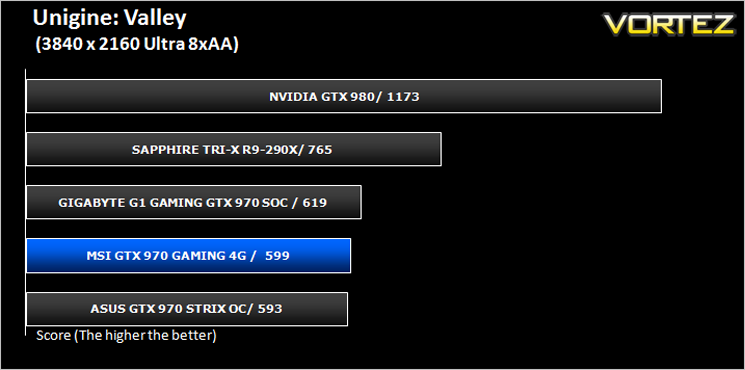
Valley Benchmark is a new GPU stress-testing tool from the developers of the very popular and highly acclaimed Heaven Benchmark. The forest-covered valley surrounded by vast mountains amazes with its scale from a bird’s-eye view and is extremely detailed down to every leaf and flower petal. This non-synthetic benchmark powered by the state-of-the art UNIGINE Engine showcases a comprehensive set of cutting-edge graphics technologies with a dynamic environment and fully interactive modes available to the end user.
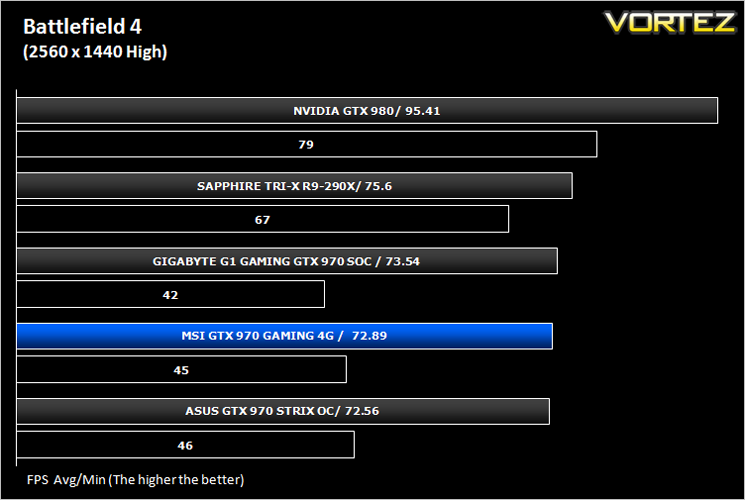
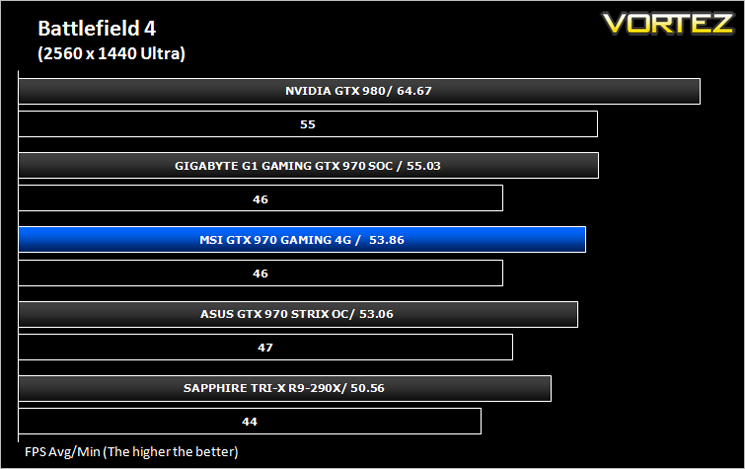
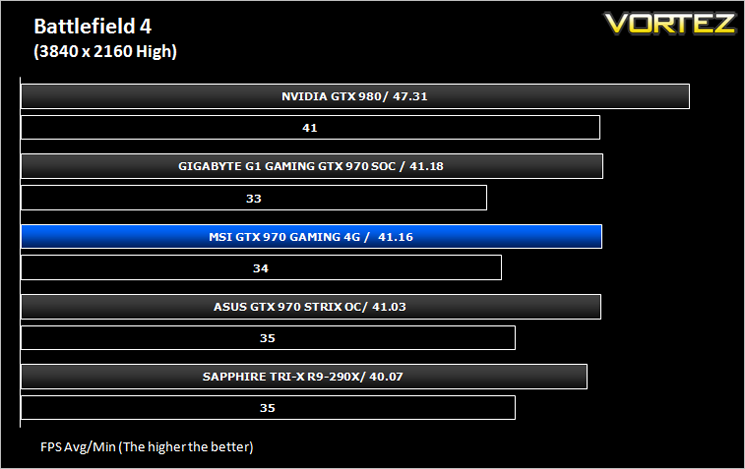
Battlefield 4 (FPS)
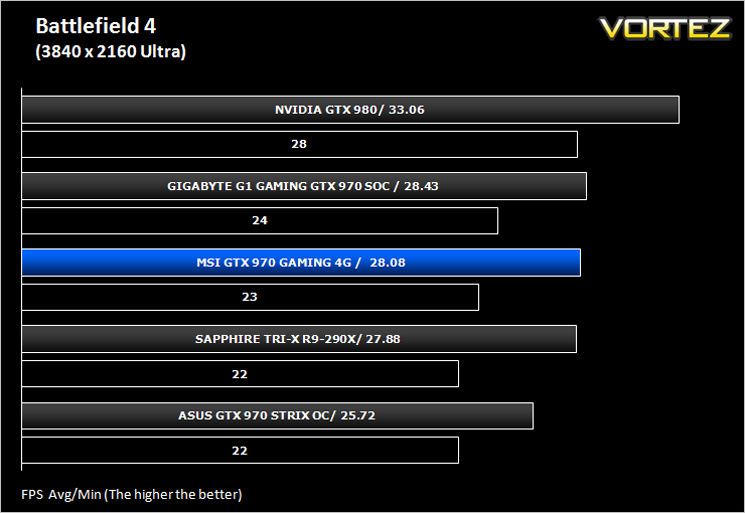
Battlefield 4 is a 2013 first-person shooter video game developed by Swedish video game developer EA Digital Illusions CE (DICE) and published by Electronic Arts. It is a sequel to 2011’s Battlefield 3 and is perhaps currently the most popular online First Person Shooter for PC gamers. It has an extremely powerful gaming engine that will stress components more than most FPS titles available.
Watchdogs (Action/Adventure)
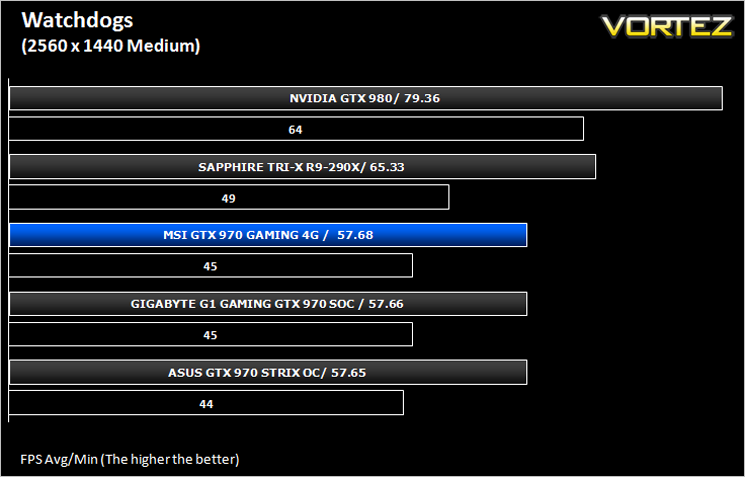
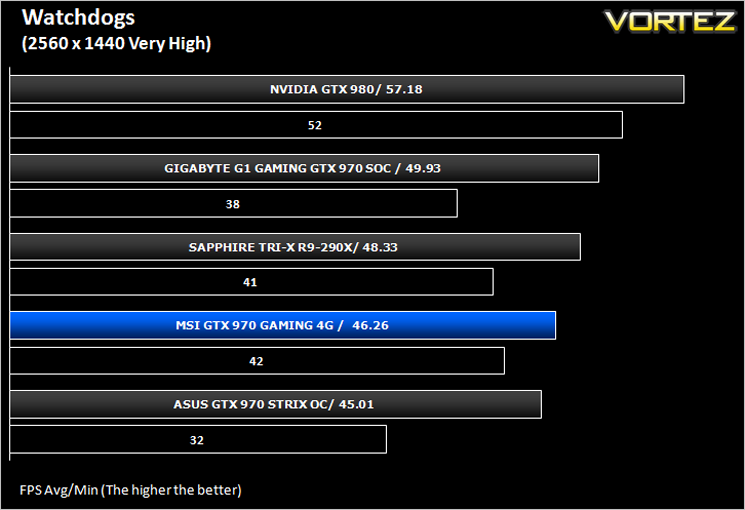
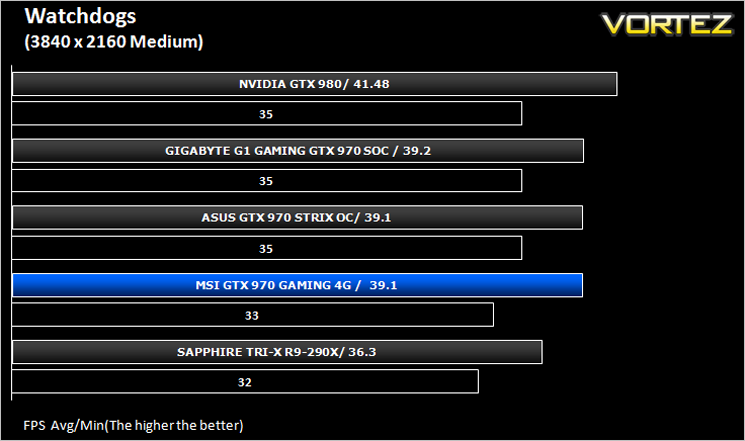
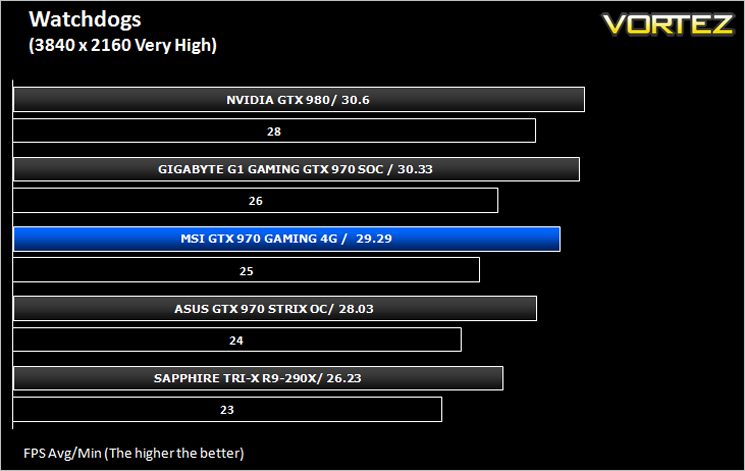
Watch Dogs is a 2014 open world action-adventure video game developed by Ubisoft Montreal and published by Ubisoft. Set within a fictionalized version of Chicago, Illinois, the single-player story follows a hacker and his efforts to seek revenge after the accidental death of his niece. The open world design lets players freely roam Chicago, which includes the urban city, open countryside, and slums. The game is played from a third-person perspective and its world is navigated on-foot or by vehicle. As such this is a very demanding game, especially when graphical options are turned up.
Thief (Stealth)
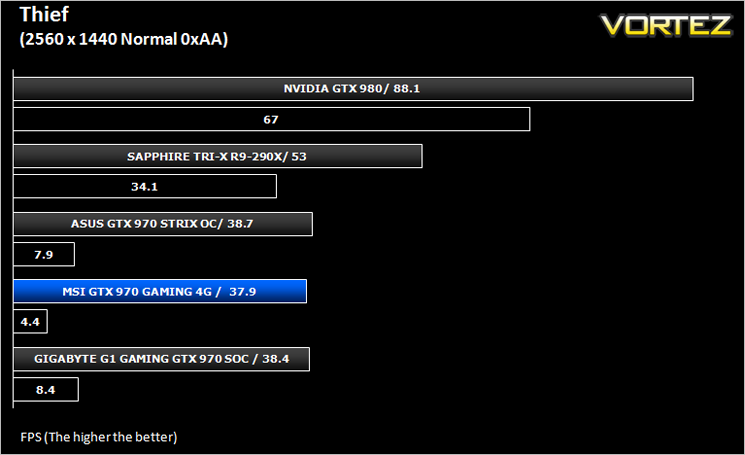
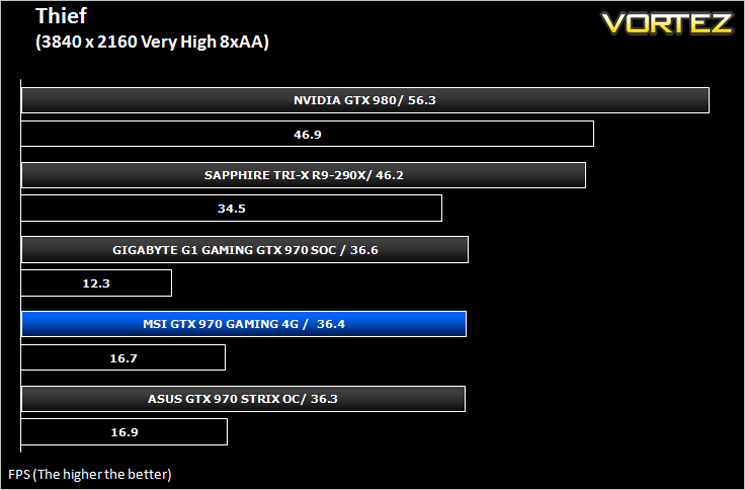
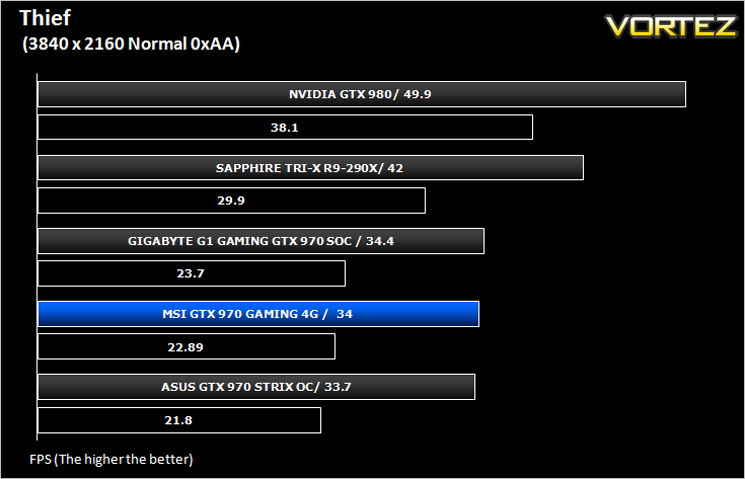
Thief is a stealth video game developed by the Canadian video game developer Eidos Montreal, and published by Square Enix. It is a revival of the cult classic Thief series of stealth games, of which it is the fourth game. Thief is set in a dark fantasy world inspired by Victorian, gothic, and steampunk aesthetics. Using a modified version of the Unreal Engine 3 it makes for a challenging game to pitch against our range of components.
Company of Heroes 2 (RTS)
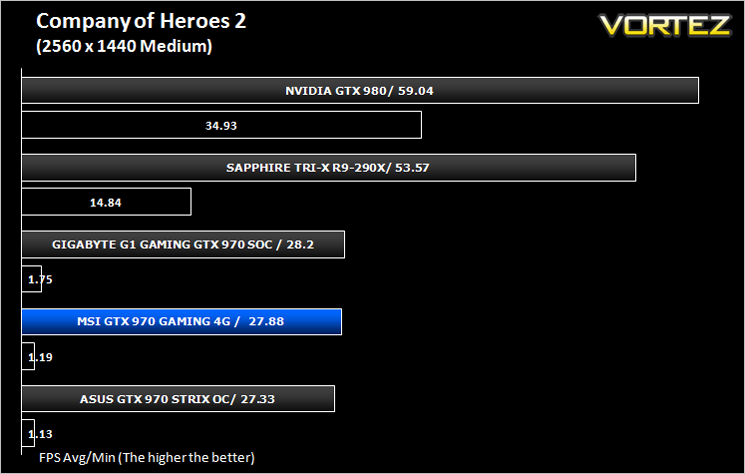
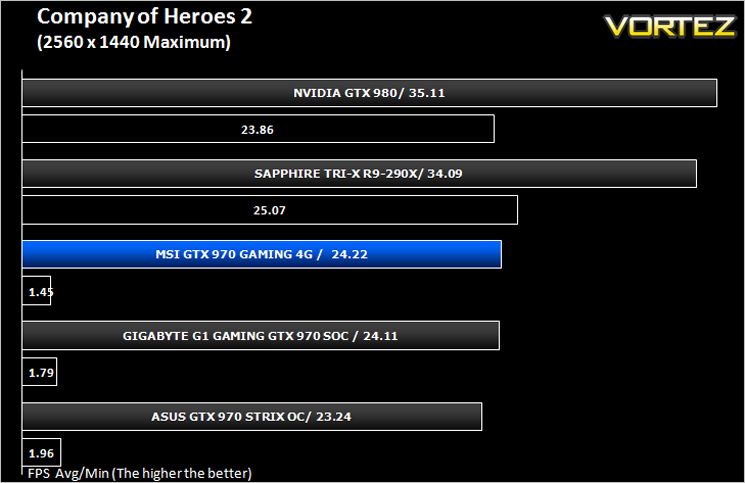
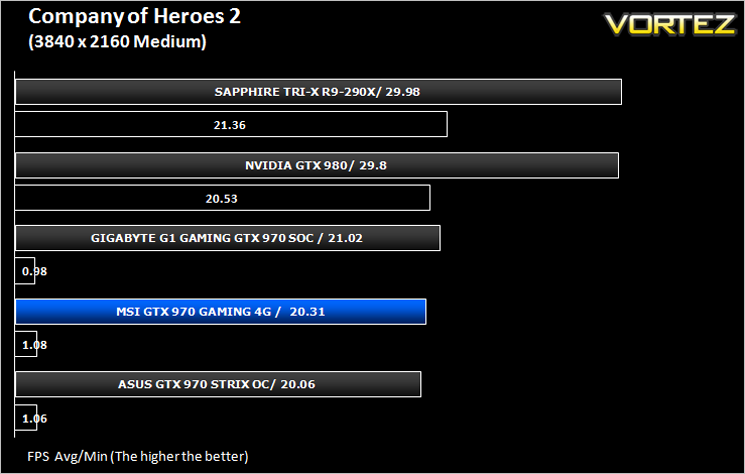
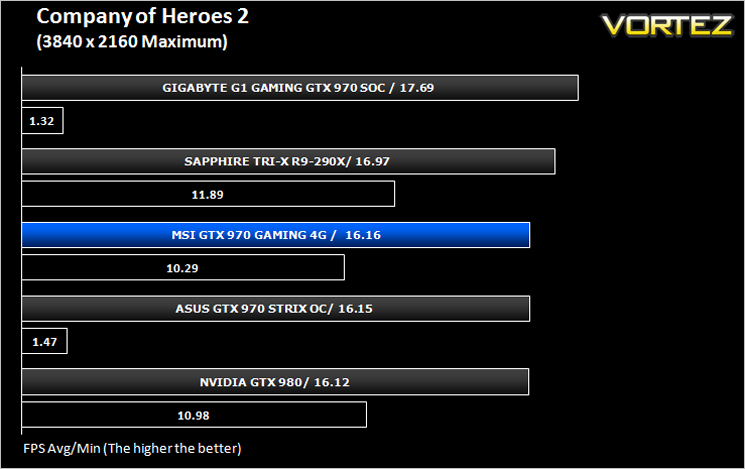
Company of Heroes 2 is a real-time strategy video game developed by Relic Entertainment. It is the sequel to the critically acclaimed 2006 game Company of Heroes.As with the original Company of Heroes, the game is set in World War II but with the focus on the Eastern Front, with players primarily controlling the side of the Soviet Red Army during various stages of the Eastern Front, from Operation Barbarossa to the Battle of Berlin. Company of Heroes 2 runs on Relic Entertainment’s proprietary Essence 3.0 game engine and is extremely demanding of both CPU and GPU.
Metro: Last Light (FPS)
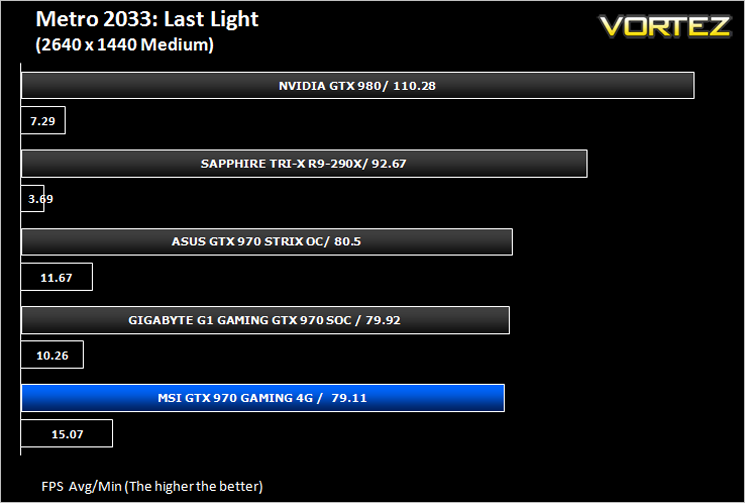
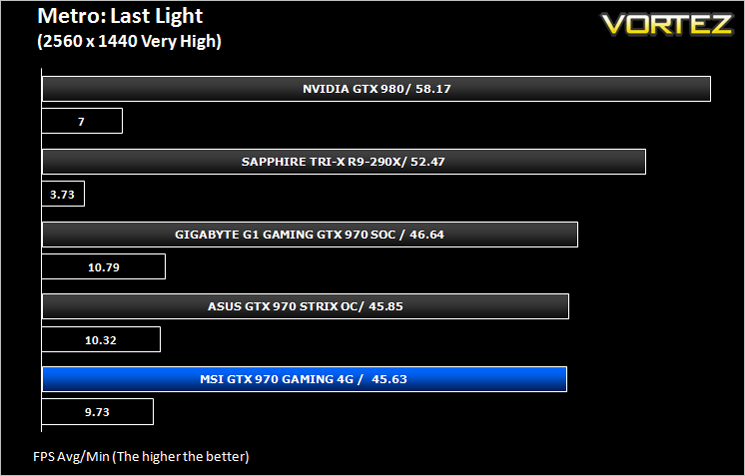
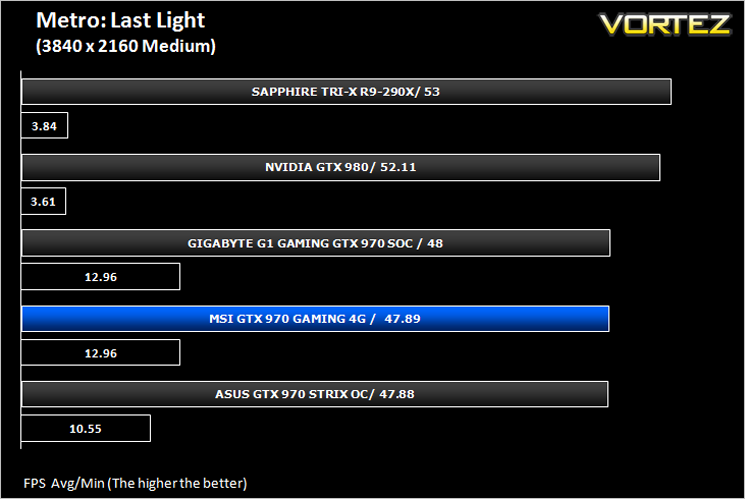
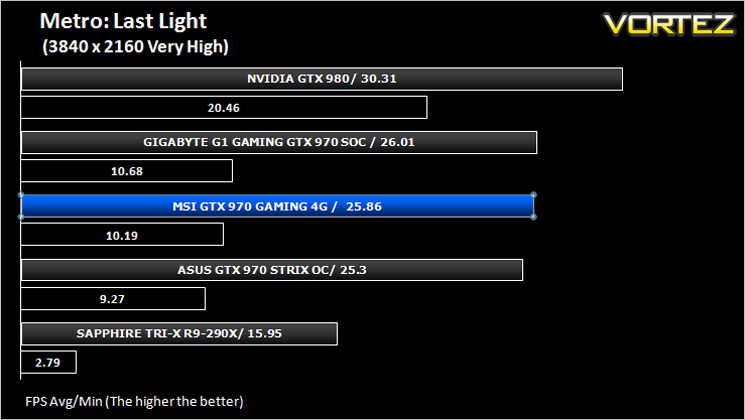
Metro: Last Light is a single-player post-apocalyptic-themed first-person shooter video game with stealth and survival horror elements, developed by Ukrainian studio 4A Games and published by Deep Silver. The game is set in a post-apocalyptic Moscow, part of the universe of the novel Metro 2033 and its sequels, written by Russian author Dmitry Glukhovsky. The second of our FPS titles, it runs on the 4A gaming engine which again, has the capability to stress even the best GPU components.
GRID: 2 (Arcade Sim)
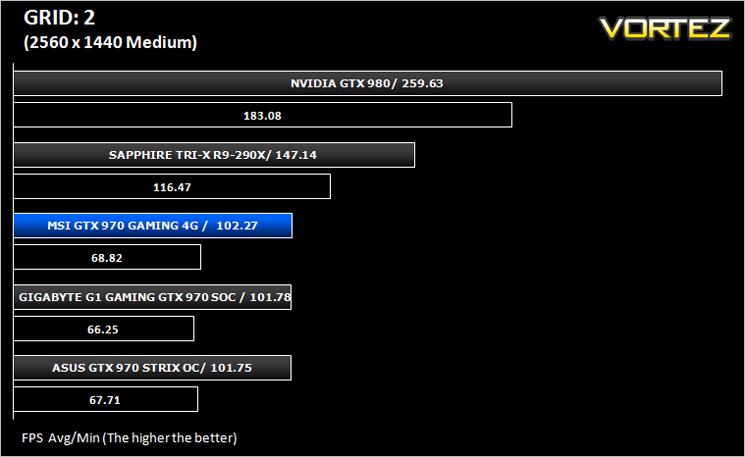
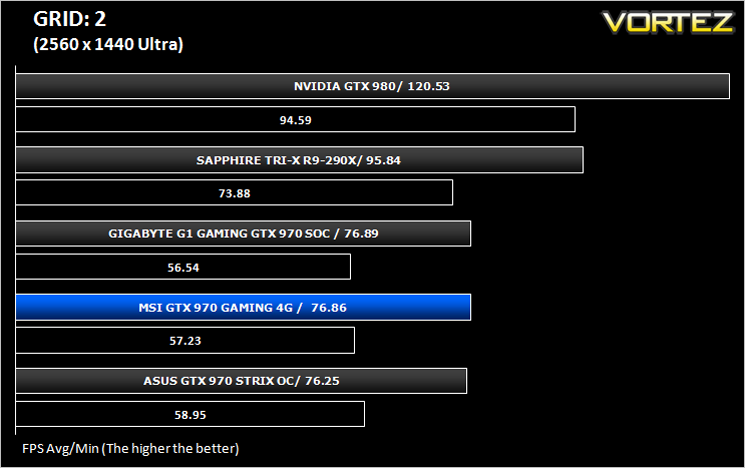
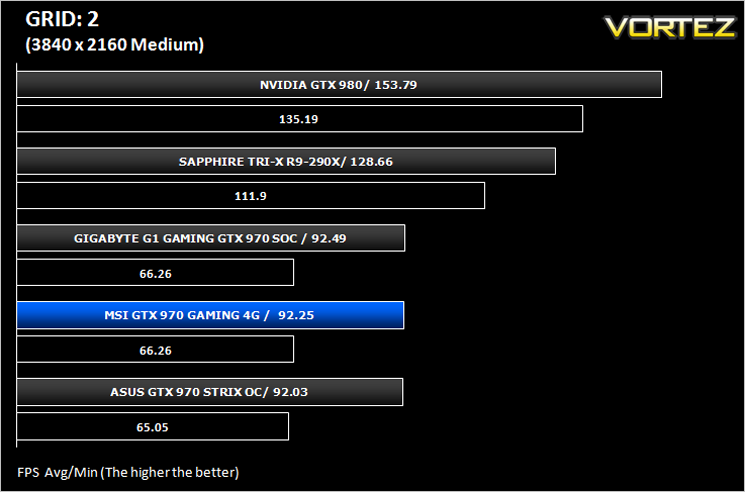
Grid 2 (stylised as GRID 2 and known as Race Driver Grid 2 in Japan) is a racing video game developed and published by Codemasters and is the sequel to 2008’s Race Driver: Grid. The game includes numerous real world locations and cities such as Paris. It also includes motor vehicles spanning four decades. In addition, it includes a new handling system that developer Codemasters has dubbed ‘TrueFeel’, which aims to hit a sweet spot between realism and accessibility. It uses the EGO 3.0 engine which while not overly challenging, is representative of games of this genre.
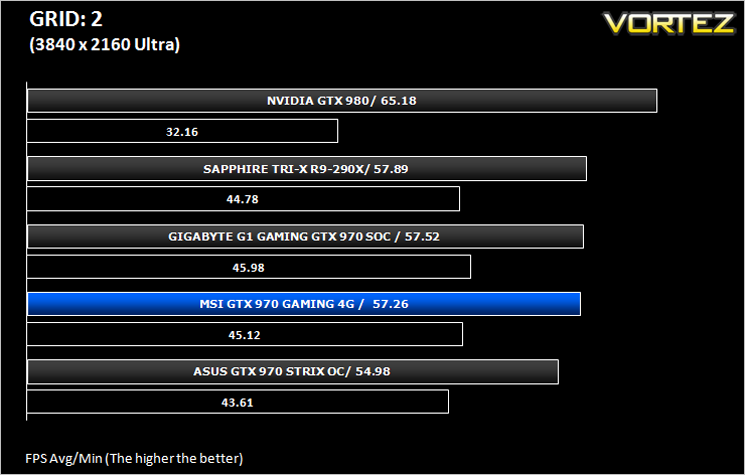
Overall Performance
Here we take a look at the overall performance of the graphics card. This figure is determined by finding the average FPS across all of the settings used in a particular benchmark(game) to give us an overall value.
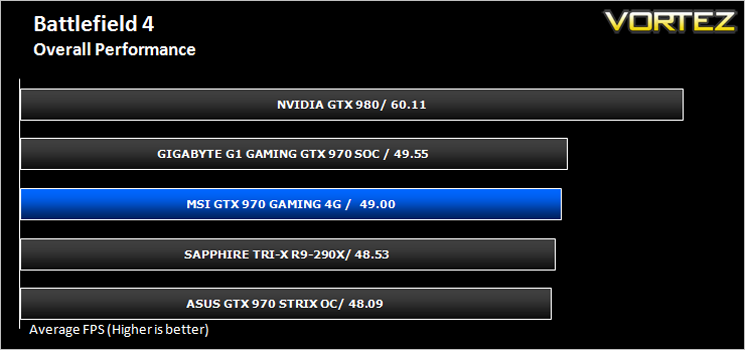
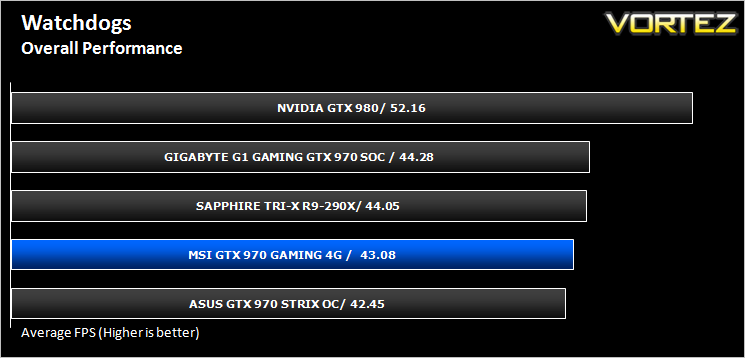
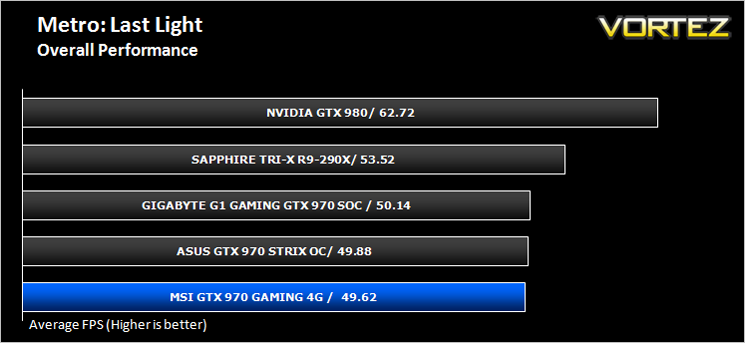
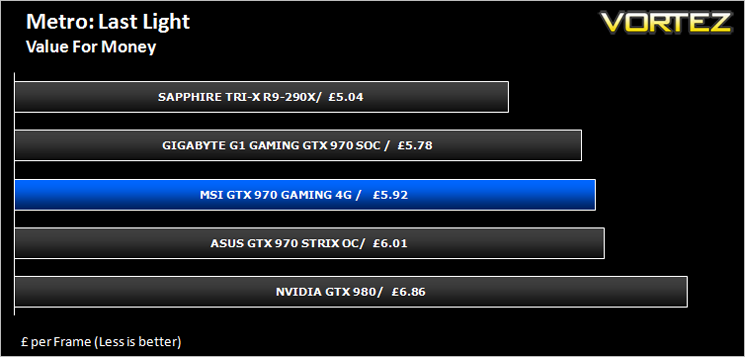
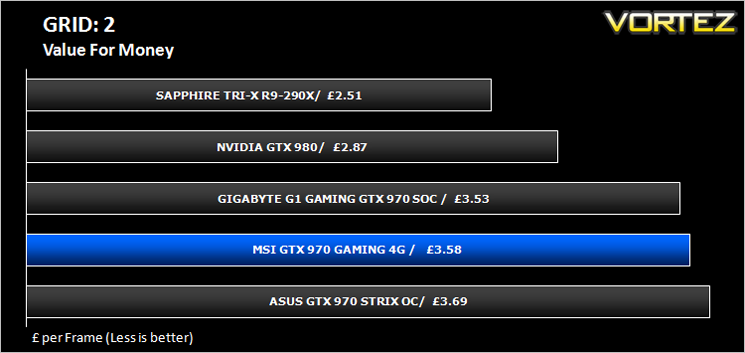
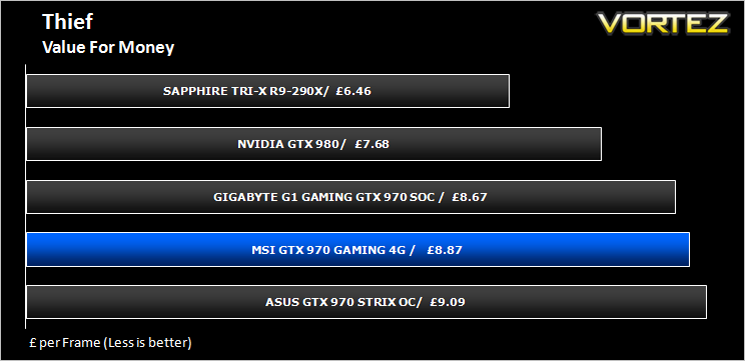
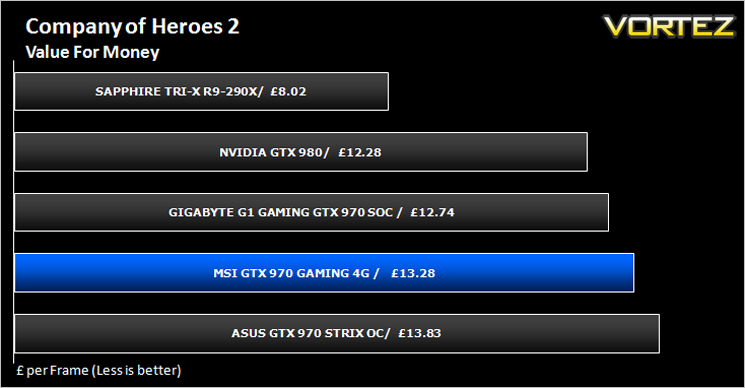
Value For Money
We make a simple calculation for this set of results. For each game we add all of the resulting FPS totals together and then divide by the four sets to give us an overall performance figure. While the figures alone do not give you an accurate picture of how the card will perform in any given scenario, they do tell you, when averaged, which GPU is the more capable across all of the benchmarks and settings tested.
Conclusion
It would be easy to position this card prior to testing simply because of the clockspeed which places this card between MSI’s closest competitors. There is however more to this card than initially meets the eye.
Firstly, the Twin Frozr V, while not a radical change, is both very quiet and as our tests showed, and very cool – two things you want from the graphics card heatsink assembly. It beat the competition, topping the charts in this category so should rightly be applauded. It also looks the business too; The red and black theme, although beginning to show its age, still looks very good and is a very popular choice with enthusiasts. We would however like to see a change in the future as MSI are a brand which sets new trends. In the past we’ve known MSI to be an innovator in this field so hopefully future incarnations will hold to these values.
Performance wise, while overclocked from the factory the 4G Gaming is an ‘also ran’. It neither breaks any records nor sets the world alight which we come to appreciate from an NVIDIA GTX 970. What we didn’t expect was getting such a superb overclock on both memory and core, hitting a magnificent boost core clockspeed of 1500MHz. This wasn’t simply a benchable overclock, it was 100% reliable throughout the games tested, along with a 15 minute burn-in using Furmark where temperatures didn’t get high enough to fry an egg. This is a good thing in case you were wondering (unless of course you are an affection ado of fried eggs – if that is the case we suggest you buy a reference AMD 290X!
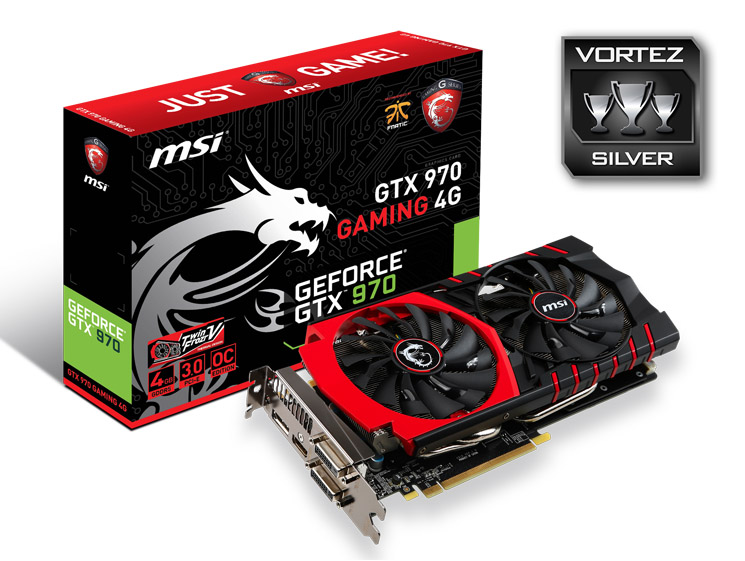
Like the reference clockspeeds, the price of the card sits between both ASUS and GIGABYTE examples which also means it is more expensive than the slightly faster R9-290X, if somewhat quieter and more power efficient. Which card you choose will most likely come down to brand loyalty which we stated in the introduction of this review as each card has it’s positives and negatives but in truth there isn’t a great deal to choose between them. Were it our choice then we would make use of the MSI if nothing else because it was the coolest and quietest card on test as performance differences will likely be undetectable. Like the other GTX 970s, the MSI GTX 970 Gaming 4G attains our Silver award. It’s a magnificent card that comes thoroughly recommended.
To summarise:
Cool, quiet and an excellent overclocker. The MSI GTX 970 Gaming 4G is a great product that is worthy of consideration.
Pros
+ Very cool
+ Very quiet
+ Good looking
+ Excellent overclocking headroom
Cons
– Slightly more expensive than a R9-290X
– Slightly slower than a R9-290X
+ Very cool
+ Very quiet
+ Good looking
+ Excellent overclocking headroom
Cons
– Slightly more expensive than a R9-290X
– Slightly slower than a R9-290X

Click here for an explanation of our awards at Vortez.net.


