Looking for an affordable route to Intel’s 11th Gen? We test out MSI’s latest Micro-ATX B560 motherboard and see if it’s worth considering.

Product on Review: MAG B560M Mortar WiFi
Manufacturer: MSI
Street Price: GBP £150 | USD $170 | AUD $260
On our venture into the world of Intel’s 11th Gen. for the desktop, we’ve examined a number of Intel Z590 motherboards – many of which are very costly. The Z chipset has long been the go-to for pulling the very best features/performance out of Intel’s CPUs, but what if under your requirements you don’t need every conceivable feature? Enter, the Intel B560 chipset. The B chipset, as in other generations is a slimmed down version (often without the ability to overclock – but not this time round).
Under observation today we have the MSI MAG B560M Mortar WiFi. This Micro-ATX motherboard comes in at very attractive price-point by removing RGB lighting and providing just the basics in terms of features.
Are you wanting a slice of Rocket Lake but want to save some cash and are perhaps eying up a compact configuration? This might be right up your street!
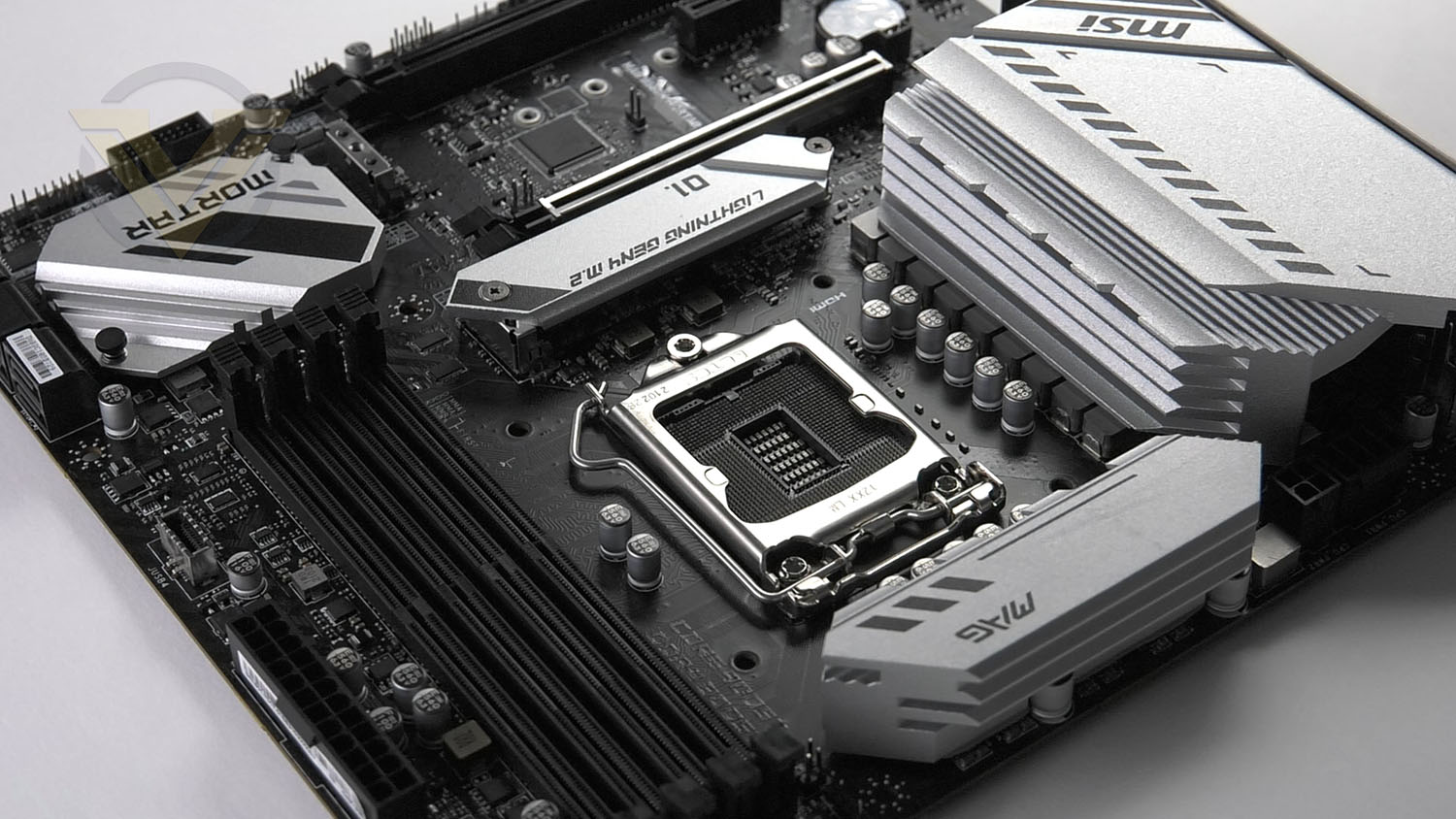
MSI on their thermal solution for Mortar
With more cores’ processors, thermal and power design is more important to make sure the temperature keeps lower. MSI extended PWM heatsink and enhanced circuit design ensures even high-end Intel CPU to run in full speed with MSI motherboards.
Technical Specifications
Below are the technical specifications concerning the Mortar:
CPU
Intel 10th and 11th Generation Core Processors
Chipset
Intel B560 Chipset
Memory
DDR4 5066 (OC) – 2133 MHz Non-ECC, Un-buffered Memory (11 Gen)
128GB
Graphics
1 x HDMI 2.0
1 x DP 1.4
Expansion Slots
2x PCIe x16 slots
Support x16/ x4
PCI_E1 (from CPU)
Support up to PCIe 4.0 for 11th Gen Intel® CPU
Support up to PCIe 3.0 for 10th Gen Intel® CPU
PCI_E3 (From B560 chipset)1
Support up to PCIe 3.0
1x PCIe 3.0 x1 slot
PCI_E2 (From B560 chipset)
Multi-GPU Support
AMD CrossfireX
Storage
6x SATA 6Gb/s ports (from B560 chipset) 1
2x M.2 slots (Key M)
M2_1 slot
Supports up to PCIe 4.0 x4 for 11th Gen Intel® CPU (From CPU)
Supports up to PCIe 3.0 x4 & SATA 6Gb/s for 10th Gen Intel® CPU (From B560 chipset)1
Supports 2242/ 2260/ 2280 storage devices
M2_2 slot (From B560 chipset)
Supports up to PCIe 3.0×4
Supports 2242/ 2260/ 2280 storage devices
Intel® Optane™ Memory Ready2
Supports Intel® Smart Response Technology for Intel Core™ processors
Ethernet
1x Realtek® RTL8125B 2.5Gbps LAN controller
Wireless & Bluetooth
Intel® WiFi 6E AX210
The Wireless module is pre-installed in the M.2 (Key-E) slot
Supports MU-MIMO TX/RX, 2.4GHz/ 6GHz* (160MHz) up to 2.4Gbps
Supports 802.11 a/ b/ g/ n/ ac/ ax
Supports Bluetooth® 5.21/2, FIPS, FISMA
USB
Intel® B560 Chipset
1x USB3.2 Gen 2×2 20Gbps port (Type-C port on the back panel)
1x USB 3.2 Gen 2 10Gbps port (1 Type-C available through the internal connector)
2x USB 3.2 Gen 1 5Gbps ports are available through the internal USB 3.2 Gen 1 connector
4x USB 2.0 ports on the back panel
USB Hubs ASM1074
3x USB 3.2 Gen 1 5Gbps Type-A ports on the back panel
Hub-GL850G
4x USB 2.0 ports are available through the internal USB 2.0 connectors
Back Panel I/O Ports
USB 2.0
DisplayPort
USB 3.2 Gen 1 5Gbps Type-A
2.5G LAN Port
Wi-Fi / Bluetooth Antenna
HD Audio Connectors
HDMI
USB 3.2 Gen 2×2 20Gbps Type-C
USB 3.2 Gen 1 5Gbps Type-A
Optical S/PDIF OUT
Accessories
– User Manual
– Quick Install Guide
– Wifi Antenna
– 2x SATA Cables
– M.2 Screws
– MSI Case Badge
– Driver DVD
– Screwdriver
– MAG Stckers
– Reward Program
– MSI Product Catalog
– Product Reg Card
Operating System
Windows 10 64bit
Form Factor
M-ATX
Intel 10th and 11th Generation Core Processors
Chipset
Intel B560 Chipset
Memory
DDR4 5066 (OC) – 2133 MHz Non-ECC, Un-buffered Memory (11 Gen)
128GB
Graphics
1 x HDMI 2.0
1 x DP 1.4
Expansion Slots
2x PCIe x16 slots
Support x16/ x4
PCI_E1 (from CPU)
Support up to PCIe 4.0 for 11th Gen Intel® CPU
Support up to PCIe 3.0 for 10th Gen Intel® CPU
PCI_E3 (From B560 chipset)1
Support up to PCIe 3.0
1x PCIe 3.0 x1 slot
PCI_E2 (From B560 chipset)
Multi-GPU Support
AMD CrossfireX
Storage
6x SATA 6Gb/s ports (from B560 chipset) 1
2x M.2 slots (Key M)
M2_1 slot
Supports up to PCIe 4.0 x4 for 11th Gen Intel® CPU (From CPU)
Supports up to PCIe 3.0 x4 & SATA 6Gb/s for 10th Gen Intel® CPU (From B560 chipset)1
Supports 2242/ 2260/ 2280 storage devices
M2_2 slot (From B560 chipset)
Supports up to PCIe 3.0×4
Supports 2242/ 2260/ 2280 storage devices
Intel® Optane™ Memory Ready2
Supports Intel® Smart Response Technology for Intel Core™ processors
Ethernet
1x Realtek® RTL8125B 2.5Gbps LAN controller
Wireless & Bluetooth
Intel® WiFi 6E AX210
The Wireless module is pre-installed in the M.2 (Key-E) slot
Supports MU-MIMO TX/RX, 2.4GHz/ 6GHz* (160MHz) up to 2.4Gbps
Supports 802.11 a/ b/ g/ n/ ac/ ax
Supports Bluetooth® 5.21/2, FIPS, FISMA
USB
Intel® B560 Chipset
1x USB3.2 Gen 2×2 20Gbps port (Type-C port on the back panel)
1x USB 3.2 Gen 2 10Gbps port (1 Type-C available through the internal connector)
2x USB 3.2 Gen 1 5Gbps ports are available through the internal USB 3.2 Gen 1 connector
4x USB 2.0 ports on the back panel
USB Hubs ASM1074
3x USB 3.2 Gen 1 5Gbps Type-A ports on the back panel
Hub-GL850G
4x USB 2.0 ports are available through the internal USB 2.0 connectors
Back Panel I/O Ports
USB 2.0
DisplayPort
USB 3.2 Gen 1 5Gbps Type-A
2.5G LAN Port
Wi-Fi / Bluetooth Antenna
HD Audio Connectors
HDMI
USB 3.2 Gen 2×2 20Gbps Type-C
USB 3.2 Gen 1 5Gbps Type-A
Optical S/PDIF OUT
Accessories
– User Manual
– Quick Install Guide
– Wifi Antenna
– 2x SATA Cables
– M.2 Screws
– MSI Case Badge
– Driver DVD
– Screwdriver
– MAG Stckers
– Reward Program
– MSI Product Catalog
– Product Reg Card
Operating System
Windows 10 64bit
Form Factor
M-ATX
Closer Look Video Review
For this motherboard review we’ve produced a video which provides you with a highly detailed overview of the board revealing all the features with a verdict. Check out the video review here or watch below:
Test Setup & Methodology
Notes: We’ve revamped our benchmark regime by removing a number of tests which reveal little, to no difference between each motherboard model. Gaming performance is one such area which has been removed due to the inability for each motherboard to offer any advantage over another. Instead, we have focussed on meaningful/tangible analysis which examines the VRM/chipset design, and the storage performance which will be far more informative to the end user.
TEST SETUP
CPU Intel Core i9-11900KCooling: Corsair Hydro Series H110i
Motherboard: MSI MAG B560M Mortar WiFi
Memory: 16GB Corsair Vengeance RGB PRO SL 3600MHz
Storage: Crucial MX300 SATA SSD + Kingston KC2500 PCIe 3.0 SSD
PSU: Corsair HX1050 80 Plus Gold Certified PSU
Monitor: AOC U2879VF
BENCHMARKS
PCMark 10 – Overall Extended ScoreSiSoftware SANDRA – SATA/PCIe Storage Tests
SiSoftware SANDRA – Processor Image Processing
OTHER SOFTWARE
Temperature Analysis: HWMonitorStress Testing Software: AIDA64 Stability Test
CPU Specification Monitoring: CPU-Z
Benchmarks: Power Consumption
In this first test we analyse the power efficiency from the wall for each motherboard (Minus the GPU). While each model uses the same chipset/platform, energy results can fluctuate between manufacturers due to the features and specifications that are integrated. First of all, for the idle tests the system is cold booted into Windows and no additional applications are executed – wattage is noted on the external energy monitor we use and then we open Aida64 stability test and execute a stress test, noting the highest reading on the monitor. Below are the results of this energy test.
Benchmarks: VRM & Chipset Cooling
Each motherboard manufacturer designs their board with a unique set of heatsinks to cover key areas like the VRM/mosfets and the chipset itself. In these test we use HWMonitor to identify the minimum values for VRM and chipset and then we load up Aida64 stability test again and perform a 20 minute run, recording the maximum value for both attributes.
Benchmarks: PCMark 10
PCMark 10 features a comprehensive set of tests that cover the wide variety of tasks performed in the modern workplace. With a range of performance tests, custom run options, and the new Battery Life Profile, PCMark 10 is the complete PC benchmark for the modern office.
Benchmarks: SATA Performance
In order to ascertain the SATA performance for our motherboards we use SiSoftware SANDRA and the File System Bandwidth performance test. This allows us to obtain the sequential read/write transfer rates for the drive being tested – Crucial MX300 SSD.
Benchmarks: PCIe M.2 Performance
In order to ascertain the PCIe M.2 performance for our motherboards we use SiSoftware SANDRA and the File System Bandwidth performance test. This allows us to obtain the sequential read/write transfer rates for the drive being tested – Kingston KC2500.
Benchmarks: CPU Image Processing
In our last test we observe the Image Processing performance from the CPU attached to the motherboard. For this we use SiSoftware SANDRA and the benchmark specifically designed for measuring the common algorithms associated with processing imagery.
Overclocking
For the overclocking phase, we already know that our CPU (Intel Core i9-11900K) is capable of having all cores operate at 5.3GHz without any stress being applied, and at 5.0GHz with stress/stability test approval, so this is the target which we aimed for with Mortar.
To our surprise, Mortar managed to hit 5GHz on all-cores and required 1.35v. This is a superb result- especially so considering one of our Z590s failed to achieve this milestone.
Conclusion
It’s been refreshing to step away from the Intel Z590 chipset and focus on the Intel B560 chipset today and see what is on offer from a cheaper, more affordable solution and we have to say, we’re impressed.
The Mortar may omit RGB lighting both in the form of integrated LEDs and dedicated headers but the overall look and design is appealing. We’re very well accustomed to all-black themes nowadays but by injecting some silver into the scheme we have a distinct livery which we quite admire.
There are some obvious features missing from using a B560 motherboard and a Micro-ATX variant at that, but this may not matter to many enthusiasts who are simply wanting to indulge in Intel’s Rocket Lake without having it hit their wallet hard. Some of the higher-end features are missing but we still get USB 3.2 Gen 2×2 and of course, PCIe 4.0 (provided we use an 11th Gen CPU) for storage and the expansion slots. One disappointing inclusion is the sheer number of USB 2.0 and USB 3.2 Gen 1 ports, this feels stagnant and we would have really liked to see more USB 3.2 Gen 2 instead.
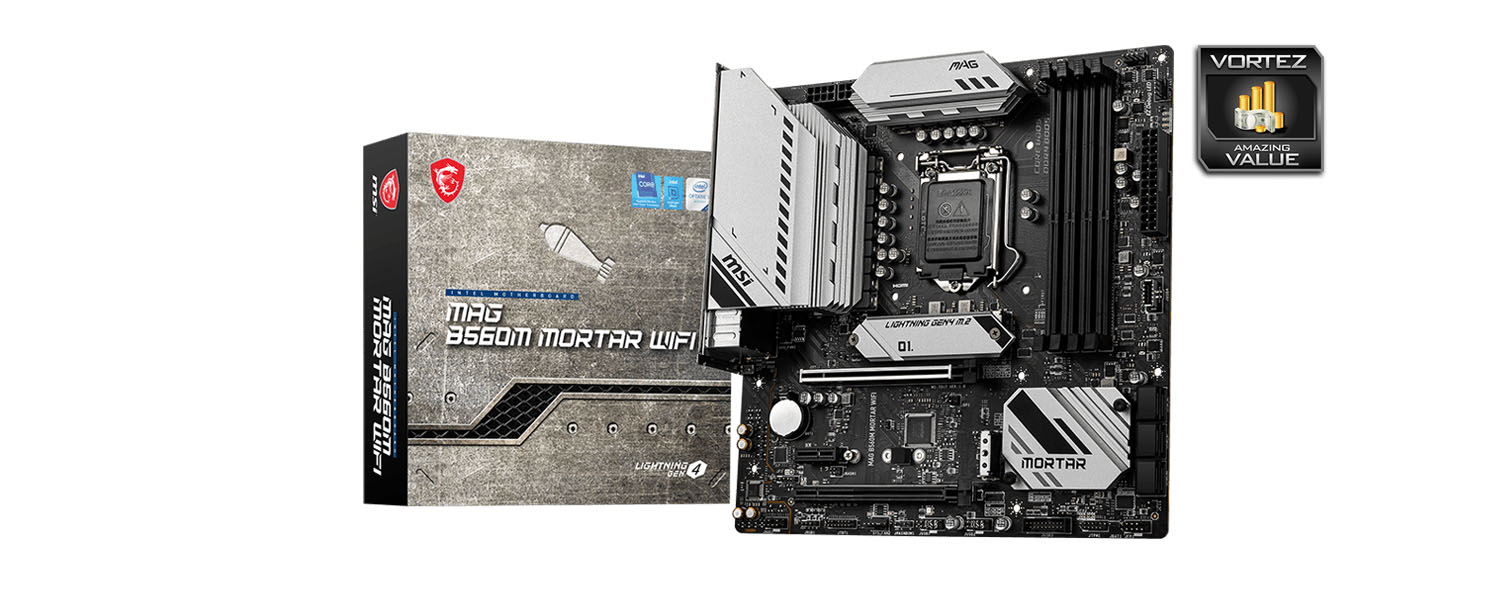
Mortar may use the B560 chipset, but is still kept up with other Z590 motherboards in our benchmark tests and we were particular pleased to see the VRM and chipset thermals were within the realms of acceptable. Furthermore, we were able to ramp up out Intel Core i9-11900K to a 5GHz all-core overclock which is the limit of our CPU, but even so, it highlights how capable this motherboard is.
One of the perks of choosing Mortar is the price-tag which sees it available for: GBP £150| USD $170 | AUD $260. This creates an affordable pathway to Intel’s 11th Gen and it means that the cash saved can be funnelled off towards other components.
If you’re looking to save some cash and have your sights set on a compact build then the MSI MAG B560M Mortar WiFi is a brilliant pick. It performs very well and comes with some good features!
Pros
+ Simple, but eye-catching design
+ Affordable
+ Designed for a compact build
+ Performs very well
+ Provides USB 3.2 Gen2x2
+ Supplies PCIe 4.0 functionality
+ Can overclock very well
Cons
– Just 4 fan headers
– Lack of USB 3.2 Gen 2 ports
– Lacks RGB lighting (if you’re bothered!)
+ Simple, but eye-catching design
+ Affordable
+ Designed for a compact build
+ Performs very well
+ Provides USB 3.2 Gen2x2
+ Supplies PCIe 4.0 functionality
+ Can overclock very well
Cons
– Just 4 fan headers
– Lack of USB 3.2 Gen 2 ports
– Lacks RGB lighting (if you’re bothered!)
Click here for an explanation of our awards at Vortez.net.
Stay connected with Vortez social media pages: