With a strong offering of high-end features, the MSI MEG X570 ACE aims to offer enthusiasts and serious PC gamers the ideal base for their latest AMD Ryzen system. Let’s find out if it’s any good.

Product on Review: MSI MEG X570 ACE
Manufacturer: MSI
Street Price: GBP £349.97 / USD $369.99 / AUS $589.00
MSI are undoubtedly one of the best when it comes to motherboards, particularly at the higher-end where features and build quality matter all the more. That’s exactly where the MSI MEG X570 ACE comes in, with a plethora of features designed for the enthusiast or serious gamer who demands more from their system.
The X570 ACE sports a unique style. There’s a large portion of the board covered by extensive heatsinks adorned by a unique dark grey and copper theme, with a mirrored section for impressive RGB lighting. However, RGB lighting as a whole is kept to a minimum, contrary to many manufacturers at the moment.
Ignoring the fancy styling, down to the nitty gritty. The ACE lands with a trio of PCI-E 4.0 x4 enabled M.2 slots, allowing the installation of rapid storage. There’s also a trio full-length PCI-E x16 slots, and a duo of x1 slots for all your add in cards and multiple GPUs, if you’re into that kind of thing.
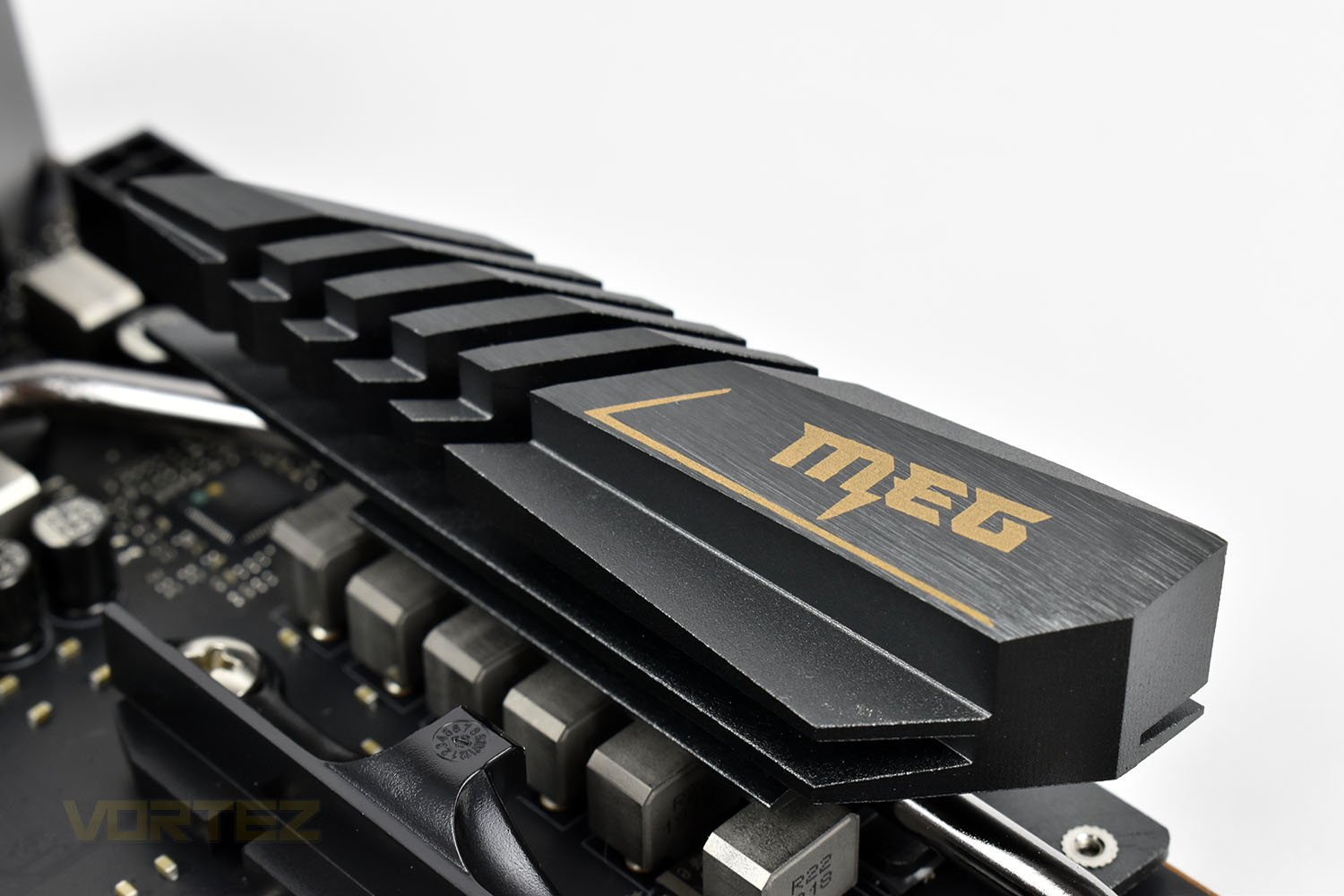
MSI have tailored the board towards DIY system builders who love to route their cables and get the appearance perfect. Keeping headers and connections at the edge of the board and placing them in optimal positions makes all the difference.
Of course, the MEG X570 ACE uses AMD’s latest X570 chipset to fully utilise the new AMD Ryzen processors. Along with that comes the PCI-E 4.0 specification for double the bandwidth of the previous generation, with full backwards compatibility.
Obviously, features like this come at a price, £350/$370/$590 to be exact, putting it right amongst some fierce competition from the likes of GIGABYTE, ASRock and ASUS. Does it do enough to set itself apart?
MSI on the MEG X570 ACE:
Go for the gold with MEG X570 ACE. Win games anywhere with 2.5G gaming LAN and WIFI AX, set records with the Frozr Heatsink Design, and outshine the competition with Mystic Light Infinity. When the stakes are high, winning is everything.
Technical Specifications
PROCESSOR
Supports 2nd and 3rd Gen AMD Ryzen™ / Ryzen™ with Radeon™ Vega Graphics and 2nd Gen AMD Ryzen™ with Radeon™ Graphics Desktop Processors for Socket AM4
See supported processors
CHIPSET
AMD® X570 Chipset
MEMORY
4x DDR4 memory slots, support up to 128GB
3rd Gen AMD Ryzen™ Processors support DDR4 1866/ 2133/ 2400/ 2667/ 2800/ 2933/ 3000/ 3066/ 3200 Mhz by JEDEC, and 2667/ 2800 /2933 /3000 /3066 /3200 /3466 /3600/ 3733 /3866 /4000 /4133 /4266 /4400 /4533 /4600 Mhz by A-XMP OC MODE
2nd Gen AMD Ryzen™ Processors, 1st and 2nd Gen AMD Ryzen™ with Radeon™ Vega Graphics Processors support DDR4 1866/ 2133/ 2400/ 2667/ 2800/ 2933/ 3000/ 3066/ 3200 Mhz by JEDEC, and 2667 /2800 / 2933 /3000 /3066 /3200 /3466 /3600 Mhz by A-XMP OC MODE
Dual channel memory architecture
Supports non-ECC UDIMM memory
Supports ECC UDIMM memory (non-ECC mode)
Supports un-buffered memory
Please refer www.msi.com for more information on compatible memory.
See supported memory
EXPANSION SLOTS
2x PCIe 4.0/ 3.0 x16 slots (PCI_E1, PCI_E3)
3rd Gen AMD Ryzen™ support PCIe 4.0 x16/x0, x8/x8 modes
2nd Gen AMD Ryzen™ support PCIe 3.0 x16/x0, x8/x8 modes
Ryzen™ with Radeon™ Vega Graphics and 2nd Gen AMD Ryzen™ with Radeon™ Graphics support PCIe 3.0 x8 mode1
1x PCIe 4.0/ 3.0 x16 slot (PCI_E5, supports x4 mode)
2x PCIe 4.0/ 3.0 x1 slots2
PCI_E3 slot is only available for 2nd and 3rd Gen AMD Ryzen™ processors.The PCIe x1 slots can not be used simultaneously. PCI_E2 will be unavailable when installing the PCIe card in PCI_E4 slot.The speeds may vary for different devices
MULTI-GPU
Supports 2-Way NVIDIA® SLI™ Technology
Supports 3-Way AMD® CrossFire™ Technology
STORAGE
AMD® X570 Chipset
4x SATA 6Gb/s ports
2x M.2 slots (M2_2/ M2_3, Key M)1
Support PCIe 4.0/ 3.0 x4 and SATA 6Gb/s
Support 2242/ 2260 /2280 storage devices
AMD® Processor
1x M.2 slot (M2_1, Key M)1
Supports PCIe 4.0 x4 (3rd Gen AMD Ryzen™)
Supports PCIe 3.0 x4 (2nd Gen AMD Ryzen™/ Ryzen™ with Radeon™ Vega Graphics and 2nd Gen AMD Ryzen™ with Radeon™ Graphics)
Supports 2242/ 2260 /2280/ 22110 storage devices
The speeds may vary for different devices
RAID
AMD® X570 Chipset
Supports RAID 0, RAID 1 and RAID 10
USB
AMD® X570 Chipset
3x USB 3.2 Gen2 (SuperSpeed USB 10Gbps) ports (2 Type-A ports on the back panel, 1 Type-C internal connector)
4x USB 3.2 Gen1 (SuperSpeed USB) ports through the internal USB 3.2 Gen1 connectors
6x USB 2.0 (High-speed USB) ports (2 Type-A ports on the back panel, 4 ports through the internal USB 2.0 connectors)
AMD® Processor
2x USB 3.2 Gen2 (3rd Gen AMD Ryzen™) or USB 3.2 Gen1 (2nd Gen AMD Ryzen™/ Ryzen™ with Radeon™ Vega Graphics and 2nd Gen AMD Ryzen™ with Radeon™ Graphics) ports (1x Type-A & 1x Type-C) on the back panel
2x USB 3.2 Gen1 (SuperSpeed USB) Type-A ports on the back panel
AUDIO
Realtek® ALC1220 Codec
7.1-Channel High Definition Audio
Supports Optical S/PDIF output
LAN
1x Intel® WGI211AT Gigabit LAN controller
1x Realtek® RTL8125 2.5 Gbps LAN controller
WIFI & BLUETOOTH
Intel® Wi-Fi 6 AX200
Supports 802.11 a/b/g/n/ac/ax, MU-MINO Rx, 2.4GHz-5GHz (160MHz) up to 2.4Gbps
Supports Bluetooth® 5
The Wireless module is pre-install in the M2_4 (Key-E) slot
INTERNAL CONNECTORS
1x 24-pin ATX main power connector
2x 8-pin ATX 12V power connectors
4x SATA 6Gb/s connectors
2x USB 2.0 connectors (support additional 4 USB 2.0 ports)
2x USB 3.2 Gen 1 connectors (support additional 4 USB 3.2 Gen 1 ports)
1x USB 3.2 Gen 2 Type-C Port
1x 4-pin CPU fan connector
5x 4-pin system fan connectors
1x 4-pin water-pump connector
1x Front panel audio connector
2x System panel connectors
1x TPM module connector
1x Clear CMOS jumper
1x Chassis Intrusion connector
1x Power button
1x Reset button
1x Game Boost knob
1x 4-pin RGB LED connector
2x 3-pin RAINBOW LED connectors
1x 3-pin CORSAIR connector
1x 2-pin LED power input
1x Debug Code LED
4x EZ Debug LEDs
BACK PANEL PORTS
Clear CMOS Button
Wi-Fi /Bluetooth Antenna Connectors
PS/2 GAMING Device Port
REALTEK 2.5G + Intel Gigabit LAN
HD Audio Connectors
Flash BIOS Button
USB 2.0 Ports
USB 3.2 Gen1 Ports
USB 3.2 Gen2 Ports Type A+C
USB 3.2 Gen2 Ports
MEG X570 ACE
DIMENSIONS
12 in. x 9.6 in. (30.5 cm x 24.4 cm)
ATX Form Factor
MOUNTING
9 mounting holes
OPERATING SYSTEM
Support for Windows® 10 64-bit
Supports 2nd and 3rd Gen AMD Ryzen™ / Ryzen™ with Radeon™ Vega Graphics and 2nd Gen AMD Ryzen™ with Radeon™ Graphics Desktop Processors for Socket AM4
See supported processors
CHIPSET
AMD® X570 Chipset
MEMORY
4x DDR4 memory slots, support up to 128GB
3rd Gen AMD Ryzen™ Processors support DDR4 1866/ 2133/ 2400/ 2667/ 2800/ 2933/ 3000/ 3066/ 3200 Mhz by JEDEC, and 2667/ 2800 /2933 /3000 /3066 /3200 /3466 /3600/ 3733 /3866 /4000 /4133 /4266 /4400 /4533 /4600 Mhz by A-XMP OC MODE
2nd Gen AMD Ryzen™ Processors, 1st and 2nd Gen AMD Ryzen™ with Radeon™ Vega Graphics Processors support DDR4 1866/ 2133/ 2400/ 2667/ 2800/ 2933/ 3000/ 3066/ 3200 Mhz by JEDEC, and 2667 /2800 / 2933 /3000 /3066 /3200 /3466 /3600 Mhz by A-XMP OC MODE
Dual channel memory architecture
Supports non-ECC UDIMM memory
Supports ECC UDIMM memory (non-ECC mode)
Supports un-buffered memory
Please refer www.msi.com for more information on compatible memory.
See supported memory
EXPANSION SLOTS
2x PCIe 4.0/ 3.0 x16 slots (PCI_E1, PCI_E3)
3rd Gen AMD Ryzen™ support PCIe 4.0 x16/x0, x8/x8 modes
2nd Gen AMD Ryzen™ support PCIe 3.0 x16/x0, x8/x8 modes
Ryzen™ with Radeon™ Vega Graphics and 2nd Gen AMD Ryzen™ with Radeon™ Graphics support PCIe 3.0 x8 mode1
1x PCIe 4.0/ 3.0 x16 slot (PCI_E5, supports x4 mode)
2x PCIe 4.0/ 3.0 x1 slots2
PCI_E3 slot is only available for 2nd and 3rd Gen AMD Ryzen™ processors.The PCIe x1 slots can not be used simultaneously. PCI_E2 will be unavailable when installing the PCIe card in PCI_E4 slot.The speeds may vary for different devices
MULTI-GPU
Supports 2-Way NVIDIA® SLI™ Technology
Supports 3-Way AMD® CrossFire™ Technology
STORAGE
AMD® X570 Chipset
4x SATA 6Gb/s ports
2x M.2 slots (M2_2/ M2_3, Key M)1
Support PCIe 4.0/ 3.0 x4 and SATA 6Gb/s
Support 2242/ 2260 /2280 storage devices
AMD® Processor
1x M.2 slot (M2_1, Key M)1
Supports PCIe 4.0 x4 (3rd Gen AMD Ryzen™)
Supports PCIe 3.0 x4 (2nd Gen AMD Ryzen™/ Ryzen™ with Radeon™ Vega Graphics and 2nd Gen AMD Ryzen™ with Radeon™ Graphics)
Supports 2242/ 2260 /2280/ 22110 storage devices
The speeds may vary for different devices
RAID
AMD® X570 Chipset
Supports RAID 0, RAID 1 and RAID 10
USB
AMD® X570 Chipset
3x USB 3.2 Gen2 (SuperSpeed USB 10Gbps) ports (2 Type-A ports on the back panel, 1 Type-C internal connector)
4x USB 3.2 Gen1 (SuperSpeed USB) ports through the internal USB 3.2 Gen1 connectors
6x USB 2.0 (High-speed USB) ports (2 Type-A ports on the back panel, 4 ports through the internal USB 2.0 connectors)
AMD® Processor
2x USB 3.2 Gen2 (3rd Gen AMD Ryzen™) or USB 3.2 Gen1 (2nd Gen AMD Ryzen™/ Ryzen™ with Radeon™ Vega Graphics and 2nd Gen AMD Ryzen™ with Radeon™ Graphics) ports (1x Type-A & 1x Type-C) on the back panel
2x USB 3.2 Gen1 (SuperSpeed USB) Type-A ports on the back panel
AUDIO
Realtek® ALC1220 Codec
7.1-Channel High Definition Audio
Supports Optical S/PDIF output
LAN
1x Intel® WGI211AT Gigabit LAN controller
1x Realtek® RTL8125 2.5 Gbps LAN controller
WIFI & BLUETOOTH
Intel® Wi-Fi 6 AX200
Supports 802.11 a/b/g/n/ac/ax, MU-MINO Rx, 2.4GHz-5GHz (160MHz) up to 2.4Gbps
Supports Bluetooth® 5
The Wireless module is pre-install in the M2_4 (Key-E) slot
INTERNAL CONNECTORS
1x 24-pin ATX main power connector
2x 8-pin ATX 12V power connectors
4x SATA 6Gb/s connectors
2x USB 2.0 connectors (support additional 4 USB 2.0 ports)
2x USB 3.2 Gen 1 connectors (support additional 4 USB 3.2 Gen 1 ports)
1x USB 3.2 Gen 2 Type-C Port
1x 4-pin CPU fan connector
5x 4-pin system fan connectors
1x 4-pin water-pump connector
1x Front panel audio connector
2x System panel connectors
1x TPM module connector
1x Clear CMOS jumper
1x Chassis Intrusion connector
1x Power button
1x Reset button
1x Game Boost knob
1x 4-pin RGB LED connector
2x 3-pin RAINBOW LED connectors
1x 3-pin CORSAIR connector
1x 2-pin LED power input
1x Debug Code LED
4x EZ Debug LEDs
BACK PANEL PORTS
Clear CMOS Button
Wi-Fi /Bluetooth Antenna Connectors
PS/2 GAMING Device Port
REALTEK 2.5G + Intel Gigabit LAN
HD Audio Connectors
Flash BIOS Button
USB 2.0 Ports
USB 3.2 Gen1 Ports
USB 3.2 Gen2 Ports Type A+C
USB 3.2 Gen2 Ports
MEG X570 ACE
DIMENSIONS
12 in. x 9.6 in. (30.5 cm x 24.4 cm)
ATX Form Factor
MOUNTING
9 mounting holes
OPERATING SYSTEM
Support for Windows® 10 64-bit
Packaging & Bundle
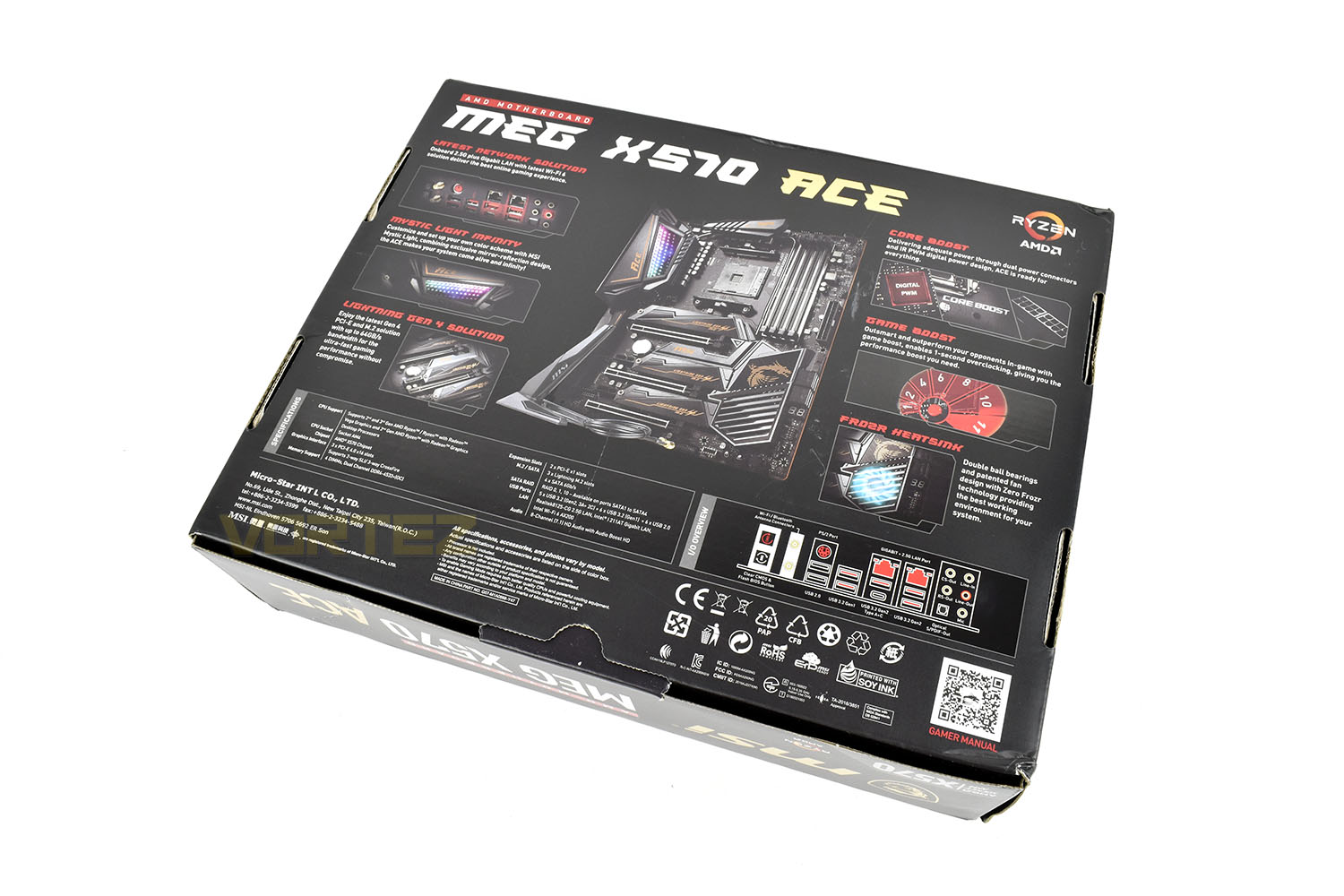
Making obvious the chipset, there’s a massive X570 Socket AM4 logo in the bottom-right with a full length image of the motherboard. Specifics are saved for the opposite side.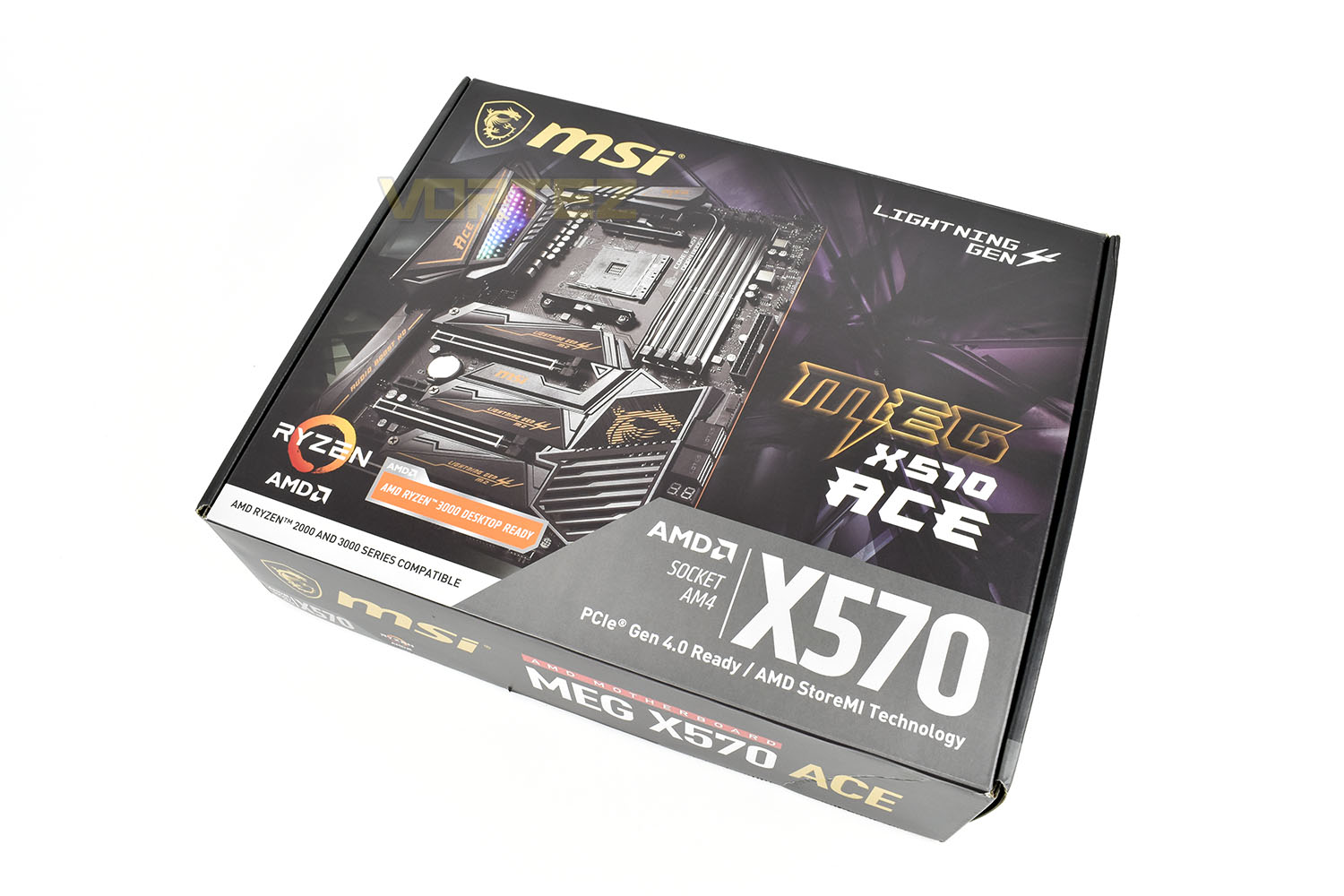
The reverse side lists all of the connections and specifications adopted by the board as well as showing several annotated illustrations regarding the key features that you can expect.
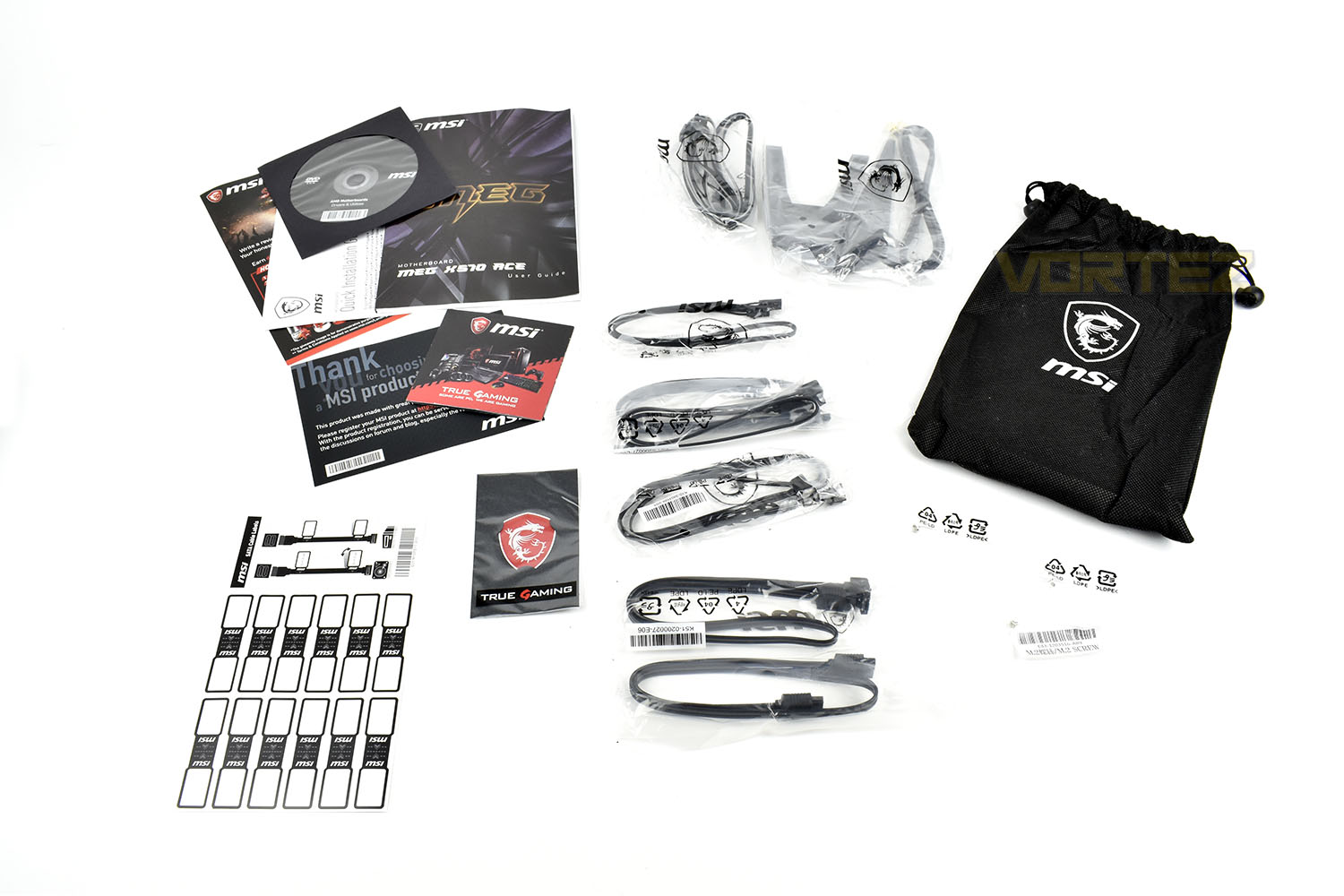
Bundled with the X570 ACE is a bunch of manuals and literature, an installation CD (does anyone still use these?), four SATA cables, an MSI case badge, RGB extension cables, a WiFi antenna and some M.2 mounting screws. There’s also a small drawstring bag that handily keeps all of the extras in one neat package.
Closer Look
As a general overview of the MEG X570 ACE, the board doesn’t look all that much different from offerings from other manufacturers, but we’ll delve a little deeper and highlight some of the smaller features that add up to make a difference. MSI have worked their way from the bottom, starting with a server-grade PCB which meets the increased demands of the new PCI-E 4.0 specification.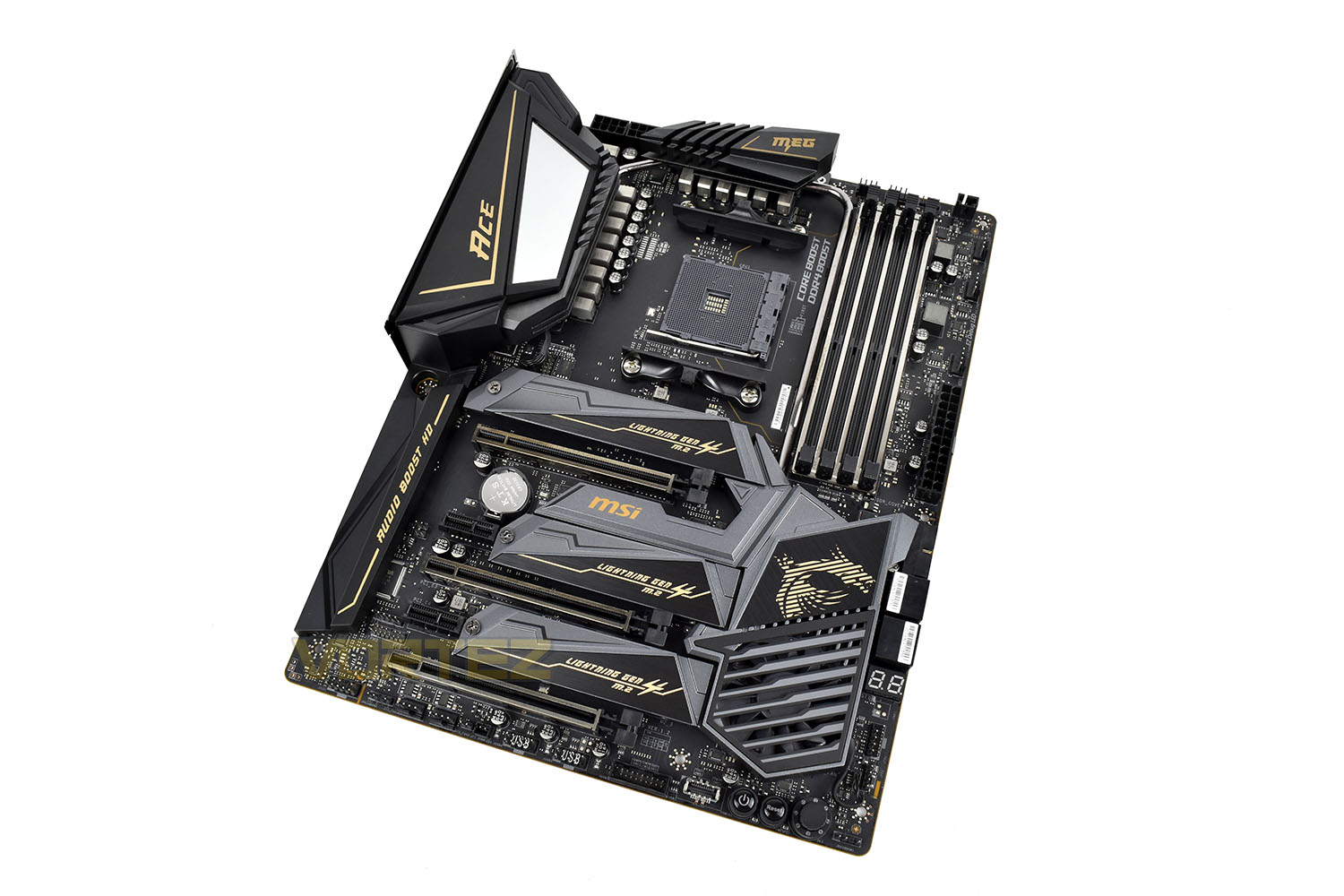
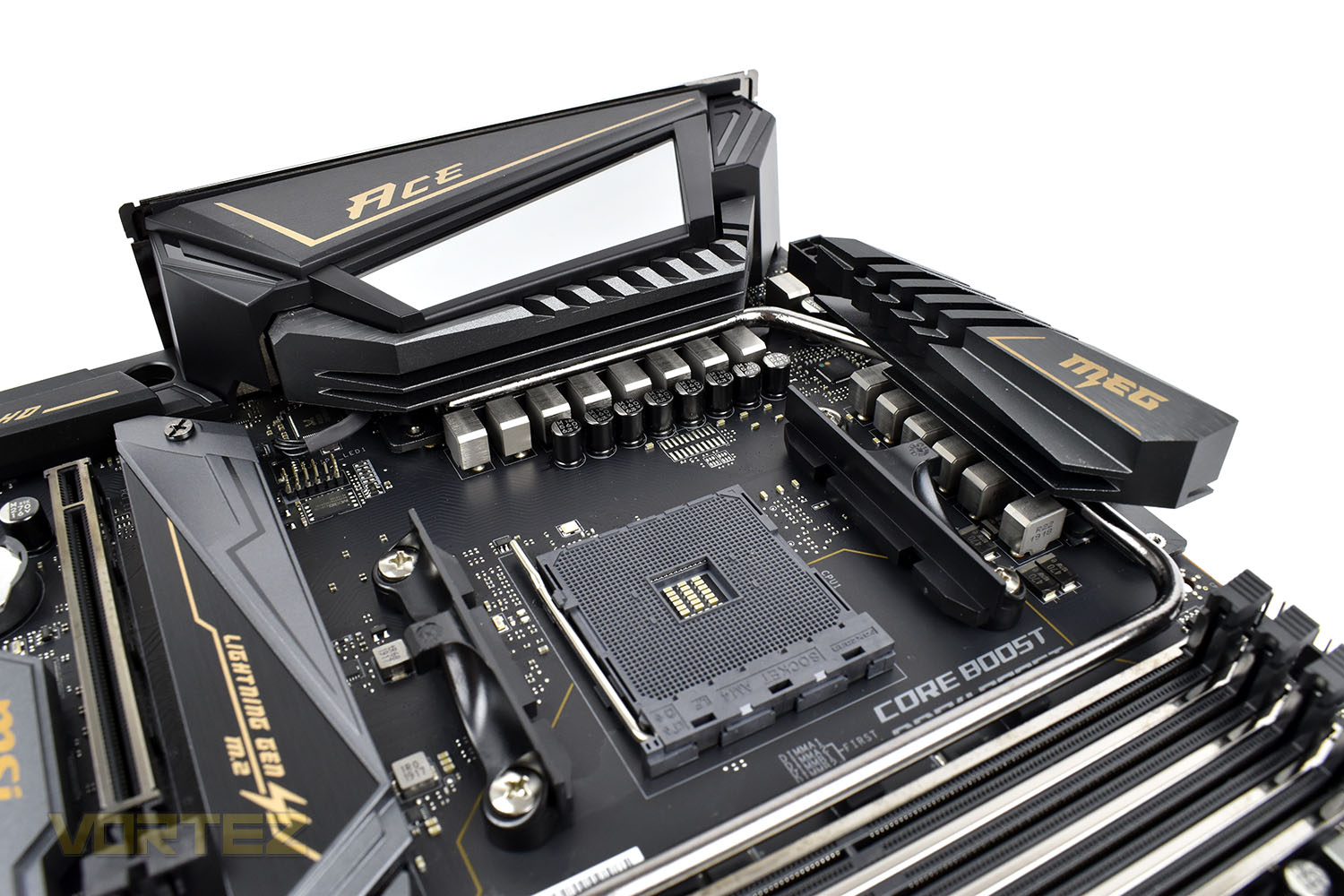
Firstly focussing onto the CPU socket and associated power delivery, MSI have employed an IR Digital PWM with DrMOS and Titanium power chokes for enhanced system stability no matter what you throw at it.
Power is delivered by a pair of 8-pin CPU connections tucked away behind the VRM heatsinks.
A heatpipe runs around the CPU socket to help distribute heat between both heatsinks for better thermal efficiency.
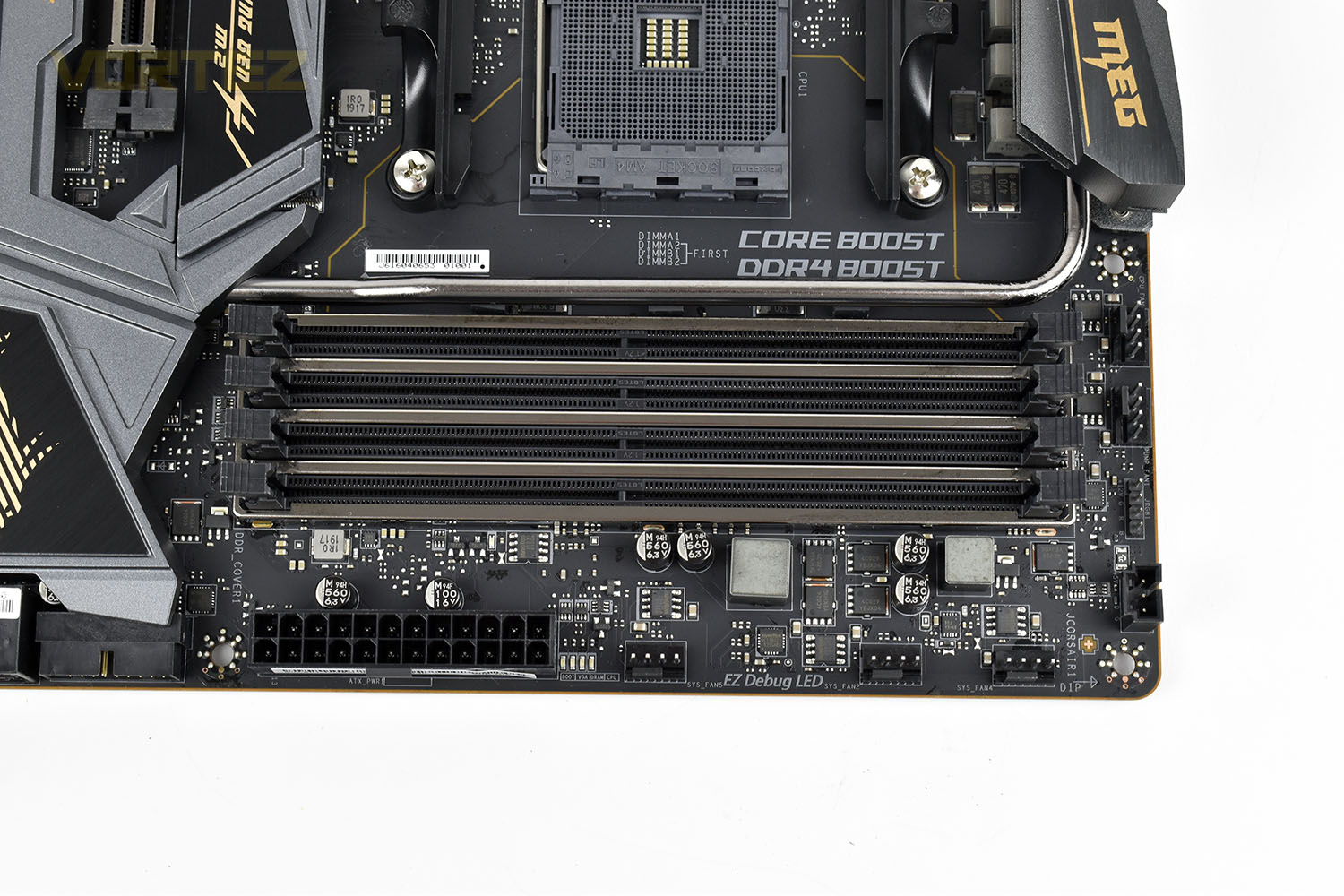
Moving onto the DIMM slots, these feature steel armour to prevent interference for better memory performance, while also featuring MSI’s DDR4 BOOST which uses optimised memory circuit design for better overclocking and system stability. MSI have also endeavoured to work in partnership with major memory manufacturers to ensure full compatibility. Up to DDR4 4600MHz and 128GB is supported.
Also located around the edge of this section is a multitude of 4-pin PWM fan headers, a couple of RGB connections and the 24-pin motherboard power.
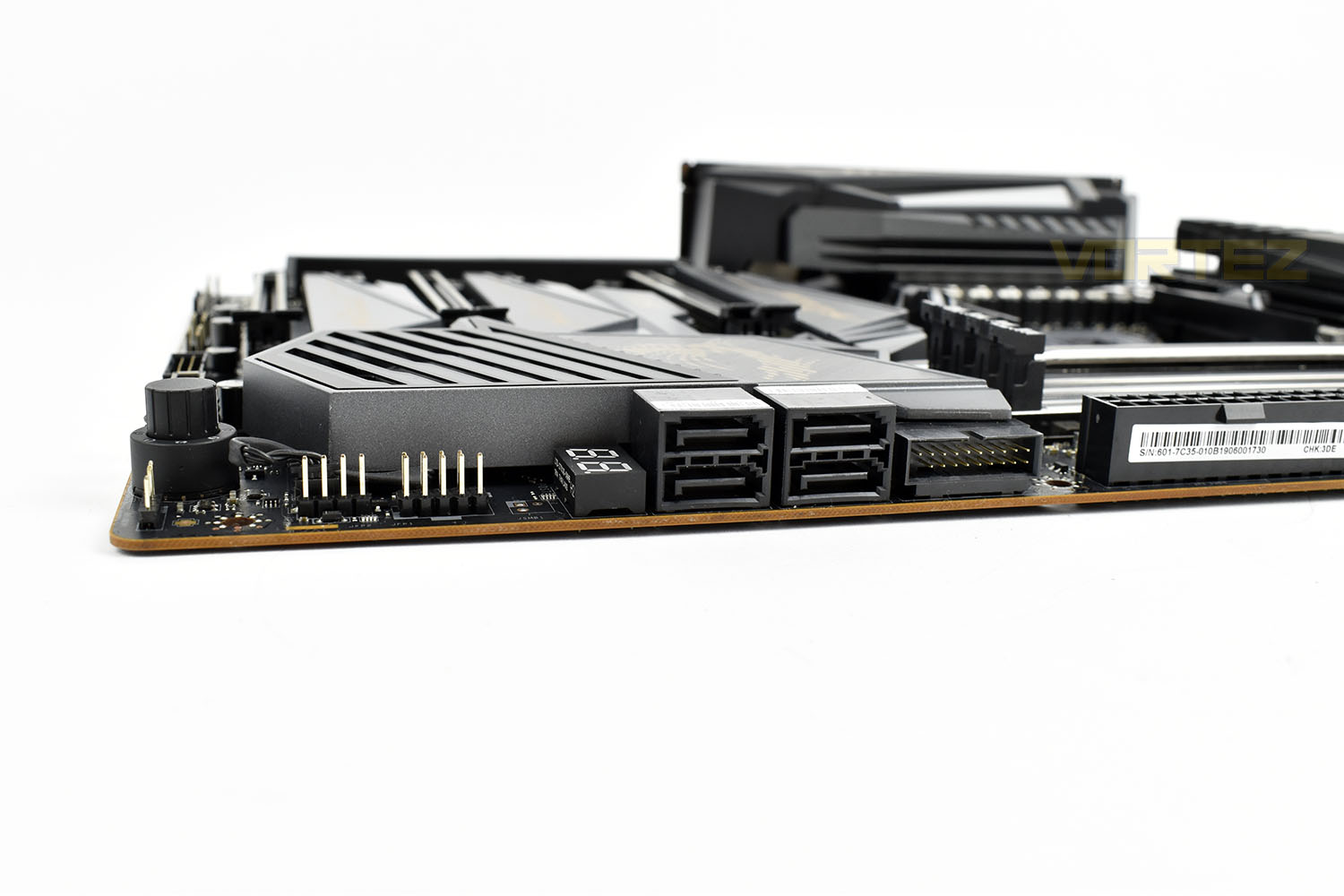
Something that’s very unusual for a high-end motherboard, we only see four SATA 3.0 ports, instead of the usual six or eight. Alongside the SATA ports is a right-angled front USB 3.0 header.
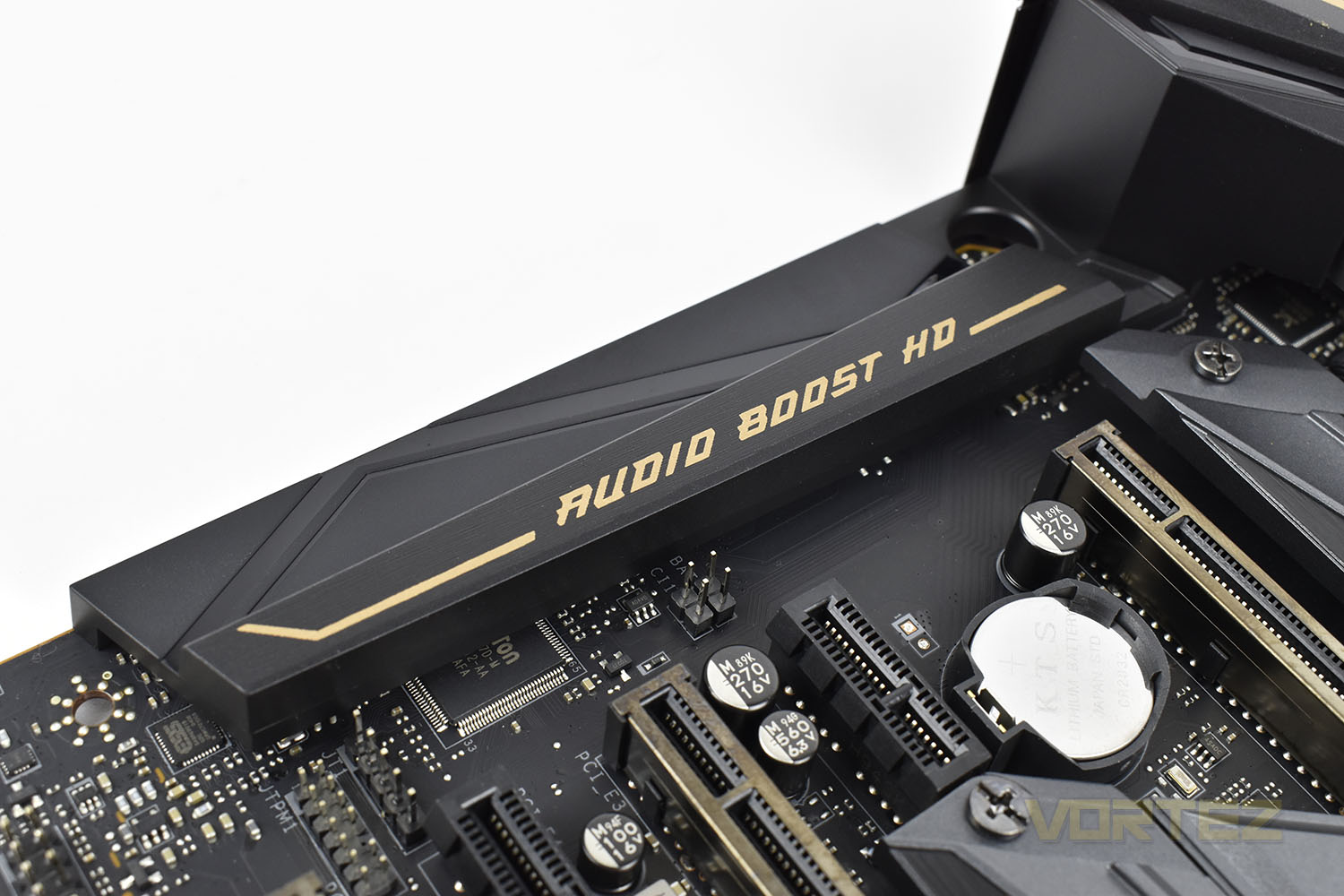
Tucked away under the metal shielding is MSIs Audio Boost HD. This has been isolated from the rest of the motherboard and features individual right and left channel circuitry for further improvements. The built in Audio Boost 4 chipset can automatically detect the impedance of your headset and make the relevant adjustments to improve sound quality.
Closer Look (Continued)
Shifting down to the bottom half of the motherboard, this is clearly dominated by a large array of heatsinks. There’s three individually removable NVMe heatsinks which interlock with the cooling arrangement around the FCH (southbridge). The heatsink that wraps around the CPU’s VRM cooling also makes it way down to the FCH, where the heat can be more effectively removed by active cooling provided the 50mm fan.All three NVMe slots are capable of supporting PCI-E 3.0 and the newest 4.0 SSDs, as well as SATA-based M.2 drives.
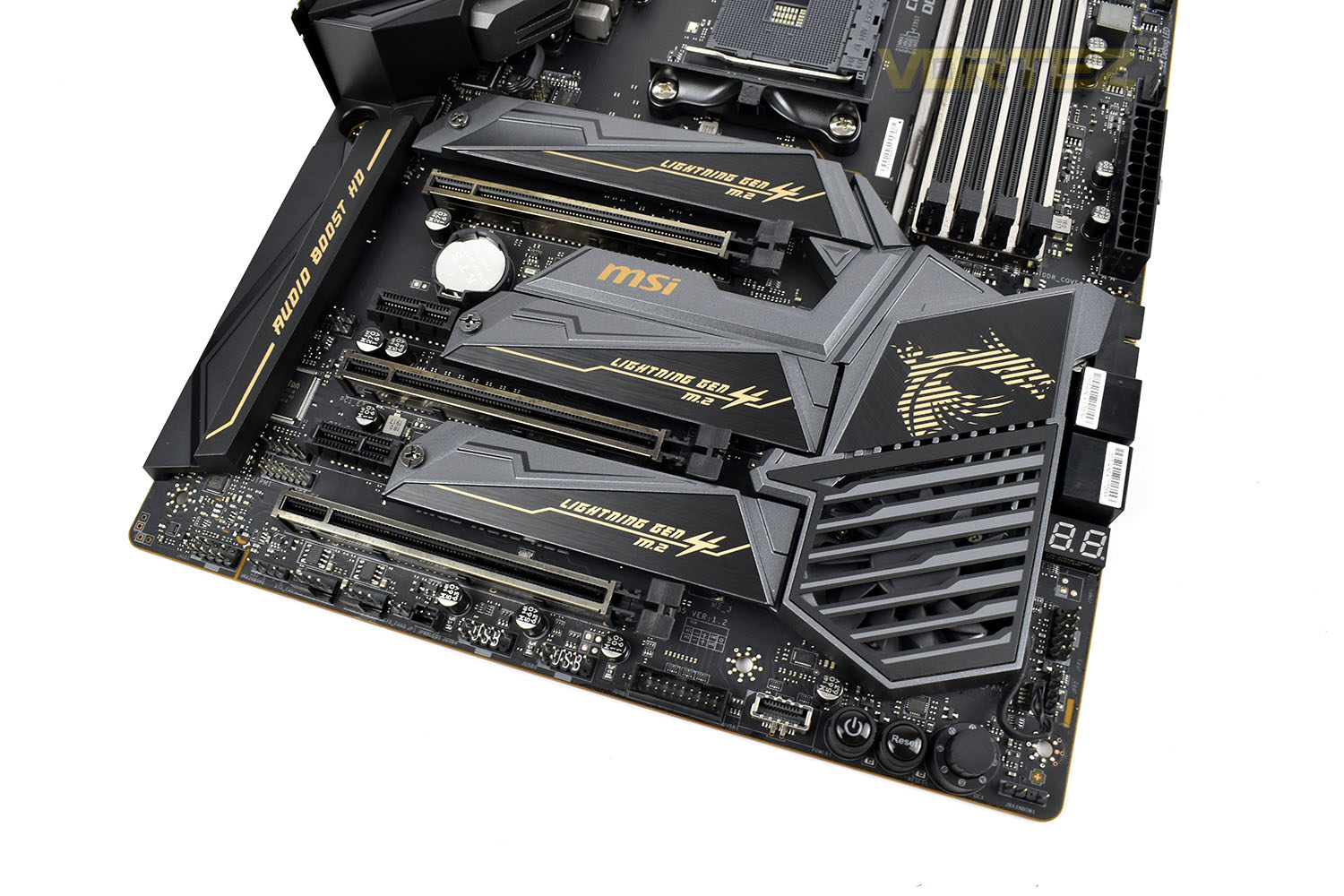
Removing the heatsinks, we get a clearly look at the layout of the connections available. There’s three PCI-E x16 4.0 slots and two x1 4.0 slots.
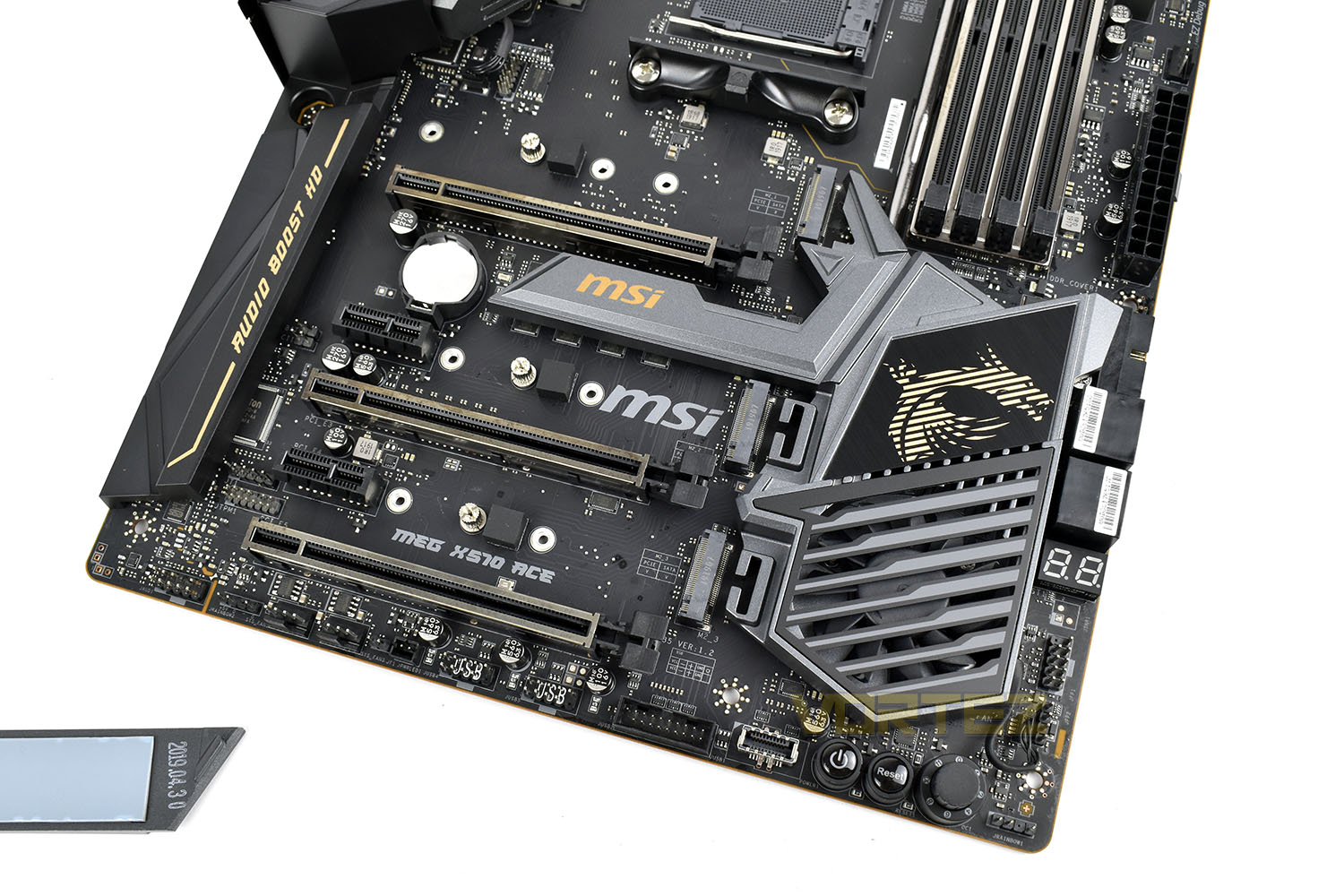
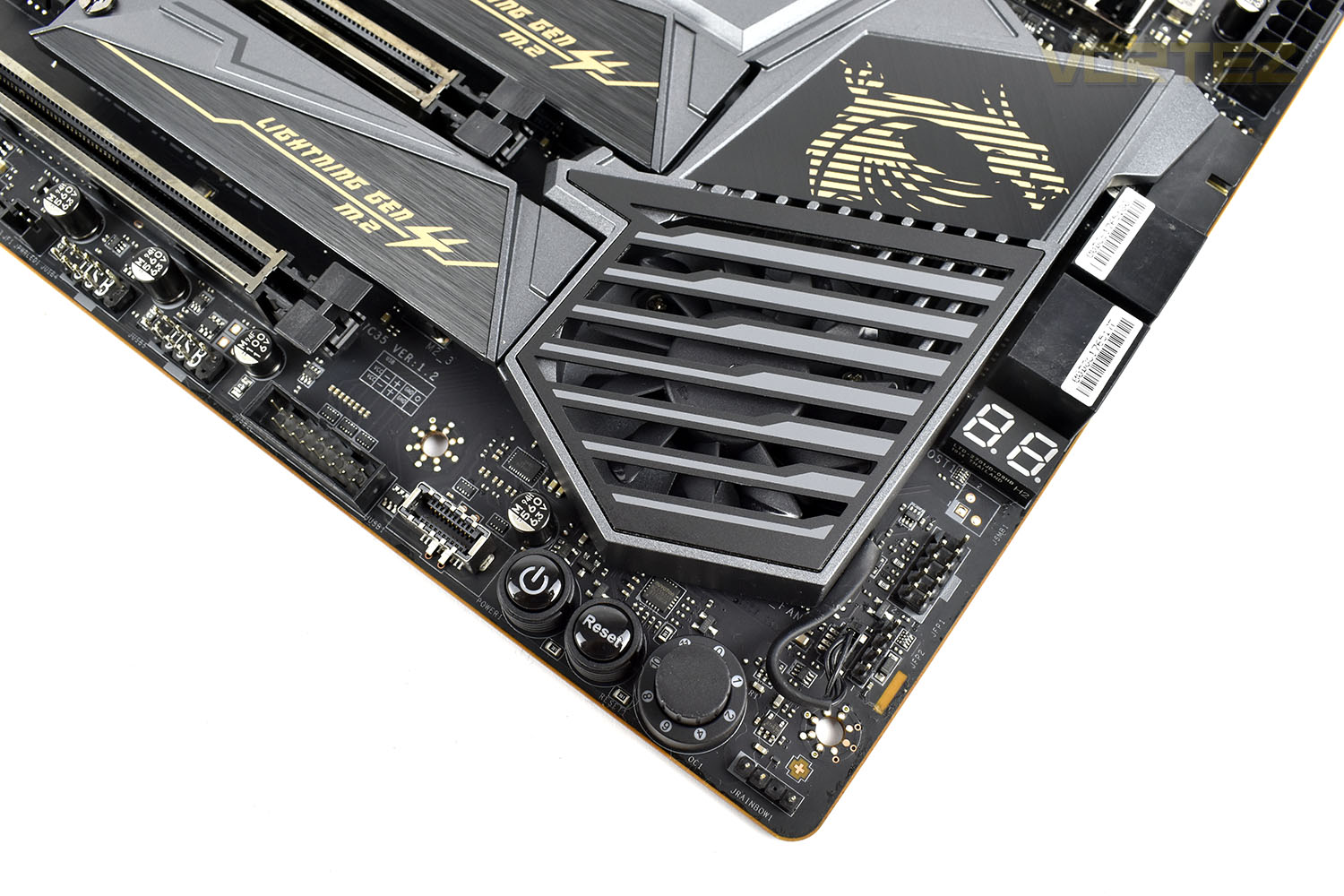
Something that MSI like to implement on their most performance-focussed motherboards is an overclocking dial, where MSI find known good values for specific processors and allow you to turn the dial up to 11 for an automatically applied overclock. Some ‘Silicon Lottery’ might be required here but it’s still a cool feature to have. The reference to This Is Spinal Tap with the dial going to 11 is a nice touch, also.
Slightly further up the board, along the right edge is a seven-segment display for BIOS fault codes, should you ever run into any trouble.
Moving the other way, there’s power and reset buttons, a USB 3.2 Gen. 1 header and a USB 3.0 front header.
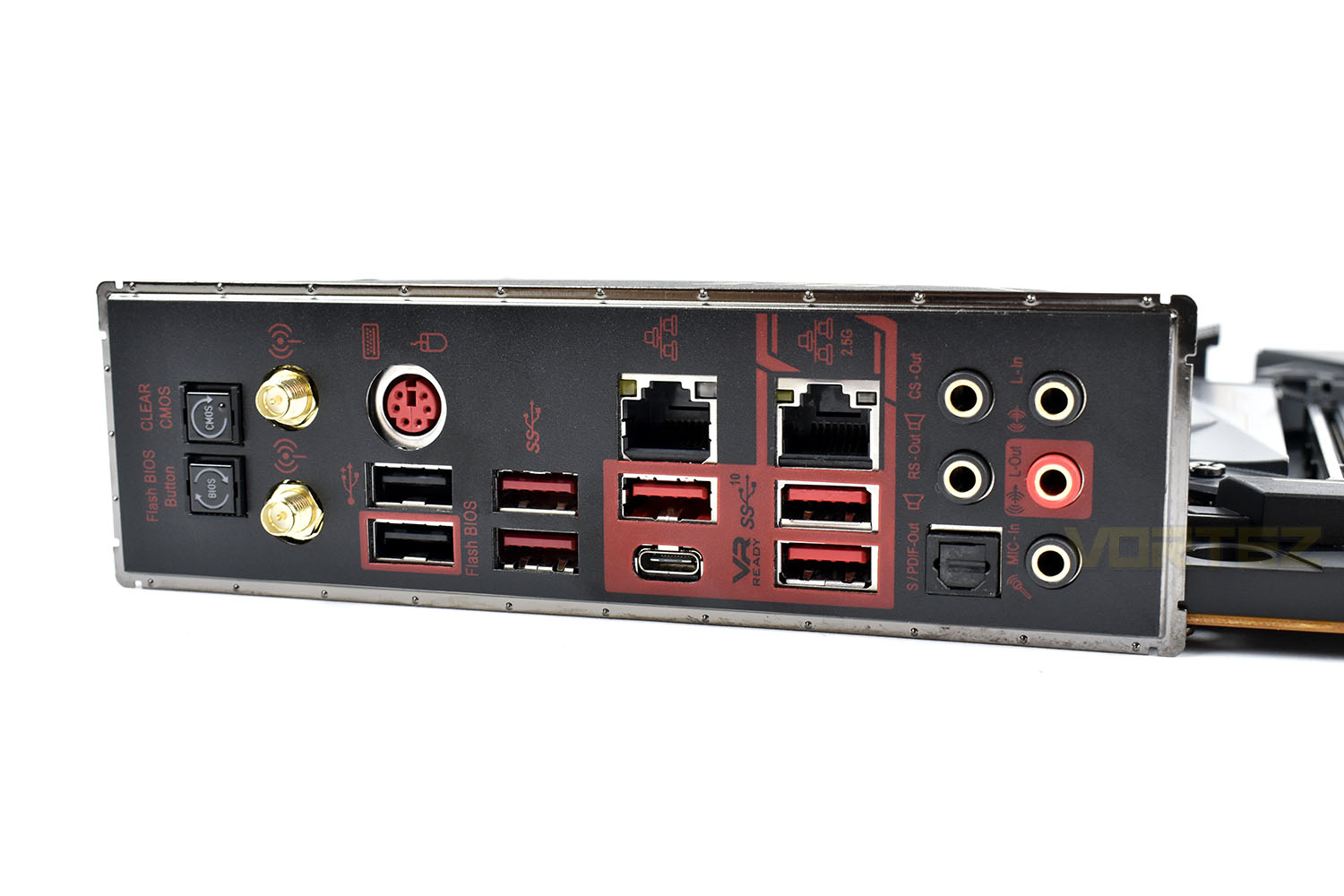
Last, but certainly not least, is the rear I/O. This section comes pre-applied for a better fit and to make installing the board just that little bit easier. We get the following:
BIOS Flash
Clear CMOS Button
Wi-Fi /Bluetooth Antenna Connectors
PS/2 GAMING Device Port
REALTEK 2.5G + Intel Gigabit LAN
HD Audio Connectors
Flash BIOS Button
2x USB 2.0 Ports
2x USB 3.2 Gen1 Ports
3x USB 3.2 Gen2 Ports Type A
1x USB 3.2 Gen2 Ports Type C
BIOS
MSI’s Click BIOS 5 has been in use over multiple chipsets, both on AMD and Intel, and has become very familiar to use as a result. The red and black theme sits well with MSI’s overall brand.Starting off with the ‘Easy Mode’, MSI have placed the most used features here, as well as a digital version of the Game Boost dial. Here you can turn on XMP and leave, which a lot of people will do, or you can hit F7 and delve a little deeper.
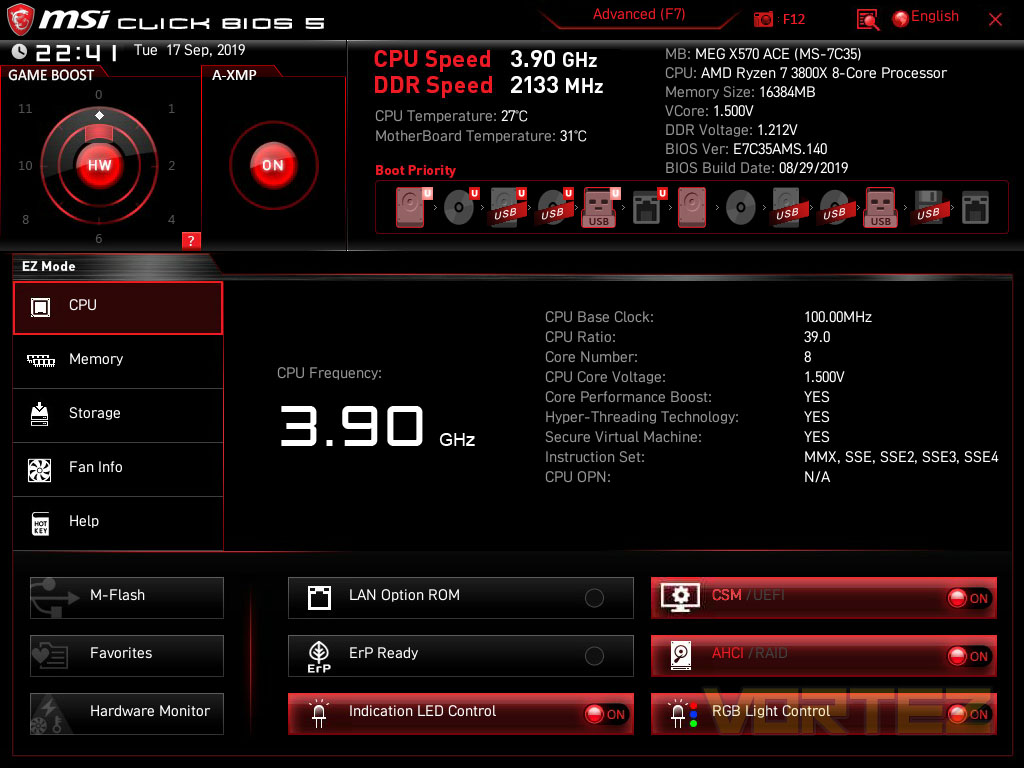
Within the Advanced Settings, there’s a few different options, all of which are clearly labelled and easy to navigate to. The top-right section is always used to display system specific details at a glance.
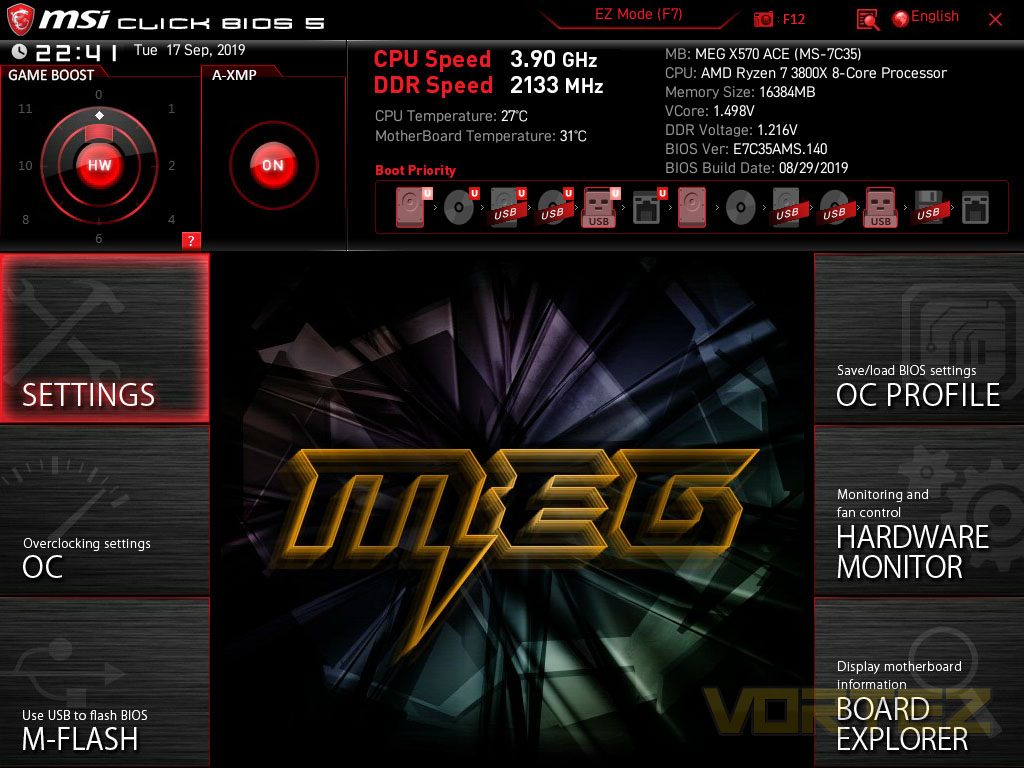
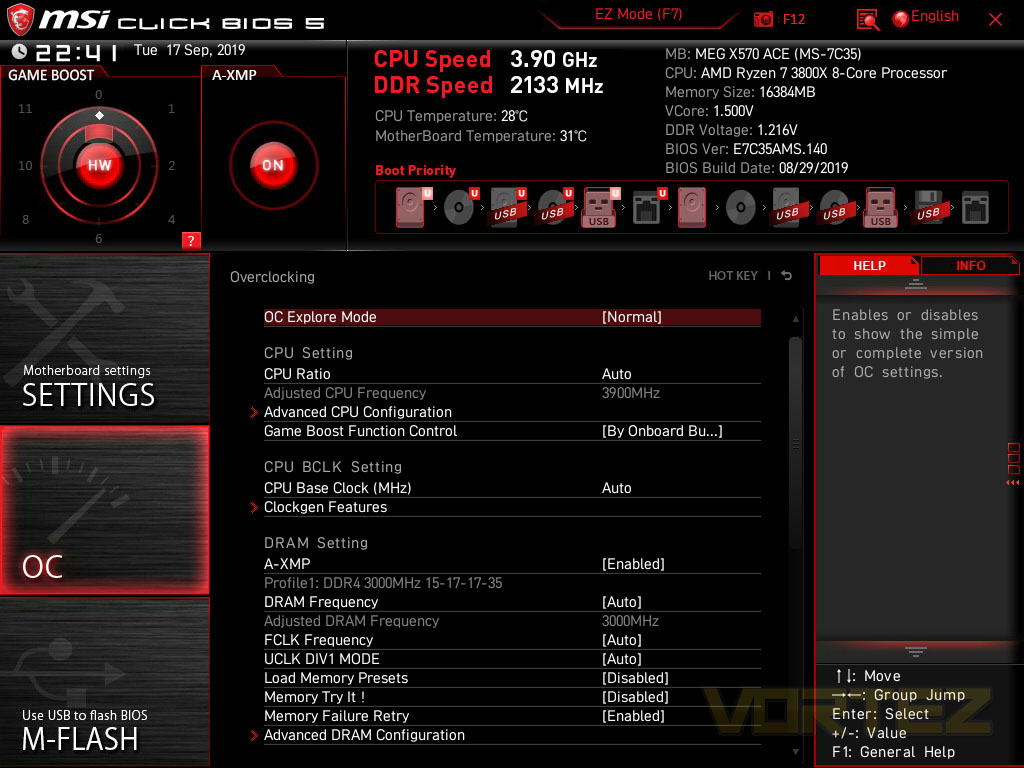
Dropping into the overclocking settings, this can go as deep as you fancy, the options are extensive and far-reaching. There’s more than enough to keep overclockers happy, but with the coming about of AMD’s Ryzen Master, we find the BIOS less useful these days.
Test Setup & Software
BIOS Version Tested: 7C35v14 – 30/08/2019Test Setup
CPU AMD Ryzen 7 3800X
Cooling Corsair H150i Pro RGB – Balanced Profile
Motherboard
Memory 16GB Corsair Vengeance LPX 3200MHz @ 3000MHz @ 15-17-17-38-58
Graphics AMD Radeon RX 480 8GB
Storage Corsair Force LE 480GB
PSU Corsair RM750X 80 Plus Gold Certified PSU
Cooling Corsair H150i Pro RGB – Balanced Profile
Motherboard
Memory 16GB Corsair Vengeance LPX 3200MHz @ 3000MHz @ 15-17-17-38-58
Graphics AMD Radeon RX 480 8GB
Storage Corsair Force LE 480GB
PSU Corsair RM750X 80 Plus Gold Certified PSU
Benchmarks
Cinebench R20 – CPU Score
SiSoftware SANDRA – CPU & Memory benchmarks
POV-RAY – CPU benchmarks
TrueCrypt – CPU benchmarks
AIDA64 – CPU benchmarks & Memory
PCMark 8 Photoshop
PC” onclick=”window.open(this.href);return false;”>https://benchmarks.ul.com/pcmark10]PC Mark 10 Extended Test
3DMark – FireStrike Extreme & TimeSpy
Games – Rise of the Tomb Raider & Total War: WARHAMMER
SiSoftware SANDRA – CPU & Memory benchmarks
POV-RAY – CPU benchmarks
TrueCrypt – CPU benchmarks
AIDA64 – CPU benchmarks & Memory
PCMark 8 Photoshop
PC” onclick=”window.open(this.href);return false;”>https://benchmarks.ul.com/pcmark10]PC Mark 10 Extended Test
3DMark – FireStrike Extreme & TimeSpy
Games – Rise of the Tomb Raider & Total War: WARHAMMER
Other Software
Temperature Analysis: Aida64 & Ryzen Master
Stress Testing Software: AIDA64 Stability Test
CPU Specification Monitoring: CPU-Z
Performance Monitoring: MSI Afterburner
Stress Testing Software: AIDA64 Stability Test
CPU Specification Monitoring: CPU-Z
Performance Monitoring: MSI Afterburner
Benchmarks: Power Consumption
It’s interesting to note the power consumption across all motherboards. Although they are using the X570 chipset, energy results can fluctuate between manufacturers due to the features and specifications that are integrated. First of all, for the idle tests the system is cold booted into Windows and no additional applications are executed – the watts are noted on the external energy monitor we use and then the system is loaded with 3DMark FireStrike – watts are again monitored for the duration of the test and the highest rated wattage result is then noted down. Below are the results of this energy test.
Ray Tracing Performance – POV-Ray 3.7
Persistence of Vision Raytracer’s PovRay is a free and open source 3D animator application with versions for computers with different operating systems.
This product allows users to build their custom 3D worlds with excellent quality despite their computer’s hardware. It has adjustable options for levels of radiance, refraction, and reflection. Calculation time may vary depending on the computer model, but PovRay can adapt to many computer builds, and is supported by the open source community.
This product allows users to build their custom 3D worlds with excellent quality despite their computer’s hardware. It has adjustable options for levels of radiance, refraction, and reflection. Calculation time may vary depending on the computer model, but PovRay can adapt to many computer builds, and is supported by the open source community.
AES Encryption Performance – TrueCrypt 7.1a
TrueCrypt is a discontinued source-available freeware utility used for on-the-fly encryption (OTFE). It can create a virtual encrypted disk within a file or encrypt a partition or (under Microsoft Windows except Windows 8 with GPT) the entire storage device (pre-boot authentication).
Processing Features Performance – AIDA64
AIDA64 Product PageThis simple integer benchmark focuses on the branch prediction capabilities and the misprediction penalties of the CPU. It finds the solutions for the classic “Queens problem” on a 10 by 10 sized chessboard. At the same clock speed theoretically the processor with the shorter pipeline and smaller misprediction penalties will attain higher benchmark scores. For example — with HyperThreading disabled — the Intel Northwood core processors get higher scores than the Intel Prescott core based ones due to the 20-step vs 31-step long pipeline. CPU Queen test uses integer MMX, SSE2 and SSSE3 optimizations.
Memory Transfer Performance – AIDA64
AIDA64 Product PageMemory bandwidth benchmarks (Memory Read, Memory Write, Memory Copy) measure the maximum achiveable memory data transfer bandwidth. The code behind these benchmark methods are written in Assembly and they are extremely optimized for every popular AMD, Intel and VIA processor core variants by utilizing the appropriate x86/x64, x87, MMX, MMX+, 3DNow!, SSE, SSE2, SSE4.1, AVX, and AVX2 instruction set extension.
The Memory Latency benchmark measures the typical delay when the CPU reads data from system memory. Memory latency time means the penalty measured from the issuing of the read command until the data arrives to the integer registers of the CPU.
The Memory Latency benchmark measures the typical delay when the CPU reads data from system memory. Memory latency time means the penalty measured from the issuing of the read command until the data arrives to the integer registers of the CPU.
Processing Power Performance – Cinebench R20
Cinebench is a real-world cross-platform test suite that evaluates your computer’s hardware capabilities. Improvements to Cinebench Release 20 reflect the overall advancements to CPU and rendering technology in recent years, providing a more accurate measurement of Cinema 4D’s ability to take advantage of multiple CPU cores and modern processor features available to the average user.
Bandwidth Performance – SiSoftware SANDRA
SANDRA isn’t always a benchmark that is included in hardware reviews but I believe it shouldn’t be ignored. SANDRA provides a vigorous package that tests your system in a rather large array of benchmarks. There are many aspects of benchmark that can be executed. We will be considering – CPU and memory tests.
Image Editing Performance – PCMark 8 Photoshop
PCMark 8 Product Page Developed in partnership with Benchmark Development Program members Acer, AMD, Condusiv Technologies, Dell, HGST, HP, Intel, Microsoft, NVIDIA, Samsung, SanDisk, Seagate and Western Digital, PCMark 8 is the latest version in FutureMark’s popular series of PC benchmarking tools. Improving on previous releases, PCMark 8 includes new tests using popular applications from Adobe and Microsoft.
Overall System Performance – PCMark 10
PCMark 10 is the latest version in our series of industry standard PC benchmarks. Updated for Windows 10 with new and improved workloads, PCMark 10 is also faster and easier to use.
PCMark 10 features a comprehensive set of tests that cover the wide variety of tasks performed in the modern workplace. With a range of performance tests, custom run options, and the new Battery Life Profile, PCMark 10 is the complete PC benchmark for the modern office.
PCMark 10 features a comprehensive set of tests that cover the wide variety of tasks performed in the modern workplace. With a range of performance tests, custom run options, and the new Battery Life Profile, PCMark 10 is the complete PC benchmark for the modern office.
VR Performance – VRMark
VRMark Product PageVRMark includes two VR benchmark tests that run on your monitor, no headset required, or on a connected HMD. At the end of each test, you’ll see whether your PC is VR ready, and if not, how far it falls short.
3D Performance – 3DMark
3DMark FireStrike Product PageFire Strike is our new showcase DirectX 11 benchmark designed for high-performance gaming PCs. It is our most ambitious and technical benchmark ever, featuring real-time graphics rendered with detail and complexity far beyond what is found in other benchmarks and games today. Fire Strike will only be available in the Windows editions of 3DMark initially.
Gaming Performance – Rise of the Tomb Raider & Total War: WARHAMMER
It’s important for us to perform a number of game benchmarks as well as the synthetic tests because gamers will want to know if there are any significant benefits. So here we have two recent gaming titles.
Conclusion
Overall, the MSI MEG X570 ACE offers a lot for any prospective buyer, if you can justify the £350 pricetag; having said that, there’s certainly plenty of reasons to justify the purchase.We think the dark theme with gold/copper accents looks great, keeping a stealthy appearance with a sprinkling of tasteful RGB lighting, but the colour theme might not be to everyone’s liking, however, you shouldn’t really discount a motherboard based on the colour scheme over anything else.
Features are abundant across the motherboard, with 2.5G ethernet, WiFi AX, three x16 PCI-E slots and three M.2 NVMe x4 slots, all operating on the 4.0 specification, a very impressive VRM power phase, with the associated cooling capacity, and a very decent rear I/O.
MSI also claimed that they’ve designed the board in a DIY Friendly manner, and it shows. The 4-pin PWM headers are conveniently located, as are things like the 90° USB 3.0 and 3.2 headers. The easily removeable M.2 heatsinks also improve things, allowing you to buy NVMe SSDs with a heatsink pre-applied or using MSI’s solution on a naked SSD.
The cooling solution applied also bodes well for overclockers, we never heard the FCH fan ramp up but it’s nice to know that it’s there if things begin to get toasty, particularly if you go for something like the 3900X or 3950X with their higher power demands.
Although, on the other hand, there are also some problems that we can’t get by for the price point. MSI’s decision to kick the norm and drop a pair of SATA ports, giving only four, will limit the options for some users, and including USB 2.0 ports on the back of the motherboard shouldn’t even be a consideration at this price point. There’s also a lack of a 2nd BIOS chip, something that enthusiasts would benefit from as a method of redundancy.
We feel the MSI MEG X570 ACE offers a good balance of options and premium features to keep the majority of enthusiasts and gamers happy but there are some odd choices implemented for the price point.
Pros
+ Extensive cooling systems
+ Capable power delivery
+ Stylish, stealthy appearance
+ Great RGB lighting on the rear IO
+ Three NVMe 4.0 slots
+ 2.5G Ethernet
+ Good placement of headers around the edge of the board
Cons
– Only 4 SATA ports
– Only one BIOS chip
+ Extensive cooling systems
+ Capable power delivery
+ Stylish, stealthy appearance
+ Great RGB lighting on the rear IO
+ Three NVMe 4.0 slots
+ 2.5G Ethernet
+ Good placement of headers around the edge of the board
Cons
– Only 4 SATA ports
– Only one BIOS chip
Click here for an explanation of our awards at Vortez.net.
Stay connected with the Vortez Social Media pages:
Join in with the discussions on Discord