MSI’s all-black, stealthy Intel Z490 motherboard is here. It brings with it a bunch of high-performance features for the new Intel Core i9-10900K.

Product on Review: MEG Z490 UNIFY
Manufacturer: MSI
Street Price: GBP £249 | USD $299 | AUD $599
This week Intel released its 10th Generation Processors for the mainstream desktop platform. Along with this new family of processors comes a new socket/chipset – Intel LGA 1200 and Z490 chipset. For tech enthusiasts wanting a slice of 10th Gen, a new motherboard is necessary and choosing one can be a daunting task, especially when you consider that there are currently some 50 models available from the range of manufacturers.
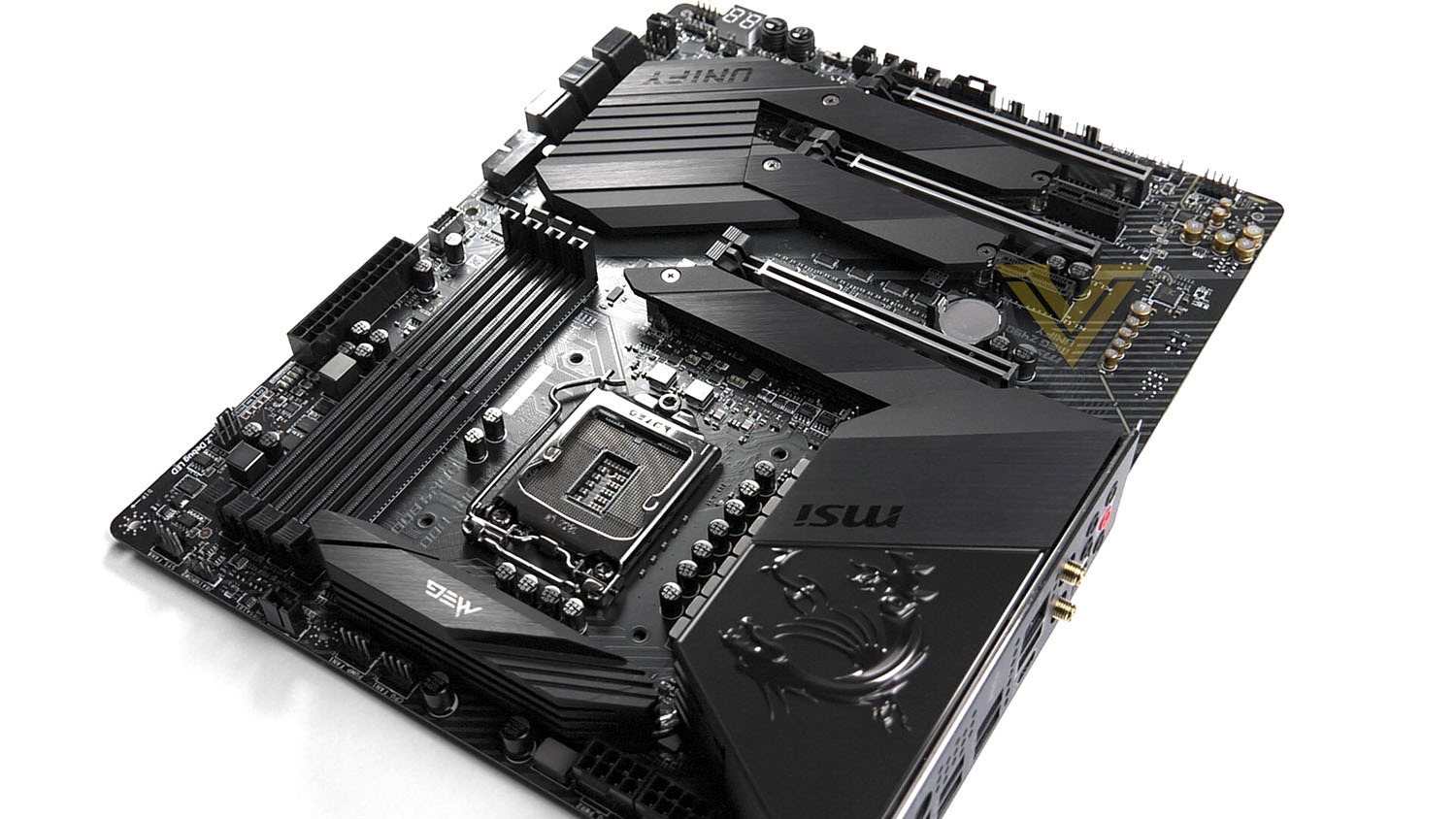
As we begin this journey, today we turn to MSI for a detailed look at their MEG Z490 UNIFY. UNIFY is an option which many have been secretly crying out for, it epitomises a group which protest against the RGB movement. UNIFY boasts an all-black design which offers up a sleek and subtle approach.
While this board is aimed squarely at purists, it also seeks to climb to the top of the pack within its price-range by supplying one or two features which rival models lack. More specifically USB 3.2 Gen2x2.
Are you considering MEG Z490 UNIFY for your next build? You’ll want to check this out!
MSI on their MEG Series
The MEG series seeks to transcend current gaming products, the flagship model designed to push the limits of what an extreme gaming series can be. Combining the strengths of our existing arsenal with new innovative technology; this results in significant improvements in operational and gaming efficiency. With the MEG series, take complete control of performance and personalization with the ultimate gaming series for enthusiasts who want it all.
Technical Specifications
Below are the technical specifications concerning the Z490 UNIFY:
Processor
Supports 10th Gen Intel® Core™ and Pentium® Gold /Celeron® processors for LGA 1200 socket1
Chipset
Intel® Z490 Chipset
Memory
4x DDR4 memory slots, support up to 128GB1
Supports 1R 2133/2666/2933 MHz
1DPC 1R Max speed up to 4800+ MHz
1DPC 2R Max speed up to 4266+ MHz
2DPC 1R Max speed up to 4400+ MHz
2DPC 2R Max speed up to 4000+ MHz
Supports Dual-Channel mode
Supports non-ECC mode, un-buffered memory
Supports Intel® Extreme Memory Profile (XMP)
Expansion Slots
3x PCIe 3.0x 16 slots (2 from CPU, 1 from PCH, support 16/0/4, 8/8/4)
2x PCIe x1 slots (from PCH)
Multi-GPU
Supports 2-Way NVIDIA® SLI™ Technology
Supports 3-Way AMD® CrossFire™ Technology
Storage
Intel® Z490 Chipset
6x SATA 6Gb/s ports1
3x M.2 slots (Key M)
M2_1 supports up to PCIe 3.0 x4 and SATA 6Gb/s, 2242/ 2260/ 2280/ 22110 storage devices1
M2_2 supports up to PCIe 3.0 x4 and SATA 6Gb/s, 2242/ 2260/ 2280 storage devices2
M2_3 supports up to PCIe 3.0 x4, 2242/ 2260/ 2280 storage devices
Intel® Optane™ Memory Ready3
Supports Intel® Smart Response Technology for Intel Core™ processors
SATA2 will be unavailable when installing M.2 SATA SSD in the M2_1 slot.
SATA5 & SATA6 will be unavailable when installing M.2 SATA/PCIe SSD in the M2_2 slot.
RAID
Intel® Z490 Chipset
Supports RAID 0, RAID1, RAID 5 and RAID 10 for SATA storage devices
Supports RAID 0, RAID 1 and RAID 5 for M.2 PCIe storage devices
USB
Intel® Z490 Chipset
4x USB 3.2 Gen 2 10Gbps ports (3 Type-A ports on the back panel, 1 Type-C internal connector)
4x USB 3.2 Gen 1 5Gbps ports (2 Type-A ports on the back panel, 2 ports through the internal USB connector)
6x USB 2.0 ports (2 Type-A ports on the back panel, 4 ports through the internal USB 2.0 connectors)
ASMedia® 3241 chipset
1x USB 3.2 Gen 2×2 20Gbps Type-C port on the back panel
Audio
Realtek® ALC1220 Codec + ESS SABRE9018Q2C combo DAC
7.1-Channel High Definition Audio
Supports Optical S/PDIF output
LAN
1x Realtek® 8125B 2.5G LAN controller
WiFi & Bluetooth
Intel® AX201
Supports 802.11 a/b/g/n/ac/ax, MU-MINO Rx, 2.4GHz-5GHz (160MHz) up to 2.4Gbps
WiFi 6 Pre-Certified
Supports Bluetooth® 5.1 , FIPS, FISMA
The Wireless module is pre-install in the M2 (Key-E) slot
Internal connectors
1x 24-pin ATX main power connector
2x 8-pin ATX 12V power connectors
6x SATA 6Gb/s connectors
3x M.2 slots (M-Key)
1x USB 3.2 Gen 2 10Gbps Type-C port
1x USB 3.2 Gen 1 5Gbps connector (supports additional 2 USB 3.2 Gen 1 5Gbps ports)
2x USB 2.0 connectors (supports additional 4 USB 2.0 ports)
1x 4-pin CPU fan connector
1x 4-pin water-pump connector
6x 4-pin system fan connectors
1x front panel audio connector
2x system panel connectors
1x Chassis Intrusion connector
1x slow mode jumper
1x power button
1x reset button
1x 4-pin RGB LED connector
2x 3-pin RAINBOW LED connectors
1x 3-pin CORSAIR LED connector
Back panel ports
Clear CMOS Button
PS/2 Keyboard / Mouse Port
2.5G LAN
Wi-Fi /Bluetooth Antenna Connectors
HD Audio Connectors
Flash BIOS Button
USB 2.0 Ports
USB 3.2 Gen 2 10Gbps (Type-A)
USB 3.2 Gen 1 5Gbps (Type-A)
USB 3.2 Gen 2×2 20Gbps (Type-C)
Optical S/PDIF-Out
Dimensions
12 in. x 9.6 in. (30.5 cm x 24.4 cm)
ATX Form Factor
Supports 10th Gen Intel® Core™ and Pentium® Gold /Celeron® processors for LGA 1200 socket1
Chipset
Intel® Z490 Chipset
Memory
4x DDR4 memory slots, support up to 128GB1
Supports 1R 2133/2666/2933 MHz
1DPC 1R Max speed up to 4800+ MHz
1DPC 2R Max speed up to 4266+ MHz
2DPC 1R Max speed up to 4400+ MHz
2DPC 2R Max speed up to 4000+ MHz
Supports Dual-Channel mode
Supports non-ECC mode, un-buffered memory
Supports Intel® Extreme Memory Profile (XMP)
Expansion Slots
3x PCIe 3.0x 16 slots (2 from CPU, 1 from PCH, support 16/0/4, 8/8/4)
2x PCIe x1 slots (from PCH)
Multi-GPU
Supports 2-Way NVIDIA® SLI™ Technology
Supports 3-Way AMD® CrossFire™ Technology
Storage
Intel® Z490 Chipset
6x SATA 6Gb/s ports1
3x M.2 slots (Key M)
M2_1 supports up to PCIe 3.0 x4 and SATA 6Gb/s, 2242/ 2260/ 2280/ 22110 storage devices1
M2_2 supports up to PCIe 3.0 x4 and SATA 6Gb/s, 2242/ 2260/ 2280 storage devices2
M2_3 supports up to PCIe 3.0 x4, 2242/ 2260/ 2280 storage devices
Intel® Optane™ Memory Ready3
Supports Intel® Smart Response Technology for Intel Core™ processors
SATA2 will be unavailable when installing M.2 SATA SSD in the M2_1 slot.
SATA5 & SATA6 will be unavailable when installing M.2 SATA/PCIe SSD in the M2_2 slot.
RAID
Intel® Z490 Chipset
Supports RAID 0, RAID1, RAID 5 and RAID 10 for SATA storage devices
Supports RAID 0, RAID 1 and RAID 5 for M.2 PCIe storage devices
USB
Intel® Z490 Chipset
4x USB 3.2 Gen 2 10Gbps ports (3 Type-A ports on the back panel, 1 Type-C internal connector)
4x USB 3.2 Gen 1 5Gbps ports (2 Type-A ports on the back panel, 2 ports through the internal USB connector)
6x USB 2.0 ports (2 Type-A ports on the back panel, 4 ports through the internal USB 2.0 connectors)
ASMedia® 3241 chipset
1x USB 3.2 Gen 2×2 20Gbps Type-C port on the back panel
Audio
Realtek® ALC1220 Codec + ESS SABRE9018Q2C combo DAC
7.1-Channel High Definition Audio
Supports Optical S/PDIF output
LAN
1x Realtek® 8125B 2.5G LAN controller
WiFi & Bluetooth
Intel® AX201
Supports 802.11 a/b/g/n/ac/ax, MU-MINO Rx, 2.4GHz-5GHz (160MHz) up to 2.4Gbps
WiFi 6 Pre-Certified
Supports Bluetooth® 5.1 , FIPS, FISMA
The Wireless module is pre-install in the M2 (Key-E) slot
Internal connectors
1x 24-pin ATX main power connector
2x 8-pin ATX 12V power connectors
6x SATA 6Gb/s connectors
3x M.2 slots (M-Key)
1x USB 3.2 Gen 2 10Gbps Type-C port
1x USB 3.2 Gen 1 5Gbps connector (supports additional 2 USB 3.2 Gen 1 5Gbps ports)
2x USB 2.0 connectors (supports additional 4 USB 2.0 ports)
1x 4-pin CPU fan connector
1x 4-pin water-pump connector
6x 4-pin system fan connectors
1x front panel audio connector
2x system panel connectors
1x Chassis Intrusion connector
1x slow mode jumper
1x power button
1x reset button
1x 4-pin RGB LED connector
2x 3-pin RAINBOW LED connectors
1x 3-pin CORSAIR LED connector
Back panel ports
Clear CMOS Button
PS/2 Keyboard / Mouse Port
2.5G LAN
Wi-Fi /Bluetooth Antenna Connectors
HD Audio Connectors
Flash BIOS Button
USB 2.0 Ports
USB 3.2 Gen 2 10Gbps (Type-A)
USB 3.2 Gen 1 5Gbps (Type-A)
USB 3.2 Gen 2×2 20Gbps (Type-C)
Optical S/PDIF-Out
Dimensions
12 in. x 9.6 in. (30.5 cm x 24.4 cm)
ATX Form Factor
Video: Unboxing – Overview – Review
For this motherboard review we’ve produced a video which provides you with the unboxing experience, an highly detailed overview of the board revealing all the features with a verdict. Check out the video review here or watch below:
Test Setup & Methodology
Notes: We’ve revamped our benchmark regime by removing a number of tests which reveal little, to no difference between each motherboard model. Gaming performance is one such area which has been removed due to the inability for each motherboard to offer any advantage over another. Instead, we have focussed on meaningful/tangible analysis which examines the VRM/chipset design, and the storage performance which will be far more informative to the end user.
TEST SETUP
CPU Intel Core i9-10900KCooling: Corsair Hydro Series H110i
Motherboard: MSI MEG Z490 UNIFY
Memory: 32GB Corsair Vengeance LPX 3000MHz
Graphics: AMD Radeon RX 480
Storage: Intel S3500 128GB SATA SSD + Samsung 960 Pro 512GB PCIe 3.0 SSD
PSU: Corsair HX1050 80 Plus Gold Certified PSU
Monitor: AOC U2879VF
BENCHMARKS
PCMark 10 – Overall Extended ScoreSiSoftware SANDRA – SATA/PCIe Storage Tests
SiSoftware SANDRA – Processor Image Processing
OTHER SOFTWARE
Temperature Analysis: HWMonitorStress Testing Software: AIDA64 Stability Test
CPU Specification Monitoring: CPU-Z
Benchmarks: Power Consumption
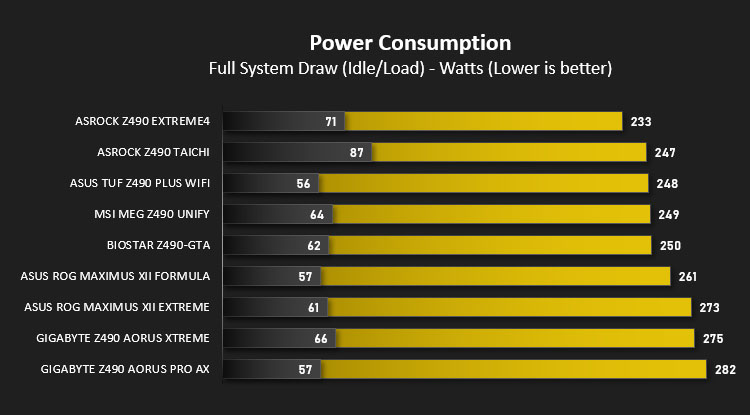
In this first test we analyse the power efficiency from the wall for each motherboard (Minus the GPU). While each model uses the same chipset/platform, energy results can fluctuate between manufacturers due to the features and specifications that are integrated. First of all, for the idle tests the system is cold booted into Windows and no additional applications are executed – wattage is noted on the external energy monitor we use and then we open Aida64 stability test and execute a stress test, noting the highest reading on the monitor. Below are the results of this energy test.
Benchmarks: VRM & Chipset Cooling
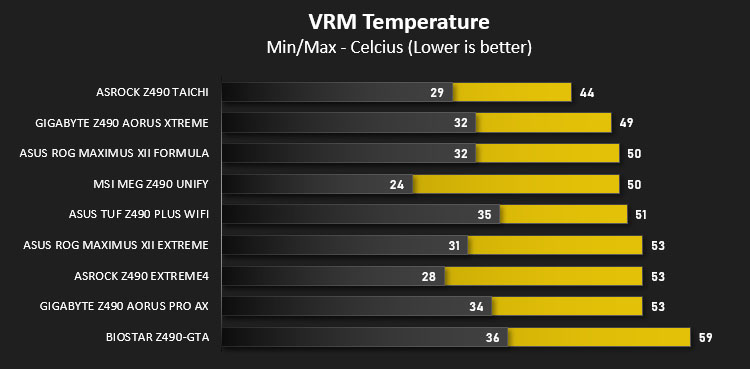
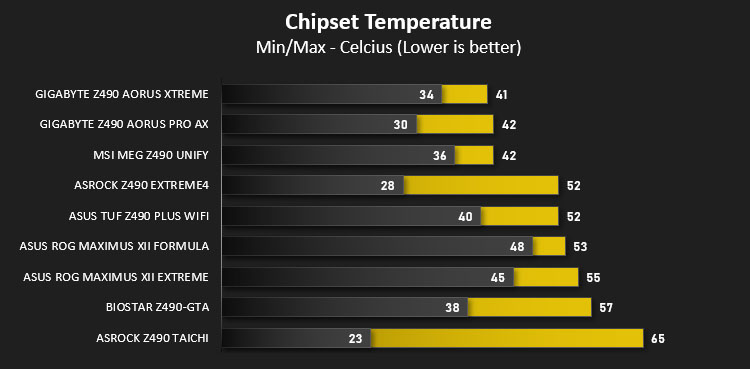
Each motherboard manufacturer designs their board with a unique set of heatsinks to cover key areas like the VRM/mosfets and the chipset itself. In these test we use HWMonitor to identify the minimum values for VRM and chipset and then we load up Aida64 stability test again and perform a 20 minute run, recording the maximum value for both attributes.
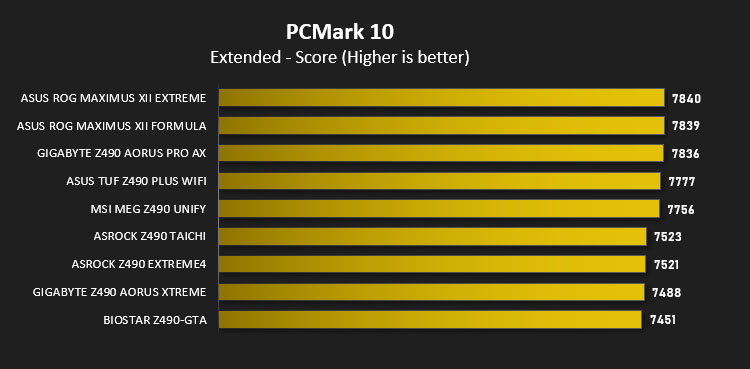
Benchmarks: PCMark 10
PCMark 10 features a comprehensive set of tests that cover the wide variety of tasks performed in the modern workplace. With a range of performance tests, custom run options, and the new Battery Life Profile, PCMark 10 is the complete PC benchmark for the modern office.
Benchmarks: SATA Performance
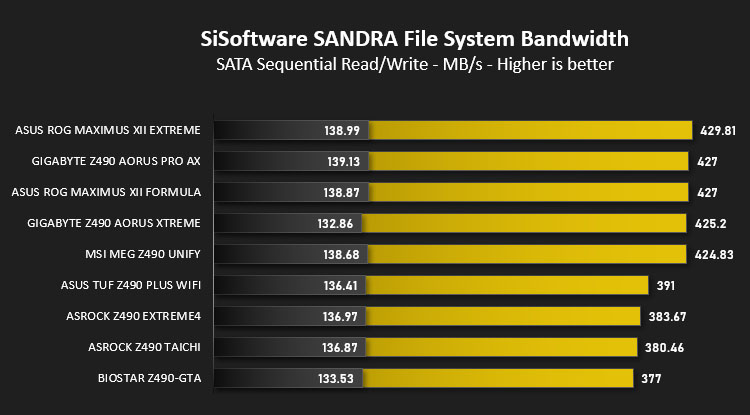
In order to ascertain the SATA performance for our motherboards we use SiSoftware SANDRA and the File System Bandwidth performance test. This allows us to obtain the sequential read/write transfer rates for the drive being tested – Intel S3500 128GB SSD.
Benchmarks: PCIe M.2 Performance
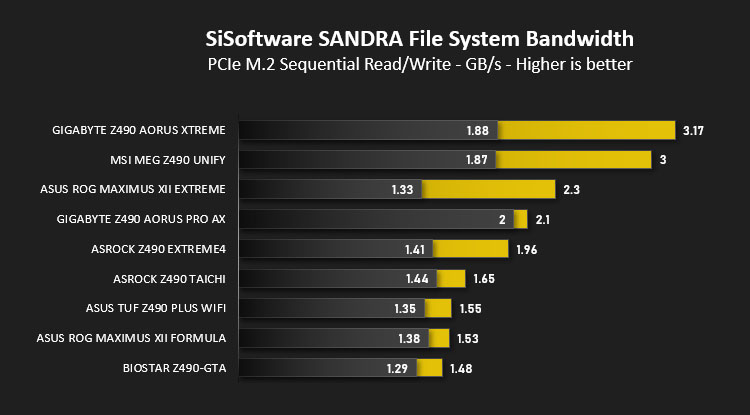
In order to ascertain the PCIe M.2 performance for our motherboards we use SiSoftware SANDRA and the File System Bandwidth performance test. This allows us to obtain the sequential read/write transfer rates for the drive being tested – Samsung 960 Pro 512GB.
Benchmarks: CPU Image Processing
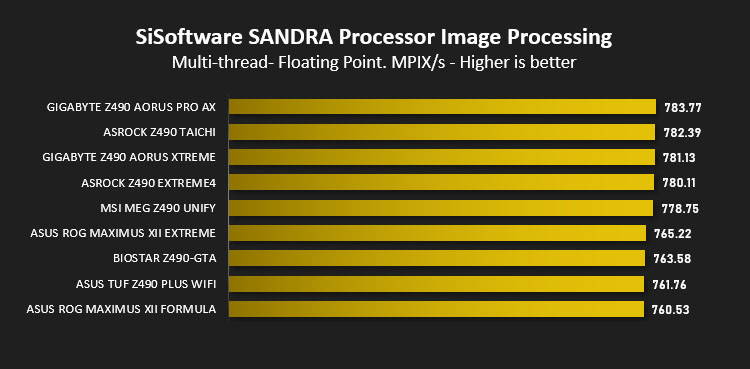
AIDA64 Product PageIn our last test we observe the Image Processing performance from the CPU attached to the motherboard. For this we use SiSoftware SANDRA and the benchmark specifically designed for measuring the common algorithms associated with processing imagery.
Overclocking
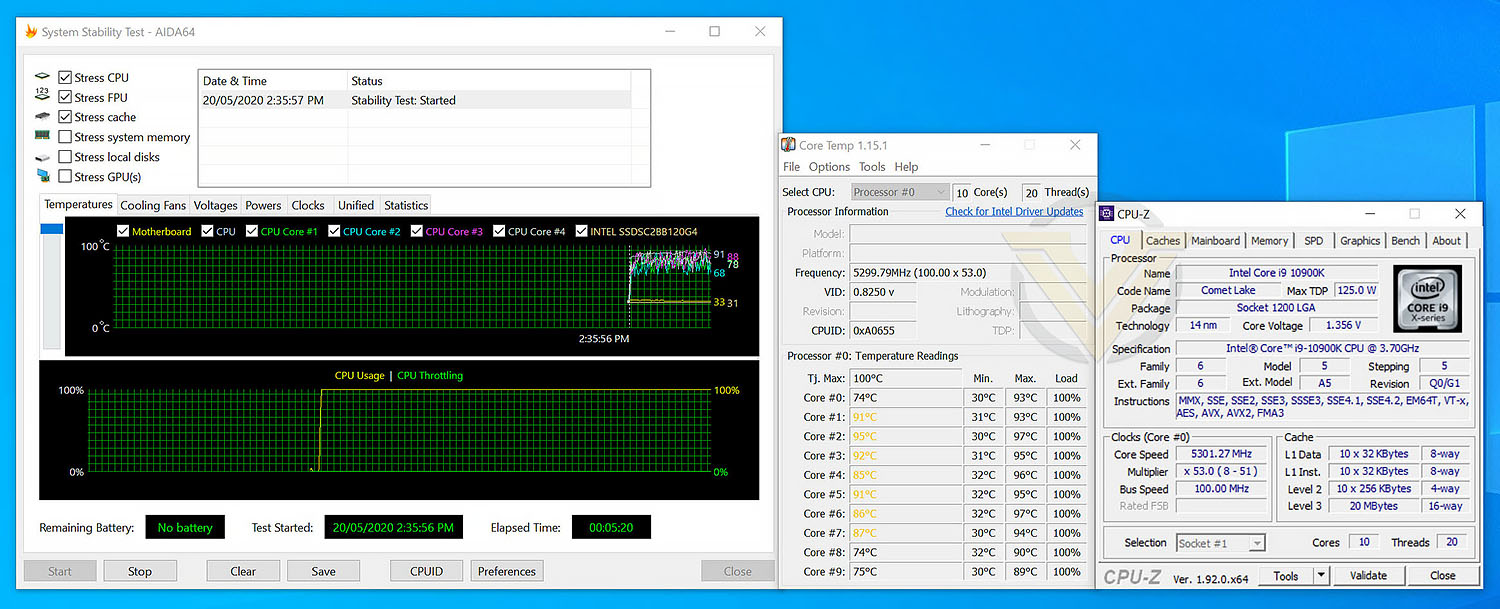
In our recent review of the new Intel Core i9-10900K, we used the MSI MEG Z490 UNIFY to perform the benchmarks since it presented us with good results and was able to overclock easily. Therefore, the result we achieve in the overclocking phase is taken directly from the CPU review.
The 10900K may have a Turbo Boost of up to 5.3GHz but that isn’t across all cores, and sustained/fixed. With UNIFY we were able to shift all cores to 5.3GHz at 1.35v.
Performing this impressive overclock was easy, thanks to the options available and layout of the intuitive UEFI BIOS.
Conclusion
MSI are aware that there are certain enthusiasts/gamers who despise the glitz and flamboyance of RGB lighting and lust after an all-black design and that is just what UNIFY delivers. This has to be one of the sleekest Intel Z490 motherboards we’ve had in for review and we’re certain it will be popular due to its stealthy aesthetics.
Across the variety of tests we performed, UNIFY provided some admirable results. The cooling design for both the VRM and chipset configurations has been well designed, with figures remaining consistently low. Not all motherboards bearing the Intel Z490 chipset will offer up USB 3.2 Gen2x2, so its pleasing to see that MSI has equipped this board to make use of such a feature. For those who count themselves as a content creator, this type of feature will be especially useful.
For the moment, just like other Intel Z490 motherboards, PCI Express 4.0 isn’t possible under Comet Lake CPUs but that hasn’t stopped MSI from implementing a PCIe Gen4 configuration which is able to utilise this technology once it arrives via future CPU updates.
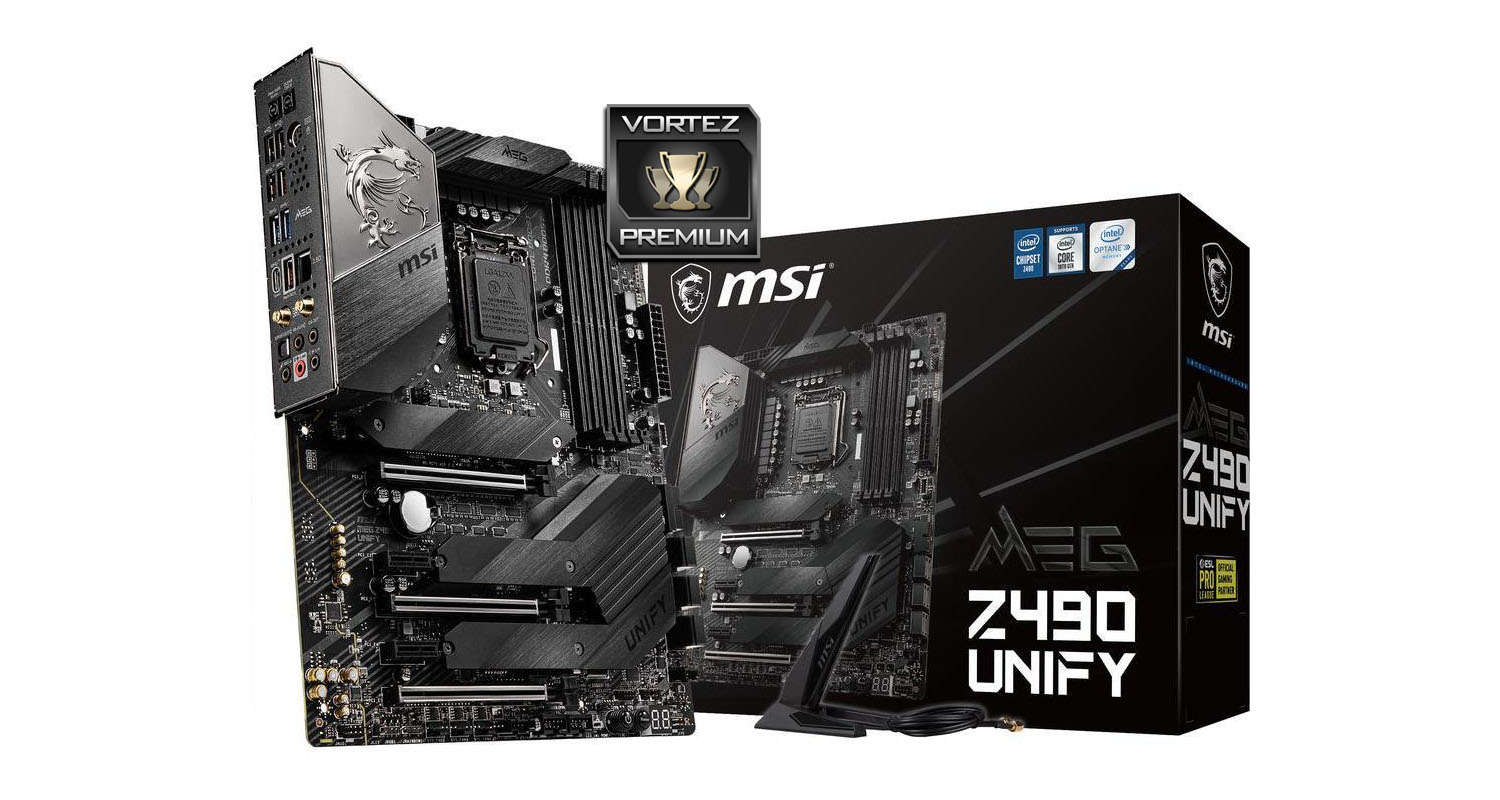
We managed to nudge all 10-cores on our 10900K up to 5.3GHz with UNIFY without any difficulty. Some BIOS layouts can be complex and tricky to navigate but its great that MSI keep things simple with their design.
Pricing for UNIFY sees it retail for: GBP £249 | USD $299 | AUD $599. For the money, you’re getting a lot of features, some of which aren’t present on rival options around the same pricepoint. We’re also reminded that MSI offer a 3-year warranty, which is definitely an added bonus.
Lusting after an all-black, no nonsense Intel Z490 motherboard? Be sure to check this one out, it’s packed with features and performs exceeding well.
Pros
+ Super-sleek all-black design
+ Offers great performance
+ Comes with USB 3.2 Gen2x2
+ Good selection of fan headers
+ Overclocks well
+ Has future support for PCIe 4.0
+ Uses strengthened PCI Express slots
+ Offers triple M.2 slots
+ VRM/chipset cooling is very good
Cons
– No Thunderbolt support
– Back panel space taken up with USB 2.0 ports
+ Super-sleek all-black design
+ Offers great performance
+ Comes with USB 3.2 Gen2x2
+ Good selection of fan headers
+ Overclocks well
+ Has future support for PCIe 4.0
+ Uses strengthened PCI Express slots
+ Offers triple M.2 slots
+ VRM/chipset cooling is very good
Cons
– No Thunderbolt support
– Back panel space taken up with USB 2.0 ports
Click here for an explanation of our awards at Vortez.net.
Stay connected with Vortez social media pages: