It’s time to take a look at MSI’s mid-tier X670E CARBON WIFI. Should it feature on your motherboard short-list?

Product on Review: MPG X670E CARBON WIFI
Manufacturer: MSI
Street Price: GBP £509 | USD $479 | AUD $829
Editor: Tim Harmer
Today we’re continuing our coverage of motherboards based on AMD’s 600-series chipset with a design from Taiwanese component specialists MSI. Having investigated an entry-level X670E motherboard from ASRock and premium entrant form GIGABYTE, it’s time to split the difference by taking a look at the mid-tier MPG X670E CARBON WIFI. With PCI-Express 5.0 signalling support for both discrete GPU and M.2 NVMe SSDs, 18+2+1-phase power delivery, WiFi 6E and of course support for AMD’s new Ryzen 7000-series CPU, the CARBON WIFI is primed to be a popular choice for those looking for a whole system upgrade this holiday season.
AMD’s X670E chipset is the premium platform for Ryzen 7000-series CPUs. Featuring the new AM5 socket, new technologies including PCIe 5.0 graphics and storage, and a host of I/O options through the incorporation of two PCH chips on one motherboard, it underpins a no holds barred solution for gamers and enthusiasts alike. More cost conscious or less demanding end-users can instead opt for X670 or B650 motherboard models, each with a slightly more restrictive set of capabilities for a commensurate reduction in price, but for the true enthusiast X670E is the only game in town..
About MSI’s MPG Series:
BE AHEAD, POP YOUR STYLE
The MPG series brings out fashionable products by showing extremely unique styles and expressing a conceited attitude towards the challenge of the gaming world. With extraordinary performance and style, the MPG series defines the future of gaming fashion.
The MPG series brings out fashionable products by showing extremely unique styles and expressing a conceited attitude towards the challenge of the gaming world. With extraordinary performance and style, the MPG series defines the future of gaming fashion.
Motherboards placed under the umbrella of MSI’s CARBON brand were previously recognised as excellent ‘bang for your buck’ models that didn’t quite sit cleanly in either gaming, mainstream or performance segments and exhibited few aesthetic frills. A stronger identity for the MPG lineup as a whole has funnelled the CARBON motherboards towards a mid-tier performance mainstay that’s typically a choice for gamers who appreciate its predominantly black aesthetics alongside a little flair (including RGB lighting). MSI’s no holds barred models within the current generation remain the province of the performance-oriented MEG X670E lineup, while the sole MAG X670E design caters to a more cost-conscious market.
With that in mind, it certainly seems like the MPG X670E CARBON WIFI has fallen victim to the costs associated with the X670E platform. £500 has historically been expensive for any motherboard (even after taking inflation into account), which means that the product labours somewhat under its branding. CARBON, like MSI’s GAMING moniker, doesn’t feel appropriate at this price point even if its featureset and the X670E landscape as a whole makes it a competitive option.
And one further point: the WiFi moniker is superfluous for X670E at this point. All X670E motherboards come with WiFi 6E as a standard aspect of the chipset, and we’re not fans of the implication that competitor X670E models might not be.
Because make no mistake, £500 certainly is mid-tier for X670E. ATX Motherboards equipped with this chipset start from £300 and rise to eye-watering levels, so in theory the MPG CARBON should offer some of the best value when balancing features and performance. They’re certainly pushing the envelope in terms of power delivery and bolstering the cooling performance out of the box, but a cursory investigation doesn’t make one aspect leap out as a killer feature.
MSI have certainly given themselves an uphill challenge to overcome from the get-go. Lets see how it shapes up with a closer look.
Closer Look
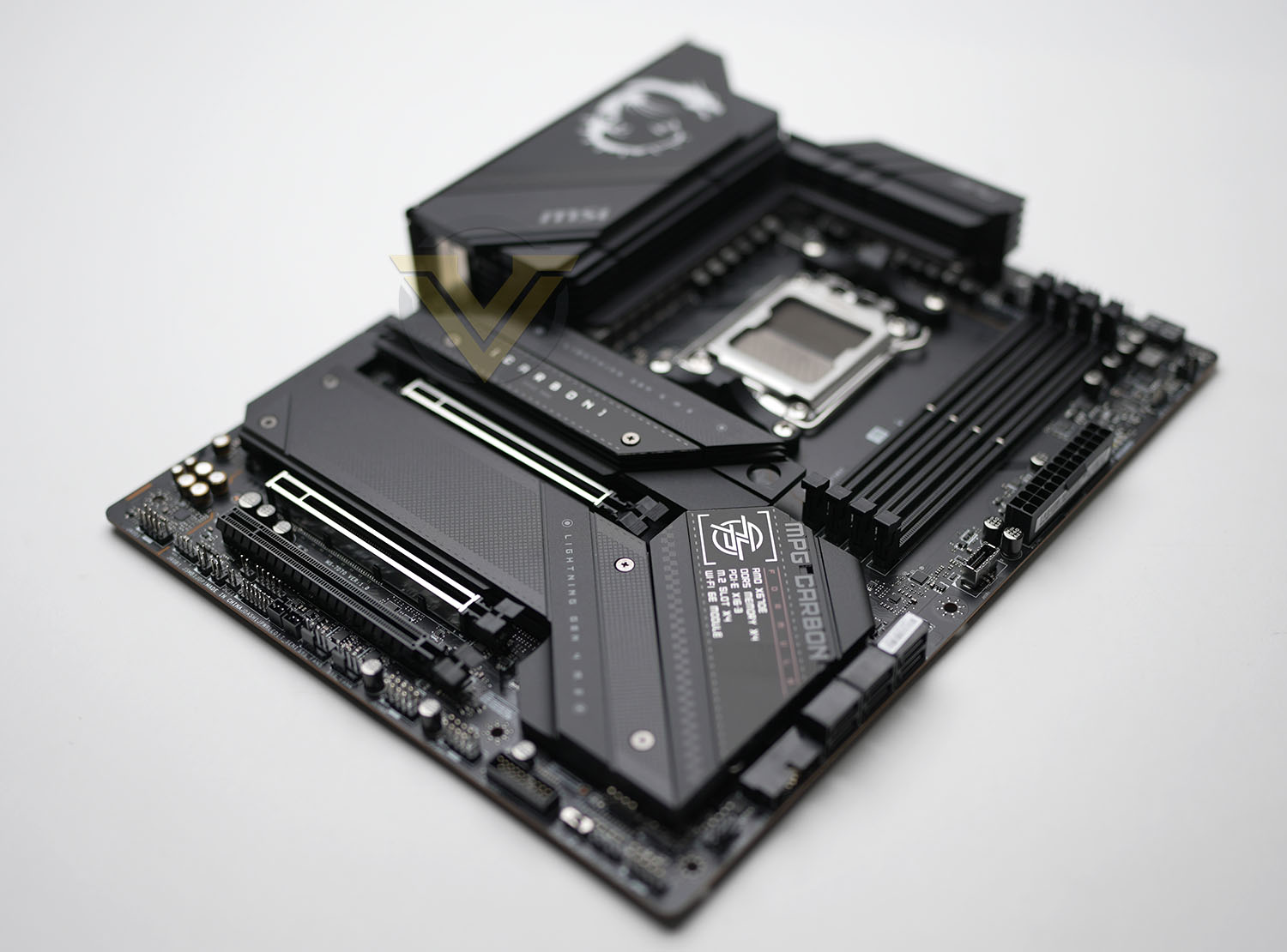
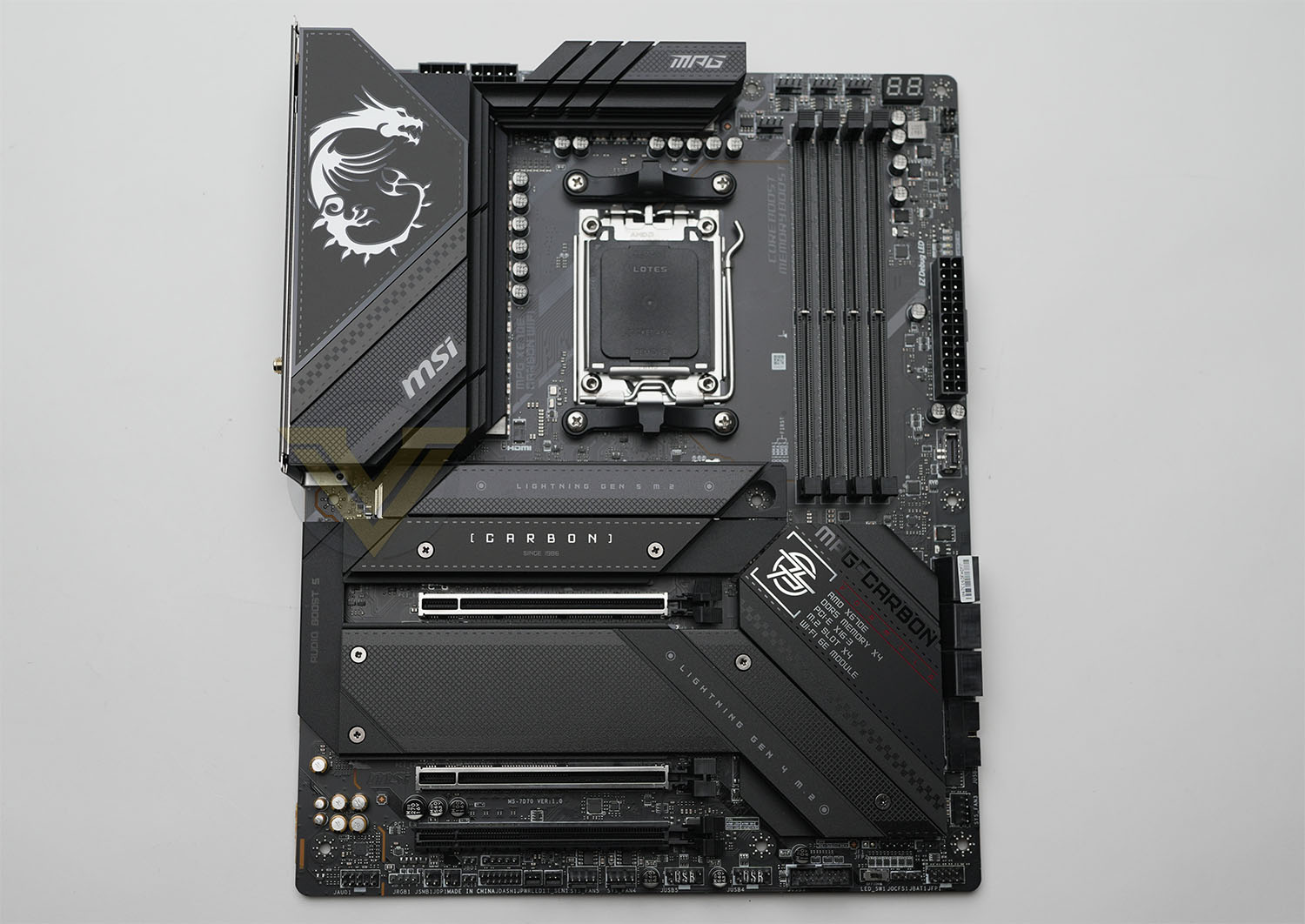
MSI’s MPG X670E CARBON WIFI conforms to a standard ATX form factor, making it compatible with the majority of PC cases currently on the market as well as those already in the hands of consumers. Port layout is similarly within industry norms, making routing for standard power and data cabling very conventional.
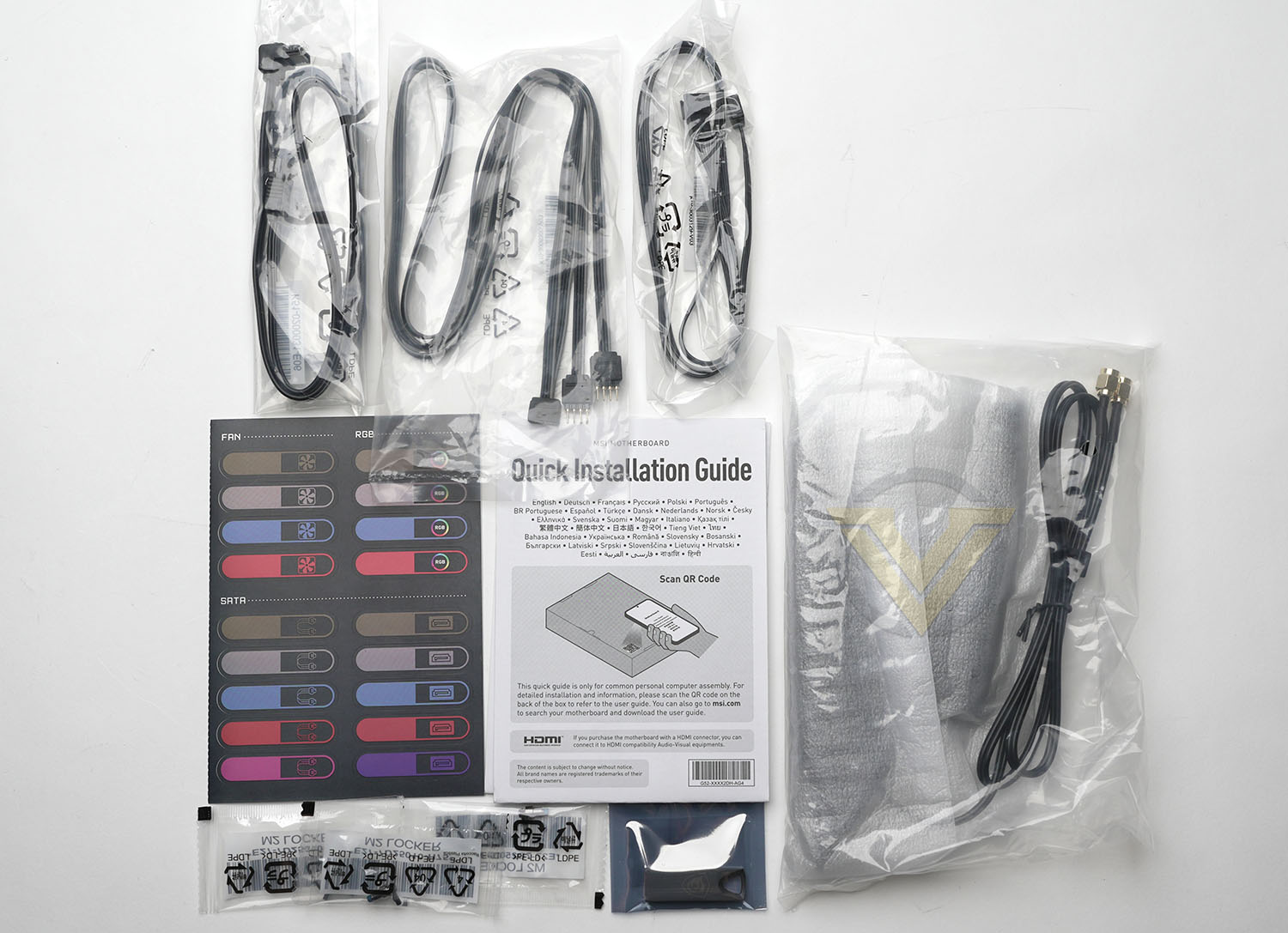
As a mid-tier design we’d expect the X670E CARBON WIFI to arrive with a few perks, but nothing too outlandish. The package comes with:
– WiFi 6E Antenna
MSI branded USB thumb drive
EZ M.2 Clips (toolless retention clips for M.2 drives)
RGB Extension Cable / Y Splitter (one four-pin female to two male)
RGB Extension Cable
Two Sata Cables
Case and cable labelling stickers
MSI branded USB thumb drive
EZ M.2 Clips (toolless retention clips for M.2 drives)
RGB Extension Cable / Y Splitter (one four-pin female to two male)
RGB Extension Cable
Two Sata Cables
Case and cable labelling stickers
So nothing too opulent, but each is a worthwhile inclusion nonetheless. We’re very happy to see MSI utilise the EZ M.2 clip system rather than screws, and would like to see more manufacturers offer this solution over screws if possible.
The board itself retains the dark tone of previous CARBON designs, but the busy nature of the board breaks up any hope of an all-black design without a full-cover fascia (rather than the partial cover we see here). There’s also a lot of text and branding over these surfaces, making it less of a blank canvas than some might be hoping for.
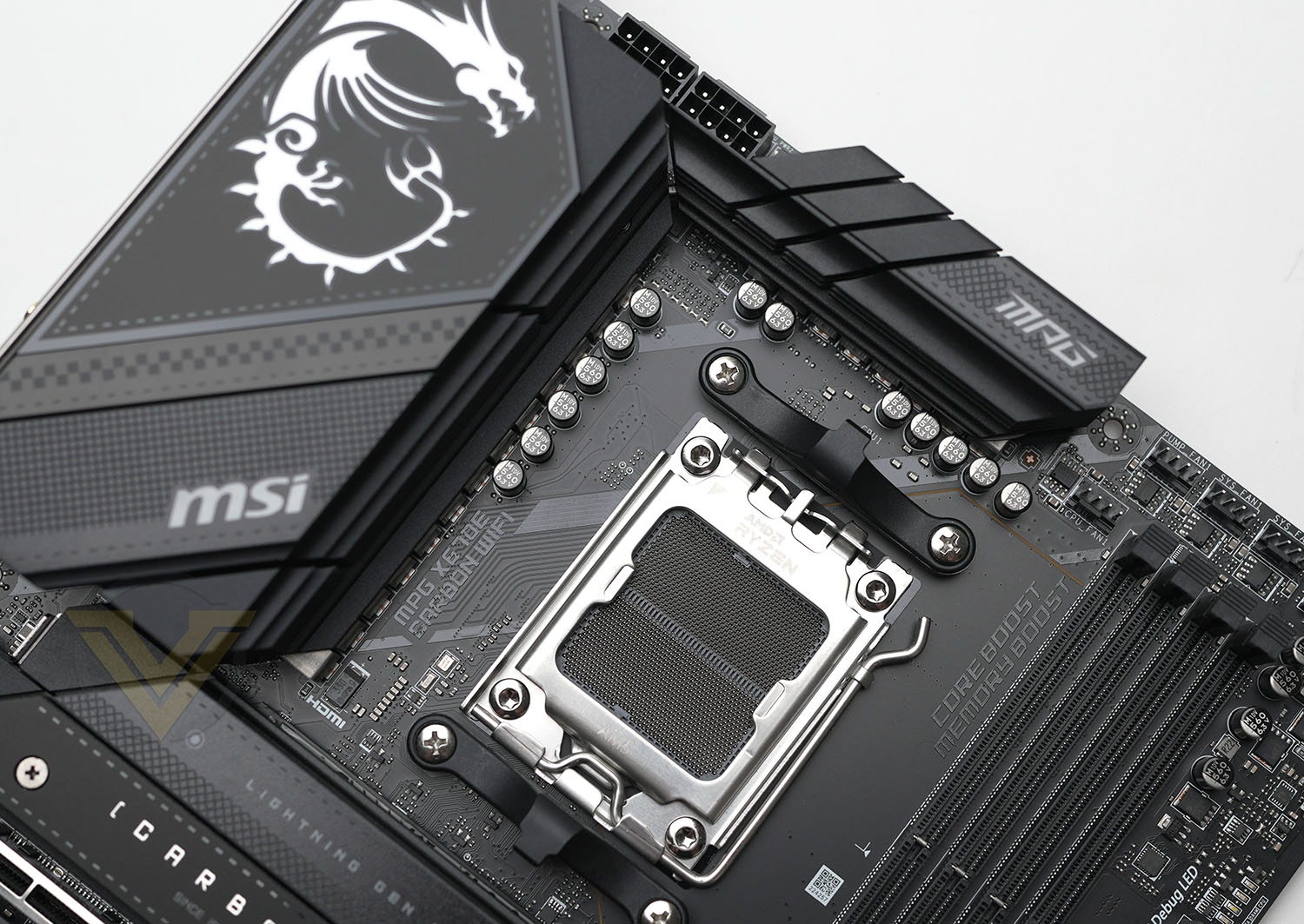
The motherboard’s AM5 socket supports the whole range of Ryzen 7000-series CPUs and will likely support forthcoming AM5 CPUs long into the future through BIOS updates. We should remind readers however that the pins in LGA sockets are fragile, so the CPU installation process should be handled with utmost care. Older AM4 coolers which utilise the clip retainer system should be compatible with the new AM5 socket but other styles may not be supported. Check with the cooler manufacturer prior to installation; some manufacturers also offer upgrade kits to those who need it.
The CARBON WIFI is equipped with two eight-pin 12V connectors for direct supply to the CPU, a feature that we’ve found is the norm for X670E motherboards but not necessarily supported by every PSU below 700W. Their location is ideal for cable management purposes and there’s just enough clearance to the surrounding heatsinks that attaching and removing cables isn’t difficult.
The power delivery heatsinks aren’t quite as heavily engineered as others we have seen, but it’s notable that MSI have chosen to utilise fins running parallel to the board rather than perpendicular. In theory, this should mean that air flow is less inhibited, trapping less heat particularly in the left-hand heatsink. In this instance the heatsink cover blends seamlessly into the overall design, and features an MSI logo (with RGB illumination, naturally). The size and tapered nature of the heatsinks will reduce the risk of CPU heatsink incompatibility with this board.
This design leverages an 8-layer PCB for improved signalling, an aspect it holds in coming with all other X670E motherboards released thus far.
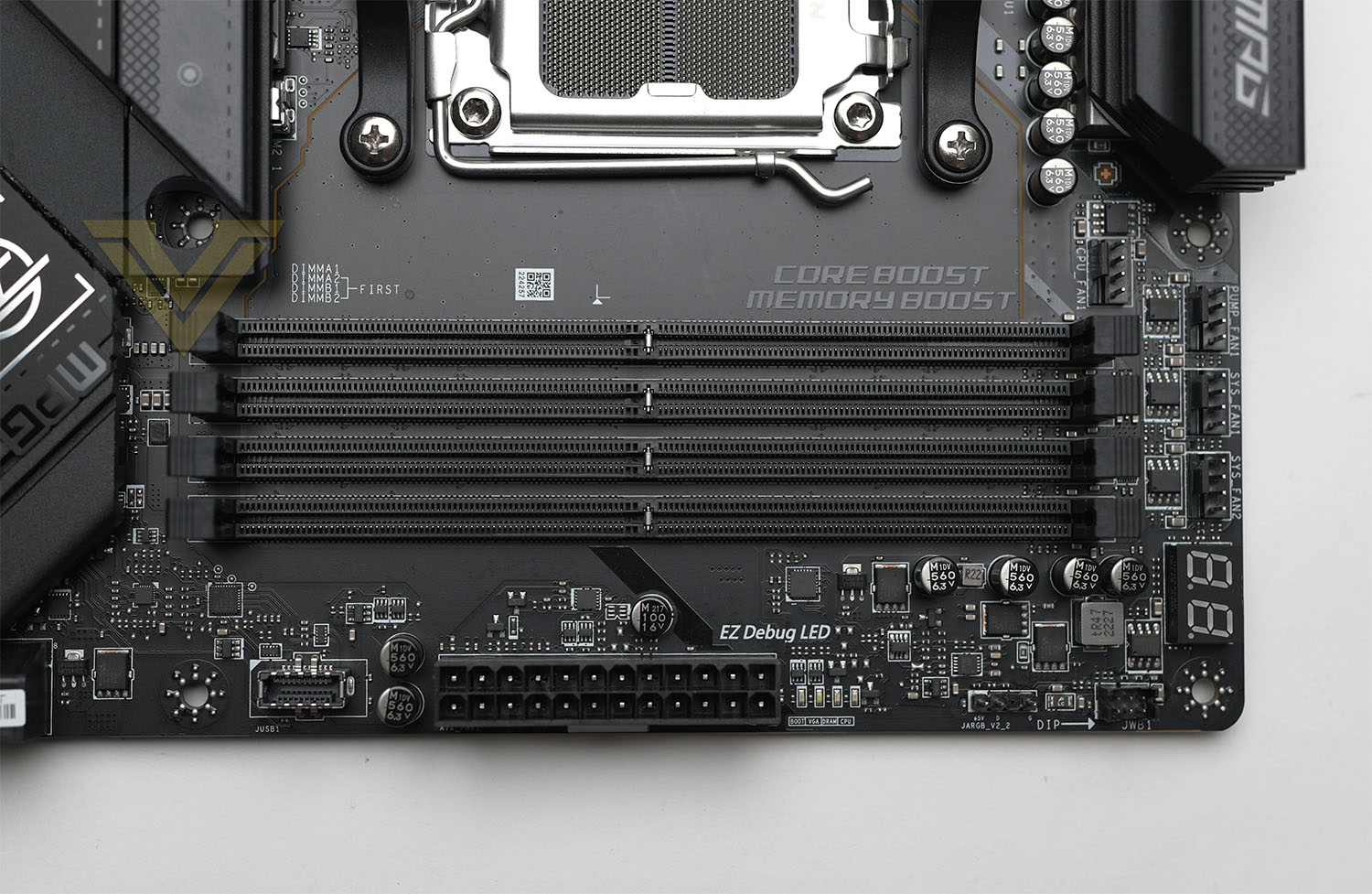
Further along the top there are four PWM fan headers, while a two-digit LED display is a great addition for overclocking and general boot troubleshooting. Four DDR5 DIMM slots are in the expected location; A2//B2 are the recommended installation locations for two DIMMs operating in dual-channel mode.
As we travel down the right-hand edge we meet an ARGB header followed by EZ Debug boot indicator LED, the 24-pin ATX power connector, and a USB 3.2 Gen 2 front panel connector (supporting up to 10Gbps). However, just before the ARGB header there’s another header marked JWB1; this is intended for an EK water cooling monoblock that’s designed specifically for the X670E CARBON but not part of the motherboard’s retail bundle.
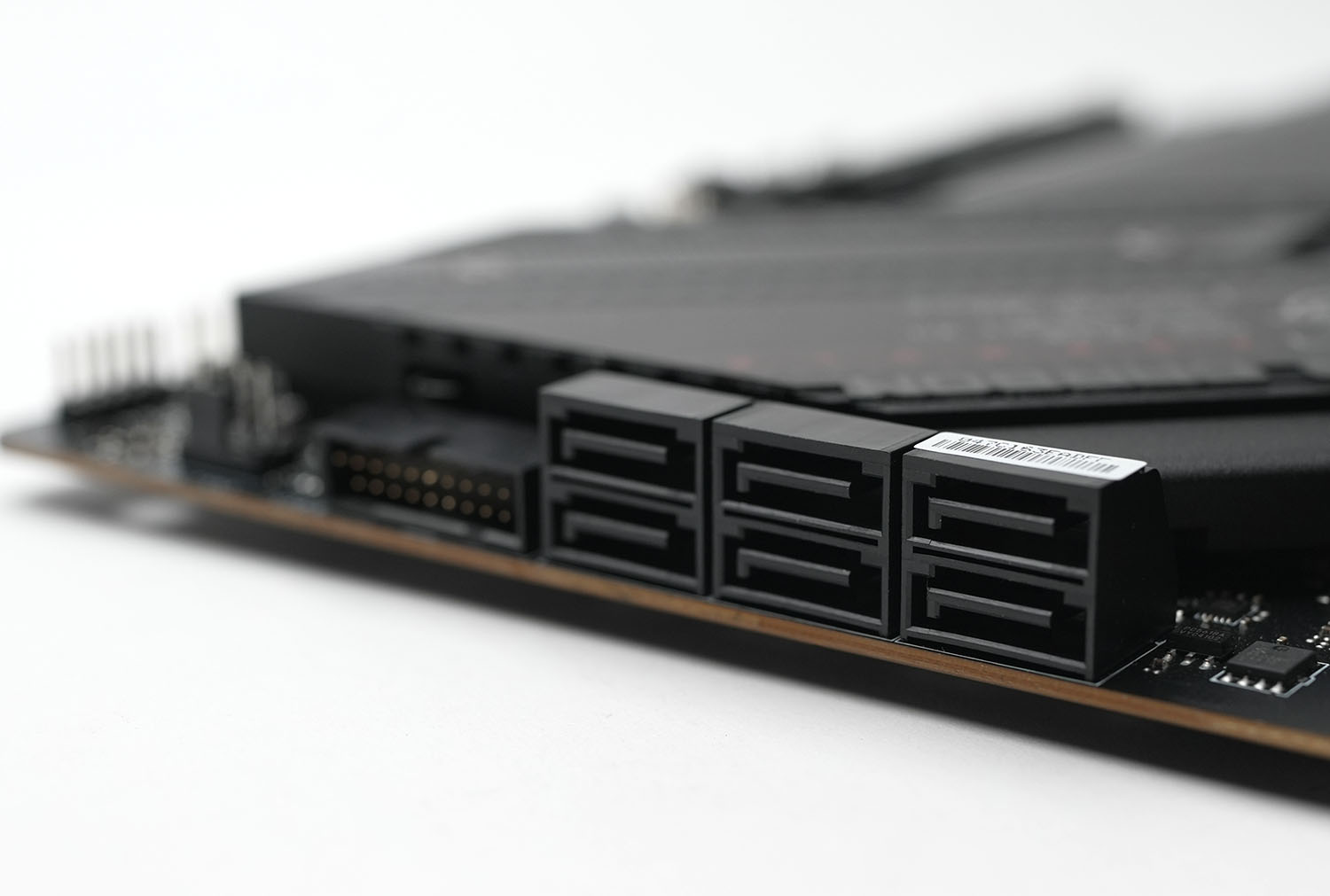
We reach six SATA 3 6Gbps ports as we travel further down, followed by a USB 3 front panel connector. Each of these are angled parallel to the motherboard, allowing for tidier cable management if the case’s cable routing holes are aligned with these connectors. One final PWM fan connector rounds out the right-hand edge.
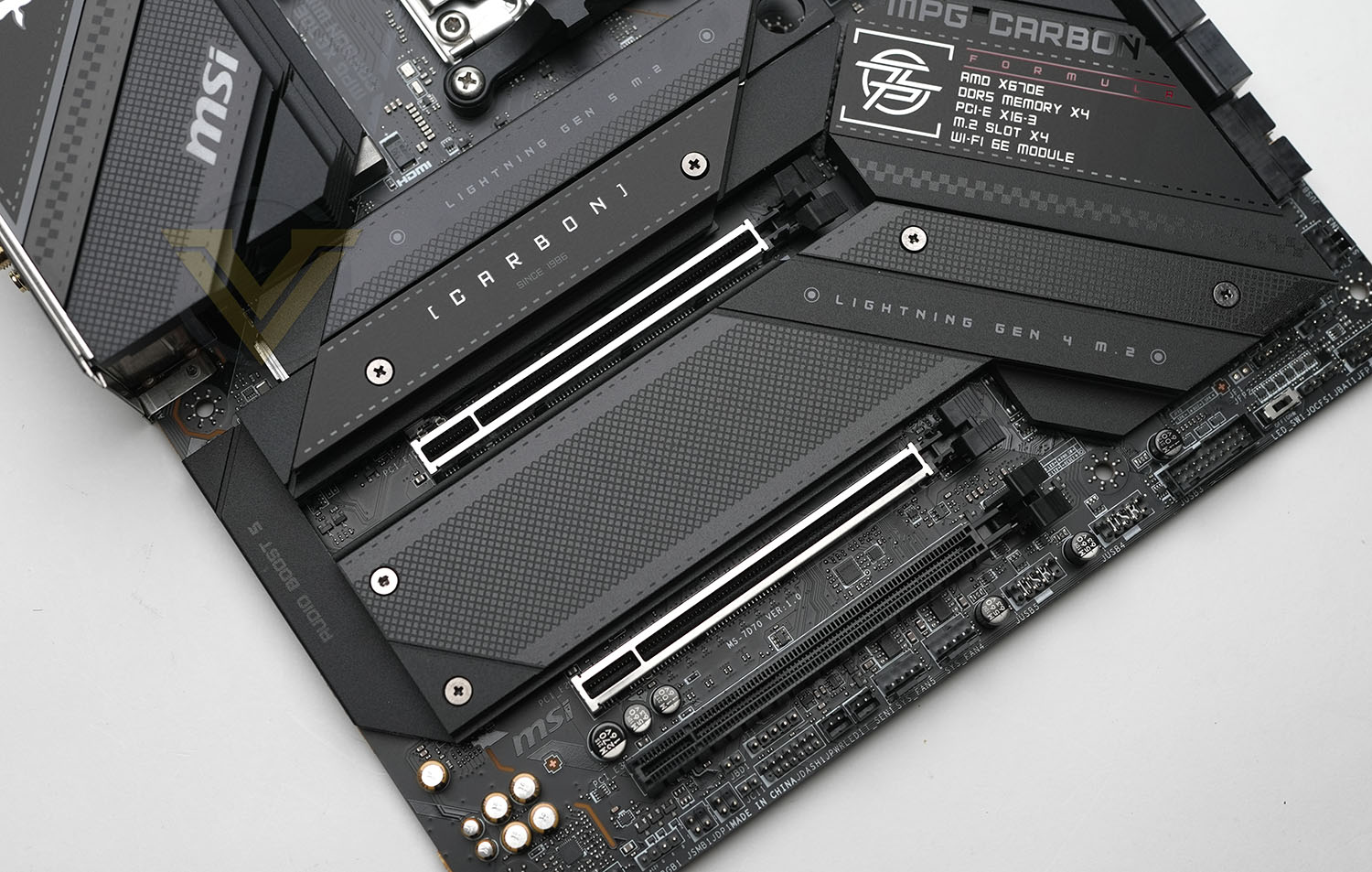
The MPG X670E CARBON WIFI is notable in that it increases the distance between CPU socket and first PCIe x16 slot to accommodate two M.2 slots rather than just one. This has the effect of lowering the position of installed discrete PCIe GPUs, and reduces the gap between first and second PCIe slots. We should also note that none of the slots conform to the newer and wider 25110 and 2580 M.2 standard, posing some compatibility issues for future drive designs. One of the four total slots supports a long 22110 M.2 drive.
The second x16 slot is wired for eight lanes of PCIe 5.0 signalling, and x8/x8 operation is supported should both slots be populated. It’s recommended that the slot remain unused if using a single discrete GPU. The final x16 slot supports PCIe 4.0 x4 signalling off the chipset.
Each M.2 drive slot is covered by a heatspreader, and to improve thermal performance MSI have pre-installed thermal pads on both the motherboard PCB and each heatspreader. Note also that the heatspreader is completely removable, allowing M.2 drives with their own cooling solution to be installed.
Finally, located along the bottom edge are a set of front panel headers, a pair of USB 2.0 headers, a USB 3.0 header, the PWR/RST switch and LED jumpers, an ARGB header, and two PWM fan headers (bringing the total to seven). There are no surprises here, everything is laid out cleanly and clearly but you will need an exceptionally long front panel audio cable to reach the very bottom and back of the board.
The board may seem cramped but, presupposing your case has at least good cable routing cutouts, it should be easy to achieve a very clean build. While seven system fan/pump headers isn’t the largest number we’ve seen it’s also far from the smallest, so air and water cooling preferences should both be amply catered to.
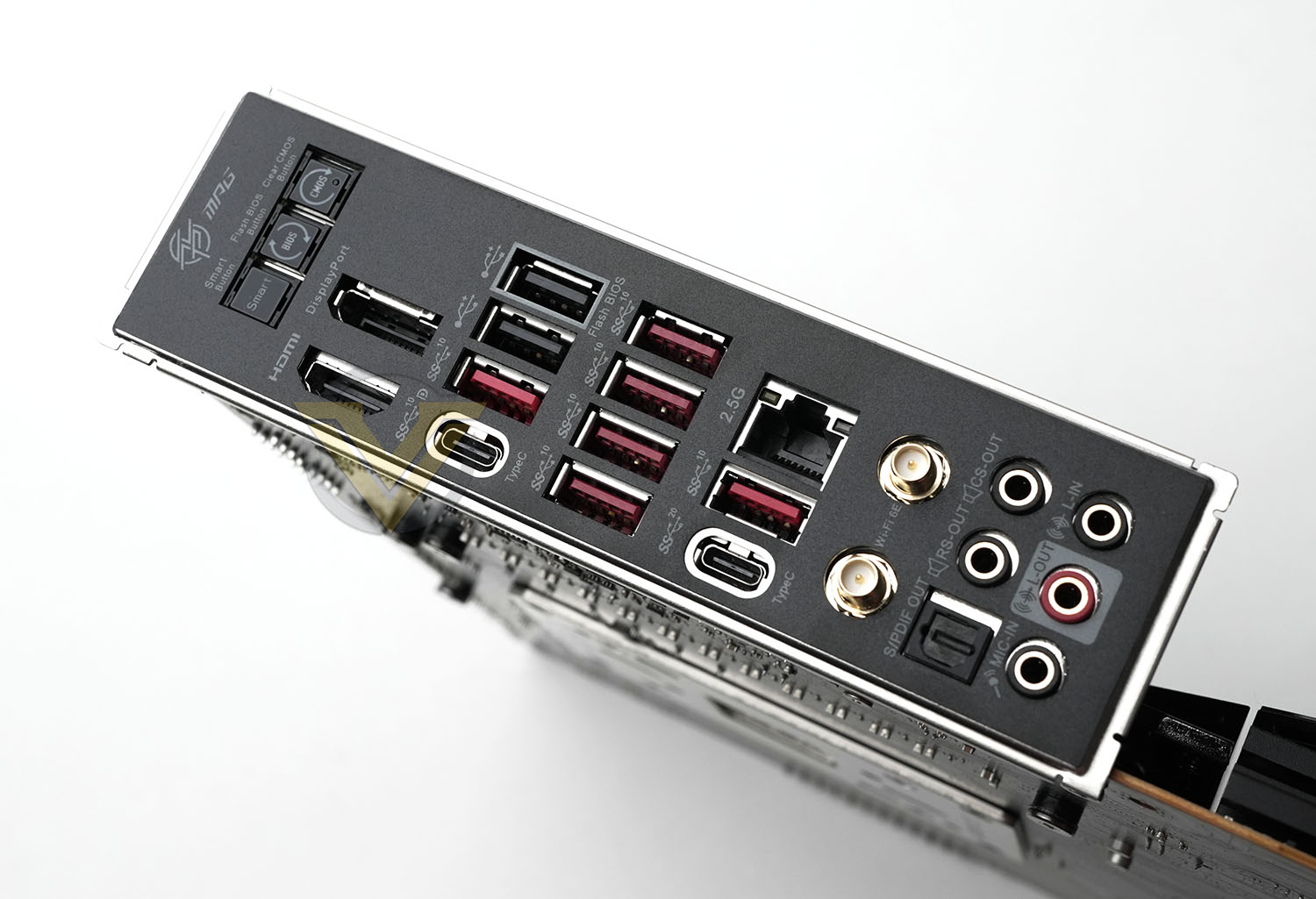
As with all X670E motherboards, the CARBON WIFI features a wide selection of I/O and functionality from both chipset and the CPU SOC:
– Smart, Flash BIOS and Clear CMOS buttons,
Displayport 1.4 and HDMI Ports (for on-board graphics)
USB 2.0 (black), USB 3.2 Gen 2 10Gbps port (red) and USB 3.2 Gen 2 10Gbps Type-C ports
Four USB 3.2 Gen 2 10Gbps Type-A ports,
2.5GbE, USB 3.2 Gen 2 10Gbps port, USB 3.2 Gen 2×2 20Gbps Type-C port.
WiFi 6E (802.11ax) aerial sockets,
7.1 channel audio ports and Optical S/PDIF Out connector.
Displayport 1.4 and HDMI Ports (for on-board graphics)
USB 2.0 (black), USB 3.2 Gen 2 10Gbps port (red) and USB 3.2 Gen 2 10Gbps Type-C ports
Four USB 3.2 Gen 2 10Gbps Type-A ports,
2.5GbE, USB 3.2 Gen 2 10Gbps port, USB 3.2 Gen 2×2 20Gbps Type-C port.
WiFi 6E (802.11ax) aerial sockets,
7.1 channel audio ports and Optical S/PDIF Out connector.
The Smart button has four discrete functions selected in BIOS:
Reset (default) – press the smart button to reset the system.
Mystic Light on/ off – press the smart button to turn on/ off all the onboard LEDs.
Safe Boot – press and hold the smart button and start the system simultaneously to boot in Safe Boot mode. The system will boot with default and lower the PCIe (from CPU) mode.
Turbo Fan – press the smart button for all fans to operate full speed or default speeds
This motherboard lacks both dual LAN and 10GbE, instead leaning on 2.5GbE and WiFi networking. That’s not a huge negative but does reflect the fact that this motherboard will not necessarily have all the premium features you might otherwise have expected from one at its price point in the recent past.
Overall, we have no great complaints about the X670E CARBON WIFI. It’s well put together, has the features you’d expect from a motherboard utilising this chipset, and incorporates a few proprietary tweaks that will set it apart from competitors in the same price bracket. We’re pleased to see a few tweaks that will make hobbyist overclockers happy – particularly troubleshooting features and ways to return to safe settings quickly without fuss – but you get the feeling that the design is really intended for mature gamers who have no real desire for the garish embellishments associated with ‘gamer’ aesthetics. It is, essentially, a CARBON ‘board, but one priced up to X670E norms.
Test Setup & Methodology
Notes: We’ve revamped our benchmark regime by removing a number of tests which reveal little, to no difference between each motherboard model. Gaming performance is one such area which has been removed due to the inability for each motherboard to offer any advantage over another. Instead, we have focussed on meaningful/tangible analysis which examines the VRM/chipset design, and the storage performance which will be far more informative to the end user.
TEST SETUP
CPU AMD Ryzen 9 7950XCooling: Corsair Hydro Series H110i
Memory: 32GB Kingston FURY 5200 MHz
Storage: Crucial MX300 SATA SSD + Kingston KC2500 PCIe 3.0 SSD
PSU: Corsair HX1050 80 Plus Gold Certified PSU
Monitor: AOC U2879VF
BENCHMARKS
PCMark 10 – Overall Extended ScoreSiSoftware SANDRA – SATA/PCIe Storage Tests
SiSoftware SANDRA – Processor Image Processing
OTHER SOFTWARE
Temperature Analysis: HWMonitorStress Testing Software: AIDA64 Stability Test
CPU Specification Monitoring: CPU-Z
Benchmarks: Power Consumption
In this first test we analyse the power efficiency from the wall for each motherboard (Minus the GPU). While each model uses the same chipset/platform, energy results can fluctuate between manufacturers due to the features and specifications that are integrated. First of all, for the idle tests the system is cold booted into Windows and no additional applications are executed – wattage is noted on the external energy monitor we use and then we open Aida64 stability test and execute a stress test, noting the highest reading on the monitor. Below are the results of this energy test.
Benchmarks: VRM Cooling
Each motherboard manufacturer designs their board with a unique set of heatsinks to cover key areas like the VRM/mosfets and the chipset itself. We load up Aida64 stability test again and perform a 20 minute run, recording the maximum value for both attributes.
Benchmarks: PCMark 10
PCMark 10 features a comprehensive set of tests that cover the wide variety of tasks performed in the modern workplace. With a range of performance tests, custom run options, and the new Battery Life Profile, PCMark 10 is the complete PC benchmark for the modern office.
Benchmarks: SATA Performance
In order to ascertain the SATA performance for our motherboards we use SiSoftware SANDRA and the File System Bandwidth performance test. This allows us to obtain the sequential read/write transfer rates for the drive being tested – Crucial MX300 SSD.
Benchmarks: PCIe M.2 Performance
In order to ascertain the PCIe M.2 performance for our motherboards we use SiSoftware SANDRA and the File System Bandwidth performance test. This allows us to obtain the sequential read/write transfer rates for the drive being tested – Kingston KC2500.
Benchmarks: CPU Image Processing
In our last test we observe the Image Processing performance from the CPU attached to the motherboard. For this we use SiSoftware SANDRA and the benchmark specifically designed for measuring the common algorithms associated with processing imagery.
Conclusion
Reviews of both £330 and £700 X670E motherboards are now behind us, essentially bookending the range of X670E motherboards on the market today. But the question remained: how does the midpoint look, and how can it meaningfully differentiate from both the lower and upper bounds of the market? The £500 MPG X670E CARBON WiFi from MSI probably gives us a pretty good indication of what to generally expect.
At least one PCIe 5.0 M.2 slot and a full x16 PCIe 5.0 slot for discrete graphics, alongside a single USB 3.Gen2x2 20Gbps port and WiFi 6E networking, are all effectively the baseline for X670E from which everything else is ‘extra’. As a result the addition of a second M.2 slot supporting PCIe 5.0, and the ability to run two x16 slots in PCIe 5.0 x8/x8 mode, are each genuine advantages for some users over budget models. But there’s not a whole lot beyond that to really whet one’s whistle.
Slightly more advanced overclocking and troubleshooting features are also welcome, and will be a boon for those who dabble rather than dive headfirst into pushing AMD’s latest CPUs to the limit. The power delivery system is similarly beefy compared to affordable X670E models, but not outrageously so. I/O options are similarly unexceptional, barely building on what’s available as standard from the chipset.
Performance-wise, there are no weaknesses compared to other X670E board’s we’ve looked at thus far. Where others might have had an odd hiccup here or there, the CARBON WIFI never seemed to dip notably below the standards set by the other models. If pushed we might surmise that the VRM temps are a little high under load, but that’s really splitting hairs.
In terms of build quality, the board is good if a little cramped and we did miss the backplate of the AORUS X670E XTREME. That being said, £200 is a lot to pay for the privilege of feeling more comfortable installing and swapping a component that will be static for 99% of its lifespan. Being able to easily fit in the vast majority of PC cases is a big plus however, which cannot be said of the EATX design.
So we come to aesthetics and to be honest it’s a little disappointing. MSI could have been much more restrained with their branding and other text on various heatspreaders around the board, allowing more of a blank canvas upon which owners can imprint their own style. Motherboard manufacturers in general still seem to think that a motherboard is their advertising space, and that gets tiresome when these prices are so eye-watering at even mid-tier levels. Two ARGB (Gen2) headers and integrated support for MSI’s own Mystic Lighting control system is fine, but not more than that.
Overall the MPG X670E CARBON WIFI is a well-appointed design with good if not exceptional features that never quite hits the heights of a premium design in any particular aspect. Nonetheless, while the competition might offer more PCIe 5.0 M.2 slots, or slightly better on-paper power delivery, or a cleaner aesthetic, there’s still something compelling about the overall package that will make it an obvious choice for 600-series early adopters everywhere.
Pros
+ Good Build Quality
+ Support for up to two PCIe 5.0 M.2 drives
+ Solid VRM and M.2 cooling
+ 18+2+1 phase power delivery
+ Logical header layout
+ Ample I/O options
+ No clear early adopter weaknesses
Cons
– Price
– Overly embellished heatspreaders that detract from a classy, sleek aesthetic