Today we have with us MSI’s latest mainstream Fermi based graphics card, the GTX465, coupled with their popular Twin Frozr II custom cooler.
Product on Review: MSI N465GTX Twin Frozr II
Manufacturer and Sponsor: MSI
MSRP: £249.99
Street Price: Not listed
When Windows 7 was released back in October last year and DirectX 11 promised us unparalleled visuals and performance on the gaming front, Nvidia were being plagued by problems. Their latest GPU architecture, codenamed Fermi, saw nothing but delays, and low yields with the 40nm TSMC manufacturing process were contributing to their growing issues. To rub salt in their already gaping wounds, ATI had already successfully released their flagship HD5800 series of cards and despite supplies not being able to meet demand, they were still several steps ahead of the competition. Finally, Nvidia officially released their DirectX 11 solutions in March this year with actual availability of the GTX470/480 cards coming later. The Fermi architecture promised even better performance and it was a complete redesign from their previous offerings, hence the delays. Upon release however, the GF100 chip was found to be power hungry and ran hot. In the aim of tackling both issues and releasing a mainstream graphics card to combat ATI’s already complete line-up, Nvidia came up with the GTX465.
Using the same GF100 chip as its bigger brothers, the GTX465 retains all of Fermi’s architectural benefits at a lower price point, with lower thermals and power consumption. Fermi wasn’t designed solely for gaming but it is a concept that encompasses Nvidia yearning for high performance computing using the sheer parallel performance and capabilities of the GPU. As such Fermi is dubbed as their next generation CUDA architecture, which we will cover more on later.
It is widely known that the greatest number of sales come from mainstream and entry level graphics cards and since ATI already have every part of the market covered with DirectX 11 solutions, Nvidia had to act quickly and the result was the cut down version of their flagship cards in the form of the GTX465. In the UK market, its price point pits it against the highly popular HD5850 so today we’ll be having a closer look at the two cards to find the winner.

Now onto MSI. MSI are well known for manufacturing some of the best motherboards on the market and they also have a vast number of products in their graphics card catalogue. More recently, they have been showcasing their own custom cooling designs to tackle the ever growing issue of heat in high end graphics cards these days. Their latest innovation comes with the Twin Frozr II cooler that aims to reduce heat by 16 degrees Celsius and noise by 21.5dB. Coupled with “Military Class” components and over volting capabilities, their GTX465 promises to deliver excellent performance and brilliant overclocking headroom.
| A bit about MSI Established in August 1986, MSI has always focused on four core values: Producing meaningful products, ensuring high product quality, the best customer service and achieving customer satisfaction. MSI’s product portfolio includes designing and manufacturing a diverse range of mainboards, graphics cards, notebooks, all-in-one PCs, server/workstations, industrial computing, barebone systems, communication devices, consumer electronics, car infotainment products and others. “Quality Products Lead to Faithful Customers” is a motto that guides all that we do at MSI. Everyone at MSI goes all out to be the best of the best in research and development. Currently, 2,000 experienced engineers staff our research and development department. This talented team carries out its work with the latest research equipment, continuing to raise the bar on product quality and innovative product features. Graphics Card MSI graphics card is designed for 3D effect, heat dissipation, power control, reliability etc. With stringent design optimization to create the most reliable high performance graphics card without compromising on quality. Global acclaim made it the undisputed number one choice for magazines, website editors and players alike. MSI’s accumulated customer base exceeded 100 million users globally in the graphics card market. MSI’s brand leadership is well established in the mind of the customers. It is this driving force that propels MSI to constantly move forward. More here… |
With that covered, let’s get to the actual review.
Specifications
Based on the GF100 chip, the GPU packs an impressive 3.2 billion transistors, over double that of the GT200 architecture. In its default configuration, the Fermi based GPU features 512 CUDA cores, or shader processors as we are more accustomed to. These are organised in a 4x16x32 block where 16 denotes the number of stream multiprocessors(SM) and 32 being the number of core on each SM, an increase of four times over the prior designs. Another addition is the L1 Cache for each SM and a common L2 Cache shared by Fermi’s 16 SMs.
Although a full GF100 core features 512 CUDA cores, only 480 are actually active in the flagship GTX480 graphics card and this is achieved by disabling one SM. However, the full 48 ROPs, L2 Cache and 60 texture units are still present so only a fraction of the shader performance is lost in the process. While the reason for this is unknown, it could well be due to thermals or yield problems. Or Nvidia might be watching the competition closely to released the full power of their Fermi core later on.
The GTX465 that we have today is merely a cut down version of the GTX480 and thus still features the GF100 core. A total of 5 SMs have been disabled leaving 11 behind and with each holding 32 cores/ 4 texture units, the GTX465 has a total of 352 CUDA cores and 44 texture units. Furthermore the number of ROPs has been cut down to 32 from the full 48.
Another notable difference of the GF100 core is its narrower memory bus compared to the 512-bit bus of the GT200 core. The GTX480 has a 384-bit memory interface but to compensate for this, the core has been teamed up with GDDR5 memory. The GTX465 has two of its memory controllers disabled leaving it with a 256-bit bus and 1024MB of memory.
GTX480: 15 SMs x 32 = 480 Core, 15 SMs x 4 = 60 texture units
32-bit channel x 12 = 384-bit interface, 256MB x 6 memory controllers = 1536MB memory
GTX465: 11 SMs x 32 = 352 Core, 11 SMs x 4 = 44 texture units
32-bit channel x 8 = 256-bit interface, 256MB x 4 memory controllers = 1024MB memory
This should put the GTX465 at roughly two thirds the performance of the GTX480 at a smaller fraction of the cost, which is always welcomed. The core and memory clock speed of the GTX465 has also been limited to 607/3200MHz respectively . Despite the Twin Frozr II cooler and superior circuitry by MSI, the card has been left at its stock speed, albeit with the promise of a massive overclocking headroom.
The MSI GTX465’s price point pits it against ATI’s HD5850 and while on paper it may seem like the ATI offering is the clear winner, we have to remember that Fermi’s architecture is a step away from the old designs and the newly designed integer ALU supports full 32-bit precision for all instructions as opposed to the limited 24-bit precision of the GT200 core. Fermi’s core value is for high performance computing, thereby being designed for better arithmetic performance and optimized for OpenCL and DirectCompute. The main disadvantage of the core, as a result of this, is its power consumption, with the GTX465 having a max power draw nearly 42W over its rival.
| Product Specifications Graphics Engine: GeForce GTX465 Bus Standard: PCI Express x16 2.0 Memory Size(MB): 1024 GDDR5 Memory Interface: 256-bits Core Clock Speed (MHz): 607 Memory Clock Speed (MHz): 3206 DVI Output: 2 D-SUB Output: 2 (optional, via DVI to D-SUB adaptor) HDMI-Output: 2 (optional, via DVI to HDMI adaptor) Mini HDMI-Output: 1 HDCP Support: Yes Dual Link DV1: Yes HDMI Support: Yes Display Output (Max Resolution): 2560 x 1600 SLI/3-Way SLI support: Yes Card Dimension (mm): 243 x 111 x 33 |
Features
| Twin Frozr II Thermal Design – Reduces Heat by 16 degrees Celsius and noise by 21.5dB Dual 8cm PWN Fans: Dual Ultra Quiet fans provide 50% better thermal efficiency and direct airflow to cool down GPU, memory and power module at once. Five heat pipes with dual SuperPipe technology: 8mm SuperPipes can transfer heat much faster to the fins under the dual PWM fans, and the fans dissipate heat directly from fins. Nickel-plated Copper Base: Large copper base coated with nickel provides the fasted heat dissipation and a bigger contact area with the GPU. Direct Contact Design: Copper base, heatsink and heat pipes are all connected together and directly contacted, creating the shortest path to dissipate the heat of the GPU and to improve cooling efficiency. High-Density Heatsink: Ultra high-density aluminium heatsink has large area for heat dissipation. Heat of GPU will be dissipated to each fin equally. Military Class Components Hi-C Cap (Highly Conductive Capacitor) provides more precise GPU voltage -Tantalum core: rare metal, incredibly stable -15x less leakage -Stabilize GPU power, better overclocking -Used on space shuttles and satellites SSC (Solid State Choke) has no buzz noise and higher current for better overclocking ability -Higher maximum current output – Better protection of power surge -Designed for overclocking All Solid CAP for longer lifespan -10 years ultra long lifetime -No explosion -Extreme low ESR -Lower temperature -Higher efficiency Over voltage function of GPU Supports over voltage function of GPU with Afterburner, and performance gain can be up to 15%. -MSI Afterburner, a powerful overclocking/monitoring VGA utility, is co-developed by MSI & Rivatuner. It supports both Nvidia & ATI-based graphics cards from MSI and has a friendly user interface, helping users overclock and monitor their graphics cards easily. MSI Afterburner includes some unique features: Over Voltage function of GPU, support SLI and CrossfireX mode, Customized profiles for 2D and 3D modes, Advanced fan speed control. PhysX & 3DVision Surround Technology -Support PhysX technology effects for realist physics effect – Support 3DVision Surround technology to provide 3 monitor output simultaneously and real 3D image experience. (Need to work with 3D monitor and 3D glass.) MSI Live Update 4 MSI Live Update 4 is a single utility software that automatically checks BIOS, driver and utility updates and installs for you , which can save your time for searching and lower the risk while updating. PCI-E 2.0 Designed to run perfectly with new PCI Express 2.0 bus architecture, offering a future proofing bridge to tomorrow’s most bandwidth-hungry games and 3D applications by maximizing the 5GT/s PCI Express 2.0 bandwidth (twice that of first generation PCI Express). PCI Express 2.0 products are fully backwards compatible with existing PCI Express motherboards for broadest support. HDMI Support MSI graphics cards offer the HDMI functionality to provide access to premium digital content. HDMI enables gaming enthusiasts to seamlessly connect to their LCD monitor to bring the ultimate multimedia experience. (Only 1 single HDMI cable is required while streaming audio/video data to flat-panel display devices, such as Plasma/LCD TVs, or projector.) SLI Support Delivers up to 2x the performance of a single GPU configuration for unequalled gaming experiences by allowing two cards to run in parallel. The must-have feature for performance PCI Express graphics, SLI technology dramatically scales performance on today’s hottest games. Industry leading 3-way NVIDIA SLI technology offers amazing performance scaling by implementing AFR(Alternate frame Rendering) under Windows Vista/7 with solid, state-of-the-art drivers. Blu-ray & HD-DVD Support Both support the latest specifications of Blu-ray and HD DVD(High Definition DVD). It comes with the latest GPU and DDRIII superior processing performance in which users can easily enjoy the high-definition video of 1920×1080(1080p/i). Nvidia CUDA NVIDIA® CUDA™ technology is the world’s only C language environment that enables programmers and developers to write software to solve complex computational problems in a fraction of the time by tapping into the many-core parallel processing power of GPUs. With millions of CUDA™-capable GPUs already deployed, thousands of software programmers are already using the free CUDA™ software tools to accelerate applications—from video and audio encoding to oil and gas exploration, product design, medical imaging, and scientific research. |
Packaging and Content
Front of the Box
The MSI packaging is fairly standard as we have come to expect from most products we see these days. However, they employ graphics to depict the power and key features of the GTX465. We can immediately see that their graphics card comes with a custom cooler with the blue colour theme keeping in touch with the chilling Frozr moniker. MSI are emphasising that their cooler is 16 degrees Celsius cooler than the reference design and 21.5dB quieter, making for a significant improvement. The main selling points are printed in bold to grab the attention of buyers and the box is certainly effective at doing so.
Key features of the card
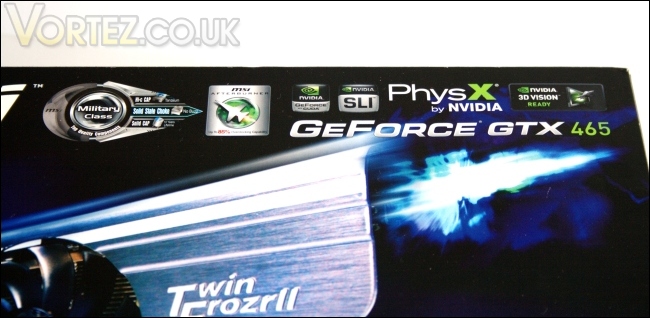
In the top right corner, all the Nvidia specific features are listed such as support for PhysX, 3D Vision and SLI. MSI also advertise their cards as military class with a superior selection of onboard components compared to the reference design. Coupled with the MSI afterburner tool, their GTX465 is bound to be an overclocking fiend.
Back of the box
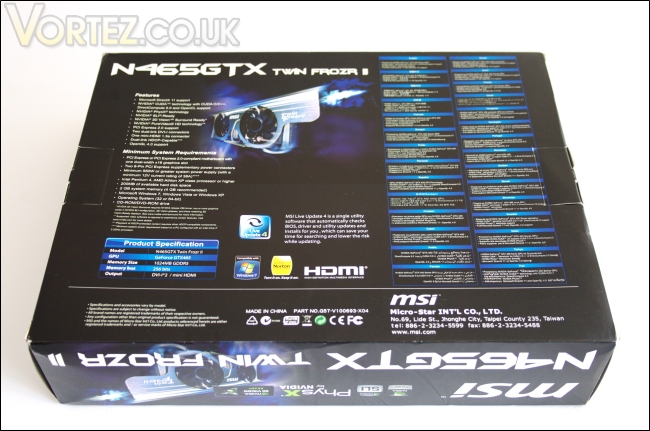
The rest of the card’s features and specifications are listed at the back as well as the system requirements. Interestingly the key features are listed in an impressive 29 languages!
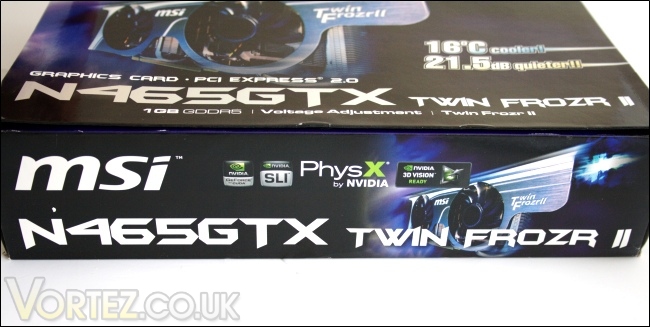
Side of the box
And just to re-iterate, this card is the Twin Frozr II edition promising unparalleled air cooling potential. MSI have delivered a number of concepts in the past, their latest being the Lightening and Hawk edition on the ATI series of cards. The Twin Frozr II design will be coming to other cards in the new generations of Nvidia Fermi cards.
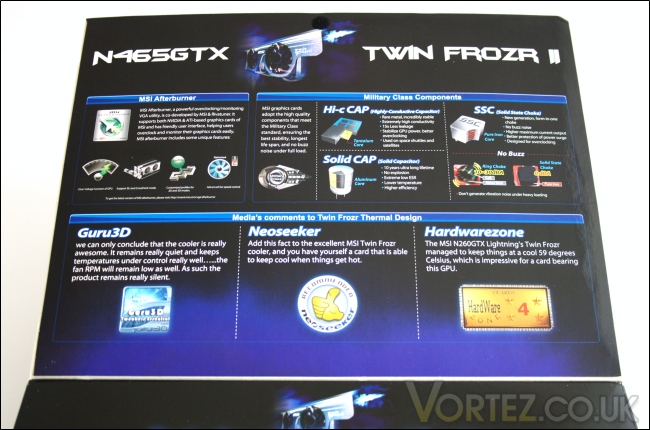
The front flap
The box uses a front Velcro attached flap which when opened, reveals more of the features specific to the MSI card. As well as the inclusion of MSI afterburner, the card comes with military class components in the form of highly conductive capacitors (Hi-c Caps), solid state chokes (SSCs) with pure iron cores, and solid capacitors with aluminium cores. These aim to deliver cleaner power delivery, a longer lifespan and better overclocking headroom.
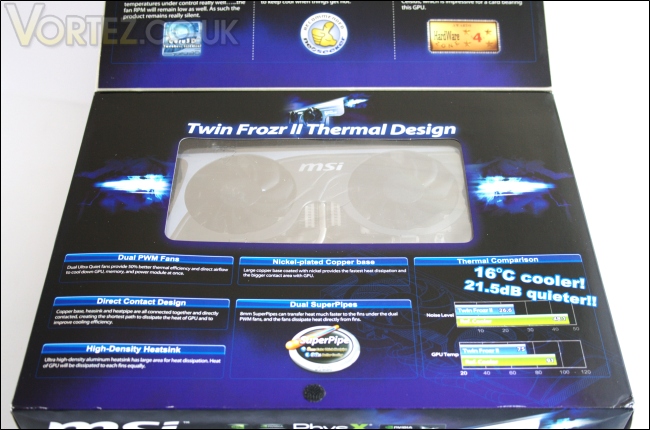
Window to the GTX465
Moving down, MSI informs us of the characteristics of the Twin Frozr II cooler design that when combined together, deliver excellent performance. The design is akin to CPU coolers we frequently test, so users can expect to see five thick heat pipes, a direct contact copper base, a high density heatsink design and two ultra quiet 8cm PWM fans to dissipate the heat. Conveniently the packaging has a clear plastic window revealing the GTX465 inside.
Closer Look
Inside the box
Going inside, we see that the graphics card is securely packaged in a foam enclosure and wrapped in an anti static bag. There is a small cut out compartment housing three adapters. Below the foam is a cardboard divider separating the card itself from the rest of the accessories and bundled user guides.
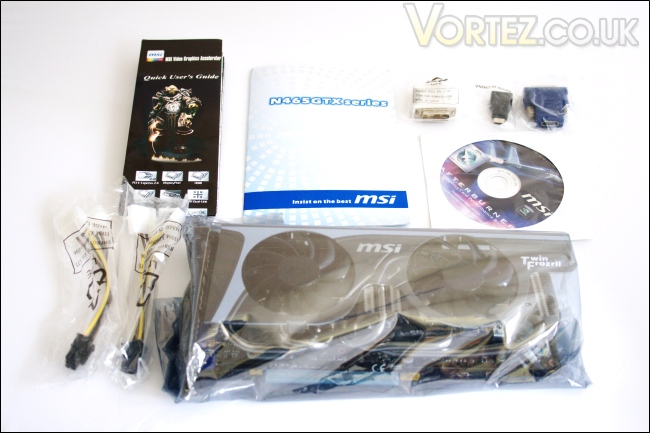
The bundle
Taking a closer look at the bundle, we can see that the whole package includes:
-GTX465 Graphics card
-1x white DVI-VGA adapter
-1x blue DVI-HDMI adapter
-1x black mini HDMI-HDMI adapter
-2x external power cable (two Molex-6 pin PCIe connector)
-Quick user guide
-GTX465 manual
-Driver & Utilities DVD
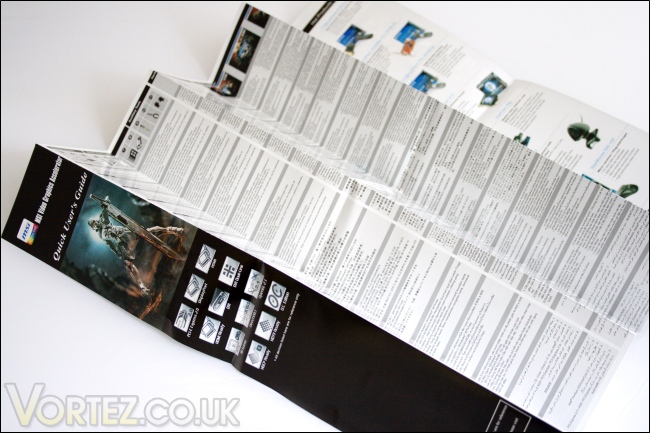
A quick user guide
The quick user guide details the installation procedure in several different languages but the rest of the information in the fold out leaflet is somewhat out dated and not specific to the Twin Frozr II GTX465. The front only mentions support for DX10.1, while inside MSI talk about some of their older graphics card and cooler designs. However this is not really an issue as installation is simple and intuitive enough for anyone to carry out.
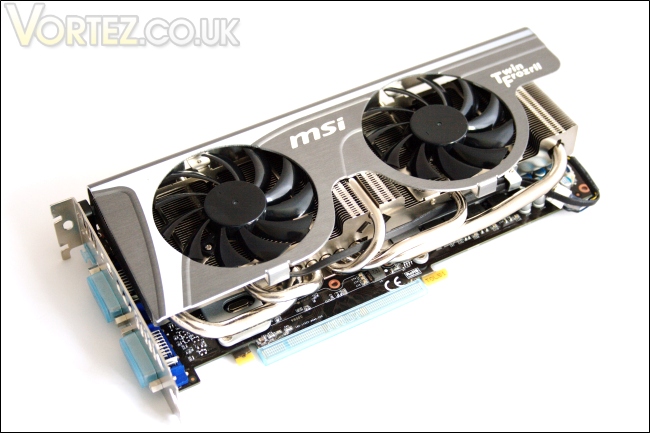
The GTX465 Twin Frozr II…
Once we take the card out, we can immediately see that MSI have done a tremendous job with this card. The card oozes nothing but quality on initial impressions and the cooler is the highlight. With a heatsink spanning the length of the PCB and a metallic cover on top, the Twin Frozr II underlines MSI philosophy of only using the best components to not only give a superior product aesthetically but also in performance. All the connectors are protected with plastic caps.
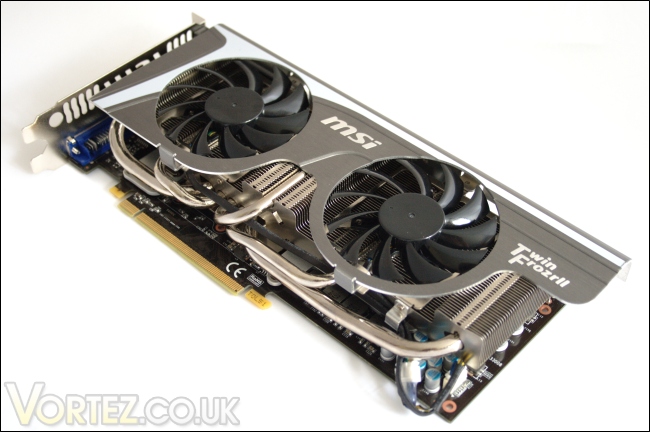
…from a different angle
From the front, we can also see that the metal cover extends beyond the PCB making the card 1.7cm longer. The reason for this is unclear but the side mounted power connectors ensures that there are no compatibility issues even in smaller ATX cases.
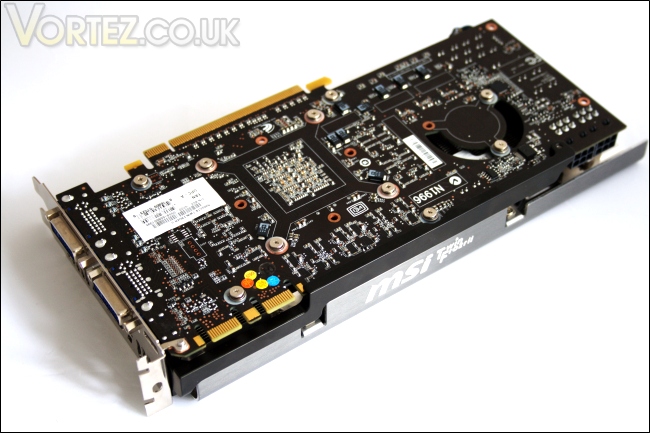
The back of the card
Onto the back of the card, we see that the card is fully exposed but with a lack of key components there, no back plate is required for additional cooling anyway. The whole cooling system on the other side is screwed on securely by spring loaded screws and separated from the PCB using washers. The use of screws also makes it easier to dismantle the heatsink. One notable addition is the side support bar to ensure that the PCB doesn’t flex with the weight of the hefty cooler.
Closer Look (Continued)
Hi-c Caps
A closer look at the back and we can see the small nine grey and black Hi-c Caps dotted around. With a Tantalum core, the capacitor ensures greater efficiency and reliability. Stability is what MSI are striving for with their GTX465 and since the card has been designed for overclocking, it’s no surprise to see MSI opting for these solid capacitors. These can also be seen on the high end motherboards.
The rear I/O panel
The rear I/O panel sports 2x Dual Link DVI-I connectors and one mini-HDMI 1.3a port. Adapters have also been provided for maximum compatibility. The air vents lie below (or above depending on how you view it) the connectors and MSI have engraved their logo on it as a finishing touch. It also shows their attention to detail that they have oriented it the correct way once installed!
The two 6-pin PCIe power connectors
The graphics card is powered by 2 6-pin PCIe connectors which have been mounted very conveniently on the side to avoid any conflicts with hard drive bays, had they been placed at the end of the card.
the SLI connectors
On the other side of the card are the SLI connectors. Up to three cards can be used simultaneously for Tri-SLI.
A 4 pin fan header and Y-splitter
In the corner, the fans are connected to a 4 pin header for PWM functionality. A small splitter is employed to avoid any more header being used and it also makes for a tidy looking card. There is a small metal clip on the side of the heatsink to help route the braided fan cables, again demonstrating MSI’s close attention to the smallest detail.
Size comparison: MSI GTX465, ASUS HD5850, XFX5870
Comparing the Twin Frozr II card to other custom designed cards, it can be seen the MSI solution has employed a much bigger heatsink. In terms of size, the PCB alone would have made the card 24.7cm but the metal cover protrusion extends its length to 26.0cm. This still makes it 1cm shorter than the ASUS HD5850 in the middle but 0.1cm longer than the XFX HD5870 at the back. It is also the only solution with the side mounted power connectors.
Closer Look (Continued)
The GF100 core and 8 memory modules
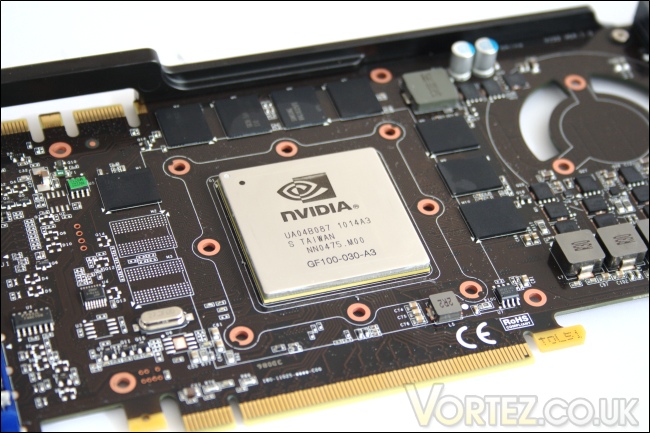
With the heatsink off, the GF100 chip is left exposed. More specifically, the integrated heat spreader is exposed but reading the details reveals that it is indeed the high end Fermi GF100 core that has simply been cut down to give us the GTX465. The heat spreader measures 42.3 x 42.3mm but the heatsink base has been carefully designed to cover the whole area when installed. The core is surrounded by 8 128MB memory modules so there is no possibility of unlocking the card to a full GTX470.
The Samsung K4G10325FE-HC05 memory chips
The memory modules are manufactured by Samsung and sport the model number: K4G10325FE-HC05. The GDDR5 memory is rated at 0.50ns for an effective 4.0Gbps.
The Solid State Chokes
Solid state chokes can also be seen here for better protection against power surges and as a result, smoother power delivery for better overclocking. The solid capacitors have been designed for a long life span of 10 years while maintaining lower temperatures and higher efficiency. It is common these days to see manufacturers coming up with large heatsinks to cool the GPU but forgetting about the memory modules. Well, MSI have thankfully not omitted this crucial feature by implementing a memory heat spreader which to open the headroom for memory overclocking.
The memory heat spreader
The heat spreader covers all the memory modules and uses thermal pads as the interface material. The heat spreader is screwed on for the best contact pressure and to minimize the risk of it falling off.
50 densely packed fins
The heatsink has a densely packed fin array with each extending across the whole card. There are a total of 50 aluminium fins, each spaced just over 1mm apart. They have a plain laminar pattern but the whole design provides a greater surface area for heat dissipation.
The heat pipes, superpipes and heatsink base
The copper base has the same area as the GF100 core for maximum contact and each of the 5 heat pipes go from the base into the heatsink, spaced evenly for greater distribution of the heat. Of the 5 heat pipes, the two side ones are 8mm in diameter while the other three are 6mm.
The heatsink and fans
From the side, we can see that the heat pipes are distributed around the heatsink for more efficient heat dissipation. The middle of the heatsink stands higher to increase surface area and to house the two 80mm PWM fans on either side. If MSI’s attention to detail hasn’t been emphasised enough, the fans have arrows engraved on to show their rotation direction. One downside of the cooling system is that cool air is pushed towards the PCB rather than directed to the back of the case, as with the reference design. The result is superior GPU temperatures but hotter air inside the case.
Test Setup
CPU – Intel Core i7 920
RAM – 6GB (3x2GB) OCZ platinum DDR3 1333mhz
Motherboard – ASUS Rampage III Extreme
Power Supply – Enermax Revolution 85+ 850W
Hard Drive – Samsung F1 320GB
Western Digital Caviar WD3200AAKS 320GB
Cooler – Noctua NH-D14
Graphics Cards:
MSI N465GTX Twin Frozr II 1024MB – ForceWare 257.21
ASUS EAH5850 TOP 1024MB – ATI Catalyst 10.5
XFX HD5870 1024MB – ATI Catalyst 10.5
Benchmark Suite
MSI Afterburner & Kombustor
Crysis Warhead using the FRAMEBUFFER Crysis benchmark tool
Far Cry 2
Resident Evil 5
Street Fighter IV
Unreal Tournament 3 using the HOC Bench tool
Enemy Territories Quake Wars using the HOC Bench tool
Colin McRae DIRT 2
Batman: Arkham Asylum
Battlefield Bad Company 2
GTA IV
Colin McRae DIRT 2
3DMark 06
3DMark Vantage
Unigine V2.1 DX 11 Benchmark
Software Bundle
The bundled DVD contains a range of utilities as well the as drivers. I would recommend using the Nvidia website for the latest drivers. The window interface is very basic but it’s functional with each tab linking to a software.
One of MSI’s most notable application in recent times has been the Afterburner overclocking utility which is bundled with their graphics cards. For those who have previously used the popular Rivatuner overclocking tool, Afterburner will be very familiar, the former providing the foundation for the software. One key difference is its ability to adjust voltages on compatible cards without any hardware modifications. For the latest released version, check out MSI’s website.
MSI Live Update 4 is a unique tool that allows users to view their installed components and update their motherboard or video card BIOS. Unfortunately, the former wasn’t functional due to an ASUS motherboard being used.
The Live Update tab searches for the most up to date BIOS, drivers and utilities online and presents users the opportunity to painless update their systems without having to trawl the internet themselves.
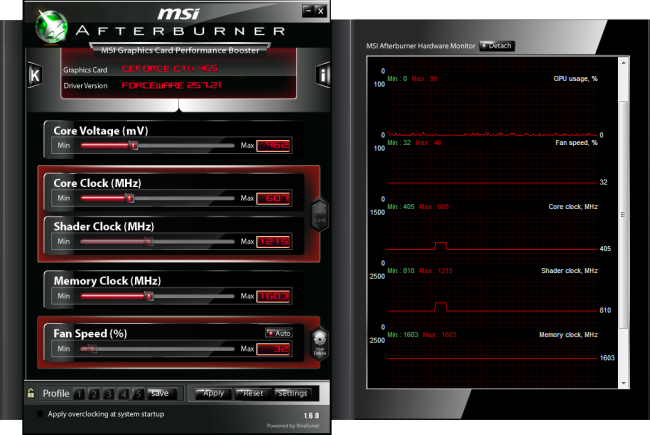
The MSI Afterburner application is heavily based on the Rivatuner engine developed by Unwinder from Guru3d. The major difference is the intuitive GUI that makes it easy to overclock, and its voltage control ability, although this does not apply to all graphics cards. The main screen gives users the ability to alter core clock speeds, memory clock speeds and the shader clock speeds for those cards that have the shader clock unlinked to the core clock. The fan speed can also be controlled manually but if left on auto, it will follow a fan profile. The latter can be adjusted in the settings with regards to temperature thanks to the GTX465’s PWM fans. The greatest feature of the Afterburner application is the core voltage tweak which isn’t limited to the GTX465. For instance, It can be used in conjunction with other MSI solutions and all reference designed ATI HD5870, making this a very powerful tool to get the most out of the graphics cards.
On the right, different aspects of the card can be monitored including the temperature. Users can select which options to be displayed in the hardware monitor window. After all the settings have been applied, overclocks can be saved as profiles to be loaded up whenever the user wants. There is even a hotkey application to quickly load profiles.
Going into the application properties reveals even more options for users to delve into. Here, the application can be configured to suit the user’s needs.
MSI Kombustor is a recent addition to the MSI application suite. It is based on the Furmark video card stress test application. Simply pressing the ‘K’ button on MSI Afterburner will open up Kombustor application and start stressing the graphics card. Its main task is to ensure that overclocks are stable and that temperatures are within limits when fully stressed. The graph displays the rise in temperature and indicates the maximum and minimum temperatures. In the top right, the illustration of the core gets redder as the temperature rises.
Temperature & Overclocking
The MSI GTX465 has been engineered for overclocking so it would have been a crime not to do so. As you can imagine, with the Twin Frozr II cooler, military class components, MSI Afterburner and voltage tweaking capabilities, overclocking was a walk in the park. The first step was to increase the voltage to the maximum limit set in Afterburner. The upper limit was 1150mV but when applied, the voltage was set to 1080mV instead, an increase on 118mV over the stock 962mV. Proceeding from there, I increased the clock speed to 815MHz from the stock 602MHz. Doing so increased the shader clock to 1630MHz which is always on a 1:2 ratio with the core clock speed. The memory clock speed reached 3600MHz, a healthy 400MHz above the stock clock.
The overclock translates into 34.4% increase in both the texture and pixel fill rate, and a 12.4% increase in the memory bandwidth, making the GTX465 more powerful than a stock GTX470 except in the memory bandwidth.
Temperature
The MSI GTX465 ran very cool and it’s no surprise with the Twin Frozr II thermal solution. Unfortunately, I didn’t have a reference model to compare it to but with a load delta value of 38 degrees using MSI kombustor, I was very impressed. Despite an ambient temperature of 30 degrees Celsius (who knew we could get hot weather in England…), the absolute load temperature was a mere 68 degrees. Even when overclocked and overvolted, the maximum load temperature reached 80 degrees, representing a delta value of 47 degrees Celsius (the ambient temperature rose further believe it or not!).
Noise
Spinning at 52% under load at stock clocks and 59% when overclocked, the dual 8cm fans stay very quiet. It seems that MSI’s claims were true and using two fans also reduces their need to rotate faster. Through PWM functionality, the fans rotate based on the temperature so the maximum temperature will always be maintained at safe values. When first installed, I did notice that the fans would occasionally behave erratically and spin up to 100% for no apparent reason but this settled over time. MSI Afterburner allows user to manually control their fans should they not want an automatic profile. At idle, the fans stay at 40% and the card is inaudible.
Overall, the cooler solution exceeded my expectations and held true to MSI’s claim.
Crysis Warhead
Following the success of Crysis, the stand alone expansion “Warhead” was hotly anticipated to bring more game play, more weapons, improved visuals whilst maintaining better performance, the latter being what gamers wanted most. After all how many people upgraded their rigs just to play this game… In the game, you play as the upbeat Brit Sergeant “Psycho” Sykes, chasing down a Korean nuclear warhead. Throw in some ice shooting aliens and we’re bound to have a great game. It sure delivered.
In Crysis Warhead, the GTX465 falls short of the ATI HD5850. Overall, when looking at the stock clocks, the difference is around 28-35%, which given the similar price point, is not justifiable. Overclocking improves the performance by around 25%, which isn’t bad considering the 34% increase in the core clock. However, these performance gains aren’t enough to overthrow the HD5850. The GTX465 isn’t a significant upgrade over the last generation of Nvidia mid-high end graphics card unless overclocked.
Far Cry 2
One of the most hyped games of 2008, Far Cry 2 had some big shoes to fill. It was built to be the next best thing since well… Far Cry I suppose. Combining an open-world game play with highly detailed graphics, physics and AI, what more could we possibly want? The game puts us in the body of a malaria inflicted mercenary hunting down the “Jackal” in the heart of Africa, in a bid to stop an ongoing conflict between two rival factions. The storyline can be hard to follow sometimes but I’m no game reviewer, so let’s concentrate on the graphics and performance. After all, we all need to know if our hardware will be able to handle the scorching savannah burning at the hands of our flamethrowers.
The MSI GTX465 performs admirably in Far Cry 2 regardless of the settings used. It has a clear lead over the stock HD5850, especially with 8x Anti-aliasing applied. At the higher resolution, it even matches the high end HD5870! Once overclocked, the GTX465 takes an even more compelling lead that is unmatched by the overclocked HD5850. After the unconvincing performance displayed in Crysis Warhead, Far Cry 2 is certainly a change of pace.
Resident Evil 5
Resident Evil 5 is the sequel to the Resident Evil series, exploring the life of main protagonist, Chris Redfield. You play as either Chris Redfield or Sheva Alomar in an African desert area in Kijuju. In true Resident Evil fashion, your main objective is to investigate a terrorist bio-organic weapon threat whilst killing infected “Majinis” on your way.
In Resident Evil 5, the GTX465 once again falls behind the HD5850. At 1680×1050, the performance gap is only 14% but once we increase AA to 8x, the gap increases to 21%. A similar difference can be found at 1920×1200 with 4x AA. Unfortunately for the Nvidia card, it loses out further at the highest level of detail. Overclocking goes a long way at narrowing the gap putting the GTX465 on par with a stock HD5850, losing out with higher levels of AA but winning with 4xAA. This isn’t enough for the Nvidia card to claim a victory.
Street Fighter IV
Street Fighter is back in its 4th iteration and its bigger and better than ever. Combining fluid, fast based sparring with stunning artistic visuals, the game delivers tremendous game play. Be reacquainted with some of the most popular characters in video game history while you battle your way to the top, be it with Ryu or the mighty Bison. The game might be frustratingly hard in some cases but there’s nothing like the satisfaction of K.O’ing your opponent with a well stringed death bringing combo.
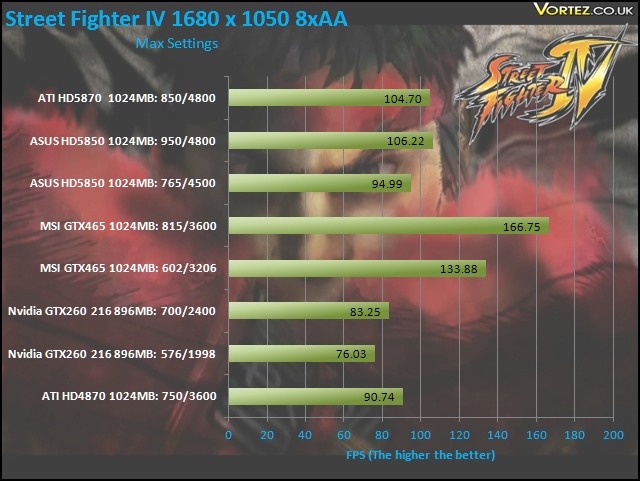
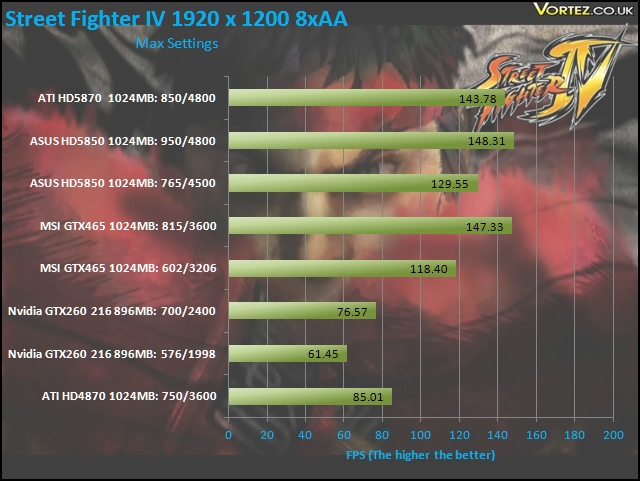
At the lower resolution, the GTX465 takes a remarkable lead over its rivals, including the HD5870. However, this is an issue we have touched on before regarding the ATI cards not performing well at non-native resolutions on Street Fighter IV. Nonetheless, it’s good to see the Nvidia card not having such issues and taking a lead of 25-40% at stock speed. Moving on to the higher resolution, the GTX465 performs very similarly to the HD5850, even when both are overclocked.
Unreal Tournament 3 & Batman Arkham Asylum
Unreal Tournament 3
Built around the unreal 3 engine, Unreal Tournament is all about mindless fast paced shooting, decapitation with a plethora of game modes to so in. Not much else can be said really except that it promises hours of enjoyment on multiplier whether it be against bots, your friends at a LAN or online. It was one of the more popular games out there to adopt PhysX in the form of partially destructible maps, tornadoes and hail.
At stock speed, the GTX465 is only slightly slower than the HD5850 and when both are overclocked, it takes a 6% lead at 1680×1050 but loses out by 1 FPS at the higher resolution. It’s still impressive to see it matching the HD5870.
Batman: Arkham Asylum
The Dark Knight takes on his greatest challenge yet when he becomes trapped with all of his most dangerous villains inside the insane asylum of Gotham City – Arkham Asylum. The game exposes you to a unique, dark and atmospheric adventure that takes you to the depths of Arkham Asylum, Gotham’s psychiatric hospital for the criminally insane.
Without PhysX, the ATI cards continue to dominate the GTX465. After overclocking both, we can see the performance of the latter card vastly improves by around25% , also netting higher minimum FPS results whereas the overclocked HD5850 doesn’t show any improvements. The main advantage of the Nvidia card is of course support for hardware PhysX. Not surprisingly, turning it on to high takes its toll on the GTX465’s performance cutting performance by over a half but the game still remains very playable. Nvidia recommends using a dedicated card for PhysX but the GTX465 managed fine on its own.
Enemy Territory: Quake Wars
Earth is struck once again by Extra-Terrestrials, this time in the form of the Strogg. In the game you play as either the humans, defending the their beloved planets, or the Stroggs, attempting to invade with their arsenal of futuristic weapons. The games has vast open battlefields with an enormous array of vehicles and weapons at your disposable promising fast paced strategic battles.
Quake Wars sees the GTX465 underperforming compared to the HD5850 but overclocking unlocks its true potential. It still falls short of a stock HD5850 but only by a few FPS, the last test being an exception to the trend.
Colin McRae DIRT 2
DIRT is back and it’s bigger than ever. With an onslaught of famous X-Games competitors such as Ken Block and Dave Mirra, extreme is being brought back to rally. The game not only delivers outstanding gameplay in lush environments but also stunning visuals in the form of Direct X 11 implementation. If you want some fast paced, arcade style racing, then look no further than Colin McRae DIRT 2.
*Note*- Graphics Cards not compatible with DX11 will be running at DX10 instead.
In this DX11 game, we can see that the GTX465 again cannot match the HD5850 but overclocking brings the gap much closer. The average FPS is marginally better on the Nvidia card at 1680×1050 but the opposite is true at 1920×1200. The minimum FPS is lower on the GTX465 throughout but remains very playable nevertheless.
Battlefield Bad Company 2
Battlefield Bad Company 2 is the new rendition of the widely successful Battlefield series of game. Having more in common with the console release of Bad Company, the sequel hopes to inject the DNA of the timeless Battlefield 2 online experience with the witty action packed single player shooting adventure of the original. As Private Preston Marlowe, your goal as a member of Bad Company is to once again save the world by securing a scalar weapon device.*Note*- Graphics Cards not compatible with DX11 will be running at DX10 instead.
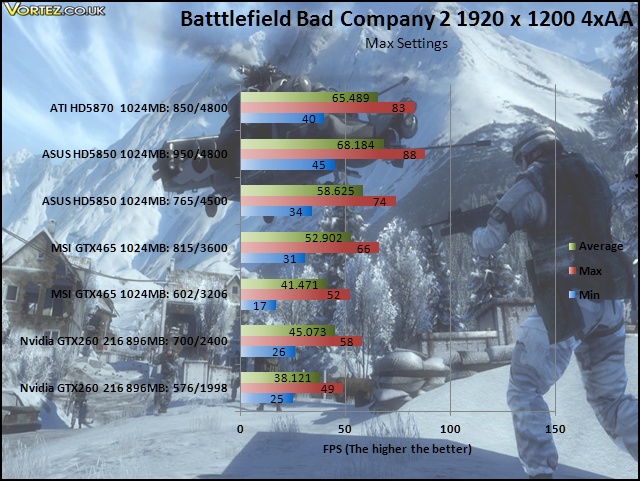
The GTX465 is unable to match the similarly priced HD5850 in Battlefield. The performance difference ranges from 35-40% and even when overclocked, the narrowed margin isn’t enough to convince buyers to opt for the Nvidia card.
Grand Theft Auto 4
GTA IV follows a whole series of highly successful predecessors and this one is no exception. You play as Nico Bellic, fresh off the boat from Russia, seeking to live the American dream. But Liberty has far more sinister plans for you as you delve quickly into the criminal underworld to make a living and survive. Hours of game play later, it still retains its flare to guarantee that you go back to it at every opportunity.
The GTX465 performs very well here and even outperforms the ATI cards. The overclocked HD5850 results had to be omitted due to severe stuttering when testing.
3DMark 06 & Vantage
3DMark 06
Futuremark has been the testing ground for enthusiasts ever since their first release in 1999! While 2006 is long gone, it’s still very popular amongst benchers.
3DMark06 has become very CPU limited nowadays but it is still a good benchmark to show overall system performance. With an overclock i7 to alleviate the problem, we see that the GTX465 performs very well. Once overclocked, it does well in outperforming an overclocked HD5850 and a stock HD5870. Those looking to break records on 3DMark06 should not overlook the latest Nvidia cards.
3DMark Vantage
The Vantage performance was less impressive, scoring only 500 points more than an overclocked GTX260.Overclocking solved the problem but the GTX465 still couldn’t keep up with the HD5850 in both tests.
Unigine V2.1 DX 11 Benchmark
Unigine’s benchmark is to showcase the benefits of DX 11 and the use of tessellation as opposed to normal rendering techniques. The demo has impressive visuals that gives an insight into what we can expect from gaming in the future.
This is where the Nvidia card truly shines. In the DX11 mode with tessellation set to extreme, the GTX465 was 15% better than a HD5870, demonstrating Fermi’s superior tessellation engine. Overclocking the card left the ATI solutions in the dust. Switching to DX10, the ATI cards take back their crown with a 28-38% performance advantage at stock and overclocked speeds respectively.
Tessellation
DX 10
DX 11 Tessellation off
DX 11 Tessellation off – wireframe mode
DX 11 Tessellation on
DX 11 Tessellation on – wireframe mode
Let’s focus on a few characteristics of tessellation in the first image. Firstly, when we compare the wireframe mode, it is clear that tessellation, triangular in this case, is adding a lot more features and details, which may at first not be recognisable. The surfaces are divided in many more triangles, allowing the objects to replicate more complex structures. The ground for example is one of the features that benefits from it. To make it as efficient as possible, tessellation becomes a function of distance, generating more polygons closer to the viewer.
Now let’s look at the application of this. If we gaze at the rock pillar closest to us, we can immediately notice that with tessellation, they are not just mere square blocks but instead have irregular surfaces, more representative of a natural rock. Now, let’s move on to the stairs, which again is a notable improvement on past rendering methods. Rather than being flat, they have depth, giving the impression of real steps as opposed to a slide. The same applies to the cobbled road although the compressed/downsized pictures make it hard to judge. The last thing I’ll point out are the tiled roofs. With tessellation, the individual tiles form a more complex/realistic shape instead of appearing flat with repeated textures. You’ll have to take my word for it if you don’t notice them or try the demo for yourself!
Nvidia Sled Demo
It has always been customary of both Nvidia and ATI do showcase their latest technology with some sort of tech demo. For the Fermi generation of card, Nvidia have opted for a mini game in which a character on a homemade rail restricted sled has to speed its way to the finish line without destroying the vehicle. It demonstrates several aspects of the DX11 API, namely tessellation, and also PhysX.
Tessellation off- Wireframe Mode
Tessellation on- Wireframe Mode
In wireframe mode, it is clearer the effect that tessellation has on the visuals. The last picture is able to outline the small crater to the left, thanks to the superior triangulation.
Physics Mode
Physics plays a big part in the demo, with each component of the sled interaction with regards to the velocity at which the vehicle is travelling. It makes the game an interesting balance between speed and stability, prompting the player to race to the end without allowing the sled to disintegrate on the rails. Switching on the velocity vectors, we can see exactly how all the separate components are interacting, both in magnitude and direction.
Power Consumption
Fermi gained much notoriety upon release for its power consumption. The GTX465, being based on the same GF100, albeit cut down, can be expected to suffer from the same issue despite Nvidia trying their best to alleviate the problem with fewer shaders. Testing the card under full load using MSI Kombustor for 5 minutes tells us that the GTX465 consumes up to 10% more power than the HD5850. The high consumption when overclocked is partially due to the increase in voltage accompanying the 30% increase in core clock speed. In that regard, efficiency favours the ATI cards, but the GTX465 isn’t terribly worse.
Unfortunately, we didn’t have a reference card at hand to verify whether the superior components of the MSI card yielded better power consumption results
Conclusion
Nvidia’s answer to the popular ATI HD5850 (at least in the UK market) has been met by intense competition, which unfortunately didn’t go their way. The GTX465 boast some impressive specifications and features and finally brings DX11 to Nvidia’s mainstream graphics card product line. With the GF100 core under its hood, the cards sports the same benefits of the flagship GTX480, namely the architectural emphasis on high performance computing, DirectCompute and CUDA implementation. But looking at the performance, we are left wondering if Nvidia have forgotten their gaming heritage, which after all is their primary market. Of all the tests, the GTX465 only truly shone in GTA IV, UT3, Street Fighter IV and Far Cry 2. Of course, we can’t forgot the excellent DX11 performance in the Unigine demo with tessellation turned on, outperforming even the HD5870. Conversely, this tremendous lead isn’t reflected in the Battlefield and DIRT 2 results, both running in DX11 and the latter making use of tessellation. Power consumption was also one of the downsides of the GTX465.
Saying that, MSI have done a tremendous job customizing their GTX465 to make the card a viable option in today’s market. For a small bump over the reference design, MSI packs many features to make their board an engineering masterpiece. It uses the best components available such as the solid capacitors, solid state chokes and highly conductive capacitors to deliver a smooth power delivery, better efficiency and in turn a longer life span. For enthusiasts, it ensures the best possible overclocking headroom and MSI have broken down the thermal obstacles by coupling their GTX465 with their innovative Twin Frozr II cooler. This latest iteration evolves on their successfully engineered concepts that have been honed over the years for maximum heat dissipation. The best aspect of the cooler is its near silent operation achieved with 2 80mm PWM fans. Finally they even bundled the much revered MSI Afterburner application to provide users an intuitive tool to get the most of the card, especially with voltage tweaking ability. Overclocking unlocked the card’s real potential but unfortunately, this wasn’t enough to trouble the HD5850, another card featuring a large overclocking headroom. The only disadvantage of the cooler is the fact that the heat is directed outside of the case but with a well ventilated case, this isn’t a setback.
So, how can I sum up the MSI GTX465 Twin Frozr II. Fundamentally, it comes in at the wrong price point for its performance, making it flawed compared to ATI’s line up. This is essentially Nvidia’s fault and personally I commend MSI for only charging £250 for its vastly superior design over the reference card. Looking around, it appears to be a bargain for those wishing to get an Nvidia card without emptying their pockets for the more expensive GTX470 and GTX480 or even the reference GTX465. Overall, the MSI GTX465 is a very capable card that brings adequate performance, excellent overclocking potential to match a GTX470, a more efficient design and brilliant cooler (easily the best I’ve come across) that tames the GF100 core without compromising on noise.
Pros
[+]Very cool and quiet operation
[+] Support for PhysX and CUDA
[+]Stable and high overclocking headroom
[+]Excellent & intuitive bundled software
[+] Aesthetically pleasing
[+]Well priced against the reference design
[+]Excellent tessellation performance
Cons
[-]Power consumption
[-]Performance not on par with the competition
For their innovative design and for providing a viable alternative to ATI graphics cards, the MSI N465GTX Twin Frozr II deserves the Vortez Hardware Silver Award.
I would like to thank MSI for providing this sample. To discuss this article, please visit our forums.