Alongside the Ryzen 3000-series of desktop processors, we now have the AMD X570 chipset, now featuring PCI Express 4.0. MSI have a broad range of motherboard available with today’s review sample aimed squarely at content creators.

Product on Review: MSI Prestige X570 Creation
Manufacturer: MSI
Street Price: GBP £445.00 / USD $450
MSI are a big player within the enthusiast PC sector producing everything from budget-orientated components to best-in-class pieces. With today’s launch of AMD’s X570 chipset, MSI weren’t hanging around with around 10 different motherboards launched today to cater to the most price-conscious users all the way through to power users demanding the fastest and best motherboards money can buy.
Today’s review sample is the MSI Prestige X570 Creation, a motherboard helping to top-out their offerings with a plethora of features aimed towards content creators and power users alike.
Helping the MSI Prestige X570 Creation stand out from the crowd is Dual LAN, which includes WiFi 6 and 10 Gigabit Super LAN for faster network connectivity. We’re also provided with a pair of M.2 PCI-E NVMe slots directly on the motherboard, both supporting the PCI-E 4.0 specification, and an add-in card, dubbed the M.2 XPANDER-Z GEN. 4, which adds in another pair of PCI-E 4.0 enabled M.2 NVMe slots complete with a heatsink and active cooling.
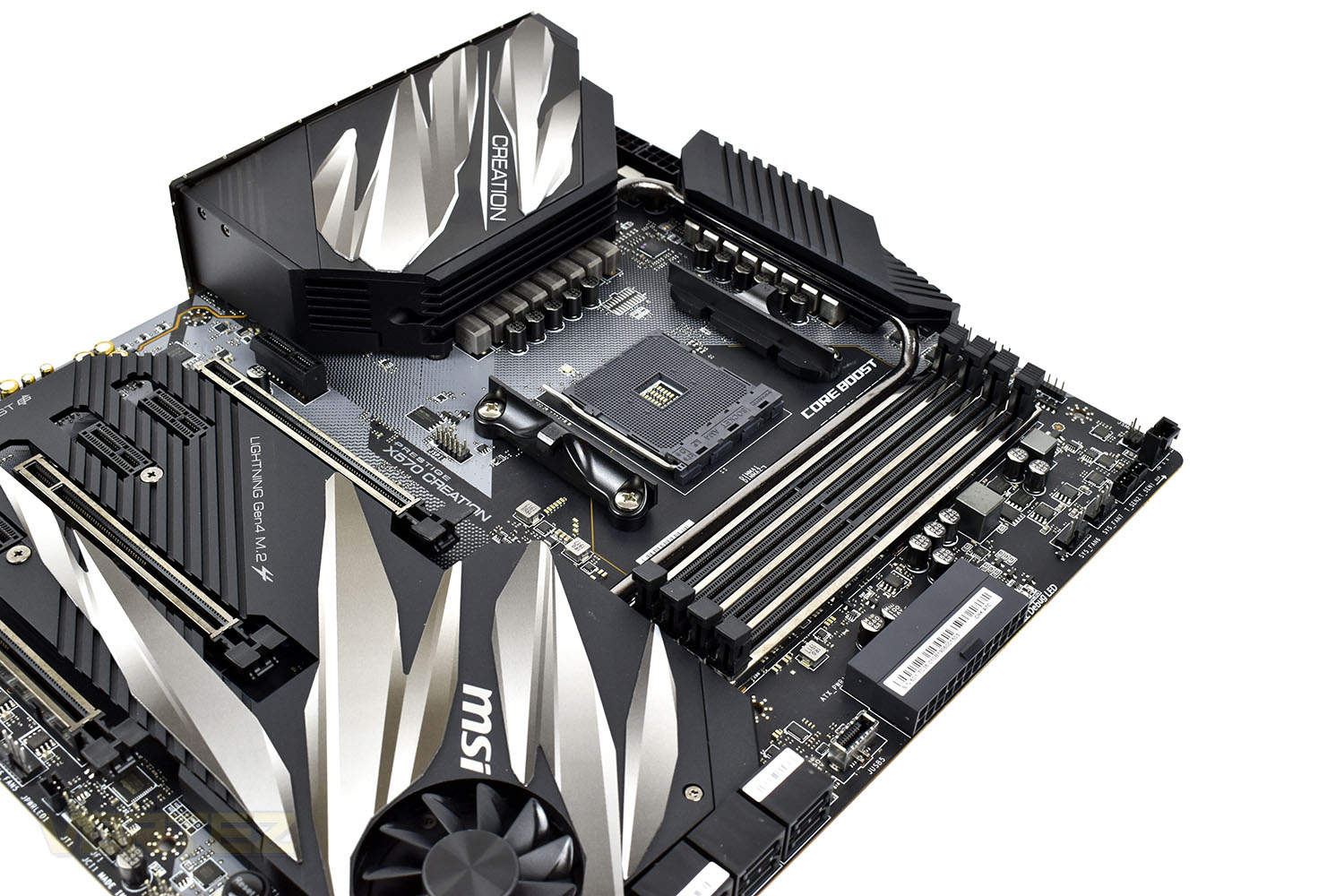
MSI have also installed an extended heatsink, utilising the Frozr heatsink design and a lengthy heat-pipe to distribute heat between the VRMs and the FCH (Fusion Controller Hub) which features a patented double-bearing fan to help reduce thermals when the going gets tough.
So, with a possible four PCI-E 4.0 NVMe drives, up to 12 core CPUs with the 3900X and 10Gig LAN, the X570 Creation should be excellent for extreme enthusiasts who require the fastest possible system. Let’s throw some tests at it and see how it fairs.
MSI on the Prestige X570 Creation:
Technical Specifications
PROCESSOR
Supports 2nd and 3rd Gen AMD Ryzen™ / Ryzen™ with Radeon™ Vega Graphics and 2nd Gen AMD Ryzen™ with Radeon™ Graphics Desktop Processors for Socket AM4
See supported processors
CHIPSET
AMD® X570 Chipset
MEMORY
4x DDR4 memory slots, support up to 128GB
3rd Gen AMD Ryzen™ Processors support DDR4 1866/ 2133/ 2400/ 2667/ 2800/ 2933/ 3000/ 3066/ 3200 Mhz by JEDEC, and 2667/ 2800 /2933 /3000 /3066 /3200 /3466 /3600/ 3733 /3866 /4000 /4133 /4266 /4400 /4533 /4600 Mhz by A-XMP OC MODE
2nd Gen AMD Ryzen™ Processors, 1st and 2nd Gen AMD Ryzen™ with Radeon™ Vega Graphics Processors support DDR4 1866/ 2133/ 2400/ 2667/ 2800/ 2933/ 3000/ 3066/ 3200 Mhz by JEDEC, and 2667 /2800 / 2933 /3000 /3066 /3200 /3466 /3600 Mhz by A-XMP OC MODE
Dual channel memory architecture
Supports non-ECC UDIMM memory
Supports ECC UDIMM memory (non-ECC mode)
Supports un-buffered memory
Please refer www.msi.com for more information on compatible memory.
See supported memory
EXPANSION SLOTS
2x PCIe 4.0/3.0 x16 slot (PCI_E2, PCI_E5)1
2x PCIe 4.0/3.0 x16 slot (PCI_E2, PCI_E5)
3rd Gen AMD Ryzen™ support PCIe 4.0 x16/x0, x8/x8 mode
2nd Gen AMD Ryzen™ support PCIe 3.0×16/x0, x8/x8 mode
Ryzen™ with Radeon™ Vega Graphics and 2nd Gen AMD Ryzen™ with Radeon™ Graphics support PCIe 3.0 x8/x0 mode
1x PCIe 4.0/3.0 x16 slot (PCI_E7, supports x4 mode)
4x PCIe 2.0 x1 slots
The speeds may vary for different devices
MULTI-GPU
Supports 2-Way NVIDIA® SLI™ Technology
Supports 3-Way AMD® CrossFire™ Technology
STORAGE
AMD® X570 Chipset
6x SATA 6Gb/s ports
2x M.2 slots (Key M)
M2_1 slot (from AMD® Processor) supports PCIe 4.0 x4 (3rd Gen AMD Ryzen™ Desktop Processors) or PCIe 3.0 x4 (2nd Gen AMD Ryzen™/ Ryzen™ with Radeon™ Vega Graphics and 2nd Gen AMD Ryzen™ with Radeon™ Graphics) 2242/2260/2280 storage devices
M2_2 slot (from AMD® X570 Chipset) supports PCIe 4.0 x4 (3rd Gen AMD Ryzen™) or 3.0 x4 (2nd Gen AMD Ryzen™/ Ryzen™ with Radeon™ Vega Graphics and 2nd Gen AMD Ryzen™ with Radeon™ Graphics) and SATA 6Gb/s 2242/ 2260/ 2280/ 22110 storage devices
The speeds may vary for different devices
RAID
AMD® X570 Chipset
Supports RAID 0, RAID 1 and RAID 10
USB
AMD® X570 Chipset
1x USB 3.2 Gen2 (SuperSpeed USB 10Gbps) Type-C internal connector
12x USB 3.2 Gen1 (SuperSpeed USB) ports (8 Type-A ports on the back panel, 4 ports available through the internal USB 3.2 Gen1 connectors)
6x USB 2.0 (High-speed USB) ports (2 Type-A ports on the back panel, 4 ports available through the internal USB 2.0 connectors)
AMD® Processor
2x USB 3.2 Gen2 (3rd Gen AMD Ryzen™) or USB 3.2 Gen1 (2nd Gen AMD Ryzen™/ Ryzen™ with Radeon™ Vega Graphics and 2nd Gen AMD Ryzen™ with Radeon™ Graphics) Type-A and Type-C port on the back panel
2x USB 3.2 Gen1 (SuperSpeed USB) Type-A ports on the back panel
AUDIO
Realtek® ALC1220 Codec
7.1-Channel High Definition Audio
Supports Optical S/PDIF output
LAN
1x Intel® I211AT Gigabit LAN controller
1x Aquantia® AQC107 10-Gigabit LAN controller
WIFI & BLUETOOTH
Intel® Wi-Fi 6 AX200
The Wireless module is pre-install in the M2_WIFI1 (Key-E) slot
Supports 802.11 a/b/g/n/ac/ax, MU-MINO Rx, 2.4GHz-5GHz (160MHz) up to 2.4Gbps
Supports Bluetooth® 5
INTERNAL CONNECTORS
1x 24-pin ATX main power connector
2x 8-pin ATX 12V power connectors
6x SATA 6Gb/s connectors
2x M.2 slots (M-Key)
1x USB 3.2 Gen2 Type-C port
2x USB 3.2 Gen1 connectors (supports additional 4 USB 3.2 Gen1 ports)
2x USB 2.0 connectors (supports additional 4 USB 2.0 ports)
1x 4-pin CPU fan connector
1x 4-pin Water Pump connector
7x 4-pin system fan connectors
1x Front panel audio connector
2x System panel connectors
1x Chassis Intrusion connector
1x TPM module connector
2x 2-pin Thermal Sensors connectors
1x 4-pin RGB LED connector
2x 3-pin RAINBOW LED connectors
1x 3-pin CORSAIR LED connector
BACK PANEL PORTS
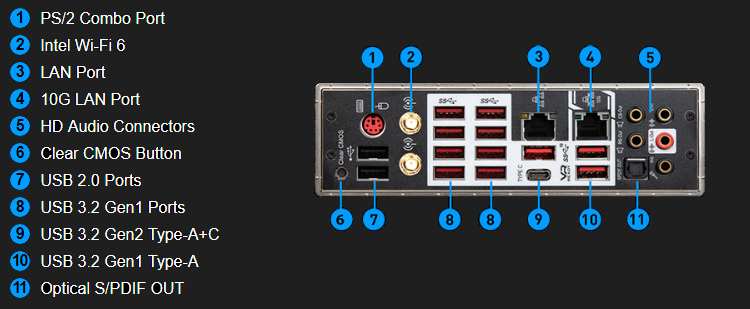
PS/2 Combo Port
Intel Wi-Fi 6
LAN Port
10G LAN Port
HD Audio Connectors
Clear CMOS Button
USB 2.0 Ports
USB 3.2 Gen1 Ports
USB 3.2 Gen2 Type-A+C
USB 3.2 Gen1 Type-A
Optical S/PDIF OUT
DIMENSIONS
12 in. x 10.7 in. (30.5 cm x 27.2 cm)
E-ATX Form Factor
MOUNTING
9 mounting holes
OPERATING SYSTEM
Support for Windows® 10 64-bit
X570 Overview
X570 – A Brief Aside
Launching alongside Ryzen 3000-series CPUs is the new X570 motherboard range. Manufactured by AMD’s extensive array of partners including industry mainstays ASRock, ASUS, GIGABYTE and MSI, X570 motherboards are the most feature complete of those available on day one.
First generation Ryzen launched with single-figure motherboard support across all manufacturers, and the second generation was only a little better. Third generation Ryzen marks a sea-change in attitudes and model variety. Dozens of X570 variants are planned across all partners, including some exceptionally high-end designs such as the £777.77 MSI X570 God Like or limited edition ASRock X570 Aqua.
In addition to all the features you expect on premium motherboards, including a plethora of IO options, storage flexibility, networking, audio and RGB lighting systems, the motherboard (specifically the chipset) will also offer up to 16 PCIe 4.0 lanes for connected components (NVMe storage etc.) which don’t require direct connection to the CPU (as in the case of discrete graphics).
The most notable pre-launch commonality has been the inclusion of a chipset/FCH fan, reflecting the increased demands these components are put under in this generation. Some motherboard manufacturers have dealt with it well, whereas others have regressed to small high-speed fans without a means of RPM control – manual or automatic. For all their bluster and high-end features, such glaring flaws will tend to rule them out of contention for approval given the pricing is far from budget.
Indeed, these motherboards are all pitched at a far higher price than the X470 series you might think they replace. That’s justified through the exclusive features – highest among them being exclusive out-the-box PCIe 4.0 support – and is excused as B450 and X470 models will continue to be sold for the time being. However, their positioning makes the next-generation Ryzen platform as a whole a little more expensive an upgrade than many would have thought just a few months ago.
Furthermore, these motherboards have limited support (i.e. typically none) for first generation Ryzen CPUs and 2000-series APUs (based on Zen rather than Zen+ architecture). As a result they may not be suitable for piecemeal upgrades. By the same token, they appear to have extremely robust power delivery systems even compared to their X470 counterparts, potentially making them excellent overclocking candidates for the higher 12 and 16-core count 3000-series processors.
Nonetheless, the vast ecosystem of X570 motherboards should mean that, if your budget is flexible enough, you’ll find exactly what you need for your use case.
Packaging & Bundle
Straight away, just from the size and weight of the box, the Prestige X570 Creation promises goodies. There’s a large image of the motherboard on the front of the box with a few brief mentions of supported devices around the edges.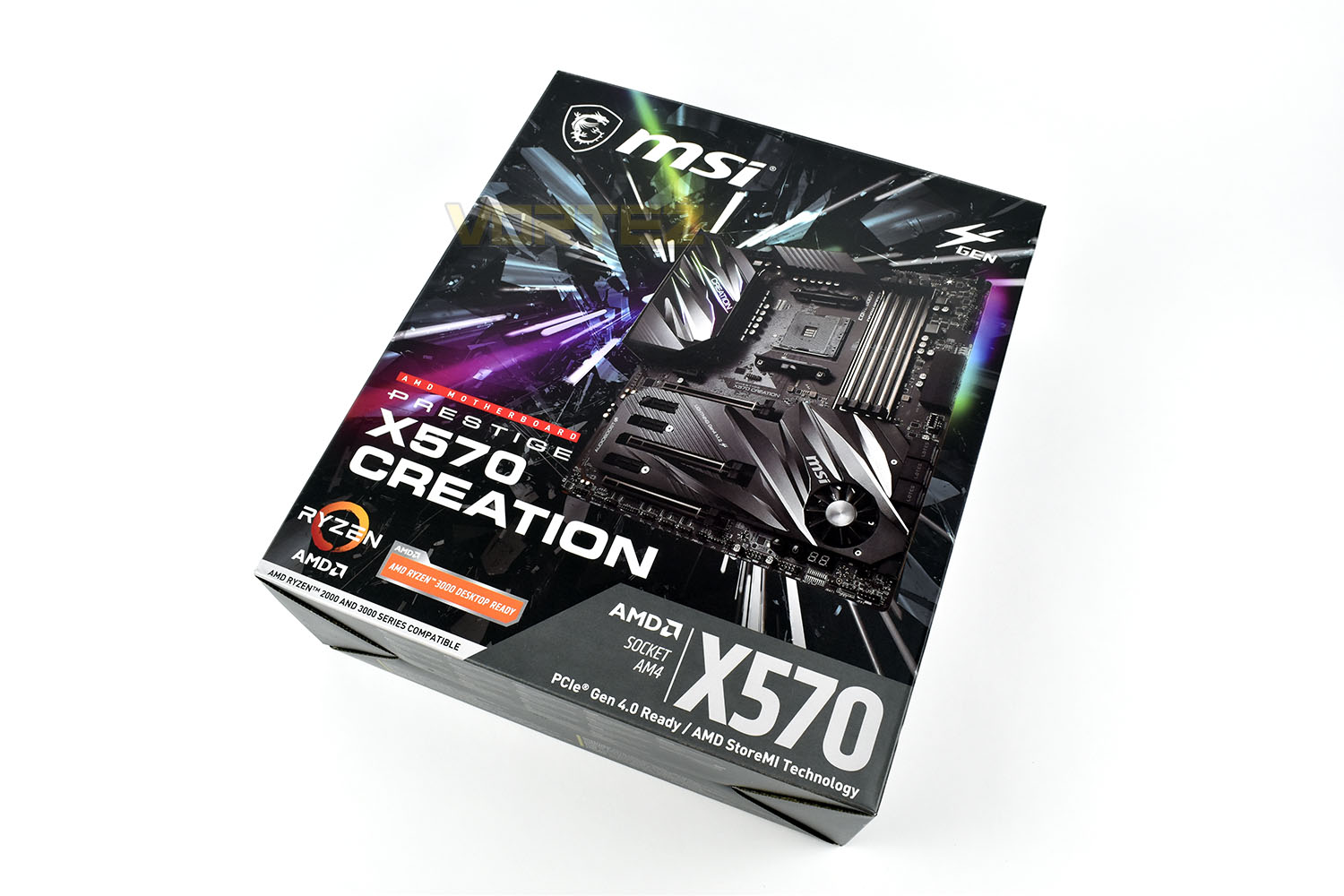
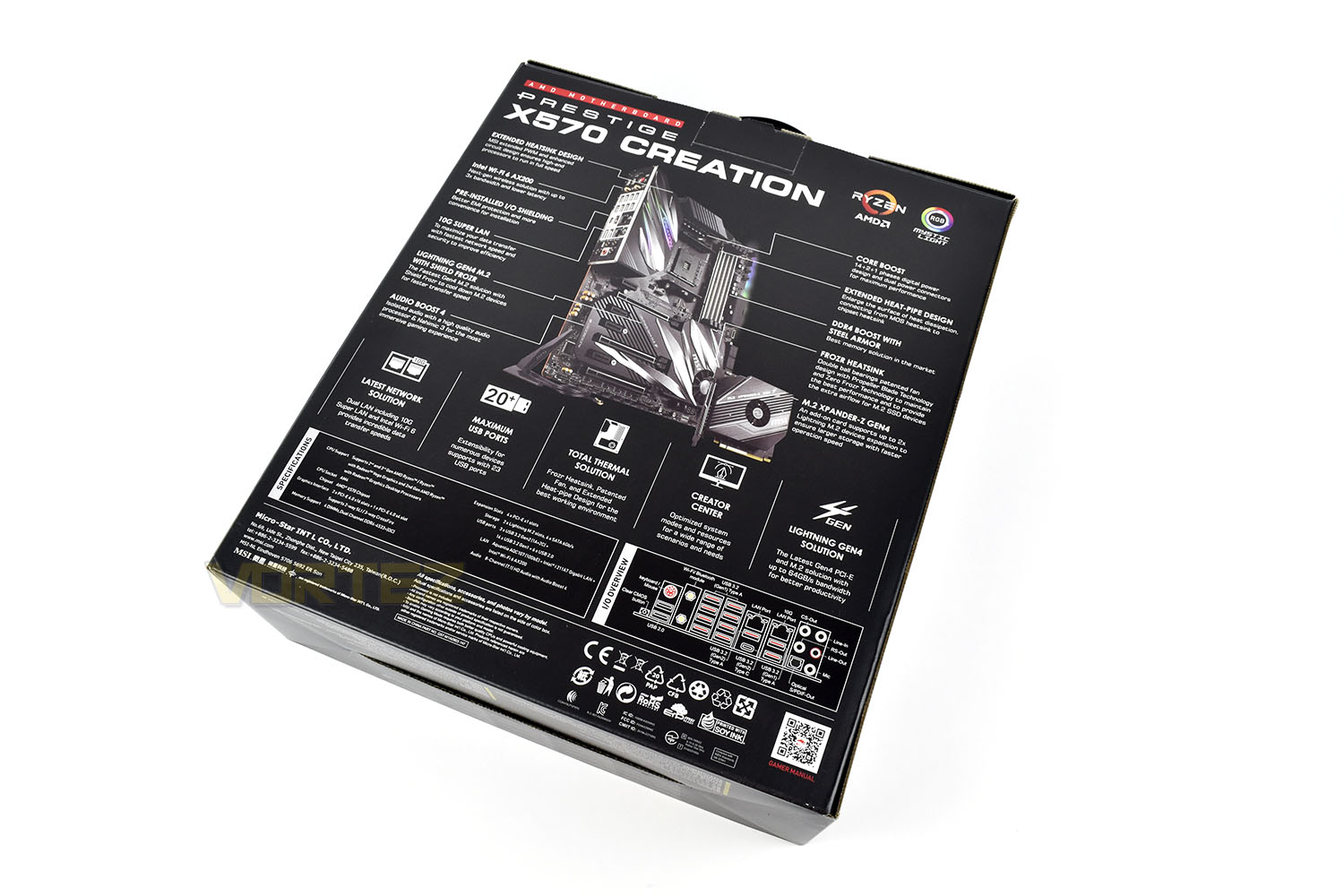
On the flipside MSI have annotated an image of the Prestige X570, showing off its key features, such as the possibility for up to 23 USB connections and the Creator Centre, a software suite optimised for use by video editors, streamers and the like.
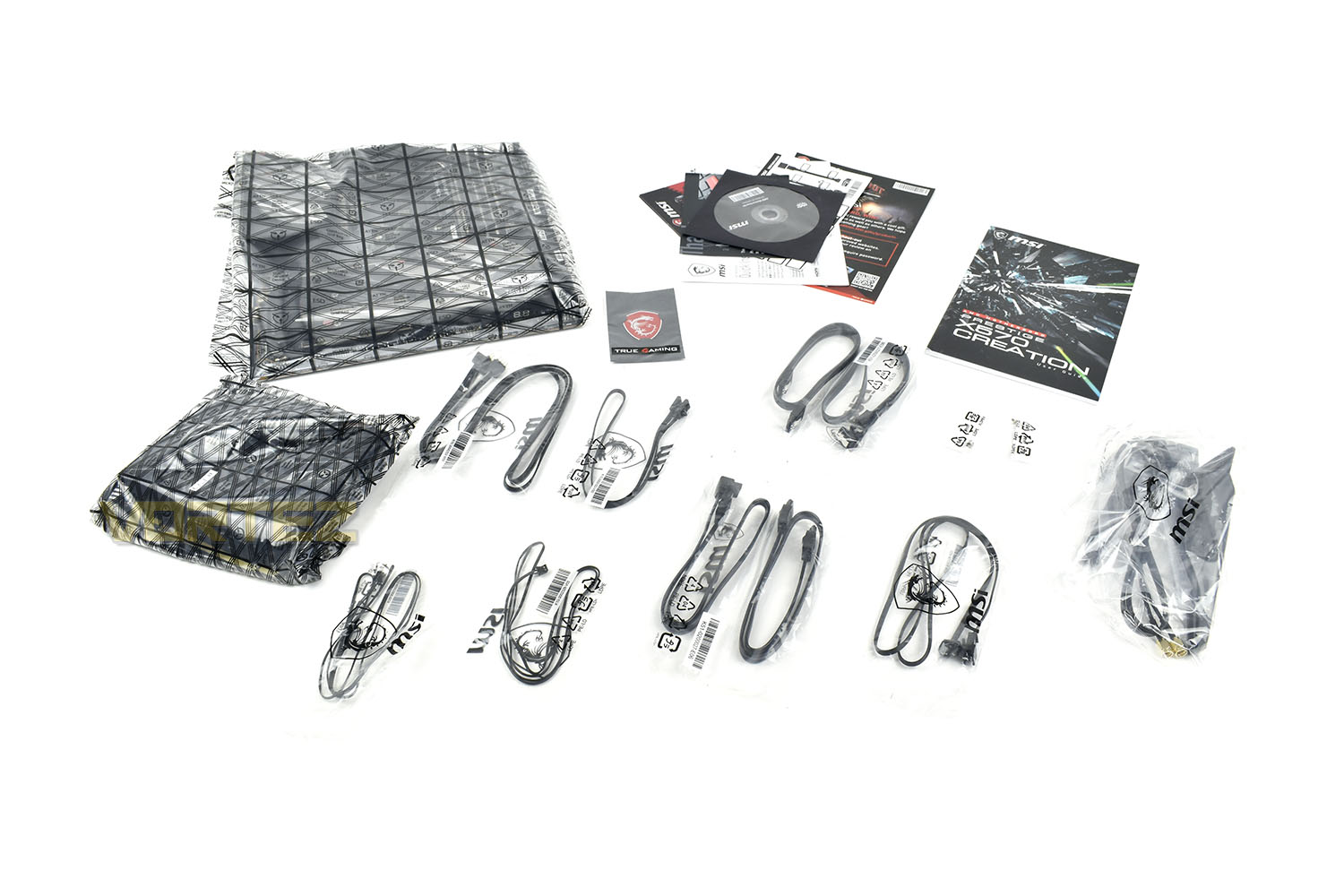
Included within the box, aside from the motherboard, we get a quartet of SATA cables, a WiFi antenna, a variety of RGB extension adaptors, a pair of temperature probes, a user manual and documentation, an MSI case badge and the M.2 XPANDER-Z GEN 4.
Closer Look
For those of you who enjoy peeling the protective film off new electronics, you’ll be more than happy with the Prestige X570 Creation, more than enough to keep you busy for a little while. Enough of that though, first impressions are certainly… impressive. The E-ATX form factor requires the board to measure in at 305mm x 272mm, ensuring it fits into any compatible case.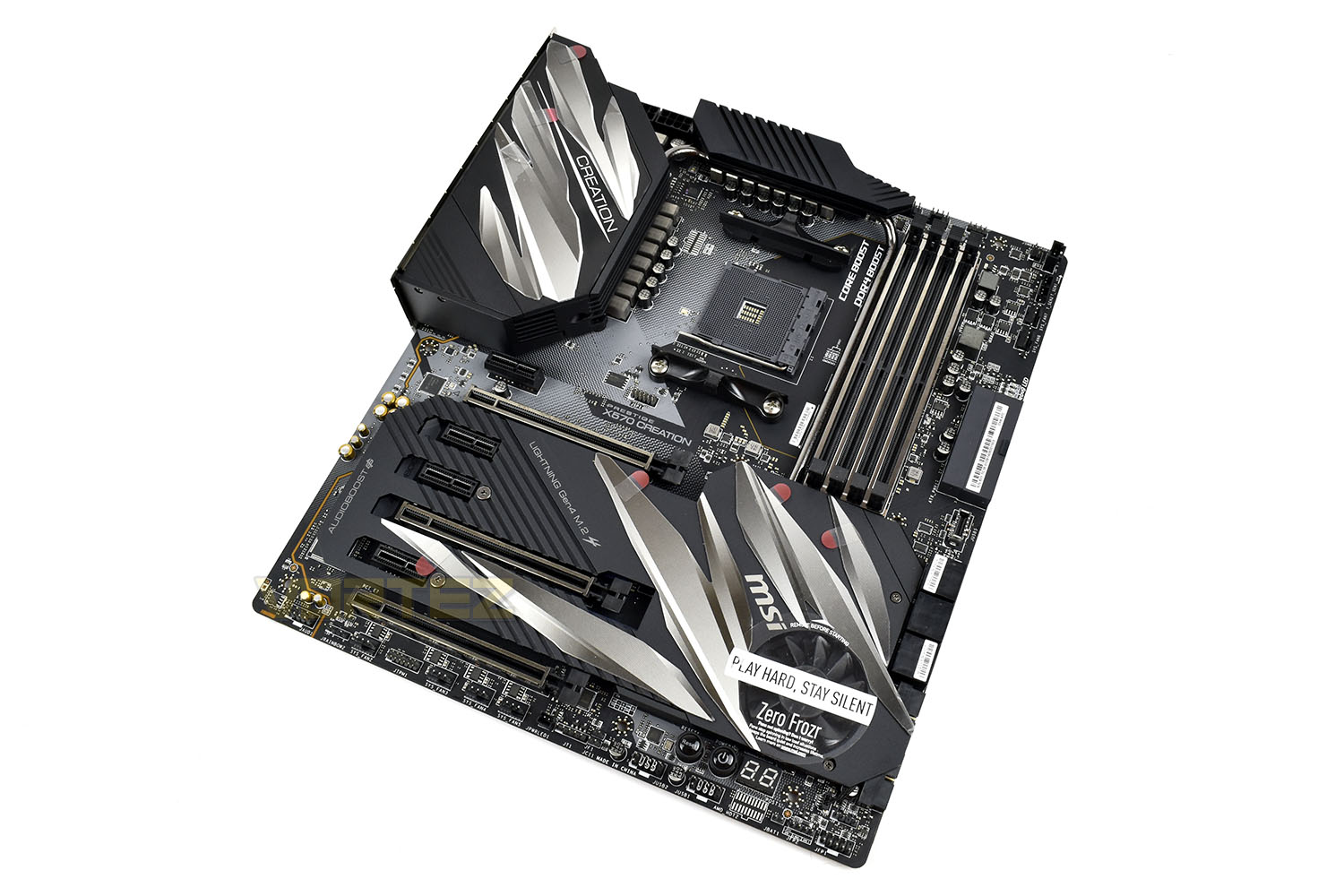
The VRMs (Voltage Regulator Modules) around the AM4 socket feature an SOC power phase with dedicated hardware specifically for memory overclocking and VDDG voltage control. The power phases utilise an IR Digital PWM and DrMOS power design for increased stability.
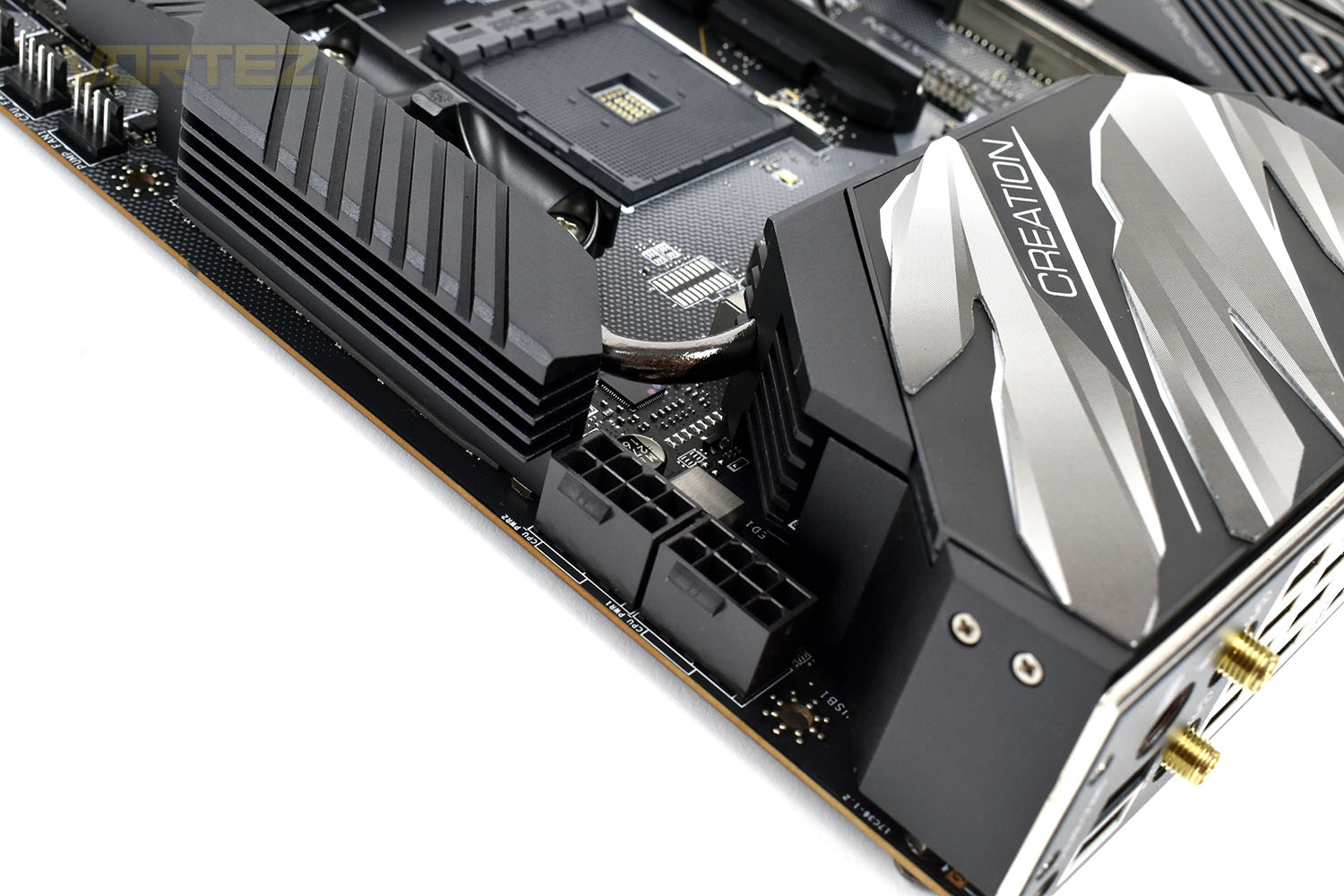
You should also notice the heatsinks, one of which is connected to the rear IO, the other above the CPU socket are joined by a 6mm thick heatpipe. That heatpipe also follows the left-edge of the DRAM slots down to the FCH for better heat distribution across the motherboard.
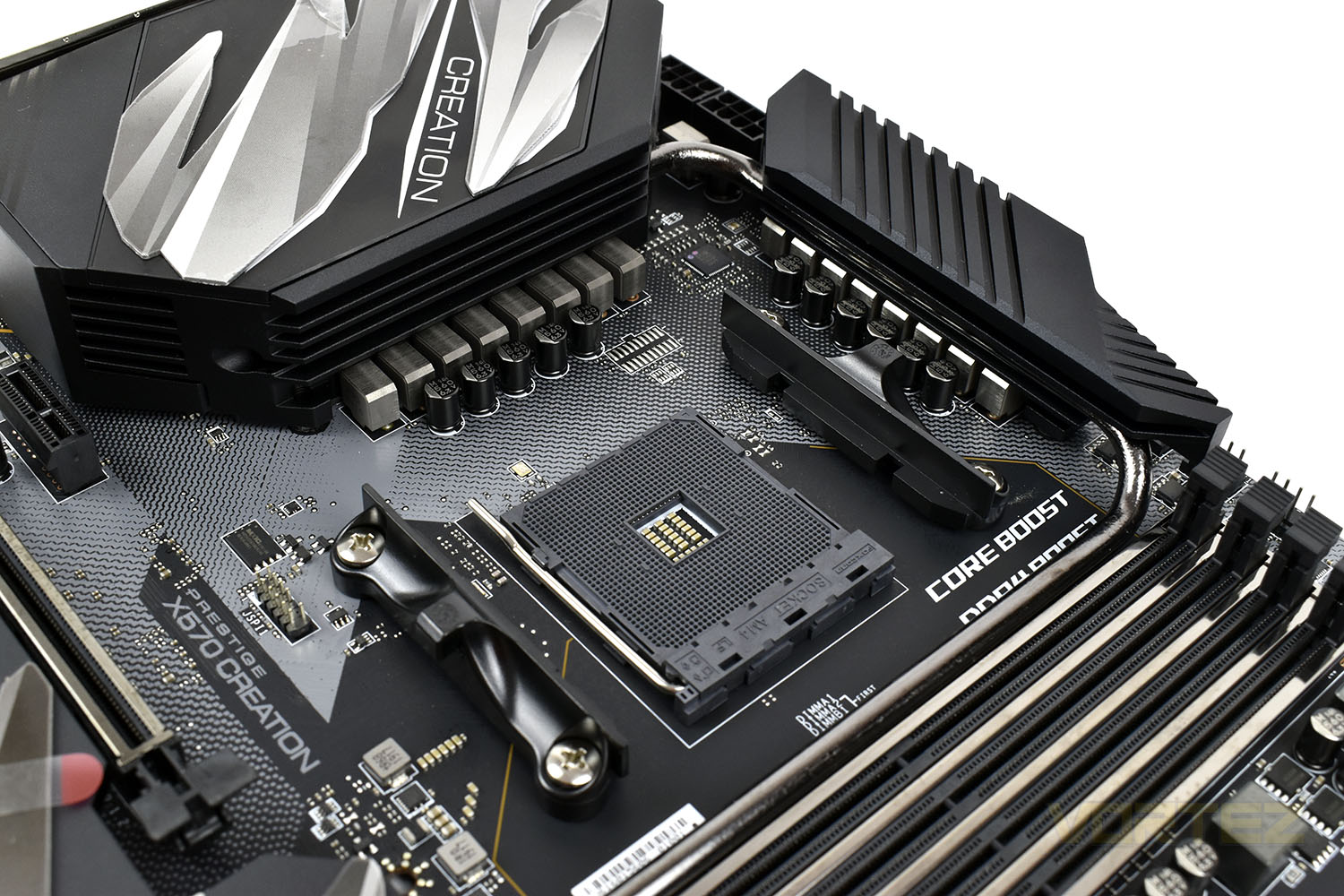
Around the back of the two VRM heatsinks, MSI have equipped the motherboard with a duo of 8-pin EPS power connectors. One connector should be ample for the majority of users, and there aren’t a great deal of PSUs that offer a pair of these connectors, but if you wish to push the ‘board and CPU to the absolute edge, you may find that the 3900X or 3950X will get close to, or even exceed, the 235W supply from a single connection.
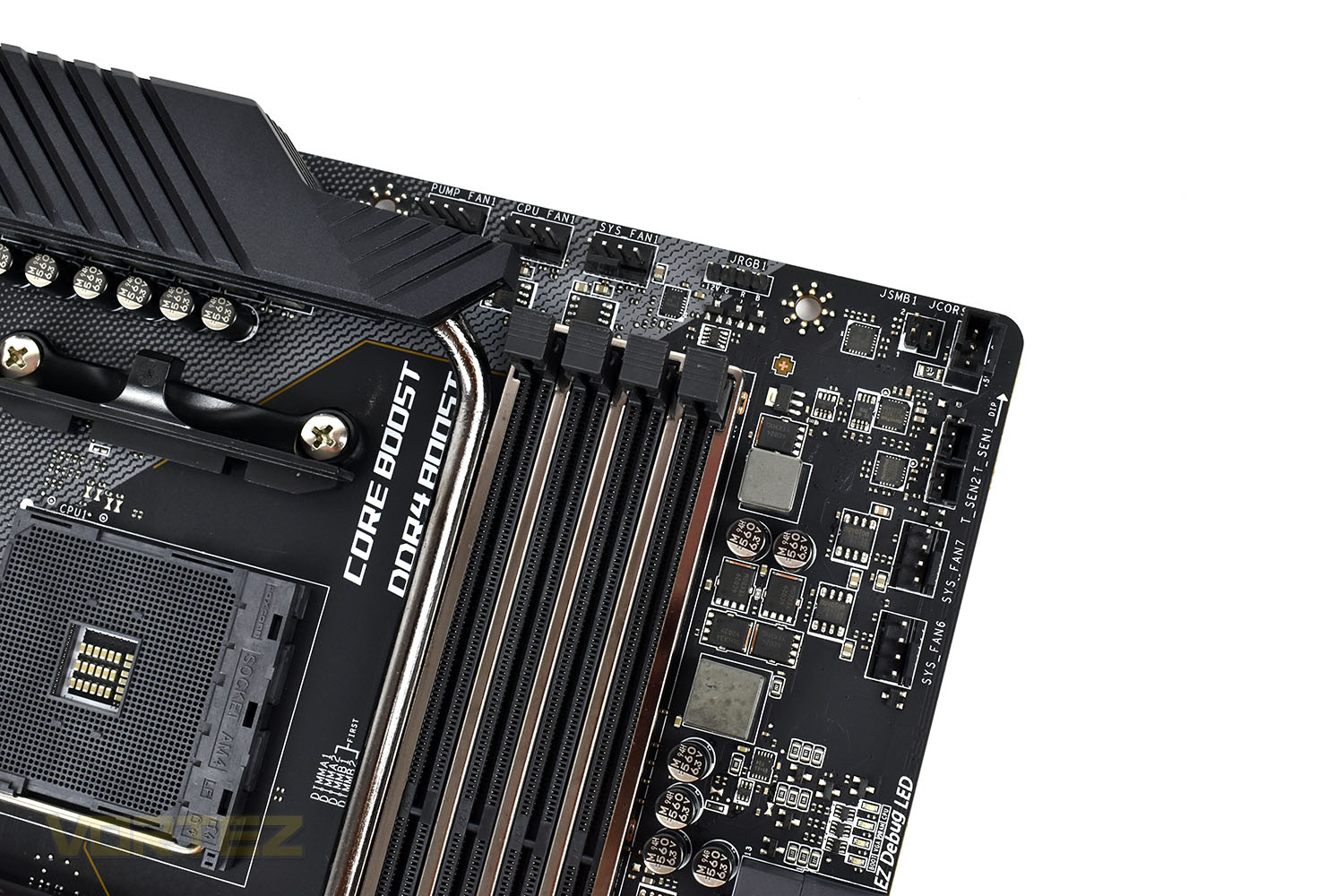
The top-right of the motherboard is somewhat of a hub for fan, RGB and temperature connections, removing some of the stress from the bottom-edge of the motherboard while also conveniently improving cable management by placing these on the edge of the board.
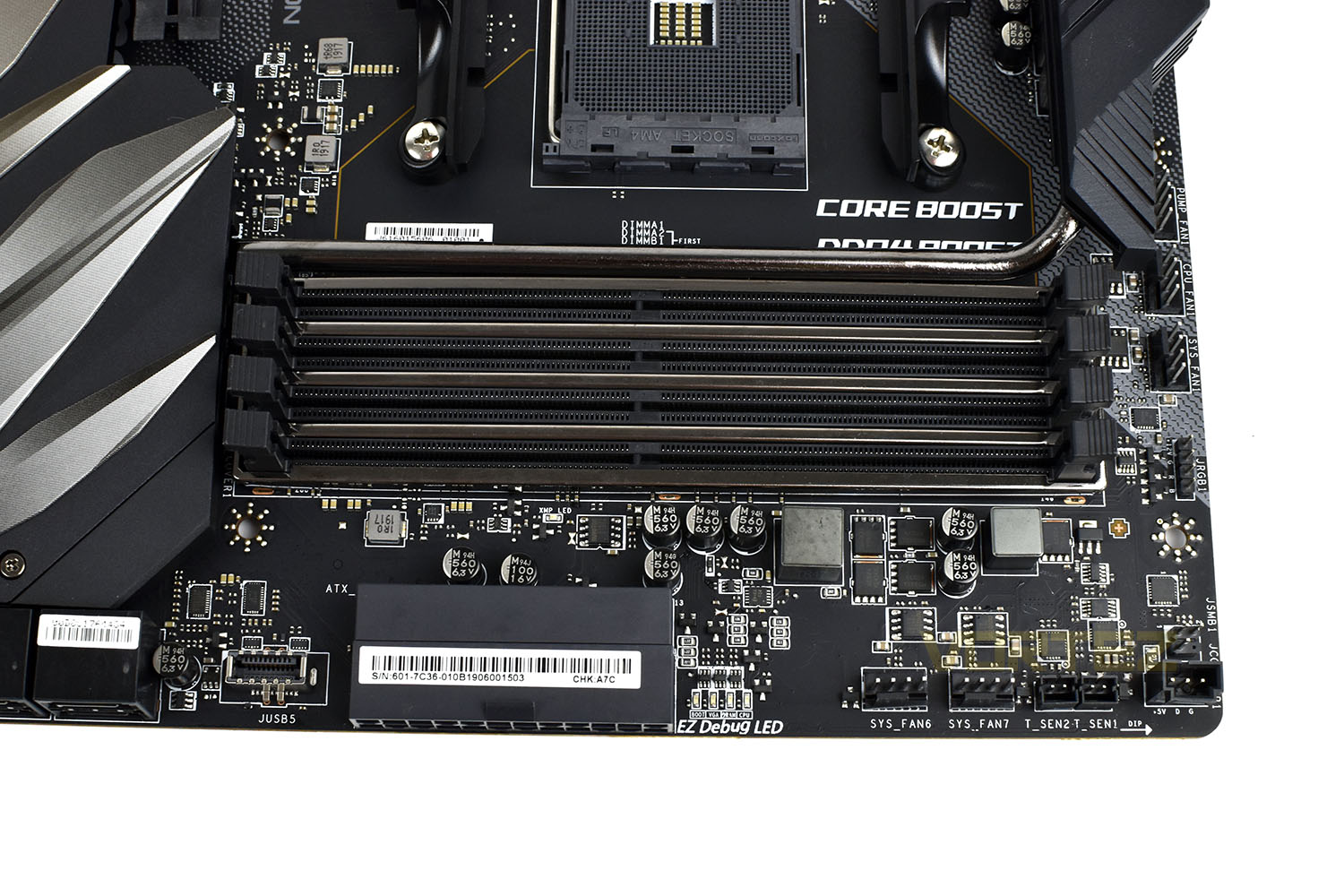
Zen 2 brings with it improved memory performance, thanks to improvements within the CPUs cache levels and better memory controllers, the MSI X570 Creation supports up to 128GB of DDR4 via the 4 DIMM slots, each of which are protected by a steel armour and server-grade PCB to improve signal quality.
Closer Look (Continued)
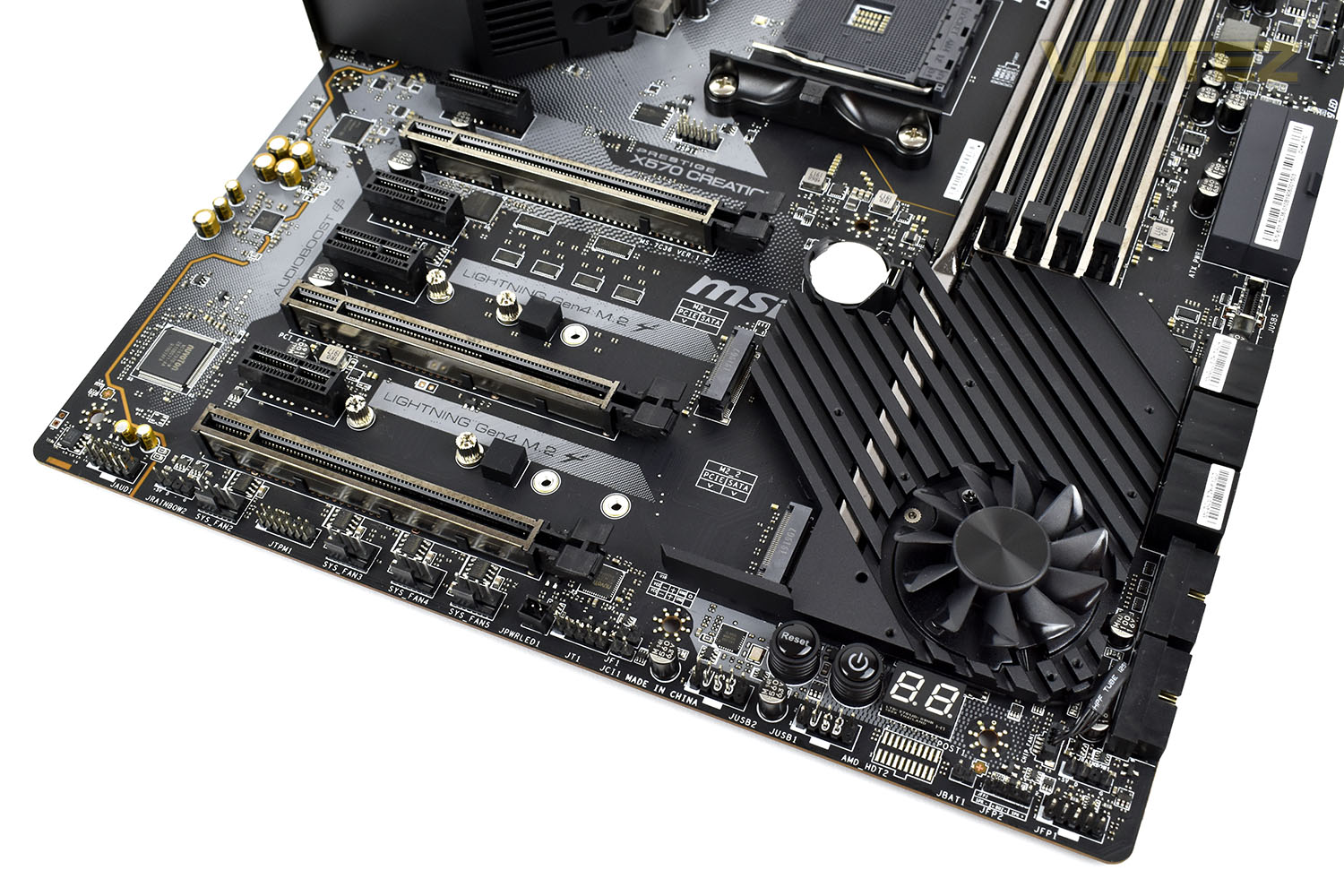
At the bottom end of the motherboard, things are busy. We get four PCI-E 4.0 x1 slots and three PCI-E 4.0 x16 slots (the first two slots operate in a x16/x0 or x8/x8 mode, with the third slot operating at x4).Audio is on an isolated section of the motherboard, on the left, using the Realtek ALC1220 Codec.
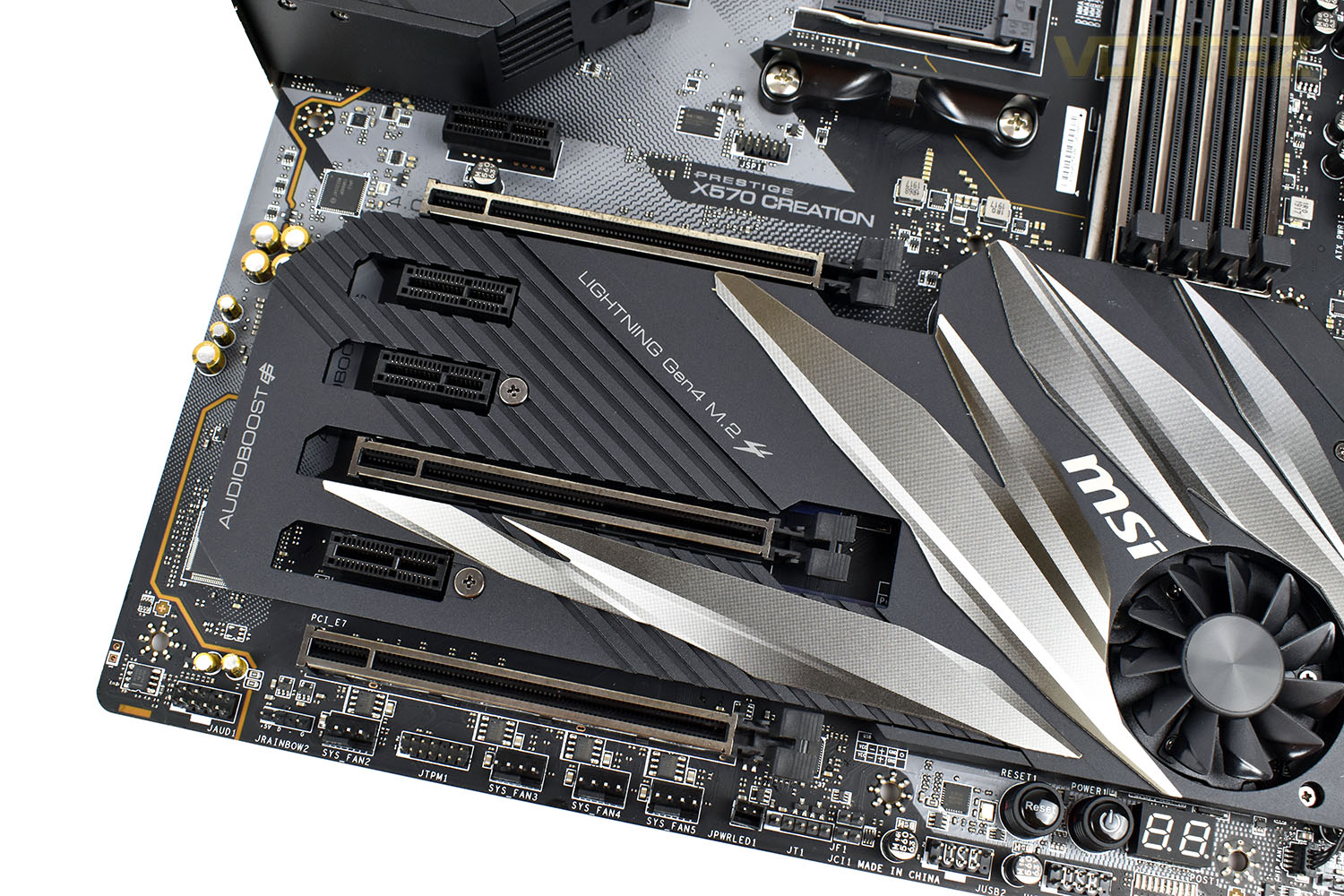
Lifting the cover from the heatsink gives you access to the pair of M.2 slots on the motherboard. The uppermost M.2 slots supports NVMe drives up to 80mm in length and is connected directly to the CPU, whereas the lower M.2 slot supports both NVMe and SATA drives and can accommodate drives up to 110mm in length. The 45mm fan will sit idle most of the time, only kicking into action when the going gets tough with a lot of activity going through the FCH. A workload such as rapid access of PCI-E NVMe drive in the bottom slot would see this area warm up, we suspect.
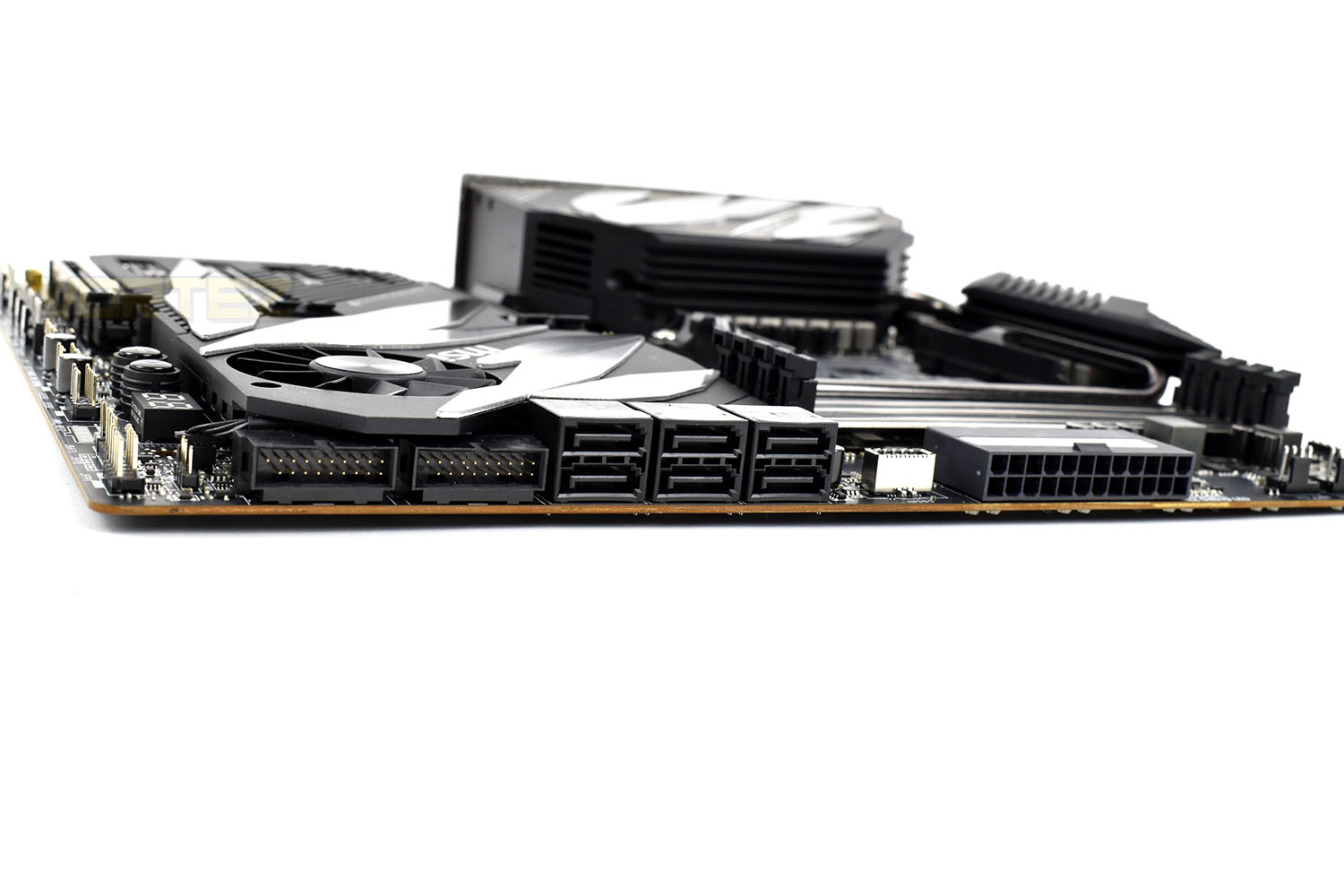
On the right-edge of the board, MSI have angled all of their connectors, apart from the USB 3.2 Gen 2 front connector, by 90°. This is going against the norm and may cause issues for smaller cases, however, it could help cable management if considered from the start. Starting from the left, there’s a pair of front USB 3.2 Gen 1 connectors, six SATA 3.0 connectors and the 24-pin power connector.
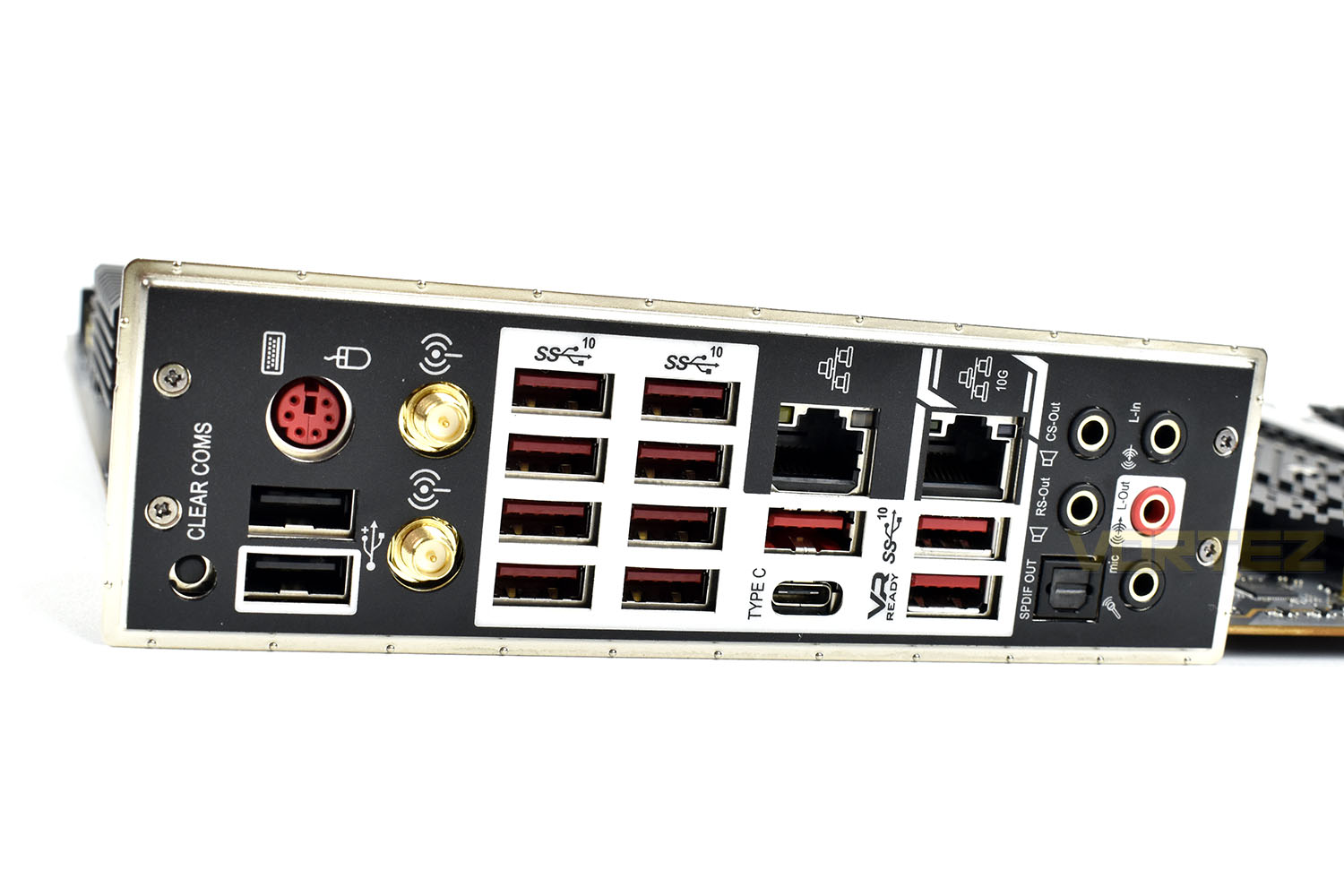
Last up, the rear IO. There’s plenty going on here, giving users a lot of scope for connectivity. Now before we get onto what’s what on here, you might want to brush up on your USB knowledge, which we’ve explained here – USB 3.2. We’ll forgive you if you thought USB 3.2 was a new standard, which in a kind of roundabout way, it is, but most of it isn’t.
The backing plate for the rear IO is mounted directly to the motherboard, saving the awkward momemt that many of us have faced when you forget to install it into the case.
Closer Look (M.2 XPANDER-Z GEN 4):
MSI’s M.2 XPANDER-Z is an add-in card, included with the motherboard, which gives you an additional two full-speed PCI-E 4.0 NVMe slots to fill up.The card measures in at 155mm in length, 135mm in depth and 25mm in thickness, making it a little thicker than a single PCI-E slot.
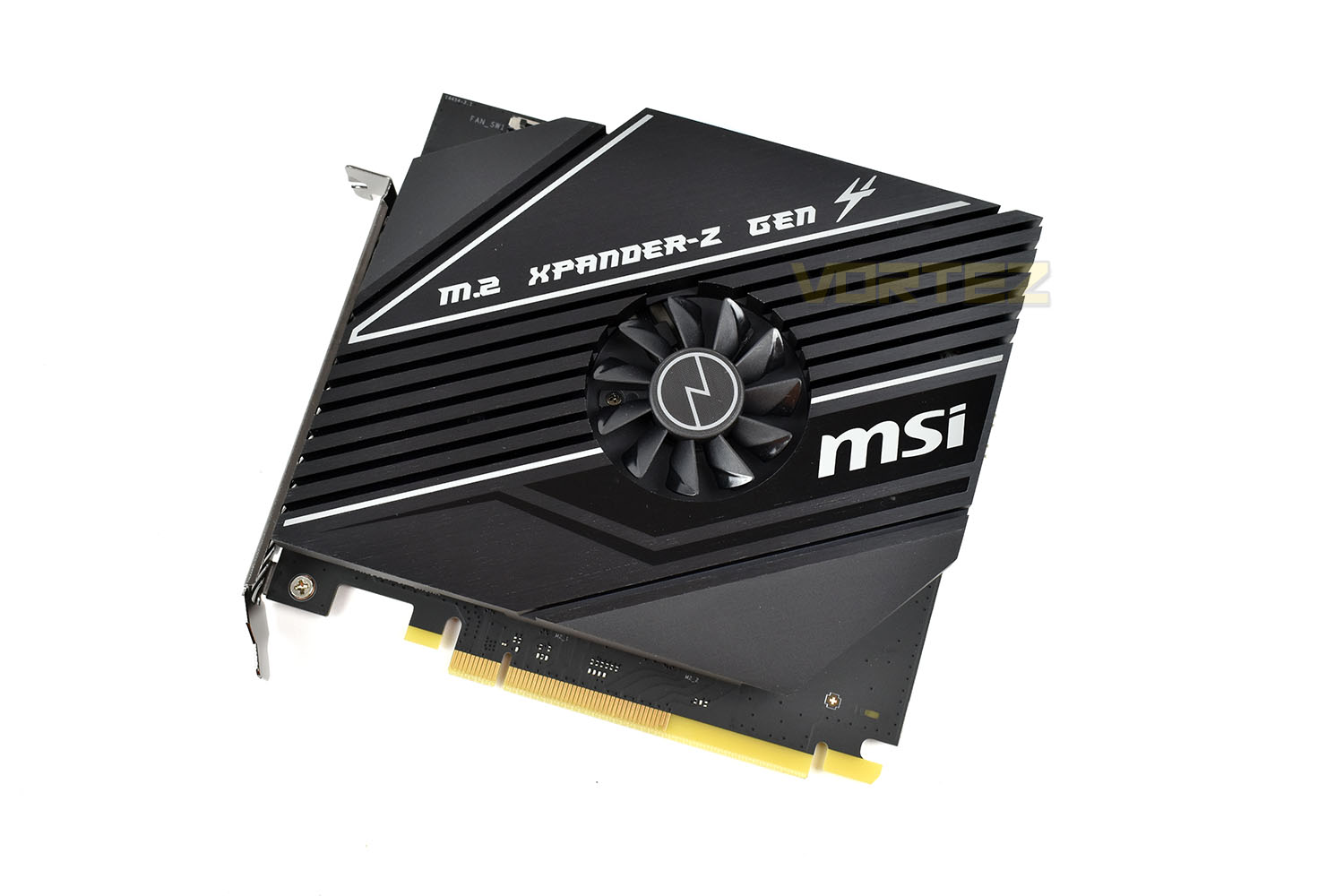
On the bottom of the add-in is a reasonably thick metal heatsink equipped with a 45mm fan for active airflow. If early PCI-E 3.0 NVMe drives are anything to go by, we expect the early 4.0 drives to get toasty when hit with a heavy workload. Manufacturers also seem to be privy to this, so are equipping the areas where they preside with decent cooling.
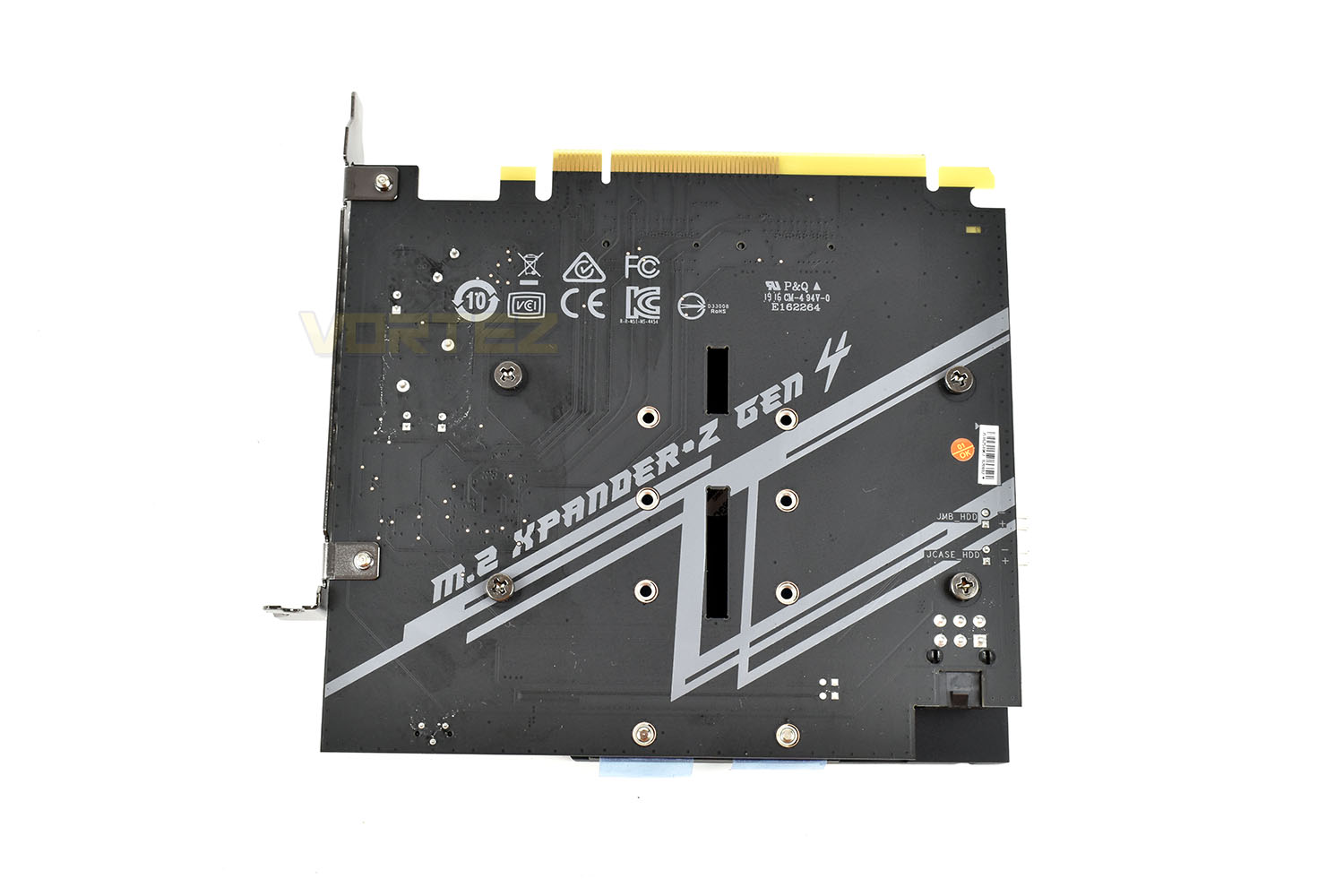
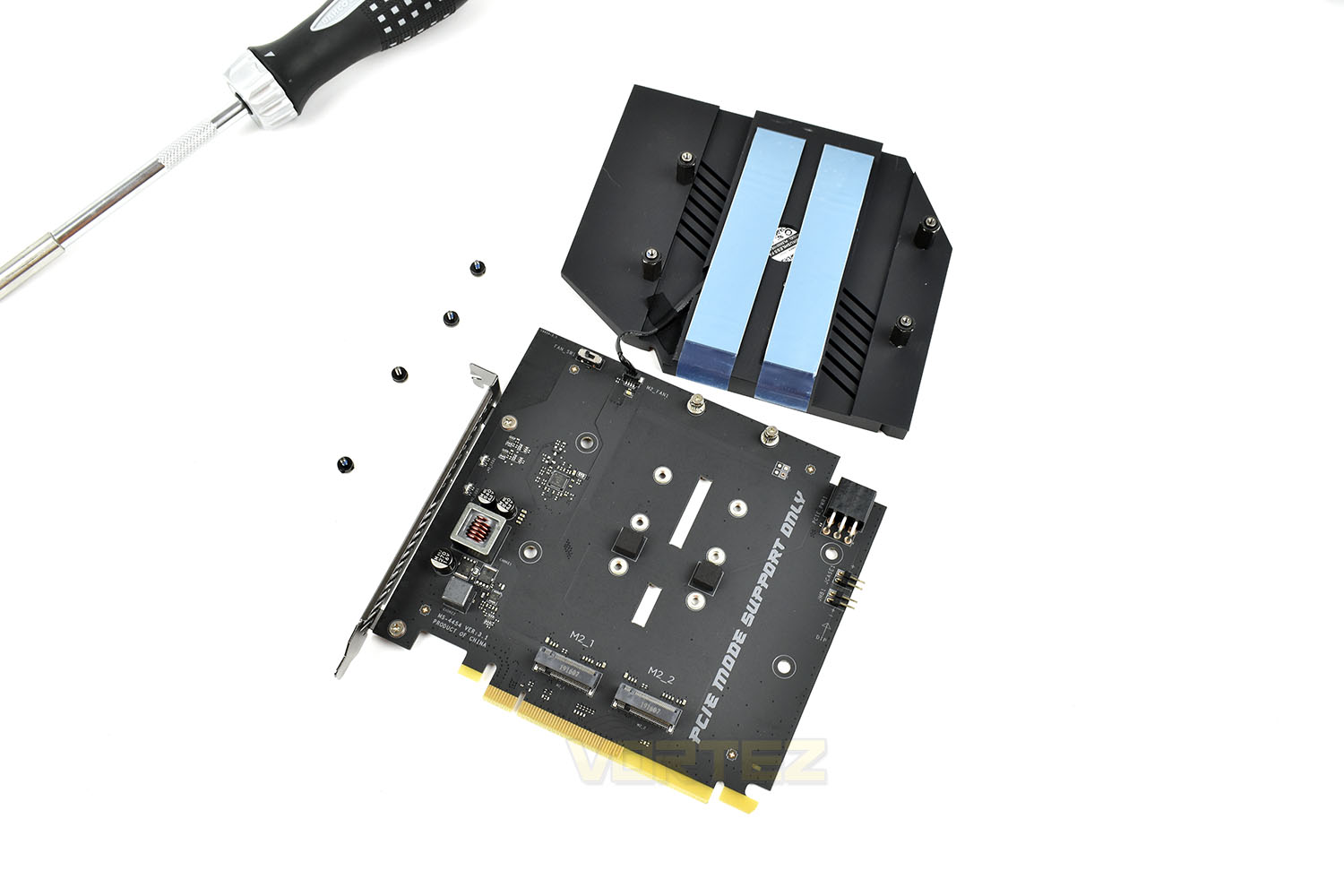
Installing an SSD is as easy as removing four small screws, with rubber washers, and installing the SSD as you normally would. Each of the two slots has a separate thermal pad pre-applied and ready to use.
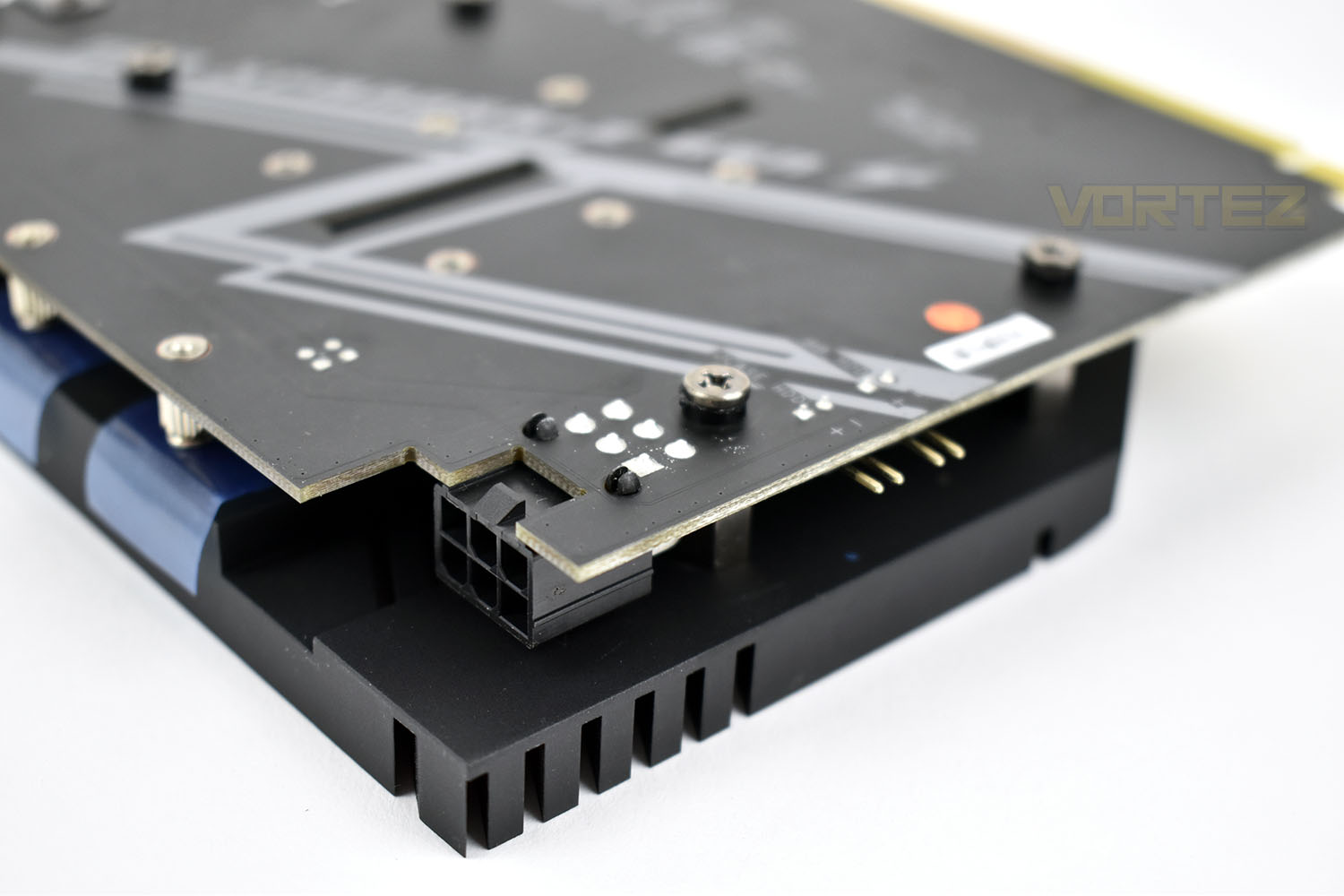
As is the case with many PCI-E NVMe adaptor cards, a supplementary PCI-E 6-pin power connector is required for optimal operation.
Test Setup & Software
Test SetupCooling Noctua NH-U12S-SE-AM4
Motherboard MSI Prestige X570 Creative
Memory 16GB Corsair Vengeance LPX 3200MHz @ 3000MHz @ 15-17-17-38-58
Graphics AMD Radeon RX 480 8GB
Storage Corsair Force LE 480GB
PSU Corsair RM750X 80 Plus Gold Certified PSU
Benchmarks
x264 HD 4.0 – 1st and 2nd pass encoding
SiSoftware SANDRA – CPU & Memory benchmarks
POV-RAY – CPU benchmarks
TrueCrypt – CPU benchmarks
AIDA64 – CPU benchmarks & Memory
PCMark 8 – Home Suite & Photoshop
3DMark FireStrike – 3D Benchmark
Games – Rise of the Tomb Raider & Total War: WARHAMMER
Other Software
Stress Testing Software: AIDA64 Stability Test
CPU Specification Monitoring: CPU-Z
Performance Monitoring: MSI Afterburner
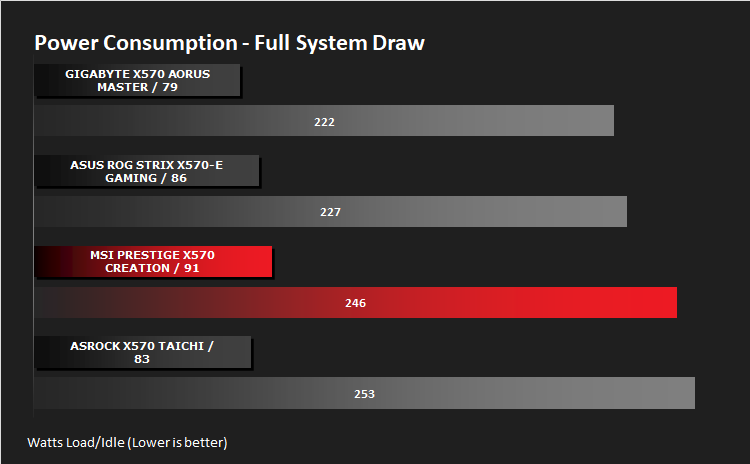
Benchmarks: Power Consumption
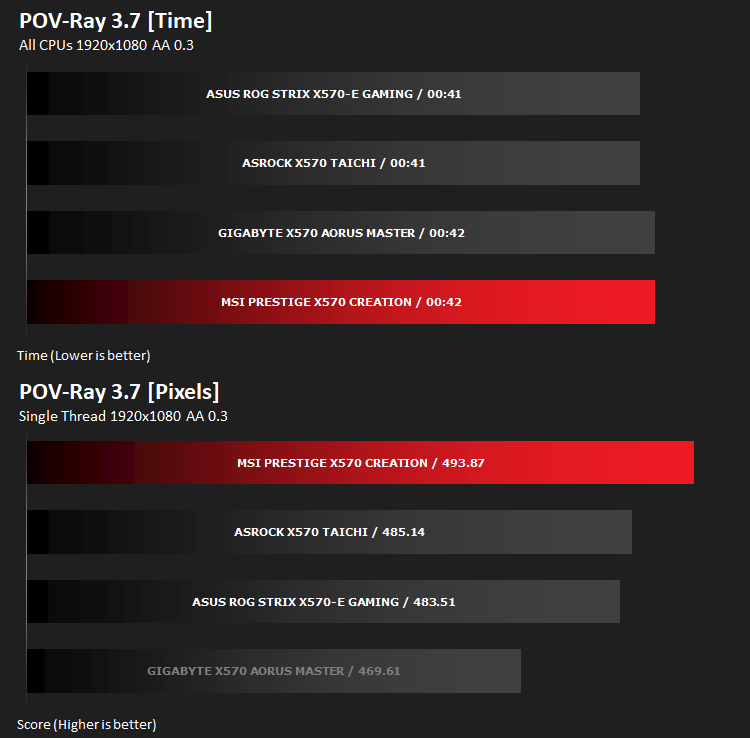
Ray Tracing Performance – POV-Ray 3.7
This product allows users to build their custom 3D worlds with excellent quality despite their computer’s hardware. It has adjustable options for levels of radiance, refraction, and reflection. Calculation time may vary depending on the computer model, but PovRay can adapt to many computer builds, and is supported by the open source community.
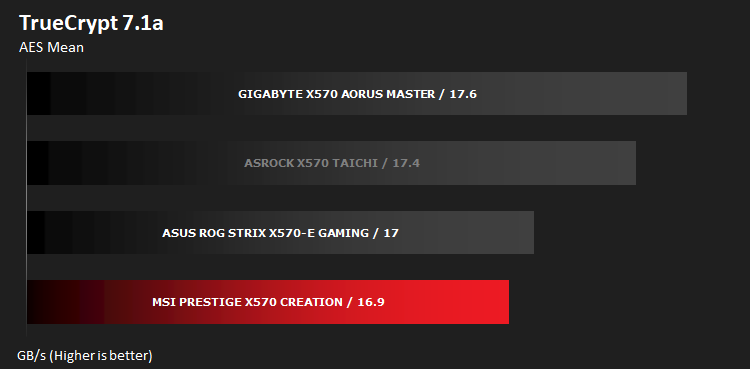
AES Encryption Performance – TrueCrypt 7.1a
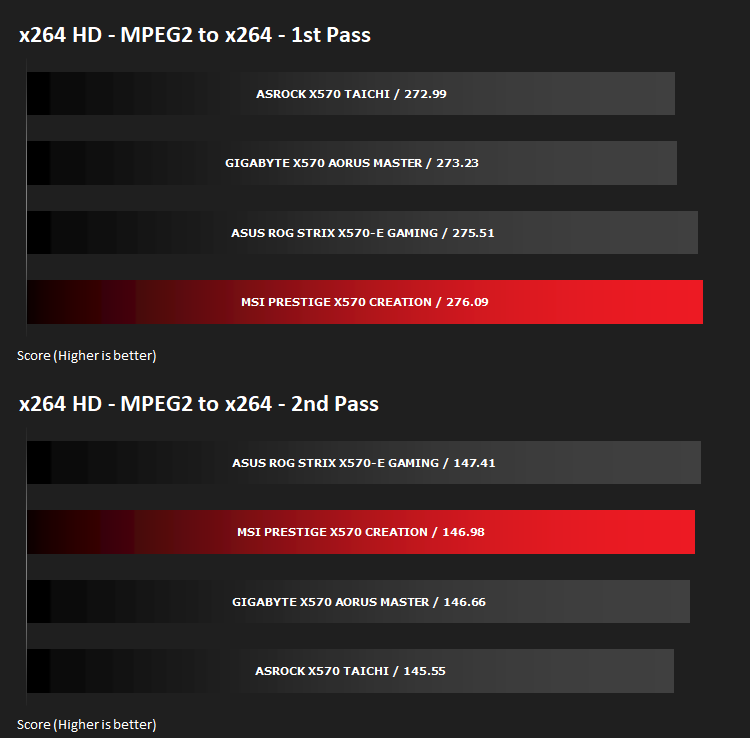
Encoding Performance – x264 HD
Processing Features Performance – AIDA64
AIDA64 Product Page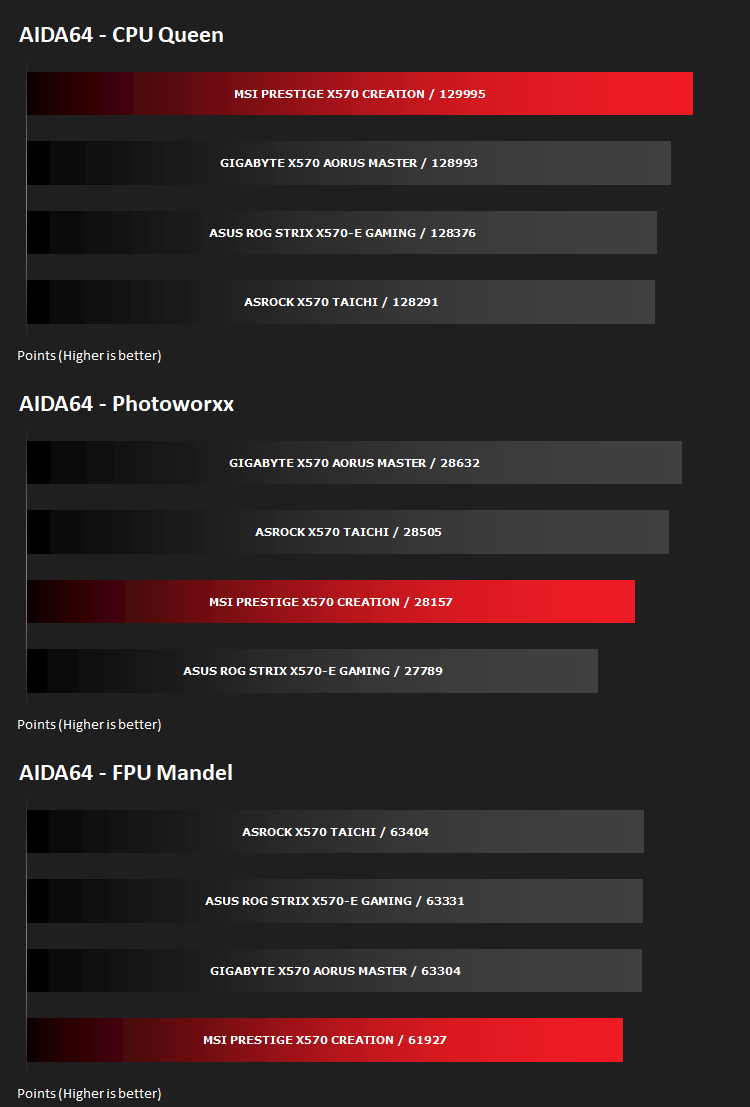
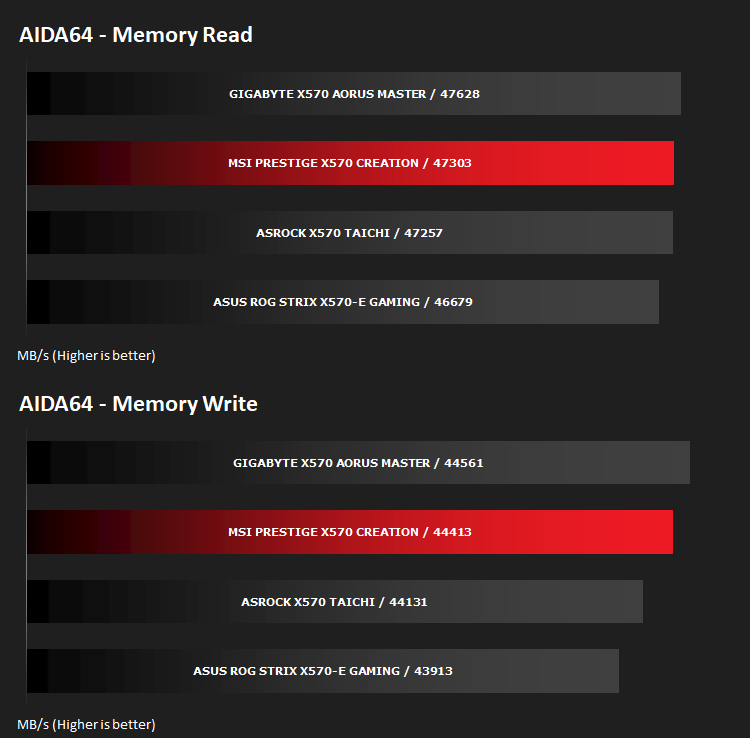
Memory Transfer Performance – AIDA64
AIDA64 Product PageThe Memory Latency benchmark measures the typical delay when the CPU reads data from system memory. Memory latency time means the penalty measured from the issuing of the read command until the data arrives to the integer registers of the CPU.
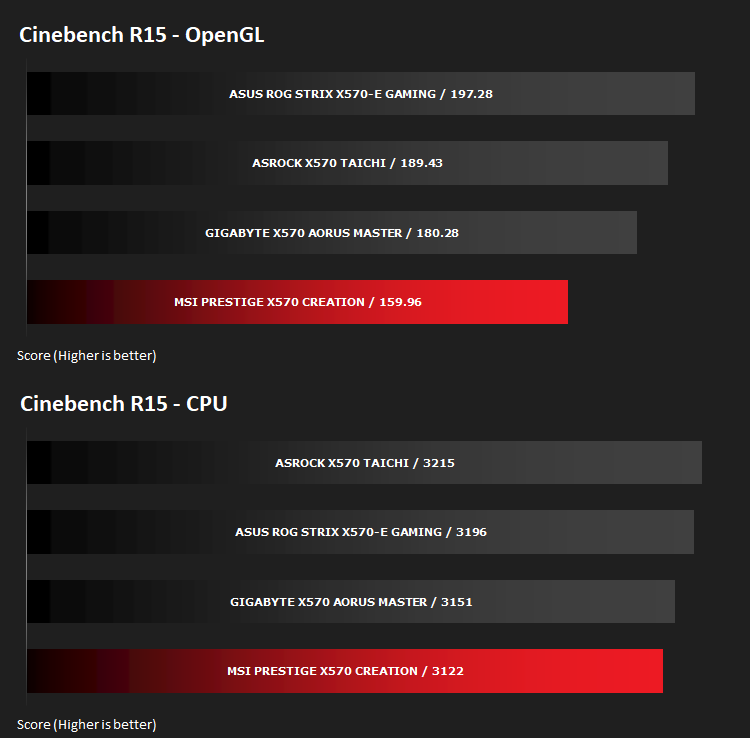
Processing Power Performance – Cinebench R15
Bandwidth Performance – SiSoftware SANDRA
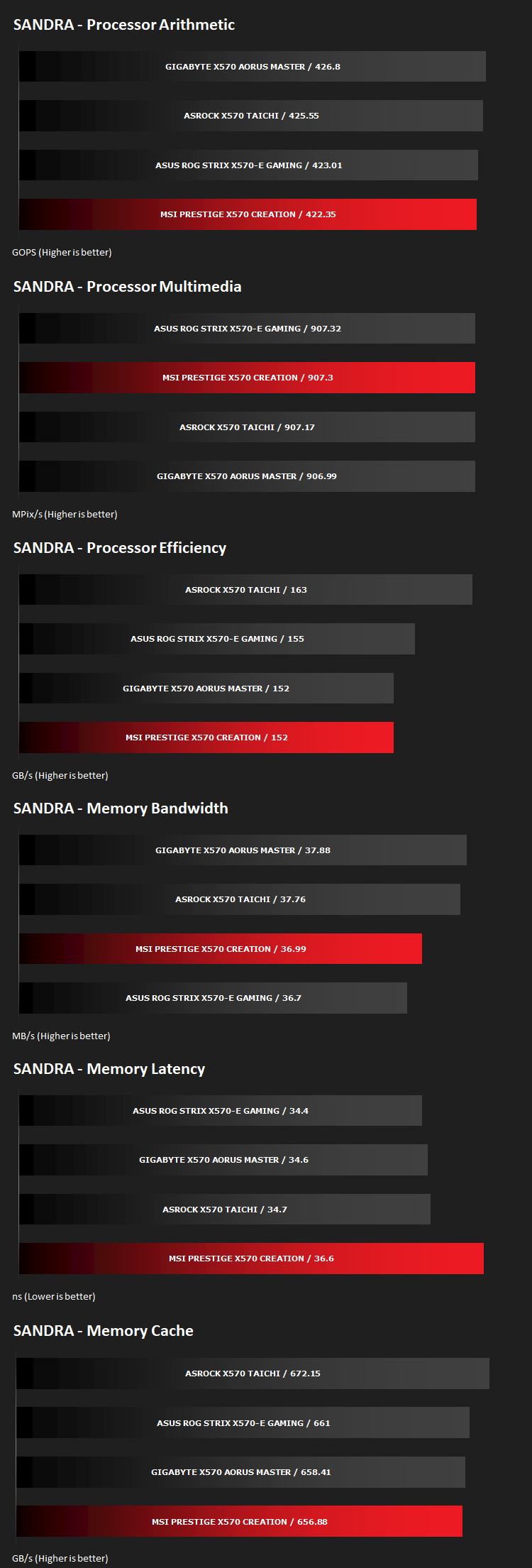
Image Editing Performance – PCMark 8 Photoshop
PCMark 8 Product Page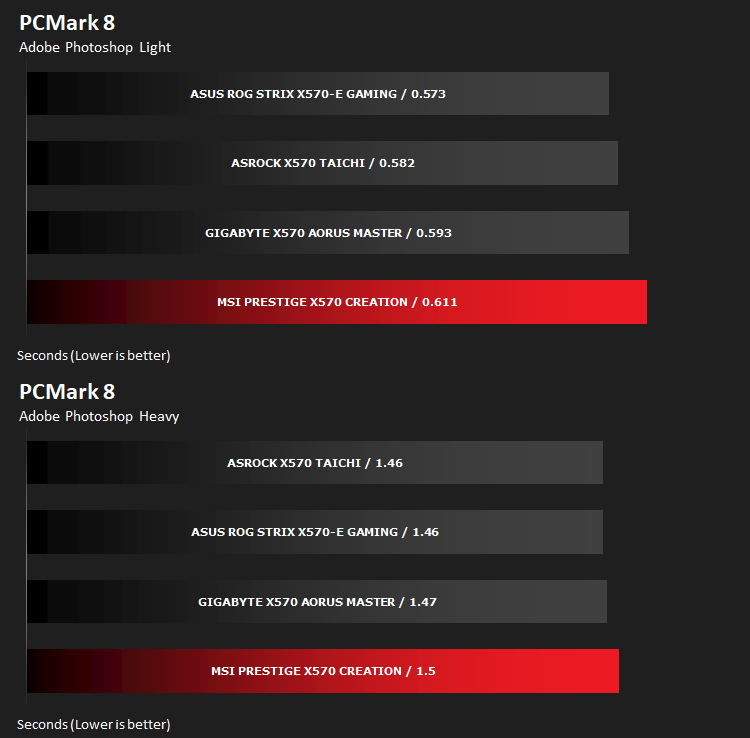
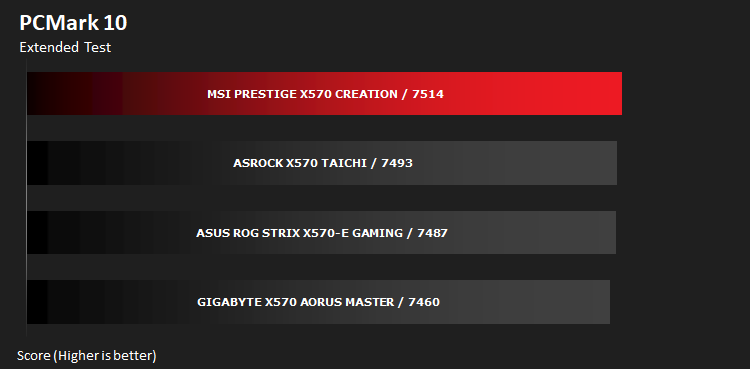
Overall System Performance – PCMark 10
PCMark 10 features a comprehensive set of tests that cover the wide variety of tasks performed in the modern workplace. With a range of performance tests, custom run options, and the new Battery Life Profile, PCMark 10 is the complete PC benchmark for the modern office.
VR Performance – VRMark
VRMark Product Page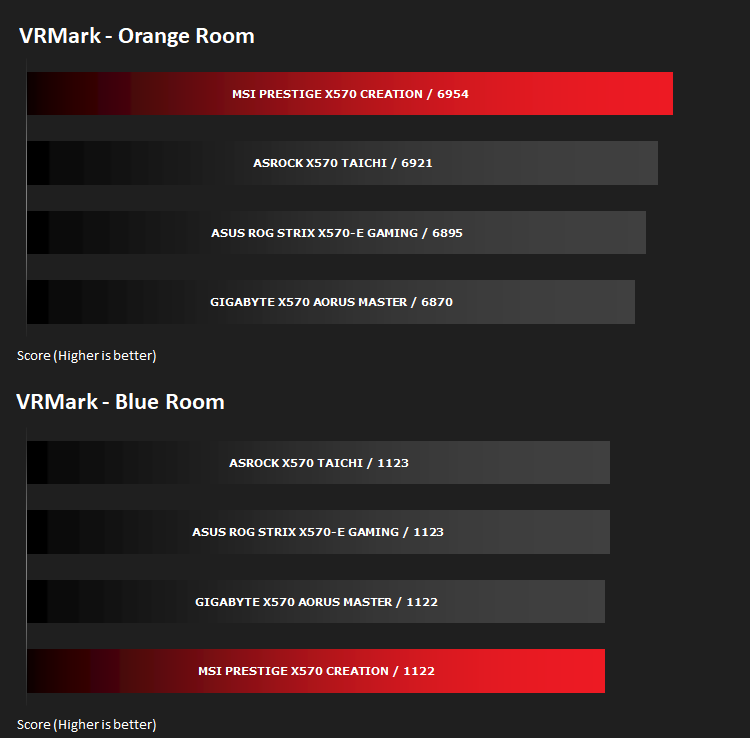
3D Performance – 3DMark
3DMark FireStrike Product Page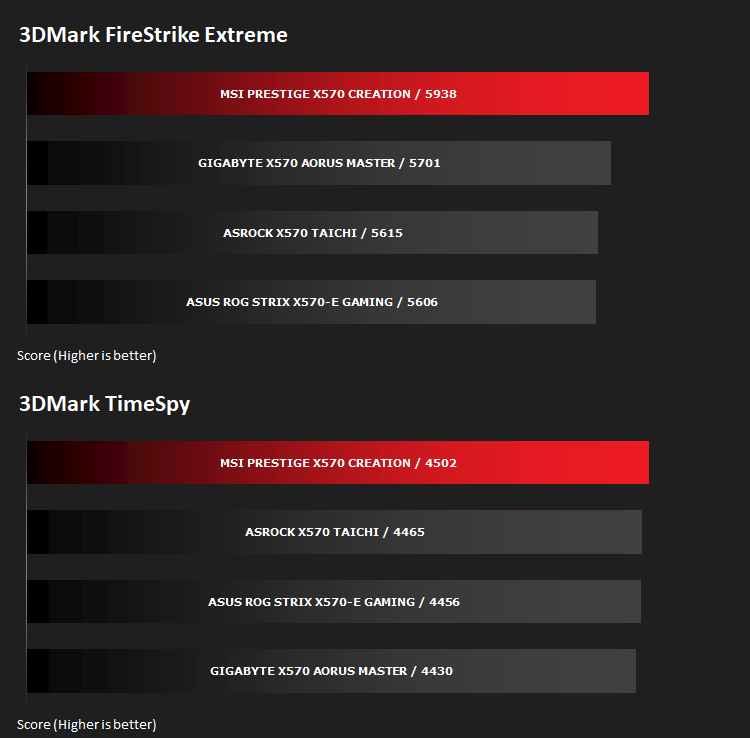
Gaming Performance – Rise of the Tomb Raider & Total War: WARHAMMER

Conclusion
MSI have once again shown their expertise within the motherboard sector with an incredibly well-equipped motherboard, but it comes at a cost. That cost being a very literal cost, of roughly £450.Firstly, focussing purely on aesthetics, MSI have kept things relatively conservative with a few small RGB LEDs on the reverse of the upper-right edge of the motherboard, along with a subtle RGB glow from the rear IO shield. Of course, if you choose, they can be completely disabled within the software. Some motherboards would struggle to retain a respectable appearance in 2019 without their RGB lighting, whereas the X570 Creation doesn’t. It looks great in all lights and the greyscale colour scheme does the board plenty of favours.
Moving onto temperatures and overclocking ability. We conducted our tests of the board with AMD’s current flagship model, the Ryzen 9 3900X. This CPU, despite the process shrink to 7nm, should still pose quite the challenge to a motherboard’s VRMs and associated cooling but the Prestige X570 Creation took it in its stride with only a single low-RPM 120mm fan blowing air across the entire board, from about 300mm away. We measured no more than 48°C from the VRM heatsinks directly, way inside of the spec that today’s VRMs are rated to. In terms of overclocking, we managed to overclock the entire CPU, across all 12 cores, to a respectable 4.4GHz while single-core loads still respond with the usual 4.5GHz. This helped to increase the Cinebench R15 score from an already impressive 3122 to 3423. Read about our overclocking experience with the X570 Creation in our Ryzen 9 3900X review.
Power consumption of the board, along with the CPU (all done at stock speeds) was higher than expected and does represent a rise when compared to an X470 chipset. However, the main competition for the X570 and Ryzen 9 3900X is the Z390 chipset paired to an Intel Core i9 9900K; while absolute total power draw is higher, the entire platform must be considered, including the new PCI-E 4.0 specification and the 12 cores vs 8 cores argument.
Being aimed straight at creators, the M.2 XPANDER-Z gives you a whopping four NVMe 4.0 drive slots, and thanks to NAND flash dropping in price, 1TB and 2TB drives aren’t quite as eye-wateringly priced as they once were. Fast access to data is a must for video and photo editors, streamlining workflows. That data, however, can also be transferred across your network via the built-in 10Gig ethernet port on the rear IO, providing transfer rates in excess of 1GB/s. You also get the option of using the latest WiFi 6 protocol, if you can’t wire your network in for whatever reason.
Creation tools don’t end at software, often devices such as an Elgato Streamdeck, webcam or display capture cards need to be used, all of which use up valuable USB ports. MSI are obviously aware of this and have implemented a multitude of USB option on the motherboard, with a massive 10x USB 3.2 Gen. 1, 2x USB 2.0 ports, and a pair of USB 3.2 Gen. 2 (10 Gbps) ports, one Type-A and one Type-C on the rear IO. The motherboard is equipped to handle plenty of front USB ports as well, allowing up to 23 USB ports in total. You’ll be hard pushed to need that many.
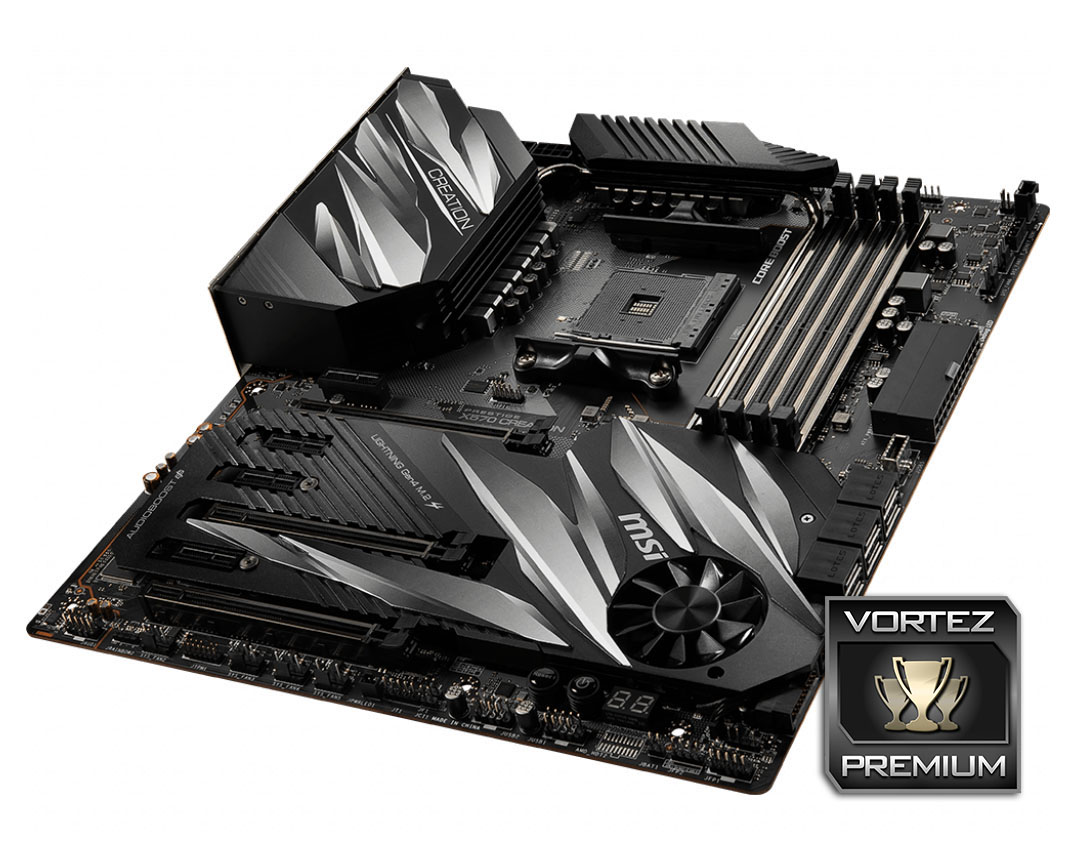
MSI appear to know their target audience and have tailored the board well towards the market but at £450/$450, it will find itself against some fierce competition.
+ Motherboard looks fantastic with or without subtle RGB lighting
+ Extended heatsinks keeps VRM and FCH temperatures low
+ Excellent overclocking performance
+ More USB ports than you can shake a stick at
+ 4x NVMe 4.0 ports available
Neutral
+- 90° connectors on right-hand edge
Cons
– Expensive
– High power consumption
Click here for an explanation of our awards at Vortez.net.
Stay connected with the Vortez Social Media pages:
Join in with the discussions on Discord