







With last months release of CAT 13.1, we look at the flagship MSI R7970 Lightning. Is this the fastest GPU available? Find out inside…
Product on Review: R7970 Lightning
Manufacturer and Sponsor: MSI
Street Price: £400 inc VAT
AMD’s HD7970 has had quite a bumpy ride. When it was first introduced, it was received with open arms as it once again took the performance crown from NVIDIA. NVIDIA were not to be outdone though and the GTX680 put paid to AMD’s celebrations. The GTX680 has held the crown over the past year however the waters have become less clear of late with some dramatic improvements in AMD’s Catalyst drivers. While AMD have had a little longer to wring every last drop of performance from their flagship card, it is fair to suggest that both AMD and NVIDIA have mature drivers ready for download so what better card to test NVIDIA’s resolve at the top of the charts with an overclocked, flagship HD7970 in the guise of MSI’s R7970 Lightning.
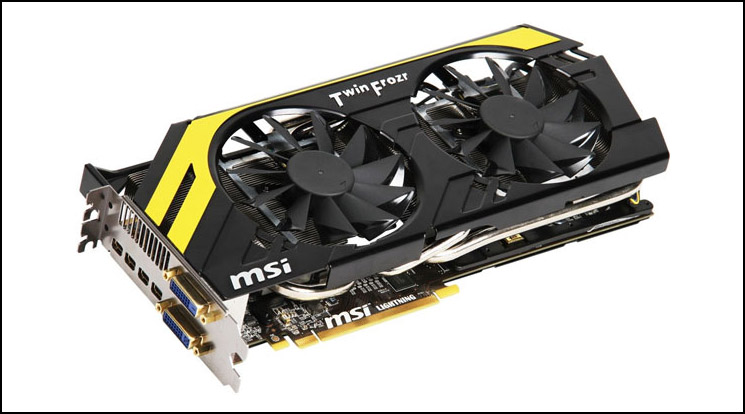
Released 3 months after the reference HD7970, the MSI R7970 Lightning is touted as the cream of the crop, the headline act with a huge factory overclock of 1070MHz on the core and 1400MHz for the memory. Bearing in mind that the reference HD7970 had a 925/1375MHz on the core and memory respectively you can’t be anything but impressed with MSI’s overclock.
To get these overclocks, MSI didn’t just tweak the BIOS, they started from scratch by designing their own PCB with a very aggressive 14+2+1 power phase design while using top of the line components. So on the face of it, with mature drivers and a stunningly fast card, the techs at MSI appear to have a card that is capable of toppling NVIDIA’s finest. Ultimate speed however is not the be all and end all of MSI’s design which we will examine in today’s lengthy and detailed review so put the kettle on, put your feet up and sit back as we take you through our autopsy of the MSI R7970 Lightning.
About MSI
Embracing years of experience in design and manufacturing, MSI motherboard and graphics card have achieved maximum productivity by becoming one of the top 3 in the world. Our hard work have led us to become one of the finest brands in the industry with accumulated sales in more than 120 countries, 150 million motherboard users and 100 million graphics card users worldwide.
Specification
About Tahiti
The HD7900 series features the new Tahiti core which is the successor to the Caymen core of the HD6900 family. The Caymen core was based on a 40nm manufacturing process so it is fair to say that perhaps the biggest improvement to the Tahiti core is the reduction to 28nm process. This has enabled AMD to cram 4.31 billion (4,312,711,873) transistors into the new Tahiti core as opposed to the 2.64 billion on the HD6970 Caymen XT.
Comprising of what AMD calls ‘Graphics Core Next (GCN)’ archetecture which is optimised for heterogeneous computing, the new Tahiti core has upto 32 CU’s (compute units) with dual geometry engines along with 8 back-ends comprising of 32 colour ROPs per clock and 128 Z/Stencil ROPs per clock. Each CU has a Vector unit and Scaler Co-Processor and can execute instructions from multiple kernels.
The VLIW4 SIMD has evolved to the GCN quad SIMD which equates to similar computational power yet grants better performance, threading and simplification. The GCN also has a new Cache hierarchy with 16KB instruction Cache and32KB Scaler Cache shared between 4 CU’s. The L2 Cache is accessible by each CU with it’s own separate process to ensure coherency. These changes increase the GFLOPs by 140%.
Tesselation on the Tahiti core is also enhanced by increased Vertex re-use off-core which theoretically at least, means the 7900 series has 4 times the throughput of the 69XX series. The are improved ansioscopic filtering algorithms too which come at no performance cost allegedly. These new algorithm improvement will allow the use of Forward Rendering with 1000’s of potential light sources and will also mean MSAA can be rendered easily.
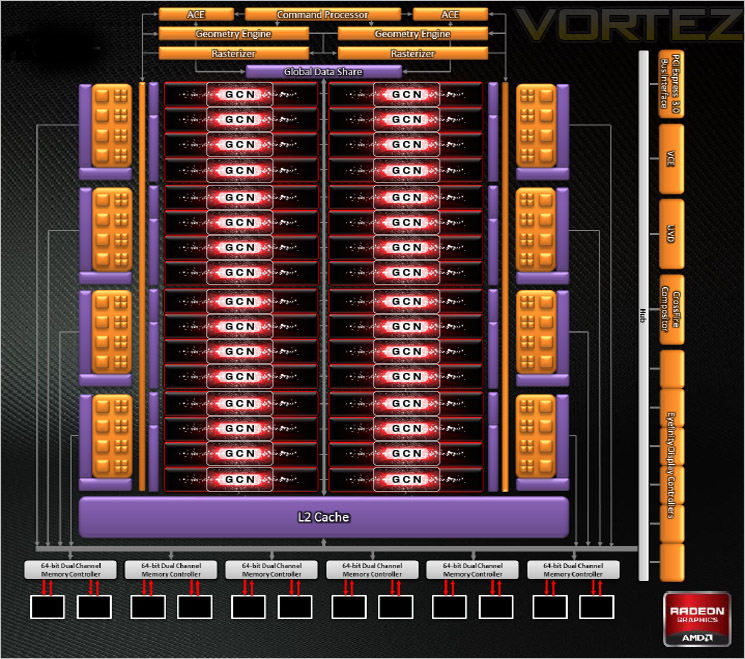
Looking at the schematics above, we can identify the bulk of the GPU is taken up with the 32 CU’s. Above these are the geometry engines. To the left and right are the 8 Render back-ends, 4 each side. There’s 768KB of L2 cache along with 6x64bit dual channel memory controllers making a 384-bit GDDR5 memory interface capable of delivering up to 264GB/sec. All of technology coupled together is transferred through a fully compatible PCI Express 3.0 x16 bus interface. Have no fear though because the cards are backwards compatible with PCIe 2.0. Note that 256 Stream Processors are disabled for the Tahiti Pro Core. Whether this is at the hardware or simply a software level remains to be seen. If it is software then a BIOS flash may see the Pro’s becomming XT’s again?
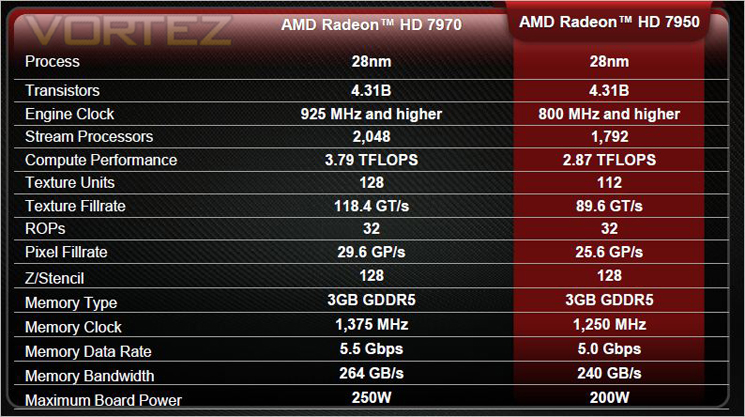
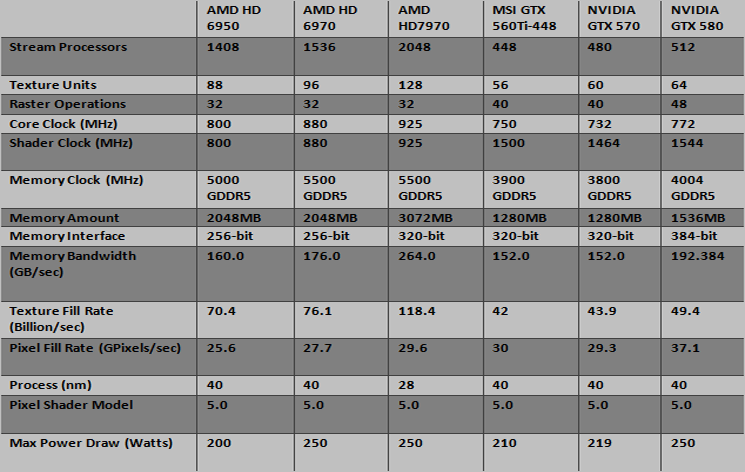
Comparing the HD7970 against it’s closest competitor, the GTX580, the AMD card has 4x more processors twice as many texture units but less ROPs. No change with AMD clockspeeds being higher than the green team and with the HD7970 being clocked to a blistering 925MHz I worry about how much is left in the bank to allow us any worthwhile overclocking. As usual, we will investigate this later in the review in the overclocking section. A big change for the AMD card is the leap towards a 320-bit memory interface which AMD have traditionally played second fiddle to NVIDIA. The texture fill rate which has always been a strong point for AMD is increased to a mind boggling 118.4 billion/sec compared to the GTX580’s miserly 49.4 while the HD7970 trails slightly in the pixel fill rate stakes ever so slightly. AMD have fired a warning shot across NVIDIA’s bow too with a huge 3GB of GDDR5 which should put paid to any difficulties running this card at high resolutions with filters applied.
On paper then, it appears AMD have been squireling away to create a graphics card behemoth capable of besting NVIDIA’s flagship single core GPU. I have little doubt that it would be faster but AMD would do well to keep an eye on the horizon as traditionally, the pendulum swings from one manufacturer to the other in a very short time. For now though, AMD have manufactured a card that is by far the most powerful card on test, on paper at least. We have seen many times in the past though that specifications mean very little if the GPU runs like a 3 legged donkey, how this transpires today we will see later in the benchmarks tests.
Graphics Engine ATI Radeon HD 7970
Bus Standard PCI Express x16 3.0
Memory Type GDDR5
Memory Size(MB) 3072
Memory Interface 384 bits
Core Clock Speed(MHz) 1070
Memory Clock Speed(MHz) 5600
DVI Output 2
Mini DisplayPort 4
HDCP Support Y
HDMI Support Y
Display Output (Max Resolution) 2560×1600
RAMDACs 400
DirectX Version Support 11
OpenGL Version Support 4.2
CrossFire Support Y
Card Dimension(mm) 305×135.5x40mm
NOTE: This card does not come with DVI-D (Dual-link) capability. This is discussed later in the review!
Features
Unlocked Digital Power
– Unlocked BIOS: One click to unlock all protections for extreme overclocking
– Digital PWM Controller: More stable and precise voltage by digital signal
– Enhanced Power Design: 2X Power output for maximum OC potential
GPU Reactor
– An add-on device on the back of R7970 Lightning (Behind GPU) for the overclocking stability
– Provide 88% higher power capacity and eliminate power noise (ripple)
Xtreme Thermal
– Dust Removal technology on Twin Frozr IV keeps dust out for the best thermal condition
– Dual Form-in-one Heatsinks provide better heat dissipation and strengthen the structure
Military Class III Components
– Meet MIL-STD-810G standard to ensure the best stability and quality.
– Adopt CopperMOS, Hi-c CAP, Golden SSC, and Dark Solid CAP
AMD CrossFire™ Technology
The AMD Radeon™ HD 7950 GPU supports AMD CrossFire™ Technology and provides excellent multi GPU scaling. With the introduction of the AMD Radeon™ HD 6900 Series Graphics, AMD began delivering improved AMD CrossFire™ Technology scaling when using two GPUs. AMD is proud to continue to offer that amazing performance with its newest AMD Radeon™ HD 7000 series graphics products.
AMD Eyefinity Technology
AMD Eyefinity Technology provides advanced multiple monitor technology enabling an incredibly immersive graphic and computing experience with innovative display capabilities, supporting massive desktop workspaces and super-high resolution gaming environments. AMD Eyefinity technology with DisplayPort connectivity enables a single GPU to support up to six independent display outputs simultaneously, depending on the OEM implementation.
AMD Eyefinity technology works with games that support non-standard aspect ratios, which is required for panning across multiple displays. To enable more than two displays, one of two cases must be satisfied:
1) Additional panels with native DisplayPort™ connectors are used;
2) Certified DisplayPort™ adapters to convert your monitor’s native input to your cards
DisplayPort™ or Mini-DisplayPort™ connector(s) are used.
With the introduction and wide availability of DisplayPort™ to single-link DVI dongles, option 2 above is a low cost way to convert a set of already-owned monitors into an AMD Eyefinity technology ready display configuration.
Unlike a similar multi monitor gaming solution offered by NVIDIA, AMD Eyefinity technology does not require two graphics cards to work. Therefore, AMD offers a multi monitor gaming solution with potential for a lower setup cost. A single AMD Radeon™ 7950 GPUs can employ AMD Eyefinity technology and AMD CrossFire™ technology to provide an outstanding multi monitor gaming experience. The following chart shows the AMD Radeon™ HD 7950 graphics in a dual AMD CrossFire™ configuration versus the NVIDIA SLI GTX 580 in three monitor gaming scenario’s.
Improved Tessellation
The latest iteration of architecture in the AMD Radeon™ HD 7970 GPU features a brand new Generation of Tesselator (Gen 9) in its Geometry Engine. This features optimizations such as; Increased vertex re-use, Off-chip buffering improvements and larger parameter caches. This helps Improve performance at all tessellation factors at up to 4x the throughput of AMD Radeon™ HD 6900 series graphics (Gen 8 ).
AMD HD3D Technology
AMD HD3D Technology is supported by an advanced and open ecosystem that, in conjunction with specific AMD hardware and software technologies, enables 3D display capabilities for many PC applications and experiences.
Your PC has evolved, offering unprecedented amount of games, photos and movies for you to play, watch, design, create, share and download in 3D. With the arrival of the latest in 3D technology you can now enjoy an enhanced visual experience on Stereo 3D-capable desktops and notebooks powered by AMD HD3D Technology.
HDMI 1.4a
More bandwith than standard HDMI allows full implementation of 60Hz Stereo 3D. Standard HDMI ports do not have adequate bandwidth for more than 3D 1080p at 24fps.
Ultra-high resolution (4k Panels)
– Current implementations currently use 4*DVI or 2*DP 1.1, which is expensive and unwieldy.
– AMD will move to a single-connector output for 4k via DP 1.2 HBR2 and HDMI 1.4a 3GHz mode.
AMD Quad Buffer SDK
– Native 3D support for Developers.
– functions with Dx9, 10 and 11
– Native support scheduled for Windows 8
Nearly 600 games support AMD’s implementation of 3D either natively or through middleware partners. Also support for many 3D displays already on the market including Samsung and LG’s proprietry implementation.
Video Codec Engine (VCE)
– H.264 HD Encoder
– Power efficient
– faster than realtime 1080p @ 60 FPS
– Variable Compression Quality
– Multiple Input Options:- (1) Frame Buffer, (2) GPU Display. (2) is useful for wireless displays.
AMD Zerocore Power
Nearly all PCs can be configured to turn off their displays after a long period of inactivity. This is known as the long idle state; where the screen is blanked but the rest of the system remains in an active and working power state (ACPI G0/S0). As soon as the system goes into long idle state and applications are not actively changing the screen contents, the GPU enters the ZeroCore power state. In the ZeroCore power state, the GPU core (including the 3D engine / compute units, multimedia and audio engines, displays, memory interfaces, etc.) is completely powered down.
However, one cannot simply remove the GPU and its associated device context completely; particularly when it is the only GPU in the system as is the case in many enthusiast platforms. The operating system and SBIOS must still be aware that a GPU is still present in the system. For this reason, the ZeroCore Power state maintains a very small bus control block to ensure that GPU context is still visible to the operating system and SBIOS. The ZeroCore power state also manages the power sequencing of the GPU to ensure that the power up/down mechanism is self-contained and independent of the rest of the system.
The enablement of the ZeroCore Power feature is controlled by the driver. The driver monitors the display contents and allows the GPU to enter the ZeroCore Power in the condition that the GPU enters long idle and subsequent work requests are no longer being submitted to the engine. If any applications update the screen contents, ZeroCore Power technology can periodically wake the GPU to update the framebuffer contents and put the GPU back into the ZeroCore Power state. Furthermore, applications such as Windows 7 desktop gadgets are architected to minimize activity and save power in the long idle state. These applications are active during screen-on mode to display dynamic content such as weather, RSS feeds, stock symbols, system status, etc. but also have the intelligence to suspend any updates and activity when the system enters long idle. These applications will not wake the GPU from the ZeroCore Power state in long idle.
AMD ZeroCore Power technology delivers tremendous energy savings. Many PCs remain in the long idle state for a variety of use cases that are highly relevant to everyday consumers, enthusiasts and professionals. In ZeroCore Power mode, users can still enjoy non-graphics activities such as file serving/streaming, motherboard audio and music, and remote access while the GPU core is essentially powered off.
ZeroCore Power technology also scales with AMD CrossFire™ technology. With an AMD CrossFire platform, all non-primary GPUs are in the ZeroCore Power state when not in use. For AMD CrossFire workloads, the driver will engage the non-primary GPUs to deliver full performance on-demand. The primary GPU can also enter the ZeroCore Power state during long idle as well. This delivers scalable benefits for the enthusiast. First, it effectively removes the power increase for users of AMD CrossFire under idle and light (single GPU) workloads. Second, it removes the noise penalty multiGPU users have always had to endure since the GPU fans are off in ZeroCore Power mode.
Packaging & Accessories
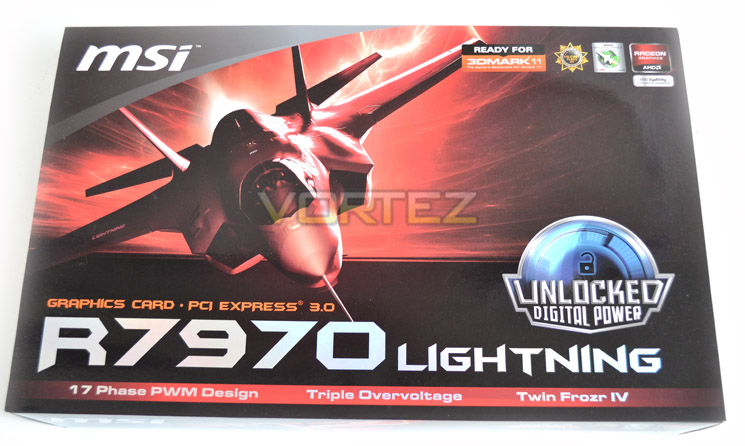
The box that the graphics card arrives in is on the large side as GPU packaging goes. The front of the packaging features an F22 Lightning fighter plane with the product title and main features written beneath.
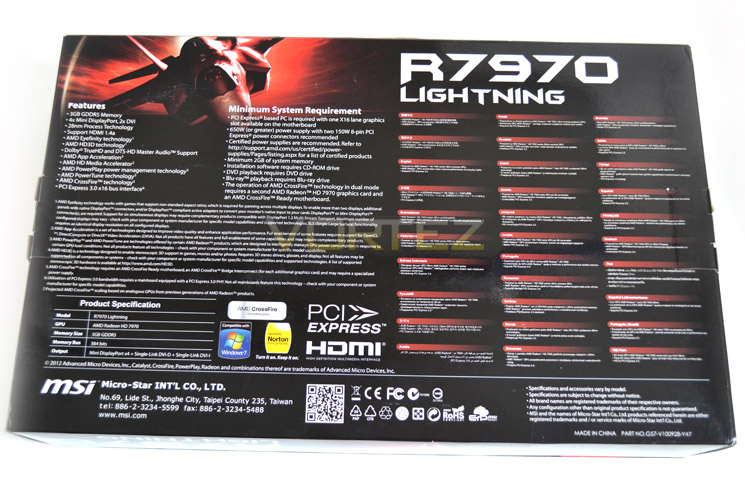
Flipping the box over we find MSI have a brief listing of both the features and specifications of the R7970 Lightning. We also get a rundown of the system requirements, most notably MSI recommend a 650W PSU to run the card.
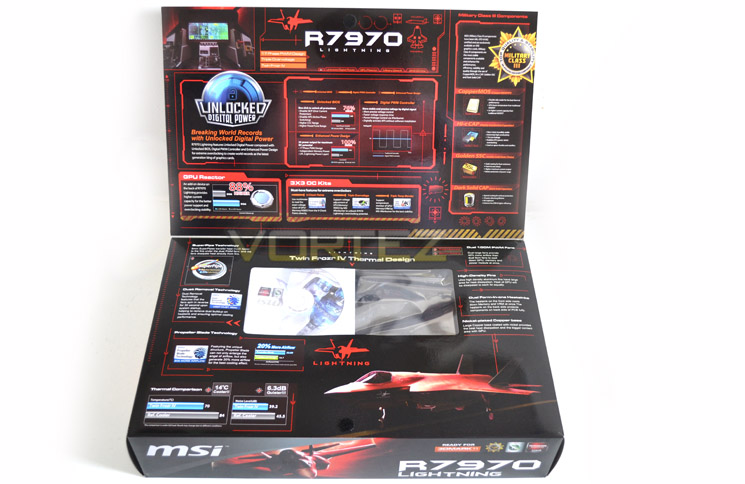
The box has a flip up lid allowing the buyer to analyse the many features this graphics card has to offer including military class components, GPU reactor, unlocked BIOS and what MSI call ‘3×3 OC kits’ which basically comprises of triple voltage check points, triple over voltage options (via Afterburner) and triple temperature monitoring.
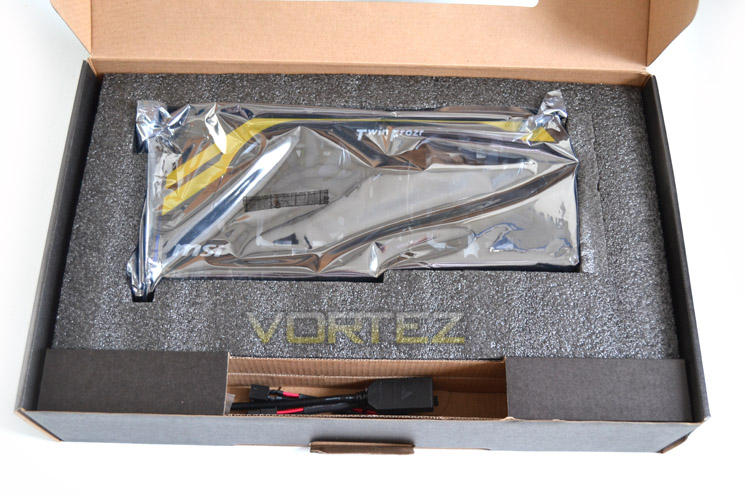
With the outer sleeve removed we are happy to report that MSI have taken all steps possible to ensure the graphics card reaches you in perfect condition. The card is held fast in a foam bracket and for added security the card is protected with a thick anti-static bag. The accessories are held in a separate component so there should be no reason why this card doesn’t reach you in A1 condition.
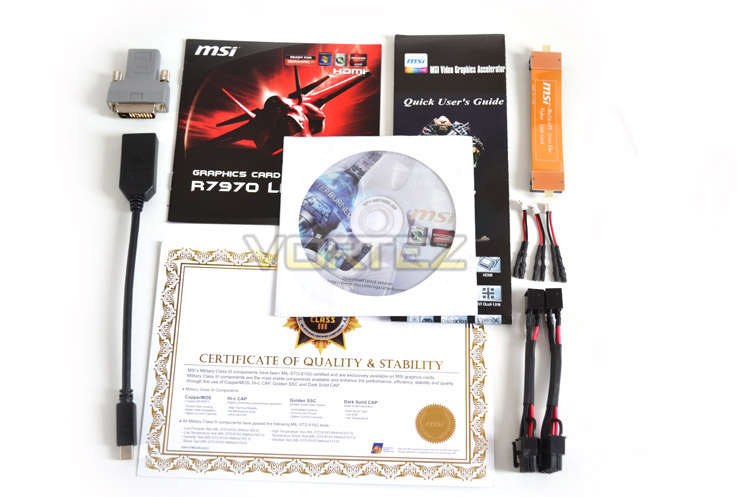
The accessories included with the R7970 Lightning are as follows:
Driver CD
User guides
Military Class Certificate
CrossFire Bridge
2x PCIe power cables
3x Voltage measurement cables
DVI Adapter
DisplayPort to HDMI Adaptor
First Look Part 1
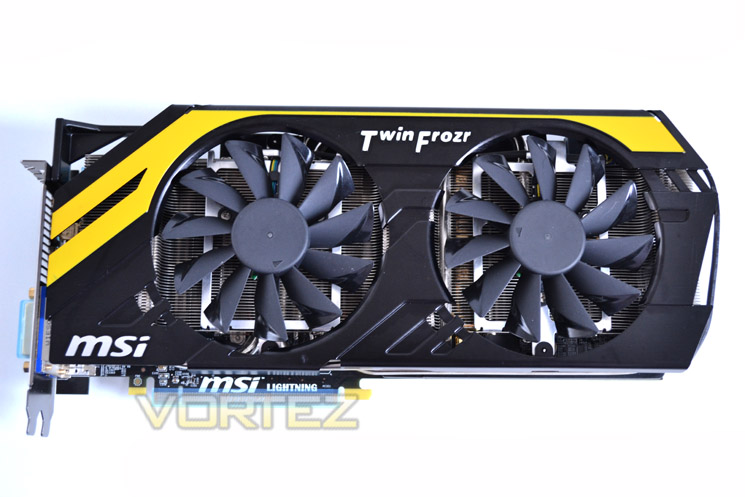
the card is immediately identifiable as a premium MSI product thanks to the ‘MPower’ stripes and colour scheme. Yellow is a strange choice for a premium product as there are few other components that will compliment this card however it cannot be accused of being dull for it will certainly hold an inquisitors gaze.
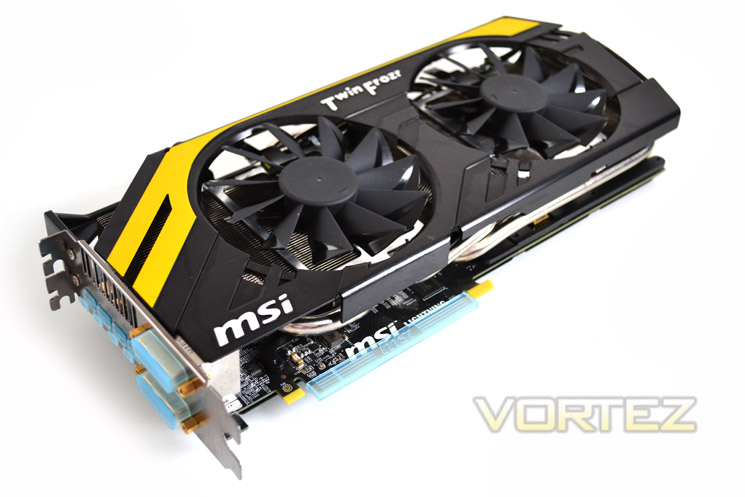
Being almost 12 inches long, the card is one of the largest on the market. While this may not be an issue for most looking to buying this card, those will small enclosures will need to ensure they have sufficient space available (27cm).
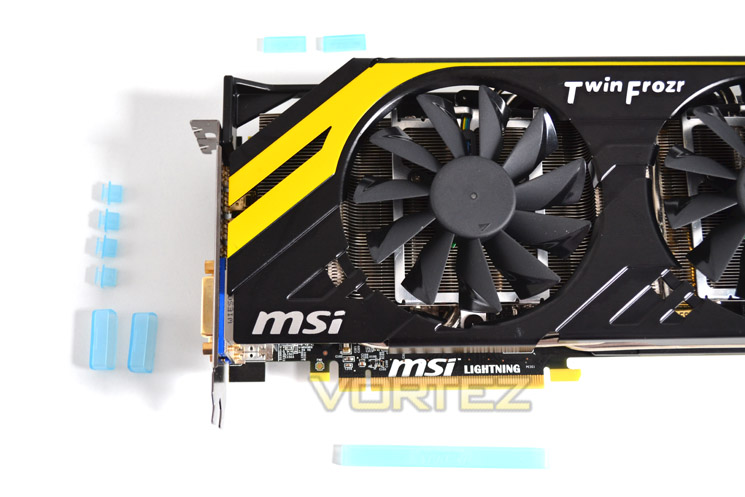
The card is very well protected with all ports and Gold fingers having the benefit of plastic covers which is not a new idea but it is certainly a welcome one for a card this expensive.
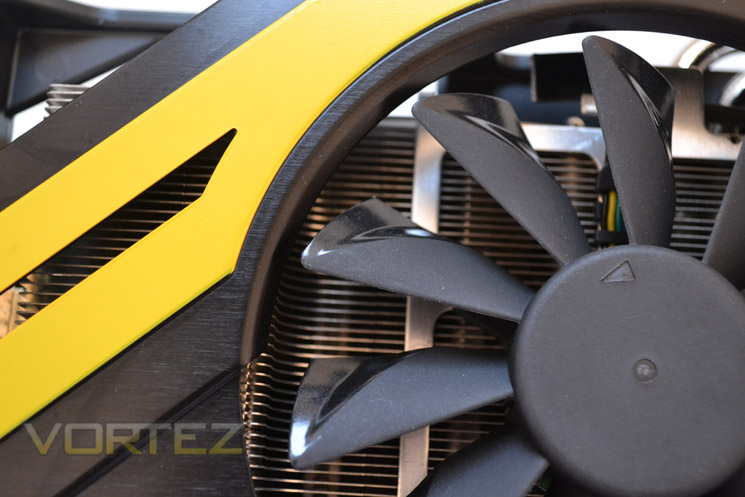
The fan uses propeller technology in that the angles of the blades are altered towards the leading edges. This results in a 20% improvement in airflow. The fan setup also boasts dust removal technology whereby the fans spin in reverse for 30 seconds upon start up, sucking the dust away from the heat sink.
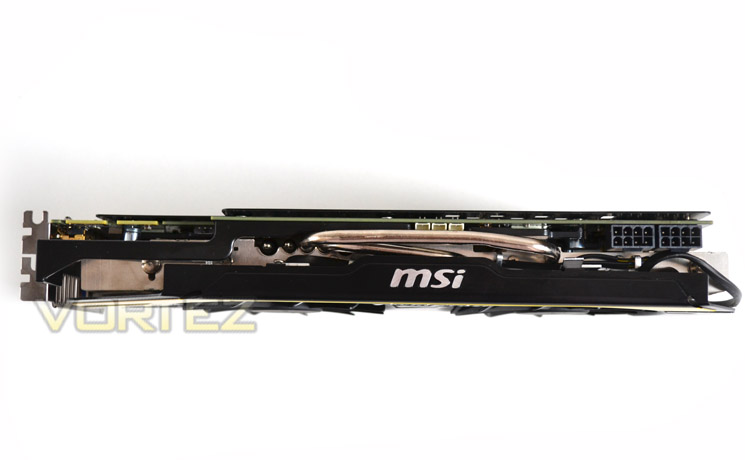
The R7970 is both long and wide (5 inches) however, the side profile is no bigger than your average GPU. You will still need to keep two slots free to accommodate this card though. From this angle the card doesn’t look too intimidating with only two heat pipes visible but as you can see below, there is a total of 5 all packed neatly away.
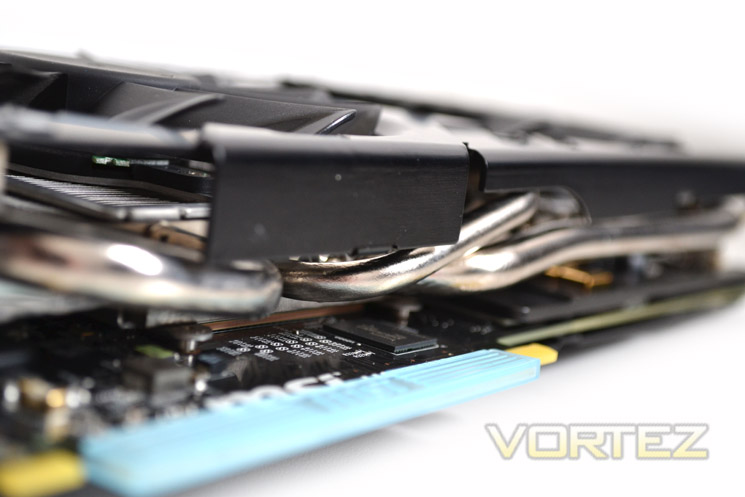
The heat pipes are nickel coated copper pipes so not only do they look the business but they should also assist cooling by spreading the heat across the heat sink.
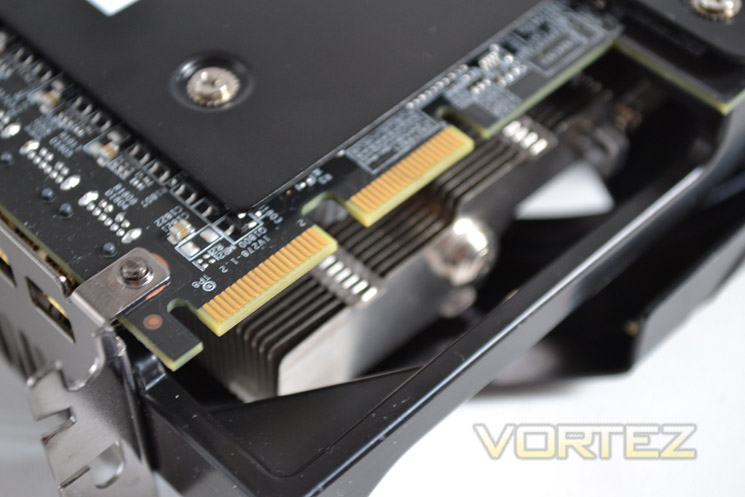
the card is fully crossfire capable meaning it can be paired to any other GPU for the same family.
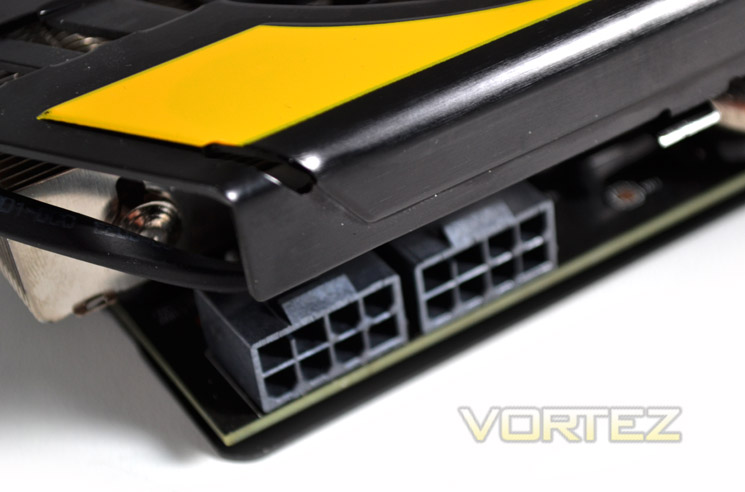
As mentioned previously, to power the MSI R7970 Lightning, MSI recommend a PSU capable of delivering 650W which quite a draw when compared to competing cards. In MSI’s defence though, this card is an out and out overclockers GPU and with its custom power circuitry, it makes sense to have a beefy PSU.
First Look Part 2
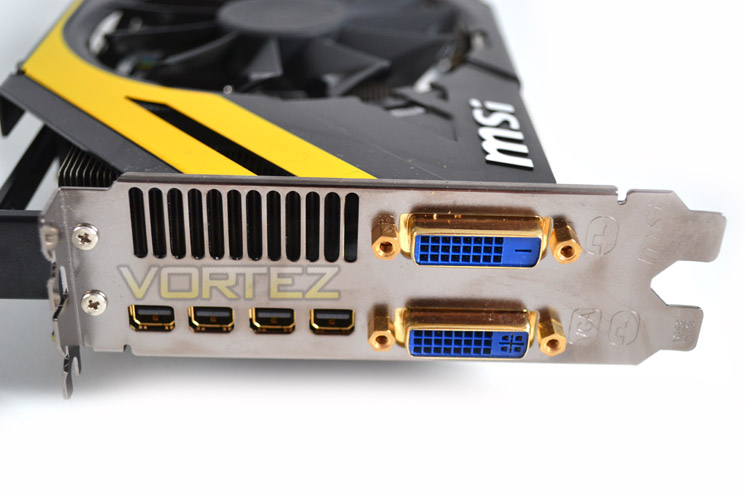
Are you reading carefully? Good because this will be extremely important to some but irrelevant to others.
The I/O features four mini-DisplayPorts and two DVI ports. For those who require Dual-Link DVI I’m afraid you are out of luck here. High end monitors such as the Dell 30″ 3007 WFP-HC which is capable of a 2560×1600 resolution will require an active DVI adapter to display at this resolution. We were aghast at this ‘oversight’ by MSI. Why release a flagship card that cannot display at the highest resolutions?
We investigated further and MSI told us that the HD7970 simply does not have the bandwidth to offer with Full Eyefinity support AND Dual Link DVI so the decision was made to support Eyefinity to its full extent over support for older, high end monitors. Monitors which support miniDP are not affected by this but that will be of little comfort to those who buy this card without carefully reading the specifications first.
The good news is that with the Active miniDP-DVI adaptor (costing around £80) does offer a 2560×1600 resolution but that is where the good news ended for us because despite trying two different leads, one offered a corrupt screen and the other resulted in random crashes when gaming which made for a very frustrating review! As such we cannot recommend using this card for this resolution unless you have a monitor with a native DisplayPort.
Here is the type we used with some success: DisplayPort® to DVI Dual Link Active Video Adapter Converter
We can understand the reasoning behind MSI’s choice of ports however we would warrant that there are for more people who require a dual link DVI port over 6 screen Eyefinity!
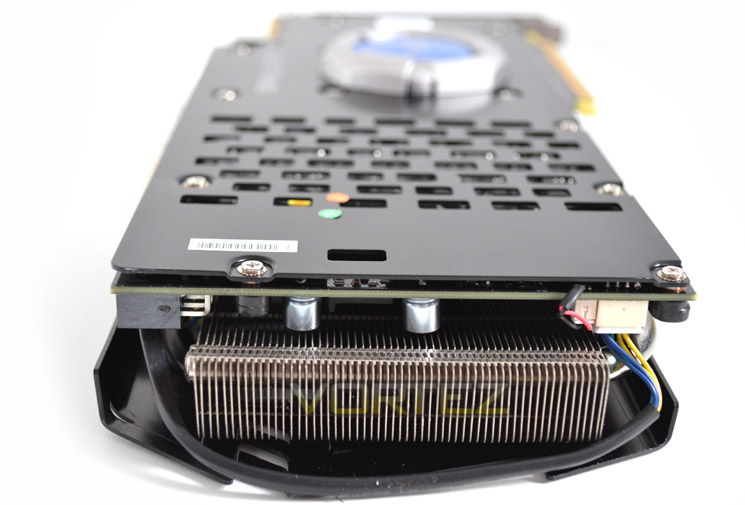
At the opposite end of the card you will find the vents from the heat sink. Because the shroud is not full cover means some of the hot air will be vented beck into the case and with this card having 3 different voltage options, you can be sure it will kick out a fair bit of heat!
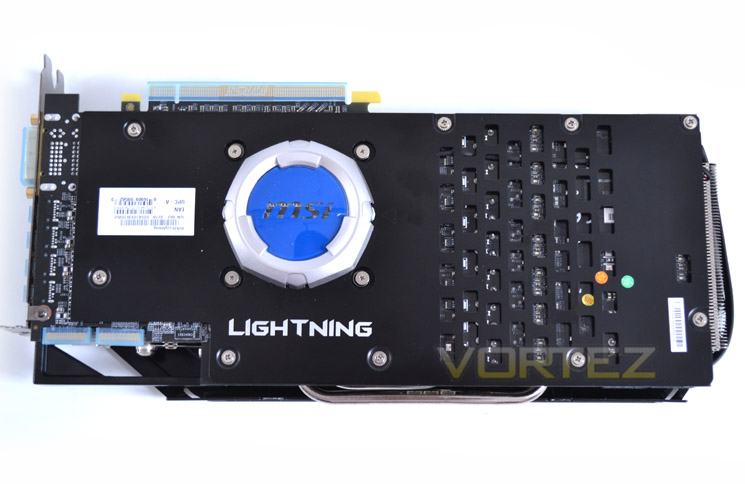
We do like a card with a back plate and thus were overjoyed to find that this card has a full length vented variety. The eye is however drawn not to the sleek back plate but to the silver/blue module that sits in the centre.
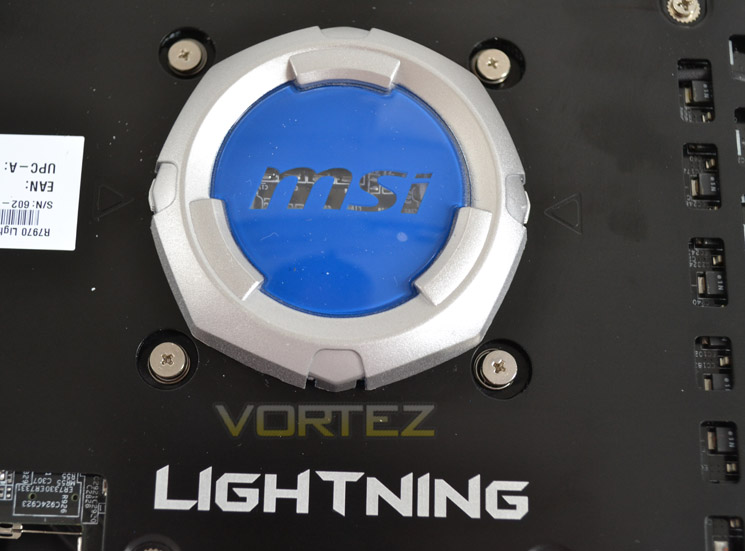
MSI call this the GPU Reactor. This isn’t the first time we have seen this device and while it may look strange, what is hidden beneath is what counts.
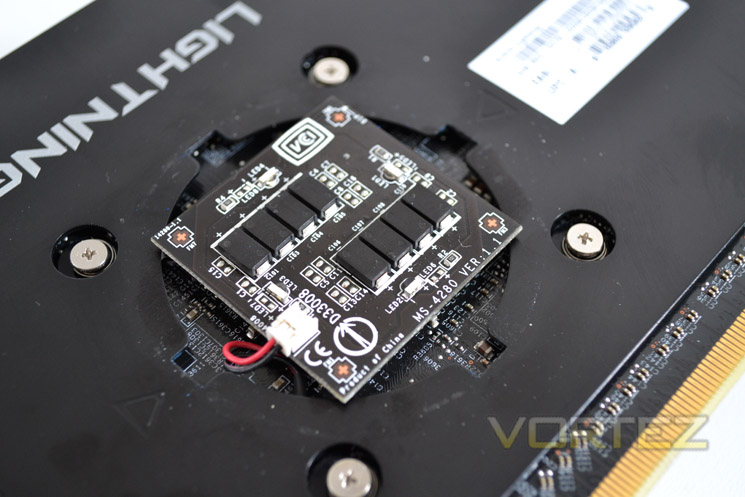
The GPU Reactor is a totally separate PCB. Its purpose is to increase current to the core and while this could be achieved using on-board components, by having the PCB separate, MSI claim it all but eliminates voltage fluctuations which is the bane of many overclocker’s lives.
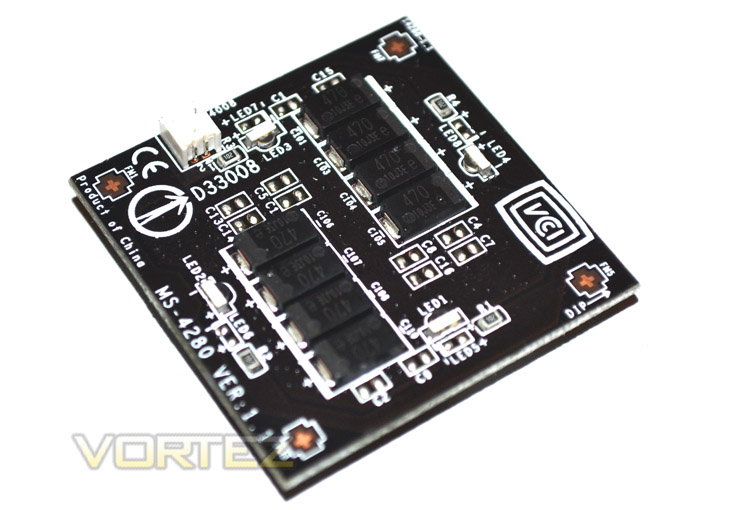
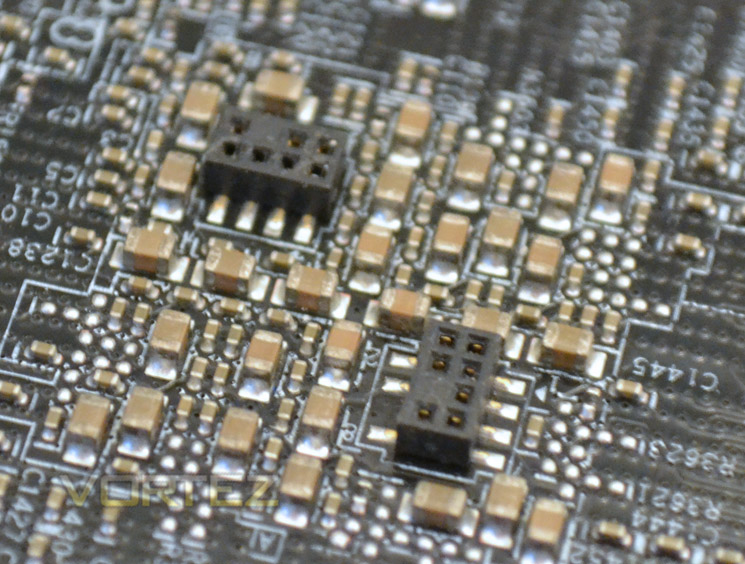
The module is connected by both power cable and pin/socket setup.
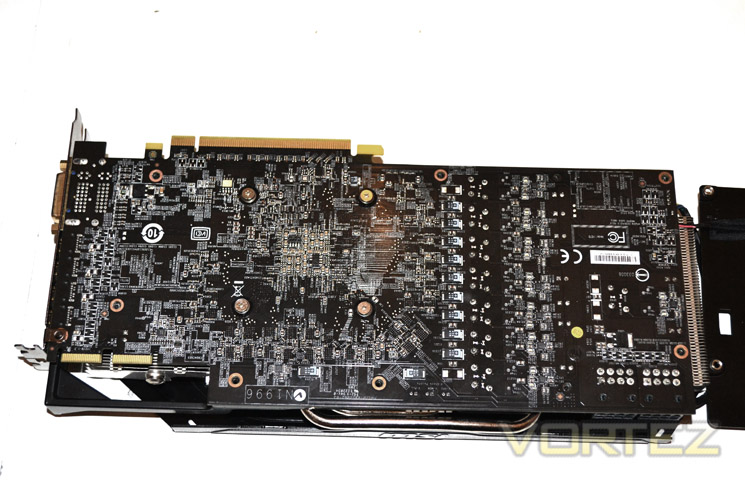
With the back plate removed you can see the full extent of the PSB. This is why we like a back plate. Some would suggest a back plate offers superior cooling however we believe it to be an excellent protector against rogue screws which could quite easily short the sensitive, component packed PCB.
Closer Look
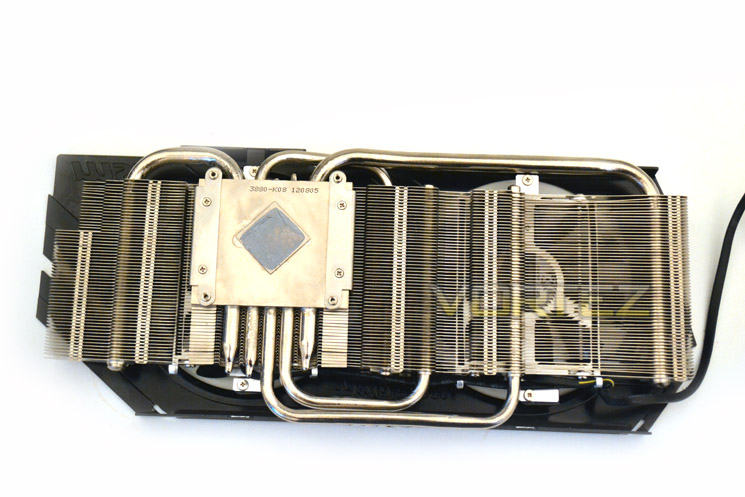
The aluminium heat sink features a nickel plated copper contact plate of which there are 5 nickel plated copper ‘Superpipes’ to spread the heat out amongst the aluminium finned array. the whole heat sink is dedicated to cooling the core only with no direct contact to either the memory chips or the VRM.
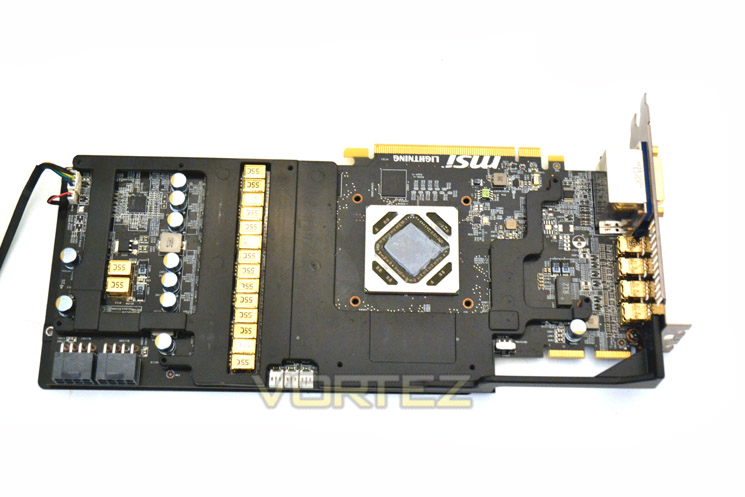
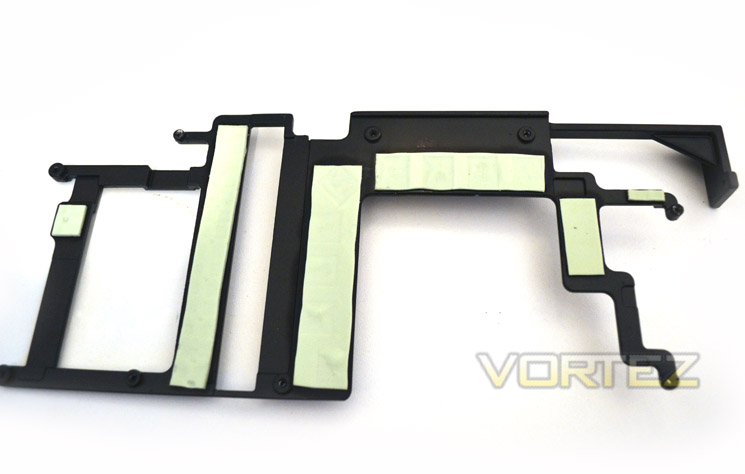
Upon removing the heat sink you will see that MSI have matt black aluminium mid plate which takes care of cooling the memory chips and VRM. The plate is screwed down to the PCB and makes contact with the components via thermal interface pads.
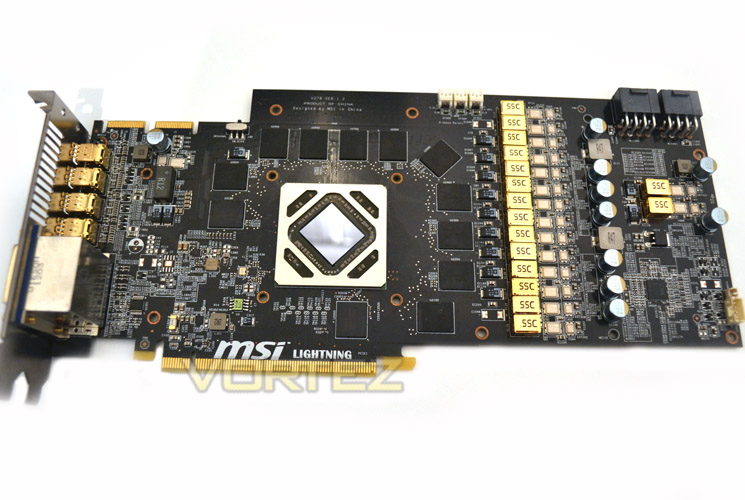
With the base plate removed we get our first look at the naked PCB in all its glory. The gold coloured chokes immediately catch the eye being that there are 16 of them. 12 memory chips frame the GPU core and are all found this side of the GPU.
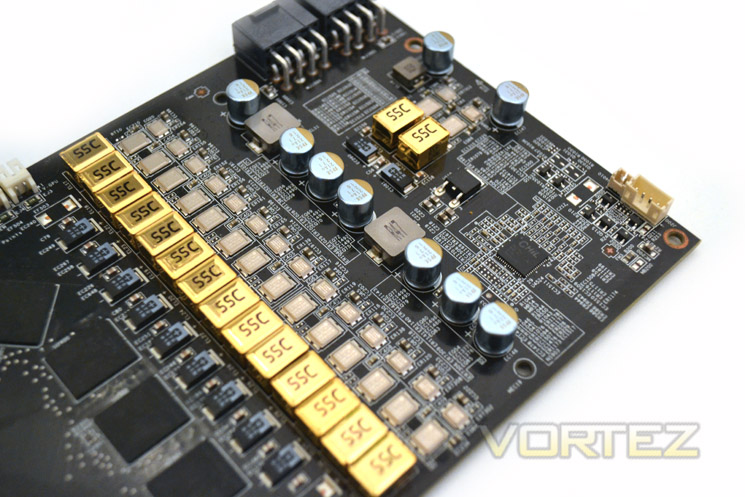
the VRM is made up of MSI’s Military class III components comprising of CopperMOS, Hi-c CAP, Golden SCC and Solid Caps. These setup oozes quality which should ensure that not only will the power delivery to this card be the ultimate available but also be durable enough to withstand plenty of punishment.
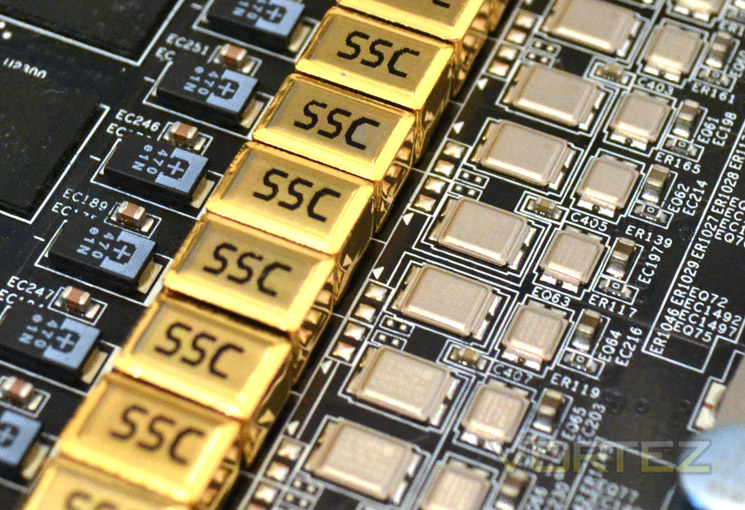
The chokes are Gold coated for better heat resistance and have a pure iron core which allows for a higher working current. The CopperMOS(fet) is also designed for extreme overclocking and allows for higher current capacity. The Hi-c Cap (Highly Conductive Capacitor features a Tantalum core which boasts 15% less leakage and as with the majority of components on this PCB, are specifically chosen to stabilise the massive GPU power afforded. Finally the solid capacitors are nickel coated for better durability and feature an aluminium core which gives us lower ESR coupled with an expected longer lifespan than the liquid alternative.
Controlling this mass of power circuitry is the CHiL 8228 controller which is identical to the one used on the reference models.
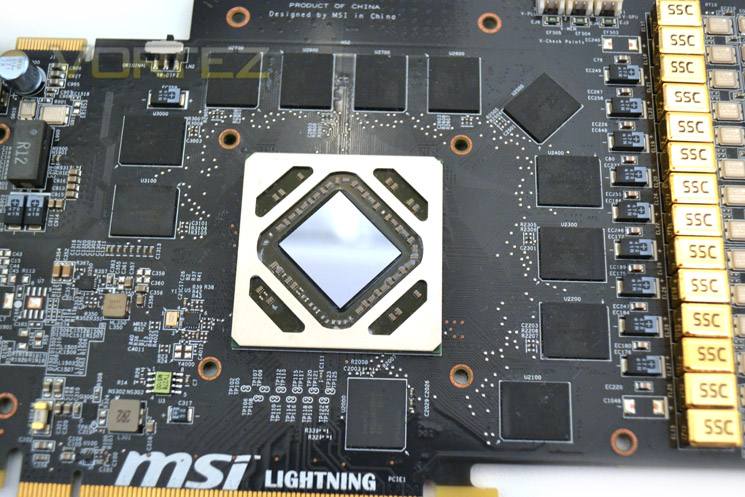
The integrated memory chips hail from HYNIX and have the serial number of H5GQ2H24MFR-R0C which tells us these specific modules are specified to run at 1500MHz (GDDR5 6000MHz). The core is also the same Tahiti processor found on other HD7970’s however this sliver of silicon on our sample had no markings whatsoever which is unusual.
Overall the cards features and aesthetics have impressed us greatly. Our major disappointment was the lack of Dual-Link DVI support which is a major negative point if you require this functionality. Other than that though, the MSI R7970 Lightning makes for some impressive reading as well as stunning visuals. Shall we see if it can back up those positives with impressive performance figures?
Test Setup
With the latest Intel chipset release we decided to update our ageing X58 setup to the new X79 chipset. Not only that but we will be using the flagship Core i7-3960X Extreme Edition processor clocked to 4.5GHz to ensure we have no CPU bottlenecks. With 16GB of ram on board there should be minimal paging so the benchmarks we run today will hopefully give a true reflection of the graphics card’s performance.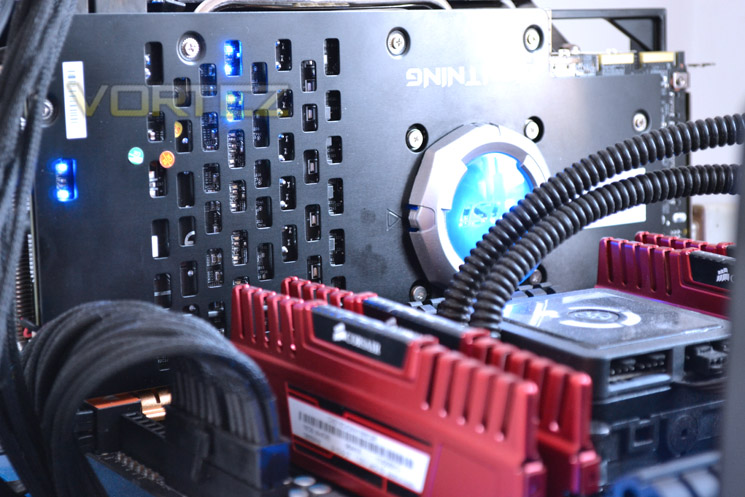
Some of the components for our test bench were kindly donated by CORSAIR who provided the majority of components without whom we would not have been able to bring you this review so a big thanks to them.
Graphics cards on test:
GIGABYTE GTX670 WINDFORCEX3 OC 4GB GDDR5
ZOTAC GTX660Ti AMP! Extreme Edition 2GB GDDR5
ZOTAC GTX660Ti AMP! Extreme Edition 2GB GDDR5
GIGABYTE GTX650 Ti 2GB GDDR5
ZOTAC GTX650 Ti 2GB GDDR5
AMD HD7770 1GB GDDR5
ZOTAC GTX660 2GB GDDR5
GIGABYTE GTX680 Super Overclock
MSI GTX680 Twin Frozr 2GB GDDR5
ZOTAC GTX660Ti AMP! Edition 2GB GDDR5
MSI R7870 Hawk 2GB GDDR5
EVGA GTX680 SuperClocked Signature 2GB GDDR5
GIGABYTE GTX680 Windforce 2GB GDDR5
NVIDIA GTX670 2GB GDDR5
HIS HD 7870 IceQ Turbo 2GB GDDR5
MSI HD 7870 Twin Frozr III OC 2GB GDDR5
GIGABYTE HD7850 OC WindForce x2 2GB GDDR5
ZOTAC GTX680 2GB GDDR5
AMD HD7870 2GB GDDR5
ZOTAC GTX580 AMP2! 3GB GDDR5
XFX R7970 Black Edition 3GB GDDR5
XFX R7770 Black Edition ‘S’ 1GB GDDR5
AMD HD7750 1GB GDDR5
HIS HD7970 3GB GDDR5
XFX DD Radeon R7950 3072MB GDDR5
PowerColor PCS+ Radeon HD7950 3072MB GDDR5
AMD Radeon HD7950 3072MB GDDR5
AMD Radeon HD7970 3072MB GDDR5
ZOTAC GTX570 AMP! 1280MB GDDR5
NVIDIA GTX570 1280MB GDDR5
MSI GTX560Ti-448 Twin Frozr III 1280MB GDDR5
MSI GTX560Ti-384 Twin Frozr III 2GB GDDR5
AMD HD6990 4GB GDDR5
Motherboard: MSI X79 Big Bang X-Power II
CPU: Intel Core i7-3960X Extreme Edition @ 4.5GHz
RAM – 16GB (4x4GB) Corsair Vengeance (Red) DDR3 @ 1866MHz 9-10-9-27
Power Supply – ANTEC High Current Pro 1200W
Hard Drive – Kingston HyperX 240GB
Cooler – Corsair H100
Benchmarks
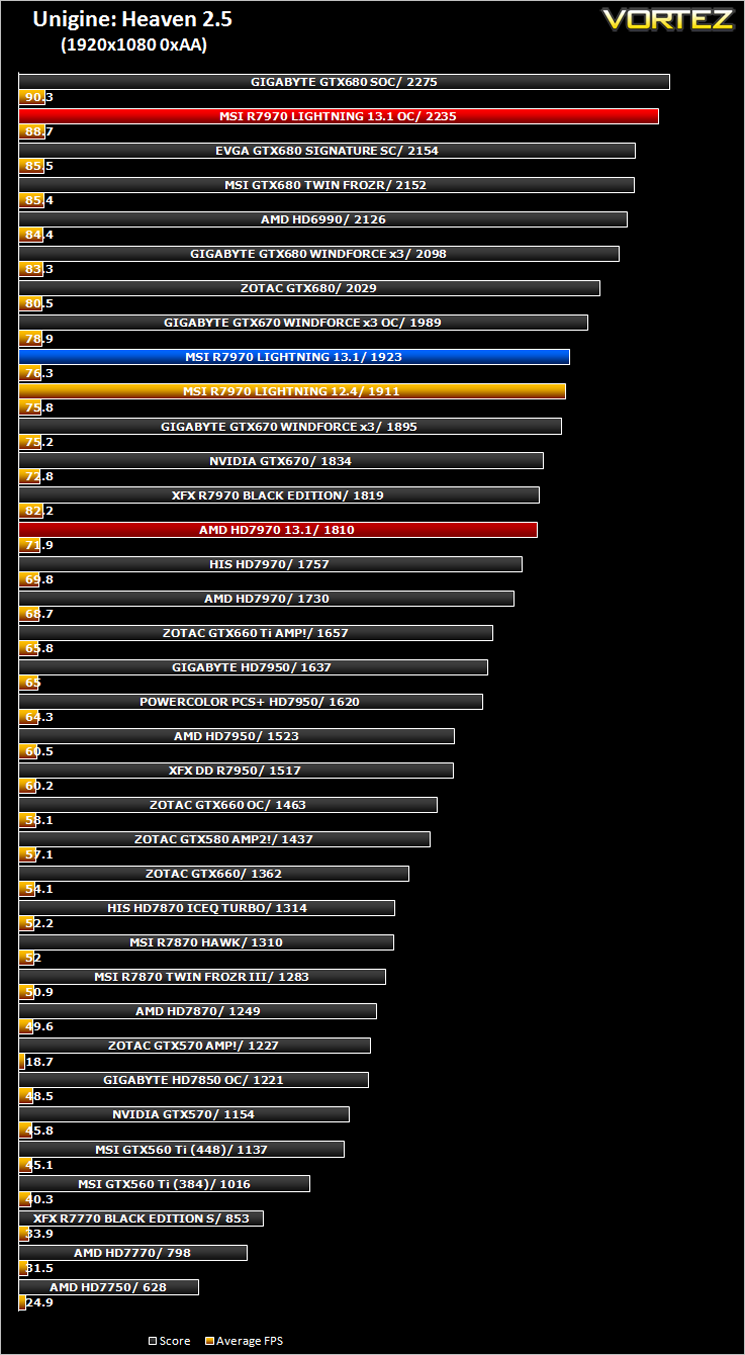
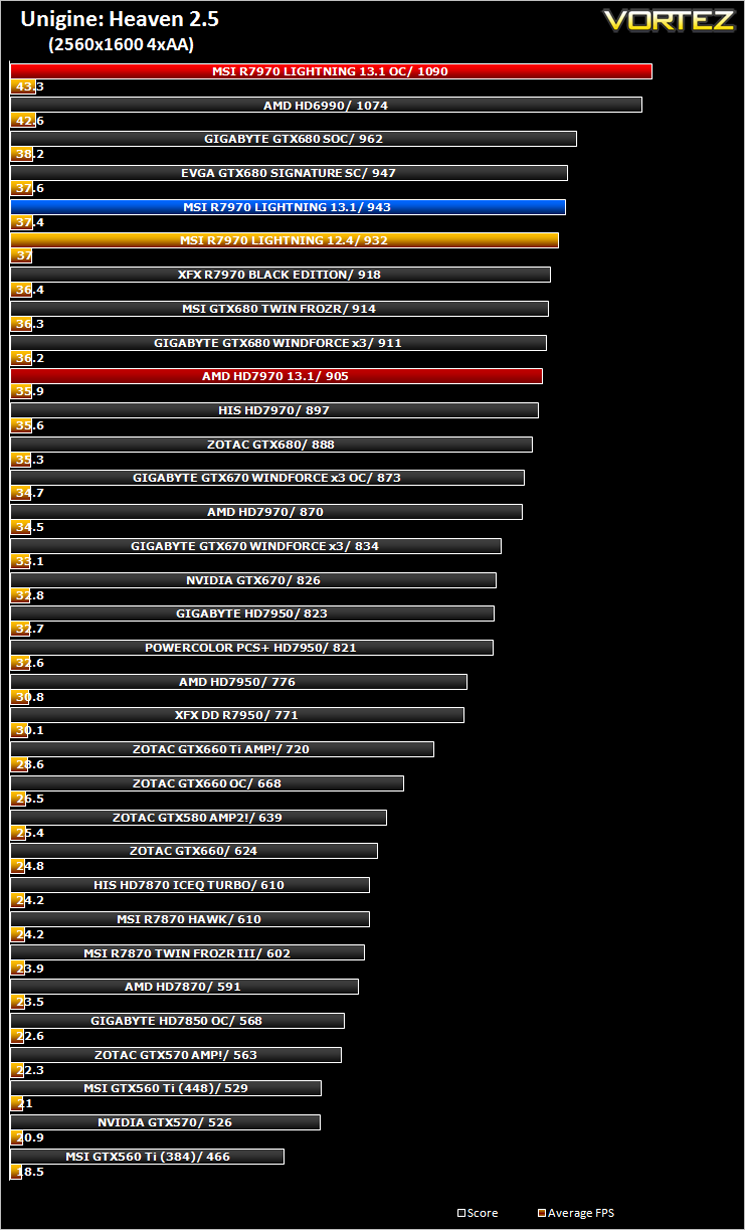
We have also updated our range of benchmarks to include the following games which will give the graphics cards a challenge and sort the wheat from the chaff. Each benchmark will be run at both stock and maximum overclock settings and utilise 1920×1080 and 2560×1600 resolutions along with AA at various levels (application dependent):
Crysis 2
Crysis Warhead
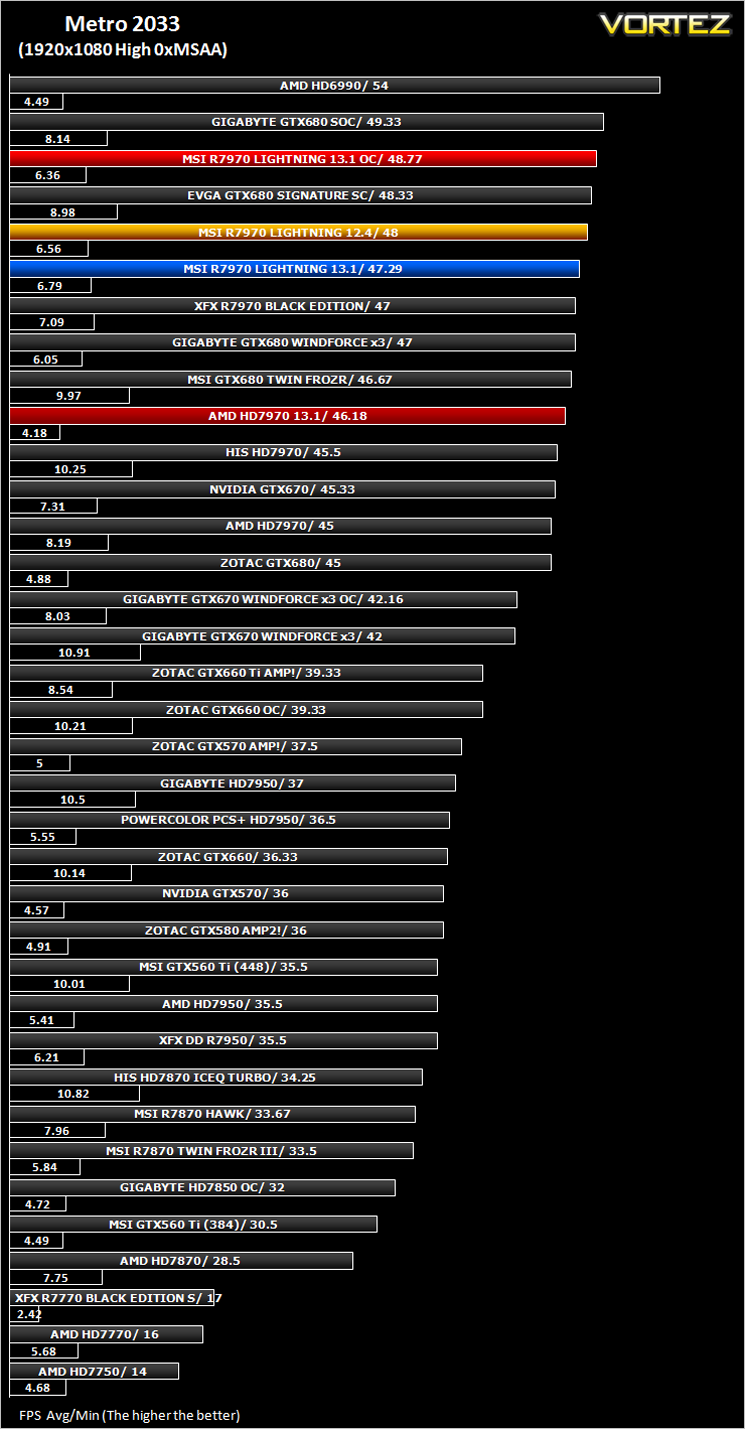
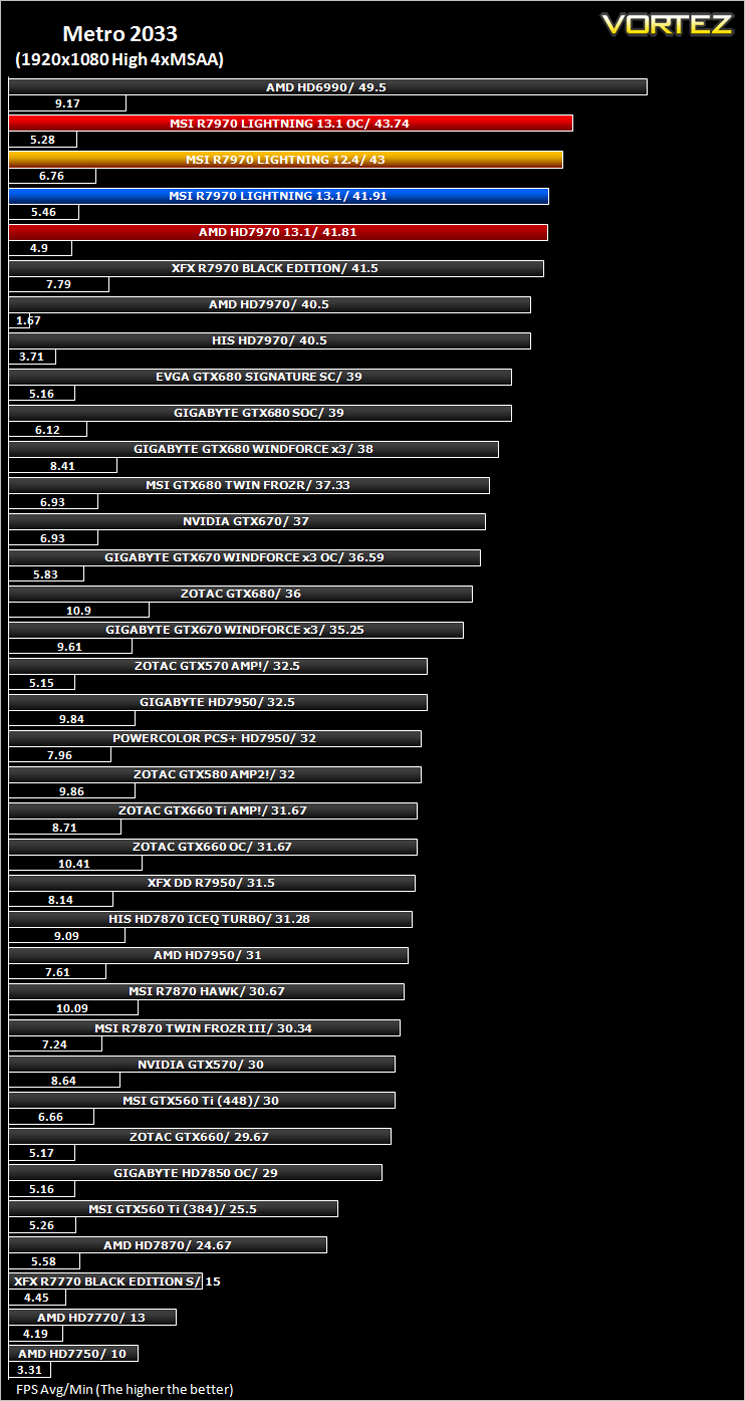
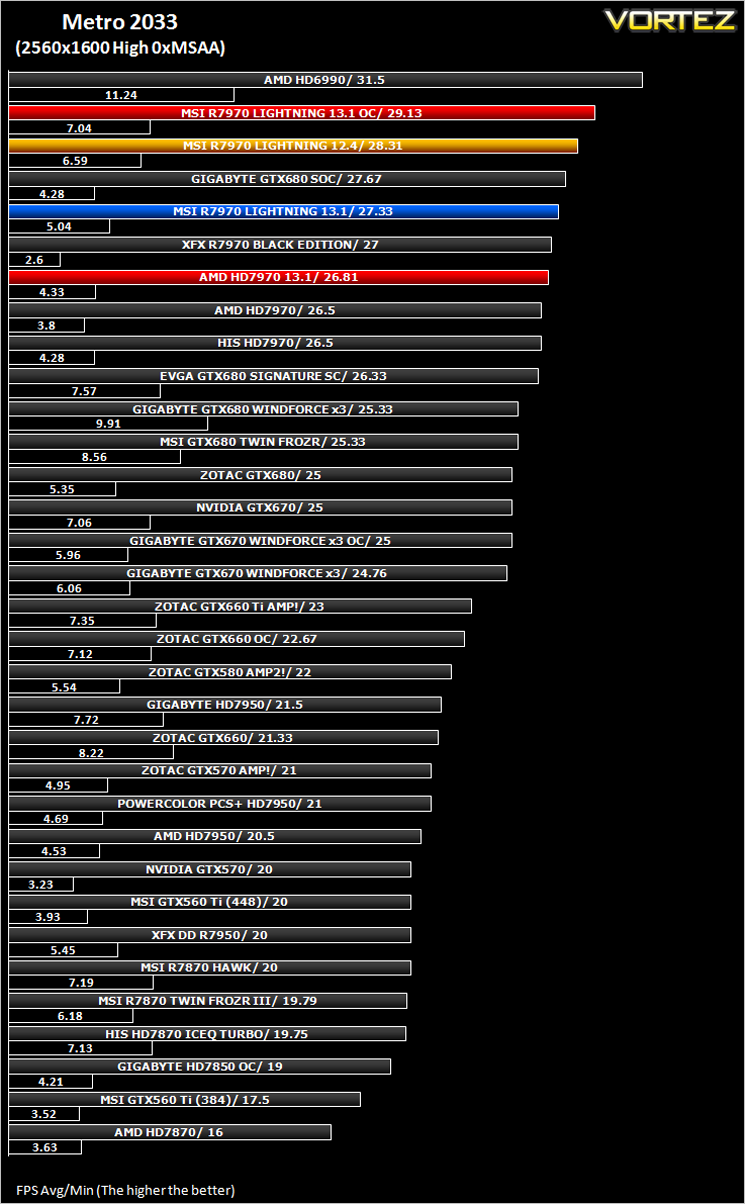
Metro 2033
The Elder Scrolls: Skyrim
DiRT 3
Futuremark 3DMark 2011
Unigine: Heaven 2.5
Let’s see how today’s graphics card performed…
Overclocking
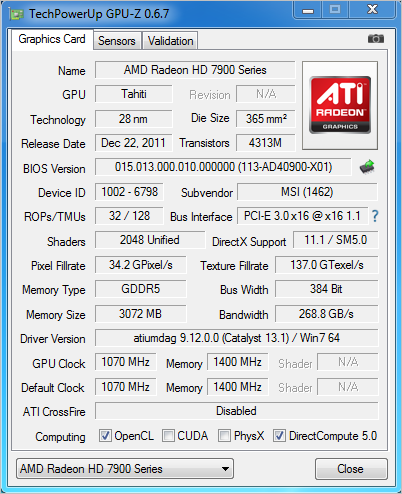
This card has two BIOS options available, a factory overclock of 1070MHz/1400MHz is the order of the day for normal operation (and recommended for aircooling). However should you like to dabble with the cold stuff then MSI have also included an ‘LN2 BIOS’ which at the flick of a switch downclocks the card to reference 925MHz/1375MHz. this may seem odd but MSI assume you won’t be keeping these clockspeeds and will push the card as far as it will go under such extreme cooling circumstances. What it does allow the user to do however is set voltages to dangerously (hot) levels, allowing for improved overclocking headroom.
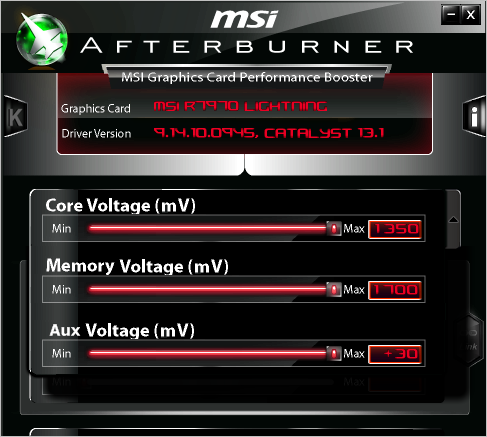
Thanks to Afterburner, we were able to adjust all three voltages which should result in some impressive figures.
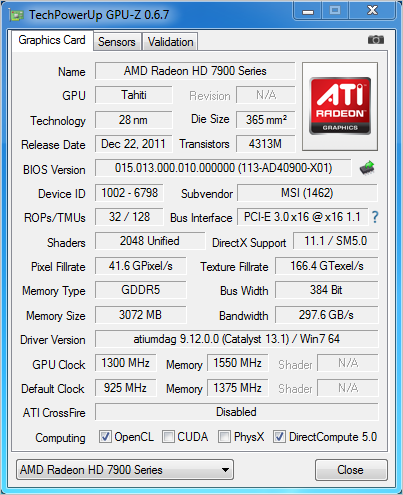
Amazing! We managed to reach a mammoth 1300MHz on the core and 1550MHz on the memory. While we confess, there were some graphical anomalies due to these extreme overclocks, the card held out and did not crash throughout the benchmarking save for errors in conjunction with the Active DVI adaptor. This was verified when we ran the card at stock speeds which also gave us the occasional crash for example, Futuremark 3DMark simply refused to run GPU test 5 regardless of clockspeed! So we are confident that the crashes were nothing to do with the stability of the card, more likely the DualLink DVI to DP adapter was to blame (compatibility). Under LN2 we have little doubt that we could go higher even than this. Anomalies withstanding, a pretty impressive overclocking feat from MSI!
Temperature, Acoustics and Power Consumption
Power ConsumptionTo test for power consumption we do not use anything to technical, just a wall meter which measures the total system power draw minus the monitor.
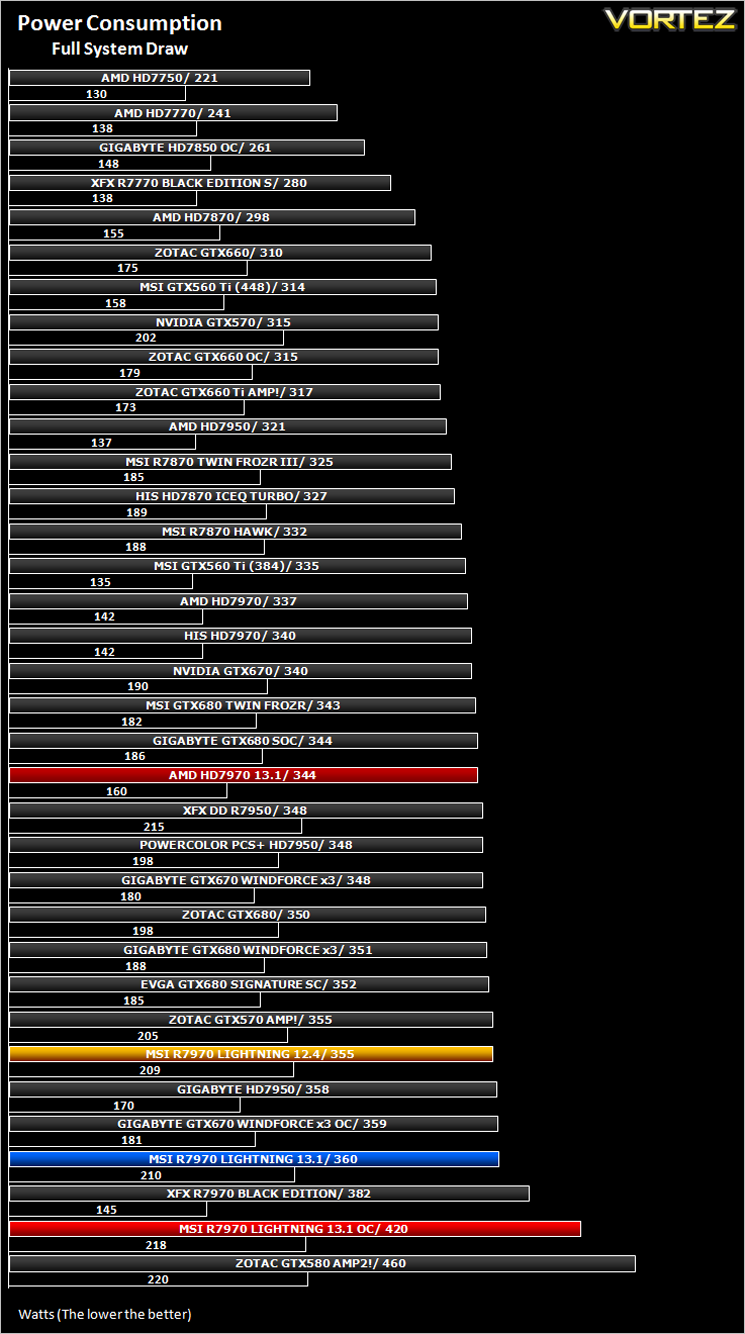
You should be under no illusion that the MSI R7970 Lightning is a hungry beast and will consume a fair whack of power. With the voltages increased to their maximum (standard BIOS), the R7970 eats its way through 80W more than the reference design! Still, with the huge overclocks, this came as little surprise and I’m sure will be of little worry to those seeking a card with such overclocking potential.
Temperature
To test temperatures we measured idle temperatures after booting windows, letting all applications finish loading and ran a few benchmarks. Once the benchmarks were complete we left the card to reach a cooling plateau where we then took the idle temperatures. For the load tests, we ran Furmark for 20 minutes, taking the absolute maximum temperature attained.
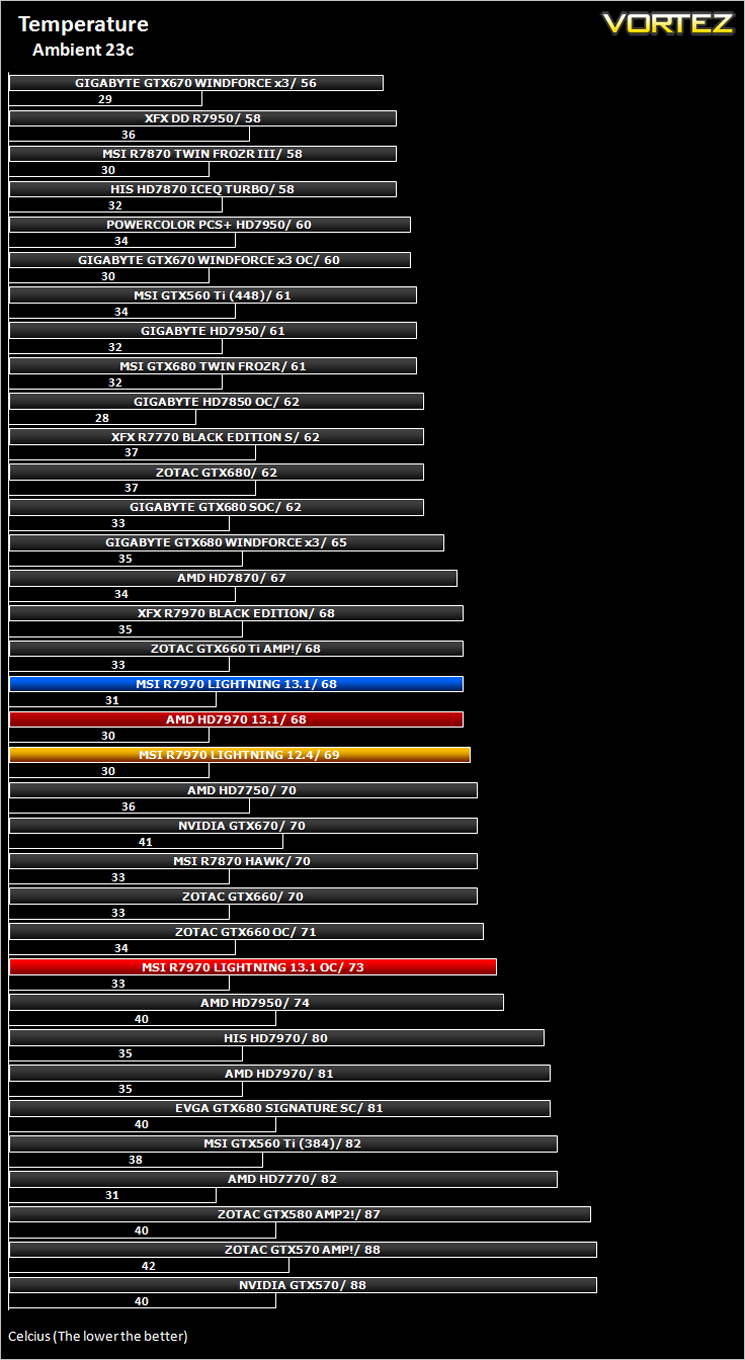
The massive cooler atop of the custom PCB did its job very well. While it couldn’t be accused of being quiet, it wasn’t intrusive unless the fans were manually increased.
Let’s move on to our suite of benchmarks…
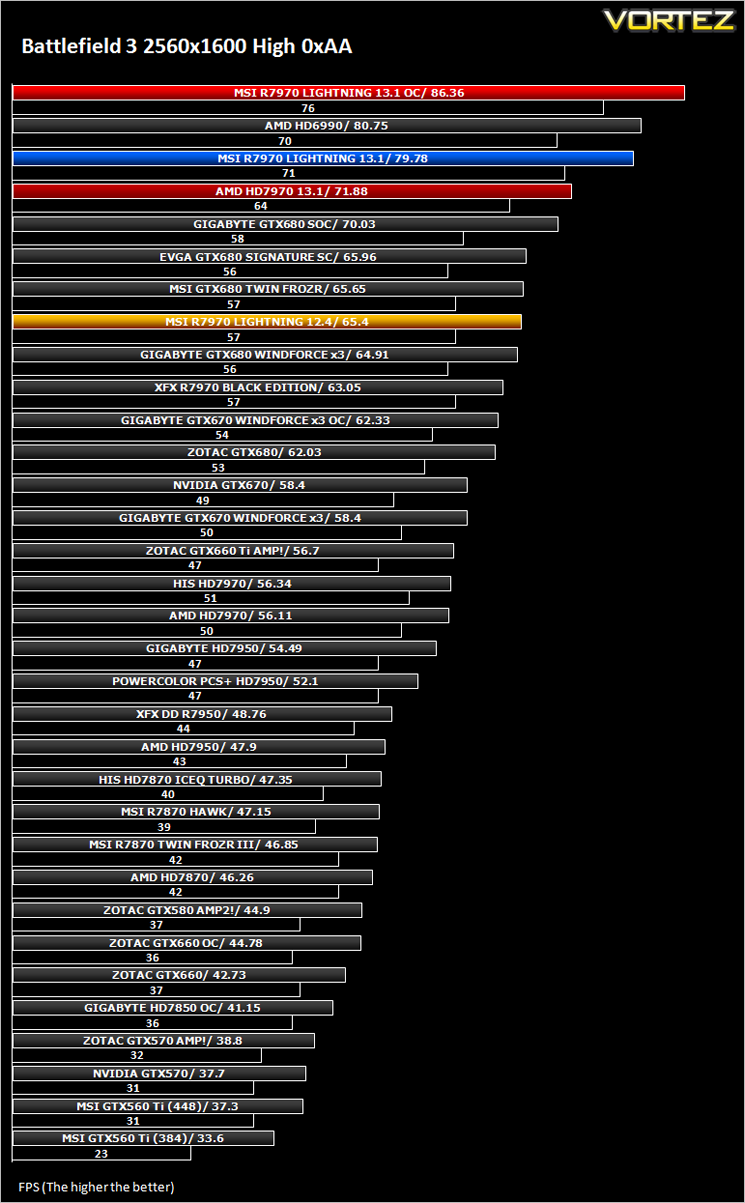
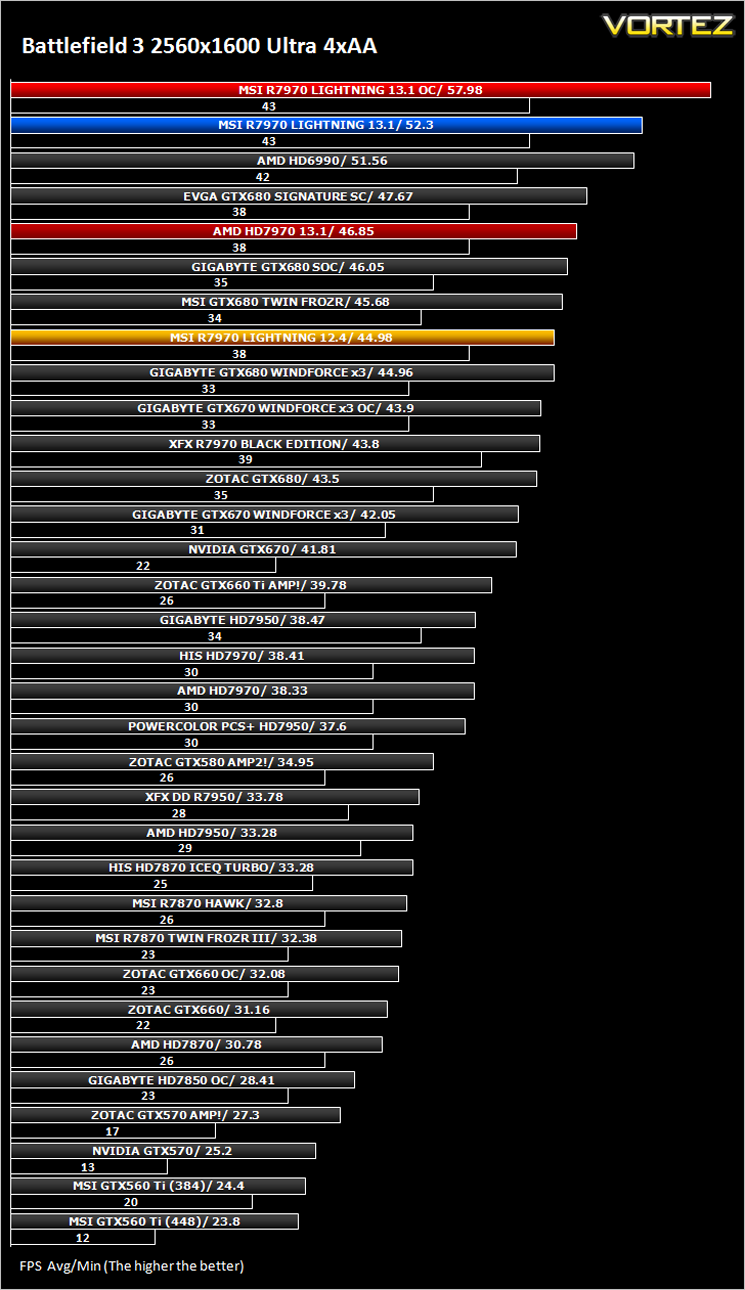
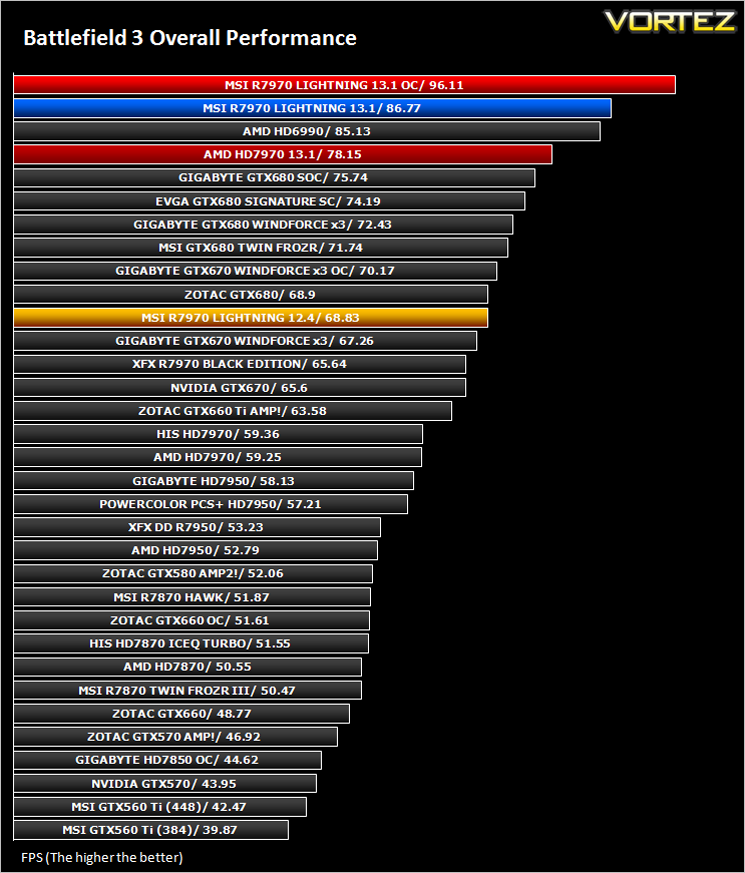
Battlefield 3
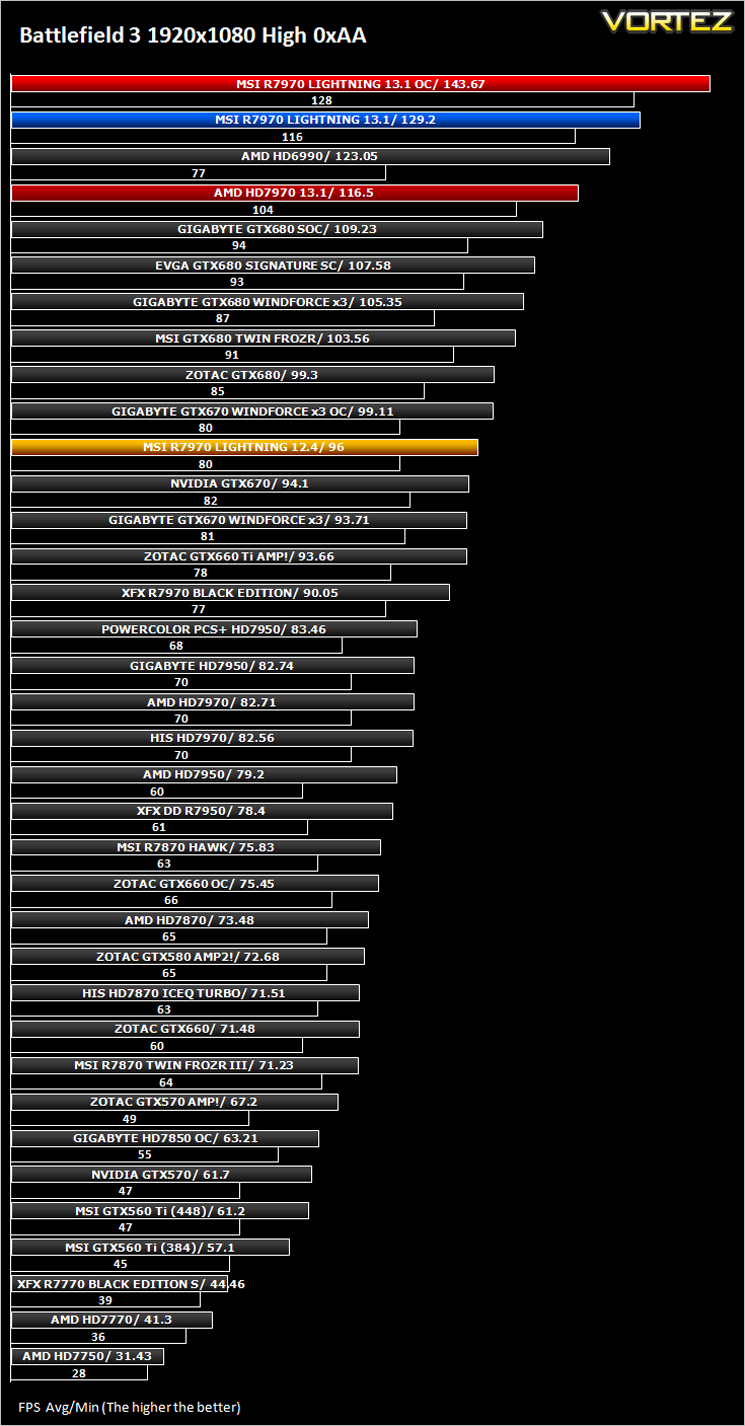
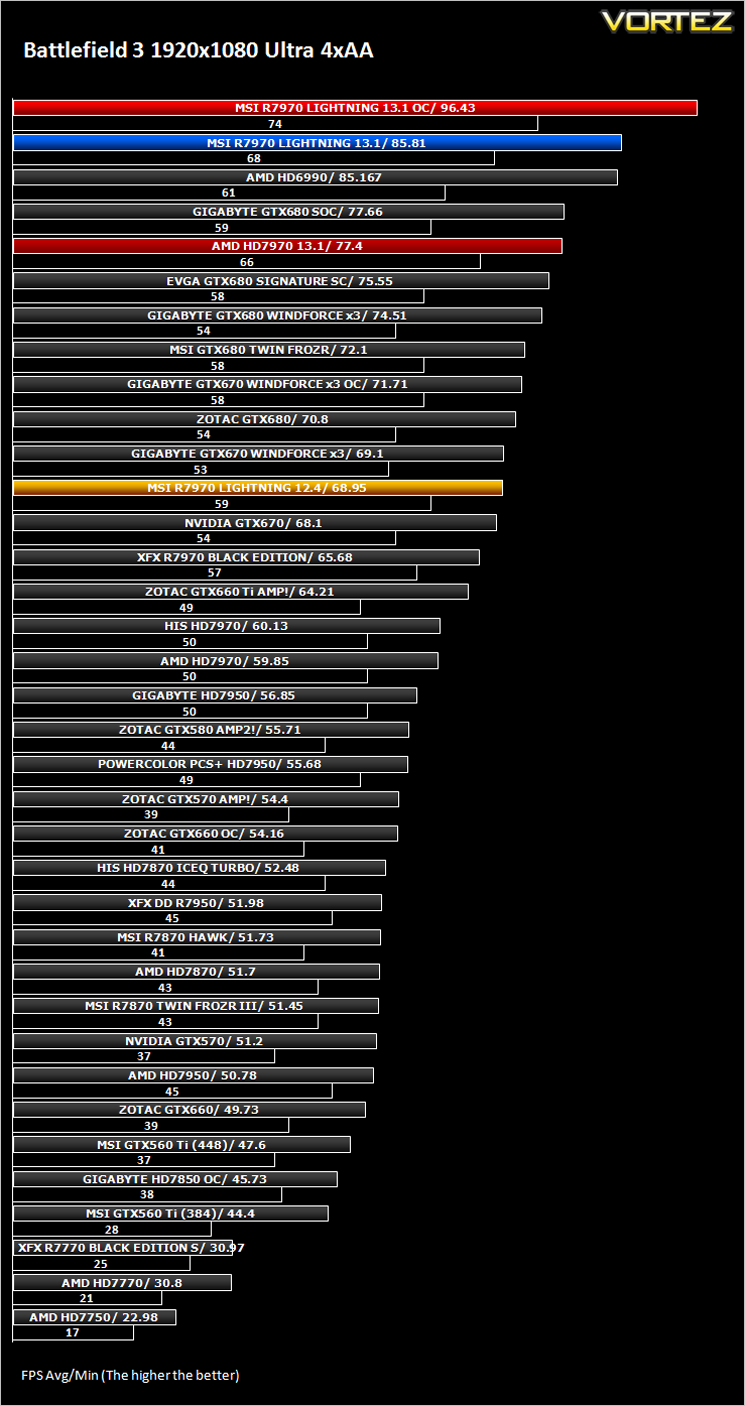
Average and minimum frames per second were measured using Fraps during the parking lot scene on Operation Sword Breaker. High and Ultra presets were loaded at both resolutions.
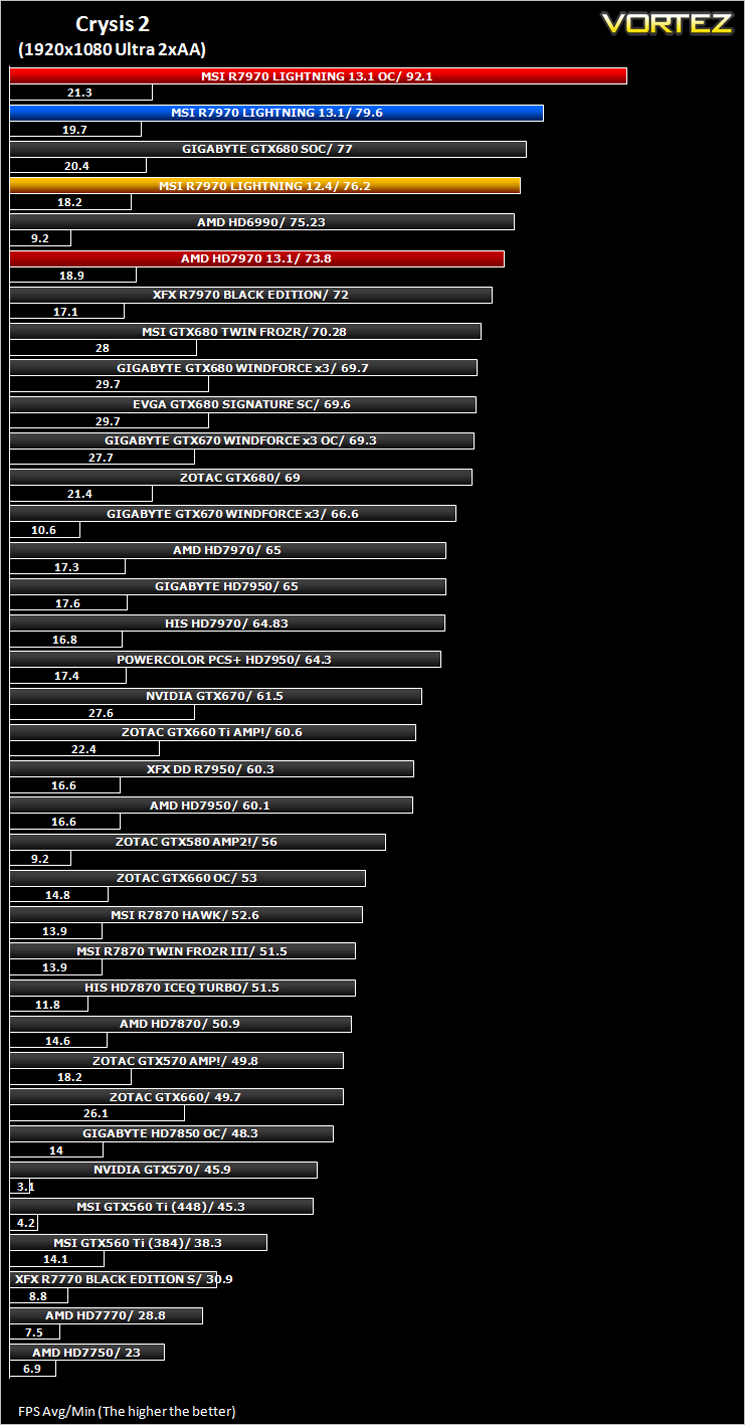
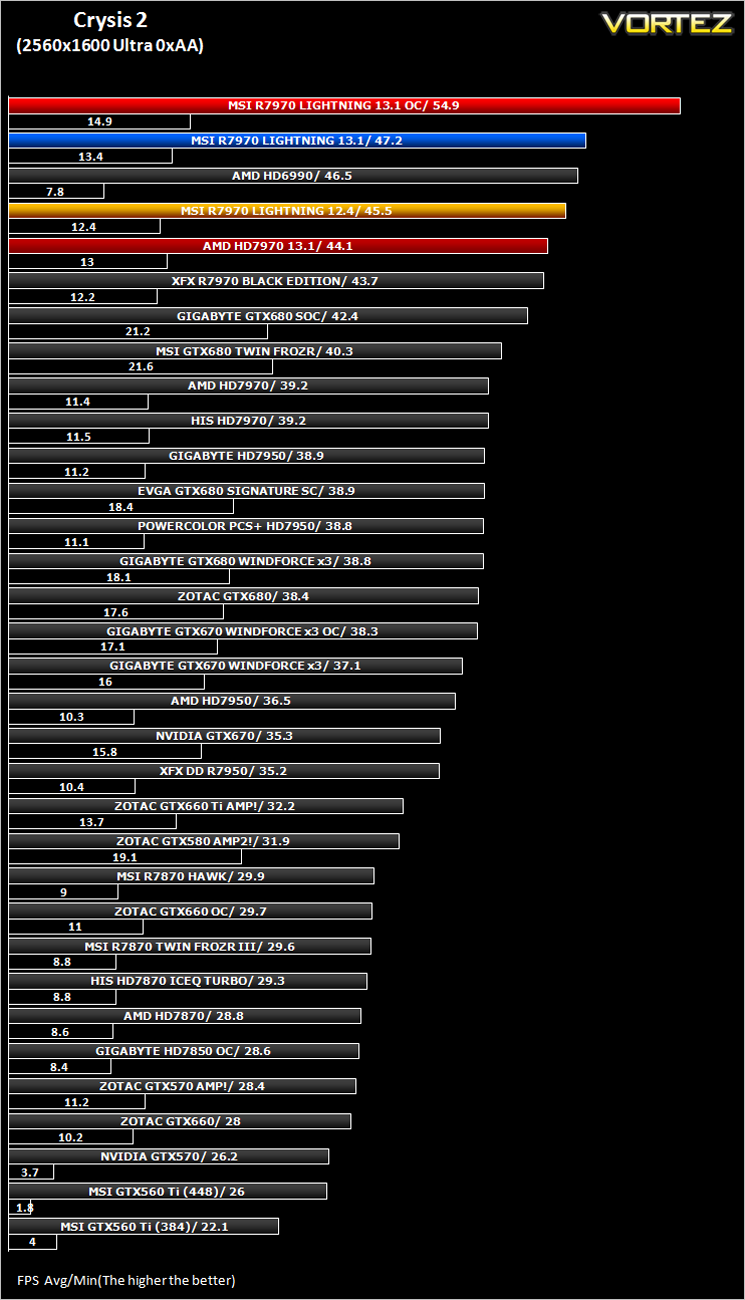
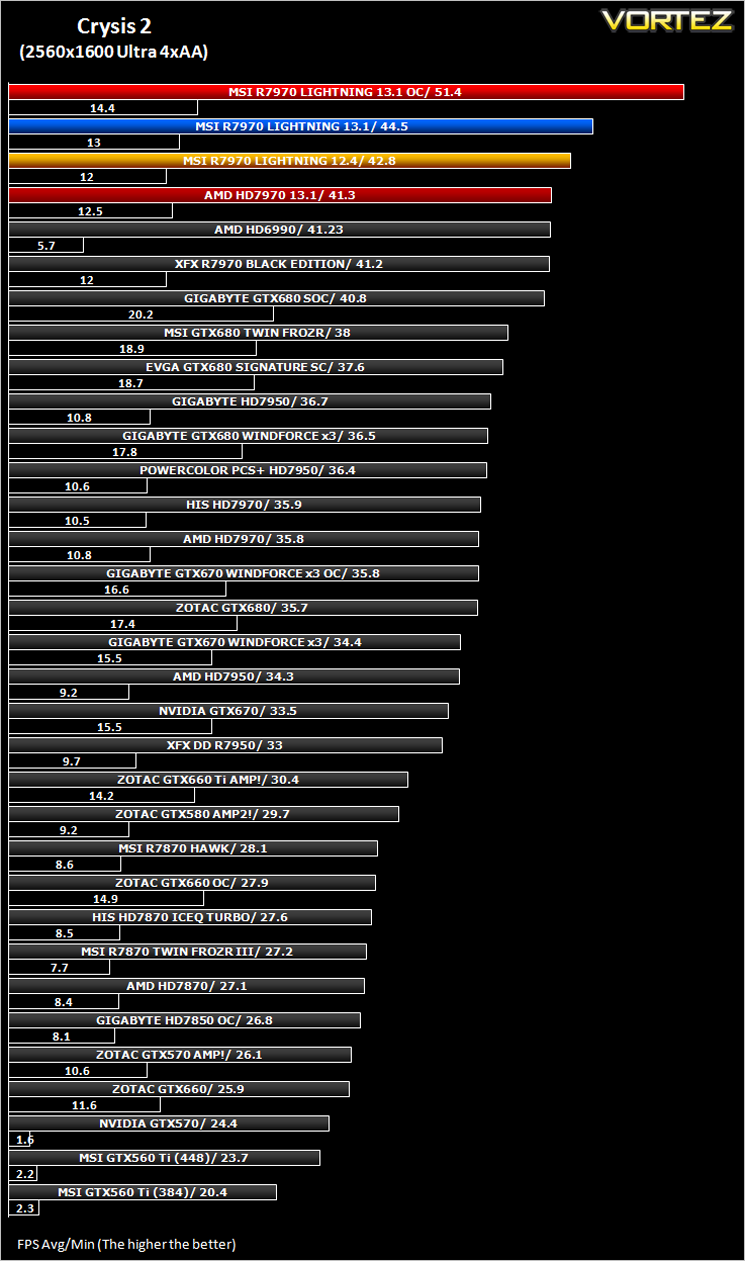
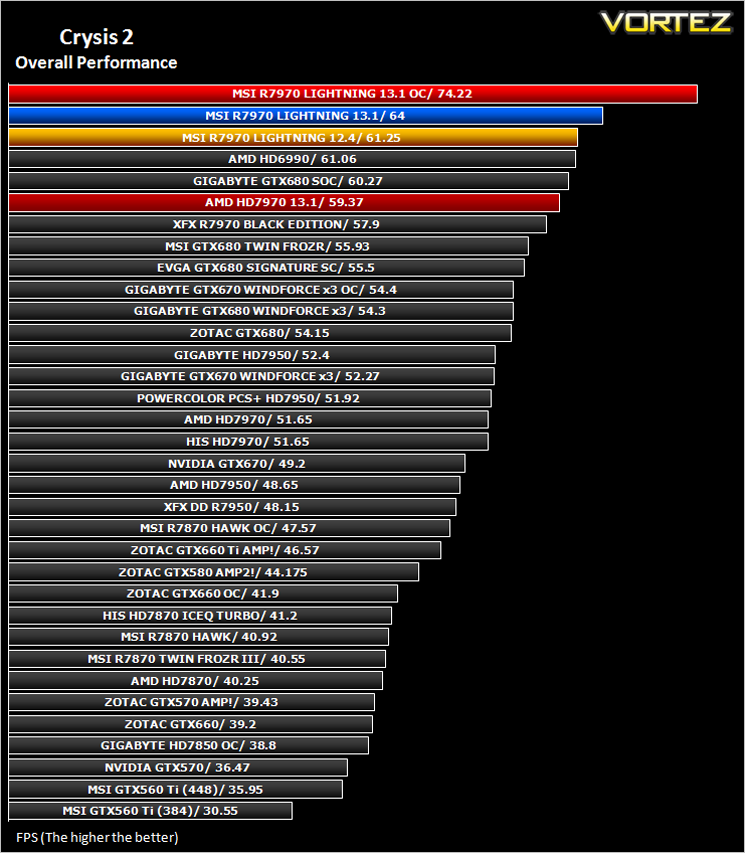
Crysis 2
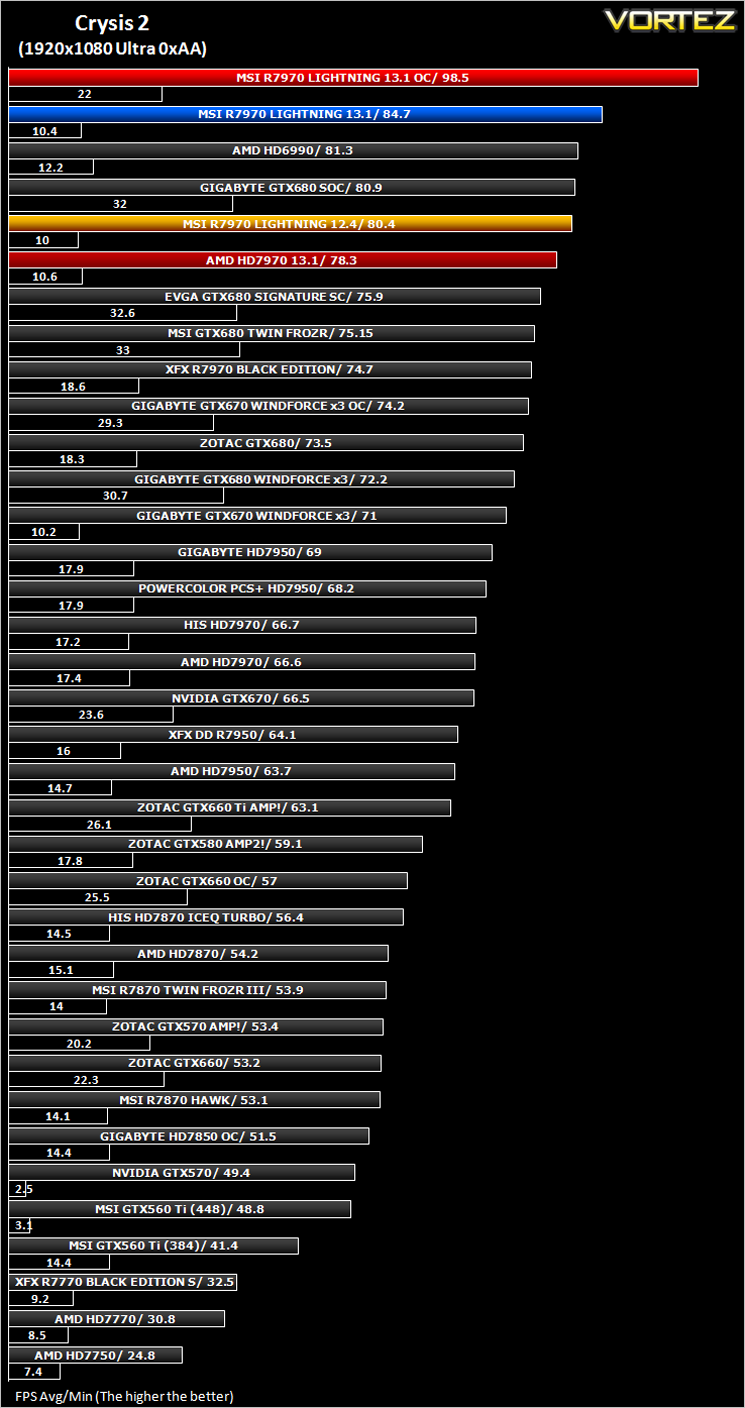
To test the cards we used the Crysis 2 benchmark courtesy of Adrenaline with both the 1.9 patch, DX11 update and Hi-res texture pack. Settings were manually placed to Ultra, DX11 and tessellation enabled with the Central Park map being run 3 times per resolution benchmark test.
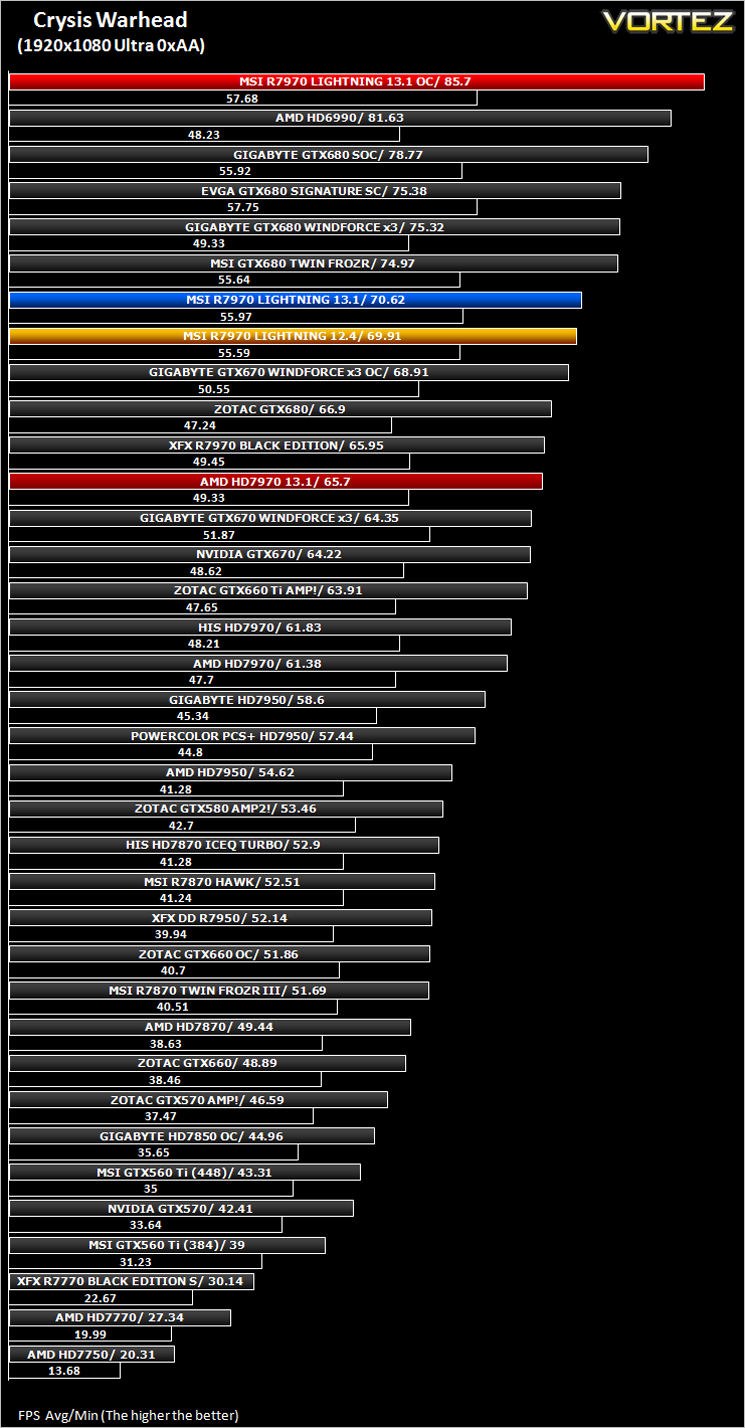
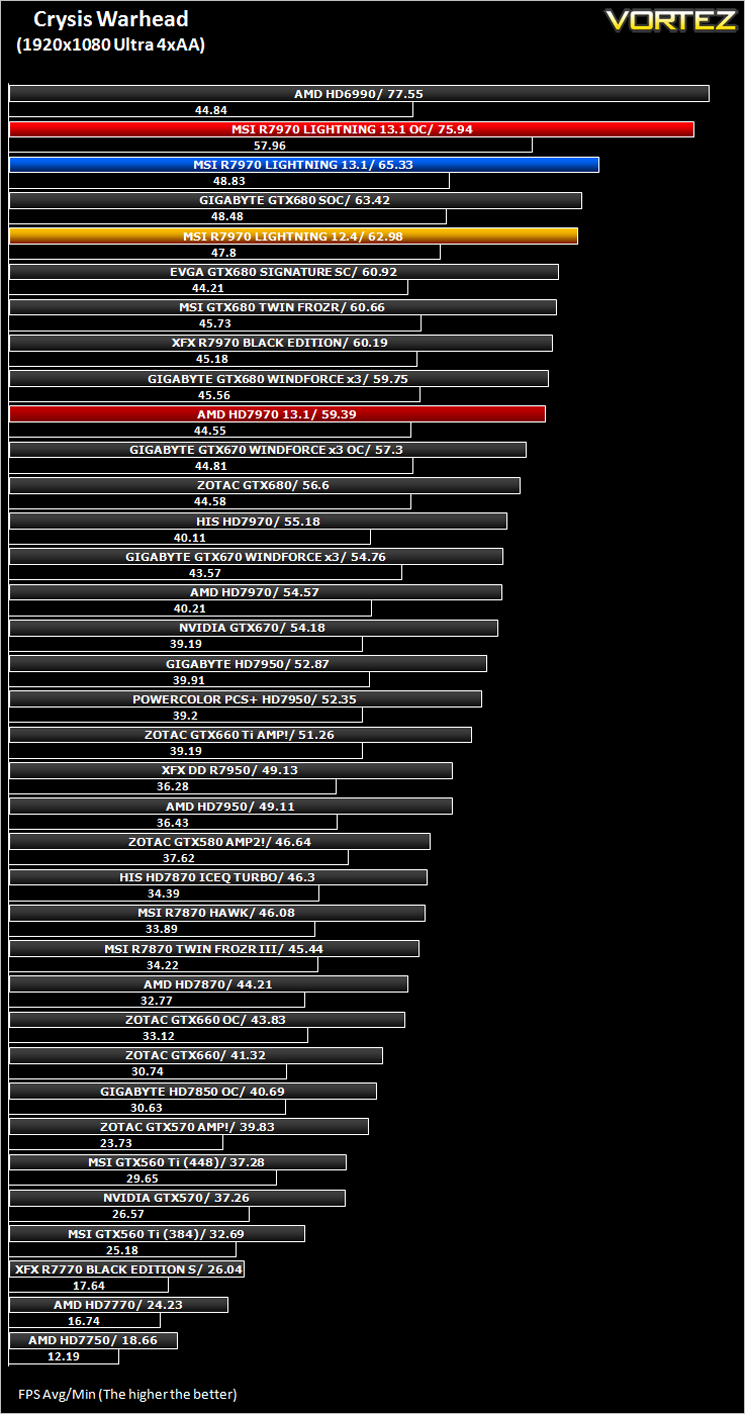
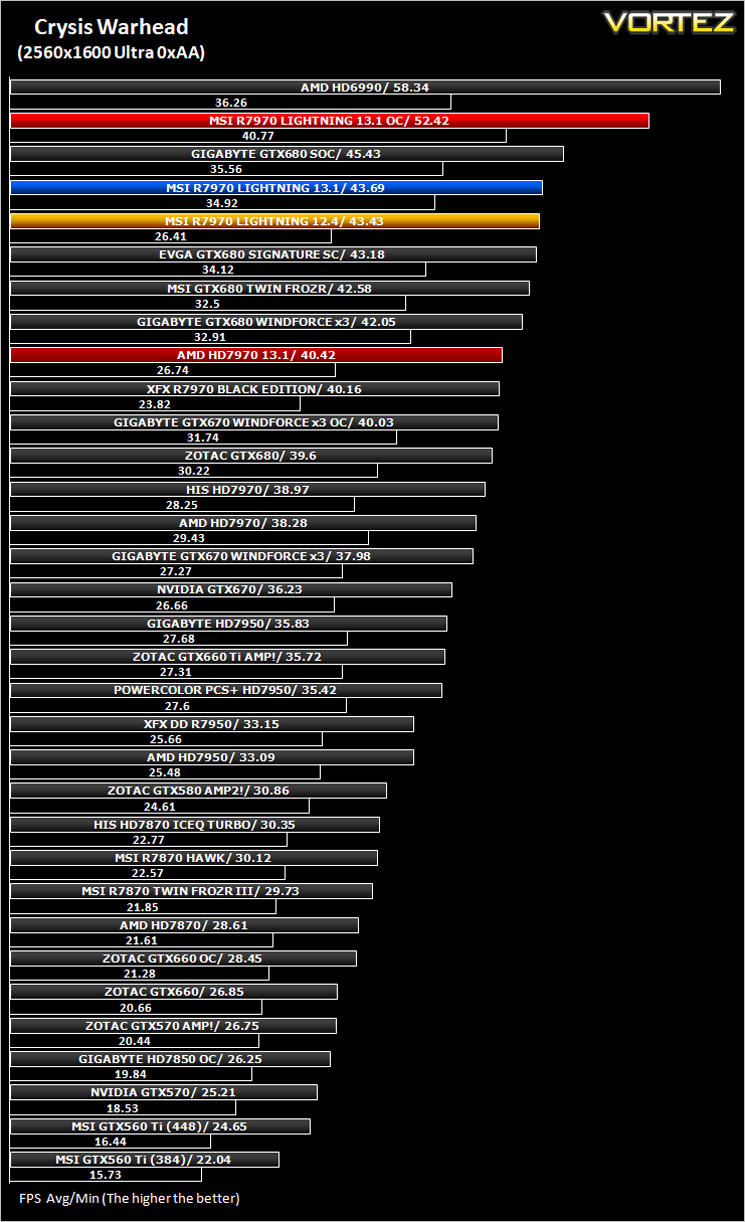
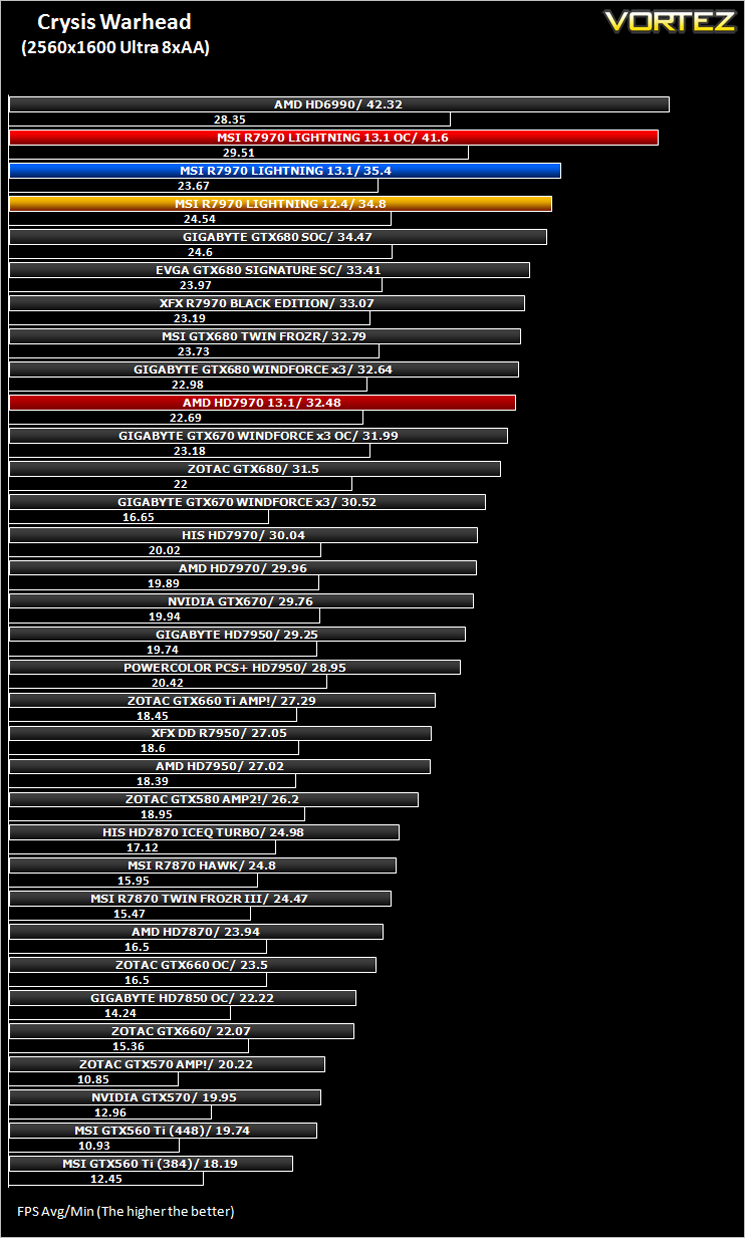
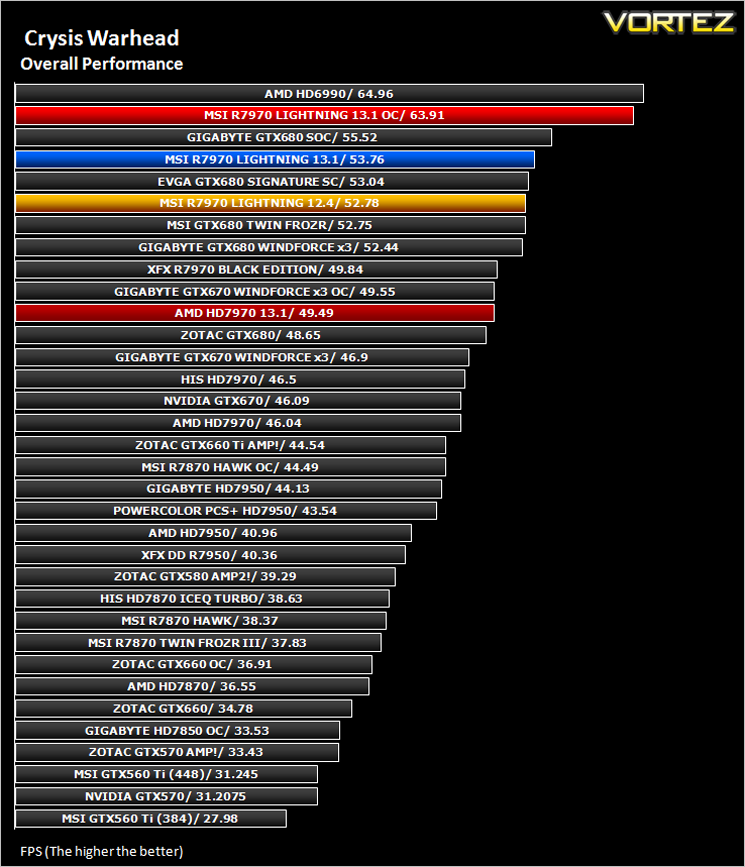
Crysis Warhead
Following the success of Crysis, the stand alone expansion “Warhead” was hotly anticipated to bring more game play, more weapons, improved visuals whilst maintaining better performance, the latter being what gamers wanted most. After all how many people upgraded their rigs just to play this game… In the game, you play as the upbeat Brit Sergeant “Psycho” Sykes, chasing down a Korean nuclear warhead. Throw in some ice shooting aliens and we’re bound to have a great game. It sure delivered.
Testing was done using Framebuffer’s Crysis Warhead benchmarking tool. The tests were configured to DirectX 10 at Enthusiast levels. Each test on the Ambush map was looped three times from which the average FPS was recorded.
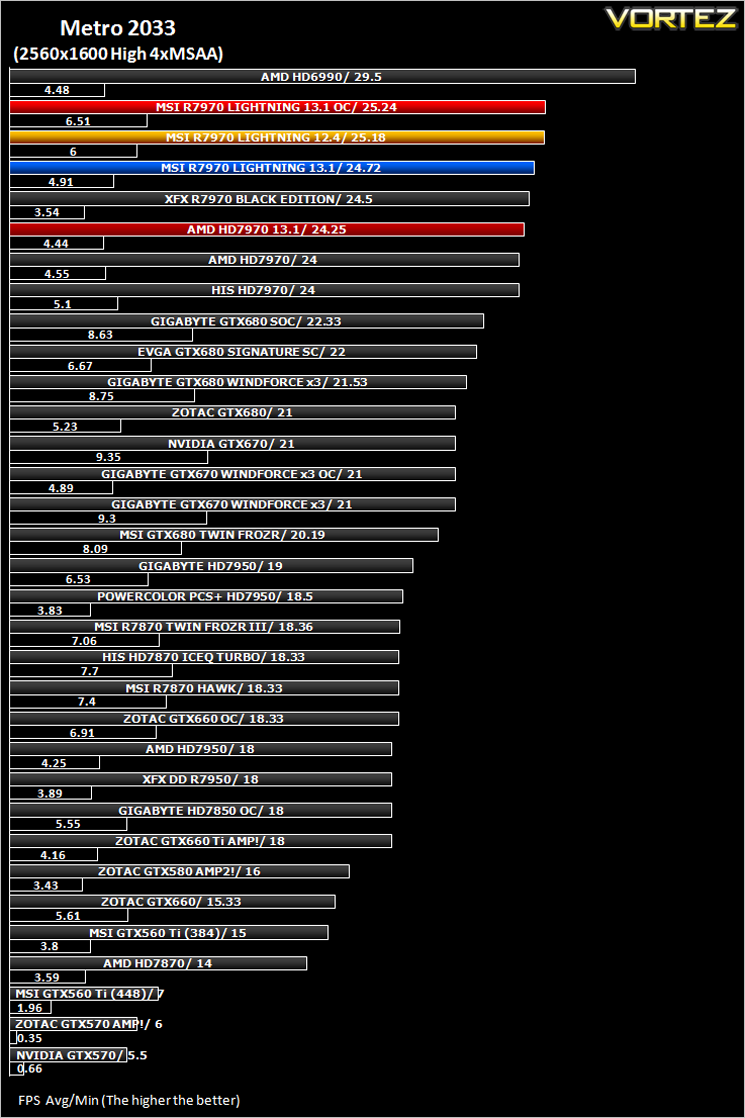
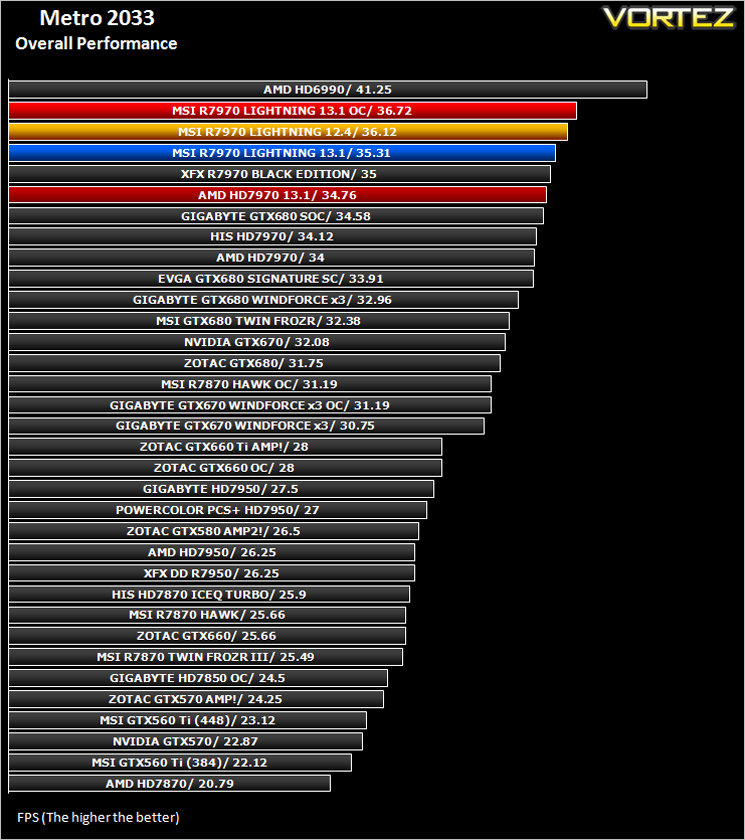
Metro 2033
The bundled benchmarking tool was used on Metro 2033, configuring the settings to High and making use of DirectX 11. The frontline scene was looped 3 times for each configuration. The average FPS was recorded at the end.
The Elder Scrolls: Skyrim
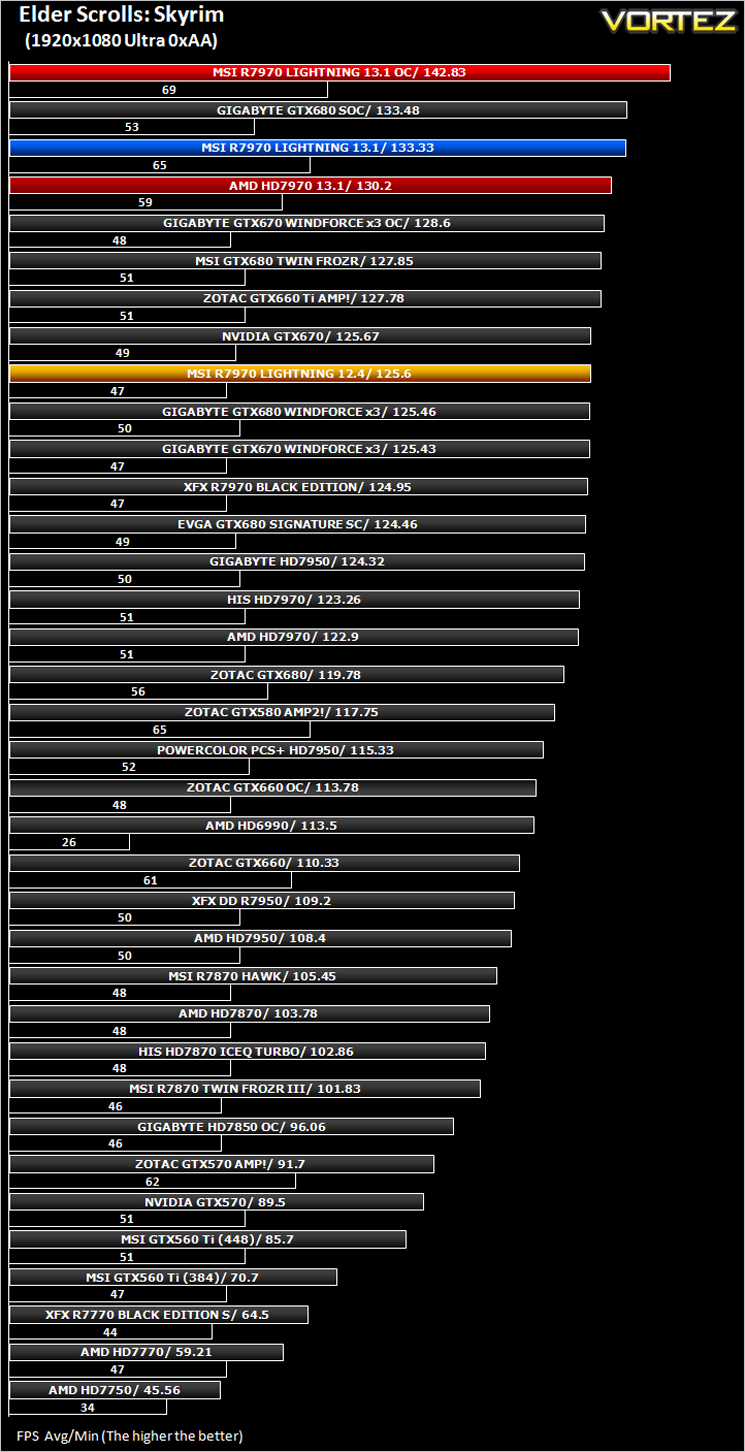
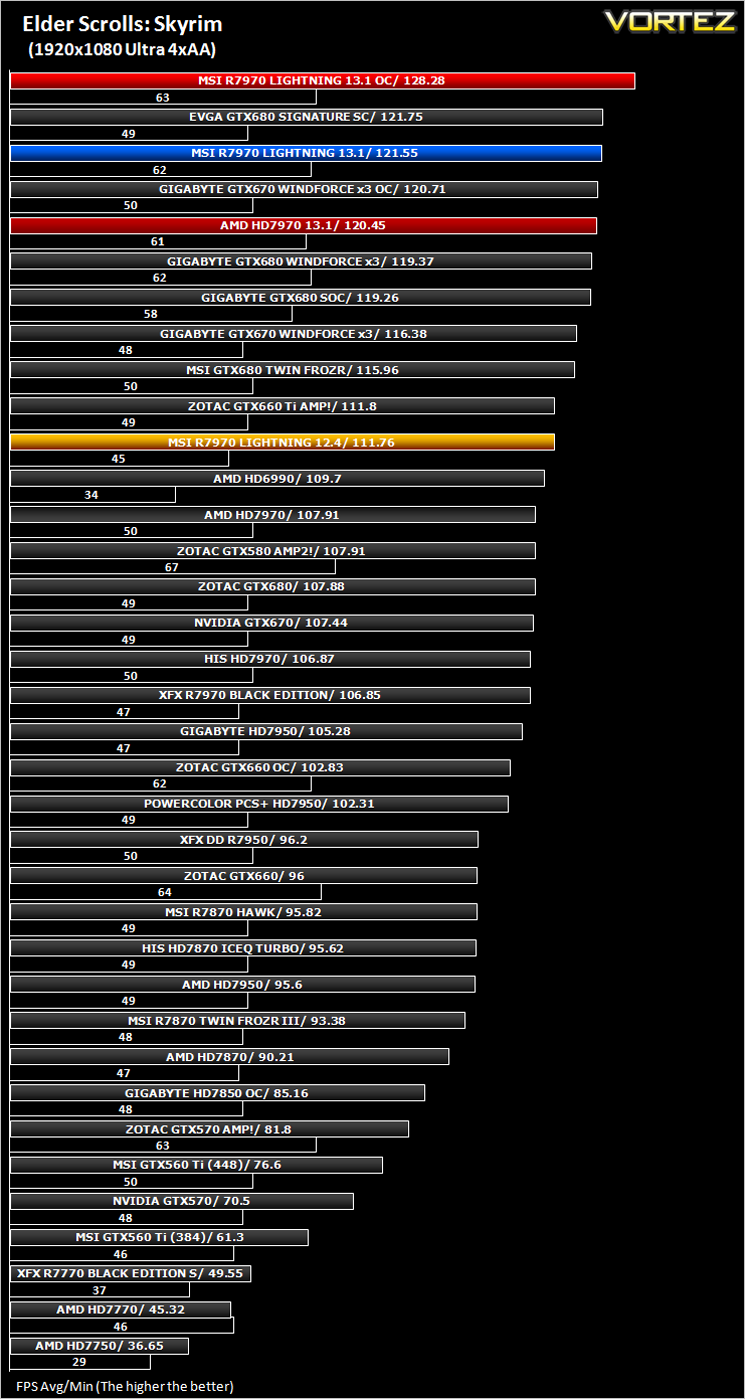
Average and minimum frames per second were measured using Fraps during the drop down passage to Riverwood. V-sync was disabled to allow fluctuating (higher the 60) FPS for these runs. It is however recommended that v-sync is left enabled during normal gameplay due to the games dynamics.
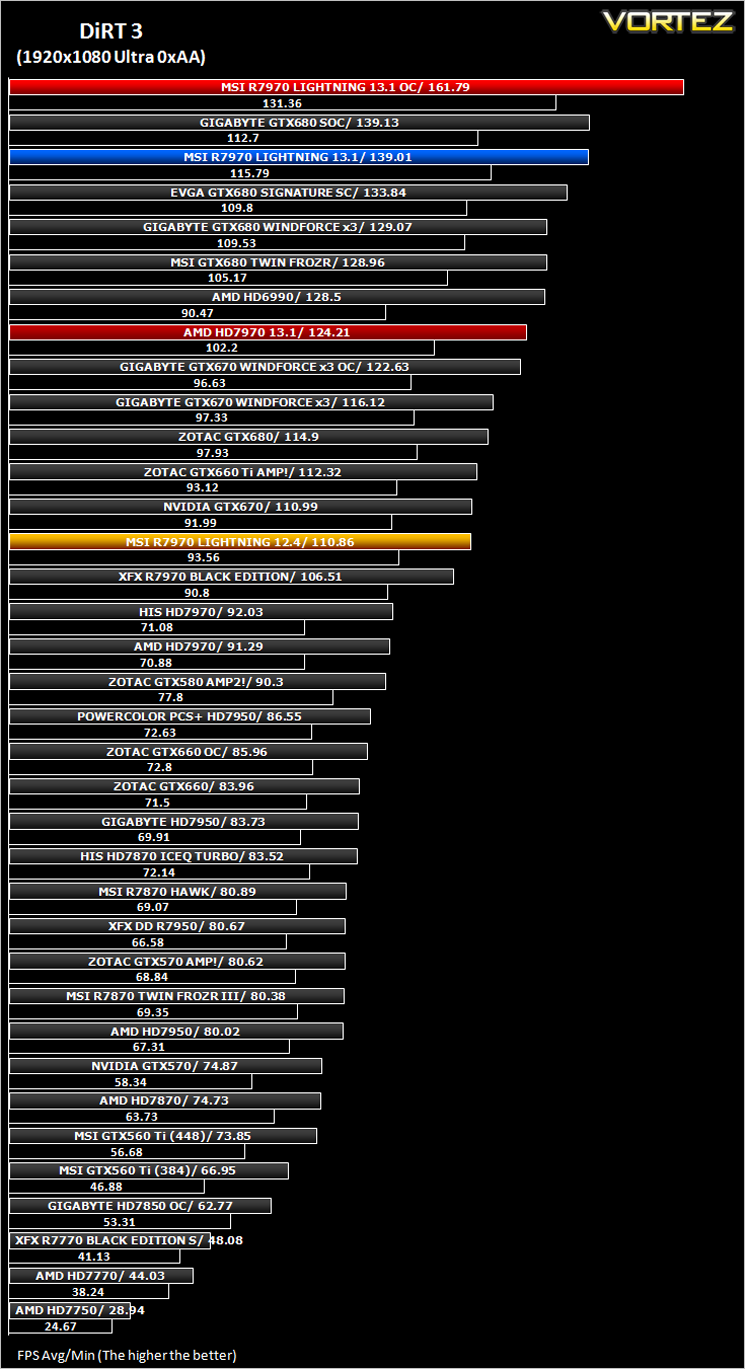
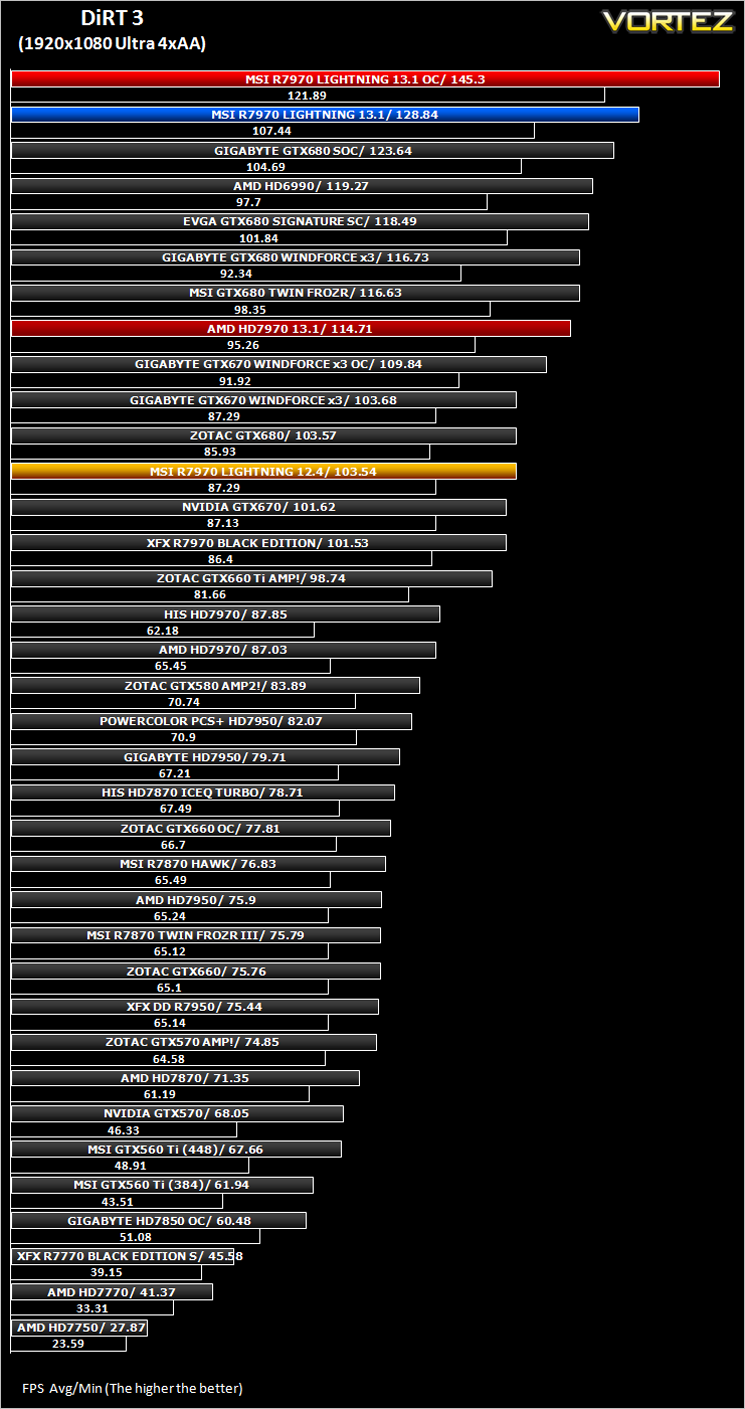
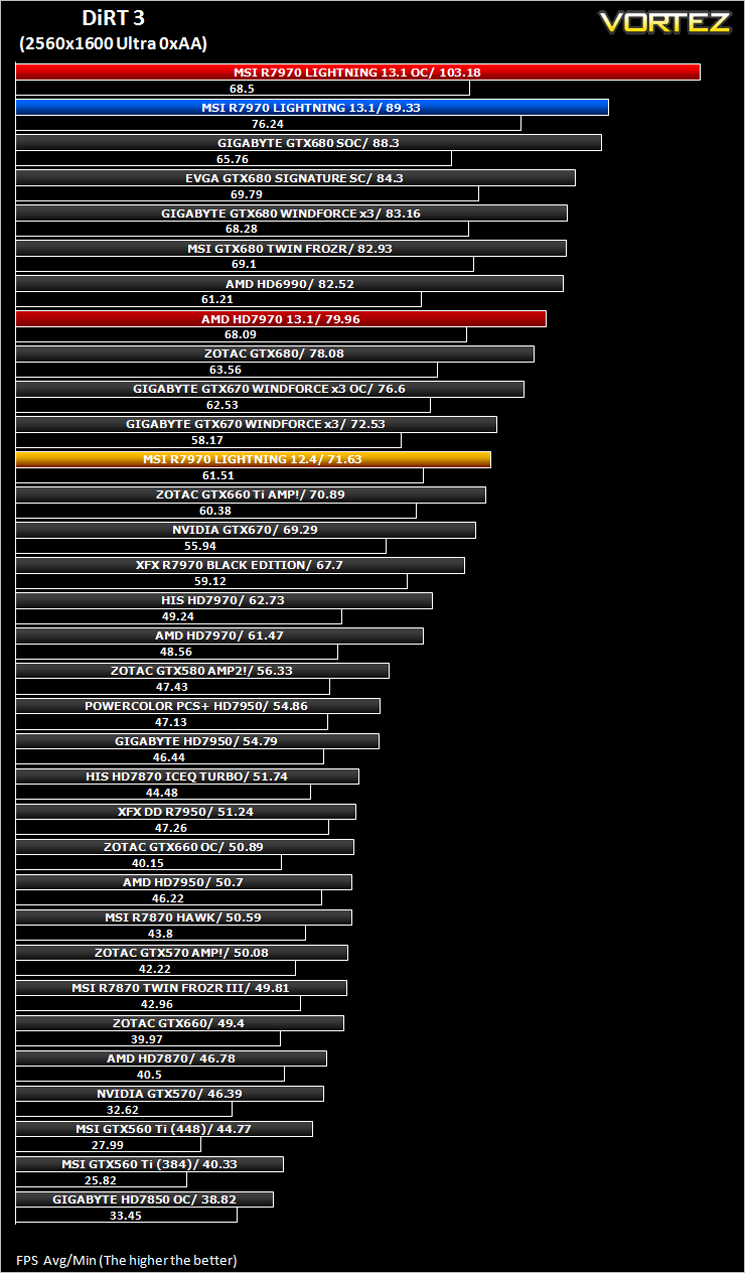
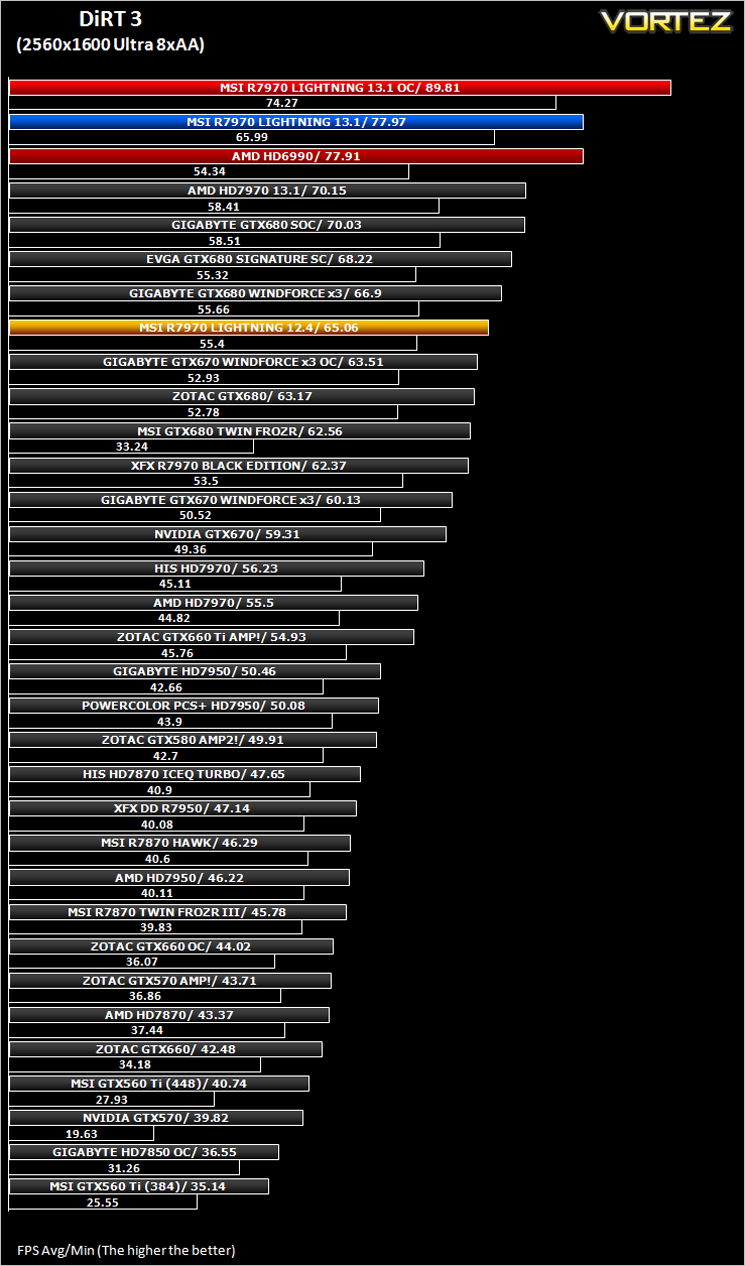
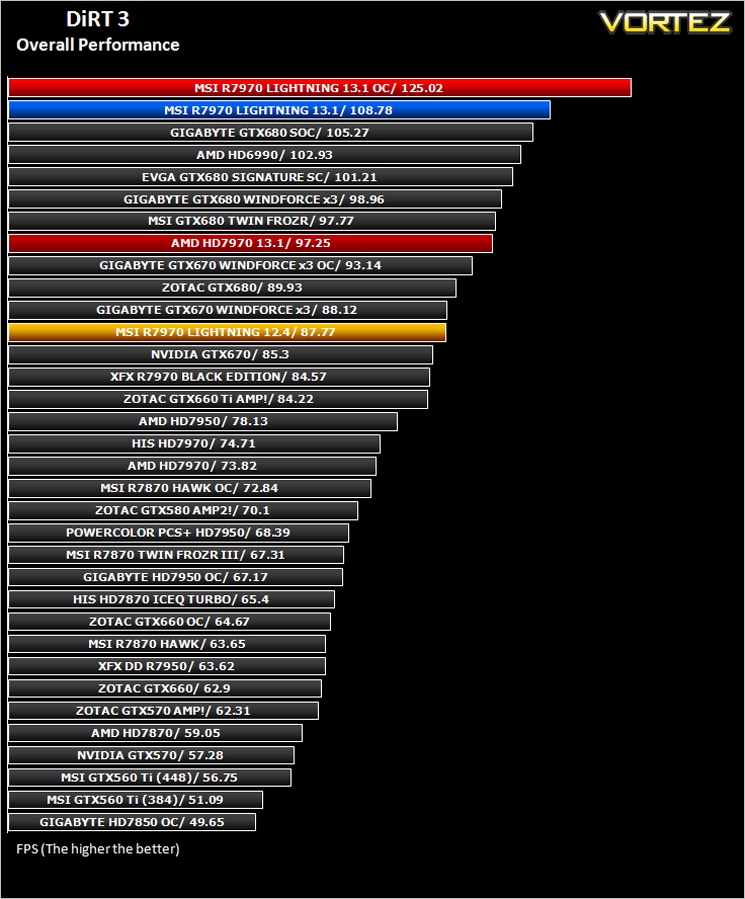
DiRT 3
The in-game benchmarking tool was used to test performance. All the display settings were set to the maximum available and DirectX 11 was applied. The average FPS was recorded at the end.
Unigine: Heaven 2.5
Conclusion
First let’s get the bad news out of the way.
By not including a DualLink DVI port MSI have abandoned those who use a large monitor. We would be happy to overlook this if an included Active DVI-Displayport adapter was included in the package but sadly it is not. It will cost you an additional £140 to buy one! While MSI excuse this by offering full Eyefinity support, this doesn’t quite make sense either because ‘out of the box’, the R7970 lightning won’t support six screens without additional cables as only one passive miniDP to full DP adaptor is included. So it offers neither camp full functionality as it stands and users will have to buy additional cables and adaptors should the wish to run either setup which is less than ideal.
If you care little for older monitor support or 6 screen Eyefinity then what we have here is a rocket of a card.
The MSI R7970 Lightning is exactly that – lightning fast. At stock (factory overclocked) levels
it was already among the quickest cards we had tested. Load up the new CAT 13.1 drivers and it topped the tables, to concrete its claim as the fastest card further we overclocked it to silly levels which coupled with the 13.1 drivers simply blew us away. Performance in every title was sublime and the new Catalyst drivers showed some very good improvements over the drivers from a year ago.
This card is a dream to overclock if you’re a novice or top the HWBOT charts. There are three voltage read points which give higher accuracy than using a software based utility. A dual BIOS functionality is also afforded which will allow you to keep the LN2 BIOS, back up the stock BIOS or try out a custom BIOS. This coupled with the awesome power on tap to stabilise those high overclocks makes this card one of the best cards for overclocking out there in our opinion.
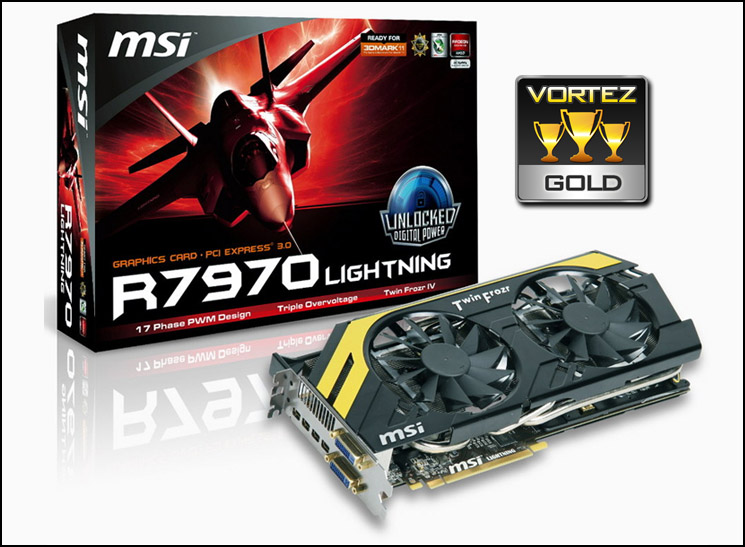
The card is packaged well, looks great, cools to chilly levels and as already stated is one of, if not the fastest single core card we have tested to date. DualLink issues aside there is very little not to like about the MSI R7970. Even the price has dropped to more reasonable levels from a steep £450 upon release which will make the choice between this or a card from the green team even more difficult.
Choosing an award for this card was a difficult choice. Were it not for the DVI issues then it would justify our very highest Platinum and Elite awards, however we have to consider that as the card is aimed at high end users and thus we simply cannot forgive the DualLink DVI oversight, even with full 6 screen Eyefinity offered in exchange. So, when all areas are considered, the MSI R7970 Lightning will have to settle for an ‘almost perfect’ Gold award.
+ Ultimate GPU overclocking
+ Very Good packaging
+ Excellent cooling performance and looks
+ Very Quiet
Cons:
– No Dual Link DVI Support
– Power Hungry

Click here for an explanation of our awards at Vortez.net.


