







Being a ‘Lightning’ sample, MSI have implemented some very cool overclocking features on their latest custom cooled R9 290X based graphics card. Check it out…

Product on Review: R9-290X Lightning OC
Manufacturer and Sponsor: MSI
Street Price: £529.99 at time of review
We were less than complimentary when we first reviewed AMD’s 290X so when MSI asked us to take a look at their lightning example we were less than enthusiastic. The problem with the AMD R9 290X was not the performance as it was clearly an astonishingly fast graphic card. The noise the reference cooler makes, due in part to the searing temperatures it needs to exhaust (95c!), gave us little option but to be honest and frank when giving our appraisal which was, for the most part a recommendation, to give a lot of thought to what you want out of a GPU. IF performance is above all else then the R9 290X will satisfy that need but if you also want a well rounded product, capable of extreme performance in all aspects, not just FPS production then you may want to look elsewhere . You see, a noisy card we can forgive, A hot card we can also accept but when a graphics card creates as much noise and heat as the reference design it is hardly surprising many would give it a wide berth when there is such stiff competition which runs both faster, cooler and quieter. Fast forward to today and we have in front of us one very special product which may give the AMD R9 290X some redemption.
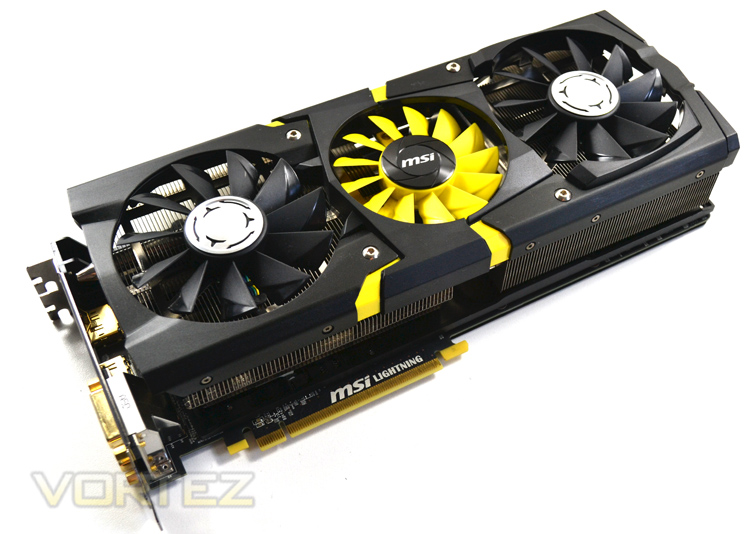
Being a lightning product, we expect nothing less than perfection from MSI as it is the flagship example. We were thoroughly impressed with the cards opposite number, the GTX 780 Ti gaming edition and while there is no ‘Lightning Edition’ of the 780Ti as yet, the gaming edition reigned supreme regardless. Hopefully then, we will see more of the same with the R9 290X Lightning because ‘Lightning Edition’ is to overclockers, what chocolate is to women, what cheese is to a mouse, what catnip is to …er a cat. You get the picture! So with a gargantuan cooler, oodles of overclocking features and a mammoth power delivery system we expect some very big results. Before we get to those though, lets take a look at the specification of the graphics card on review today…
About MSI
MSI started from the motherboard and graphics card industries and extended into consumer and commerical electronics including notebooks, All-in-One PCs, servers, workstations, industrial PCs, household appliances, car infotainment products, barebone systems, multimedia, communication devices, and others.
Specification
Bus Standard: PCI Express x16 3.0
Memory Type: GDDR5
Memory Size(MB): 4096
Memory Interface: 512 bits
Stream PRocessors 2816
Core Clock Speed(MHz): 1080
Memory Clock Speed(MHz): 5000
DVI Output: 2 (Dual-link DVI-D)
HDMI-Output: 1 (version 1.4a)
DisplayPort: 1 (version 1.2)
HDCP Support: Y
HDMI Support: Y
Dual-link DVI: Y
Display Output (Max Resolution): 2560×1600
RAMDACs: 400
DirectX Version Support: 11.2
OpenGL Version Support: 4.3
CrossFire Support: Y, 4-Way(SW)
Card Dimension(mm): 305(L)X113(W)X38(H) mm Size
MSI Features
Afterburner
Afterburner co-development by MSI and Rivatuner, MSI releases the ultimate graphics card utility “Afterburner”. This utility enables all MSI graphics cards users to boost performance and to monitor all kinds of critical information in real-time. Afterburner is a completely free utility which is compatible with almost all MSI graphics cards.
Live Update 5
MSI Live Update 5 is a single utility software that automatically checks BIOS, driver and utility updates and installs for you , which can save your time for searching and lower the risk while updating.
Triple Force
Triple Force Architecture including TriFrozr Thermal Design, Triple Level Signals and Pure Digital PWM Control provides the most convenient display function, the best dissipation and the most precise voltage control for extreme overclockers.
Twin BIOS
Including two separate BIOS chips, one for Gaming and one specially for extreme overclockers. Just one click switch to LN2 BIOS and release overall overclocking potential.
Military Class 4 Components
MSI Graphics Cards are the only one of meeting MIL-STD-810G standard. We adopt top components like Copper MOS, Hi-c CAP, New SFC, and Dark Solid CAP to ensure the best stability and quality. It brings perfect quality and longest lifetime to you.
3×3 OC Kits
– Triple Overvoltage: You can adjust voltage of GPU/Memory/PLL at once via MSI Afterburner.
– Triple Temp Monitor: Monitoring and controlling GPU/Memory/PLL condition at the same time.
– V-Check Points: It’s design for easy to monitor voltage of GPU/Memory/PLL via multi-meter.
PCI Express Gen 3 Standard
This advanced manufacturing technology reduces operating temperatures and improves performance, and when combined with the latest connectivity standard it can also deliver a staggering 32GB/s of bandwidth with compatible CPUs and motherboards, this means an even better gaming experience for gamers.
Gold-Plated Connector
MSI Lighting graphics cards adopts Gold-Plated Connector to provide better signal transmission and rust protection. It can maximize display connectivity and expand lifetime of your graphics card.
AMD Eyefinity technology
Enjoy the ultimate immersive gaming experience with innovative “wrap around” multidisplay capabilities. Fore more info: http://www.amd.com/us/products/technologies/amd-eyefinity-technology/Pages/eyefinity.aspx
AMD App Acceleration
Improve performance of everyday tasks such as Web browsing, office applications and video rendering. Fore more info: http://www.amd.com/us/products/technologies/amd-app/Pages/eyespeed.aspx
AMD GCN Architecture
Primed to enable astonishing performance and breathtaking image quality, making it a top choice for gamers who expect the best. Fore more info:http://www.amd.com/us/products/technologies/gcn/Pages/gcn-architecture.aspx
AMD CrossFire™ technology
With outstanding performance scaling, a system equipped with AMD CrossFire™ technology keeps you fragging while everyone else is reaching for an upgrade. Fore more info: http://sites.amd.com/us/game/technology/Pages/crossfirex.aspx
AMD HD3D Technology
Play 3D games, watch Blu-ray 3D videos, and edit 3D photos on your 3D monitor, TV or projector. Fore more info: http://www.amd.com/us/products/technologies/amd-hd3d/Pages/hd3d.aspx
AMD PowerTune technology
Enables intelligent power monitoring to enable higher clock speeds and better performance in your favorite games.
AMD ZeroCore technology
Allows your AMD Radeon™ GPU to consume virtually no power when in idle state.
GCN (Graphics Core Next)
The AMD Radeon R9 290X features an evolution of Graphics Core Next Architecture (GCN).
AMD has taken great strides to ensure that the GCN Architecture is capable of efficiently using its hardware resources. This seems like such a simple idea, but designing a GPU to frequently approach its peak theoretical performance is a challenge the GCN Architecture tackles with ease.
The GCN Architecture is designed for improved utilization, which ensures that the GPU is making optimal use of its resources for maximum performance.
The GCN Architecture also benefits from dramatically improved tessellation performance. Games featuring this DirectX® 11 technology are considerably faster than they were on the previous generation of AMD Radeon™ products. There is also the new Mantle API which promises to dominate NVIDIA, especially in titles such as Battlefield 4. Project Mantle is one of AMD’s most innovative and game-changing features, delivered with the Radeon™ R9 and R7 Series product line. Mantle is a new application programming interface (API), leveraging the commonality between the next-gen consoles and Radeon™. It enables game developers direct communication to our GPUs, unlocking the true potential of GCN and resulting in significantly higher gaming performance at all segments. We will be looking at Mantle in a separate article but if what we hear is correct, Microsoft (who are responsible for DirectX) should be very worried.
Every gamer knows that the GPU’s clockspeed also has a big impact on the performance of a graphics card, and the GCN Architecture keeps that in mind.
But what many don’t know is that every graphics card is designed to draw only a certain amount of power from your PC’s power supply. This is called the Thermal Design Profile, or TDP, and it’s critical that the GPU architecture is capable of making the most of every watt. The GCN Architecture can do that thanks to a technology called AMD PowerTune technology.
AMD PowerTune is an intelligent system that performs real-time analysis of the games and applications that utilize a GPU. Examples of such software might include Battlefield 3 or Furmark. In the event that an application is not making the most of the power available to the GPU, AMD PowerTune can improve that application’s performance by raising the GPU’s clockspeed by up to 30%! Best of all, this technology is completely automatic and is designed specifically to improve gaming performance.
Available on all 28nm AMD Radeon™ products, AMD PowerTune is designed to enable significantly higher clockspeeds in your favorite games-automatically!
The block diagram above shows us that the R9 290X has the following features:
– Up to 44 Compute Units
– 4 Geometry Processors
– 64 Pixel Output/Clock
– 1 MB L2 cache
– 512-bit GDDR5 memory interface
– AMD TrueAudio technology
– New AMD CrossFire™ technology
– 6 AMD Eyefinity technology Display Controllers
– 6.2 billion transistors
– 28nm process node
The GPU has 4 shader engines, with each shader comprising of one geometry processor per shader engine which is load balanced with other shader engines on die. The 4x Geometry Processors feature a geometry assembler, a tessellator and vertex assembler. Performance is improved on the geometry shader and tesselation thanks to a reduction in off-chip bandwidth by LDS utilisation along with off-chip buffering.
The shader engine also features scalable compute resources with the new architecture supporting a possible 9 compute units. The instruction set and cache can be shared by up to 4 compute units each. The new GCN features 44 of these compute units equating to 2816 shaders on the 290X. In addition to the the scalable compute resources, there is one rasteriser unit per shader engine and 16 render back ends, each with 64b pixels per cycle and 256 Z/Stencil operations resulting in a massive pixel fill rate.
Finally, the GPU features asynchronous compute with up to 8 of these ACE per GPU. With independent scheduling and work item dispatch for ultra efficient multi tasking operations. Each ACE can manage up to 8 queues and has access to both L2 cache and GDS.
GCN Architecture is now the foundation of a common architecture that spans PC’s, next generation consoles and the new Mac Pro. The industry has spoken and resoundingly endorsed GCN for high performance graphics platforms.
Let’s take a look at some of the more familiar features of the Radeon card…
AMD Zerocore Power Efficiency
Enabling the World’s Most Power Efficient GPUs
When a discrete GPU is in a static screen state it works to minimize idle power by enabling a host of active power saving functions including (but not limited to); clock gating, power gating, memory compression, and a host of other features. However, GPUs with AMD’s exclusive AMD ZeroCore Power technology can take energy savings to entirely new heights by completely powering down the core GPU while the rest of the system remains active.
Nearly all PCs can be configured to turn off their displays after a long period of inactivity. This is known as the long idle state; where the screen is blanked but the rest of the system remains in an active and working power state (ACPI G0/S0). As soon as the system goes into long idle state and applications are not actively changing the screen contents, the GPU enters the AMD ZeroCore power state. In the AMD ZeroCore power state, the GPU core (including the 3D engine / compute units, multimedia and audio engines, displays, memory interfaces, etc.) is completely powered down.
However, one cannot simply remove the GPU and its associated device context completely; particularly when it is the only GPU in the system as is the case in many enthusiast platforms. The operating system and SBIOS must still be aware that a GPU is still present in the system. For this reason, the AMD ZeroCore Power state maintains a very small bus control block to ensure that GPU context is still visible to the operating system and SBIOS. The AMD ZeroCore power state also manages the power sequencing of the GPU to ensure that the power up/down mechanism is self-contained and independent of the rest of the system.
The enablement of the AMD ZeroCore Power feature is controlled by the driver. The driver monitors the display contents and allows the GPU to enter the AMD ZeroCore Power in the condition that the GPU enters long idle and subsequent work requests are no longer being submitted to the engine. If any applications update the screen contents, AMD ZeroCore Power technology can periodically wake the GPU to update the framebuffer contents and put the GPU back into the AMD ZeroCore Power state. Furthermore, applications such as Windows 7 desktop gadgets are architected to minimize activity and save power in the long idle state. These applications are active during screen-on mode to display dynamic content such as weather, RSS feeds, stock symbols, system status, etc. but also have the intelligence to suspend any updates and activity when the system enters long idle. These applications will not wake the GPU from the AMD ZeroCore Power state in long idle.
AMD ZeroCore Power technology delivers tremendous energy savings. Many PCs remain in the long idle state for a variety of use cases that are highly relevant to everyday consumers, enthusiasts and professionals. In AMD ZeroCore Power mode, users can still enjoy non-graphics activities such as file serving/streaming, motherboard audio and music, and remote access while the GPU core is essentially powered off.
AMD ZeroCore Power technology also scales with AMD CrossFire™ technology. With an AMD CrossFire platform, all non-primary GPUs are in the AMD ZeroCore Power state when not in use. For AMD CrossFire workloads, the driver will engage the non-primary GPUs to deliver full performance on-demand. The primary GPU can also enter the AMD ZeroCore Power state during long idle as well. This delivers scalable benefits for the enthusiast. First, it effectively removes the power increase for users of AMD CrossFire under idle and light (single GPU) workloads. Second, it removes the noise penalty multiGPU users have always had to endure since the GPU fans are off in AMD ZeroCore Power mode.
4K Ultra HD Gaming
Commonly addressed as Ultra HD, UHD or 4K, this new resolution refers to the ultra-high resolutions with approximately 4000 horizontal pixels. Ultra HD resolution also has four times the number of pixels of a typical 1920×1080 resolution.
With four times the pixels, an unprecedented level of immersion can be created for gamers on a single display. Gamers will be able to experience richer details and a new sense of realism with the next generation of gaming on Ultra HD displays.
Your AMD Radeon™ R9 290X features support for Ultra HD resolutions over both HDMI 1.4b (low refresh) and DisplayPort 1.2. We recommend you do all performance testing at Ultra HD resolution to truly test what the product is capable of.
Many UltraHD/4K monitors can achieve a 60 Hz refresh rate using a tiled display configuration. AMD Eyefinity technology can be leverage to support these tiled displays by making two 2Kx2K tiles act as one 4Kx2K monitor. AMD has taken steps to make this easy for end users by providing an Automatic AMD Eyefinity Configuration features. This feature allows an automatic “plug and play” configuration of supported UltraHD/4K tiled displays when a Display Port cable is connected.
When a user hotplugs a tiled 4K monitor (such as the Sharp PN-K321 or Asus PQ321Q), a 2×1 display group will be automatically created and the two tiles will be combined to act as one monitor. This configuration will be remembered and re-enabled when the display is unplugged or the system is rebooted. It is also possible to manually disable the display group in CCC, and have the two tiles act as independent monitors. It should be noted that once the display group is manually disabled, it can no longer be automatically configured as a tiled display via the Automatic AMD Eyefinity Configuration feature.
Additionally, AMD is supporting a new industry standard for tiled displays in VESA DisplayID v1.3. The “Tiled Display Topology Data Block” describes additional display capabilities that can be leveraged to enable the plug and play experience with tiled displays. Tiled displays supporting this data block can be supported by the Automatic AMD Eyefinity Configuration with no driver update required.
Packaging & Accessories
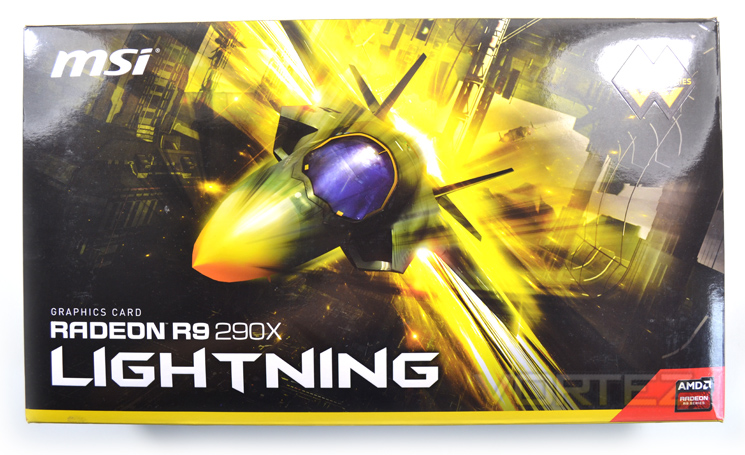
The exterior packaging consists of a glossy cardboard sleeve with the main product title found on the front page along with a picture of an F35 Lightning II aircraft. There are very little other features on the front of the package that hint at the performance other than an OC moniker in the top right corner.
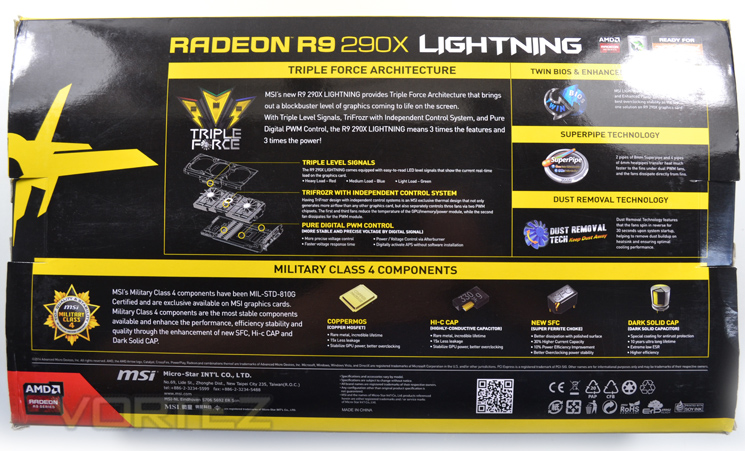
The rear of the package is at polar opposites to the front in that there is a massive amount of data to absorb from a split-diagram of the cards cooling design to the MSI OC features.
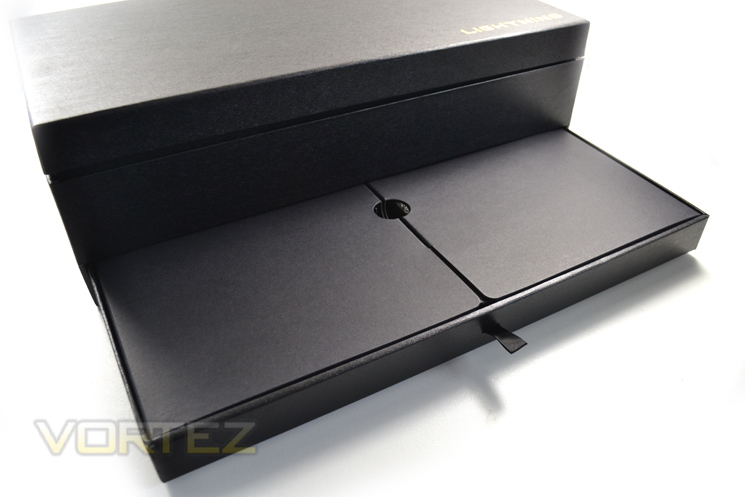
One very neat feature of the packaging is the inner box. Resembling a jewellery box, and complete with gold embossed lettering, the lid flips up on cloth brackets to reveal the graphics card which is held fast in a foam brace and further protected by an anti-static bag. The accessories are found inside a drawer toward the bottom of the box.
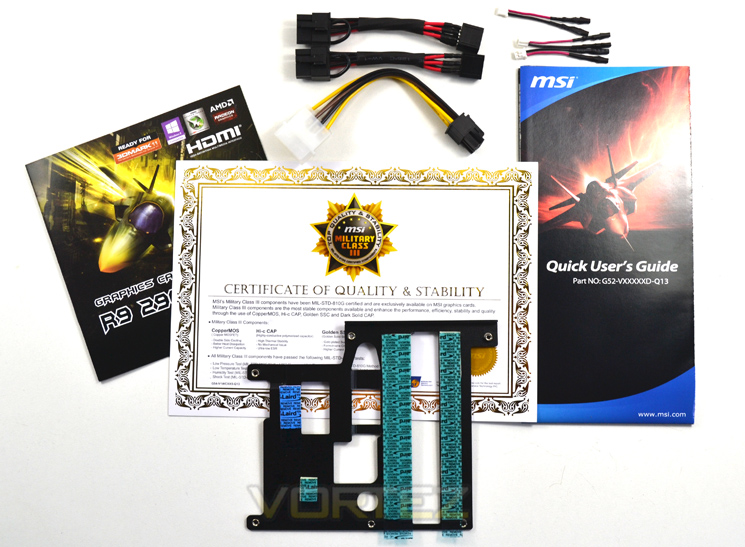
The included accessories cater for your every need with power adaptors, instruction manuals, driver CD and even a set of multimeter plugs! Hinting toward the ‘extreme’ overclocker is the VRM bracket for use exclusively when using LN2.
Overall, a class leading package that raises the level a notch further than we have seen thus far for a graphics card. Let’s look at the card itself…
First Look
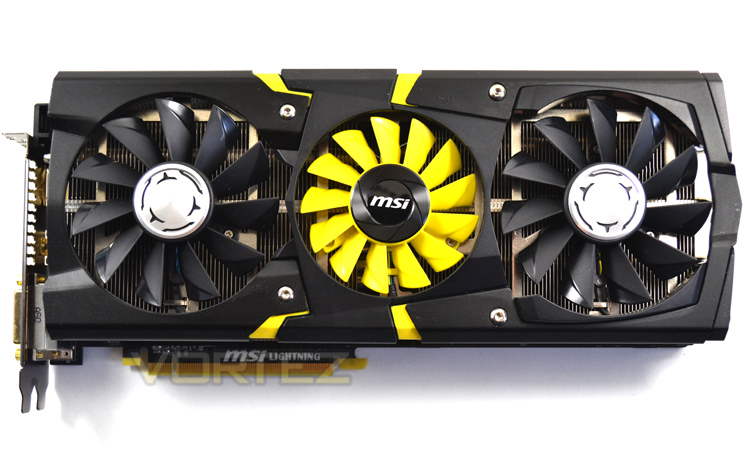
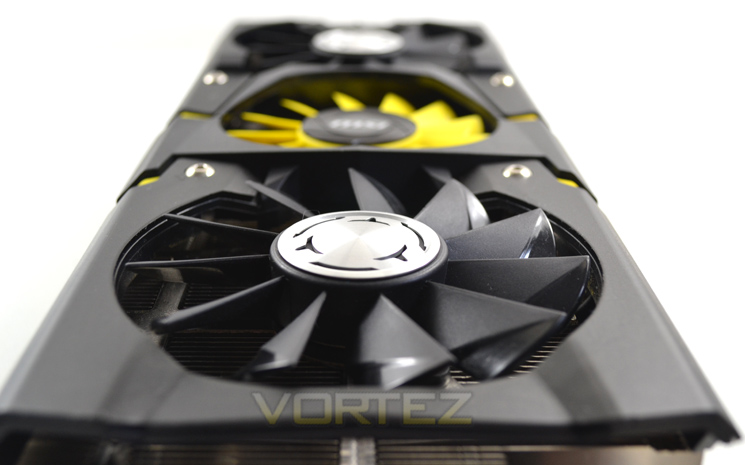
Matching the Lightning theme we have seen in previous incarnations, the R9 290X Lightning carries off the black and yellow colour scheme really well. We particularly liked the contrasting fans and the jagged, yellow inserts of the plastic shroud only serve to heighten the aesthetic appeal.
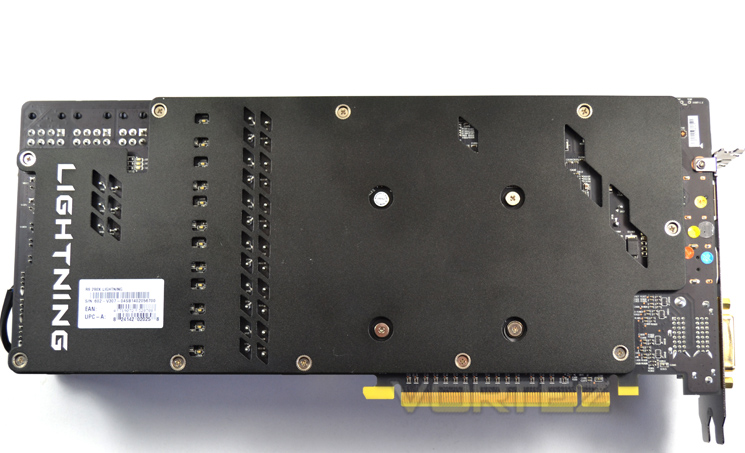
Flipping the card over we see that MSI have not skimped here either by fitting a full length metal backplate. The are a variety of cut-outs in the backplate to allow both light and heat to escape while retaining card rigidity.
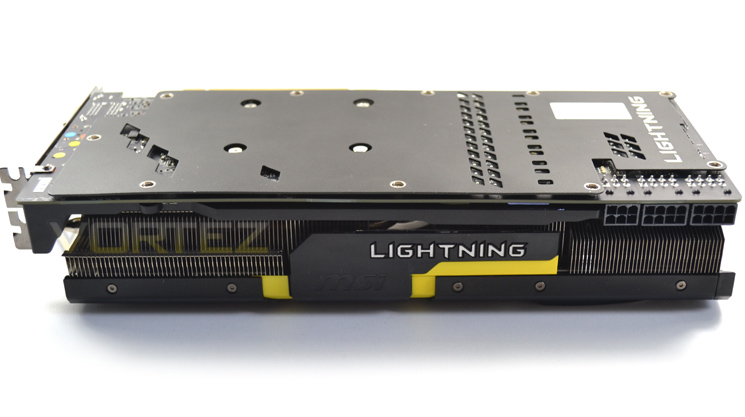
From the side, we can see that this card will take up 3 slots on your motherboard due to the oversize cooling design. Normally we would criticise such a design however we know only too well how much heat these cards produce so it is forgiveable should the temperatures be kept under control.
The card measures 302 x 131 x 55 mm so it is a little longer than your average high end card but not massively so. As already stated, the biggest size difference would be the girth but it should also be noted that the card is also quite chubby in that the PCB measures 115mm wide! Make no mistake this is a very large graphics card.
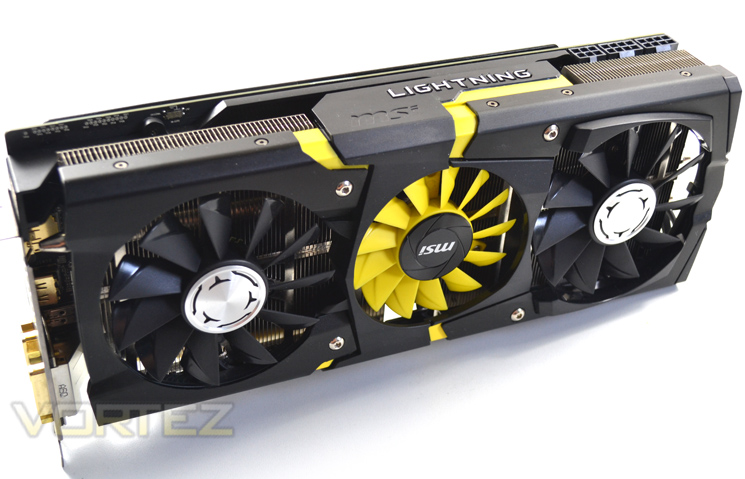
Regardless of what angle you view the MSI R9 290X lightning from it looks simply stunning. The aesthetics department at MSI have pulled out all of the stops in creating a beast of a card which has to go down as one of the best looking components on the market and will no doubt inspire many to build a yellow/black themed PC because of this.
Closer Look
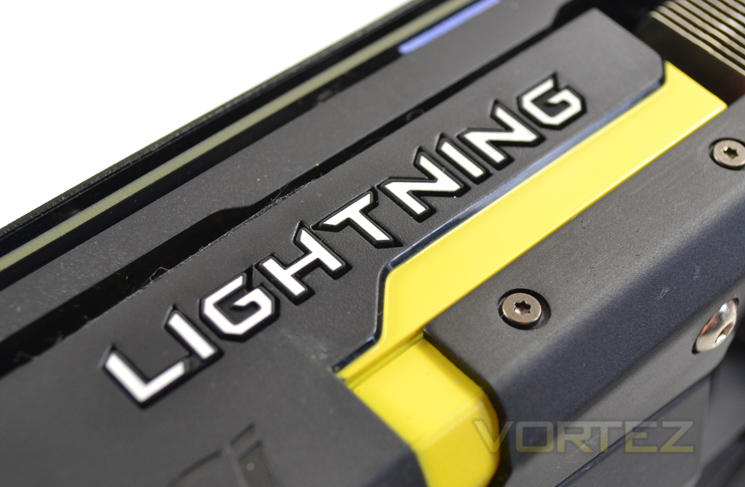
The lightning accent along the cards midriff looks great in both ambient light and darkness. Why darkness? Well it lights up red(high), blue(medium), Green (low) depending on the load it is currently under, better still it is the right way around so when viewed through a case window, the vast majority of users will get ‘LIGHTNING’ beaming back at them and letting their fellow LAN attendee’s know only the best components are contained within!
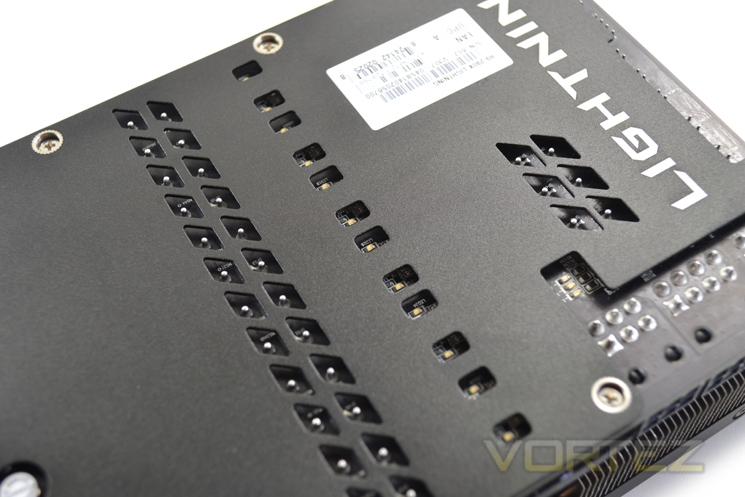
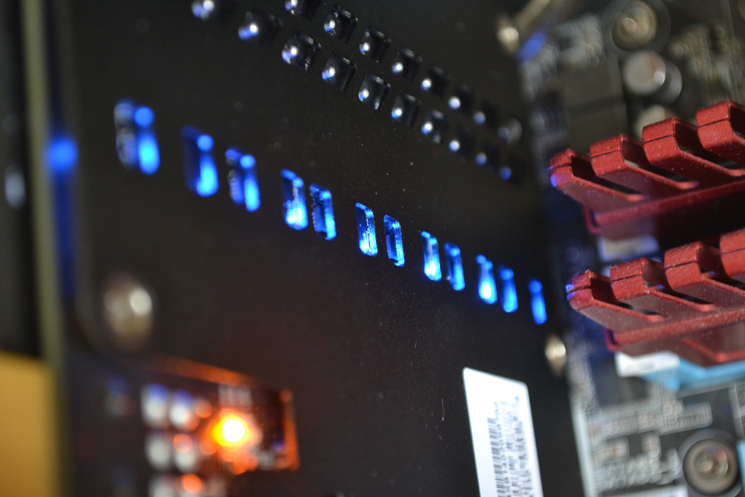
This thing has more lights than a Christmas tree. First it has a power indicator which has three levels:
Red – Not enough power to the card (0 or one connector added)
Blue – Normal mode (twin 8pin PCIe power cords fitted)
Yellow – OC Mode (all power cords fitted)
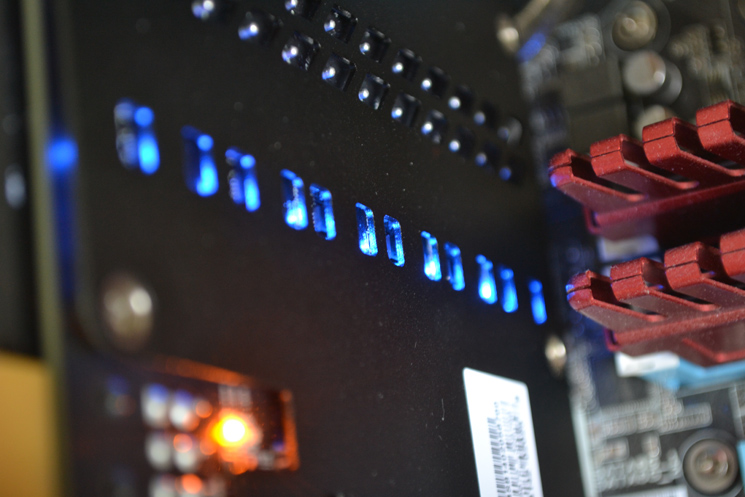
Then there is what we believe to be power phase load indicator LED’s (blue) which indicate how many power phases are currently in use. A pretty card in both daytime and night guises!
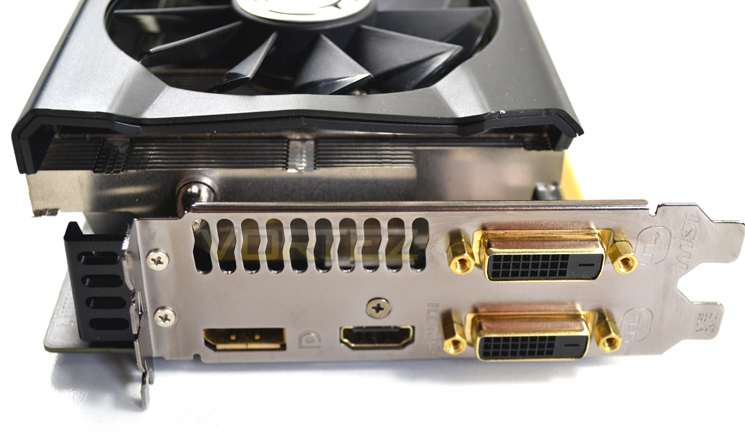
At the input/output area we find both DVI-I and DVI-D which may seem obligatory however with the HD7970, dual link DVI was not catered for which was unforgivable and thankfully this time around MSI have provided this key functionality which should be a pre-requisite on a high end graphics card. DisplayPort and HDMI 1.4a are also provided.
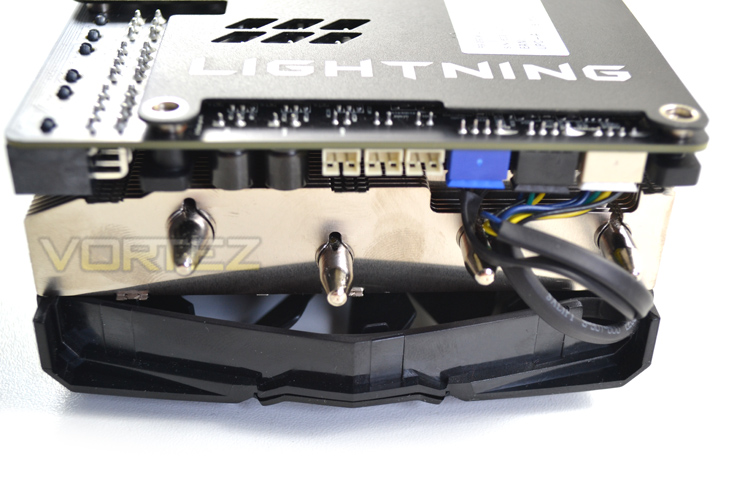
At the adjacent end we find individual fan ports for the three fans and LEDs along with a further 3 ports for voltage monitoring of the memory, GPU and PLL. Thankfully, MSI have included 3 multi-metre adaptors for this purpose.
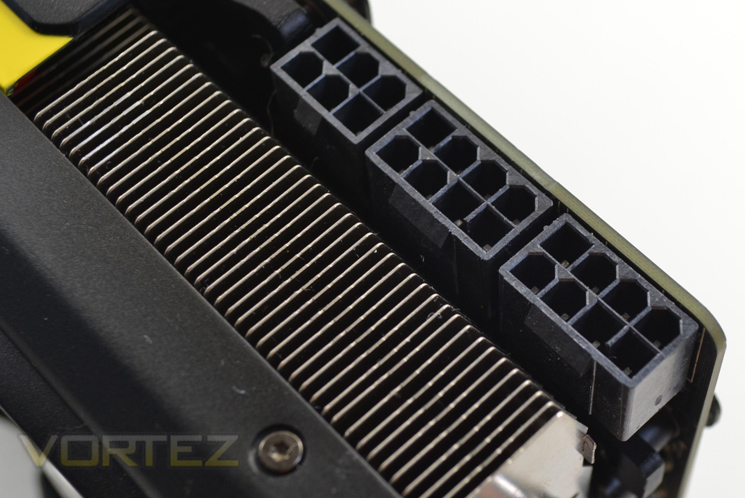
While the graphics card only requires twin 8pin PCIE ports to function, a third 6pin PCIe port is also provided to obtain a little extra juice which is essential for those looking to hit the highest possible overclocks, especially with the voltage unlocked LN2 mode. The minimum power requirement is a 500W PSU and while MSI provide twin adaptors for the 8pin ports we would recommend a larger PSU capable of filling all of the ports for the very best functionality.
Detailed Look pt.1 (Cooling)
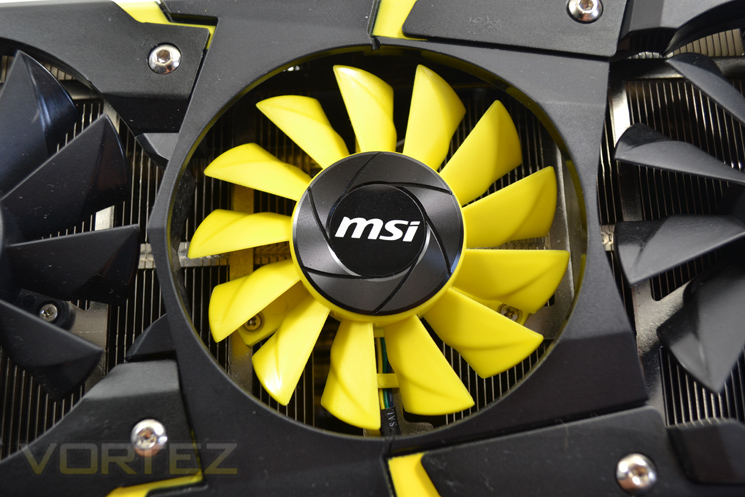
Keeping the 290X cool is quite a task and so MSI decided to use not two fans as with their TwinFrozr design but a three fan configuration aptly named ‘Trifrozr’. The fans are independently controlled via two PWM chipsets. The two 90mm black fans act to reduce GPU, memory and power modules while the central yellow 80mm fan reduces PWM temperature. This is a great design and will give even more control to the overclocker however in all liklihood, when attempting those OC records all of the fans will be running full tilt or if you intend on breaking some world records, not at all and use LN2 for cooling instead for which there is also a separate ‘extreme’ BIOS for at the flick of a switch.
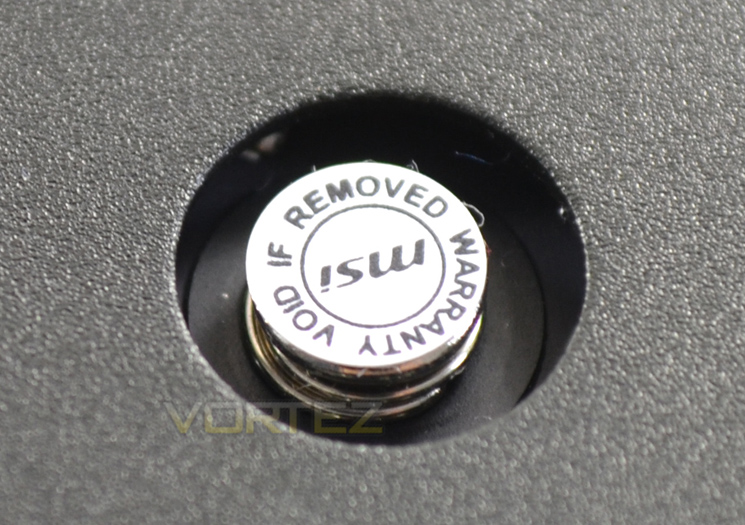
If you intend on removing the cooler, this will invalidate the warranty of the card in some countries so best to check with you local supplier before doing so.
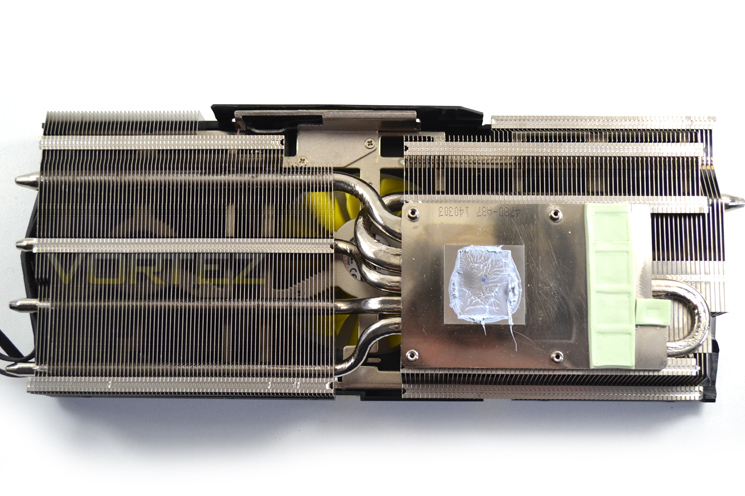
The heatsink, despite its size is only held on with 4 spring loaded screws. It is a twin fin array design with 6 interconnecting heatpipes. The paste used by MSI is not one we have come across before being a light grey/blue colour and having the consistency of Arctic Cooling MX4 which is no bad thing. Contact with the baseplate to the core was excellent with our only complaint being a little too much paste used.
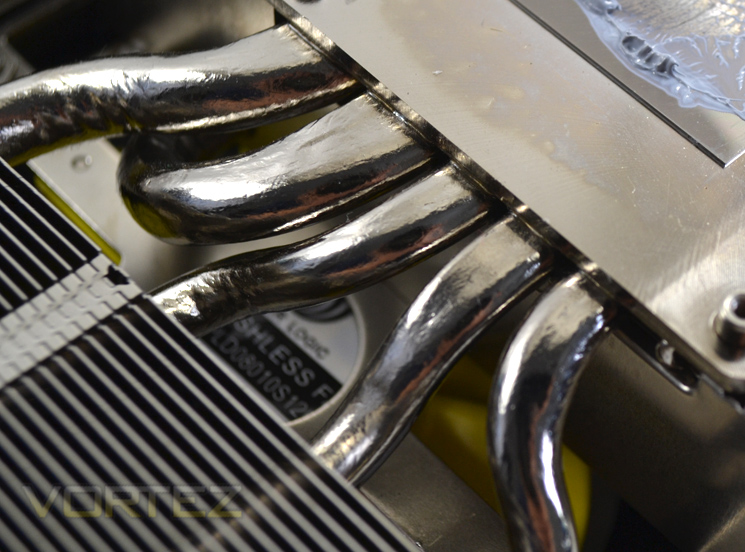
The 6 heatpipes are made up a two 8mm and 6mm pipes that dissipate heat across the two aluminium fin arrays. The pipes are soldered to the nickel plated(?) baseplate which has a brushed (not shiny) appearance.
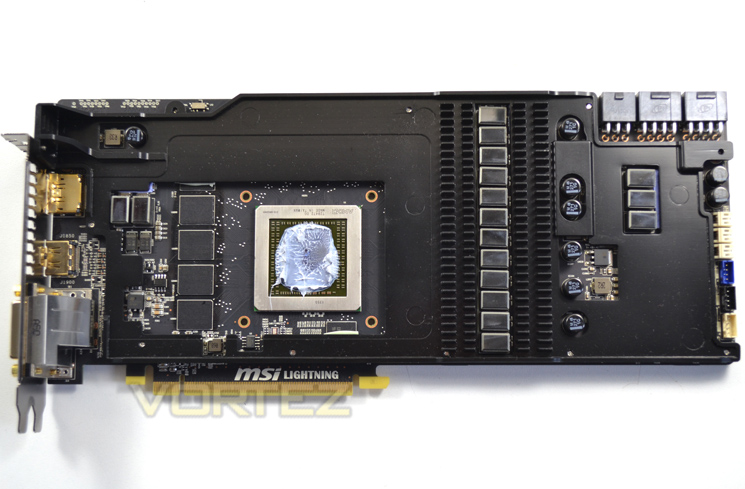
Continuing with the cooling MSI appear to have left no stone unturned because not only is there a backplate and main (huge) heatsink but also a midplate which serves two purposes. First, it strengthens the card under the huge weight of the main heatsink but perhaps most importantly it cools both the memory and VRM modules. The backplate dissipates heat from the PWM module and together with the midplate, thick, twin finned aluminium heatsink, independently controlled fans and gorgeous shroud, MSI have created one of the best air cooled graphics card cooling designs. Love it!!
Detailed Look pt.2 (Components)
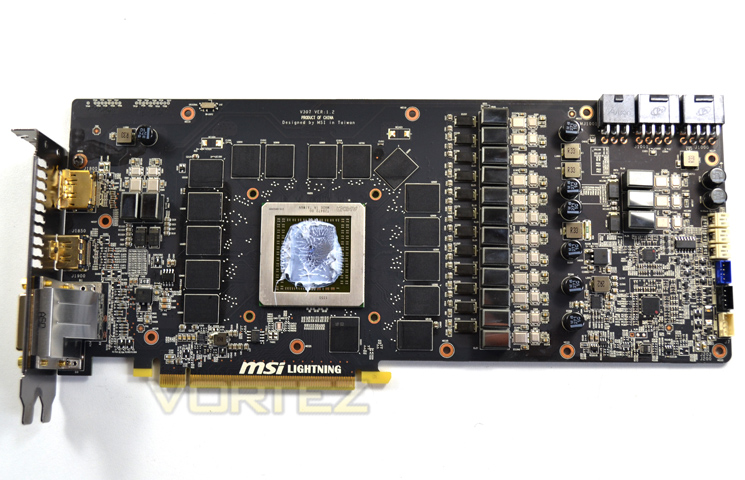
The PCB is a custom design featuring MSI’s Military Class 4 Components. The PCB is positively crammed with components designed to take some serious abuse, not only from overclocking as you would expect but hot plugging a DVI monitor which in itself can produce an Electical Static Discharge (ESD), enough to damage traces rendering the card useless. MSI call this Transient Voltage Suppression but whatever its official title, it is a welcome addition as anything that protects against the dreaded ESD.
The layout is however familiar with the main voltage regulation module found closest to the power ports with the main exposed GPU framed with memory chips.
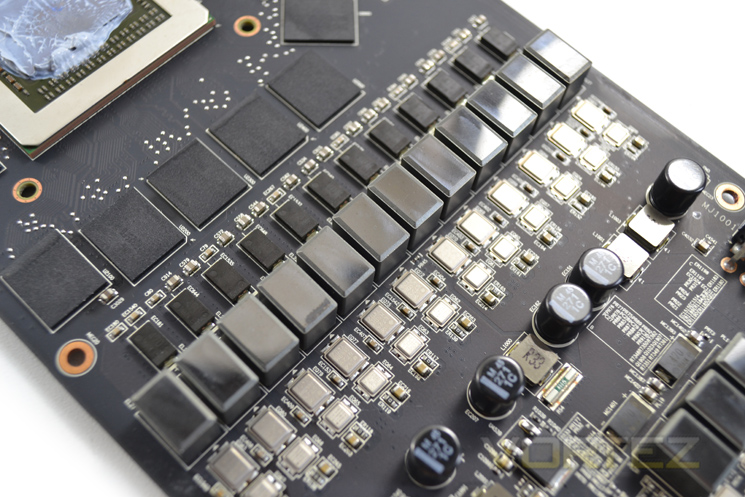
The power delivery system is made up of a 10+3+2 power phase design, 10 for the GPU, 3 for the memory with 2 power phases reserved for the PLL. That is quite an impressive setup which thankfully rids the unsightly and bulky GPU core reactor we saw on the back of the HD7970 Lightning. The power design features only the very best components included Hi-C caps, CopperMOS, Dark Solid Capacitors and new Super Ferrite Chokes which equate to enhanced durability and overclocking.
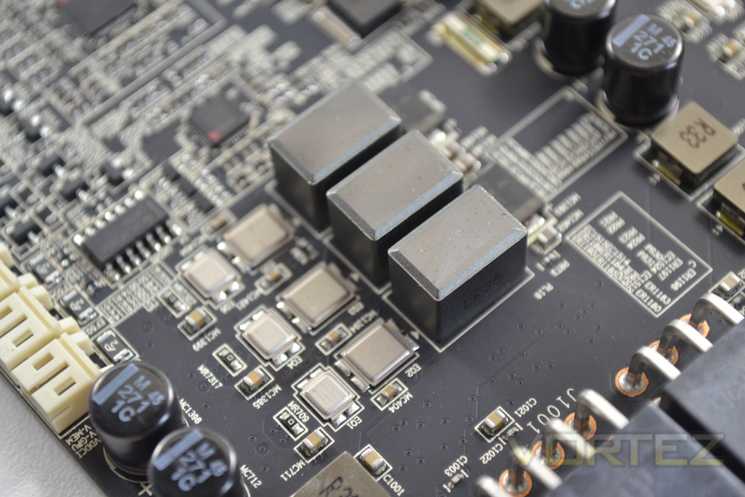
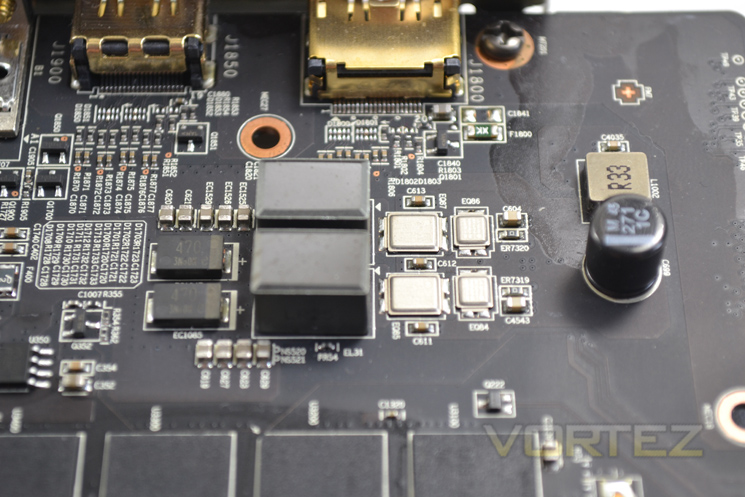
The 3 memory phases take power jointly from the added PCIe power cables while the PLL of the card takes its power from the PCIe clot. Having this type of setup means the motherboard is not adversely stressed and theoretically will enhance system stability, especially during overclocking scenarios.
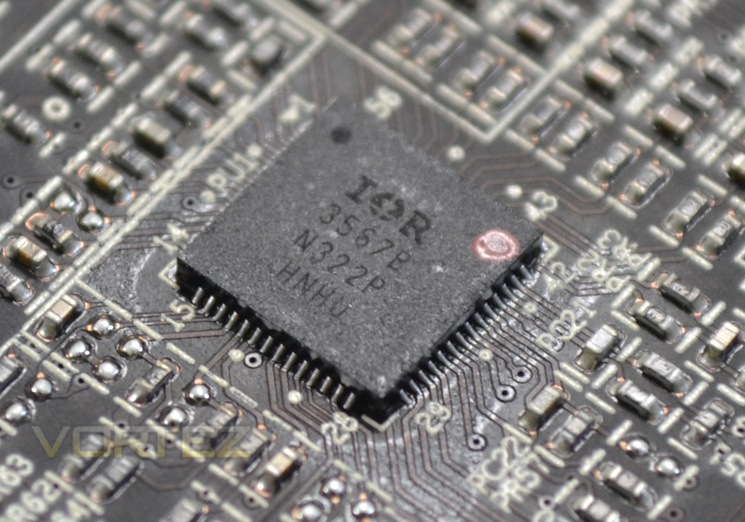
Power is nothing without control so we are told and above is just one of the three PWM controllers used on the card. This is a shift away from the reference design which had just one controller for the whole card.
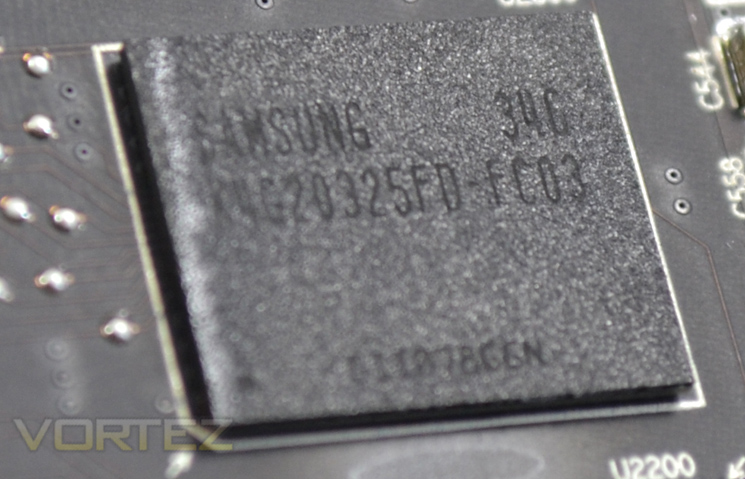
There are generally 3 choices for memory when building a graphics card. Elpida is generally regarded as bottom of the pile where overclocking is concerned while SK Hynix is a cut above. The very best chips hail from Samsung though and this is what we have on the R9 290X Lightning.
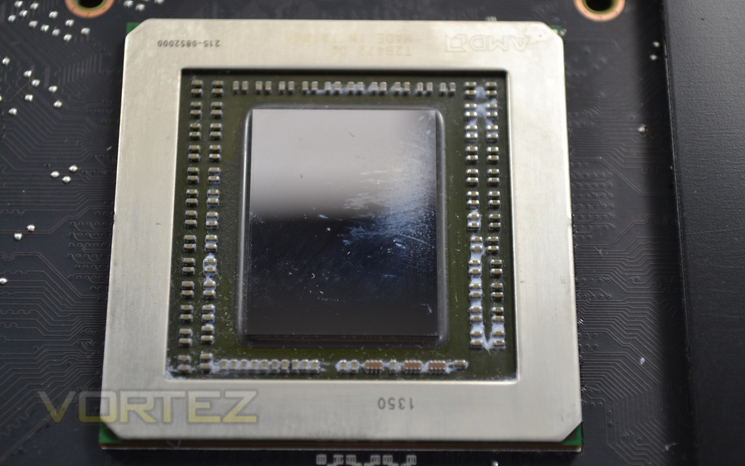
Even the core is hand picked by MSIs testing engineers for guaranteed stable overclocking. Each core has to complete a 24hr burn-in test before being speed binned for the 290X lightning.
All in all, what we have here is the very best in cooling, power delivery, looks and packaging. the only thing left to look at is the actual performance of the card. We think it’s time we found out…
Test Setup & Methodology
How we test graphics cardsTesting a graphics card is an extremely lengthy process. We sometimes see reviews where a graphic card has been tested using out of date equipment, out of date games and out of date drivers. While the latter can be excused due to the sheer amount of driver updates making a thorough review impossible we will however notify the reader when we have used a different driver to the normal for example a pre-release driver. For the most part however we will always use the same hardware and where possible the same drivers unless a newer driver rectifies an issue we have encountered or significantly improves performance to such an extent that continuing with an outdated driver is not feasible.
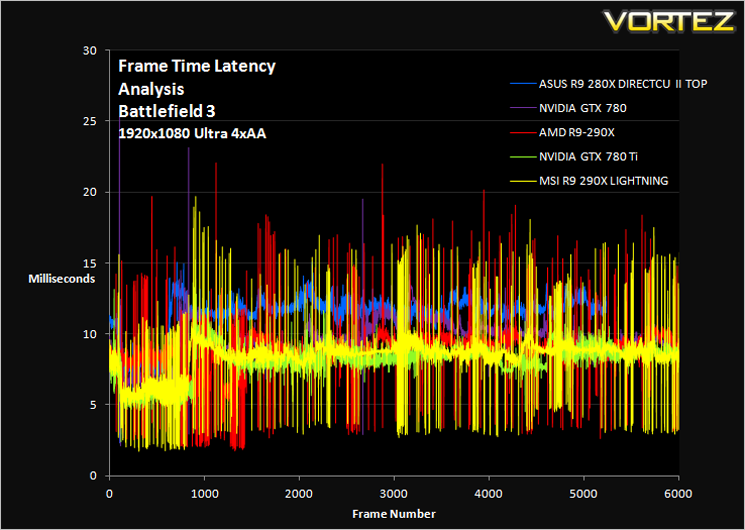
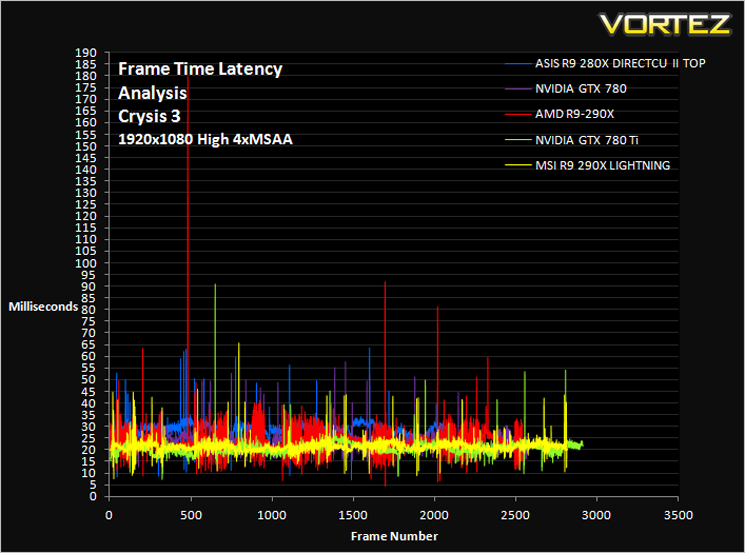
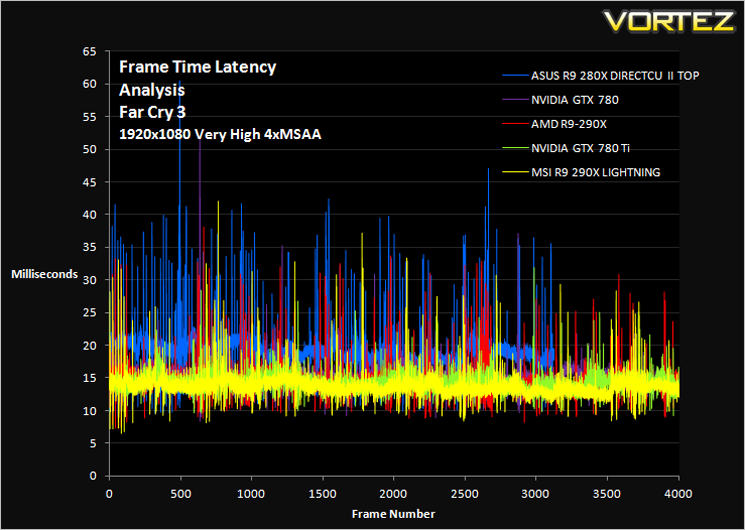
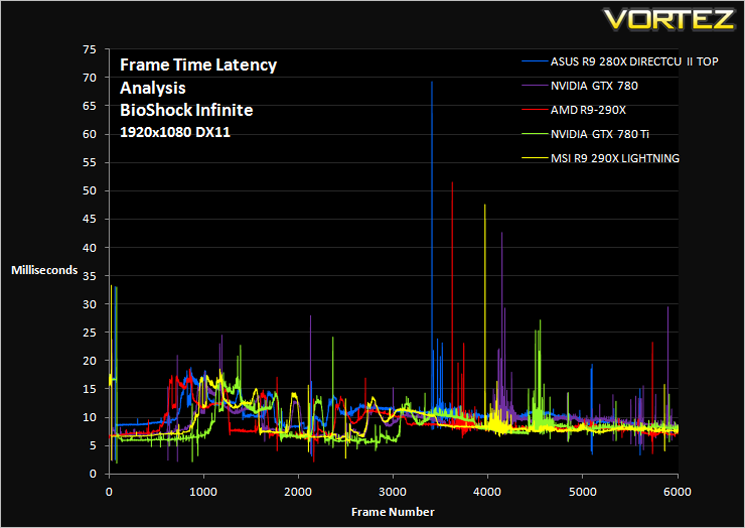
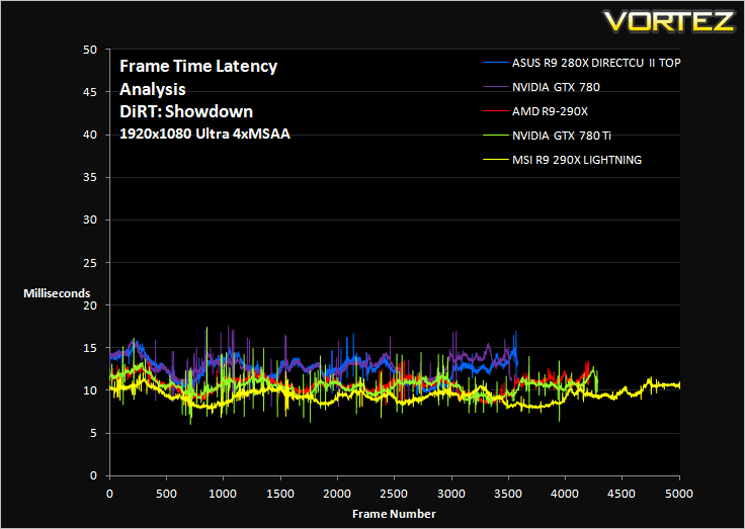
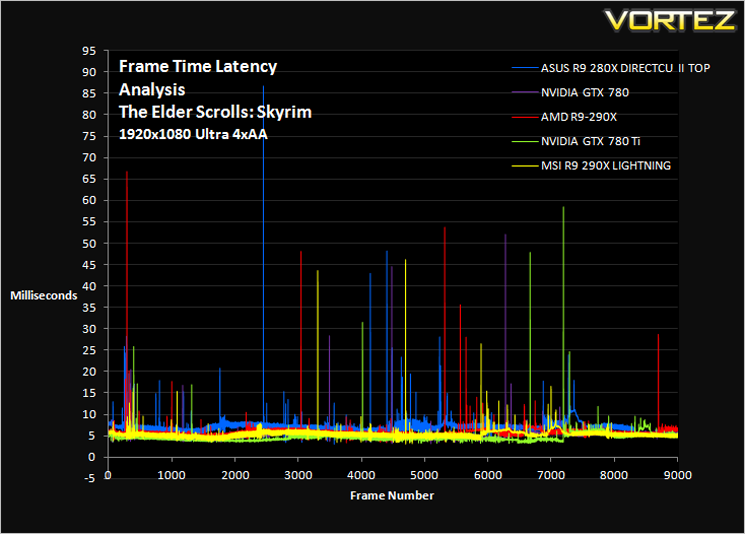
Frame Time Analysis
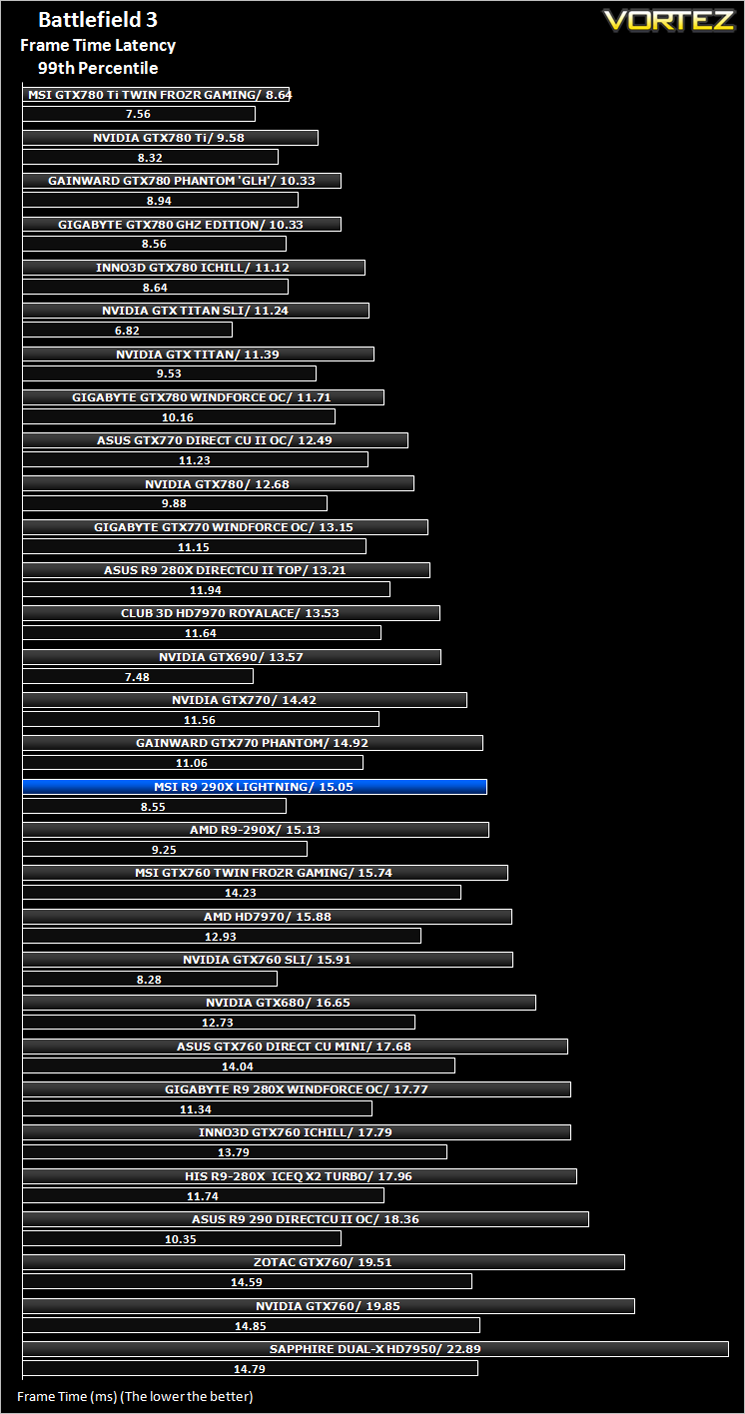
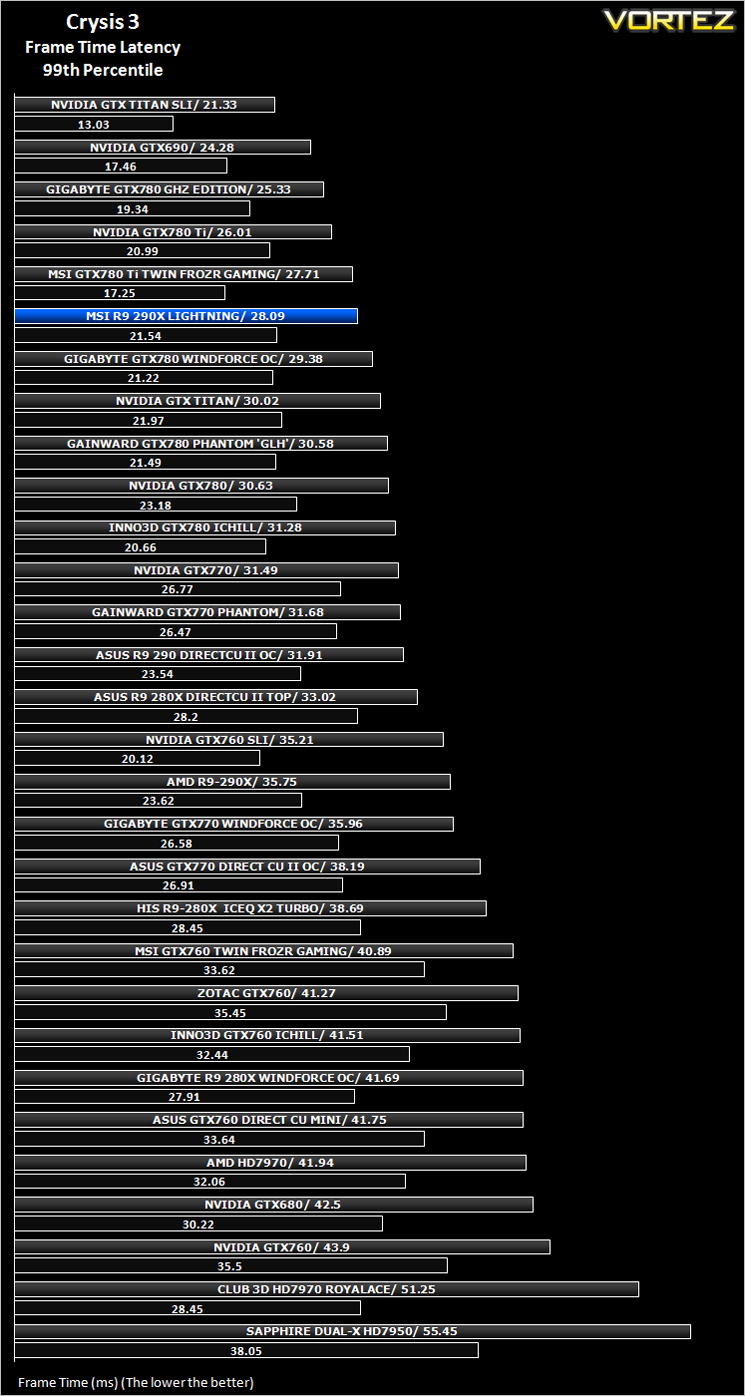
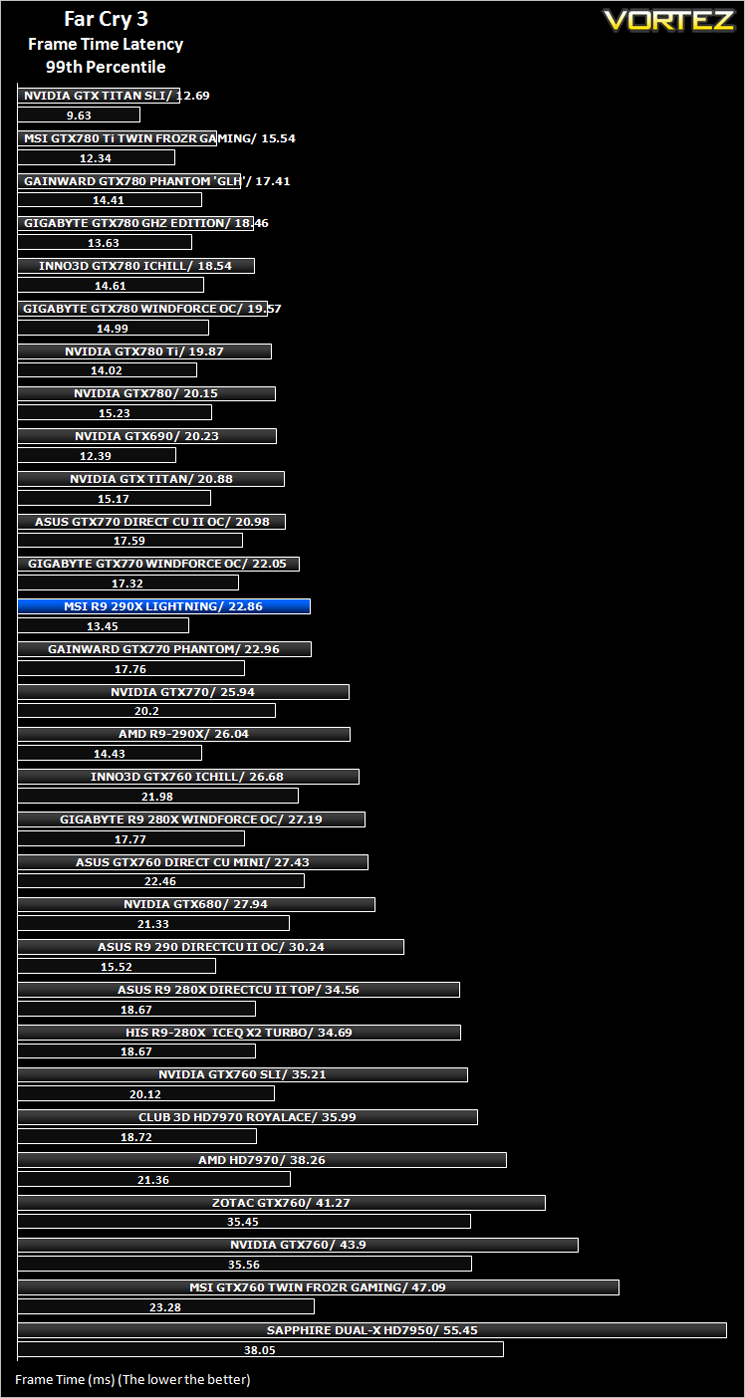
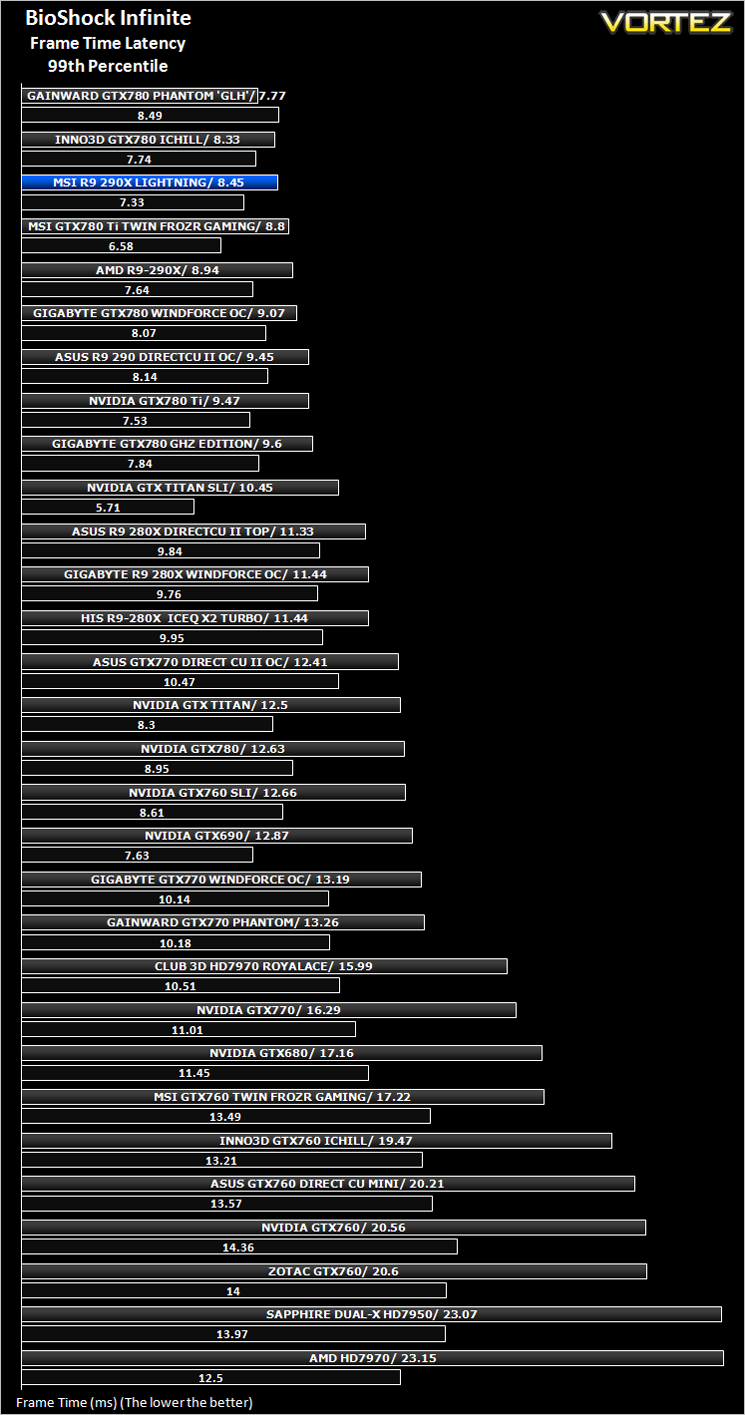
We have also seen the emergence of frame time analysis. We covered this in a separate article here: GPU Reviews: Why Frame Time Analysis is important so we won’t go into the reasoning again but to summarise, our testing comprises both FPS testing and perhaps arguably more importantly, frame time analysis. We also look at overall performance by equating averages across the games and finally before concluding our review we take a look at value for money.
HardwareWith the latest Intel chipset release we decided to update our ageing X58 setup to the new X79 chipset. Not only that but we will be using the flagship Core i7-3960X Extreme Edition processor clocked to 4.5GHz to ensure we have no CPU bottlenecks. With 16GB of ram on board there should be minimal paging so the benchmarks we run today will hopefully give a true reflection of the graphics card’s performance.
High End Graphics cards on test:
ASUS R9 290 DIRECTCU II OC 4GB GDDR5(Catalyst 13.12)
MSI GTX 780 Ti Twin Frozr OC GAMING 3GB GDDR5(Forceware 331.70)
GIGABYTE GTX 780 GHz Edition 3GB GDDR5(Forceware 331.70)
HIS R9 280X ICEQ X2 TURBO 3GB GDDR5](CAT 13.11)
GIGABYTE R9 280X WINDFORCE 3X OC 3GB GDDR5(CAT 13.11)
AMD RADEON R9 290X 4GB GDDR5(CAT 13.11 Beta v5)
ASUS R9 280X DirectCU II 3GB GDDR5(CAT 13.11 Beta v1)
ASUS GTX760 DirectCU Mini OC 2GB GDDR5(Forceware 320.49)
Inno3D iChill GTX 780 HerculeZ X3 Ultra 3GB GDDR5(Forceware 320.49)
ASUS GTX770 DIRECT II CU OC 2GB GDDR5(Forceware 320.49)
MSI GTX760 Twin Frozr Gaming 2GB GDDR5(Forceware 320.49)
GIGABYTE GTX780 Windforce x3 OC 3GB GDDR5(Forceware 320.49)
GAINWARD GTX780 PHANTOM ‘GLH’ 3GB GDDR5(Forceware 320.49)
INNO3D GTX760 ICHILL HERCULEZ 2GB GDDR5(Forceware 320.49)
GIGABYTE GTX770 WINDFORCE 3X OC 2GB GDDR5(Forceware 320.49)
ZOTAC GTX760 2GB GDDR5(Forceware 320.39)
NVIDIA GTX760 2GB GDDR5(Forceware 320.39)
]NVIDIA GTX760 2GB GDDR5 SLI(Forceware 320.39)
SAPPHIRE DUAL-X HD7950 3GB GDDR5 (Catalyst 13.6 beta)
CLUB 3D HD7970 royalAce 3GB GDDR5 (Catalyst 13.6 beta)
GAINWARD PHANTOM GTX 770 2GB GDDR5 (Forceware 320.18)
NVIDIA GeForce GTX 770 2GB GDDR5 (Forceware 320.18)
NVIDIA GeForce GTX 780 3GB GDDR5 (Forceware 320.18)
NVIDIA GeForce GTX 690 4GB GDDR5 (Forceware 314.22)
NVIDIA GeForce GTX TITAN 6GB GDDR5 (Forceware 314.22)
NVIDIA GeForce GTX TITAN SLI 12GB(2x6GB) GDDR5 (Forceware 314.22)
NVIDIA GTX680 2GB GDDR5 (Forceware 314.22)
AMD HD7970 3GB GDDR5 (AMD CAT 13.3 beta)
CPU: Intel Core i7-3960X Extreme Edition @ 4.5GHz
RAM – 16GB (4x4GB) Corsair Vengeance (Red) DDR3 @ 1866MHz 9-10-9-27
Power Supply – Thortech Thunderbolt Plus 1200W
Hard Drive – Kingston HyperX 240GB
Cooler – Corsair H100
Benchmarks
If you are a regular reader of our reviews you will know we like to test the latest hardware with the latest games and benchmarks on the market. Here are the games we have chosen:
Crysis 3
Far Cry 3
BioShock Infinite
DiRT: Showdown
The Elder Scrolls: Skyrim
We also take into consideration the benchmarkers out there so have included 3 of the more popular synthetic benchmarks available:
Unigine: Heaven 4
Futuremark 3DMark Firestrike
Let’s see how today’s graphics card performed…
Overclocking
For overclocking today’s sample we will be using MSI’s own Afterburner tool as this gives us all of the options we require included the additional voltage controls. It should also be noted that MSI have their own VGA fan control tool specific to this model which allows independent fan control along with temperature monitoring of both GPU and PWM.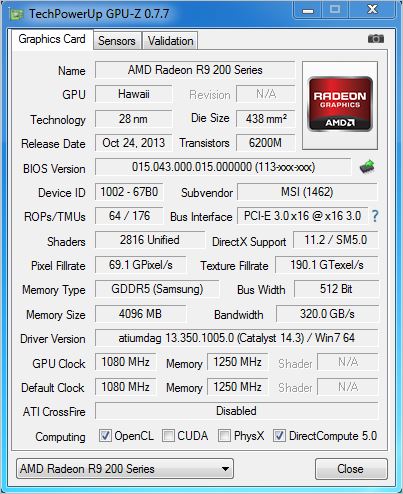
Above is a screenshot of GPU-Z showing the reference (factory overclocked) speeds.
Overclocking the MSI R9 290X Lightning can be as easy or engaging as you want it to be and caters for both novice and expert alike. Using MSI’s Afterburner tool, one can simply adjust the already overclocked core and memory speeds however, thanks to the individual controllers, AUX, memory and GPU voltages can also be fiddled with to get the very best from the card. If that is not enough then switch over to the LN2 BIOS which allows the 20% power limit to be exceeded and over-current protection to be disabled along with having no temperature limits. Obviously anyone doing so will need excellent cooling, preferably liquid nitrogen as the switch suggests. Sadly, we had neither DICE or LN2 so we could only test air cooling but the results were impressive nonetheless.
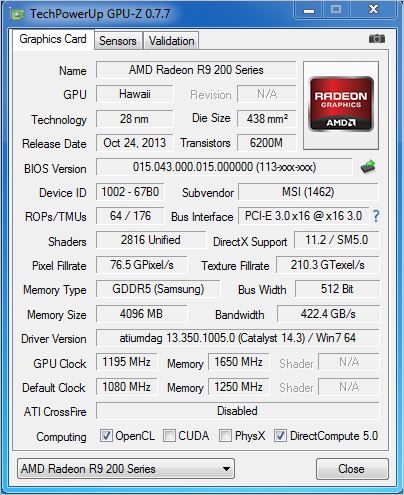
We managed some insane speeds, easily surpassing 1200MHz on the core however, at this speed we did encounter a few lock-ups which benchmarking and stability testing so we were forced to reduce this speed slightly. That said it would run a few of the lighter benchmarks and we think it is fair to say, that is what this card was built for. For comparison purposes though we settled for a fully stable 1195MHz on the core with a very speedy 1650/6600MHz effective clockspeed on the memory.
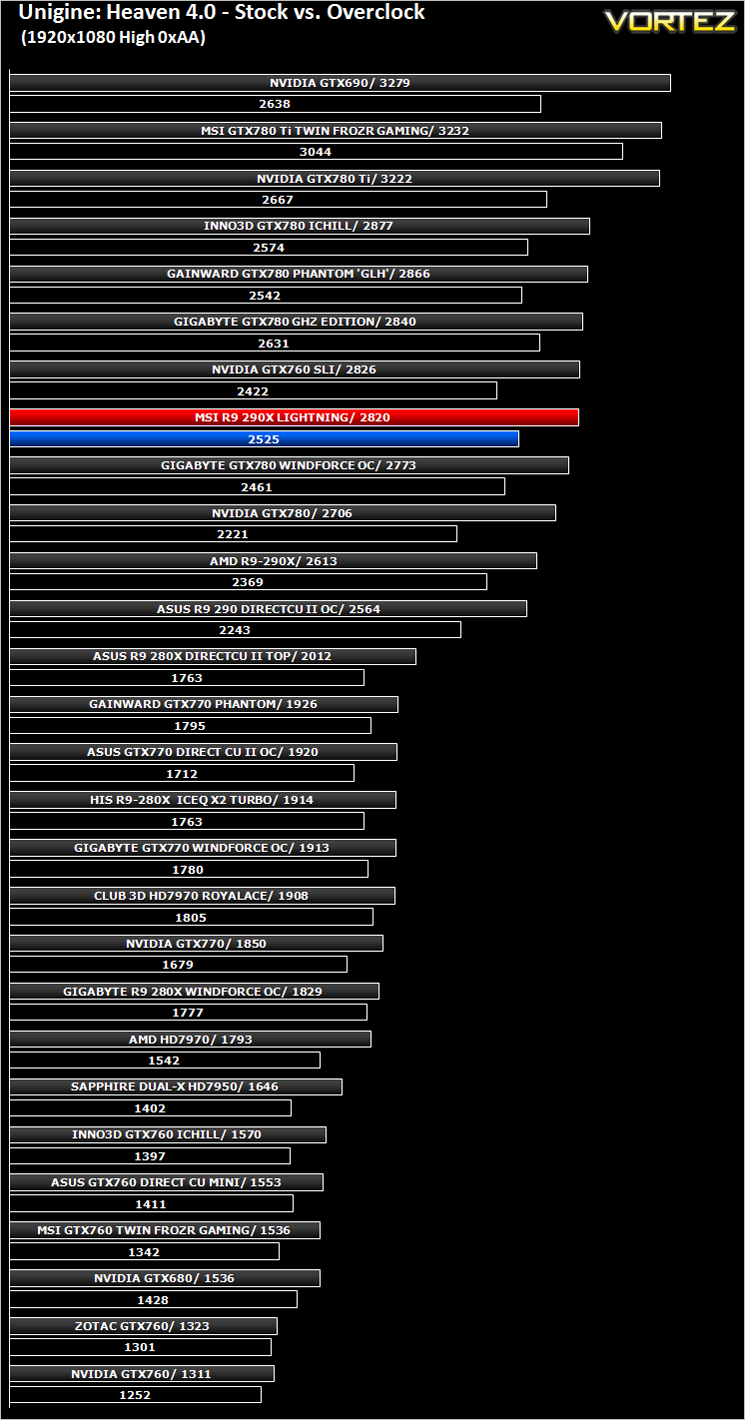
After settling on our stable clockspeed which was verified by multiple runs of Unigine Heaven and 3DMark we benchmarked the overclock and compared it to stock results with Unigine Heaven 4.0 to evaluate the benefits of overclocking the GPU.
Temperature, Acoustics and Power Consumption
Power Consumption
To test for power consumption we use the included iPower Meter found with our Thortech PSU. As system load figures obviously differ from idle it is extremely difficult to get an accurate figure of system draw and then simply take this figure away from the overall amount because each game will generate varying levels of CPU and hard drive activity. Dynamic power adjustments which fluctuate in game will also affect accurate power figures thus rendering any such power consumption calculations redundant at worst and approximate at best.
We will therefore take our system readings averaged over a benchmark run of Tessmark (100% load) and after 20 minutes of being idle in Windows 7. These can then be used as a comparison to other graphics cards to determine how much more or less power you can expect a GPU to consume.
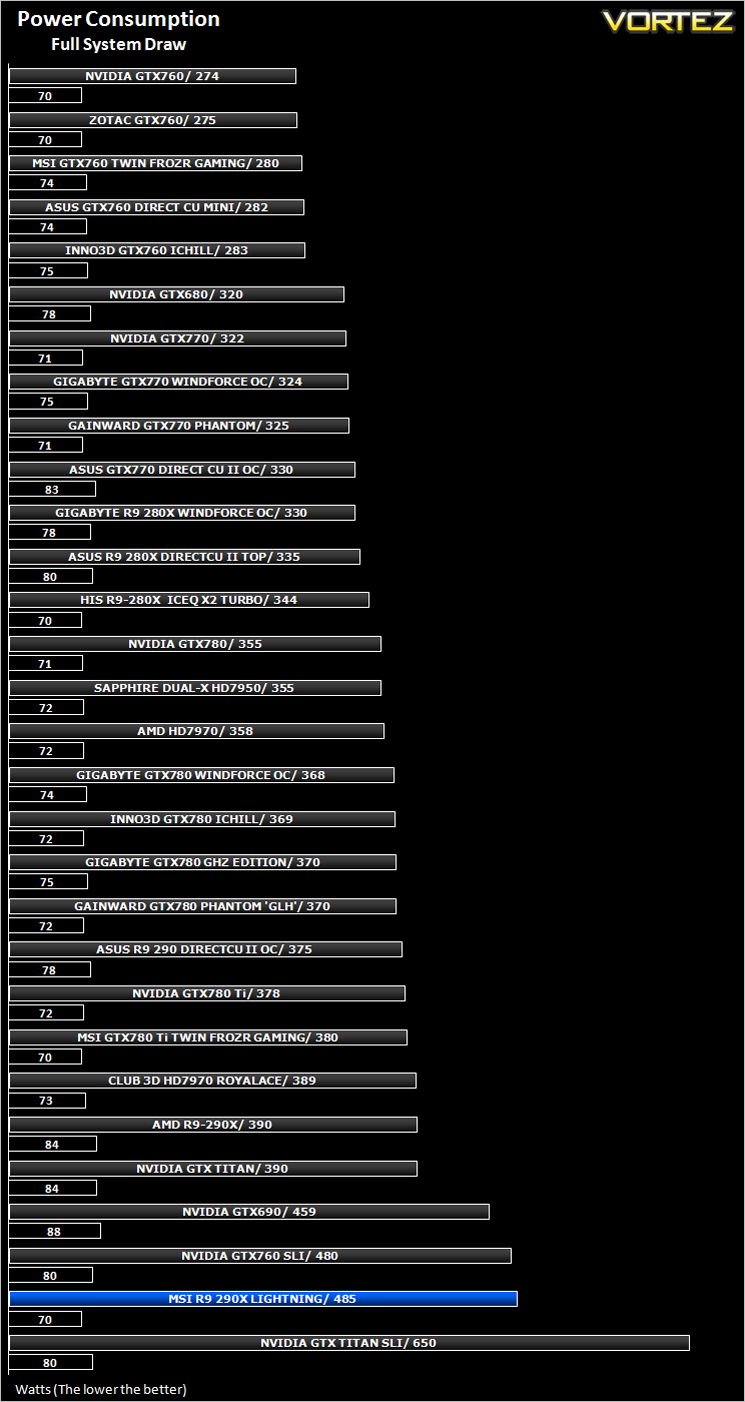
The MSI R9 290X is a hungry beast, of that there can be no doubt and our own tests back this up with the card consuming more power than the vast majority of cards on test. If you are looking to save the planet then this is not a card that will appeal.
Temperature
To test temperatures we measured idle temperatures after booting windows, letting all applications finish loading and ran a few benchmarks. Once the benchmarks were complete we left the card to reach a cooling plateau where we then took the idle temperatures. For the load tests, we would normally run Furmark for 20 minutes, taking the absolute maximum temperature attained however we found that this throttled the card and resulted in spurious results. So we set Heaven running continuously for 20 minutes and used this as a temperature result as the card did not throttle with this application.
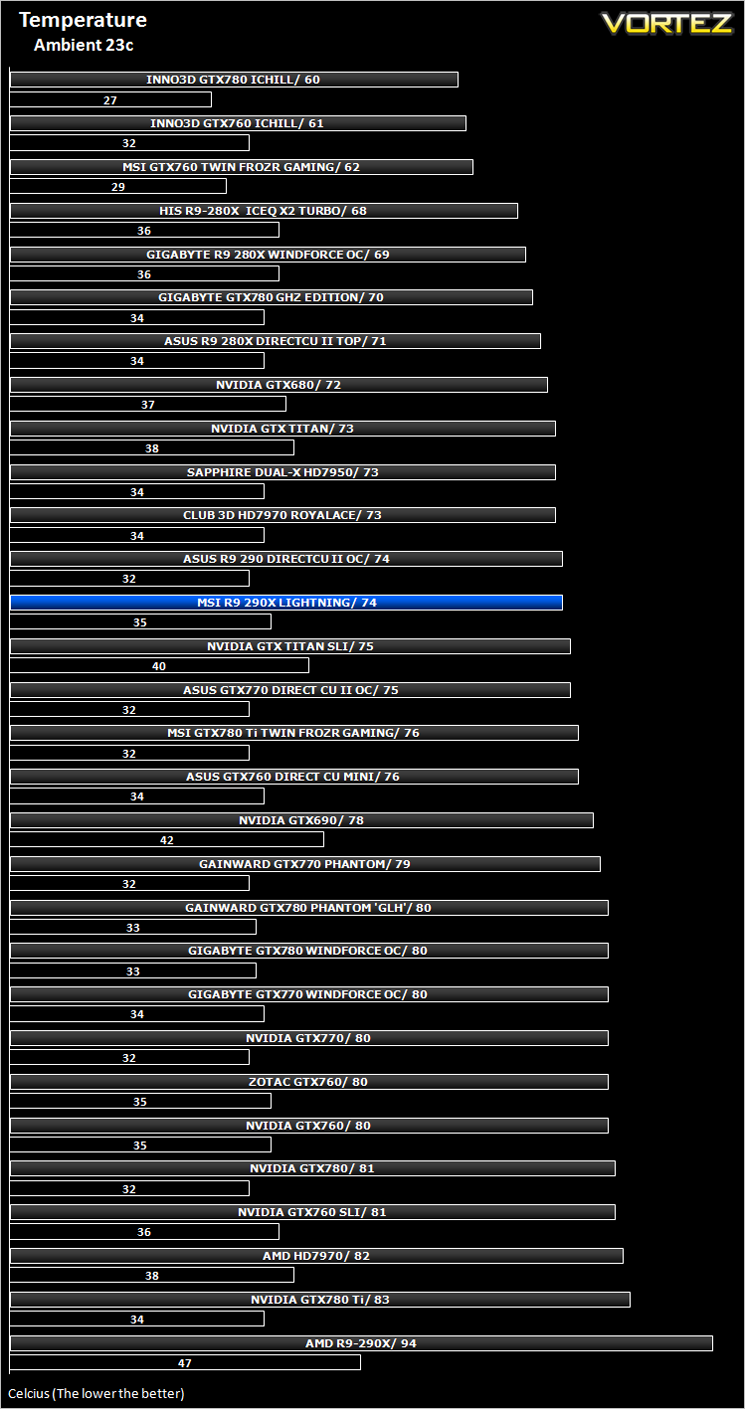
Temperatures were very good especially when you consider the silly high 95c specified by AMD. The MSI card betters this by more than 20c thanks to the Trifrozr design which allows for better overclocking headroom and most likely a more durable graphics card.
Acoustics
Despite having three fans, the TriFrozr design makes very little noise. Sure, when the fan speed is manually raised during high overclocks for benchmarking, the noise is quite high (but substantially less than reference) but under normal operating conditions, for say gaming, it is hardly noticeable and when idle is pretty much silent.
Gaming Experience (Frame Time Analysis)
Comment
Average and 99th Percentile response times (Frame Time Analysis)
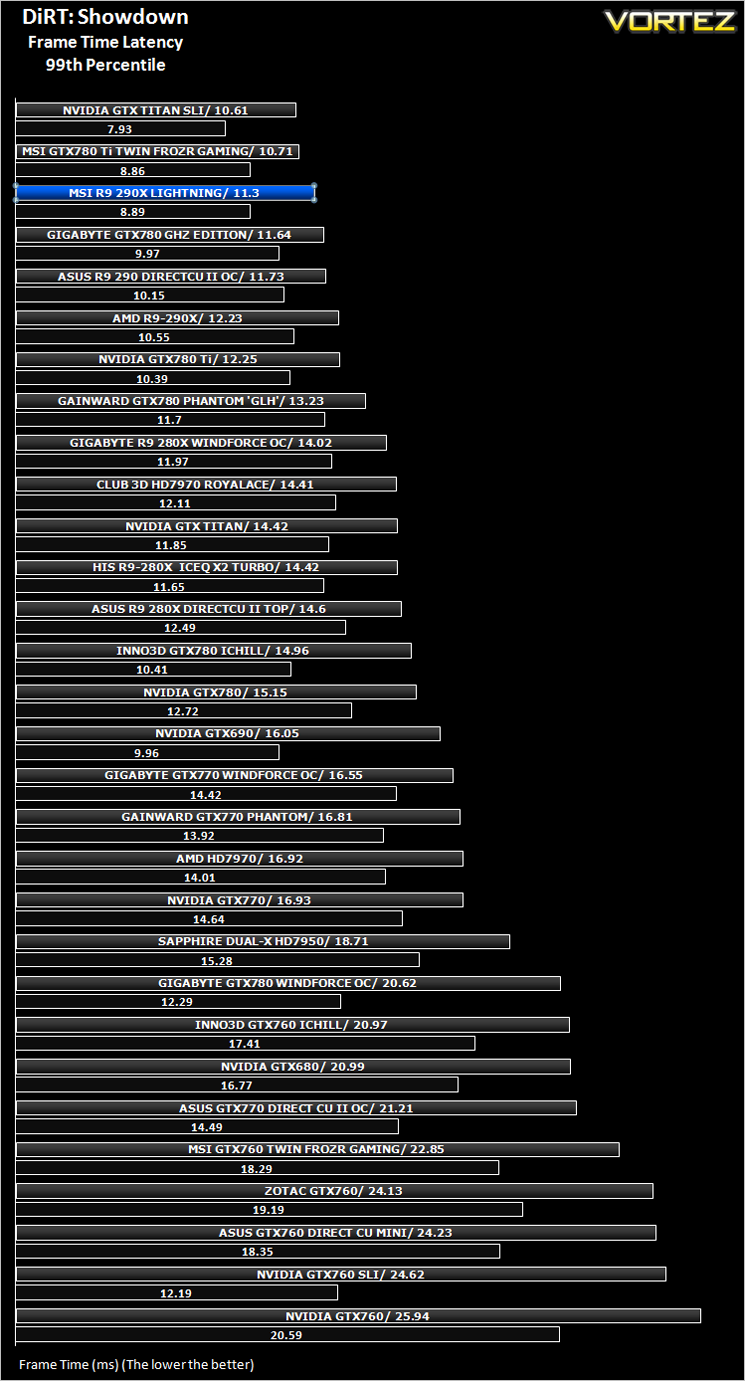
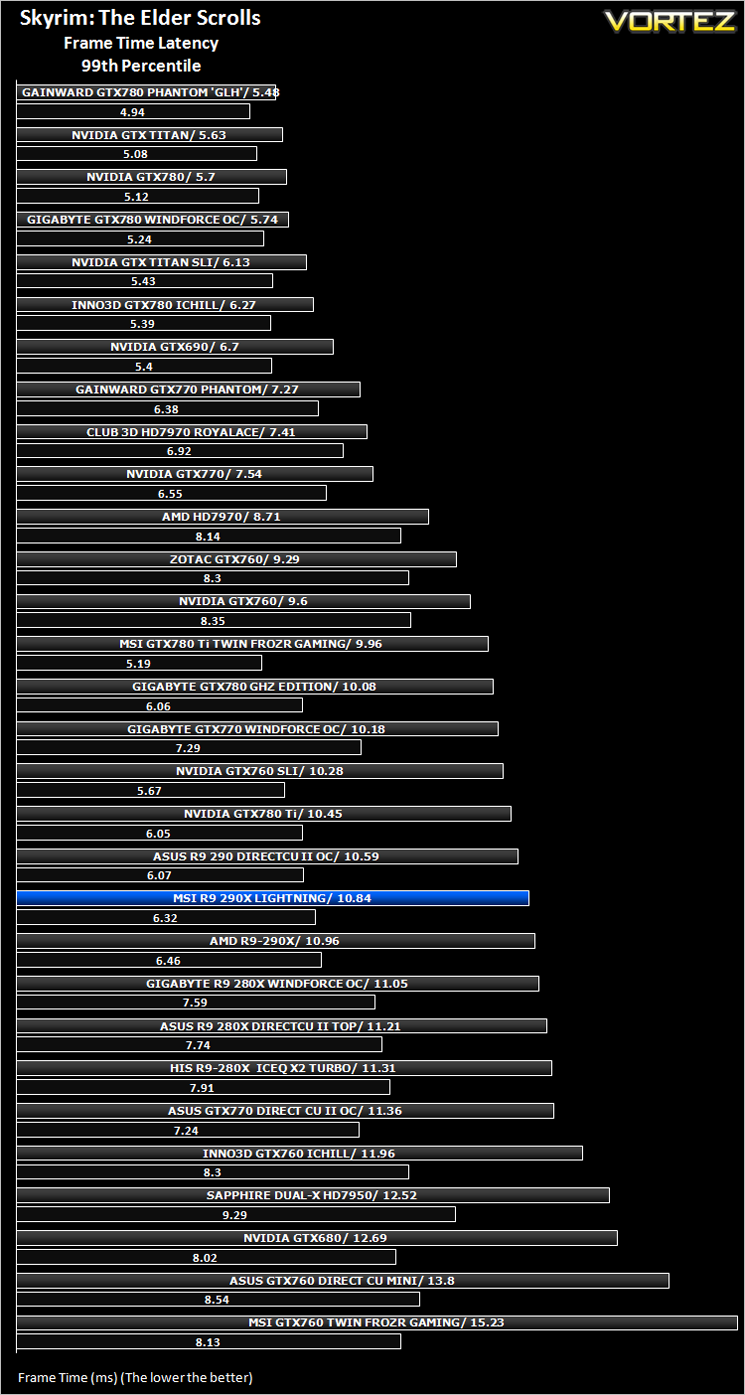
Futuremark 3DMark Fire Strike (Synthetic)
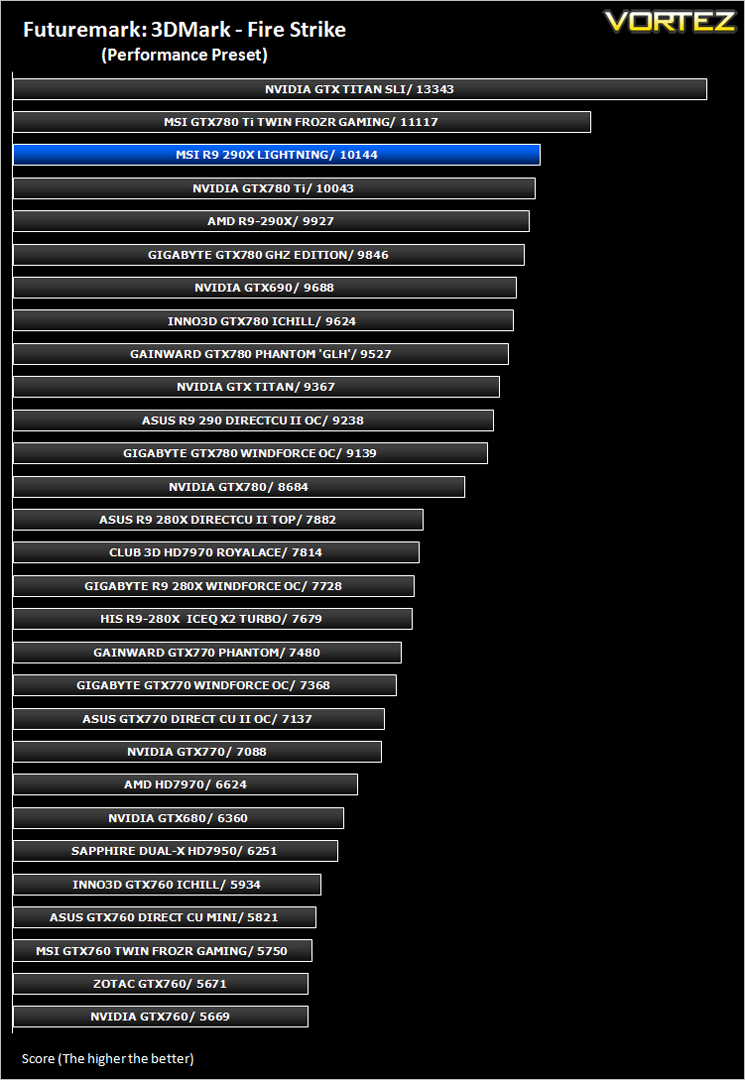
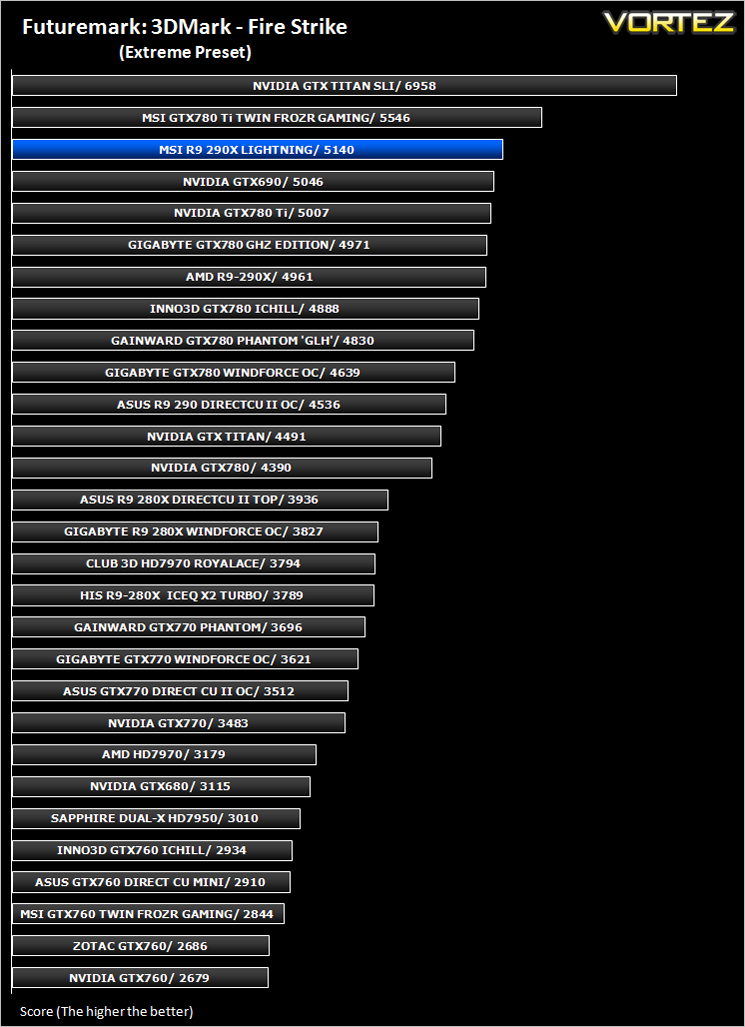
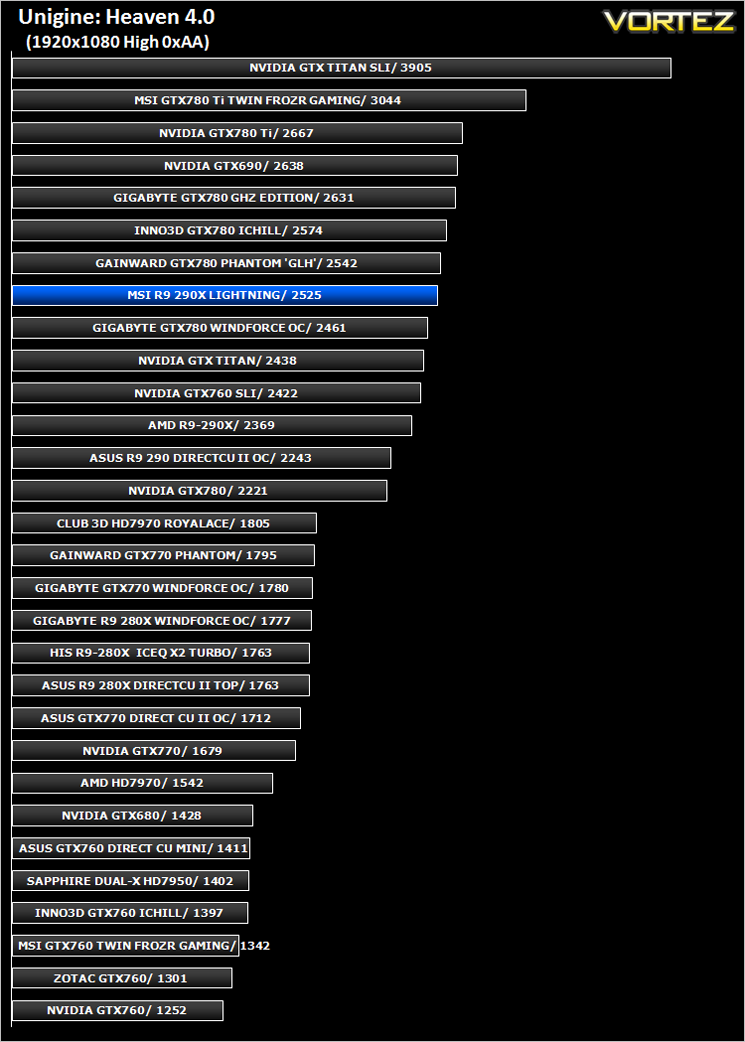
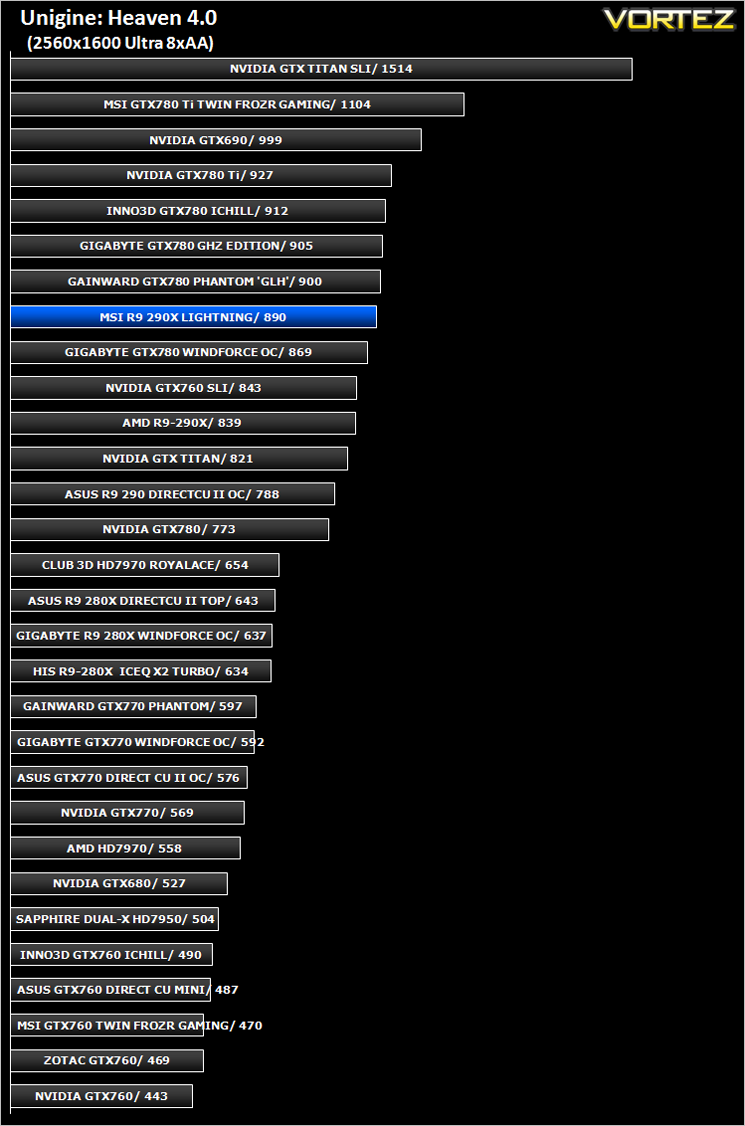
Unigine: Heaven 4 (Synthetic)
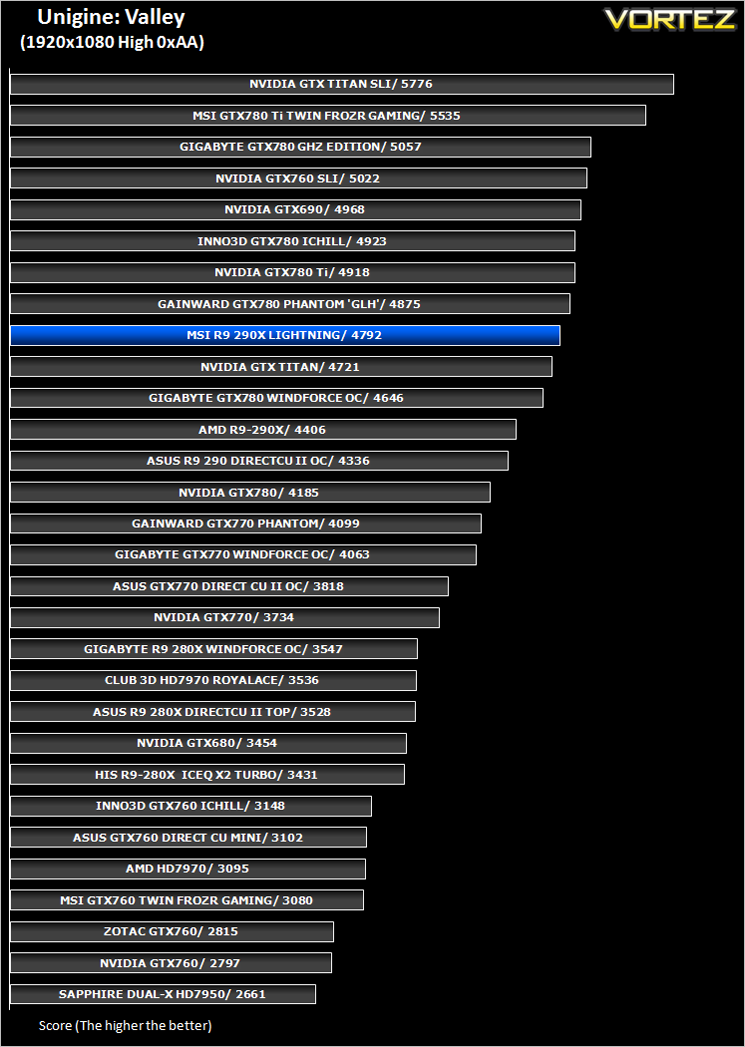
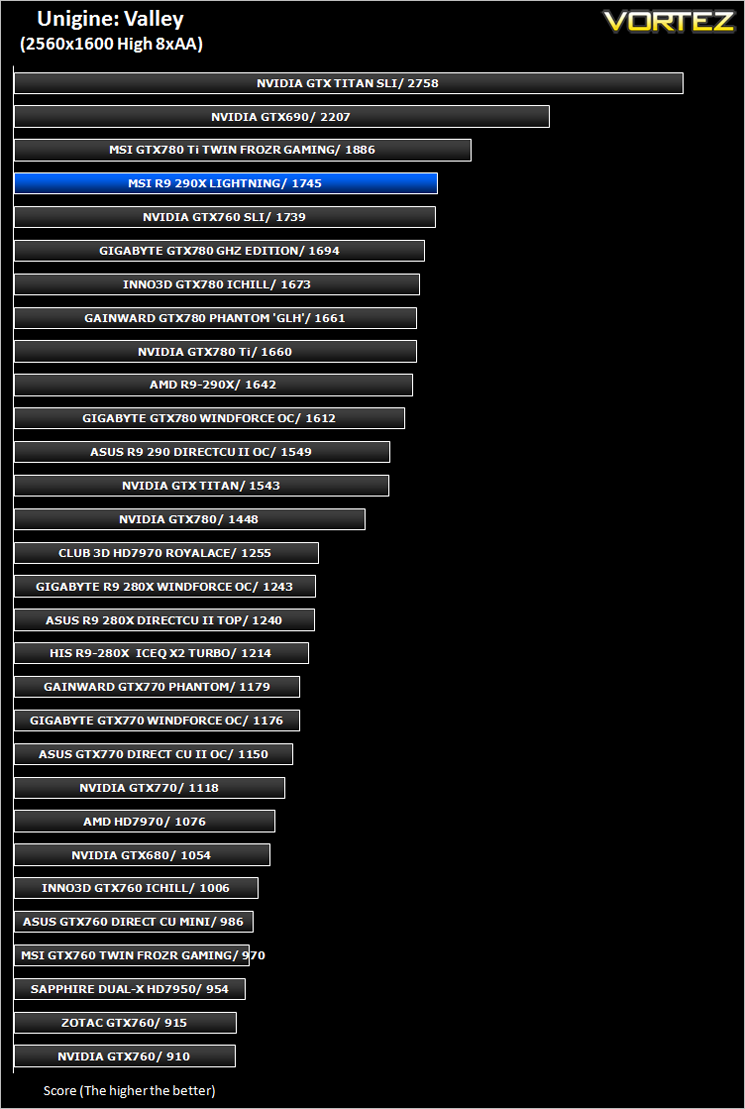
Unigine: Valley (Synthetic)
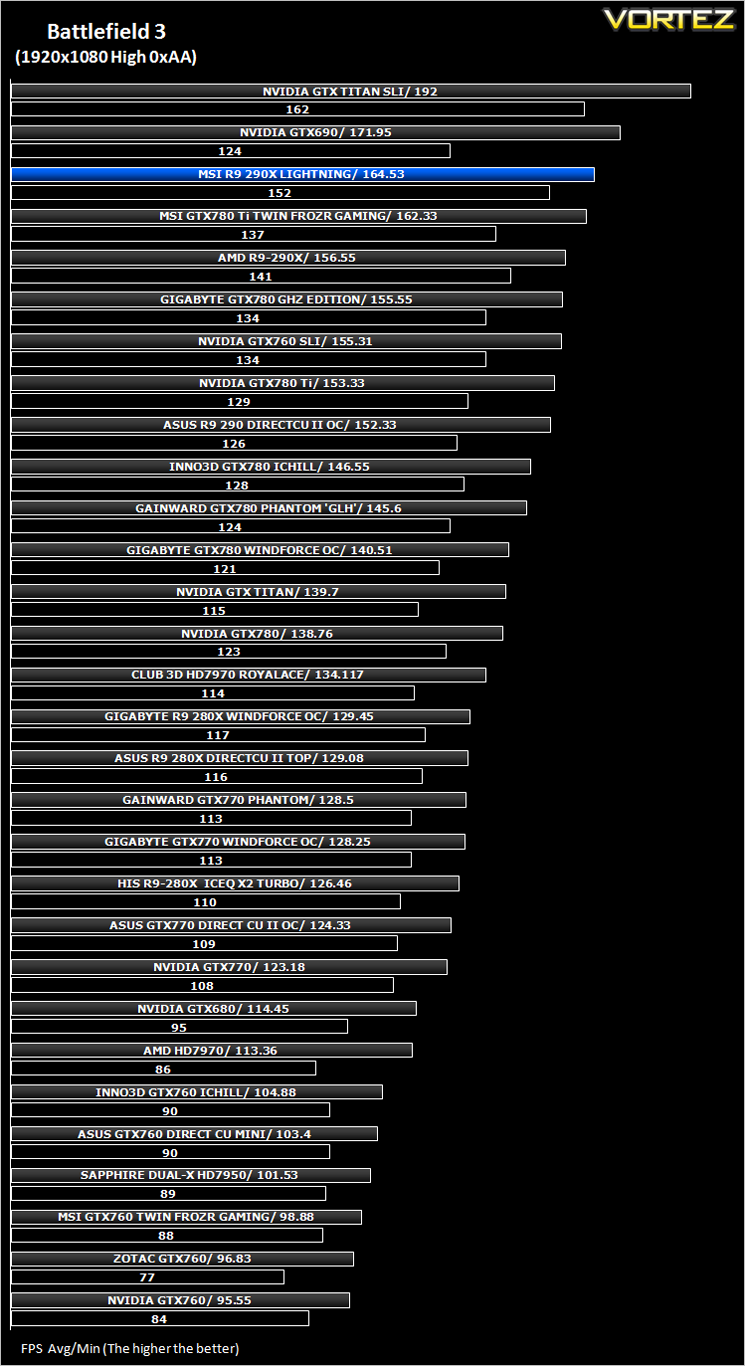
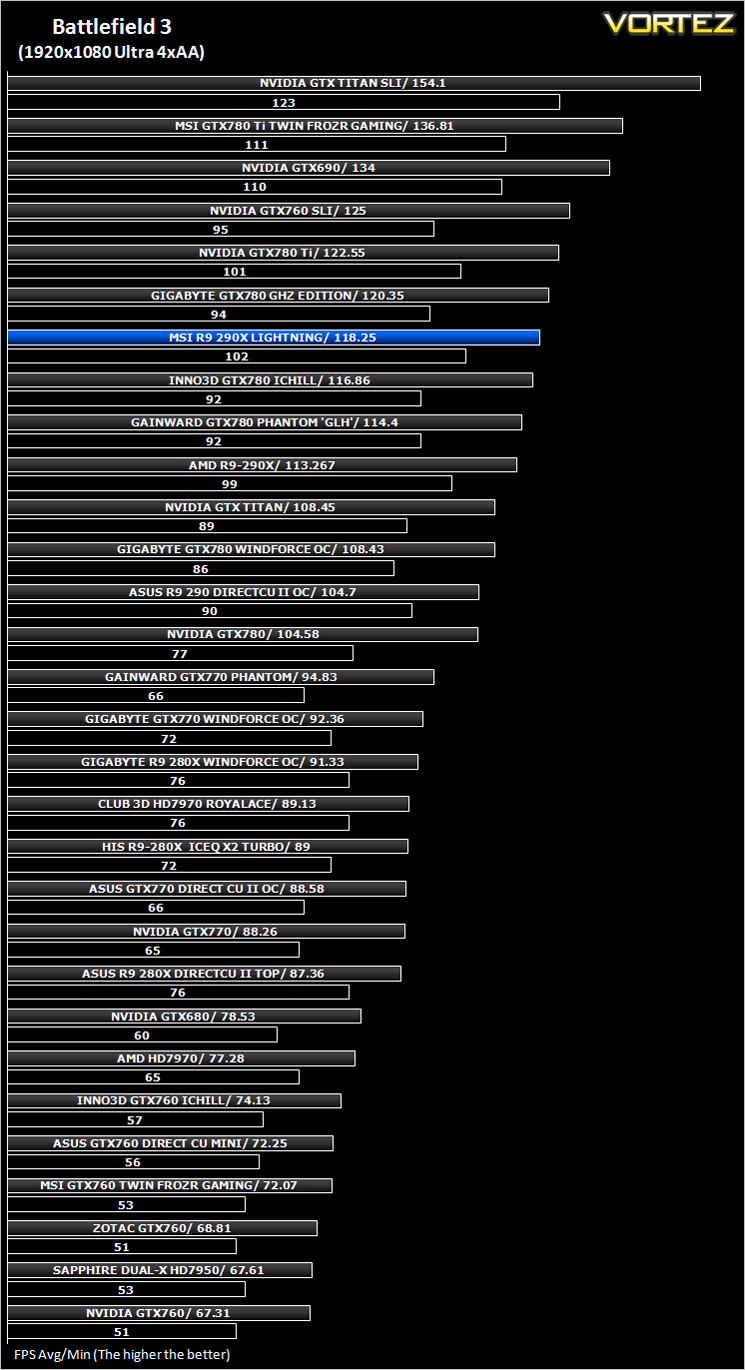
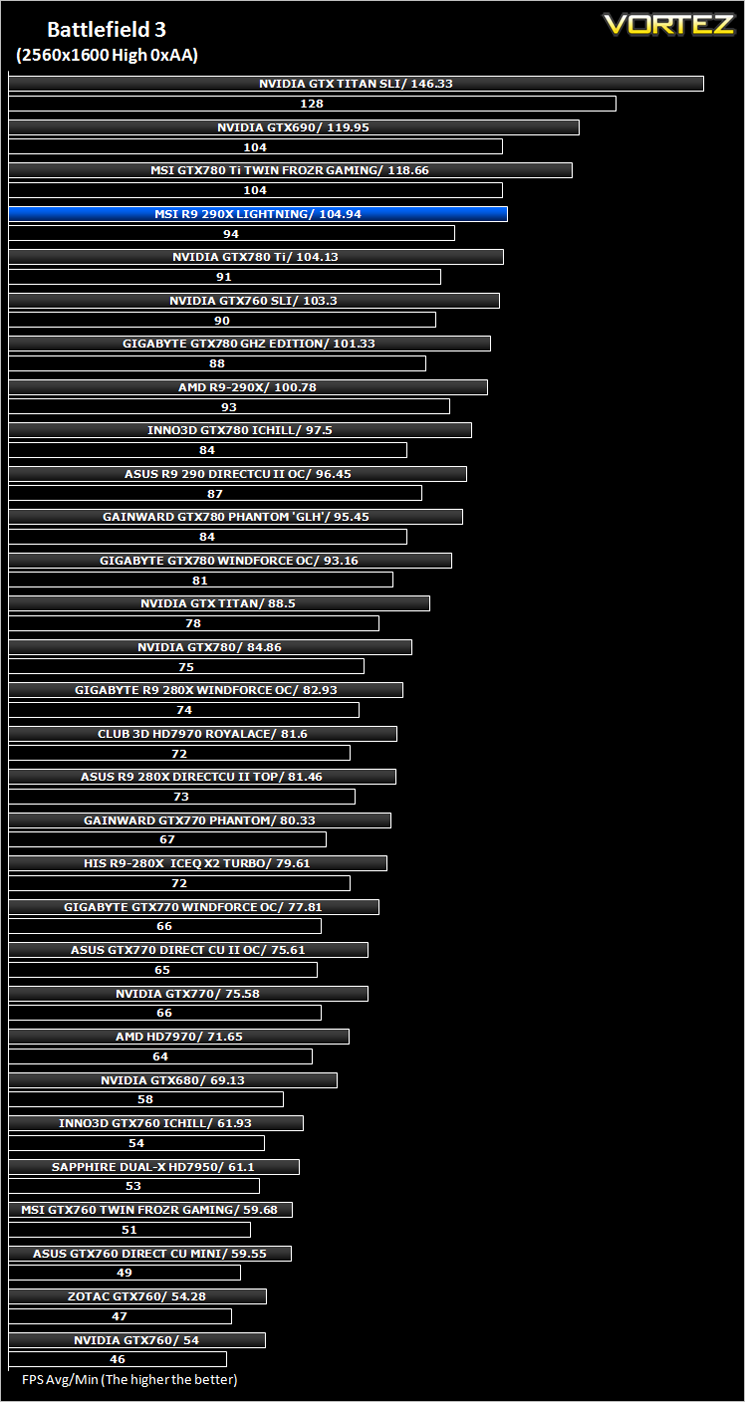
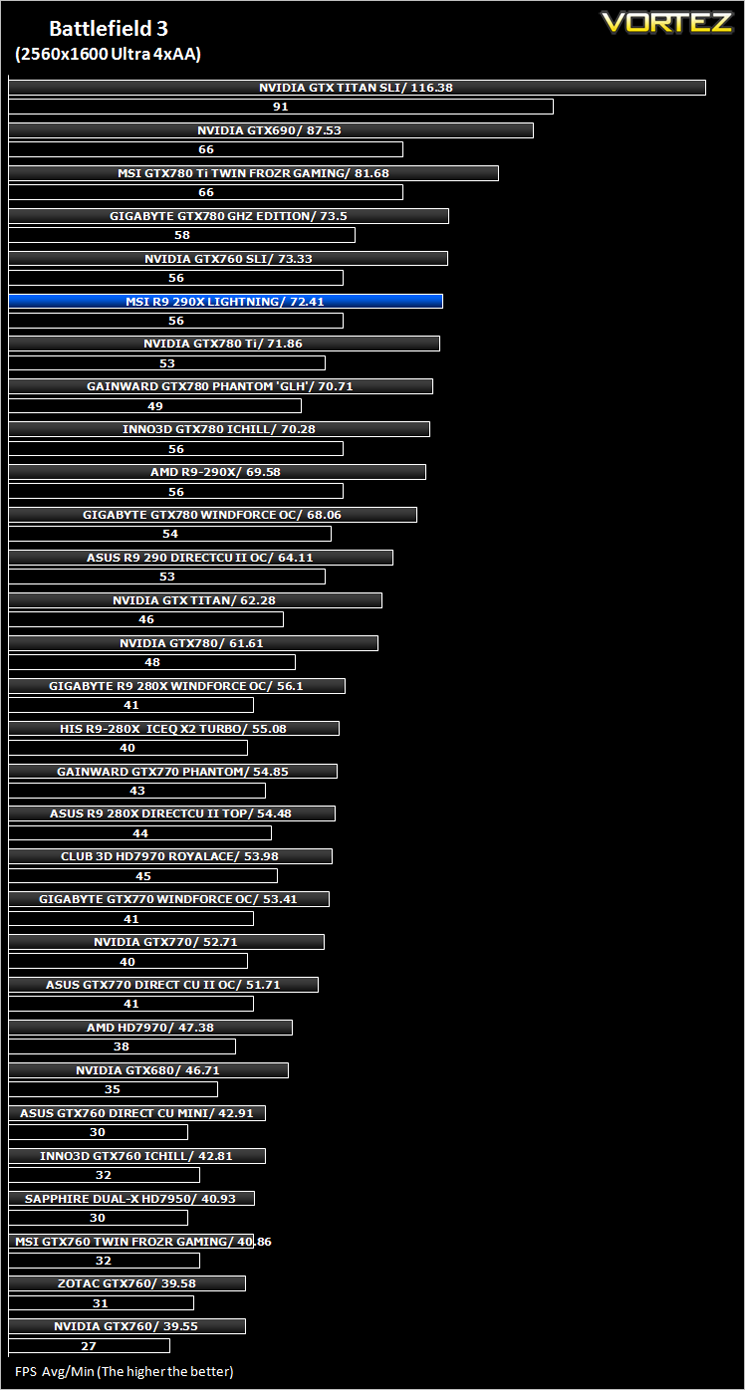
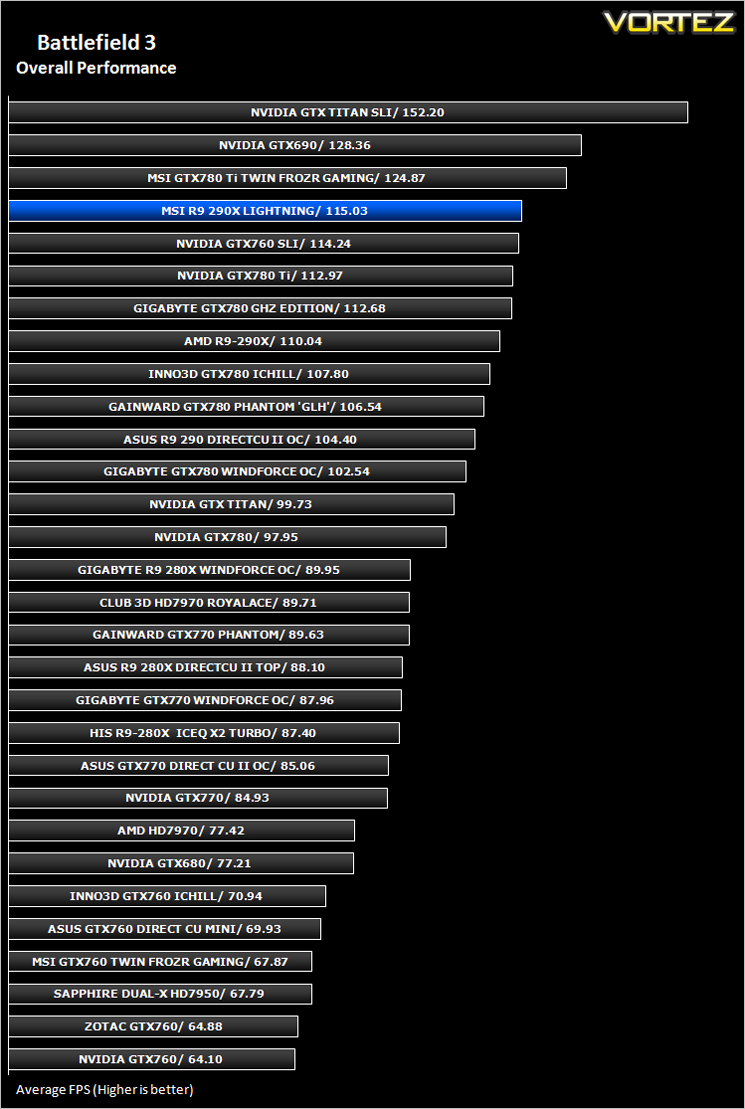
Battlefield 3 (FPS)
Average and minimum frames per second were measured using Fraps during the parking lot scene on Operation Sword Breaker. High and Ultra presets were loaded at both resolutions.
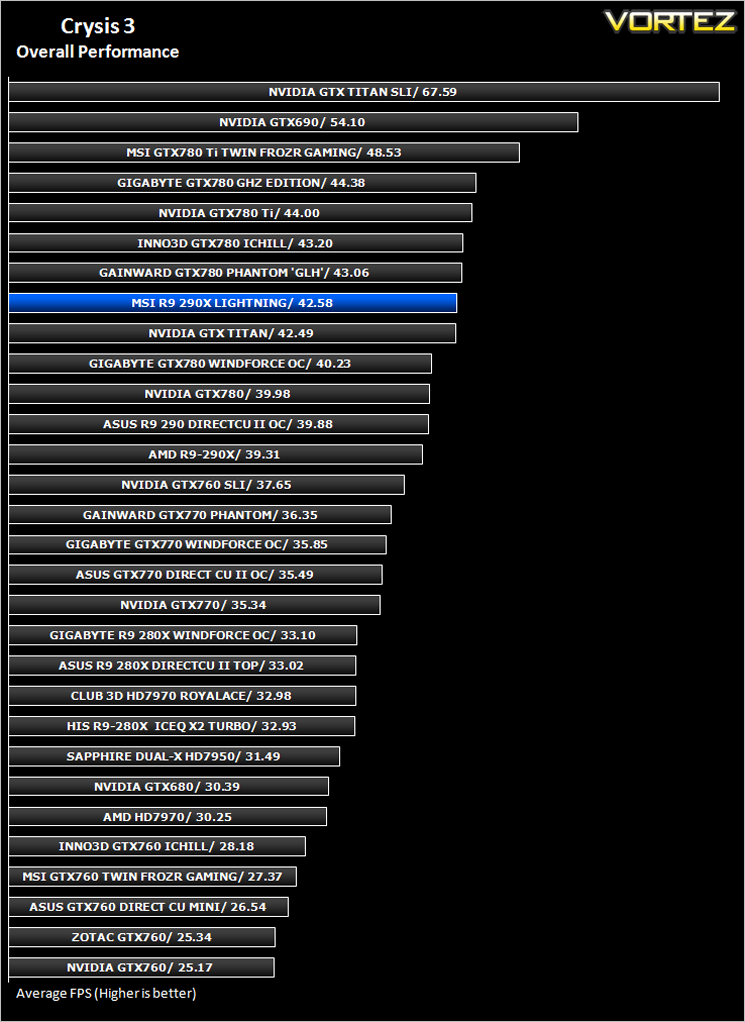
Crysis 3 (FPS)
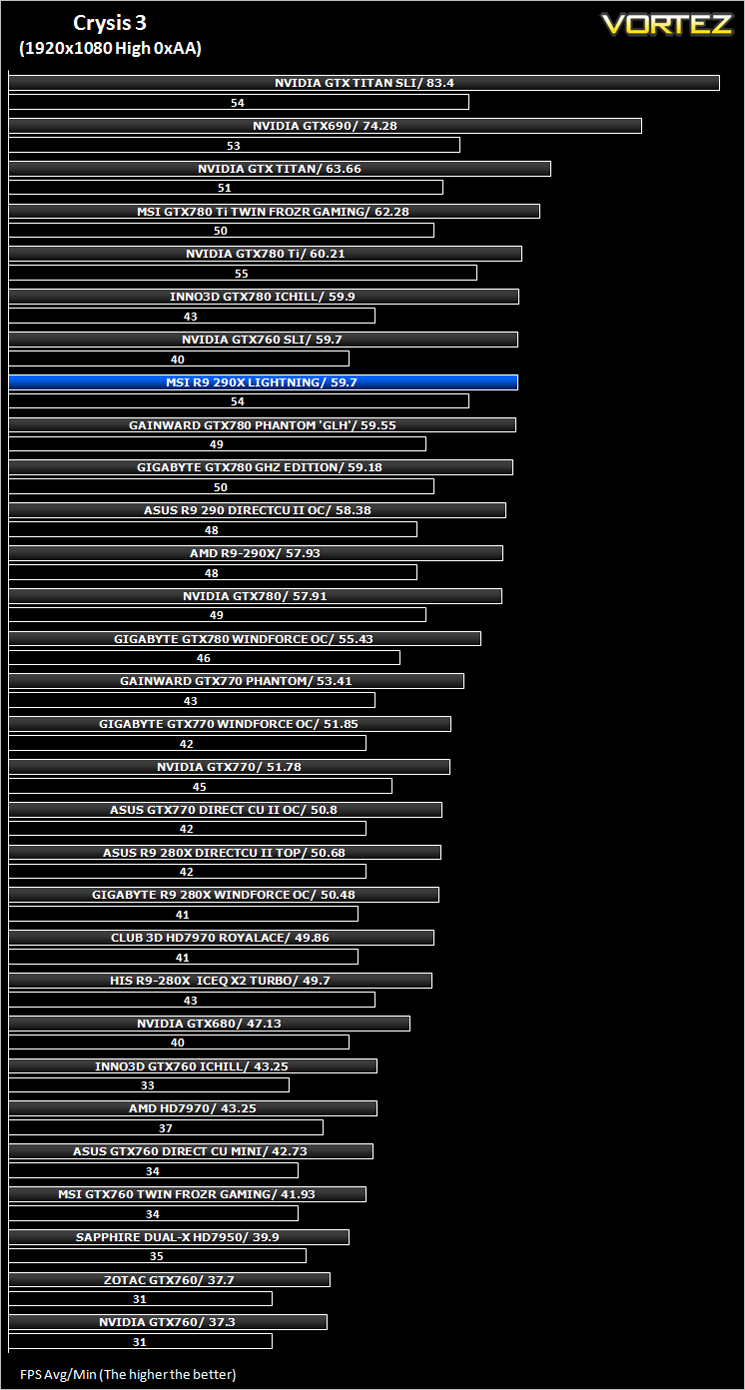
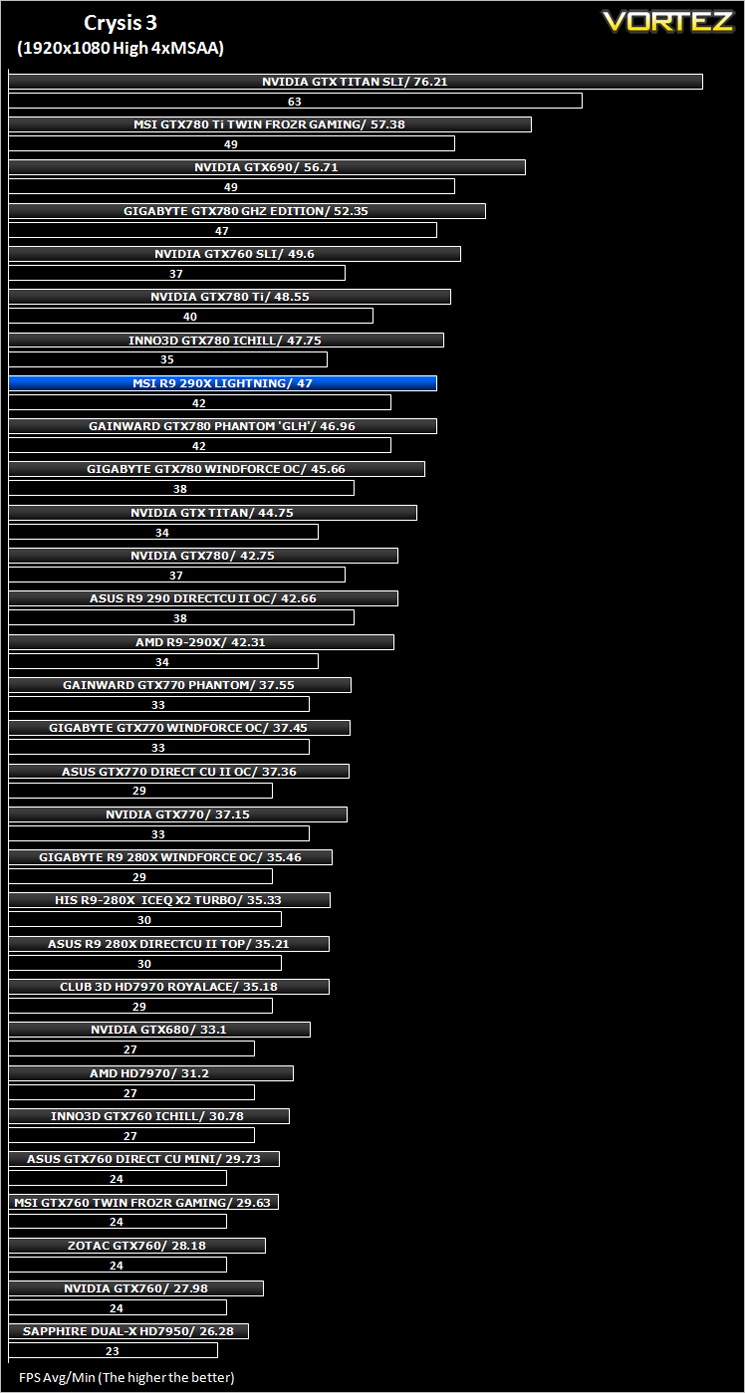
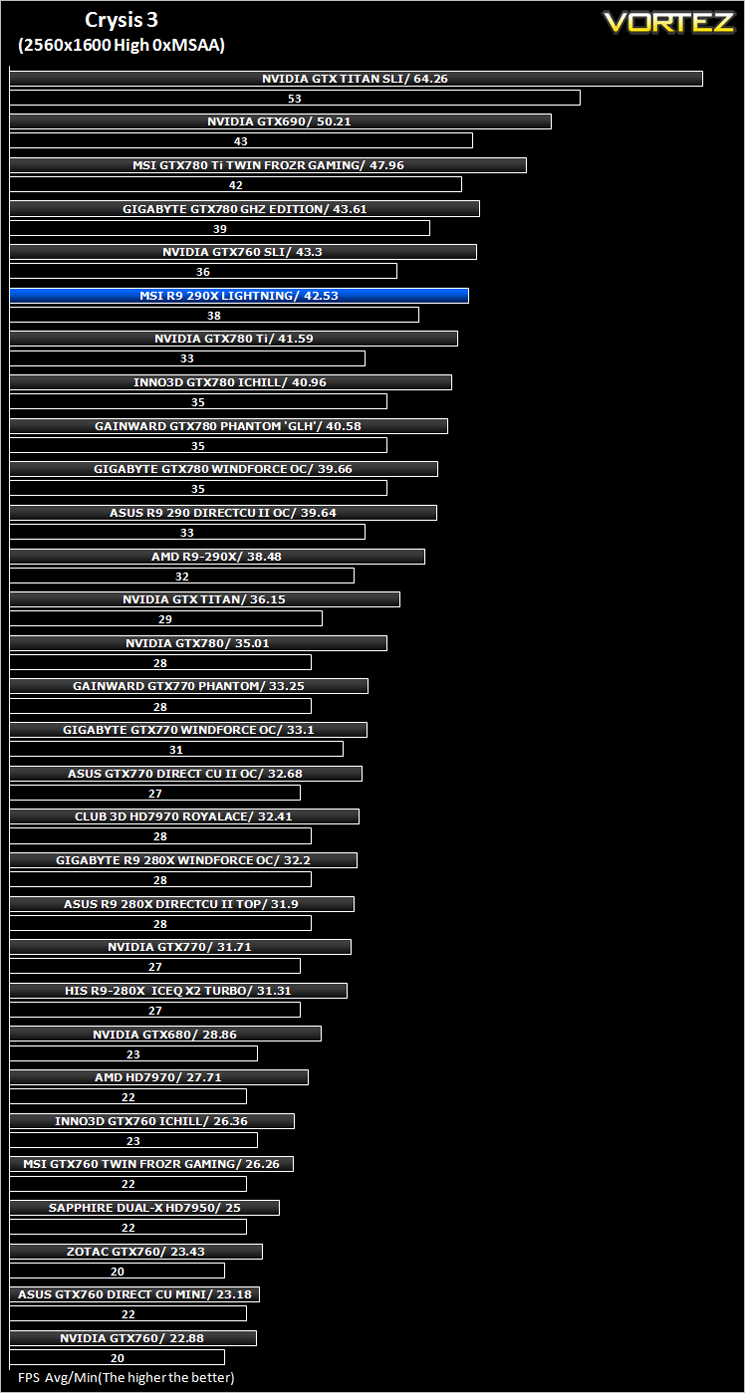
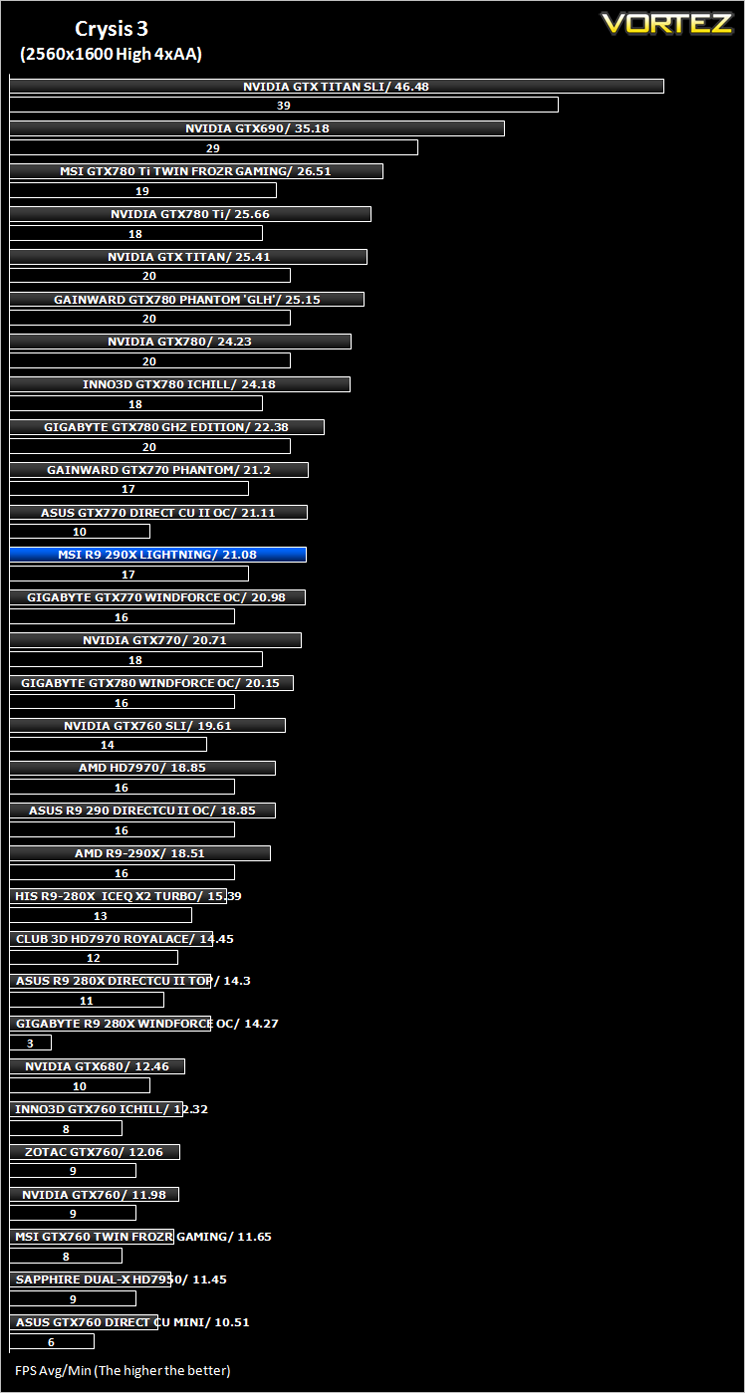
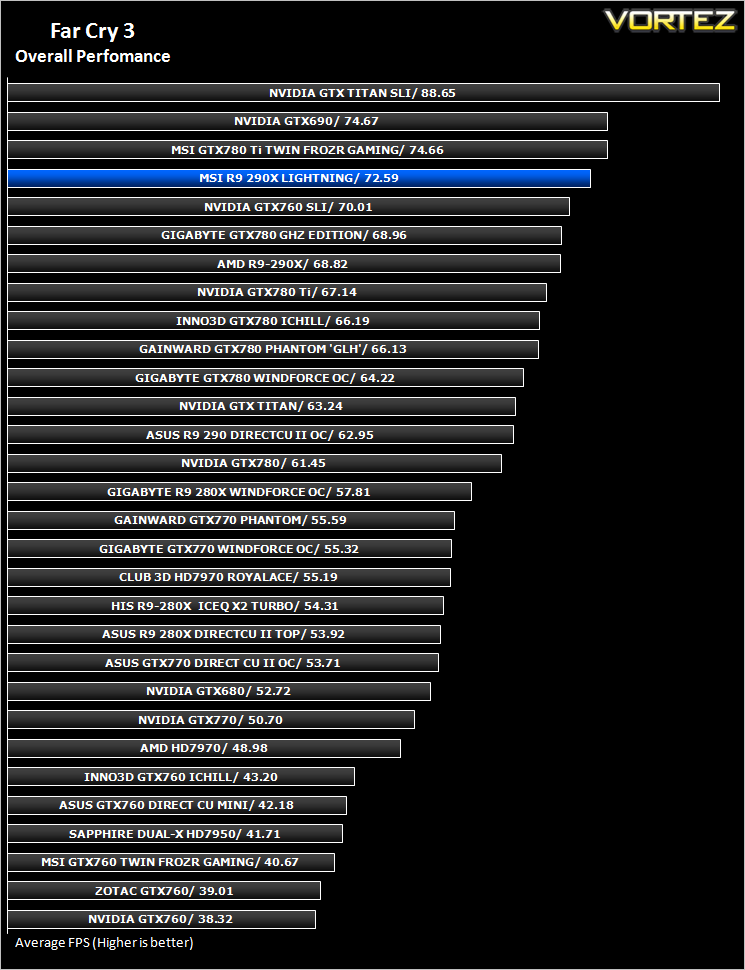
Far Cry 3 (FPS)
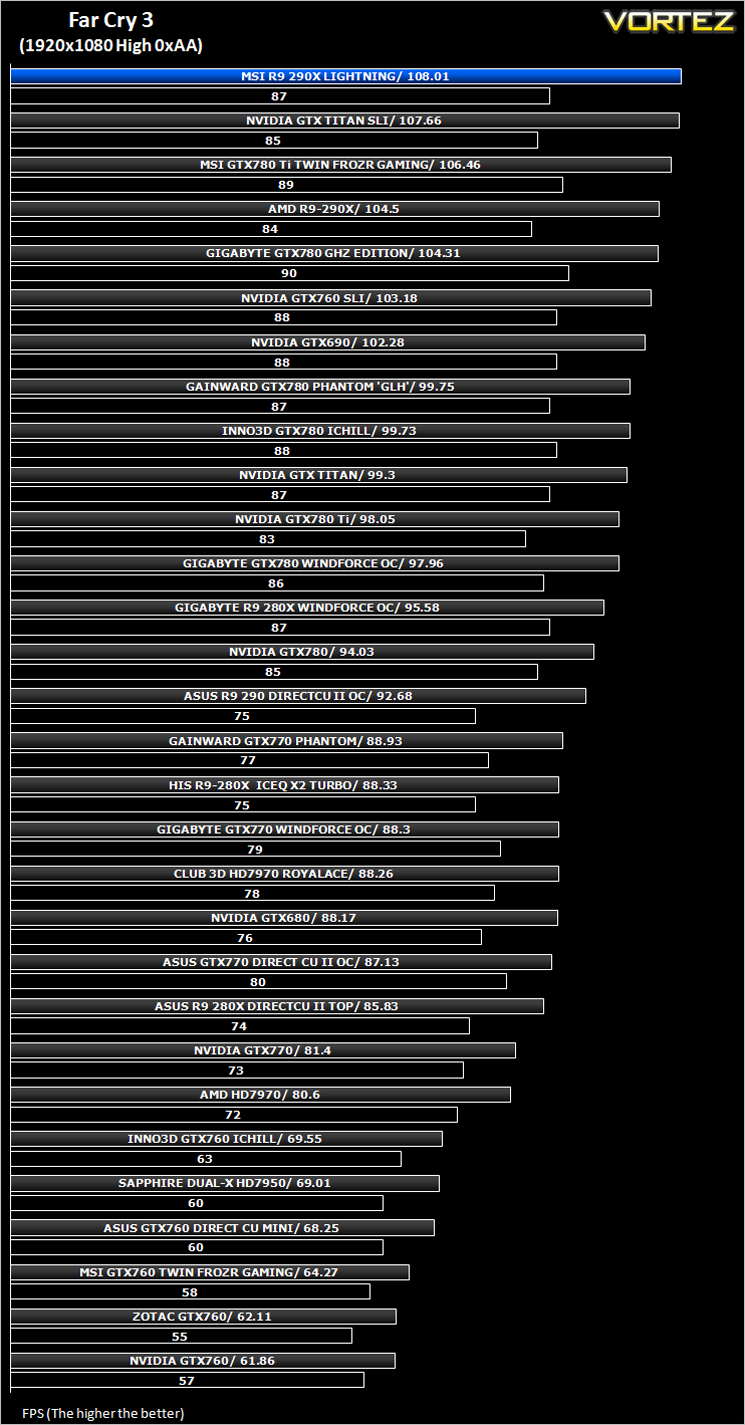
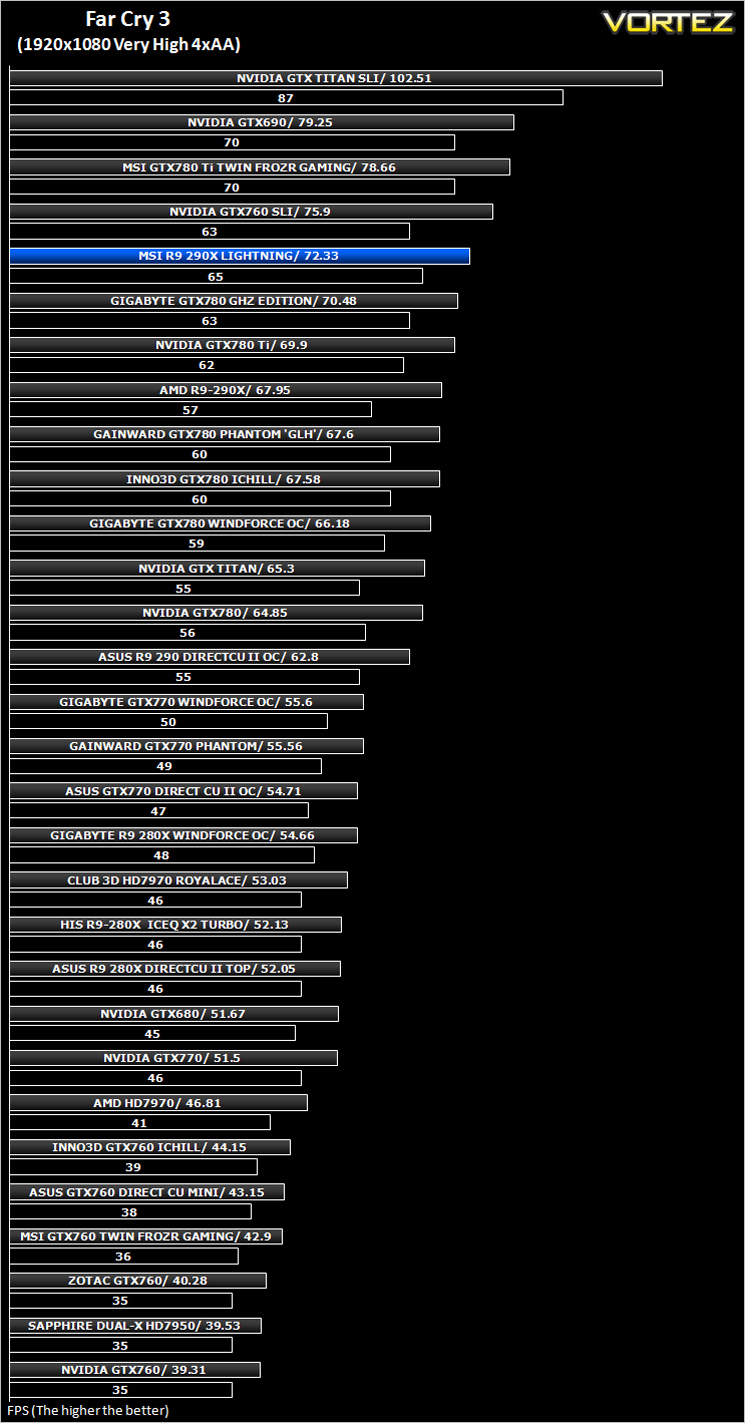
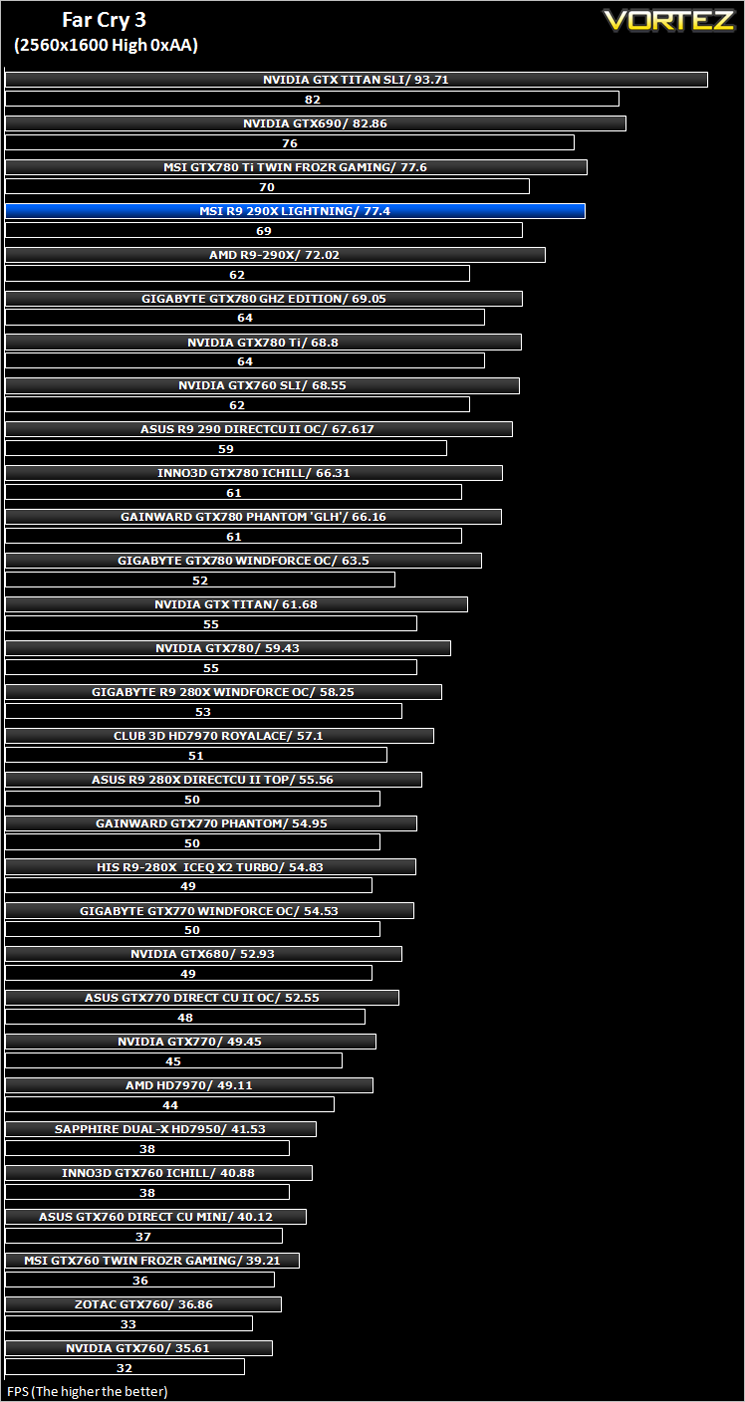
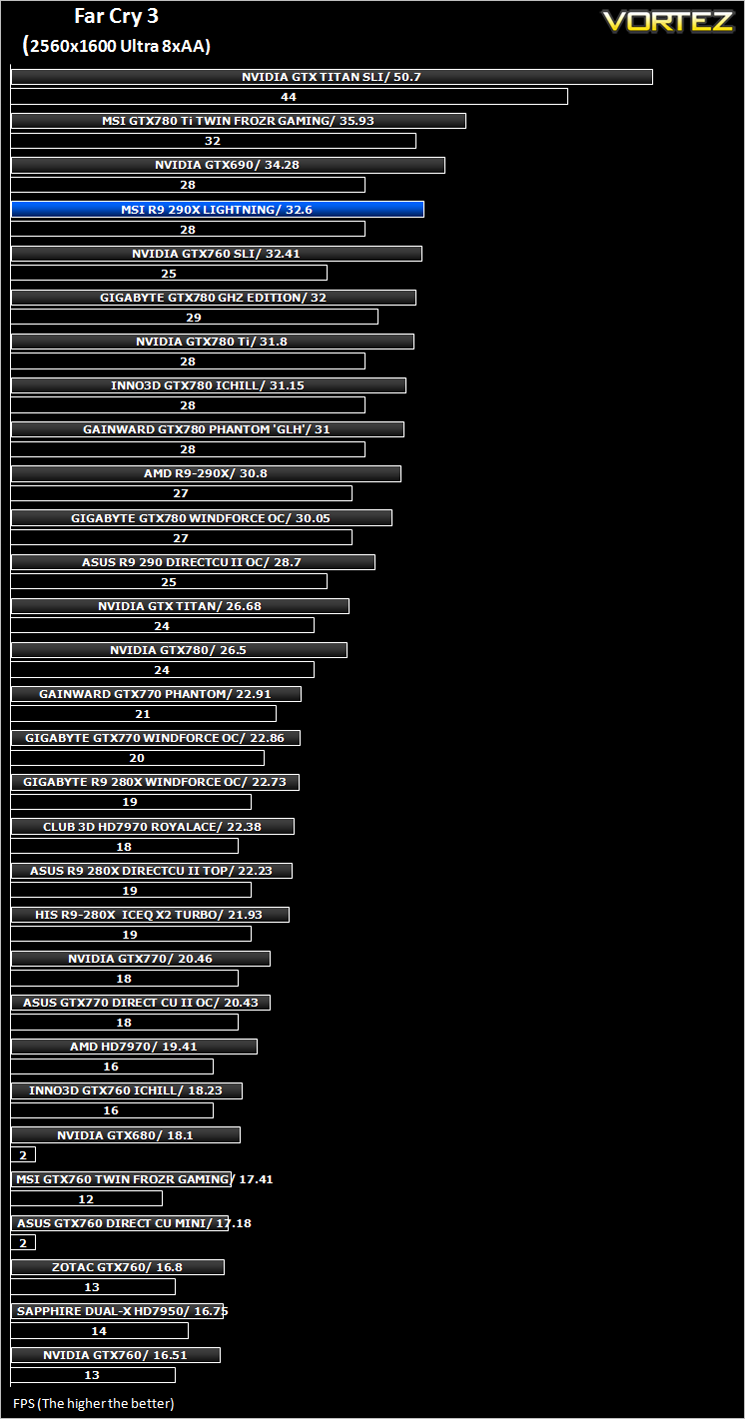
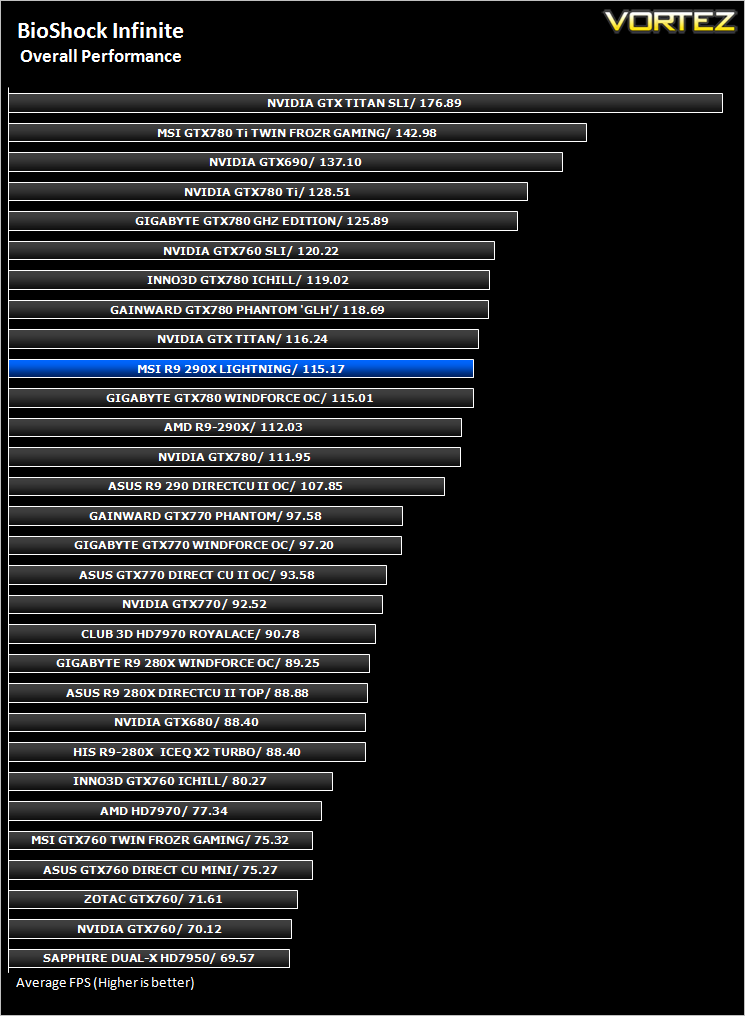
BioShock Infinite (FPS)
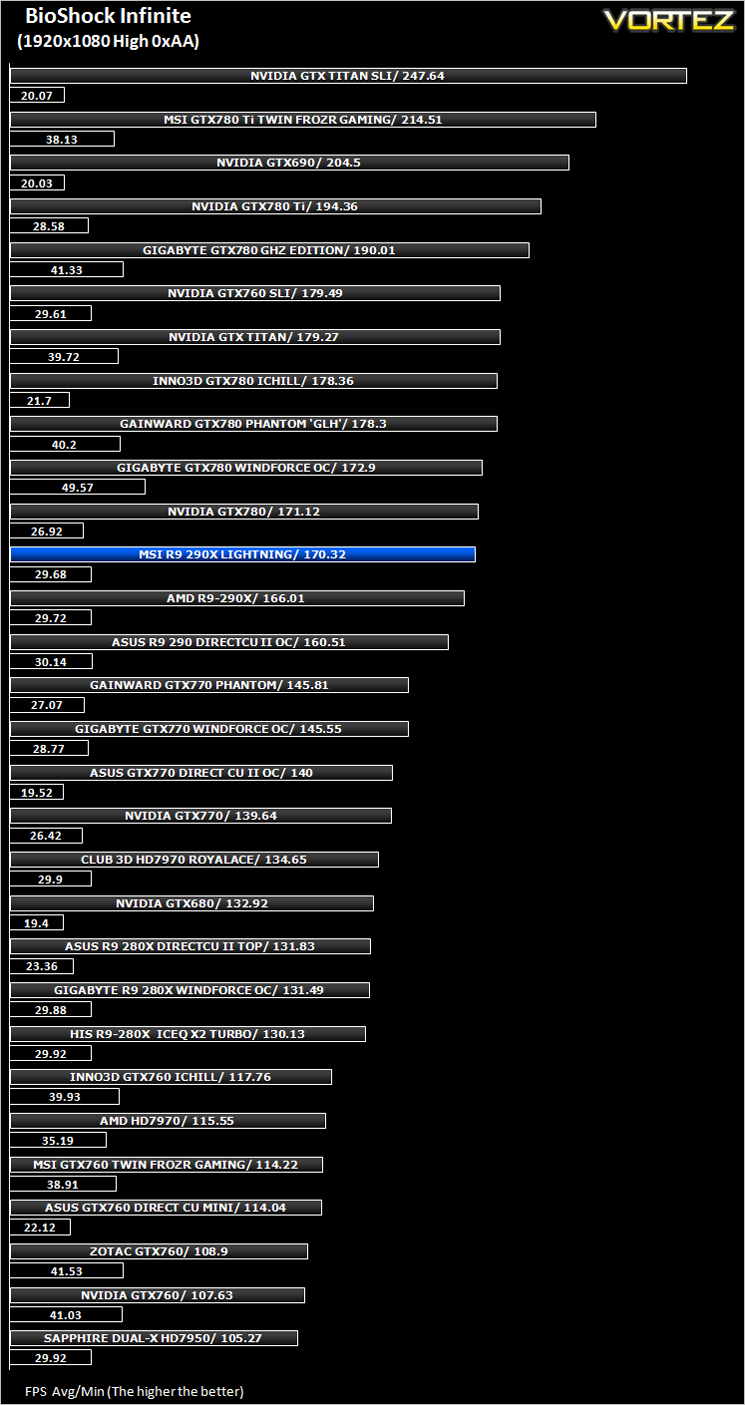
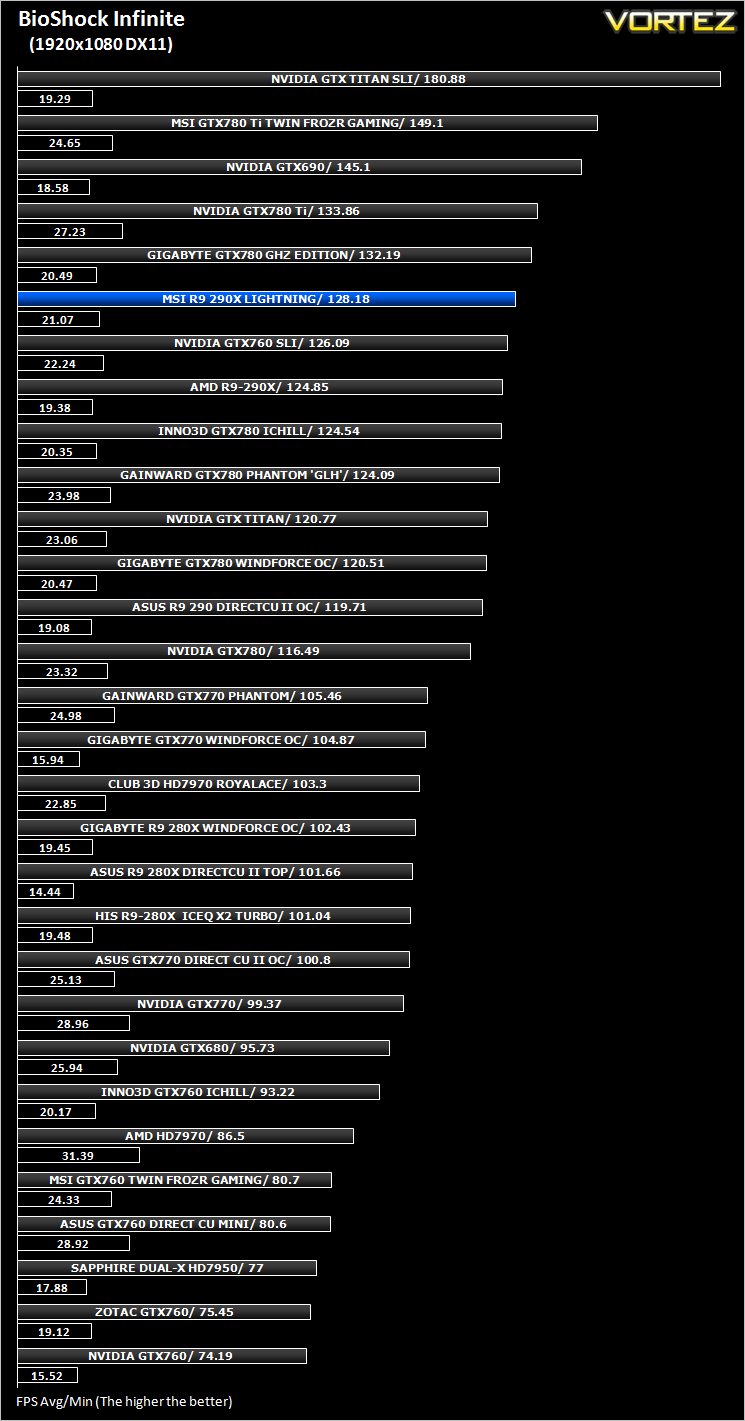
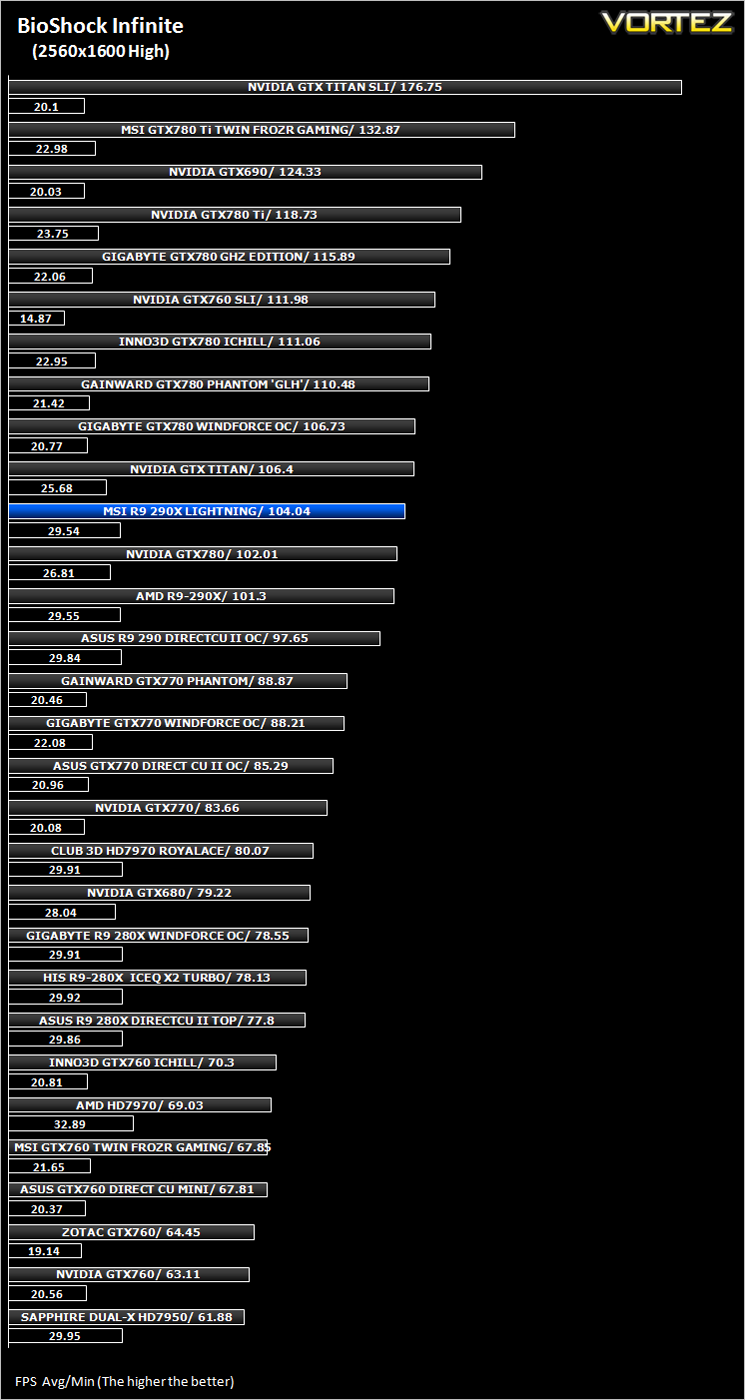
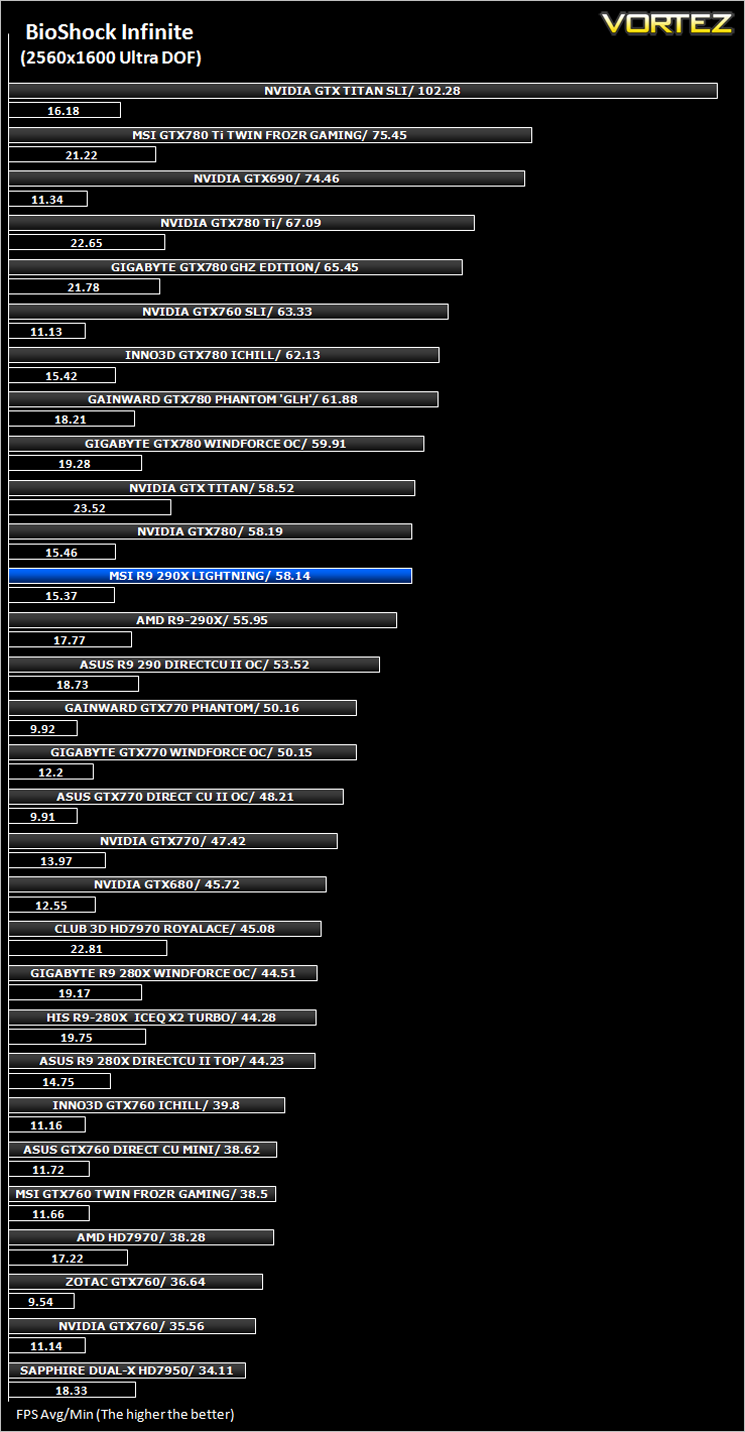
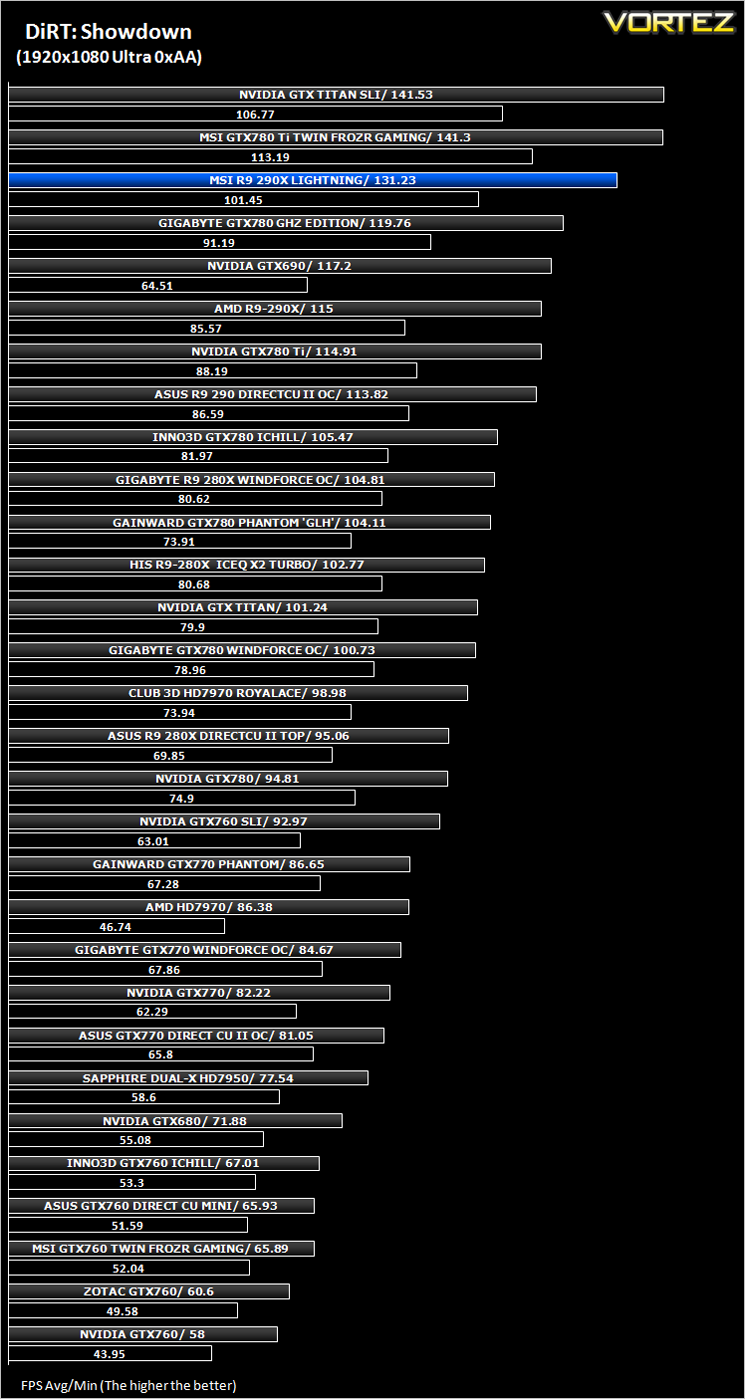
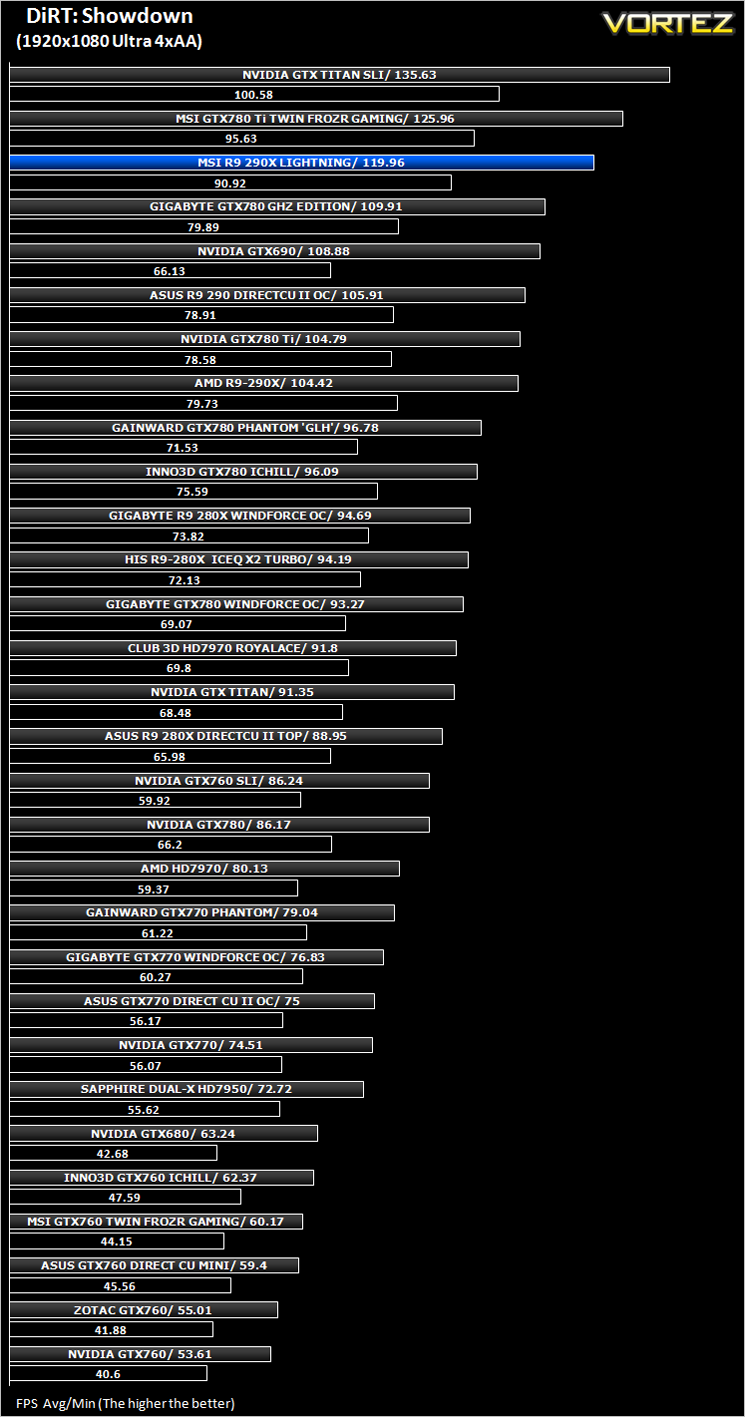
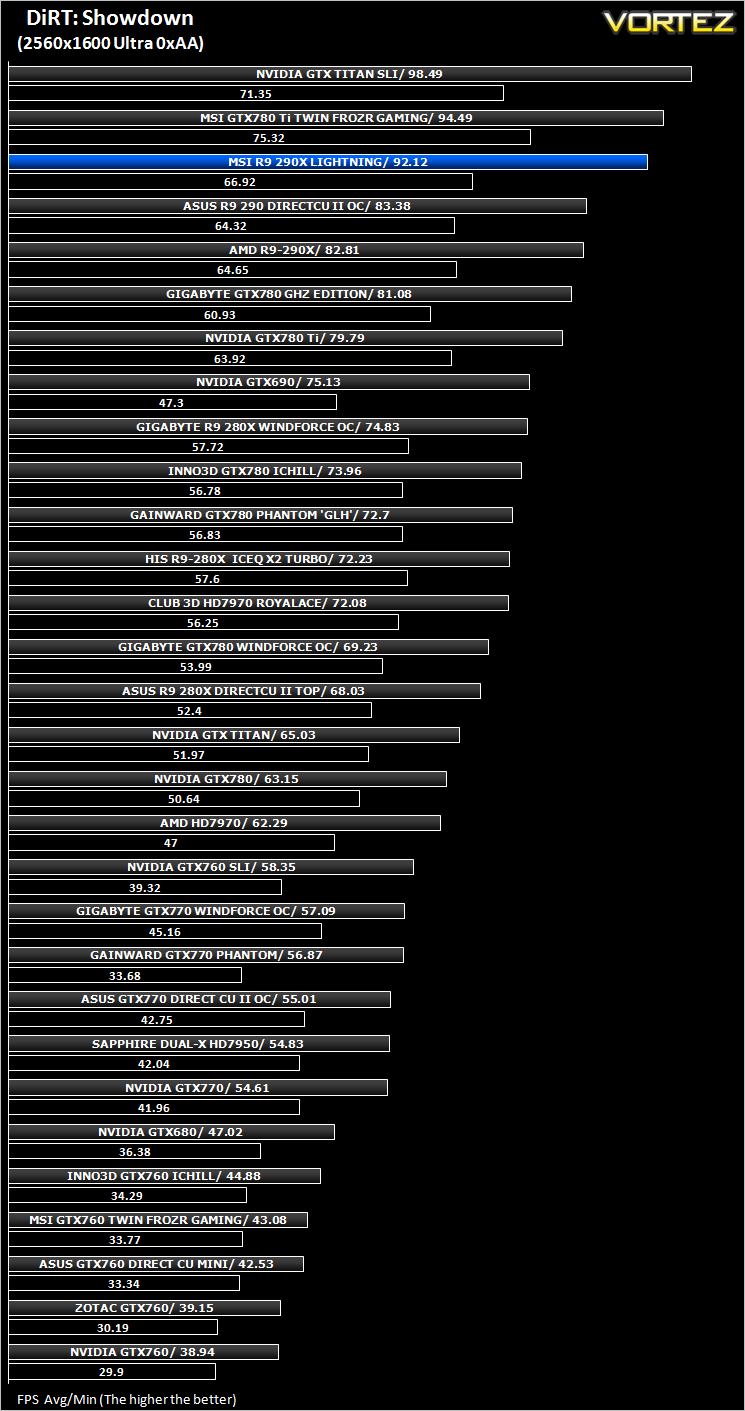
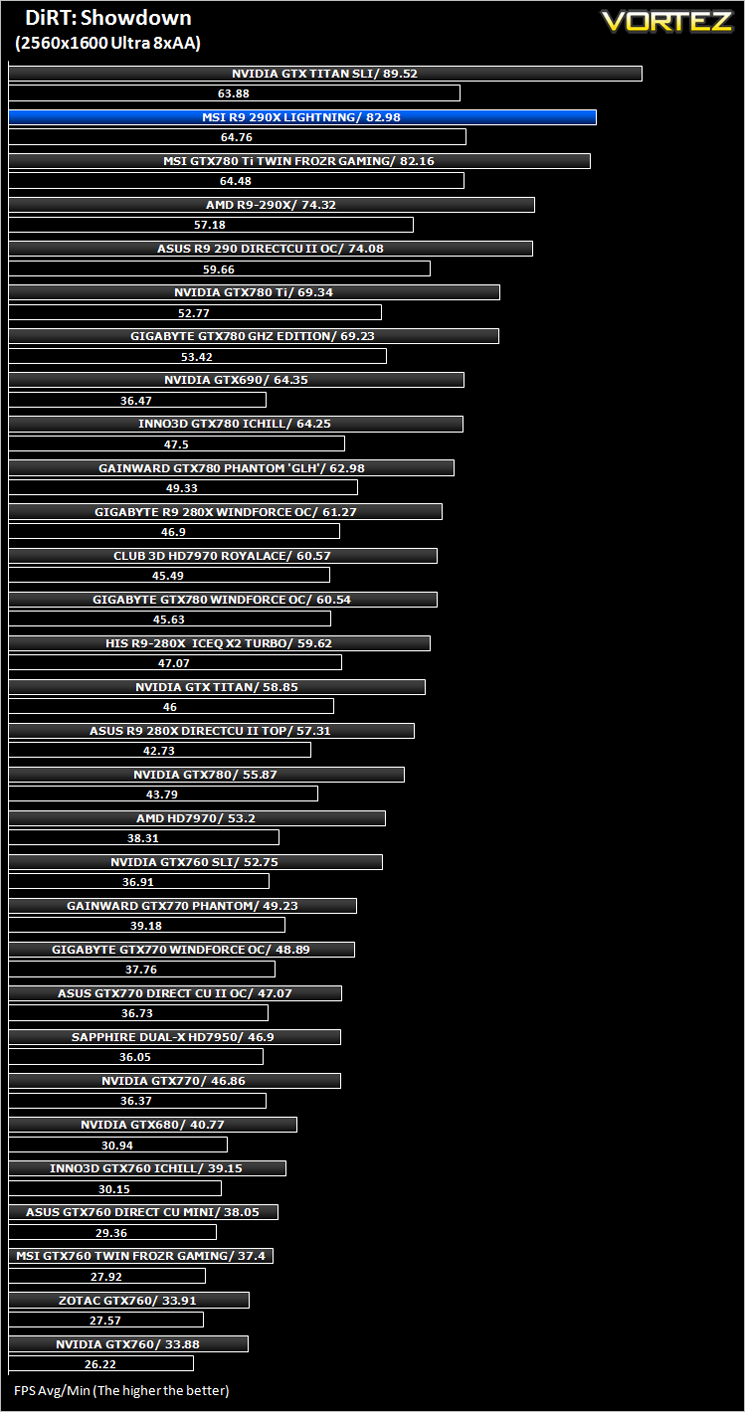
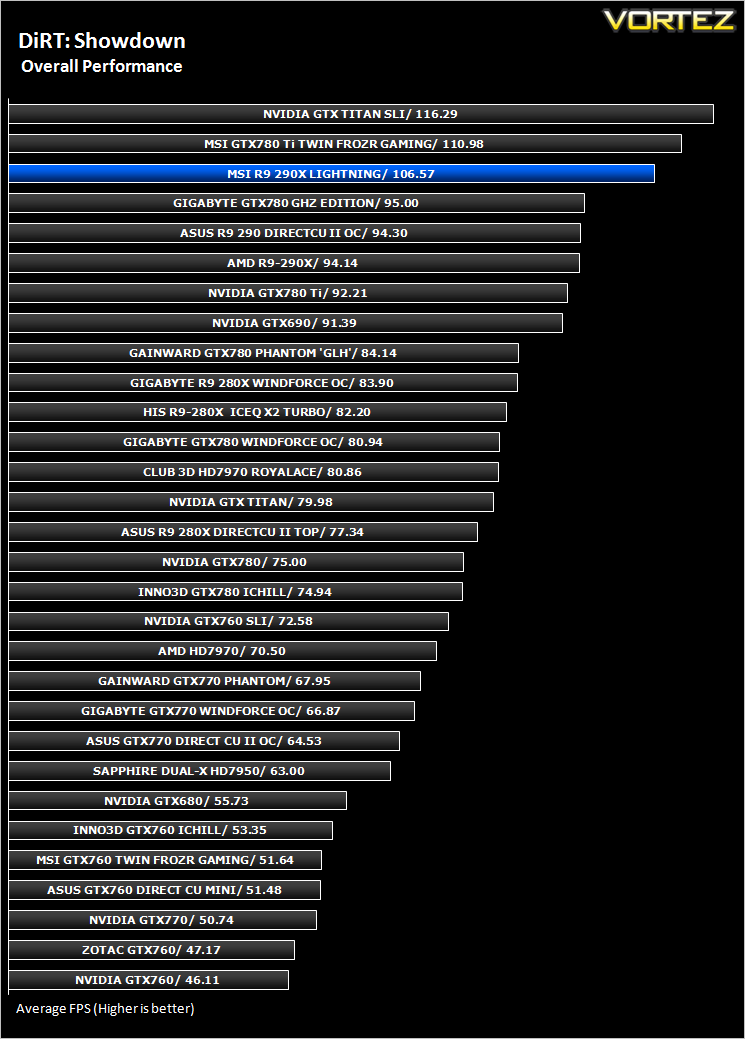
DiRT: Showdown (FPS)
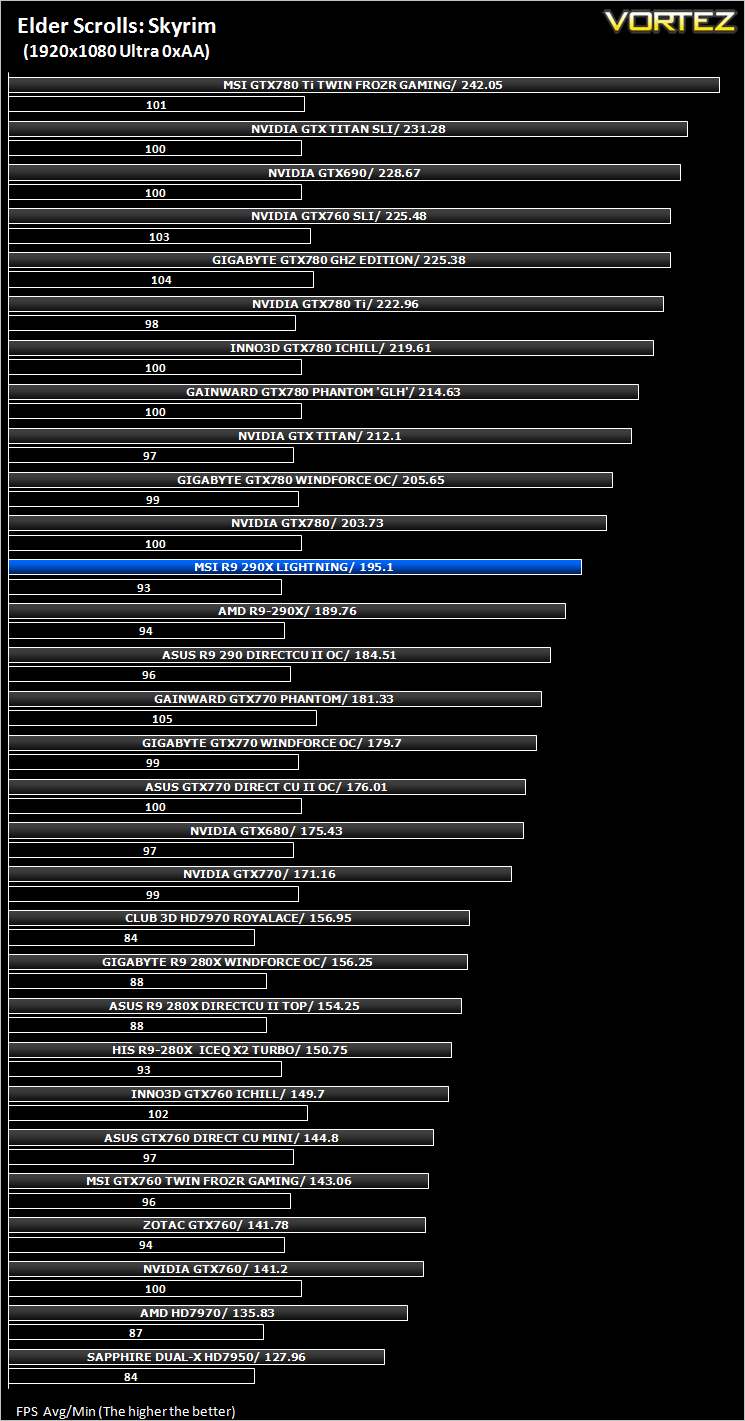
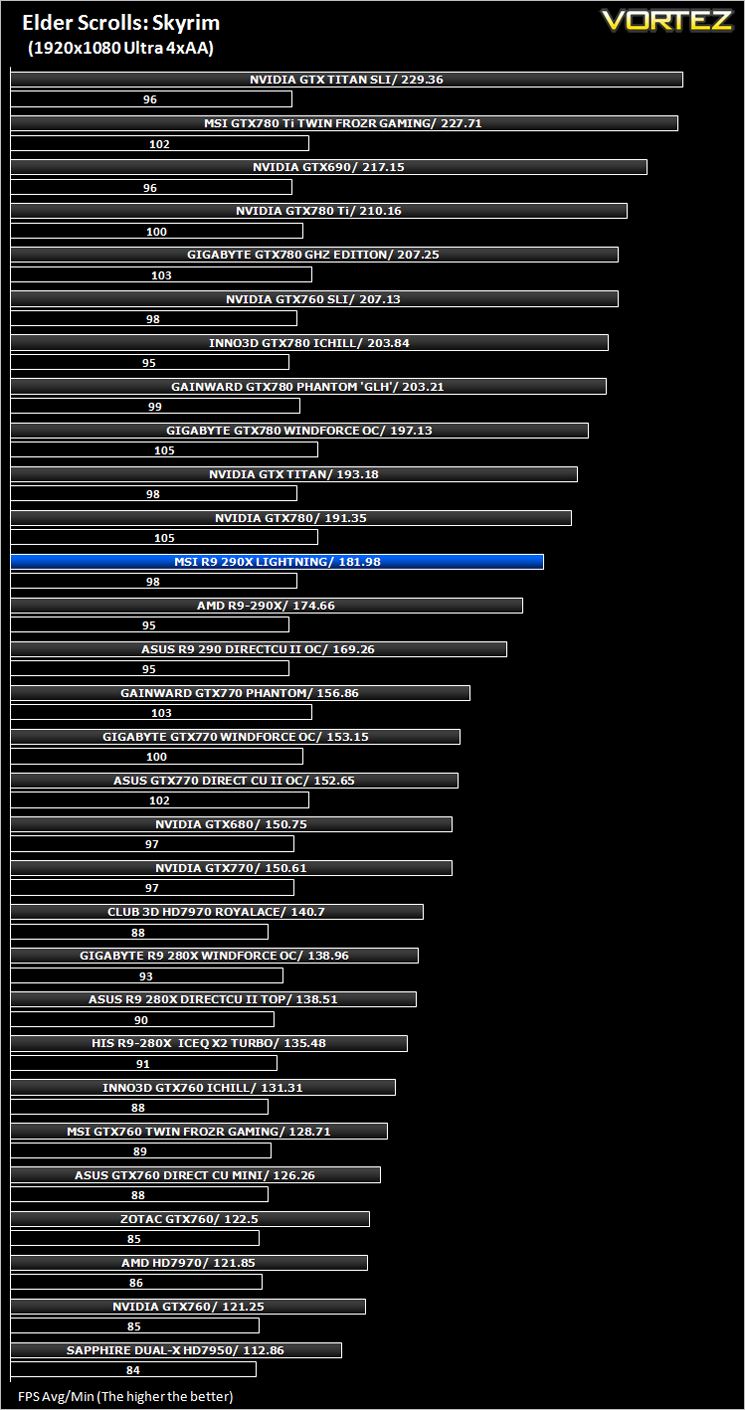
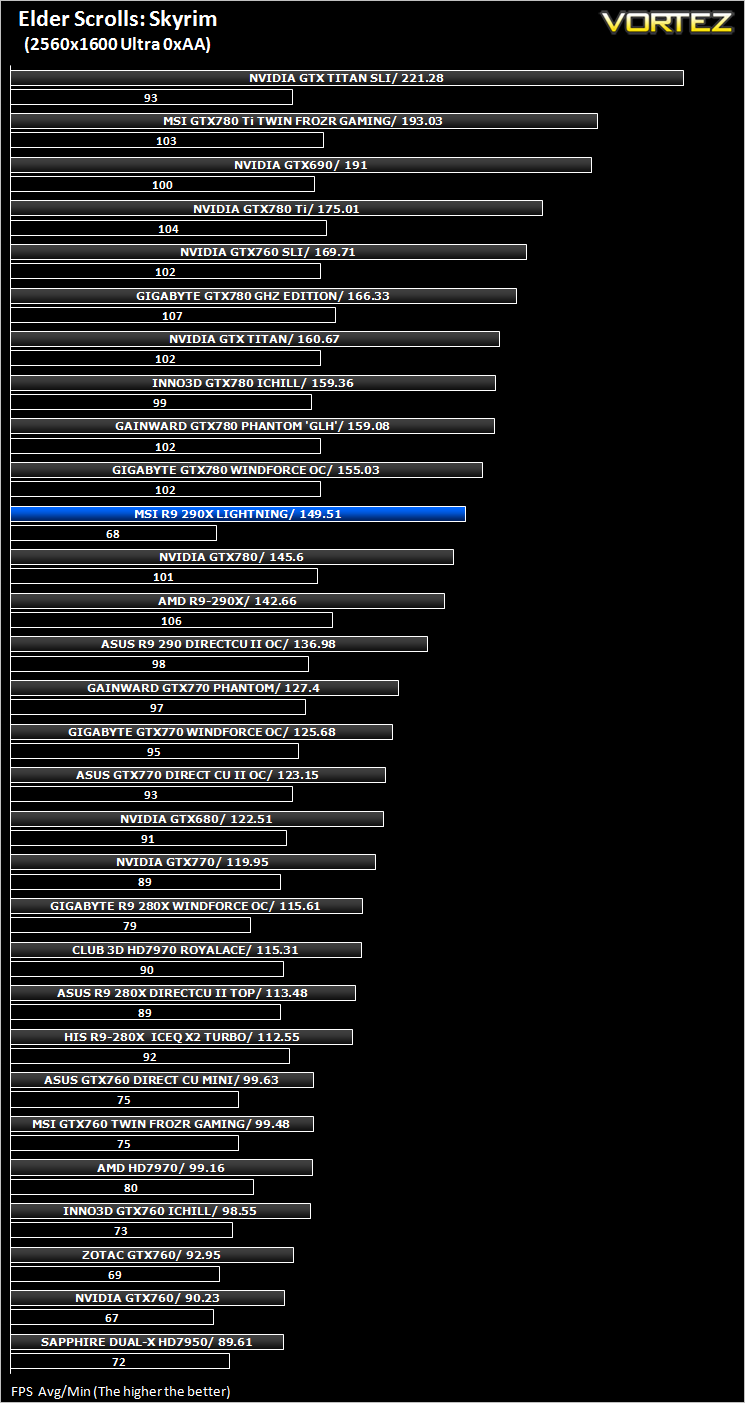
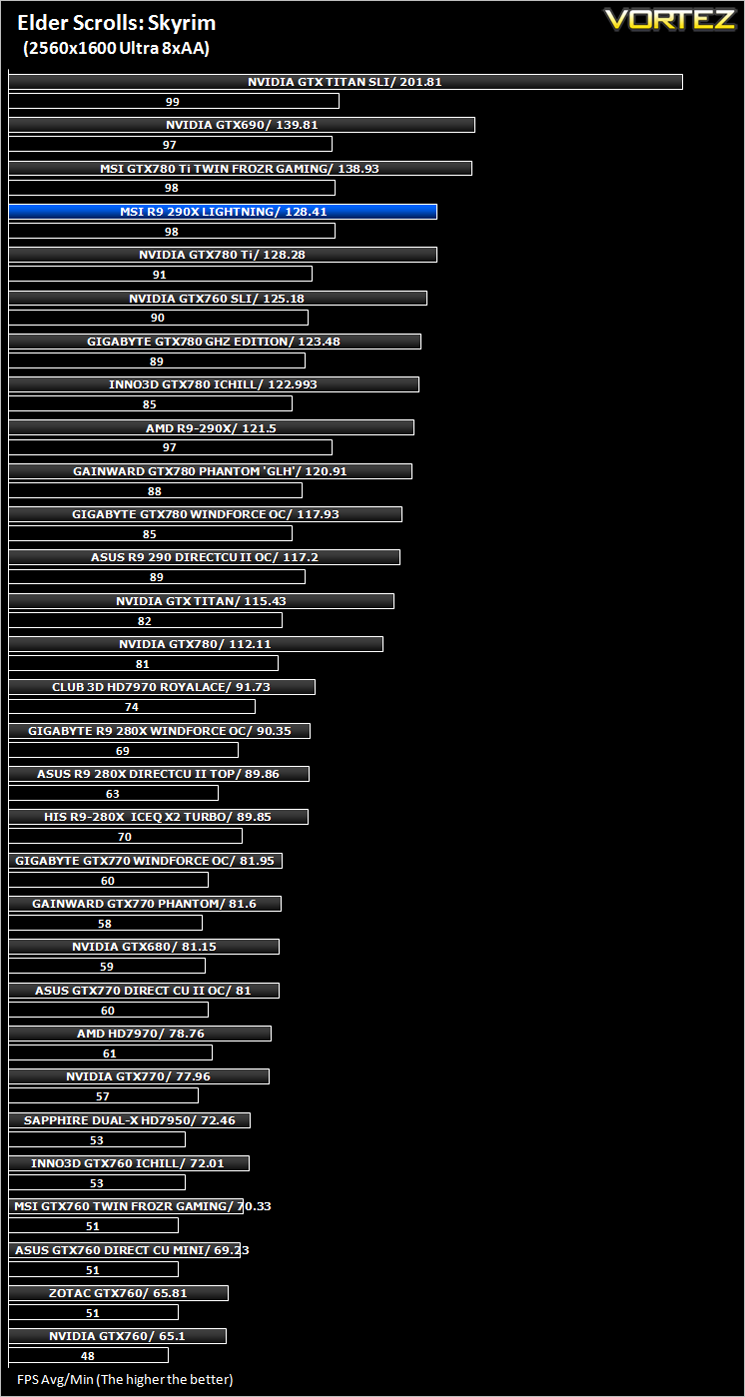
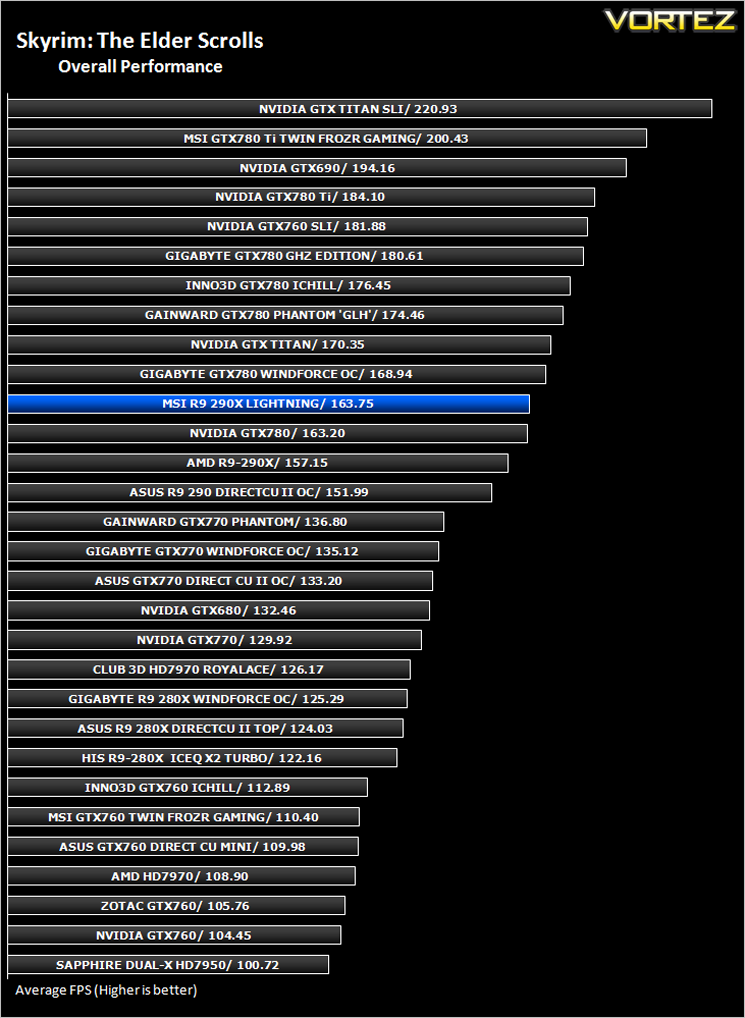
The Elder Scrolls: Skyrim (FPS)
Average and minimum frames per second were measured using Fraps during the drop down passage to Riverwood. V-sync was disabled to allow fluctuating (higher the 60) FPS for these runs. It is however recommended that v-sync is left enabled during normal gameplay due to the games dynamics.
Overall Performance
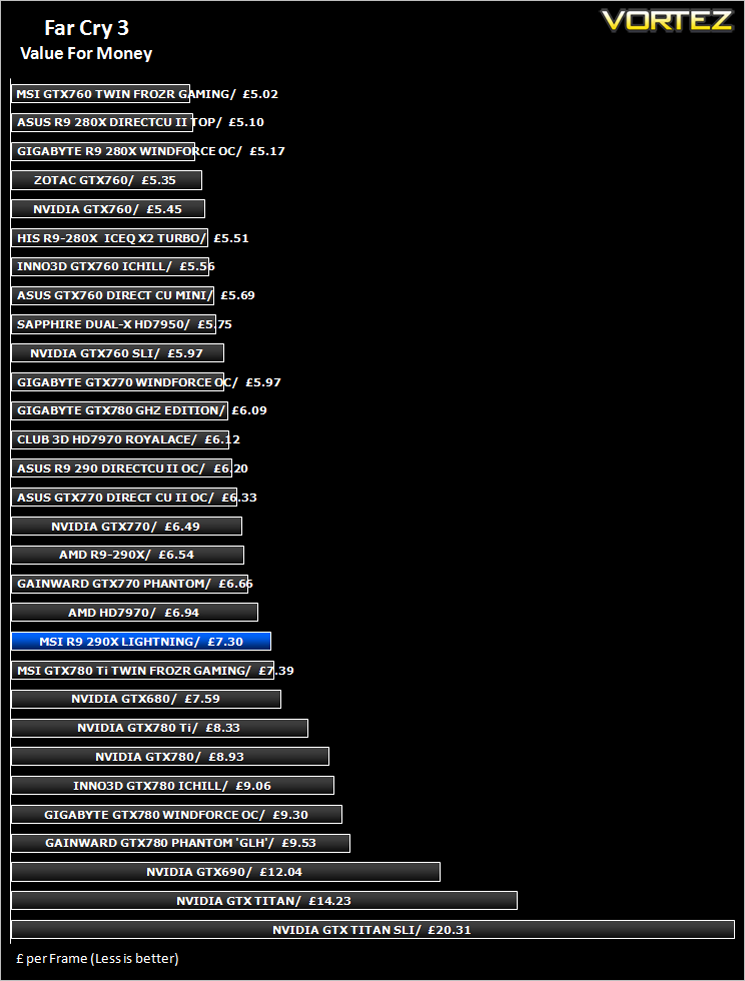
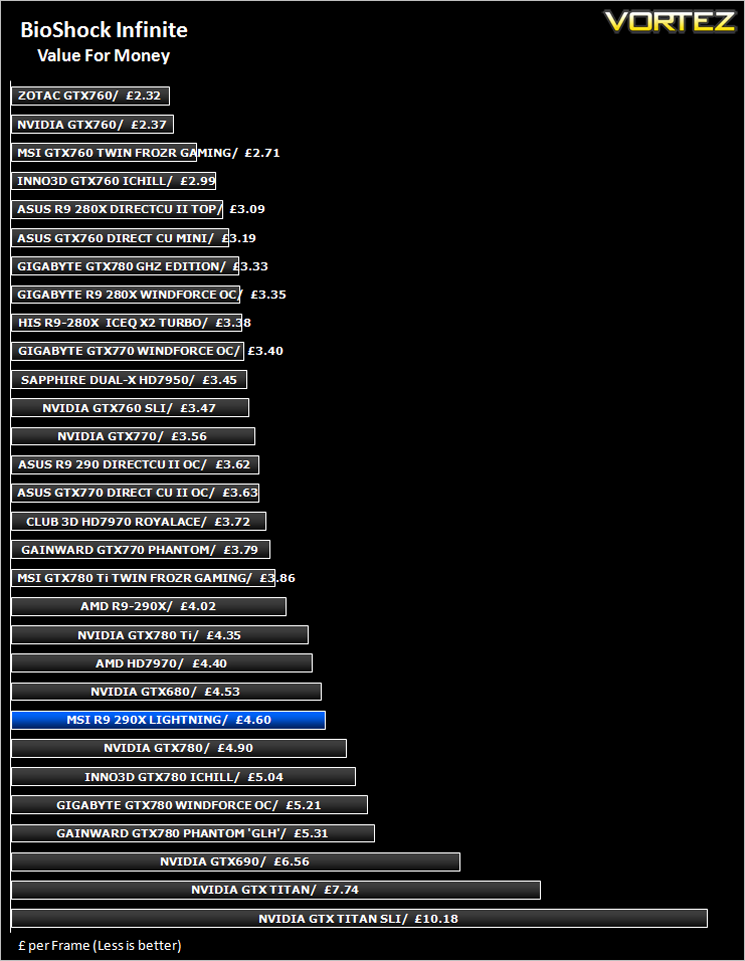
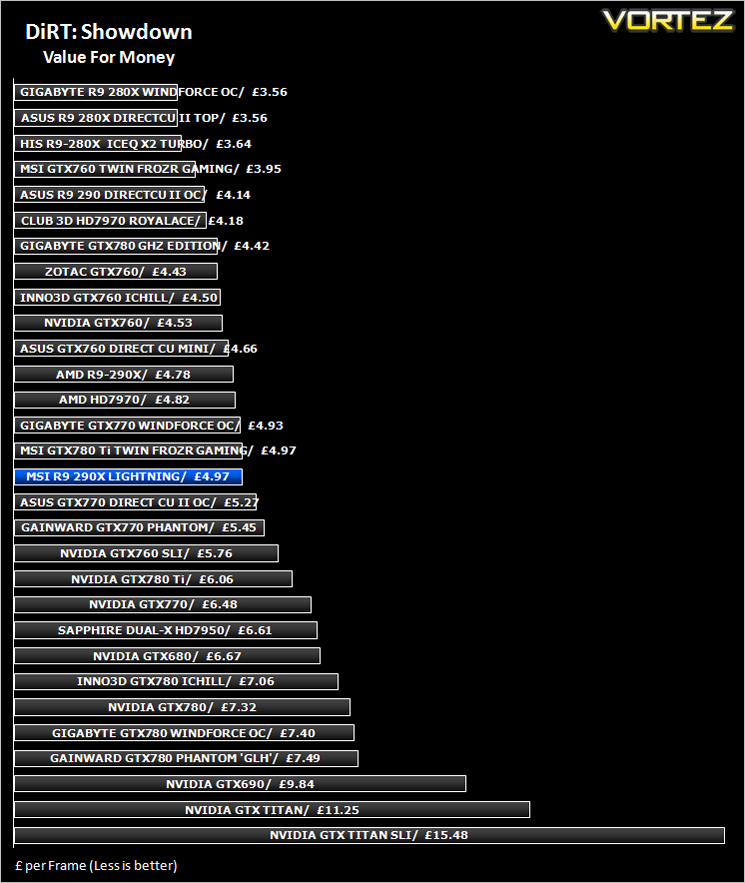
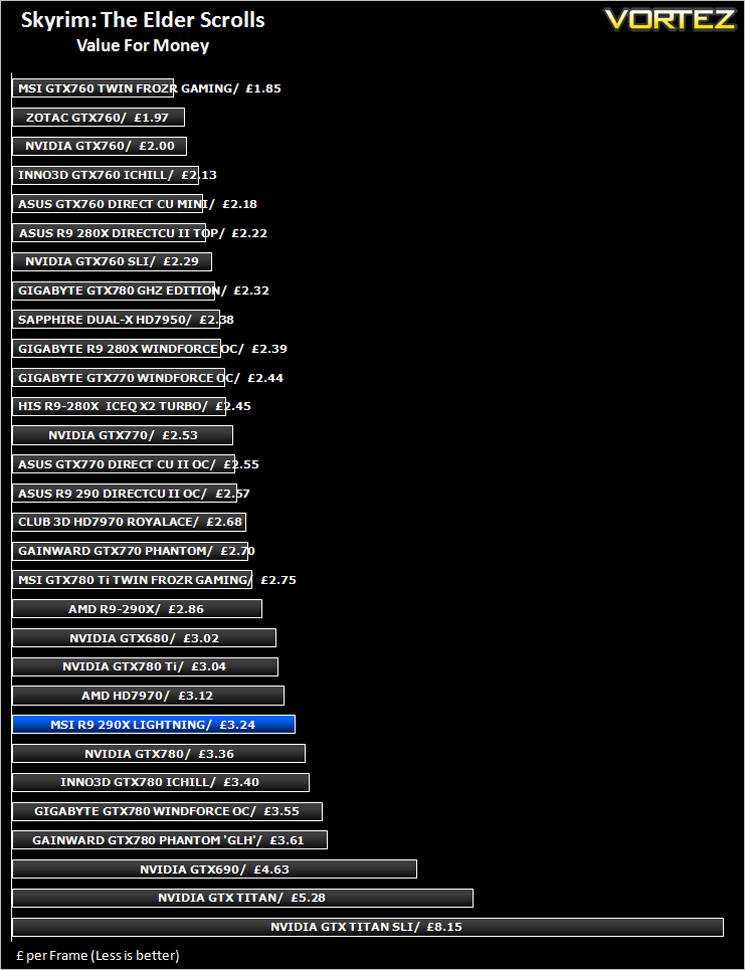
Value For Money
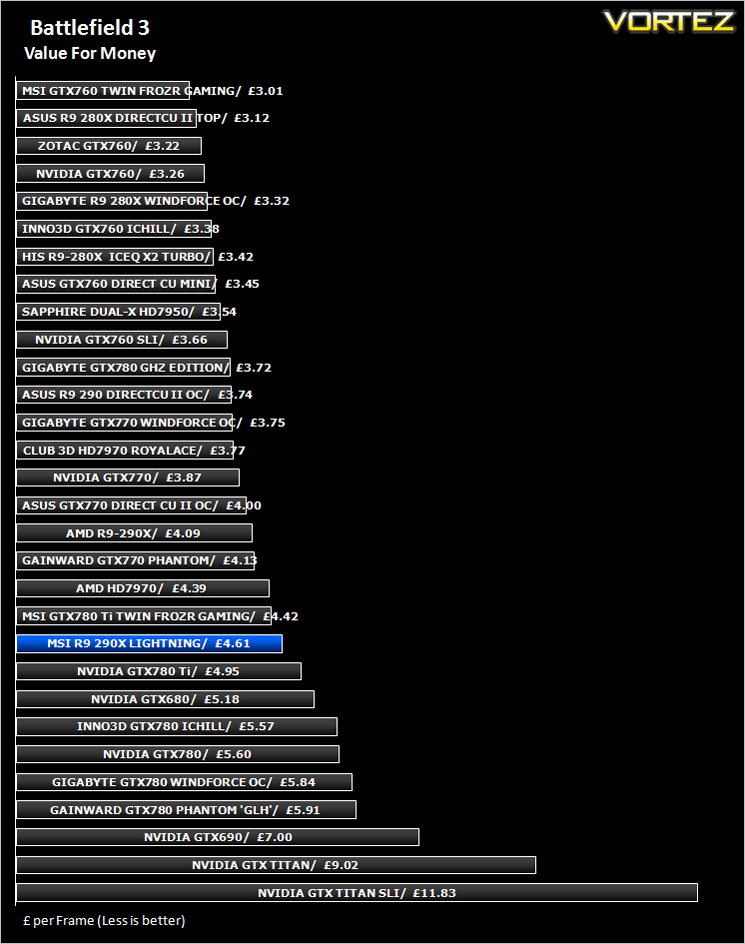
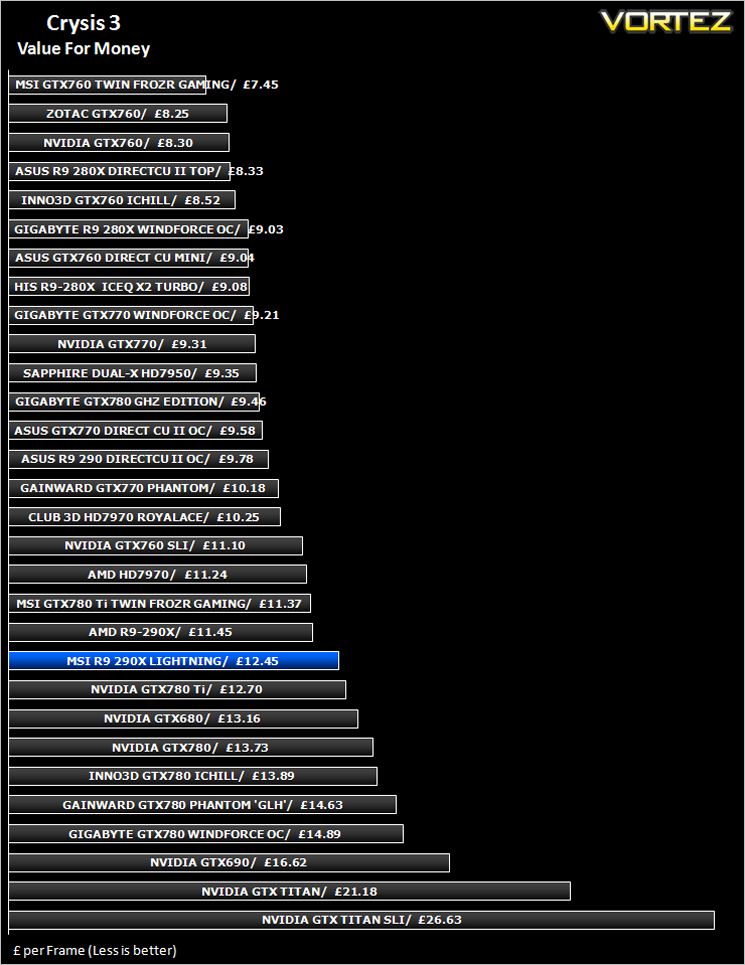
Conclusion
When we were first asked to take a look at the R9 290X Lightning were agreed but with trepidation. Not only due to the fact that the reference design AMD R9 290X did not thoroughly impress us but also because the HD7970 Lightning caused us issues due to its inability to drive a dual link DVI monitor. Our fears however were unfounded and what’s more to the point, we may even be converts to the AMD R9 290X!
MSI have created a monster with the Lightning Edition. While it is equally capable as an everyday card, it is quite clearly aimed toward the ultra high end enthusiast/overclocker. The sheer amount of features to assist overclocking is unparalleled and those features are backed up with some pretty impressive on-board components. This isn’t the first Lightning card we have reviewed so we were hardly surprised at the overclocking theme. Perhaps what impressed us most is the fact that MSI have made a good card, simply fantastic.
The 290X Lightning is very much an enjoyable card to own, particularly if you like to overclock at any level as this card offers more than any other we have sampled in terms of reconfigurability. All of the major components are monitored and tailored for their specific job which makes punishing the card with excessive voltage and clockspeeds all the more pleasurable because you know it can take it. We can only imagine the type of overclocks attainable with the use of LN2. A quick look at HWBOT tells us the 290X responds extremely well to extreme cooling, grabbing the 3DMark records so with the extra capabilities the Lightning furnishes the overclocker, we can expect even higher scores to come.
The only downside to the card is the price. Costing £150 more than a reference design 290X will be hard to swallow for most of us. Even with all of the bells and whistles the Lightning editions furnishes us with it can hardly be described as value for money. It is however, on a par with entry level the GTX 780Ti and because the Lightning has many more features (and overclocking headroom) it is likely to be of greater appeal to those for whom the card was designed for – Overclockers.
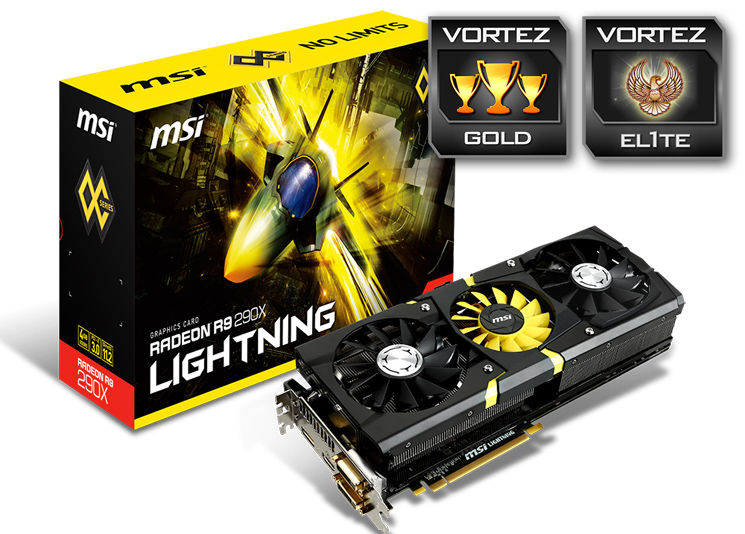
So when all parameters are considered we feel the Lightning is deserving of both our Gold and Elite awards. It is the best R9 290X on the market at present and while it may not be the fastest card as standard, it has the potential, in the right hands, to be a world record breaker and that is something special indeed.
To summarise:
From the packaging to the aesthetics, the on-board components to the overclocking, the MSI R9 290X is sure to blow you away. If you are looking for the best R9 290X money can buy – look no further.
+ Top class cooling
+ Tier one components
+ Excellent overclocking experience
+ Sublime Aesthetics
+ Brilliant monitoring and performance tuning
+ Class leading packaging
Cons
– The GTX 780Ti is still quicker as standard


