In our first review of Grenada XT aka Radeon R9 390X, we take a look at what MSI has to offer in the 390X GAMING 8G featuring Twin Frozr V and a factory overclock.

Product on Review R9 390X GAMING 8G
Manufacturer & Sponsor: MSI
Street Price: £350 GBP/ $429 USD
MSI are well-known within the computer tech industry as a dedicated graphics partner to both AMD and NVIDIA. Their portfolio of expertise reaches into motherboards and has recently even featured peripherals too. Fundamental to the brands success in the graphics arena has been their renowned Twin Frozr cooling solution and inclusion of Military Class components.
Today we’ll be taking a look at MSI’s take on the new R9 390X, courtesy of the GAMING 8G. This graphics card takes advantage of Twin Frozr V cooling solution and benefits from a factory overclock. Against the 290X to which the 390X supersedes, we have an extra 4GB of GDDR5, an additional 1100MHz on the memory clock and an extra 100MHz for the core clock. This graphics card is designed for high-resolution gaming with the idea being that it will be ideally suited to pair up with a 4K monitor.
MSI on their Twin Frozr V
With every new generation of GPUs comes more performance. With every new generation of MSI Twin Frozr we give you less noise and heat!. We’ve listened to all your requests and the new Twin Frozr V is smaller, features stronger fans, generates less noise, keeps your graphics card and its components cooler and matches perfectly with your MSI GAMING motherboard including some funky LED lightning. We’ve spent 18 months on the development of the Twin Frozr V, including field testing in gaming cafés to ensure the cards have the quality and stability to give you the FPS you need.
Technical Specifications
Graphics Processing Unit
AMD Radeon™ R9 390X
Interface
PCI Express x16 3.0
Boost / Base Core Clock
1100 MHz (OC Mode)
1080 MHz (Gaming Mode)
1050 MHz (Silent Mode)
Memory Size (MB)
8192
Memory Type
GDDR5
Memory Interface
512 bits
Memory Clock Speed (MHz)
6100 (OC Mode) / 6000
DVI Connectors
2 (Dual-link DVI-D), Max Resolution: 2560 x 1600 @60 Hz
HDMI Connectors
1 (version 1.4a)
Max Resolution: 4096×2160 @24 Hz (1.4a)
DisplayPort
1 (version 1.2)
Max Resolution: 4096×2160 @60 Hz
Maximum Displays
3
HDCP Support
Y
OpenGL Version Support
4.4
Multi-GPU Technology
CrossFire™
Card Dimension(mm)
277 x 129 x 51
Card Weight (g)
1312
Power consumption (W)
275
Power Connectors
6-pinx1, 8-pin x1
Accessories
6-pin x 1
AMD Radeon™ R9 390X
Interface
PCI Express x16 3.0
Boost / Base Core Clock
1100 MHz (OC Mode)
1080 MHz (Gaming Mode)
1050 MHz (Silent Mode)
Memory Size (MB)
8192
Memory Type
GDDR5
Memory Interface
512 bits
Memory Clock Speed (MHz)
6100 (OC Mode) / 6000
DVI Connectors
2 (Dual-link DVI-D), Max Resolution: 2560 x 1600 @60 Hz
HDMI Connectors
1 (version 1.4a)
Max Resolution: 4096×2160 @24 Hz (1.4a)
DisplayPort
1 (version 1.2)
Max Resolution: 4096×2160 @60 Hz
Maximum Displays
3
HDCP Support
Y
OpenGL Version Support
4.4
Multi-GPU Technology
CrossFire™
Card Dimension(mm)
277 x 129 x 51
Card Weight (g)
1312
Power consumption (W)
275
Power Connectors
6-pinx1, 8-pin x1
Accessories
6-pin x 1
Packaging & Bundle
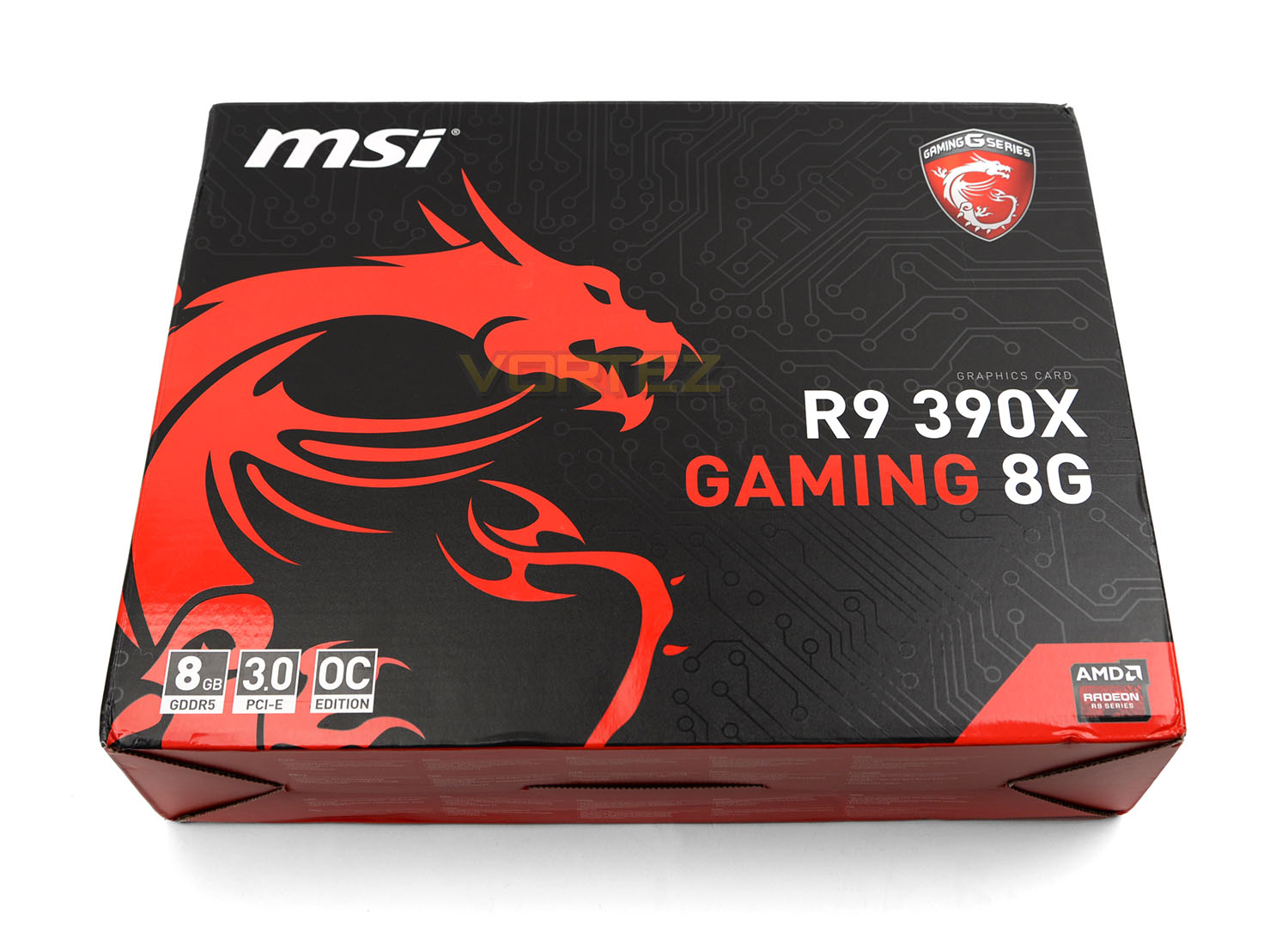
390X GAMING 8G is presented in an attractive and sturdy box. Since this graphics card has its roots based in the MSI’s gaming series, the dragon insignia can be clearly seen. On the reverse there is a comprehensive run-down of the features and specifications.
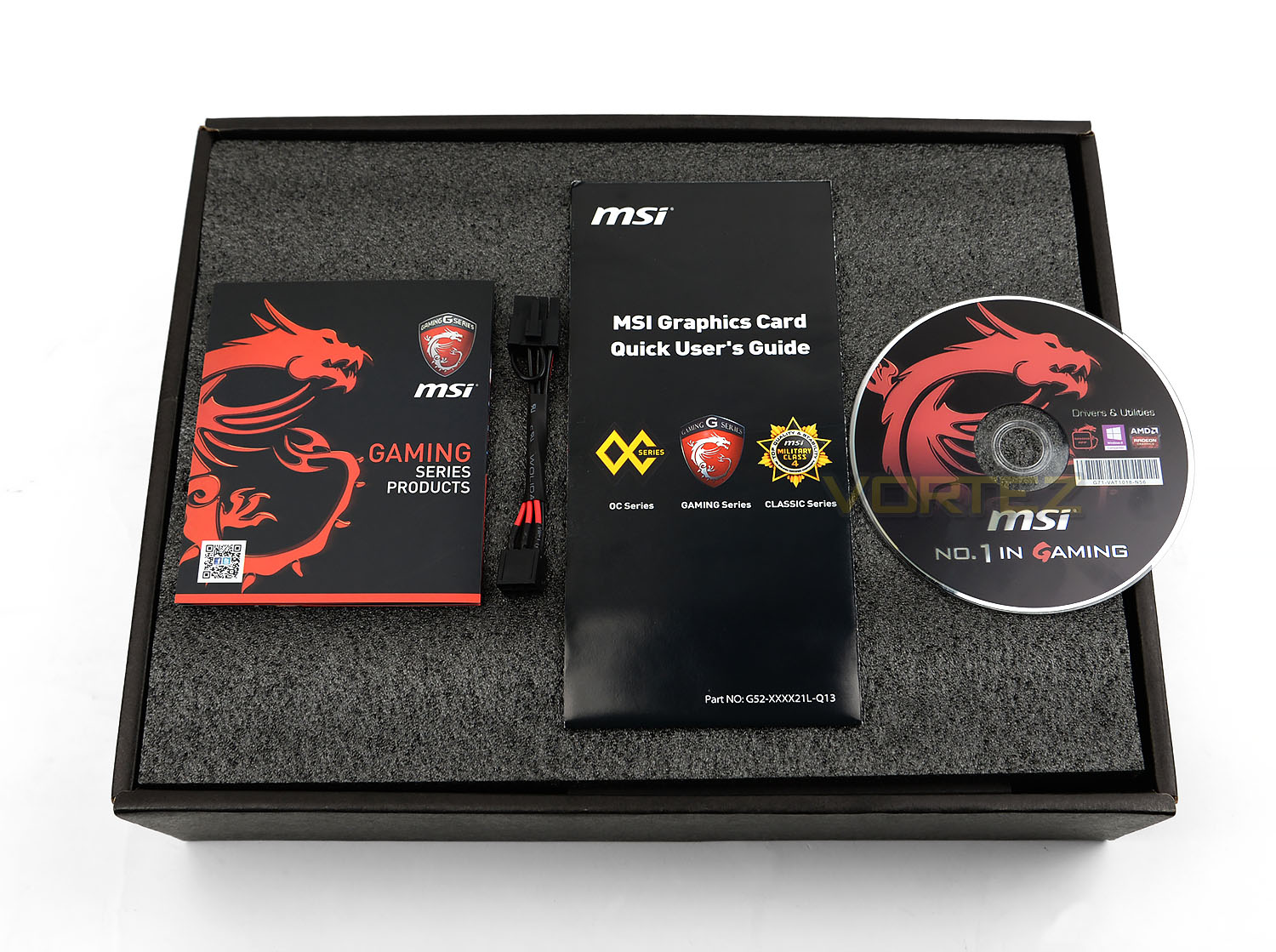
Opening the box up, there are a number of included items within the bundle. These items are as follows:
• Documentation – Product portfolio & User Guide
• Driver CD
• PCI Express adapter
Closer Look (With Cooler)
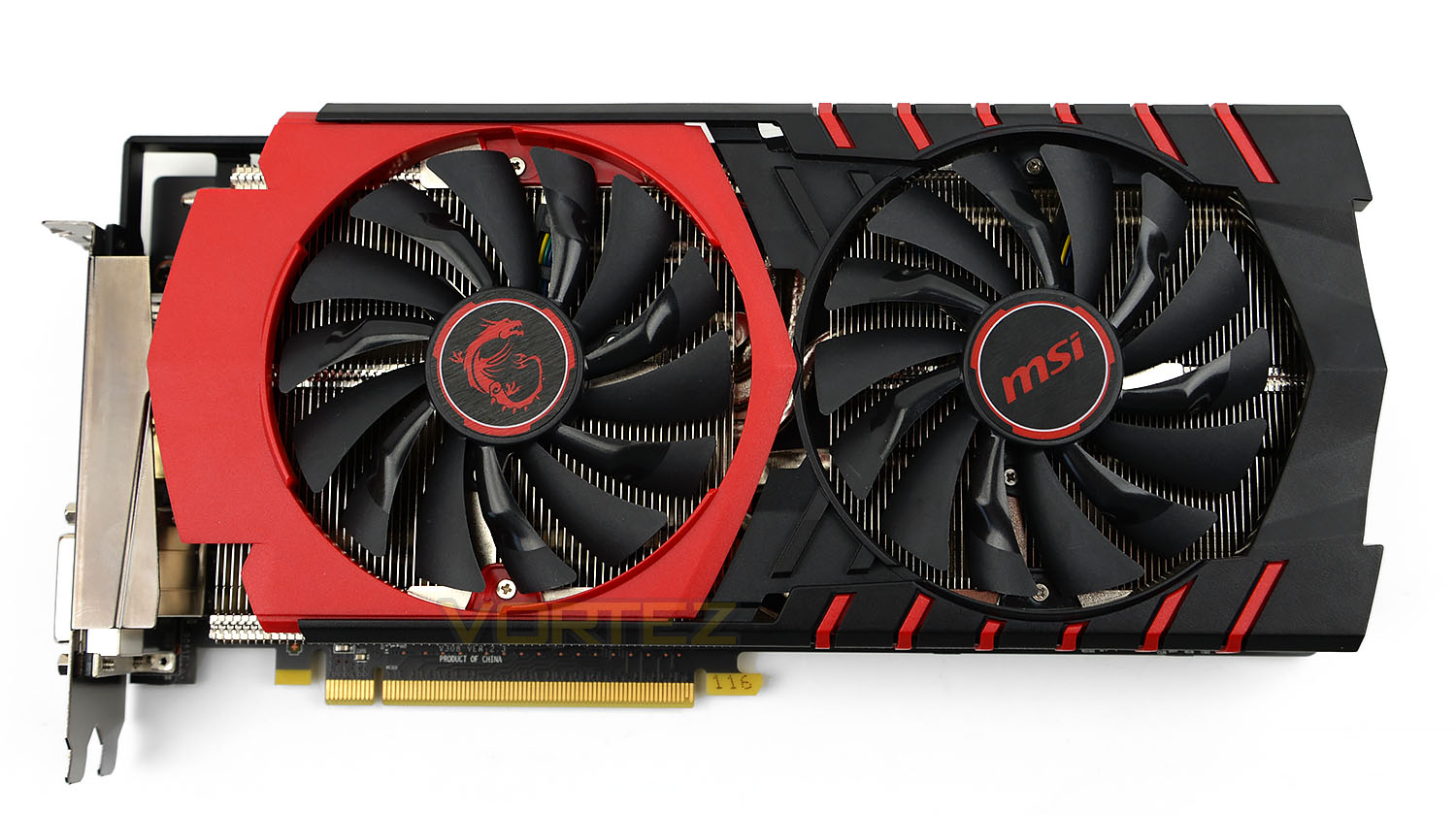
Core Clock (OC): 1100MHz
Memory Clock (OC): 6100 MHz
Memory Size: 8GB GDDR5
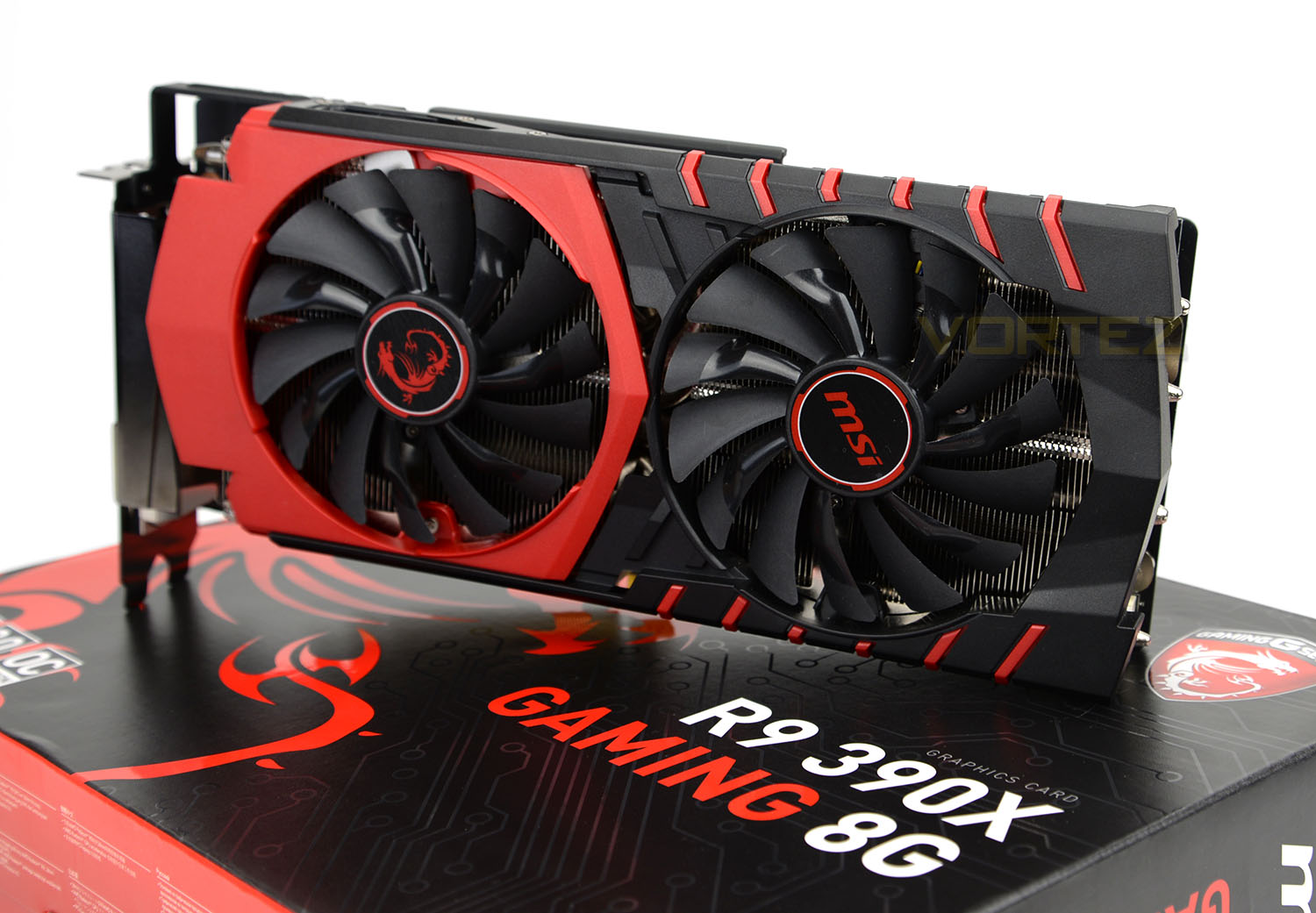
Fundamental to 390X GAMING 8G’s feature-set is the new Twin Frozr V cooling solution. Those with a black and/or red motherboard will be able to pair this card up perfectly and if you’re a fan of MSI’s gaming series then adding this such a card will be a perfect match in terms of aesthetics.
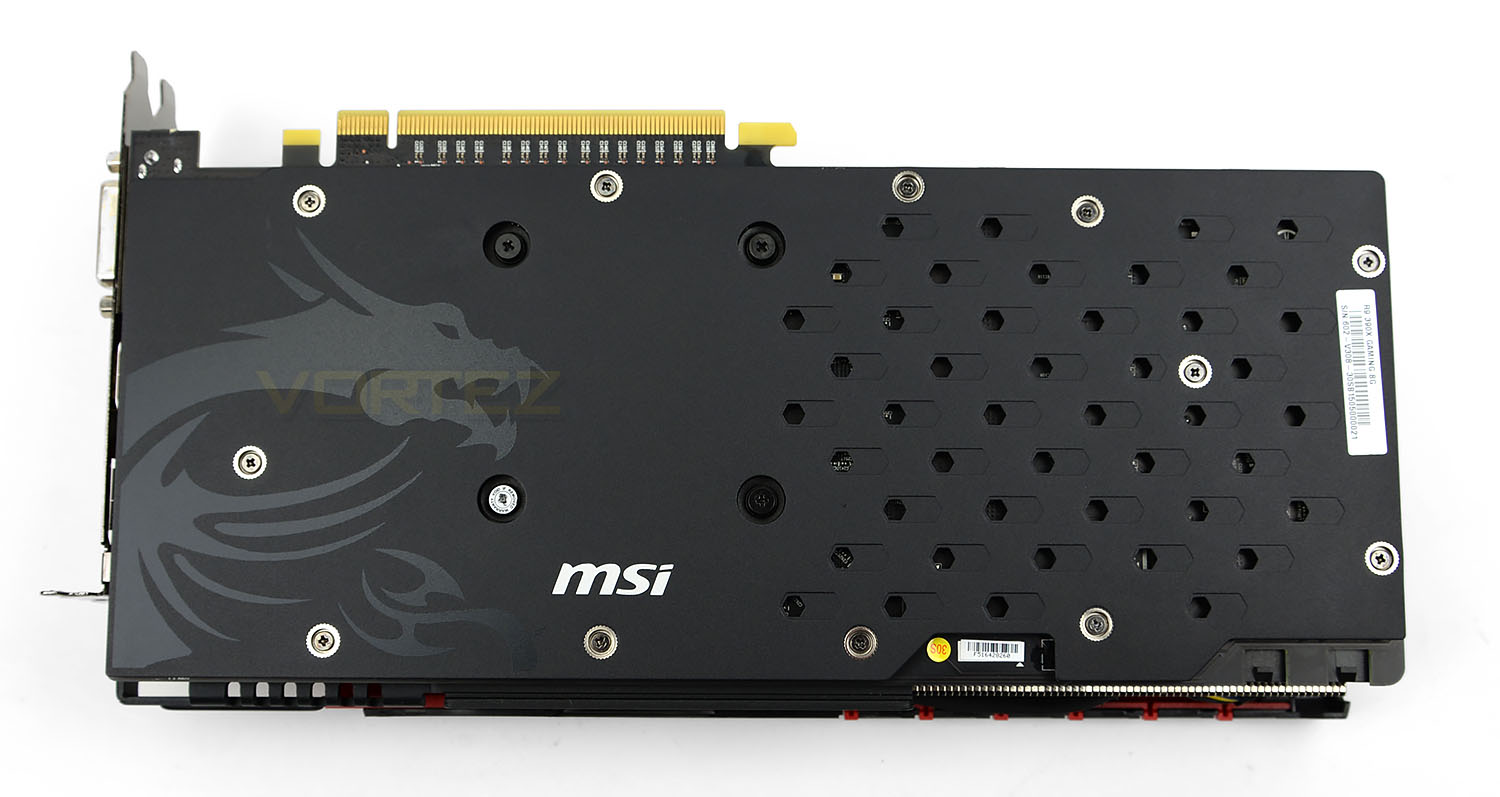
Unlike some of the other graphics cards from MSI which use Twin Frozr V, this latest version utilises a solid metal backplate to give the card rigidity. This backplate has the dragon emblem stamped on it and has a series of perforations to allow some ventilation for the VRMs. This backplate also gives PCB some physical protection – the PCB and chips are fully covered.
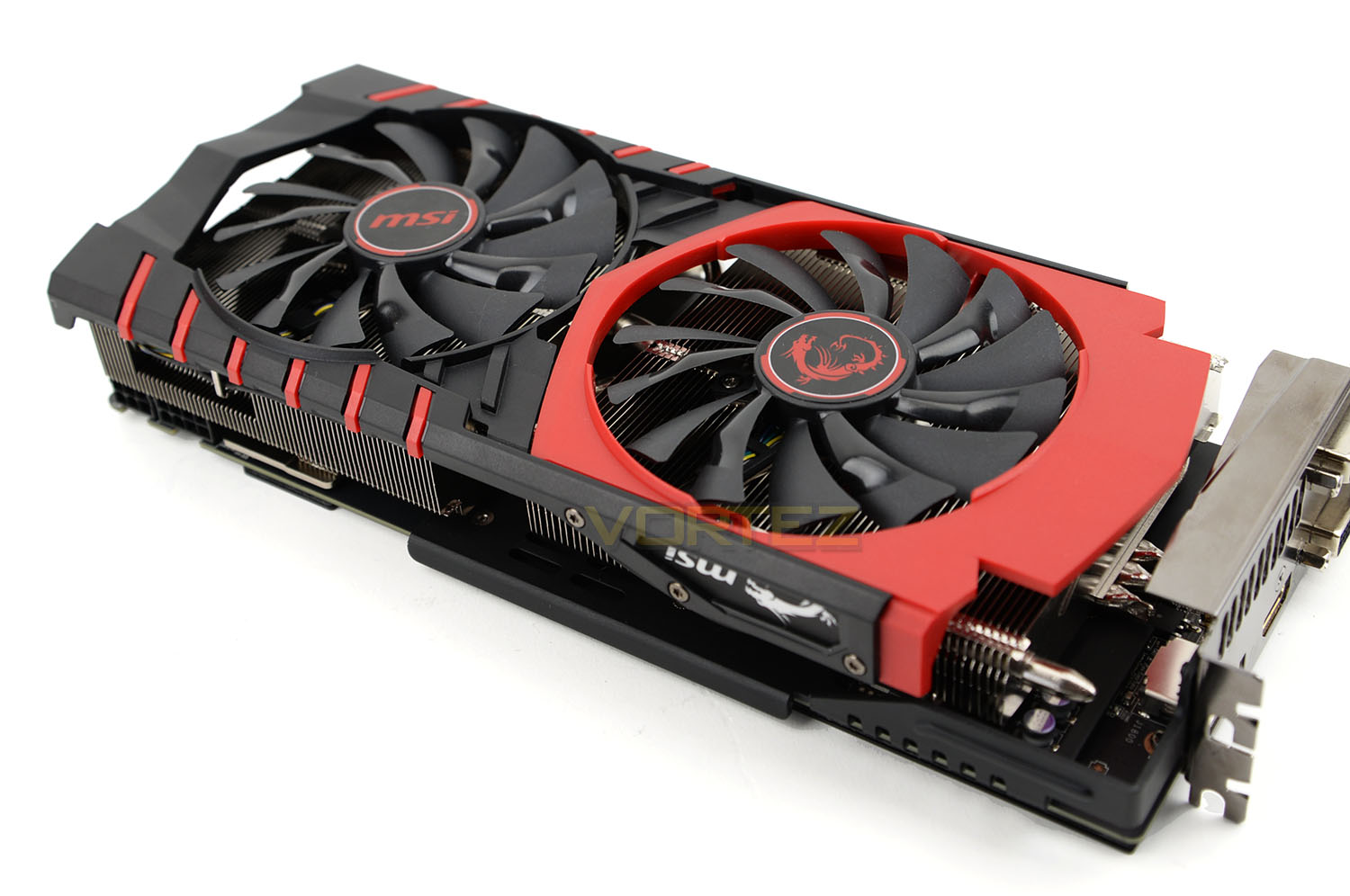
The Twin Frozr V cooler uses a dual-cooling fan configuration. MSI has given the fans “Dispersion” blades which scoop more air without increasing drag. This points to 19% more airflow compared to the previous generation of Twin Frozr cooler. MSI also claim this configuration emits less noise too.
Furthermore to this, during idle state the fans cease spinning to reduce noise and extend the lifetime of the bearings.
Along the edge we have the MSI logo and that reoccurring dragon emblem – both illuminate when the card is powered up and the LED can be adjusted within a special software app.
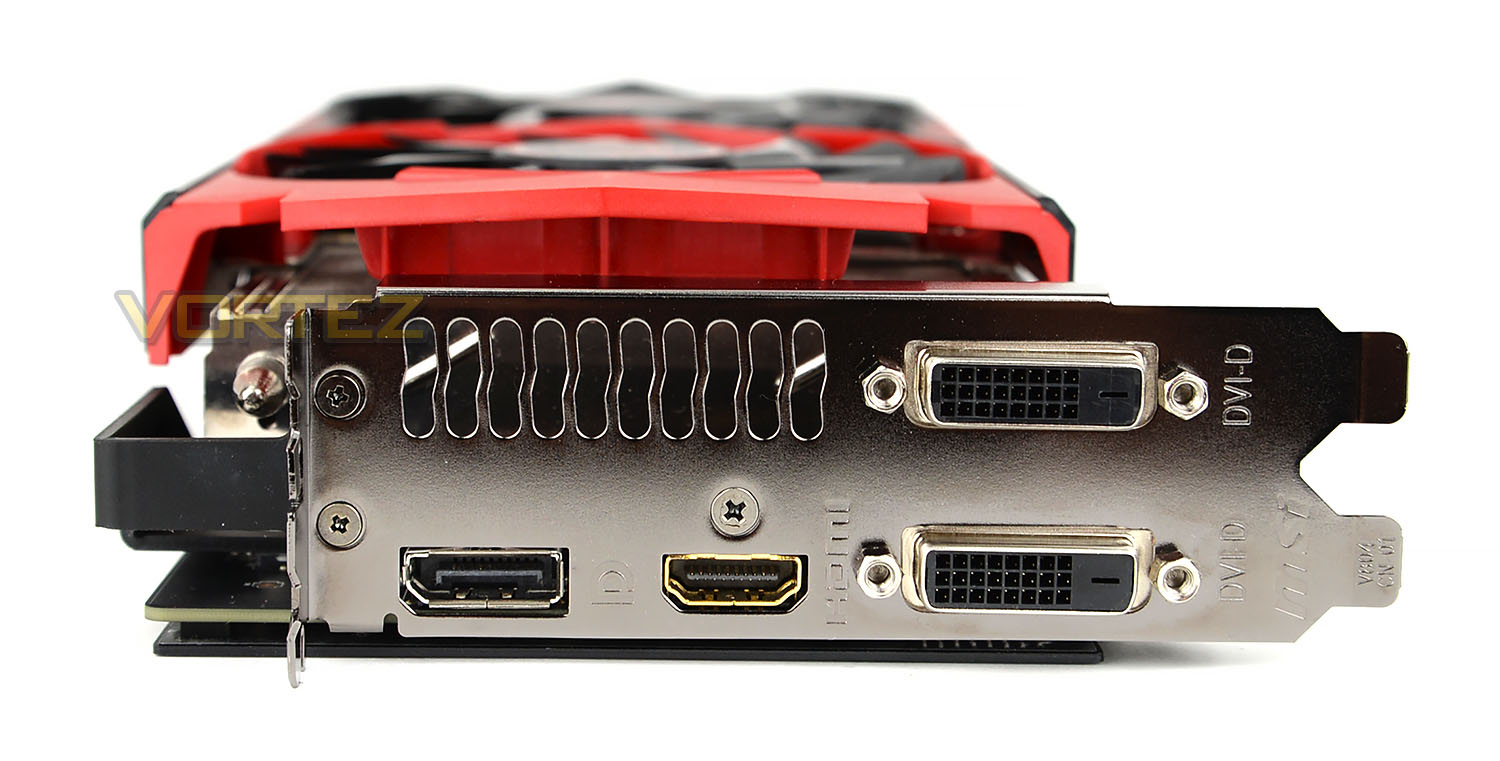
Focusing our attention on the IO area there are an assortment of different ports available.
• Dual-Link DVI-D (Up to 3K @ 60Hz)
• HDMI 1.4a (Up to 4K @ 24Hz)
• DisplayPort 1.2 (Up to 4K @ 60Hz)
To get the most out of this card, if you’re using a 4K monitor it’s better to use a DP cable as 60Hz is an option – unlike HDMI which only supplies lower refresh rates.
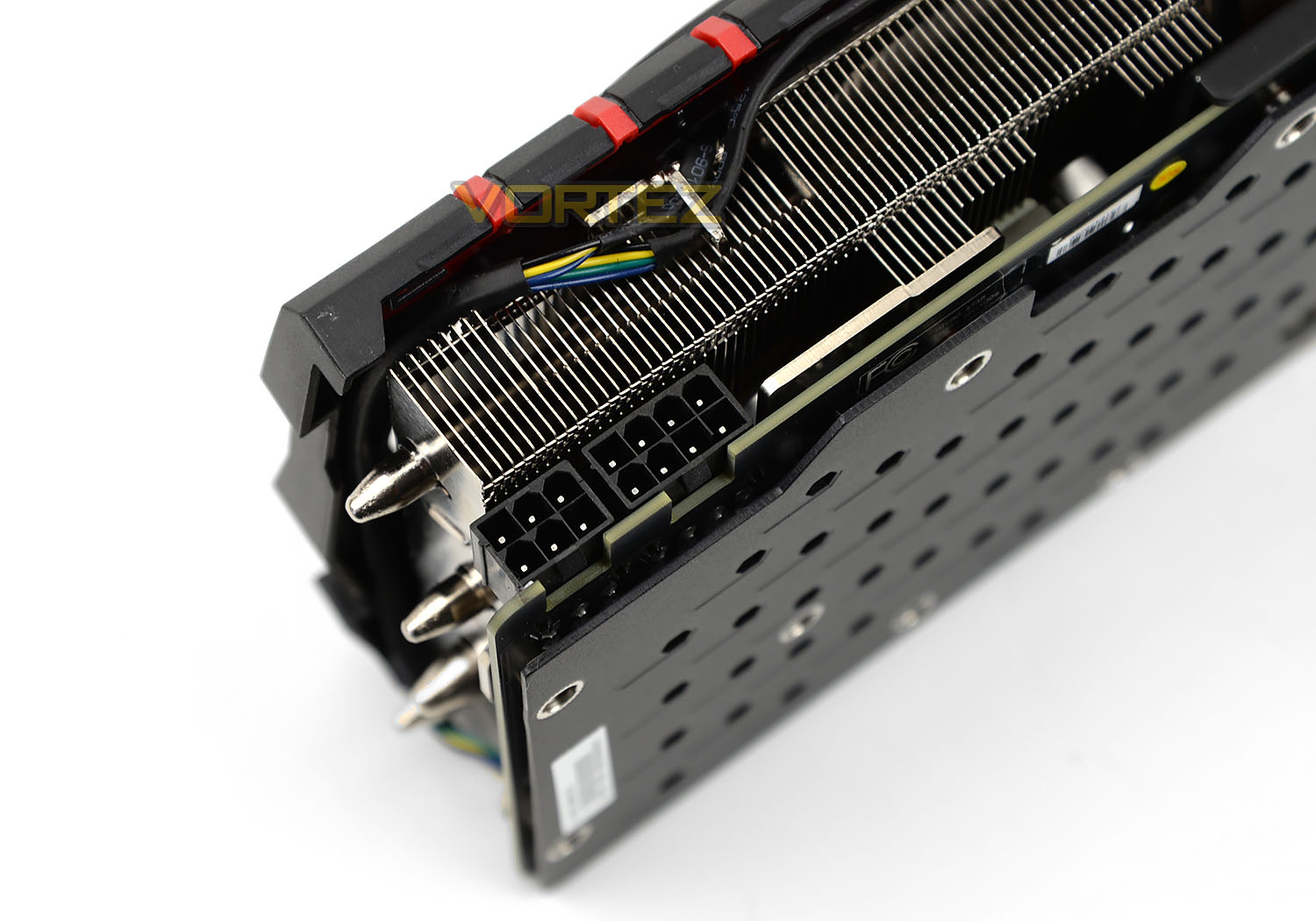
On the back edge of the card we have 8+6-pin PCI Express ports. To ensure proper stability, AMD recommend 750W power supply with 50A on the +12v rail.
Closer Look (Without Cooler)
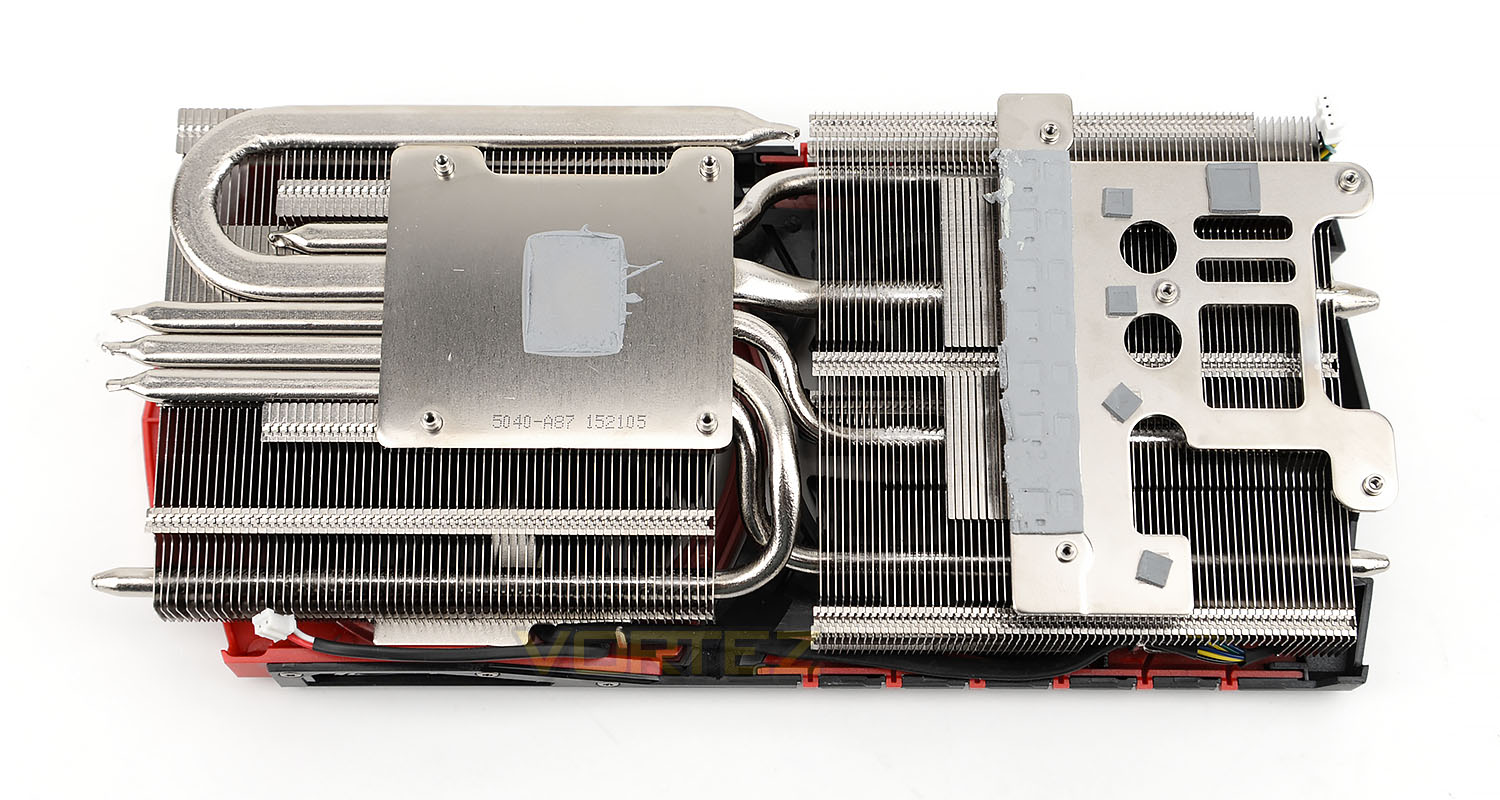
To detach the cooler from the graphics card a total of sixteen screws need to be removed from the backplate. After removing the heatsink we can clearly see the SuperSU design which utilises 2x8mm and 2x6mm copper heatpipes to direct heat away from the GPU. Adequate thermal pads are placed over the VRM/SFCs.
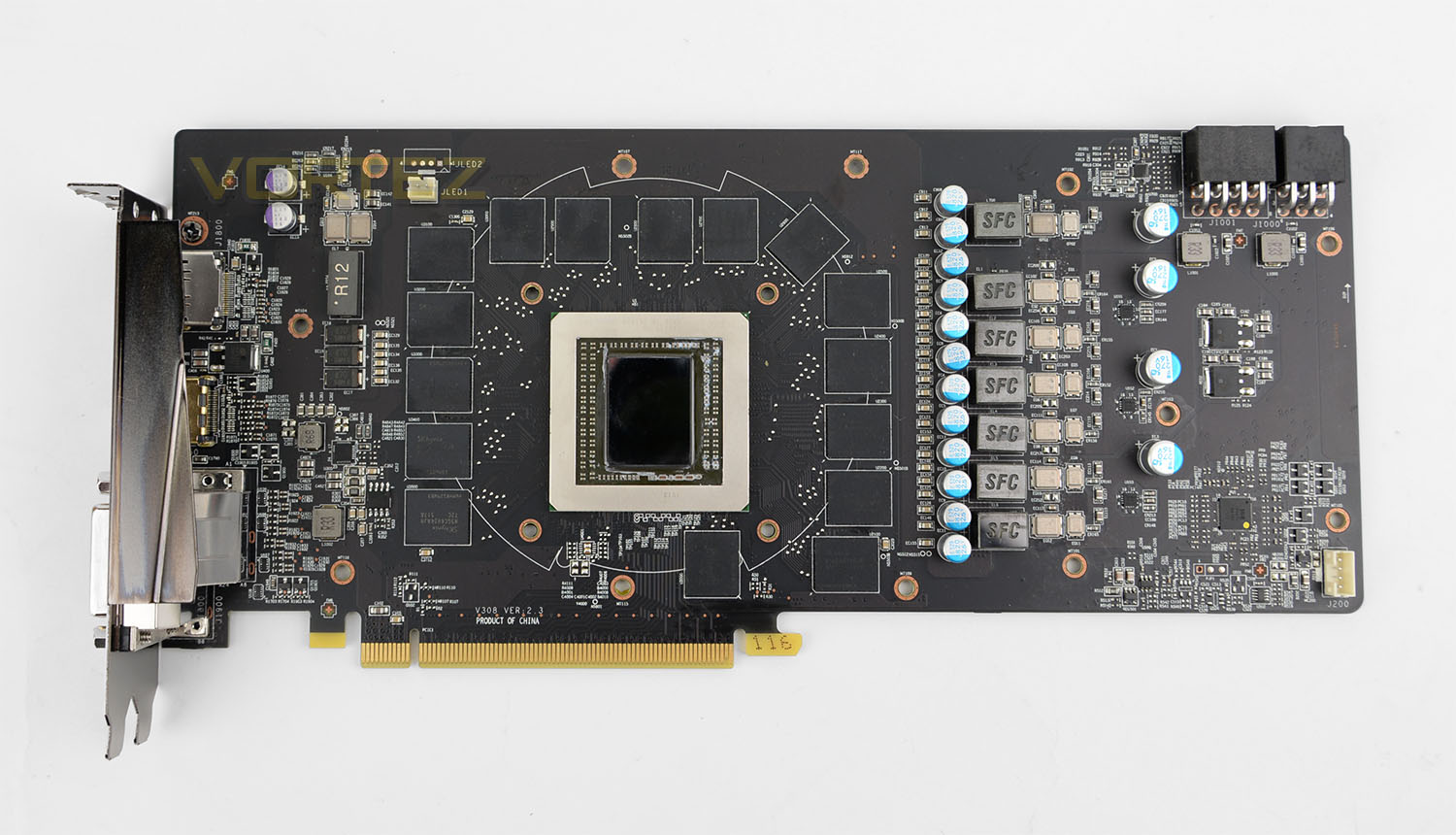
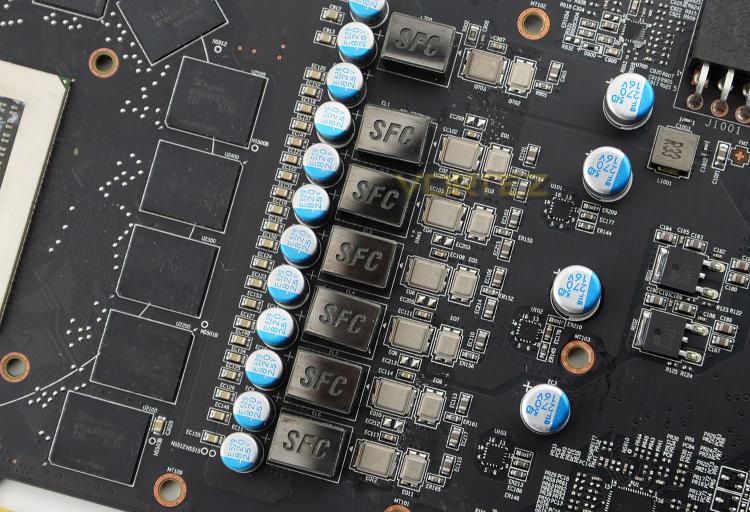
Having detached the cooler from the graphics card we can now see the PCB in-the-flesh. Throughout the card, MSI has used their Military Class 4 components such as SFCs and Hi-C Caps. Though it’s never seen, we like that MSI has given 390X GAMING 8G a black PCB.
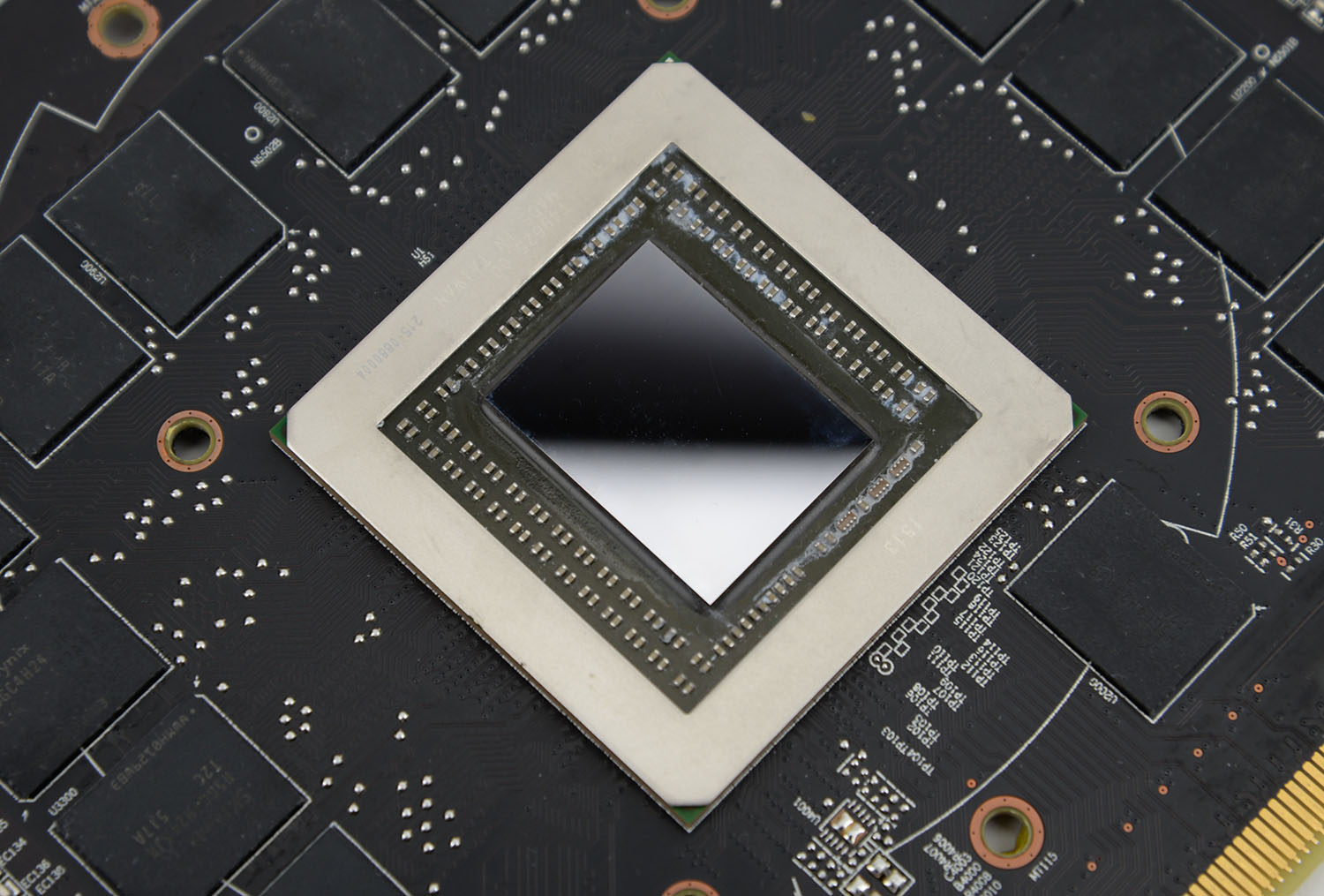
At the very heart of 390X we have the Grenada XT GPU. This is the same design as the 290X (Hawaii XT) – the same circuitary and design but with better manufacturing. Many were hoping for a bigger step-up from this but the 300 series has only had a minor facelift.
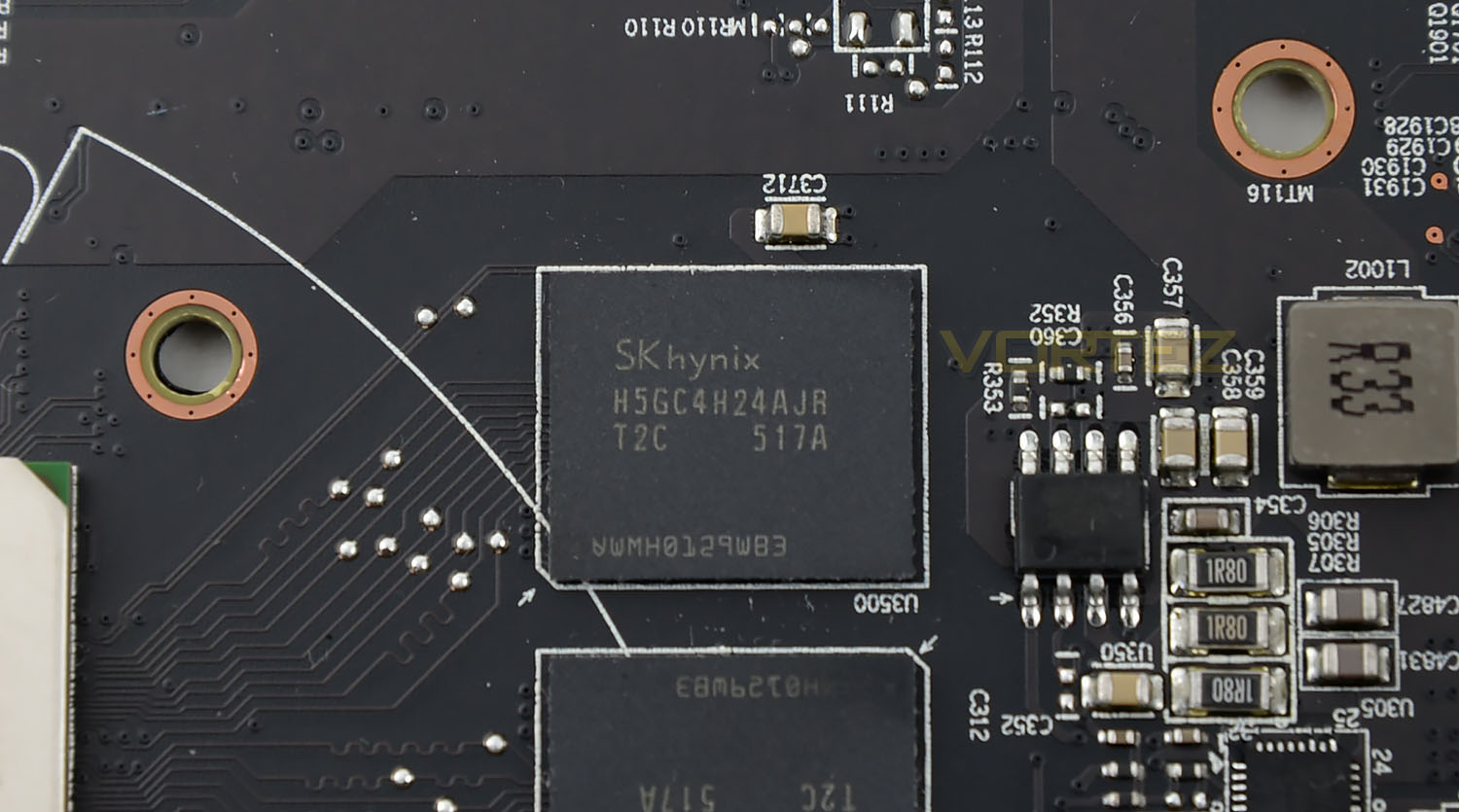
Dotted around the PCB we have 16x 512MB GDDR5 chips courtesy of Hynix (H5GC4H24AJR T2C). Since our card has been given a factory overclock, the memory is bumped up to 6100MHz – quite a significant improvement over the 290X.
Test Setup & Methodology
How we test graphics cards
Testing a graphics card is an extremely lengthy process. We sometimes see reviews where a graphics card has been tested using out of date equipment, out of date games and even out of date drivers. While the latter can be excused due to the sheer amount of driver updates making a thorough review impossible we will however notify the reader when we have used a different driver to the normal for example a pre-release driver. For the most part however we will always use the same hardware and latest drivers so this does certainly need to be taken into consideration when viewing our testing results. Each game and benchmark is tested times with the lowest and highest scores omitted out of the 5 results and the average then taken from the three remaining to give us our final result for each resolution and setting used.
Hardware
With the latest Intel chipset release we decided to update our ageing X79 setup to the very latest X99 chipset. Not only that but we will be using the flagship Core i7-5960X Extreme Edition processor clocked to a realistic, achievable 4GHz to ensure we have no CPU bottlenecks. With 16GB (4x4GB) of GDDR4 at 2666MHz and a 500GB SSD there should be minimal paging so the benchmarks we run today will hopefully give a true reflection of the graphics card’s performance.
High End Graphics Cards on test:
MSI R9 390X GAMING 8G (Catalyst 15.15)
NVIDIA GTX 980 Ti 6GB (Forceware 352.90)
ZOTAC GTX 970 AMP! EXTREME CORE(Forceware 344.75)
ZOTAC GTX 970 AMP! EXTREME(Forceware 344.75)
MSI GTX 970 GAMING 4G(Forceware 344.75)
GIGABYTE G1 GAMING SOC GTX 970(Forceware 344.75)
ASUS STRIX GTX 970 4GB GDDR5(Forceware 340.60)
NVIDIA GTX 980 4GB GDDR5(Forceware 340.52)
SAPPHIRE TRI-X R9-290X 4GB GDDR5(Catalyst 14.3)
Special thanks go to Intel, Corsair, MSI and AOC for providing the extreme spec components used for our test bench:
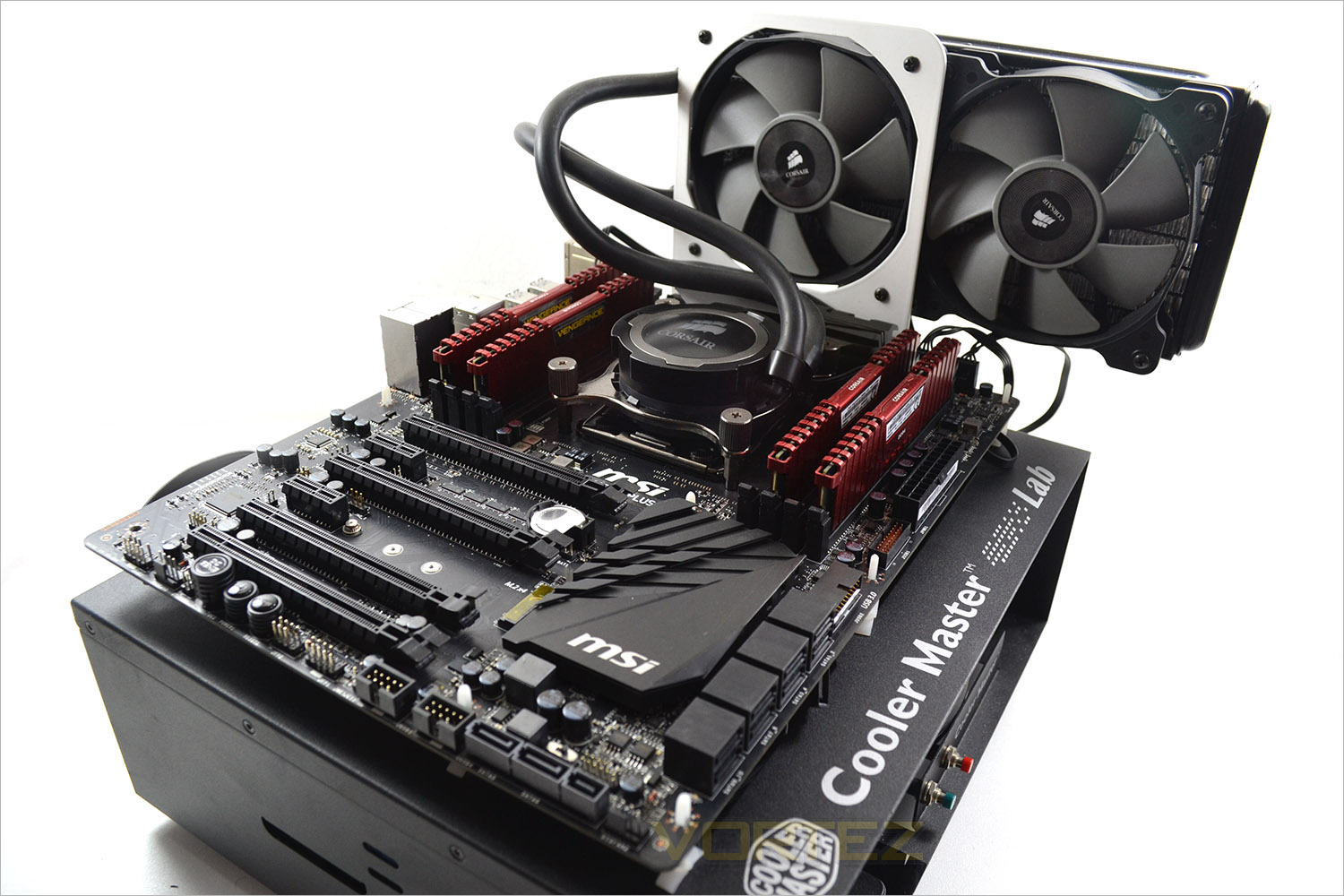
Motherboard: MSI X99S GAMING 9 AC
CPU: Intel Core i7-5960X Extreme Edition @ 4GHz
RAM – 16GB (4x4GB) Corsair LPX Vengeance (Red) DDR3 @ 2666MHz 16-17-17-35 C1
Power Supply – CORSAIR RM Series™ RM1000
Hard Drive – CORSAIR Force Series™ LX 512GB SATA 3 6Gb/s SSD
Cooler – CORSAIR Hydro Series™ H105 240mm Extreme Performance Liquid CPU Cooler
Monitor – AOC 28″ 4K U2868 PQU
Cables – Startech DP 1.2 Cable
CPU: Intel Core i7-5960X Extreme Edition @ 4GHz
RAM – 16GB (4x4GB) Corsair LPX Vengeance (Red) DDR3 @ 2666MHz 16-17-17-35 C1
Power Supply – CORSAIR RM Series™ RM1000
Hard Drive – CORSAIR Force Series™ LX 512GB SATA 3 6Gb/s SSD
Cooler – CORSAIR Hydro Series™ H105 240mm Extreme Performance Liquid CPU Cooler
Monitor – AOC 28″ 4K U2868 PQU
Cables – Startech DP 1.2 Cable
Benchmarks
If you are a regular reader of our reviews you will know we like to test the latest hardware with the latest games and benchmarks on the market. Here are the games we have chosen:
Battlefield 4
Watchdogs
Company of Heroes 2
Thief
GRID: 2
Metro: Last Light
Watchdogs
Company of Heroes 2
Thief
GRID: 2
Metro: Last Light
We also take into consideration the benchmarkers out there so have included three of the more popular synthetic benchmarks available:
Unigine: Valley
Unigine: Heaven 4
Futuremark 3DMark Firestrike
Unigine: Heaven 4
Futuremark 3DMark Firestrike
Let’s see how today’s graphics card performed…
Power, Temperatures, Acoustics
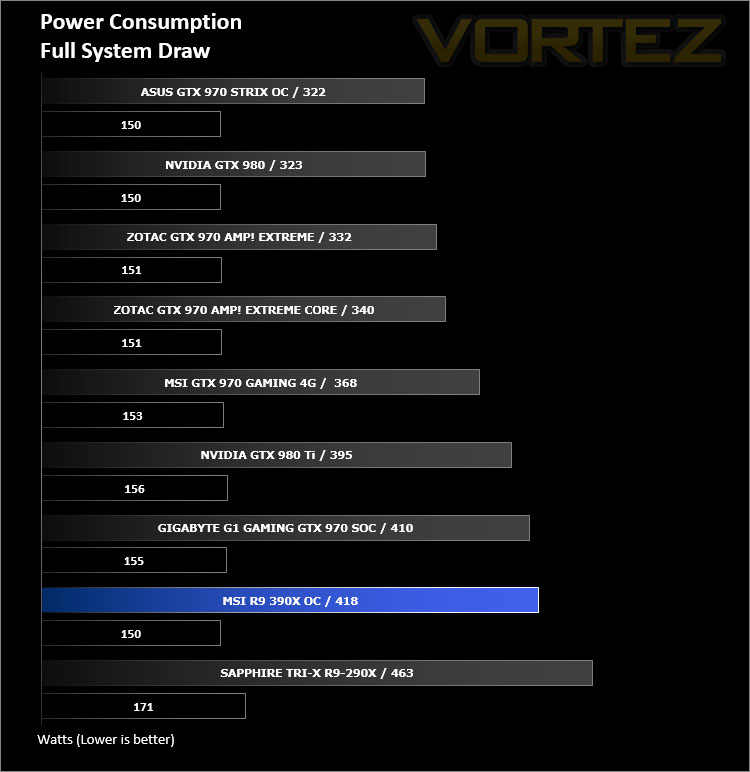
To test for power consumption we take a measurement from the plug socket. It is important to note that the figures below represent total system power use and not just the GPU. The CPU was always in a fixed state (4GHz overclock) so did not affect the additional power load when the GPU was placed under 100% load using Furmark which was ran for 15 minutes at which point a load reading was taken. Idle readings were taken 5 minutes after system boot to ensure any background services and applications had loaded.
Temperature
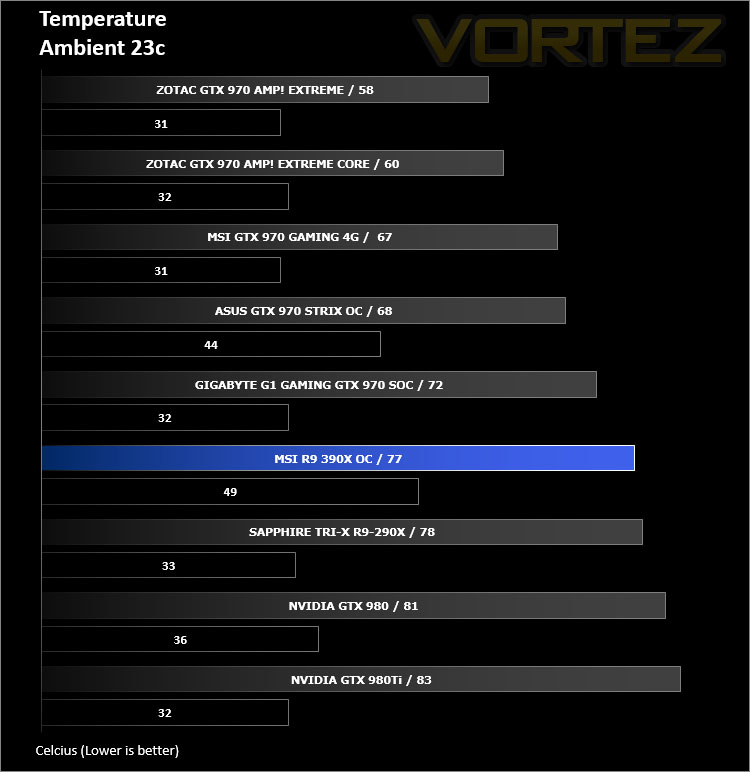
To test temperatures we measured idle temperatures after booting windows, letting all applications finish loading and ran a few benchmarks. Once the benchmarks were complete we left the card to reach a cooling plateau where we then took the idle temperatures. For the load tests, we would normally run Furmark for 20 minutes, taking the absolute maximum temperature attained however we found that this throttled the card and resulted in spurious results. So we set Heaven running continuously for 20 minutes and used this as a temperature result.
Acoustics
As expected, the Twin Frozr V cooler is very quiet indeed. Fans stop spinning when the system is idle which adds to the low-noise operation, but even when the card is fully loaded the cooling fans are designed in such a way to produce less noise and they certainly achieve this.
Overclocking
To overclock the MSI R9 390X GAMING 8G we’ll used MSI Afterburner Tool since it gives extensive options for modifying the graphics card.
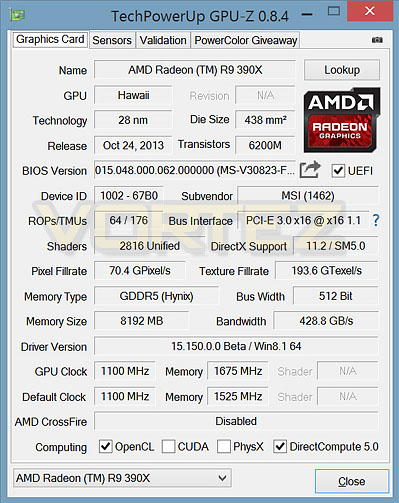
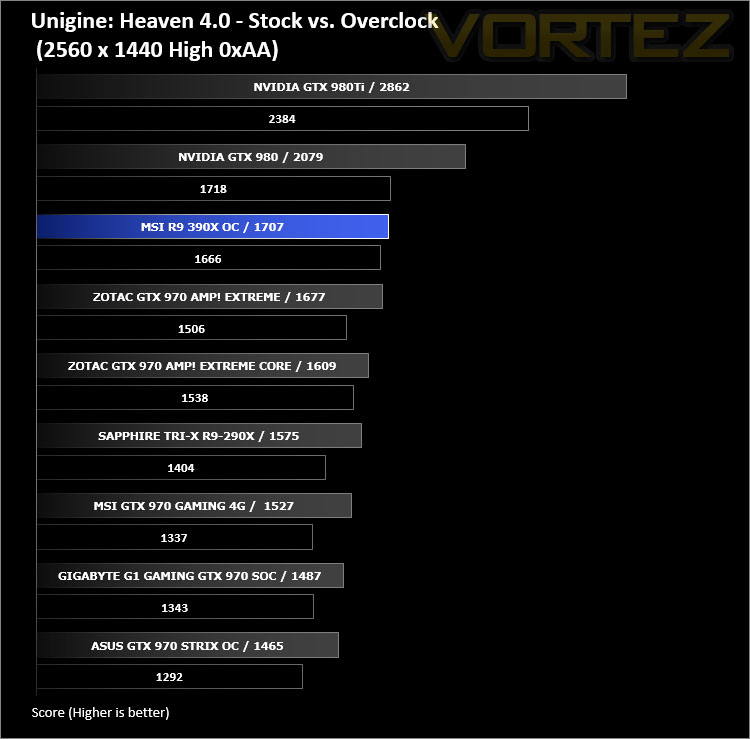
Overclocking was very easy, but there wasn’t a lot of headroom to increase the frequency of the memory clock – with a factory overclock already applied out-of-the-box we managed to take it from 6100MHz up to 6700MHz by tweaking the memory clock to 1625MHz. In return, this gave us a slight boost in Ungine Heaven 4.0 as shown below!
3DMark FireStrike
Fire Strike is the new showcase DirectX 11 benchmark designed for high-performance gaming PCs. It is Futuremark’s most ambitious and technical benchmark ever, featuring real-time graphics rendered with detail and complexity far beyond what is found in other benchmarks and games today.
Unigine Heaven 4.0
Heaven Benchmark with its current version 4.0 is a GPU-intensive benchmark that hammers graphics cards to the limits. This powerful tool can be effectively used to determine the stability of a GPU under extremely stressful conditions, as well as check the cooling system’s potential under maximum heat output. It provides completely unbiased results and generates true in-game rendering workloads across all platforms.
Unigine Valley
Valley Benchmark is a new GPU stress-testing tool from the developers of the very popular and highly acclaimed Heaven Benchmark. The forest-covered valley surrounded by vast mountains amazes with its scale from a bird’s-eye view and is extremely detailed down to every leaf and flower petal. This non-synthetic benchmark powered by the state-of-the art UNIGINE Engine showcases a comprehensive set of cutting-edge graphics technologies with a dynamic environment and fully interactive modes available to the end user.
Battlefield 4
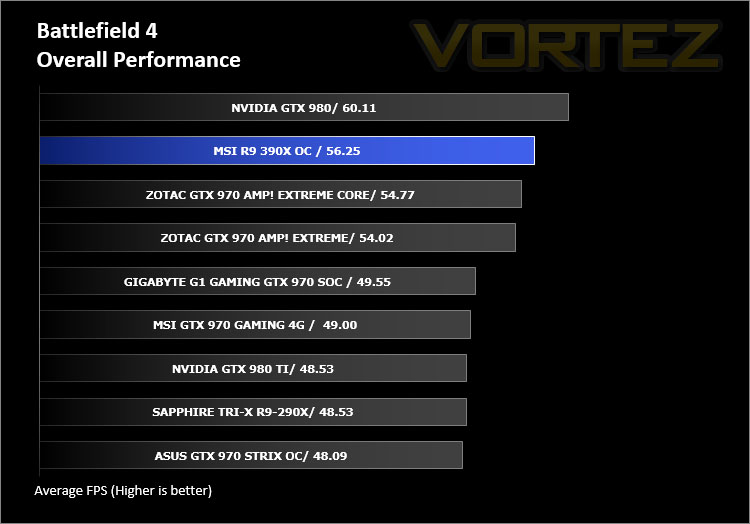
Battlefield 4 is a 2013 first-person shooter video game developed by Swedish video game developer EA Digital Illusions CE (DICE) and published by Electronic Arts. It is a sequel to 2011’s Battlefield 3 and is perhaps currently the most popular online First Person Shooter for PC gamers. It has an extremely powerful gaming engine that will stress components more than most FPS titles available.
Watchdogs
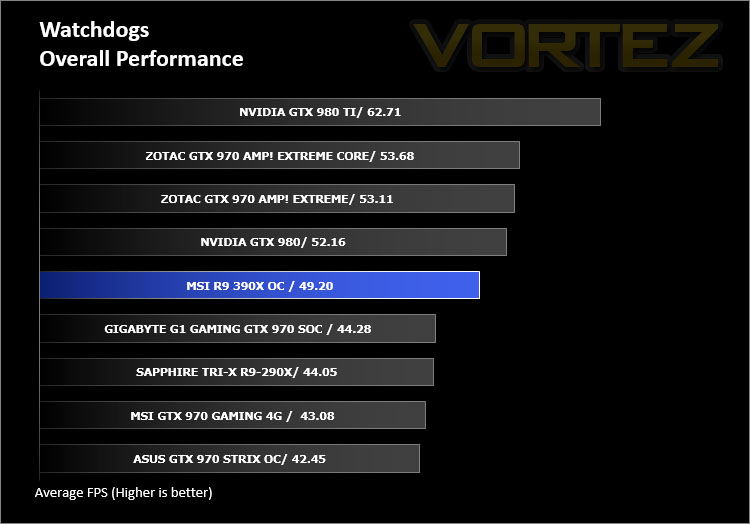
Watch Dogs is a 2014 open world action-adventure video game developed by Ubisoft Montreal and published by Ubisoft. Set within a fictionalized version of Chicago, Illinois, the single-player story follows a hacker and his efforts to seek revenge after the accidental death of his niece. The open world design lets players freely roam Chicago, which includes the urban city, open countryside, and slums. The game is played from a third-person perspective and its world is navigated on-foot or by vehicle. As such this is a very demanding game, especially when graphical options are turned up.
Thief
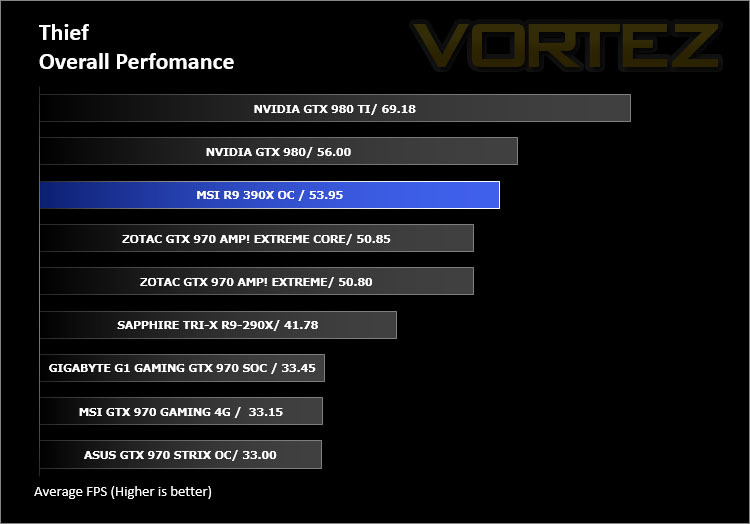
Thief is a stealth video game developed by the Canadian video game developer Eidos Montreal, and published by Square Enix. It is a revival of the cult classic Thief series of stealth games, of which it is the fourth game. Thief is set in a dark fantasy world inspired by Victorian, gothic, and steampunk aesthetics. Using a modified version of the Unreal Engine 3 it makes for a challenging game to pitch against our range of components.
Company of Heroes 2
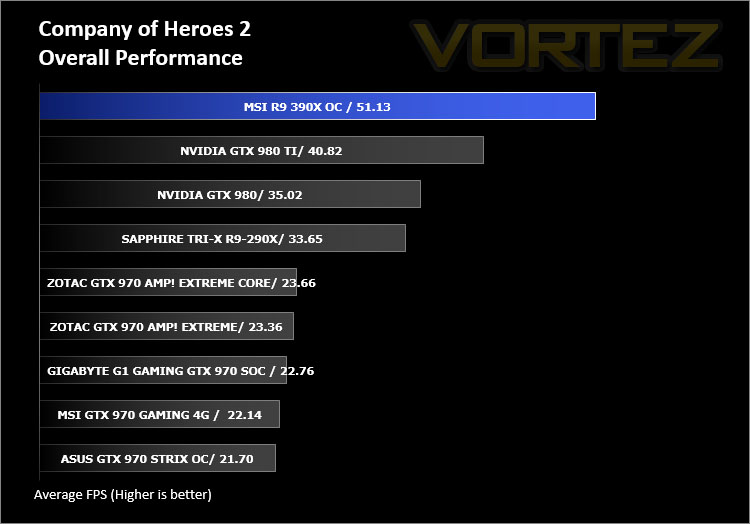
Company of Heroes 2 is a real-time strategy video game developed by Relic Entertainment. It is the sequel to the critically acclaimed 2006 game Company of Heroes.As with the original Company of Heroes, the game is set in World War II but with the focus on the Eastern Front, with players primarily controlling the side of the Soviet Red Army during various stages of the Eastern Front, from Operation Barbarossa to the Battle of Berlin. Company of Heroes 2 runs on Relic Entertainment’s proprietary Essence 3.0 game engine and is extremely demanding of both CPU and GPU.
Metro Last Light
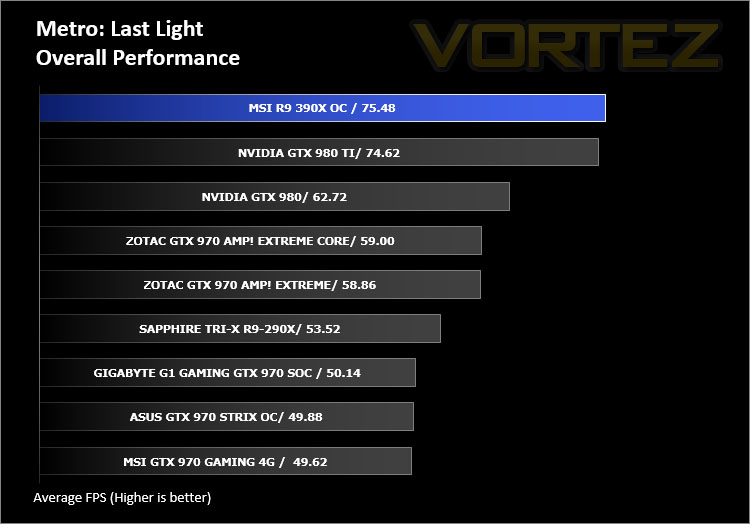
Metro: Last Light is a single-player post-apocalyptic-themed first-person shooter video game with stealth and survival horror elements, developed by Ukrainian studio 4A Games and published by Deep Silver. The game is set in a post-apocalyptic Moscow, part of the universe of the novel Metro 2033 and its sequels, written by Russian author Dmitry Glukhovsky. The second of our FPS titles, it runs on the 4A gaming engine which again, has the capability to stress even the best GPU components.
GRID 2
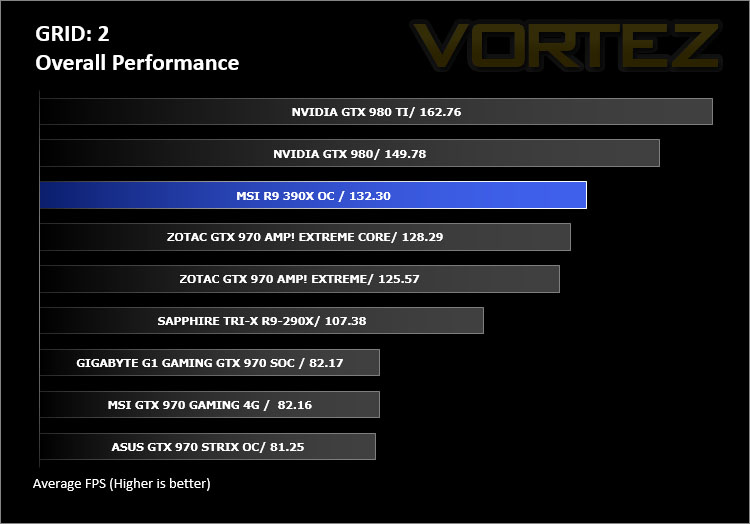
Grid 2 (stylised as GRID 2 and known as Race Driver Grid 2 in Japan) is a racing video game developed and published by Codemasters and is the sequel to 2008’s Race Driver: Grid. The game includes numerous real world locations and cities such as Paris. It also includes motor vehicles spanning four decades. In addition, it includes a new handling system that developer Codemasters has dubbed ‘TrueFeel’, which aims to hit a sweet spot between realism and accessibility. It uses the EGO 3.0 engine which while not overly challenging, is representative of games of this genre.
Overall Performance
Here we take a look at the overall performance of the graphics card. This figure is determined by finding the average FPS across all of the settings used in a particular benchmark(game) to give us an overall value.
Value For Money
We make a simple calculation for this set of results. For each game we add all of the resulting FPS totals together and then divide by the four sets to give us an overall performance figure. While the figures alone do not give you an accurate picture of how the card will perform in any given scenario, they do tell you, when averaged, which GPU is the more capable across all of the benchmarks and settings tested.
Conclusion
Moving into the position of flagship to the new 300 series, the 390X offers up some significant improvements to its predecessor the 290X and is a serious contender to the GTX 980 on many levels. Furthermore to this, the 390X GAMING 8G we’ve looked at today is MSI’s representation of how to squeeze the most out of a GPU.Laden with the new Twin Frozr V cooling solution, this card not only follows a meticulous design with stylish aesthetics but it’s also very practical too. We found the thermal performance very good and noise levels exceedingly low. When the card is in its idle or low-load state, the cooling fans cease spinning – further strengthening the low-noise characteristics.
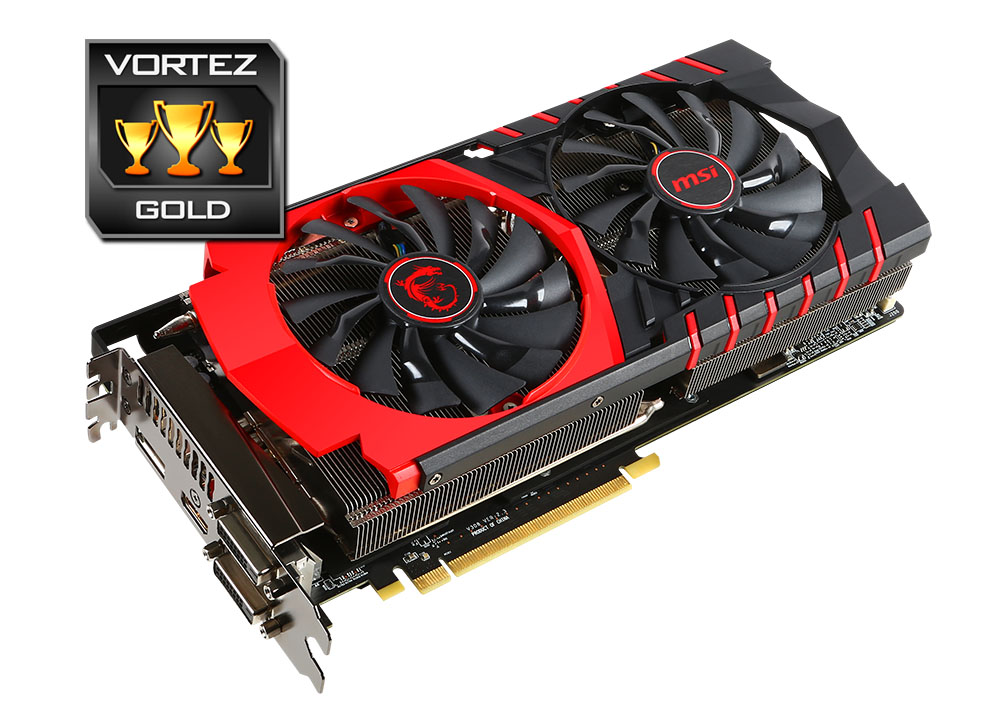
On the performance front, 390X GAMING 8G is ‘neck and neck’ with the GTX 980. This overclocked variant of the 390X appears to favour high-resolutions, so those wanting to pair this card up with a 4K monitor would be well advised to do so.
Another highlight to draw attention to this graphics card is its price. Priced at £350 GBP / $429 USD it is cheaper than the rival GTX 980 and in manages to attain a decent position in both our value and overall performance analysis charts on the preceding pages.
MSI R9 390X GAMING 8G is a superb graphics card which offers great build quality, low-noise operation and tackles the high-end gaming arena very well indeed.
VIDEO REVIEW – VORTEZ TV
Pros
+ Aesthetically pleasing
+ Low-noise operation
+ Decent cooling solution
+ DirectX 12 ready
+ Military Class 4 components
+ 3 years warranty
Cons
– Stock GTX 980 is still faster in some scenarios
+ Aesthetically pleasing
+ Low-noise operation
+ Decent cooling solution
+ DirectX 12 ready
+ Military Class 4 components
+ 3 years warranty
Cons
– Stock GTX 980 is still faster in some scenarios

Click here for an explanation of our awards at Vortez.net.