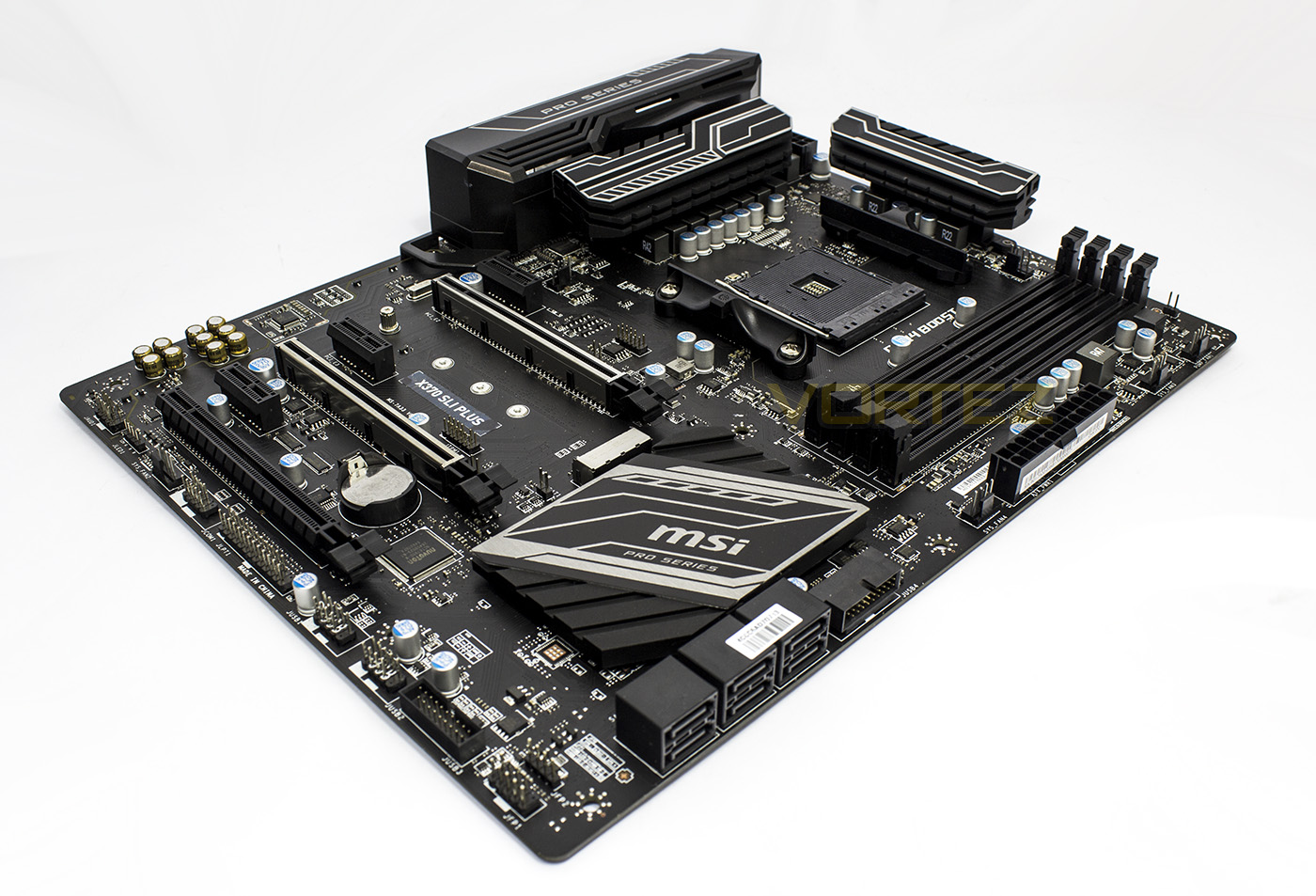
Part of MSI’s ‘PRO’ series, the X370 SLI PLUS is a no fuss, rugged motherboard ensuring users get a long-lasting, stable performance.

Product on Review: X370 SLI Plus
Manufacturer & Sponsor: MSI
Street Price: £130 GBP / $140 USD
If you are looking for an X370 chipset motherboard, but don’t quite need all the fanciful extras, the X370 SLI FLUS may be the board for you. As it is part of the ‘PRO Series’, the X370 SLI PLUS targets industry professionals and businesses that are looking to cut down on cost without compromise. Recently MSI displayed their ability to create a beautiful, high-quality, high-performance motherboard in the form of theX370 XPOWER GAMING TITANIUM, and that same design ethic extends deep into this product even at under half the price.
The X370 SLI PLUS comes out as a sleek, blacked out motherboard with all the primary benefits of the X370 chipset, including a host of the latest USB standards, robust heatsinks, high grade components, robust electro-static defences including the use of ‘Steel Armour’, and of course the high-speed M.2 32Gb/s slot. The primary and secondary PCIe x16 lanes are each given a triple slot clearance to give users optimal positioning so content creators (and of course, gamers) can get the best out of the use of a multi-graphics card setup. Comparatively, there has been some polishing in regards to various non-essential features, allowing MSI to offer this X370 motherboard at a highly competitive price of under £130.
MSI in their own words
As a world leading gaming brand, MSI is the most trusted name in gaming and eSports. We’ve dedicated countless hours and committed numerous resources to the eSports community to support the world’s most aspiring and best gamers and use their knowledge and expertise in our products in return. MSI integrated all gamers’ aspirational functions in its gaming rigs, eliminating the tedious trial and error by themselves and pushing the performance beyond limits. The determination to surpass past achievements has made MSI a ‘True Gaming’ brand with gaming spirit throughout the industry!
Technical Specifications
CPU
• Supports AMD® RYZEN series processors and 7th Gen A-series/ Athlon™ processors for Socket AM4
Chipset
• AMD® X370 Chipset
Main Memory
• 4 x DDR4 memory slots, support up to 64GB
– Supports DDR4 1866/ 2133/ 2400/ 2667(OC)/ 2933(OC)/ 3200(OC)+ Mhz *
• Dual channel memory architecture
• Supports non-ECC, un-buffered memory
• Supports ECC UDIMM memory (non-ECC mode)
* 7th Gen A-series/ Athlon ™ processors support a maximum of 2400 MHz. Please refer to www.msi.com for more information on compatible memory.
Slots
• 2x PCIe 3.0 x16 slots (PCIE_2, PCIE_4)
– RYZEN series processors support x16/x0, x8/x8 mode
– 7th Gen A-series/ Athlon™ processors support x8/x0 mode
• 1x PCIe 2.0 x16 slot (PCIE_6, supports x4 mode)*
– 3x PCIe 2.0 x1 slots
* PCI_E6 slot will be PCIe 2.0 x1 when installing device in any PCIe x1 slot.
Onboard Graphics
• 1 x DVI-D port, supporting a maximum resolution of 1920×1200@60Hz, 1600×1200@60Hz*
• 1 x HDMI™ 1.4 port, supports a maximum resolution of 2560×1600@60Hz*
* Only support when using a 7th Gen A-series/ Athlon™ processors
* Maximum shared memory of 2048 MB
Multi-GPU
• RYZEN series processor
– Supports 2-Way NVIDIA® SLI™ Technology
– Supports 3-Way AMD® CrossFire™ Technology
• 7th Gen A-series/ Athlon™ processor
– Supports 2-Way AMD® CrossFire™ Technology
Storage
• AMD® X370 Chipset
• 6 x SATA 6Gb/s ports*
• 1 x M.2 slot (Key M)
– Supports PCIe 3.0 x4 (RYZEN series processor) or PCIe 3.0 x2 (7th Gen A-series/ Athlon™ processors) and SATA 6Gb/s 2242/ 2260 /2280/ 22110 storage devices
• Supports RAID 0, RAID 1 and RAID 10
USB
• ASMedia® ASM2142 Chipset
– 1 x USB 3.1 Gen2 (SuperSpeed USB 10Gbps) Type-C port on the back panel
– 1 x USB 3.1 Gen2 (SuperSpeed USB 10Gbps) Type-A port on the back panel
• AMD® X370 Chipset
– 4x USB 3.1 Gen1 (SuperSpeed USB) ports available through the internal USB connectors
– 6x USB 2.0 (High-speed USB) ports (2 Type-A ports on the back panel, 4 ports available through the internal USB connectors)
• AMD® CPU
– 4x USB 3.1 Gen1 (SuperSpeed USB) Type-A ports on the back panel
Audio
• Realtek® ALC892 Codec
– 7.1-Channel High Definition Audio
LAN
• 1 x Realtek® 8111H Gigabit LAN controller
Internal I/O Connectors
– 1 x 24-pin ATX 12V power connector
– 1 x 8-pin ATX 12V power connector
– 6 x SATA 6Gb/s connectors
– 2 x USB 2.0 connectors (support additional 4 USB 2.0 ports)
– 2 x USB 3.1 Gen1 connectors (support additional 4 USB 3.1 Gen1 ports)
– 1 x 4-pin CPU fan connector
– 1 x 4-pin PUMP fan connector (supports up to 2A)
– 4 x 4-pin system fan connectors
– 1 x RGB LED connector
– 1 x TPM module connector
– 1 x Serial port connector
– 1 x Parallel port connector
– 1 x Front panel audio connector
– 2 x System panel connectors
– 1 x Chassis Intrusion connector
– 1 x Clear CMOS jumper
Back Panel I/O Ports
– 1 x PS/2 keyboard/ mouse combo port
– 2 x USB 2.0 Type-A ports
– 1 x DVI-D port
– 1 x HDMI™ 1.4 port
– 1 x LAN (RJ45) port
– 4 x USB 3.1 Gen1 Type-A ports
– 1 x USB 3.1 Gen2 Type-A port
– 1 x USB 3.1 Gen2 Type-C port
– 6 x audio jacks
Dimension
• 12.0 in. x 9.6 in. (30.4 cm x 24.3 cm)
• ATX Form Factor
• Supports AMD® RYZEN series processors and 7th Gen A-series/ Athlon™ processors for Socket AM4
Chipset
• AMD® X370 Chipset
Main Memory
• 4 x DDR4 memory slots, support up to 64GB
– Supports DDR4 1866/ 2133/ 2400/ 2667(OC)/ 2933(OC)/ 3200(OC)+ Mhz *
• Dual channel memory architecture
• Supports non-ECC, un-buffered memory
• Supports ECC UDIMM memory (non-ECC mode)
* 7th Gen A-series/ Athlon ™ processors support a maximum of 2400 MHz. Please refer to www.msi.com for more information on compatible memory.
Slots
• 2x PCIe 3.0 x16 slots (PCIE_2, PCIE_4)
– RYZEN series processors support x16/x0, x8/x8 mode
– 7th Gen A-series/ Athlon™ processors support x8/x0 mode
• 1x PCIe 2.0 x16 slot (PCIE_6, supports x4 mode)*
– 3x PCIe 2.0 x1 slots
* PCI_E6 slot will be PCIe 2.0 x1 when installing device in any PCIe x1 slot.
Onboard Graphics
• 1 x DVI-D port, supporting a maximum resolution of 1920×1200@60Hz, 1600×1200@60Hz*
• 1 x HDMI™ 1.4 port, supports a maximum resolution of 2560×1600@60Hz*
* Only support when using a 7th Gen A-series/ Athlon™ processors
* Maximum shared memory of 2048 MB
Multi-GPU
• RYZEN series processor
– Supports 2-Way NVIDIA® SLI™ Technology
– Supports 3-Way AMD® CrossFire™ Technology
• 7th Gen A-series/ Athlon™ processor
– Supports 2-Way AMD® CrossFire™ Technology
Storage
• AMD® X370 Chipset
• 6 x SATA 6Gb/s ports*
• 1 x M.2 slot (Key M)
– Supports PCIe 3.0 x4 (RYZEN series processor) or PCIe 3.0 x2 (7th Gen A-series/ Athlon™ processors) and SATA 6Gb/s 2242/ 2260 /2280/ 22110 storage devices
• Supports RAID 0, RAID 1 and RAID 10
USB
• ASMedia® ASM2142 Chipset
– 1 x USB 3.1 Gen2 (SuperSpeed USB 10Gbps) Type-C port on the back panel
– 1 x USB 3.1 Gen2 (SuperSpeed USB 10Gbps) Type-A port on the back panel
• AMD® X370 Chipset
– 4x USB 3.1 Gen1 (SuperSpeed USB) ports available through the internal USB connectors
– 6x USB 2.0 (High-speed USB) ports (2 Type-A ports on the back panel, 4 ports available through the internal USB connectors)
• AMD® CPU
– 4x USB 3.1 Gen1 (SuperSpeed USB) Type-A ports on the back panel
Audio
• Realtek® ALC892 Codec
– 7.1-Channel High Definition Audio
LAN
• 1 x Realtek® 8111H Gigabit LAN controller
Internal I/O Connectors
– 1 x 24-pin ATX 12V power connector
– 1 x 8-pin ATX 12V power connector
– 6 x SATA 6Gb/s connectors
– 2 x USB 2.0 connectors (support additional 4 USB 2.0 ports)
– 2 x USB 3.1 Gen1 connectors (support additional 4 USB 3.1 Gen1 ports)
– 1 x 4-pin CPU fan connector
– 1 x 4-pin PUMP fan connector (supports up to 2A)
– 4 x 4-pin system fan connectors
– 1 x RGB LED connector
– 1 x TPM module connector
– 1 x Serial port connector
– 1 x Parallel port connector
– 1 x Front panel audio connector
– 2 x System panel connectors
– 1 x Chassis Intrusion connector
– 1 x Clear CMOS jumper
Back Panel I/O Ports
– 1 x PS/2 keyboard/ mouse combo port
– 2 x USB 2.0 Type-A ports
– 1 x DVI-D port
– 1 x HDMI™ 1.4 port
– 1 x LAN (RJ45) port
– 4 x USB 3.1 Gen1 Type-A ports
– 1 x USB 3.1 Gen2 Type-A port
– 1 x USB 3.1 Gen2 Type-C port
– 6 x audio jacks
Dimension
• 12.0 in. x 9.6 in. (30.4 cm x 24.3 cm)
• ATX Form Factor
Packaging, Bundle & First Look
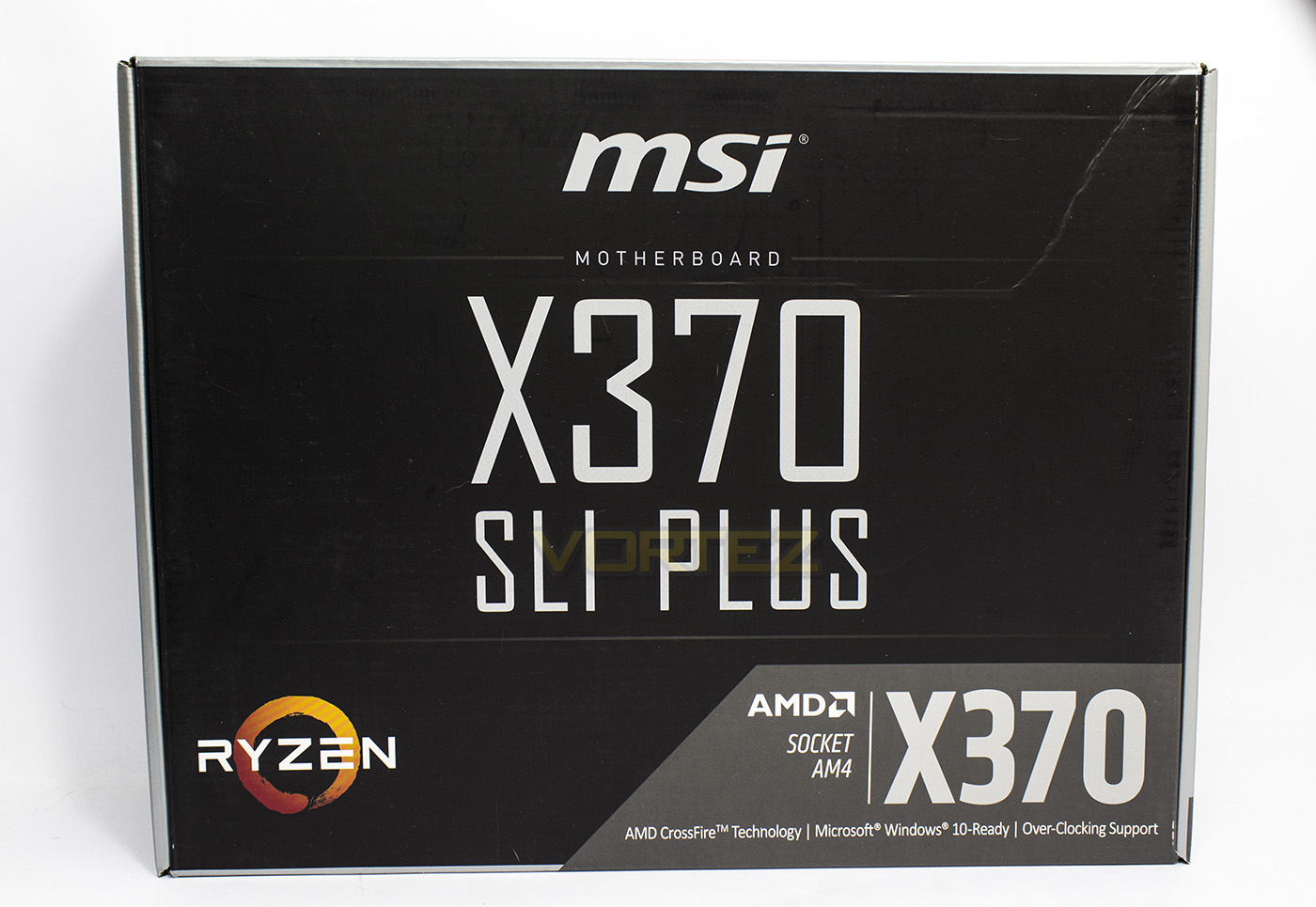
The X370 SLI PLUS is packaged in a sleek, minimalistic black box with the product name printed in large, along with some support information.
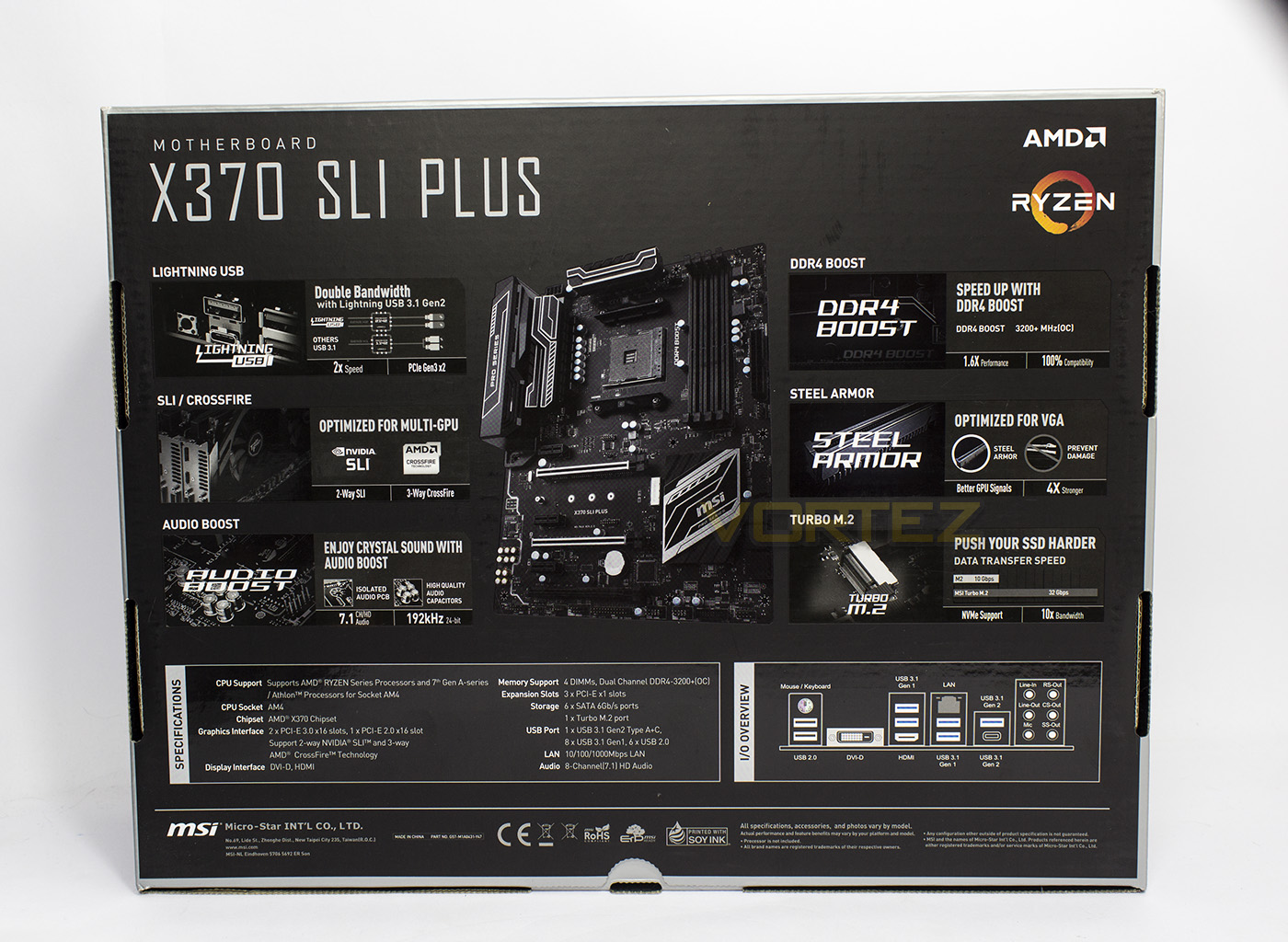
The reverse side gives an overview to some of the features, including SLI/CrossFire support, DDR4Boost, AudioBoost, and Steel Armour. There is a table outlining the specifications of the motherboard along with a diagram of the rear I/O connectivity.
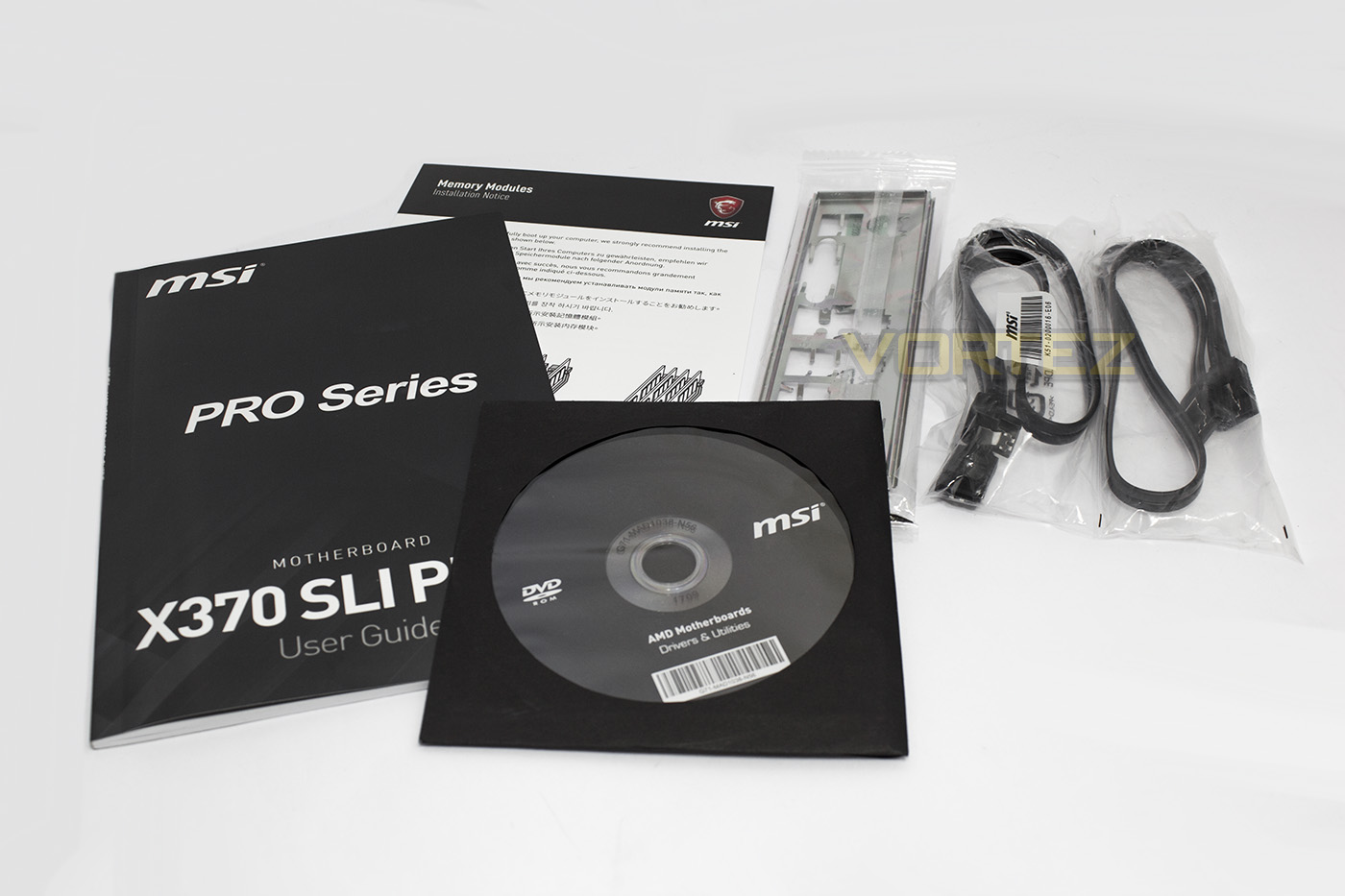
The bundle included is rather lite, shipping with the manual, driver disc, some SATA cables and some information about the DIMMs. Strange that MSI didn’t include a hard SLI bridge similar to as we have seen with many of the other manufacturers.
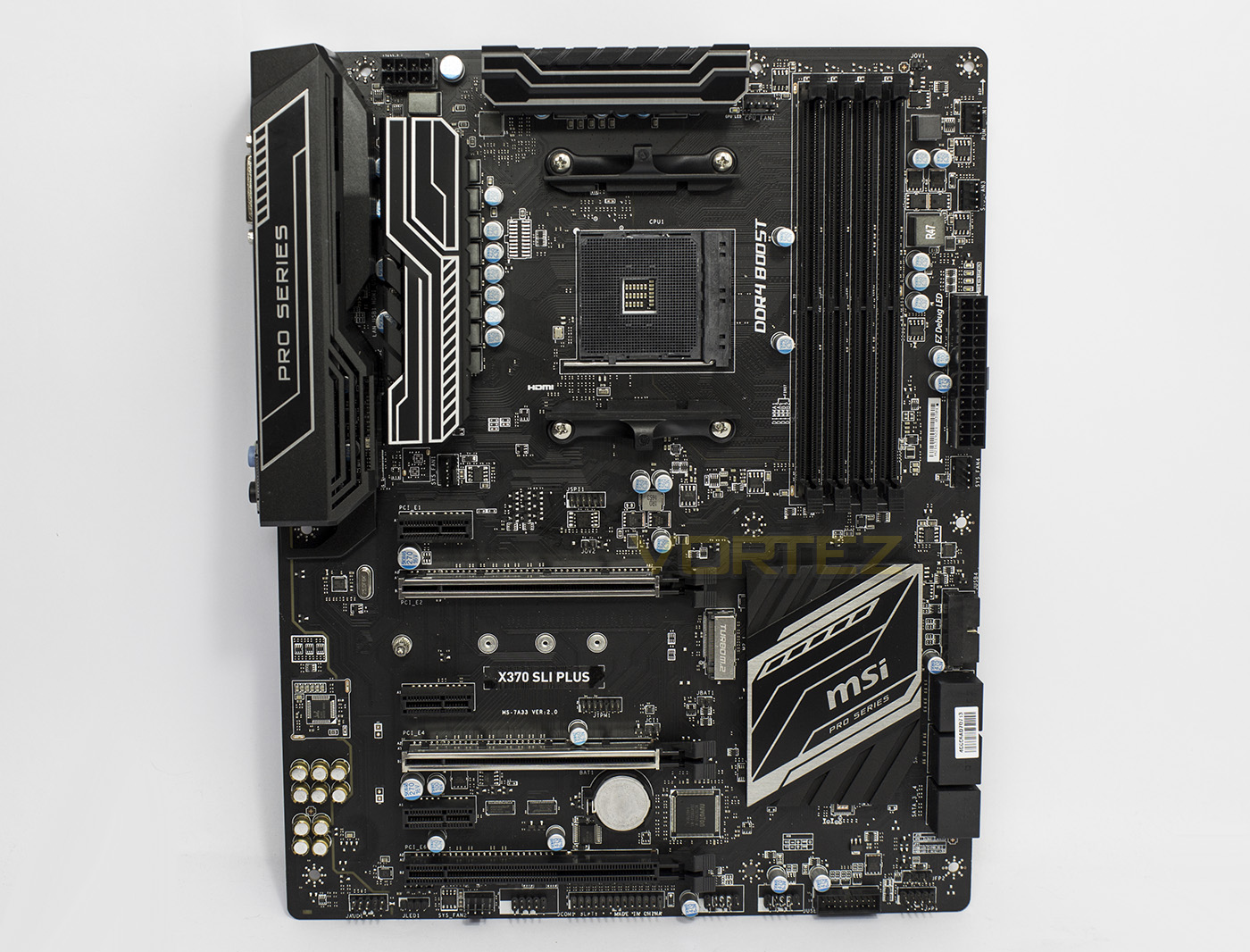
The X370 SLI PLUS is mostly black with some metallic highlights, giving a very simple, but sleek aesthetic.
Closer Look
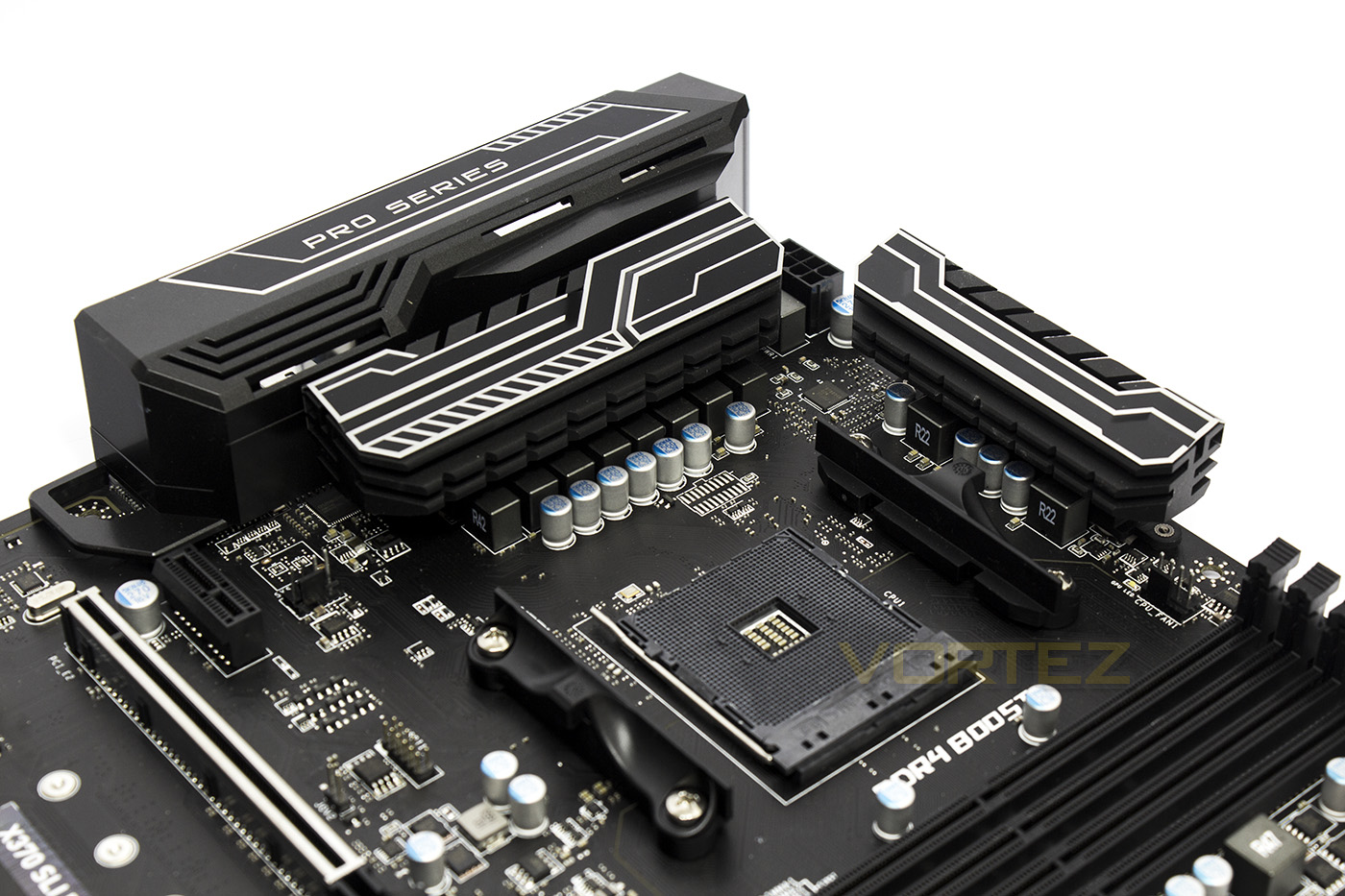
Underneath the rear heatsink there is a 4pin fan header, and another to the right of the top heatsink. The socket is fed by a ten phase delivery system to ensure cool operation.
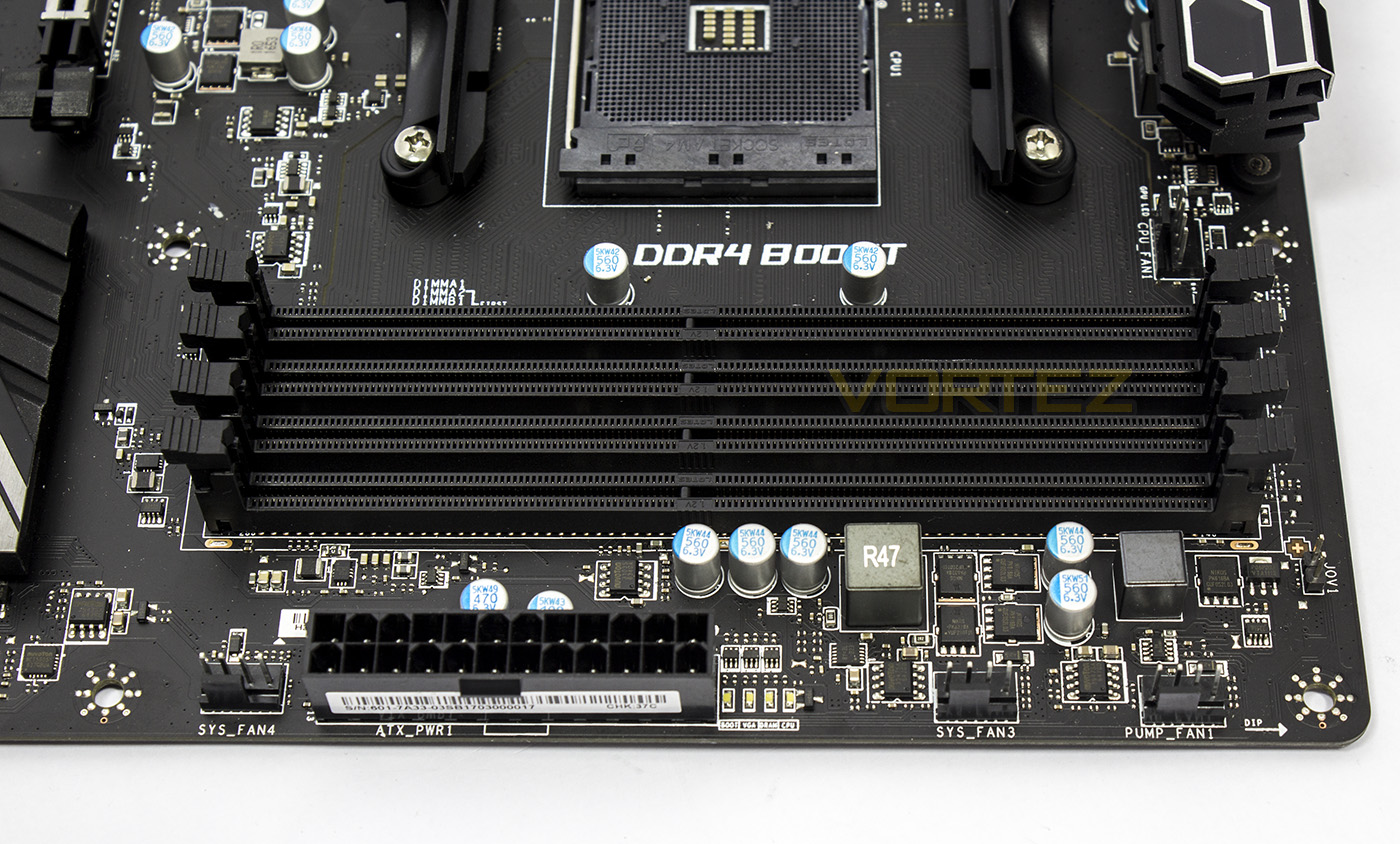
The top right corner is lined with three more 4pin fan headers, one of which outputs 2A of power for water pumps. Next to the 24pin ATX socket there are four diagnostic LEDs.
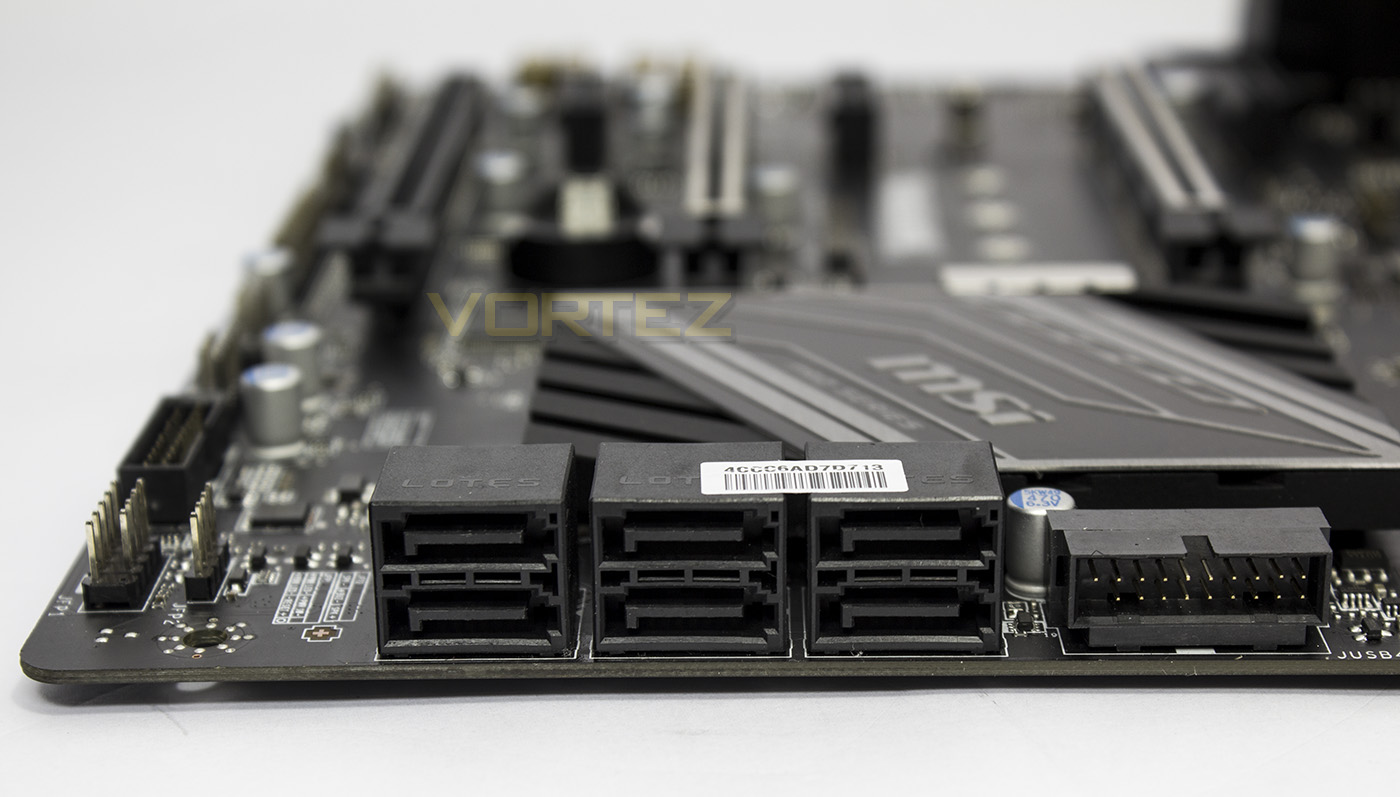
The X370 SLI PLUS features 6x SATA 6Gb/s, to the right of which there is a right angle USB 3.1 Gen1 header.
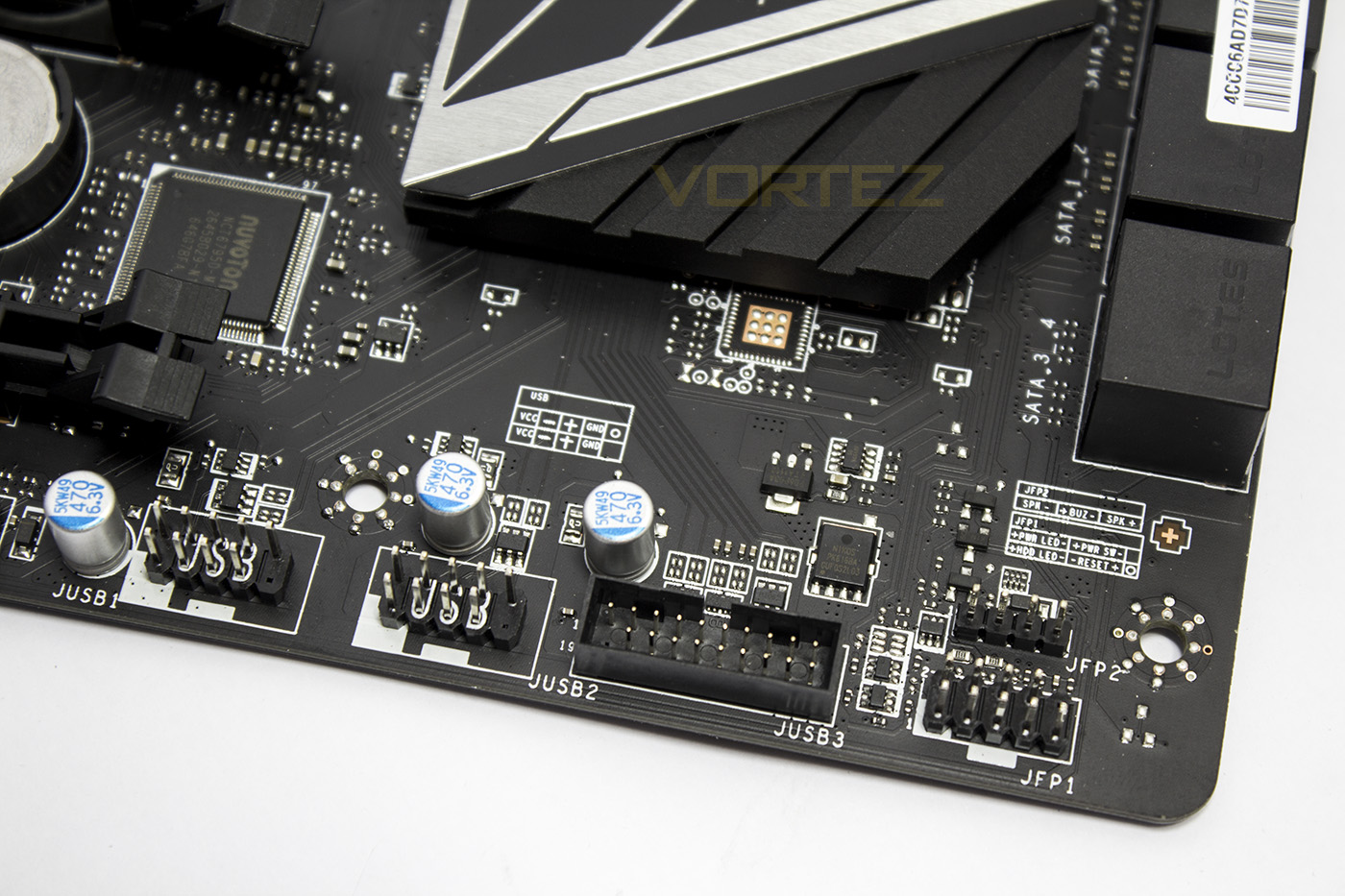
You will find the front panel headers in their usual location in the bottom right section of the motherboard, followed by an additional USB 3.1 Gen1 header and 2x USB 2.0 headers.
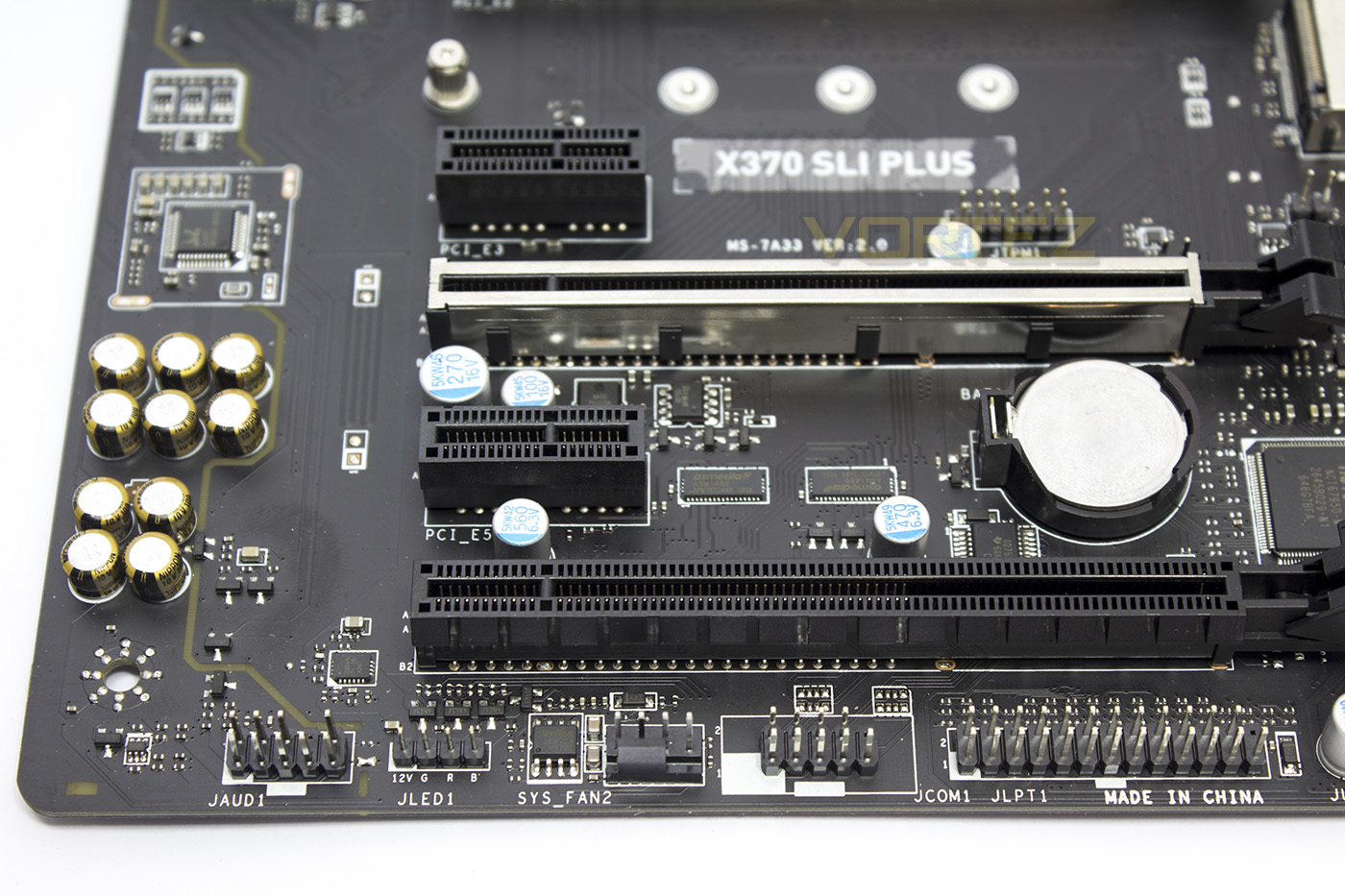
Here we find the front panel HD audio header, RGB LED strip header, COM and TPM headers as well as an additional 4pin fan header.
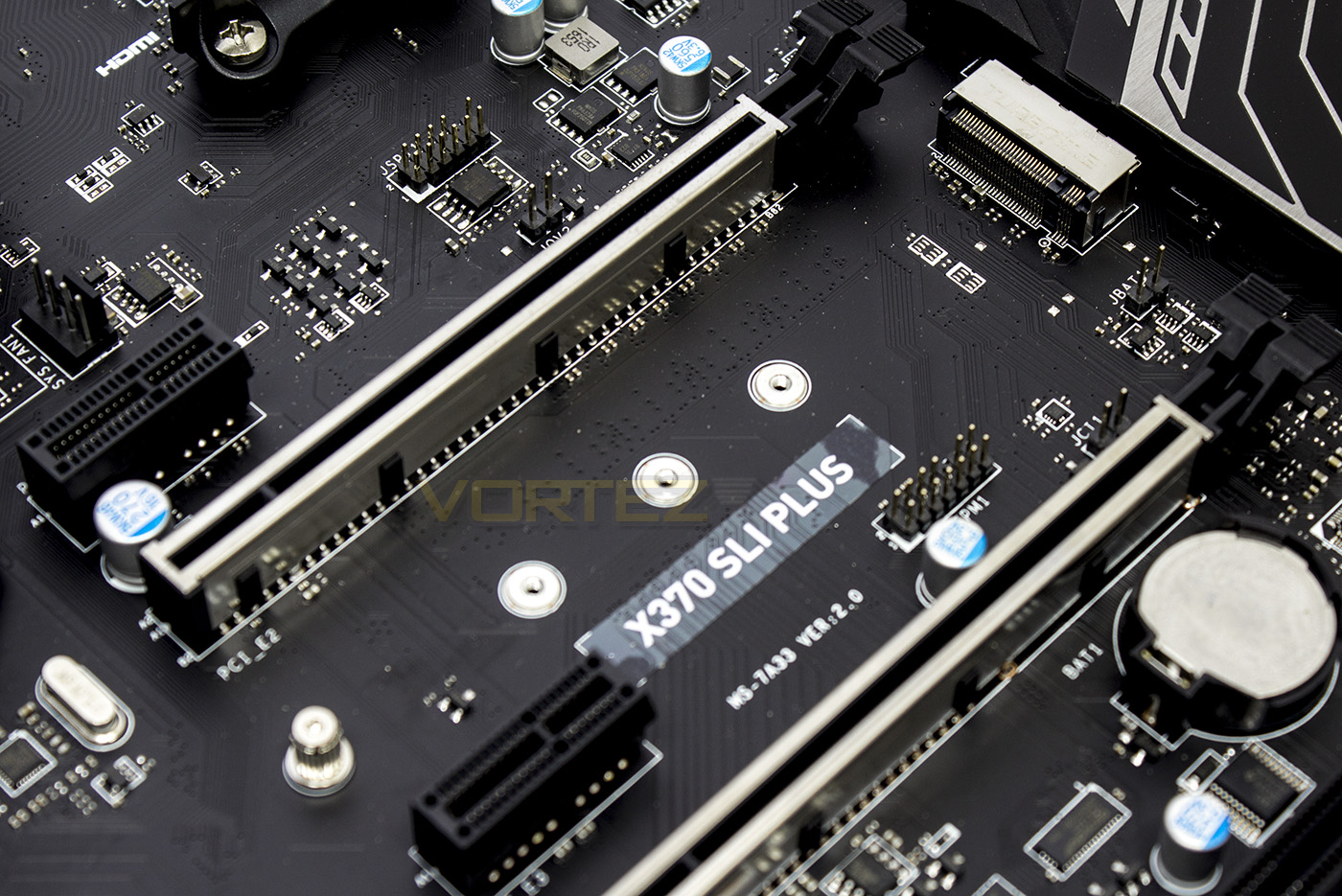
Positioned between the two main PCIe slots, there is an ‘Ultra’ M.2 slot with some Steel Armour, adjacent to is the clear CMOS pins.
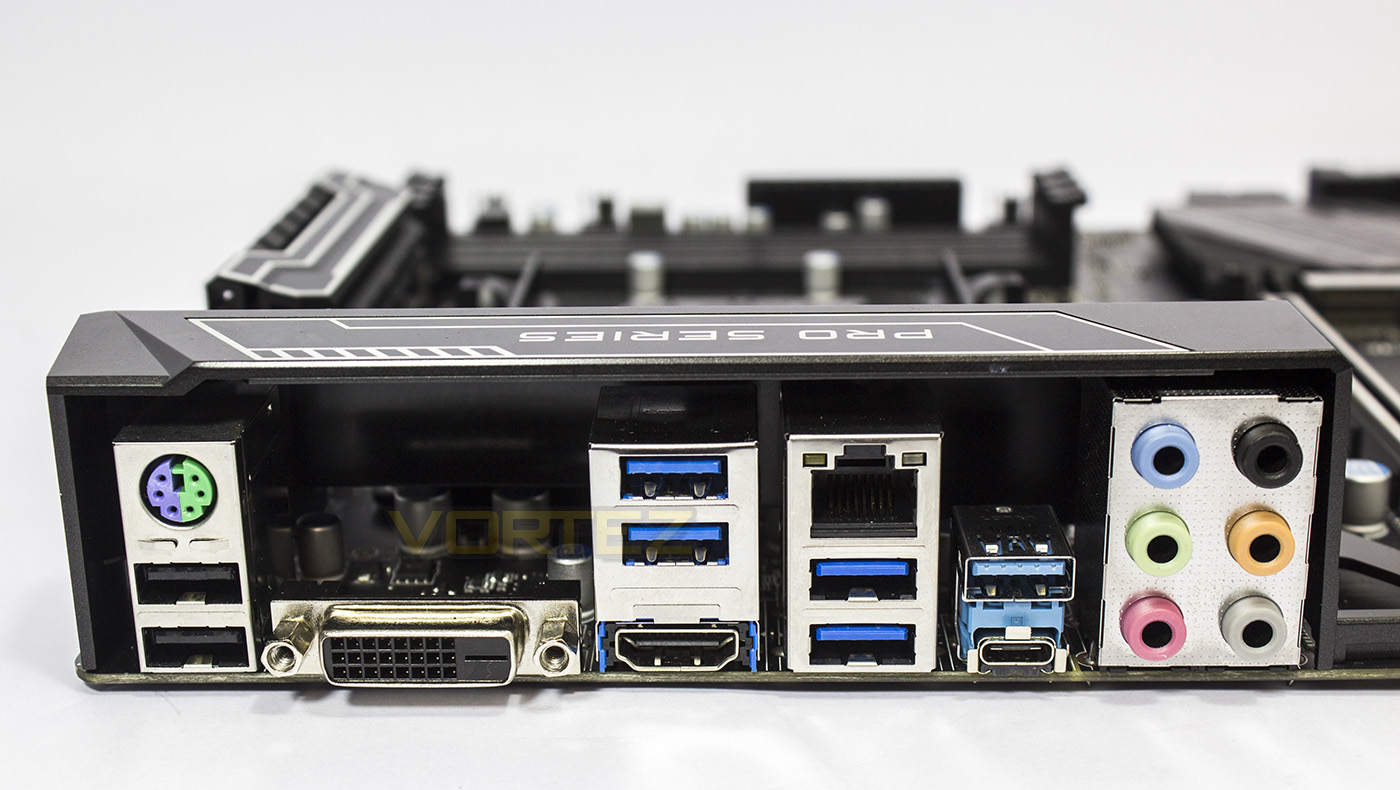
The rear input/output affords users with: a universal PS/2 port, 2x USB 2.0, a DVI-D display adaptor, a HDMI 1.4a port, 4x USB 3.1 Gen1, 1x USB 3.1 Gen2 (Type A), 1x USB 3.1 Gen2 (Type C), RJ-45 LAN socket, and the multi-channel HD audio jacks.
Test Setup & Overclocking
Test SetupCPU AMD Ryzen 7 1800X
Cooling Noctua U12S
Motherboard X370 SLI Plus
Memory 2x 8GB Corsair Vengeance LPX 3200MHz @ 2667MHz
Graphics AMD Radeon RX 480 8GB
Storage Corsair Force LE 480GB
PSU Corsair RM750X 80 Plus Gold Certified PSU
Cooling Noctua U12S
Motherboard X370 SLI Plus
Memory 2x 8GB Corsair Vengeance LPX 3200MHz @ 2667MHz
Graphics AMD Radeon RX 480 8GB
Storage Corsair Force LE 480GB
PSU Corsair RM750X 80 Plus Gold Certified PSU
Benchmarks
Cinebench R15 – CPU/OpenGL Score
x264 HD 4.0 – 1st and 2nd pass encoding
SiSoftware SANDRA – CPU & Memory benchmarks
POV-RAY – CPU benchmarks
TrueCrypt – CPU benchmarks
AIDA64 – CPU benchmarks & Memory
PCMark 8 – Home Suite & Photoshop
3DMark FireStrike – 3D Benchmark
Games – Rise of the Tomb Raider & Total War: WARHAMMER
x264 HD 4.0 – 1st and 2nd pass encoding
SiSoftware SANDRA – CPU & Memory benchmarks
POV-RAY – CPU benchmarks
TrueCrypt – CPU benchmarks
AIDA64 – CPU benchmarks & Memory
PCMark 8 – Home Suite & Photoshop
3DMark FireStrike – 3D Benchmark
Games – Rise of the Tomb Raider & Total War: WARHAMMER
Other Software
Temperature Analysis: Aida64 & Ryzen Master
Stress Testing Software: AIDA64 Stability Test
CPU Specification Monitoring: CPU-Z
Performance Monitoring: MSI Afterburner
Stress Testing Software: AIDA64 Stability Test
CPU Specification Monitoring: CPU-Z
Performance Monitoring: MSI Afterburner
BIOS
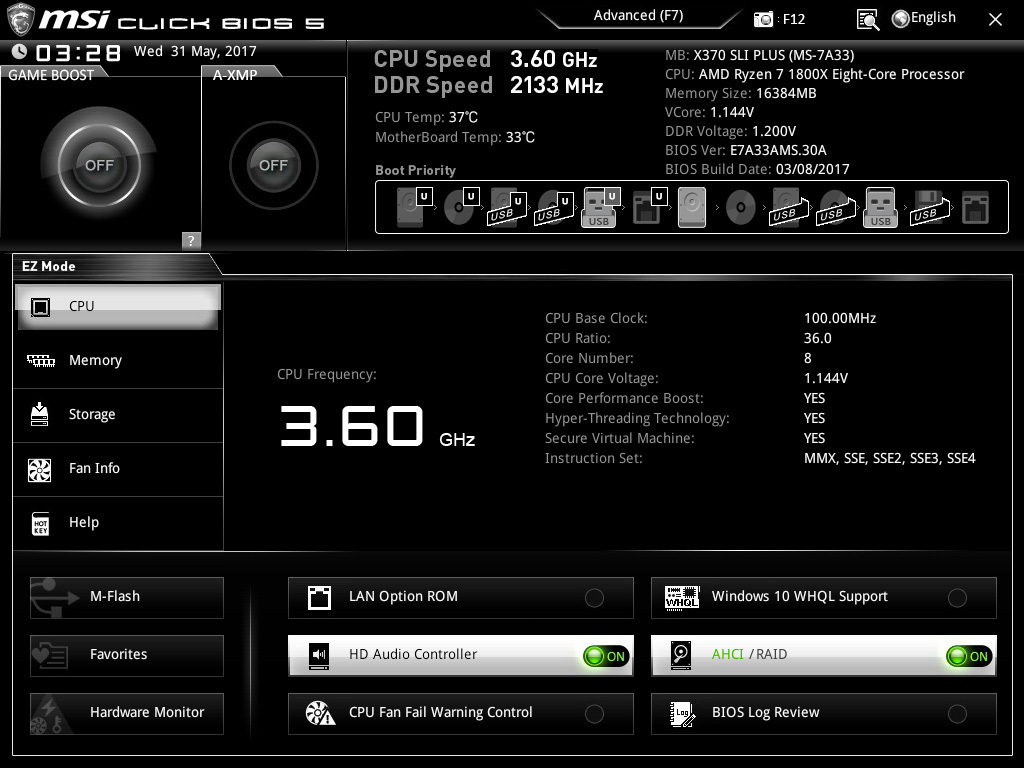
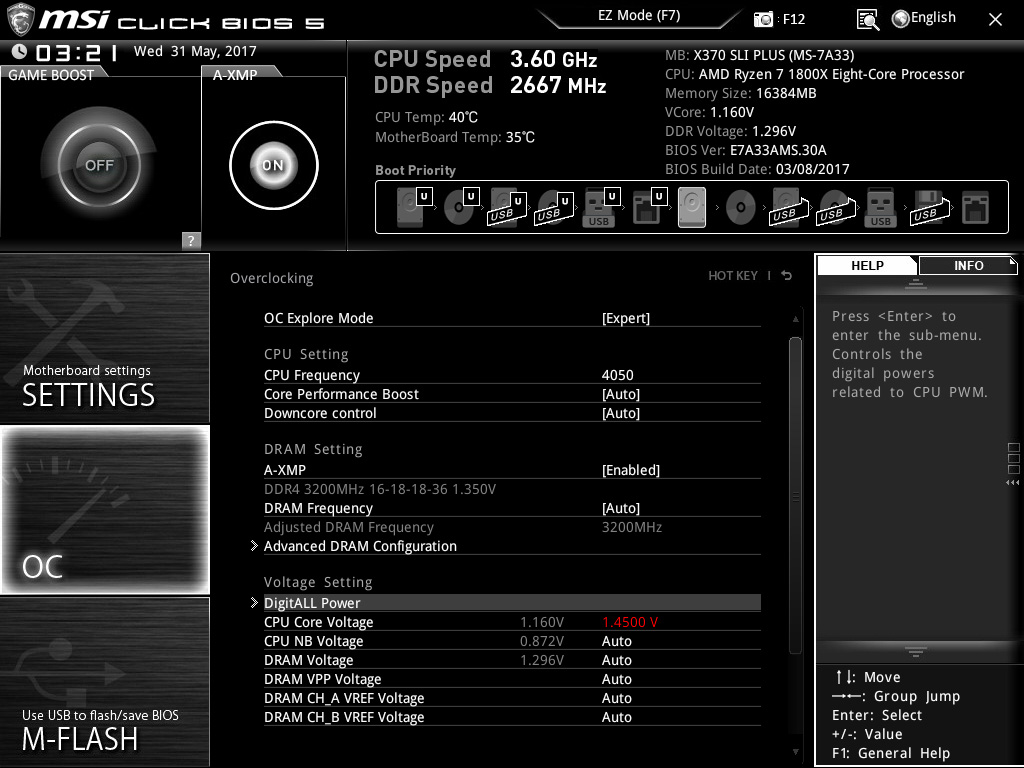
The BIOS GUI is (as an award winning design) easy to navigate and understand, with all the features accessible and easy to find. The ‘EZ’ landing page provides you will all the system information and the location of the primary options you will need, while the advanced option helps prevent you from getting too lost in sub-menus.
Overclocking
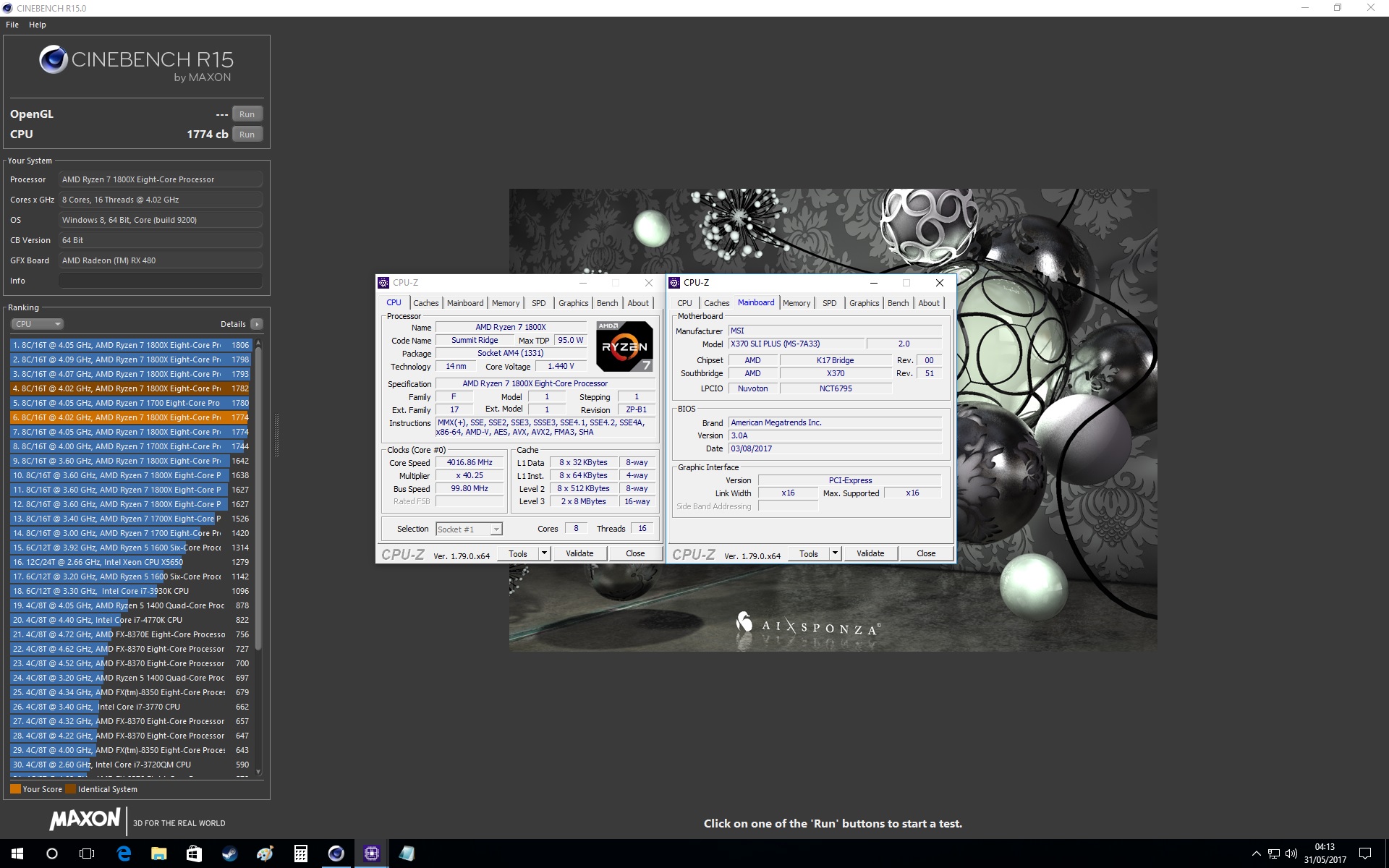
We couldn’t manage to get our memory to run at 3200MHz either at stock CPU or overclocked frequencies, which is a bit of a shame, but had no problem with 3000MHz. Overclocking the CPU is fairly simple to do with some multiplier and voltage changes, though we weren’t able to hit the frequencies we hoped. The Voltage adjustment increments are a little clunkier than other motherboards (at 0.0625V increments rather than 0.03125V increments), which meant I had to use a little higher voltage than we already know our Ryzen 7 1800X required for 4.05GHz. Though it didn’t quite like 4.05GHz either. We resulted in getting a 4.025GHz overclock with 1.44V, though despite the lower frequency, it still managed to give a strong comparative performance.
Benchmarks: Power Consumption
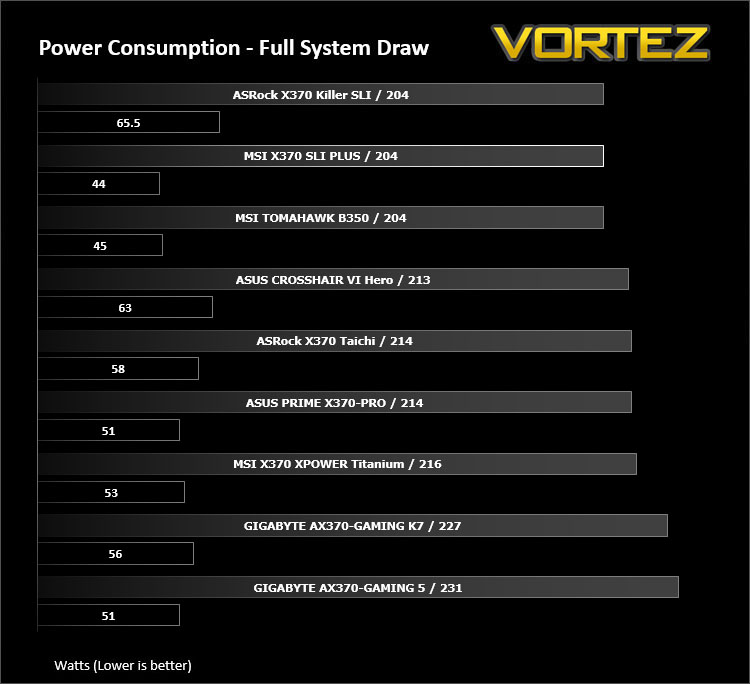
It’s interesting to note the power consumption across all motherboards. Although they are using the Z270 chipset, energy results can fluctuate between manufacturers due to the features and specifications that are integrated. First of all, for the idle tests the system is cold booted into Windows and no additional applications are executed – the watts are noted on the external energy monitor we use and then the system is loaded with 3DMark FireStrike – watts are again monitored for the duration of the test and the highest rated wattage result is then noted down. Below are the results of this energy test.
Benchmarks: Cinebench R15
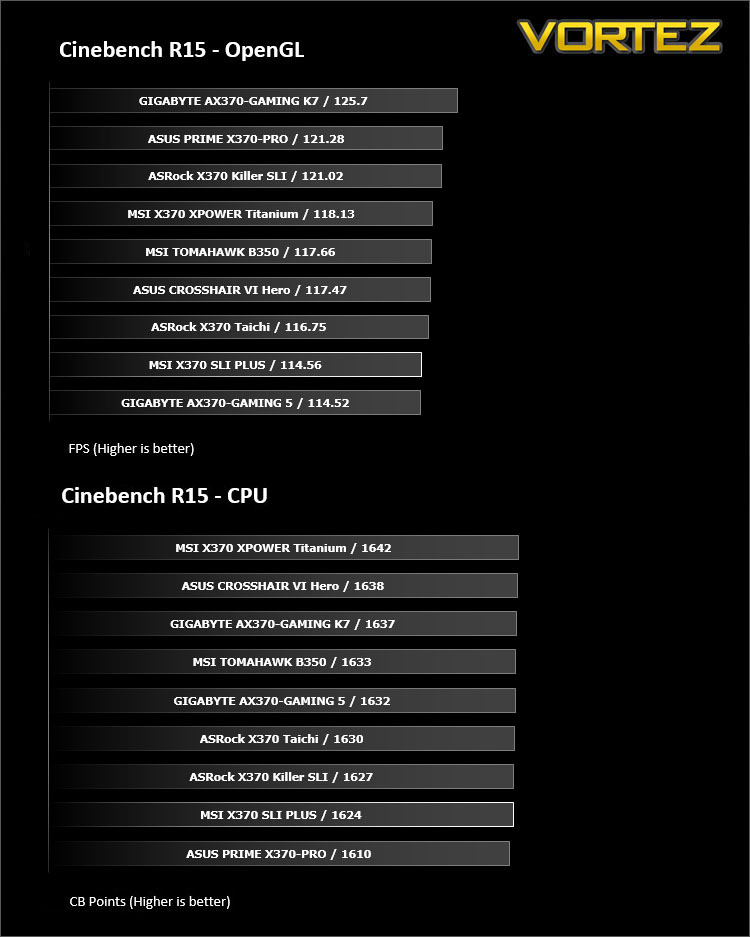
CINEBENCH is a real-world cross platform test suite that evaluates your computer’s performance capabilities. CINEBENCH is based on MAXON’s award-winning animation software CINEMA 4D, which is used extensively by studios and production houses worldwide for 3D content creation. MAXON software has been used in blockbuster movies such as Iron Man 3, Oblivion, Life of Pi or Prometheus and many more.
Benchmarks: X264 HD
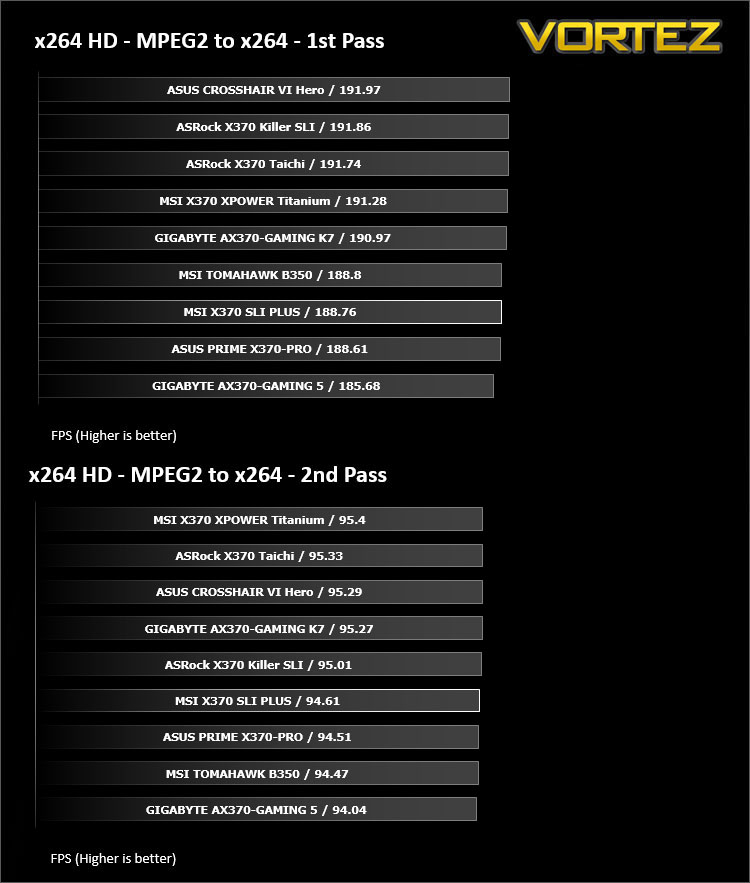
Simply put, this test measures how fast your machine can encode a short, DVD quality MPEG-2 video clip into a high-quality x264 video clip. What’s x264, you ask? It’s more or less the next-generation Xvid/DivX codec. I think it’s ideal for a benchmark because the application (x264.exe) reports fairly accurate compression results (in frames per second) for each pass of the video encoding process, and it uses multi-core processors very efficiently.
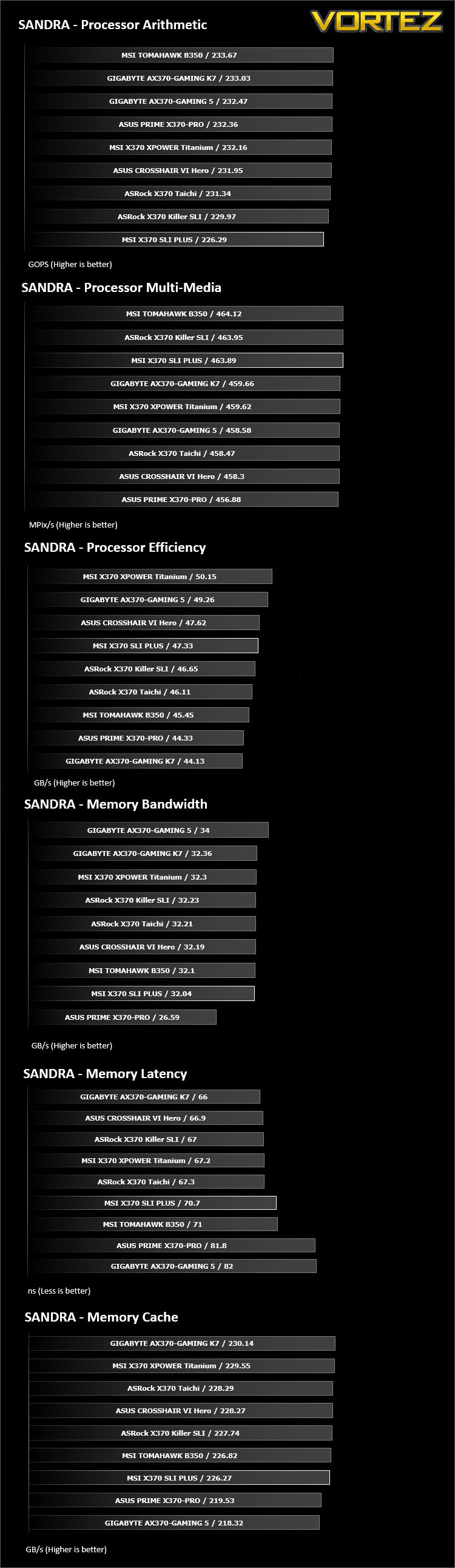
Benchmarks: SiSoftware SANDRA
SANDRA isn’t always a benchmark that is included in hardware reviews but we believe it shouldn’t be ignored. SANDRA provides a vigorous package that tests your system in a rather large array of benchmarks. There are many aspects of benchmark that can be executed. We will be considering – CPU and memory tests.
Benchmarks: POV-RAY
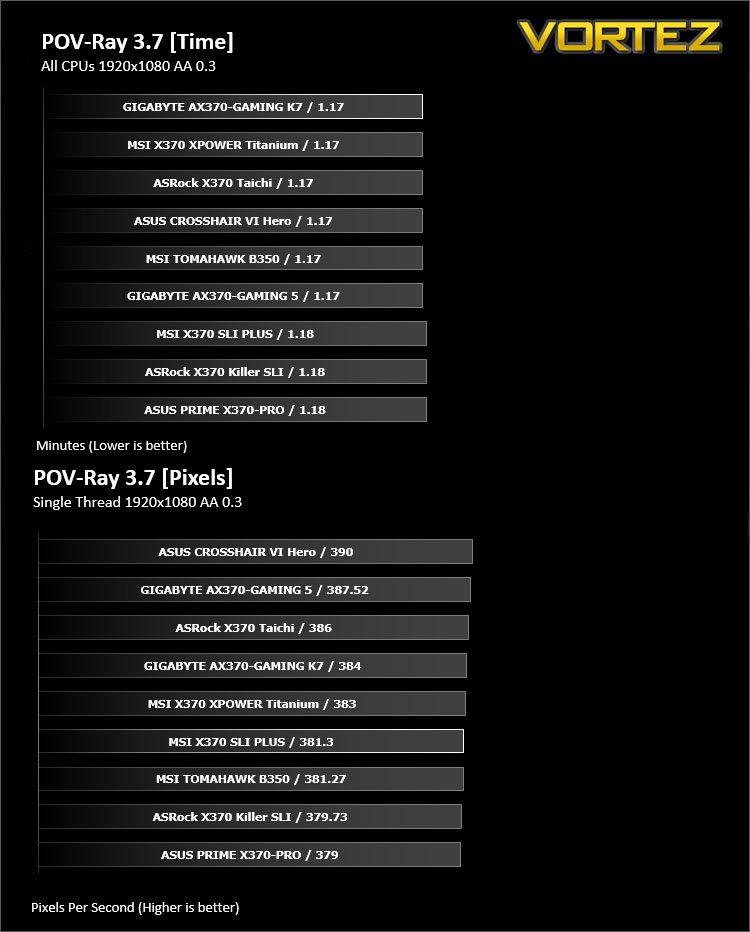
Persistence of Vision Raytracer’s PovRay is a free and open source 3D animator application with versions for computers with different operating systems.
This product allows users to build their custom 3D worlds with excellent quality despite their computer’s hardware. It has adjustable options for levels of radiance, refraction, and reflection. Calculation time may vary depending on the computer model, but PovRay can adapt to many computer builds, and is supported by the open source community.
This product allows users to build their custom 3D worlds with excellent quality despite their computer’s hardware. It has adjustable options for levels of radiance, refraction, and reflection. Calculation time may vary depending on the computer model, but PovRay can adapt to many computer builds, and is supported by the open source community.
Benchmarks: TrueCrypt
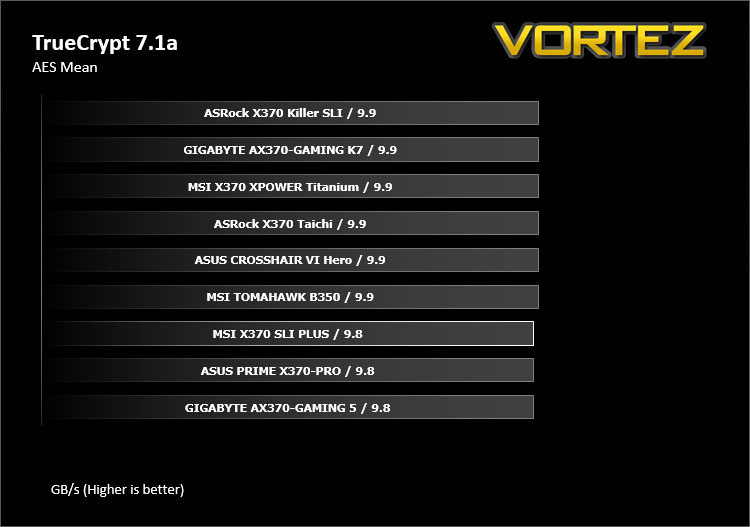
TrueCrypt is a discontinued source-available freeware utility used for on-the-fly encryption (OTFE). It can create a virtual encrypted disk within a file or encrypt a partition or (under Microsoft Windows except Windows 8 with GPT) the entire storage device (pre-boot authentication).
Benchmarks: AIDA64
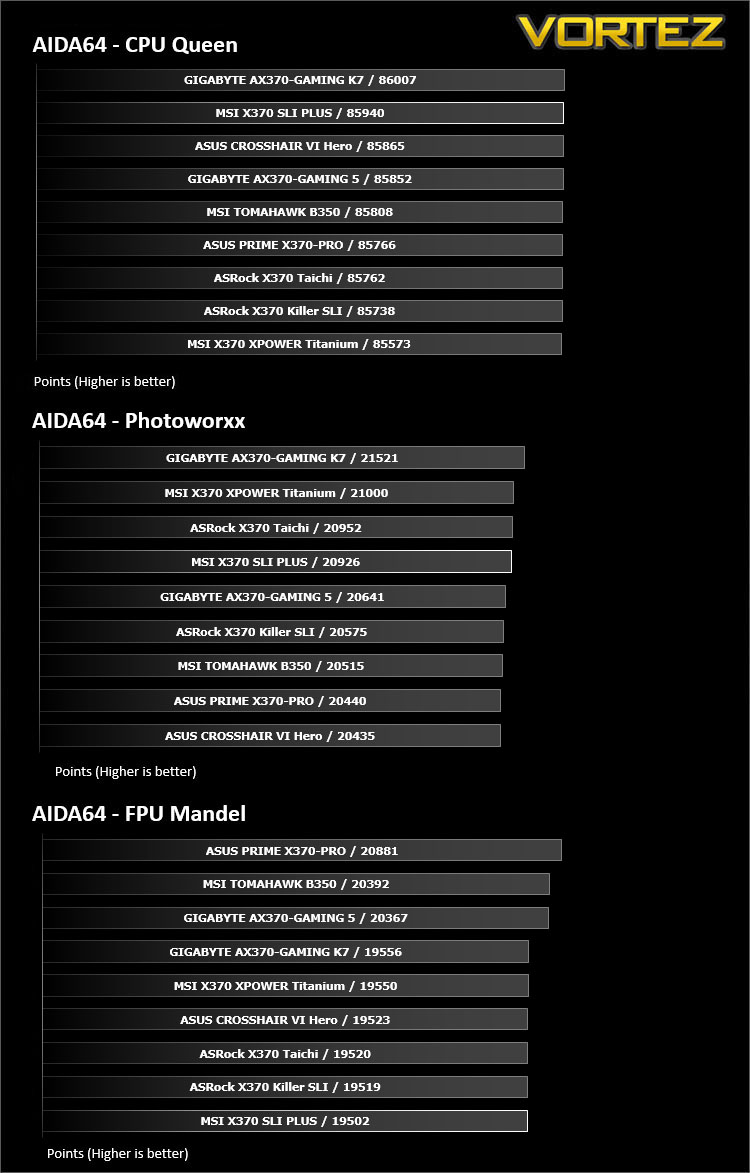
AIDA64 Product PageThis simple integer benchmark focuses on the branch prediction capabilities and the misprediction penalties of the CPU. It finds the solutions for the classic “Queens problem” on a 10 by 10 sized chessboard. At the same clock speed theoretically the processor with the shorter pipeline and smaller misprediction penalties will attain higher benchmark scores. For example — with HyperThreading disabled — the Intel Northwood core processors get higher scores than the Intel Prescott core based ones due to the 20-step vs 31-step long pipeline. CPU Queen test uses integer MMX, SSE2 and SSSE3 optimizations.
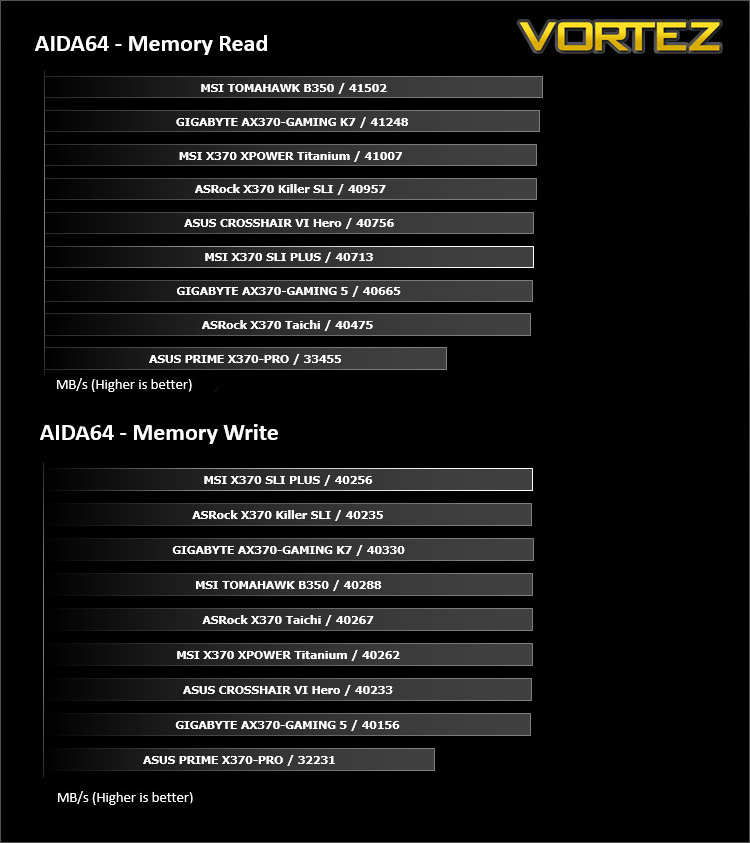
Benchmarks: PCMark 8
PCMark 8 combines performance benchmarking with battery life measurement and includes tests based on popular Adobe and Microsoft applications. Whether you are looking for long battery life, or maximum power, PCMark 8 will help you find the devices that offer the perfect combination of efficiency and performance for your needs. It’s the complete PC performance benchmark for home and business.
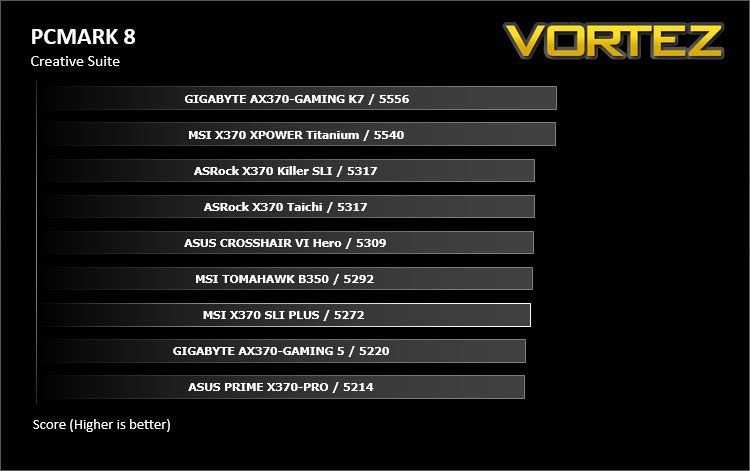
Benchmarks: PCMark 8 Photoshop
The PCMark 8 Applications benchmark measures system performance using popular applications from the Adobe Creative Suite and Microsoft Office. You can choose which tests to run based on the applications installed on your system. Each test automatically steps through a series of actions such as opening, editing and saving a file. The results are used to calculate the PCMark 8 Applications scores for the system.
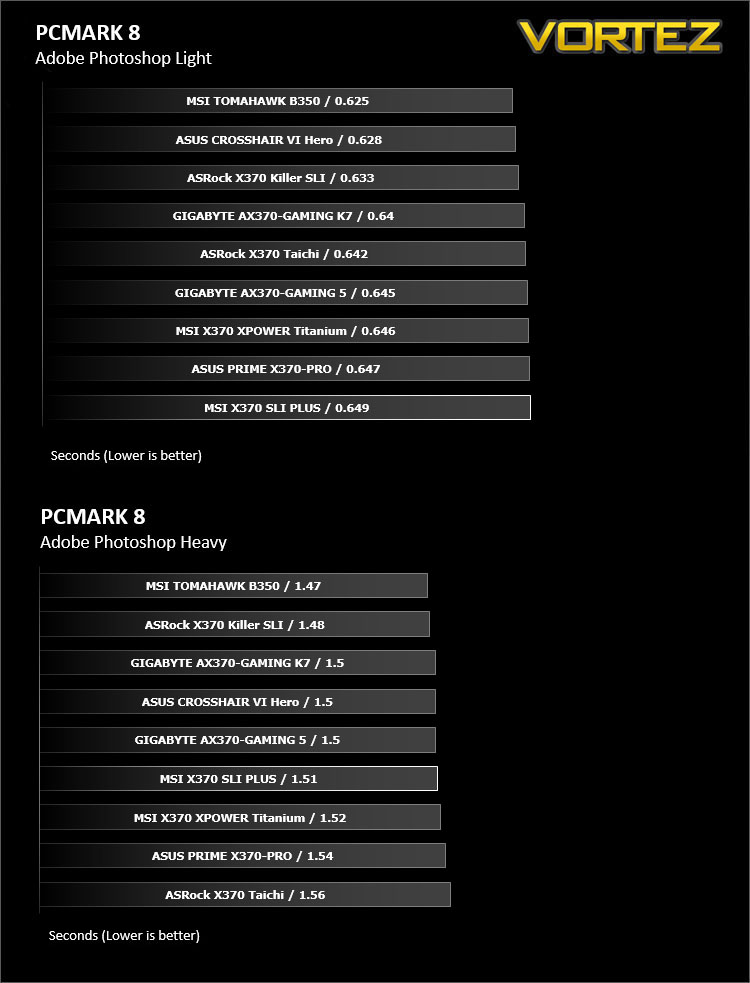
Benchmarks: 3DMark
3DMark FireStrike Product PageFire Strike is our new showcase DirectX 11 benchmark designed for high-performance gaming PCs. It is our most ambitious and technical benchmark ever, featuring real-time graphics rendered with detail and complexity far beyond what is found in other benchmarks and games today. Fire Strike will only be available in the Windows editions of 3DMark initially.
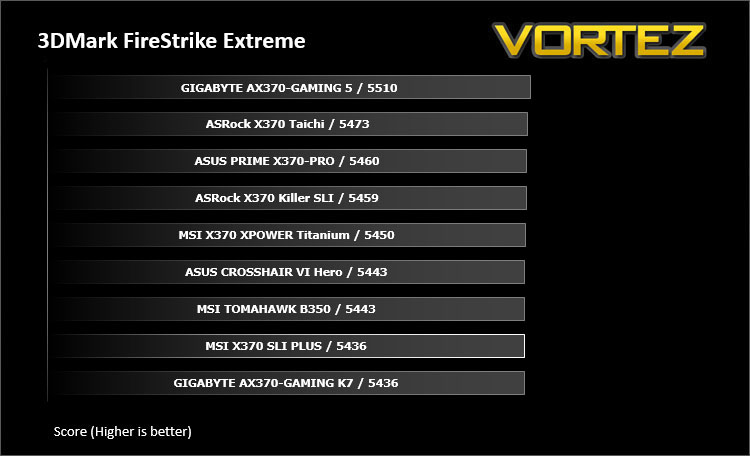
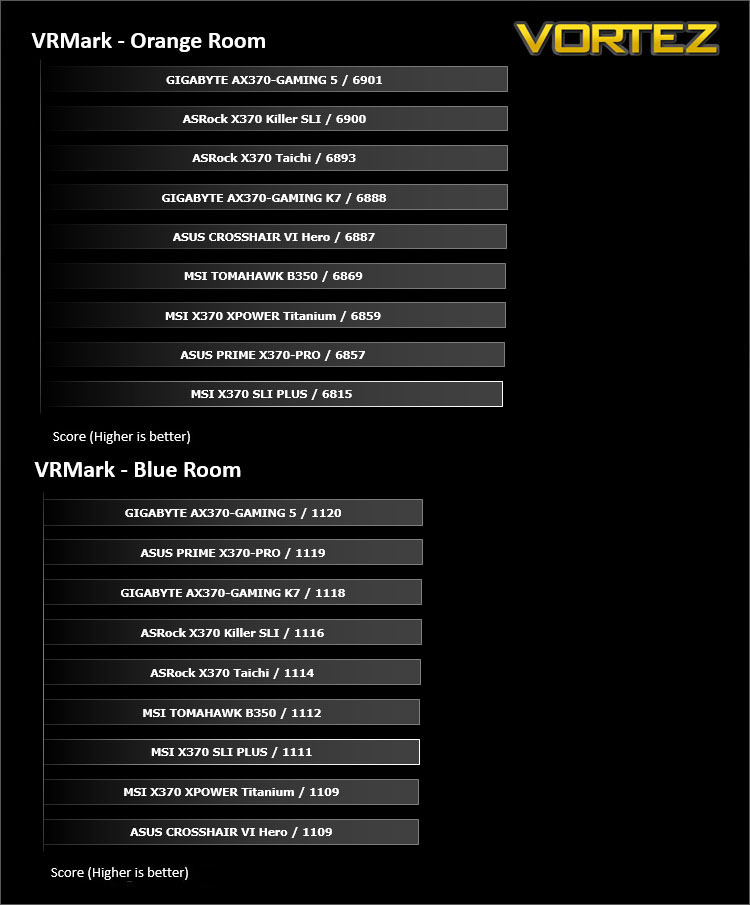
VR Performance – VRMark
VRMark Product PageVRMark includes two VR benchmark tests that run on your monitor, no headset required, or on a connected HMD. At the end of each test, you’ll see whether your PC is VR ready, and if not, how far it falls short.
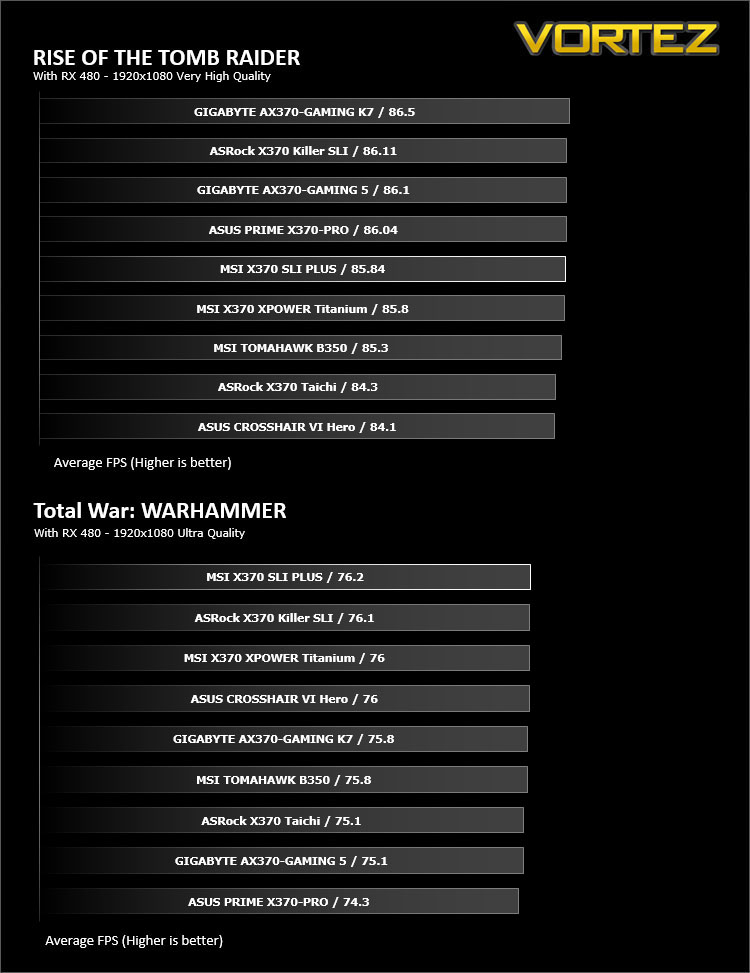
Gaming Performance – Rise of the Tomb Raider & Total War: WARHAMMER
It’s important for us to perform a number of game benchmarks as well as the synthetic tests because gamers will want to know if there are any significant benefits. So here we have two recent gaming titles.
Conclusion
The sleek aesthetics and no-nonsense appeal of the X370 SLI PLUS will help make it a popular choice for system builders and business users. It supports SLI and CrossFire for multi-graphics setups, and has a whole host of MSI technologies to ensure long term stability. At time of writing, the X370 SLI PLUS is the most affordable X370 motherboard we have looked at, and though there has been measures taken to keep the cost down (like not including an SLI bridge, despite ‘SLI’ featuring in the product name, or omitting fancy RGB LEDs), there has been very little compromise in regards to the overall quality and performance of the product.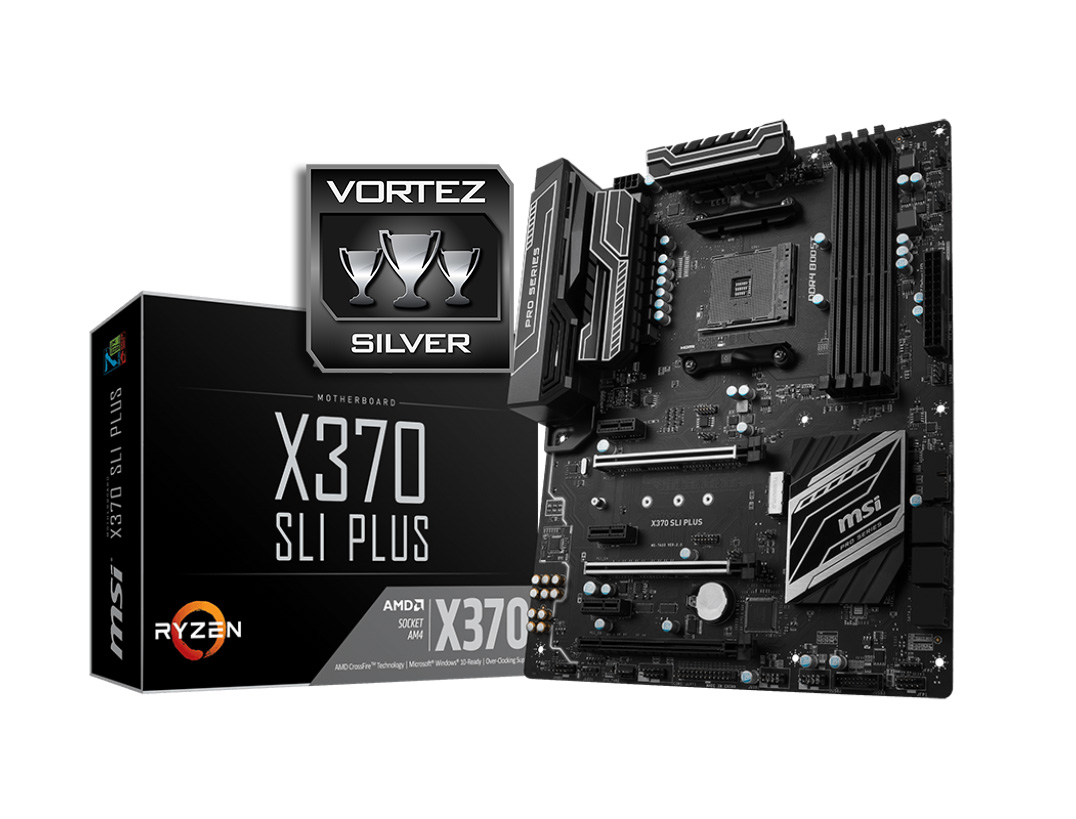
If we were to compare the X370 SLI Plus to the ASRock X370 Killer SLI, the latter, at an extra cost, provides users with an additional M.2 slot and a dedicated M.2 E-Key for a wireless card, helping it to appeal to a broader audience. So enthusiasts may overlook the X370 SLI PLUS as they may be seeking that little bit more from their system. Though if you are a professional, home user, or even gamer, seeking a simple low-cost X370 motherboard, this would certainly be a motherboard to consider.
The X370 SLI Plus is a robust and visually elegant motherboard that does everything it says on the tin.
Pros
+ Sleek, minimalistic aesthetics
+ High quality construction (rugged ESD. and Steel Armour)
+ Easy to use BIOS
+ DDR4 Boost/Audio Boost
+ EZ Debug LED
+ Right angle USB 3.1 Gen1 header
+ Low power usage
+ Competitive pricing
Cons
– Slow reacting ‘Smart Fan’
– SLI bridge not included
+ Sleek, minimalistic aesthetics
+ High quality construction (rugged ESD. and Steel Armour)
+ Easy to use BIOS
+ DDR4 Boost/Audio Boost
+ EZ Debug LED
+ Right angle USB 3.1 Gen1 header
+ Low power usage
+ Competitive pricing
Cons
– Slow reacting ‘Smart Fan’
– SLI bridge not included
Click here for an explanation of our awards at Vortez.net.