







An Intel Z97 motherboard designed for elite overclockers desiring to push their hardware to the absolute limit with 4-way NVIDIA SLI & AMD CrossfireX support.

Product on Review Z97 XPOWER AC
Manufacturer & Sponsor: MSI
Street Price: £287 GBP / $400 USD
It goes without saying that overclocking has vast become a popular practise for devoted hardware enthusiasts. Hardware vendors specifically design their products to be tweaked in this fashion nowadays and today we are to take a look at a motherboard which plans to project enthusiasts to overclocking stardom.
For Intel’s previous 8 Series motherboards, MSI began designing solutions which definitively target the overclocker. This division of motherboards set out on a quest to satisfy the needs for such intense use and MSI are back with their overclocking division and a fresh batch of motherboards for the Intel 9 series.
XPOWER AC is an E-ATX motherboard which is primarily designed to push the limits of your hardware. MSI has furnished this motherboard with plenty of innovation which include a number of performance related features including the possibility to make use of 4-way NVIDIA SLI or AMD CrossfireX.
About MSI
Micro-Star International Co., Ltd (MSI) was established in August 1986 by 5 founders, one of the world’s largest information technology manufacturers.
MSI started from the motherboard and graphics card industries and extended into consumer and commercial electronics including notebooks, All-in-One PCs, servers, workstations, industrial PCs, household appliances, car infotainment products, barebone systems, multimedia, communication devices, and others.
MSI holds itself responsible not only to its clients, employees and stockholders, but also to the society and environment as a whole to consistently fulfill its corporate commitment.
With innovation and style as its core value, customer satisfaction and premium service as its goal, MSI will definitely be the most brilliant star in the global brands!
MSI started from the motherboard and graphics card industries and extended into consumer and commercial electronics including notebooks, All-in-One PCs, servers, workstations, industrial PCs, household appliances, car infotainment products, barebone systems, multimedia, communication devices, and others.
MSI holds itself responsible not only to its clients, employees and stockholders, but also to the society and environment as a whole to consistently fulfill its corporate commitment.
With innovation and style as its core value, customer satisfaction and premium service as its goal, MSI will definitely be the most brilliant star in the global brands!
Technical Specifications
CPU
• Supports 5th and 4th Generation Intel® Core™ Processors, and Intel® Pentium® and Celeron® Processors for the Socket LGA1150
Please refer to CPU Support for compatible CPU; the above description is for reference only.
Chipset
• Intel® Z97 Express Chipset
Main Memory
• Support four DDR3 DIMMs 1066/1333/1600/1866*/2000*/2133*/2200*/2400*/2600*/2666*/
2800*/3000*/3100*/3200*/3300*(OC)DRAM (32GB Max)
– Supports Dual-Channel mode
– Supports non-ECC, un-buffered memory
– Supports Intel® Extreme Memory Profile (XMP)
Slots
• 5 x PCIe 3.0 x16 slots (PCI_E1, PCI_E2, PCI_E3, PCI_E5, PCI_E7)*
– The operating mode will be x0/x16/x0/x0/x0, x16/x0/x0/x16/x0,x16/x0/x0/x8/x8 or x8/x0/x8/x8/x8.*
– Support for installing up to 4 PCIe x16 expansion cards.
• 2 x PCIe 2.0 x1 slots
* For a single expansion card installation with optimum performance, using the PCI_E2 slot is recommended.
On-Board SATA
• Intel Z97 Express Chipset
– 6 x SATA 6Gb/s ports (SATA1~6)
– 1 x M.2 port*
– M.2 port supports M.2 SATA 6Gb/s module
– M.2 port supports M.2 PCIe module up to 10Gb/s speed**
– M.2 port supports 4.2cm/ 6cm/ 8cm length module
– Supports RAID 0, RAID1, RAID 5 and RAID 10***
– Supports Intel Smart Response Technology, Intel® Rapid Start Technology and Intel Smart Connect Technology****
• ASMedia® ASM1061 chipset
– 4 x SATA 6Gb/s ports (SATA7~10)
* The SATA5 and SATA6 ports will be unavailable when installing a module in the M.2 port.
** M.2 PCIe interface only supports UEFI option ROM, NOT support legacy option ROM.
*** M.2 PCIe interface does not support RAID 0, RAID1, RAID 5 and RAID 10.
**** Supports Intel Core processors on Windows 7 and Windows 8/ 8.1
USB
• Intel Z97 Express Chipset
– 4 x USB 3.0 ports available through the internal USB connectors
– 6 x USB 2.0 ports (2 ports on the back panel, 4 ports available through the internal USB connectors*)
• ASMedia ASM1074 Chipset
– 6 x USB 3.0 ports on the back panel
• ASMedia ASM1042 Chipset
– 2 x USB 3.0 ports on the back panel
* internal JUSB1 connector supports MSI Super Charger
Audio
• Realtek® ALC1150 Codec
– 7.1-Channel High Definition Audio
– Supports S/PDIF output
LAN
• 1 x Intel I218-V Gigabit LAN controller
WIreless LAN
• Wi-Fi/Bluetooth expansion module with Intel Dual Band Wireless-AC 7260 chip.
– Supports Wi-Fi 802.11 a/b/g/n/ac, dual band (2.4GHz, 5GHz) up to 867 Mbps speed.
– Supports Intel Wireless Display (WiDi)
Bluetooth
• Wi-Fi/Bluetooth expansion module with Intel Dual Band Wireless-AC 7260 chip.
– Supports Bluetooth v4.0 (includes BLE* and Bluetooth 3.0+HS)
Multi-GPU
• Supports 4-Way AMD® CrossFire™ Technology*
• Supports 4-Way NVIDIA® SLI™ Technology
*Supports Windows 7 and Windows 8/8.1.
Internal I/O Connectors
– 1 x 24-pin ATX power connector
– 1 x 8-pin ATX 12V power connector
– 1 x 6-pin ATX 12V power connector*
– 5 x 4-pin System fan connectors
– 2 x 4-pin CPU fan connectors
– 10 x SATA 6Gb/s connectors
– 2 x USB 2.0 connectors (supports additional 4 USB 2.0 ports)
– 2 x USB 3.0 connectors (supports additional 4 USB 3.0 ports)
– 1 x Front Panel Audio connector
– 2 x System panel connectors
– 1 x TPM module connector
– 1 x Chassis Intrusion connector
– 9 x V-Check points connectors
– 1 x GO2BIOS button
– 1 x OC Genie button
– 1 x Discharge button
– 1 x Reset button
– 1 x Power button
– 2 x Base Clock control buttons
– 2 x CPU Ratio control buttons
– 1 x Clear CMOS jumper
– 1 x Multi-BIOS switch
– 1 x OC Genie mode switch
– 1 x PCIe CeaseFire Switch
– 1 x Slow mode switch
– 1 x Base Clock step swtich
– 1 x PCIe CeaseFire switch
– 1 x 2-Digit Debug Code LED
– 1 x Wi-Fi/ Bluetooth module connector
* Provides additional power to PCIe x16 slots
Back Panel I/O Ports
– 1 x PS/2 keyboard/mouse combo port
– 1 x Clear CMOS button
– 1 x Optical S/PDIF-out port
– 2 x USB 2.0 ports
– 8 x USB 3.0 ports
– 1 x RJ45 LAN jack
– 1 x 6 in 1 OFC audio jack
– 1 x DisplayPort with max. resolution up to 4096×2304@24Hz, 2560×1600@60Hz, 3840×2160@60Hz,1920×1200@60Hz
– 1 x HDMI ports with max. resolution up to 4096×2304@24Hz, 2560×1600@60Hz, 3840×2160@60Hz,1920×1200@60Hz
BIOS
• The motherboard BIOS provides “Plug & Play” BIOS which detects the peripheral devices and expansion cards of the board automatically.
• The motherboard provides a Desktop Management Interface(DMI) function which records your motherboard specifications.
Dimension
• 30.5cm(L) x 26.4cm(W) E-ATX Form Factor
Mounting
• 9 mounting holes.
• Supports 5th and 4th Generation Intel® Core™ Processors, and Intel® Pentium® and Celeron® Processors for the Socket LGA1150
Please refer to CPU Support for compatible CPU; the above description is for reference only.
Chipset
• Intel® Z97 Express Chipset
Main Memory
• Support four DDR3 DIMMs 1066/1333/1600/1866*/2000*/2133*/2200*/2400*/2600*/2666*/
2800*/3000*/3100*/3200*/3300*(OC)DRAM (32GB Max)
– Supports Dual-Channel mode
– Supports non-ECC, un-buffered memory
– Supports Intel® Extreme Memory Profile (XMP)
Slots
• 5 x PCIe 3.0 x16 slots (PCI_E1, PCI_E2, PCI_E3, PCI_E5, PCI_E7)*
– The operating mode will be x0/x16/x0/x0/x0, x16/x0/x0/x16/x0,x16/x0/x0/x8/x8 or x8/x0/x8/x8/x8.*
– Support for installing up to 4 PCIe x16 expansion cards.
• 2 x PCIe 2.0 x1 slots
* For a single expansion card installation with optimum performance, using the PCI_E2 slot is recommended.
On-Board SATA
• Intel Z97 Express Chipset
– 6 x SATA 6Gb/s ports (SATA1~6)
– 1 x M.2 port*
– M.2 port supports M.2 SATA 6Gb/s module
– M.2 port supports M.2 PCIe module up to 10Gb/s speed**
– M.2 port supports 4.2cm/ 6cm/ 8cm length module
– Supports RAID 0, RAID1, RAID 5 and RAID 10***
– Supports Intel Smart Response Technology, Intel® Rapid Start Technology and Intel Smart Connect Technology****
• ASMedia® ASM1061 chipset
– 4 x SATA 6Gb/s ports (SATA7~10)
* The SATA5 and SATA6 ports will be unavailable when installing a module in the M.2 port.
** M.2 PCIe interface only supports UEFI option ROM, NOT support legacy option ROM.
*** M.2 PCIe interface does not support RAID 0, RAID1, RAID 5 and RAID 10.
**** Supports Intel Core processors on Windows 7 and Windows 8/ 8.1
USB
• Intel Z97 Express Chipset
– 4 x USB 3.0 ports available through the internal USB connectors
– 6 x USB 2.0 ports (2 ports on the back panel, 4 ports available through the internal USB connectors*)
• ASMedia ASM1074 Chipset
– 6 x USB 3.0 ports on the back panel
• ASMedia ASM1042 Chipset
– 2 x USB 3.0 ports on the back panel
* internal JUSB1 connector supports MSI Super Charger
Audio
• Realtek® ALC1150 Codec
– 7.1-Channel High Definition Audio
– Supports S/PDIF output
LAN
• 1 x Intel I218-V Gigabit LAN controller
WIreless LAN
• Wi-Fi/Bluetooth expansion module with Intel Dual Band Wireless-AC 7260 chip.
– Supports Wi-Fi 802.11 a/b/g/n/ac, dual band (2.4GHz, 5GHz) up to 867 Mbps speed.
– Supports Intel Wireless Display (WiDi)
Bluetooth
• Wi-Fi/Bluetooth expansion module with Intel Dual Band Wireless-AC 7260 chip.
– Supports Bluetooth v4.0 (includes BLE* and Bluetooth 3.0+HS)
Multi-GPU
• Supports 4-Way AMD® CrossFire™ Technology*
• Supports 4-Way NVIDIA® SLI™ Technology
*Supports Windows 7 and Windows 8/8.1.
Internal I/O Connectors
– 1 x 24-pin ATX power connector
– 1 x 8-pin ATX 12V power connector
– 1 x 6-pin ATX 12V power connector*
– 5 x 4-pin System fan connectors
– 2 x 4-pin CPU fan connectors
– 10 x SATA 6Gb/s connectors
– 2 x USB 2.0 connectors (supports additional 4 USB 2.0 ports)
– 2 x USB 3.0 connectors (supports additional 4 USB 3.0 ports)
– 1 x Front Panel Audio connector
– 2 x System panel connectors
– 1 x TPM module connector
– 1 x Chassis Intrusion connector
– 9 x V-Check points connectors
– 1 x GO2BIOS button
– 1 x OC Genie button
– 1 x Discharge button
– 1 x Reset button
– 1 x Power button
– 2 x Base Clock control buttons
– 2 x CPU Ratio control buttons
– 1 x Clear CMOS jumper
– 1 x Multi-BIOS switch
– 1 x OC Genie mode switch
– 1 x PCIe CeaseFire Switch
– 1 x Slow mode switch
– 1 x Base Clock step swtich
– 1 x PCIe CeaseFire switch
– 1 x 2-Digit Debug Code LED
– 1 x Wi-Fi/ Bluetooth module connector
* Provides additional power to PCIe x16 slots
Back Panel I/O Ports
– 1 x PS/2 keyboard/mouse combo port
– 1 x Clear CMOS button
– 1 x Optical S/PDIF-out port
– 2 x USB 2.0 ports
– 8 x USB 3.0 ports
– 1 x RJ45 LAN jack
– 1 x 6 in 1 OFC audio jack
– 1 x DisplayPort with max. resolution up to 4096×2304@24Hz, 2560×1600@60Hz, 3840×2160@60Hz,1920×1200@60Hz
– 1 x HDMI ports with max. resolution up to 4096×2304@24Hz, 2560×1600@60Hz, 3840×2160@60Hz,1920×1200@60Hz
BIOS
• The motherboard BIOS provides “Plug & Play” BIOS which detects the peripheral devices and expansion cards of the board automatically.
• The motherboard provides a Desktop Management Interface(DMI) function which records your motherboard specifications.
Dimension
• 30.5cm(L) x 26.4cm(W) E-ATX Form Factor
Mounting
• 9 mounting holes.
Packaging & First Look
Packaging arrives with the black and yellow theme
Since the XPOWER series belongs to MSI’s overclocking category, our motherboard arrives in a large black and yellow box. This theme is recognised as MSI’s chosen scheme for this calibre of motherboard and helps to significantly diversify from other brands.
Around the back of this box there are further details concerning the critical feature-set of XPOWER AC.
Sneak preview of the motherboard
The top section of the packaging opens out to reveal a sneak preview of the actual motherboard within the packaging. This lid also contains information surrounding the fundamental features of this motherboard for those wanting to discover more.
Plenty of included items
Opening the box up, there are a plethora of included items bundled with XPOWER AC. These include the following:
• Documentation: User Guide, OC Guide, Software Guide, Quick Start
• Software CD
• SLI Bridges: 2-way, 3-way, 4-way
• 6x SATA 3 (6G) cables
• Wireless Antennas and module
• Test bench fan bracket
• Delid Die Guard
• E-SATA/Molex adapter
• Rear IO shield
• Drive labels
• Case badge
• Door hanger
As you can see, this package is rather extensive and covers every possible usage.
Black and yellow styling is very appealing to the eye
XPOWER AC is easily distinguished from other motherboards due to the black and yellow theme which is now synonymous with MSI’s overclocking products. The styling is rather engaging, it catches the eye and we applaud MSI for their efforts – it’s obvious that much thought has gone into the production of this motherboard. The PCB has been adorned with a matt black finish and all of the ports and slots are also black.
XPOWER AC steps away from the standard ATX form factor and this isn’t any wonder since this motherboard is jam-packed with numerous features which are beyond the norm. Our motherboard conforms to E-ATX so you will have to ensure you have a computer chassis (or test bench) which can accommodate this extra width.
Closer Look
16-Phase DigitALL Power Design
Around the socket, MSI has placed a combination of three burly heatsinks which are all interconnected via a copper heatpipe. These heatsinks cover the MOSFETs/VRM. XPOWER AC actually uses a 16 Phase DigitALL Power Design to ensure pinpoint accuracy for voltage delivery. Combining this and the 12-pin EPS (CPU) power and the recipe for a good overclocker is certainly there. MSI uses Military Class 4 components throughout, which include HI-C CAPs, Dark CAPs and SFCs.
Although XPOWER AC uses passive heatsinks, MSI has also added in the choice to water cool the VRMs. There is a cap on either end of this design to correspond with water cooling barbs. This is what MSI has to say about this particular feature:
Featuring a new unique heatsink design, MSI Z97 overclocking motherboards ensure the best cooling performance. Saving water cooling enthusiasts having to buy a waterblock for our motherboards, new generation overclocking models feature a no compromise built-in solution within the heatsink. So whether you choose a traditional air cooling or enthusiast water cooling solution, be sure to expect the lowest temperatures and maximum performance under the most extreme conditions.
XPOWER AC is designed with LGA1150 and thus coincides with Intel’s 4th Generation and 5th Generation CPUs including the current ‘Haswell Refresh’ SKUs.
Plethora of features around the memory slots
XPOWER AC has four DIMM slots which support dual channel DDR3. This motherboard can accommodate up to 3300 (OC) and a maximum capacity of 32GB. As expected, Intel XMP is available too.
In the memory region MSI has packed in an assortment of innovative features.
OC Genie 4: Allows a one-second overclock (can switch between two settings)
Direct OC buttons: On-the-fly overclocking (Multi or Baseclock)
LED Debug: Displays codes on POST to help resolve any issues
V-Checkpoints 2: Voltages can be read by up to three multimeters
OC switches: Enabling/disabling specific OC features
Next to the 24-pin power MSI has placed a USB 3.0 header for use with the front panel of a computer chassis.
No shortage of SATA 3 ports
Gracing the XPOWER AC are a total of ten SATA 3 (6G) ports which are certain to cater for most users. MSI has also included another USB 3.0 header port which is right-angled. Unlike other Intel Z97 motherboards, XPOWER AC has no native SATA Express functionality – the focus has been placed upon other areas.
Large Intel Z97 heatsink
Behind the SATA ports and covering the Intel Z97 chip is a distinct and substantial heatsink. MSI has given the heatsink the “X” design to signify XPOWER.
In the bottom corner of XPOWER AC, there is a fast boot button which allows the user to boot directly into the BIOS without having to hit the “DEL” key on the keyboard – ideal if you have the board on a test bench. Next to this button is a BIOS switch, allowing you to move to and from a secondary BIOS.
Multi-GPU support and much more!
In the graphics card department, XPOWER AC excels by supporting up to four solutions. 4-way SLI and 4-way CrossfireX is supported via a PLX chip (PLX8747).
MSI has given XPOWER AC the following slots:
– 5x PCI Express 3.0 X16 slots
Operating at: x0/x16/x0/x0/x0, x16/x0/x0/x16/x0,x16/x0/x0/x8/x8 or x8/x0/x8/x8/x8.
– 2x PCI Express 2.0 X1 slots
Additionally, there is an auxiliary PCI-E power socket to assist with delivering more juice, since a configuration of four graphics cards is extremely demanding upon the system.
In between the bottom two PCI Express X16 slots MSI has integrated an M.2 slot for use with an M.2 Solid State Drive. SATA ports 5 and 6 cannot be used if an M.2 drive is installed but users can enjoy up to 10Gb/s transfer rates.
Onto the topic of audio, MSI are using Audio Boost 2 on XPOWER AC.
Audio Boost 2 physically isolates the audio PCB for lower interference and makes use of a dedicated power interface to ensure that it’s both more powerful and stable. In addition to the standard 7.1 analogue output GAMING-series motherboards are bundled with Creative Sound Blaster Cinema 2 software, boosting simulated surround-sound to headphones and headsets for more immersive gameplay.
USB Audio Power ensures a consistent 5V supply to the rear USB ports, even under the heavy draw a device such as a USB DAC would cause. A significant long-term weakness for USB, is great to see MSI and others address the quality of power being delivered to external peripherals.
Dual built-in amplifiers improve audio clarity to headphones of up to 600-ohm impedance, headphones which can be hooked up to either the back panel or chassis audio ports. High quality Nichicon Japanese Capacitors are specially designed for audio and enable the best possible filtering for high-end acoustics. Finally, golden audio connectors should increase long-term durability and signal quality.
USB 3.0 galore on the rear IO panel
Lastly we focus attention on the rear IO panel, this particular area has numerous USB 3.0 ports which is great to see. In this area we have the following:
– 1 x PS/2 keyboard/mouse combo port
– 1 x Clear CMOS button
– 1 x Optical S/PDIF-out port
– 2 x USB 2.0 ports
– 8 x USB 3.0 ports
– 1 x RJ45 LAN jack
– 1 x 6 in 1 OFC audio jack
– 1 x DisplayPort with max. resolution up to 4096×2304@24Hz
– 1 x HDMI ports with max. resolution up to 4096×2304@24Hz
MSI Z97 OC SERIES UEFI Video Tour
Below is a video tour showing the interface of MSI’s OC SERIES UEFI BIOS and the options which are available. The XPOWER BIOS is very similar to their Gaming line, the only real difference are the colours and XPOWER specific feaatures and settings. The overall experience when using this interface is great, it responds well to the mouse, is fluid and easy to use.
Test Setup, Methodology & Overclocking
Test Setup
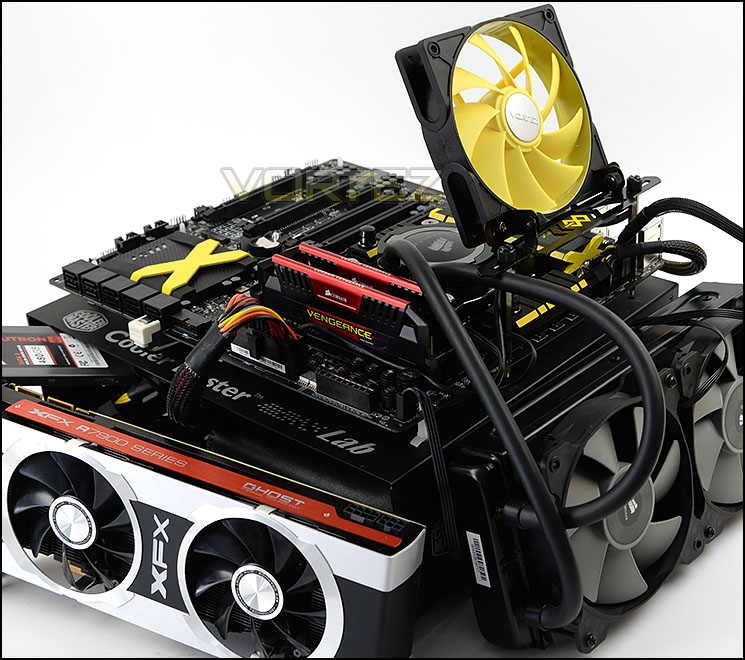
CPU Intel Core i7 4770K (Haswell) 3.50GHz
Cooling Corsair Hydro Series H105
Motherboard MSI Z97 XPOWER AC
Memory 16GB Corsair Vengeance Pro 2800MHz CL12 DDR3
Graphics XFX R7970 Black Edition
Storage Corsair Neutron GTX 480GB
PSU Corsair HX1050 80 Plus Gold Certified PSU
Cooling Corsair Hydro Series H105
Motherboard MSI Z97 XPOWER AC
Memory 16GB Corsair Vengeance Pro 2800MHz CL12 DDR3
Graphics XFX R7970 Black Edition
Storage Corsair Neutron GTX 480GB
PSU Corsair HX1050 80 Plus Gold Certified PSU
Benchmarks
Cinebench R15 – CPU/OpenGL Score
x264 HD 4.0 – 1st and 2nd pass encoding
SiSoftware SANDRA 2014 – CPU & Memory benchmarks
AIDA64 – CPU benchmarks
PCMark 8 – Home Suite
3DMark FireStrike – DX11 3D Benchmark
Games – Tomb Raider, THIEF
x264 HD 4.0 – 1st and 2nd pass encoding
SiSoftware SANDRA 2014 – CPU & Memory benchmarks
AIDA64 – CPU benchmarks
PCMark 8 – Home Suite
3DMark FireStrike – DX11 3D Benchmark
Games – Tomb Raider, THIEF
Other Software
Temperature Analysis: Core Temp
Stress Testing Software: LinX
CPU Specification Monitoring: CPU-Z
Stress Testing Software: LinX
CPU Specification Monitoring: CPU-Z
Overclocking
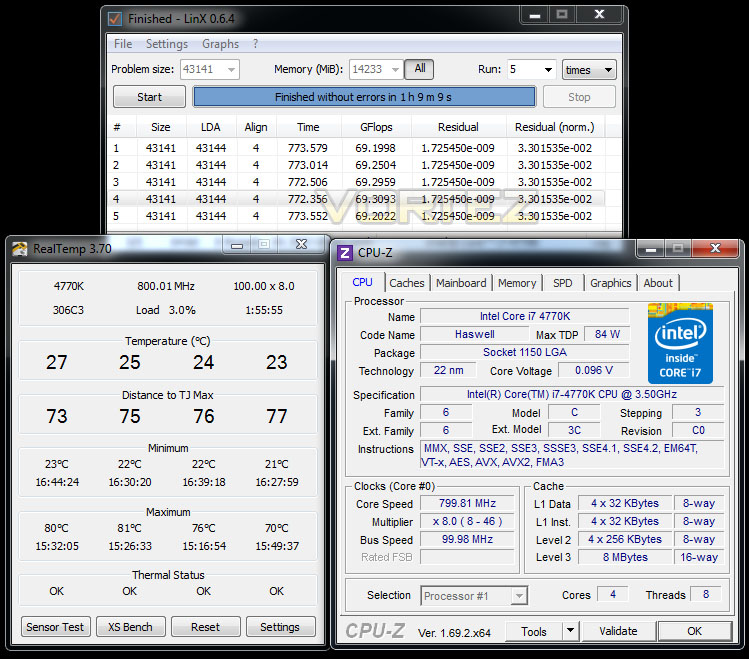
Since the introduction of Z87 back in 2013, there has been a return to BCLK overclocking. This type of functionality ensures flexibility for Overclockers compared to previous generations were the BCLK was locked to 100MHz and only the ratio could be adjusted. As many of you will know, Haswell CPUs get very hot with little voltage increase therefore the flexibility and headroom for overclocking can be limited. For the Z97 launch, we are testing with the Intel Core i7-4770K which from previous, extensive testing, has a maximum overclock of 4.6GHz.
XPOWER AC managed to take our Intel Core i7-4700K to 4.6GHz and settled at 1.28v – one of our best results so far. We couldn’t lower the voltage any further than this but many of the motherboards we have tested require 1.29-1.3v in order to run at 4.6GHz. By having the voltage lower, we can enjoy lower temperatures compared to a higher voltage and it obviously preserves the lifespan of the chip.
Benchmarks: Power Consumption
It’s interesting to note the power consumption across all motherboards. Although they are using Z97 chipsets, energy results can fluctuate between manufacturers due to the features and specifications that are integrated. First of all, for the idle tests the system is cold booted into Windows and no additional applications are executed – the watts are noted on the external energy monitor we use and then the system is loaded with 3DMark FireStrike – watts are again monitored for the duration of the test and the highest rated wattage result is then noted down. Below are the results of this energy test.
Benchmarks: X264 HD
Simply put, this test measures how fast your machine can encode a short, DVD quality MPEG-2 video clip into a high-quality x264 video clip. What’s x264, you ask? It’s more or less the next-generation Xvid/DivX codec. I think it’s ideal for a benchmark because the application (x264.exe) reports fairly accurate compression results (in frames per second) for each pass of the video encoding process, and it uses multi-core processors very efficiently.
Benchmarks: AIDA64
AIDA64 Product PageThis simple integer benchmark focuses on the branch prediction capabilities and the misprediction penalties of the CPU. It finds the solutions for the classic “Queens problem” on a 10 by 10 sized chessboard. At the same clock speed theoretically the processor with the shorter pipeline and smaller misprediction penalties will attain higher benchmark scores. For example — with HyperThreading disabled — the Intel Northwood core processors get higher scores than the Intel Prescott core based ones due to the 20-step vs 31-step long pipeline. CPU Queen test uses integer MMX, SSE2 and SSSE3 optimizations.
Benchmarks: Cinebench
CINEBENCH is a real-world cross platform test suite that evaluates your computer’s performance capabilities. CINEBENCH is based on MAXON’s animation software CINEMA 4D 3D content creation.
Benchmarks: SiSoftware SANDRA
SANDRA isn’t always a benchmark that is included in hardware reviews but I believe it shouldn’t be ignored. SANDRA provides a vigorous package that tests your system in a rather large array of benchmarks. There are many aspects of benchmark that can be executed. We will be considering – CPU and memory tests.
Benchmarks: 3DMark
3DMark FireStrike Product PageFire Strike is our new showcase DirectX 11 benchmark designed for high-performance gaming PCs. It is our most ambitious and technical benchmark ever, featuring real-time graphics rendered with detail and complexity far beyond what is found in other benchmarks and games today. Fire Strike will only be available in the Windows editions of 3DMark initially.
Benchmarks: PCMark 8
PCMark 8 combines performance benchmarking with battery life measurement and includes tests based on popular Adobe and Microsoft applications. Whether you are looking for long battery life, or maximum power, PCMark 8 will help you find the devices that offer the perfect combination of efficiency and performance for your needs. It’s the complete PC performance benchmark for home and business.
Benchmarks: Tomb Raider & THIEF
It’s important for us to perform a number of game benchmarks as well as the synthetic tests because gamers will want to know if there are any significant benefits. So here we have two popular and recent gaming titles which feature a dedicated benchmark tool within them to display results.
Conclusion
We’ve already reviewed a number of Intel Z97 motherboards and are aware of what to expect in terms of design and feature-set but MSI appear to have broken away and developed something quite spectacular in the Z97 XPOWER AC.
Beginning at the packaging, we’re generously given a multitude of accessories and MSI even go as far as to provide a pen drive that contains native drivers and allows for management of OC profiles. Documentation is also in abundance, helping you to get the most out of this motherboard but there are other items which help to set MSI apart from other motherboards which are specifically designed for overclockers; features like the OC fan stand – even if you don’t happen to have a test bench with a cooling fan bracket, MSI have catered for this and such a device can be mounted via the actual motherboard.
Throughout the benchmark tests we ran, XPOWER AC was consistent and demonstrated some pleasing results. The exhaustive feature-set is a particular trait which will be gladly welcomed by overclockers and hardcore enthusiasts. The wealth of features available cover just about every possibility whether you are wanting on-the-fly adjustments, voltage check points or fast BIOS boot – convenience and innovation are both clearly evident.
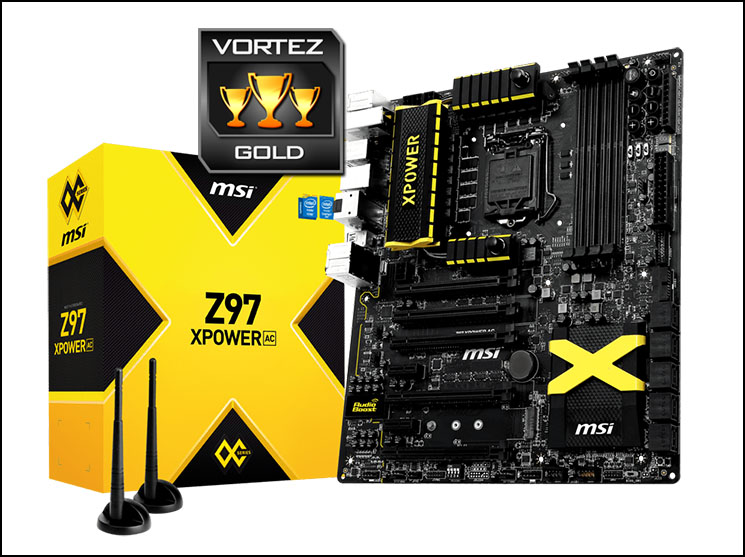
MSI’s overclocking division of motherboards has certainly carved out its own identity – the black and yellow theme we saw with the previous generation of Intel 8 series motherboards looked good but the new Intel 9 series line looks even better. A super smooth matt black PCB, black ports and slots with black and yellow heatsinks distinguish XPOWER AC from anything else and even though this may not be a concern for some users, the aesthetics are sure to astound. MSI has quite obviously spent their time thoughtfully and carefully designing this motherboard.
Although Intel’s new Haswell Refresh chips – Core i5-4690K and Core i7-4790K have been announced, stock isn’t due till later this month (June 2014) and therefore we are yet to see the performance benefits. We are confident that XPOWER AC will bring out the best from these chips and we’ll be using this motherboard to demonstrate stock and overclocked performance.
XPOWER AC is priced at £287 GBP / $400 USD which could be tough for some to swallow but it’s important to remember this motherboard is destined for passionate overclockers and avid enthusiasts. Specialised hardware with such a plethora of features has to be priced accordingly.
MSI’s XPOWER AC is a prolific motherboard which is one of the stronger Intel Z97 motherboards out there. This motherboard oozes style and finesse and whilst doing so satisfies the type of user which intends to push their hardware to the absolute limit.
Pros
+ Stunning visual appearance
+ Extensive accessories pack – including pen drive w/drivers
+ Good performer
+ Exhaustive feature-set including advanced OC options
+ Dual USB 3.0 headers
+ M.2 included
+ Up to 4-way SLI/CrossfireX
+ Military Class 4 components
+ Easy to use and attractive BIOS
+ Wireless/BT functionality
Cons
– Costly
+ Stunning visual appearance
+ Extensive accessories pack – including pen drive w/drivers
+ Good performer
+ Exhaustive feature-set including advanced OC options
+ Dual USB 3.0 headers
+ M.2 included
+ Up to 4-way SLI/CrossfireX
+ Military Class 4 components
+ Easy to use and attractive BIOS
+ Wireless/BT functionality
Cons
– Costly

Click here for an explanation of our awards at Vortez.net.


