Netgear’s Nighthawk range extends further, this time focusing on wireless performance and style. Boasting the latest WiFi 6 (802.11ax) standard and a 1.8GHz Quad-Core CPU.

Product on Review: Netgear AX8 (AX6000)
Manufacturer: Netgear
Street Price: GBP £279.99 / USD $298.00 / AU $599.00
Netgear’s Nighthawk range is aimed towards multiple users, often with gaming-orientated features, aiming to improve overall network performance for everyone. The latest in the Nighthawk range is the AX8.
The Nighthawk AX8 is an 8-stream router and is part of an initial offering within Netgear’s WiFi 6 range. WiFi 6 is the latest confirmed standard within the WiFi standard; WiFi 6 and 802.11ax are interchangeable, however, to make wireless transmission technologies easier to understand for the general public. This latest standard improves 2.4GHz & 5GHz operation and supports the newer 160MHz channels, and in doing so broadly increases support for multiple high-bandwidth devices.
The AX8 supports eight spatial streams (2.4GHz 4×4 and 5GHz 4×4) for a total supported bandwidth of 6000Mbps. Streams are dynamically allocated to devices depending on their needs for more efficient operation in homes and offices with high numbers (typically 10+) of concurrently connected wireless peripherals.
Like other members of the revised Nighthawk series, the AX8 supports a number of new features deemed integral to successful adoption of Wifi 6: OFDMA and 1024-QAM. OFDMA allows full-duplex operation with compatible peripherals, while the 1024-QAM scheme is a forward-thinking standard that significantly increases available bandwidth in zones particularly dense with compatible connected devices.
While supporting the latest WiFi 6 standard is important, wired performance certainly doesn’t take a back seat, with Netgear incorporating Gigabit port aggregation for 2Gbps connections; these connections can be used for direct connection to supporting PCs but also for multi-gig internet connections, allowing more than one ethernet connection to your ISP-provided modem/router.
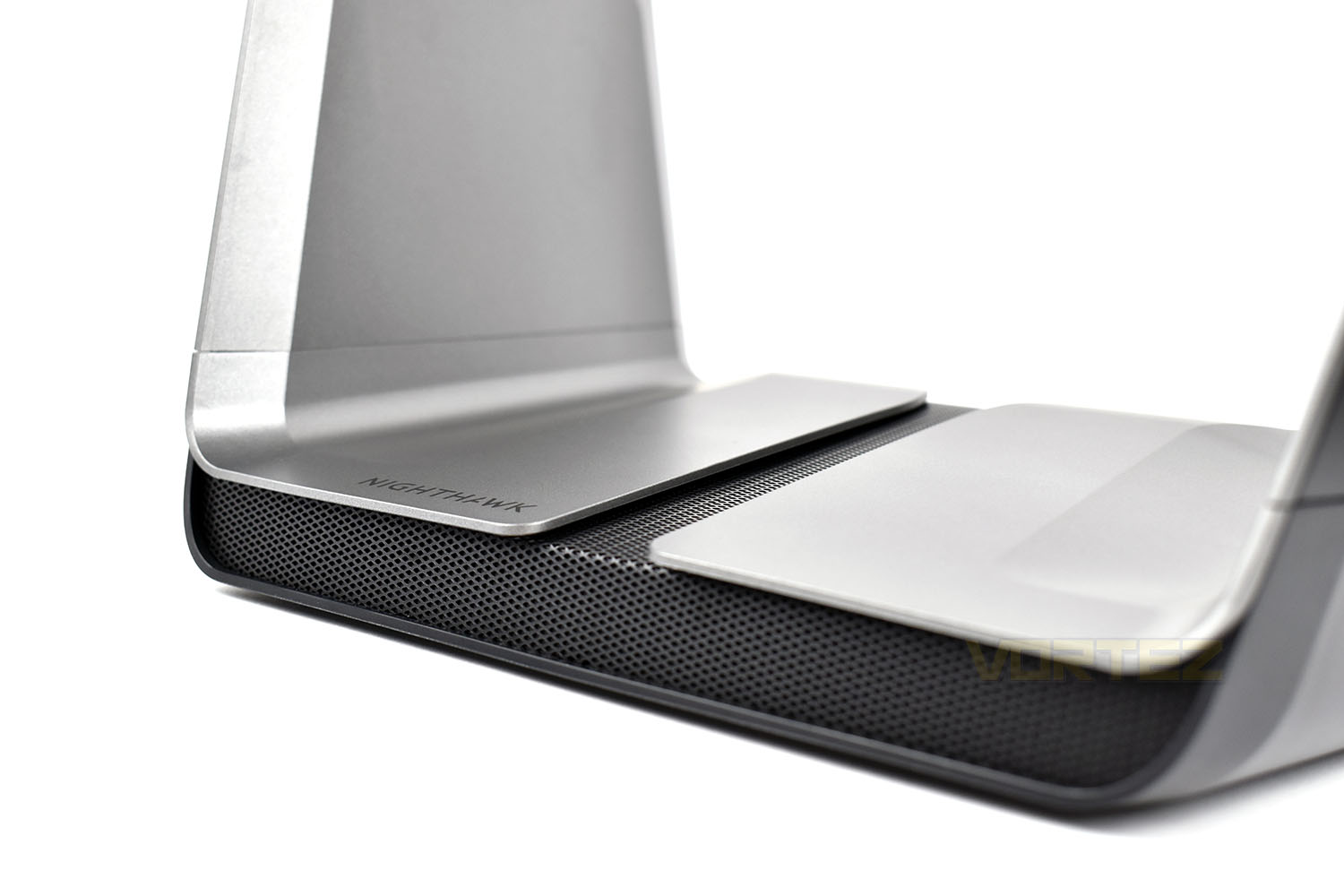
While the internals are of a high importance, as is the appearance. The AX8 sports a striking, starship-like design that we believe would look fantastic almost anywhere.
Netgear on the AX8:
Technical Specifications
WIFI TECHNOLOGY
802.11ax Dual Band WiFi (AX6000)
2.4GHz AX: 4×4 (Tx/Rx) 1024 QAM 40MHz, up to 1.2Gbps
5GHz AX: 4×4 (Tx/Rx) 1024 QAM 160MHz, up to 4.8Gbps
Backwards compatible with 802.11a/b/g/n/ac WiFi
WIFI PERFORMANCE
AX6000 WiFi
WIFI RANGE
Very large homes
WIFI BAND
Simultaneous dual band 2.4 & 5GHz
BEAMFORMING
Beamforming+ — Boosts speed, reliability and range of WiFi Connections for 2.4 and 5GHz
NUMBER OF ETHERNET PORTS
Six (6) 10/100/1000 Mbps Gigabit Ethernet ports (1 WAN & 5 LAN)
Dual Gigabit Ethernet Port Aggregation
NUMBER OF USB PORTS
Two (2) USB 3.0 ports
PROCESSOR
Powerful 64bit 1.8GHz quad-core processor
KEY FEATURES
A Wi-Fi 6 router – Leading the New Era of WiFi
Uplink & Downlink OFDMA§—Improved capacity and efficiency
1024-QAM—25% data efficiency and faster speeds than a 256-QAM router
Powerful 64bit Quad-Core 1.8GHz Processor
SECURITY
Standards-based WiFi Security (802.11i, 128-bit AES encryption with PSK)
Automatic firmware update delivers latest security patches to the router
Guest network access—separate & secure
VPN Support—Secure access to your home network away from home
PHYSICAL SPECIFICATIONS
Dimensions:
Folded size: 10.75 x 7.95 x 2.83 in (273 x 202 x 72 mm)
Unfolded size: 12.0 x 7.95 x 6.34 in (305 x 202 x 161 mm)
Weight: 2.82 lbs (1281g)
PACKAGE CONTENTS
AX8/8-Stream AX6000 WiFi Router (RAX80)
Ethernet cable
Quick start guide
Power adapter
STANDARDS
Two (2) USB 3.0 ports
2.4GHz AX: 4×4 (Tx/Rx) 1024 QAM 40MHz, up to 1.2Gbps
5GHz AX: 4×4 (Tx/Rx) 1024 QAM 160MHz, up to 4.8Gbps
Six (6) 10/100/1000Mbps—(1 WAN & 5 LAN) Gigabit Ethernet ports
SYSTEM REQUIREMENTS
Microsoft® Windows 7, 8, 10, Vista®, XP®, 2000, Mac OS®, UNIX®, or Linux®
Microsoft® Internet Explorer® 11 or higher, Microsoft Edge, Google Chrome™ 55 or higher, Firefox® 45 or higher, Safari® 10 or higher
Packaging & Bundle
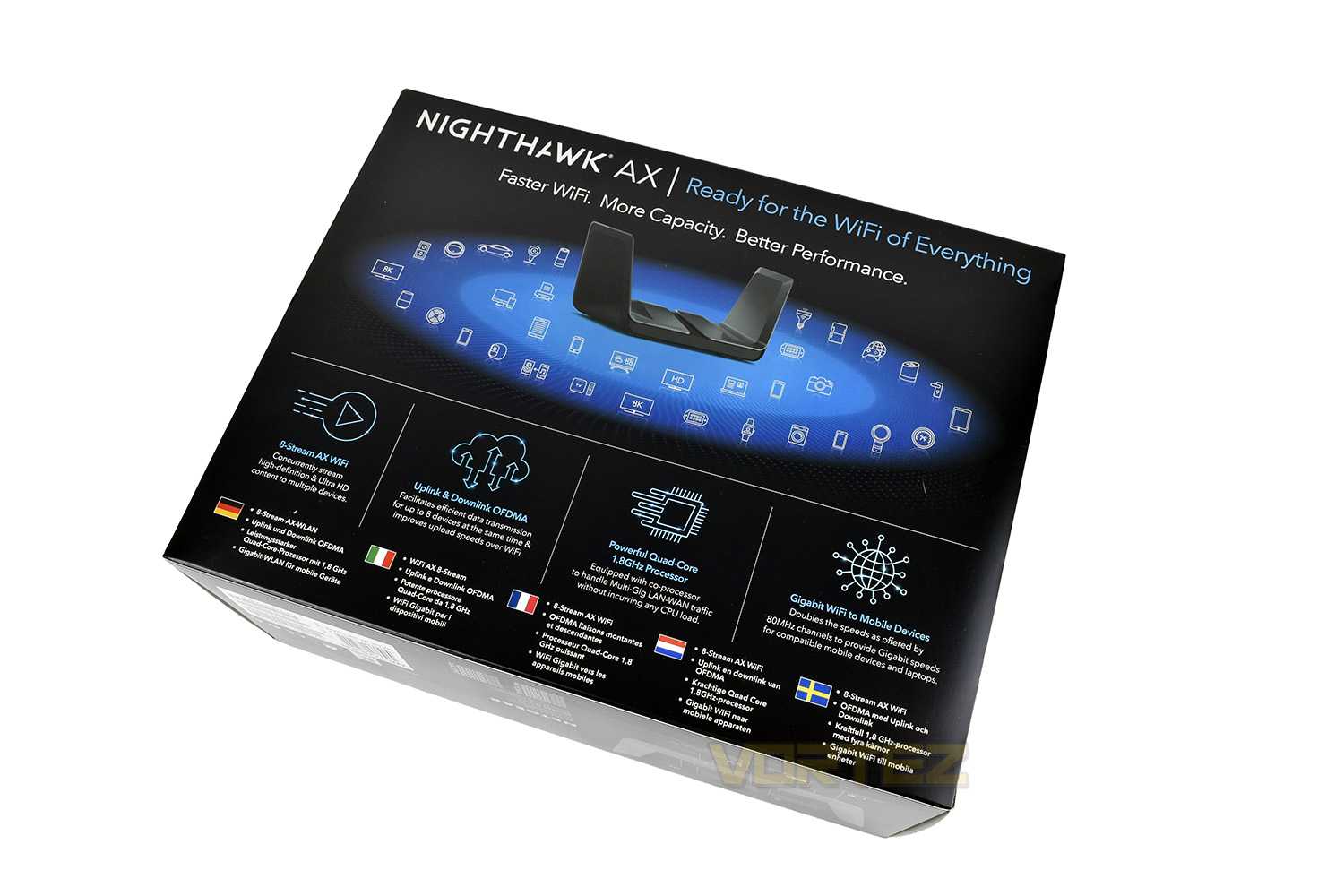
Unlike the previous Nighthawk routers we’ve looked at, the colour scheme is grey, black and blue. The front gives some snippets of information but the rear is where the details are.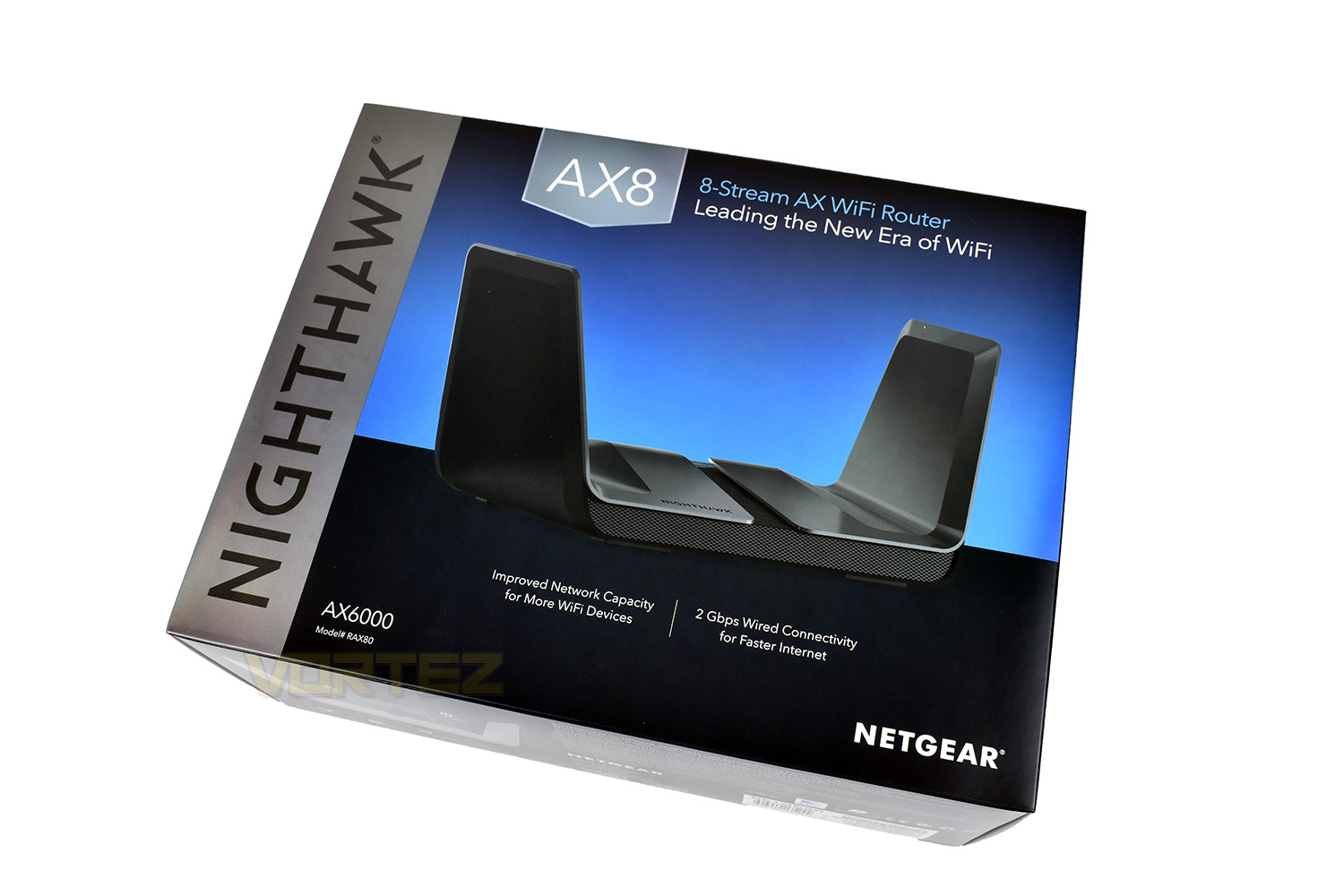
If Netgear’s aim of advertising this router towards users with many wireless devices wasn’t already clear, the diagram on the rear of the box should certainly cement that. With homes now littered with devices all vying for bandwidth, this kind of device should prove popular, if it performs well.
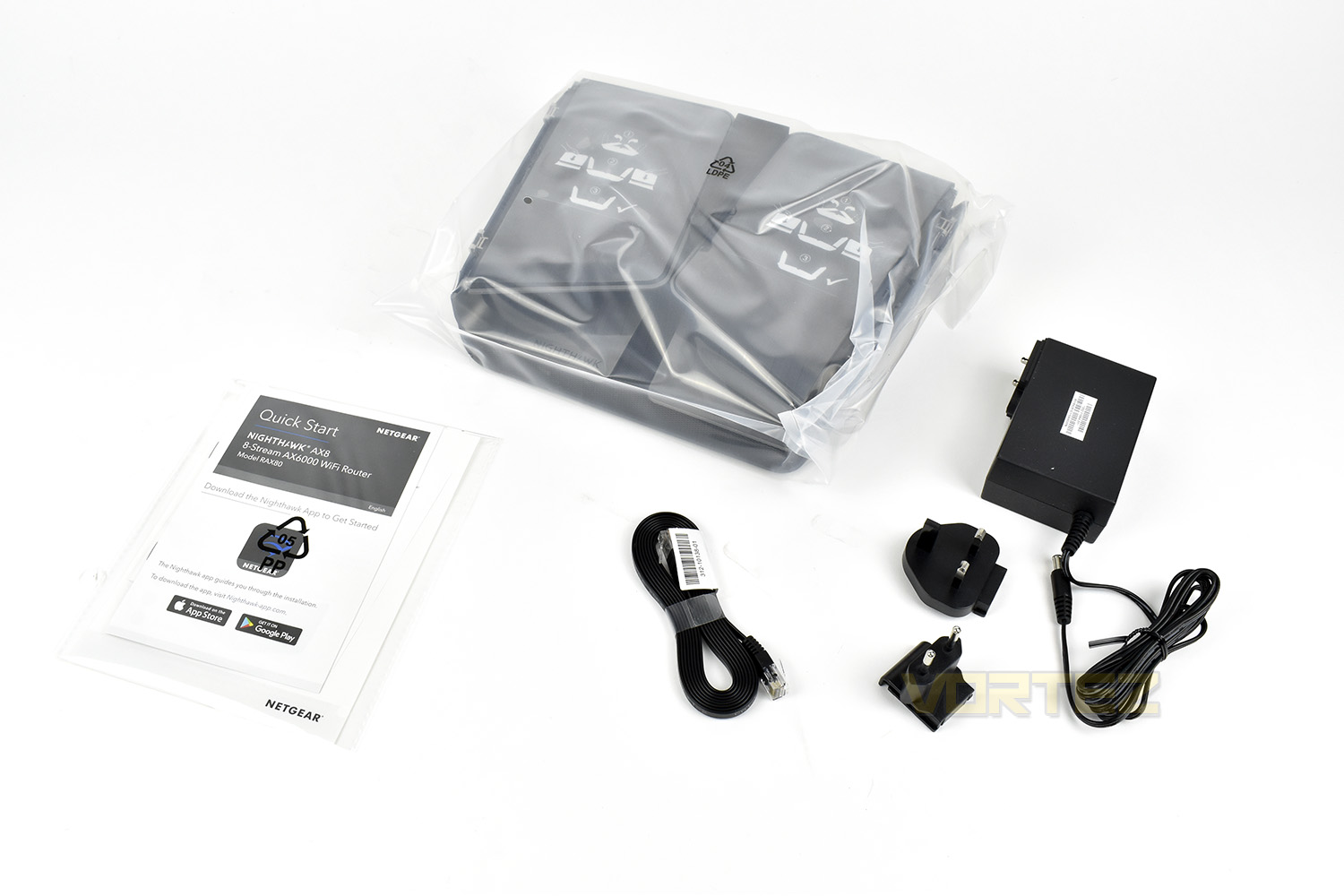
As you can see, the router arrives folded up in a thick plastic bag. Alongside the router are instruction and quick start guides, a UK/Eu plug adaptor and a flat ethernet cable.
Closer Look
With the ‘wings’ laid flat, the router is covered with peelable protective labels. The instructions on the antennas are clear and easy to follow.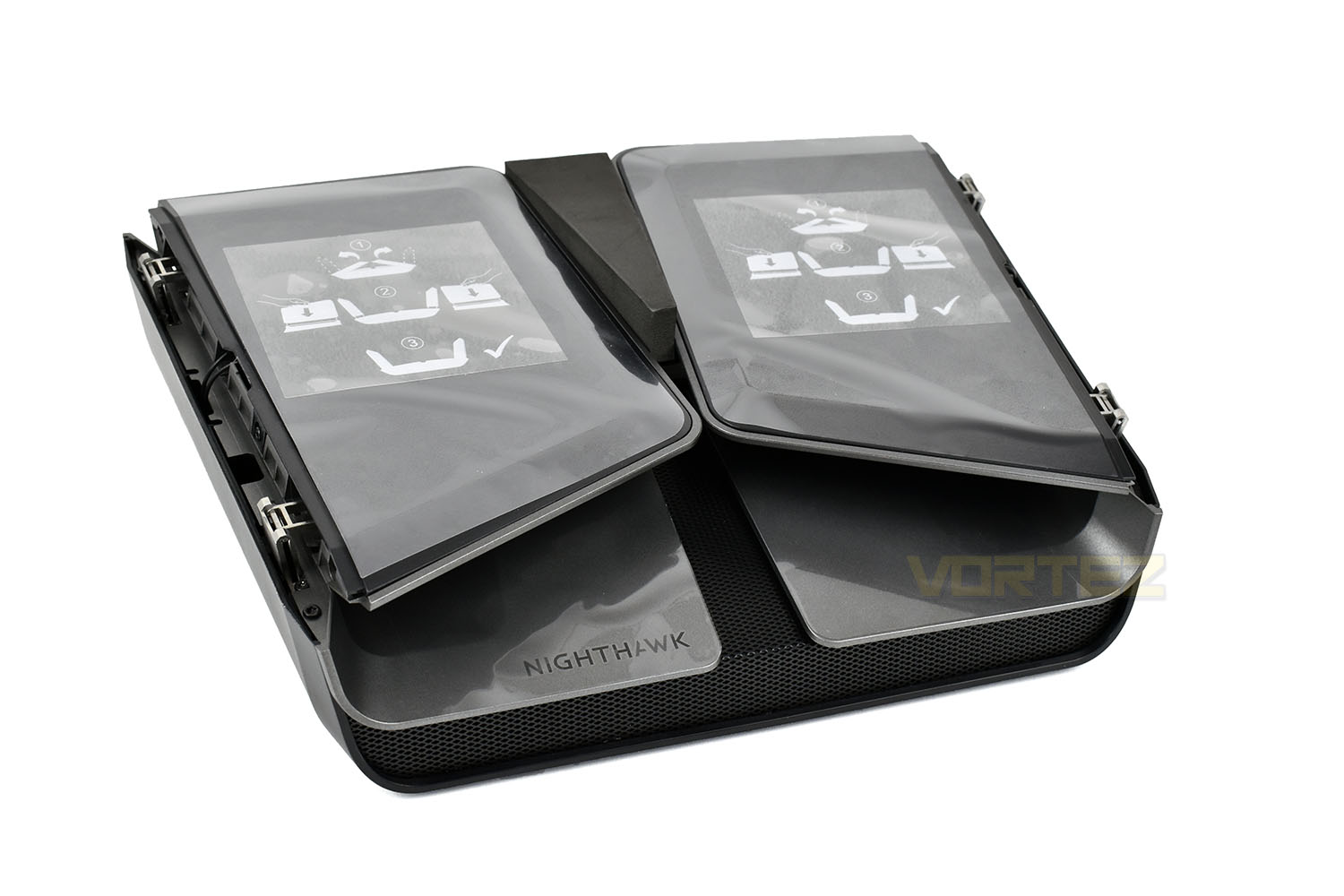
The metal hinges allow the wing to reach its full height then using a small amount of force, you push down to lock it into place. The protective foam can then be removed and discarded.
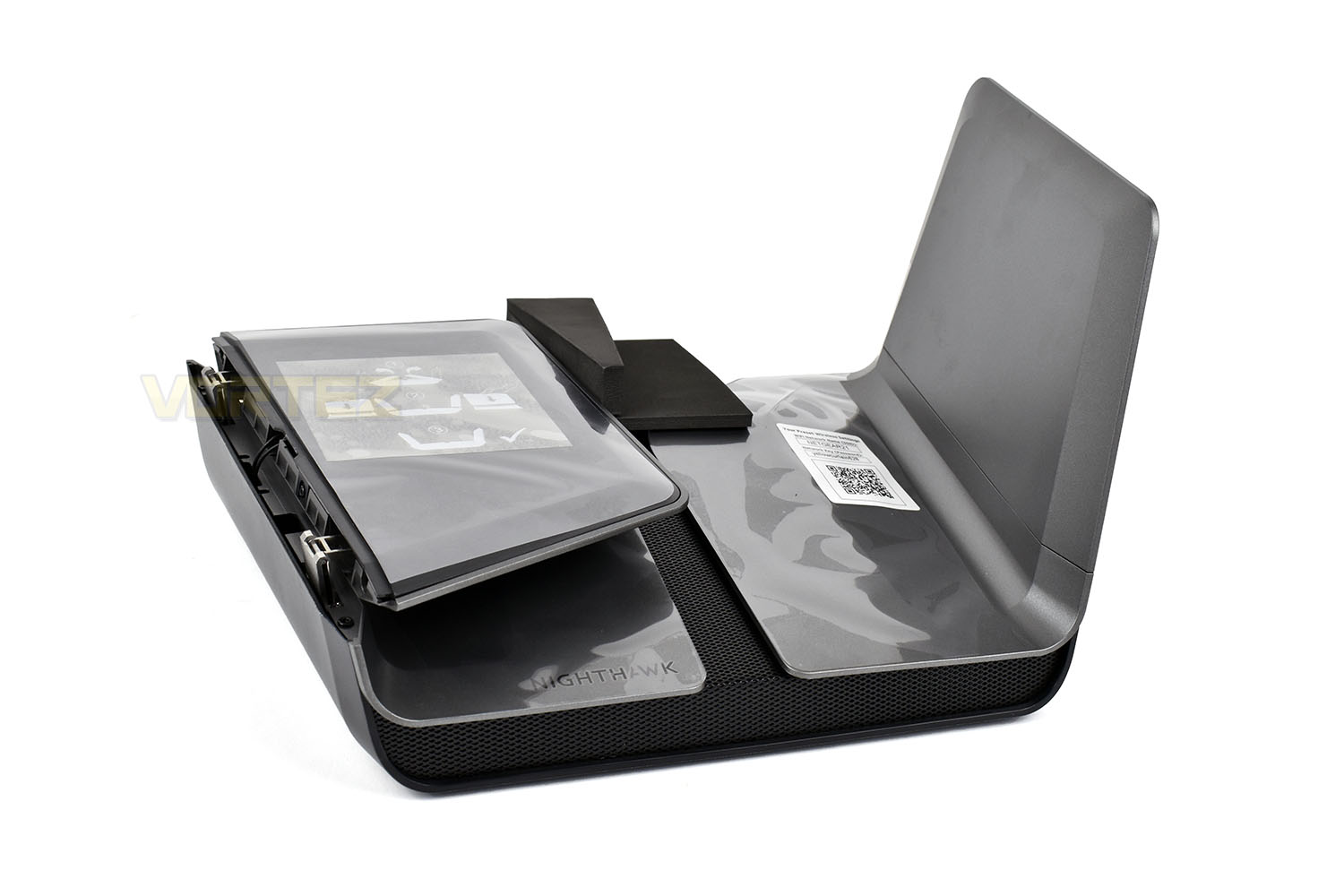
With everything locked into place, it’s now possible to see the thin meshed section in the centre of the router, extending right across the front. There’s a small fan residing behind this, roughly 40mm in diameter, likely used to keep everything cool when the device is being heavily utilised.
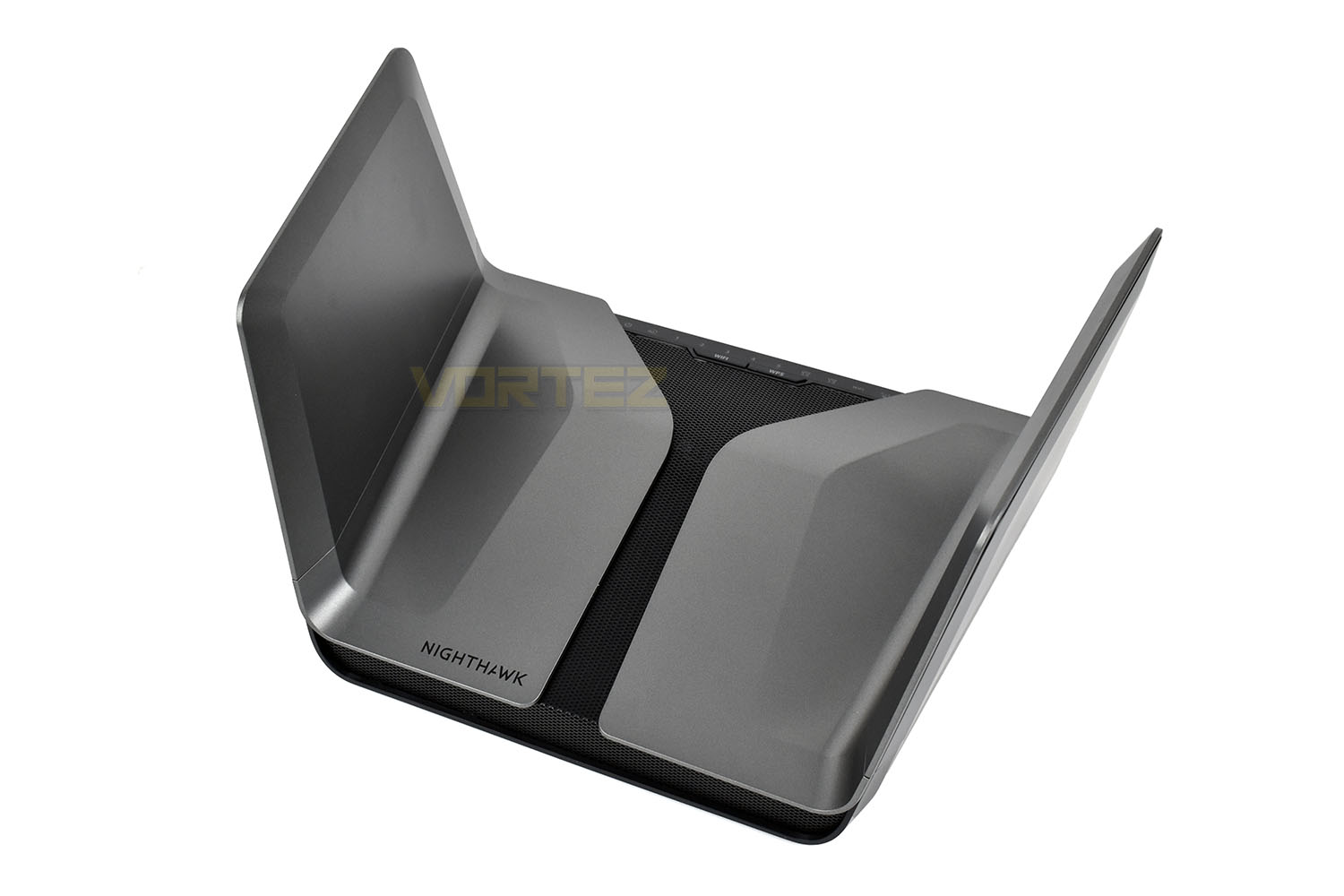
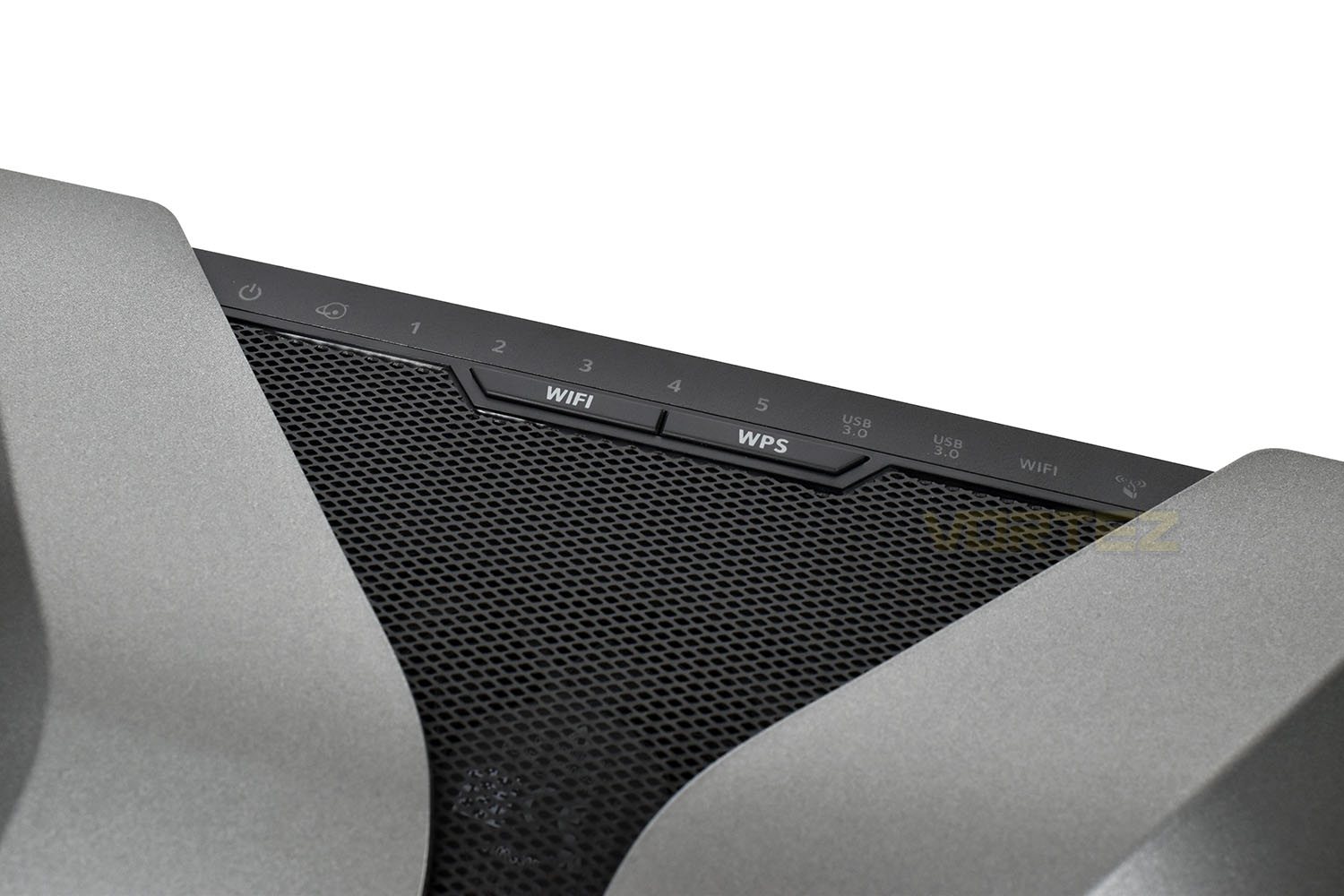
Instead of putting the flashing lights on the front edge, Netgear have switched things around and put them out of eye-shot, at the back of the device. There’s also a WiFi off and WPS switch here.
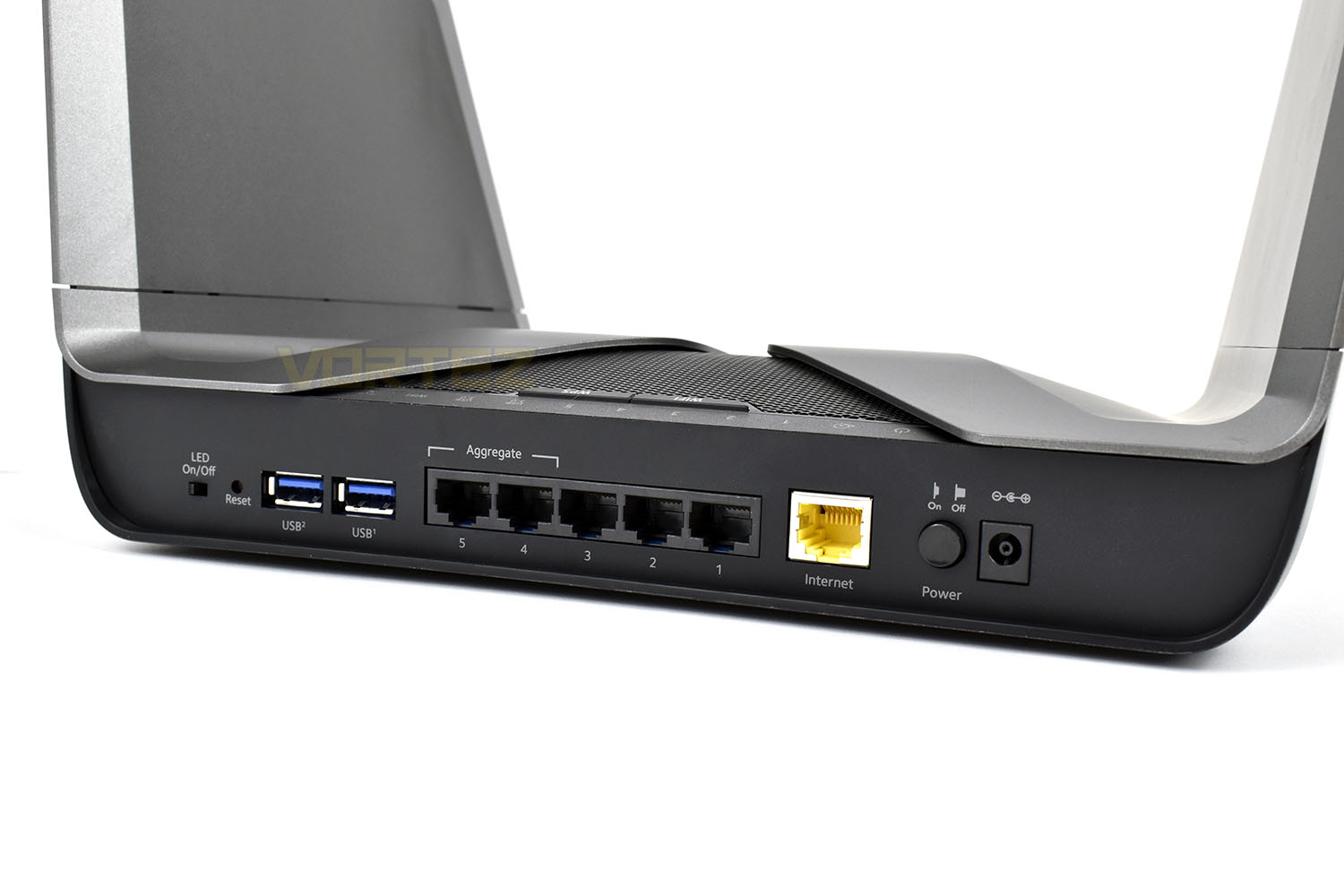
All of the IO is located on the back, with no ports/connections found on the side or front. Starting on the left we have:
LED on/off toggle
Reset switch (to restore factory defaults)
2x USB 3.0 ports
5x Gigabit ethernet (with Aggregation options)
1x WAN port for your ISPs modem (with aggregation options to the adjacent Gigabit port)
Power switch
AC connector
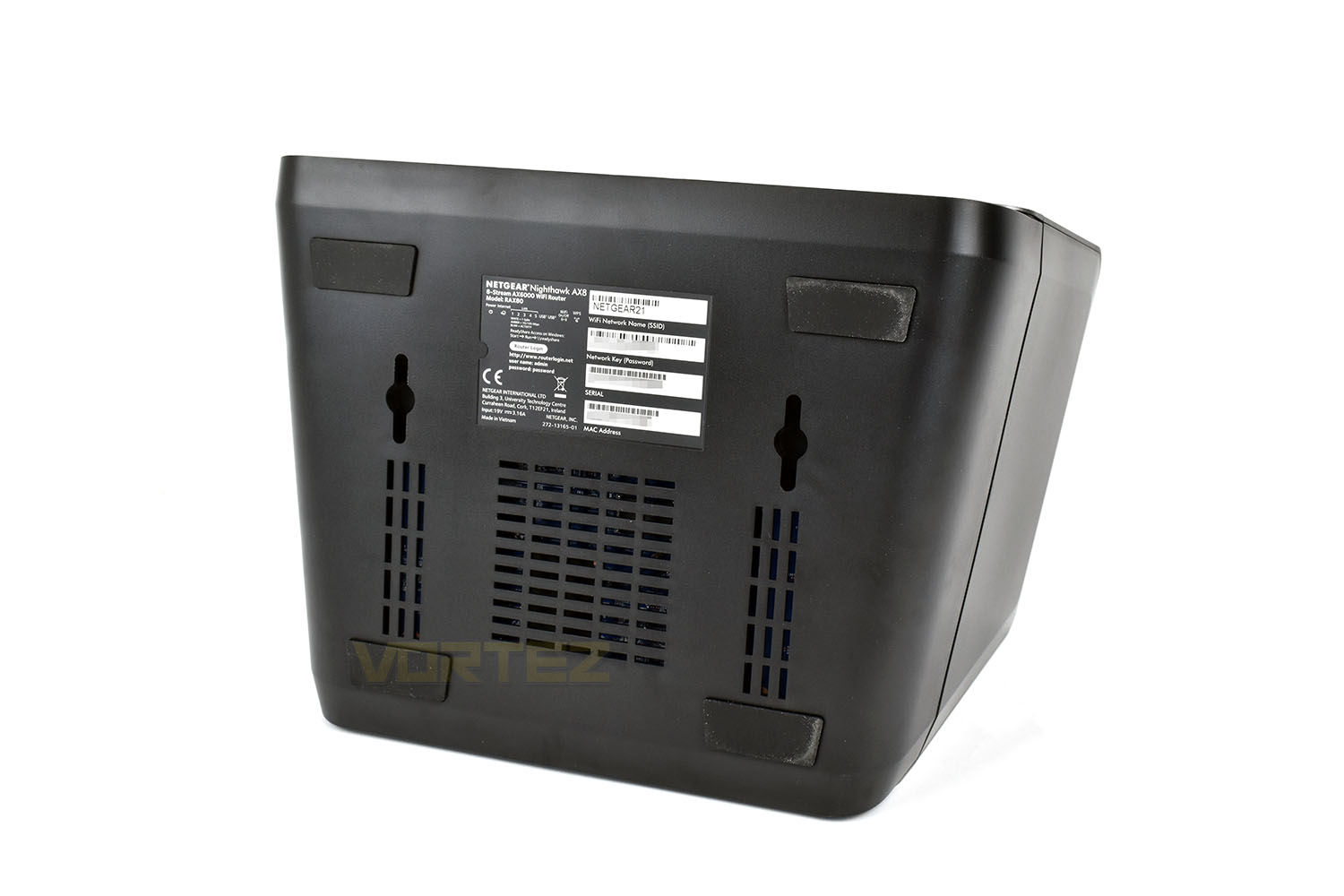
Finally, the base of the router. There’s some small ventilated sections to help keep things cool in the centre, allowing airflow through the 40mm fan that we mentioned, and four large rubber pads to keep it in place and allow a small space between the surface and the router.
Netgear have also placed two keyhole mounting points on the underside, but in typical Netgear fashion, haven’t included any mounting hardware.
Test Setup & Methodology
Testing a router of any kind, especially the wireless performance, can be regarded as somewhat of a minefield. Fluctuations due to overheads and other nearby devices can drastically effect performance from one minute to the next, therefore we kindly ask that you regard the results here in as a rough guide and they likely won’t mirror your personal experience exactly. However, having said that, we do attempt to reduce the amount of interference in anyway possible, such as shutting off any devices not currently being used and limiting the host and client PC to the core applications only.
Our wireless tests are performed via a series of file transfers from a host PC to a client PC. The host PC uses a Killer E2500 Gigabit controller and the files are contained on a Samsung 970 EVO NVMe drive, helping to prevent any file-access bottlenecks. Our client PC utilises an Intel Wireless-AC 9560 network card for wireless communication, capable of both 2.4GHz and 5.0GHz transmission; while relying on a Realtek Gigabit ethernet adaptor for wired transfers. The client PC also uses a Samsung 970 EVO, again, reducing the chance of storage bottlenecks.
Wireless tests are performed at two different locations within a 2 bedroom house, to more accurately reflect a real world scenario. The first location is around 3 metres from the router, in the same room, to represent a user browsing the internet in their living room where their router is also located. The second location is at the far corner of the property, roughly 12 metres away, and through three walls. We position the router underneath a TV, between a TV set top box and a games console.
Wired performance is measured by plugging both the host PC and client PC into the router.
To test two different use cases, we obtained a copy of Bastion from the Steam servers, this game is 1.23GB in size, containing 1,203 files within 35 folders. The second usage scenario is a 1GB .bin file, downloaded from Speed.Hetzner. The file is exactly 1024MB and can be repeatedly transferred incredibly quickly, to measure the theoretical top speed of the router.
We provide our results as an average transfer speed in Mbps (Megabits per second, divide this result by 8 for MB/s).
Each test is conducted three times with an average result then deduced from those.
Software GUI & Performance
SoftwareWhile The Nighthawk AX8 offers access by the usual routerlogin.net URL from a web browser connected to the network, as well as a lightweight application called Netgear Genie, the device’s focus on wireless performance lead us to focus on the router’s Nighthawk application, available from the App Store and Google Play. This application doesn’t give a lot of in-depth options but it allows the basics to be completed very easily.
Performance
We test both the WiFi and ethernet performance of the router below, at both 2.4GHz and 5.0GHz on the WiFi tests. Please check the Test Setup & Methodology page for details.
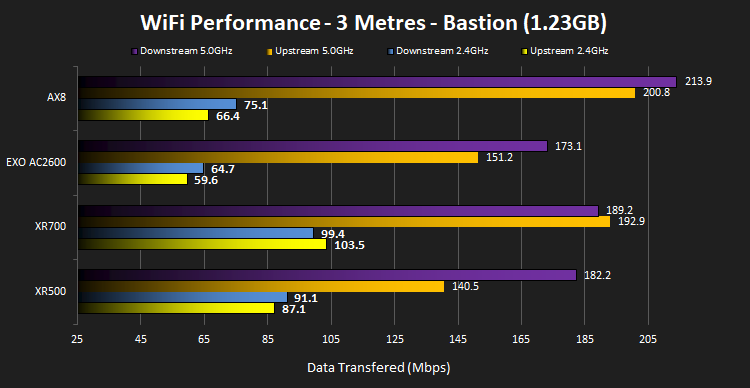
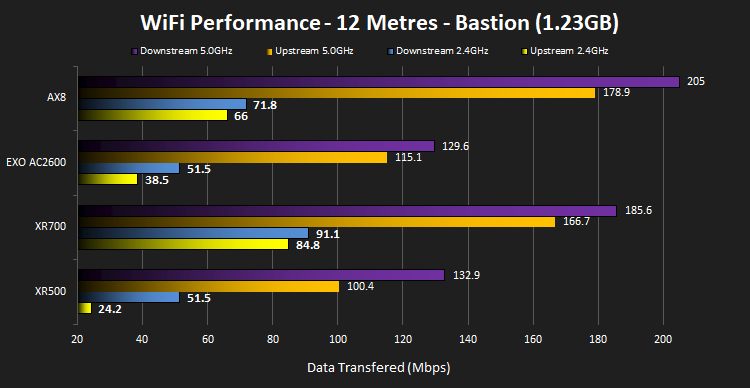
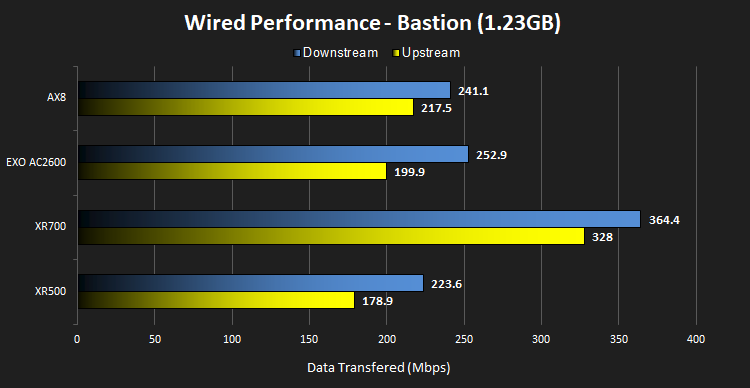
These tests are designed to be particularly hard work to transfer, comprising of many small files. The router still handles them very well.
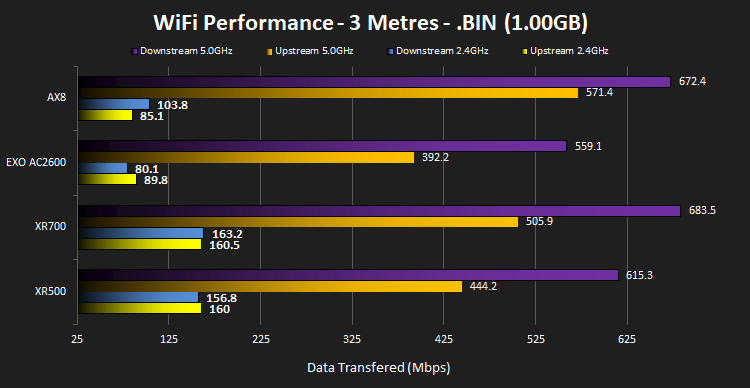
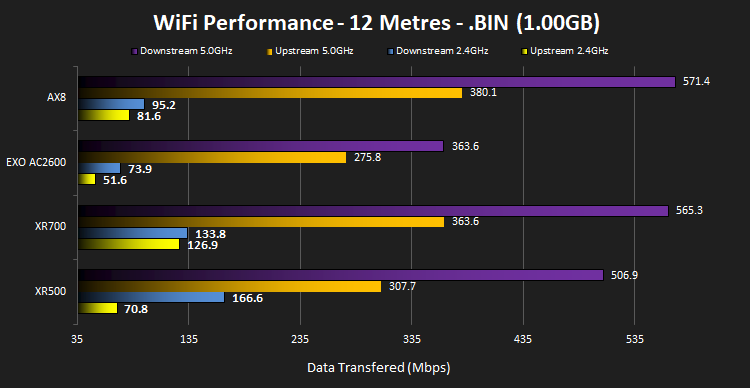
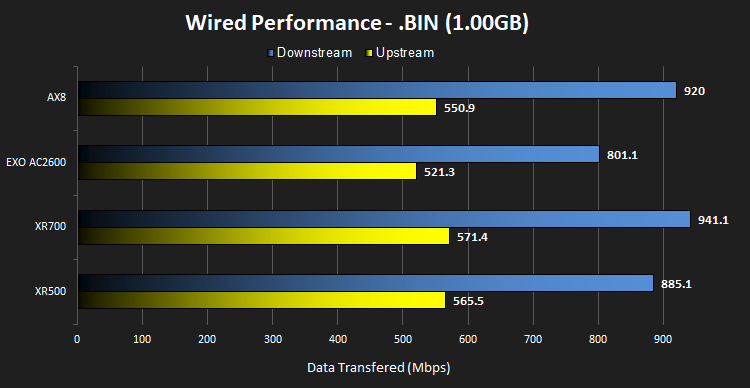
These tests, conversely to the Bastian transfer, is to test the theoretical maximum that the network is capable of. We see some incredibly fast transfers, far above what would reasonably be required in a home environment.
Conclusion
If you cast your mind back to August of last year, we tested the Netgear Nighthawk XR500; a network router with a similar feature-set and almost identical price to the AX8 we’ve delved into today. However, the similar price doesn’t describe the performance.Firstly, if we’re being superficial, the AX8 looks much better. It’s a classy design that would genuinely look great on a side table in the hallway, beside a lamp or a vase of some kind. The silver and black design with the bulky wings is brilliant, whereas the design of the Nighthawk XR500, while being very sporty in appearance, would be much better suited to a boy’s bedroom than in plain sight.
Next up is the software. During our video we removed a few small pauses while the router responded to requests, but overall it felt snappy and gave a clear and easy to use interface. If a more in-depth configuration is needed, we can confirm that the web browser (typically available through the 192.168.0.1 or routerlogin.net commands) does offer much more customisation and is equally as responsive.
Then moving onto performance. While the 2.4GHz speeds may be slightly lacking compared to the XR500 and XR700, the 5.0GHz, at both distances and in both tests, was better than anything else. Wired performance didn’t suffer due to Netgear’s focus on wireless, either, with it putting in a very respectable result and far more than most users would ever need.
While the Netgear Nighthawk AX8 is a touch on the expensive side it can certainly be justified in the right scenarios. For instance, if the cost was split between multiple university students sharing accommodation, or purchased by a parent to allow multiple children and adults to use the internet at the same time.
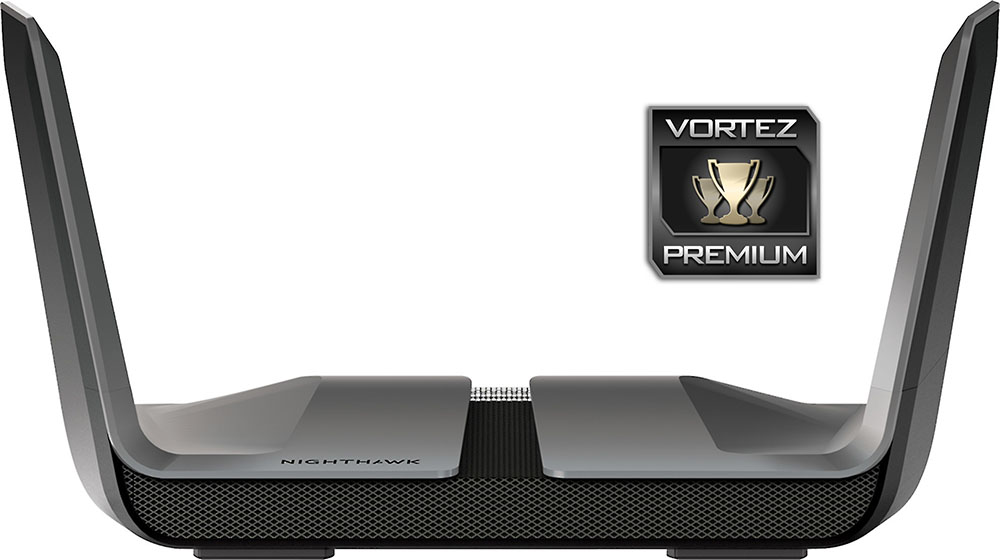
Overall, the AX8 looks great, performs amazingly well and is very easy to configure. Well worth a recommendation in our books.
+ Stylish design
+ Excellent performance
+ Easy to use software
+ WiFi 6 support
Cons
– Costly (but can be justified)
Click here for an explanation of our awards at Vortez.net.
Stay connected with the Vortez Social Media pages:
Join in with the discussions on Discord