







Today we will investigate the performance of NF-S12A NF-A14 and NF-A15. Not only that, we will look at the FLX, ULN and PWM flavors of these fans too.

Product on Review: NF-S12A NF-A14 NF-A15
Manufacturer and Sponsor: Noctua
Street Price: £15-20 each
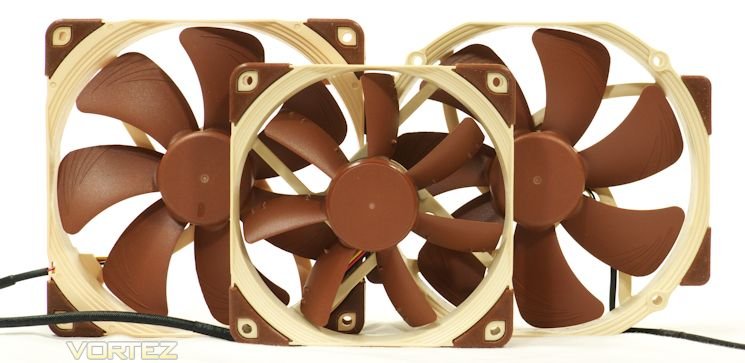
Noctua has been building fans since 2006. We have become familiar with the NF-P14 and the NF-P12 that stock the fabled NH-D14 heatsink. More recently, the NF-F12 dazzled us as the first stator fan for consumers, and only 25mm thick. But now, in the past eight months, Noctua has opened us to a whole new series of fans – the A series – from 40mm to 140mm. Today we will review the performance of the 120mm NF-S12A case fans, 140mm NF-A14 case fans and the 140mm NF-A15 heatsink fans. Not only that, we will look at the FLX, ULN and PWM flavors of these fans. How will they perform? Let’s see.
About Noctua
Designed in Austria, Noctua’s premium cooling components are internationally renowned for their superb quietness, exceptional performance and thoroughgoing quality. Having received more than 3000 awards and recommendations from leading hardware websites and magazines, Noctua’s fans and heatsinks are chosen by more than a hundred thousand satisfied customers around the globe.
Features of the Noctua A Series Fans
Noctua has worked hard on these fans. They have applied what they call “Noctua’s AAO (Advanced Acoustic Optimisation) standard” to all of them. They have applied “sophisticated aerodynamic design measures such as the Flow Acceleration Channel” to their 140mm fans, and “Anti-Stall Knobs” on their NF-S12A. All of the fans feature the SSO2 bearing that made its appearance with their NF-F12, and their PWM fans are all driven by Noctua’s silent PWM integrated circuit chips. That means no clicking at all; even when the Voltage is changed, you will hear no clicking.
All of the Noctua new-generation fans can be instantly recognized by their “Integrated Anti-Vibration Pads” – those soft brown corners. They all include such airflow enhancements as stepped inlets and inner surface microstructures. They all use their corners as flare vents for fan output. All feature metal bearing shells, and all have Noctua’s six-year warranty. And if you have ever dealt with Noctua, you will already know to expect world-class customer service.
Specifications
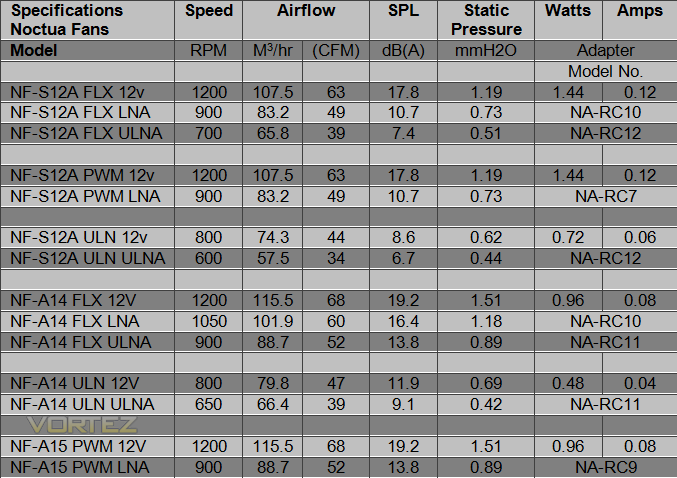
The table below lists the Noctua A series fans and their stated performances, at 12 Volts, with a Low noise Adapter or with an Ultra Low Noise Adapter. Noctua lists their airflow specs in cubic meters per hour. The table below restates these in the traditional cubic feet per minute (CFM). In the right column are listed the various Low Noise Adapters (L.N.A.) and Ultra Low Noise Adapters (U.L.N.A.). Noctua provides these in various versions. The single-digit NA-RC model numbers are PWM Low Noise Adapters. Double-digit NA-RC model numbers are three-wire Low and Ultra Low Noise Adapters. The RPM signal is always present in these adapters, and operates even when the ULNA adapter is used.
Packaging
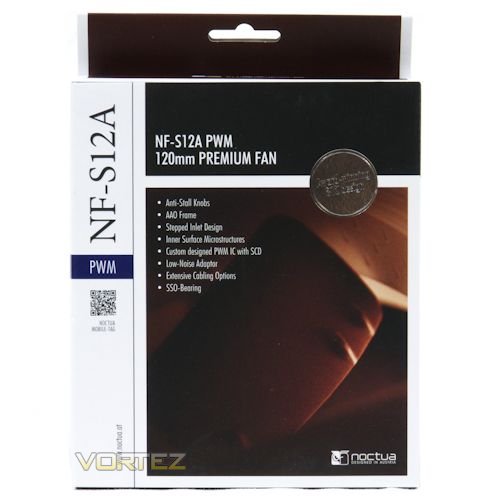
This single picture is going to represent six fan boxes: The 120mm NF-S12A FLX, the NF-S12A ULN and the NF-S12A PWM fans; the 140mm NF-A14 FLX, the NF-A14 ULN, and the NF-A15 PWM fans. Handsome. Understated. And the others are just like it.
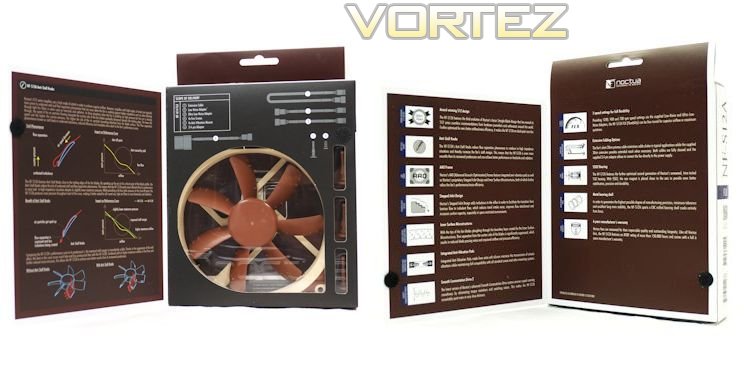
The box – and the boxes for all of these fans – comes with flaps front and back that show off the fan and tell you all about its features.
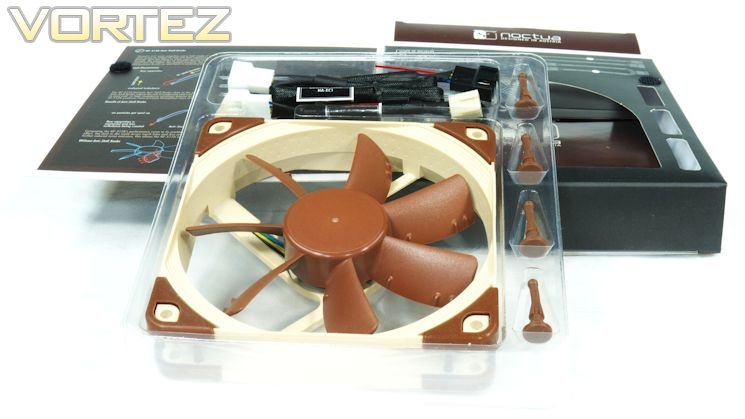
Like all Noctua fans, this one is nestled with its accessories in a clear plastic case.
Bundle
Noctua A series fans come with a pleasant bundle of accessories. Every one of these fans comes with a 30cm (1 foot) extension cable – 4-wire for the PWM fans, 3-wire for the rest. This lengthy extension complements the fact that the fans themselves come with rather short 20cm (eight-inch) cables. So, users have the best of both worlds – short fan cables to keep their cases uncluttered; long extensions when the fans need a lengthy tether – such as when you mount them to radiators.PWM fans come with 4-wire Y-cables. These are the good kind of Y-cables that only transmit RPM signals from one fan, to avoid confusing your motherboard. The FLX and ULN fans come with Molex adapters that allow you to power the fans directly from the power supply. Since fans powered this way are most likely to be used as case fans, Noctua can be forgiven for not including RPM signals on their Molex adapters.
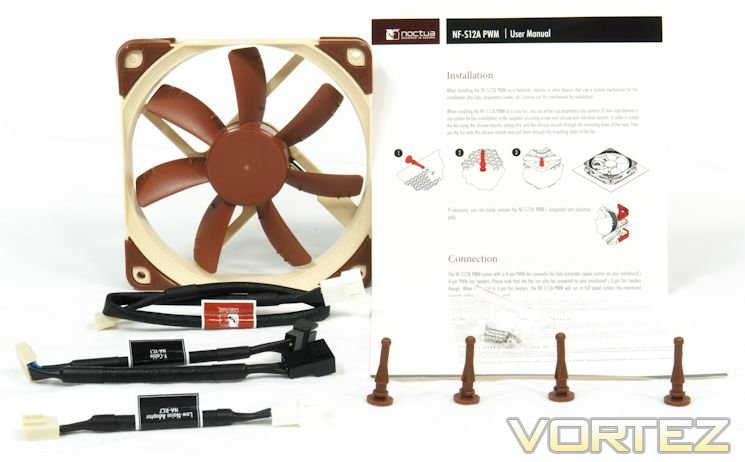
The Low Noise Adapter shown in the foreground of the picture below is a PWM LNA. Note that the tag has a part number on it. All of the accessory cables in this new generation of Noctua fans come with part numbers printed on tags. This allows you to keep these cables straight. But if you have more than one Noctua fan, be sure to label each box with the part numbers of the LNA/ULNA cables it came with. Mixing them up, though not the end of the world, would be unfortunate.
All Noctua fans come with four standard fan screws and four Noctua standard vibration isolators – Noctua calls them “Vibration Compensators”—basically rubber replacements for screws that tend to dampen any vibration that might get transmitted from the fan frames to your case.
Finally, each of these fans comes with a printed insert that tells you how to use it.
A Closer Look – the NF-S12A
Let us start our closer looks with the NF-S12A:
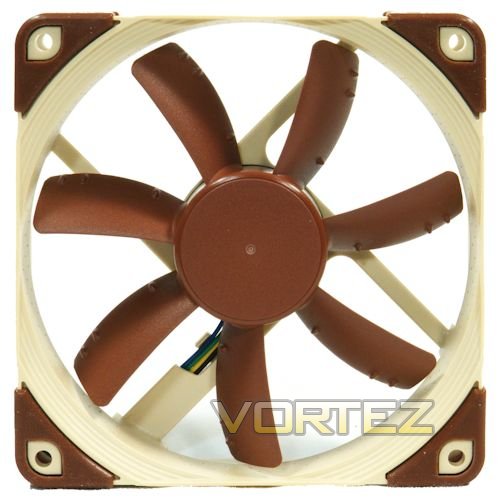
On the blades you can see the anti-stall knobs. Around the edges are the stepped inlets. On the right portion of the frame, just above midline, you can barely see the inner surface microstructures. Those soft corner gloves peel off and go back on easily. Unlike some fans that come with vibration-dampened frames, these corners allow you to fasten connectors firmly to the fan.
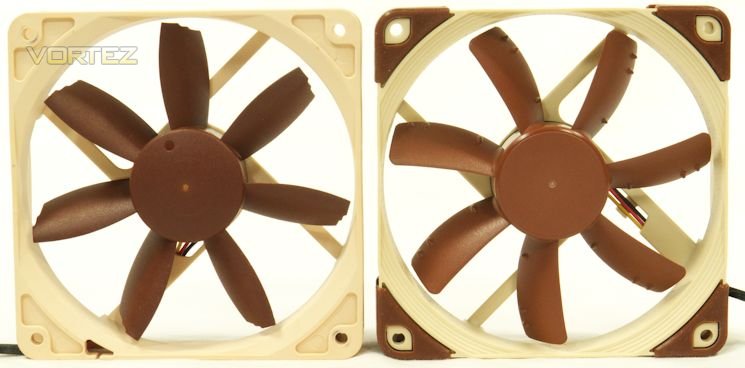
In the picture above we present the S12A’s predecessor, the NF-S12B, along with the NF-S12A. The progression of design is clearly evident, but the main design elements remain: this is a fan with seven thin blades that emphasize airflow over static pressure.
A Closer Look – the NF-A14 and the NF-A15
Our next fan is the NF-A14. Below, the older NF-P14 is shown next to a new NF-A14. The P14’s adapters are attached, so this fan could be mounted in a position that requires 140mm standard screw holes. The NF-A14, on the other hand, has a standard 140mm frame. So when it is mounted to a 140mm position, the corners will not be open; there will be no backflow through open corners. As with the NF-S12A, the stepped inlet and the cushioned corners are evident. The “Flow Acceleration Channel” elements are present on the blades. The seven wide-chord blades suggest that this fan will emphasize static pressure in addition to airflow.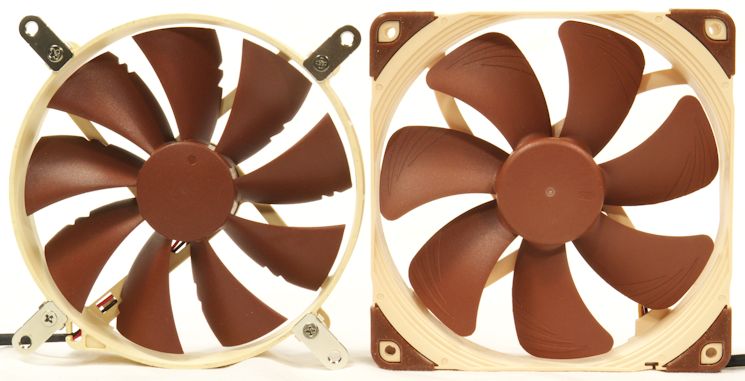
Comparing the NF-A15 to the NF-A14, we can see that the bladed parts of the fans are the same. The frames are where they differ. This picture does show the output side flaring of both frames. The P14 did not have this feature.
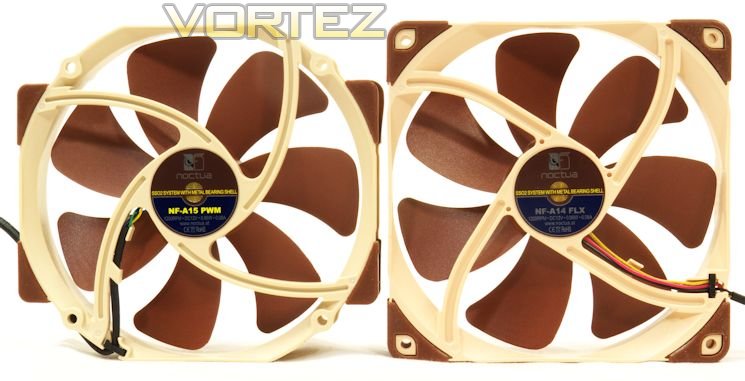
That blade looks very familiar – similar to a TY-140, perhaps? And the elongated frame resembles that of a Thermalright TY-140 and its derivatives. So let us compare them side by side.
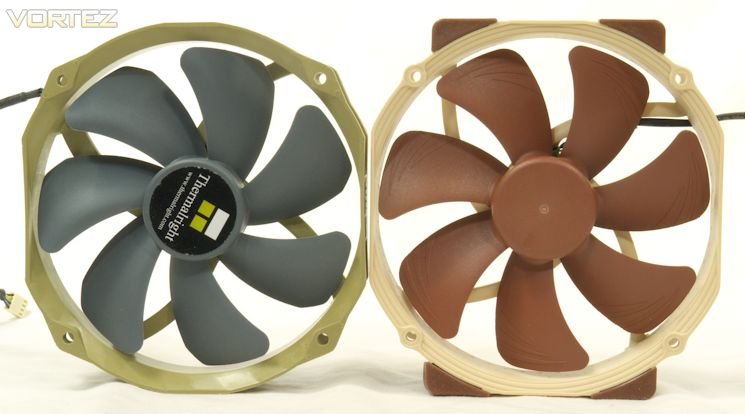
Both fans have a 139mm by 152mm frame. The blades are similar, but not the same: the trailing corner of the TY-140 blade is a straight cut, while that on the NF-A15 is rounded. The leading edge of the blade is less raked on the NF-A15. So this is quite promising: the NF-A15 is following a superb design. The NF-A14 and the NF-A15 should be very good fans.
Test Setup and Methodologies – Airflow Output
On the following pages we shall look at the airflow output of a variety of fans. Thank-you notes go out to Noctua, for providing pairs of NF-A14 FLX, NF-A14 ULN, NF-A15 PWM, NF-F12, NF-S12A PWM, NF-S12A FLX and NF-S12A ULN; to Antec, for providing the TrueQuiet 120, the TrueQuiet 140 and the TrueQuiet Pro 120; to Phanteks, for providing the PH-140TS. Noctua provided pairs of the A-series fans, so they were tested in pairs, and the results averaged.For the first set of tests, each fan blew into a sealed box. The box captured all of each fan’s output, no matter how broadly spread. And blowing into a sealed box allowed the air to mix, so the dead spot caused by the hub was gone. Because what goes in must come out, the entire output of each fan exited through a circular opening which had a diameter of 115mm for 120mm fans, and a diameter of 135mm for 140mm fans.
Air Stream/Flow
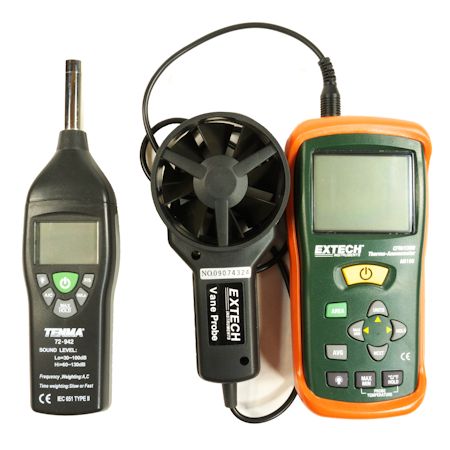
At the exit, each fan’s output was measured with an Extech AN100 anemometer. The anemometer can be calibrated for the diameter of the airstream. It can also average a series of readings – ten for each fan run. As noted above, pairs of fans were tested separately and the results averaged. Singleton fans were given two runs, each averaging ten readings, and the two runs averaged.
Fans can be tested at twelve Volts, or they can be tested at their nominal speeds – the RPM’s stated on the side of the box. But what do we want a fan to do? Do we really care about how fast it spins? Or do we want the airflow? Fans often miss their speed specifications. But really, we want to make sure it puts out its specified airflow, and makes no more than its specified noise doing that. So the fans in the test comparisons in the following pages are measured at approximately 12 Volts, straight from the PSU (a fanless Seasonic X460). Their speeds were taken from software readings using ET6 software on a Gigabyte GA-P55A-UD3P motherboard. Their output was measured in CFM by the Extech AN100.
Sound Pressure
The sound pressure level of each fan was measured from 10cm in free air with a Tenma 72-942, which can measure SPL accurately down to 30 dB(A). The SPL was adjusted for distance to the equivalent of 1 meter.
Note that the sound pressure level of the basement where these fans were tested is about 30.5 dB(A). Fans making this much noise at 10cm have an adjusted SPL of 10.5 dB(A). So a reading of 11 – 12 dB(A) is as quiet as this setup can measure. This means that some fans can be significantly quieter, but still have an adjusted SPL of 11 – 12 dB(A).
Fan Results, Arranged by Name, with a note on PWM
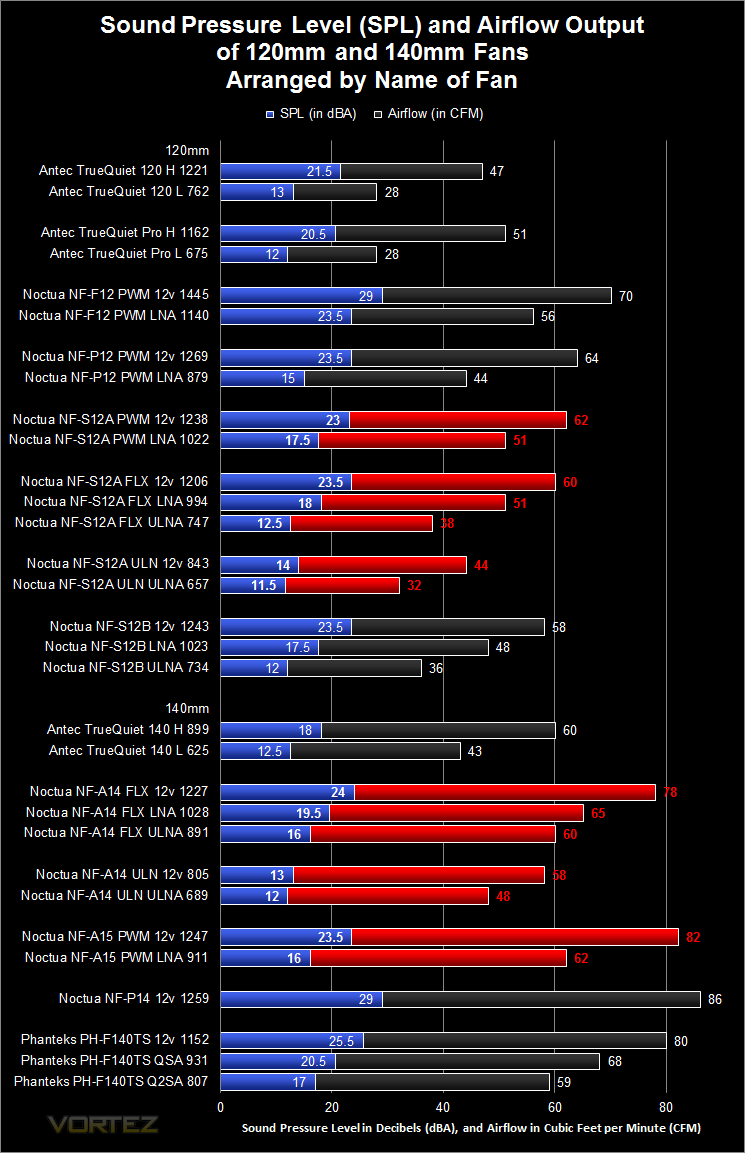
Here is the time for the NF-S12B to shine. In previous testing it was always asked to push air through a heatsink. This time it was only asked to push air through a box, which is what it was designed to do. It pushed almost as much air as its successor, and made no more noise doing so. Better yet, the results agreed with the fan’s specifications.
Comparing the NF-P14 to its successor, the NF-A15, the P14 produces more airflow, but makes a lot more noise doing so. Six decibels represents approximately double the SPL.
Note that the numbers following the fan names represent the average RPM observed.
PWM
Each fan was subjected to testing with a Zalman PWM Mate, which can be set to approximately 25%, 50%, 75% and 100% PWM duty as well as smoothly varying the fan speed from 25% to 100% PWM duty. The fans were run up and down their speed range, from PWM line grounded (this is the same as 0% PWM duty) to 100% PWM duty. The fan speeds were approximately proportional to PWM duty.
No clicking was heard up and down the entire speed range. No clicking at all. This makes Noctua fans unique.
Fan Results, Arranged by Output
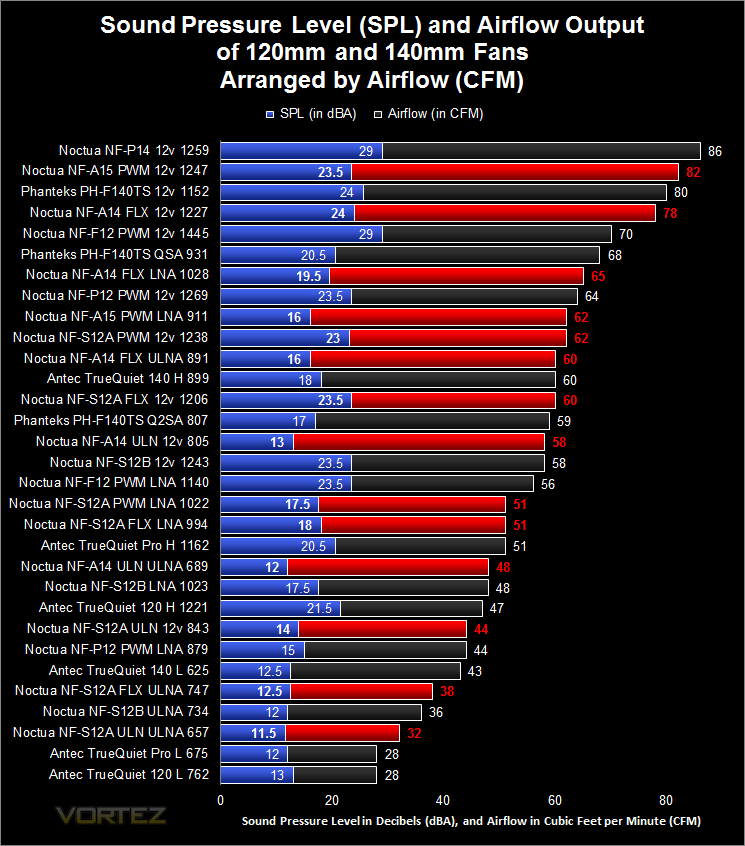
The value of a performance-based chart like this is that you can compare fans of similar output to see which one is the quietest. The quietest fans of most groups are Noctua.
Note that the numbers following the fan names represent the average RPM observed.
Fan Results, Arranged by Sound Pressure Levels
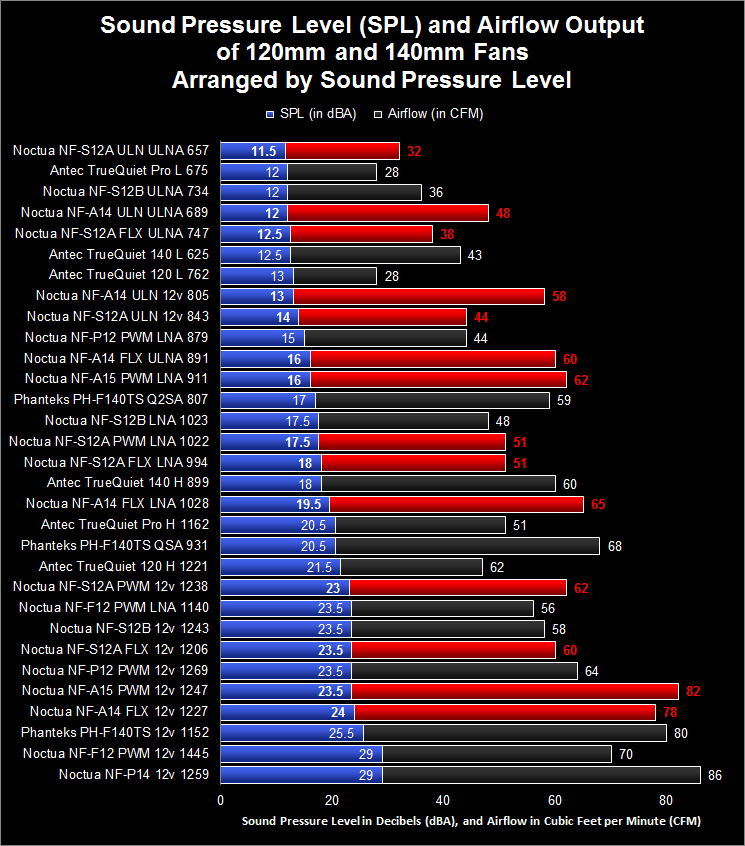
For those of you who skipped the setup page, note that the sound pressure level of the basement where these fans were tested is about 30.5 dB(A). Fans making this much noise at 10cm have an adjusted SPL of 10.5 dB(A). So a reading of 11 – 12 dB(A) is as quiet as this setup can measure. That means that some fans can be significantly quieter, but still have an adjusted SPL of 11 – 12 dB(A; so some of these fans are quiet indeed – too quiet to measure.
A chart like this allows you to first decide how much noise you can tolerate, and pick the fan or fans with the greatest output.
Note that the numbers following the fan names represent the average RPM observed.
Noctua Fans tested on NH-D14 Cooler
Since Noctua’s NF-A15 fans were designed to be used on heatsinks, we need to see how well they cool a heatsink. That’s what this page is all about.
Setup for Noctua fans on an NH-D14
Measuring airflow in a box allows you to know how a fan will perform as a case fan. But when you are considering a fan for a heatsink, you want to know how well it will cool your CPU. The Noctua NF-A15 was built to be a heatsink fan. So how better to test it than to mount it on Noctua’s premiere heatsink, the NH-D14? The test setup in the table is completely passive except for the fans on the NH-D14. The motherboard was mounted on a removable motherboard tray so it could be set up vertically.
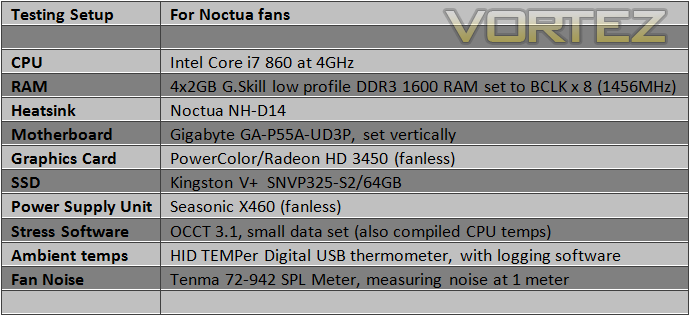
Only Noctua fans were tested. First there is a pair of stock fan sets for the NH-D14, each comprising an NF-P12 and an NF-P14. Then there were the PWM fans: a pair of NF-A15’s, a pair of NF-F1’s, and an NF-P12. The part numbers for the LNA adapters are shown in the table below.
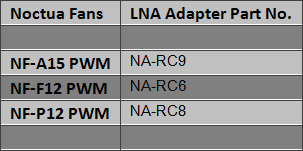
Thank you to Noctua for providing the PWM fans for testing.
Results
The chart below shows the results of the testing. Note that the numbers following the fan names represent the average RPM observed for each fan. Sound Pressure levels were measured one meter from the motherboard. The basement measured 30.5 dB(A) with nothing going – it sounds silent at this level – so anything that measured that low may well have been quieter.
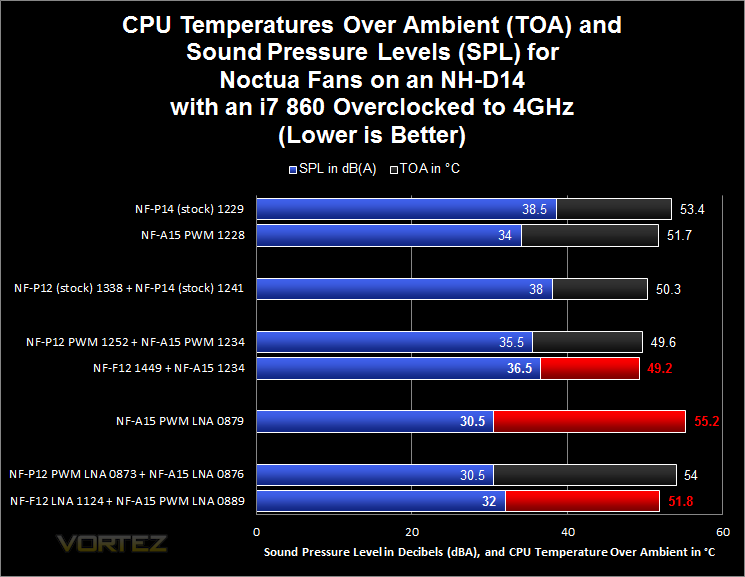
First, cooling power and noise were measured and averaged for pairs of the NF-A15 PWM and its predecessor, the Voltage-controlled NF-P14 that comes supplied with the cooler. Then the two sets of the NF-P12 and the NF-P14 were measured and averaged to show the performance of the stock fans on the NH-D14. Next we compared the performance of the NF-A15 PWM using two PWM fans designed for heatsinks, the NF-P12 PWM vs. the NF-F12 PWM. Last three results show the fans on their Low Noise Adapters.
Finally, the orientation question. When the TY-140 was tested on the same NH-D14, the CPU appeared to be 1-2°C cooler when the fan was oriented with the long axis parallel to the mainboard. No formal testing of was done at the time, however. So, now was a great time to test whether the Noctua NH-A15, with the same dimensions as the TY-140, would the show any difference in cooling on the NH-D14 whether its long axis stuck out from the fin stacks on both sides (long axis parallel to the mainboard), or whether sticking one square side down between the fin stacks would give better cooling. Noctua sent out extra clips so this could be tested.
No difference. With nearly identical ambient temperatures, CPU net temperatures (TOA) were 0-0.1°C apart. That is as close to identical as you will get. So it makes no difference how you orient your fan on the NH-D14.
Conclusion
Noctua has devoted itself to quiet cooling. In that they have succeeded well. One measure of their insistence on quietness was their not bringing PWM products to market until they were ready to do it the Noctua way. “Fans” of Noctua’s fans long wrote about how they wanted PWM versions, yet there were no PWM fans from Noctua. But it turned out that Noctua was not ignoring PWM; their engineers were working on developing a silent PWM control. The clicking seen in other PWM fans – even quiet clicking – is completely absent in Noctua PWM fans. This started with their NF-F12’s, and has now extended to their A series. All are clickless.
As well as can be measured in a non-professional setup, Noctua’s airflow specifications are accurate. You can listen to a fan and hear if it is quiet or not, and whether it makes unpleasant noises (Noctua fans are free of unpleasant noises). But airflow is another matter. Airflow takes special instruments to measure. It is comforting to know Noctua’s specifications on this are accurate; so you can use those specifications in your buying decisions.
The various Low Noise Adapters and Ultra Low Noise Adapters are different for each of the fans. Clearly, they are tailored to achieve particular results. This may or may not be unique to Noctua fans. Interestingly, Noctua says nothing about it. The Noctua accessories are of good quality, and appear likely to last in extended usage. They are all handsomely sleeved as well. The fan frames are sturdy, and the corner cushions do not extend into the screw holes. That means the fans can be securely fastened with or without the cushions.
Overall, the Noctua A series is a fine set of fans. Careful attention to airflow and acoustics, along with the best PWM circuits in existence, make these superb fans. They rate a Vortez Gold rating.


Click here for an explanation of our awards at Vortez.net.

