







Today we will have an exclusive look at Noctua’s new flagship CPU cooler. Based on the major success of their previous cooler, which is still one of the most popular today, this should without doubt be very special.
Product on Review: Noctua NH-D14Manufacturer and Sponsor: Noctua
MSRP: EUR 74.90 / USD 84.90
Street Price: N/A
In this industry, companies come and go – releasing one ground shaking product followed by years of quietude. Tuniq, as previously seen, can be considered one of them remaining fairly quiet up till the release of the new Tower 120 Extreme rendition. Noctua, on the other hand, hasn’t followed the same suit thankfully. Their NH-U12P has grabbed them much success and during the past few years, they have strived on supporting customers with new improved fan designs and one of the best cooler mounting kit in existence. However, their actual heatsink design has failed to upkeep that trend and sporting that same 4 heat pipe design, it now faces stiff competition from other more efficient designs.
In my previous reviews, the Noctua NH-U12P has stood out from the rest of the coolers and has been a great benchmark amongst the crowd, but regrettably has lost its crown against some new comers this year. But today we have a look at a brand new release from Noctua in the all new NH-D14. Time for Noctua to set the benchmark once again?
A little bit about Noctua:
Designed in Austria, Noctua’s premium cooling components are internationally renowned for their superb quietness, exceptional performance and thoroughgoing quality. Having received more than 1000 awards and recommendations from leading hardware websites and magazines, Noctua’s fans and heatsinks are chosen by more than a hundred thousand satisfied customers around the globe.
Technology
Scientific know-how pooling and state-of-the-art simulation environments allow for advanced, highly optimised products that set new benchmarks for performance to noise efficiency. Over the years, Noctua has put itself on the forefront of quiet cooling innovations with its unique, psycho-acoustically optimised impeller designs as well as new bearing and drive technologies such as the SSO-Bearing (Self-Stabilising Oil Pressure Bearing) or the Smooth Commutation Drive (SCD) system. Thanks to advanced aerodynamic design measures like Vortex-Control Notches and Bevelled Blade Tips, Noctua’s products are renowned for pushing the envelope in axial fan technology.
Quality and Service
In a market that’s increasingly driven by cost saving rather than customer dedication and flooded with branded budget products, we take pride in striving for excellence both in product and service quality. For example, our heatsinks feature all soldered joints for maximum performance and durability, our fans’ 150,000h+ MTBF is backed up by a full 6 years manufacturer’s warranty and when AMD introduced AM2 and Intel introduced LGA1366, we provided thousands of users with mounting kits for free. As a result, an ever growing base of avid Noctua users not only swears by the thoroughgoing premium quality of our products, but also by our excellent, customer-friendly service.
Known for the innovation, performance and silent acoustics, Noctua has grabbed the hearts of many enthusiasts, including many of us on the Vortez team. Enough of my ramblings now, let’s see what the NH-D14 delivers.
Features and Specifications
Noctua’s own overview of the cooler:Combining a massive six heatpipe dual radiator design with an exquisite NF-P14/NF-P12 dual fan configuration, the NH-D14 is built for ultimate quiet cooling performance. Topped off with a tube of Noctua’s award-winning NT-H1 thermal compound as well as the new SecuFirm2™ multi-socket mounting system, the NH-D14 is an elite choice for the highest demands in premium quality quiet cooling.
Noctua have gone all out to create a no-compromise solution with the NH-D14. The main features here are the dual radiator design, as seen in the Thermalright IFX-14 and the Tuniq Tower 120 Extreme, and the dual NF-P14/NF-P12 fan setup. The aim here is to create a much higher dissipation surface area over which the two high performance fan can efficiently transfer the heat, while still retaining low acoustic level. Instead of a brute force approach of using high RPM fans, the low speed dual 140mm/120mm fan design helps Noctua achieve what they are best at, high performance without sacrificing your hearing. The 140mm fan is also oriented in such a way that it cools the surrounding components on your motherboard. Often, the Northbridge and Mosfet cooling are forgotten when overclocking, thereby limiting your headroom so Noctua hopes to address this problem.
One thing to take notice though is that the NH-D14 weighs over 1kg with both fans attached! This is heavier than other coolers we have tested before but we can sleep well knowing that Noctua’s SecuFirm2 is class leading for a very good reason.
Packaging
The box
Breaking away from convention, Noctua approached the packaging with a more minimalistic yet clean design with the box. The box is cardboard based as is the case for all boxes these days but rather than the previous pink and blue box, Noctua settled for a more professional white coloured package. In my opinion, that’s a very appealing look. The box itself is quite large, to securely house the heatsink and fans, and it also helps provide all the features and specifications without having to cramp all the information around the box. Surrounding the box are subtle illustrative outlines of the cooler. Noctua has informed us that this box isn’t the final design so I’ll be gladly waiting to see how it eventually turns out.
The front of the box
The front of the packaging has a clear plastic window to allow us to gaze at the beast within. Noctua adheres to this image by firstly showing us the top of the heatsink and the 140mm NF-P14 fan. We also see the features listed on the front. The first impression you get is almost that Noctua are trying to downplay the sheer robust and sharp design of its cooler. The stripe goes on to the side where a diagram of the cooler is presented to illustrate the cooler’s dimensions.
Specifications
At the top, the specifications are listed very thoroughly, including those of the heatsink itself and the NF-P14 and NF-P12 fans. If you’ve read the last page, you’ll know already that they are very impressive indeed.
“Made in Taiwan”
At the back, Noctua elaborates on the key features of the cooler, as mentioned on the last page. The product is stated to be “Made In Taiwan”.
And all is laid bare
Upon opening the box, we are greeted with foam. Thankfully, removing the foam reveals the beast itself, pre-installed with the two fans using the wire clips, and on the sides are two boxes, one holding the installation kit and the other holding some useful tools. More on the next page.
Content
The tool kit and thermal paste
The bundle is very healthy with the NH-D14. The heatsink comes with the premium Noctua fans, and these are supplied with the U.L.N.A adapters. The two adapters provided allow for two fans to be connected to them, which in turn only requires one fan header on the motherboard. The common parts box also contains the manual, a very handy screwdriver (my previous one from the NH-U12P is one, if not the most useful tool I own having use much use in the past), the premium grade NT-H1 thermal paste, some rubber mounts for the fan, 4 fan screws and finally a metal Noctua case badge. The manuals come in a handy leaflet-like sachet.
The installation kit
Moving on to the installation kit box, we see two plastic packets, one labelled the Intel Set and the other one, not surprisingly, the AMD set. For more information on exactly what the installation kit is comprised of, check the installation page. Now is the chance for me to praise Noctua’s dedication to provide ongoing support for maximum socket compatibility. The NH-D14 must be one of the first cooler to come with factory support of the latest Intel socket 1156. Along that, there’s compatibility with Intel LGA1366/1156/775 and AMD AM2(+)/AM3, although another backplate is required for the AMD sockets.
The bundle
Here, we see the full bundle laid out.
An absolute goliath
Now for the cooler. Immediately, we notice all the features Noctua mentioned, the dual radiator design, the dual fan setup, the six heatpipes and the overall asymmetrical design for RAM compatibility.
And for comparison…
To fully comprehend the sheer size of the cooler, we need to compare the NH-D14 to its older brother the NH-U12P. While the NH-U12P already sports a hefty 70mm thick heatsink, the NH-D14 is comprised of 2 x 52mm thick radiators! That is sure a first sign of what we can expect from this cooler. With the fans installed, the NH-D14 absolutely dwarfs the NH-U12P! Both have very similar radiator heights although the NF-P14 fan does protrude slightly above.
Closer Look (The Heatsink)
Cheese grater?
Let’s take a closer look at the heatsink. Firstly, we notice the striking fins array. All the fin plates are nickel plated aluminium with sharp indentations running along the length the radiators. All the plates are stacked up in parallel above each other unlike the last few previous coolers we have seen. This may indeed help with a more laminar flow of air, over a wide surface area. There are 42 fins in total, 6 more than Noctua’s previous cooler, meaning the higher pressure Noctua fans will certainly be useful here with the high static pressure. For those who have noticed the grooves on the side of the fins, they are not suitable for a third fan installation using the old wire clips.
6 heat pipes!
Next up, the heat pipes. The number has been upgraded from 4 to 6 heat pipes for increased efficiency. Despite the base being the same size as the NH-U12P, the NH-D14 manages to fit six heat pipes in it, making more efficient use of the available space. The heat pipes also spread out to cover a larger surface over the radiator fins. Each end of the heat pipes go through their own radiator so heat can dissipate over a much wider surface area. Each fan is then able to carry the heat generated away from the two radiators.
The middle fan is big for a reason, in that it acts as both a push and pull fan
At the top are the tips of the heat pipes. Noctua have opted for each radiator to hold 3 rounded ends and 3 grooved ends. The fan setup has also been cleverly designed for the more powerful 140mm fan to act as a push and pull fan across the two radiators.
The base comes with part of the mounting pre-installed
The base of the cooler is fairly flat but doesn’t have a mirror finish. Noctua’s philosophy is targeted at better thermal paste application, hence the base being slightly rough to prevent air pockets forming. Micro grooves mean that high viscosity thermal paste is dispersed creating a uniform thin layer. Notice the white rubber strips running along the radiators, these are anti vibrations strips put in place for the fans. Noctua has also settled for a more traditional copper base rather than direct core contact technology and in this case, it’s a good thing since there’s a higher surface area of copper making contact with the core. The heat pipes are sufficiently close to the base to quickly transfer hear away.
This looks more like a weapon than a heatsink…
Even without the fans, the NH-D14 remains a very large heatsink. It’s astounding to think that the heat pipes can hold those two massive radiators, so it’s no surprise that Noctua has opted for an aluminium construction for the fins. One complaint I have with the shape is that the two radiators are too close to each other, making removal and installation of the middle fan unsettling as it scrapes the sharp fins.
Closer Look (The Fan)
The supplied screwdriver is long enough to access the screws at the base
Unlike the Tuniq Tower 120 Extreme, the screws on the pre-installed bracket can be easily accessed on the Noctua but removal of the NF-P14 is necessary first.
140mm fan with 120mm fan fittings
The NF-P14 is a 140mm fan acting as the middle push-pull fan. With its 120mm mounting holes, it means that they can be installed on any other 120mm fittings. The wire clips are attached to the fan through a small rubber insert.
The NF-P14 fan design
The NF-P14 is not merely a bigger version of the NF-P12, coming with a few alterations that is meant improve air flow and reducing turbulence. The fans provided come pre braided as is Noctua’s fashion.
To think that you need such a massive heatsink to cool a core i7…
Once installed, the sheer size of the cooler really strikes you. The behemoth of the cooler covers a large area of the motherboard real estate, hanging above 4 of the ram slots on the Biostar T-Power X58! However there is enough clearance to not interfere with the RAM. RAM with tall heatsinks will definitely have problems so check this diagram to make sure you will have enough space. This cooler is no puny owl, that’s for sure, more along the line of some mythical beast

RAM clearance may be an issue for many so check here first for compatibility
Removing those RAM won’t be such an easy task anymore…Thankfully the wire clips only require a small push to unlatch easing fan removal. This is actually very similar to Coolermaster’s method as we have seen previously.
Installation
Installing the NH-D14 is a very easy, straight forward task. The above shows the mounting parts for AMD systems on the left and Intel systems on the right.
If you have previously used the Secufirm kit, then this will be very familiar.
Intel Systems
•Firstly insert the 4 bolts in the appropriate position on the Intel backplate. There are three sets of holes for LGA775/1156/1366 systems.
•Install the back plate through the motherboard making sure you use the rubber inlay if you have an LGA775 motherboard.
•Place the plastic spacers onto the bolt and install the mounting bar. on top, ensuring that the circular rim faces outwards.
•Tighten is with the 4 thumbscrews and proceed with placing the heatsink on top.
• Use the screwdriver provided to tighten the cooler on to the mounting bars.
AMD systems
•If your motherboard has a backplate, place the spacers above the mounting holes with the mounting bars on top.
•Thread the 4 long screws through the holes and tighten them.
•Finish by installing the cooler, and tightening the pre-installed screws until they stop.
For much more detail, follow Noctua’s instructions.
Results
Finally, we get on to the highly anticipated results. Afterall, that’s what we are here to see. The table contains the raw data with the actual temperature measured but to provide a fair comparison of the coolers, I will be looking at the delta value based on the room temperature. These are drawn up on the graphs.**Updates**
-Mid-fan results added
-Prolimatech Megahalem results added
-Added 2x140mm fan results
-Added 2xSWiF2-120 results
2.66ghz
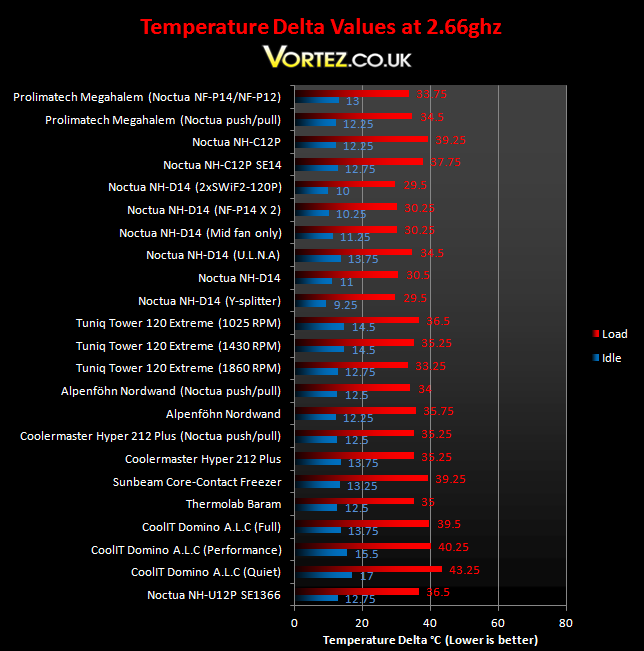
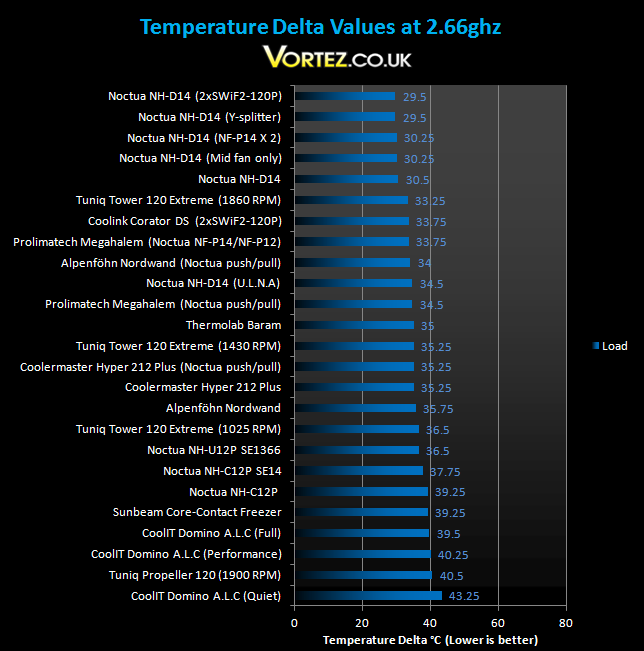
If the NH-D14’s size was not enough of an indication of its sheer potential, then the above certainly is. At stock speeds, the new Noctua outperforms the old NH-U12P by up to 6 degrees. Using the Y-splitter yields a small performance increase but that is well within the error limits. The NH-D14 is the new top performer, succeeding the Tuniq Tower 120 Extreme as the leader of our chart. Noctua advertises their new cooler using the Ultra Low Noise Mode as being better than the NH-U12P at full speed and our findings back up their words, In fact the U.L.N.A mode manages to outperform many of the top coolers such as the Alpenföhn Nordwand and the Thermolab Baram!
4.0ghz
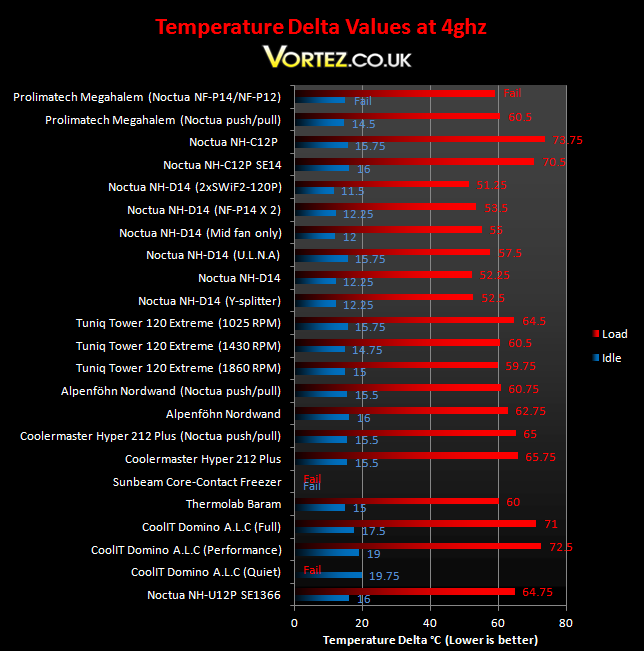
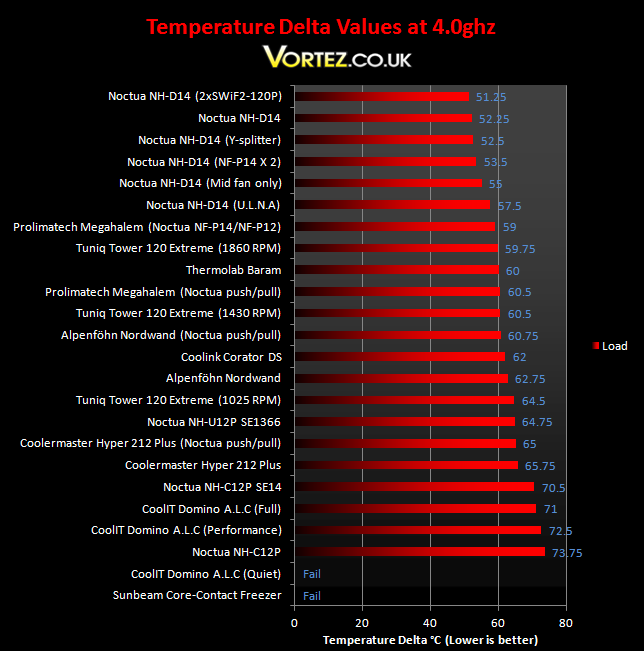
When you see results showing new coolers outperforming previous crown holders by more than 4 degrees, impressive just doesn’t cut it! The Noctua NH-D14, with and without the y-splitter is an outstanding 12.5 degrees better than the NH-U12P and is clearly in a different league to the Thermolab Baram and Tuniq Tower. Noctua have managed to create the ultimate cooler through a very efficient and well thought out design rather than relying on the brute force of a high RPM fan. The U.L.N.A is further proof of that, managing to stay ahead of the competition even with both fan spinning at a mere 900 RPM. At idle, where normally we see very little variation, Noctua disproves the convention and sets the benchmark once again.
Noise
It wouldn’t be Noctua if it wasn’t silent so there’s really not much to say here apart that the fans are virtually inaudible. The Ultra Low Noise mode further quietens an already silent solution whilst maintaining similar cooling performance. The phrase “to have one’s cake and eat it too” justifies what Noctua stand for, silence and performance.
*Update I*
I have decided to add the results for the NH-D14 with just the middle fan installed for those interested in the cooler but were put off by the fact that it covered several RAM slots. It’s outstanding to observe that there is very little difference in performance. There you have it, there’s no real reason not to get one now!
*Update II*
I have now added the results for the Prolimatech Megahalem after popular demand, and the Noctua NH-D14 still remains the King of the coolers. I have decided to remove the raw data tables but for an indication of real world performance, add your room/ambient temperature to the delta values to get an idea of the temperatures you will experience.
*Update III*
For those wondering how the NH-D14 copes with high RPM fans, I conducted a few tests with the SWiF2-120P and the results speak for themselves. They blast their way to the top of the charts, but Noctua’s forte is silence and the lower RPM NF-P12/NF-P14 still do a tremendous job keeping the CPU cool without much of a performance hit.
Conclusion
Ever since Noctua\’s first announcement of its new concept \”Sandwich\” cooler, people have eagerly waited to see what they\\\’d bring to the table. Recently however, Noctua have lived in the shadow of other high end coolers, namely Prolimatech and Thermalright\’s offering. Today we see why Noctua have their name engraved at the very top and in the heart of the enthusiasts. Delivering unparalleled performance, it is unmatched in its cooling performance leaving others in its trail of dust, especially on an overclocked system.Noctua have done a tremendous job creating a product that is worthy to be called more than just an upgrade. However, the NH-D14 does come at a price and not just money wise. Its sheer titanic size may well put people off, and those who use memory coolers will not have space for the Noctua. Furthermore, someone looking for a quiet HTPC cooler will probably have to look elsewhere because much of an ATX form factor\’s real estate is already taken up by the NH-D14. Personally, I find the fact that it covers the memory slots a justifiable compromise for what is essentially the best air cooler around. Its price is also fully justified. It might be misleading at first but after considering that you are supplied with two of the best fans on the market, it doesn\’t take long to realise that it\’s actually a very good deal.
Pros
[+] Class leading performance and efficiency
[+] Excellent compatibility with modern motherboards including LGA1156
[+] Extremely quiet
[+] Supplied with an NF-P14 140mm fan.
[+] Very easy to install
[+] U.L.N.A adapters
[+] Reasonably priced compared to its main competition and its predecessor
[+] High quality finish
Cons
[–] Size
[–] Middle fan is a tight fit
It\\\’s my pleasure to present the Noctua NH-D14 with the Vortez Hardware Gold Award today.
I\\\’d like to thank Noctua enormously for providing us with one of their first samples! To discuss this product or give us feedback, please visit our forums.
