







Noctua have added a new 140mm capable CPU cooler to their popular NH-U Series, boasting a slim design for maximum memory compatibility and clearance.

Product on Review: NH-U14S
Manufacturer and Sponsor: Noctua
Street Price: £59.99
Noctua are a mainstay in the cooling segment and are highly regarded as cooling specialists in their field. Having already reviewed many of their products we are already accustomed to the quality that are associated to the brand name. Today however, we are looking at a new product to join the U-Series.
The NH-U14S is a step-up from the notorious NH-U12P. The U14S utilises a single tower design which has been engineered for maximum memory clearance and is the first cooler within the U-Series to feature a 140mm cooling fan. It’s been a while since we have seen a new addition to this series and so we are enthusiastic to what lies ahead.
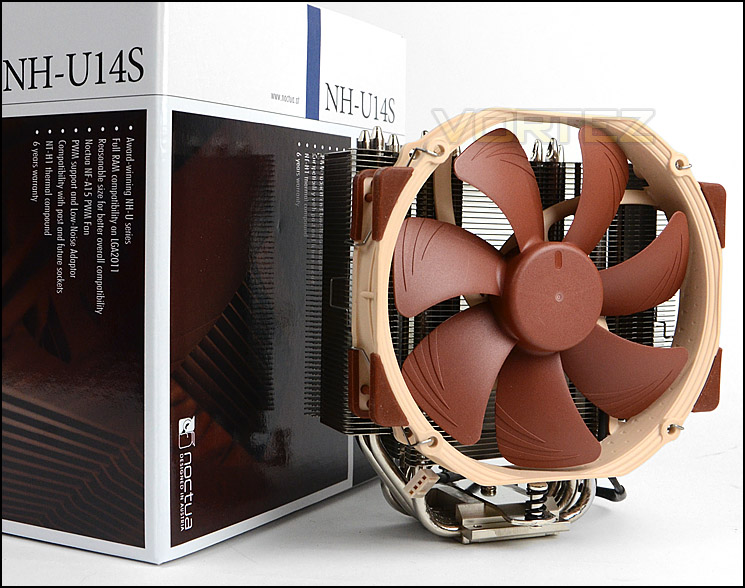
Noctua on their NH-U14S
The NH-U14S is the 14cm top model of Noctua’s classic U-series single tower CPU coolers, which have received more than 400 awards and recommendations from the international press. While the large, six heatpipe design and the NF-A15 140mm fan with PWM support for fully automatic speed control allow the cooler to best the renowned quiet cooling performance of all other U-series coolers, its 52mm slim shape still guarantees full compatibility with tall RAM modules on LGA2011. Topped off with the trusted, pro-grade SecuFirm2™ multi-socket mounting system, Noctua’s proven NT-H1 thermal compound and full 6 years manufacturer’s warranty, the NH-U14S is a complete premium quality solution that combines superb performance, high compatibility and quiet operation.
Technical Specifications
Socket compatibility
Intel LGA2011 (Square ILM), LGA1156, LGA1155, LGA1150
AMD AM2, AM2+, AM3, AM3+, FM1, FM2 (backplate required)
Height (without fan) 165 mm
Width (without fan) 150 mm
Depth (without fan) 52 mm
Height (with fan) 165 mm
Width (with fan) 150 mm
Depth (with fan) 78 mm
Weight (without fan) 770 g
Weight (with fan) 935 g
Material
Copper (base and heat-pipes), aluminium (cooling fins), soldered joints & nickel plating
Fan compatibility
140x150x25 (with 120mm mounting holes)
140x140x25 (with 120mm mounting holes), 120x120x25
Scope of Delivery
NF-A15 PWM premium fan
Low-Noise Adaptor (L.N.A.)
NT-H1 high-grade thermal compound
SecuFirm2™ Mounting Kit
Anti-vibration pads and fan-clips for second NF-A15 (optional)
Noctua Metal Case-Badge
Warranty 6 Years
Fan specifications
Model Noctua NF-A15 PWM
Bearing SSO2
Max. Rotational Speed (+/- 10%) 1500 RPM
Max. Rotational Speed with L.N.A. (+/- 10%) 1200 RPM
Min. Rotational Speed (PWM) 300 RPM
Max. Airflow 140,2 m³/h
Max. Airflow with L.N.A. 115,5 m³/h
Max. Acoustical Noise 24,6 dB(A)
Max. Acoustical Noise with L.N.A. 19,2 dB(A)
Input Power 1,56 W
Voltage Range 12 V
MTBF > 150.000 h
Intel LGA2011 (Square ILM), LGA1156, LGA1155, LGA1150
AMD AM2, AM2+, AM3, AM3+, FM1, FM2 (backplate required)
Height (without fan) 165 mm
Width (without fan) 150 mm
Depth (without fan) 52 mm
Height (with fan) 165 mm
Width (with fan) 150 mm
Depth (with fan) 78 mm
Weight (without fan) 770 g
Weight (with fan) 935 g
Material
Copper (base and heat-pipes), aluminium (cooling fins), soldered joints & nickel plating
Fan compatibility
140x150x25 (with 120mm mounting holes)
140x140x25 (with 120mm mounting holes), 120x120x25
Scope of Delivery
NF-A15 PWM premium fan
Low-Noise Adaptor (L.N.A.)
NT-H1 high-grade thermal compound
SecuFirm2™ Mounting Kit
Anti-vibration pads and fan-clips for second NF-A15 (optional)
Noctua Metal Case-Badge
Warranty 6 Years
Fan specifications
Model Noctua NF-A15 PWM
Bearing SSO2
Max. Rotational Speed (+/- 10%) 1500 RPM
Max. Rotational Speed with L.N.A. (+/- 10%) 1200 RPM
Min. Rotational Speed (PWM) 300 RPM
Max. Airflow 140,2 m³/h
Max. Airflow with L.N.A. 115,5 m³/h
Max. Acoustical Noise 24,6 dB(A)
Max. Acoustical Noise with L.N.A. 19,2 dB(A)
Input Power 1,56 W
Voltage Range 12 V
MTBF > 150.000 h
Packaging, Bundle & Fan
U14S is presented in a large and attractive box. Noctua are renowned for taking care with packaging – ensuring minute details are the focus. There are technical specifications on the packaging for those who are interested. Inside the protective box are smaller boxes containing various items for installation. The heatsink is well protected and house in a way that no damage will occur during transit.
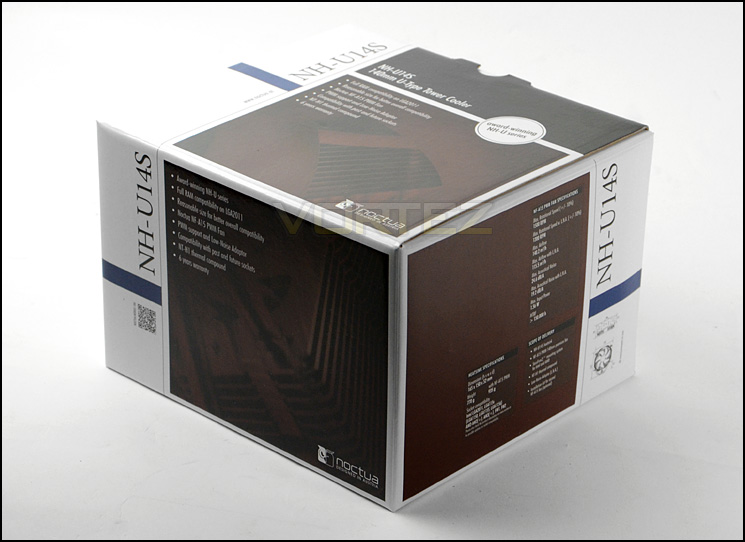
The packaging for U14S
With U14S being a universal CPU cooler it has socket compatibility for a plethora of Intel and AMD options which include:
Intel LGA2011 LGA1156, LGA1155, LGA1150
AMD AM2, AM2+, AM3, AM3+, FM1, FM2
Within the accessories bundle there are components for the above sockets, respective user guides and a “common parts” pocket which has the screwdriver/wrench, thermal paste (NT-H1), fan clips, bade and vibration pads. All of these parts are presented in a new set of boxes which look very nice indeed. As we expect, Noctua have done a great job here.
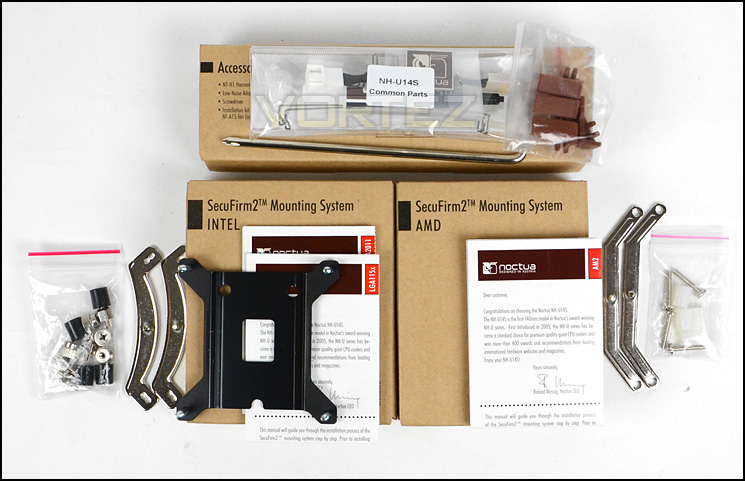
Universal socket installation kits
Accompanying the U14S heatsink is a NF-A15 PWM. In theory this is a 140mm cooling fan but it has a 150mm width, hence its A15 moniker. A15 has a seven blade design and is capable of up to 1500RPM thanks to the PWM functionality. Noctua provide the usual low noise adapters which can control the fan speed to around 300RPM, 1200RPM and 1500RPM. Whether you love it or hate it, Noctua’s notorious colour-scheme is certainly here to stay and stands out as being unique.
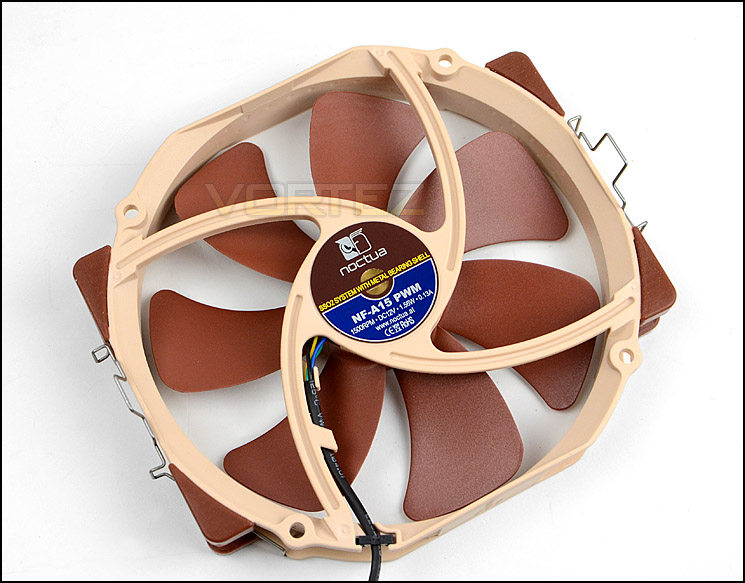
NF-A15 accompanies the heatsink
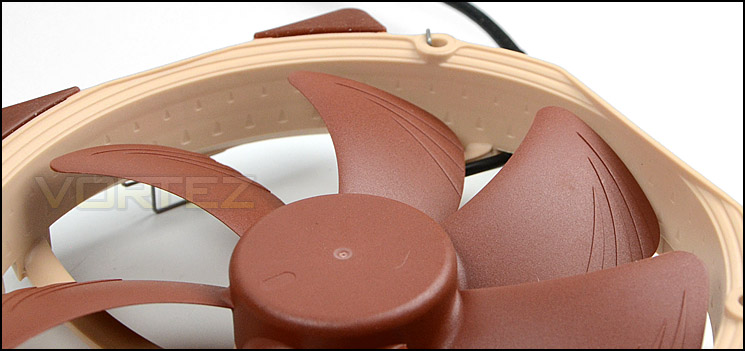
A seven blade design with striking characteristics
Closer Look
One of U14S’s biggest selling points is the slim design. Noctua have engineered this heatsink to cater for maximum memory compatibility on all socket types but more importantly LGA2011 – which has memory slots on either side. (More on this later in the review).
The U14S heatsink measures 165 mm in height, 150mm in width and 52mm in depth. Weighing 770g, It uses copper for the baseplate and heat-pipes, aluminium for the cooling fins with nickel plating.
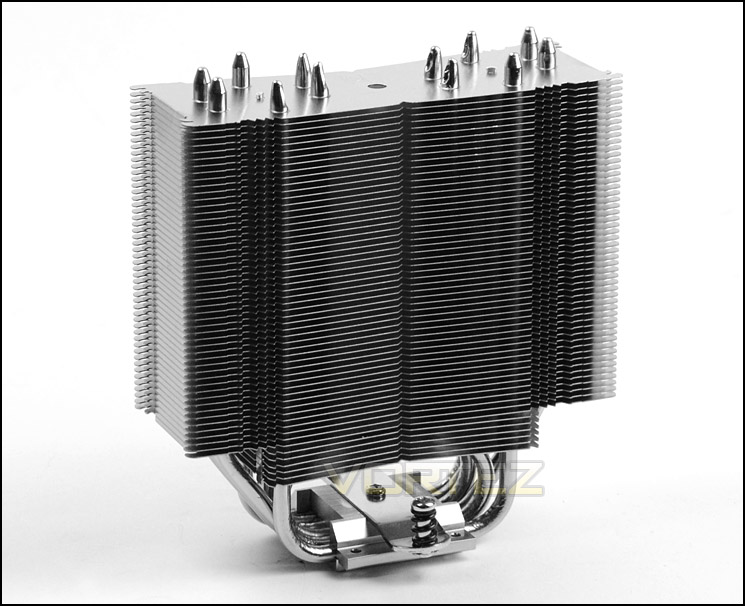
The U14S heatsink
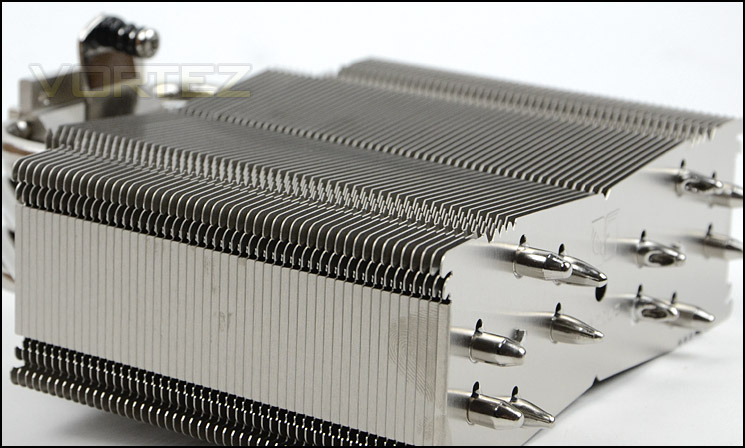
The fin stack profile
Utilising a total of six copper heatpipes, the U14S may have the dimensions and single tower specification which is customary to the U-Series but it still promises to deliver high-end performance. The heatpipes are positioned in eclipse type alignment rather than in a straight line, this is more noticeable when observing the heatsink from an aerial point of view.
U14S’s baseplate uses copper and has the mounting plate already fixed for easy installation. The surface finish on the baseplate is semi-transparent, meaning there is no mirror finish.
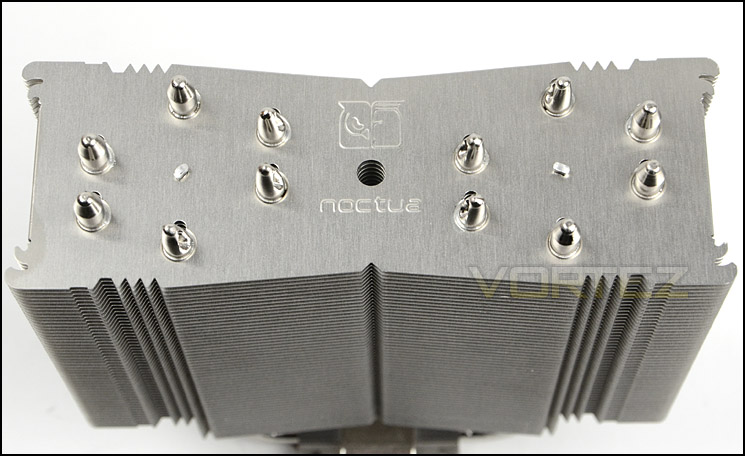
Six copper heatpipes run through the heatsink
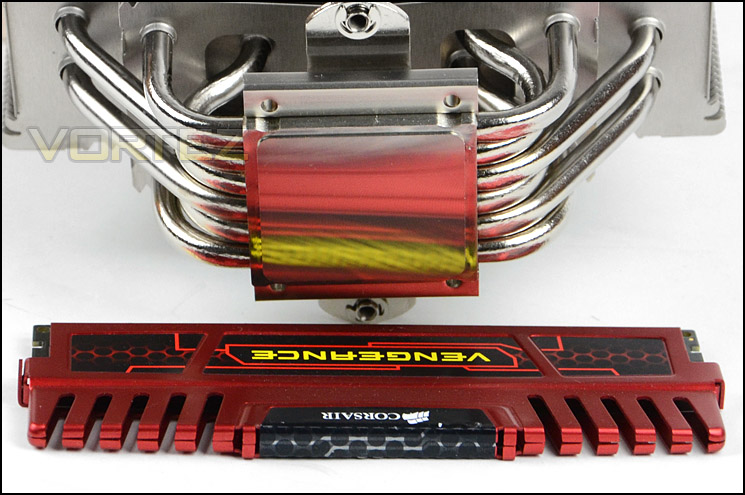
A semi-reflective copper baseplate
To attach the NF-U15 to the heatsink, Noctua have given the fan an ingenious clip to provide a secure fitment. These fan clips whilst being very easy to fit offer a firm attachment.
Noctua provide fan clips for attaching another cooling fan to the U14S, the heatsink can accommodate: 140x150x25 (with 120mm mounting holes), 140x140x25 (with 120mm mounting holes), 120x120x25.
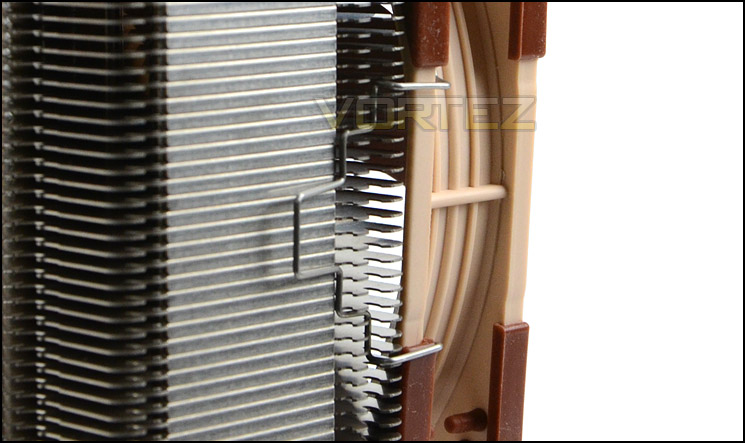
Easy to use fan clips are fast and effective
Installation Process
In order to demonstrate the installation process for U14S we are installing the cooler on the Intel LGA2011 socket. Since Noctua hold claims that this cooler offers 100% memory compatibility for LGA 2011 this will be a worthwhile venture.
Installation is very simple, those who have used Noctua in the pat will know that the SecuFirm2™ mounting kit sets the benchmark for CPU cooler installation.
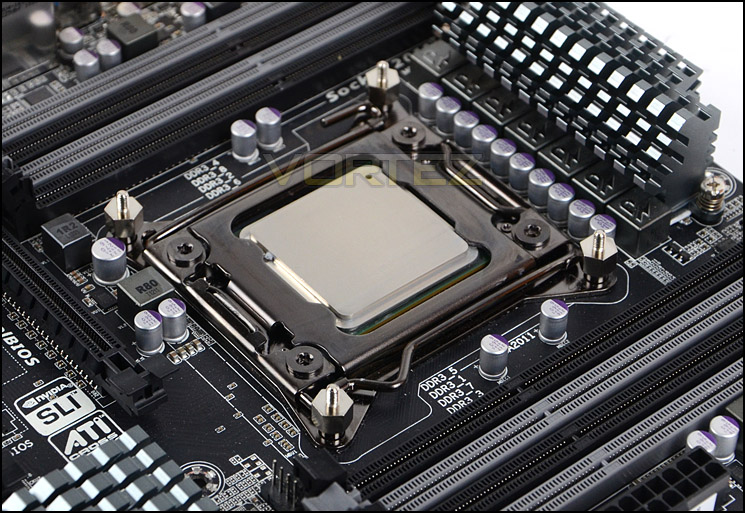
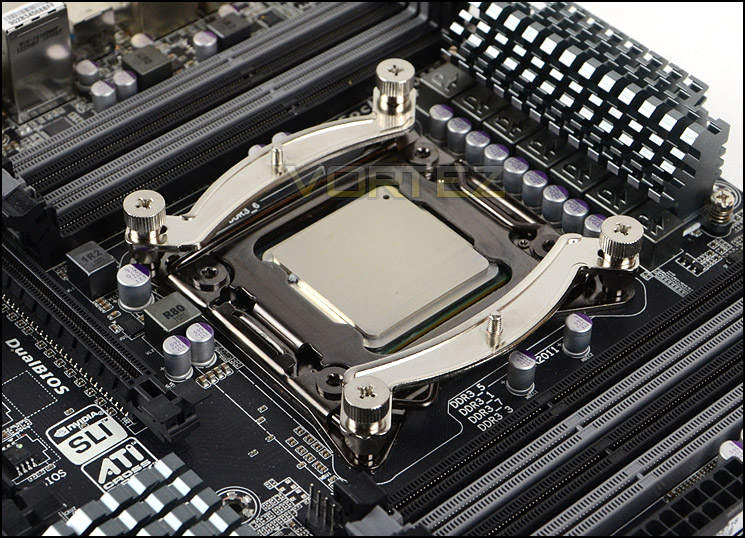
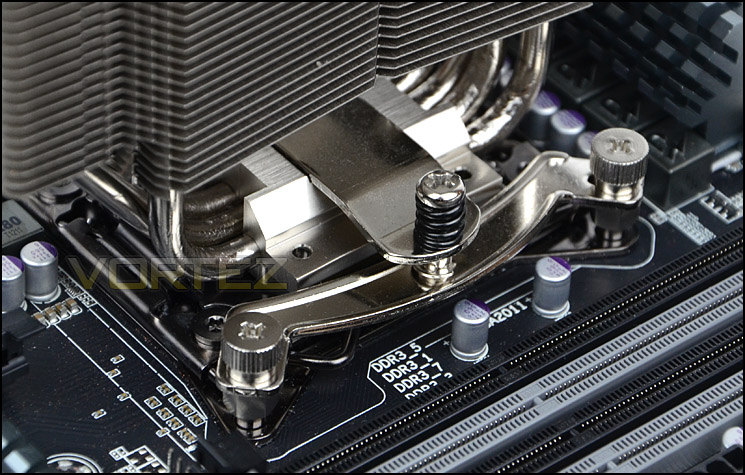
The first step is to apply four stand-off screws to the socket cover. Once these are in place and tight, the mounting brackets can be placed over the top and respective thumbscrews tightened. It’s important to have the brackets bowing outwards when installing, but the orientation is down to how you’d like the cooler to face. For a traditional setup of the fan facing the rear exhaust fan within a computer chassis you will need to install the brackets as pictured below. The only aspect left to fulfil is to apply thermal paste and place the cooler over the CPU and tighten the pre-attached screws.
It’s advisable when completing the final step to perform one screw turn on either side to apply even pressure to the CPU – if you screw down one side entirely you will probably find it extremely difficult to tighten the other side anyway due to tension.
Installed – Memory Clearance
Memory clearance is something which many system builders and enthusiasts are eager to discover since this will ascertain whether a memory kit will be compatible with the CPU cooler or not. To demonstrate this, a low profile memory kit is used.
Dimensions:
165 x 150 x 52 mm (without fan)
165 x 150 x 78 mm (with fan)
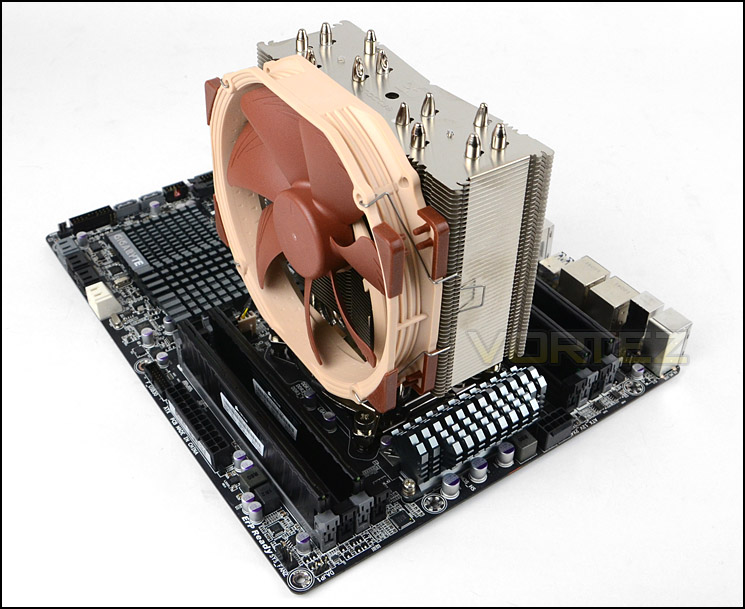
Installation complete, a thin single tower stands tall
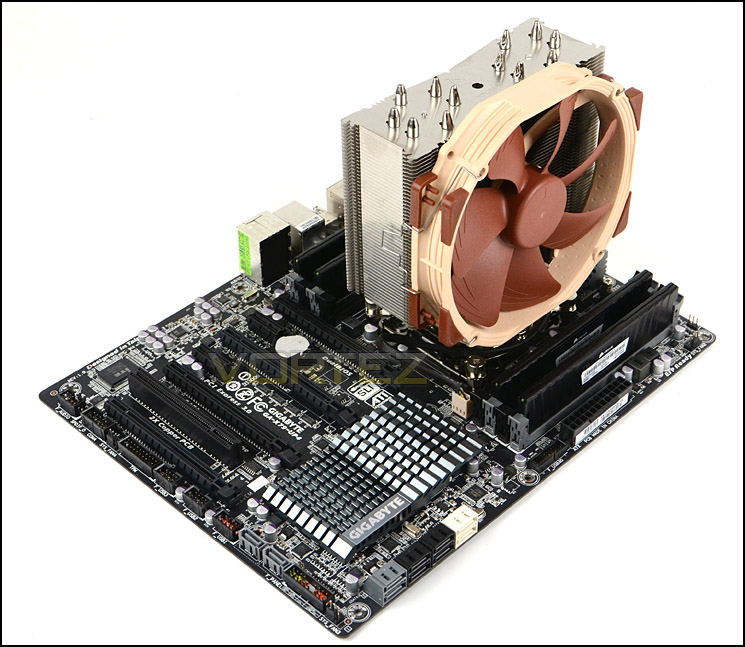
Even with fan attached, memory clearance is great
Just as Noctua claim, the U14S presents no memory compatibility issues whatsoever. Thanks to its design both sets of slots are clear of any obstruction. We didn’t even need to bring out the measuring ruler to demonstrate clearance distance since the cooler doesn’t hang over the slots at all, on either side.
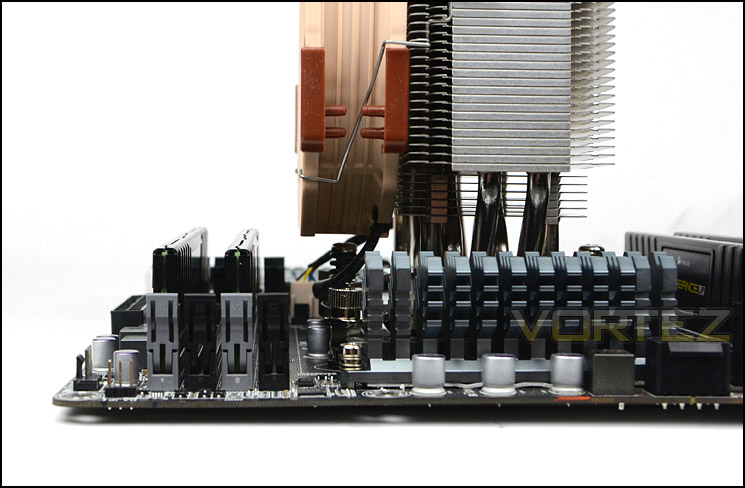
No overhang whatsoever on either side
Test Setup & Methodology
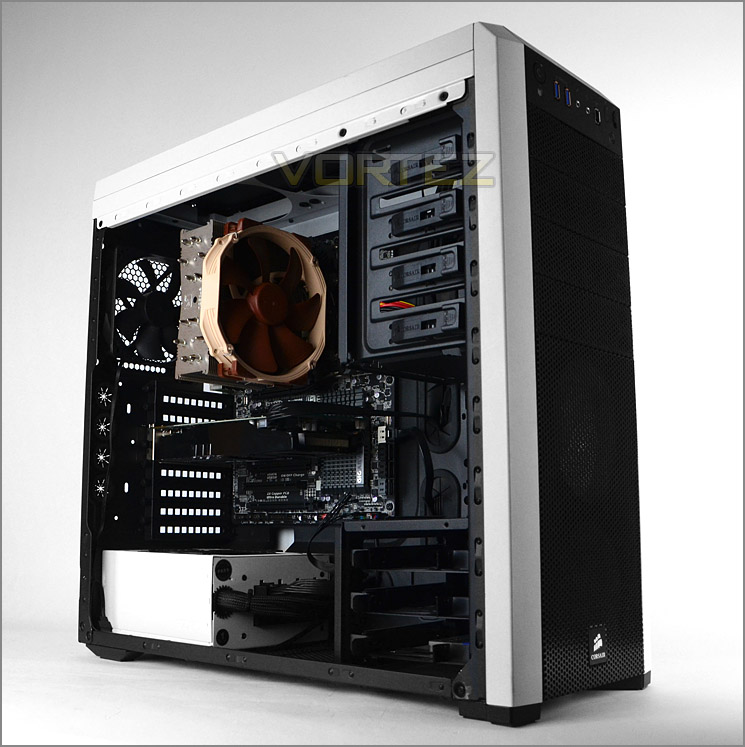
Test System
CPU – Intel Core i7-3930K (3.6GHz)
Motherboard – GIGABYTE X79-UP4
Memory – 8GB Corsair Vengeance LP 1600MHz CL9
Graphics – Sapphire Radeon HD 6850 1GB
PSU – NZXT Hale90 650W
Hard Drive – Kingston HyperX 240GB SATA III SSD
Case – Corsair Carbide 500R White
Motherboard – GIGABYTE X79-UP4
Memory – 8GB Corsair Vengeance LP 1600MHz CL9
Graphics – Sapphire Radeon HD 6850 1GB
PSU – NZXT Hale90 650W
Hard Drive – Kingston HyperX 240GB SATA III SSD
Case – Corsair Carbide 500R White
CPU Coolers
Alpenföhn Matterhorn Pure(120mm Wingboost: 300-1200RPM)
Alpenföhn K2 (120mm Wingboost: 500-1500RPM, 140mm Wingboost: 300-1100RPM)
Alpenföhn Gotthard (140mm Wingboost: 300-1100RPM)
Noctua NH-D14 (120mm NF-P12 PWM + 140mm NF-P14 PWM: up to 1200RPM)
Thermalright SilverArrow SB-E Extreme (Dual TY-143 fans – 600-2500RPM)
Corsair Hydro H100 (Dual 120mm fans – low: 1300RPM, mid: 2000RPM, high: 2600RPM Push Config)
SilverStone HE01 (140mm PWM fan – 500RPM-1200RPM – 500RPM-2000RPM)
be quiet! Dark Rock Pro 2 (135mm + 120mm PWM Fans – up to 1500RPM and 1700RPM)
Thermaltake Water 2.0 Pro (Dual 120mm PWM fans – up to 2000RPM)
Corsair Hydro Series H100i (Dual 120mm fans – up to 2700RPM Push Config)
Be Quiet! Shadow Rock TopFlow(1x 135mm PWM fan – up to 1500RPM)
SilverStone HE02 (Passive – optional fan used: Noctua NF-F12 120mm PWM)
Corsair H55 (Single 120mm fan – 1700RPM Exhaust Push)
Cooler Master Seidon 120M (Single 120mm fan – Up to 2500RPM Exhaust Push)
Zalman CNPS11X Extreme (Single 120mm fan – Up to 1950RPM)
Phanteks PH-TC12DX (Dual 120mm fans – 600-1800RPM)
Noctua NH-U14S (Single 140mm cooling fan – 300-1500RPM)
Program Suite
Real Temp – Maximum temperature analysis
LinX 0.6.4 – Applies thorough stress test to CPU
CPU-Z – Confirmation of CPU frequency/voltage
AIDA64 Extreme Edition – Confirmation of temperatures/fan speeds
Testing methodology
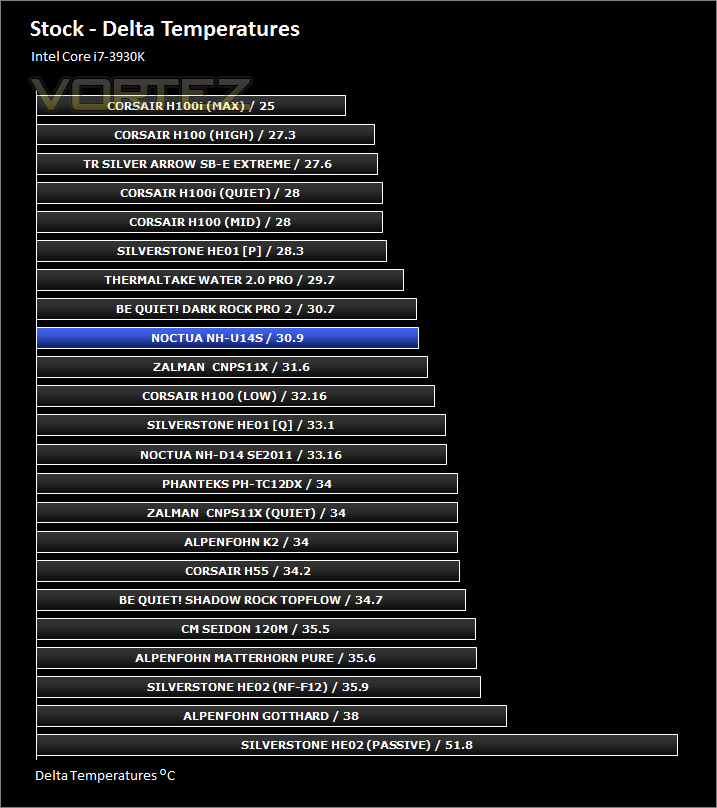
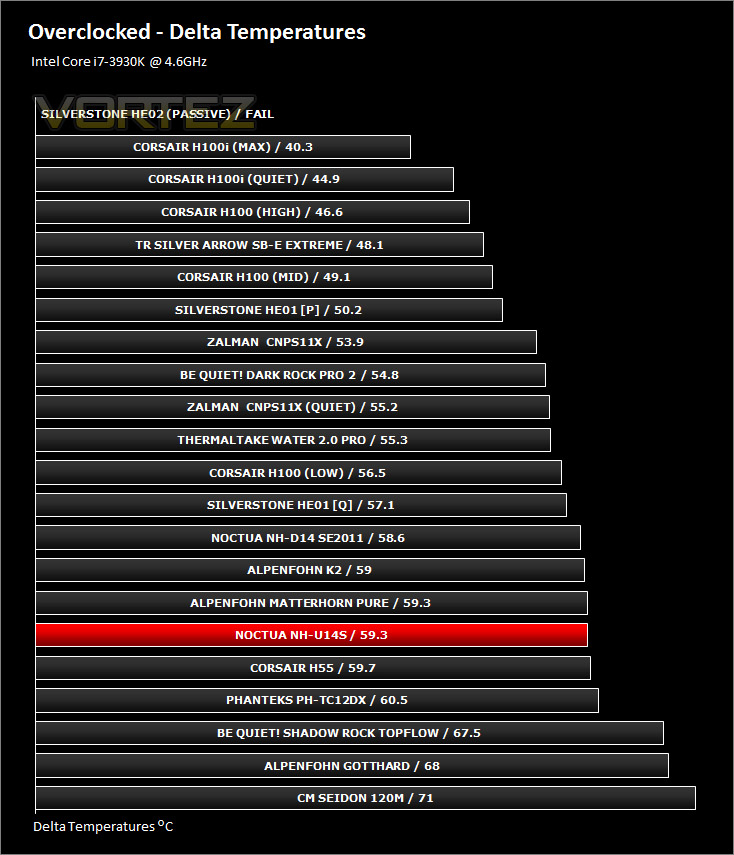
Testing will be based on temperatures recorded by Real Temp after 20 passes of LinX stress test. The maximum absolute temperatures will be recorded after the test and averaged over the 6 cores. The delta is then calculated by subtracting the ambient temperature recorded near the intake fans from the average temperature calculated. Tests are conducted with the Intel i7 3930K at its default 3.6GHz stock speed and overclocked to 4.6GHz @ 1.42V. The tests are done inside the Corsair Carbide 500R chassis to simulate real world conditions. To keep the tests standardised we are using Noctua’s NT-H1 thermal paste on all coolers.
CPU coolers are reviewed as they come out of the box – with their factory cooling fans, as the manufacturer intended and as the consumer expects.
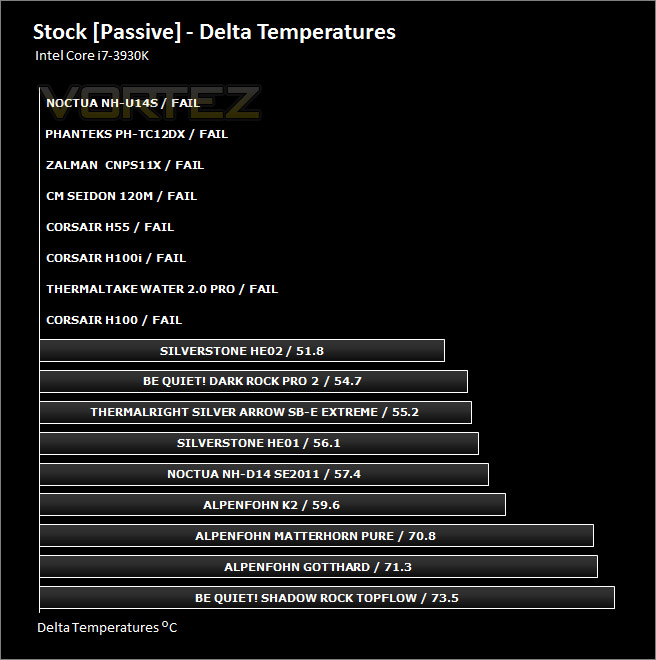
Additional tests include a passive test where the cooling fans are taken away from the heatsink and a comparison between the cooler used with stock thermal paste against our Noctua NT-H1 paste.
A kind thank you to Noctua for supplying us with NT-H1 thermal compound.
Results – Stock Performance
During the stock testing U14S handled our Intel Core i7-3930K very well indeed. The results demonstrate that Noctua can still be regarded as a stalwart in the air cooling arena. Noise levels were barely noticeable with the fan maintaining 1000RPM.
Results – Overclocked Performance
Under a substantial overclock, U14S does admirably but does struggle somewhat. The cooling fan ramps up to 1500RPM during this state and is noticeable but compared with other fans isn’t as noisy.
Results – Passive Performance
We run passive tests to see how the CPU cooler reacts when cooling fan(s) are removed. Without the aid of the cooling fan U14S struggled and gave results which exceeded 90C – the level in which we pronounce a fail in this category.
Results – Thermal Paste Comparison
Most CPU coolers come accompanied with thermal paste provided by the manufacturer. For our CPU cooling tests we use Noctua’s NT-H1, so it wasn’t necessary to compare thermal paste since its exactly the same as our usual paste.
Conclusion
Noctua are cooling specialists and as such, new and upcoming products always hold great expectations. So what do we think of the new NH-U14S?
Well, right from the get-go we were impressed with the attention to detail that Noctua have employed even with something as overlooked as packaging. Everything is presented in a professional manner and they have even gone over and above to ensure first impressions are good.
We found the installation process a breeze thanks to the use of SecuFirm 2. You have to remember that many vendors have analysed SecuFirm over the years and attempted to copy its design methodology because it is efficient and reliable. The installation kit we used for LGA 2011 was great quality, as was the heatsink itself – you can gauge the level high-quality engineering just from quick observation.
The aspects which stand out as unique selling points with U14S are the excellent memory clearance. Noctua claims that this CPU cooler will not cause any obstruction, even on LGA 2011 which has memory slots on either side and this claim is ratified. We found no clearance issues whatsoever. The other point to note is that noise levels were very low, even with the fan at full speed – compared to other models it was by no means disruptive.
In terms of performance, U14S delivers good results with SB-E during stock CPU conditions but struggled slightly when overclocked, but we know that on other platforms such as LGA1155 others have found U14S being able to handle overclocks better.
Priced £59.99, this might be hard for some to swallow but as with other Noctua products you have to consider the entire package before jumping to any conclusions. There is plenty within the bundle to warrant the price, combine this with the quality and silence on offer and it isn’t a bad deal by any stretch.
Noctua have a proven track record for delivering brilliant products and the U14S is no exception. NH-U14S offers excellent memory compatibility clearance and build quality. It performs well for both thermal results and noise levels.
Pros
+ Great packaging/presentation
+ Good performance
+ Excellent build quality
+ Easy to install with SecuFirm 2
+ Excellent memory compatibility clearance
+ Extremely quiet
Cons
– Average performance on LGA 2011
– Failed passive tests
+ Great packaging/presentation
+ Good performance
+ Excellent build quality
+ Easy to install with SecuFirm 2
+ Excellent memory compatibility clearance
+ Extremely quiet
Cons
– Average performance on LGA 2011
– Failed passive tests

Click here for an explanation of our awards at Vortez.net.


