







With the advent of the Intel i7 chip, Noctua have released a special edition version of their award-winning U12P. We put it to the test.

Noctua are a company that need little introduction. Based in Austria, they are one of the biggest companies that produce quality cooling solutions for desktop and server computers. Their CPU cooling line-up over the past 2-3 years have included the NHU12F, NH-U12P, NH-C12P, which in themselves are multi-award winning products.
With the advent of the new Intel i7 chip, the cooling firms are gradually bringing out CPU coolers to accommodate this new platform. One of the first companies to bring us an i7 ready cooler is Noctua. Noctua have taken all the qualities of the NH-U12P, designed a new fitting kit – SecuFirm2, included an additional fan and brought us the NH-U12P SE1366.
The Intel i7 chips have a reputation for getting extremely hot whilst under load, so the NH-U12P SE1366 will need to be very effective in dissipating that extreme heat. We look forward in anticipation at how well this cooler will work against some other coolers currently on the market; it will be interesting to see just how far we can push the i7 in our overclocking test also. So over the page and we can begin.
Packaging and Features
As with previous Noctua CPU Coolers, the NH-U12P SE1366 comes seated in a windowed box. There are plenty of details on the box to inform you of just what you are getting. The NH-U12P SE1366 is securely packaged up inside, you can be sure that it will come to no harm during transit. There is nothing worse than a badly packaged product, it can get easily damaged and it generally just reduces respect for the manufacturer because of lack of care.

Inside the NH-U12P SE1366 box you will find included:
~ SecuFirm2 Mounting System
~ NT-H1 Thermal Compound Paste
~ 2xNF-P12 120mm Premium Fans
~ Low Noise Adaptor
~ Ultra Low Noise Adaptor
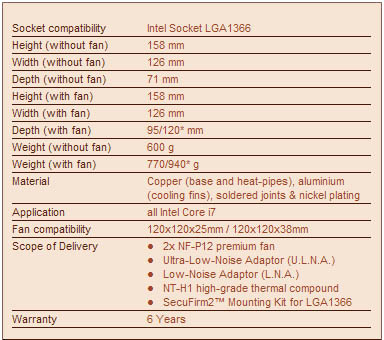
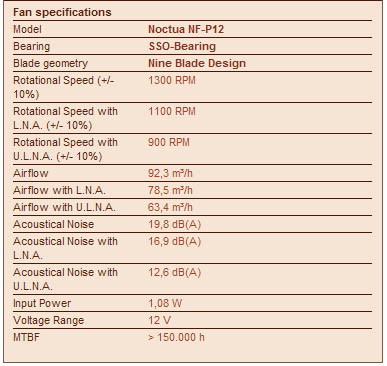
Included in the bundle are two adaptors to control the fan’s noise levels. The Low Noise Adaptor (black) controls the fan at 1100RPM whilst the Ultra Low Noise Adaptor (blue) controls the fan at 900RPM. Without any of these adaptors the fan will normally operate at 1350RPM.

Specifications
Fan Specifications
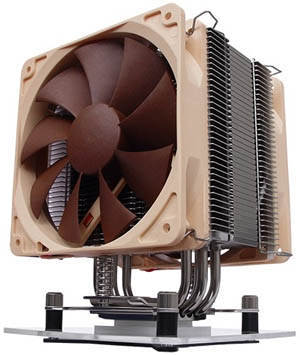
The NH-U12P is similar to other tower-type heatpipe CPU coolers on the market. The construction and design of this heatsink has been very well thought out. Notice how the fins lip out and curve. The base that makes indirect (thermal paste between both) contact with the CPU is clean and shiny. The overall quality of this cooler is very high. There is confidence in this workmanship.


Installation
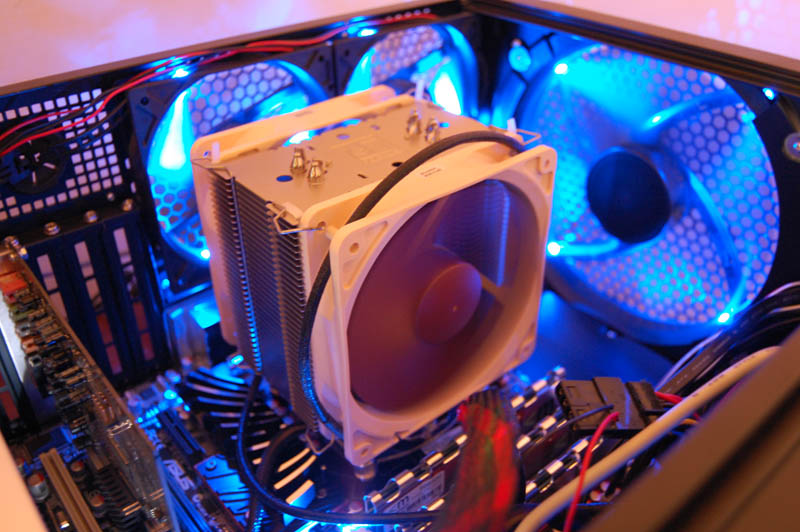
Installation is very smooth if you follow the included instructions. You will have no problems following them as they are simple and easy to follow. The one thing that might have you getting a little frustrated is that you have to remove the motherboard to install the NH-U12P SE1366. But if you consider how secure the fitting kit will be these trivial tasks are not to be concerned with. I would rather have a secure cooler and put my confidence here, than be worried and concerned the cooler lacks good fitting.As soon as you have removed the motherboard, the base plate must be installed. The mounting bars will appear through the holes and up through the top side of the motherboard. As soon as this is done the next stage is to install the bushes. From this next step, you must choose which orientation you desire. I chose the typical orientation that faces the rear exhaust fan in any case. When you have decided upon which you want to go for, the next step is to slot the brackets on top of the bushes and then we can attached the thumbscrews to ensure the brackets are kept in place.


Once this is completed you should then attached the mounting brackets to the base of the heatsink so that you can attach the cooler to the brackets you have already installed on the motherboard. As soon as everything is fastened up nicely, place a small pea-sized portion of NT-H1 thermal paste onto the CPU.
Next place the heatsink onto the CPU, you will notice that on the SE1366 version the screws and coils are automatically attached to the mounting bracket. This is a big improvement over the previous version of the U12P. With less space to place the screw and coil on the mounting bracket this task can be really awkward and frustrating to try and achieve. I really like this idea, it makes installing the cooler onto your motherboard that little bit easier and removes the annoyance of dropping the coil whilst trying to screw and keep the cooler in place at the same time. Be careful not to tighten the screws too much, stop rotating when you feel the tension in the screw driver (or Noctua screw tool). Another important thing to take care with is not to tighten one side up then the other. Complete 2 rotations then, move onto the other screw so that the cooler gently meets the CPU/thermal paste surface.


When the heatsink is securely fastened down, you can attach the NF-P12 fans. To do this you will need to stick the anti-vibration strips onto the very edge of the fins and hold the fans in place whilst fixing the fan clips into the mounting holes on the fans. Lastly plug the power connector from the fans either directly into a port on the motherboard (CPU FAN, AUX) or use the provided adaptor to take advantage of more control over the operation.


Testing and Results
To test the performance of the Noctua NH-U12P 1366 we will be putting it up against 2 other CPU coolers currently available for the Intel i7 platform. The coolers to be tested will be:~ Noctua NH-U12P SE1366
~ Noctua NH-C12P (with SE1366 mounting kit)
~ Intel i7 Reference Cooler
We will be seeing how the NH-U12P SE1366 performs during idle and load operations. The load will be applied by using OCCT 3.0.1. The application used to monitor the temperatures during this test will be Lavalys Everest ULTIMATE and CoreTemp. Idle temperatures will be observed from a cold bootup after 15 minutes of idle time. None of the included adaptors for the fans will be used. So the fans mounted will be operating on the NH-U12P SE1366 at 1350RPM.
The system used in the testing stage of this review is:

Results
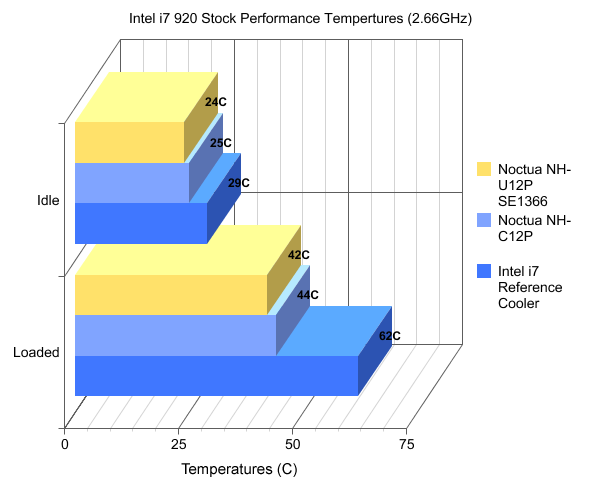
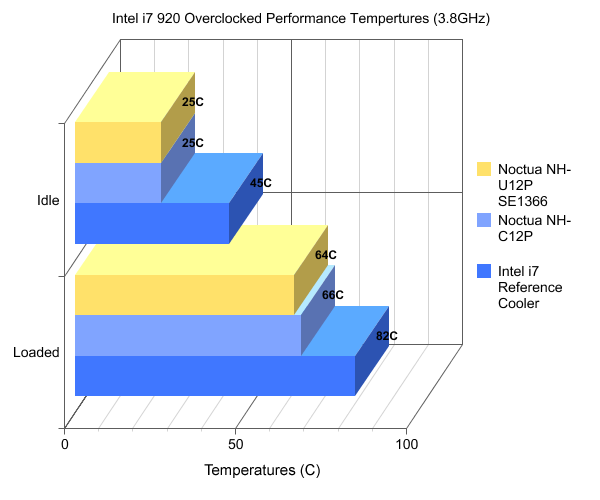
A very pleasing set of results from both Noctua counterparts. The SE1366 in particular delivers some blistering performance figures. The Intel i7 chips are well known for getting rather hot under load compared to the previous Core 2 family, the intel stock cooler quite clearly indicates this – when I overclocked the i7 920 to 3.8GHz the stock cooler gave out readings that approached the 90C mark.
I would imagine that the results above instill some confidence in the cooling ability of the SE1366, and provides not only confidence but reassurance that what is under the hood will be kept cool enough for you to execute some rather intense overclocking.
The overclock that I ran was 42% above that of the stock clock speeds, and when you cast your eyes at the graph the temperatures only just reach 64C. A very impressve and satisfying set of results.
Conclusion
To conclude, the Noctua U12P SE1366 is again one outstanding cooling solution. It goes without saying that the performance abilities that we saw on the LGA775 platform from the U12P have most definately been transferred across to the Intel i7. We are left in no doubt that the benchmark has been set, you will struggle to find a CPU cooler that beats the results found on the previous page.The U12P SE1366 does come at quite a price, but you get exactly what you pay for. You are investing in two award winning premium NF-P12 fans, a tube of award winning thermal paste and, well, a heatsink that has proven itself as one of the best coolers on the market to date.
One of my favourite things about the SE1366 package is the secuFirm2 mounting kit. Noctua have gone away and revised the secuFirm mounting solution and produced yet more improvements to their system of work. When you fit the SE1366 you get a sense of complete security when mounting the whole unit. This feeling is highlighted when you come to install the Intel reference cooler, and when you compare the two mounting systems there is just no way you can even judge the two side by side. This kit is in a league of It’s own.
Noctua have once again amazed me with their engineering and it appears they are going from strength to strength.
Vortez Hardware would like to thank Noctua for supplying this sample. Discuss on this review can be found over @ Vortez Hardware Forum
