







In our hands today is a gaming system from Novatech featuring the AMD Phenom II CPU…
Novatech are one of the leading retailers in the UK for computer products. Over the 22 years they have been established they have won numerous awards for their outstanding service and quality. Some information taken from their website (http://www.novatech.co.uk/novatech/hdoutlets.html):“We have 22 years of experience and have supplied millions of IT products to over a million satisfied customers. This means that we can deliver the products you need, at the prices you want, with the service you expect. We always remember you have a choice.”
Today we have the privilege of looking at just one of their many pre-built gaming systems – the Brawler Pro. (http://www.novatech.co.uk/novatech/range.html?t=pc&c=gaming&r=BRA/)
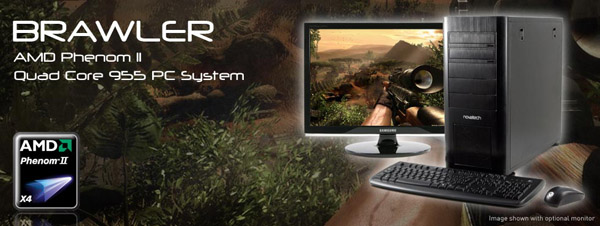
To many, building a computer can be a daunting task – perhaps not just the construction but the selection of compatible components. Whilst retailers have thousands of products to choose from for the confident system builders amongst us, most also host a selection of pre-built systems to counter this. It’s a great idea, consumers can simply order a system based on their budget and purpose of use.
Over the page we will take a look at the Brawler Pro and discover how well it holds up to a selection of games, applications and tests.
Specifications
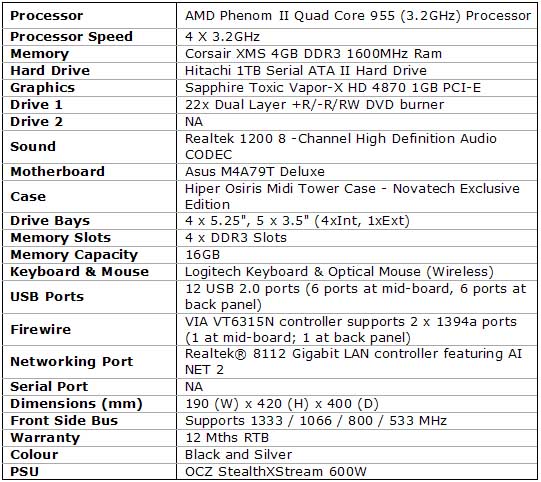
On paper this looks like a very clean setup. It should do well when we come to test it. I anticipate some decent FPS ingame.
A Closer Look
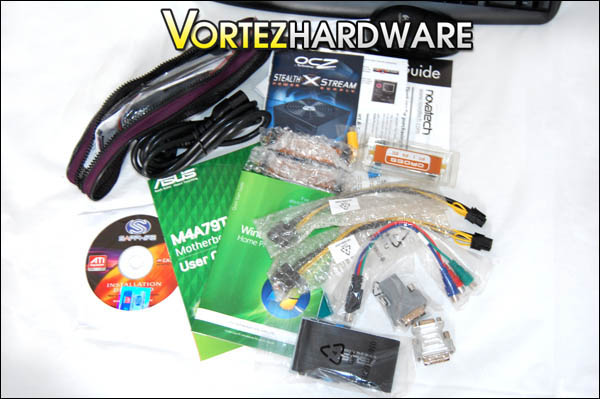
The Brawler Pro comes packaged in a well padded box. Inside is the tower itself, keyboard, mouse, wireless transceiver and batteries along with two boxes containing all the documentation for components, software and additional accessories such as crossfire adaptor, molex to pci-e, vga to dvi, and drivers discs.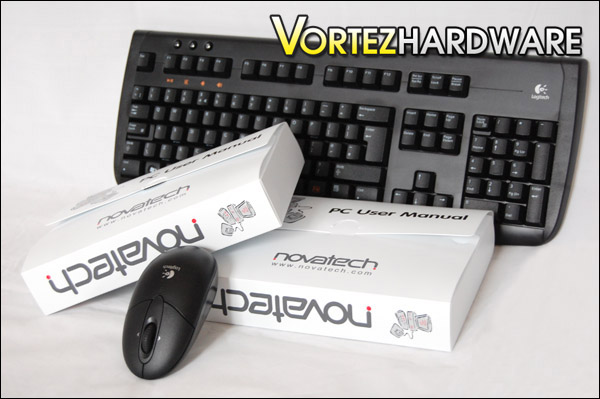
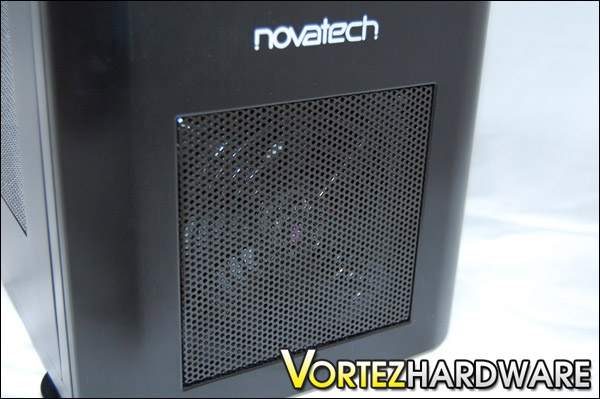
The Brawler Pro as stated in the specifications comes sitting in a Hiper designed case exclusively for Novatech. This case comes in a nice air brushed alloy finish, and just from first impressions it’s quite evident this case is high quality. All parts to this case on the exterior – even the front fascia are constructed of alloy.
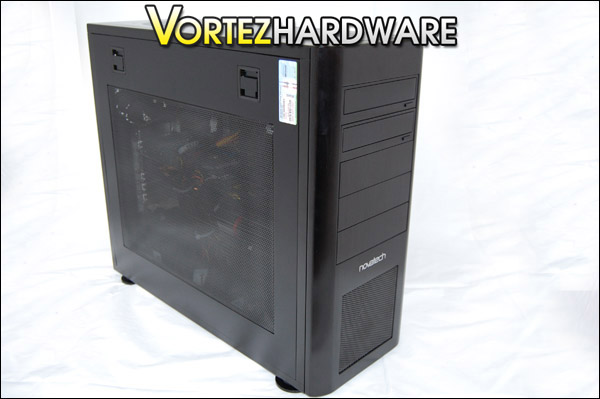
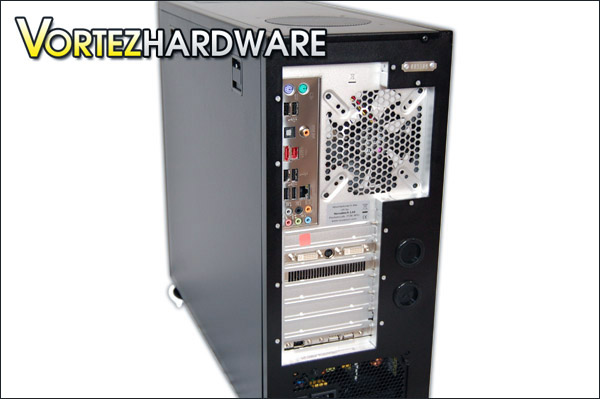
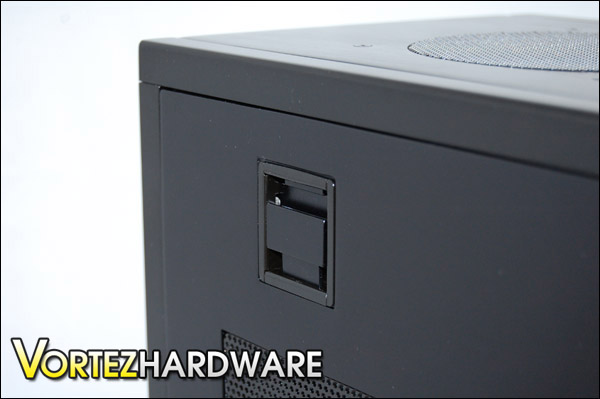
The left panel of the Osiris case features a large mesh Perspex window. Both side panels are fixed in place by two tension clips on either side. All you do to remove is push the clips in a downward motion and remove the side panel. It’s really that easy – no screws, no messing about. Taking a closer look at the mesh side panel, it appears as a strange combination to have a Perspex window and mesh. It disturbs the view somewhat.
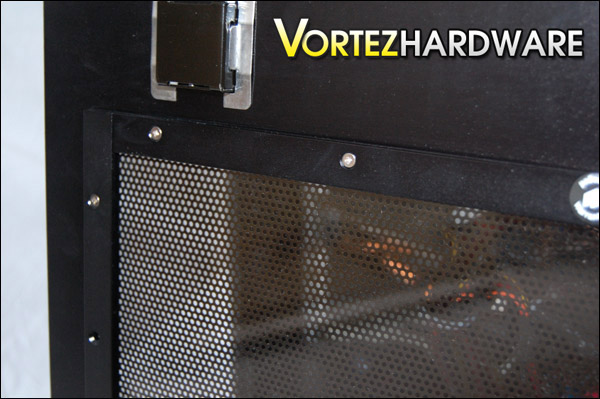
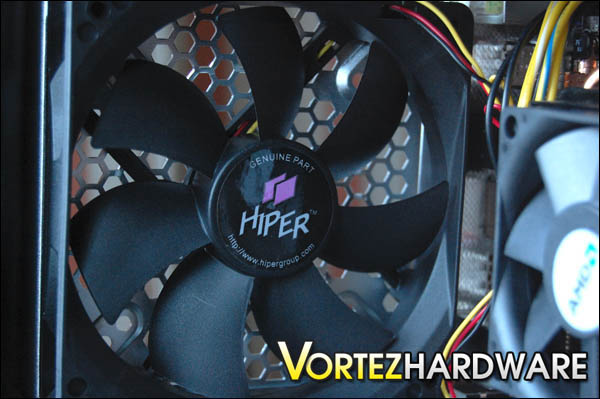
In typical fashion there is a front intake fan (Hiper 120mm) and a rear exhaust fan. There is also some additional cooling at the very top of the case which I am sure will assist in getting the CPU temperatures down. On the underside of the case there is an area that hosts an outlet to allow the PSU some additional cooling, along with a dust filter for this gap. The base of the case can pickup dirt and this is a good method of reducing this from happening whilst giving that PSU a little more chance of shedding heat. On the base we also have 4 removable rubber feet.
A Closer Look (Continued)

On the top of the case towards the back as we’ve mentioned there is a 120mm fan outlet. Towards the front we have the control panel featuring x2 USB 2.0 slots, x1 eSATA, x1 headphone port, 1x line-in port, 1x microphone port and of course the obligatory power and reset buttons with lights.
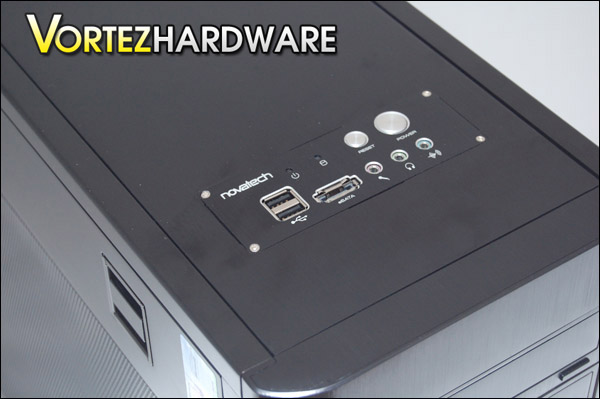
Whilst this case does have some brilliant build quality and features its worth noting that it does have a tendency to smear and mark easily due to the matte black finish. I’m pretty sure the silver version of this case wouldn’t mark as easy. That said, it is decent enclosure visually and aesthetically, whether the Osiris will provide some good temperatures and low noise we will find out over the next few pages.
With the side of the case off, we can see what lies beneath. Inside is the Asus M4A79T Deluxe motherboard that hosts the new AMD Phenom II Quad Core 955. The heatsink seated on this CPU is the standard AMD reference cooler, although this doesn’t offer optimum cooling it will be interesting to see what temperatures are reported a bit later on. We can of course upgrade this cooler if we wanted to, as the Osiris case is more than capable of giving enough headroom for the biggest of coolers out there.

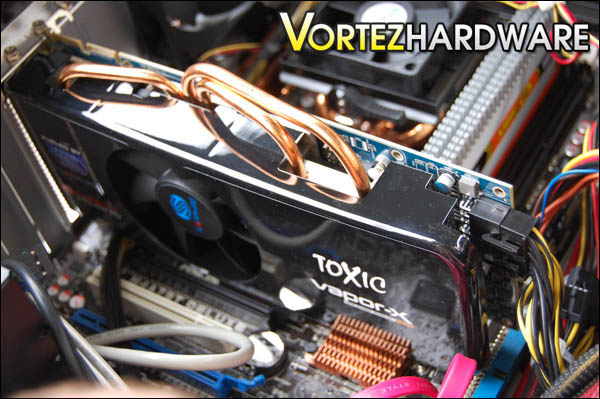
The graphics card inside is the Sapphire HD 4870 1GB TOXIC Vapor-X. This is quite a big card, but there are no problems with space – in fact there are at least 2 inches if space. So no worries there either. Again I’m anticipating some great results from this card as it’s got a lot of hype surrounding it since its release.
Taken from the Sapphire website they have this to say about this graphics card:
“The SAPPHIRE HD 4870 1GB TOXIC Edition features the award winning Vapor-X cooler, SAPPHIRE’s implementation of Vapor Chamber Technology (VCT) first introduced by SAPPHIRE over a year ago on its ATOMIC and TOXIC series of high performance graphics cards. On this new model, the Vapor-X cooling solution is used to efficiently remove heat from the core logic. So the heat from the GPU, memory and other components is carried away by the vapor chamber together with three heatpipes and heatsinks cooled by a thermally controlled fan venting outside the case. This hybrid solution provides more efficient and quieter cooling than competing solutions for this generation of high performance graphics.”
Beside the graphics card is the memory, Novatech have chosen to go for Corsair for this setup. In particular the 4GB of XMS DDR3 @ 1600MHz, I think you will agree that with the components listed this system should cut through games and give us a fantastic PCMARK scores.
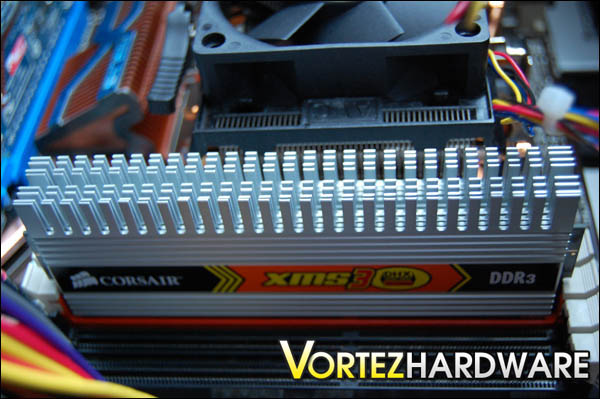
All of this hardware runs with a Microsoft Vista Home Premium 64-Bit edition which is sat on a massive 1TB Hitachi SATA HDD.
Powering all these components is an OCZ 600W StealthXSteam. There’s no doubt in my mind that 600W is more than enough to run the list on the previous page without any problems. But we will have to see the results from the power usage tests to determine this. So without further ado let us begin testing the Brawler Pro.
Testing
The testing stage for this review takes on various forms, since we are trying to ascertain how well the system stands up to pressure in different areas, we are going to need to analysis the Brawler Pro with various tools. These tools are as follows:
Everest ULTIMATE
PCMARK Vantage
Energy Monitor
OCCT
Crysis Warhead
Call of Duty: World at War
As previously mentioned all these tests will be run under Microsoft Vista Home Premium 64-Bit.
Everest ULTIMATE is a computer diagnostics application that gives a full rundown of a system. It gives indepth details along with giving the option of benchmarking certain aspects of a system.
PCMARK Vantage is one of the most popular benchmarking tools on the web, used by enthusiasts, system builders and gamers it calculates through a series of tests how good a system really is by awarding points for FPS scores and read/write tests. PCMARK Vantage, once finished will publish a set of scores, these scores can be compared against a database of other users and therefore we can closely compare different systems.
Energy Monitor is a great bit of kit that does just what it says. It monitors the energy, more importantly the watts that a system will draw. From this we can ascertain how much power the Brawler Pro uses whilst idle and fully operational. Obviously if when loaded it reaches the maximum watts on our PSU then we should be worried.
OCCT is an application that stresses the system forcing various bits of hardware like the processor to operate. This tool will be used in the temperature and power cosumption tests. Fully loading the system will give us a good indication of the maximum draws. OCCT is a reliable tool for this.
Crysis Warhead and Call of Duty: World at War are two First-Person Shooter games that will demand a high spec system in order to play at maximum settings. Complex 3d games test the performance of our CPU, RAM and Graphics Card. Both of these titles are worthy candidates to benchmark whether our system is a true gaming system or not.
And onto the testing…
Everest ULTIMATE Cache & Memory Benchmark
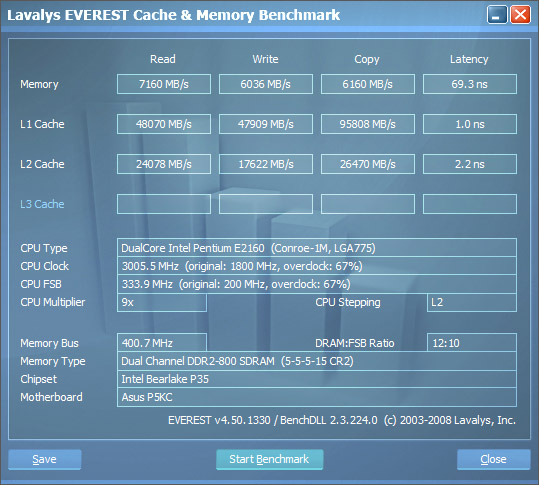
For this test I ran the Cache & Memory Benchmark with no applications open except Everest ULTIMATE. This was performed on one of our Intel Core 2 Duo systems for comparison.Comparison
Intel Core 2 Duo 2160 @ 3GHz
GeIL DDR2 Ultra Low Latency 2GB
Asus P5KC Motherboard
Intel Core 2 Duo
Novatech Brawler Pro
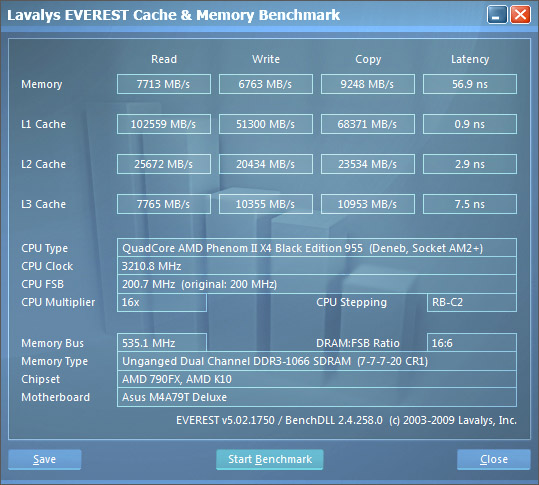
Overall for this test it outperforms the Intel Core 2 Duo system by a fair few ms. This will be noticable during processing periods.
PCMARK Vantage 64-Bit
This test is the one that most look to for a good estimation of how good a computer system is. The results are displayed by points and these points are then compared against a database of other user’s systems.
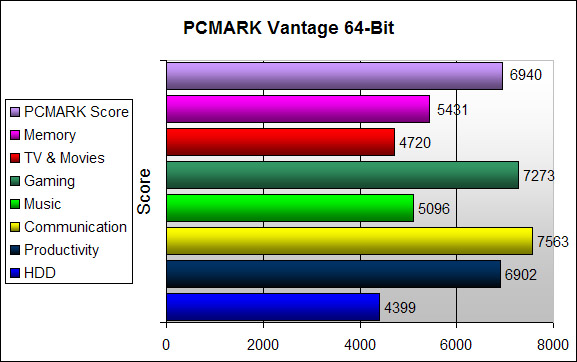
Some great looking scores, especially in the gaming area. This will be something we will be focusing on over the page.
Game Performance
For the next test we will be testing the Brawler Pro in its natural surroundings. I’ve selected two popular titles to put the system through its paces.
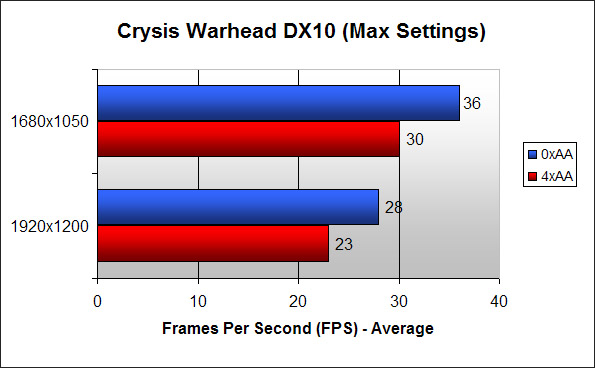
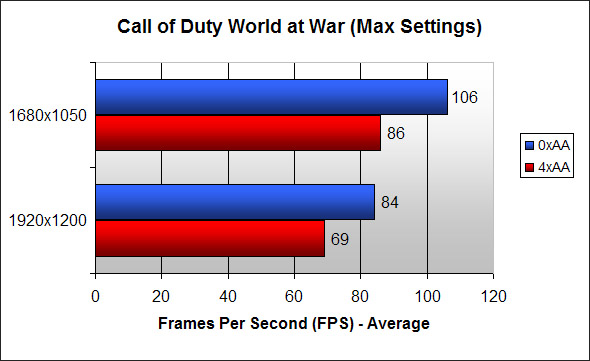
In both our games the Brawler Pro shines. Crysis is a very demanding game, and whilst the FPS reported weren’t very high they are great for Crysis. With 0xAA in both resolutions tested, the game had comfortable gameplay performance.
The Brawler Pro tore through Call of Duty. I was very impressed with the results here, performance-wise the gameplay was very smooth not a stutter at all. More than comfortable FPS at both resolutions and even with 4xAA on.
Temperatures and Power Consumption
This is an area that most are concerned about. Especially in these summer months as the temperatures rise and our system temperatures increase, we want our systems to be cool. A cooler system reduces the risk of problematic freezes and shutdowns, and we can also squeeze a bit more performance out of our machine by overclocking if its cooler.
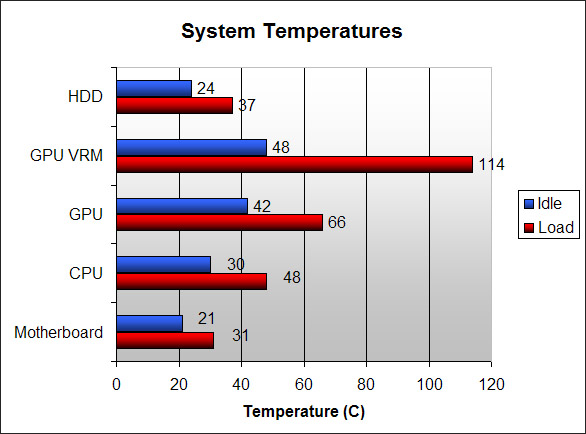
From the above results we have nothing to worry about with regards to the overall system temperatures. The temperatures to start with are very low when the system is idling, and when we fully load the various components there is a small increase difference. The GPU core was cool compared to other GPU’s that we’ve tested, so the Vapor-X really does do a good job as it intends to. The only real concern is the temperatures on the GPU VRM’s it does seem quite high.
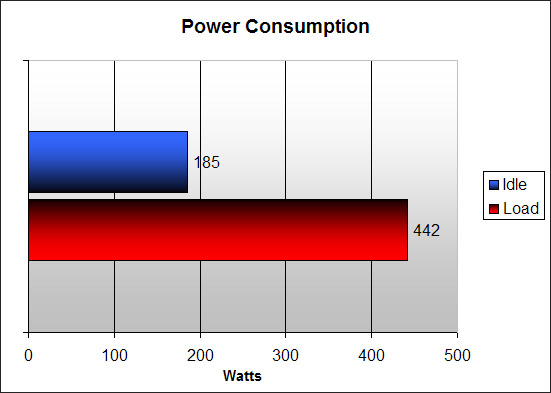
On the power usage side of things, our Brawler Pro barely uses any power when its idling. Just under 200W and again whilst under full load its still under that 450W mark, clearly plenty of head room for a moderate overclock. This proves great for future expansion, even if you do run out of 1TB!!
Conclusion
If you are someone who doesn\\\’t have the time, patience or perhaps even expertise to build a system then the Novatech Brawler Pro is an ideal candidate to take you to gaming paradise. Novatech have done well to select some great components that gell very well together for under £900, offering some fantastic gaming performance that is reliable and consistent. In all the tests this system was put through it had no hiccups and sailed on through.The only negative comments I would have to mention regarding this system is the ability to control the fans. The 120mm Hiper fans installed in the case aren\\\’t amongst the quietest of case fans out there and with the absence of any fan controller this might cause some frustration for those who thrive on a near silent setup. The Hitachi HDD did seem to contribute to this noise also.
Those small niggly points aside this system is very impressive, its enclosure is solid and has great build quality as I\\\’ve already mentioned the components inside are reliable and efficient. I really like the fact that you can remove the side panels without any screwdriver being needed, you can take the panels off in less than a minute. Similarly the bootup sequence took just 50 seconds to fully load into Vista and a hasty 14 seconds to shutdown.
Overall I\\\’m very impressed with this system and I award it the Vortez Silver Award.
We would like to thank Novatech for providing us with the Brawler Pro. To discuss this review please visit our forum
