







Featuring the new power efficient Maxwell core, we test NVIDIA’s new architecture in the form of the entry level GeForce GTX 750Ti.

Product on Review: GeForce GTX 750 Ti 2GB GDDR5
Manufacturer and Sponsor: NVIDIA
Price: £114.99
It was early 2012 that we saw the introduction of Kepler architecture so 2 years on it should come as no surprise that NVIDIA are about to unleash the latest range of GeForce graphics cards to feature the new architecture codenamed ‘Maxwell’. While there is still progress being made with Kepler, most recently with the fantastic GTX 780 Ti, demand for next generation technology is high. Maxwell looks build upon the success of the 2 year old architecture, particularly with regard to power consumption.
We had massive leaps in performance with Kepler and while it wasn’t exactly an inefficient core, there were clearly improvements to be had so this time around NVIDIA are looking to make a more efficient architecture with Maxwell, at least until the second generation Maxwell cards appear which will no doubt raise the performance threshold once more. The first example of the new Maxwell Core GM107 comes in the guise of the GeForce GTX 750 Ti. The GM107 is designed for power limited environments such as SFF PCs and notebooks. Efficiency however is clearly coupled with power because NVIDIA claim the GTX 750 Ti will frequently match the GTX 480. Not a bad show if those claims are found to be true!
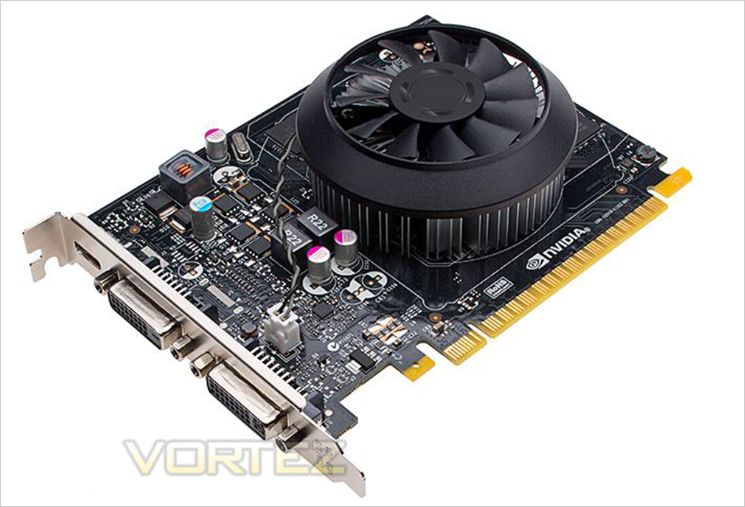
NVIDIA’s experience of developing Kepler for use not only in Super Computers but for mobile processing has meant that they learned a great deal regarding the necessity of reducing power consumption while increasing performance – in short how to make a sliver of silicon more efficient. It is this power efficiency that has helped NVIDIA create a card powerful enough to play today’s modern games yet compact in both size and power requirements to be used in a SFF PC. Today we get to sample that graphics card – the NVIDIA GeForce GTX 750 Ti.
About NVIDIA
For two decades, NVIDIA has pioneered visual computing, the art and science of computer graphics.
With our invention of the GPU — the engine of modern visual computing — the field has expanded to encompass PC games, movie production, product design, medical diagnosis and scientific research.
Today, visual computing is becoming increasingly central to how people interact with technology.
For two decades, NVIDIA has pioneered visual computing, the art and science of computer graphics.
With our invention of the GPU — the engine of modern visual computing — the field has expanded to encompass PC games, movie production, product design, medical diagnosis and scientific research.
Today, visual computing is becoming increasingly central to how people interact with technology.
Specification
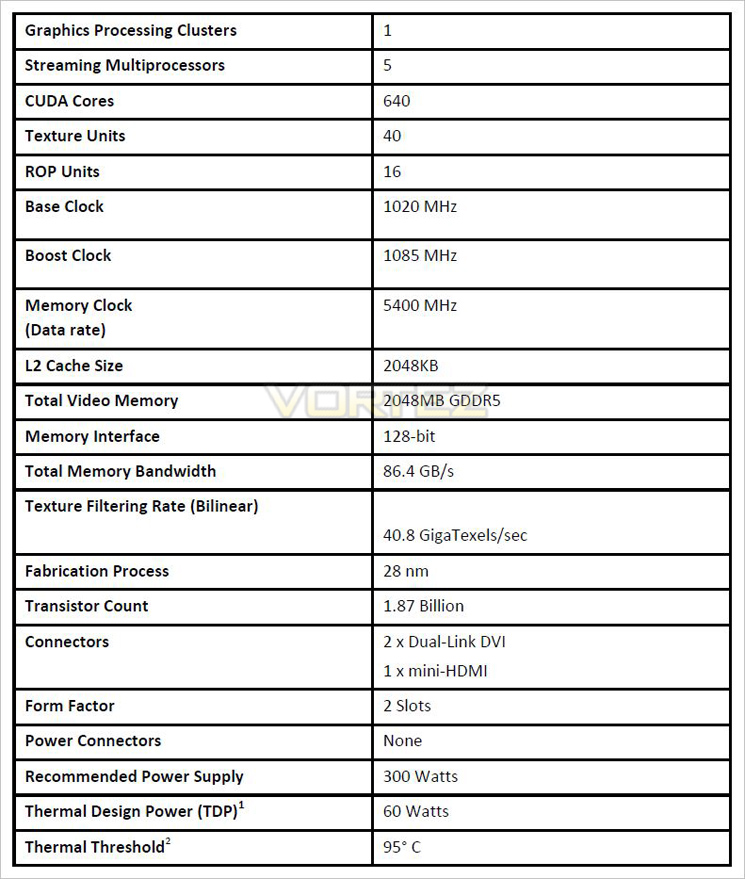
Maxwell Archetecture
Maxwell is the next step along the NVIDIA roadmap after Kepler. The focus with Maxwell is to improve performance per watt, in short improve GPU efficiency. To do this NVIDIA have created a new Streaming Multiprocessor (SM) that improves performance per watt. There are a variety of efficiencies that the new SM performs, including but not limited to logic partitioning, workload balancing, clock-gating granularity, compiler-based scheduling and increasing the number of instructions issued per clock cycle. These efficiencies have allowed NVIDIA to increase the number of SMs to 5 in the new GM107 core. This compares favourably to the two found within the GK107 core. Despite more than doubling the number of SMs, the die size only sees a 25% increase!
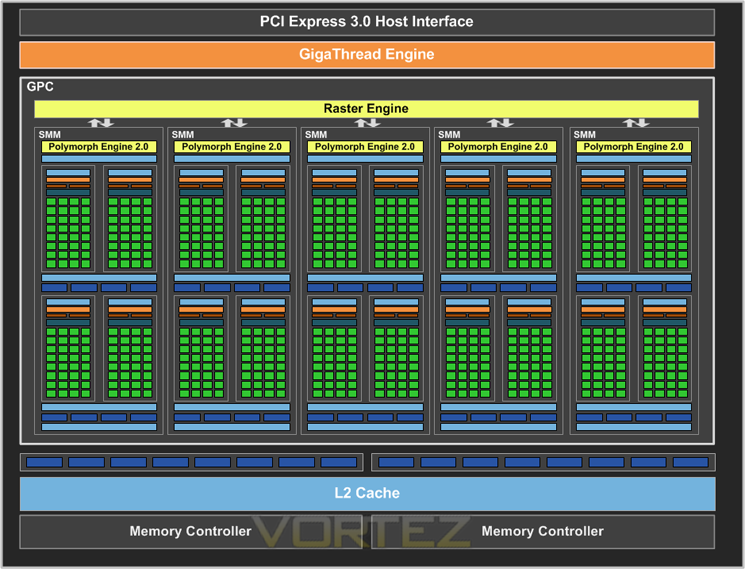
Above we can see a block diagram of the GM107 (GTX 750 Ti).
Each of the five SM includes a Polymorph engine and Texture units with the GPC having utilising the raster engine. The huge L2 cache and memory controllers are aligned to the ROPs with all of the above units redesigned and optimised to afford greater power efficiency.
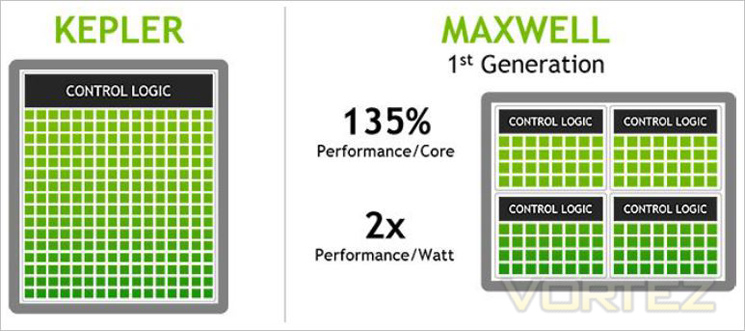
A massive boost in L2 cache from 256KB found in GK107 to 2048KB on GM107 which means that fewer requests to the GPU DRAM are required, once again improving efficiency thus lowering the cards overall power draw. With a few more tweaks at transistor level, the end result means that Maxwell is capable of delivering twice the performance per watt of Kepler but still uses the same 28nm manufacturing process.
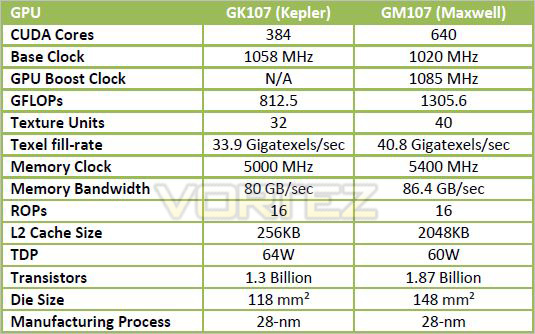
Above we can see a comparison between equivalent GM107 and GK107 architectures. Clearly GM107 appears to be more powerful, on paper at least with NVIDIA claiming an average increase of 1.7 X performance. Perhaps the greatest story here though is that this performance gain, with the GM107 based GTX 750 Ti, has a miniscule TDP of just 60W!
While it remains to be seen just how powerful the new Maxwell architecture is, if NVIDIA’s claims regarding the power efficiencies are to be believed they may well have a winner on their hands.
GeForce Experience
GeForce Experience is a new application from NVIDIA that optimizes your PC in two key ways. First, it maximizes your game performance and game compatibility by automatically downloading the latest GeForce Game Ready drivers. Second, GeForce Experience intelligently optimizes graphics settings for all your favorite games based on your hardware configuration.
Some enthusiasts will view (excuse the pun) altering settings to get the very best from a game one of the ‘fun’ elements of owning a powerful graphics card. Others just want to play their game of choice without the endless testing and benchmarking to determine what settings work best. Many don’t have the inclination or indeed the time to learn what effect each setting has upon the games visual elements.It soon becomes a bind when upon a new driver release those settings which were great before can be bettered (or lowered) for a better gaming experience. FXAA, TSAA, MMAA or simply AA. Low, medium, high, ultra texture settings along with overall visual settings can be all too confusing when configuring a games visuals and while it would be easy to just crank everything up to maximum and hoping for the best, this all too often results in choppy, unplayable gaming ruining the gaming experience.
NVIDIA’s GeForce Experience removes much of the guess work when configuring a game thereby giving users the means to jump straight into the game with the best optimised settings for there hardware.
This handy utility will also keep your GPU updated with the latest driver that can be set to automatically download, ready to be installed as soon as they are available and also it gives you access to the beta drivers.
How does it work?
GeForce experience requires an internet connection which, once connected to the NVIDIA Cloud datacenter will download optimal game settings that are tailored to your PC based upon CPU, GPU and monitor resolution.
Low end hardware will have the visuals reduced to improve framerates while high end hardware will inevitably have higher settings assigned. This is all done with a click of a button which ensures that the game not only looks great but perhaps more importantly, plays smoothly.
Testing of the settings are done by NVIDIA themselves who benchmark the game, set a framerate target to ensure smooth gameplay then adjust the settings to ensure both framerate and smooth gameplay are optimised.
In our own tests, the utility worked well and is great for those who want to jump straight into the game with the minimal of fuss and furore of adjusting GPU settings.
Our one complaint is that the supported games list requires expanding. While most of the popular games are supported, many, especially some older but very popular titles are not.
First Look
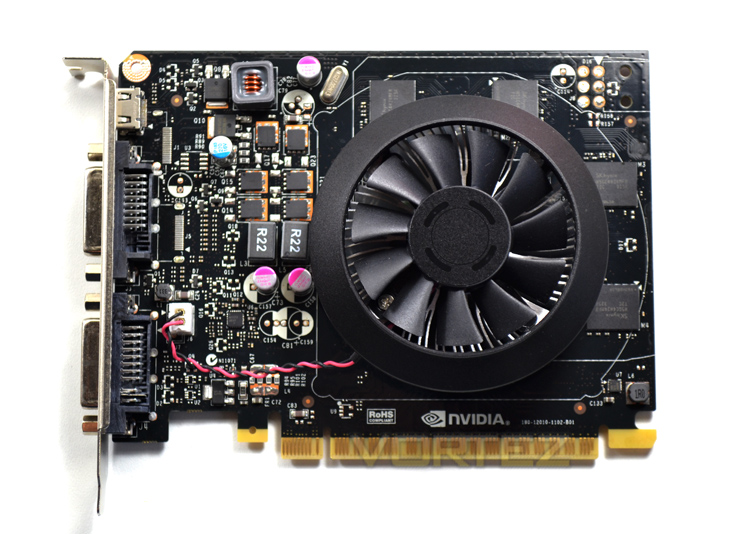
The GTX750 Ti at first glance appears to be a no-nonsense basic card. It is worth bearing in mind that all the glitter and razzmatazz from the manufacturing samples can be found below. All we get with the sample on offer direct from NVIDIA is a basic cooling design atop of a minuscule black PCB.
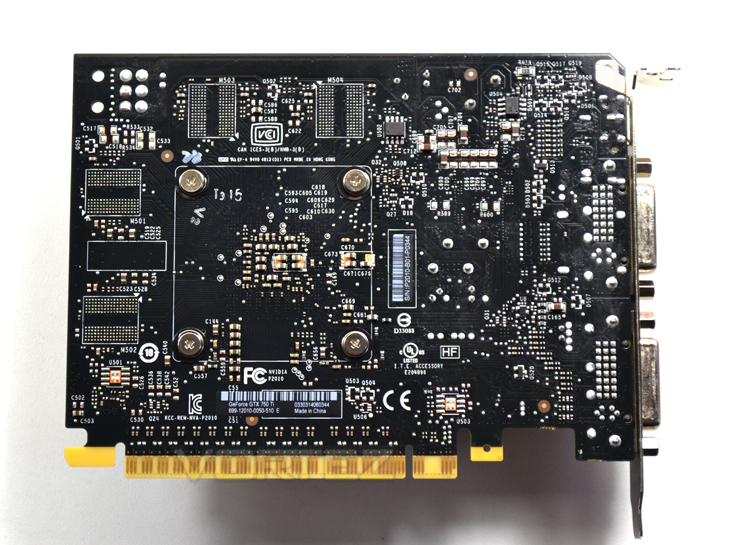
The card itself measures just 150mm in length, 6 inches in old money. It is therefore ideally placed to be used in a small form factor. While our sample features a dual slot sized cooler, we wouldn’t be surprised if a manufacturer opted to release a single slot design.
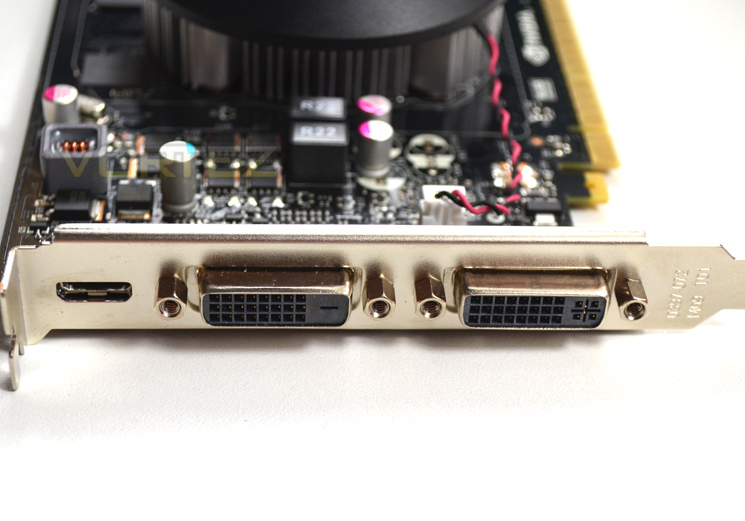
Input/Output features both DVI-D and DVI- along with a HDMI port. Sadly there was no DisplayPort option on our sample.
Below are the expected examples from popular manufacturers (click to enlarge):
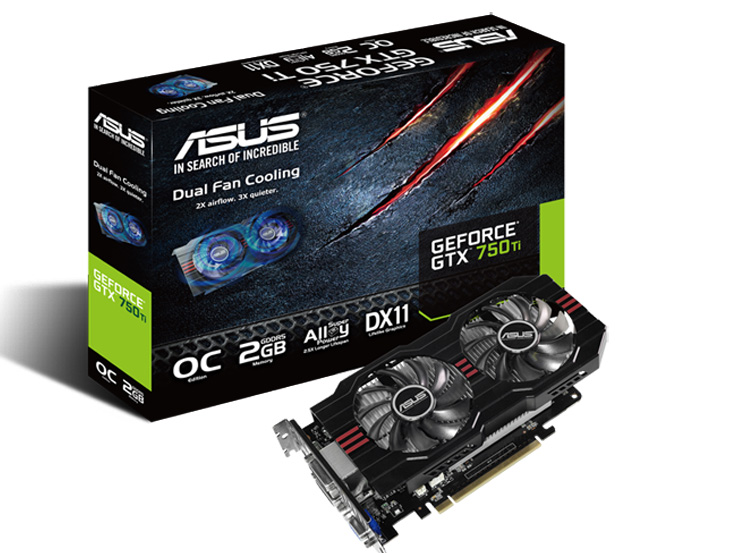
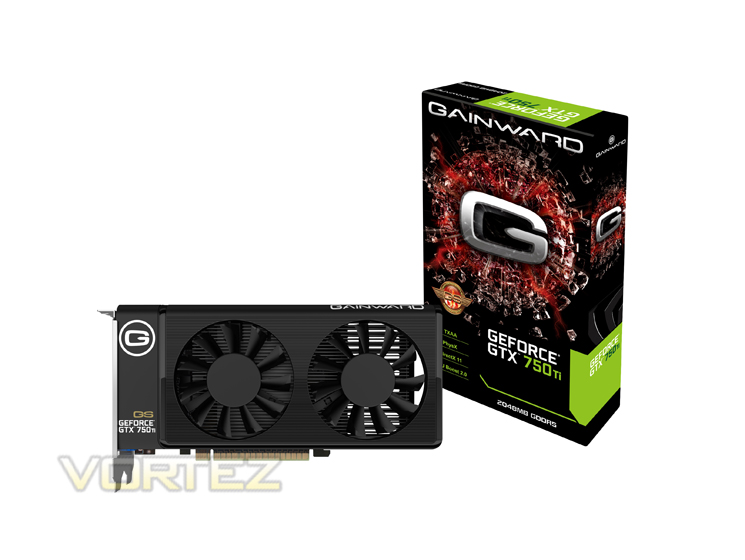
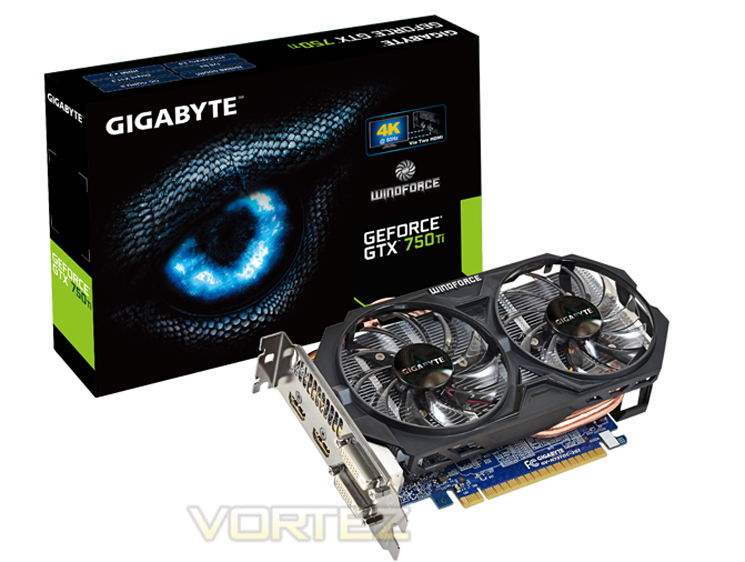
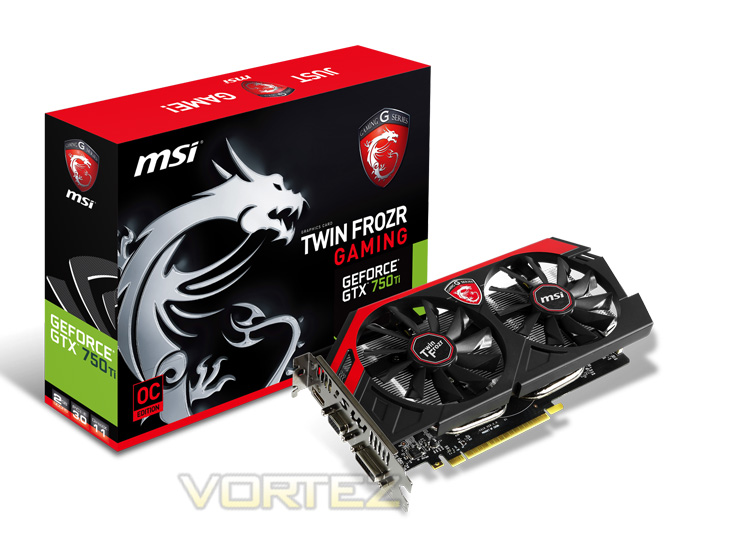
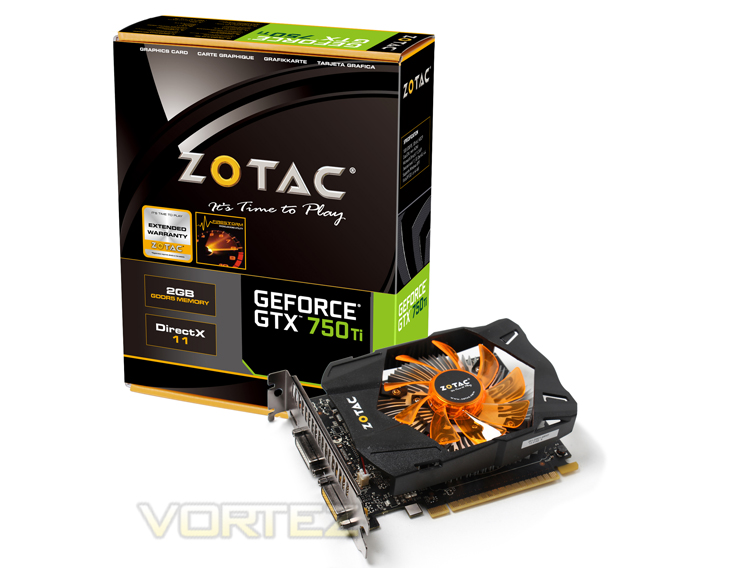
Closer Look
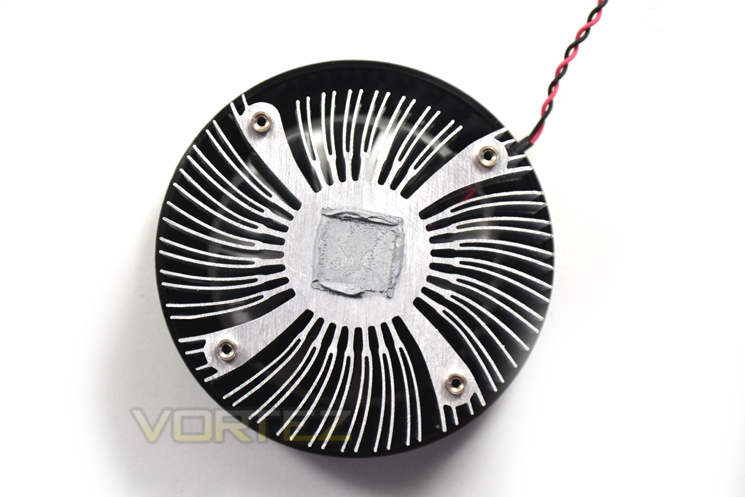
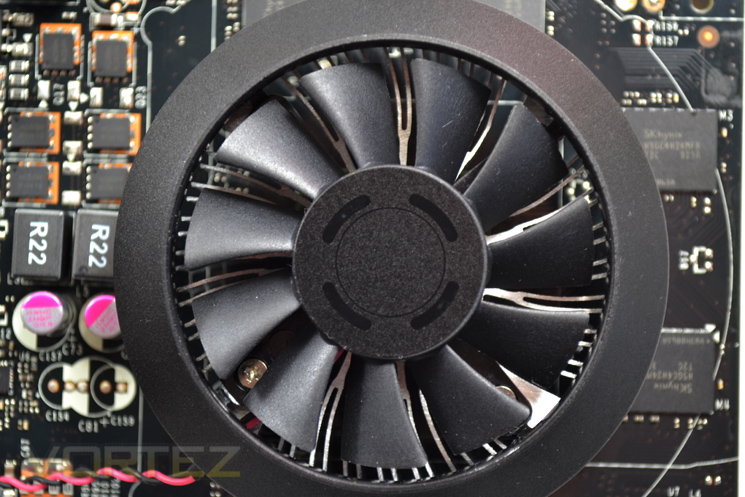
The cooler is of a very basic design but as we will see, goes about its just with the minimal of fuss and noise. Please see the previous page for examples of retail cooling designs.
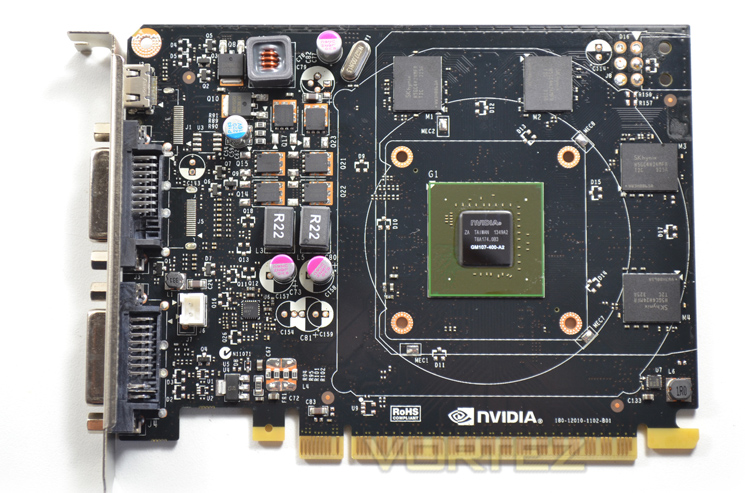
With the cooler removed we can see that NVIDIA have used 4x512MB memory chips which frame the main core. You will note that there are no external power connectors required to power this card with the whole of the cards power being drawn from the PCIe slot.
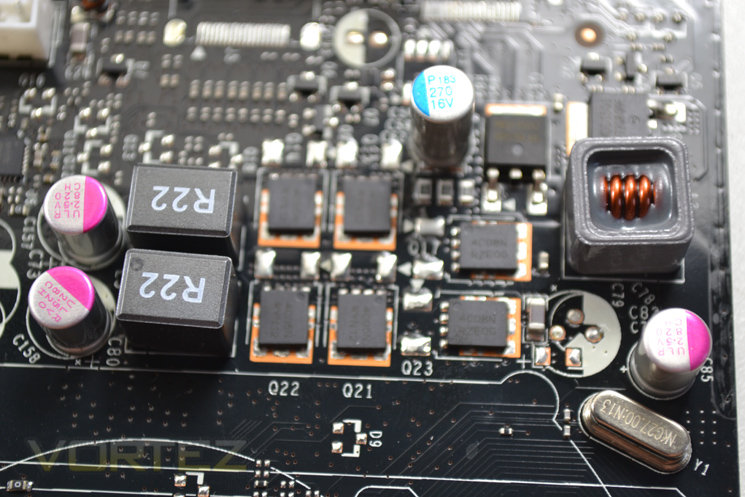
Speaking of power, the VRM is a very small 2 phase design, such is the minuscule power requirement of the GPU. Again, we expect to see variations in this area with the overclocked, super clocked, Ultra versions no doubt in production by the popular GPU manufacturers.
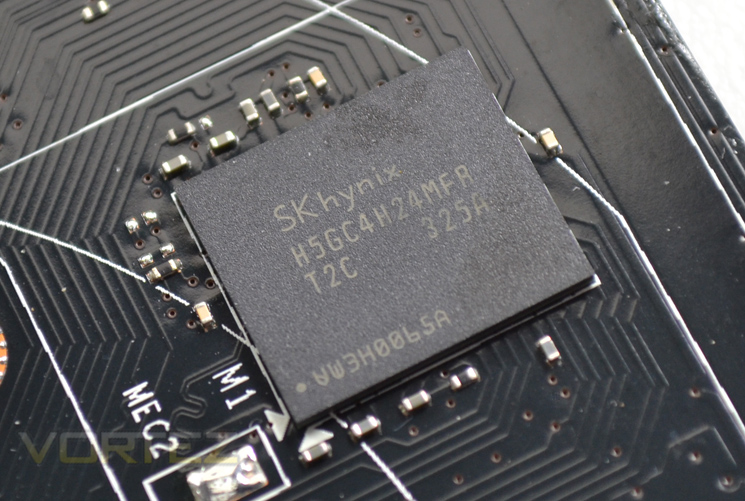
Memory comes courtesy of Hynix and carries the same product code of H5GC4H24MFR T2C which is usually found in 4GB bundles. Regardless, the memory is rated to 6.0 Gbps at 1.5v so should overclock well.
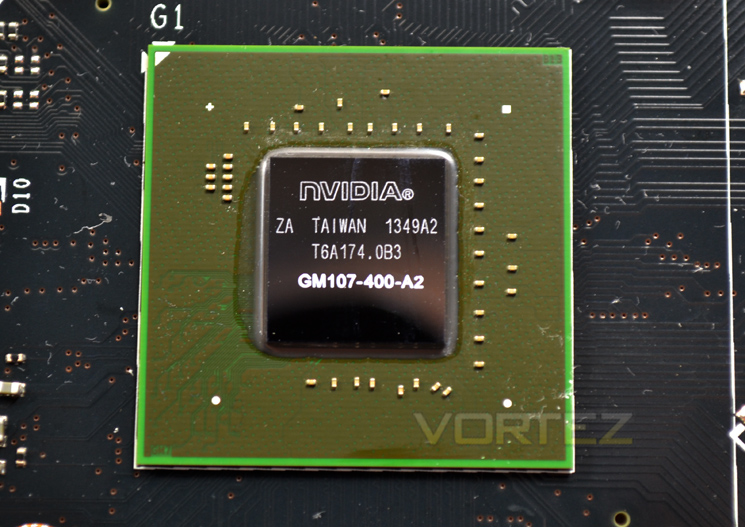
Finally we reach the core of the card, the fabled GM107 ‘Maxwell’. While this is the first Maxwell based GPU we have covered we expect it to put on a good show and hopefully give us an indication of future performance.
Test Setup & Methodology
How we test graphics cards
Testing a graphics card is an extremely lengthy process. We sometimes see reviews where a graphic card has been tested using out of date equipment, out of date games and out of date drivers. While the latter can be excused due to the sheer amount of driver updates making a thorough review impossible we will however notify the reader when we have used a different driver to the normal for example a pre-release driver. For the most part however we will always use the same hardware and where possible the same drivers unless a newer driver rectifies an issue we have encountered or significantly improves performance to such an extent that continuing with an outdated driver is not feasible.
Frame Time Analysis
We have also seen the emergence of frame time analysis. We covered this in a separate article here: GPU Reviews: Why Frame Time Analysis is important so we won’t go into the reasoning again but to summarise, our testing comprises both FPS testing and perhaps arguably more importantly, frame time analysis. We also look at overall performance by equating averages across the games and finally before concluding our review we take a look at value for money.
HardwareWith the latest Intel chipset release we decided to update our ageing X58 setup to the new X79 chipset. Not only that but we will be using the flagship Core i7-3960X Extreme Edition processor clocked to 4.5GHz to ensure we have no CPU bottlenecks. With 16GB of ram on board there should be minimal paging so the benchmarks we run today will hopefully give a true reflection of the graphics card’s performance.
Mid-Range Graphics cards on test:
NVIDIA GTX 750 Ti 2GB GDDR5
(Forceware 334.69)HIS R9 270X ICEQ X2 TURBO2GB GDDR5(AMD CAT 13.11 beta 9.2)
GIGABYTE Windforce OC R9 270X 2GB GDDR5(AMD CAT 13.11 beta 9.2)
AMD R9 270X 2GB GDDR5(AMD CAT 13.11 beta 5)
NVIDIA GTX760 2GB GDDR5(Forceware 320.39)
SAPPHIRE HD7950 3GB GDDR5(AMD CAT 13.3 beta)
HIS HD7850 IceQ X 1GB GDDR5(AMD CAT 13.3 beta)
HIS HD7790 IceQ Turbo 1GB GDDR5 (AMD CAT 13.3 beta)
MSI GeForce GTX 650Ti BOOST OC 2GB GDDR5 (Forceware 314.22)
Motherboard: ASUS P9X79 Pro
CPU: Intel Core i7-3960X Extreme Edition @ 4.5GHz
RAM – 16GB (4x4GB) Corsair Vengeance (Red) DDR3 @ 1866MHz 9-10-9-27
Power Supply – Thortech Thunderbolt Plus 1200W
Hard Drive – Kingston HyperX 240GB
Cooler – Corsair H100
CPU: Intel Core i7-3960X Extreme Edition @ 4.5GHz
RAM – 16GB (4x4GB) Corsair Vengeance (Red) DDR3 @ 1866MHz 9-10-9-27
Power Supply – Thortech Thunderbolt Plus 1200W
Hard Drive – Kingston HyperX 240GB
Cooler – Corsair H100
Benchmarks
If you are a regular reader of our reviews you will know we like to test the latest hardware with the latest games and benchmarks on the market. Here are the games we have chosen:
Battlefield 3
Crysis 3
Far Cry 3
BioShock Infinite
DiRT: Showdown
The Elder Scrolls: Skyrim
Crysis 3
Far Cry 3
BioShock Infinite
DiRT: Showdown
The Elder Scrolls: Skyrim
We also take into consideration the benchmarkers out there so have included 3 of the more popular synthetic benchmarks available:
Unigine: Valley
Unigine: Heaven 4
Futuremark 3DMark Firestrike
Unigine: Heaven 4
Futuremark 3DMark Firestrike
Let’s see how today’s graphics card performed…
Temperature, Acoustics and Power Consumption
Power Consumption
To test for power consumption we use the included iPower Meter found with our Thortech PSU. As system load figures obviously differ from idle it is extremely difficult to get an accurate figure of system draw and then simply take this figure away from the overall amount because each game will generate varying levels of CPU and hard drive activity. Dynamic power adjustments which fluctuate in game will also affect accurate power figures thus rendering any such power consumption calculations redundant at worst and approximate at best.
We will therefore take our system readings averaged over a benchmark run of Tessmark (100% load) and after 20 minutes of being idle in Windows 7. These can then be used as a comparison to other graphics cards to determine how much more or less power you can expect a GPU to consume.
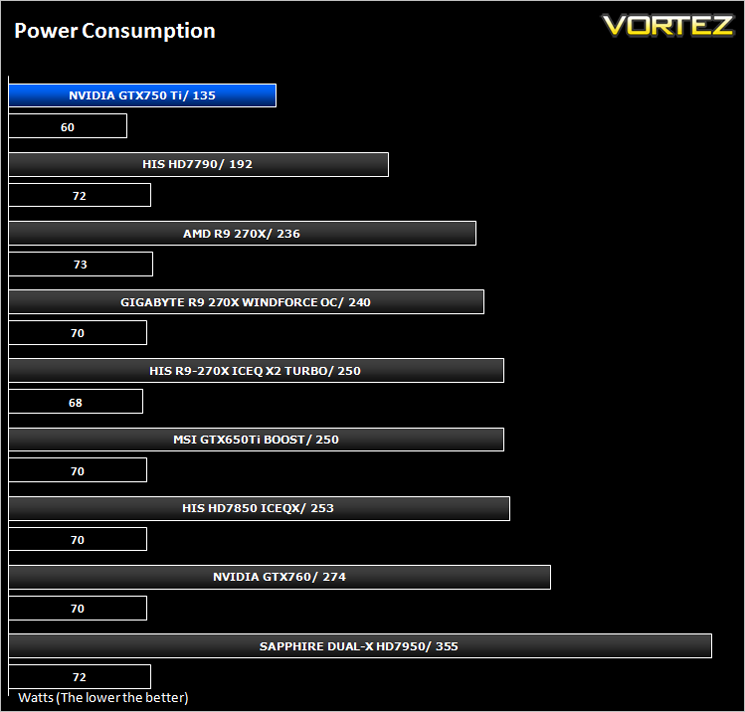
The card certainly lived up to the hype as it consumed the least amount of power at both idle and load against the other test subjects.
Temperature
To test temperatures we measured idle temperatures after booting windows, letting all applications finish loading and ran a few benchmarks. Once the benchmarks were complete we left the card to reach a cooling plateau where we then took the idle temperatures. For the load tests, we would normally run Furmark for 20 minutes, taking the absolute maximum temperature attained however we found that this throttled the card and resulted in spurious results. So we set Heaven running continuously for 20 minutes and used this as a temperature result as the card did not throttle with this application.
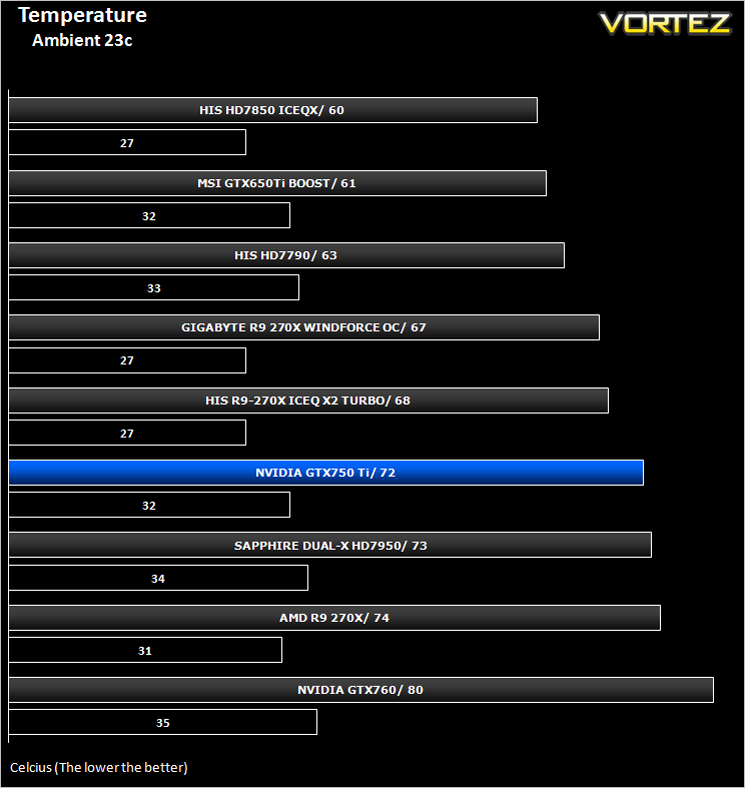
Temperatures were nothing to write home about although with better cooling solutions we would expect temperatures to be among the best in this line up.
Acoustics
Again, because this is not a retail example, the cooling design is pretty much irrelevant however it is worth noting that should a manufacturer copy the design you will have no worries with regards to noise levels as despite the small footprint, the cooler is very quiet under both idle and load conditions.
Gaming Experience (Frame Time Analysis)
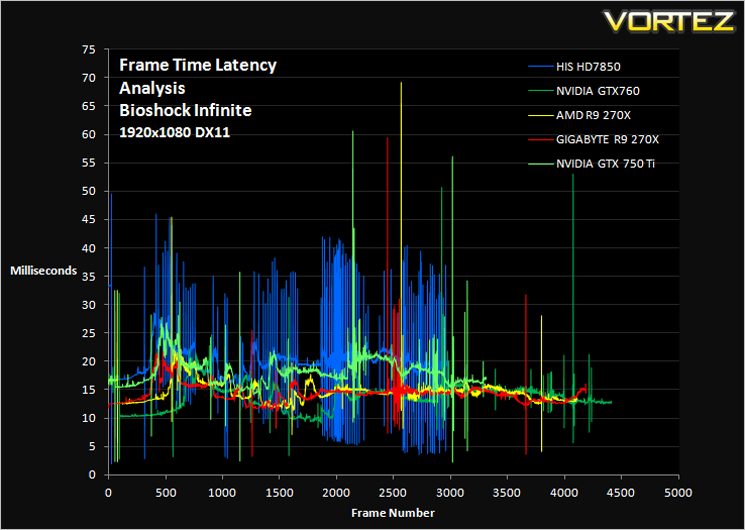
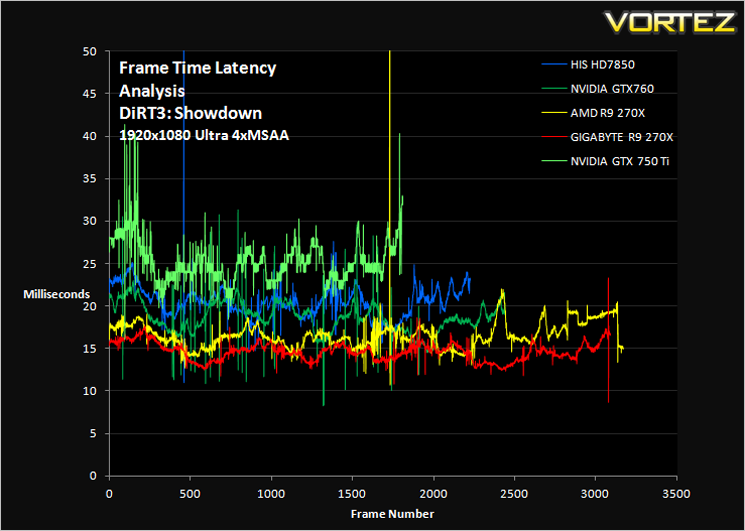
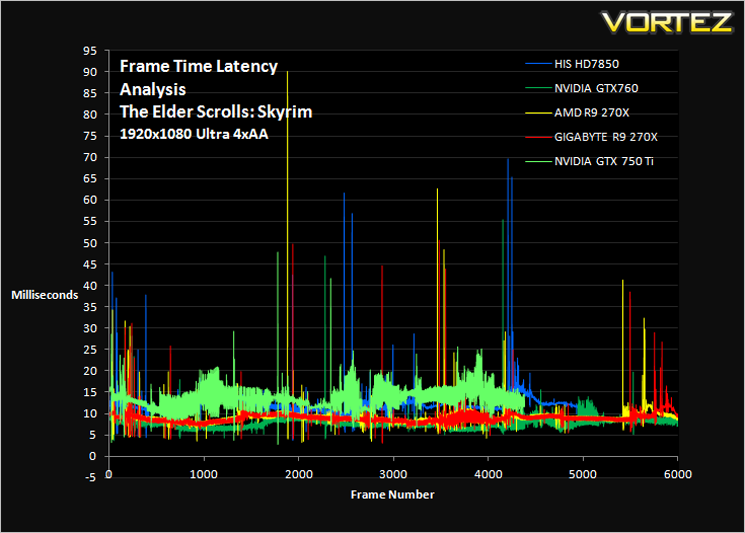
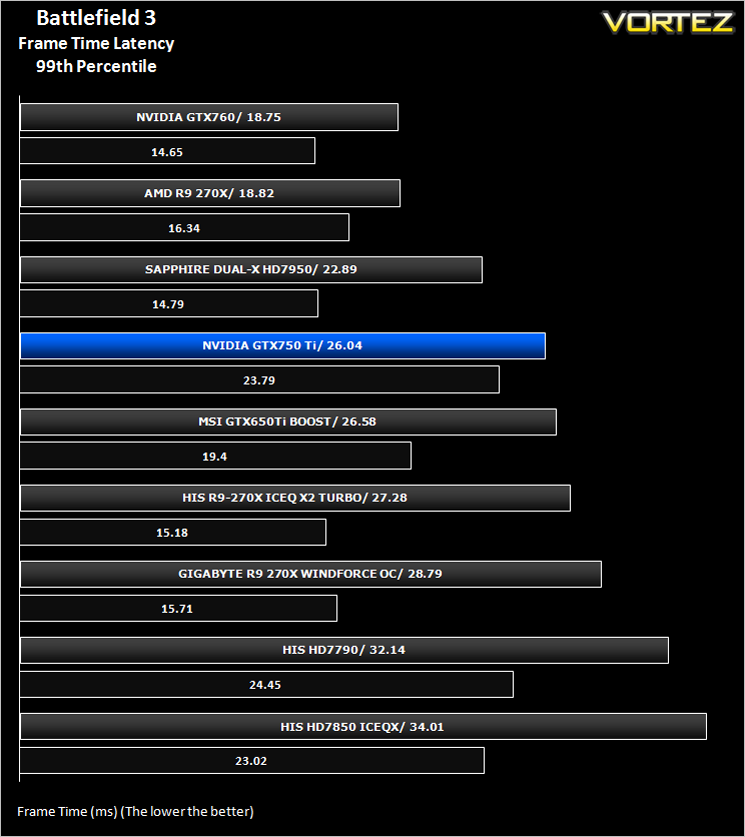
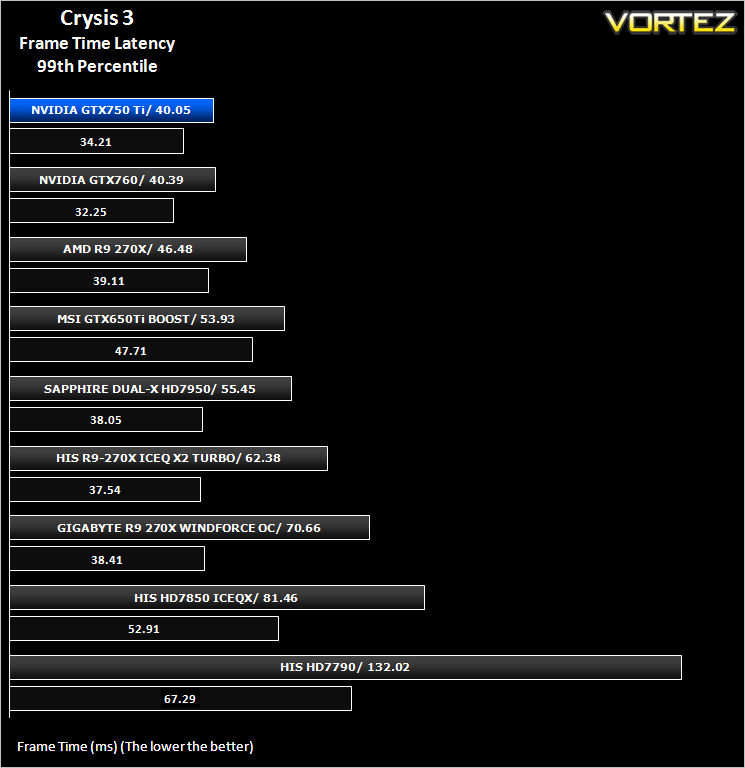
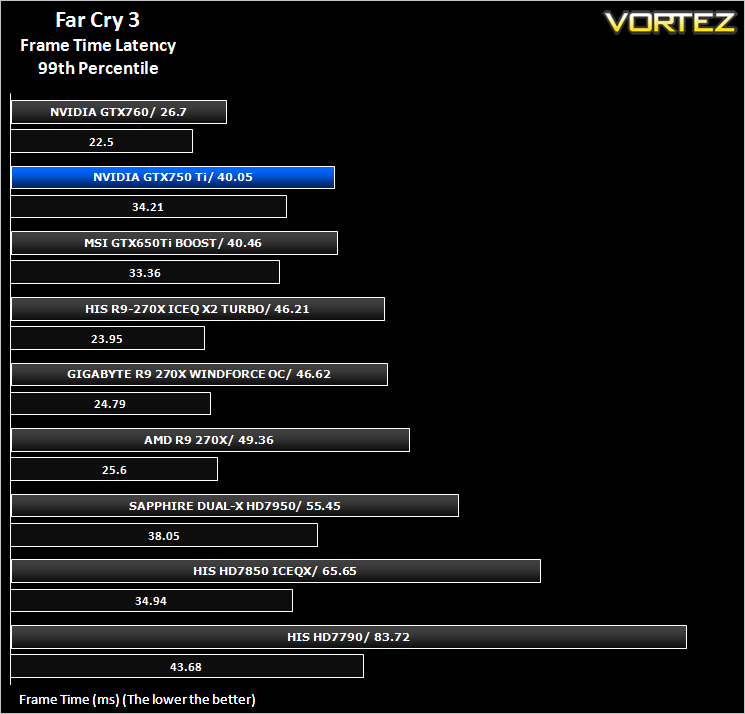
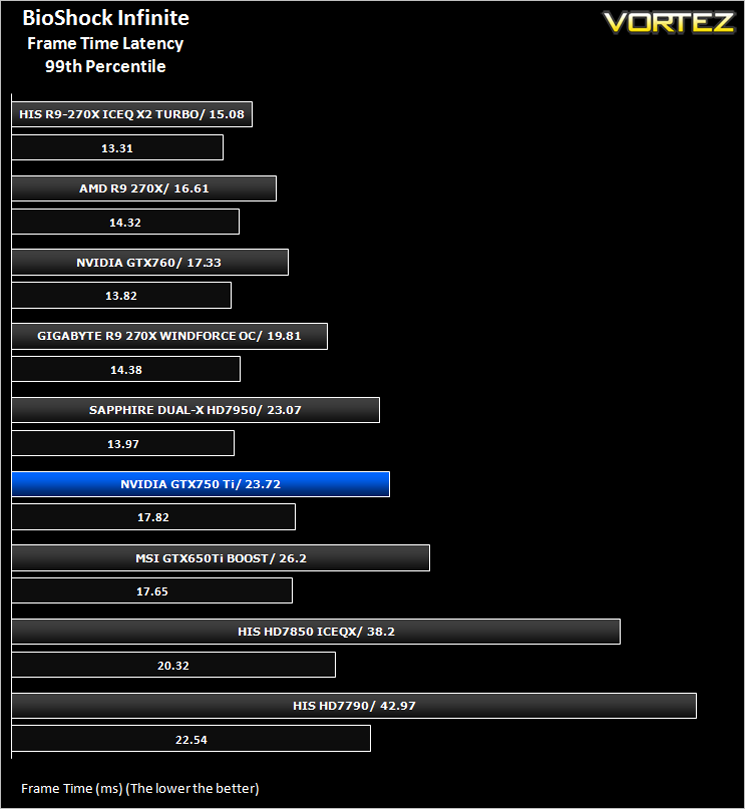
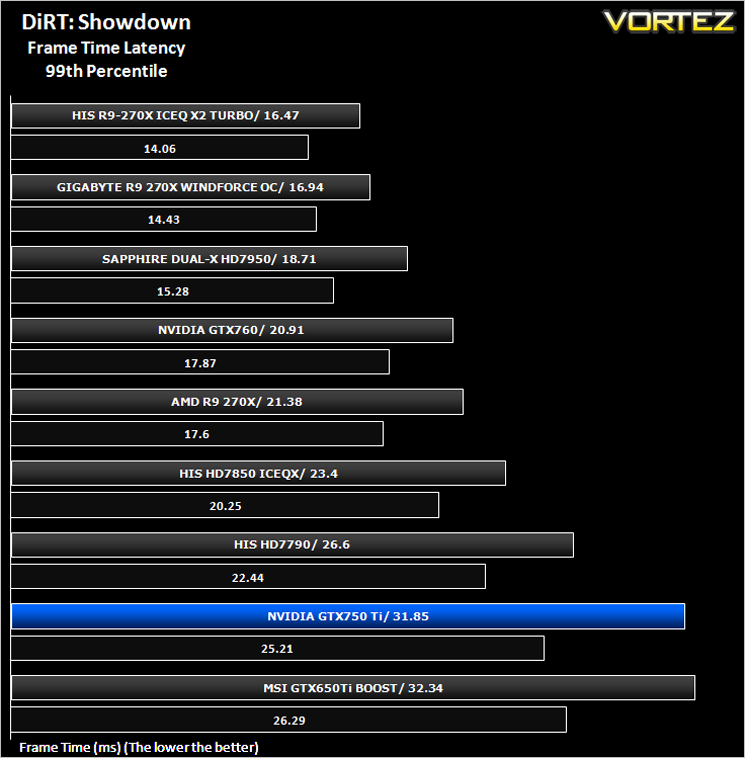
Gaming experience is what we like to refer to as the Laymans term for Frame Time analysis. Frame time analysis is in its most basic sense how smooth your gameplay will be. Ever had a powerful card rendering at 100FPS with ease for it to stall for a split second before resuming? This is what Frame Time Analysis shows us: The peaks during an otherwise smooth gaming experience. This is presented to you in two ways, by showing you a line graph of a 60 second FTA capture using FRAPS and then by deducing the average and 99th percentile response times.
Some claim this should be the way graphics cards are tested and we won’t argue here because there is little point in having a card which churns out an average 100FPS if it has micro stutters lasting 50ms (GPU response time) which spoils the fluidity of the game.
Some claim this should be the way graphics cards are tested and we won’t argue here because there is little point in having a card which churns out an average 100FPS if it has micro stutters lasting 50ms (GPU response time) which spoils the fluidity of the game.
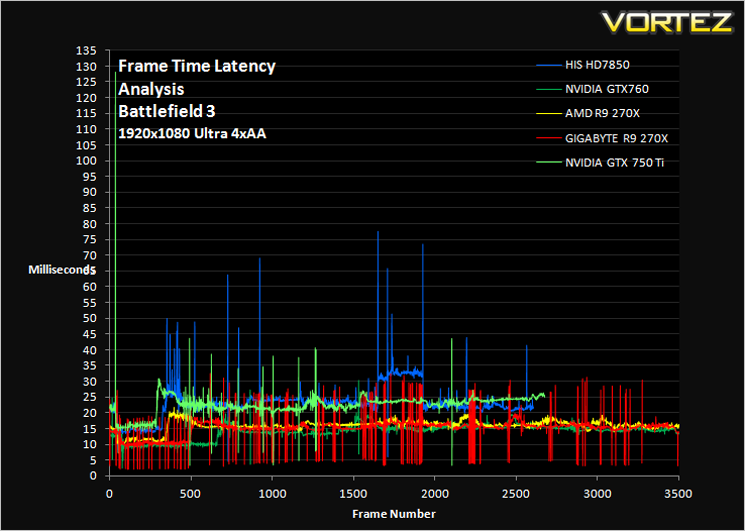
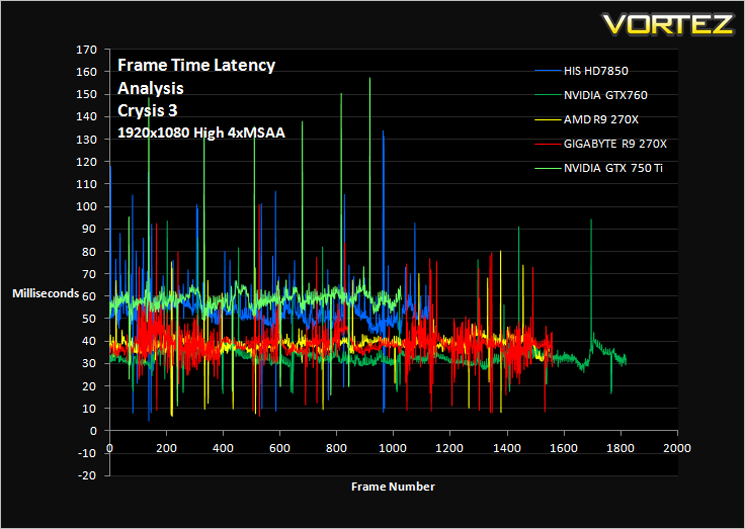
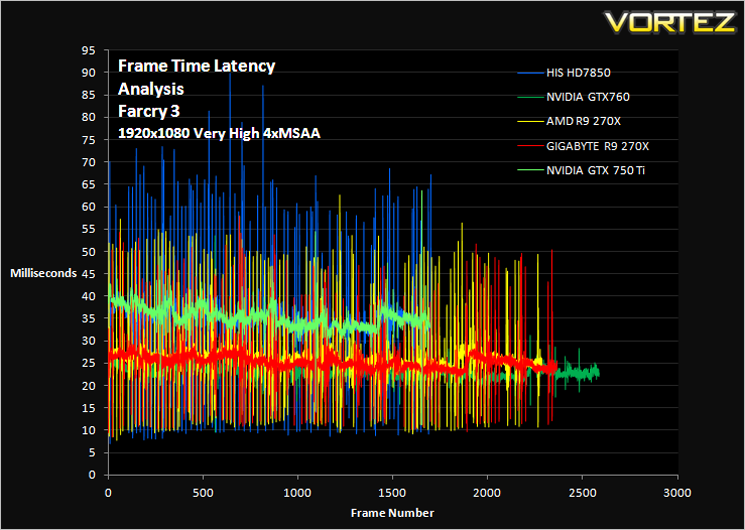
Comment
The graphs above may appear very daunting however, what you want to see is a smooth line (not fuzzy) with very few peaks and troughs. While you are unlikely to notice peaks and troughs below 30ms, any peak above 30ms may be seen as a stutter during gameplay. This will however depend greatly on your own perceptions.
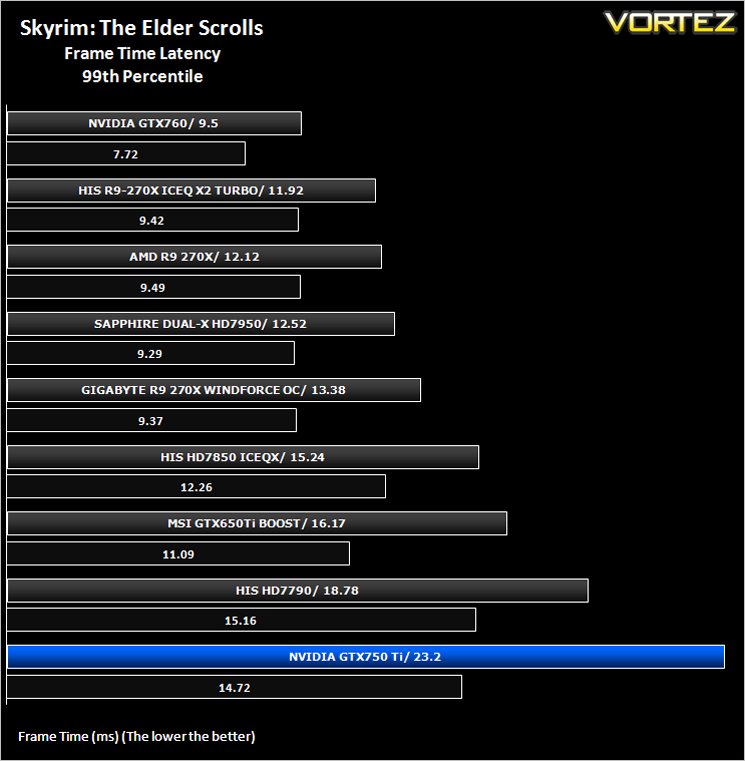
Average and 99th Percentile response times (Frame Time Analysis)
Here we take a look at both average (black) and 99th Percentile (coloured) response times of the graphics cards. It is highly unlikely a user will notice any micro stutter (also incorrectly referred to as lag but the effect can be interpreted to be similar) at anything below 30ms but every gamers perception differs.
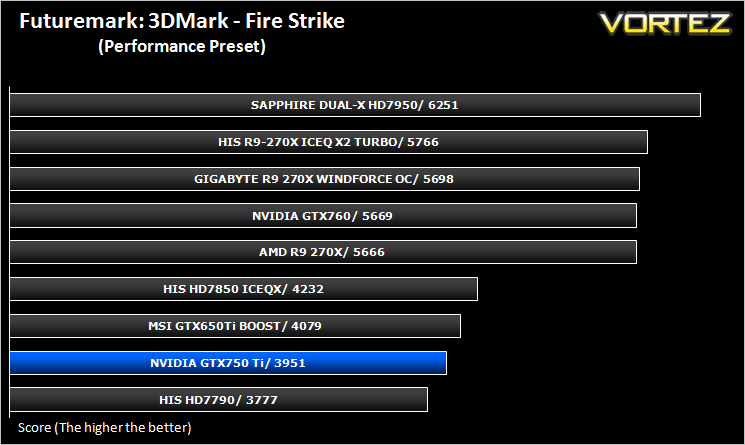
Futuremark 3DMark Fire Strike (Synthetic)
Fire Strike is the new showcase DirectX 11 benchmark designed for high-performance gaming PCs. It is Futuremark’s most ambitious and technical benchmark ever, featuring real-time graphics rendered with detail and complexity far beyond what is found in other benchmarks and games today.
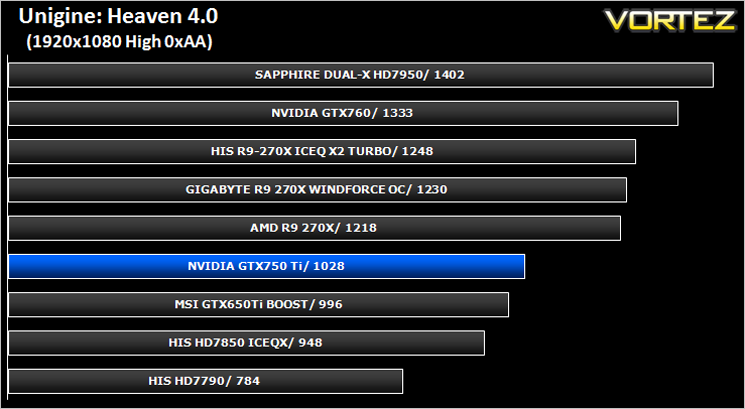
Unigine: Heaven 4 (Synthetic)
Heaven Benchmark with its current version 4.0 is a GPU-intensive benchmark that hammers graphics cards to the limits. This powerful tool can be effectively used to determine the stability of a GPU under extremely stressful conditions, as well as check the cooling system’s potential under maximum heat output. It provides completely unbiased results and generates true in-game rendering workloads across all platforms.
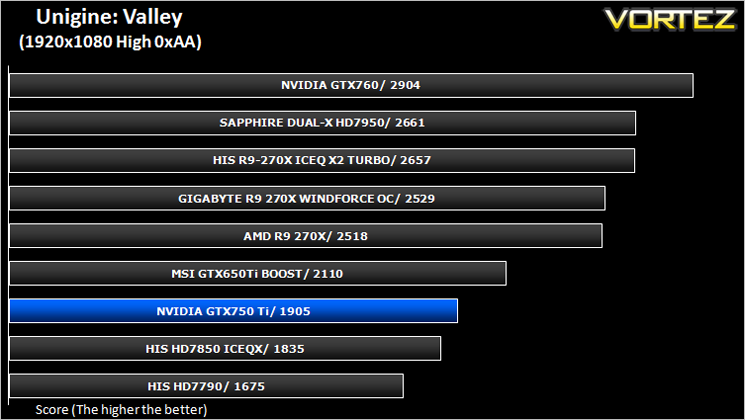
Unigine: Valley (Synthetic)
Valley Benchmark is a new GPU stress-testing tool from the developers of the very popular and highly acclaimed Heaven Benchmark. The forest-covered valley surrounded by vast mountains amazes with its scale from a bird’s-eye view and is extremely detailed down to every leaf and flower petal. This non-synthetic benchmark powered by the state-of-the art UNIGINE Engine showcases a comprehensive set of cutting-edge graphics technologies with a dynamic environment and fully interactive modes available to the end user.
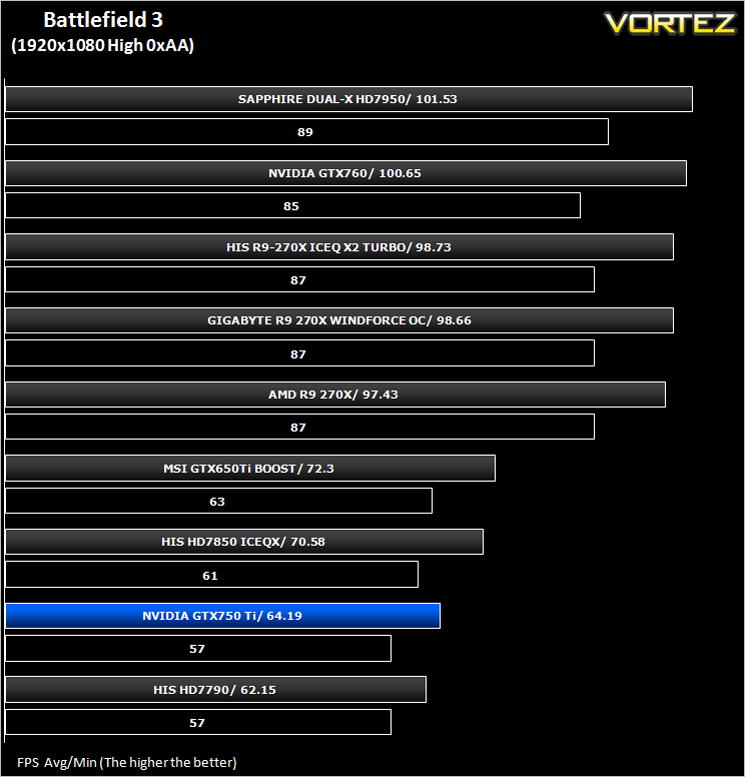
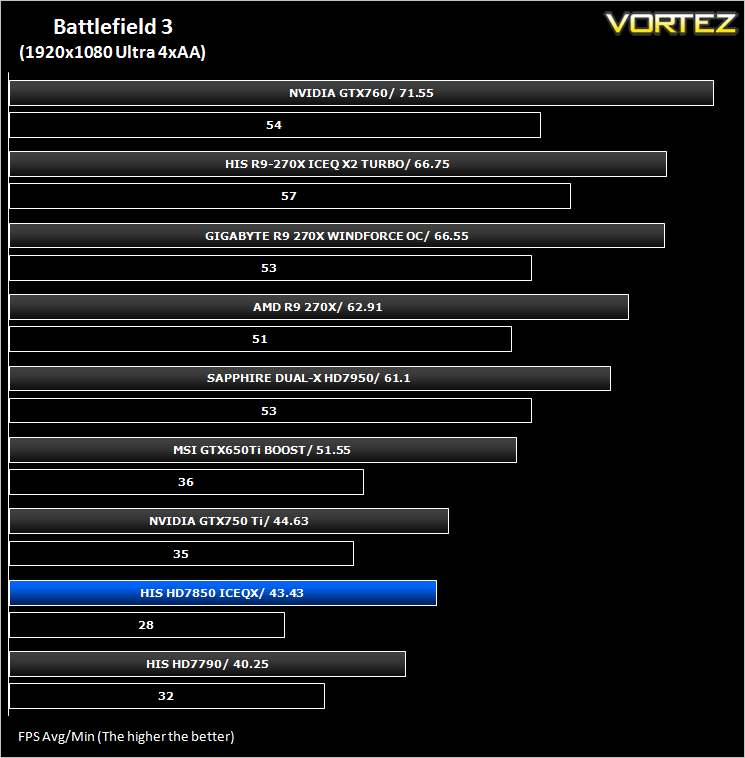
Battlefield 3 (FPS)
Battlefield 3 leaps ahead of its time with the power of Frostbite™ 2, the next instalment of DICE’s cutting-edge game engine. This state-of-the-art technology is the foundation on which Battlefield 3 is built, delivering enhanced visual quality, a grand sense of scale, massive destruction, dynamic audio and incredibly lifelike character animations. As bullets whiz by, walls crumble, and explosions throw you to the ground, the battlefield feels more alive and interactive than ever before. In Battlefield 3, players step into the role of the elite U.S. Marines where they will experience heart-pounding missions across diverse locations including Paris, Tehran and New York.
Average and minimum frames per second were measured using Fraps during the parking lot scene on Operation Sword Breaker. High and Ultra presets were loaded at both resolutions.
Crysis 3 (FPS)
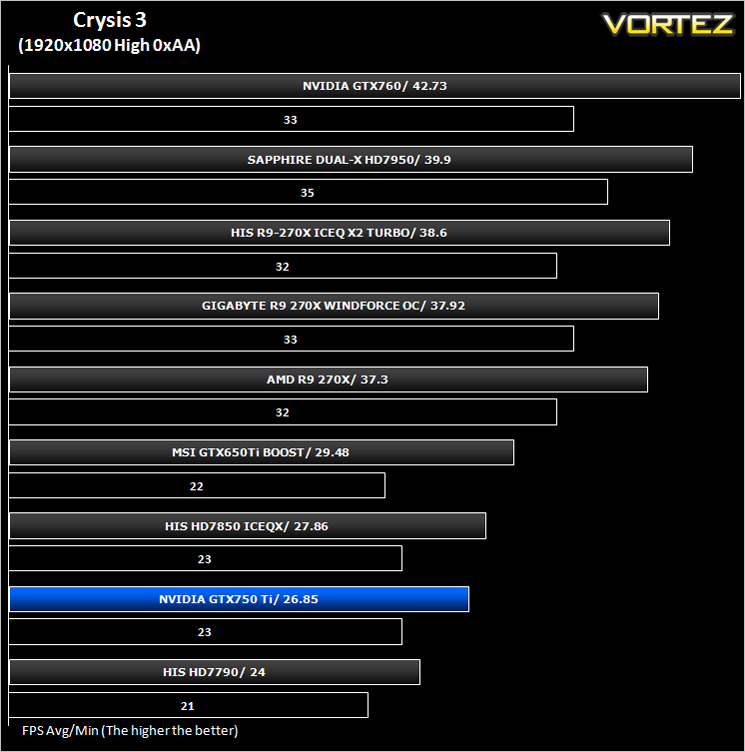
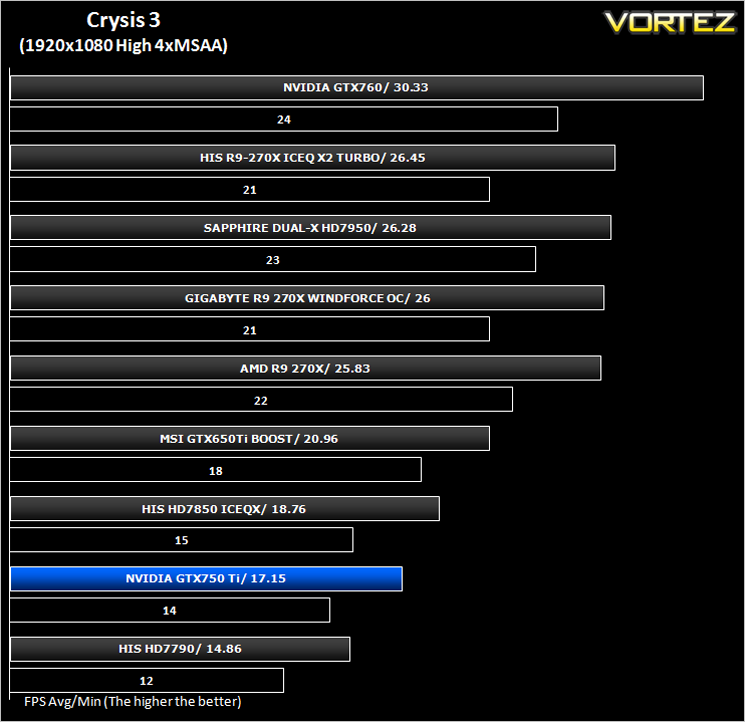
Crysis 3 from Electronic Arts is the fourth instalment of the Crysis franchise and sequel to Crysis 2. It uses the CryEngine 3 gaming engine which is perhaps the most advanced gaming engine to date and therefore the most demanding. The meme ‘Can it run Crysis’ has never been so apparent…
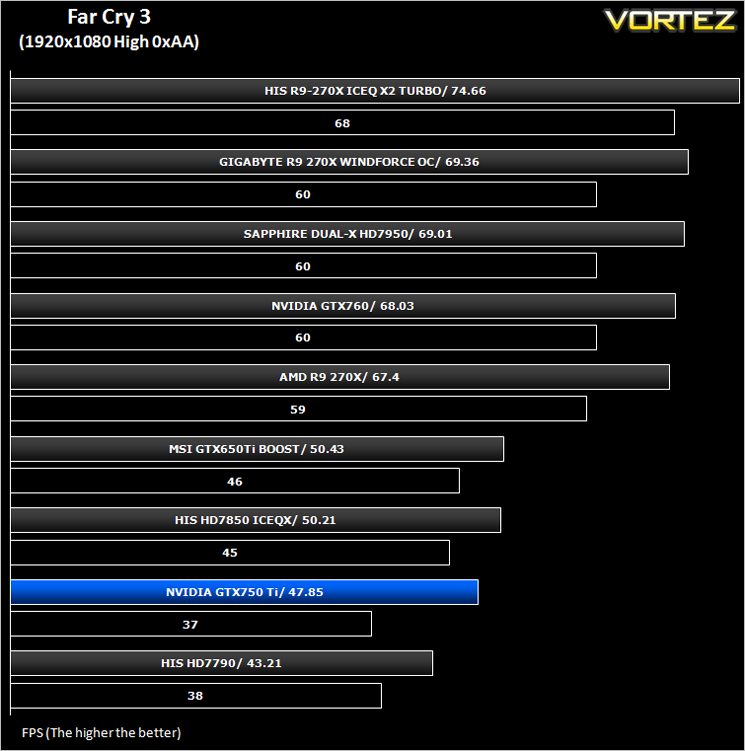
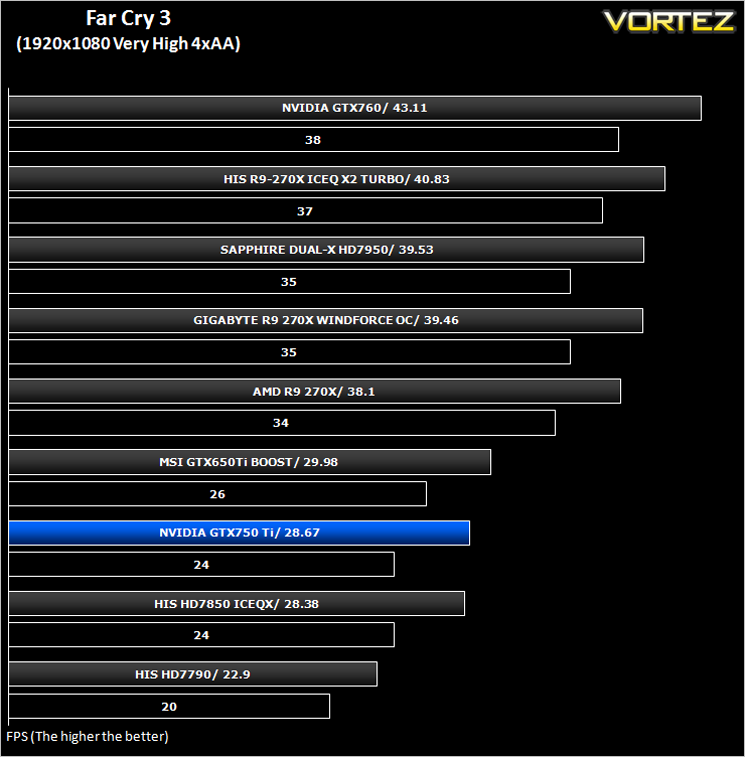
Far Cry 3 (FPS)
Far Cry 3 is a tropical survival shooter video game from Ubisoft Montreal and Massive studios. It’s open world design has similar traits to it’s forbear Far Cry 2 but it does it all so much better. With stunning visuals and settings to bring a PC to it’s knee’s, this game is so much more than the ‘just another console port’ it was reported to be.
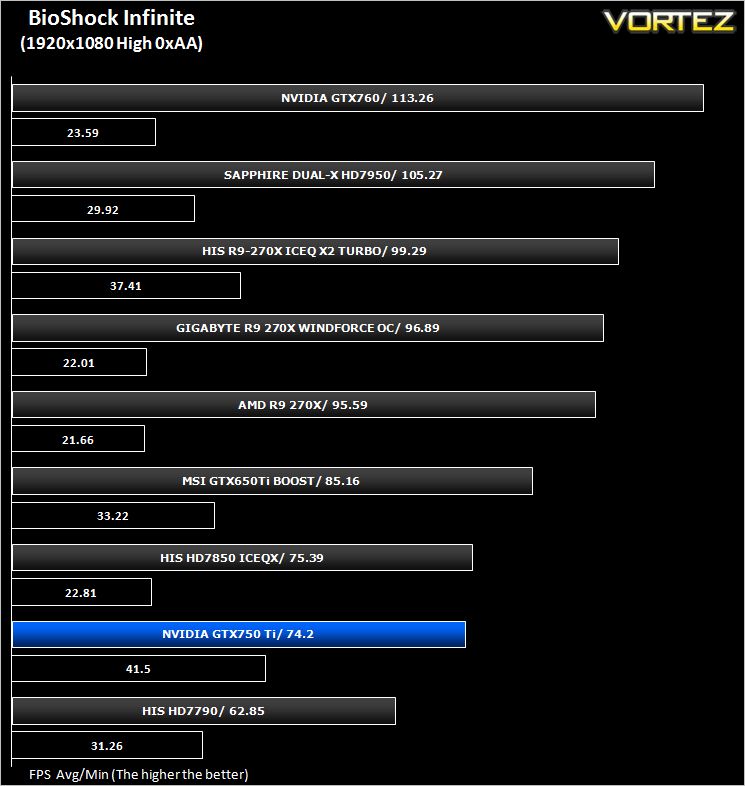
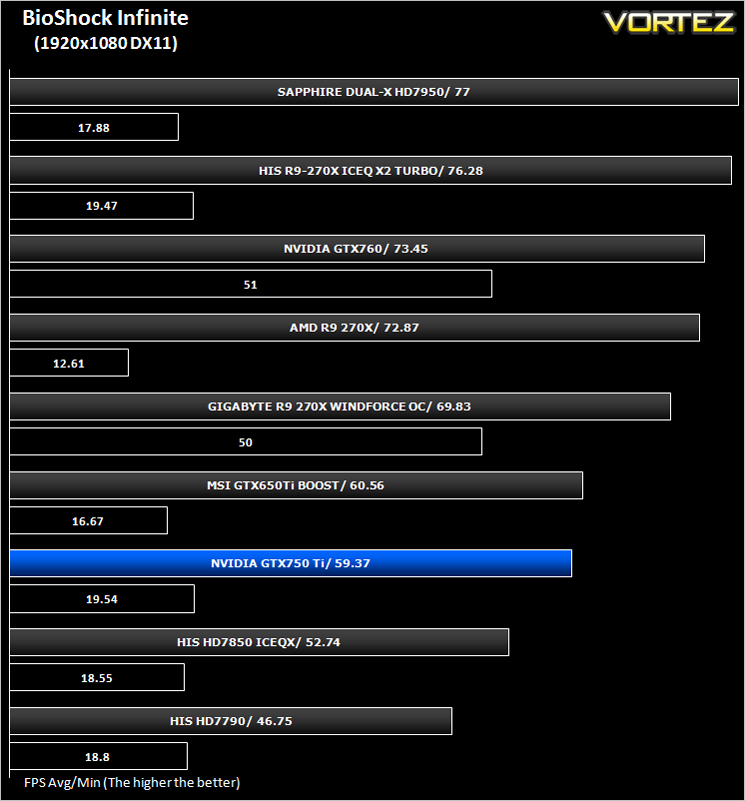
BioShock Infinite (FPS)
Set in 1912 during the growth of American exceptionalism, BioShock Infinite is a thrid person shooter developed by Irrational games and published by 2K Games. It is the third instalment of the BioShock franchise. the game utilises the Unreal Engine 3, modifying it with their own lighting engine to present a visually stunning experience like no other.
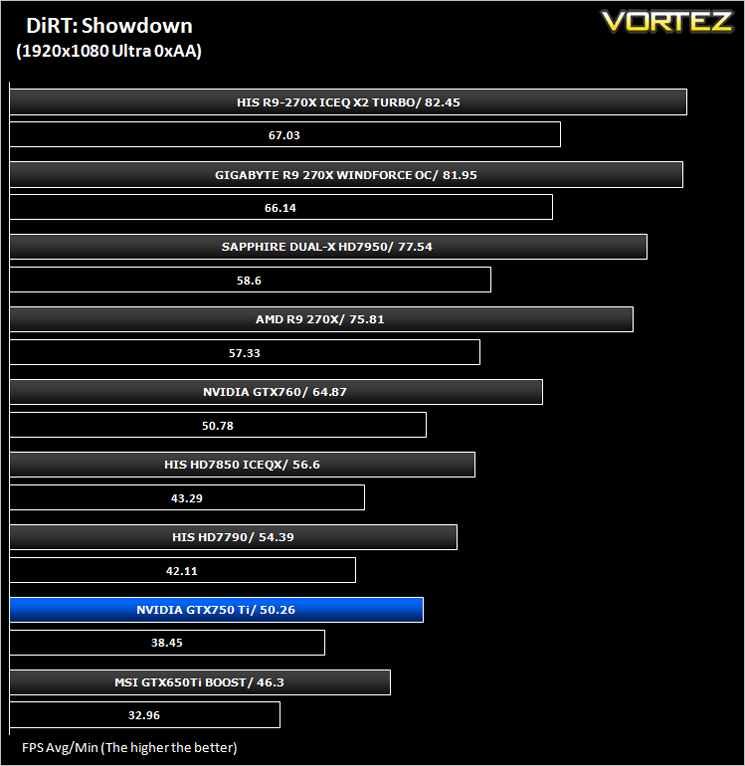
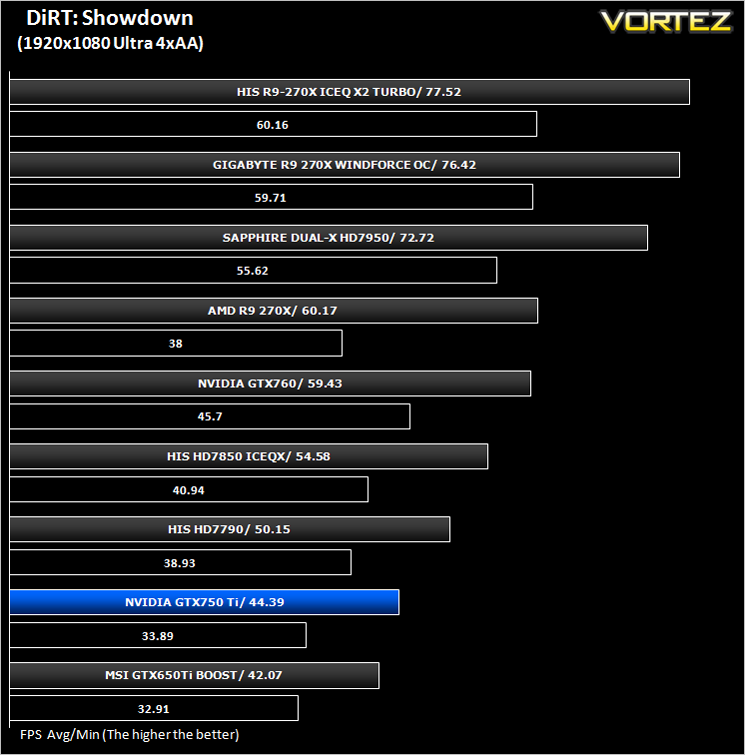
DiRT: Showdown (FPS)
DiRT Showdown is the new arcade racing game from the team that brought you the award-winning DiRT series, uncaged in 2012. Pick up and play controls combine with electrifying events, frenzied crowds and stunning graphics to deliver high octane, dive in and drive thrills from event one.
The Elder Scrolls: Skyrim (FPS)
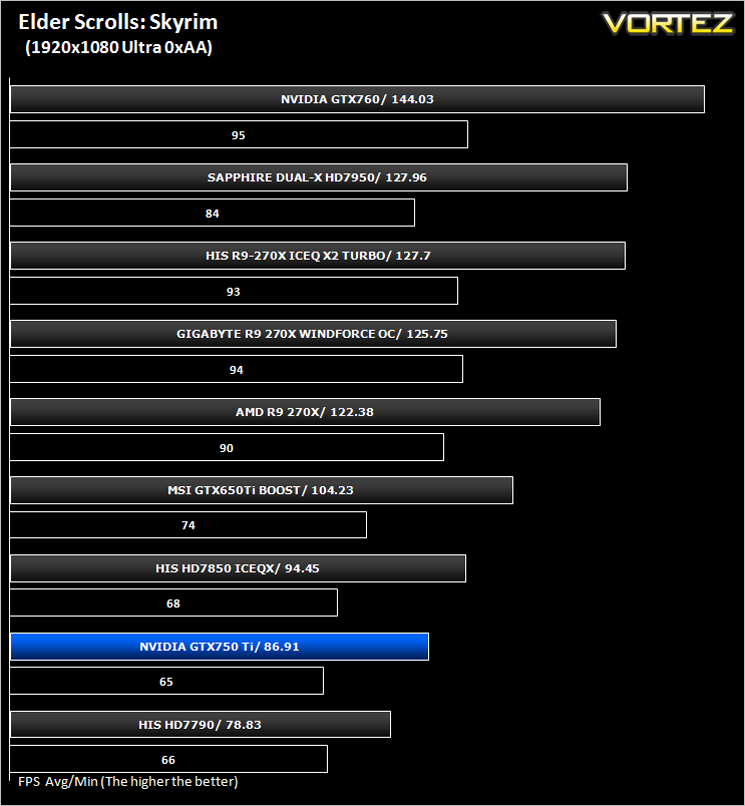
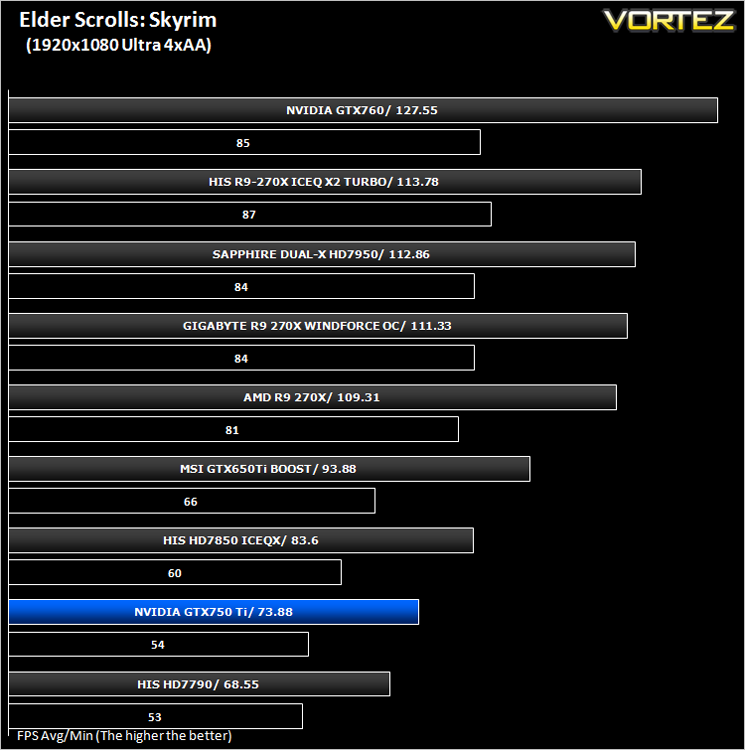
Skyrim is not a direct successor to the very popular Oblivion. Instead it takes place 200 years after the events of Oblivion. The non-linear playing that made the Elder Scrolls such a popular series does however make a return along with the beautiful scenery the encompasses the world of Skyrim.
Average and minimum frames per second were measured using Fraps during the drop down passage to Riverwood. V-sync was disabled to allow fluctuating (higher the 60) FPS for these runs. It is however recommended that v-sync is left enabled during normal gameplay due to the games dynamics.
Value For Money
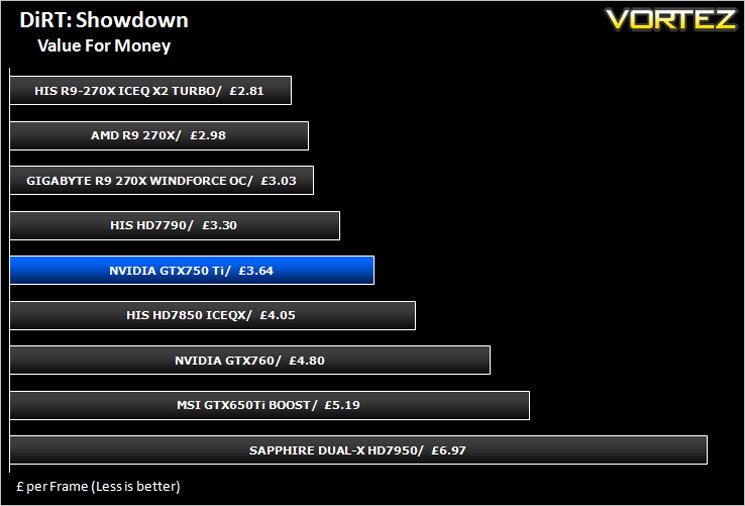
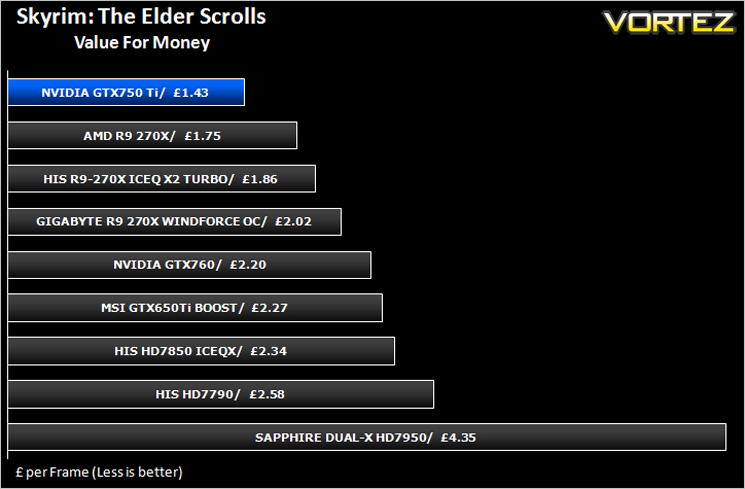
For those on a budget, this is perhaps the most important section of a graphics card review. For everyone else it will certainly make you think twice before calling the bank manager for an overdraft request. We calculate Value for money by taking the cost of the product and then dividing that figure by the overall performance figure which gives us a result in the guise of £ per frame – in effect how much every frame per second will cost you.
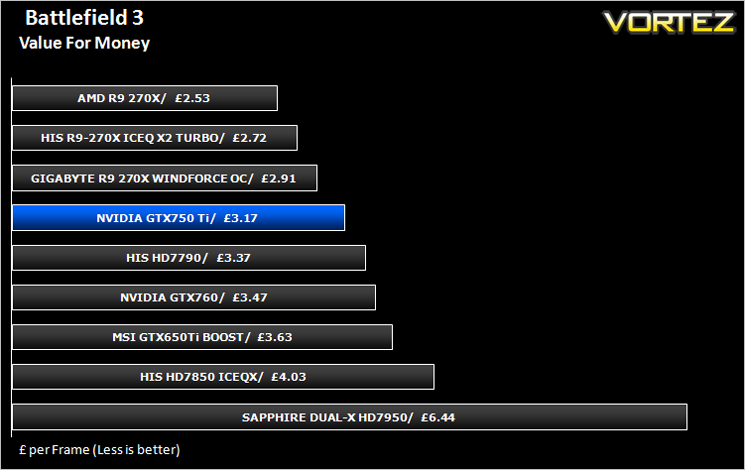
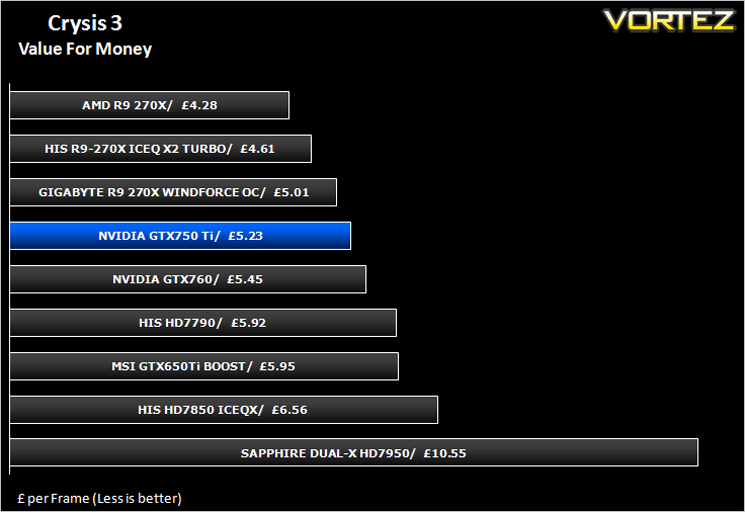
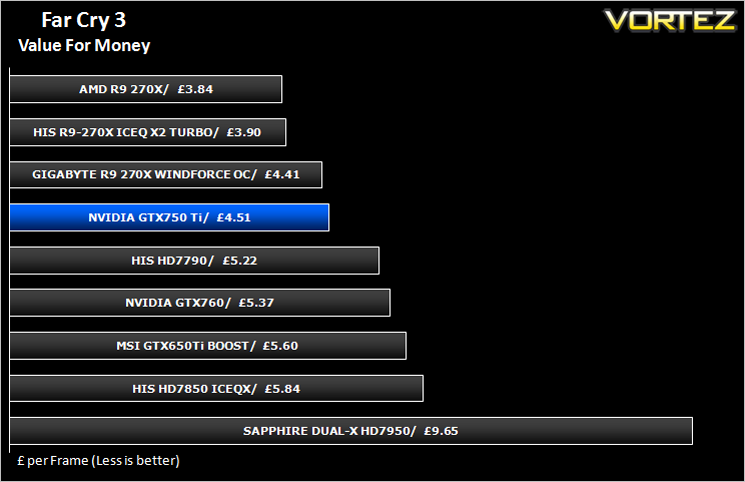
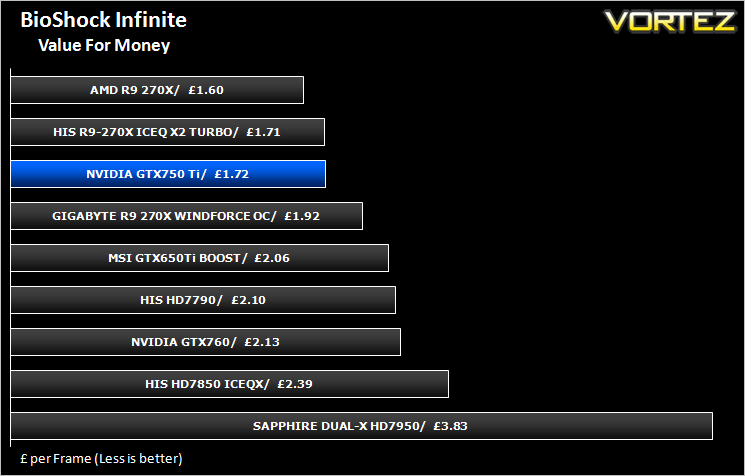
Overall Performance
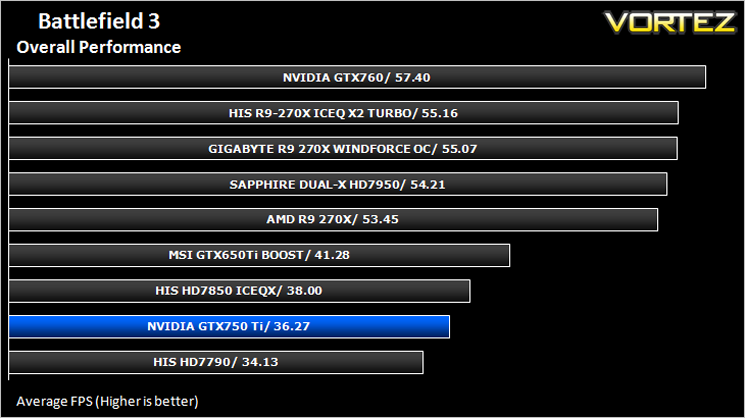
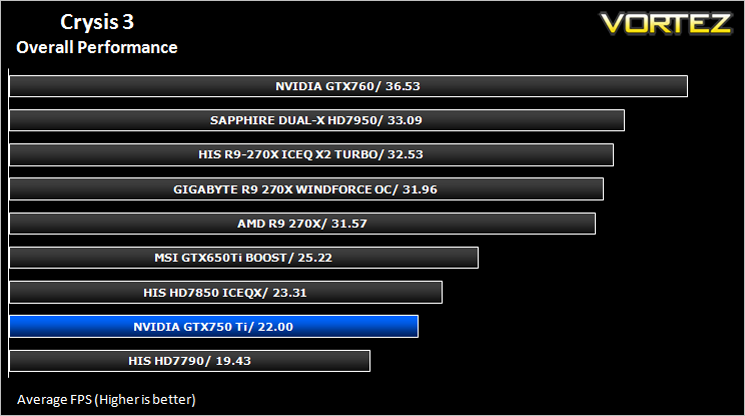
Here we take a look at the overall performance of the graphics card. This figure is determined by finding the average FPS across all of the settings used in a particular benchmark(game) to give us an overall value.
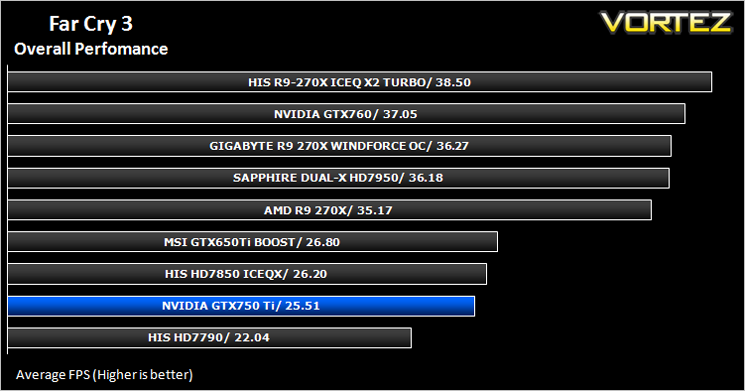
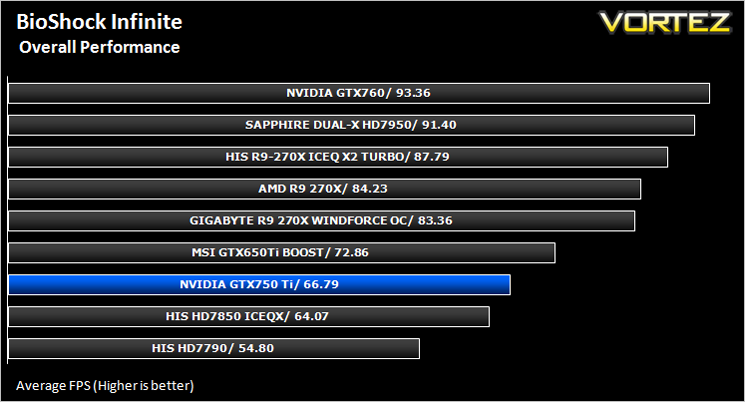
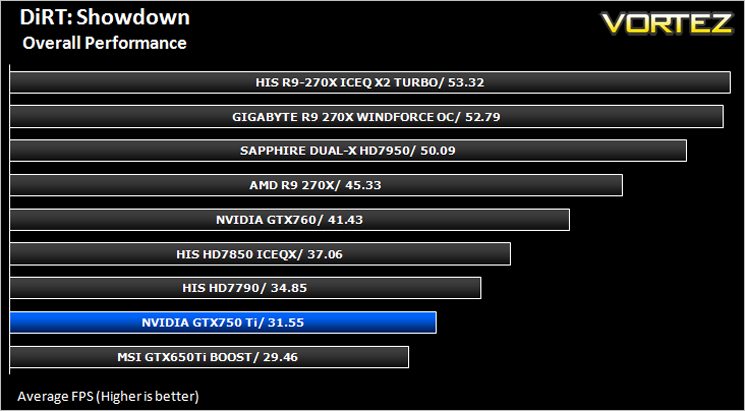
[fullimage=25747]
Overclocking
For overclocking the NVIDIA card we will be using EVGA PrecisionX as this gives us all of the options we require.
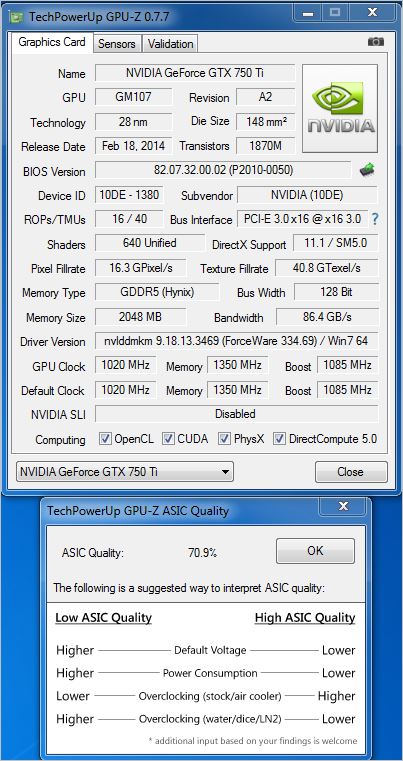
Above is a screenshot of GPU-Z showing the factory overclock of our sample.
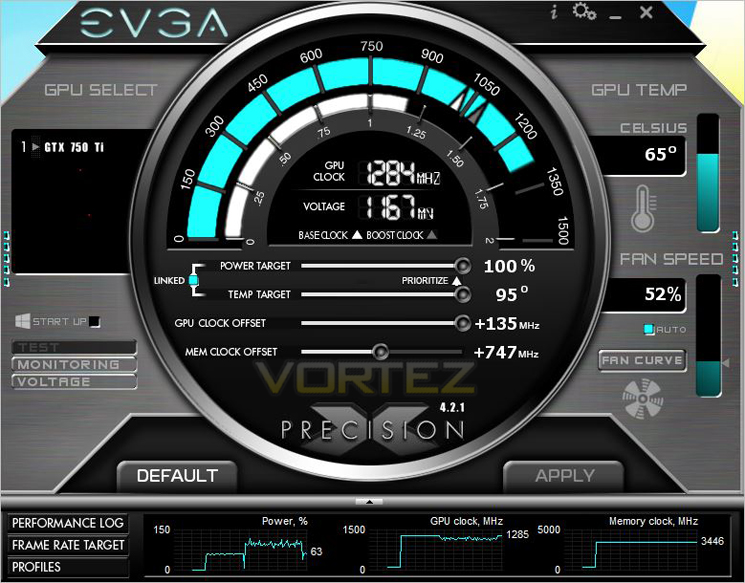
In all honesty we weren’t expecting massive overclocking results from the diminutive graphics card, especially given the power phase design however to our surprise this little card is a wolf in sheep’s clothing because not only did it give us exceptional core overclocking results but the memory clocked well too!
We managed to add 135MHz on the core which resulted in an overall boost clock of 1284MHz which is a fantastic result. We also squeezed a further 750MHz from the 2GB of GDDR5 resulting in an effective clockspeed of 6892MHz.
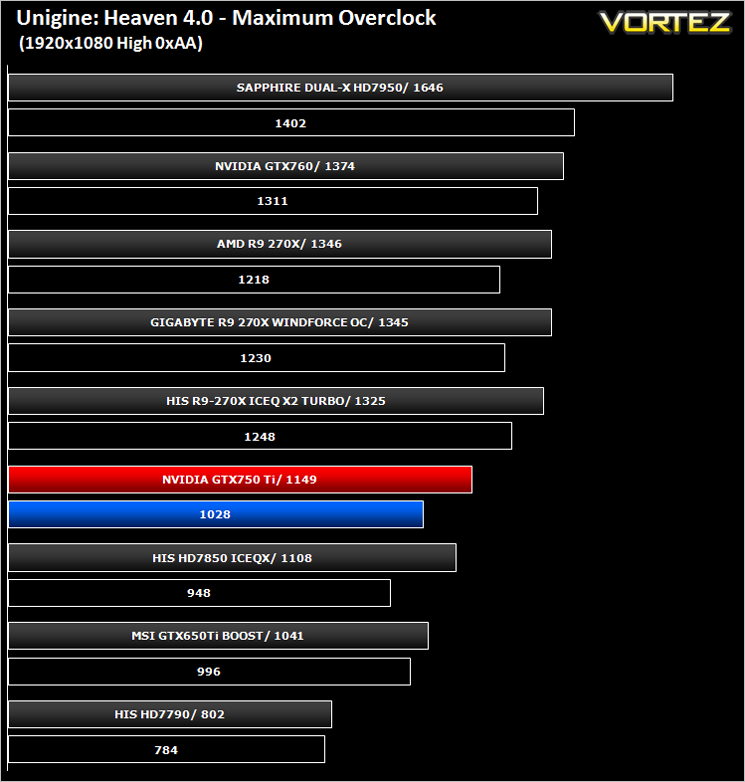
Above you can see the effects the overclock (red) had on the stock score (blue).
Conclusion
Maxwell is upon us and the signs are good. Performance is certainly not ground breaking at this level of the market, at least in terms of churning out FPS but the power efficiencies of the card are exceptional. NVIDIA claim that the GTX 750 Ti is almost a match for the GTX 480 and while it does occasionally come close to the 4 series flagship performance, it is hardly what you could call a direct replacement. Not that it is meant to be of course because the GTX 750 Ti is aimed squarely at customers who want a low power graphics card capable of occasional gaming with a small footprint. To this end, the GeForce GTX 750 Ti with it’s GM107 core is worthy of consideration.
It is hard to tell just how much performance can be squeezed out of the next generation of Maxwell cores which will be dedicated to the mid/high end gaming market but the initial signs are mouth watering with regard to power consumption. Because the card is very efficient, it stands to reason that performance will also be enhanced which should see a good leap forward in terms of raw speed. It should be considered though that gamers generally care little for power consumption and will readily pay a higher electricity bill if it means more fluid, faster gaming performance. We wait with baited breath for the enthusiast Maxwell cards.
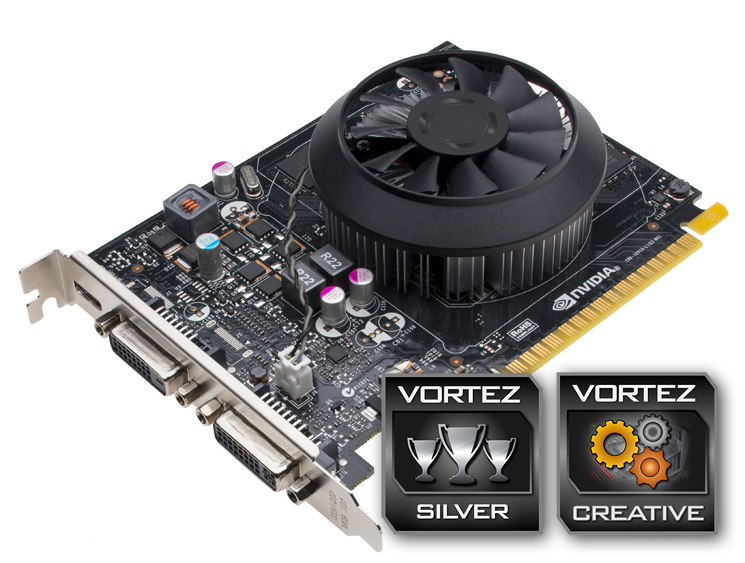
Overall, we were impressed with the little GTX750 Ti. The price is reasonable at £114.99 which sits it slightly above the R7-260X but below the GTX760 and R9-270X which is right where it should be in terms of performance. FPS re-production could be stronger and if you don’t mind overclocking, this card has plenty of headroom available to put the performance on a par with higher priced AMD cards. On the other hand you may be a light gamer who just needs an ‘everyday’ card for a SFF PC with minimal power consumption. Which ever discipline you find yourself in we can thoroughly recommend the GTX 750 Ti as it has most bases covered. Just don’t expect to go breaking benchmark world records any time soon.
To summarise:
Small in stature with minuscule power consumption to match, the GTX 750 Ti is an entry level GPU that will suit those who need a capable gaming GPU but don’t have the real estate to accommodate larger models.
Pros
+ Excellent power efficiency
+ Plenty of overclocking headroom
+ Small footprint
+ No external power leads required
Cons
– No DisplayPort
+ Excellent power efficiency
+ Plenty of overclocking headroom
+ Small footprint
+ No external power leads required
Cons
– No DisplayPort

Click here for an explanation of our awards at Vortez.net.


