







The Avatar is NZXT’s first attempt at a gaming mouse. Will it be a success for NZXT?
NZXT, a company built upon gamer’s dreams, hopes to create products that put consumers first. With the objective of designing unique products catered for hardware enthusiasts and gamers, NZXT has grown into a globally renowned brand recognized for dedication towards creating the next great gaming product. NZXT has won numerous awards from media and publications from across the globe with a product line spanning from gaming chassis, power, and gaming input devices. As a corporation formed by gamers, NZXT continues to expand into new horizons and push the limits further with each product unveiling.Our dedicated sales and customer service team will work diligently to earn your trust and loyalty. All our products are built with high quality material and engineered in the best conditions.
NZXT products are designed and engineered in the United States and manufactured overseas in China and Taiwan.
NZXT was established in 2004 in Los Angeles, California

Although fairly young and small compared to other computer hardware companies, NZXT has made headway since their establishment in 2004, and their name has become trusted by many computer users for providing quality products.
In the past five years, NZXT has released a dozen computer cases that ranged from the trendy Lexa Blackline to the bold Tempest. In addition to computer cases, NZXT has expanded their line-up to include other gaming-oriented hardware, such as fan controllers, power supplies and laptop coolers.
At Computer 2008, NZXT surprised their user-base (see Official Avatar Guess Thread at NZXT Lounge) with the launch of the Avatar, a gaming mouse that they designed themselves. Such a mouse will be the subject of this review, and it will be investigated whether or not it is an able gaming mouse worth your money.
Features and Specifications
Packaging
As like most NZXT products, the Avatar is sold in an attractive packaging. The box itself is made of carton, and it is narrow and tall. In terms of colours, NZXT has opted for black, a shade of purple and white. At the front, the picture of the mouse and the name “Avatar” are embossed and reflective, putting emphasis on the product and creating a nice contrast effect. There is also a quick blurb of the product’s main features. At the back, the product’s features are given in four languages: English, German, French and Spanish. Specifications and system requirements are found at the bottom of the box.

The box has a cover, which is held in place by Velcro. Behind the cover, a diagram indicates the various buttons and the DPI indicator of the Avatar. The mouse itself can be seen, and it is fairly exposed so that curious eyes may gaze at its beauty.


Inside the cover, one can find the manual and the driver CD. Some might have trouble finding them, however, seeing as they are hidden in the foam. Nevertheless, NZXT has been thoughtful to maximize space usage of the box by placing the manual in the cover. It is also appreciated that NZXT used a mini-CD and not a regular CD. No doubt, they were looking to reduce cost and maximize space, but reducing resource usage is welcomed too.


Taken out of the box, the mouse is enclosed in an elaborate carton shell. A more economic shell that uses less paper might have been preferable, though it may be argued that the current design provides additional protection.

Closer Look
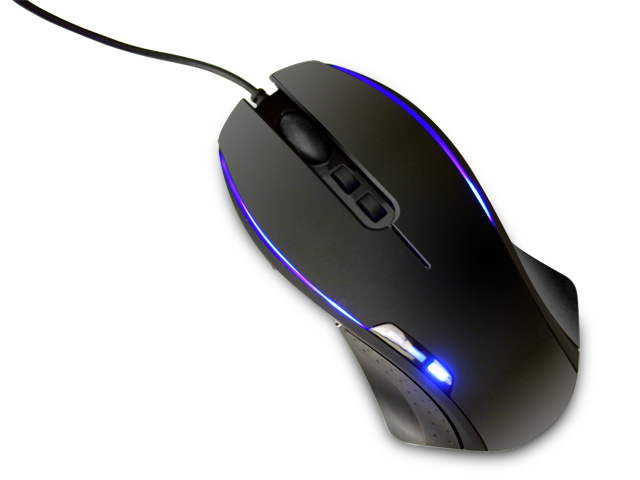
Once taken out from its packaging, the mouse was analysed. The mouse is fairly black, though it has a slight grey shade to it. The mouse has an overall rubbery feel, but it is still smooth to the touch, and it can be easily stained by oily fingers. The two buttons posterior to the middle button are pre-configured as the DPI switchers. They are well positioned, and can be easily accessed with the index finger. The DPI indicator on the left side has three light indicators.
Seeing as it is ambidextrous, the Avatar is symmetric and features sharp curved sides. The sides of the Avatar also have a rubbery feel to them, and they feature small pores to enhance grip. Two side buttons, once on each side, are protruding. These buttons preconfigured as forward and back are well positioned for the thumb. Yet, clicking the side button with the ring or little fingers is more difficult, and the button was more or less useless in my experience.


All buttons, including the scroll wheel, have a nice tactile feedback, sufficient resistance to not cause cramps and a discreet sound when clicked. The company’s logo is also etched at the posterior of the mouse.


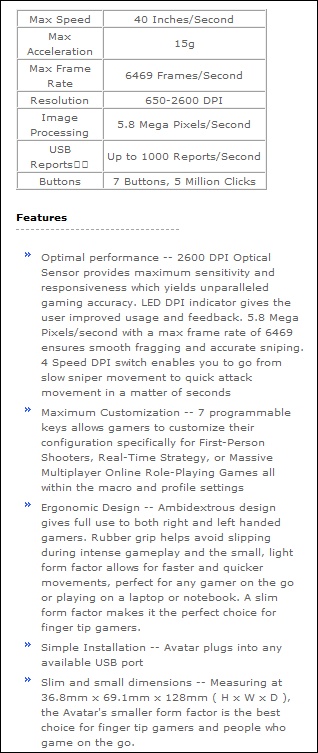
At the bottom of the Avatar, three Teflon feet ensure that the mouse glides effortlessly across most surfaces. The bottom face is glossy, and it is reminiscent of Razer-made mice. The Avatar uses a 2600dpi Japan-made infrared sensor, which is more than sufficient for most gamers and up-to-par with what is offered on the market.


Closer Look (continued)
In terms of connectivity, the Avatar has a six feet, gold plated USB cable. Gold plated USB connectors, in theory, enhanced performance reliability, but they offer no noticeable improvement in mice performance in the real world. Unlike many new gaming mice offered today, the Avatar’s cable is not sleeved with fabric. Once plugged to a power source, the Avatar lights up.

The DPI indicator has three blue lights and, the manner that they are lit indicates the DPI mode: none for 600dpi, one for 1200dpi, two for 1800dpi and three for 2600dpi. Blue lights are also shone out of the upper half of the mouse, below the main left and right buttons. The overall effect is very pleasing, and the mouse becomes highly attractive.


In comparison to other mice, such as a Microsoft Wireless Optical mouse and the Logitech G7, the Avatar is timid in size; it has a low profile and is quite narrow. As such, the Avatar is ideal for gamers that use the claw grip, also known as the finger tip grip, which, many argue, is the best grip for gaming as it gives great control. However, the Avatar becomes unattractive for casual users because the low profile causes the bottom of the palm and the wrist to brush the mouse pad, impeding movement, when holding it by the palm grip.


Installation and Software
The Avatar can be used without the included drivers, and it is recognized by Windows Vista as a “USB Human Interface Device”. DPI switching, custom macro key assignment and custom profiles require the driver and software provided by NZXT.Installation of the drivers is straight-forward as the CD has an autoplay feature. The installation process has nine steps and does not offer customizations besides the installation directory. Also, under Windows Vista, a Windows Security notice will inquire whether or not to install a “NZXT Human Interface Devices” driver software.
It must be noted that the included drivers from the CD do not support Windows Vista Ultimate x64; the software installs successfully, but the mouse is rendered functionless. Yet, the latest drivers, which can be obtained from NZXT’s website (see Driver Download page), do support this operating system.


The software itself has a pleasant GUI that resembles the mouse’s design. It has three main tabs: advanced functions, sensitivity and advance settings. The software provides more than enough customizations and control for any enthusiast, including polling rate changing that successfully worked under Windows Vista.


The software comes with pre-configured button macros, but it allows for custom macro keys mapping via “Advanced”. Also, the software includes an X-Y master sensitivity setting, which I have no use for but may interest others.


Testing Methodology
Personal preferences greatly come into play when using a mouse, and this renders testing a mouse quite difficult. Its testing will be straight-forward:
– Test 1: Gaming performance in Counter Strike 1.6
– Test 2: Gaming performance in Warhammer 40,000: Dawn of War
– Test 3: Tracking performance during image cutting in Photoshop CS3
Test Setup
– CPU: AMD Athlon X2 5000+ Black Edition @ 2.6 GHz 1.15V
– Motherboard: Gigabyte GA-MA78GM-S2H 780G
– RAM: Corsair XMS2 TWIN2X4096-6400C5 PC2-6400 2x2GB
– Case: Antec NSK3480 mATX
– Power supply: Antec EarthWatts 380W
– CPU cooler: Noctua NH-U12P with Noctua NF-P12 @ 5V
– Case fan: Noctua NF-P12 @ 5V
– Hard drive: Western Digital Caviar SE16 WD6400AAKS 640GB
– DVD Drive: LG GH22NS30 DVD Writer
– OS: Windows Vista Ultimate 64bit
– Mouse pad: Dell cloth surface[/list]
Results
Test 1: Counter-Strike is one of those first person shooter games where quick and precise movement is primordial or else death of your character ensues. Here, the NZXT Avatar performed admirably. Movements were smooth and quick. I had neither difficulty rotating 180 degrees to look behind me nor trouble making headshots with the AWP Magnum when it was needed. The DPI switcher was also very useful when switching between a sniper rifle and an assault rifle, seeing as one needed less sensitivity than the other. A thing that surprised me was how the mouse did not make my hands sweaty, and no sweat strains were present on the mouse afterwards.
Test 2: Warhammer 40,000: Dawn of War’s gameplay is quite different from Counter-Strike, given the fact that it is a real-time strategy game. Nevertheless, the same level of precision is needed from the mouse. Yet again, the Avatar delivered.
Test 3: Cutting an image in Photoshop CS3 by the vector method or the lasso tool method can become quite complicating if a bad mouse is used. The Avatar proved to be very precise, and the DPI switcher made it so that even the small details in the image may be removed without too much hassle. Drawing straight lines with the brush tool in Photoshop was also a breeze.
Overall: The Avatar provided great control and precision that rivalled my Logitech G7. It responded quickly to clicking and did not miss any. It glided across my fairly generic mouse pad without trouble, and it worked well on my wooden table. The mouse was quite light, and some may find it too light. In terms of comfort, the Avatar takes time to get used to because of its low profile. Also, I am more acquainted with right-handed mice, such as the Logitech G7, and I believe such mice are much more comfortable. Initially, the Avatar gave me cramps, but after an hour of gaming, I found it pleasing. Nevertheless, I would only use it for gaming, as I cannot palm grip it properly, which is my more comfortable grip for casual computing.
Conclusion
NZXT’s first attempt at making a gaming mouse is quite a success. The overall look, the features, the performance and the design rival those of the more popular mice sold on the market. Given its 2600dpi infrared sensor and low profile, the Avatar becomes an ideal mouse for any gamers looking to excel. Comfort-wise, the Avatar proves to be excellent for claw gripping, but it becomes awkward with the palm grip and this drawback limits its range of uses. Its ambidextrous design ensures that both left and right handed users will be able to enjoy the mouse. Customization is a selling factor of this mouse, and it is well exploited with the NZXT software and driver.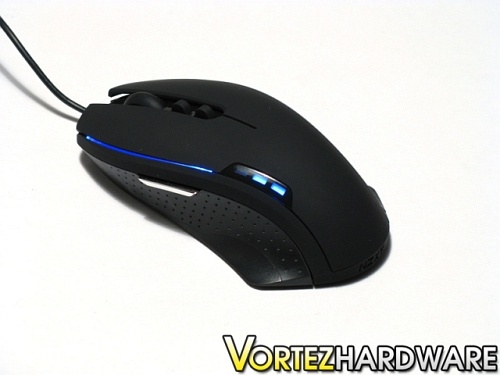
The mouse has a $59.99 USD MSRP, but availability seems to be lacking. In terms of price, the NZXT Avatar competes well in this price range.
Weighing its advantages and disadvantages, I believe it is fair to award the NZXT Avatar Vortez Hardware’s Silver medal.
Pros
+ Ambidextrous design
+ Attractive design
+ Excels at gaming
+ Highly customizable
+ Precise control and tracking
+ Quality Teflon feet
+ Side buttons and DPI switcher
Cons
– Lightweight
– Uncomfortable with the palm grip
The NZXT can be bought from: TEK Computers UK.
To discuss this review please visit our forum.
