







A 6400 DPI laser gaming mouse with ambidextrous design, 8 programmable buttons and numerous other features such as adjustable polling/response rates.

Product on review: Neon Gaming Mouse
Manufacturer: Ozone Gaming
Street Price: £44.99 GBP
Ozone are steadily proving their worth in the gaming peripheral arena and in the last couple of months they have furnished their portfolio with a number of new releases which include a laser gaming mouse named Neon.
Neon is a 6400 DPI laser gaming mouse which features 8 programmable buttons, an on the fly DPI switch, adjustable polling rate, adjustable response rate all contained with an ambidextrous design which has subtle and minimalist styling.
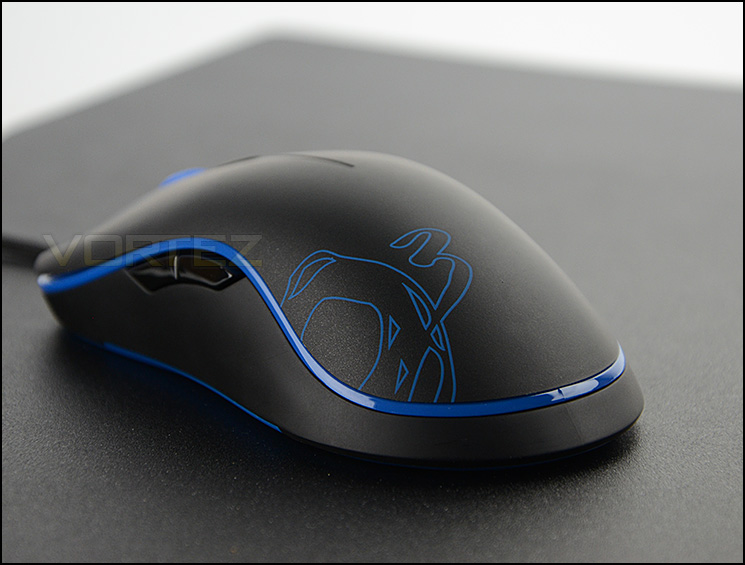
Ozone on their Neon Gaming Mouse
Ozone Neon is an ambidextrous gaming mouse designed to suit a wide variety of grip styles and hand sizes. Outfitted with an ultra-precise 6400 DPI laser sensor that ensures a perfect tracking performance. Fully customizable, adjust the polling and response rate and program its 8 buttons in 5 independent profiles thanks to its 128Kb built-in memory.
Technical Specifications
Precision 6400 DPI laser sensor.
8 programmable buttons
On-the-fly adjustable DPI: 6400/3500/1800/800
128kb built-in memory
Included Software for personal configuration (Windows only)
Adjustable polling rate: 125/250/500/1000HZ
Adjustable response rate: 2/65/125/190/255ms
Cable length: 1.8M
Compatible OS: Windows® 8/ Windows® 7 / Windows Vista® / Windows® XP
Ambidextrous design
Rubber coating top surface
Weight: 120g (with cable)
8 programmable buttons
On-the-fly adjustable DPI: 6400/3500/1800/800
128kb built-in memory
Included Software for personal configuration (Windows only)
Adjustable polling rate: 125/250/500/1000HZ
Adjustable response rate: 2/65/125/190/255ms
Cable length: 1.8M
Compatible OS: Windows® 8/ Windows® 7 / Windows Vista® / Windows® XP
Ambidextrous design
Rubber coating top surface
Weight: 120g (with cable)
Packaging & Bundle
Packaging for Neon
Ozone has chosen to present Neon in a professionally designed box which contains an illustration of the mouse on the front along with the fundamental features and then on the reverse there is a schematic diagram of the mouse with specific features highlighted.
The packaging has a folding cover which gives further details surrounding the mouse but also gives a preview of the product itself.
Folding cover to give preview of mouse
Inside, Neon has been given just a few bundled items, these include:
• Driver Software CD
• Ozone Sticker
• Instructions leaflet
The included items within the bundle
Closer Look
Neon is ambidextrous and available in 4 colours
Neon is available in a selection of colours which include: blue, red, white and black. We are reviewing the blue variant. Our mouse features an ambidextrous design and therefore, left and right-handed gamers can use this peripheral. Neon’s shape and size has close similarities to some other mice on the market such as SteelSeries Xai, Sensei RAW and certainly Zowie’s FK.
Neon’s design is classic and it will appeal to gamers who are looking for a peripheral with subtle and simple styling.
Smooth external shell
Being ambidextrous, either side is exactly the same. There are two buttons in easy reach for the thumb to navigate back and forth within Windows or a customised function within game. Neon has a smooth shell which uses am antislip rubber to help with control. A plastic strip wraps around the entire unit and Ozone has also printed their emblem onto the palm section of the mouse.
Two buttons on either side
Looking at the mouse head on, the front has the obligatory two button configuration and an incremental scrolling wheel in the centre with DPI switcher button. The scrolling wheel snaps between each increment and is neither tough nor soft – just perfect. The button which sits behind the scrolling wheel allows the user to tweak the DPI profiling on the fly. Users can switch to the following DPI settings: 6400 / 3500/ 1800 / 800 and there is an LED indicator to help distinguish which profile you are in currently in, this was a feature missing from the similarly speced Zowie FK and so we are pleased to see that Ozone has included it.
Neon from the front
Neon makes use of a thick-braided cable and has a gold plated USB connector. The connector plug has been given a custom design to help distinguish it from other devices – this will help when connecting/disconnecting devices from your tower.
At the heart of Neon is a laser sensor which has a maximum DPI of 6400. Along with the specifications label, Ozone has given Neon two glide pads at the top and bottom of the mouse.
Neon features a 6400 DPI laser sensor
Software & Performance
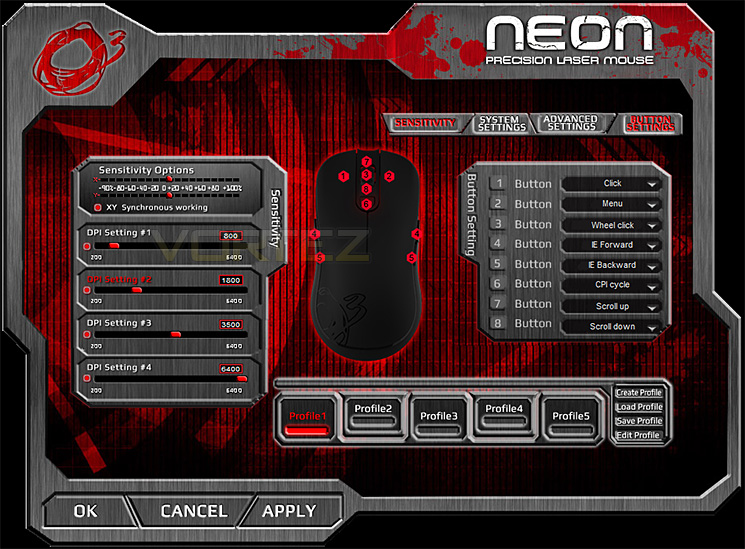
Bundled with Neon is Ozone’s software to fully customise the gaming mouse. Although the overall appearance and presentation could be improved (by making it clearer and less cluttered) the available options are all-encompassing. Sensitivity profiles can be adjusted, scrolling speeds, pointer speeds and other general attributes can be modified.
We’re also pleased to see that advanced settings such as polling rates and response rates can be altered too.
Performance
Neon is quite a lightweight mouse and as such requires less force to navigate with. Even though it is on the light side, it still has a flat and even base which is exactly what you want when operating such a device.
Due to Neon being a reasonably thin mouse, its ideal for small-medium sized hands. Reaching the buttons is no problem at all because they have been placed nearby and in reliable locations. The scrolling wheel on the mouse passes through increments and is neither too smooth nor tough which is something we really like to see. One particular feature which is extremely handy is the DPI selector, this has LED profiling and you can (as above) tweak these profiles so that the sensitivity is assigned to different colours for different games.
In terms of comfort, Neon features just one type of material which the hand comes into contact with and whilst we had no problems with the hand slipping (even after long gaming sessions), having multiple textures can enhance the comfort and grip.
During our testing we used the mouse for many hours in Windows, editing pictures and browsing the internet in order to gauge how Neon responds to general usage. We can report that within this environment the mouse handles all tasks very well and is particularly precise when it comes to editing pictures which require pinpoint accuracy.
In the gaming arena Neon works very well in different genres. We found it responded very well to FPS titles and offers good tracking and glide when used with both cloth and hard surfaced gaming pads. The DPI switch stands out as a notable advantage during gaming sessions because you can shift to different sensitivities without having to ALT+tab or modify within the said game.
So, in general we found this mouse to be reliable, accurate and comfortable to use in a range of different environments.
Conclusion
Although Ozone are fairly new to the scene, they have already shown some great potential with the first wave of products they have brought to market and Neon is another example of this.
Following a classic design, Neon will appeal to gamers who just want a simple design. Although this mouse has subtle aesthetics Ozone provide a selection of four different colours which should satisfy style conscious gamers and with the added bonus of Neon being ambidextrous it doesn’t matter if you’re left or right handed.
Neon features a 6400 DPI laser sensor which delivers plenty of flexibility for different gaming styles and we’re pleased to see Ozone has decided to place a DPI profile switch right next to the scrolling wheel. This button allows you to switch to specific DPI settings on the fly and is ideal if you use multiple sensitivity settings across different games.
Bundled with Neon is a software suite which is far-reaching. A wide selection of settings can be modified such as polling rate, response rate, sensitivity, DPI profiles and much more.
On the performance side of things we found Neon to be responsive and accurate on a variety of different surface pads and across different environments, be it Windows or diverse gaming genres. Due to Neon being quite thin it will be ideal for gamers with small-medium sized hands and we’re pleased to report this mouse is comfortable to use for extended periods of time.
At a cost of £49.99 GBP and against the features included, Neon is quite a costly investment. We expected it to be slightly cheaper but even so, we feel this mouse is a worthwhile consideration for those seeking a new peripheral replacement.
Neon is a splendid gaming mouse which will satisfy both left and right handed gamers with its ambidextrous, simplistic design. Styling is subtle and there are a choice of different colours so that you can coordinate the mouse with other devices.
Pros
+ Simple, classic design
+ Appealing livery
+ Ambidextrous – works for left and right-handed gamers
+ Multiple colour options
+ On the fly DPI adjuster with profiles
+ Braided cabling
Cons
– Price
+ Simple, classic design
+ Appealing livery
+ Ambidextrous – works for left and right-handed gamers
+ Multiple colour options
+ On the fly DPI adjuster with profiles
+ Braided cabling
Cons
– Price

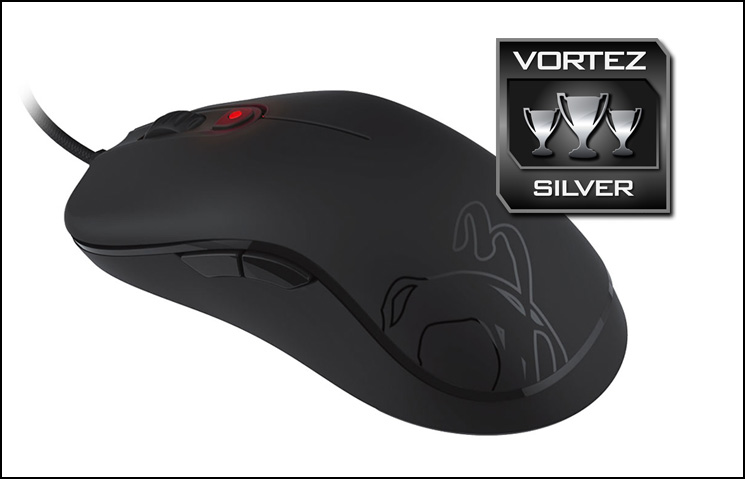
Click here for an explanation of our awards at Vortez.net.


