







Phanteks step into the computer chassis arena with the Enthoo Primo. Oozing style, quality and features, can this new full tower making a lasting impression?

Product on Review: Enthoo Primo
Manufacturer and Sponsor: Phanteks
Street Price: £200 (At time of review)
Phanteks only came onto the scene a few years ago and yet they have made a lasting impression within the cooling segments with the PH-TC14PE and other notable releases. It’s rare to see success right from the start but Phanteks appear to be doing everything right and today sees this cooling prodigy take on the computer chassis market in their very first attempt at bringing to shelf a high-end offering.
The Enthoo Series is a new venture for Phanteks and the Primo is the first case within this new range. Phanteks have boldly taken on the high-end by bringing to market a gargantuan full tower chassis comprising of steel and aluminium. Primo has been carefully designed with water cooling at the forefront of planning, the internal layout lends itself to having multiple areas for housing different sized radiators which will be music to cooling enthusiast’s ears.
So without further ado, let’s begin our look at this exciting new release…
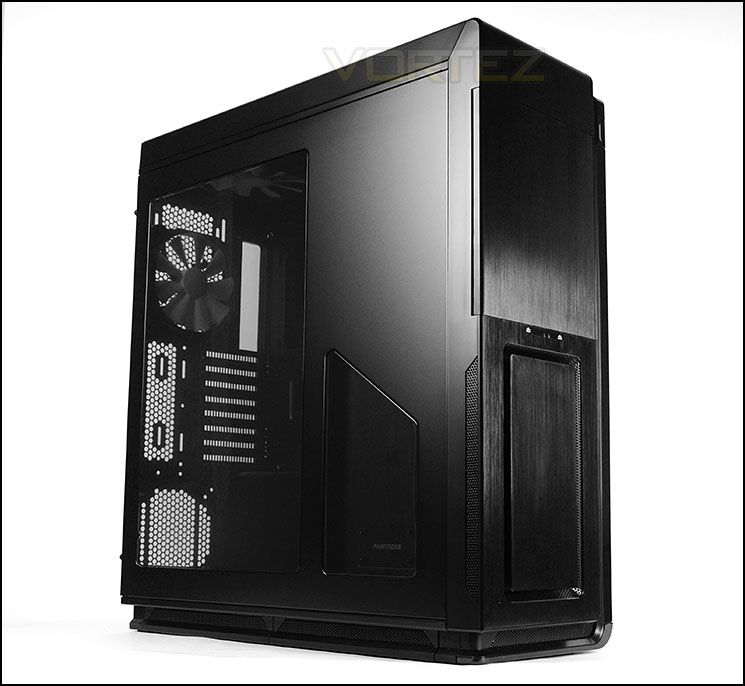
Phanteks on their Enthoo Primo
Phanteks’ Enthoo Primo features a unique PSU thermally isolated location, multifunctional cable/reservoir cover, exclusive brackets, and massive cooling potential. Phanteks’ new case features a shifted design which allows for the unique PSU configuration. The PSU is thermally isolated, creating cooler temperatures within the case. With the PSU located in the back of the case, this allows for a cleaner look and better cable management.. Exclusive brackets that makes everything a breeze to install. Reservoir bracket that can be use as a cable cover with the modular cover on or as a reservoir bracket with the pre-drilled holes when cover is off. Enthoo Primo includes a pump bracket that supports many different pumps, side radiator bracket and bottom radiator bracket for easy installation.
Technical Specifications
Case Specifications
Dimension
250mm x 650mm x 600mm (WxHxD)
Form Factor
Full Tower Chassis
Material(s)
Aluminum Faceplates, Steel Chassis
Motherboard Support
ATX, EATX, mATX, SSI EEB
Front I/O
2x USB 3.0, 2x USB 2.0, Mic, Headphone, LED Switch, Reset Switch
Side Window
Yes, split-window design
Expansion & Drive Bays
Expansion slots
8
Power Supply Slots
2
External 5.25″
5
Internal 3.5″
6 (2x 3 HDD cages)
Internal 2.5″
12 (2x 3 HDD cages + 2x doublestack SSD brackets ) *expandable to 3x
]Cooling
120mm Fan
Front: 2x
Top: 4x
Side: 2x
Rear: 2x
Bottom: 4x
HDD: 2x
140mm Fan
Front: 2x (2x included with LED)
Top: 3x (1x included)
Side: 2x
Rear: 1x (1x included)
Bottom: 2x (1x included)
HDD: N/A
Liquid Cooling
120mm radiator
Front: Up top 240
Top: Up to 480
Side: (w/o HDD cages) Up to 240
Rear: 120
Bottom: Up to 480
140mm radiator
Front: N/A
Top: Up to 420
Side (w/o HDD cages) N/A
Rear: 140
Bottom: Up to 280
Clearance
Graphic card
257mm (reservoir bracket installed)
277mm (reservoir bracket installed w/o cover)
350mm (no reservoir bracket)
390mm (HDD cages in front position)
515mm (no HDD cages)
CPU cooler
207mm
Cable management
30mm
PH-F140SP (included fans)
Speed (rpm)
1200±250 rpm
Max Airflow
82.1 CFM
Static Pressure
1.33mm H2O
Acoustical Noise
19 dB
Packaging Information
Package Dimension
320mm x 725mm x 705mm (WxHxD)
Net Weight
17.9 kg
Gross Weight
20 kg
Warranty
5 Years Limited
Dimension
250mm x 650mm x 600mm (WxHxD)
Form Factor
Full Tower Chassis
Material(s)
Aluminum Faceplates, Steel Chassis
Motherboard Support
ATX, EATX, mATX, SSI EEB
Front I/O
2x USB 3.0, 2x USB 2.0, Mic, Headphone, LED Switch, Reset Switch
Side Window
Yes, split-window design
Expansion & Drive Bays
Expansion slots
8
Power Supply Slots
2
External 5.25″
5
Internal 3.5″
6 (2x 3 HDD cages)
Internal 2.5″
12 (2x 3 HDD cages + 2x doublestack SSD brackets ) *expandable to 3x
]Cooling
120mm Fan
Front: 2x
Top: 4x
Side: 2x
Rear: 2x
Bottom: 4x
HDD: 2x
140mm Fan
Front: 2x (2x included with LED)
Top: 3x (1x included)
Side: 2x
Rear: 1x (1x included)
Bottom: 2x (1x included)
HDD: N/A
Liquid Cooling
120mm radiator
Front: Up top 240
Top: Up to 480
Side: (w/o HDD cages) Up to 240
Rear: 120
Bottom: Up to 480
140mm radiator
Front: N/A
Top: Up to 420
Side (w/o HDD cages) N/A
Rear: 140
Bottom: Up to 280
Clearance
Graphic card
257mm (reservoir bracket installed)
277mm (reservoir bracket installed w/o cover)
350mm (no reservoir bracket)
390mm (HDD cages in front position)
515mm (no HDD cages)
CPU cooler
207mm
Cable management
30mm
PH-F140SP (included fans)
Speed (rpm)
1200±250 rpm
Max Airflow
82.1 CFM
Static Pressure
1.33mm H2O
Acoustical Noise
19 dB
Packaging Information
Package Dimension
320mm x 725mm x 705mm (WxHxD)
Net Weight
17.9 kg
Gross Weight
20 kg
Warranty
5 Years Limited
Packaging & First Look
An initial look at the packaging alludes to the sheer size of Primo, this case is a monolith. There is a depiction of the case found on the front-side of the box, whilst on the sides there are technical specifications and on the rear, Phanteks have listed all of the integral features.
Inside this huge box, the case is covered in a clear plastic sheet and held in place with two polystyrene pillars on both sides and an additional piece at the top for extra protection during transit.
Packaigng for Primo
Unveiling Primo we are met with an eye-catching, colossal computer chassis. Due to its unique visual appearance it’s easy to distinguish this case from others, if not only for its sheer size – measuring in at 250mm x 650mm x 600mm (WxHxD).
On the prominent side, there are two sections of tinted Perspex. The larger of the two spans the entire height of the interior, giving a preview of the hardware installed. Since Primo is touted for water-cooling a transparent window is ideal for showing off exciting configurations.
On the alternate side we have a solid panel with three marked out perforated sections. The section towards the front of the case can house dual 120/140mm fans and has a respective dust filter. Towards the back of this side panel the perforated section covers the PSU area and again this has a dust filter which is magnetic and can be taken off and cleaned.
Large Perspex split-window
Distinct styling helps Primo stand out
Exterior
Moving in for a closer look at the rest of Primo, we can see the front features a brushed aluminium faceplate which looks rather professional. This elegant front section is split into various regions, the lower section has a rectangular cut-out which has ventilation inside the cavity for the front mounted cooling fans underneath. To the right, this mesh is extended to provide further ventilation for the compartment behind the motherboard tray. Phanteks have designed Primo to have a protruding plastic fascia on the right-side, this features a lighting system and power button. Overall, we really like the look of visual appearance.
Around the back, at the bottom, over on the left side is an area for mounting the PSU – this will sit behind the motherboard tray since the tray is engineered higher up in the chassis. Next to this there is a perforated section for an optional 120/140mm cooling fan. Above this, there is a total of eight PCI expansion slot covers and ventilation to the immediate right. At the top of this rear panel there is a 140mm cooling fan which has been positioned as an exhaust – Phanteks have designed Primo to have slide mounting rather than mounting holes, this means the fan can have its vertical position altered to the user’s requirements.
The front and back of Primo
In the upper region of the front panel there is a door which covers the 5.25” drive bays. This sturdy door pivots from the left and has magnetics to help it close.
There are a total of five 5.25” drive bay covers which are removable from the outside of Primo.
Door covers 5.25” drive bays
On the top edge of Primo within the cavity sit the front panel connectivity. Due to these ports being exposed to dust/dirt, Phanteks have given each of the USB ports a rubber cover. We think this is a brilliant idea – those ports which are unused can be kept dust-free. The following are available here:
• Lighting/Reset buttons
• 2x USB 2.0 ports
• 2x USB 3.0 ports
• Headphone/microphone jacks
Front panel ports have rubber covers
The top section of Primo is again constructed of Aluminium and has a perforated, removable fascia in the centre. This cover simply needs to be pressed-in towards the back to detach and includes a dust filter.
The top of Primo with removable cover
The underside of Primo features seven rubber feet to help prevent the case from slipping on smooth surfaces. The two sections at the bottom of Primo feature removable dust filters since inside the case, a cooling fan is pre-installed and more can be added.
The bottom of Primo
Interior
The side panels on Primo are fixed into place via dual thumbscrews. Although our case is huge in stature, we are surprised to see XL-ATX absent from the form factor compatibility. Nevertheless E-ATX, ATX and M-ATX are all supported and there is a twist on the traditional layout of the computer chassis. The PSU has been taken away from the prominent side and instead, cooling fans and radiators are able to be installed. Phanteks have also taken the HDD storage to the reverse side and given the motherboard a fascia on the right-hand side to disclose cable management.
The cable management options within Primo are on another level with the clearance options and features which come integrated. On the reverse side there is also an eight channel PWM hub which the included fans all slot into.
A twist on the traditional layout
Cable management is a key feature
At the bottom of Primo, on the prominent side, there is a pre-installed 140mm cooling fan (PH-F140SP – 1200RPM) this fan is positioned as an intake – bringing cool air into the chassis. At the bottom there are varied options for mounting radiators, providing space for radiators up to 480mm. More on this later!
The lower region of Primo
Primo has a total of eight PCI expansion slot covers for multi-GPU configurations. All of the covers have ventilation for better airflow inside the case and also have the thumbscrews for easy removal. To the immediate left there is additional ventilation.
Multi-GPU support
Above the PCI covers are two 140mm exhaust cooling fans (PH-F140SP – 1200RPM). These fans can be re-positioned because there are sliders as opposed to mounting holes and both fans are already connected to the PWM hub on the reverse.
At the back of Primo, where the 140mm cooling fan resides, we can obviously fit a 140mm radiator if you are wanting to go down the water-cooling route. At the top a combination of different sized radiators can be attached and as such, up to 480mm can be installed. More on the water-cooling clearance later in the review.
Dual 140mm exhaust fans pre-installed
Over on the other side of the case, Primo has a total of 5x 5.25” drive bays – each having tool-free design mechanisms for fixing devices into place. The quality and finish of these features are top-notch.
Tool-free design mechanisms for 5.25” drives
Interior (Continued)
As previously mentioned, the area for mounting the PSU is found on the reverse side of Primo. The PSU will be positioned on its side with the fan facing the side panel. There are a series of six rubber mounts which act as anti-vibration pads which we are pleased to see.
Next to this area there is also a rubber platform which can support various different pumps and can even be re-positioned elsewhere.
The PSU area on the reverse side, with rubber mounts
Towards the front of the case, Phanteks have placed two removable HDD cages which can house 2.5” and 3.5” drives. Inside the cages are a series of six trays.
The cages are fixed into place with thumbscrews which can be easily removed to make way for more clearance and a look at the front mounted cooling fans which are again 140mm (PH-F140SP – 1200RPM).
Two cages, offering up to six options for storage drives
PH-F140SP intake cooling fans at the front
There are additional locations for installing storage drives too – Phanteks have integrated mounting plates to the side of the 5.25” cage to allow 2x 2.5” drives to be attached.
Additional locations for 2.5” drive installation
Installation
Overall, Primo is a delight to work with. It’s design and feature-set lends itself to being easy to install kit and furthermore, clearance for radiators and cable management is very good.
The only aspect which caused an initial problem was the metal bracket which conceals the cable management grommets on the prominent side (this is also known as the reservoir bracket). This bracket has two aspects to it, the metal structure and a plastic cover. Installing a graphics card longer than 9.5” in length means the plastic cover has to be removed – with only the metal bracket attached we can install cards up to 10.5″, just like our XFX card.
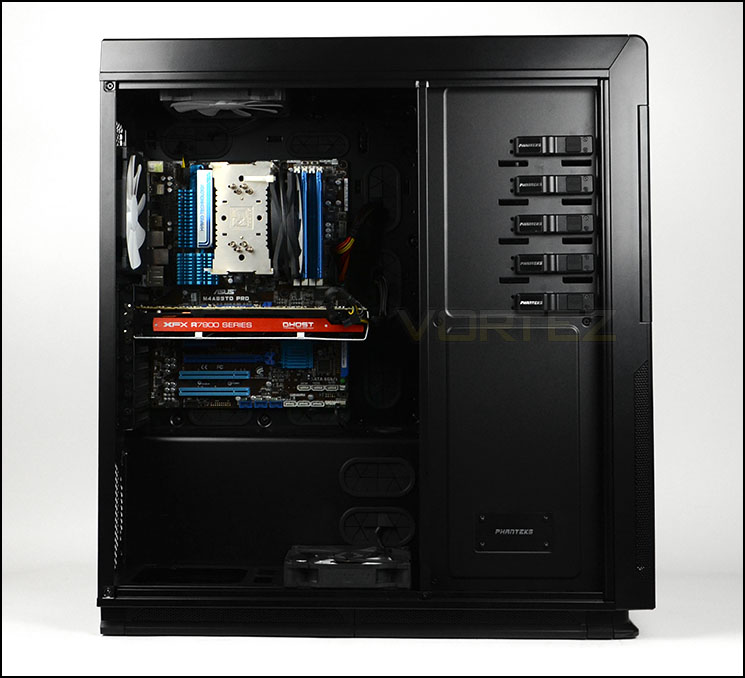
A very roomy internal layout with hardware installed
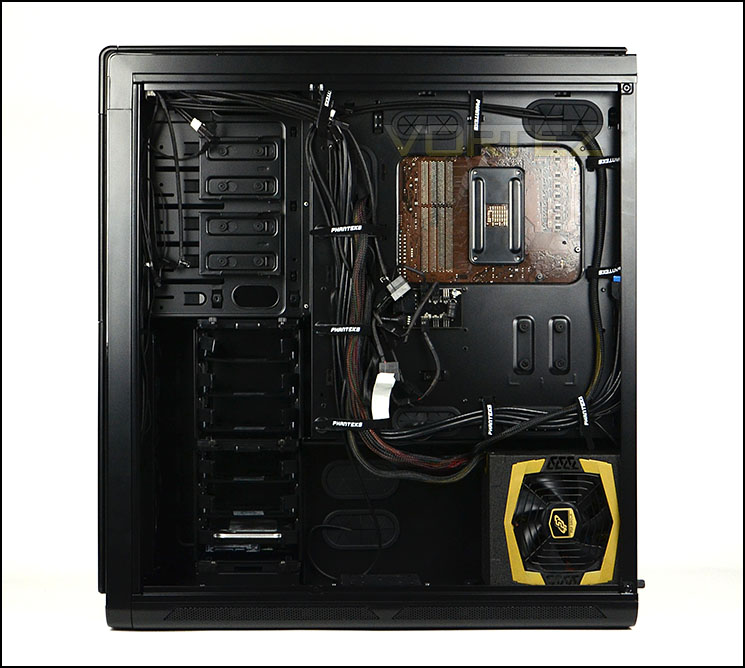
Cable management is a particular forte
Installing storage drivers within Primo is easy thanks to the tool-free design mechanisms. 3.5” drives simply have to be positioned within the tray, the sides are clipped into the mounting holes and that’s it. 2.5” drives require screws on the underside.
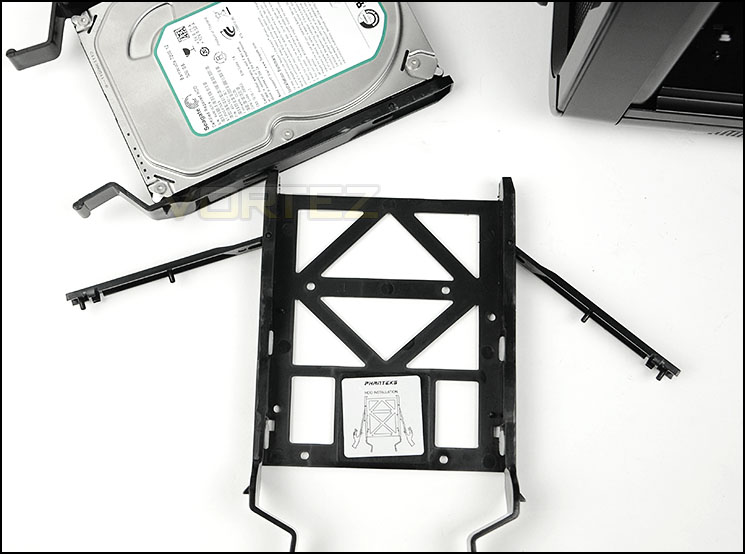
Installing HDDs is easy thanks to tool-free trays
Clearance – CPU cooler, GPU
The clearance options inside a chassis are paramount to system builders since it highlights what hardware will be compatible with a specific case. Clearance is an aspect which Primo specialises in, Phanteks have designed this case with numerous water-cooling options.
To begin with, the CPU cooler clearance is approximately 207mm – making way for oodles of space for tall CPU coolers. Flagship offerings such as the popular Noctua NH-D14 which are just 160mm will have no problems whatsoever inside Primo.
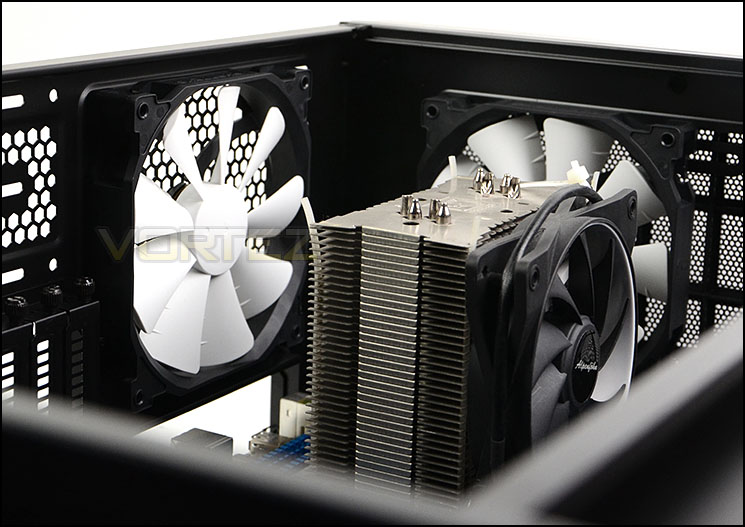
Massive clearance for CPU coolers
The graphics card clearance is a different matter however, there are a variety of options available. If you have a graphics card over 9.5” in length the plastic cover on the concealment bracket will need to be removed from Primo in order to allow longer cards to fit. If your card is over 10.5″ then the bracket will need to be removed altogether. Our XFX HD 7970 DD which is 10.5” required the plastic cover removing from the bracket.
With the bracket/cover taken out of the case, cards up to 13.78” will fit inside Primo before the card touches the HDD cage – the HDD cage can also be taken out, allowing unlimited space for anything currently on the market.
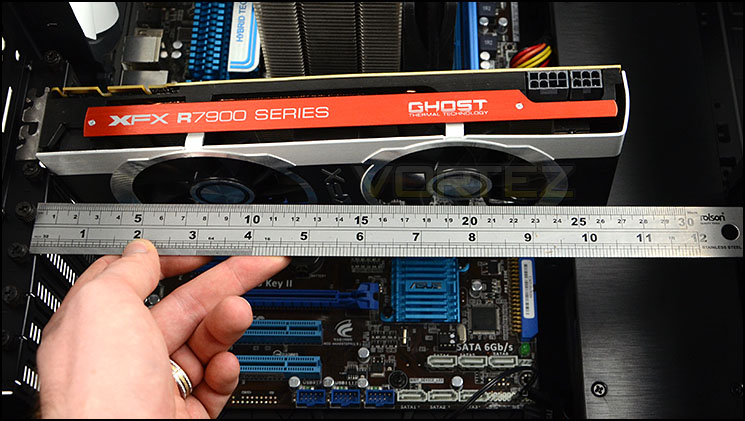
Reservoir bracket can cause obstruction for some graphics cards
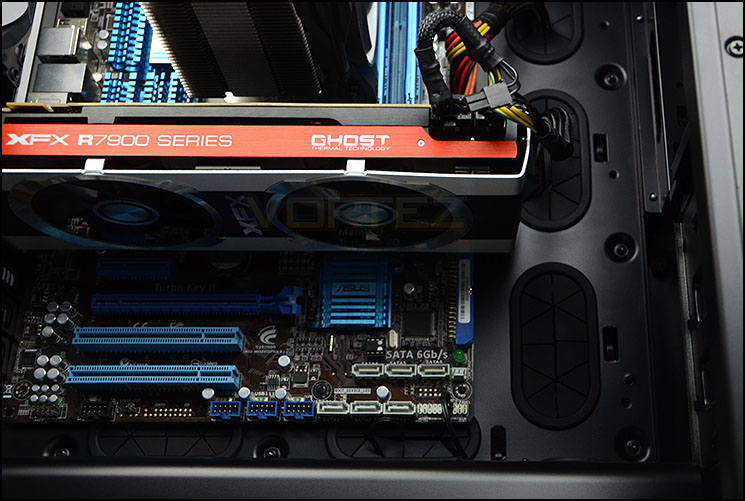
Support for long graphics cards
Clearance – Water cooling, Cable Mangement
The water cooling options within Primo are definitely a highlight with this case. It has a multitude of orientations available for those wanting to go down the water or liquid cooling route. Phanteks have produced a video demonstrating the different installation regions available:
The video above details all of the available options inside Primo but we have chosen to show common areas using popular hardware.
At the top of Primo, the case has enough space and mounting holes for including a 480mm radiator – below we installed a Phobya G-Charger 360mm. This is radiator is 6cm thick and still has enough clearance for the top of the motherboard.
Popular ALC offerings such as Corsair H100 will fit at the top also.
The top of Primo, supporting up to 480mm radiators
At the bottom of Primo, again up to 480mm radiators can be installed – the HDD cages need to be removed though. Without removing the HDD cages our Phobya G-Charger 240mm can fit and cooling fans on both sides can be fitted since the motherboard is such a long distance away.
Various options at the bottom of Primo
On the outer edge of the HDD cage there are mounting holes allowing fans and radiators to be attached. Unfortunately our 6cm thick Phobya G-Charger would not fit in this area but the Corsair H100 would fit.
Thinner radiators fit on the edge of the HDD cage
In terms of cable management clearance, there is lots of space behind the motherboard tray – especially in the cavity where the PSU resides.
Directly behind the motherboard tray where most of the cables are routed, there is approximately 3cm which is more than generous amount.
Clearance behind the motherboard tray – 3cm
Thermal Performance Testing
Primo has a plethora of cooling fans installed within its chassis. There are a total of 5x 140mm (PH-F140SP) fans. Two exhaust at the top and rear, and three intakes at the bottom and front.
To discover the thermal performance of the Primo we will record idle temperatures after 20 minutes from a cold boot. We will then stress the system and temperatures will again be monitored after 30 minutes have elapsed.
For the purpose of accurate analysis the idle and load temperatures for CPU and GPU will be recorded and the range between idle and load will be calculated to determine how efficient cooling is. Fan controller will be set to “high”.
NOTE: Ambient temperature is 20C
System Components
CPU AMD Phenom II X6 1055T 2.8GHz
Motherboard ASUS M4A89TD PRO
Graphics NVIDIA GTX 480 (Different from card pictured)
Memory 4GB Kingston HyperX DDR3
HDD Samsung Spinpoint 500GB SATA-II
PSU FSP AURUM GOLD 650M
Motherboard ASUS M4A89TD PRO
Graphics NVIDIA GTX 480 (Different from card pictured)
Memory 4GB Kingston HyperX DDR3
HDD Samsung Spinpoint 500GB SATA-II
PSU FSP AURUM GOLD 650M
Noise
Having five cooling fans inside Primo does mean there is some noise to contend with but it isn’t overly disruptive.
Conclusion
Phanteks Enthoo Primo can be summed up in just one word: monolith.
For a first-time product, Phanteks really need to be commended for such a valiant effort. We have been really impressed by what we have seen in this new computer chassis and we can certainly recommend it.
From a build quality point of view, Primo oozes excellence. It’s been a while since we have seen such good quality engineering and thoughtful design work. It’s quite clear Phanteks have spent a lot of time carefully planning this project, implementing some brilliant features whilst maintaining generous amounts of clearance for an assortment of hardware.
After just an initial observation it’s quite obvious this chassis is touted as being equipped for water-cooling support. Inside, there are numerous sizes and orientations available for avid cooling enthusiasts to plan out a new system build. In this particular aspect, Primo has extensive coverage which other cases on the market can only dream of offering.
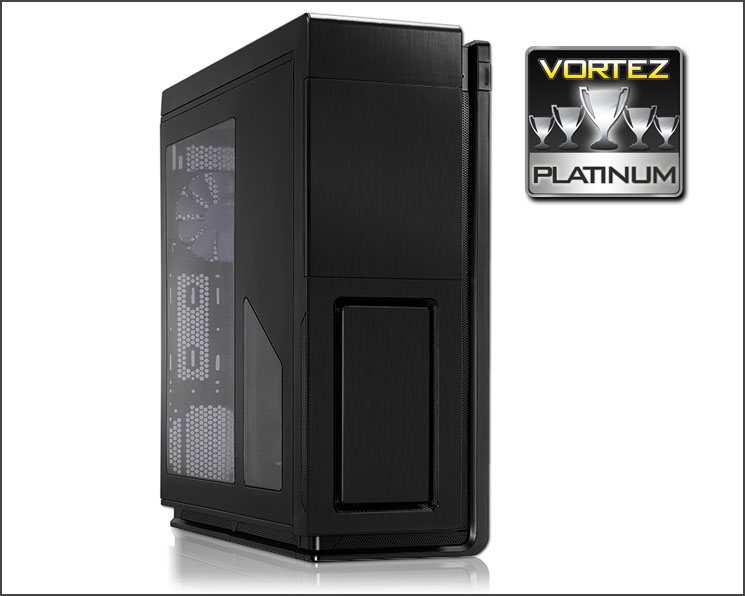
The only complaint we have about Primo is the lack of XL-ATX support – which we really expect from a case of this stature.
Priced at £200 (GBP) / $250 (USD) many of you, (as we were) will be surprised what is on offer for this sum of money. Other cases in the same price-range do not offer the same quality and features – Primo is simply in another league.
VIDEO REVIEW – VORTEZ TV
Enthoo Primo is a fantastic first attempt at computer case design from Phanteks. They have certainly excelled themselves in almost every area and cooling enthusiasts will be pleased to discover countless options for radiators available inside this stunning chassis. Other case manufacturers ought to be very afraid… We very rarely hand out our prestigious platinum award, but Primo has excelled and we are pleased to highly recommend this case.
Pros
+ Visual distinctive and attractive
+ Premium build quality without compromise
+ Thoughtful engineering/design
+ Strong cooling performance
+ Excellent clearance options
+ Thorough water cooling support
+ Brilliant cable management
+ Good value for money
Cons
– No XL-ATX support
+ Visual distinctive and attractive
+ Premium build quality without compromise
+ Thoughtful engineering/design
+ Strong cooling performance
+ Excellent clearance options
+ Thorough water cooling support
+ Brilliant cable management
+ Good value for money
Cons
– No XL-ATX support

Click here for an explanation of our awards at Vortez.net.


