A two-bay and four-bay NAS designed for Home and SOHO users; TS-231 and TS-451 seek to enhance the network with the help of a dual-core CPUs and DDR3 memory.

Product on Review: TS-231 & TS-451
Manufacturer & Sponsor: QNAP
Street Price:
TS-231: £119 GBP / $250 USD
TS-451: £304 GBP $440 USD
QNAP has been around since 2004 which may not sound an extremely long time at all, but in their time spent inside the networking sector they’ve made inroads into a rather competitive arena. Their current portfolio includes a large selection of network-related devices for enterprise, SMB, Home and SOHO users. This is actually our first outing with QNAP and after hearing good things about the brand we’re anticipating good things today.
Today we’ll be taking a look at what QNAP has to offer in the TS-231 and TS-451 – two NAS units which are designed to cater for Home and SOHO users. Both products utilise dual-core processors and fast memory on the hardware-side and take advantage of the new QTS 4.2 OS on the software-side.
About QNAP
QNAP Systems, Inc., as its brand promise “Quality Network Appliance Provider”, aims to deliver comprehensive offerings of cutting edge network attached storage (NAS) and network video recorder (NVR) solutions featured with ease-of-use, robust operation, large storage capacity, and trustworthy reliability. QNAP integrates technologies and designs to bring forth quality products that effectively improve business efficiency on file sharing, virtualization applications, storage management and surveillance in the business environments, as well as enrich entertainment life for home users with the offering of a fun multimedia center experience. Headquartered in Taipei, QNAP delivers its solutions to the global market with nonstop innovation and passion..
Hardware Specifications
TS-231
CPU
Freescale™ ARM®v7 Cortex®-A9 dual-core 1.2GHz processor
Floating Point Unit
Yes
Hardware Encryption Engine
Yes
DRAM
512MB
Flash Memory
512MB
Hard Disk Drive
2 x 3.5″or 2.5″ SATA 6Gb/s, SATA 3Gb/s HDD or SSD
NOTE:
1. The system is shipped without HDD.
2. For the HDD compatibility list, please visit www.qnap.com/compatibility
Hard Disk Tray
2 x Hot swappable tray
LAN Port
2 x Gigabit RJ-45 Ethernet port
LED Indicators
Power, Status, LAN, USB, HDD1, HDD2
USB/eSATA
3 x USB 3.0 port (Front: 1, Rear: 2)
1 x eSATA port (Rear)
Support USB & eSATA storage devices, USB printer, pen drive, and UPS etc.
Buttons
Power, USB One-Touch-Copy, reset
Alarm Buzzer
System warning
Form Factor
Tower
Dimensions
168.5 (H) x 102(W) x 225(D) mm
6.63(H) x 4.02(W) x 8.86(D) inch
Weight
Net weight: 1.28kg/ 2.82 lb; Gross weight: 2.32kg/ 5.11 lb
Power Consumption (W)
HDD standby: 9.78W;
In operation: 20.56W
(with 2TB HDD installed)
Operating Temperature
0 – 40˚C / 32~104°F
Humidity
5 ~ 95% RH non-condensing, wet bulb: 27˚C
Power Supply
External Power Adapter, 60W, 100-240V
Secure Design
Kensington security slot for theft prevention
Fan
1 x quiet cooling fan (7 cm, 12V DC)
Certification
FCC, CE, BSMI, VCCI, C-TICK
Freescale™ ARM®v7 Cortex®-A9 dual-core 1.2GHz processor
Floating Point Unit
Yes
Hardware Encryption Engine
Yes
DRAM
512MB
Flash Memory
512MB
Hard Disk Drive
2 x 3.5″or 2.5″ SATA 6Gb/s, SATA 3Gb/s HDD or SSD
NOTE:
1. The system is shipped without HDD.
2. For the HDD compatibility list, please visit www.qnap.com/compatibility
Hard Disk Tray
2 x Hot swappable tray
LAN Port
2 x Gigabit RJ-45 Ethernet port
LED Indicators
Power, Status, LAN, USB, HDD1, HDD2
USB/eSATA
3 x USB 3.0 port (Front: 1, Rear: 2)
1 x eSATA port (Rear)
Support USB & eSATA storage devices, USB printer, pen drive, and UPS etc.
Buttons
Power, USB One-Touch-Copy, reset
Alarm Buzzer
System warning
Form Factor
Tower
Dimensions
168.5 (H) x 102(W) x 225(D) mm
6.63(H) x 4.02(W) x 8.86(D) inch
Weight
Net weight: 1.28kg/ 2.82 lb; Gross weight: 2.32kg/ 5.11 lb
Power Consumption (W)
HDD standby: 9.78W;
In operation: 20.56W
(with 2TB HDD installed)
Operating Temperature
0 – 40˚C / 32~104°F
Humidity
5 ~ 95% RH non-condensing, wet bulb: 27˚C
Power Supply
External Power Adapter, 60W, 100-240V
Secure Design
Kensington security slot for theft prevention
Fan
1 x quiet cooling fan (7 cm, 12V DC)
Certification
FCC, CE, BSMI, VCCI, C-TICK
TS-451
CPU
Intel® Celeron® 2.41GHz dual-core processor (burst up to 2.58GHz)
DRAM
TS-451-4G: 4GB DDR3L RAM (2GB x 2)
TS-451: 1GB DDR3L RAM
Total memory slots: 2 (expandable up to 8GB)
NOTE:
1. When installing two memory modules, please ensure that they are the same size and ideally use the same type of RAM for both memory slots.
2. For the information of RAM module installation and compatible NAS models, please refer to the QNAP RAM Module Installation Guide
Flash Memory
512MB DOM
Hard Disk Drive
4 x 3.5” or 2.5” SATA 6Gb/s, SATA 3Gb/s hard drive or SSD
NOTE:
1. The system is shipped without HDD.
2. For the HDD compatibility list, please visit www.qnap.com/compatibility
Hard Disk Tray
4 x Hot-swappable tray
LAN Port
2 x Gigabit RJ-45 Ethernet port
LED Indicators
Status, LAN, USB, HDD 1-4
USB
2 x USB 3.0 port (Front: 1, Rear: 1)
2 x USB 2.0 port (Rear: 2)
Support USB printer, pen drive, and USB UPS etc.
HDMI
1
Buttons
Power/Status, USB One-Touch-Backup, reset
Alarm Buzzer
System warning
IR Receiver
MCE-compatible
Form Factor
Tower
Dimensions
177(H) x 180(W) x 235(D) mm
6.97(H) x 7.09(W) x 9.25(D) inch
Weight
Net: 3 kg (6.61 lbs) / Gross: 4.3 kg (9.48 lbs)
Power Consumption (W)
HDD standby: 15.85W
S3 sleep: 0.55W
In operation: 31.07W
(with 4 x 1TB HDD installed)
Temperature
0-40˚C
Humidity
5~95% RH non-condensing, wet bulb: 27˚C
Power Supply
External Power Adapter, 90W, 100-240V
Secure Design
Kensington security slot for theft prevention
Fan
1 x quiet cooling fan (12 cm, 12V DC)
Intel® Celeron® 2.41GHz dual-core processor (burst up to 2.58GHz)
DRAM
TS-451-4G: 4GB DDR3L RAM (2GB x 2)
TS-451: 1GB DDR3L RAM
Total memory slots: 2 (expandable up to 8GB)
NOTE:
1. When installing two memory modules, please ensure that they are the same size and ideally use the same type of RAM for both memory slots.
2. For the information of RAM module installation and compatible NAS models, please refer to the QNAP RAM Module Installation Guide
Flash Memory
512MB DOM
Hard Disk Drive
4 x 3.5” or 2.5” SATA 6Gb/s, SATA 3Gb/s hard drive or SSD
NOTE:
1. The system is shipped without HDD.
2. For the HDD compatibility list, please visit www.qnap.com/compatibility
Hard Disk Tray
4 x Hot-swappable tray
LAN Port
2 x Gigabit RJ-45 Ethernet port
LED Indicators
Status, LAN, USB, HDD 1-4
USB
2 x USB 3.0 port (Front: 1, Rear: 1)
2 x USB 2.0 port (Rear: 2)
Support USB printer, pen drive, and USB UPS etc.
HDMI
1
Buttons
Power/Status, USB One-Touch-Backup, reset
Alarm Buzzer
System warning
IR Receiver
MCE-compatible
Form Factor
Tower
Dimensions
177(H) x 180(W) x 235(D) mm
6.97(H) x 7.09(W) x 9.25(D) inch
Weight
Net: 3 kg (6.61 lbs) / Gross: 4.3 kg (9.48 lbs)
Power Consumption (W)
HDD standby: 15.85W
S3 sleep: 0.55W
In operation: 31.07W
(with 4 x 1TB HDD installed)
Temperature
0-40˚C
Humidity
5~95% RH non-condensing, wet bulb: 27˚C
Power Supply
External Power Adapter, 90W, 100-240V
Secure Design
Kensington security slot for theft prevention
Fan
1 x quiet cooling fan (12 cm, 12V DC)
Packaging & Bundle
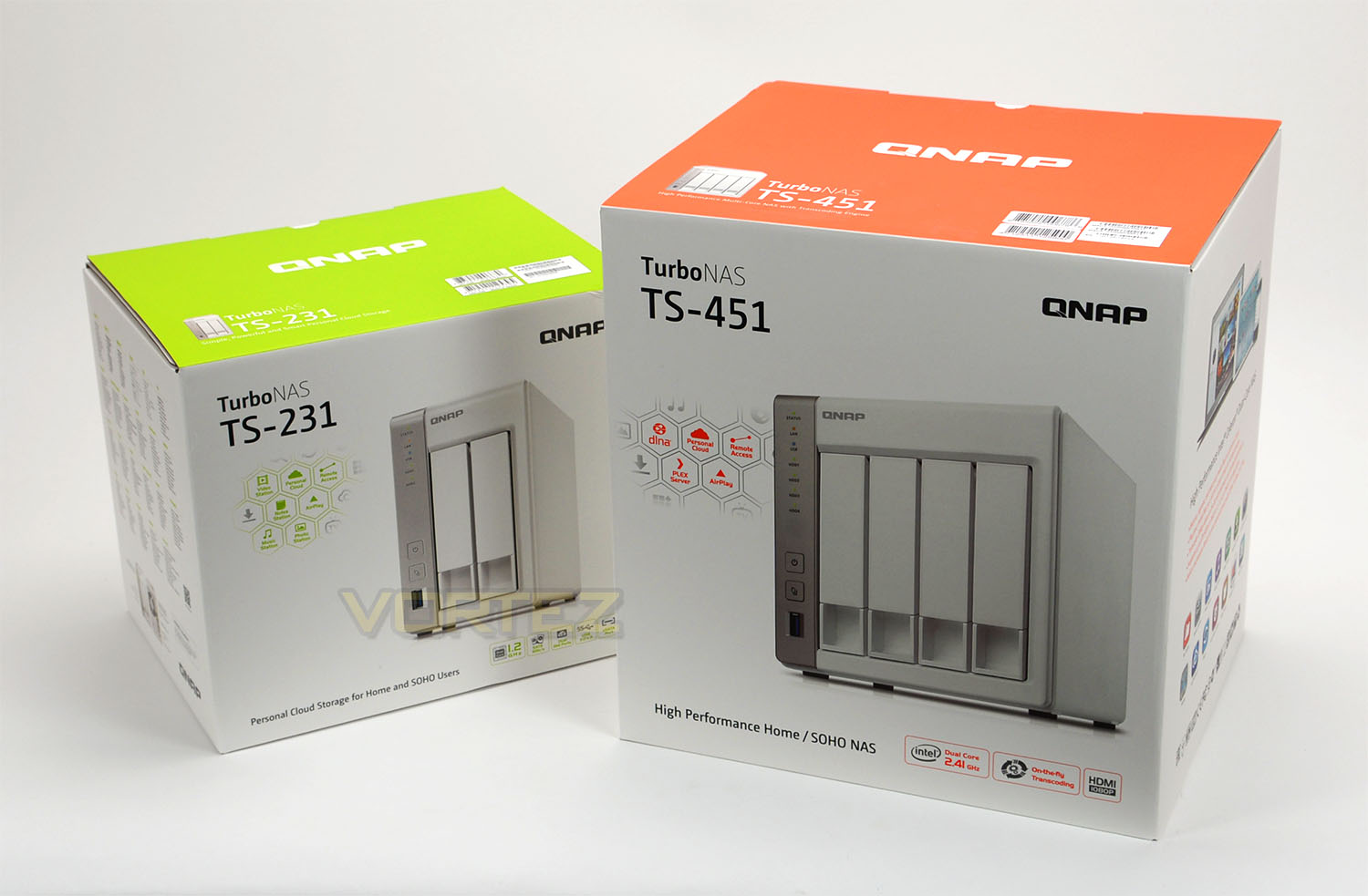
Both the 231 and 451 are presented in professional, high-quality packaging. These boxes feature a depiction of the units on the front and some of the key features are listed. Around the back and sides there are further details and technical specifications.
Inside both boxes all of the included items are compartmentalised with cardboard sections and foam padding helps to protect the server units.
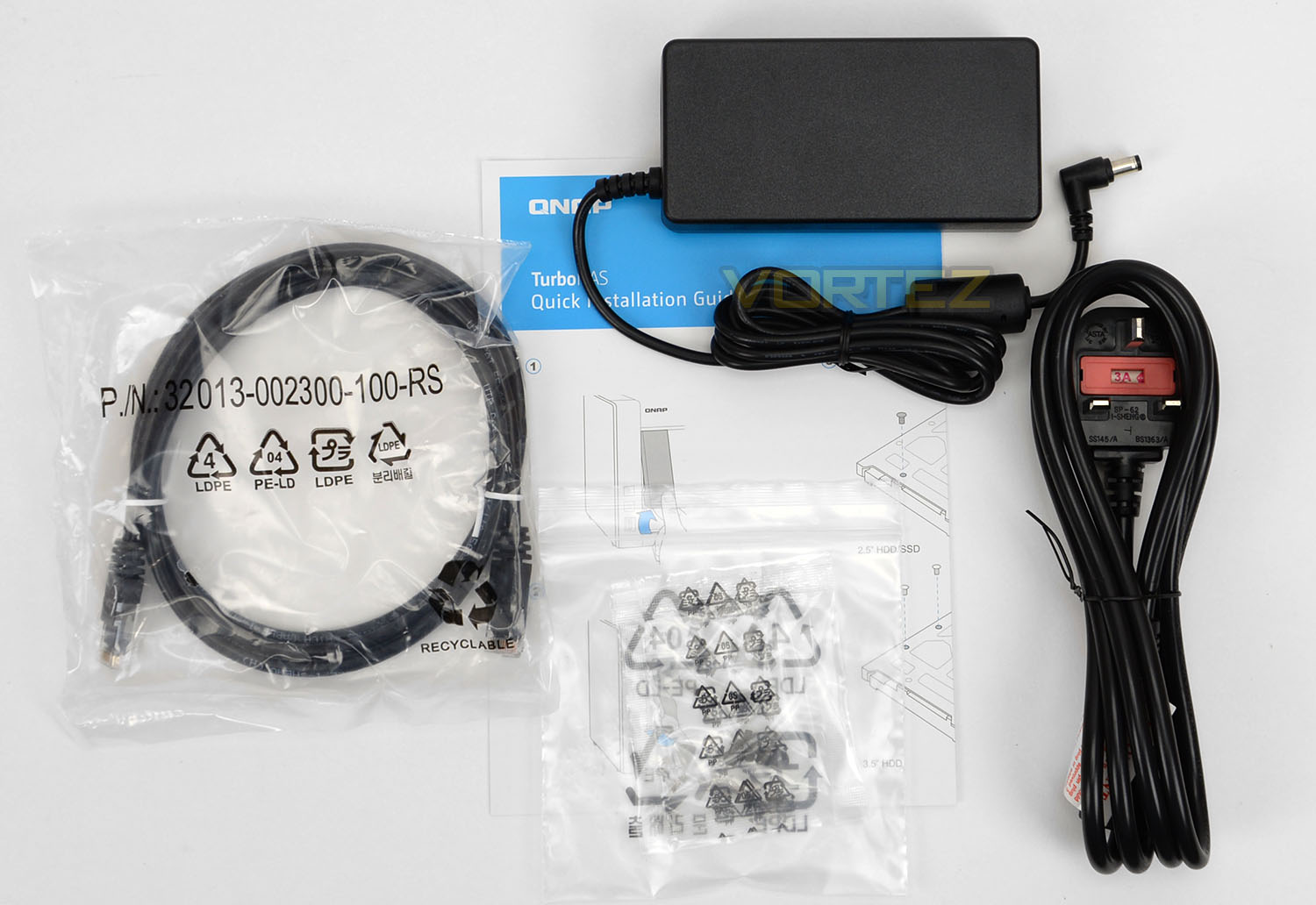
The 231 arrives with the following items:
• 60W charging unit + cable
• 1x Ethernet cable – CAT5e
• HDD mounting screws
• Installation guide
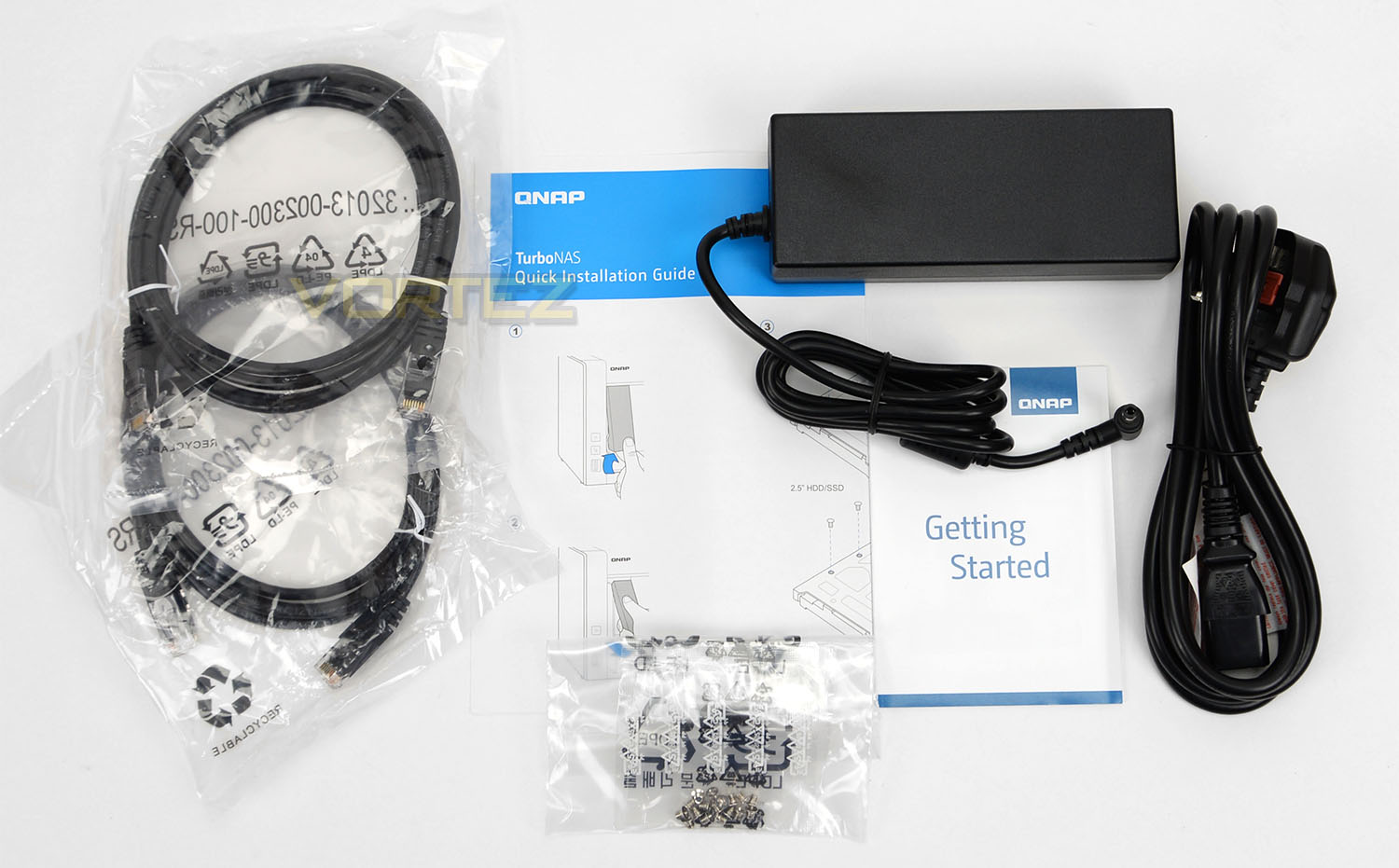
While the larger 451 comes with:
• 90W charging unit + cable
• 2x Ethernet cable – CAT5e
• HDD mounting screws
• Installation guide
So, the larger NAS unit makes use of a bigger charging unit both in the physical design and power delivery. An extra CAT5e cable is also supplied with the 451.
Closer Look
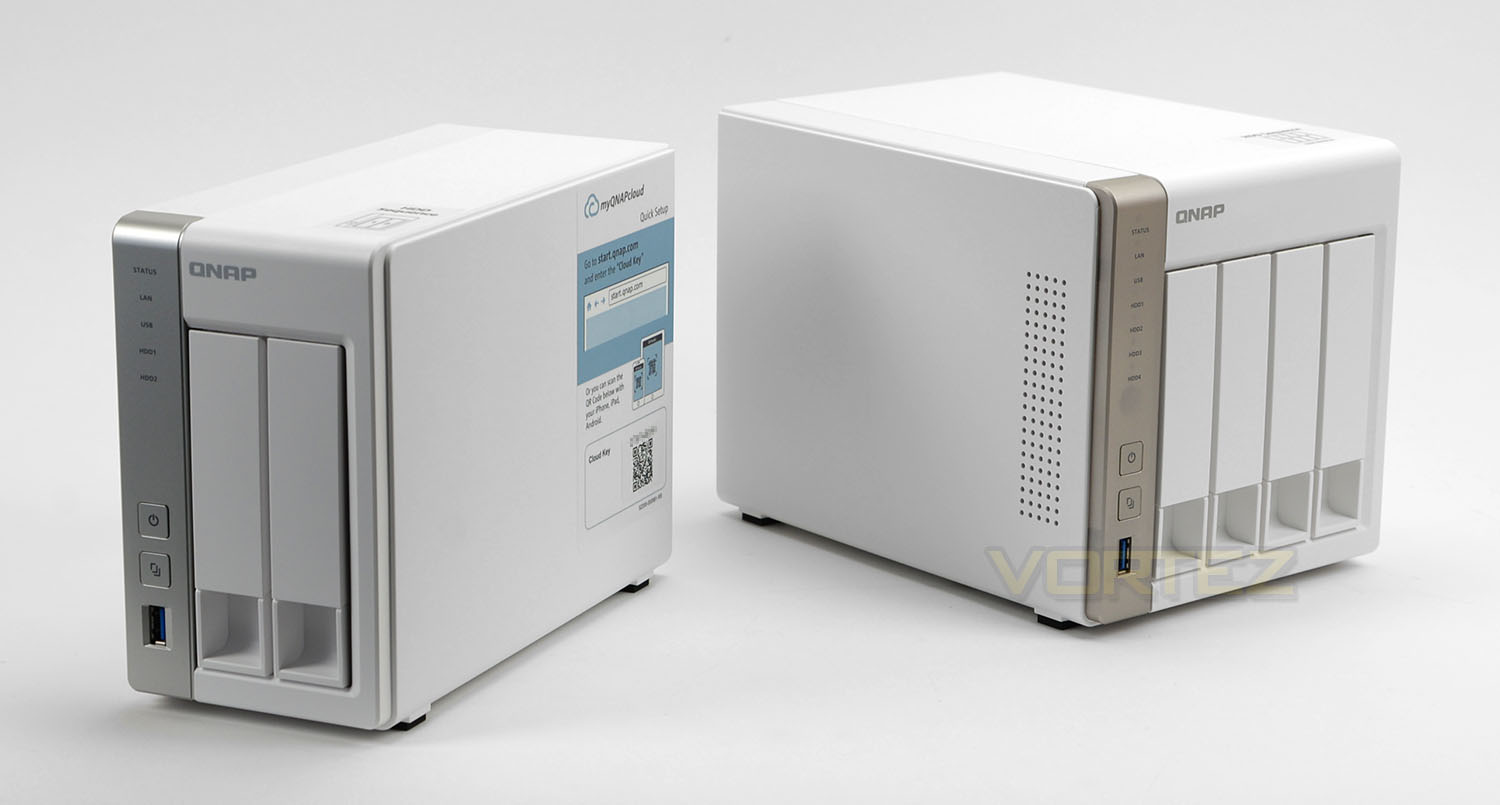
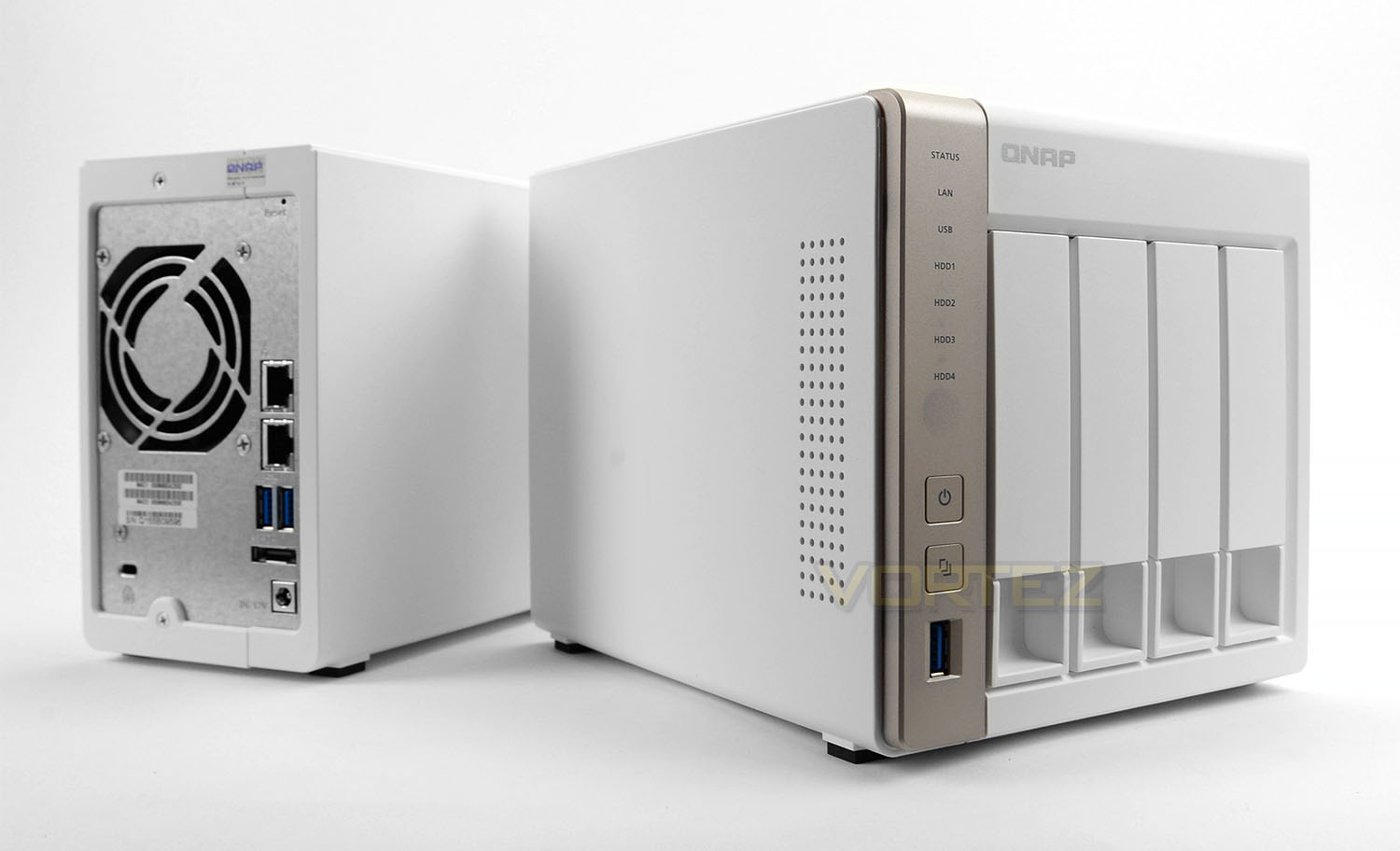
QNAP’s 231 and 451 both adopt similar styling; matt white panels surround each unit, providing a professional and classy external design. The aesthetics should fit in with most home offices, though white can sometimes stand out since most appliances tend to be black. We really like the clean look that both units bring and after handling either NAS we can confirm that these units use good quality materials.
Note: the stickers on the side and top are easy to remove and do not leave any trace behind – no tearing occurs etc.
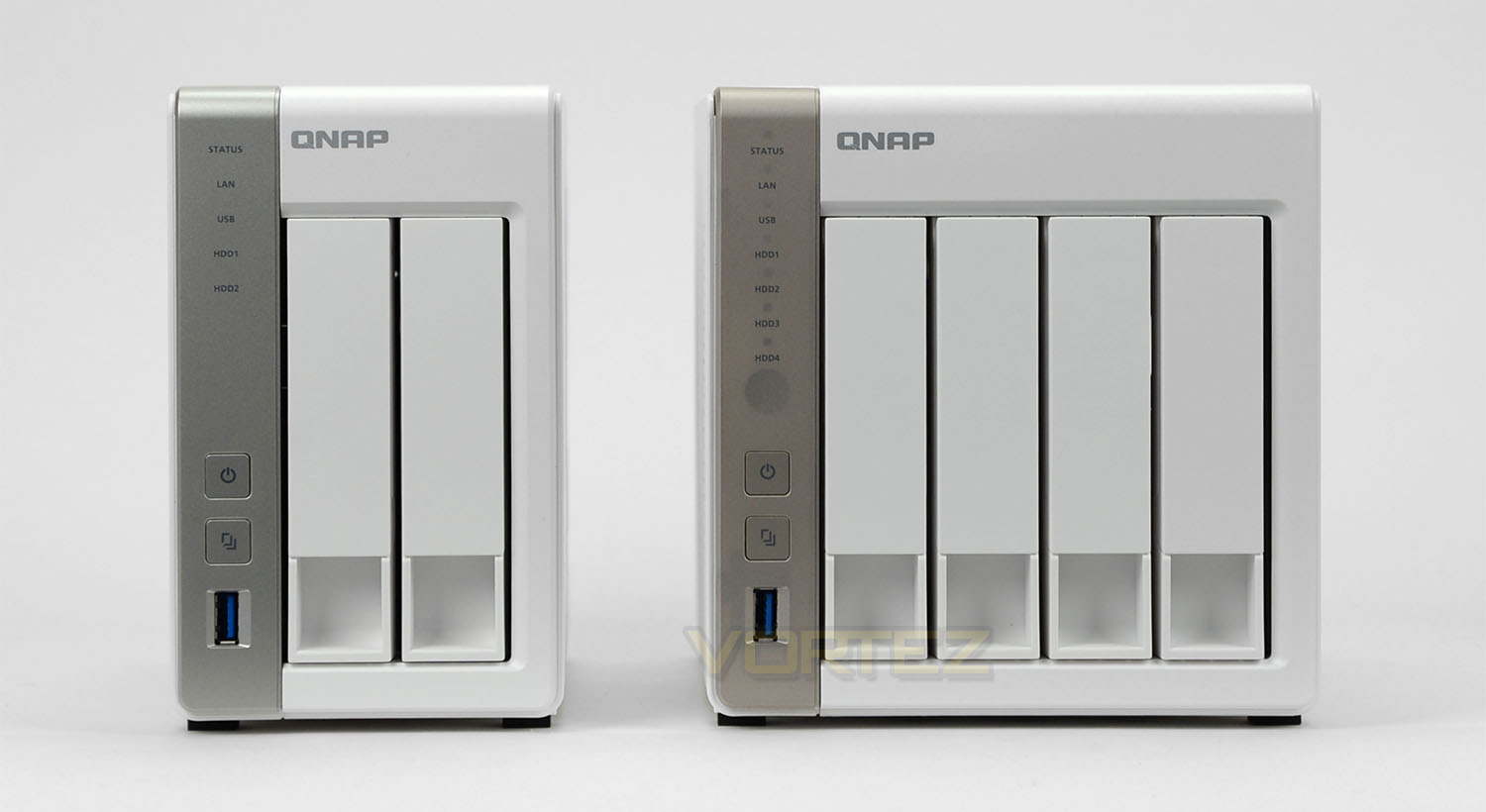
The 231 is a two-bay solution while the 451 offers four-bays – the name is obviously an indicator for this. The similarities continue at the front of each model with a silver strip running down the left-side. Oddly, the 451 has a slight bronze tone to it and there are some additional LEDs to view. Immediately next to these strips are the detachable HDD trays.
On closer inspection there are the following options on the front of 231:
• STATUS
• LAN
• USB
• HDD 1
• HDD 2
• IR Receiver
• Power button
• One touch copy button
• USB 3.0 port
While over on the 451 we have:
• STATUS
• LAN
• USB
• HDD 1
• HDD 2
• HDD 3
• HDD 4
• IR Receiver
• Power button
• One touch copy button
• USB 3.0 port
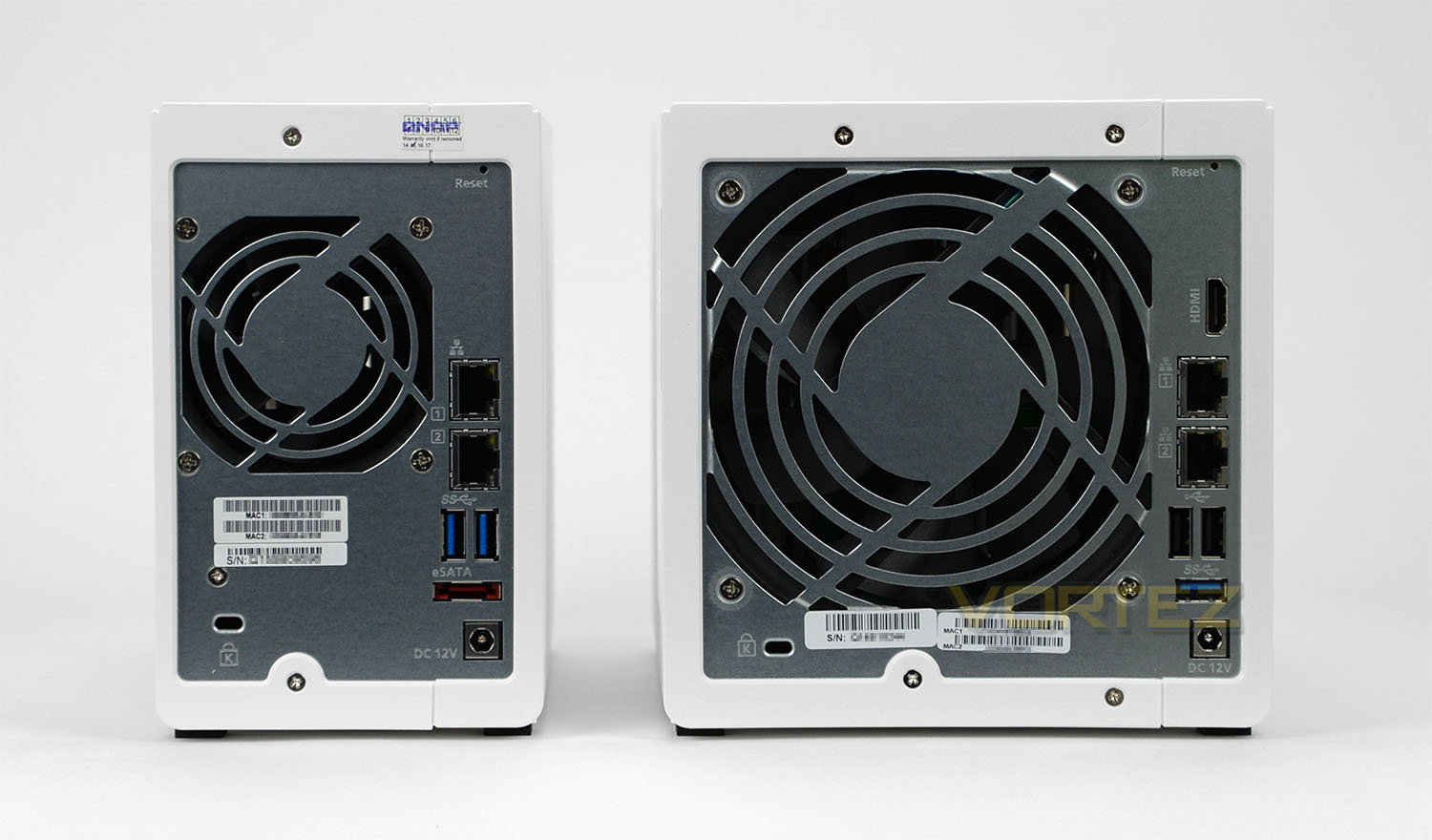
Around the back a steel panel features more ports and the openings for the pre-installed cooling fans. As we’ve seen already on the external design of both the 231 and 451, the reverse utilises high-quality materials and everything is organised in a tidy manner.
The rear of 231 consists of:
• Reset button
• 7cm cooling fan
• 2x Gigabit LAN ports
• 2x USB 3.0 ports
• 1x eSATA port
• Power connector
• Kensington lock
The rear of the 451 consists of:
• Reset button
• 12cm cooling fan
• HDMI port
• 2x Gigabit LAN ports
• 2x USB 2.0 ports
• 1x USB 3.0 port
• 1x eSATA port
• Power connector
• Kensington lock
The rear of both units reveals quite a selection of functionality most of which will be rather useful to even the average user. Having USB ports at the front and rear of the QNAP devices means that data can be shared more easily.
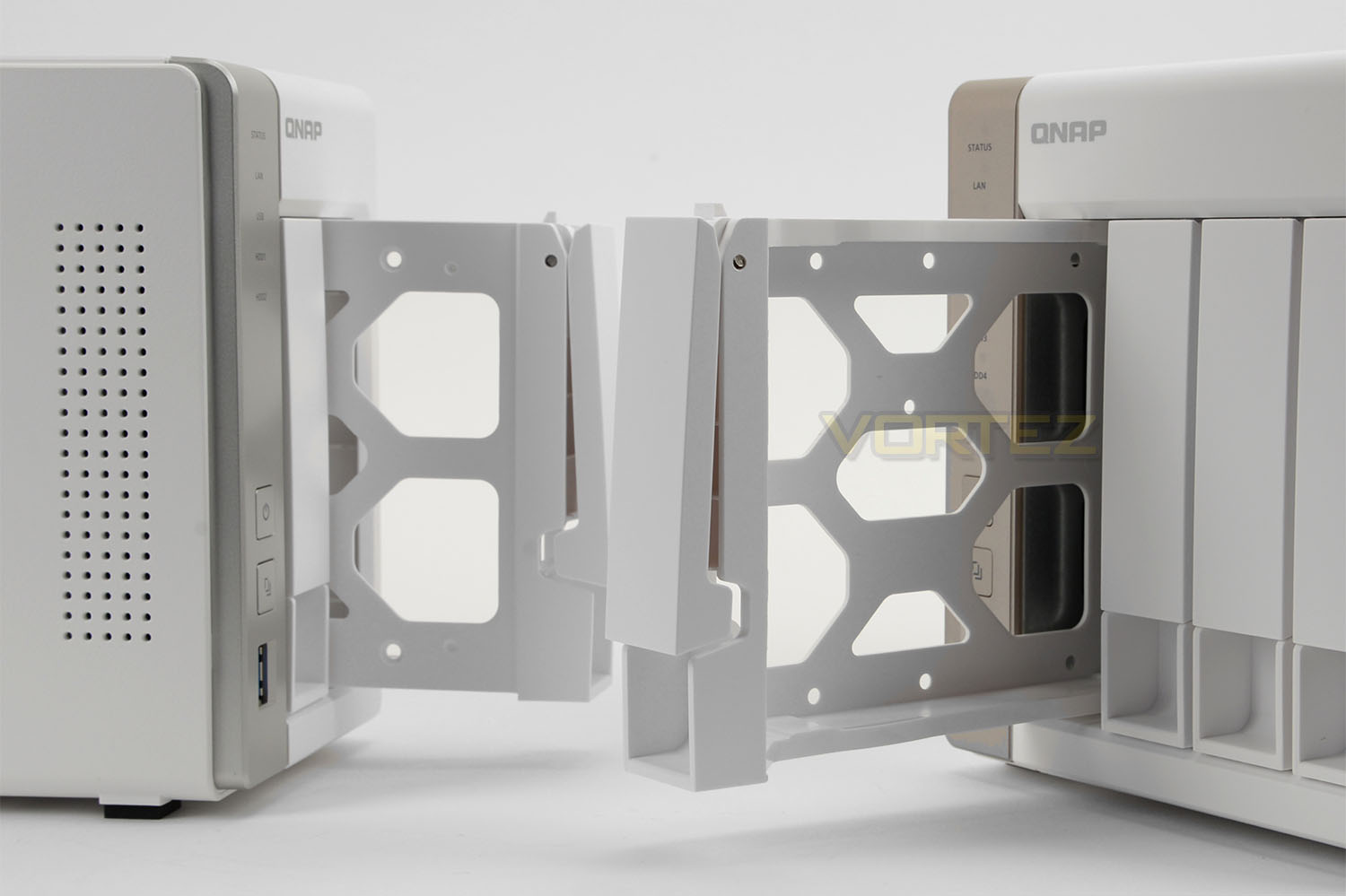
The 231 and 451 both use a traditional method for installing HDDs. The front features a series of removable trays which makes storage hot-swappable. As already mentioned, the 251 has two trays for two drives and the 451 has four trays for four drives.
The 231 supports up to 2x 8TB drives and the 451 also supports the same storage specification. 6GB/s drives are also fully supported which is great – The QNAP compatibility page lists all of the compatible storage drives for reference.
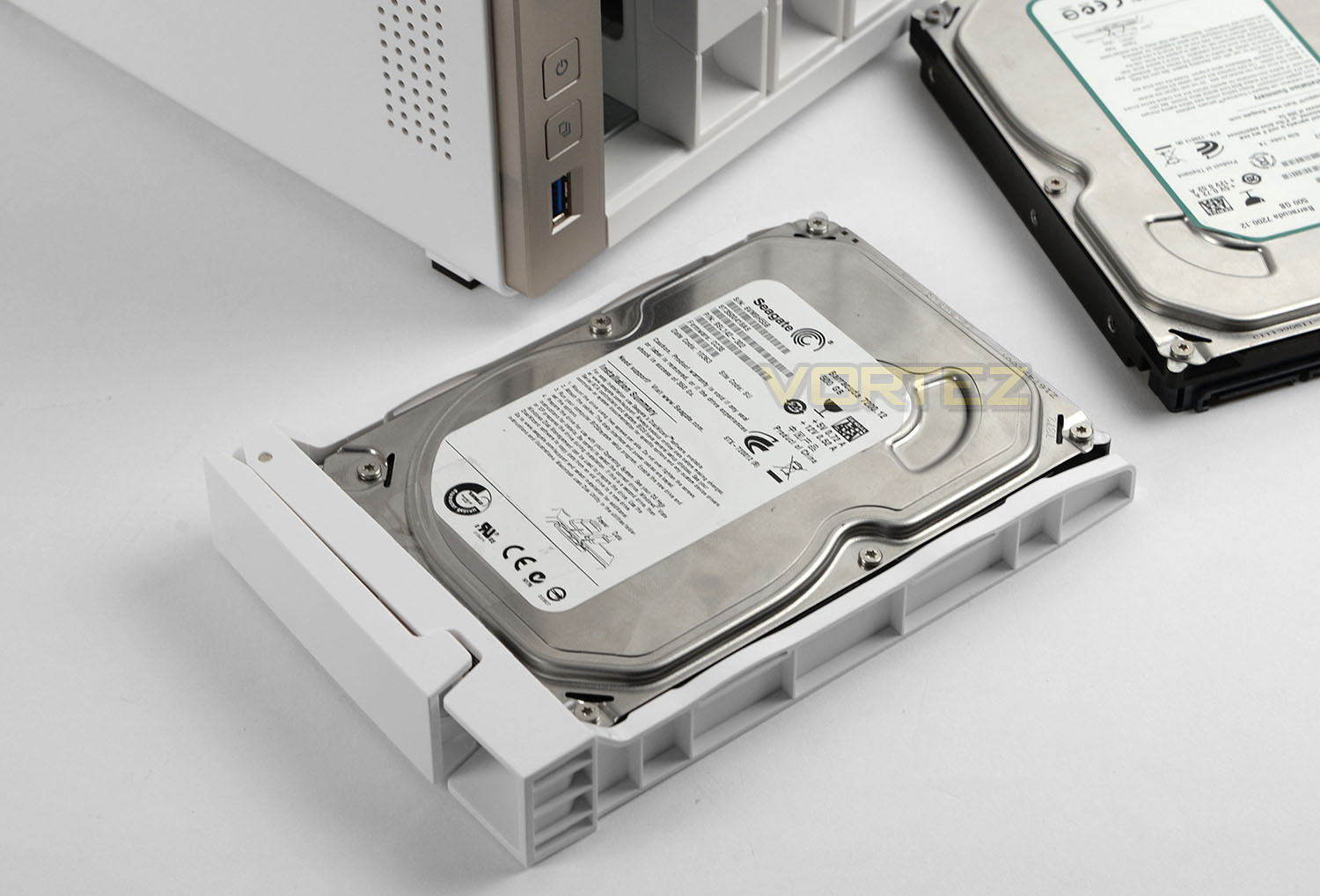
3.5” or 2.5” drives can be installed into the supplied trays – the drive is simply placed into the tray with the connection ports facing the rear and then the provided mounting screws are applied to the underside to fix the drive to the tray.
Once the drive is fixed, the tray simply slides back into the NAS and the connection ports marry up to the SATA ports within the unit.
Within the 231 we have the following hardware:
• CPU Frequency: ARM Cortex A9 1.2GHz
• Memory: 512MB
• Internal HDD/SSD: 3.5″ or 2.5″ SATA(II or III) X4
• Max Internal Capacity: 32TB (4X 8TB HDD)
Within the 451 we have the following hardware:
• CPU Frequency: Intel Celeron Dual-core 2.41GHz (Turbo to 2.58GHz)
• Memory: DDR3 1GB
• Internal HDD/SSD: 3.5″ or 2.5″ SATA(II or III) X4
• Max Internal Capacity: 16TB (4X 8TB HDD)
For NAS of this calibre we’re getting solid, capable hardware which will certainly aid multi-tasking – some rival offerings lack the speed offered by the Celeron CPU and the capacity from the DDR3 so this is very pleasing to see.
Having the option to use multiple HDDs inside each NAS paves the way for RAID configurations which almost every user would be encourage to arrange. Server-related data demands backup strategies in the event of hardware failure and thus data loss.
Configuring QNAP NAS
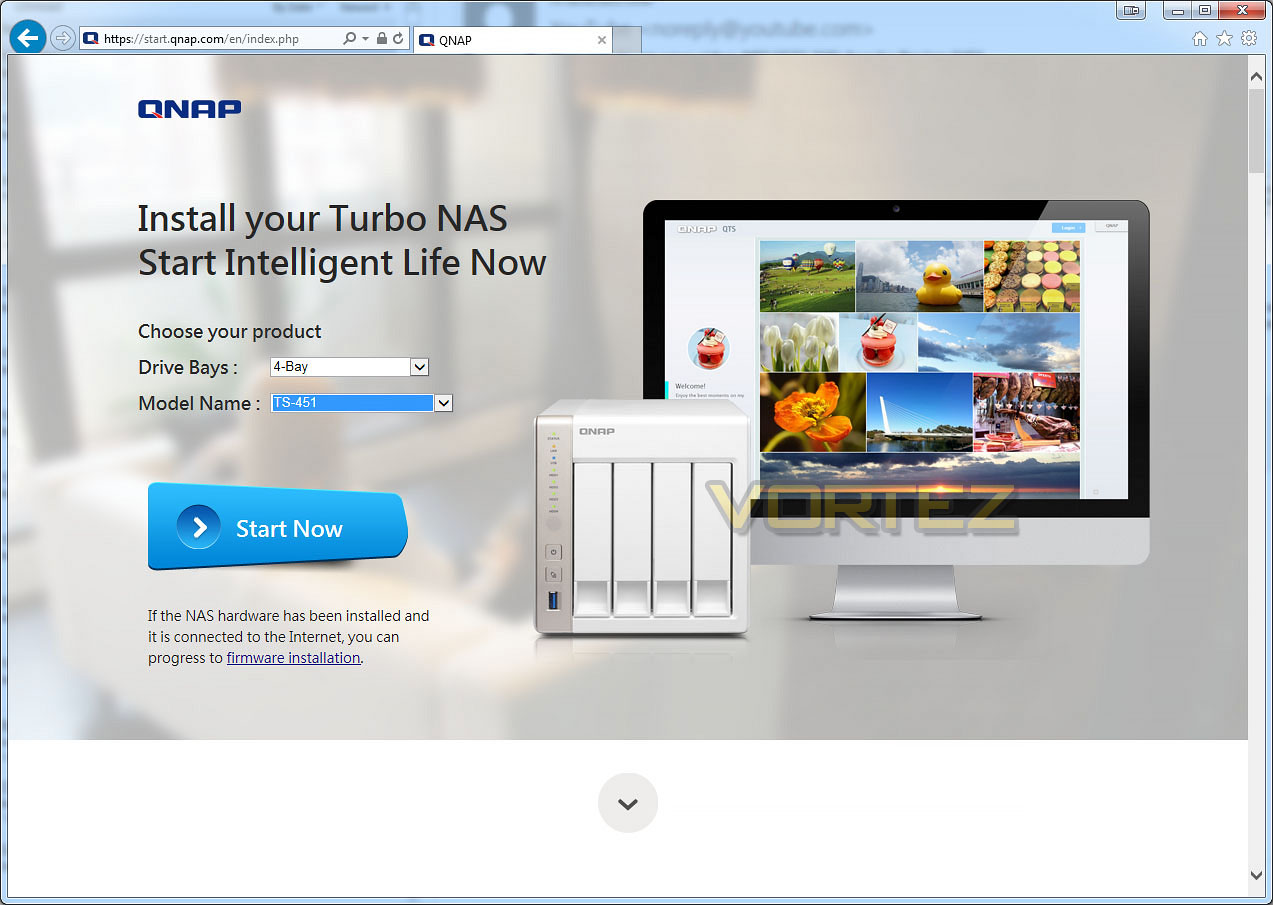
In order to get up and running with one of the QNAP NAS units we first of all need to connect the power and network cables up. Once this is done, a web browsing is opened and we navigate to “start.qnap.com”. The above page loads up and this initialises the installation process with QTS.
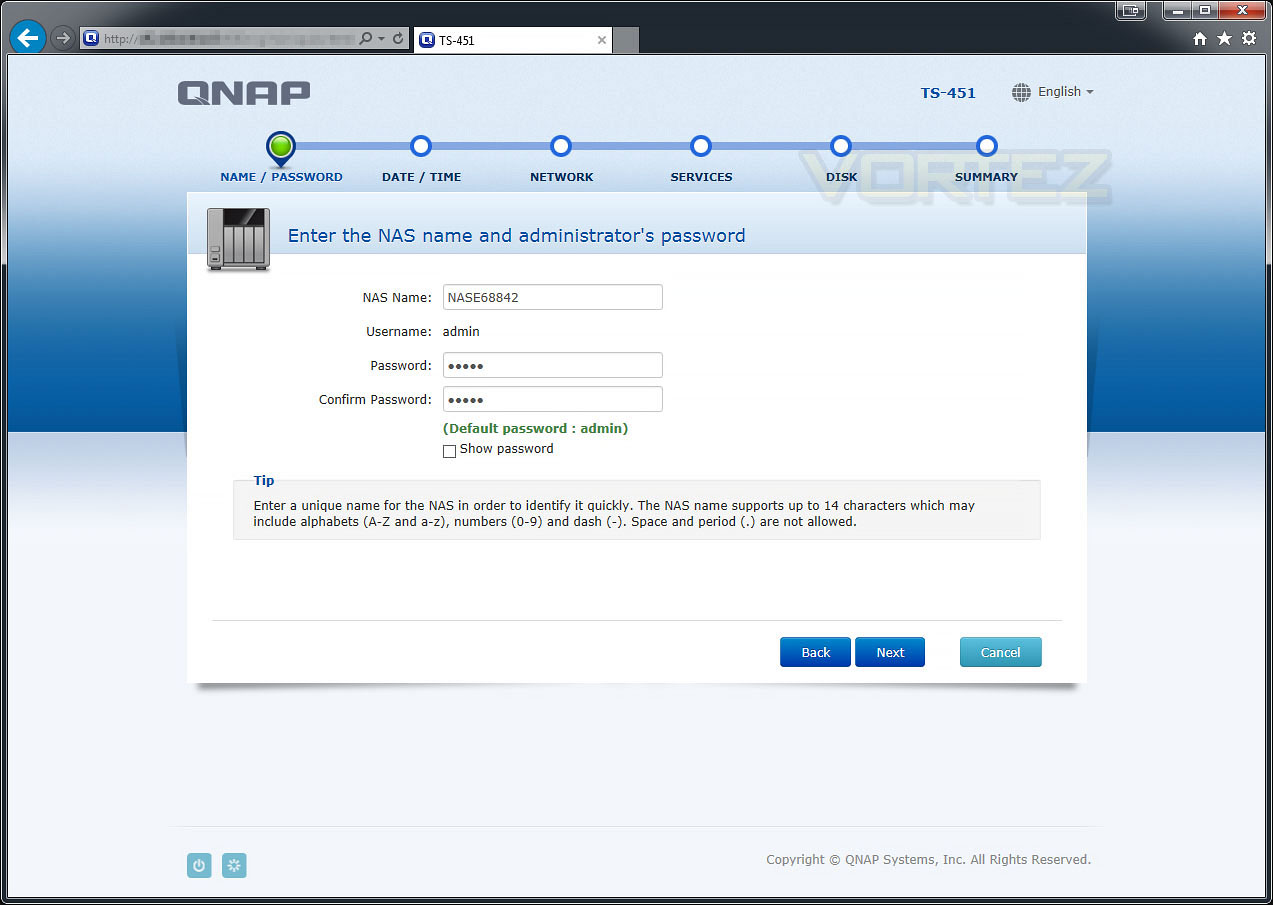
The first step in the process is to choose a name for the server and set the administrator password. The admin credentials will supply the top-level of privileges so that you can configure the various options for network usage.
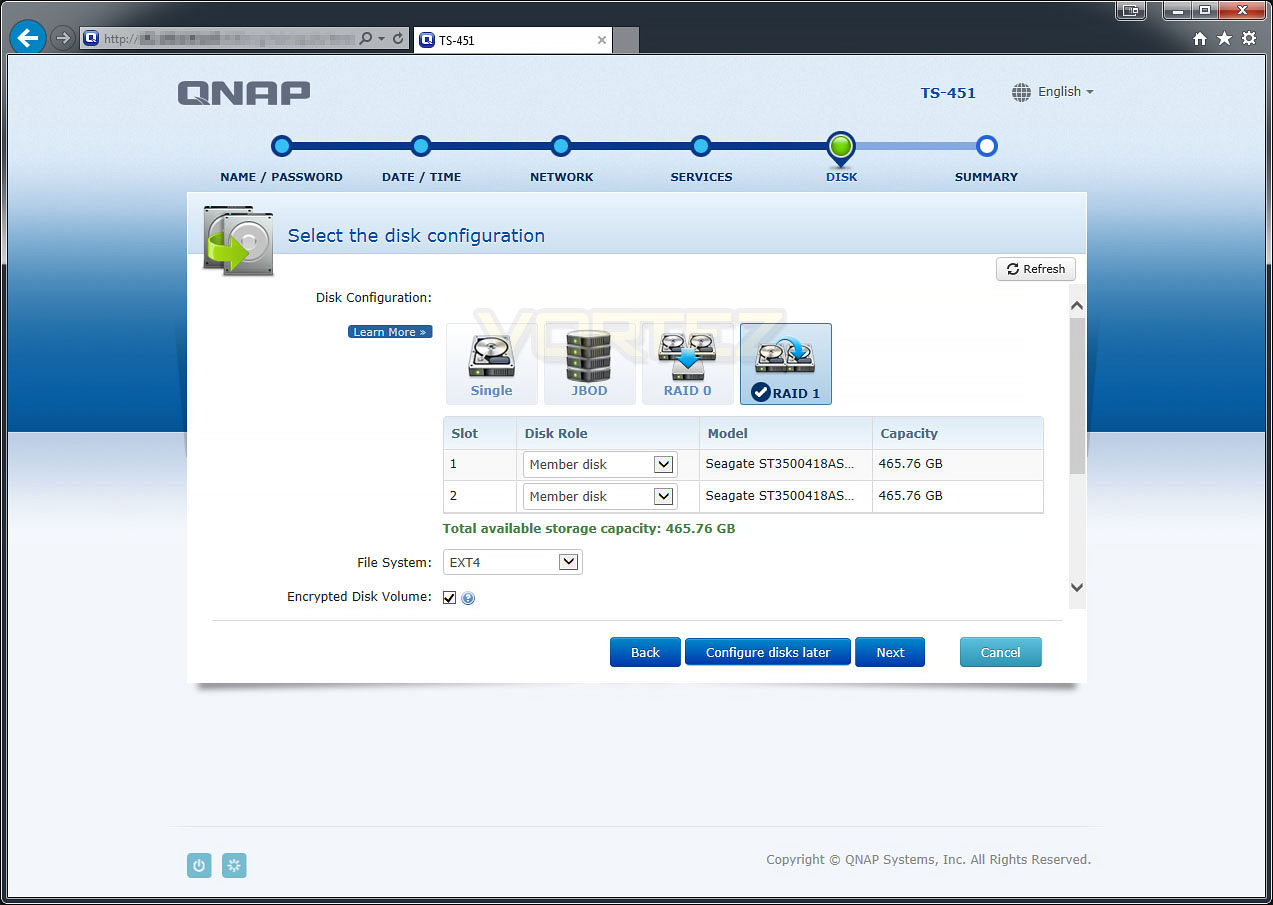
Other options need to be set which include the date/time and network/services protocols. Then we arrive at the above screen which assists with the setting up of the disk configuration. If you are planning to use more than one drive inside the NAS then you can apply a RAID array to form a backup strategy. In the above screenshot we chose to use RAID 1 so that all data is shadowed onto the secondary drive. Furthermore to this, encryption can be assigned to the drives to protect the theft of data.
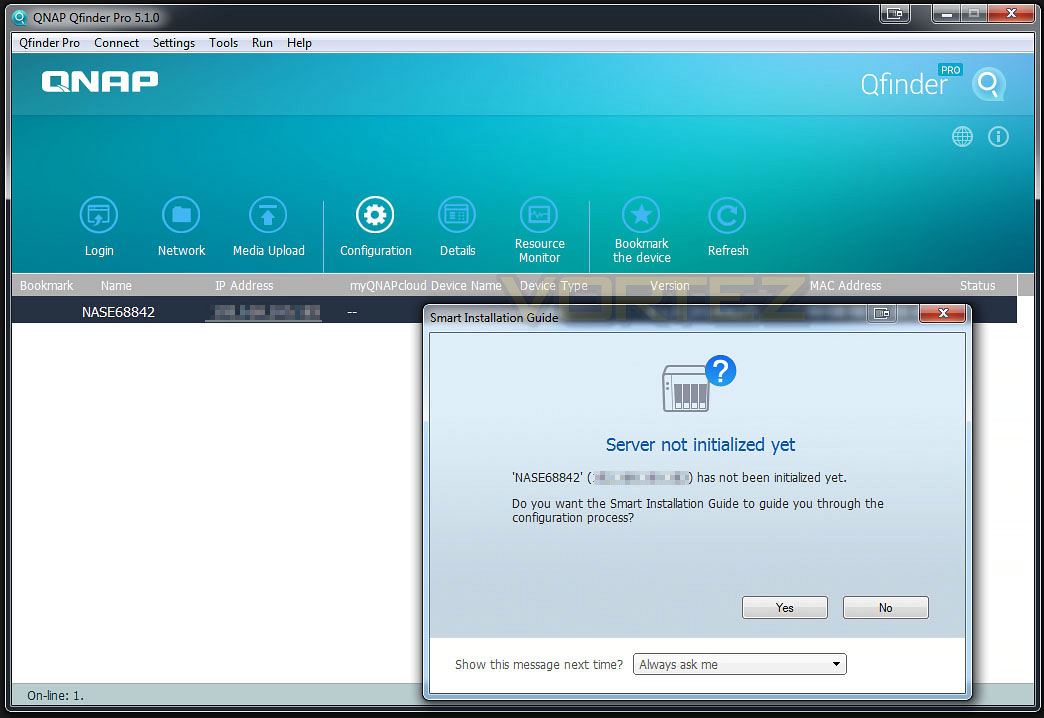
If you need to gain access to the NAS but do not know the IP address, Qfinder can be installed; this application discovers any QNAP devices on the network and details some of the technical attributes – allowing you to obtain the correct IP address and thus gain access to the NAS.
The process of installing QTS on the NAS involves various configuration files being applied. The entire process doesn’t take very long at all but this is obviously dependant on the size of the disks being used and the chosen backup configuration.
QNAP QTS 4.2 Operating System – With Video Overview
QNAP has been keen to promote their latest version of their Operating System. QTS 4.2 is QNAP’s secret weapon and is an all-encompassing piece of software which supplies an extensive feature-set. Having great hardware is only part of the story – software plays a vital role in the success of any network device. Administration tools and flexible applications transform the way a QNAP device operates on any network. QNAP have the following to say about QTS 4.2:
QTS 4.2 continues the evolution of the NAS user interface with a fresh look and many new features and enhancements, empowering you to achieve more at work and play. As QTS keeps your data secure yet accessible anywhere, you can explore more possibilities by harnessing the power of your data. Discover how QTS has transformed and what it empowers you to do.
On the previous page we configured the NAS for first usage. Below is a video which demonstrates QTS 4.2 – this software is the next step following on from the initial configuration.
Inside the GUI there are lots of features to look at and use. The interface is fluid, interactive and very extensive. Rather than show its functionality via screenshots, here is a brief overview of what you can find inside.
VIDEO – QTS 4.2 Overview
Video Streaming To Android Device
QTS 4.2 offers a wide-selection of functionality across the network environment but one such use which many users will likely be interested in is the video streaming support.
Video can be viewed from multiple devices simultaneously. Video can also be pre-rendered for lower resolution playback to reduce network traffic all via Video Station and such technologies as DLNA.
Below is a short video demonstration of how easy and effective it is to stream a full HD video to an Android device using the Qfile app.
Power & Thermal Performance
We’ve looked at some of the features that QTS 4.2 brings with the TS-231 and TS-451 but how does this affect performance? What are typical transfer rates like over a Gigabit network? Is power consumption reasonable? These are all questions that you might be asking and we’re here to answer them.
Test System Specifications
CPU Intel Core i5 2500K
Motherboard ASRock Z68 Extreme4 Gen3
Memory 8GB Kingston HyperX 1600MHz DDR3
Graphics NVIDIA GTX 580
PSU Thermaltake Toughpower Grand 750W
Motherboard ASRock Z68 Extreme4 Gen3
Memory 8GB Kingston HyperX 1600MHz DDR3
Graphics NVIDIA GTX 580
PSU Thermaltake Toughpower Grand 750W
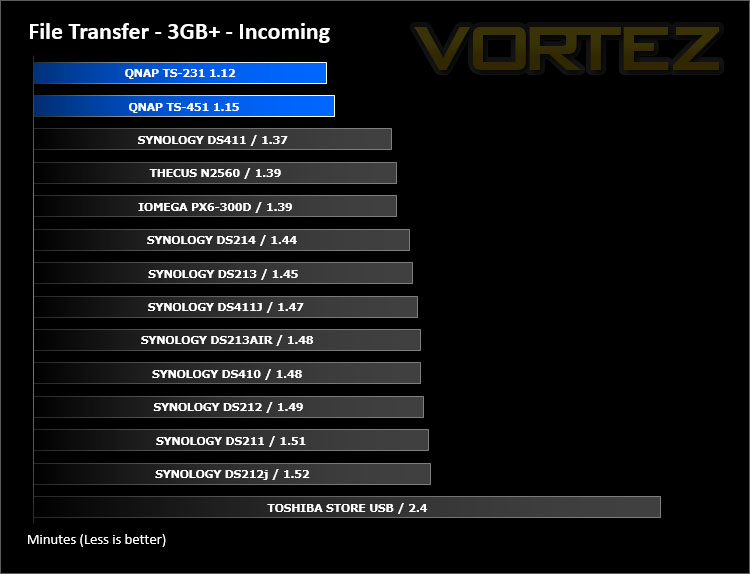
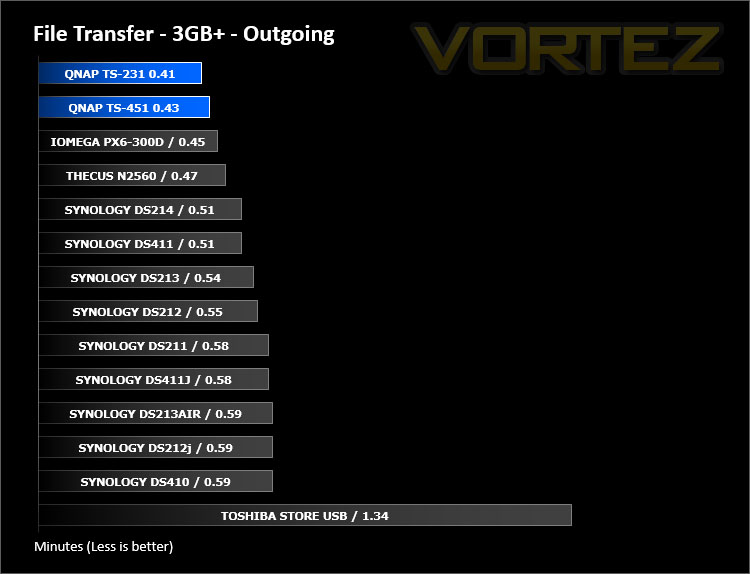
First of all, for the purpose of real world testing we bundled together 6 files which were in 2 folders amounting to 3.2GB. We wanted to discover the incoming and outgoing transfer times between both NAS and the computer – against other devices on a Gigabit network. Here are the results.
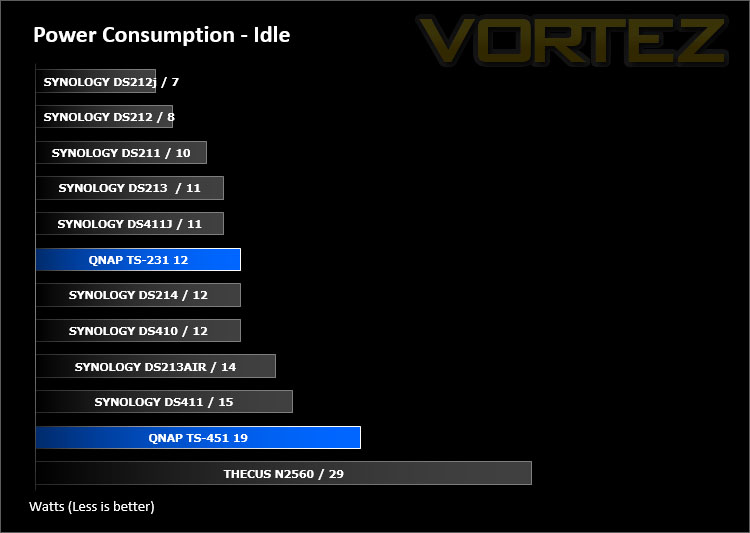
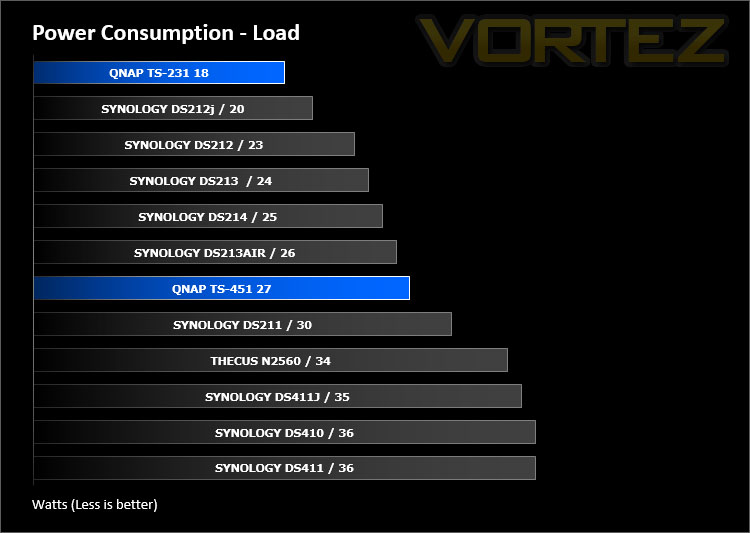
Whilst performing these tests load power consumption was monitored. The power consumption was also monitored whilst being in an idle state. There are actually two states, idle after usage and hibernation which the unit falls into after 10 minutes of non-usage. Hibernation figures were recorded.
Conclusion
Our NAS user experience has been limited to just one brand since we began looking this sector but today our eyes have been opened to the other options which are available by way of QNAP’s solutions and its evident we’re mightily impressed.
Time and again we see good products with good hardware hitting the market but which are let down by poor software development – fine tuning both of these elements will guarantee success and this is where QNAP has managed to pull through. From a visual standpoint both the 231 and 451 are classy-looking network devices and inside, both utilise dual-core processors and fast DRAM. The hardware is always the foundation for such a device so it’s great to see components which are more than up to the job of performing demanding tasks which are oriented around multi-tasking.
At the time of writing this review the 231 and 451 are both able to utilise QNAP’s OS – QTS 4.2. This software suite is one which places particular emphasis on productivity which spans across multiple platforms. QTS is feature-rich and covers a wide-selection of possibilities whether you are seeking a central system for storing your data, VPN services, DLNA media station or managing a group of surveillance devices – there is plenty of flexibility for varied uses. If you’d like to know how QTS looks and what it offers, please check out our video overview on the previous pages.
In our review we tested out the Qfile android app by streaming HD video from the QNAP NAS and viewing some pictures. Although there are a few steps prior to playback, this highlights how versatile QNAP’s solutions are – with the added bonus of being able to transcode to different qualities for devices which require varied quality options.
The TS-231 is priced at £119 GBP / $250 USD while the TS-451 is £304 GBP $440 USD – Perhaps slightly more expensive than rival options out there which are also two-bay and four-bay variants but the QNAP solutions are faster than these competitors due to the core hardware specifications.
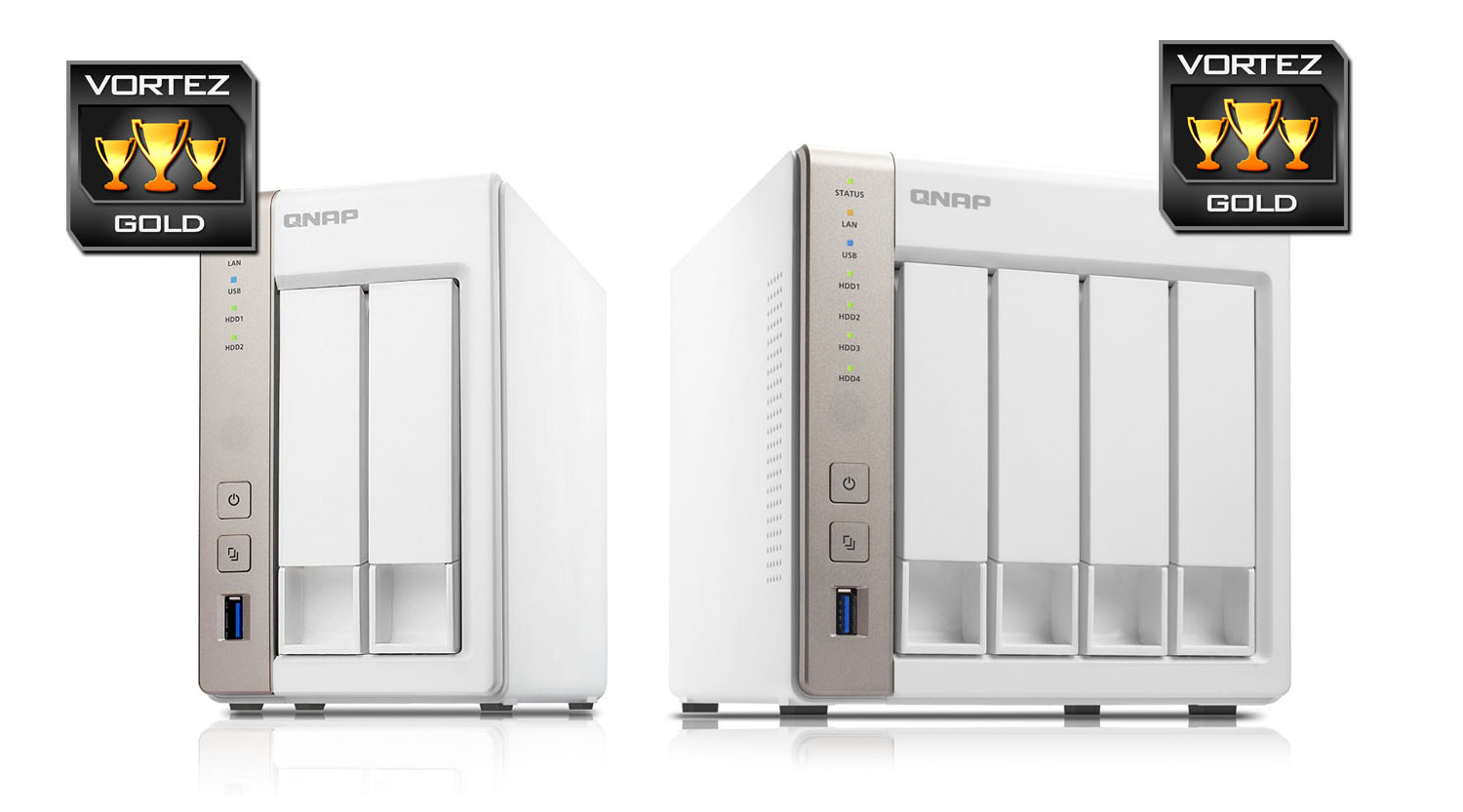
QNAP’s TS-231 and TS-451 are two stylish NAS units which are ideal for any home network environment. If you’re looking to get the most out of your network and require innovative features at your finger-tips then look no further!
Pros
+ Professional and stylish designs
+ Great build quality
+ Fast hardware specifications
+ SATA 6GB/s compatibility
+ 2.5” and 3.5” drive support
+ USB 3.0 support
+ Excellent performance
+ Low fan noise
+ Flexible operating system
Cons
– White may stand out with other typically blank appliances
+ Professional and stylish designs
+ Great build quality
+ Fast hardware specifications
+ SATA 6GB/s compatibility
+ 2.5” and 3.5” drive support
+ USB 3.0 support
+ Excellent performance
+ Low fan noise
+ Flexible operating system
Cons
– White may stand out with other typically blank appliances
Click here for an explanation of our awards at Vortez.net.