







In the spotlight today is new brand Raijintek’s flagship CPU cooler, namely EreBoss. Featuring an ultra-slim 140mm PWM cooling fan and many more features.

Product on Review: EreBoss
Manufacturer and Sponsor: Raijintek
Street Price: £30 @ OcUK (At time of review)
Last month saw newcomers Raijintek enter the cooling market with a range of CPU coolers to keep budding enthusiasts entertained. Amongst the variety of options came quite a surprising price-tag, touting this new brand as a possible choice for those on a tight budget.
EreBoss is deemed the flagship of Raijintek’s new CPU cooler range, boasting half a dozen copper heatpipes, huge surface area and an ultra-thin 140mm PWM fan. No-one can argue with the price of this cooler but can Raijintek make a dent in an extremely competitive market? Let’s find out.
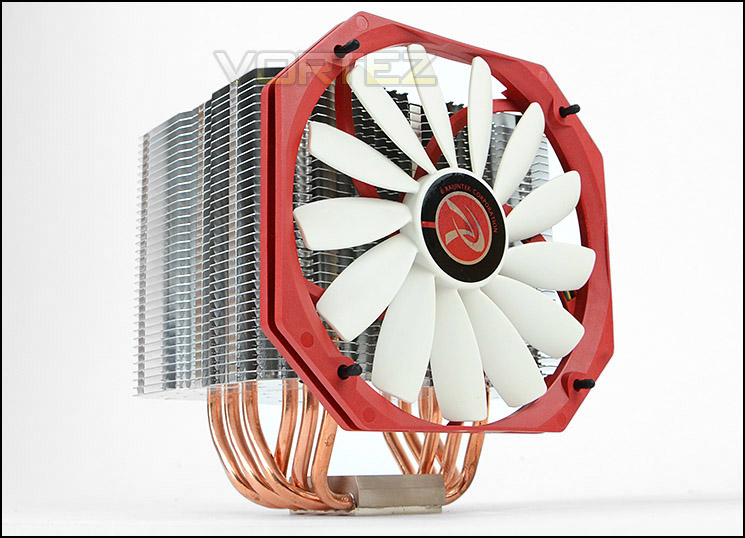
Raijintek’s take on EreBoss
A giant heat-sink with world’s top slim type 14013 fan, is an extremely good C/P value cooler. ” Designed in Germany “, Ereboss is manufactured to provide users an awesome performance but at a great price point. Its’ fan mate is 14013, world’s top slim type 140mm fan-13mm thickness, but provide outstanding cooling air flow. With multiple mounting kits, giant dissipating fin area and outstanding performance, Ereboss is your best choice of cooling partner.
Technical Specifications
Product Name
EREBOSS
Product Number
0P105250
Dimension [WxDxH]
140×110.5×160 mm
Weight
808 g [Heat Sink Only]
Thermal Resistance
0.11 °C/W
Heat Sink
Base Material
Nickel Copper Base
Fin Material
Aluminum Alloy; Solder-less fins assembly
Heat-pipe
SPEC
Φ6mm
Q’ty
6 pcs
Fan
Dimension [WxHxD]
140x150x13 mm
Voltage Rating
12V
Starting Voltage
7 V
Speed
650~1400 R.P.M. [PWM controlled]
Bearing Type
Sleeve Bearing
Air Flow
44.43~56.55 CFM
Air Pressure
0.76~1.24 mmH2O
Life Expectance
40,000 hrs
Noise Level
28 dBA
Connector
4 pin with PWM
APPLICATION
Intel® All Socket LGA 775/1150/1155/1156/1366/2011 CPU (Core™ i3 / i5 / i7 CPU)
AMD® All FM2+/FM2/FM1/AM3+/AM3/AM2+/AM2 CPU
EREBOSS
Product Number
0P105250
Dimension [WxDxH]
140×110.5×160 mm
Weight
808 g [Heat Sink Only]
Thermal Resistance
0.11 °C/W
Heat Sink
Base Material
Nickel Copper Base
Fin Material
Aluminum Alloy; Solder-less fins assembly
Heat-pipe
SPEC
Φ6mm
Q’ty
6 pcs
Fan
Dimension [WxHxD]
140x150x13 mm
Voltage Rating
12V
Starting Voltage
7 V
Speed
650~1400 R.P.M. [PWM controlled]
Bearing Type
Sleeve Bearing
Air Flow
44.43~56.55 CFM
Air Pressure
0.76~1.24 mmH2O
Life Expectance
40,000 hrs
Noise Level
28 dBA
Connector
4 pin with PWM
APPLICATION
Intel® All Socket LGA 775/1150/1155/1156/1366/2011 CPU (Core™ i3 / i5 / i7 CPU)
AMD® All FM2+/FM2/FM1/AM3+/AM3/AM2+/AM2 CPU
Packaging, Bundle & Fan
EreBoss arrives in a nicely designed box which is rather colourful and eye catching. Along with a depiction of the CPU cooler itself, the box also details technical specifications on the sides and back. It’s surprising to see such a small box for a CPU cooler of EreBoss stature – plus a 140mm cooling fan. Everything is very compact inside the packaging.
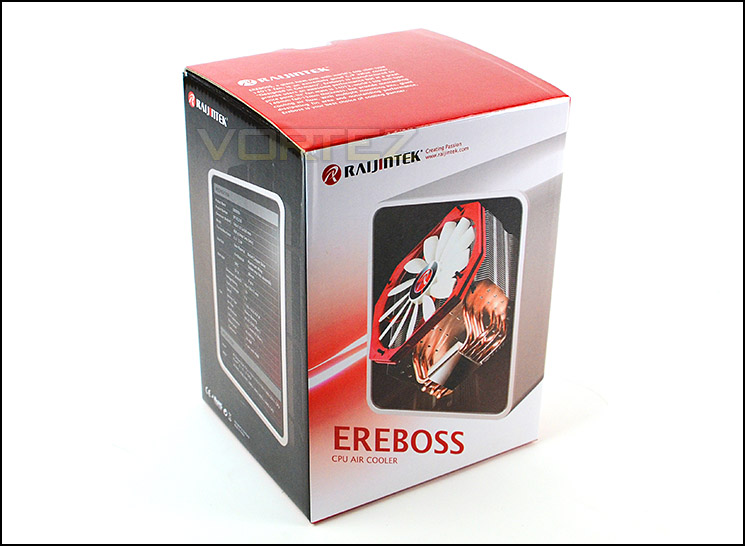
Packaging for EreBoss
Inside the box there are an assortment of components to install the cooler including support for the following sockets:
Intel: Socket LGA 775/1150/1155/1156/1366/2011 CPU (Core™ i3 / i5 / i7 CPU)
AMD: FM2+/FM2/FM1/AM3+/AM3/AM2+/AM2 CPU.
Raijintek also include an instructions guide and a 140mm cooling fan to attach to the heatsink.
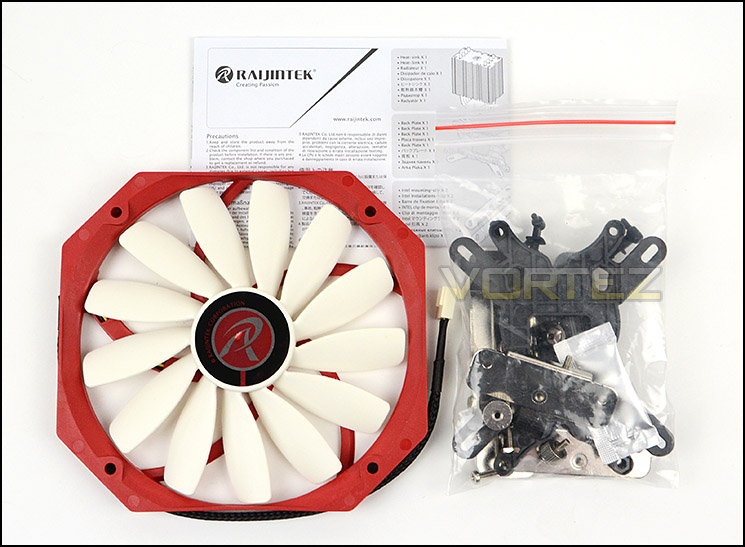
Support for many different sockets
Included with the heatsink is a large cooling fan which has the following dimensions: 140x150x13 mm, this fan is a 13-blade model and is extremely thin. The model name is AG14013MMSPAB. This fan is PWM and capable of 1100RPM – 1650RPM. Connectivity is via a 4-pin fan connector.
In the next section we will show how this fan is mounted since there is an alternative method of attaching it.
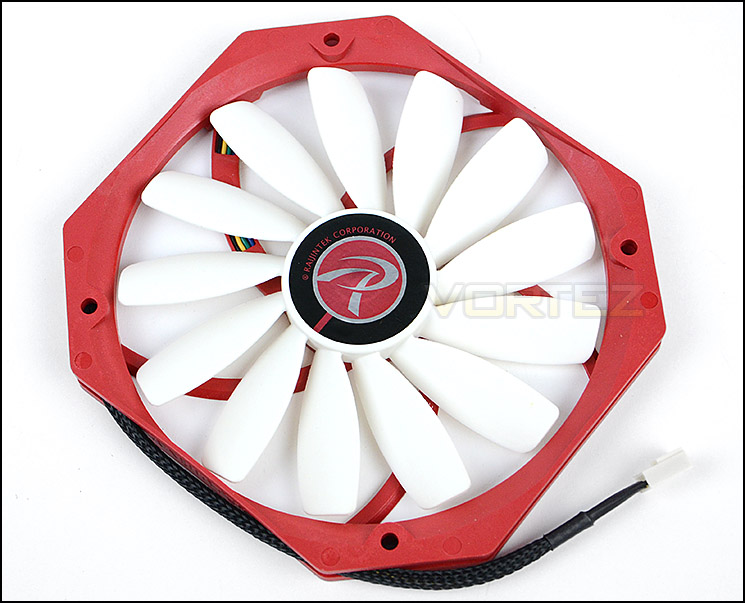
An ultra-thin 140mm cooling fan
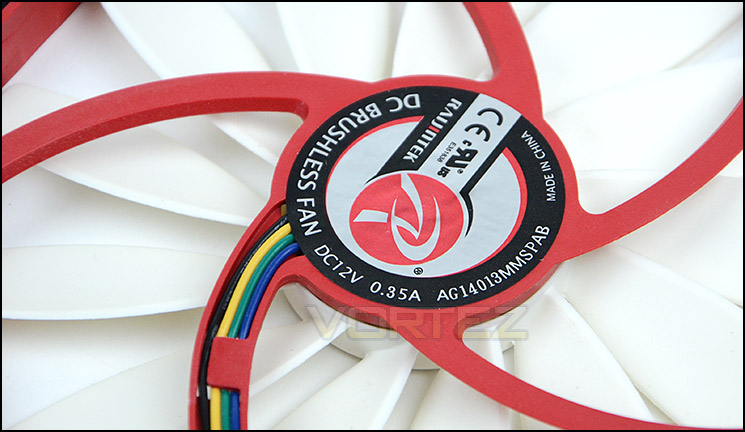
13-blade design
Closer Look
EreBoss is Raijintek’s current flagship CPU cooler and thus has a burly appearance. Weighing 808g and measuring 140x150x13 mm this heatsink is not for the fainthearted. The fins are aluminium whilst the base and heatpipes are copper in construction.
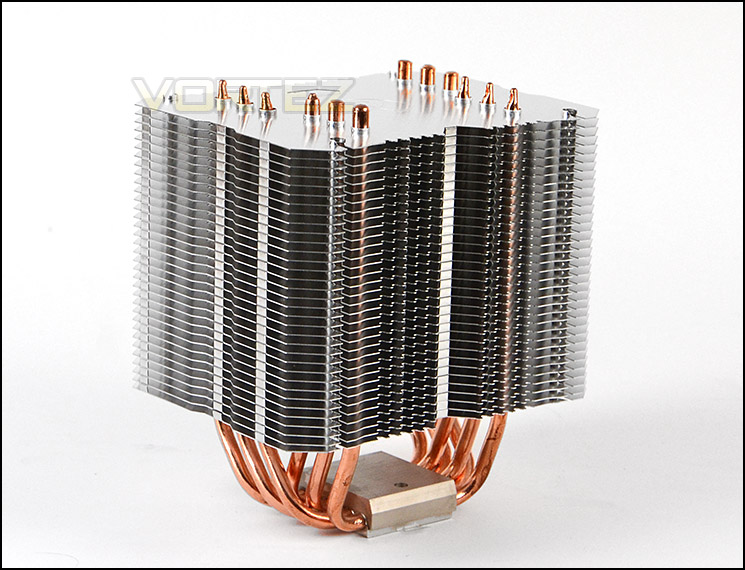
An overview of EreBoss
The fin profile follows an interesting arrangement. The profile bow inwards and has a deep incision in the middle. The fin arrangement is rather dense and there are perforations on the underside of the first plate.
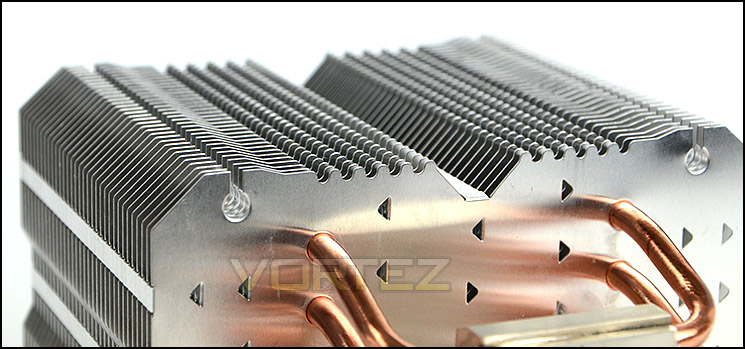
The fin arrangement and profile
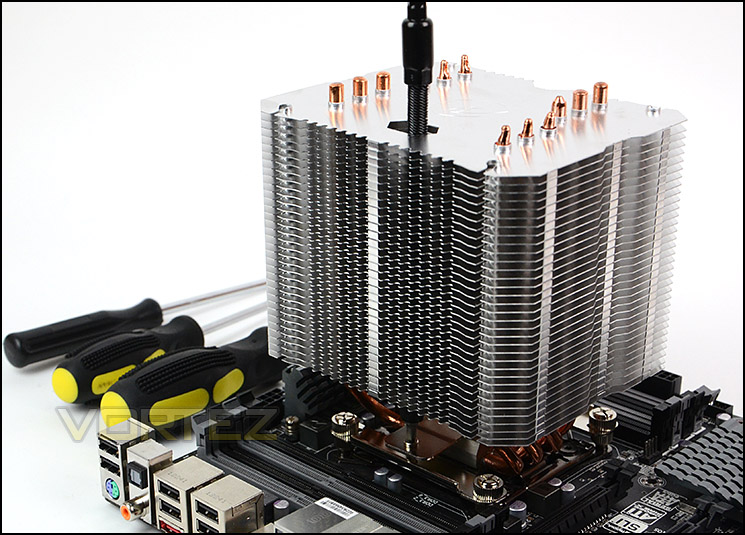
Raijintek have given EreBoss six copper heatpipes which transfer the heat from the baseplate to the aluminium fins. The top of the heatsink has the Raijintek logo engraved in the centre and a cavity has been channelled down to sit directly above the crossbar screw hole so that a screwdriver can be used since EreBoss overhangs with its oversized design.
The baseplate is copper with nickel plating which has been given a transparent finish. As you can see from the picture the baseplate shows a perfect reflection of what is placed in front of it.
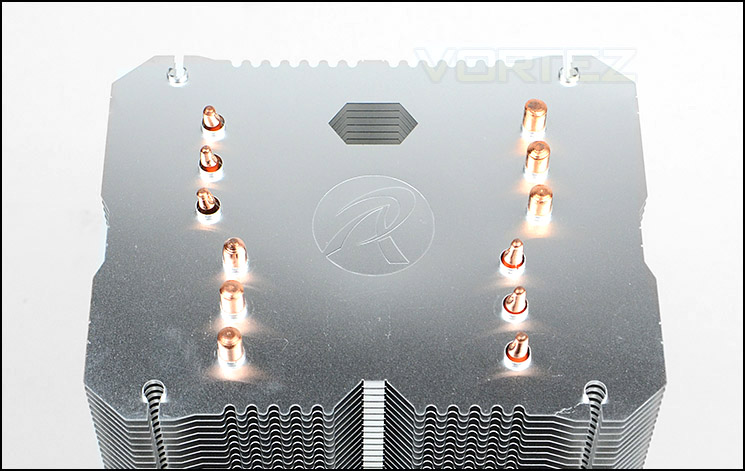
The top of EreBoss
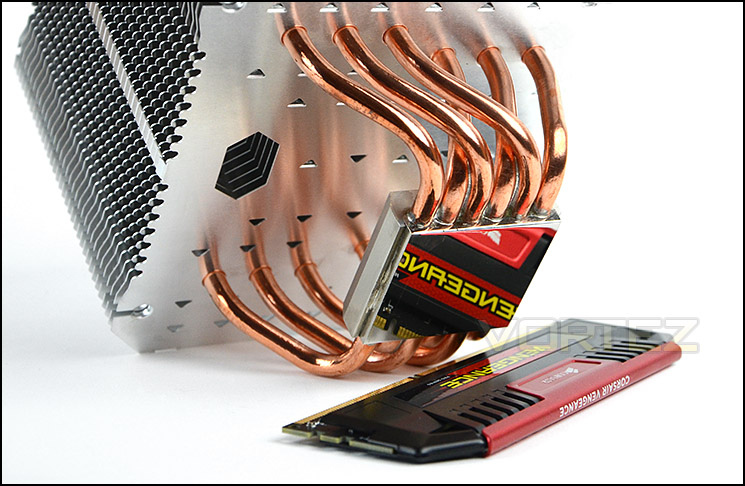
A mirror finish baseplate
In order to attach the cooling fan there is a different method employed against the usual fan clips. Instead, there are a series of rubber plugs which slot between the fan mounting holes and the mounting holes on the heatsink. Not only does this make installation of the fan easier, but it also has anti-vibration attributes.
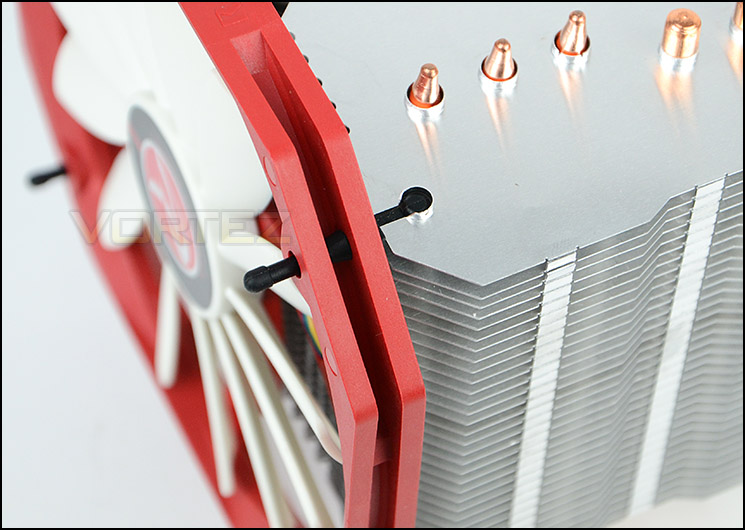
Fan installation involves rubber plugs
Installation Process
In order to demonstrate the installation process for EreBoss we are installing the cooler on the Intel LGA2011 socket.
The first step in the installation process is to attach the four stand-offs to the four corners of the socket plate for LGA2011. Once this has been done, the brackets can then be placed over these stand-offs and screws applied to tighten things into place. To opt for the traditional orientation where the cooling fan faces the rear exhaust within a computer chassis the brackets must be placed as per the picture below. The last step is to apply thermal paste to the CPU, place the heatsink over the CPU, place the crossbar over the baseplate and tighten the screws up.
The last part of the installation is rather fiddly. The cooling fan needs to be detached from the heatsink to tighten the screw as it causes obstruction. On the other side a screwdriver needs to be placed down the cavity in order to tighten the screw. The various screwdrivers we had wouldn’t fit down the cavity since the handle was too big for the gap. Alternatively we had to use an extended device to achieve the goal of tightening the screw, although eventually we managed to tighten this up the screw did slip out of place many times – we would have preferred a pre-installed solution with tension spring.
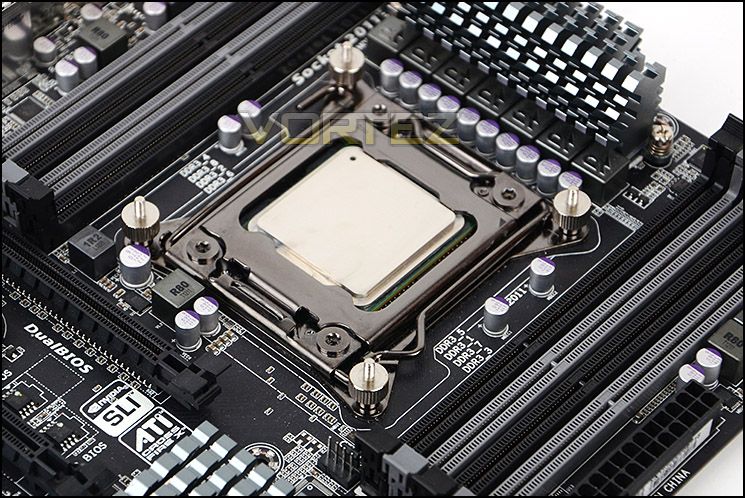
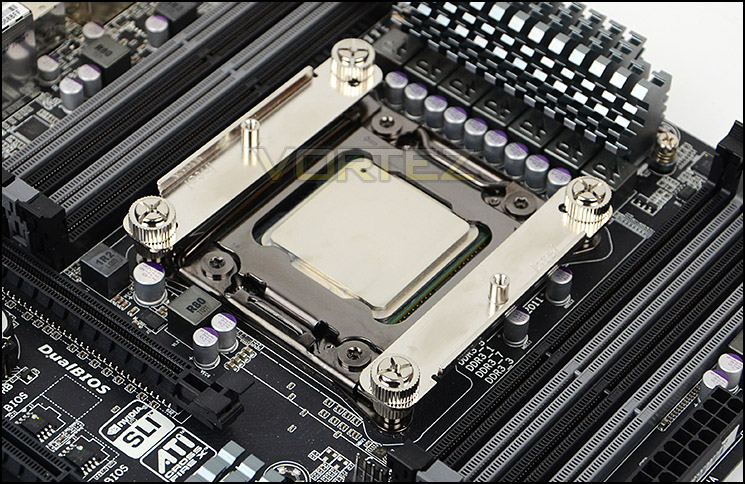
Installed – Memory Clearance
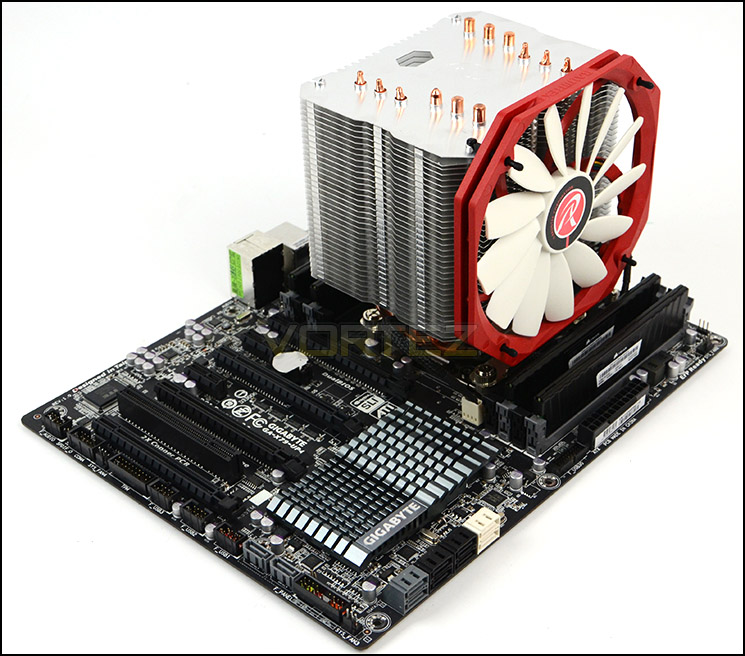
Memory clearance is something which many system builders and enthusiasts are eager to discover since this will ascertain whether a memory kit will be compatible with the CPU cooler or not. To demonstrate this, a low profile memory kit is used.
Dimensions: 140 mm x 110.5 mm x 160 mm
Installation complete – EreBoss in all its glory
A burly heatsink covers much of the motherboard
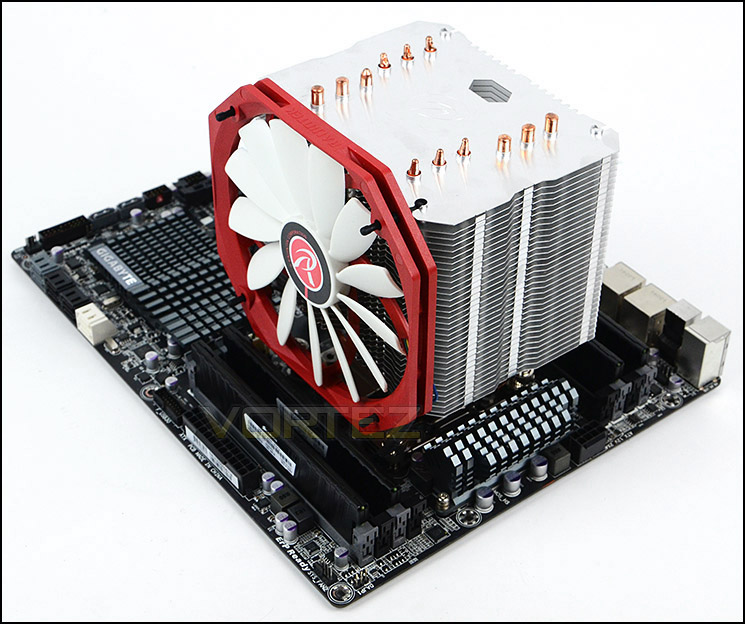
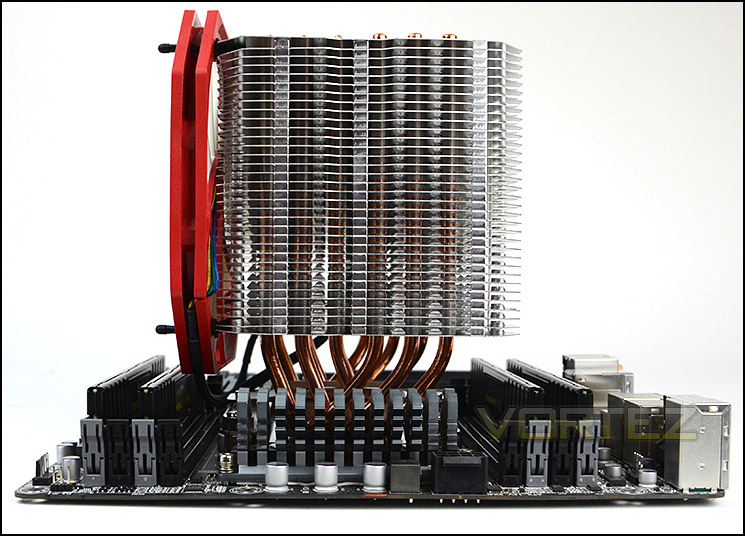
The heatsink itself covers both the first slots on our LGA2011 motherboard and will only allow memory kits with a maximum height of approximately 4cm.
Furthermore the cooling fan also causes a slight obstruction by constraining memory to a maximum height of just over 2.5cm in height. So there are some limitations with this cooler in terms of clearance but many consumers generally only use the default, outer slots for memory anyway so this would probably be no problem to a vast majority of users.
The large heatsink overhangs slightly
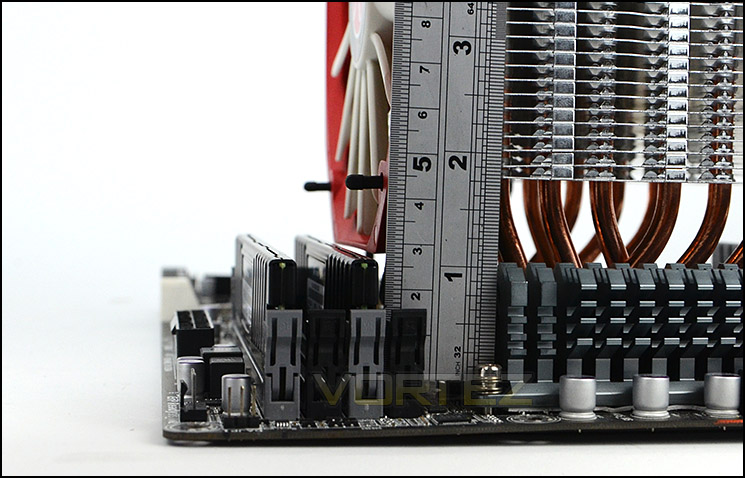
Measurements showing clearance for heatsink and fan between memory
Test Setup & Methodology
Test System
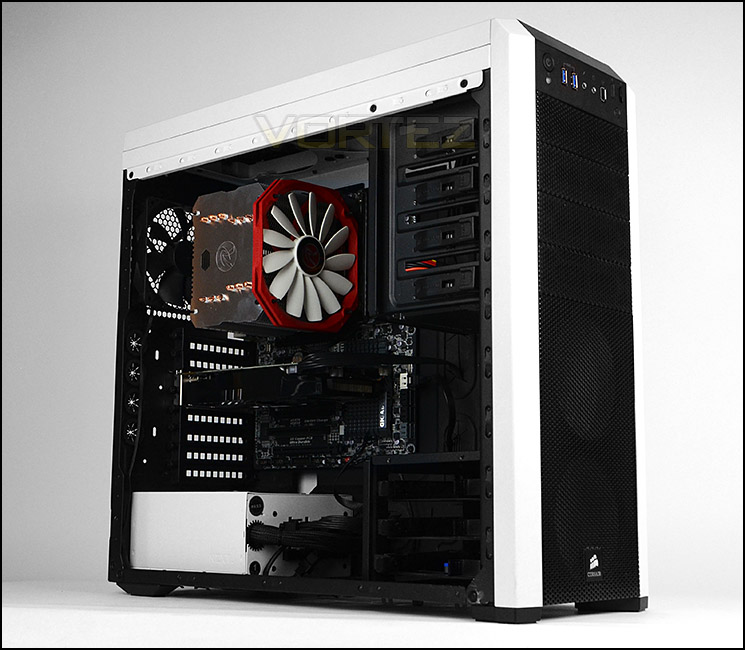
CPU – Intel Core i7-3930K (3.6GHz)
Motherboard – GIGABYTE X79-UP4
Memory – 8GB Corsair Vengeance LP 1600MHz CL9
Graphics – Sapphire Radeon HD 6850 1GB
PSU – NZXT Hale90 650W
Hard Drive – Kingston HyperX 240GB SATA III SSD
Case – Corsair Carbide 500R White
Motherboard – GIGABYTE X79-UP4
Memory – 8GB Corsair Vengeance LP 1600MHz CL9
Graphics – Sapphire Radeon HD 6850 1GB
PSU – NZXT Hale90 650W
Hard Drive – Kingston HyperX 240GB SATA III SSD
Case – Corsair Carbide 500R White
CPU Coolers
Alpenföhn Matterhorn Pure(120mm Wingboost: 300-1200RPM)
Alpenföhn K2 (120mm Wingboost: 500-1500RPM, 140mm Wingboost: 300-1100RPM)
Alpenföhn Gotthard (140mm Wingboost: 300-1100RPM)
Noctua NH-D14 (120mm NF-P12 PWM + 140mm NF-P14 PWM: up to 1200RPM)
Thermalright SilverArrow SB-E Extreme (Dual TY-143 fans – 600-2500RPM)
Corsair Hydro H100 (Dual 120mm fans – low: 1300RPM, mid: 2000RPM, high: 2600RPM Push Config)
SilverStone HE01 (140mm PWM fan – 500RPM-1200RPM – 500RPM-2000RPM)
be quiet! Dark Rock Pro 2 (135mm + 120mm PWM Fans – up to 1500RPM and 1700RPM)
Thermaltake Water 2.0 Pro (Dual 120mm PWM fans – up to 2000RPM)
Corsair Hydro Series H100i (Dual 120mm fans – up to 2700RPM Push Config)
Be Quiet! Shadow Rock TopFlow(1x 135mm PWM fan – up to 1500RPM)
SilverStone HE02 (Passive – optional fan used: Noctua NF-F12 120mm PWM)
Corsair H55 (Single 120mm fan – 1700RPM Exhaust Push)
Cooler Master Seidon 120M (Single 120mm fan – Up to 2500RPM Exhaust Push)
Zalman CNPS11X Extreme (Single 120mm fan – Up to 1950RPM)
Phanteks PH-TC12DX (Dual 120mm fans – 600-1800RPM)
Noctua NH-U14S (Single 140mm cooling fan – 300-1500RPM)
SilverStone TD03 (Dual 120mm fans – 1500-2500RPM)
Thermaltake]Thermaltake NiC C5 (Dual 120mm fans – 1000RPM – 2000RPM)
Raijintek EreBoss (Single 140mm fan – 1100RPM – 1600RPM)
Program Suite
Real Temp – Maximum temperature analysis
LinX 0.6.4 – Applies thorough stress test to CPU
CPU-Z – Confirmation of CPU frequency/voltage
AIDA64 Extreme Edition – Confirmation of temperatures/fan speeds
Testing methodology
Testing will be based on temperatures recorded by Real Temp after 20 passes of LinX stress test. The maximum absolute temperatures will be recorded after the test and averaged over the 6 cores. The delta is then calculated by subtracting the ambient temperature recorded near the intake fans from the average temperature calculated. Tests are conducted with the Intel i7 3930K at its default 3.6GHz stock speed and overclocked to 4.6GHz @ 1.42V. The tests are done inside the Corsair Carbide 500R chassis to simulate real world conditions. To keep the tests standardised we are using Noctua’s NT-H1 thermal paste on all coolers.
CPU coolers are reviewed as they come out of the box – with their factory cooling fans, as the manufacturer intended and as the consumer expects.
Additional tests include a passive test where the cooling fans are taken away from the heatsink and a comparison between the cooler used with stock thermal paste against our Noctua NT-H1 paste.
A kind thank you to Noctua for supplying us with NT-H1 thermal compound.
Results – Stock Performance
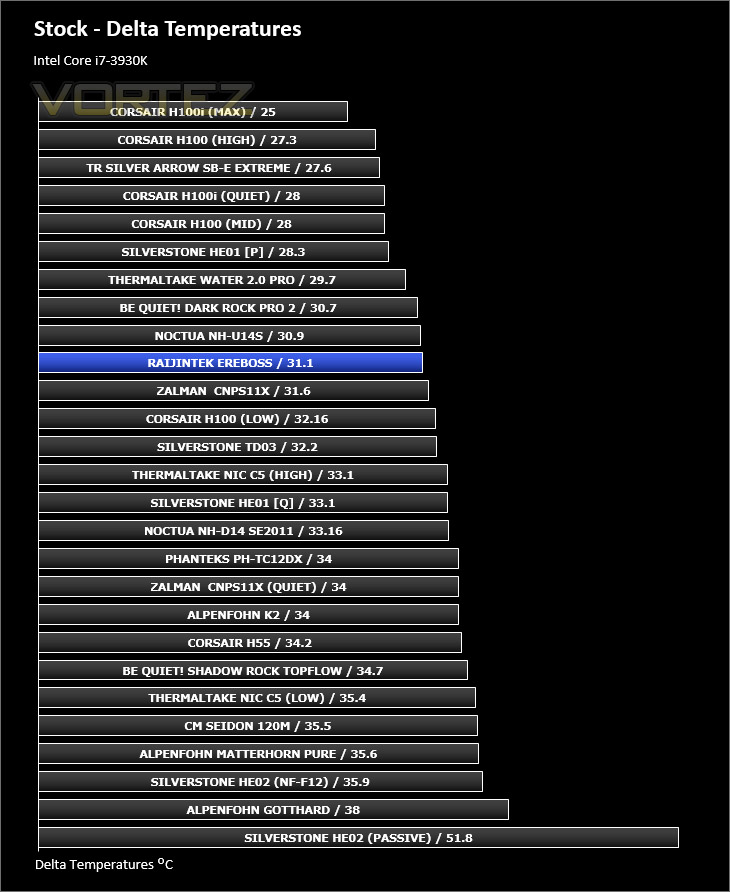
EreBoss does an excellent job during stock conditions with an Intel Core i7-3930K. In fact we were quite surprised by its ability to handle the chip and place itself in a rather significant spot in our cooling chart. Noise levels are barely even noticeable with the fan at its below speed.
Fan Speed
1355RPM – during stock testing
Results – Overclocked Performance
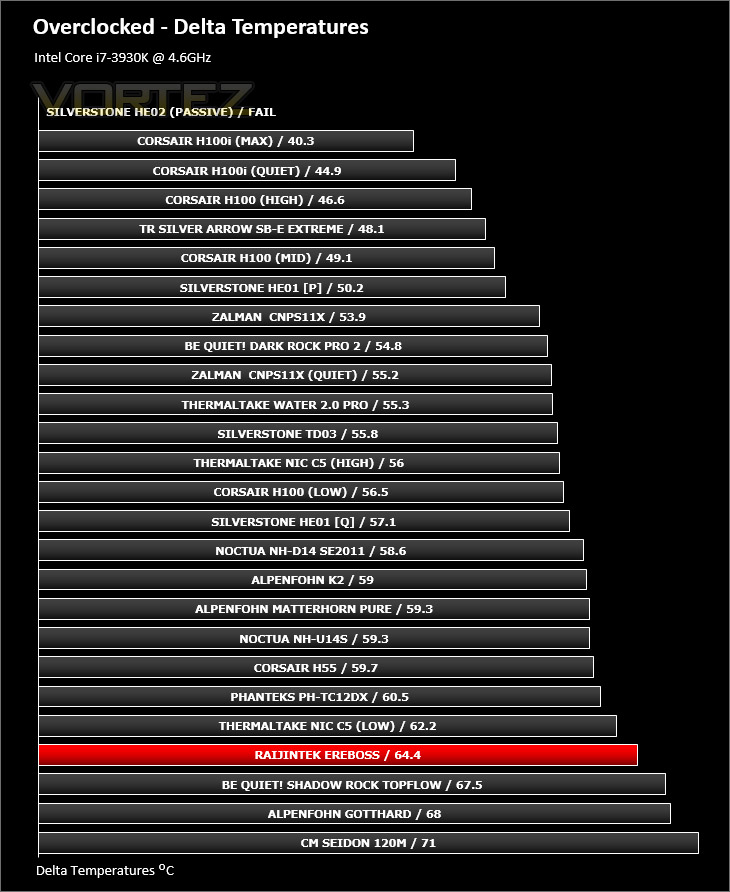
Applying a significant overclock to the Intel 3930K EreBoss falls behind sadly. This is probably down to the cooling fan.
Fan Speeds:
1573RPM – during overclocked testing
Results – Passive Performance
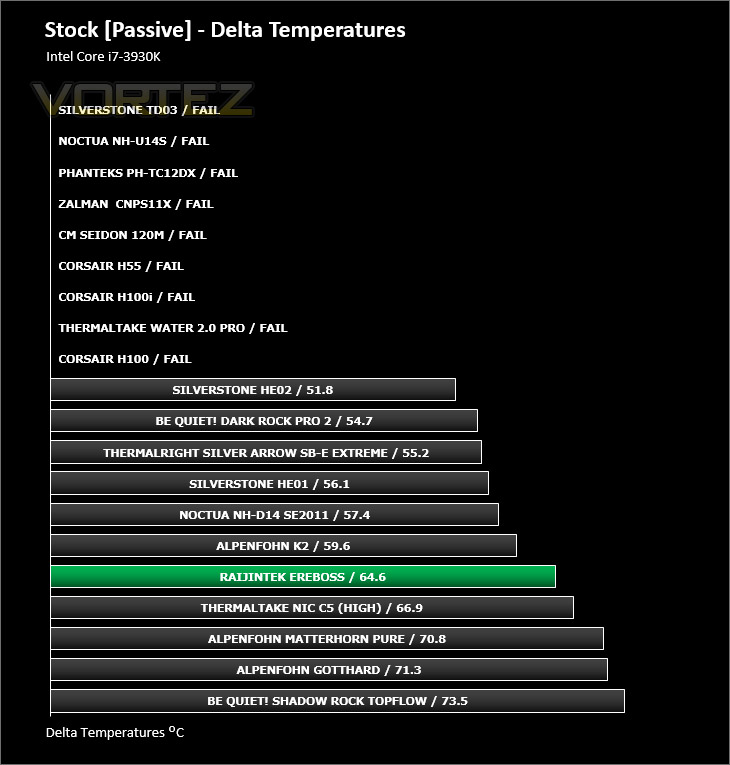
During the passive tests the EreBoss heatsink just about managed to keep within the acceptable temperatures. It’s an achievement for this cooler to be able to handle the 3930K whilst in passive mode but the results here aren’t brilliant.
Results – Thermal Paste Comparison
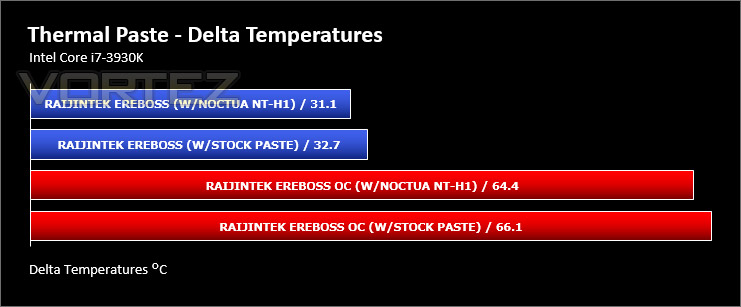
Most CPU coolers come accompanied with thermal paste provided by the manufacturer. For our CPU cooling tests we use Noctua’s NT-H1, so to offer up some interesting analysis we test the thermal paste given with EreBoss against NT-H1 to see which gives the best results during stock and overclocked performance and the results really aren’t that much different, the Noctua is only slightly better.
Conclusion
The CPU cooling category is extremely competitive with numerous options to choose from, has Raijintek done enough to make an impression?
EreBoss is Raijintek’s flagship CPU cooler and under stock performance we found it to be an excellent solution for keeping Intel’s demanding Sandy Bridge-E nice and cool. Not everyone applies an overclock, let alone a substantial one but EreBoss did struggle in this department and fell behind its great achievement under stock conditions.
Raijintek have introduced a new way to install cooling fans and we found it to be very useful. Having rubber plugs to install such a device and having the adding anti-vibration properties makes the job of attaching a fan to the cooler hassle-free.
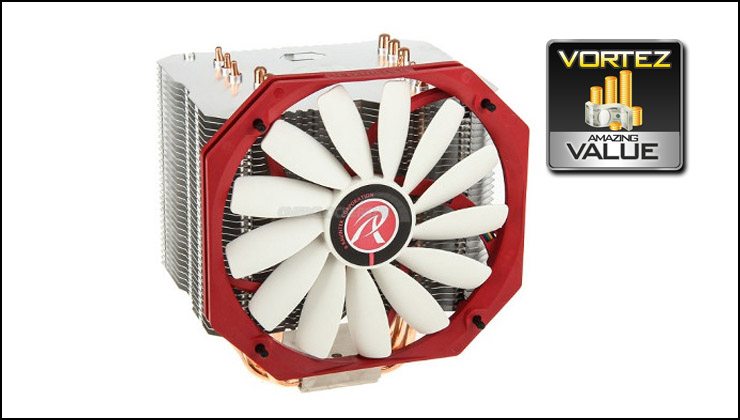
The aspect which will rouse plenty of discussion and surprise is EreBoss’ price-point which comes in at a mere £30. It’s rare these days to discover a bargain but this sums EreBoss up in one word. This cooler is a great value for money choice for any enthusiast wanting low-noise and great stock performance.
Entering the ring as the ‘new face’ is never an easy task but Raijintek have done a great job with EreBoss. We found this cooler to be good quality, demonstrating great performance under stock conditions and with such an attractive price-tag we would encourage a purchase if you are on a tight budget.
Pros
+ Good quality
+ Supports all sockets
+ Looks good
+ Stock performance revealed a great cooler
+ Ultra-thin cooling fan
+ Low-noise
+ Very good value for money
+ Easy method to install fan
Cons
– Extra-long screwdriver needed for install
– Struggled when overclocked
+ Good quality
+ Supports all sockets
+ Looks good
+ Stock performance revealed a great cooler
+ Ultra-thin cooling fan
+ Low-noise
+ Very good value for money
+ Easy method to install fan
Cons
– Extra-long screwdriver needed for install
– Struggled when overclocked

Click here for an explanation of our awards at Vortez.net.


