Compact and versatile, the Orochi V2 incorporates both 2.4GHz and Bluetooth wireless with extreme battery life, but do its credentials stack up as a true mobile gaming mouse?

Product on Review: Orochi V2
Manufacturer: Razer
MSRP:
– UK: £69.99 (inc. V.A.T.)
– US: $69.99 (excl Tax)
– EU: €79.99 (inc. Tax)
– AUS: AU$114.95 (inc. Tax)
Introduction
After 18 months of pandemic-imposed restrictions the world is collectively attempting to return to some kind of normality, with varying degrees of success it must be said. With that normalcy comes a renewed desire for getting out and about: returning to college, holding gaming events, and visiting friends and family to renew bonds grown frayed through time apart and stress caused by isolation. And to help you, you might want your kit to be a little more mobile than pre-pandemic norms.
Mobility was surely at the fore-front of the initial design brief laid out by peripheral specialists Razer for the Orochi V2, a new wireless gaming mouse that, even if not directly motivated by post-pandemic expectations, comes at a very opportune time. Compact and wireless but with genuine gaming credentials, it’s one of a new breed of lightweight rodents tailored to taking advantage of PC gaming’s changing norms.
Named for an eight-headed serpent from Japanese mythology, you might expect the Orochi to be a monstrous behemoth shaped for the hands of Andre the Giant. In fact the Orochi V2 is a small and perhaps cute mouse that fits very easily in the palm of even a normal-sized human, belying the deadly gaming technology inside.
The Orochi V2 utilises the latest iteration of Razer’s Hyperspeed 2.4GHz wireless technology to achieve low-latency mousing, but adds flexibility through Bluetooth support for laptops and MacBooks. If you opt for Hyperspeed then it can connect through the included USB dongle or other Hyperspeed dongle that supports multi-device pairing, cutting down on the ports used.
Dual wireless modes aren’t the only flexible aspect to the Orochi V2’s design. The mouse can be powered by either a AA or a AAA battery, whichever you have to hand in the moment, with the knock-on effect of also allowing you to very slightly tweak both the weight and balance if it’s important to you.
Compared to the original Orochi this V2 update is both longer and more narrow, eschewing the squat traditions of mobile mice of the past and embracing a more streamlined shape. This model also doesn’t include an integrated battery, charging capability, or ambidextrous button layout. Taken holistically, these changes underscores the significance of the Orochi V2’s change of direction.
Mechanical switches and an 18000 dpi optical sensor round of the gaming features shown off by the Orochi V2. But there’s one final aspect of the mouse gamers might appreciate more than any other.
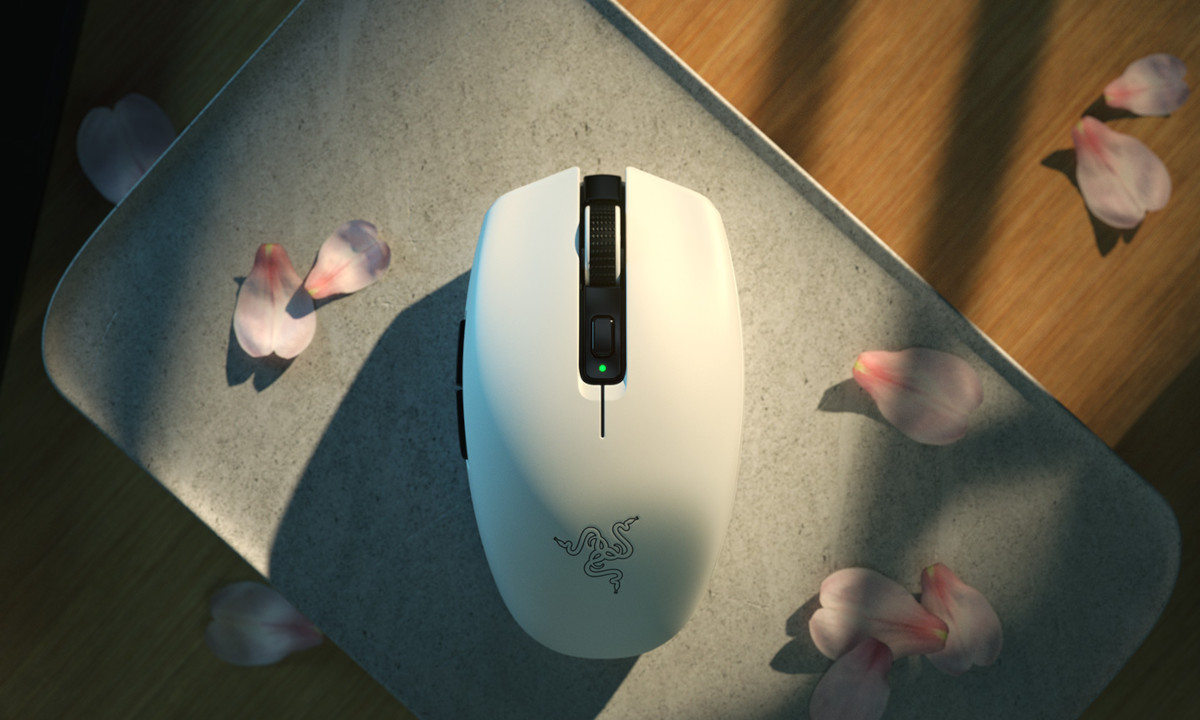
We’re looking at the White Edition of the Orochi V2, and it’s also available in Black. For a premium however you can choose from a plethora of custom top-shell design themes inspired by games, celebrities and influences. Or create your own through a simple design editor for something a bit more bespoke. The world may not quite be your oyster, but the options are many and varied.
The price you pay for this premium design is however, well, premium. At £70/$70 it costs as much as many wired enthusiast mice, and significantly more than some of the more affordable wireless gaming mice on the market such as the CORSAIR KATAR PRO. The closest competitors might be SteelSeries’ Rival 3 Wireless or Logitech’s G305, but many with equivalent specs have transitioned to a rechargeable wireless style.
Razer on the Orochi V2
Introducing the Razer Orochi V2—a compact, ultra-lightweight wireless gaming mouse with the longest battery life that’s second to none. Armed with both Razer HyperSpeed Wireless & Bluetooth modes, it’s your perfect companion for gaming on the go.
Technical Specifications
Connectivity:- Dual-mode wireless (2.4GHz and BLE)
Battery Life:- Up to 425 hours (2.4Ghz), 950 hours (BLE) /w included Lithium AA battery
RGB Lighting:- None
Sensor:- Optical
Max Sensitivity (DPI):- 18000
Max Speed (IPS):- 450
Max Acceleration (G):- 40
Programmable Buttons:- 6
Switch Type:- 2nd-gen Razer Mechanical Mouse Switches
Switch Lifecycle:- 60 Million Clicks
On-board Memory Profiles:- 1
Tilt Scroll Wheel:- No
Mouse Feet:- Undyed PTFE mouse-feet
Cable:- None
Dimensions
Length: 108 mm
Width: 60 mm
Height: 38 mm
Weight:- < 60 g (excl battery) / 73g (incl supplied lithium AA battery)
Two principles are core to the design of Razer’s Orochi V2: power efficiency and low weight.

In service to the former they have avoided the scourge of RGB lighting, of which there’s not even a hint on this model. Aesthetic customisation is available through the range of custom shell designs sold through the Razer store, but otherwise the Orochi is all business. Even optical switches are shunned in favour of more conventional mechanical types. As a result the mouse is capable of operating for up to 950 hours on a single AA battery when running in Bluetooth mode and almost half that in 2.4GHz wireless mode, although that may also require an aggressive power-saving profile.
Keeping the weight down is aided by this no-frills approach. No LEDs, no charging circuitry, no ports for cable connections – just shell, sensor, battery and button. The advertised <60g weight is a little disingenuous as a battery is required but not included in that calculation, but coming in under 70g when paired with a AAA cell instead isn’t unreasonable.
In common with a number of travel mice, the Orochi V2 holds all it needs to get it up and running. When you lever open the shell there’s not only spaces for both types of battery, there’s also a small alcove for the USB receiver/transmitter. The fit is snug so even if the shell pops open the dongle shouldn’t escape.
Packaging and First Look
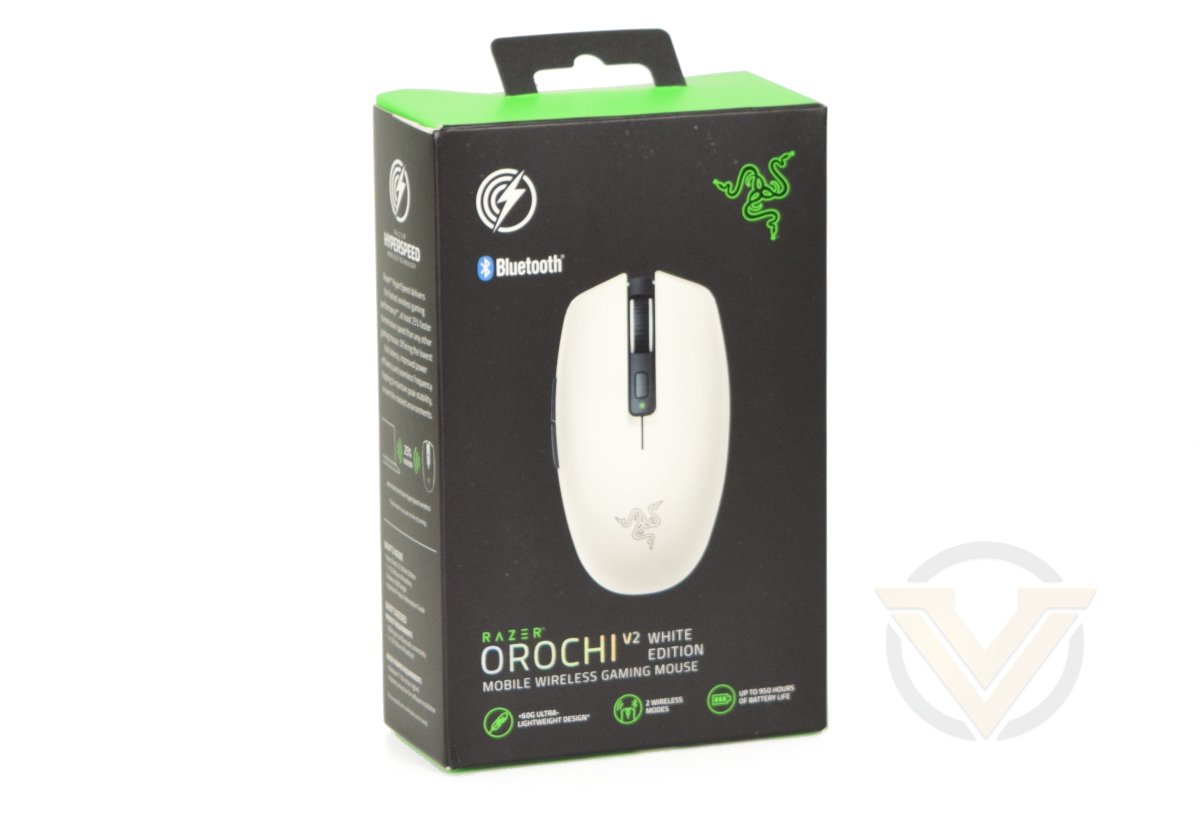
The Orochi V2 arrives in packaging with a familiar green/black colour scheme, continuing the branding through the product lineup. The mouse itself, a white Orochi V2 variant, is shown on the front alongside two primarily highlighted features: Bluetooth and HyperSpeed wireless support (although the latter of the two might be more difficult to recognise).
Just below the name and description of the mouse are three more feature highlights: an ultra-lightweight design, dual wireless support, and up-to 950 hours of battery life. That certainly covers all the important points, even if it’s not exhaustive.
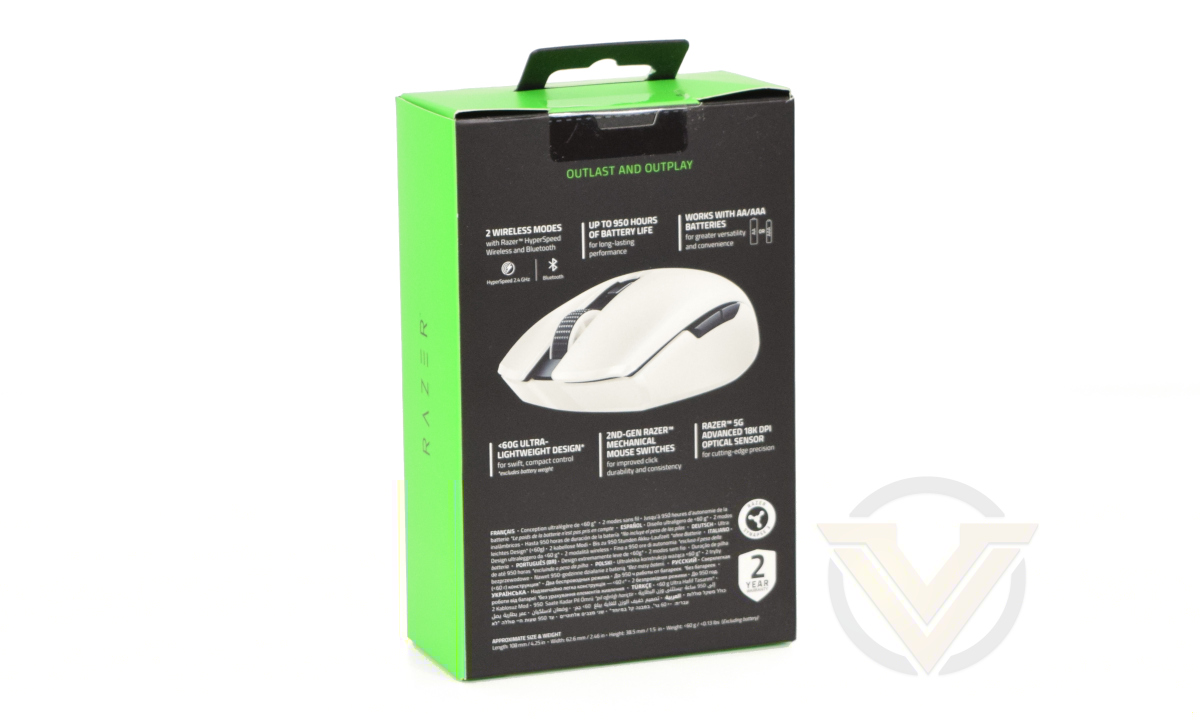
The packaging’s rear breaks down the feature set in a little more detail. It describes the two wireless modes available to the mouse and low weight credentials, but also adds a more colour to the proceedings by breaking down the switch type, sensor specs and dual support for AA and AAA batteries. Size and weight meanwhile are footnote at the bottom, where they make it clear that the <60g figure is derived from the weight without battery installed.
Lastly, the spine goes into a little more detail regarding Razer Hyperspeed technology and provides a list of bundle contents.
The interior packaging is primarily cardboard, however a polyethylene bag protects the mouse in transit while a single-use plastic clip holds the documentation in place. Each should be recyclable, but ideally we’d like to see Razer move entirely to cardboard and biodegradable materials if possible.
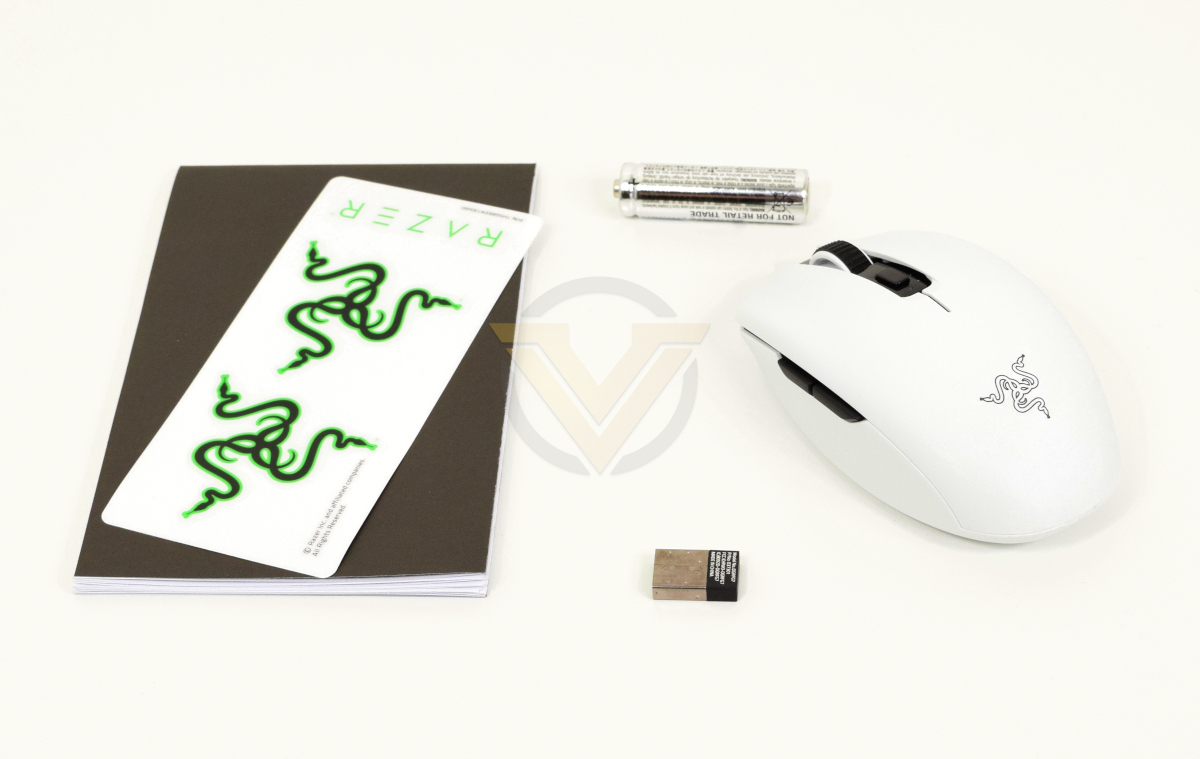
Our first glimpse of the Orochi V2 is a pleasant one. The mouse is compact but not the almost squat dimensions of many other highly portable/travel mice, it comes with a AAA battery so can be used straight out of the box, and the documentation is minimal. But where’s that USB wireless receiver?
Well, for that we need to take a peek inside
Closer Look
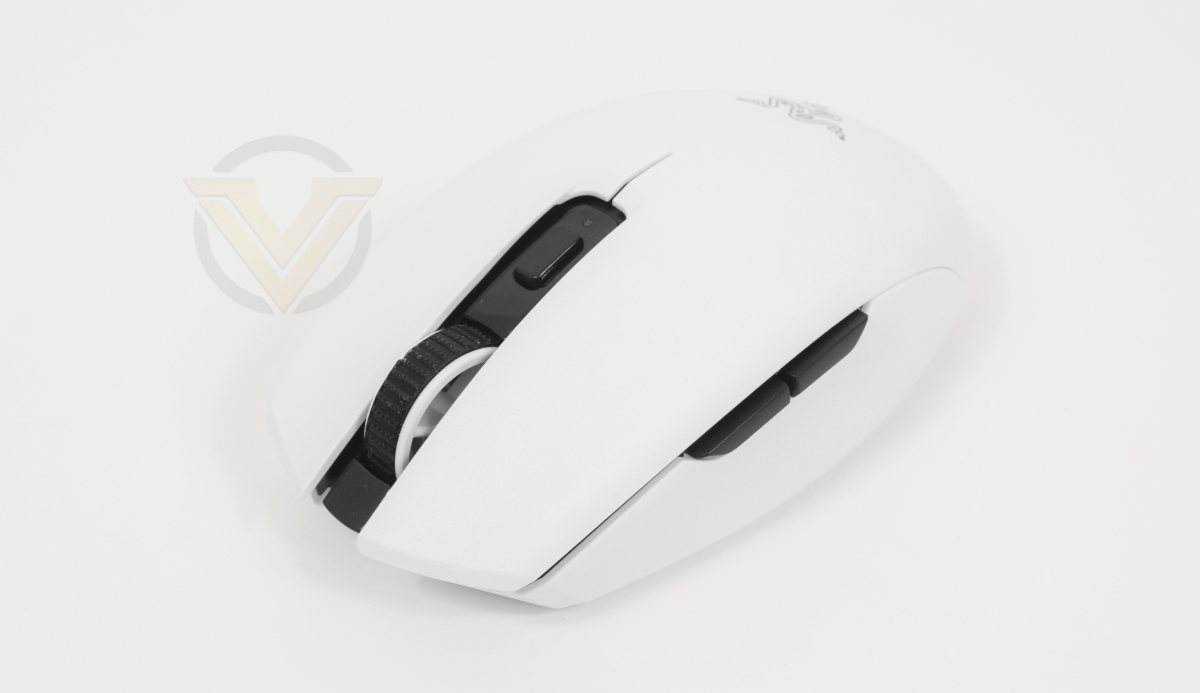
From the top down the Orochi V2 looks almost like a standard six button mouse. Its stretched aspect and tapered rear is reminiscent of out and out gaming mice, whereas those unfamiliar with the model might have expected the fat-bottomed compact shape similar to the original Orochi or the Atheris, Razer’s other mobile mouse. As a consequence it fits in the hand nicely and moreover doesn’t feel strange or awkward. Smaller hands in particular might find this shape the most appealing.
A wheel and single button are the two major features adorning the top, but an indicator LED sitting just below them helps you determine the status of wireless connectivity. Blue is Bluetooth, Green is Hyperspeed, and flashing means that it’s searching for a connection on that particular band.
The left side features two thumb buttons in their logical location just above a curved side-wall section that’ll help users grip the mouse. Both buttons are stiff and responsive without any mushiness experienced on other mice in this class.
The right side has no distinguishing features; this is very much a mouse intended for the right hand.
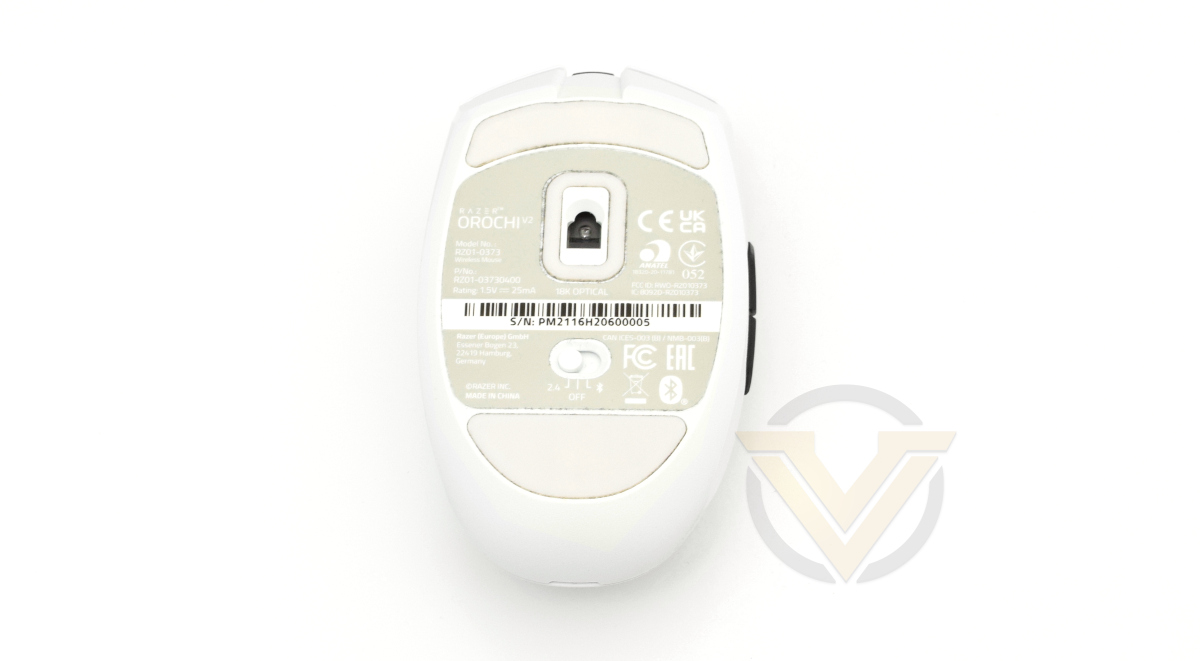
The floor* tells a story of relative simplicity. Two large low-friction skates keep the mouse slippery on mats and desks, and a third low-friction section surrounds the sensor apparatus and protects it from lint build-up. Below it sits the 3-way mode selector for 2.4 GHz (Hyperspeed), Bluetooth or Off. The rest of the space is repurposed for certification information, product and serial numbers and not much else. Simple, well-designed and without features that will get in the way of its primary role.
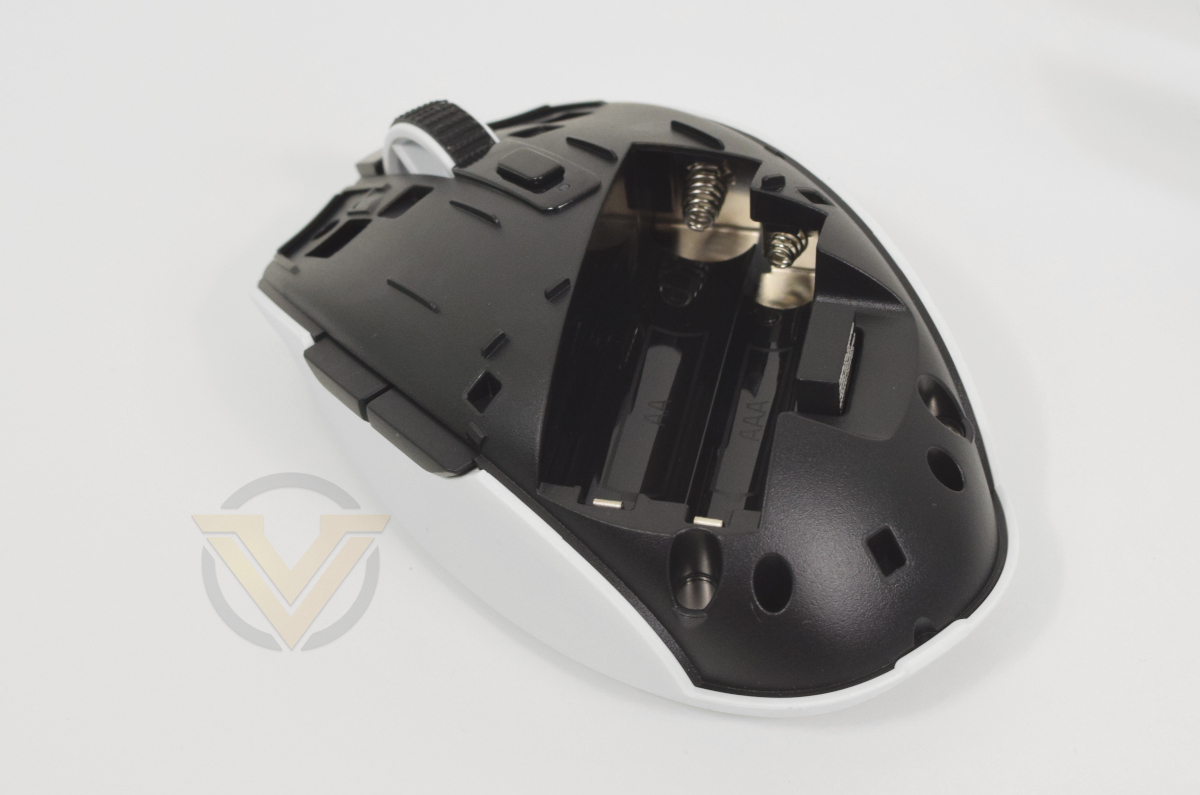
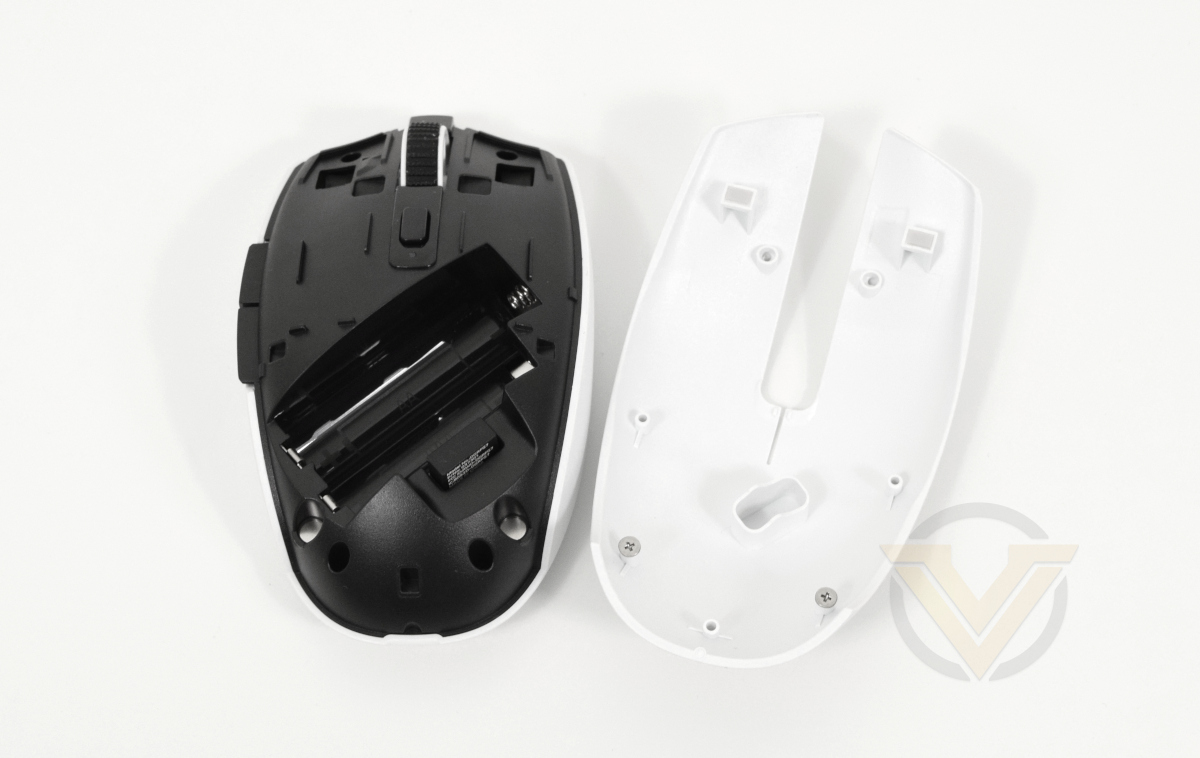
Time to move on to the Orochi V2’s party trick. Rather than placing compartments on the floor for installation and retention of batteries and wireless dongle, the entire palm and button section is levered off to reveal storage points for each.
This section of the mouse exterior is held in through two strong magnets. It pivots about the switches and care should be taken when repositioning it once you’re ready to go. Both battery and dongle are held snugly and won’t pop out in the normal course of travelling from one location to another, but they won’t remain in place when dropped from even small heights (<0.5m) if the cover isn’t also in place.
And finally, the wireless dongle itself has its companion mouse printed clearly on the side, a change that wasn’t the case with the Basilisk Ultimate. That should help prevent it from getting lost in a sea of dongles.
*Image shown is of the Orochi V2 after testing, showing lint build-up around skates over this period.
Software
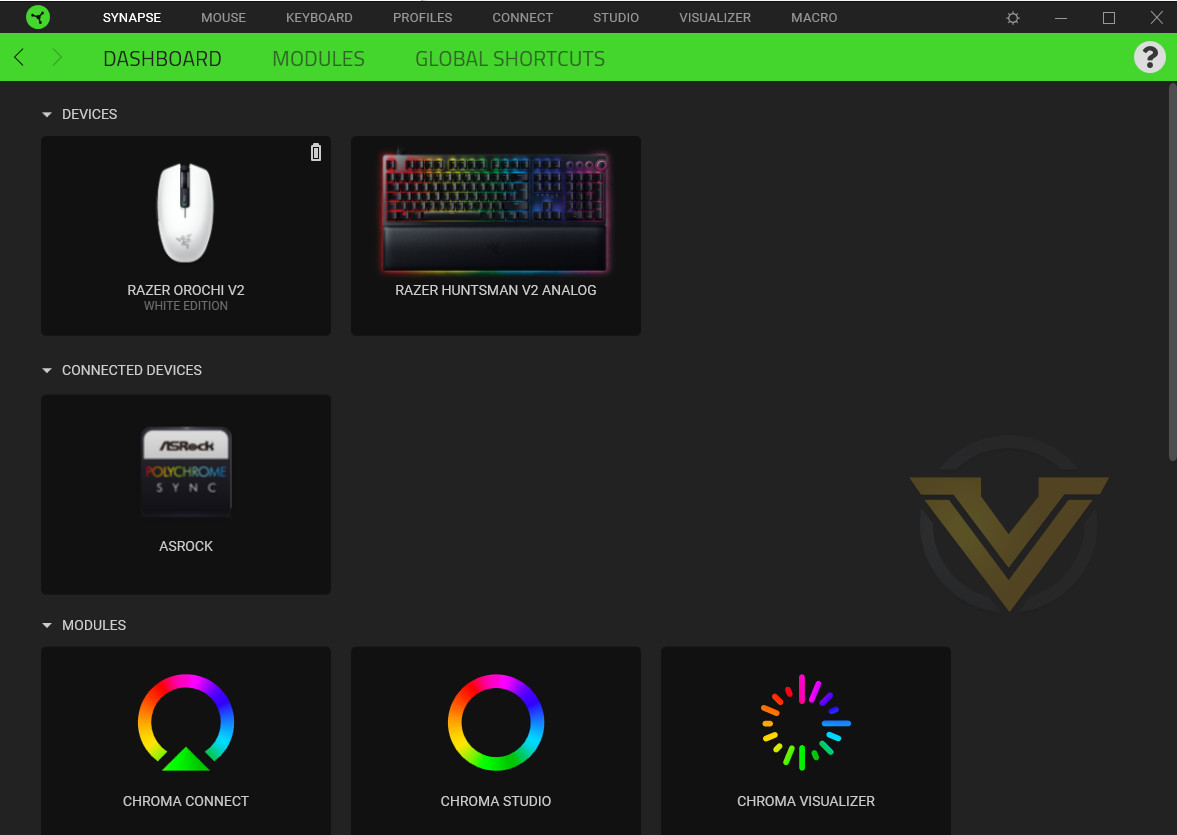
Razer, in common with other manufacturers, has developed a unified utility that manages the core aspects of their entire peripheral range. Synapse – now in its third major iteration – is the tool for both the high-end Huntsman V2 Analog, and this more modest mobile mouse; experience with any of Razer’s product range will stand you in good stead with the Orochi V2, but its cut-down functionality will make the learning curve gentler for novices.
Selecting the Orochi V2 from the Synapse Dashboard will bring up its configuration page. Four tabs are each deal with a different aspect of the mouse:
Performance: sets the different onboard DPI stages and polling rate, while also linking the Windows Mouse Properties menu.
Calibration: calibrates the sensor for any given surface, and defines the sensor lift-off distance.
Power: sets power-saving parameters
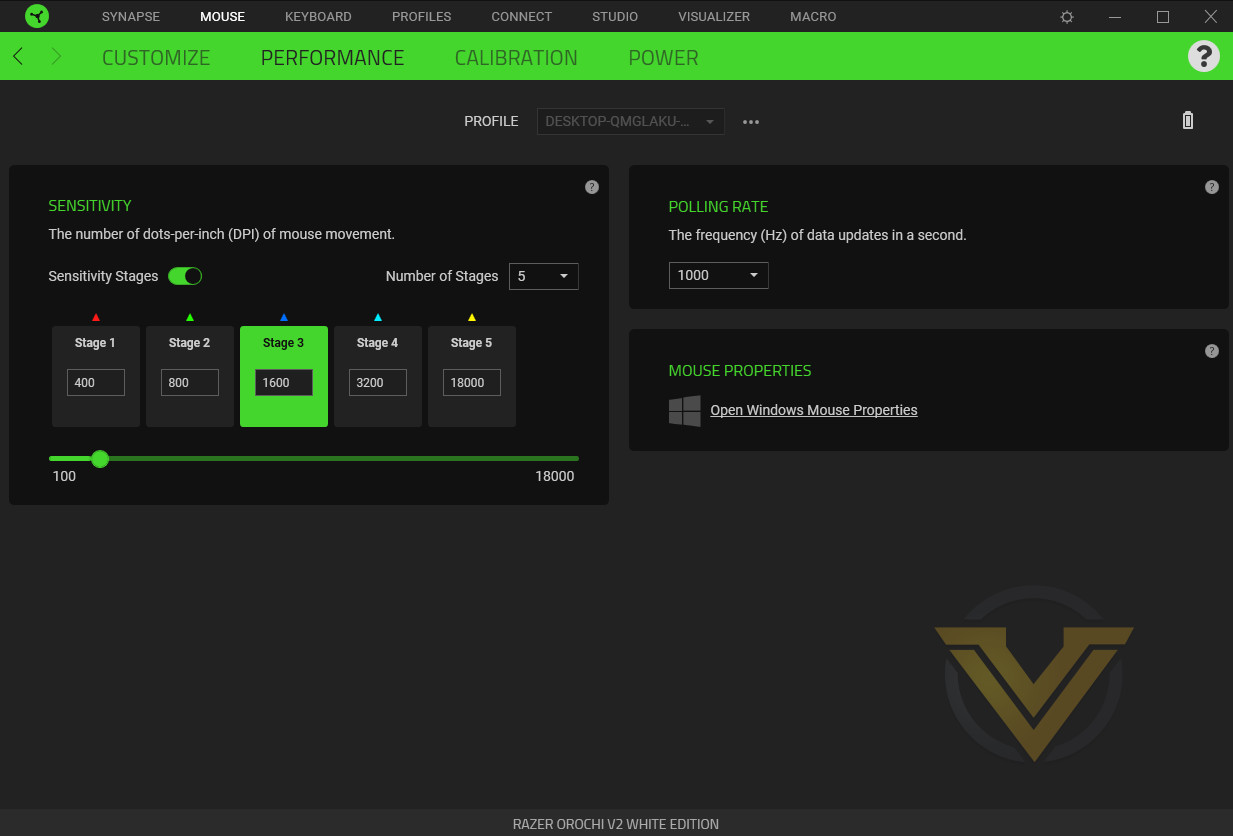
The mouse has five on-board DPI sensitivity levels which can be configured as desired. The button on the top of the mouse cycles through these stages, briefly flashing up an indicator LED colour corresponding to the stage selected when pressed. The number of DPI stages can also be reduced, leaving you to cycle through only those that are needed.
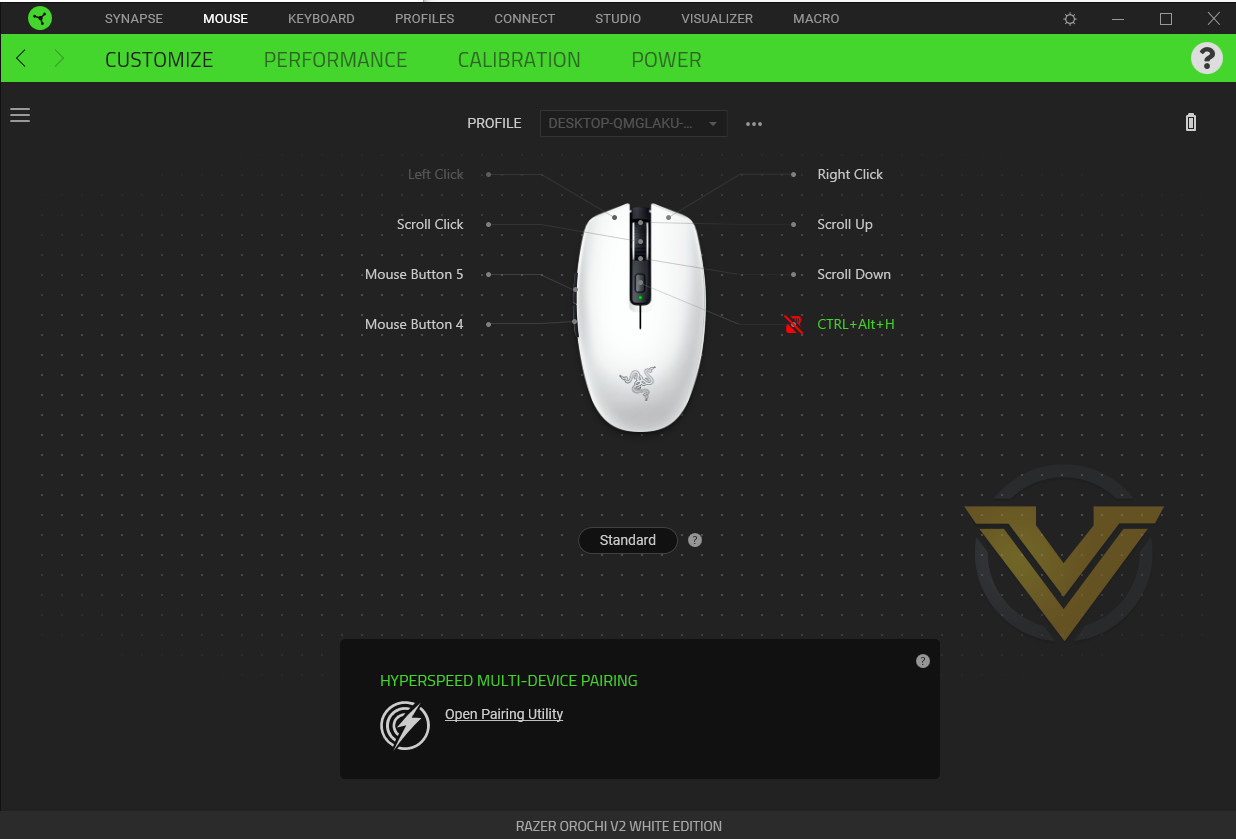
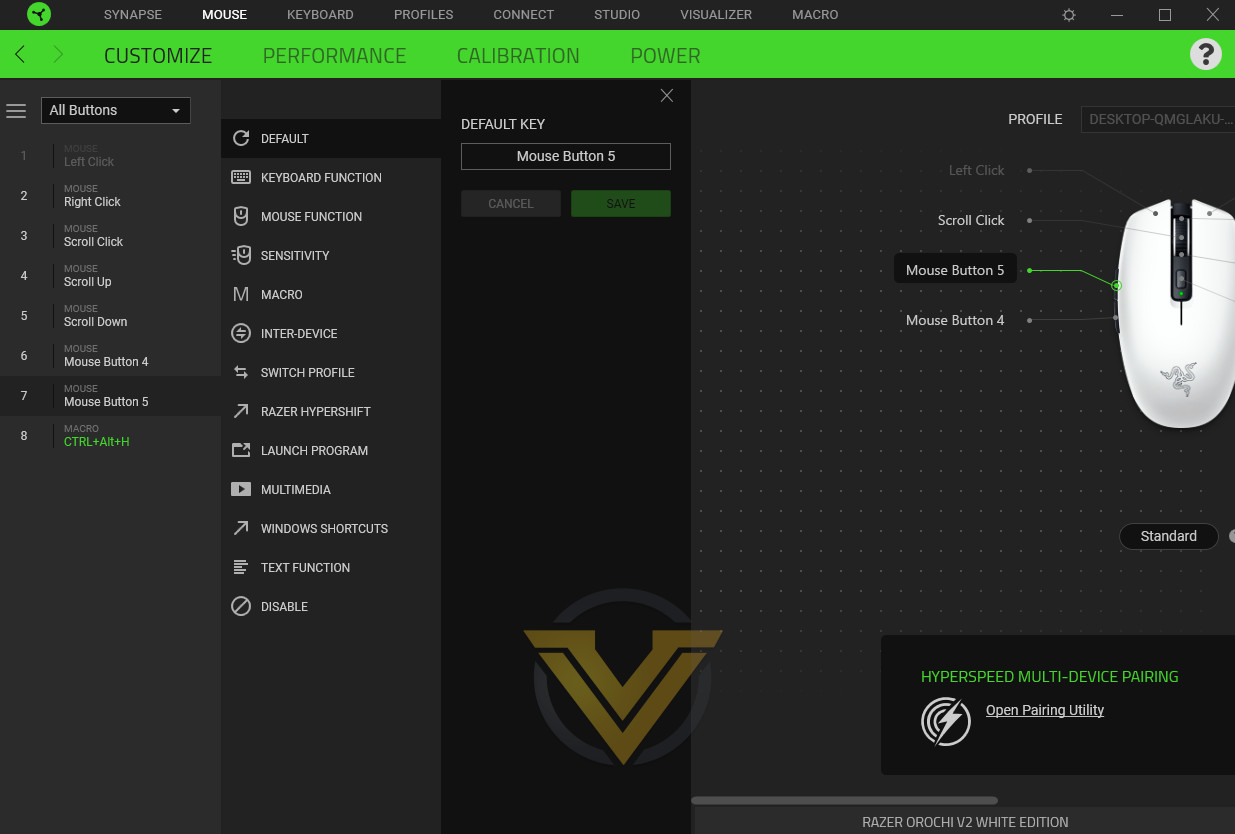
The Customisation section operates identically to similar sections on other Razer mice. Selecting a given button (or scroll wheel direction) in the overview will bring up a list of binding options including standard Windows functionality, general mouse functions, macros and more. Remapping a button is a trivial process, and any remapped buttons are highlighted in green on the overview.
Power saving options are limited for the Orochi V2, chiefly due to the lack of LED illumination. The end-user is able to adjust the idle sleep timings – from 1m to 15m with a default of 5m – and a low power mode threshold. The former is more likely to be of long-term value that the latter, but making that last 10% of juice go further could be a life-saver in rare instances.
The Orochi V2 also supports Razer Hypershift, allowing a second binding option for each button on the mouse. Hypershift works as a modifier similar to Shift or Control on your keyboard, letting the mouse perform a different action when held simultaneous to a button press.
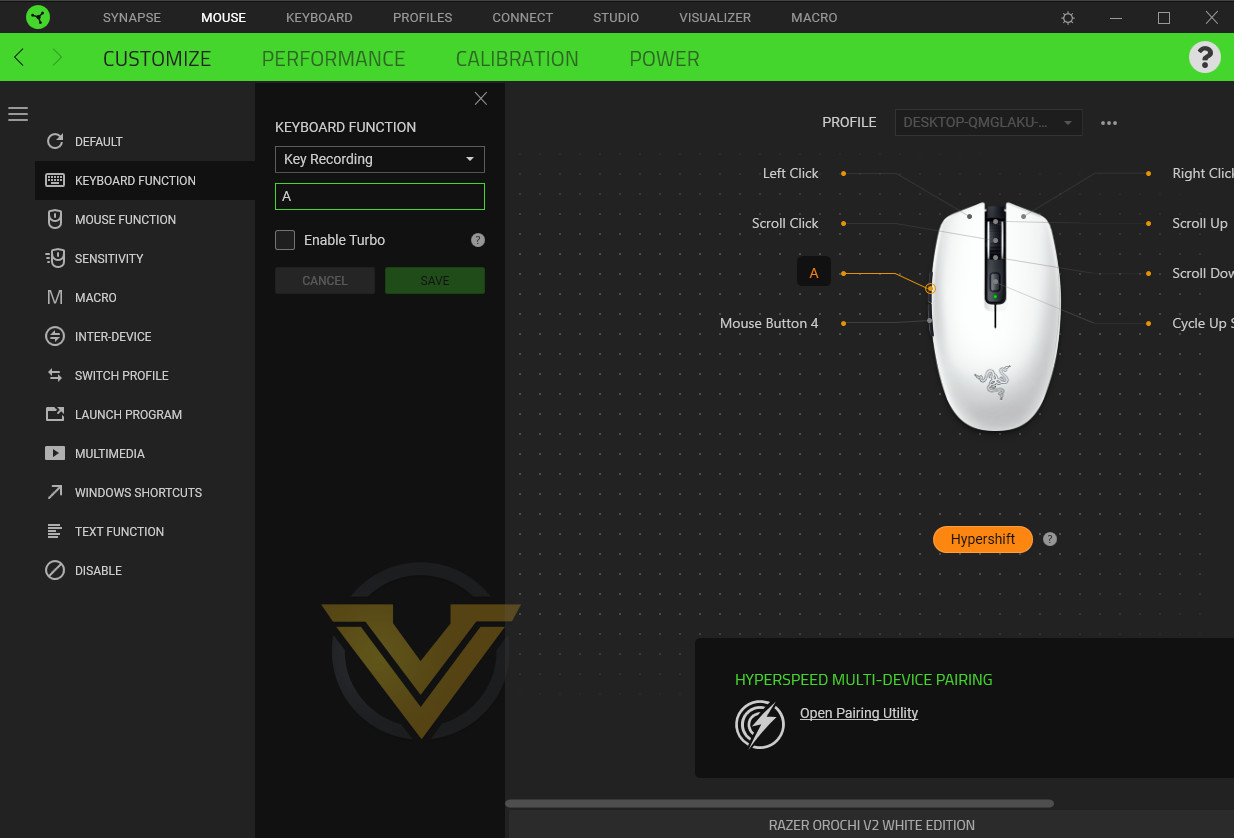
Hypershift works best as a feature operating across multiple devices, particularly the combination of Razer keyboard and mouse. Holding a key with your left hand and activating the mouse button’s secondary function feels much more natural than attempting to leverage Hypershift on the mouse alone, and makes for a much more effective weapon in your gaming arsenal.
Hypershift bindings are set by toggling Standard to Hypershift at the bottom of the overview and then setting each button as previously. The default binding is identical to Standard functionality so accidentally activating Hypershift won’t affect general usage unless you make a change. Modified buttons will be highlighted in orange.
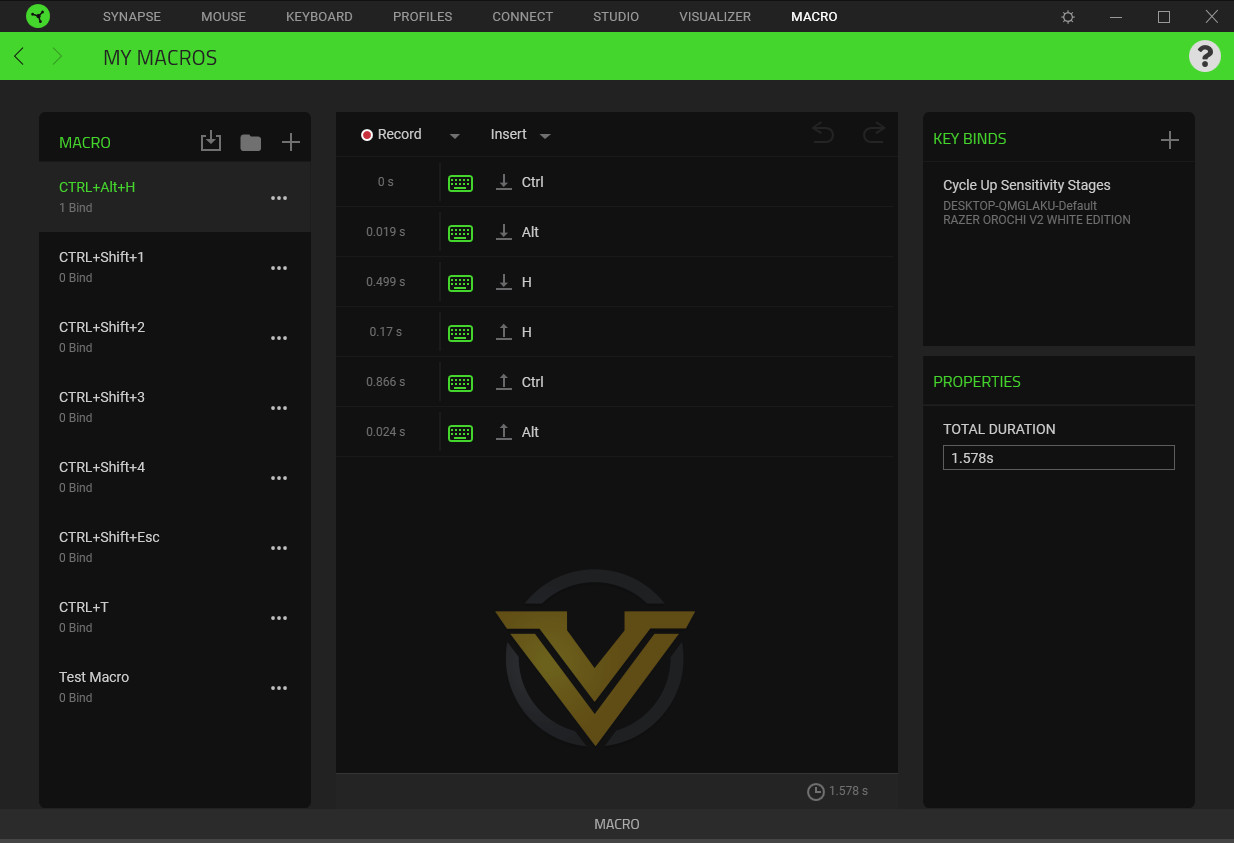
And finally, the Orochi makes use of the same versatile macro system as other Synapse-powered peripherals. Macros are recorded as typed and each individual component of the macro can be edited directly. When complete and assigned to a button on the mouse (or other device) the software relays both the number of devices it is bound to and, on the right, the device, profile and exact button it is assigned to.
Synapse is an ideal partner for the Orochi V2 that complements its core use rather than loading the user down with extraneous features and a steep learning curve.
Performance
The Orochi V2 is a mobile mouse that you can take with you where-ever you go, but at its heart it’s still a gaming mouse (and marketed as such). We reviewed it in that light just as we did with CORSAIR’s KATAR Pro Wireless, except with dialled up expectations due to the difference in price.
Before we get there however, we should report one slight niggle with the installation process. When initially plugged into our test system (with Synapse running) the mouse was detected but movement was jerky. Not a tracking issue so far as we could tell, instead it was as if the cursor was freezing in place and updating tracked movement every other second. Removing and re-plugging the dongle cleared the problem; if replicated on other systems however it’s something that might put off consumers.
As we’ve already mentioned, the Orochi V2 has a shape that’s contoured well to the hand without an aggressive ergonomic shape, and in that respect is similar to many classic gaming mice from down the years. It’s a little smaller than is typical, particularly of Razer mice, and lightweight at a little over 70g including battery. It’s ideal for smaller to medium sized hands with claw or fingertip grips; using a palm grip with larger hands in particular might be less suitable.
The build quality is very good. Despite a retention system that only uses a pair of magnets (albeit strong ones) there’s effectively zero lateral and only the merest hint of front-to-back movement, making it feel rock-solid in the hand almost as if the top section was screwed in place. Both LMB and RMB are crisp with no discernable pre-travel and very little additional distance post-actuation; it’s taking advantage of the tension offered by a single curved piece rather than individually tensioned buttons. There is however some movement in both buttons towards the centre when pressed from either side.
Both thumb buttons are a step up again in quality with a very similar feel. There’s a fractional amount of pre-travel on both forward and back, but both have satisfying clicks and a uniform backstop that prevents excessive post-travel movement. They’re some of the better we’ve used across both wired and wireless mouse products.
The wheel is a moderately low resistance design that doesn’t quite allow for free spinning. Notch positioning is even around its track. The button is neither light nor heavy, hitting a good sweet spot given the tension in the wheel.
General mousing is good thanks to the low weight and good skates. The sensor had zero tracking issues (barring the teething problems outlined above), accurately mapping up to the full (and overly sensitive without per-application adjustment) 18000dpi. There was no perceptible angle snapping or acceleration to contend with, resulting in a reliable experience overall.
Our gaming time with the Orochi V2 was primarily spent playing both Path of Exile and Apex Legends. PoE’s ARPG click-fest puts the two main buttons through their paces while offering scope for using additional buttons for additional skills. Apex Legends meanwhile is all about that FPS action, where the timing of a single click can make the difference between survival and defeat.
The slight instability in LMB and RMB was amplified in Path of Exile, where frequent and repeated button presses were enough to make them feel slightly inconsistent, almost as if they weren’t quite sitting flush and secure on their switches. Not enough to mar the experience to any great degree, but just enough to reduce confidence in gameplay. The thumb buttons however remained excellent throughout, even though they were sidelined a little due to the game’s underlying mechanics.
Playing with a higher than typical DPI so minimise movements wasn’t an issue, and the mouse’s light weight meant that there was no fatigue during long sessions, despite racking up a punishing click count.
It was a different story with Apex Legends. The change in play pattern suited both LMB and RMB, while the thumb buttons remained effective as ping indicators throughout. Lower DPI and wider movements weren’t to the detriment of the mouse either, with weight standing it in good stead over multiple hours of gaming.
Finally, the mouse survived a short drop test of 1m with shell still attached. Moving up to 1.5m both detached the shell and ejected the battery, perhaps indicating a need for a small carry bag if used regularly on a commute or whilst at college.
Conclusion
It’s fair to say that we’ve had something of a mixed experience with wireless mice in the recent past, from the excellent Basilisk Ultimate to the promising but ultimately flawed KATAR PRO Wireless, so we entered into this review with a degree of trepidation. Thank goodness that these worries were swiftly dispelled by the Orochi V2’s excellent overall design.
With Razer Mechanical Switches, Hyperspeed Wireless and 18K DPI optical sensor, the underlying technical gaming credentials were always going to be present. What Razer needed to deliver on was a compact lightweight chassis that didn’t fall apart as soon as you used it assertively. The Orochi V2 is just such a mouse, with very good build quality and a smart internal layout coupled to an opening mechanism that works to the design’s overall benefit rather than detriment.
Operating with either AA or AAA batteries is another smart decision. Flexibility in power source is an underappreciated aspect in mobile mice, when you may be at a location that has one or the other type but not both. Replacements are oftentimes urgent, particularly when working remotely, and beggars cannot be choosers. With this mouse they don’t have to be.
Slight quality issues are in evidence which might frustrate some high level gamers however. The fractional inward movement on both LMB and RMB is the most egregious, but it’s notable that such a minor flaw is really our harshest criticism. If you’re gaming on the move then it’s unlikely you’ll find it much of a problem compared to other aspects of mobile gaming. That aside, we’d also note that the grippy surface of the Orochi will also tend to pick-up grime a little more readily than some others.
Speaking of mobile gaming, we strongly recommend the 2.4GHz wireless mode over Bluetooth. Latency was obvious in the sort time we had the mouse operating in Bluetooth mode, certainly enough to throw off your game. Bluetooth is however perfect for wide compatibility and battery longevity, making it a good solution for productivity and general non-game PC/Laptop usage.
As for that battery life, despite two weeks as our daily driver running full bore setting (2.4GHz, 1000 Hz polling, default power settings) the battery indicator didn’t budge. We can’t corroborate the claimed 950 hrs with Bluetooth or 425 with 2.4GHz, but 200hrs was easily reached and surpassed without it breaking sweat.
For some, the one aspect lacking on the Orochi V2 (apart from RGB lighting, we see you gamers) might be on-board profile support. The mouse only has one, and as a consequence you’ll need to leverage the cloud storage capabilities of Synapse software to act as an alternative.
On the other hand, the cherry on top might well be the custom fascia designs purchasable from Razer. Either by showing your appreciation for a specific style, influencer or game, or simply by designing your own striking personalised graphics, the Orochi V2 offers near unprecedented aesthetic options that take advantage of a neat quirk in the mouse’s design. The one addition that we’d love to see is a carry bag just to keep it safe in a holdall, but we understand why Razer would be reluctant to bundle one given the mouse’s position in the market.
All told, Razer’s Orochi V2 is a high quality mouse for the mobile gamer and those who engage with the new hybrid work paradigm. It mixes quality components with smart design for a great mouse that excels on-the-go but is also at home in a home office. At an MSRP of £69.99 it’s at the premium end of this class of mouse, but for the right person it will seem cheap at that.
+ Great Shape
+ Good array of buttons
+ Great sensor
+ Dual Wireless (2.4 GHz and Bluetooth)
+ Dual Battery (AAA and AA)
+ 2 Year Warranty
= Custom fascias are available through the Razer Store.
Cons
– Price
– Slight movement in the LMB and RMB
Click here for an explanation of our awards at Vortez.net.
Stay connected with the Vortez Social Media pages:
Join in with the discussions on Discord