







Does the first ROCCAT gaming keyboard to feature their new Talk FX technology have what it takes for gaming greatness or will Isku FX fall by the wayside?

Product On Review: Isku FX Gaming Keyboard
Manufacturer & Sponsor: ROCCAT
Street Price: £85 Inc. V.A.T.
Based in Hamburg, Germany, ROCCAT are swiftly making a name for themselves not only through their wide range of peripherals, but also through innovation in the field of cross-peripheral interaction. Our most recent experience with ROCCAT was the Gold Award winning Kone Pure, a slimmed down mouse compared to the very high end Kone XTD with many of its core features including Easy Shift, Easy Aim, wide button rebinding and lighting customisation. One of the features we weren’t able to discuss very much was its ROCCAT Talk FX functionality, chiefly because we had yet to see the then upcoming Isku FX keyboard. Well, now here it is.
The Isku FX is an evolution of the Isku reviewed by David way back in 2011 and has been designed with the same ethos which has permeated the latest Kone mice – extensive customisation, to an almost absurd length. The Isku FX also adds far greater lighting range than the previous Isku, now in theory allowing one of 16.8 million colours and the ability to synergise with Kone[+], Pure and XTD mice for additional ambient effects or dynamic changing based on gaming conditions through the use of Talk FX.
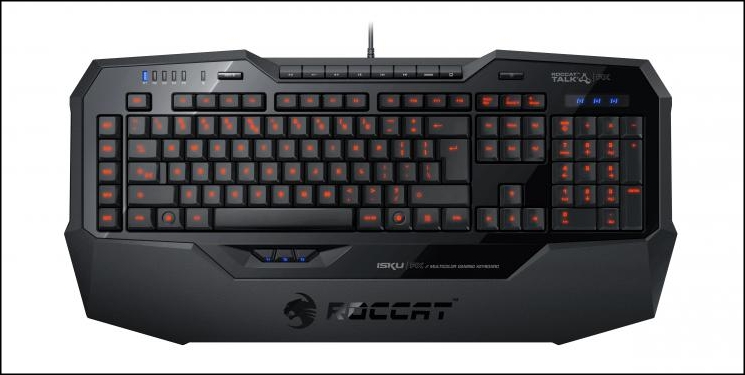
Through the use of Easy-Shift the Isku FX has a frankly ridiculous 36 macro buttons available, including three specifically for the thumb, and unlocks the potential of the Kone XTD, Pure and [+] by allowing activation of Easy-Shift mode on those devices. At its core however it remains a membrane-based keyboard, and so must be judge in the understanding of the strengths and weaknesses of this particular switch type.
FPS gamers will also have access to Easy-Aim on the keyboard, reducing the sensitivity of mouse movement without changing any other mouse attributes, helping aiming and stability without the use of an Aim button built directly into the mouse.
About The ROCCAT Isku FX:
Total gaming domination. It’s easy with the right tools. Combining the world’s smartest gaming engineering with jaw-dropping design, the ROCCAT™ Isku FX Multicolor Gaming Keyboard hands you the power to own any game the easy way — and be legend.
Total gaming domination. It’s easy with the right tools. Combining the world’s smartest gaming engineering with jaw-dropping design, the ROCCAT™ Isku FX Multicolor Gaming Keyboard hands you the power to own any game the easy way — and be legend.
At near the £85 mark this premium keyboard locks horns with other very high end membrane keyboards currently on the market, as well as a number of mid-range mechanical ‘boards which eschew the extensive feature set for a theoretically better switch type. It’s a tough job, so are ROCCAT up to it?
Features and Technical Specifications
Keyboard Features
* MULTICOLOR KEY ILLUMINATION with 16.8 million colors of your choice; with 6 brightness levels.
* 3 EASY-SHIFT[+]™ ZONES for easy key duplication
* 36 EASY-TO-REACH MACRO KEYS including 3 Thumbster keys
* MACRO LIVE! RECORDING with dedicated M-Rec button; 180+ macros in 5 profiles
* 8 CONFIGURABLE MEDIA & HOTKEYS 25+ assignable functions
* MEDIUM-HEIGHT KEYS with an optimum keystroke & pressure point; advanced anti-ghosting; 1000Hz polling rate
* ROCCAT™ DRIVER + MACRO MANAGER incl. Sound Feedback; Macro Presets for games, multimedia and office apps
* EXTRA-LARGE GRANULAR WRIST REST with special surface texture
* INTEGRATED CABLE CHANNELS for better device organization
* NON-SLIP BASE with lock-on keyboard feet
* ULTRA-FAST PROFILE SWITCHING 5 Profile-Status LEDs
* ROCCAT™ TALK® – SET BONUS get more out of your ROCCAT™ devices by combining their functions
* ROCCAT™ TALK® FX translates on-screen action into sensory effects on your Isku FX
* 3 EASY-SHIFT[+]™ ZONES for easy key duplication
* 36 EASY-TO-REACH MACRO KEYS including 3 Thumbster keys
* MACRO LIVE! RECORDING with dedicated M-Rec button; 180+ macros in 5 profiles
* 8 CONFIGURABLE MEDIA & HOTKEYS 25+ assignable functions
* MEDIUM-HEIGHT KEYS with an optimum keystroke & pressure point; advanced anti-ghosting; 1000Hz polling rate
* ROCCAT™ DRIVER + MACRO MANAGER incl. Sound Feedback; Macro Presets for games, multimedia and office apps
* EXTRA-LARGE GRANULAR WRIST REST with special surface texture
* INTEGRATED CABLE CHANNELS for better device organization
* NON-SLIP BASE with lock-on keyboard feet
* ULTRA-FAST PROFILE SWITCHING 5 Profile-Status LEDs
* ROCCAT™ TALK® – SET BONUS get more out of your ROCCAT™ devices by combining their functions
* ROCCAT™ TALK® FX translates on-screen action into sensory effects on your Isku FX
Specifications
* Illuminated keyboard with 123 keys
* Enhanced anti-ghosting capability
* 3 programmable Thumbster Keys (T1-T3)
* 5 programmable Macro Keys (M1-M5)
* 20 additional Macro Keys (Easy Zone)
* 5 Profile-Status LEDs
* Macro Live Recording
* 3 Status LEDs (Caps Lock, Easy Shift[+]™, Num Lock)
* 1000Hz polling rate, 1ms response time
* 2m USB cable
* Dimensions:- 24.7cm x 50.9cm
* Enhanced anti-ghosting capability
* 3 programmable Thumbster Keys (T1-T3)
* 5 programmable Macro Keys (M1-M5)
* 20 additional Macro Keys (Easy Zone)
* 5 Profile-Status LEDs
* Macro Live Recording
* 3 Status LEDs (Caps Lock, Easy Shift[+]™, Num Lock)
* 1000Hz polling rate, 1ms response time
* 2m USB cable
* Dimensions:- 24.7cm x 50.9cm
System Requirements:-
Windows® XP, Windows Vista® 32/64-bit, Windows® 7 32/64-bit or Windows® 8 / Windows® 8 Pro
Internet connection (for driver installation)
USB 2.0 port
Internet connection (for driver installation)
USB 2.0 port
Packaging and First Look
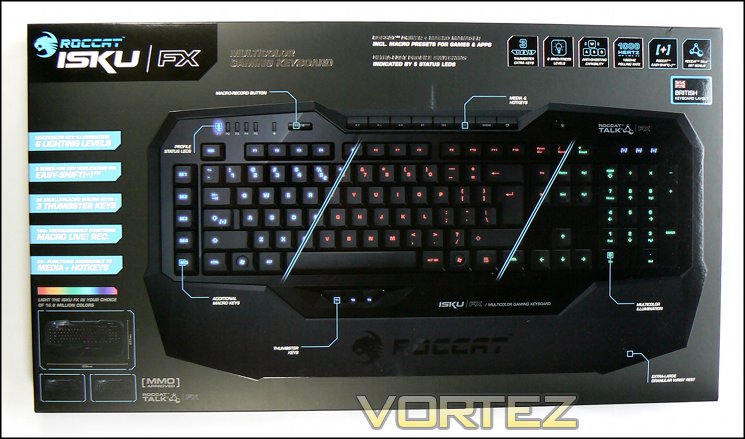
The front of the Isku FX’s packaging is as we have come to expect from ROCCAT: packed with information on the keyboard, as well as including a full image of the keyboard itself. Although it may have the graphic designers who lean towards a more stylish design up in arms, it should be something of a relief to customers in need of additional functionality detail or just a visual confirmation of the layout they expect to see.
Whilst an EU layout is shown on the keyboard itself, ROCCAT specify the layout of the keyboard inside quite prominently on both the front and the SKU near the barcode. This will hopefully prevent any confusion, especially in multi-lingual areas which don’t really have a set layout preference.
Lighting is obviously a large factor, and the imagery of the keyboard presents three of the 16.8 million colours it is capable of. The only criticism we would have in this regard is that it makes it appear as though multiple colours can be presented simultaneously, whereas as far as we have been able to make out only one colour can be shown at a time.
Eight key points of functionality are represented on the packaging front, including Easy-Shift[+], Anti-Ghosting, Thumbster Keys, 1000Hz polling, ROCCAT Talk, Brightness levels, Live macro recording and 25 hotkeys. Where possible the features are indicated on the image, which cuts down enormously on the potential for confusion.
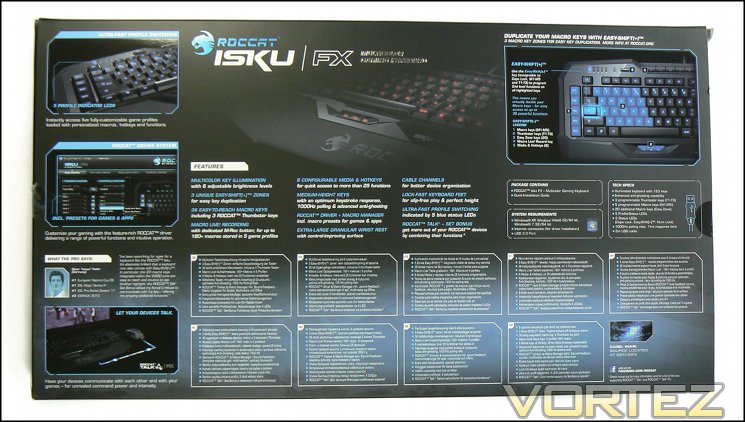
The packaging rear contains much more detailed information on the keyboard, including a breakdown an additional background on the keyboard features, a description of the Easy-Zone, and the technical specifications. ROCCAT also include the feature set in nine languages.
Mentioned briefly are also the ROCCAT Talk FX functionality, driver details and profile switching. Whilst brief, it shows their relative importance in the minds of ROCCAT and consumers overall. It especially shows how proud ROCCAT are of the drivers they have developed for the Isku , a facet of their product line we have praised them on in the past.
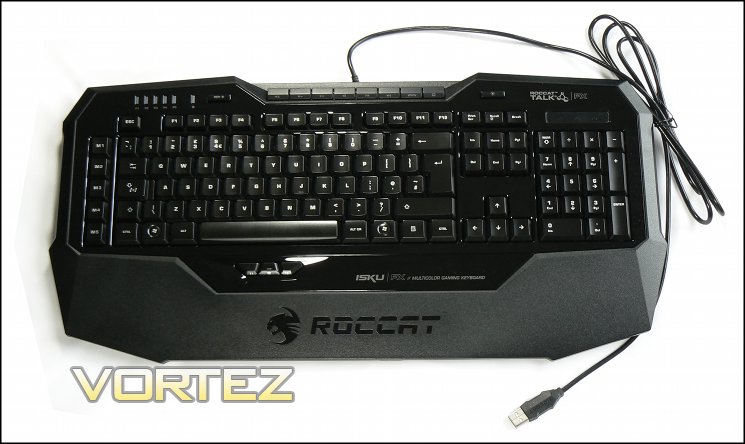
Our first look at the Isku FX, although we should note that surprisingly it was packaged in an anti-static bag. The keyboard is medium-to-low profile with gloss black finish frame and textured surround. There is little variation from the standard layout for the standard keys, with the possible exception of the Function (F1-12) keys which are half-height. Macro keys M1-M5 are on the left of the keyboard in descending order – generally speaking a more useful location than above the F-keys as on many other keyboard layouts – whilst media keys are arraigned centrally on the top edge of the keyboard frame. The three ‘Thumbster’ keys are just below the spacebar, central to it.
The package also includes a ROCCAT quick-start guide with keyboard installation tips and download instructions for the latest driver suite and firmware, a trend which has become increasingly common for peripheral manufacturers seeking to shave costs and improve quality assurance in software.
A Closer Look
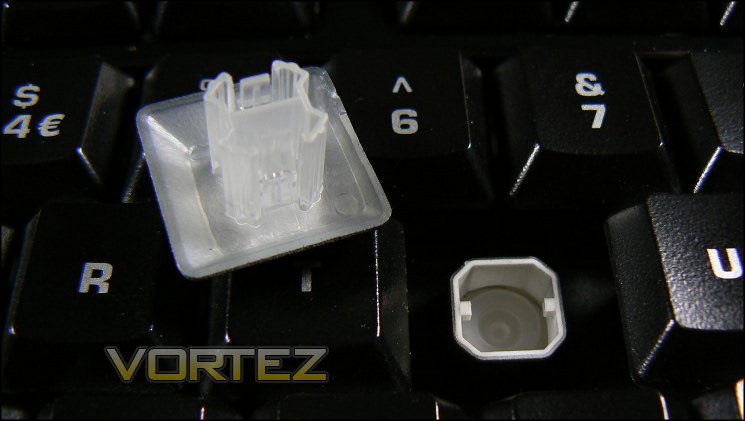
There’s quite a lot to take in with the Isku FX, so lets begin. The first and most important point for keyboard connoisseurs is that this is a low profile membrane keyboard rather than mechanical switch type of other keyboard in a similar price range. This membrane type usually has a few consequences – less responsive keys, a more deadened typing experience and less robust construction – but we find the Isku to be extremely solid in construction. It’s true to say however that the keys are less responsive at first blush and may be a slight disappointment to those who are used to mechanical switch types, but the low-profile keys will obviate some of the downside thanks to less spring-back distance.
The Isku FX has keycaps with a very good finish and characters which are clearly defined when lighting is enabled and disabled. The paint is relatively slippery, although the initial sheen wears to a reasonably grippy surface in a short space of time.
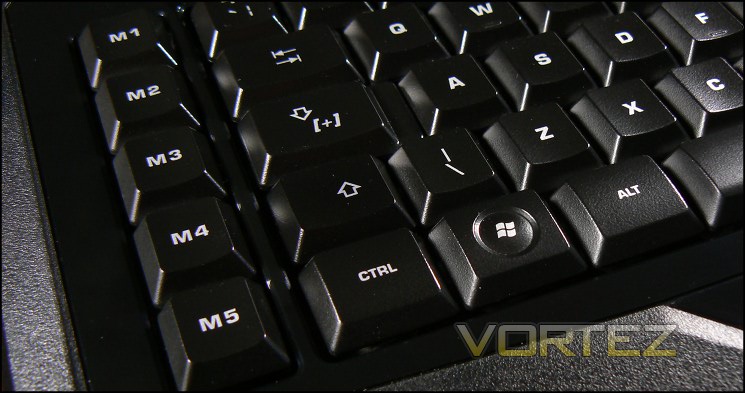
Macro keys M1-M5 on the Isku are in the ideal location for quick access whilst retaining hand position around the WASD-zone, although initial use of the Isku will take some getting used to if you typically orientate your hand to the edge of the keyset (SHIFT+CAPS+TAB etc.) rather than from a central point outwards. They utilise the same membrane switch technology of the other keysets.
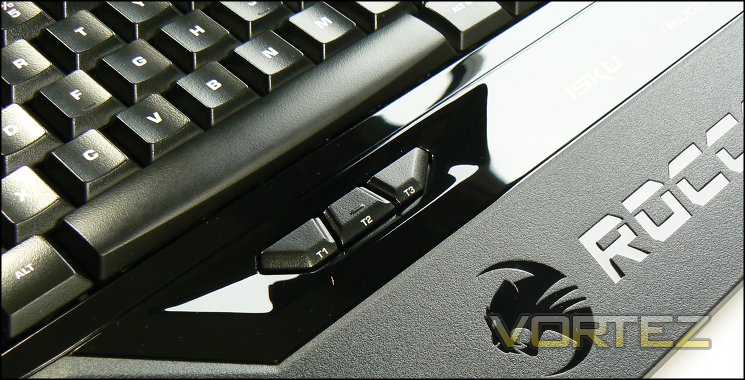
Thumbster keys are three additional keys below the spacebar which can be activated and also utilise Easy-Shift[+] to unlock three addition keybind options. Location-wise they’re excellent and being slightly recessed don’t interfere with normal typing. However actuation of these keys is a little stiff as they utilise a standard button-type switch, and this may make them a little more difficult to utilise in the heat of battle. With extended use however this initial stiffness should slacken off.
Speaking of Easy-Shift[+], ROCCAT have built this feature into their Kone and Isku keyboards, acting as a modifier for macro keys to double the number of keybinds possible. On the Isku FX Caps-Lock is the default Easy-Shift[+] key (denoted by the [+] on the keycap), a sensible choice in our mind thanks to Shift and even Tab being utilised more often in gaming. It also allows both Shift and Easy-Shift[+] to be utilised in tandem if required.
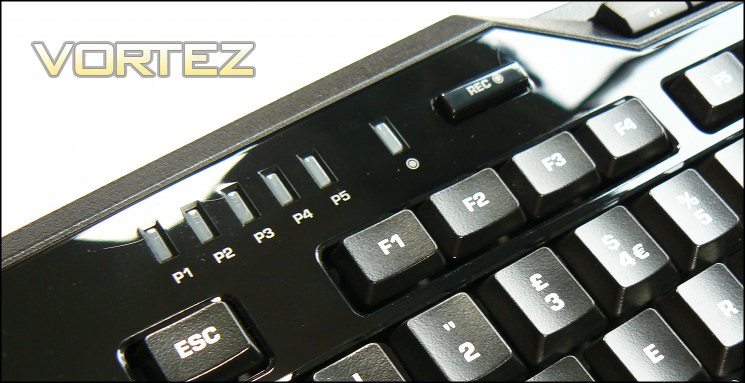
Casting your eyes up to the top-left of the board, you can see the profile indicator (P1-P5). Interestingly there is no dedicated key for profile selection; the key you might have expected to change profile in fact activates Macro Live Record functionality, with an indicator light just to the left of it. This should not however be seen as a liability, there are a huge number of macro keys on the Isku, any of which can be bound to profile selection.
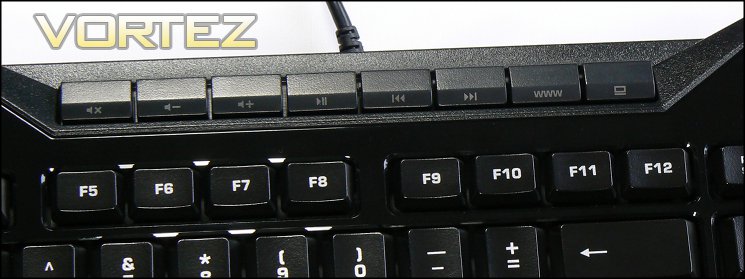
Centrally located at the top of the keyboard are the media keys. Often an oversight on many such peripherals, ROCCAT have taken the added step of allowing additional functions to be assigned including web-page refresh. They’re not quite as extensive a function set as the macro Thumbster keys, but this additional flexibility is swiftly becoming ROCCAT’s hallmark.
On the top-right is a solitary button which controls the brightness level of the keyboard lighting; a button push cycles between off and the 5 brightness levels. This is perhaps the weakest of the on-keyboard buttons, frequently failing to register a response when pressed. All said however, if one part of the keyboard was to be weaker than the rest we would choose it to be one where minute-by-minute operation wasn’t important.
We should mention the three indicator LED’s at the top-right – as you would expect they generally indicate NUMLOCK, CAPSLOCK and SCROLLLOCK status, however when Easy-Shift[+] is enabled (through pressing Caps Locks by default) the [+] will flash rather than be lit continuously. This is a nice way of providing some decent visual indication of the function being in operation rather than an additional LED or through changing the lighting (as occurs on the Kone mice).
The keyboard keyset is bordered by glossy plastic, which is then framed by a more substantial textured plastic in part forming the moderately sized firm wrist wrest. The glossy surround will be a fingerprint magnet and a devil to clean in time, and the few ridges where the frame transitions from glossy to textured will tend to pick up grime and particulates. It’s not an issue per se, more a concern if operating in dusty environments.
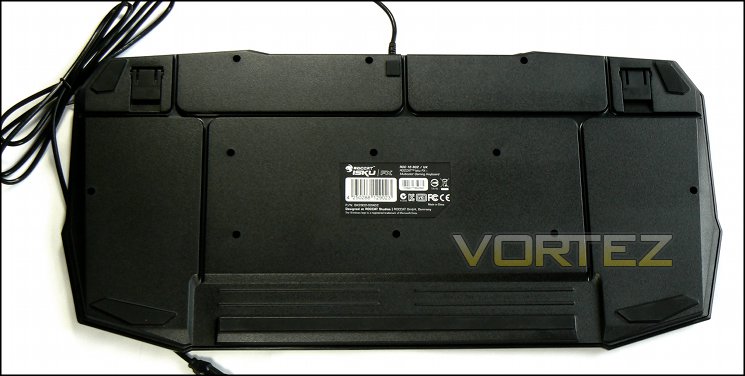
Multiple rubberised ‘feet’ around the circumference of the Isku FX provide stability on the table-top, whilst extendible rubberised feet allow the Isku FX a swallow incline if that’s the user preference. Channels cut into the keyboard floor also allows some cable routing options for headset and/or mouse USB if desired, which is a nice touch.
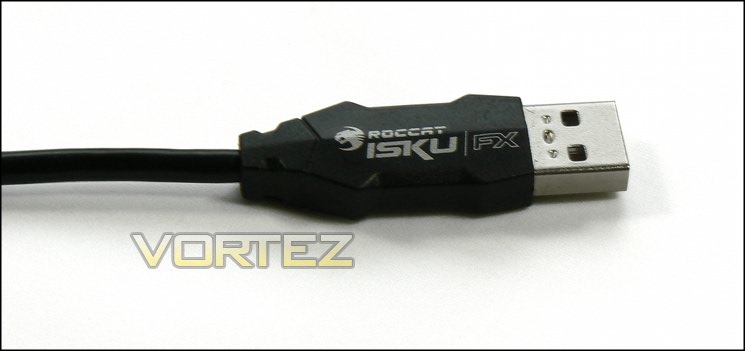
Finally, we should note that the USB cable is not braided, unlike that of the Kone mice. This is something of a disappointment, and whilst not having a substantial durability impact as on the mice it is a rare slip in quality.
Overall we would have to admit to being quite pleased with the Isku FX. It feels durable and has minimal flex, the membrane switches are okay and the layout is excellent. As the top-end goes for these types of keyboard it sets a very high bar.
Lighting, Customisation & ROCCAT Talk FX
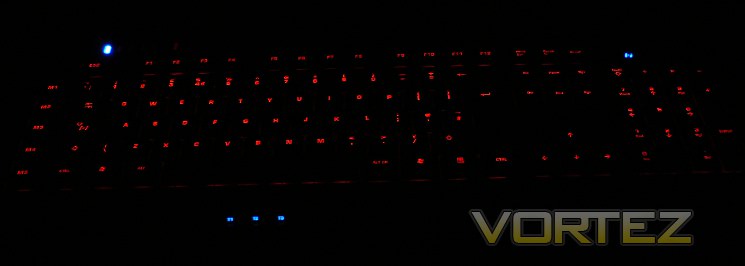
In a design akin to the lighting on the ROCCAT Kone XTD the Isku FX makes available 16.8million colours, essentially any in the RGB spectrum. Rather than multiple LEDs for each key – which would explode costs – the Isku FX utilises a distributed lighting system which dissipates an LED backlight across the whole keyboard. The effect is one of great colour consistency at the expense of some brightness: you won’t be gaining a great deal of aesthetic benefit in even substandard lighting conditions, but move to dim lighting or none at all except that of your monitor and the choice literally shines.
The included five brightness levels feel a little ancillary to the experience – two could easily have been enough for gameplay and periods of inactivity. Still, we’re not ones to complain about additional options. If you however choose to go without lighting entirely it will be worth knowing that the text print is crisp, clear and easily legible in most conditions.
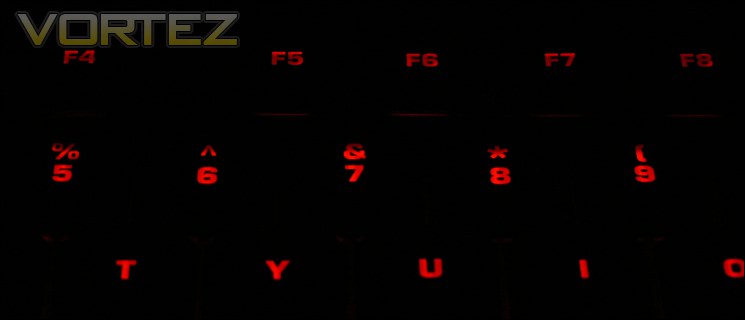
The lighting isn’t perfect however; when observed from a standard typing angle the it doesn’t quite appear to reach to the top of particular characters – the ASCII characters on the number row are the clearest example. Also 16.8 million colours is somewhat misleading – although an RGB input of that size is possible, realistically the variation in output exhibited isn’t that great. The sixteen preset colours however are all very good with some variation possible either side of each, and those options on their own are more than most others.
A couple of lighting effects are also available from the software suite: breathing and colour flow; the former is a relatively simple brightness variation at a constant frequency, whilst the latter cycles the backlighting through the colour spectrum. Breathing is fine, but as we found in the Kone XTD the colour cycling tends to have a step change between certain colours rather than a continuous flow. That said, the pleasant illumination of constant lighting isn’t a feature we would give up.
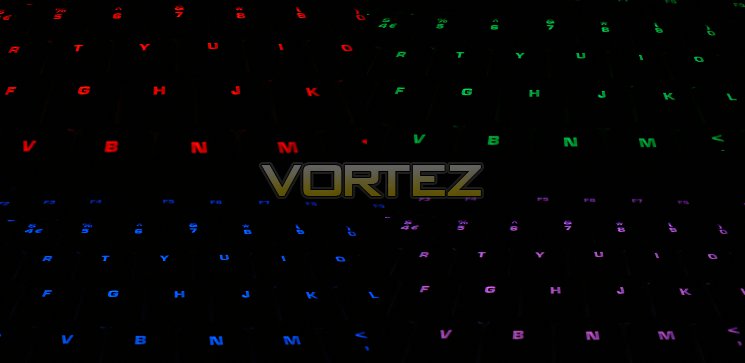
Lighting is on a per-profile basis. Due to the five on-chassis profile indicator lights this isn’t as important as on the Kone mice where profiles can be differentiated by this lighting, but may have additional ancillary benefits.
ROCCAT Talk FX
Apart from the new colour choices, the chief difference between the Isku and the new Isku FX is the integration of ROCCAT Talk FX. The first version of ROCCAT Talk allowed cross-communication between ROCCAT peripherals – initially the Isku and Kone[+] mice – allowing functions such as Easy-Shift[+] and Easy-Aim to operate on both periperhals. Talk FX goes beyond the previous iteration to add the potential for additional sync’d ambient and dynamic lighting options.
The technology was first unveiled at Gamescom 2011, but could only begin to flex its muscles with the release of an enabled keyboard and supported titles. At present, finding a list of supported games for the dynamic notification feature is very difficult beyond World Of Tanks, and in the main integration needs to be performed in software rather than at the driver level, especially for event notification. There may be a few exceptions to that, but it seems unlikely that traditional game mods would have that level of access to the API without built-in support.
World of Tanks makes use of the dynamic lighting Talk FX protocals rather than general ambient lighting, but in relatively ancillary ways. When in game, the pre-start countdown period makes your keyboard and mouse lighting flash white. In-game, the colour of the your peripheral lighting will reflect your in-game health through a green to red gradient; with death comes a fairly obnoxious flashing red. There may be more hidden deeper in the game, but they are the most obvious and go some what towards showing what could be done.
This has not stopped amateur modders from getting their hands dirty with Talk FX. Unofficial apps are available if you search hard enough, which will allow you to see the potential of Talk FX in action. Two features in particular have been implemented thus far with some success – Actions Per Minute and Ambient dynamic lighting. The former will change the colour of the keyboard/mouse lighting based on your APM (essentially, the rate of keys/buttons pressed per minute), whilst the latter analyses the colour balance presented on-screen and changes the peripheral lighting to match. Whilst relatively crude demonstrations, they are effective at presenting the potential of the technology if it becomes supported in the mainstream.
At present a lack of support makes this heavily promoted feature something of a non-starter compared to standard ROCCAT Talk, but with near boundless ideas we want to see how far Talk FX will go and if it will be extended to other peripherals such as headsets in the future.
Live Macro Record
The Isku FX Live Macro Record allows lets you record macros on the fly and bind them to a key without needing to go through the rigmarole of the software suite. Once pressed, a voice prompt will ask you to press a macro key – M1-5, Easy-Shift[+]+M1-5 or one of the other 20+ available buttons – and then enter the keystrokes which the macro needs to be composted of. Once complete, Live Record is pressed again and the recorded macro is bound to the macro key specified.
Any macro saved is stored as the following hash:
Px-MLR-yy
Where:-
x = The active profile at the time the macro was saved
yy = string representing the key the macro was assigned to.
– M1-M5 = Macro keys 1 through 5
– T1-T3 = Thumbster Keys
– E prefix represents an Easy-Shift[+] modifier
Where:-
x = The active profile at the time the macro was saved
yy = string representing the key the macro was assigned to.
– M1-M5 = Macro keys 1 through 5
– T1-T3 = Thumbster Keys
– E prefix represents an Easy-Shift[+] modifier
and can be edited later through the Macro Manager in the Isku FX software suite. This seems extremely convenient, and voice prompts are clear and surprisingly helpful; just be aware that other macros with the same name construction will be overwritten.
The Isku FX therefore perfectly complements the Kone XTD’s ethos of high customisation through lighting and onboard features. It’s disappointing that ROCCAT appear to have yet to follow through with a software package for Talk FX’s basic functions, but hopefully they will take the ball and run with it.
Software
As with most ROCCAT peripherals you’re now expected to be able to download the dedicated software direct from the website rather than relying on a potentially out-of-date driver CD. To facilitate this ROCCAT include a quick-start pamphlet with instructions on finding the download location, which is under the product support page of the official website.
The current version of the software, used for testing and evaluation of the Isku FX, is 1.07 and is paired with firmware v1.05. It’s notable that ROCCAT continue to develop software and firmware post-release, unlike some manufacturers who stick a fork in it when shipped.
From a layout and stylistic standpoint the Isku FX software UI is near identical to that of other ROCCAT peripherals we’ve reviewed, and shouldn’t prove to be difficult to get to terms with. This familiarity extends to profile handling and UI navigation, so much of our assessment of the software for the Kone Pure and XTD will hold true for their keyboard cousin.
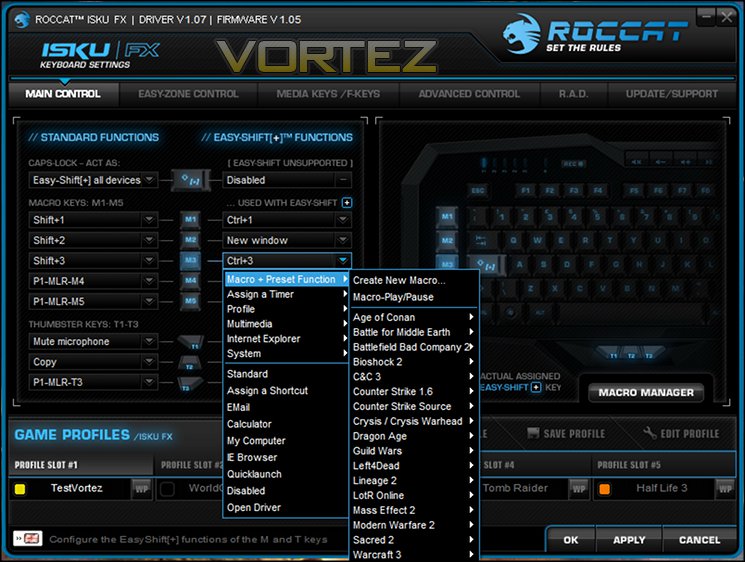
Upon launching, the initial window displayed will be Main Control, with navigation tabs at the top to select Easy-Zone Control, Media/F-Key Control etc. The primary purpose of this window is the assignment of M1-M5 macro keys, Thumbster keys and the Easy-Shift[+] variant of each.
As you expect with the labelling on the keyboard, Capslock is the default Easy-Shift[+] modifier and when pressed simultaneously with a macro key will trigger a different assigned event. However any of the M1-M5 and Thumbster keys can be assigned to Easy-Shift[+] with no issue in performance except for the opportunity loss of a macro key. Capslock itself can be rebound to its standard function if desired.
If Roccat Talk drivers are installed you may also select this key to Easy-Shift[+]both the keyboard and any attached Kone[+], Pure or XTD mouse, but you will need to select that facility because it isn’t default behaviour.
The Main Control window also provides access to the Macro Manager for creating, editing, delete or renaming macros, which makes sense given you’ll be assigning macros to these keys. We’ll delve more deeply into this later.
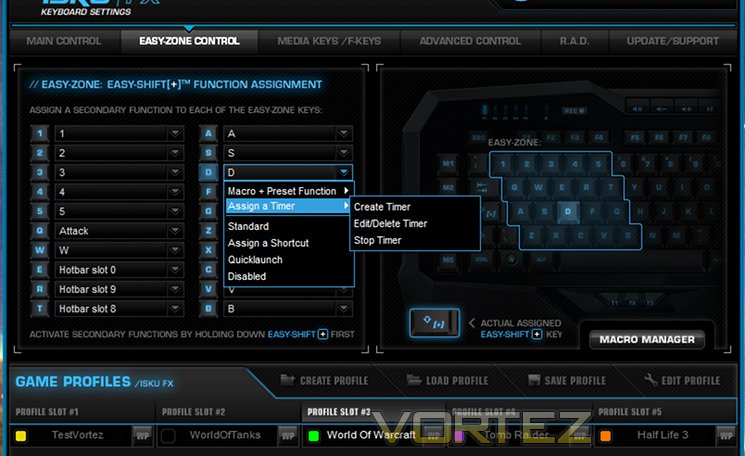
The ROCCAT Easy-Zone is a further innovation begun with the Isku and allows keys around the WASD zone to act as additional macro keys when Easy-Shift[+] is enabled. The value of these will depend on the application, but at the very least could reduce the hand travel distance for in-game shortcuts/hotkeys typically bound to keys on the right of the keyboard (or requiring two hands). Can be bound to preset game macro’s or user-defined timers.
With macro keys Roccat also offers a wide selection of preset shortcuts for gaming applications such as Battlefield, World of Warcraft or even Teamspeak. Each of these can be selected from the drop-down menu, but for more comprehensive shortcuts you may need to program them yourself. Thankfully macros are assigned on a per-profile basis.
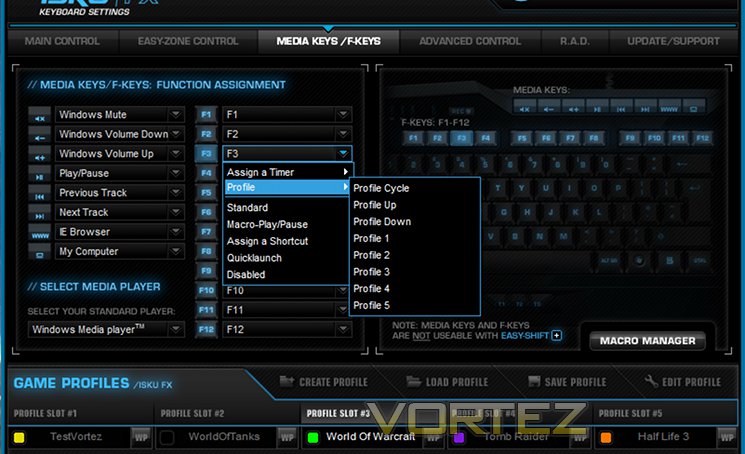
The Media /F-Keys Control windows profiles more limited reassignment options for these twenty extra keys. Multimedia keys are limited to standard multimedia (Play/Pause/Mute etc.), web browser (launch home page, forward, back etc.) or OS (sleep, shutdown etc.) functions, whilst F-keys can be assigned to a timer, profile cycling or even macro pausing.
Whilst not nearly as comprehensive as the main or easy-zone macro options they should still prove useful to many users, and are welcome for just that. It’s also noteworthy that although Easy-Shift[+] doesn’t adjust their behaviour, the marketing-quoted number of ‘macro keys’ does not include these keys at all.
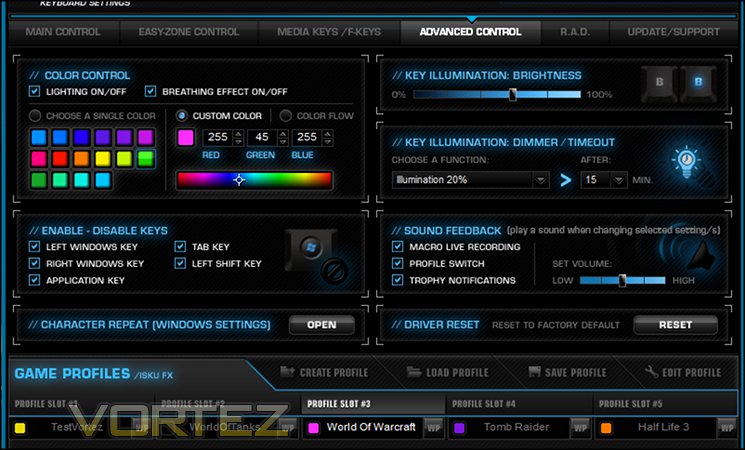
Advanced Control is where all the aesthetic adjustments – colour, lighting effects and the like – are made along with other technical aspects which won’t quite fit in to other windows. The UI offers twenty preset colours, an RGB input for additional colours in RBG-space and the option for other effects. Augmenting this is a inactivity timer to dim the keyboard, and overall brightness control.
Also part of the window are checkboxes to selectively disable certain keys – such as the Windows or Application keys – to prevent them from interfering during gaming. Being able to do this on a per-profile, per-key basis is excellent, and including the left-shift button and tab keys is extremely rare. Gamers will appreciate this.
Other features include modification of repeat rates (OS software control), and disabling audio notifications for profile switching, trophies and macro live recording. We would recommend that Trophy notifications are turned off, so as not to scare you witless when it goes off during your Amnesia playthrough. Finnally the entire keyboard can be reset to defaults through this window if required, which thankfully prompts you for comfirmation.
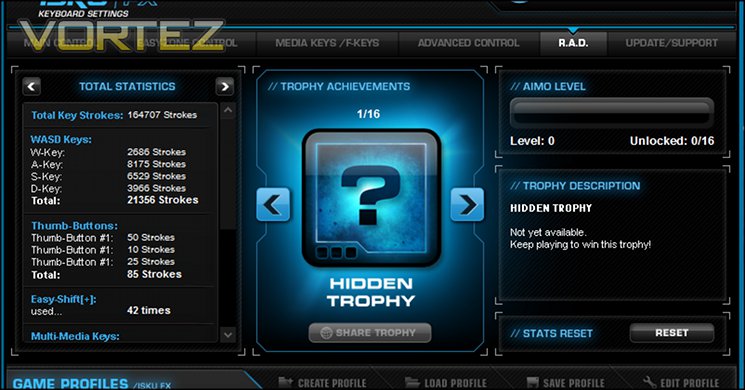
ROCCAT Achievement Display (R.A.D.) is a trophy/achievement system which measures the number of times you use certain keys or functionality, and grants an award when you surpass a certain level. It’s all just for fun, and quite cool for all that.
The final pane – Update/Support – is for suite information of driver and firmware version, essential for troubleshooting and ascertaining whether your using the latest software version. Many manufacturers hide this information away, so it’s a blessing to fiund that ROCCAT have continued to include it in a tab all its own, along with a direct link to the Isku FX support webpage. The only feature which we feel it lacks is a live-update feature which checks to see if a new software/firmware exists automatically, but that’s perhaps asking a little much considering how gamers can get frustrated with multiple executables running in the background during gameplay.
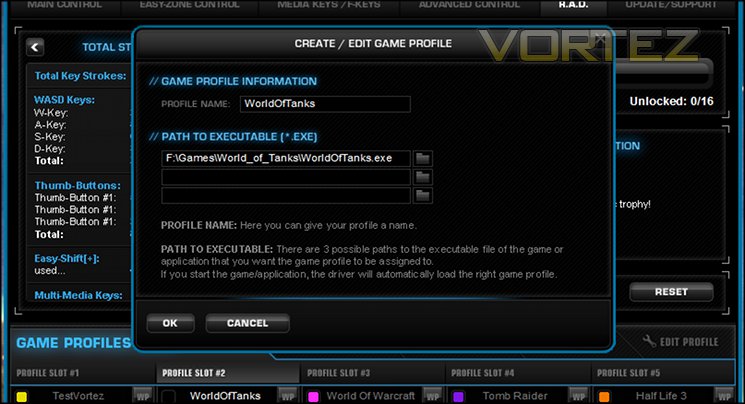
All configuration settings including key assignments and colour schemes are stored on a per-profile basis which can be saved/deleted/backed-up locally and activated upon the launch of a particular application (or one of three). In this fashion mouse and keyboard profiles can be linked and changed simultaneously, but otherwise profile cycling operates independently.
The keyboard has five active profile slots, but thanks to backup the number of profiles which can be stored and later recalled is effectively limitless. Profiles can be renamed to suit the purpose, for example with the title of the application it has been configured to operate with, and include a small colour key which can help to represent and differentiate the profiles at a glance.
Profile switching operates either through keyboard commands or by clicking each slot in the software, and so far as we can ascertain there is no means to link the cycling of profiles.
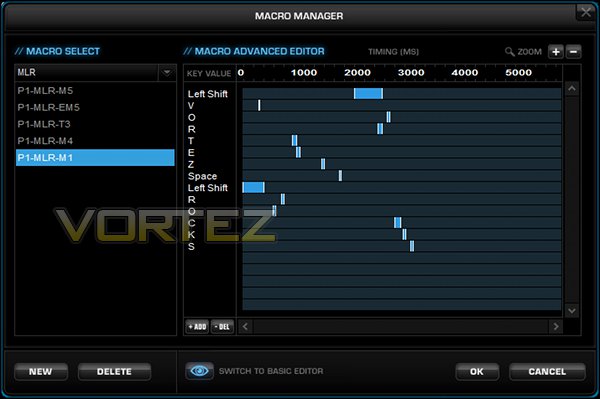
The Macro Manager is accessible at any time, and allows you to record, edit and save keystroke combinations to be assigned to a macro key (of which the Isku FX has a plethora). There are two different modes for the editor – Basic and Advanced – but they amount to much the same thing – a means of defining when and for how long a series of keystrokes are input.
Macros are grouped into macro sets, with predefined macros sets for games and other applications. We’d criticise the layout of macro selection here a little, as it would be more sensible to put user-defined macro sets and the add macro option at the top rather than the bottom.
Once a macro is selected on the left, the detail is displayed on the right in either a Basic or Advanced mode view. Basic view essentially displays a list of actions – Left Shift Press-> time delay (ms) ->Left Shift Release – which may then be easily edited by right-clicking on each action. Advanced view accomplishes the same thing, but displays the information as a timeline rather than sequential list of actions.
Both modes have great value, with advanced mode being especially good for complicated macros where keeping track of Shift/Control modifiers can be a core.
—
Overall, ROCCAT’s software suite for the Isku FX is just as good as that for the Kone mice, and far stronger than the solution provided by many competitors. It’s not perfect, but it comes pretty close.
Performance
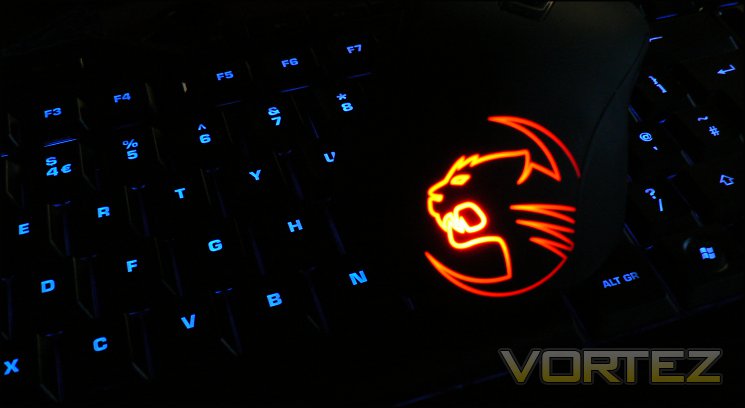
The ROCCAT Isku FX features membrane switches composed of firm rubber domes which buckle when pushed to provide firm resistance towards the point of actuation. The design of the Isku FX puts the actuation point at almost a full stroke of the medium profile keys, rather than the half-stroke of many full-height membrane keyboards. Whilst not having the responsiveness of mechanical switches, even the relatively low-gauge Cherry MX Reds, they remain a good choice with gamers seeking either a cost compromise or a specific feature. Because the rubber switch can be transparent it’s typically far easier to project light from the keyboard base than with mechanical switches, a feature which ROCCAT exploit for their even lighting across all keycaps. At present ROCCAT do not offer a mechanical switch option in their range, although the new Ryos MK range featuring ROCCAT Talk (not Talk FX) is due later this year.
Isku FX keycaps are a UV coated to provide some additional luminescence in low-light conditions and finished with a black plastic with very slight sheen. A rigid backplate supports the keyboard, ensuring that there is minimal flex on striking the keys. As the keyboard isn’t mechanical it isn’t supported by a steel backplate, but nonetheless the Isku FX is very rigid in the face of quite some punishment.
The wide keycaps of the Isku FX lead to a consistent and accurate typing experience which is surpassed only by a mechanical switch type, although we should note that it seems a little bedding in was required whilst the keyboard was a little ‘factory-fresh’. Word per minute rates will tend to suffer compared to mechanical switch types and only somewhat ameliorated by the low-profile key design, but the softer membrane feel is preferred by some. Keystrokes are consistent across the keyboard with the only exceptions being the ‘Thumbster’ keys, which owe their design to be more like buttons than keys. This can often mean that more than an expected amount of force is required to push them, which does take a little getting used to. However their location is ideal, even for those with smaller hands.
One issue which presents with many keyboards, especially those where you’re hammering the keys, is where the underside doesn’t grip the desk well enough and it begins to wander. The huge rubber zones on the floor of the Isku FX grip extremely well, holding the keyboard in place even given plenty of pressure on the keys and wrist-rest over time. This was also true when the feet were in an extended position, indicating great weight balancing during the design process.
Keycaps can be removed for cleaning, but this is certainly not recommended due to being held in place with clips rather than merely sat on a switch post. Cleaning therefore could be rather difficult, and something will will not want to do regularly.
Anti-Ghosting/ N-Key Rollover
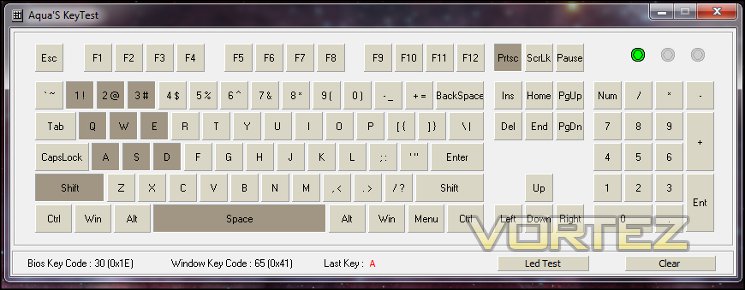
Extensive anti-ghosting features are are advertised for the Isku FX, a proud claim in an era where USB keyboards typically feature 6 rollover as standard. This feature is notoriously difficult to test due to the sheer number of possible combinations on a standard keyboard, and in the past was only seen on keyboards which utilised PS2 connections (thanks chiefly to limitations of the USB protocol).
A solid port of call is Aquakey, a small application which tracks the keypresses registered by the OS and displays them on a convenient UI; Microsoft offer a similar web-based service here. Testing all combinations simply isn’t feasible, but important ones such as around the standard gaming WASD keys are more than possible and often present themselves during gaming, especially MMO gaming. Here the Isku FX performed on par with most gaming keyboards, though poorer than some: Aqua-key was able to register full anti-ghosting over {1,2,3,q,w,e,a,s,d+SHIFT+SPACE}, with no further keypress registration in the key WASD zone following that. Adding CONTROL to the mix was more troubling, with CTRL+SHFT+1+2 not registering fully when pressed simultaneously.
Just as crucially the macro keys M1-M5 were not as robust to ghosting, with combinations in the WASD zone + M1-M5 failing with as few as five simultaneous keypresses. Thankfully Easy-Shift[+] didn’t seem to cause as many issues, with macro’d keystrokes bypassing the technical limitations which cause it. Interestingly, the Thumbster buttons appear to be impervious to ghosting.
All told, it’s neither the strongest nor the weakest anti-ghosting performance we have seen, but is adequate for gaming. Particularly complicated commands which may trigger ghosting in-game if used in conjunction with normal movement keys should be offloaded to a macro and placed in a macro key.
General Performance
Although billed as a gaming keyboard, and peripheral attached to a PC will need to at some time or another prove its worth in the more menial tasks involved in computing – wordprocessing, spreadsheet manipulation and the like. Advanced users may even double up their PC as both an ‘work’ (i.e. SOHO) and ‘gaming’ outlet, in which case peripherals will need to excel at both. So, how does the Isku FX do? To find out, we paired it with our preferred Kone Pure mouse to test in a range of activities as well as ROCCAT Talk functionality.
As mentioned, typing is pretty satisfying as far as membrane keyboards go. There is enough resistance such that you’re never bogged down in typing, waiting for the key to spring back, but equally it’s not a light touch. Perhaps the best term to use is comfortable, it certainly has none of the harsh feel you often get from mechanical switch types. Words per minute scores will not be out of this world, but equally they should hold their own vs lower quality mid-range boards.
Those who make extensive use of spreadsheets should be able to take great advantage of the extremely powerful macro system for repetitious data input, especially thanks to the Live Macro Record function which makes the creation process much more streamlined. The full-size layout should also be handy as opposed to some tenkeyless gaming keyboards on the market. For both wordprocessing and other forms of heavy use the keys should be relatively quiet and less of a distraction in the office.
Gaming Performance
We took a look at three common gaming titles representing three distinct gaming types to see how well the keyboard was suited to gameplay and if any issues cropped up. The following is a summary of our conclusions.
Team Fortress 2
A free to play title than anyone can pick up and play, Team Fortress 2 can still reward precision and quick reflexes thanks to a relatively high skill ceiling. The Isku FX brings two keys features to the mix in that regard: a very high quality membrane switch with with keycaps, and the Easy-Aim precision aiming modifier.
Throughout precision was excellent, but we would have welcomed slightly more resistance in the keys in the lift-off portion of the keystroke as your fingers tend to linger ever so slightly. Still, reaction speeds were affected due to the low profile nature of the keyboard, so not a huge amount of headway was lost versus mechanical switch types.
Easy-Aim was a feature we felt would eb difficult to use in our review of the Kone Pure and XTD, but it came into its own with the Isku FK. We bound it to the Caps Lock key and found that it was an easy feature to use which didn’t hinder out use of the mouse in the slightest. This made snpiing in particular quite easy, but also in general lead to more precise play overall. It does make Easy-Shift[+] a little more difficult to use, but FPS titles weren’t even close to needing more than the eight macro keys we had easily to hand without it. Lighting also allowed us to play deep into the night in low light, but at no time did it dazzle the eyes in the way that strong per-key blue LED lighting has done in the past.
World of Warcraft
To make use of the Isku’s macro capabilities we shook the dust off a World of Warcraft account, as well as playing a little Starcraft in the down time. Without doubt, the macros came into their out in WoW, such that even the relatively straightforward game it as become since the early years was still made markedly easier by macro binds. M1-M5 are located optimally and require little learning curve to utilise to great effect, and Live Macro recording allowed assignment of relatively hard to reach key combinations to be simple. A similar conclusion could be made for the Thumbster keys, one of which served as an excellent PushToTalk button, although it did take a little getting used to the firm pressure required compared to the spacebar just above.
Using Easy Zone keys as macros took much more getting used to, perhaps as much down to the this competition with the WoW macro system. If building custom keybinds from first principles it can be fine, but in practice we found that only the bottom row of keys saw much Easy Zone use. That’s not a mark against the Isku FX per se, merely that the Easy Zone is a feature which needs to find its niche, where it will thrive. On the other hand Easy-Shift[+]ing the buttons on the Kone Pure via ROCCAT Talk unlocked a lot of hidden potential in the mouse, allowing it to compete much more with it’s bigger brother in the MMO field.
Obviously when playing multiple games the Profile system was particularly useful too. All in all, we can say that the Isku performed well, but we found it difficult to really capitalise on all the options it makes available. Cool colours and a plethora of macros are always welcome, but we found that by far the killer app for the Isku FX was ROCCAT Talk and the impact it had on how we used our Kone Pure. The only fly in the ointment is that the original Isku also provides this functionality, for less money.
Conclusion
We’ve spent two weeks with the Isku FX and put it through quite the mill for a membrane keyboard, and it really has performed quite well. It’s often said that those who have gone mechanical wouldn’t go back, but if you did they the Isku FX would be an excellent place to start if you’re a heavy gamer. By the same token, those happy with membrane keyboards should certainly give the Isku FX a long, hard look.
As it always seems with ROCCAT products customisation is the key to getting the most out of the keyboard, whether you’re keen for lighting options or extreme macro and hotkey flexibility, and so the Isku FX perfectly complements the new Kone Pure and XTD mice. The dynamic of communicating between devices through the Talk FX technology opens up options when previously a feature exclusive to one peripheral may feel restrictive; the proviso must be however that the feature is appropriate for the use it is being put to.
In one case, Easy-Aim, assigning the functionality to the keyboard makes it excellent for FPS gaming with a Kone mouse, and in many respects preferable to a similar ‘Aim Button’ on the mouse itself. A second, Easy-Shift[+], is outstanding for hotkey-based MMO gaming without choosing the elaborate mouse solutions which may be a hindrance in other games.
The big unknown is just how much hotkey input style will feature in future years as Blizzard, ArenaNet and similar developers move to a more concentrated hack’n’slash approach for their MMOs. Even so, these elements to the keyboard will never be problematic, only surplus. Additionally multiple profiles will never be unwanted.
In terms of aesthetic appeal, just as with the Kone XTD the lighting should attract those looking for high levels of customisation. Whilst it is uniform, the options available are rarely seen and would set you apart from your gaming cohort in the gloomy lighting of a LAN party. In this regard Talk FX also has great potential for more immersive gaming through dynamic lighting, much of it unrealised as yet.
Once again we are impressed with ROCCAT’s software, which had an excellent layout matched by the layout of the Isku FX itself. One criticism could be that they use a larger window and increase the text size a little, but other than that it’s very difficult to fault.
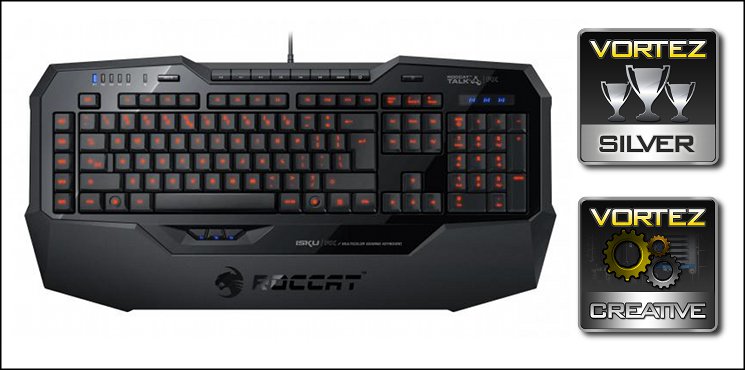
As good as it is however the Isku FX is on the expensive end for a membrane keyboard, and still suffers from the issues these have – namely lack of responsiveness, dull feel and the impact that has on typing speed and reaction time. It’s possible that low profile keys were chosen specifically due to this weakness. That said, for a membrane type it is still out of the top draw, with a consistent response across all keys which has been an oversight on some competitor products in the past.
ROCCAT’s Isku FX is a fine evolution of the original Isku which adds vibrant lighting to it extensive feature set. The keyboard is ideal when matched with a ROCCAT Kone mouse and is still good when paired with an off-brand alternative. As membrane keyboards go it is robust, but expensive at £85 considering mechanical alternatives at the price, even featuring the promising potential of Talk FX. It has earned its Silver Award, and can now boast a Creative award too.
Pros
+ Enormous flexibility
+ Vibrant colours
+ Multiple Profiles
+ Live recording of macros
+ Built to a high standard
+ Excellent software
Cons
– Price
– Membrane switch type
Tips
= Pair with a ROCCAT Kone[+], Kone Pure or Kone XTD mouse to take advantage of Talk FX functionality.
+ Enormous flexibility
+ Vibrant colours
+ Multiple Profiles
+ Live recording of macros
+ Built to a high standard
+ Excellent software
Cons
– Price
– Membrane switch type
Tips
= Pair with a ROCCAT Kone[+], Kone Pure or Kone XTD mouse to take advantage of Talk FX functionality.

Click here for an explanation of our awards at Vortez.net.


