A new gaming mouse is in our midst. The ROCCAT Kone+ 6000DPI Max Customization Gaming Mouse.
Product on Review: ROCCAT Kone+ / Kone[+]
Manufacturer and Sponsor: ROCCAT
MSRP: £70 / $109 / €82

ROCCAT are a gaming brand with a lot of style, innovation and maturity. For a company that has been established for only 5 years they have had tremendous success with just a handful of products. I’m not lying when I say that I admire the ROCCAT brand, especially its philosophy.
Today I have something quite exciting to take a look at. Back in the summer of 2007 ROCCAT announced the arrival of their first gaming mouse, the Kone. Since it’s appearance it has caught the attention of many, winning multiple-awards and being an overwhelming success. ROCCAT have carefully gone away and devised plans on how they can improve on such a successful product. Let’s face it, that can’t be an easy thing to do. But today we have the out workings of those audacious plans in the all new Kone[+].
ROCCAT’s Take:
| With a 6000dpi Pro-Aim Laser Sensor and its integrated Tracking & Distance Control Unit (TDCU), the further development of the prize-winning ROCCAT™ Kone Gaming Mouse has unbelievably more power under the hood. Its maximum precision and ultimate tracking are beyond comparison. The massive upgrade made to the driver and the introduction of the EasyShift[+] button has also turned the Kone[+] into a real customizable marvel at the same time. No other mouse offers as many configuration options as the ROCCAT Kone[+]. |
Features
• 6000DPI Pro-aim laser sensor
• EasyShift[+] button duplicator
• 4-LED Multicolor light system
• TDCU – Tracking & Distance Control Unit
• ROCCAT Drive with Macro Manager
• 4 easy to clip in weights
Specifications
• Pro-Aim Laser Sensor R2 with up to 6000dpi
• 1000Hz polling rate
• 1ms response time
• 11750fps, 10.5megapixel
• 30G acceleration
• 3.8-5m/s (150-200ips)
• 16-bit data channel
• Tracking & Distance Control Unit
• 72MHz TurboCore processor
• 576kB onboard memory
• 2m USB cable
Closer Look (1)
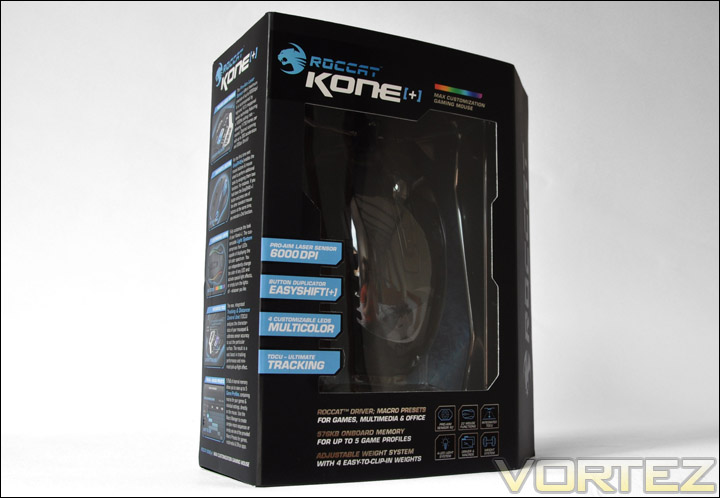
The Kone[+] comes in a very attractive looking box, quite typically ROCCAT. The box showcases the Kone[+] and lists all the major features. Similar to other products that ROCCAT have released, this box opens out and reveals more indepth technicalities and a closer look at the treasure inside.
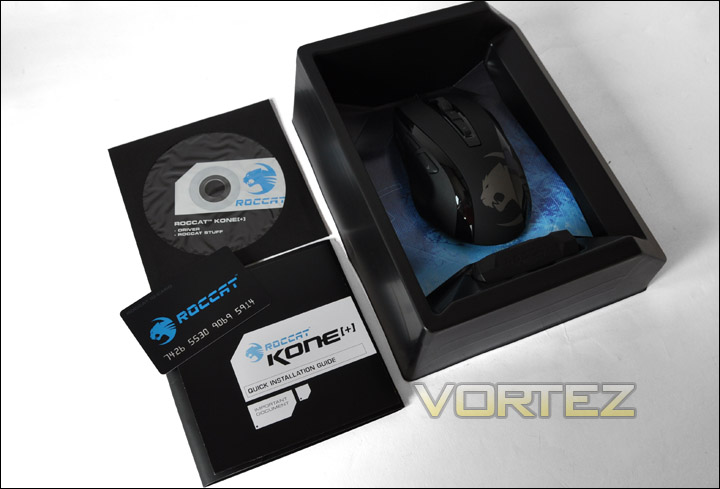
Within the box comes an attractive array of accessories. There is a ROCCAT Kone[+] drive and software disc, ROCCAT membership card, quick installation guide and the mouse itself of course.
The Kone[+] button placement is actually very similar to the original Kone mouse, however the buttons use different material and styling. Instead of being glossy they now have a matt appearance and are moulded into the mouse rather than looking like they have just been dropped into place.
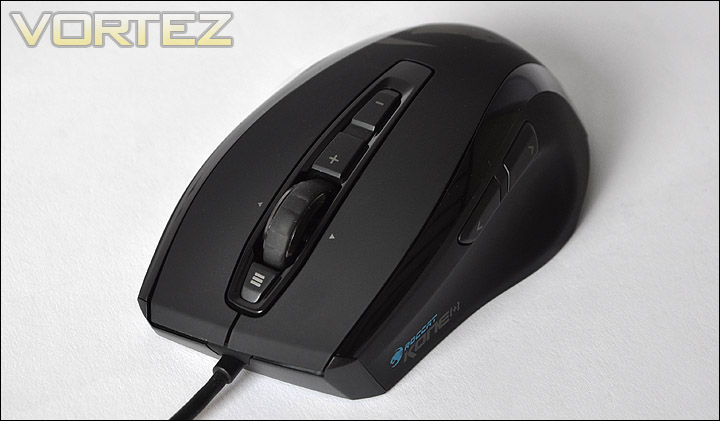
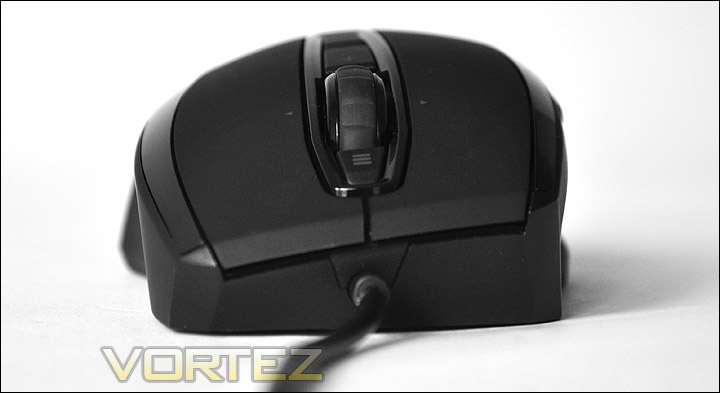
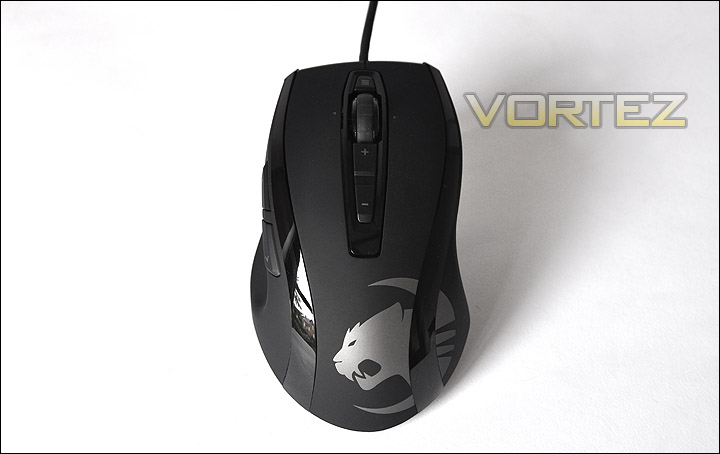
With an overview of the Kone[+] its apparent there is no longer a glowing ROCCAT emblem in the palm area of the mouse. Instead a larger impression of the logo is stamped in this area. The central region has a concaved area with DPI up and down buttons and the new 4D scroll wheel. Further down the Kone[+] is a button that allows you to swap between 4 colours.
Overall the new look is much more refined, aggressive and appears to have more depth.
Closer Look (2)
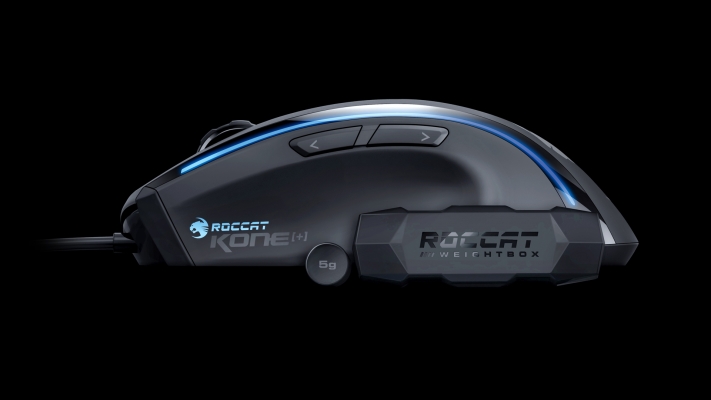
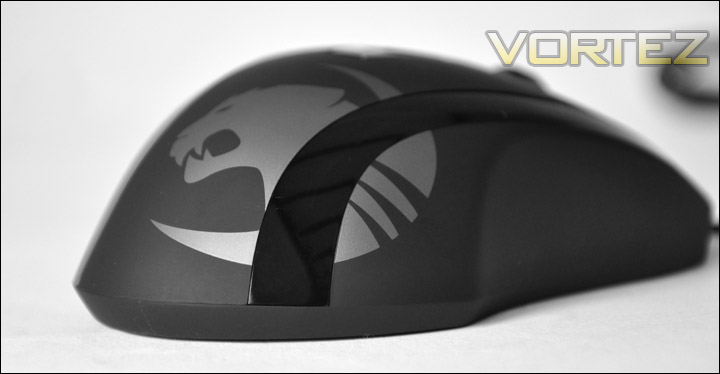
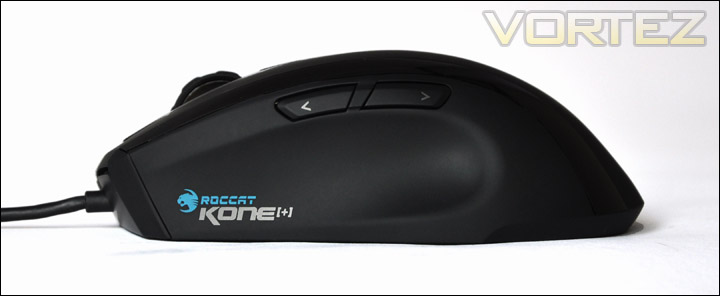
The side profile view shows a branding imprint and follows similar curvatures to the Logitech MX-518 especially the thumb rest moulding.
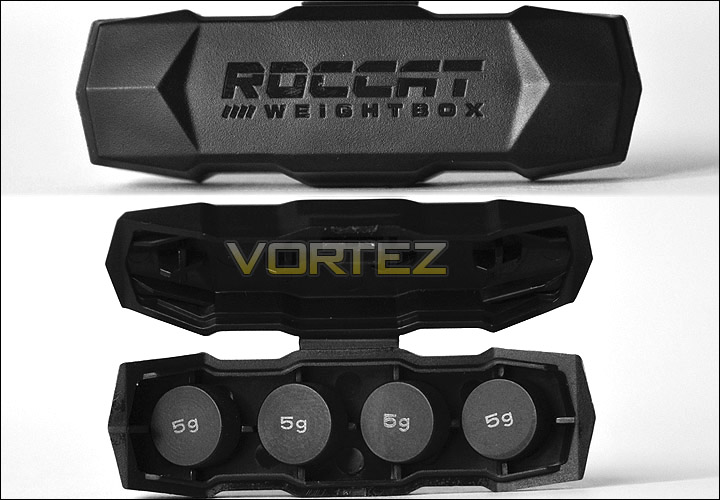
Bundled with the Kone[+] are a set of weights. They come in a pleasant little box, each of the weights are 5g in mass and there are a total of 4.
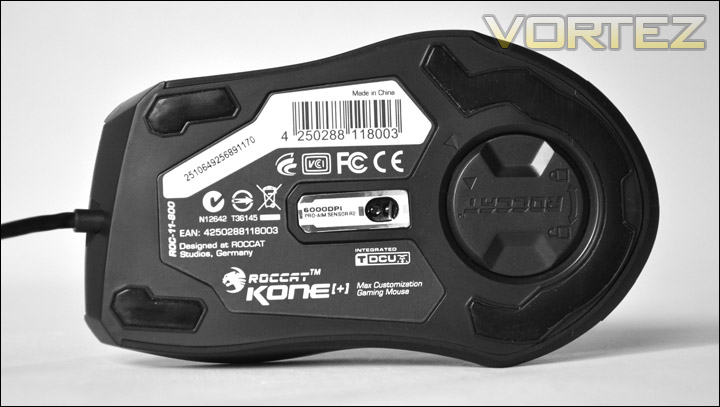
On the underside of the mouse there are a lot of things to consider. First of all there are 3 pads, in the centre there is a various logos showing the standards involved in the production of this mouse. Directly in the centre is the laser sensor – 6000DPI PRO AIM Sensor R2. To the bottom of the mouse is a circular plastic looking cap.
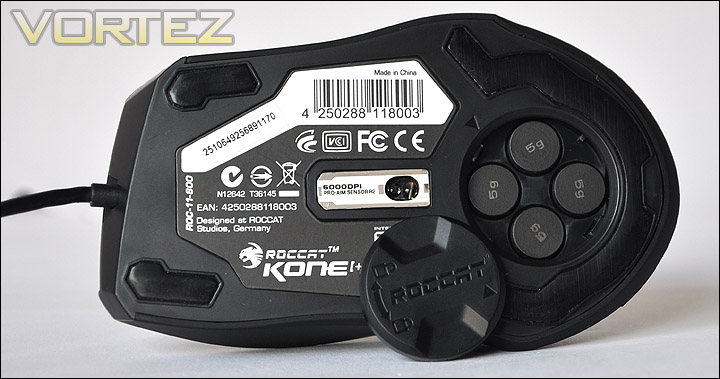
Taking the cover off, putting the weights in and locking the cover is very easy. But I did have some trouble trying to get the cover back off to remove some of the weights. This is because of the design, it would be better if this lid clipped in and out rather than twisted to lock/unlock.
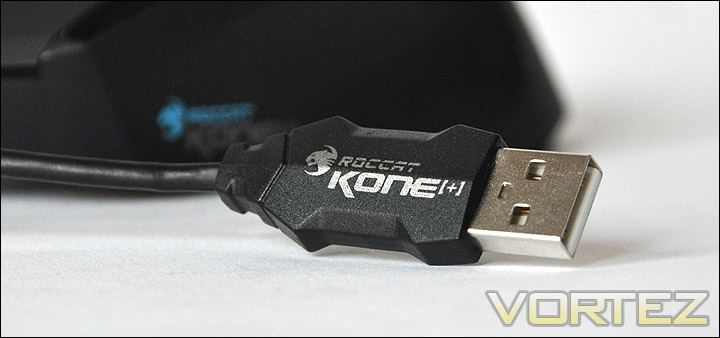
As with previous ROCCAT mice, the USB cable plug has a distinctive chunky shape to it. Great for discovering which USB socket the Kone[+] is residing in on your computer should you need to remove it.
Mouse Comparison
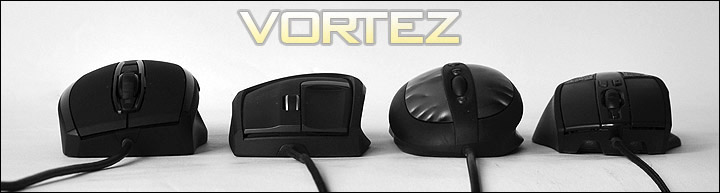
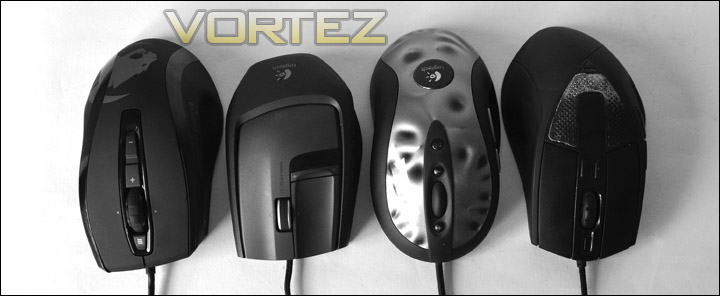
As with all mouse reviews now, I find it particularly useful to compare the mouse under review to a selection of market leading gaming mice. It just gives readers a better understanding of the shape, size and surface materials used on a variety of popular peripherals.
In the first image below, the height is compared. Firstly we have the (from left to right) ROCCAT Kone[+] and then the Logitech G9X, Logitech MX-518 and finally the CM Storm Sentinel. The Kone[+] is the tallest of all the mice being used to compare and its shape is significantly different to any of the other mice.
Moving to the next image, this time we are observing the length of each mouse. Again the ROCCAT Kone[+] is the first mouse (left to right) and then Logitech G9X, Logitech MX-518 and finally CM Storm Sentinel. Strangely the Kone[+] and CM Storm sentinel are both similar in length and curve in a similar fashion. It’s quite safe to say the Kone[+] is a solid unit, showing favour to medium to large sized hands.
Colour Customisation
Thanks to the ROCCAT Kone[+] drivers we are able to manipulate the colour configuration on this mouse extensively. Unlike other mice were you are able to perhaps change between a few colours, you are able modify up to 4 individual LED placements on the Kone[+].
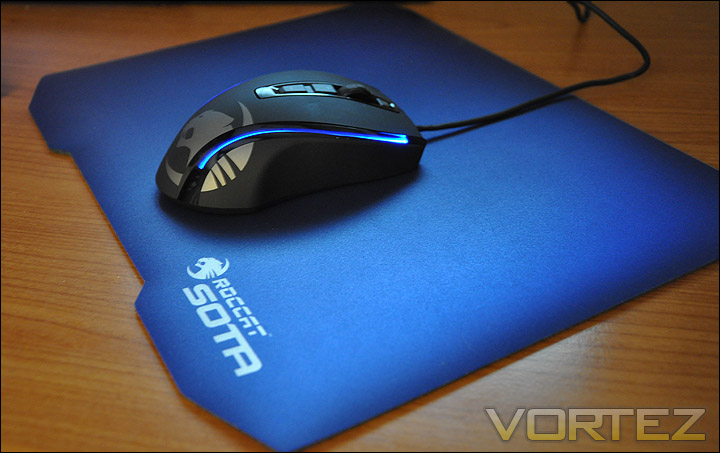
Along the edges of the Kone[+] are two long wisps, underneath the glossy surface are LEDs. You can change the colour of the top and bottom of each of these wisps by going into the ‘Color Control’ tab within the ROCCAT software. By being able to control the top and bottom colours, this means that you can create gradients of your favourite colours. The palette covers a multitude of colours that should suit most gamers.
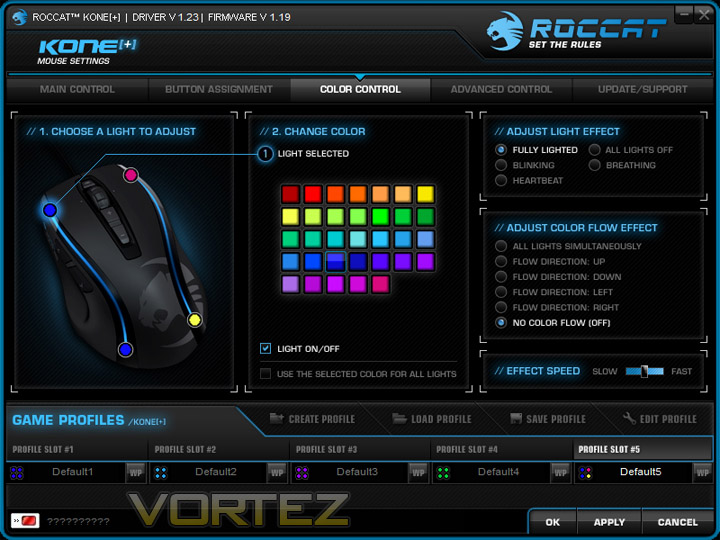
That isn’t it either. Light effects can also be modified to be in 1 of 5 states. Fully lighted, blinking, heartbeat, all lights off and breathing. Each mode displays the colour in a different way. I find the fully lighted mode the best, the others can take your concentration away from what you are doing!
What a fantastic feature ROCCAT have brought us in this mouse/software package. When you think innovative, think ROCCAT. They are living exactly by their philosophy… ‘Set the rules’.
Software
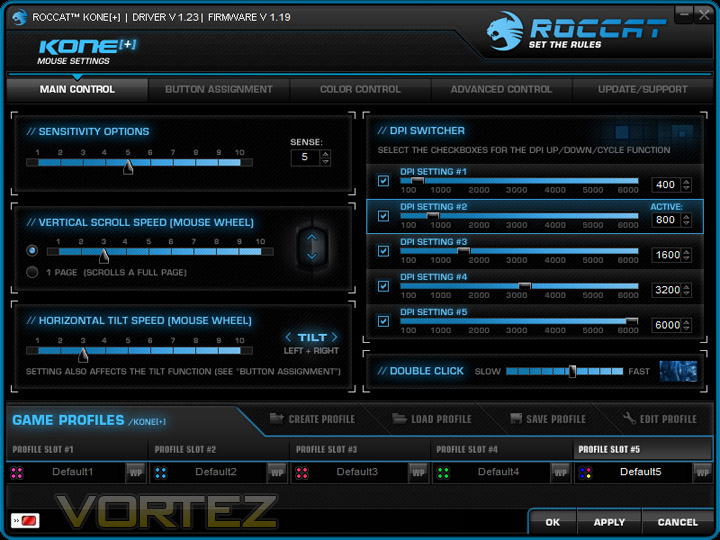
To say that the bundled software that comes with the Kone[+] is extensive is an understatement. There are so many different options to adjust. First of all the Main Control tab. This allows you to control the options such as sensitivity, DPI, scroll wheel and double click speed. These are common elements of functionality found on a mouse, but there are 5 different DPI settings you can scroll through whilst in a game. The DPI Switcher allows you to change the DPI by increments of 100. When the DPI buttons on the mouse are pressed (+ and – behind the scroll wheel) a voice booms through the speakers/headset to confirm what setting you are using. A very novel idea. (this can be turned off within ‘Advanced Control’)
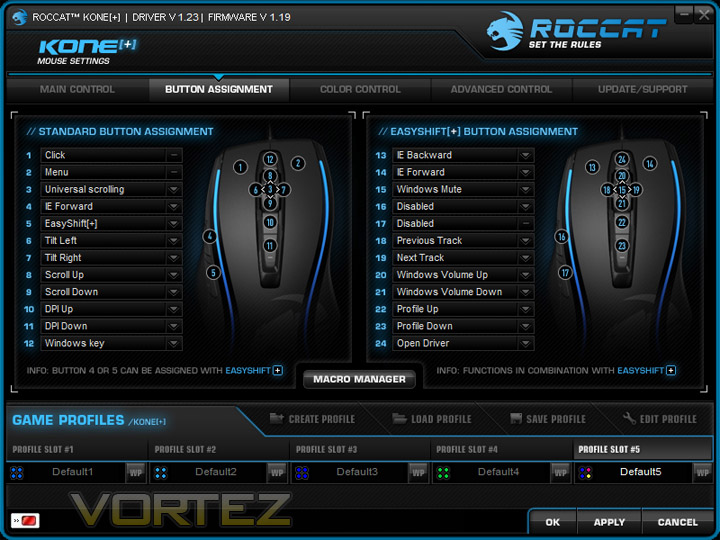
The next tab is “Button Assignment” this area allows you to take full advantage of the button configuration on the Kone[+]. Under the standard assignment there are 12 commands available. Each of the buttons has a drop down list that covers a wide range of commands.
The interesting feature with the Kone[+] is its ability to duplicate button assignment via something called EasyShift[+]. This quite simply means that by pressing button 5 in the below image, and any of the other buttons you can cause an additional command to run. Putting it plainly – the EasyShift[+] button (5) acts as a shift key found on your typical keyboard. It allows access to a further 12 buttons meaning you have a total of up to 24 buttons configurable. So a lot of choice!
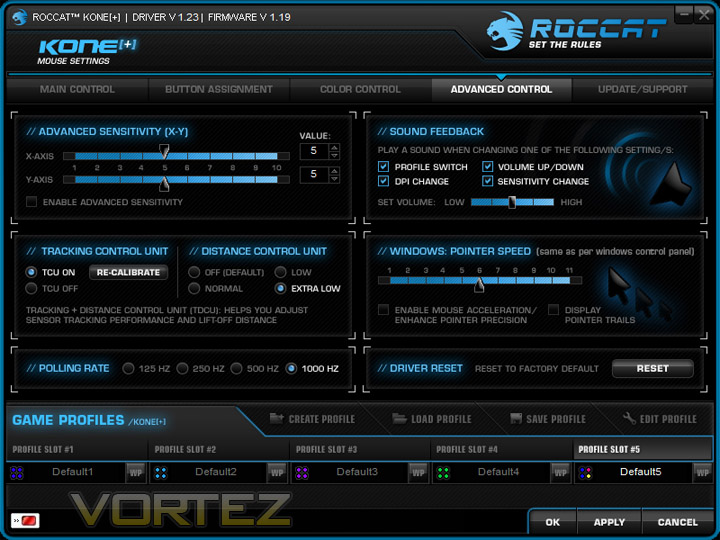
Lastly the ‘Advanced Control’ tab gives a further dimension to the already multifaceted software system. Inside here you can channel into even greater customisation such as advanced sensitivity – controlling x and y axis.
I mentioned earlier that when the DPI buttons are pressed a sound feedback voice is played through the speakers/headset. Inside here you can choose whether or not to have this sound option on. You can have the voice talk when a profile is switched, dpi is changed, volume is moved up or down and when sensitivity is changed. This is actually very useful.
Tracking and Distance Control Unit (TDCU) is something ROCCAT have been working hard on to not only give gamers more control over their performance but to remove such nuisances as lift-off and poor tracking on awkward surfaces.
The Tracking Control Unit option when switched on will calibrate the Kone[+] on whatever pad you are using, optimising tracking performance. This is fantastic, because in each instance the Kone[+] can be put on different surfaces and will still operate at the best possible performance. So if you are on the move to different tournaments and happen to use different pads then this is a very helpful solution. Once again, ROCCAT are at the very pinnacle of innovation.
Within this tab there is also the option to control lift-off by tweaking the Distance Control Unit. Personally I would recommend using Extra Low. Polling rates can be altered here too, choose from 125 Hz through to 1000 Hz.
Don’t forget, all these settings can be stored in up to 5 profiles on the 576KB onboard memory.
Performance and Conclusion
**Update** After 6 months of usage you can see that the emblem is looking rather shabby. It has started to wear thin, bubble and seperate as pictured below. With the Kone+ being a high-end gaming mouse and costing considerably more than other mice on the market this is disappointing.
Commenting on the performance of a gaming peripheral can be a difficult task because we all have different shaped and sized hands, we all have opinions on what feels good and what doesn’t. So the thoughts within this section are based purely upon first hand experience. Commenting on the durability, feel and software manipulation.
I used the Kone[+] for a sustained period of time in a variety of different environments. I spent over 3 hours gaming with the mouse combined with the ROCCAT Sota pad – ensuring the tracking control calibration had performed its scan and optimised settings for the surface. It handled games excellently, immediately I felt comfortable using the Kone[+] its shape and size are just right. I did notice something though, at default the lift-off or "
 istance Control” interfered when gaming. When I moved my mouse by lifting the Kone[+] off the pad to look whilst in game – at around 6-7mm the movement was registered. So I changed this to “Extra Low” as I explained in the previous section of the software. This removed the problem and the sensor on the Kone[+] stopped registering movement right away.
I also tested the Kone[+] within windows and image editing software. In fact I used the mouse to edit the images for this review as a thorough all-round test. Again it handled intricate, precise movements just perfectly and was a pleasure to work with.
Conclusion
I enjoy reviewing mice, whilst some review sites may not take part in reviewing such peripherals I think the market shows that this type of product is at a period of time when things are very competitive. There are a lot of newcomers, but also some stalwarts.
With the arrival of the Kone[+], ROCCAT have reinvented the wheel so to speak. They have gone away and carefully thought about how they can improve a very successful product, and I can confirm that they most definitely have devised a thoroughly innovative product in the Kone[+].
**Update** After 6 months of usage you can see that the emblem is looking rather shabby. It has started to wear thin, bubble and seperate as pictured below. With the Kone+ being a high-end gaming mouse and costing considerably more than other mice on the market this is disappointing.
If 6000DPI isn’t enough to please your gaming habits then the 24 button options just might. The software bundled with the Kone[+] compliments the mouse beautifully because it works hand in hand to deliver some outstanding functionality. You can alter the colours on the mouse to your desire, creating smooth, vibrant gradients. You can calibrate the mouse to whatever gaming pad you use, ensuring the best possible traction is available, you can configure 12 commands available as standard to convert to 24 commands via the EasyShift[+] and much more. It oozes innovation this mouse.
At around £70 ($109 / €82) the Kone[+] may appear to be rather an expensive bit of kit but compare this against the likes of the Razer Mamba, Logitech G700 or the Saitek Cyborg all of which are in the same league and you will be aware that the Kone[+] is the cheapest of the bunch and I would dare to say it offers much more. You pay for what you get, this is a cutting edge product.
Pros
+ Unique looks
+ Extremely innovative
+ Extensive customisation
+ Up to 6000DPI
Cons
– Weight cover can be tricky to remove
– Logo wears out after just 6 months
+ Unique looks
+ Extremely innovative
+ Extensive customisation
+ Up to 6000DPI
Cons
– Weight cover can be tricky to remove
– Logo wears out after just 6 months
You would be able to tell that from this review I am very inspired by what ROCCAT have brought to the table. The Kone[+] thoroughly deserves the Gold award.
We would like to thank Meroncourt for sending the Kone[+]. Discuss this review on our forums.