







Up to 3200DPI, driverless, customizable lighting and fully fledged for gaming. The mouse everyone has been waiting for has arrived.
Manufacturer: RoccatProduct reviewed: ROCCAT Kova
RRP: 49,99€

With only a few months left of this year, there is little time to release new products onto the market in time for Christmas, but Roccat have a few tricks up their sleeves. Back in August news circulated regarding the production of an exciting new gaming mouse – the Roccat Kova.
The Roccat Kova is said to be designed for both left and right handed gamers, and is quite considerably different than the previous release the Roccat Kone. It uses an optical sensor rather than laser, has less buttons and is significantly lighter.

Roccat have the following to say about the Kova:
It doesn’t matter whether you’re left or right handed, you use a PC or a Mac, or you’re a fan of red, blue or green – the ROCCAT™ Kova satisfies any wish; and it does all that without you needing to install additional drivers. With this component of the ROCCAT™ SDMS, another foundation stone has been laid for feature-packed, efficient gaming.
3200DPI PRO-OPTIC GAMING SENSOR
The optical gaming sensor with its resolution of up to 3200dpi delivers amazingly precise tracking on almost any surface. The ROCCAT™ Kova is especially effective when used in conjunction with the ROCCAT™ Sota Gaming Mousepad which features an integrated metal film layer that reflects light back to the optical sensor without distorting it thereby providing optimum tracking. With up to 20Gs of acceleration, faultless tracking is ensured even when rapid responses are called for.
DRIVERLESS CONFIGURATION
As part of the ROCCAT™ SDMS, the Kova has been fine-tuned for pure performance. The mouse can be configured just by pressing simple button combinations – and all without the need for drivers. For instance, the dpi resolution can be increased from 400 to 800, 1600 or even 3200dpi without needing to go through the tedious process of configuring the software – and it’s just as easy to switch between right and left handed mode. The 5(+2) mouse buttons come preset with the most important functions for all the latest games and applications.
FULL COMPATABILITY
Whether you have a Windows® or Mac® PC, the Kova is fully compatible with both systems – and even with Windows® 7 already. The motto is: plug in and let rip.
CUSTOMIZABLE LIGHTING
The ROCCAT™ Kova features a customizable lighting system which can be adjusted to suit at the press of a button. You decide which color the mouse should light up in. The discrete LEDs on the sides of the mouse will cast an atmospheric aura on your desktop, particularly when you set them to pulse slowly.
DPI-CHANGE FEEDBACK
The LEDs also indicate the dpi setting you’ve selected with the help of the dpi-change feedback system. The default resolution is 800dpi. By simultaneously pressing mouse buttons 5 and 7, the mouse will flash green twice, indicating that the dpi setting has now been changed to 1600dpi. Change the resolution again and the mouse will flash blue twice and the resolution will increase to 3200dpi. Following that, the dpi setting can be set to its lowest setting of 400dpi which the mouse confirms by flashing red twice. Press the buttons again and the mouse will flash violet two times and return to its preset resolution of 800dpi.
Features
• 3200DPI PRO-OPTIC GAMING SENSOR
with enhanced optical sensor technology
• HARDWARE BASED CONFIGURATION
for rapid use and simple operation
• 20G ACCELERATION
ensures smooth and precise movements
• V-SHAPE ERGONOMIC FIT
for left and right handers
• ROCCAT™ GRIPTECH SIDE AREAS
with non-slip stablization surface
• COATED MOUSE WHEEL
with optimum grip + comfort
• CUSTOMIZABLE LIGHT SYSTEM
for your favorite color
• DPI CHANGE FEEDBACK
LEDs indicate the selected dpi setting
• 5(+2) MOUSE BUTTONS
with core task configurations
• FULL SYSTEM COMPATIBILITY
works with Mac® and Windows® OS
Technical Specification
• 3200dpi optical gaming sensor
• 40 inch per second maximum speed
• 20G acceleration
• Integrated lighting
• 2m USB cable
Mouse Size
12cm maximum length x 6.5cm maximum width
Mouse Weight
Approx. 90g (excluding cable)
System Requirements
Windows® XP/Windows Vista®/Windows® 7
Macintosh OS® X or higher
USB 1.1 Port
Package Contains
ROCCAT™ Kova – Pure Performance Gaming Mouse
Inari Case Mission Book with ID Card
Quick Install Guide
Against the above, the Roccat Kova shapes up to be a very clearly thought out peripheral. Enough of the statistics though, lets get on with our analysis of this new product.
Packaging
Our Roccat Kova is dressed in a very neatly designed box with plenty of colour and information. The Kova itself is showcased behind a transparent piece of plastic so that you are able to have a sneak peak of how it shapes up. It’s nice to see that Roccat have taken care with their packaging to deliver and very tidy looking package. It gives you confidence that what’s inside will have been given even greater attention. Opening the box up there is more information to fill your mind with, along with a testimonial from a gaming professional.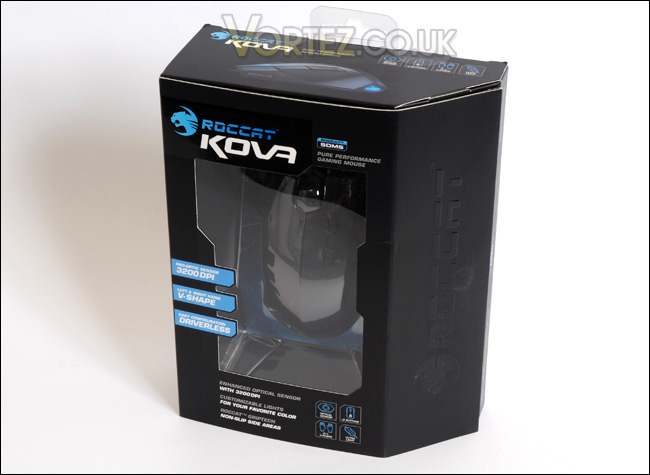
The front of the Kova box
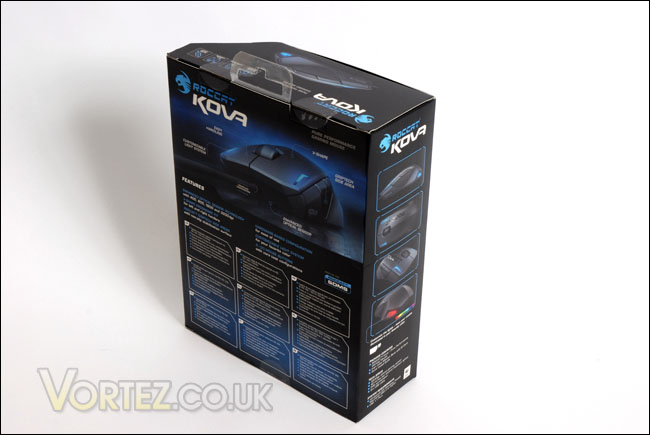
The back of the Kova box
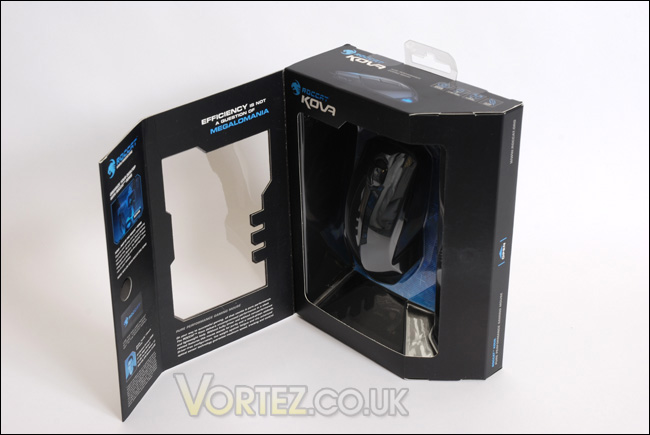
The front of the box opens to reveal the Kova
Inside the package we have the Kova, and an instructions pamphlet, coupled with an ‘Inari Case Mission Book and ID Card’. It’s Great that Roccat are trying to reach out further by including the customer in their community. Altogether, quite a small package – there aren’t a great deal of extras, no driver disc is included as the Kova comes driverless.
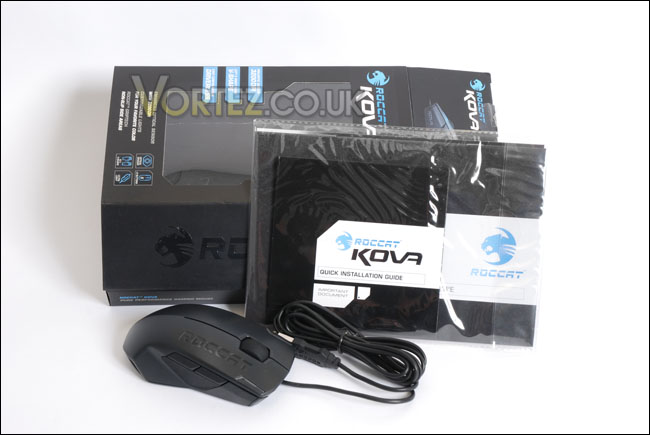
The contents of the box
ROCCAT Kova
Upon taking the Roccat Kova out of the box we are met with a very sleek looking gaming mouse. The design is actually based around a sports car, the Lamborghini and you can see the shapes and visual aesthetics characterize this quite accurately. Looking down the Kova from the front you can see there is slim-line gaps for the LED’s, almost looking like headlights from a car. On the right hand button of the Kova there is a nice imprint of the Roccat logo but most prominent from this view is the large scrolling wheel. This is coated for maximum grip and comfort.
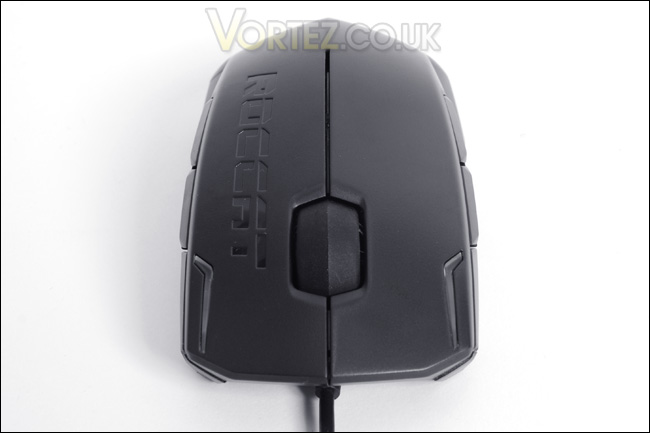
Looking down the front of the Kova
Moving to the sides, the left and right side are almost identical except for the Roccat impressed logo. There reason that the Kova is indistinguishable on both sides is that this gaming mouse is designed for left and right handed gamers. A novel idea, as I’m sure there are many left handed gamers out there that feel they are being left out. So, with the mouse being designed in this way – there are two buttons on each side rather than just the left as tradition would have it. Again, similar to the front there are small outlets on the rear of the Kova to illuminate the back of the mouse and the gaming pad you would use. Perhaps these are the tail lights?
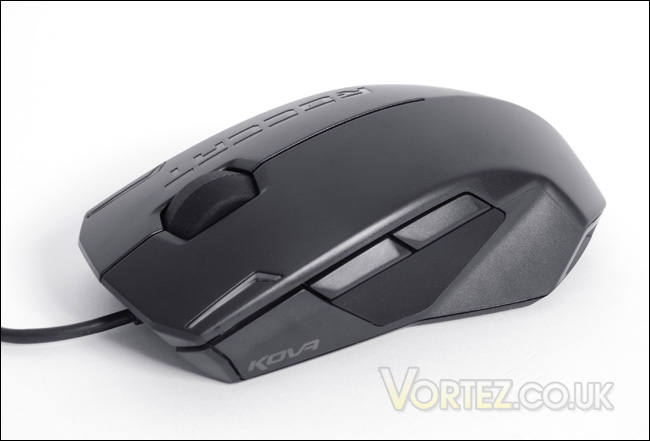
The left side of the Kova, with Griptech material and double buttons
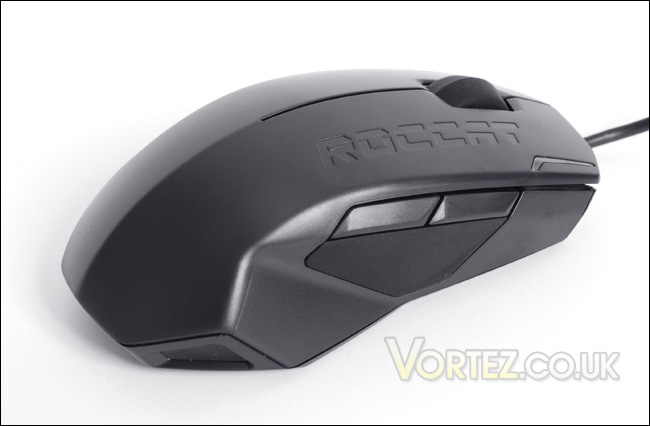
Identical to the left side of the Kova, although on this side we have the engraved logo of ROCCAT
We now move on to the underside of the Roccat Kova and as standard there are cushioned feet to encourage decent traction as well as a bar code with the words written: Designed at ROCCAT Studios, Hamburg, Germany. Made in Malaysia. It’s interesting to note that Roccat have chosen to integrate an optical sensor rather than the trend in recent times to produce gaming mice with laser sensors. You can read all about the differences between optical and laser mice here. It seems strange to have a preference towards producing an optical gaming mouse rather than a laser, when the advantages in accuracy and usability mark the laser mouse out as a better option. This by the way isn’t to say that optical mice are inferior, as we will see with the Kova – the DPI setting allows us to increase the sensitivity all the way up to 3200 DPI.
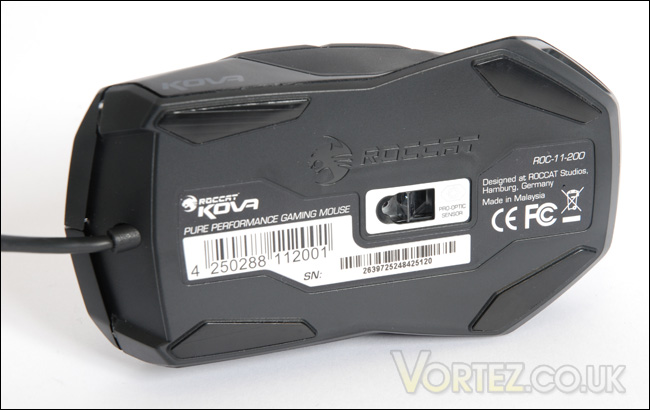
The underside of the Kova
Lastly the USB cable has been shaped similarly as the mouse in the shape of the Lamborghini. What’s more, upon plugging this USB into our computer we will not need any drivers as the Roccat Kova comes completely driverless. Surely a benefit in these days were drivers are essential to get your kit going.
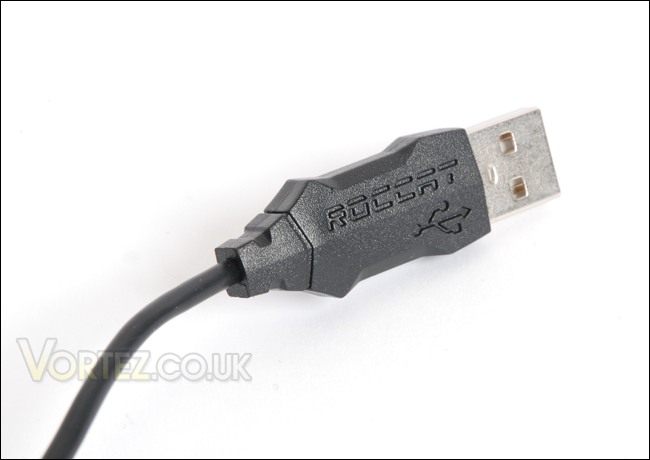
The car shaped USB lead
So we’ve seen the Roccat Kova is a looker, but how will it perform when we put it into its true environment?
Performance
It’s only fair to test our Roccat Kova in the gaming arena. So we will observe its performance in some of the most popular FPS titles to hit the shelves. Testing mice cannot be considered as conclusive as obtaining hard results from say a CPU cooler such as temperature. But all the testing will be reported from first hand experience, such as weight, traction, accuracy, usability and comfort.
To kick things off, I started using the Roccat Kova in Quake Live. Quake Live since the beginning of the year has attracted millions of gamers world-wide to the FPS battleground. It’s based on the ever popular Quake III Arena but is designed to run through your web browser via a plugin. You can literally play it anywhere, on any machine that has a web browser. It does not suffer if you have inferior hardware and thus it does not depend on powerful graphics cards and processors. (It’s completely free to play – have a go!
I’ve been playing Quake Live for some time now using the Mionix Saiph 1800 so the Roccat Kova has some big boots to fill. My first impressions were that the Kova is extremely light. Even for a weightless gaming mouse, (similar to the Saiph 1800) it felt very lightweight indeed. This could be an issue with some, especially if you like the ability to customize your mouse. That said, the performance was nothing short of sensational. Couple it with the Roccat Sota and both will work in harmony. All the usual things that the gamer requires such as adequate glide, traction and precision are clearly there and my fragging sessions in Quake Live are very enjoyable.
The one thing that bugged me across all games though was the complex sequence in which DPI and colour customization is controlled. The Roccat Kova has a simplistic design in mind, yet to change the DPI I have to press a certain sequence of buttons to increase/decrease the settings and similarly to change the colour I have to know the correct buttons to simultaneously press. The only way of doing so is by reading the instructions manual. It seems annoying that if I were to change the gaming surface or want to change the colour I would need this manual with me at these times. I can’t help but feel that Roccat have over complicated the simple. Other than this the Roccat Kova is superb mouse and it will confidently aid your performance in game.
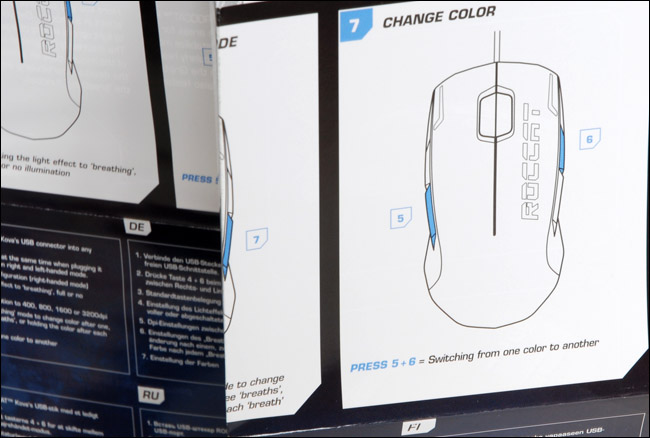
Changing the colours and DPI can be awkward

Call of Duty: World at War shouldn’t need any introduction. The Call of Duty series is multi-award winning and without fail each year round becomes the synonymous ‘Game of the year’. Being totally different to the fast paced Quake Live, COD:WaW’s action is more tactical and absolute precision is required. This should be good grounds for the Roccat Kova to show its true worth.
Again the Roccat Kova doesn’t disappoint. It fits into the palm of the hand nicely and reacts to all movements and actions exactly as intended. It suffered no let downs whatsoever and delivered in traction and glide. What’s nice is the ability to use it if you are left or right handed, both parties have been catered for due to the shape and button placement. Although the DPI and colour control could be considered complex, the simplistic design of the Kova will suit oldschool gamers down to a tee.
Comfort
The Roccat Kova is surprisingly comfortable, though it wouldn’t seem so from visual appearance. The edges aren’t as ergonomic as other mice may be but it sits nicely in the palm of your hand thanks to the Griptech padding and looks impressive sat on your desk. I played for hours and I can firmly say that the Kova presented no faults in this aspect at all.
Conclusion
Choosing the best gaming mouse out there can be a difficult decision to make. There are now many brands to choose from, and within these brands, many models. The Roccat Kova could be considered as one of the top gaming mice out there to date.The Kova is a strong performer and there is definitely appeal for the simplistic design as well as driverless configuration. Appeal for the effortless design, but also the thoughtfulness for left and right handed gamers. This will stand out as a very versatile gaming mouse due to this feature. There aren’t many mice out there that will provide for both types of user.
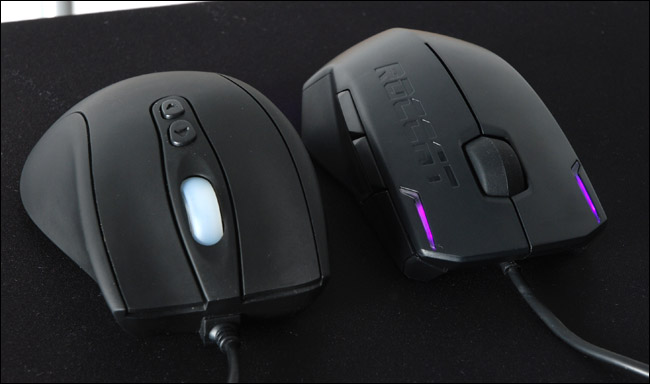
The ROCCAT Kova along-side Mionix Saiph 1800, illuminated with the fixed colour of purple
It’s really nice to be able to change the illuminating colours that the Kova emits and not only this but alter the way in which they operate. You can turn the colours off altogether, choose to display a solid colour or even rotate amongst the colourful array of reds, blues, greens etc. This gives your workstation an incredibly atmospheric feel.
The only let down that I have to comment on is the customization of both the DPI and colour settings. It takes away the aspect of the Kova being simple. To have to refer to the manual to change the DPI or colours confuses the user and maybe even frustrates. I would hope that Roccat could improve this somehow.
Overall the Roccat Kova comes recommended by me. For the price of 50€ / $74 / £44 you get a top performing mouse that comes with a nice selection of features. I would be tempted to suggest that although Roccat may have cut back on including some items out of this bundle maybe it would be good to include something complimentary or even lower the RRP, as the current price may seem steep to some.
The Roccat Kova has impressed me and for this reason it receives the Vortez Silver award.
Pros
[+] Good looking
[+] A big hit with old school gamers
[+] Excellent accuracy, rapid responces
[+] Left and right hand friendly
[+] Driverless
[+] Nice colour customization
Cons
[–] Complicated configurations
[–] Price may be steep for a simple mouse
