We’re storing more files than ever before, so the importance of the security of those files must also increase, right? Well, SAMSUNG have implemented a pretty nifty feature on their latest external SSD, the T7 Touch.
Product on Review: SAMSUNG T7 Touch
Manufacturer: SAMSUNG
Street Price:
500GB: £129.99 / USD $129.99
1TB: GBP £195.99 / USD $229.99
2TB: GBP £365.99 / USD $399.99
SAMSUNG are extremely well-known within the technology industry, producing mobile phones, wearables, televisions & monitors, appliances and of course, solid state storage.
Roughly two and a half years ago we looked at the SAMSUNG T5 SSD, boasting speeds in excess of 500MB/s and a tiny form factor. Today we’re looking at the successor, the T7 Touch, with faster performance and tighter security.
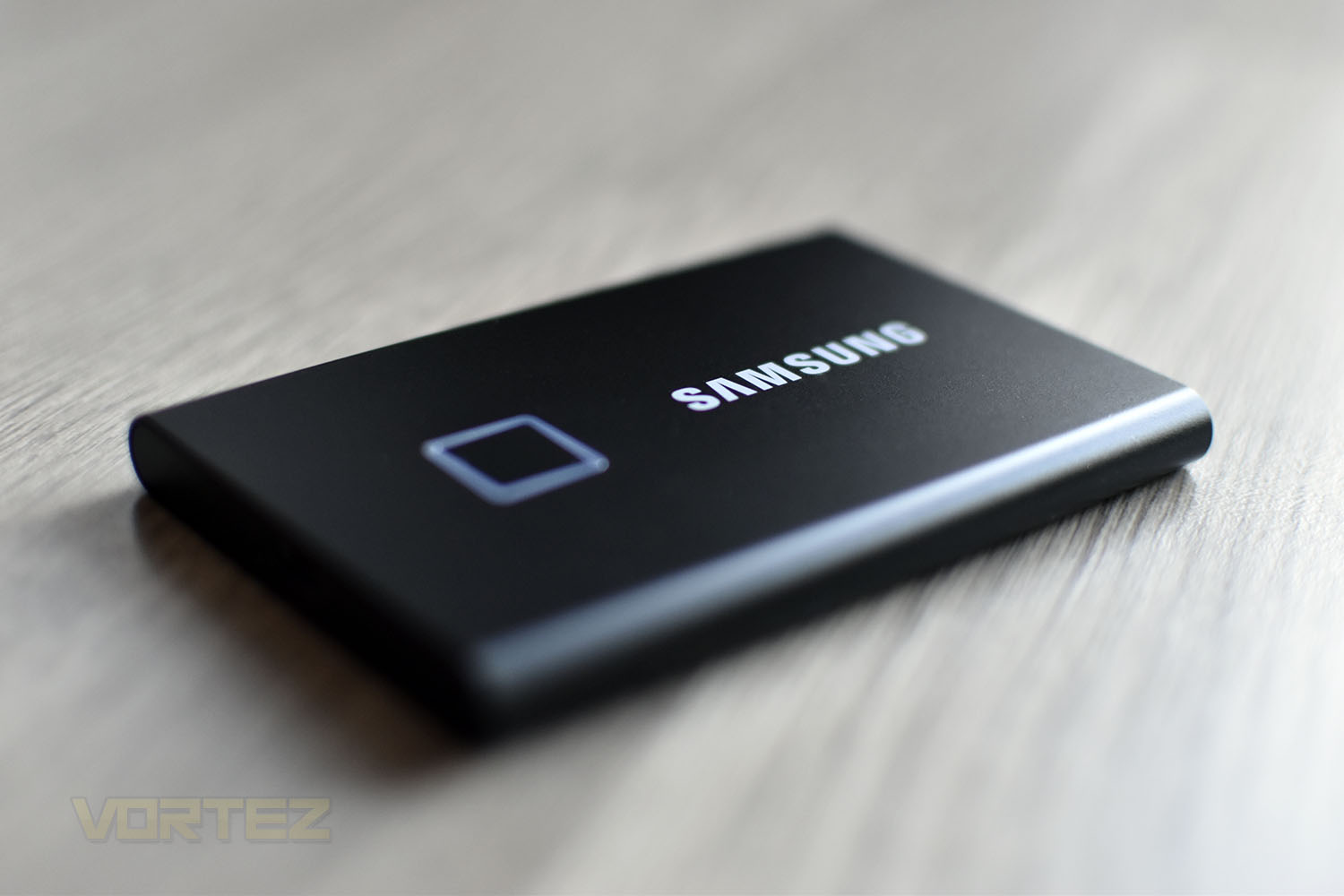
The most notable addition is the fingerprint sensor, locking the drive from unwanted access. The T7 utilises AES 256-bit encryption and will only unlock with the use of your finger or with a password. Furthermore, thanks to the nature of Solid State storage with no moving parts, and with a sturdy aluminium enclosure, the drive keeps things safe from drops up to 2 metres.
SAMSUNG have also boosted the speeds while still remaining on the same USB 3.2 Gen. 2 interface, with sequential reads and writes up to 1050MB/s and 1000MB/s respectively (USB nomenclature has changed since our review of the T5, USB 3.1 Gen. 2 is the direct equivalent of USB 3.2 Gen. 2).
Your choice of colour is between a classic black or stylish silver and capacity options are 500GB, 1TB or 2TB. Moving on from the T5, does the T7 Touch offer much more in the way of everyday usefulness? Let’s check it out.
SAMSUNG on the T7 Touch:
Transfer massive files within seconds with the incredible speed of USB 3.2 Gen2 on the T7 Touch. The embedded PCIe NVMe technology facilitates sequential read/write speeds of up to 1,050/1,000 MB/s, respectively, making the T7 Touch almost twice as fast as the T5.
Technical Specifications
Interface: USB 3.2 Gen. 2 (10 Gbps)
Compability: Windows 7 or higher, Max OS X 10.10 or higher, Android Lollipop or higher
Hardware Information:
Capacities: 500GB, 1000GB, 2000GB
Dimensions: 85 x 57 x 8mm
Weight: 58g
Performance:
Sequential Read: Up to 1,050 MB/s
Sequential Write: Up to 1,000 MB/s
Security:
Encryption: AES 256-bit hardware encryption
Security: Password protection, fingerprint recognition
Reliability:
Temperature: 0°C to 60°C
Humidity: 65°C, 95%
Shock: 1,500G, duration: 0.5ms, 3 axis
Vibration: 10-2,000Hz, 20G
Certifications: CE, BSMI, KC, VCCI, C-tick, FCC, IC, UL, TUV, CB
RoHS Compliance: RoHS 2
Warranty: 3 year limited warranty
Compability: Windows 7 or higher, Max OS X 10.10 or higher, Android Lollipop or higher
Hardware Information:
Capacities: 500GB, 1000GB, 2000GB
Dimensions: 85 x 57 x 8mm
Weight: 58g
Performance:
Sequential Read: Up to 1,050 MB/s
Sequential Write: Up to 1,000 MB/s
Security:
Encryption: AES 256-bit hardware encryption
Security: Password protection, fingerprint recognition
Reliability:
Temperature: 0°C to 60°C
Humidity: 65°C, 95%
Shock: 1,500G, duration: 0.5ms, 3 axis
Vibration: 10-2,000Hz, 20G
Certifications: CE, BSMI, KC, VCCI, C-tick, FCC, IC, UL, TUV, CB
RoHS Compliance: RoHS 2
Warranty: 3 year limited warranty
Packaging, Bundle & Closer Look
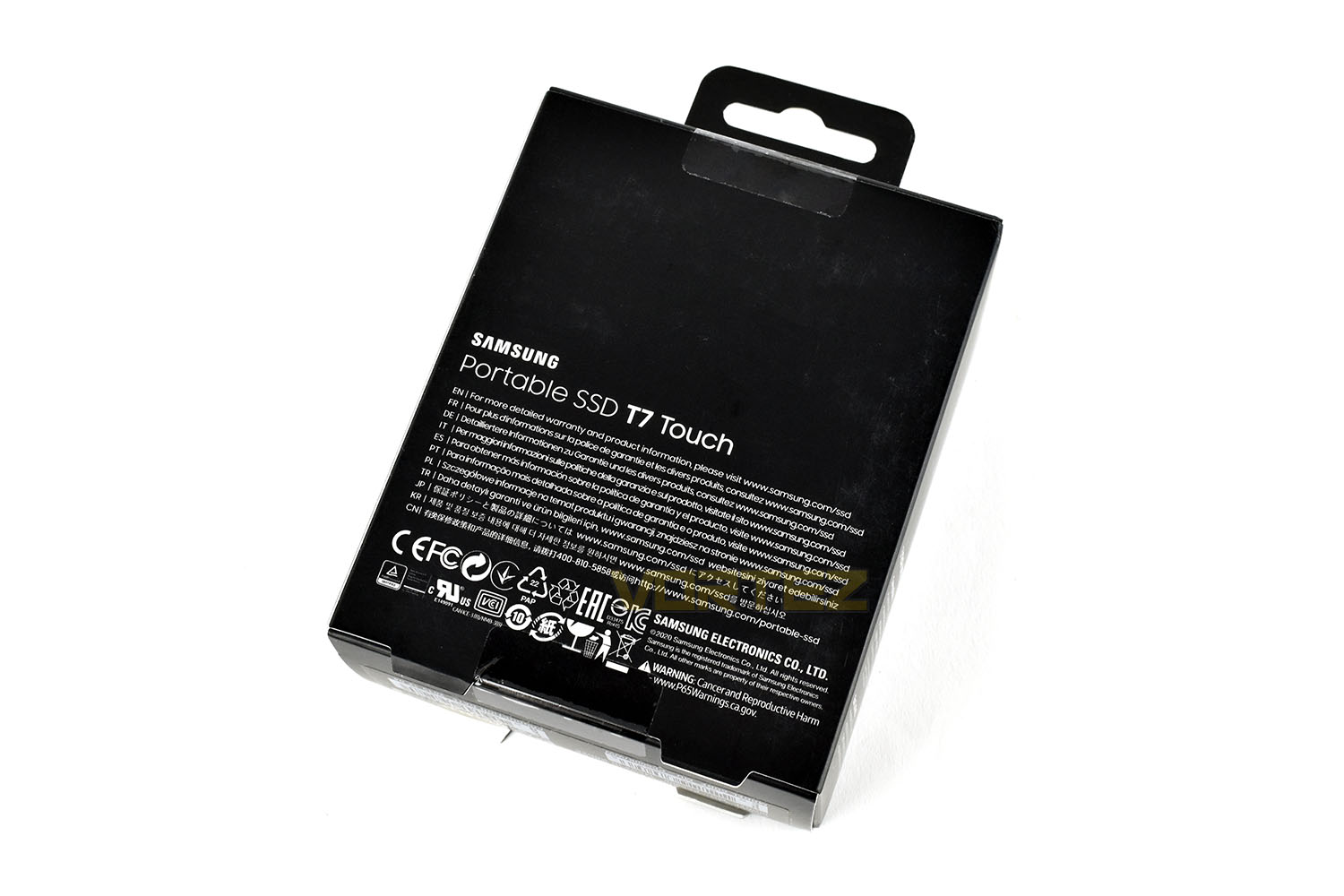
Packaged away inside a black cardboard box, the T7 Touch is well protected and will look good on the shelf. The front states that the device works with Windows, Mac and Android and shows the capacity.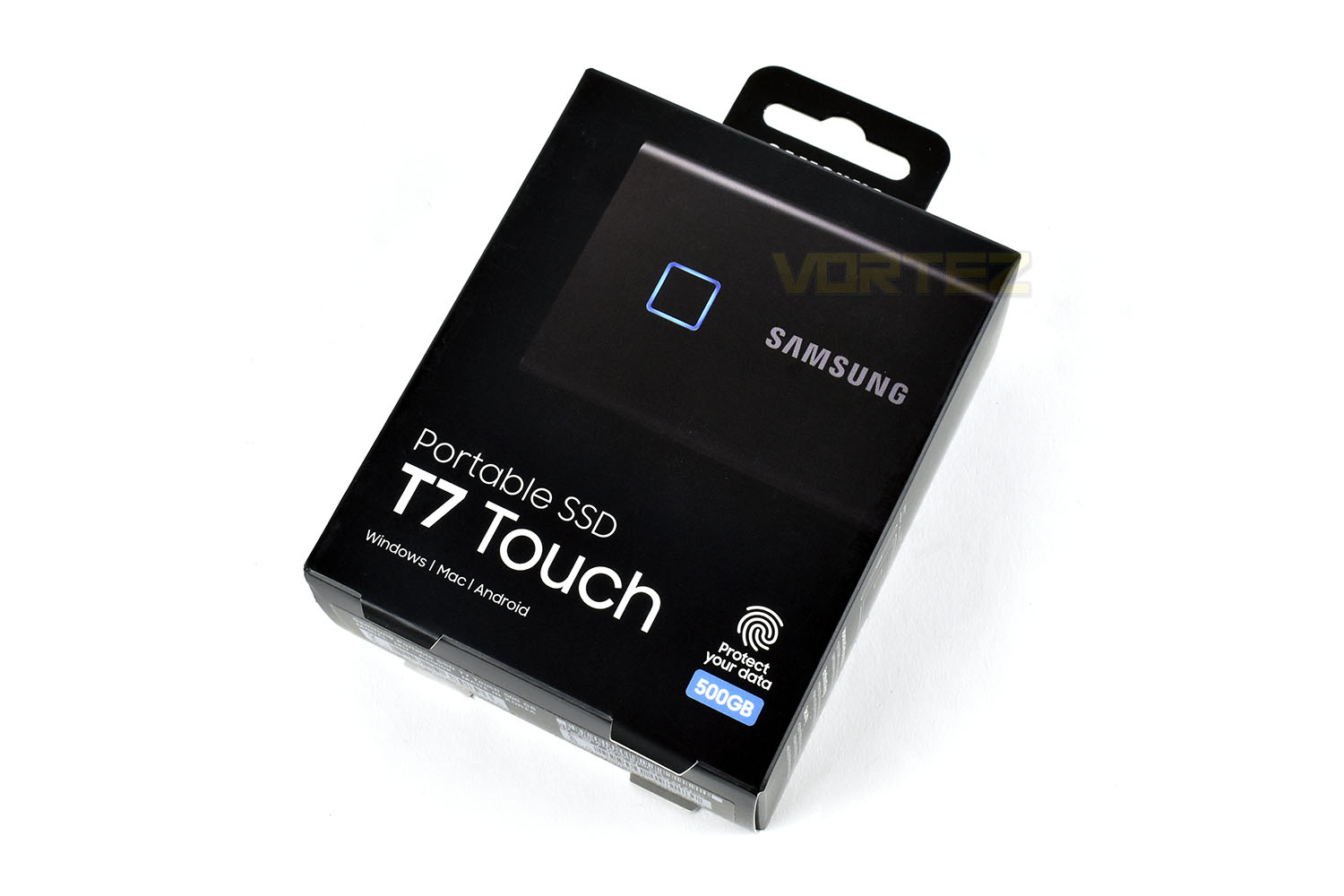
The reverse of the packaging serves no other purpose than to divert you to their website for further information.
Inside, amongst a mass of cardboard packaging, is the SSD, a Quick Start Guide, and a Type-A and Type-C cable.
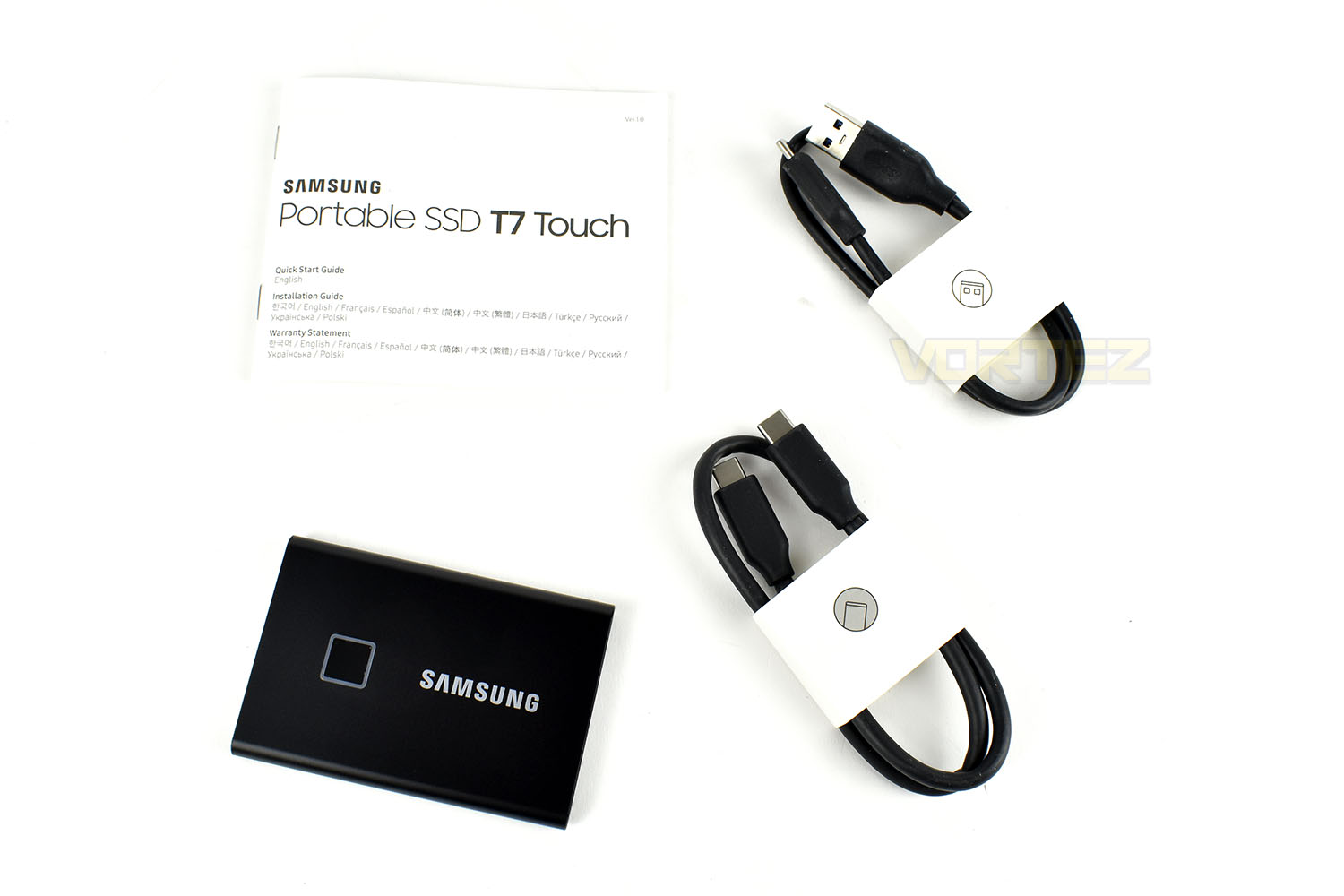
While the box does its job of keeping the SSD and its accessories in perfect condition, the simple fact is, SAMSUNG have used far too much cardboard for this packaging. There’s USB cables inside a cardboard box, with a cardboard wrap around them, inside another cardboard box, which is inside another cardboard box. Even the paper Quick Start Guide is inside its own cardboard sleeve. SAMSUNG need to do better here, in the current climate of reducing our waste.
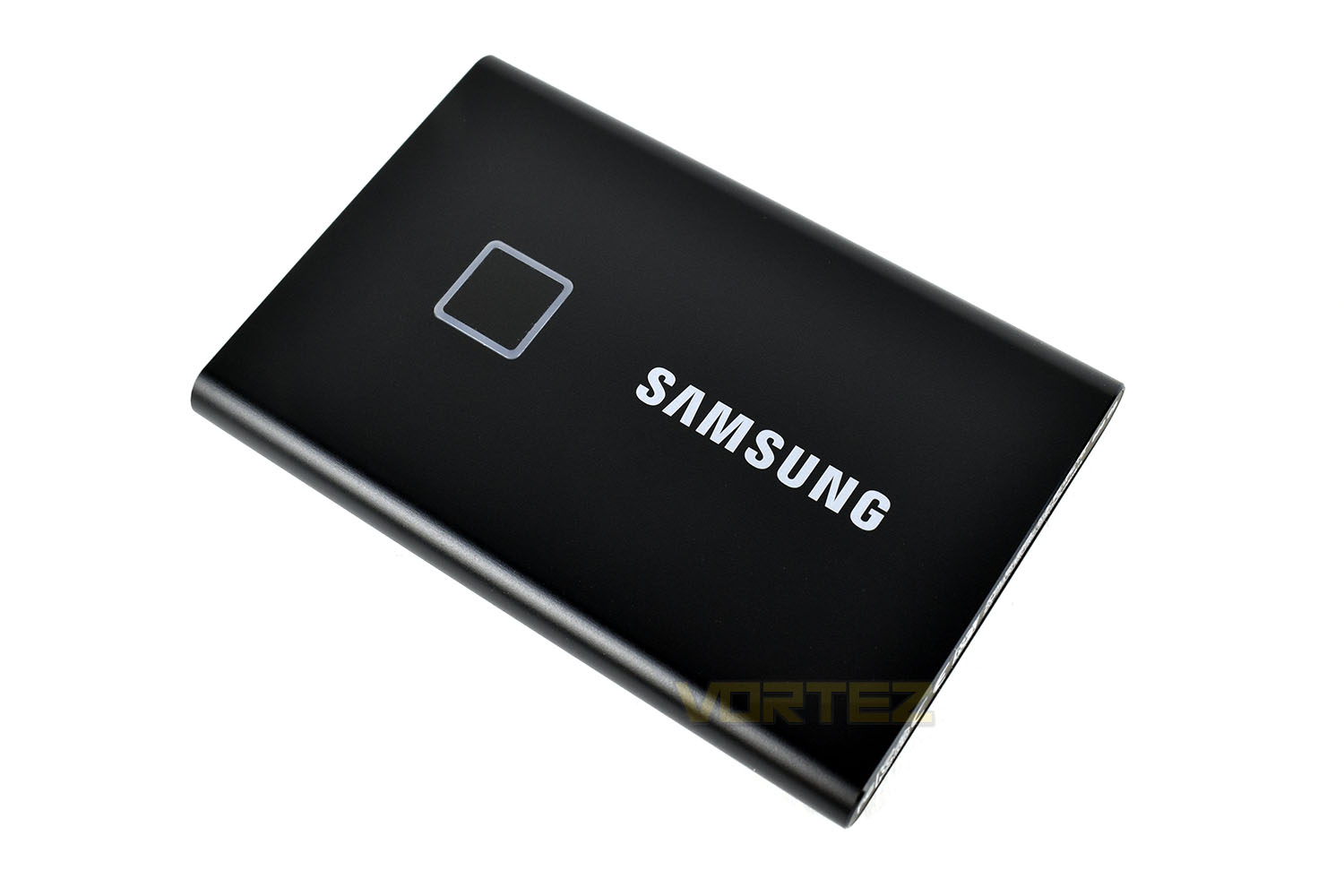
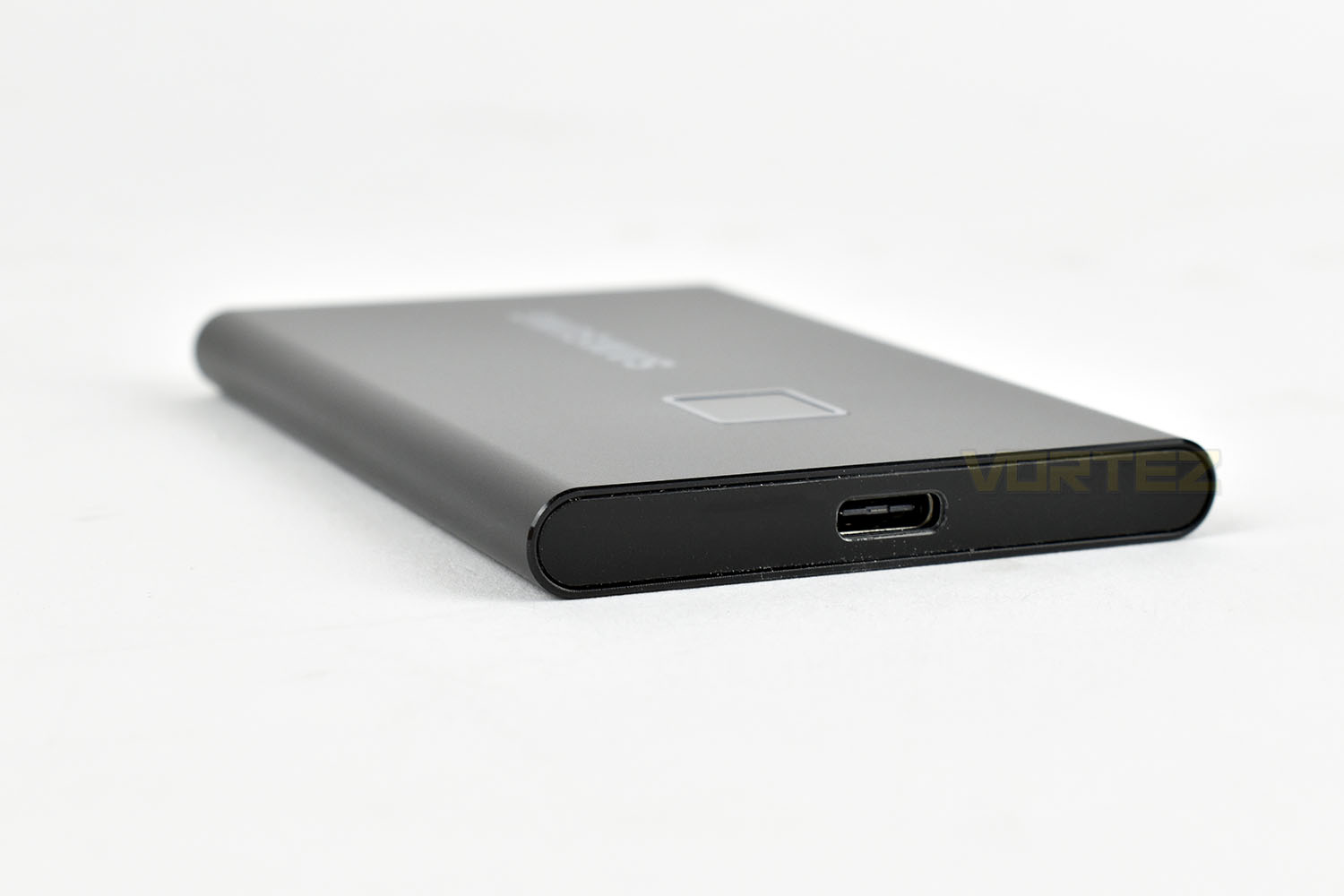
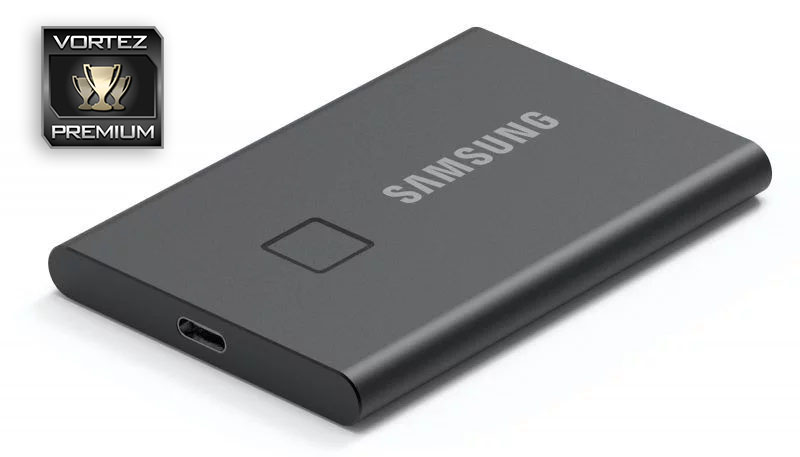
Measuring at 85mm x 57mm, and 8mm thick, the T7 Touch is a thin and sleek design which weighs very little at 58g. The chassis is an all-aluminium unibody construction for strength, with an ePCM (Encapsulated Phase Change Material) inside the structure which gradually releases heat from the device without raising the surface temperature above 45°C.
The small square on the left of the device is the fingerprint scanner, surrounded by a transparent light ring that is used to signify different security states.
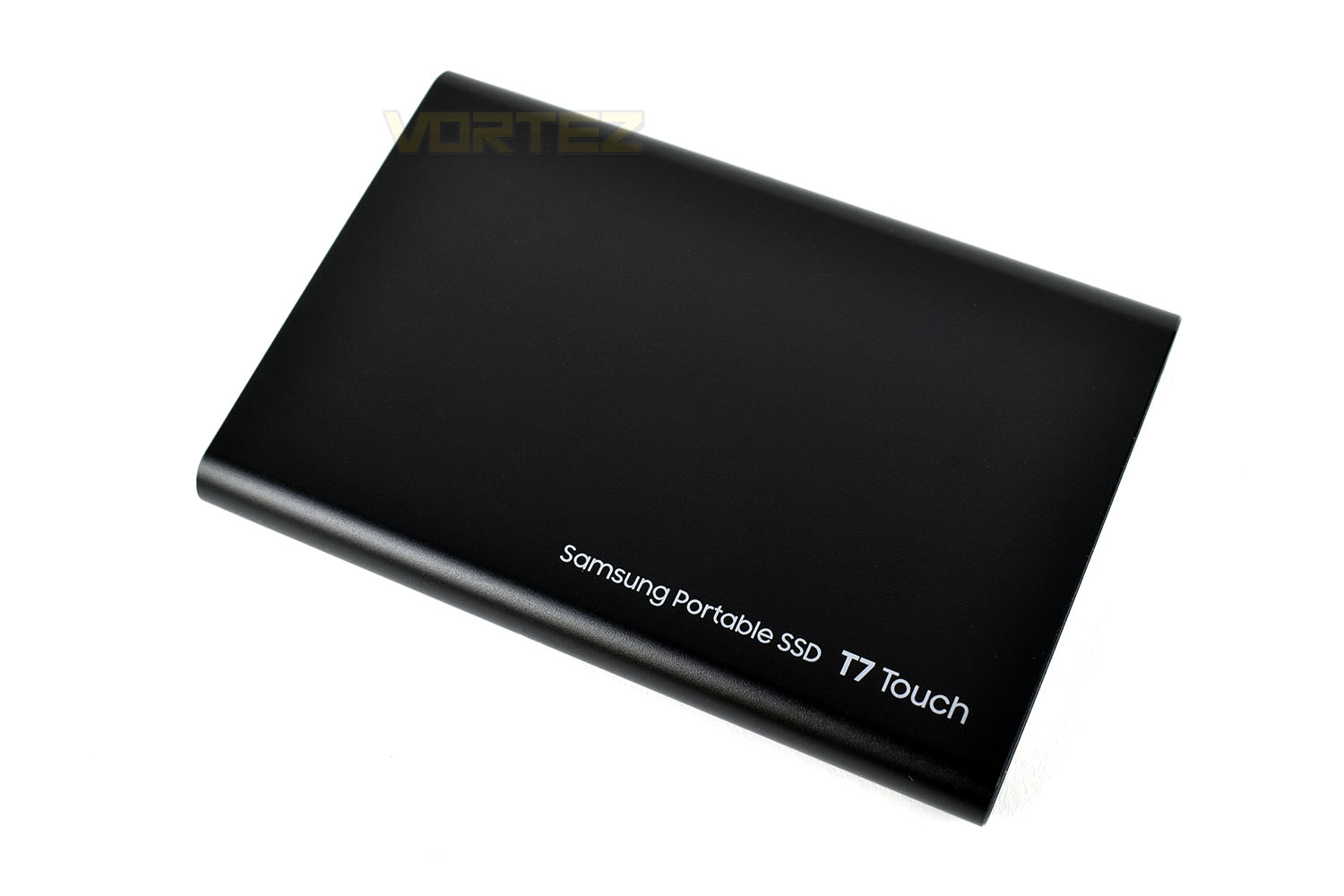
The reverse side is a flat piece of aluminium with only the product title in the bottom-right.
On one end of the drive is a USB Type-C connector, useful for up to 10Gbps (1250MB/s) theoretical maximum speed, with Samsung claiming to have managed to extract 1050MB/s.
Software
The SAMSUNG Portable SSD software is so simple that it really doesn’t warrant a video demonstration.Thanks to some clever design by SAMSUNG, there’s an 18MB partition on the drive that can be accessed without a fingerprint/password being set up. That partition contains the installer you need to set up the security features on the drive. From then on, it’s still available but the remaining 480GB-or-so (500GB model) is locked away behind a 256-bit AES encryption that can only be unlocked by scanning your fingerprint or entering your password.
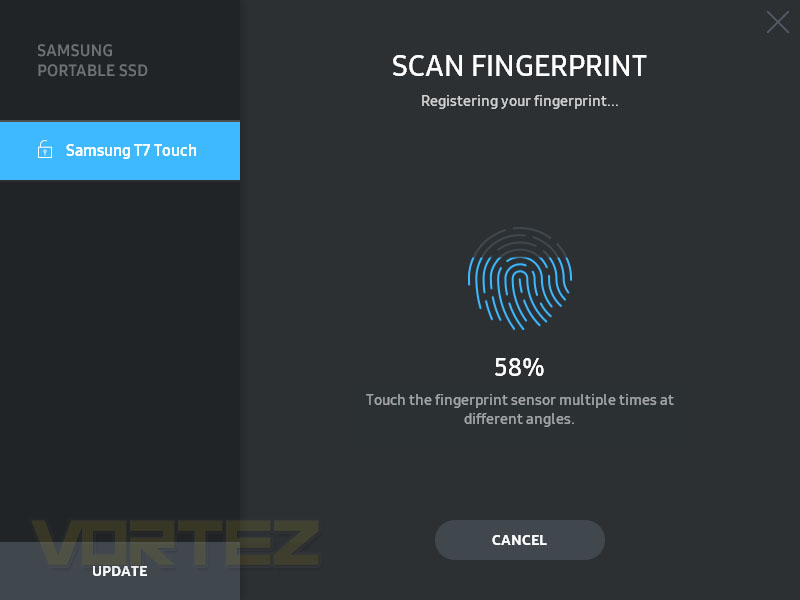
Once the software is set up, which takes but a moment, the configuration of the device is super easy. You type in your desired password and then begin the fingerprint registering. If you’ve ever set up your fingerprint on a smartphone you’ll be very familiar with this process; it’ll ask you to move your finger about slightly to register the edges and get a broader picture of your fingerprint overall. It’s also possible to add more than one fingerprint so multiple people can be given access, or you can use several fingers.
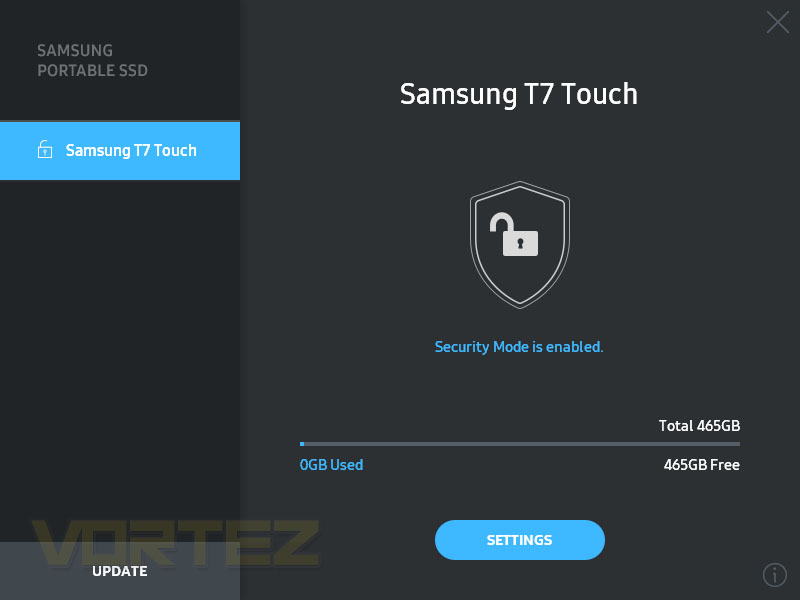
Once into the software, you can see how much capacity is remaining and the security status.
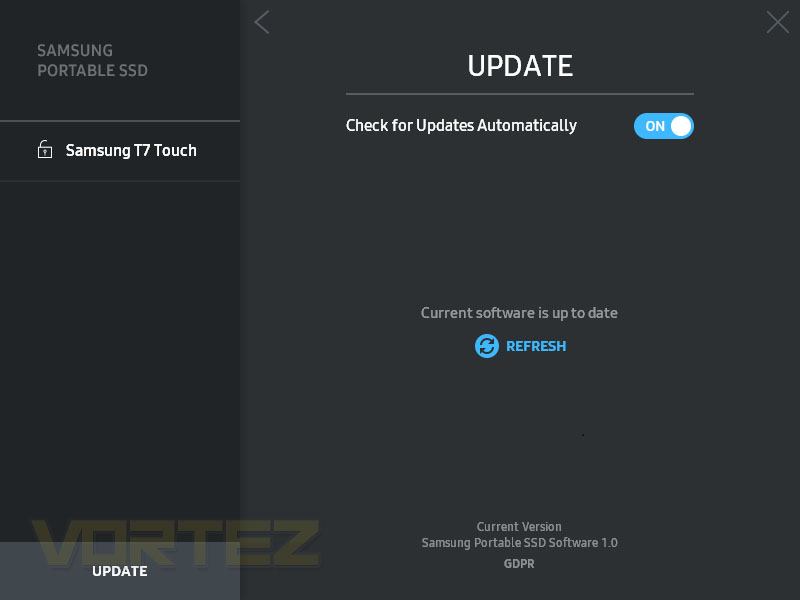
Checking that the software is up to date is also incredibly simple, with a single button to check the current version is correct.
Overall, the software is very simple to use and isn’t really missing any big features.
Test Setup & Methodology
Our test system is formatted and a fresh version of Windows is installed with just drives in place – no additional applications. Windows is then updated to the latest release and the drivers are installed.Included in the list of benchmarks are the following applications:
Benchmarks
Anvil Pro
AS SSD
ATTO Disk Benchmark v2.46
CrystalDiskMark
AIDA64
Games Transfer (Rise of the Tomb Raider, Total War: WARHAMMER & War Thunder – 85.3GB)
AS SSD
ATTO Disk Benchmark v2.46
CrystalDiskMark
AIDA64
Games Transfer (Rise of the Tomb Raider, Total War: WARHAMMER & War Thunder – 85.3GB)
Test system:
CPU: AMD Ryzen 7 3800X
Motherboard: MSI Prestige X570 Creation
Graphics: AMD Radeon RX480
Memory: 16GB (2x 8GB) Corsair Vengeance LPX 3000MHz
PSU: Corsair RM750x
OS: Microsoft Windows 10 Pro 64-Bit
Monitor: ASUS ROG PG279Q
Motherboard: MSI Prestige X570 Creation
Graphics: AMD Radeon RX480
Memory: 16GB (2x 8GB) Corsair Vengeance LPX 3000MHz
PSU: Corsair RM750x
OS: Microsoft Windows 10 Pro 64-Bit
Monitor: ASUS ROG PG279Q
Benchmarks: Anvil Pro
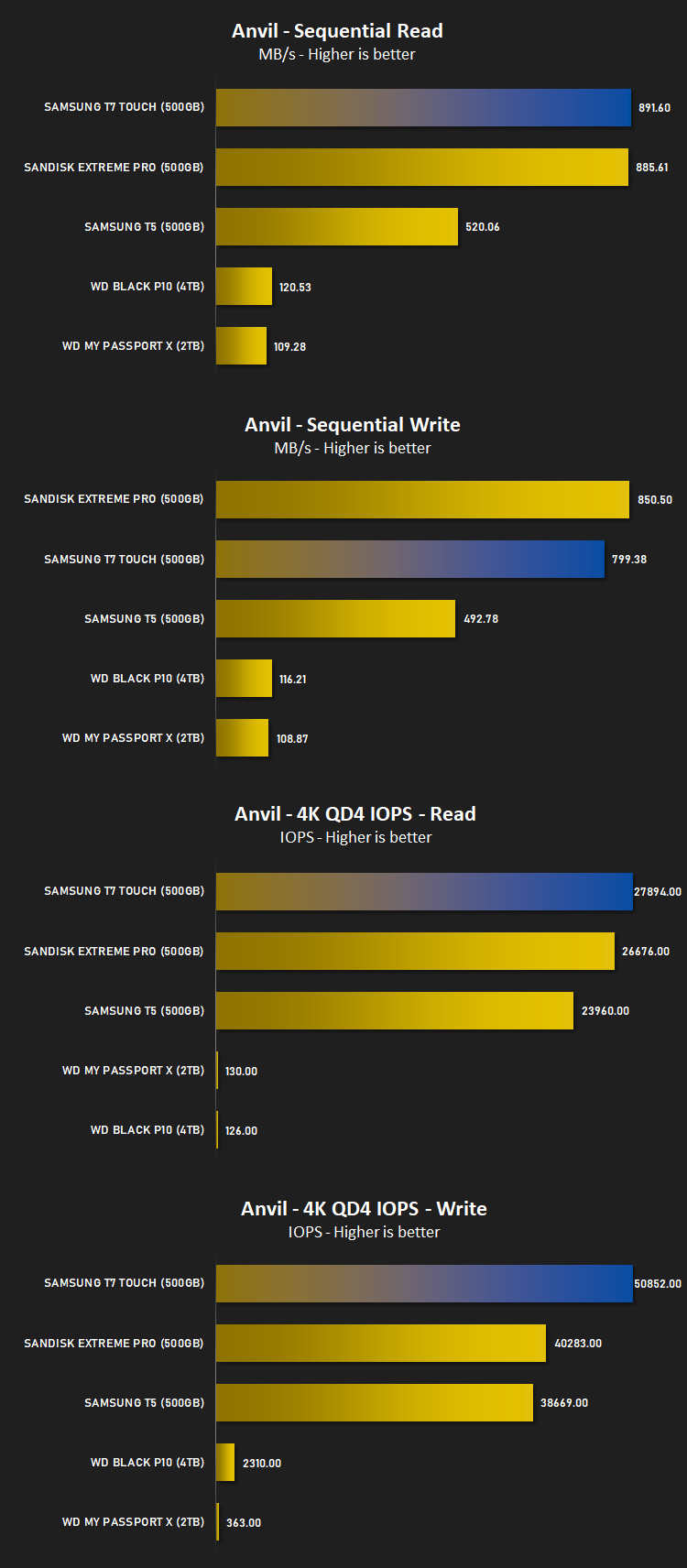
Anvil Pro from Anvil Storage utilities is one of the most popular storage benchmarking utilities today thanks to the large suit of tests available. You can test pretty much anything from Read/write Speed to IOPs with many variables to tweak allowing you to get either a single or host of results to compare with other likeminded enthusiasts. In our test we ran the standard suite 5 times, subtracting both the highest and lowest scores and determined the final result from the average of the remaining three results.
Benchmarks: AS SSD
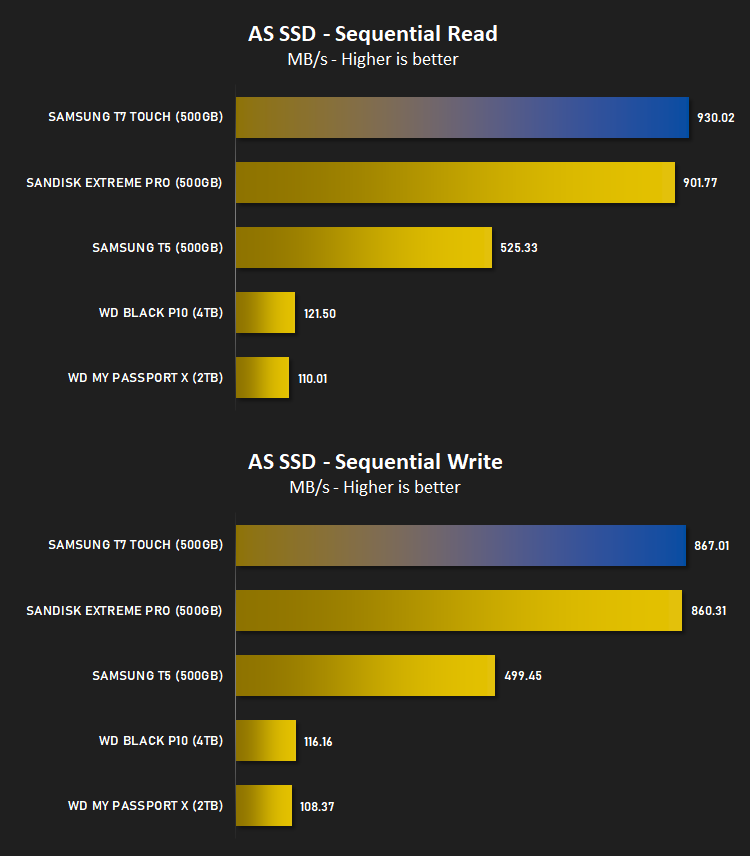
AS SSD Benchmark is a straightforward tool for measuring the speed of your SSD drive.
Simply launch the program, choose your drive, click Start, and it’ll test your SSD’s read and write speed in a variety of ways, delivering a score for each when it’s done. And if that’s not enough, there are also additional file copy and compression-related benchmarks available from the Tools menu. (The author’s support page is German only, but if you need further English explanations then there’s a thread on the program at the OCZ Technology forum.).
Simply launch the program, choose your drive, click Start, and it’ll test your SSD’s read and write speed in a variety of ways, delivering a score for each when it’s done. And if that’s not enough, there are also additional file copy and compression-related benchmarks available from the Tools menu. (The author’s support page is German only, but if you need further English explanations then there’s a thread on the program at the OCZ Technology forum.).
Benchmarks: ATTO
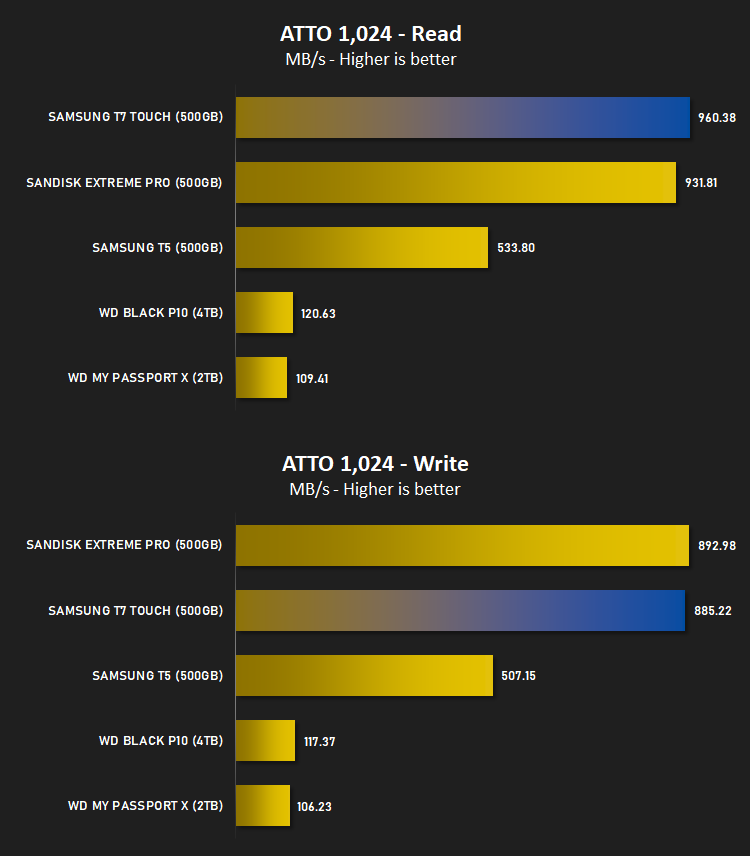
The ATTO Disk Benchmark performance measurement tool is compatible with Microsoft Windows. Measure your storage systems performance with various transfer sizes and test lengths for reads and writes. Several options are available to customize your performance measurement including queue depth, overlapped I/O and even a comparison mode with the option to run continuously. Use ATTO Disk Benchmark to test any manufacturers RAID controllers, storage controllers, host adapters, hard drives and SSD drives and notice that ATTO products will consistently provide the highest level of performance to your storage.
Benchmarks: AIDA64
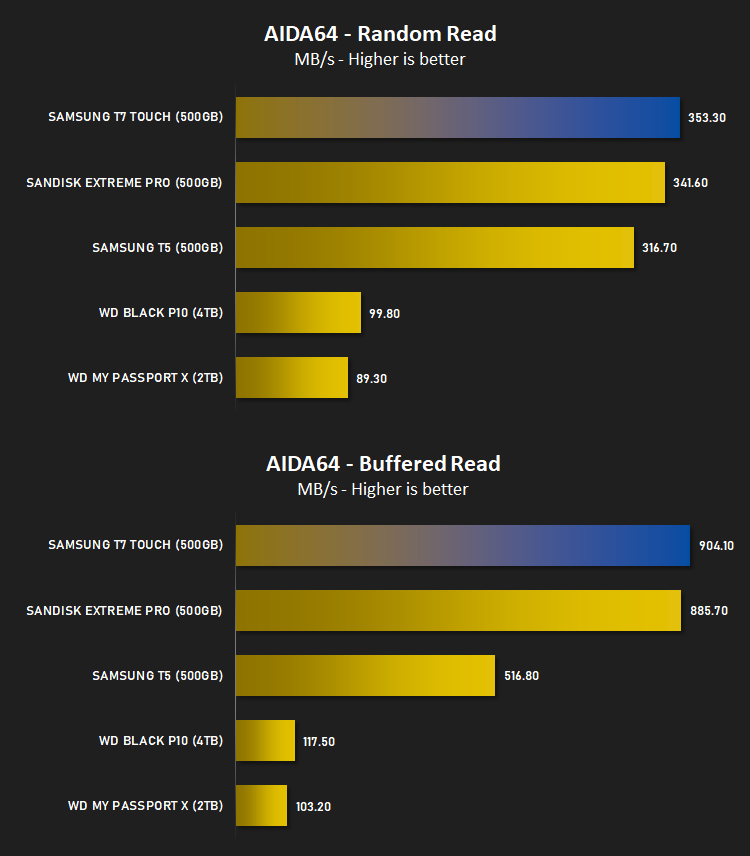
With this module, we can measure the performance of the PC’s storage devices, including (S)ATA or SCSI hard disk drives, RAID arrays, optical drives, solid-state drives (SSD), USB drives and memory cards. It also allows us to perform write tests, which helps us detect fake products and errors on the devices. In order to attain reliable benchmark results we have to make sure to close all background applications.
Benchmarks: CrystalDiskMark
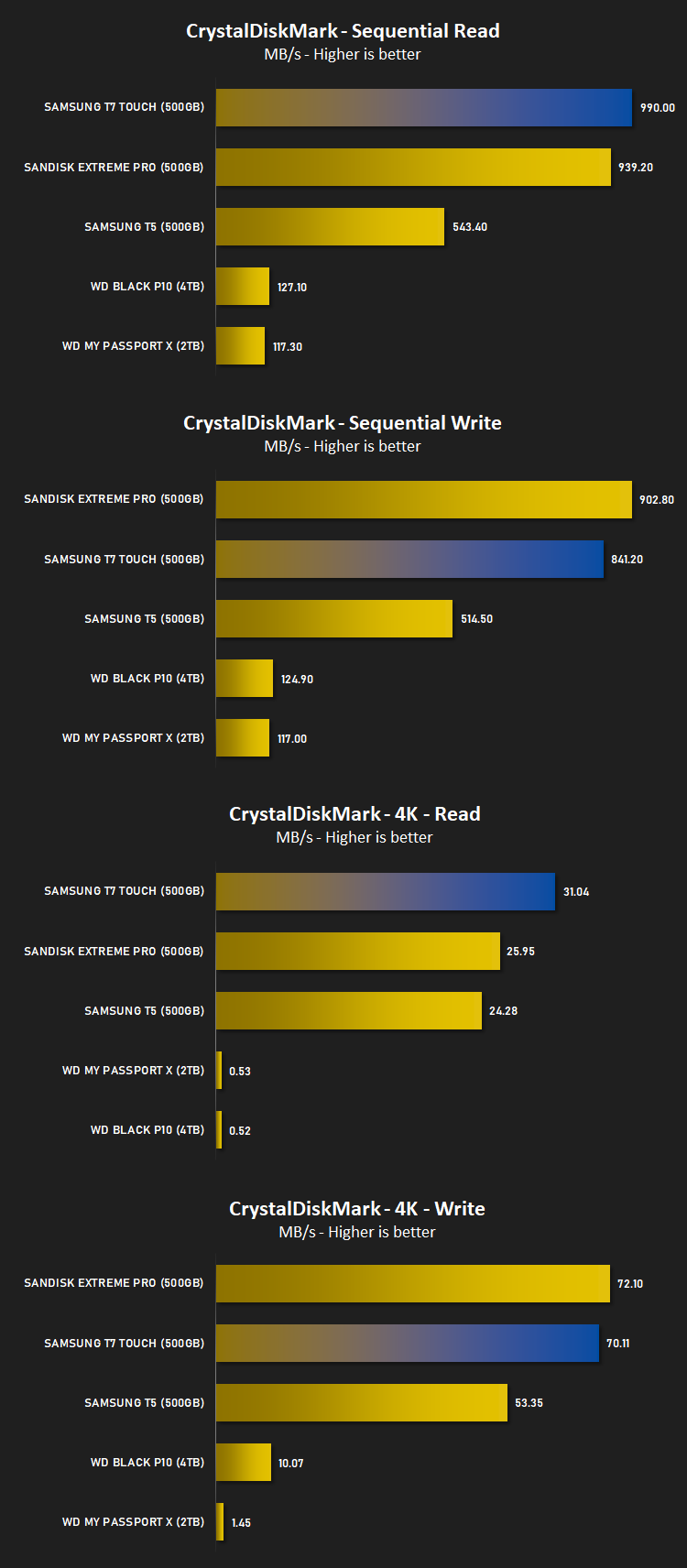
CrystalDiskMark is an open source disk drive benchmark tool for Microsoft Windows. Based on Microsoft’s MIT-licensed Diskspd tool, this graphical benchmark is commonly used for testing the performance of solid-state storage. It works by reading and writing through the filesystem in a volume-dependent way. It generates read/write speeds in sequential and random positions with varying numbers of queues and threads.
Benchmarks: Games Transfer
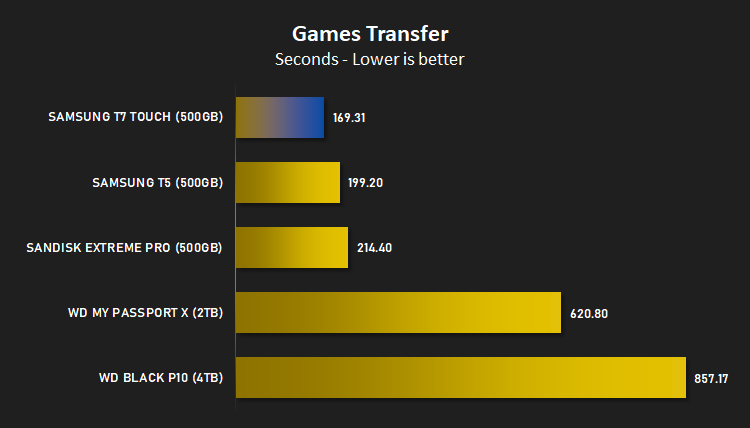
To test the “real world” performance of the drive, we transfer the Rise of the Tomb Raider, Total War: WARHAMMER and War Thunder Steam files from an M.2 NVMe drive to the external drive. These files total 85.3GB and feature a mix of large and small files.
Conclusion
Having fast access to your data is one thing, but keeping it secure at the same time is another challenge altogether. Add in the requirement of the device being small and sleek and easy to use and the equation just continues to get more complex. However, against all of that, SAMSUNG have pulled off quite the feat with the T7 Touch.We’ve been using the SAMSUNG T5 500GB at least once a week since we reviewed it in 2017 and it’s yet to miss a beat. It’s excellent for transferring a Steam library, TV shows, anything you fancy, but the lack of security was always somewhat of a concern, until now.
The T7 Touch is thinner and sleeker than its predecessor, and in the Classic Black finish it looks fantastic, though it is slightly heavier at 58g versus 51g (not that you can tell the difference.) It also looks better than any other drive in this category, in our opinion. The shape and style is timeless with a beautifully well integrated fingerprint scanner.
In terms of using the software, setup was a piece of cake, we really couldn’t have asked for an easier experience. Unlocking the device on other systems, including a Samsung Galaxy S9, a PS4, a Samsung QE65Q9FN TV and a laptop was all as simple as plugging the device in and placing your finger on the sensor; a few seconds pass and the host system detects the files and away it goes. It felt totally seamless compared to entering a password, which sometimes isn’t even an option with some devices, leaving you locked out entirely.
Now, for the speed of the device. The T5 was no slouch when it was released but SAMSUNG have turned things up to 11 on the T7 Touch, utilising NVMe technology inside and almost fully saturating the USB 3.2 Gen. 2 interface for, in our tests, just shy of 1000MB/s. This drive beat out the SanDisk Extreme Pro in 80% of tests which is no small feat.
When compared to other drives of a similar speed, the SAMSUNG offers decent value, with a fingerprint scanner thrown into the mix alongside a sturdy unibody aluminium design and a three year warranty, it’s difficult to find a single flaw with the T7 Touch.
The only downside we could find was the wasteful packaging – if SAMSUNG can do something about that, we’re onto a winner!
If you need stupidly fast data access and robust security, the T7 Touch will take some beating!
Pros
+ Incredibly fast
+ Simple, solid security
+ Beautiful design
+ Intuitive, easy to use software
+ Nothing’s quite as simple as a fingerprint
Cons
– Wasteful packaging
+ Incredibly fast
+ Simple, solid security
+ Beautiful design
+ Intuitive, easy to use software
+ Nothing’s quite as simple as a fingerprint
Cons
– Wasteful packaging
Click here for an explanation of our awards at Vortez.net.
Stay connected with the Vortez Social Media pages:
Join in with the discussions on Discord