The tech giant, Samsung, has today released their fastest portable SSD to date, the Samsung X5; claiming speeds of 2.8GB/s and 2.3GB/s read and write. Surely that can’t be true, can it?

Product on Review: Samsung X5 Portable SSD
Manufacturer: Samsung
Street Price: 500GB – GBP £359.99 / USD $399.99. 1TB – GBP £629.99 / USD $699.99. 2TB – GBP £1249.99 / USD $1399.99.
Samsung are rapidly becoming one of the biggest brands on the planet, dominating markets left, right and centre. We already rely on them for high quality televisions and monitors, their mobile division produces millions of devices per year, they make washing machines and fridge-freezers and, of course, flash storage in the form of SSDs, such as the Samsung 860 EVO and the Samsung 970 PRO NVMe drives.
Today we look at something we’ve not seen from Samsung before; a Thunderbolt 3-based portable solid state drive. Last year we examined the Samsung T5 SSD which was incredibly impressive, this time around we’re testing the Samsung X5 1TB.
Samsung claims the Samsung X5 is capable of read and write speeds of 2800MB/s and 2300MB/s respectively; if those ring true in our testing, this will be the single-fastest external drive we’ve seen, without question. To achieve those speeds, Samsung have used an M.2 NVMe drive featuring the latest 3-bit MLC V-NAND, paired with a high-speed controller and their TurboWrite technology.
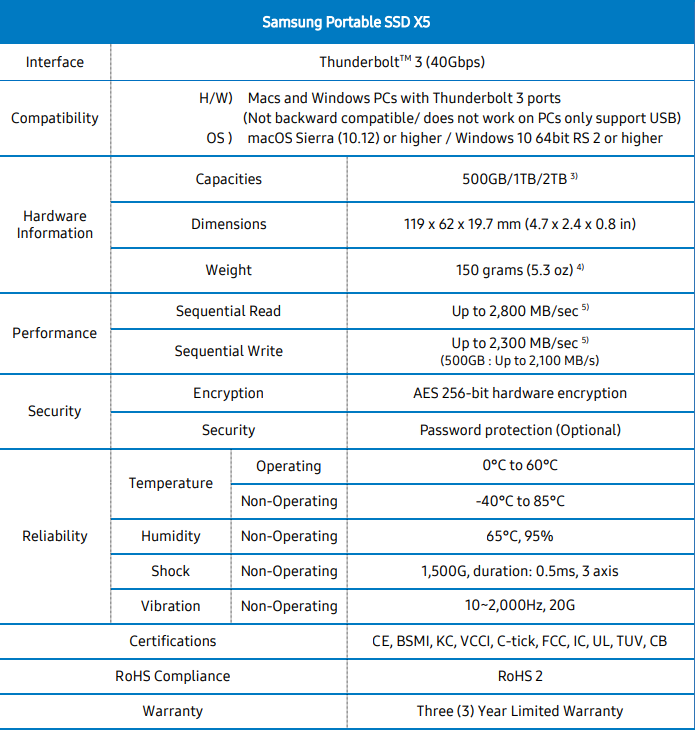
The Samsung X5 uses the Thunderbolt 3 interface, most notable for its 40Gbps bandwidth and up-to 100W of power; however, despite using the same cable as a USB Type-C drive, the two interfaces are not to be confused. This does cause the drives intended audience to be much smaller than a typical USB Type-C drive, mainly limited to those using Apple Mac machines, or modern high-end laptops. (In fact, for this review we partnered with MSI and tested X5 with the MSI GS65 Stealth Thin 8RF). On the other hand, that same limitation of only using Thunderbolt 3 also opens up many doors with its high bandwidth, making the drive viable as a scratch disk for content creation professionals.

Along with the SSD, Samsung pre-load the X5 with Samsung Portable SSD Software, with versions for Windows 10 and Mac OS, which enables 256-bit AES hardware encryption. It’s always nice to know your data is safe if you happen to misplace the drive at any point.
While the lack of USB Type-C support is inconvenient, there’s plenty of choice aside from the X5 if that’s what you’re after, but a massive hurdle to overcome will be the price. Our 1TB sample is priced at £629 in the UK, equating this to around 60p/GB, with the alternative capacities arriving at a similar price per gigabyte level.
With all of that said, there’s only one thing left to do, rip open the packaging, show you the device and run some tests. See you at the other side.
Samsung on the X5 SSD:
Samsung Portable SSD X5 is a revolutionary external storage with integrated cutting-edge NVMeTM and ThunderboltTM 3 technologies. The X5 is designed for content creators and high-tech professionals who need fast and secure access to data in a lightweight and compact storage solution. The X5 also leads the industry with a 2TB capacity option.
Technical Specifications
Packaging & Bundle
In a rather fancy fashion, Samsung have packaged the drive in a black box with a ghost-like image of the X5 on the front. The bottom-right shows the Thunderbolt interface as well as the capacity.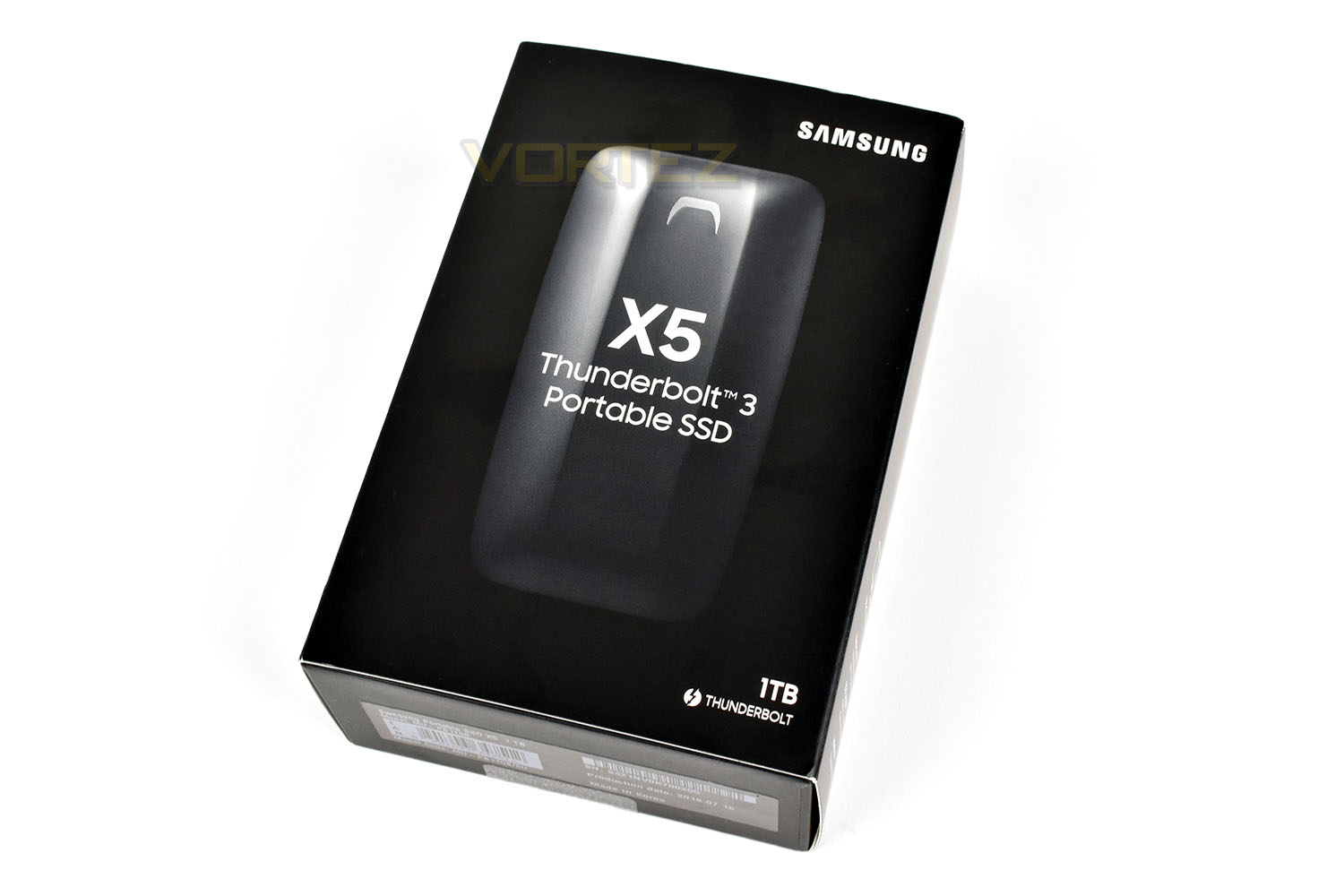
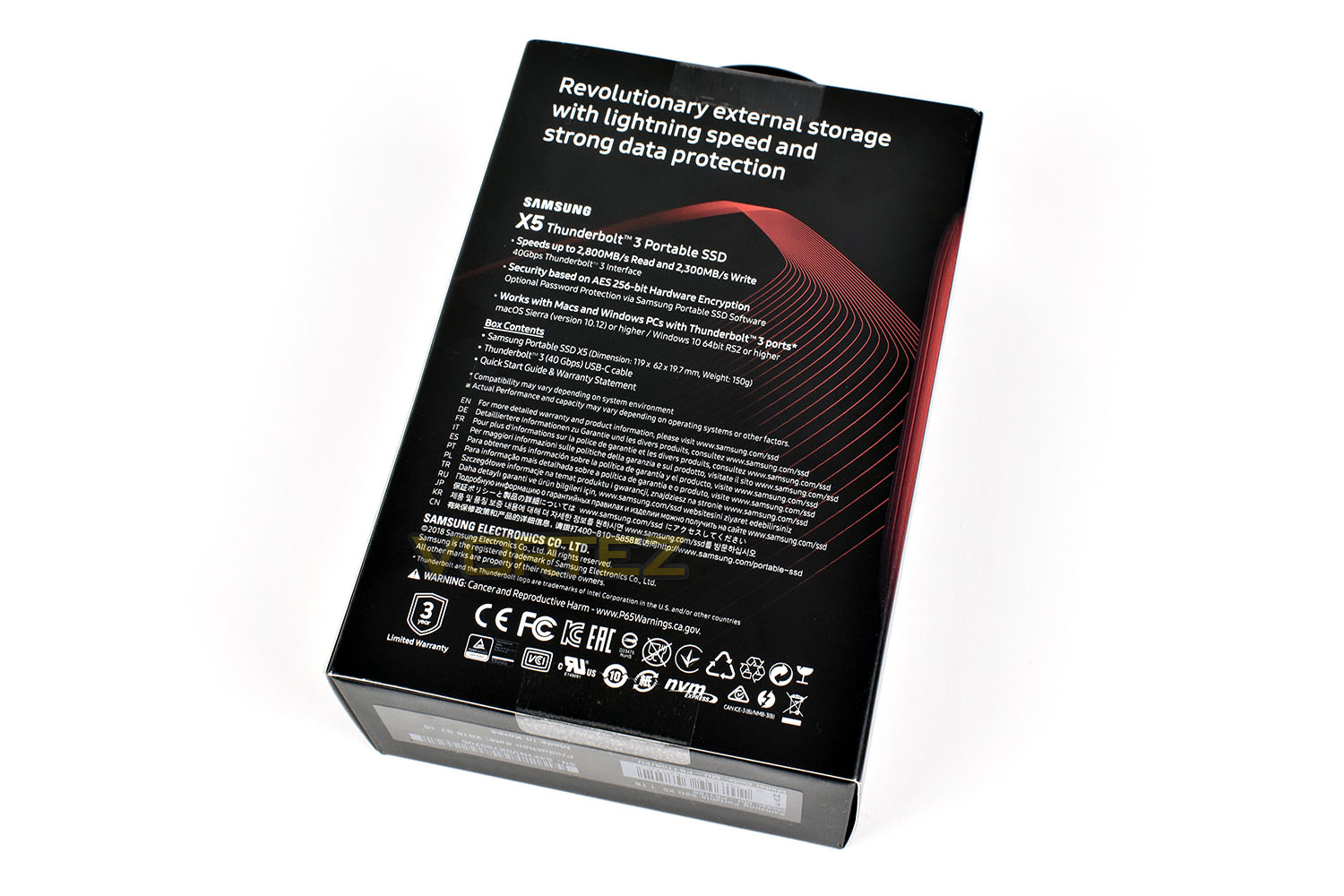
The rear of the box injects a bit of colour into the situation, but they’ve hardly gotten carried away with it, instead deciding that a few thin red lines will suffice. In terms of information, you’re given some best case scenario speeds, information about the encryption and security aspects and a list of the contents in the box.
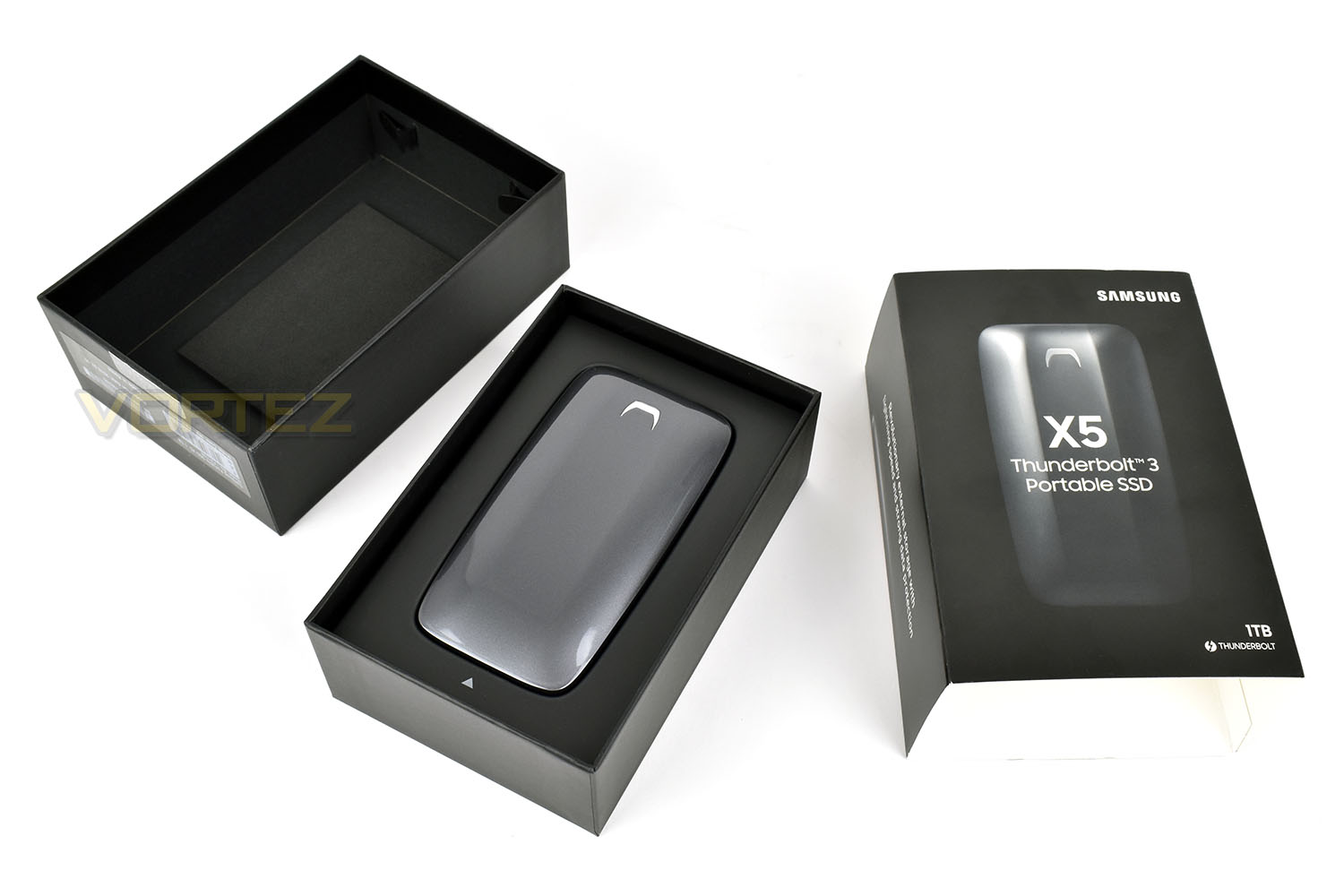
The inner box slides out from the outer sleeve, which then opens up to reveal the gun-metal grey Samsung X5.
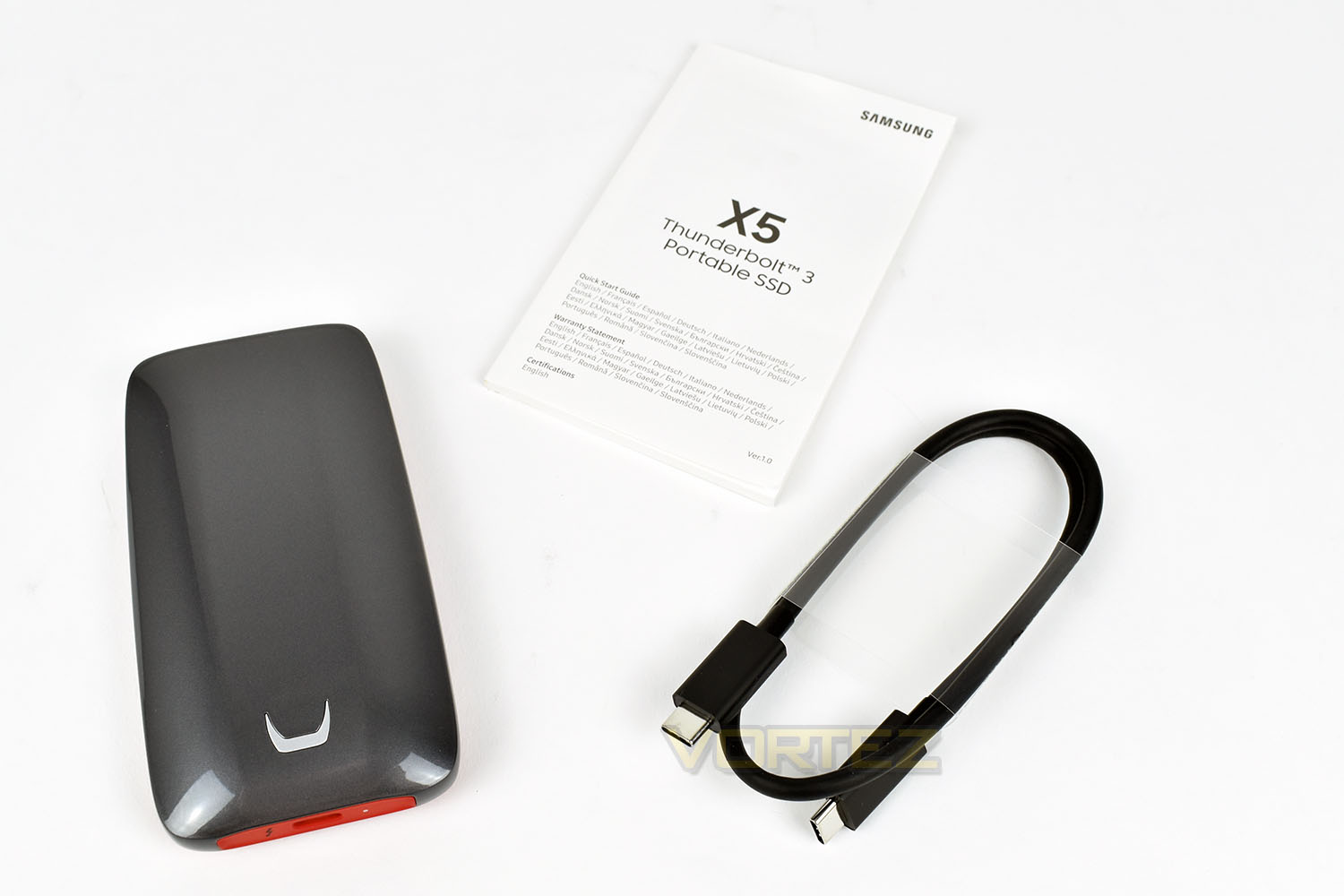
Along with the X5 is a short USB Type-C Thunberbolt 3 cable, measuring only xxx in length and a Quick Start Guide. The included cable is limited in length by the Thunderbolt 3 connection – It tends to be the case that any TB3 cable over the length of around 500mm requires an active connection, with auxiliary power and higher quality materials being used to ensure signal quality at both ends; that is costly and inconvenient so Samsung decided to remain with the shorter cable. To be fair, this is perfectly suitable for the usage this cable will see.
Closer Look
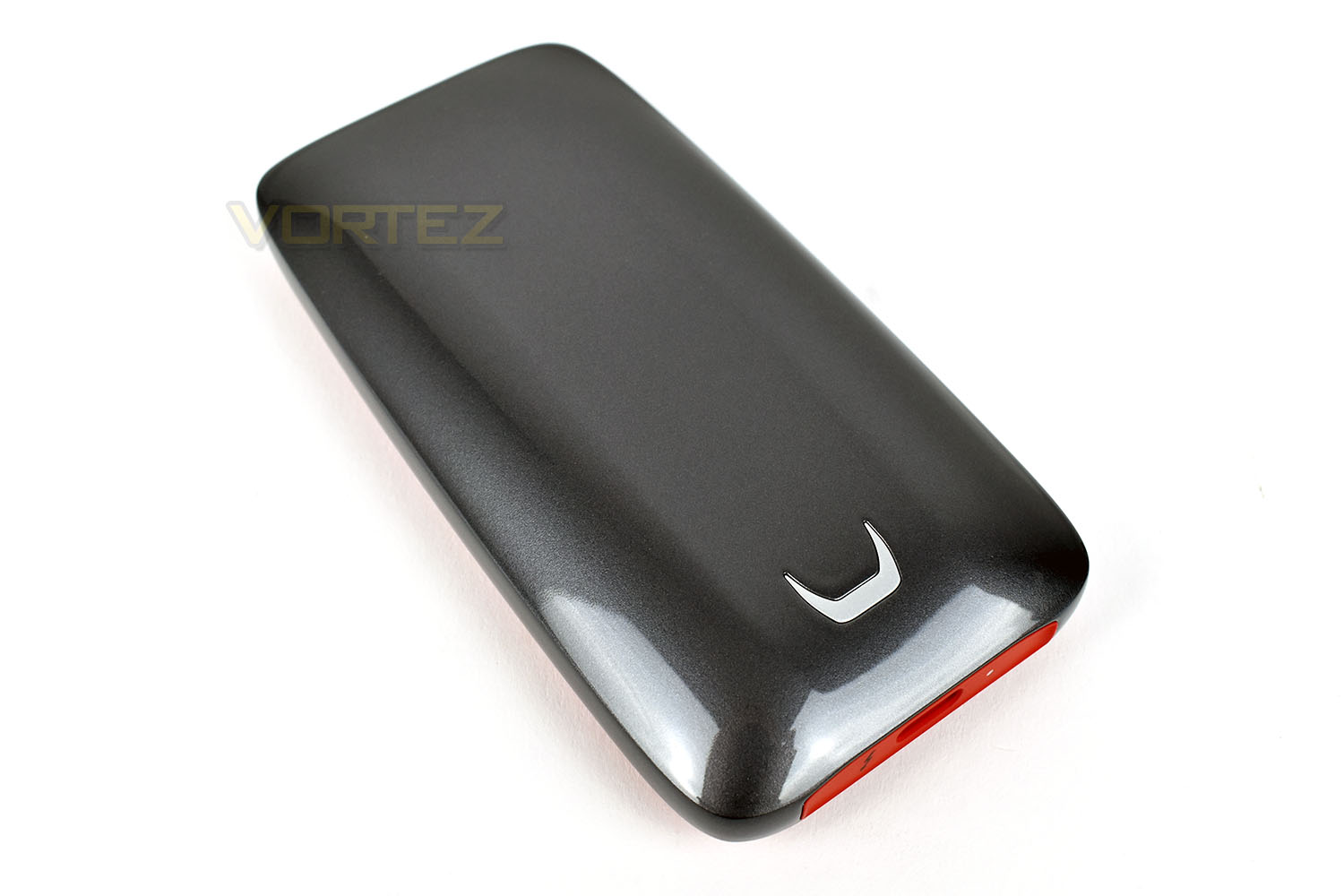
Weighing in at 150g without the cable, you would certainly notice it in your pocket; to give that some scale two flagship phones available at the moment, the Samsung Galaxy S9 and the iPhone X weigh roughly the same, tipping the scales at 163g and 174g respectively. Having said that, the weight gives the device a premium feel.The paint finish on the top is gorgeous, with a proper metallic look and feel, much like you’d expect on an Audi or a BMW, without sounding too over the top. The overall sense from the device is “premium”.
We’ve been told that the shape is inspired by a supercar, which we can appreciate when looking at the design; it almost looks as though it was tested in a wind tunnel.
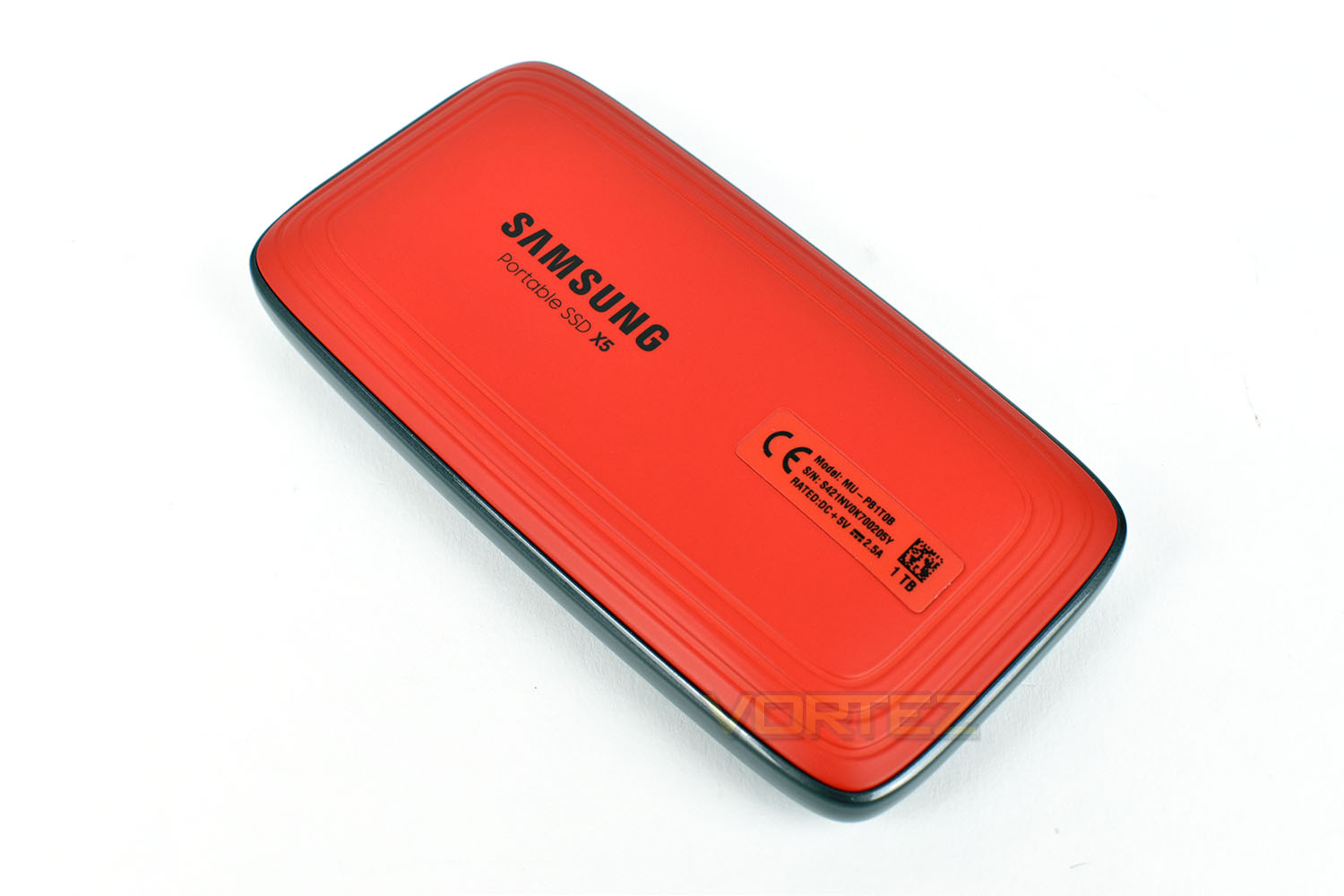
The base is made from a bright orange, non-slip plastic which should prevent the drive from moving around too much on your desk. Handy if you’re using the device on a train or a coach, or even the back of a taxi.
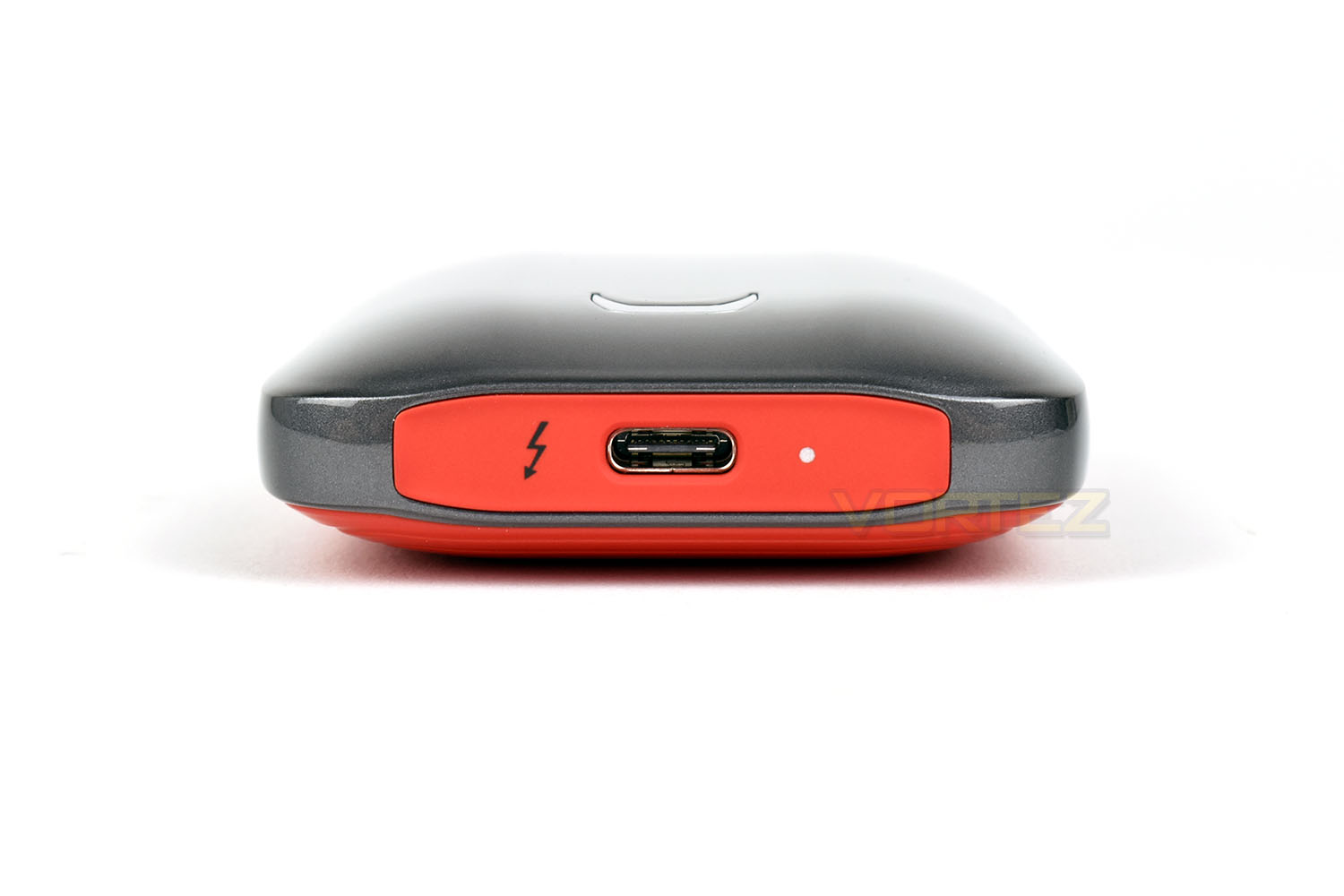
On the Thunderbolt end is the USB Type-C port and an activity LED, surrounded by the flat orange shield.
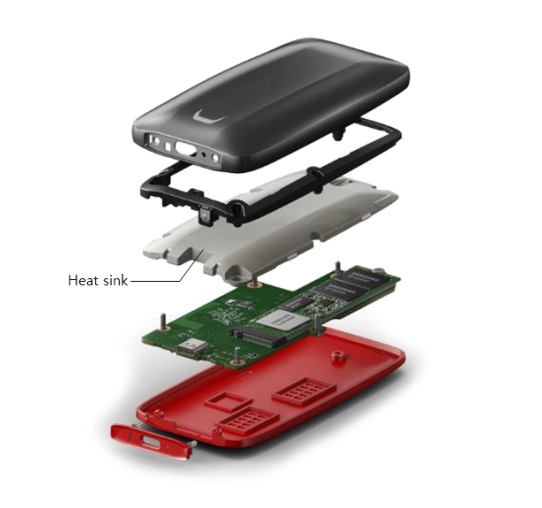
Without tearing apart our drive and risking damage to the internals, we’ve used the provided image from Samsung to show the inner construction.
The X5 is made up of 5 significant parts, the magnesium shell provides stiff, durable protection from bangs and knocks and Samsung claims it’s capable of withstanding a 2 metre fall. The 2nd layer is a shock absorption piece, made from soft plastic, designed to work in tandem with the outer casing to absorb energy and protect the device. Below that is a large heatsink; NVMe drives have been known to get hot, due to their small size and incredibly fast speeds, so Samsung have provisioned ample heatsink material to deal with that. Below the heatsink is the Thunderbolt controller paired with the M.2 NVMe drive. Finally, the non-slip plastic base finishes off the construction with its bright colour.
Test Setup & Methodology
Our test system is formatted and a fresh version of Windows is installed with just drives in place – no additional applications. Windows is then updated to the latest release and the drivers are installed.Included in the list of benchmarks are the following applications:
Benchmarks
Anvil Pro
AS SSD
ATTO Disk Benchmark v2.46
Futuremark PCMark 8
AIDA64
AS SSD
ATTO Disk Benchmark v2.46
Futuremark PCMark 8
AIDA64
Our usual test system is as follows, but due to the unique nature of this review, with the Samsung X5 requiring a Thunderbolt 3 port, unfortunately we’ve been forced to use a different system. MSI don’t currently support Thunderbolt 3 on the Z270 Gaming M7, even via add-in card. This means our test results are not a perfect like-for-life with the rest of our results but we believe they’ll be more than close enough to include in the graphs but please do not compare them exactly.
Test system
CPU: Intel Core i7 7700K
Motherboard: MSI Z270 Gaming M7
Graphics: EVGA GTX 1070 SC
Memory: 16GB CORSAIR Vengeance LPX 3200MHz DDR4
SAMSUNG SM961 256GB NVMe
Crucial MX500 500GB SSD
PSU: BeQuiet Straight Power 11 650W
OS: Microsoft Windows 10 Pro 64-Bit
Monitor: ASUS ROG PG279Q
Motherboard: MSI Z270 Gaming M7
Graphics: EVGA GTX 1070 SC
Memory: 16GB CORSAIR Vengeance LPX 3200MHz DDR4
SAMSUNG SM961 256GB NVMe
Crucial MX500 500GB SSD
PSU: BeQuiet Straight Power 11 650W
OS: Microsoft Windows 10 Pro 64-Bit
Monitor: ASUS ROG PG279Q
For today’s review, MSI have kindly loaned us their MSI GS65 Stealth Thin 8RF laptop, equipped with Thunderbolt 3. The specs are as follows.
CPU: Intel Core i7-8750H
Graphics: GeForce GTX 1070 with Max-Q Design
Memory: 32GB DDR4 2666MHz
OS: Microsoft Windows 10 Pro 64-Bit
Monitor: 15.6” FHD IPS 144Hz
Graphics: GeForce GTX 1070 with Max-Q Design
Memory: 32GB DDR4 2666MHz
OS: Microsoft Windows 10 Pro 64-Bit
Monitor: 15.6” FHD IPS 144Hz
Benchmarks: Anvil Pro
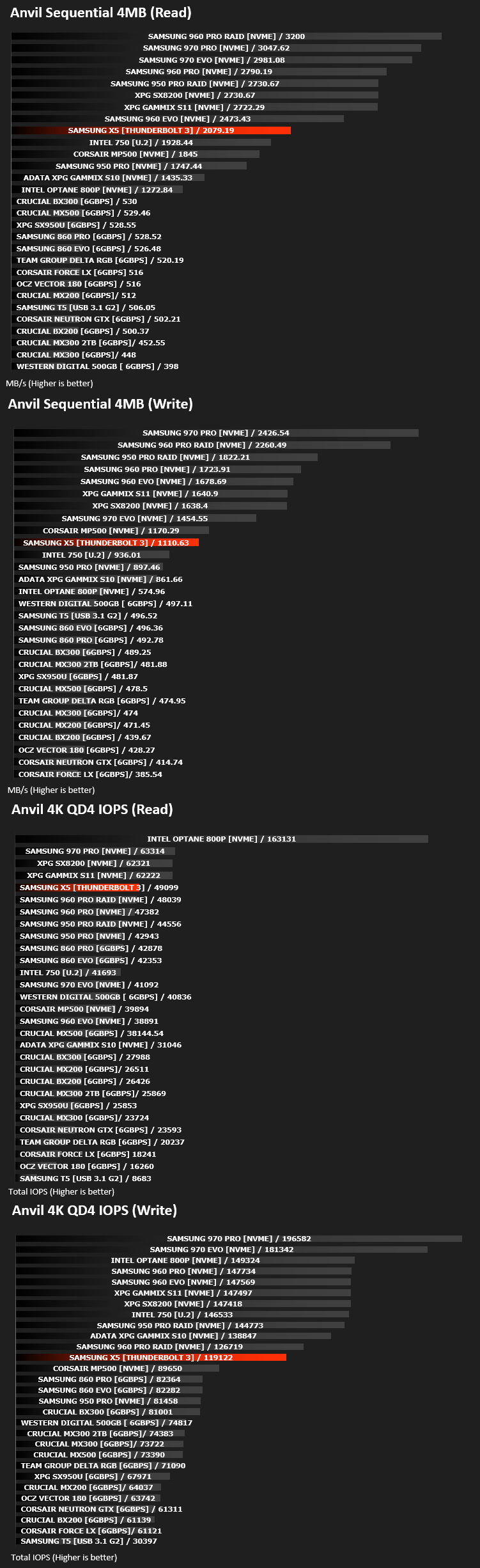
Anvil Pro from Anvil Storage utilities is one of the most popular storage benchmarking utilities today thanks to the large suit of tests available. You can test pretty much anything from Read/write Speed to IOPs with many variables to tweak allowing you to get either a single or host of results to compare with other likeminded enthusiasts. In our test we ran the standard suite 5 times, subtracting both the highest and lowest scores and determined the final result from the average of the remaining three results.
Benchmarks: AS SSD
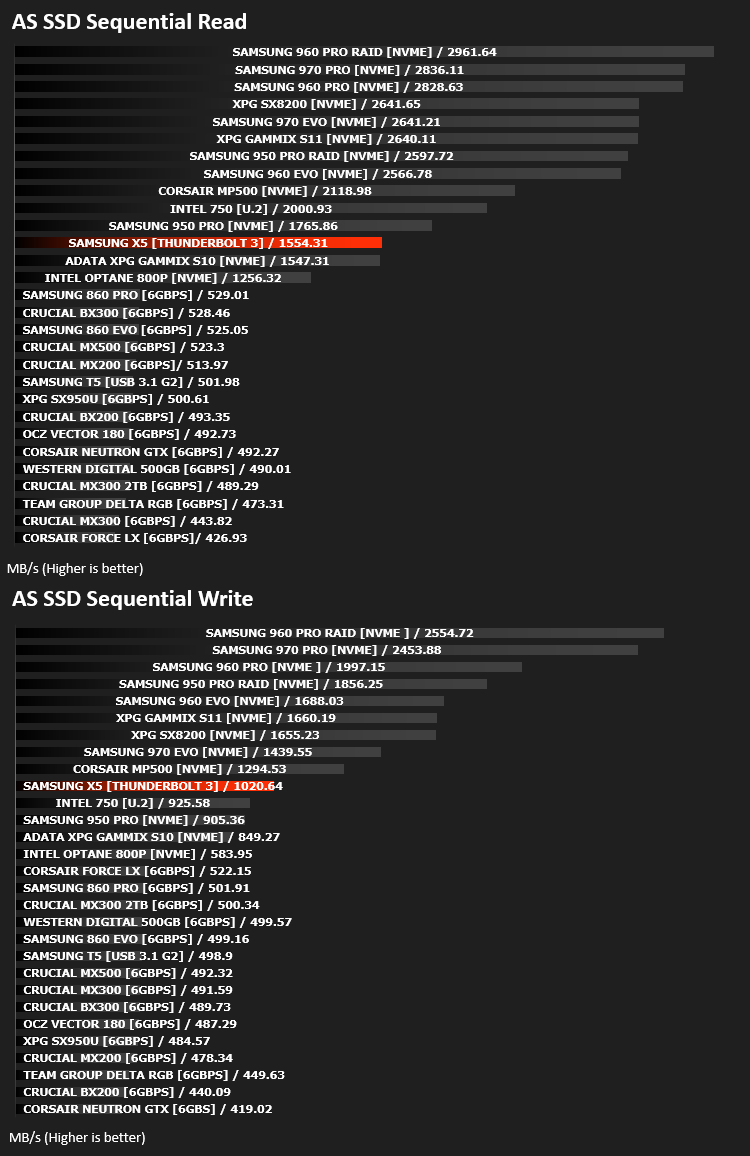
AS SSD Benchmark is a straightforward tool for measuring the speed of your SSD drive.
Simply launch the program, choose your drive, click Start, and it’ll test your SSD’s read and write speed in a variety of ways, delivering a score for each when it’s done. And if that’s not enough, there are also additional file copy and compression-related benchmarks available from the Tools menu. (The author’s support page is German only, but if you need further English explanations then there’s a thread on the program at the OCZ Technology forum.).
Simply launch the program, choose your drive, click Start, and it’ll test your SSD’s read and write speed in a variety of ways, delivering a score for each when it’s done. And if that’s not enough, there are also additional file copy and compression-related benchmarks available from the Tools menu. (The author’s support page is German only, but if you need further English explanations then there’s a thread on the program at the OCZ Technology forum.).
Benchmarks: ATTO
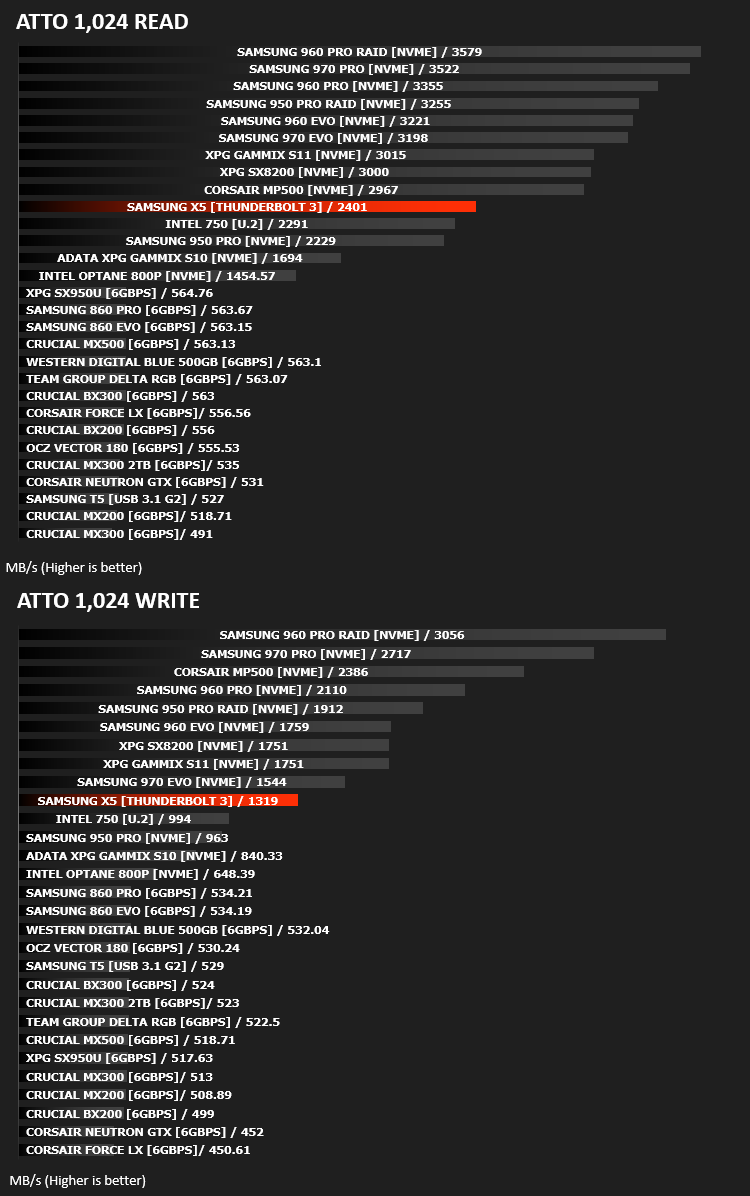
The ATTO Disk Benchmark performance measurement tool is compatible with Microsoft Windows. Measure your storage systems performance with various transfer sizes and test lengths for reads and writes. Several options are available to customize your performance measurement including queue depth, overlapped I/O and even a comparison mode with the option to run continuously. Use ATTO Disk Benchmark to test any manufacturers RAID controllers, storage controllers, host adapters, hard drives and SSD drives and notice that ATTO products will consistently provide the highest level of performance to your storage.
Benchmarks: AIDA64
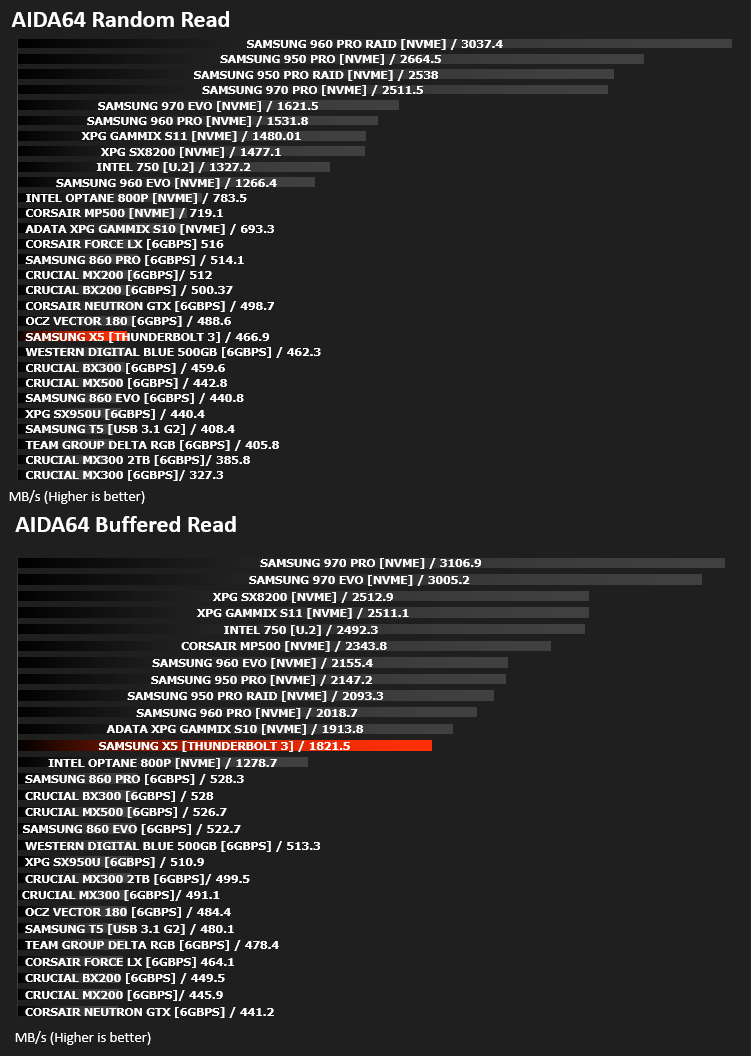
With this module, we can measure the performance of the PC’s storage devices, including (S)ATA or SCSI hard disk drives, RAID arrays, optical drives, solid-state drives (SSD), USB drives and memory cards. It also allows us to perform write tests, which helps us detect fake products and errors on the devices. In order to attain reliable benchmark results we have to make sure to close all background applications.
Benchmarks: PCMark 8
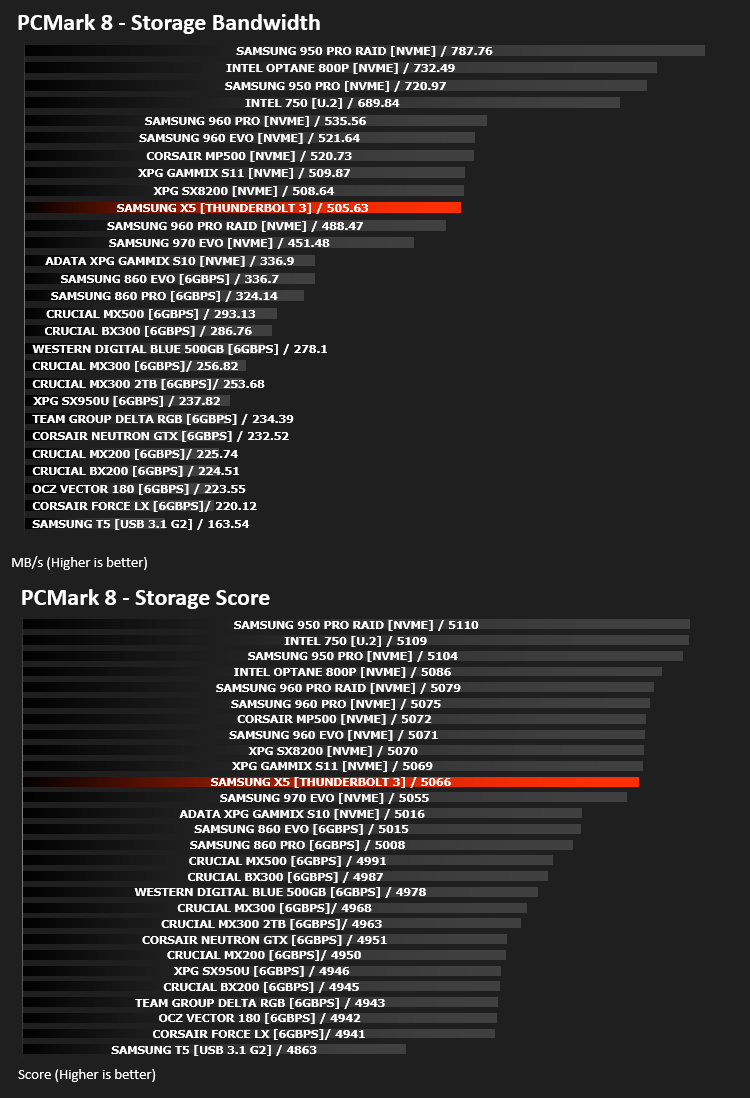
We use the Futuremark PCMark 8 utility to measure storage via Photoshop performance under both light and heavy loading conditions. Accelerated (open CL) is used to perform this test. The test is measured in seconds to complete.
Conclusion
Muscle flexing and showing off seems to be the X5’s game. Every test we threw at the drive was handled incredibly well, even prolonged usage such as the PCMark 8 test didn’t faze the drive, eventually landing up with a stronger score than a 250GB Samsung 970 EVO. We witnessed almost 50,000 read IOPS and very nearly 120,000 write IOPS, truly impressive for an external device. To compare that to the Samsung T5 which we reviewed last year, despite using a similar connection, is almost laughable.The device itself feels rock solid, thanks to the 150g heft and metallic paint finish on the magnesium shell. The non-slip base isn’t exactly “grippy”, but it’s preferred over an all-metal design which would end up scratched and tarnished, even with a quality coating of paint. Something we’d have liked to see is a choice of colours, even two or three options would be good, instead of being limited to grey/red.
During our testing, we noticed the drive got warm quite quickly but performance was reasonably consistent considering. The heatsink, paired with Samsung’s thermal throttling software, ensured that performance never dropped hugely making it suitable for Content Creation and the likes.
Our main concern with the drive is the lack of backwards compatibility. The USB Type-C and Thunderbolt 3 standards work on the same cable, albeit with Thunderbolt 3 requiring a higher quality cable, so we’d therefore expect some kind of usability on slightly older hardware with a Type-C port, which have become abundant in recent years, even if the speed was reduced drastically, this would open up many options for accessing your files elsewhere.
To sum up the drive, the price tag is steep, but the bleeding edge of performance is never cheap, but if you need to transport around massive files, with encryption enabled, backed by the knowledge that Samsung know a thing or two about flash storage, this is certainly the drive for you; however, on the other hand, if you’re a bit less serious, we’d have to recommend the Samsung T5 instead.
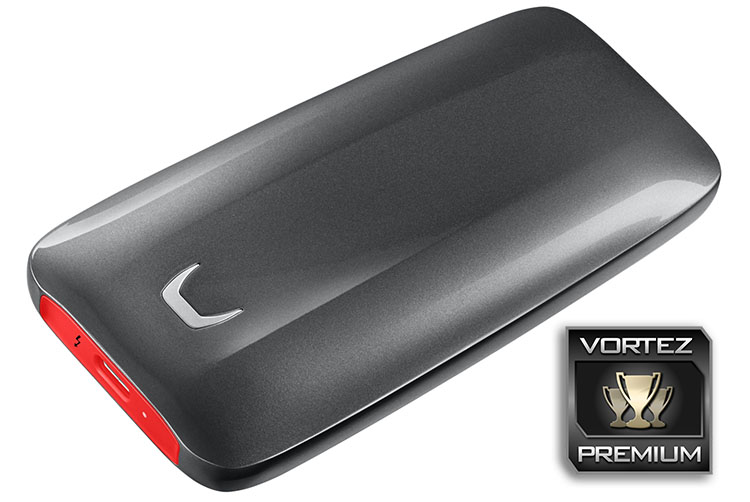
Fast storage in a beautiful shell with an ability not-too-short of a motherboard-mounted NVMe drive, however, you’re going to pay through the nose for it.
Pros
+ Terrifyingly fast performance
+ Beautiful, sleek design
+ Rock solid build quality
+ AES 256-bit encryption
+ Up to 2TB capacity
Neutral
+- 3-year warranty
Cons
– No USB Type-C support
– Very pricey
+ Terrifyingly fast performance
+ Beautiful, sleek design
+ Rock solid build quality
+ AES 256-bit encryption
+ Up to 2TB capacity
Neutral
+- 3-year warranty
Cons
– No USB Type-C support
– Very pricey
Click here for an explanation of our awards at Vortez.net.
Stay connected with the Vortez Social Media pages:
Join in with the discussions on Discord