







The Sapphire Tri-X R9-290X features 1GHz of graphics processing power. Will that be enough to top our performance charts though? Let’s find out…
Product on Review: SAPPHIRE TRI-X R9 290X 4GB GDDR5 OC

Manufacturer and Sponsor: Sapphire
Street Price: £398.75
The AMD R9-290X, despite its very good performance, never really got our taste buds tingling. It wasn’t the boring aesthetics, nor was it the volcanic temperatures of the GPU requiring nothing less than Rolls-Royce supercharger to keep it cool. No, it was all three. You see, we can forgive a hot running card if it is quiet yet powerful. We can overlook a noisy card if it runs cool but gives us the grunt we desire. We can even ignore a boring exterior as it’s what’s inside that counts right? What is unforgivable and the cardinal sin AMD exercised with the R9-290X, was that they created a graphics card that was horrendously noisy, crazy hot and looked (in our opinion) worse than the card it replaced. Sure it was fast, very fast actually, but is that enough?
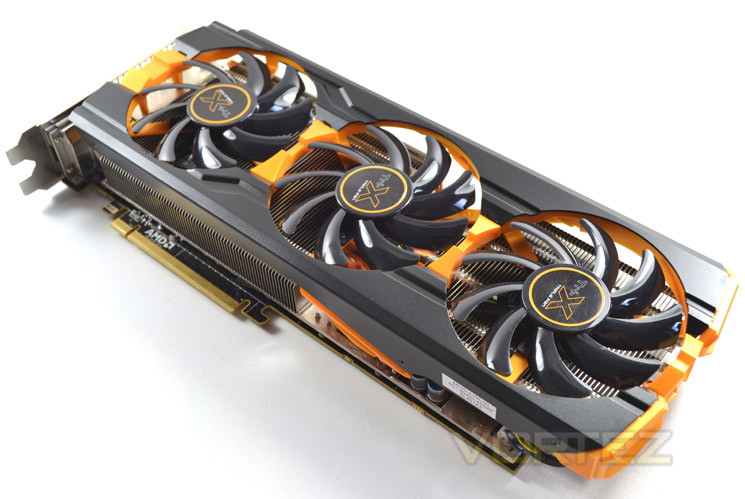
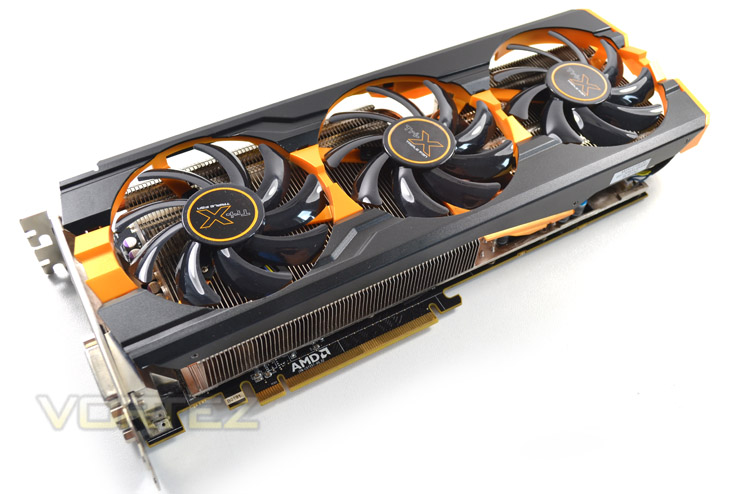
All hail the Sapphire TRI-X. It aims to resolve the noise and efficiency issues found on the original reference cooler and you can see that this solution certainly looks like it means business with the three cooling fans (hence the TRI-X branding) and funky aesthetics. Add to this a factory overclock and the Sapphire card looks to be a very attractive proposition.
Sapphire’s take on the R9-290X TRI-X:
Specification
Bus Standard: PCI Express x16 3.0
Memory Type: GDDR5
Memory Size(MB): 4096
Memory Interface: 512 bits
Stream PRocessors 2816
Core Clock Speed(MHz): 1040
Memory Clock Speed(MHz): 5200
DVI Output: 2 (Dual-link DVI-D)
HDMI-Output: 1 (version 1.4a)
DisplayPort: 1 (version 1.2)
HDCP Support: Y
HDMI Support: Y
Dual-link DVI: Y
Display Output (Max Resolution): 2560×1600
RAMDACs: 400
DirectX Version Support: 11.2
OpenGL Version Support: 4.3
CrossFire Support: Y, 4-Way(SW)
Card Dimension(mm): 305(L)X113(W)X38(H) mm Size
Accessory 8 PIN to 4 PIN Power Cable
6 PIN to 4 PIN Power Cable
HDMI 1.4a high speed 1.8 meter cable(Full Retail SKU only)
Features
Support for Deep Color, 7.1 High Bitrate Audio, and 3D Stereoscopic, ensuring the highest quality Blu-ray and video experience possible from your PC.
DisplayPort 1.2
Doubling the effective bandwidth of previous DisplayPort implementations, DisplayPort 1.2 now includes support for Multi-Stream, allowing you to drive up to four separate monitors from a single DisplayPort 1.2 connector (requires DP1.2 monitors or Multi-Stream compatible hub), Stereoscopic 3D monitor support and adds support for high quality, lossless, 7.1 channel audio formats.
Dual-Link DVI-D
Equipped with the most popular Dual Link DVI (Digital Visual Interface), this card is able to display ultra high resolutions of up to 2560 x 1600 at 60Hz.
Advanced GDDR5 Memory Technology
GDDR5 memory provides twice the bandwidth per pin of GDDR3 memory, delivering more speed and higher bandwidth.
AMD Stream Technology
Accelerate the most demanding applications with AMD Stream technology and do more with your PC. AMD Stream Technology allows you to use the teraflops of compute power locked up in your graphics processer on tasks other than traditional graphics such as video encoding, at which the graphics processor is many, many times faster than using the CPU alone.
AMD Avivo HD (DVD/HD-DVD/Blu-ray Playback)
Watch the hottest Blu-ray movies or other HD content at full 1080p display resolution and beyond and enjoy a more feature rich experience with enhanced Unified Video Decoder(UVD)
AMD HD3D Technology
Enjoy the most immersive experience possible with full support for High Definition Stereoscopic 3D, a technique that presents 2D images (movies, games, photos) in a format that creates the illusion of three-dimensional depth when using compatible 3D displays / glasses / software.
28 nm GCN (Graphic Core Next) Architecture
The new 28nm GCN Architecture’s more efficient process technology puts more transistors in less space, enabling a dramatic increase in processing power
PCI Express 3.0
PCI-Express 3.0 delivers double the bandwidth per lane of PCIe Gen 2 for faster GPU (GPU communication-up to 16GB/sec in each direction), maximizing the performance from your GPU when paired with the latest platforms.
AMD Eyefinity 2.0
The next generation of AMD Eyefinity technology is here, featuring all-new support for stereo 3D, universal bezel compensation and brand new display configurations. Face it: the best just got better: The enhancements for AMD Radeon HD7000 series include: Stereo 3D-multi-display stereoscopic 3D support via DisplayPort 16K X 16K maximum display group resolution-output up to 268 megapixels per GPU.
*To support 3 displays, one of the monitors has to support DisplayPort
*With Sapphire Flex Technology, this requirement will be no necessary
Learn more about Sapphire Flex Technology→http://www.sapphiretech.com/Flex/FleX_Eng_home.html
**When running Microsoft Windows XP, Eyefinity technlogy supports a maximum of 2 displays.
UEFI BIOS support
1) Pre-OS and network security: Sapphire HD 7730/UEFI ready products equip the UEFI firmware that is digitally signed and approved by Microsoft for Secure Boot. With Windows 8’s secured boot architecture and its establishment of a root of trust, the customer is protected from malicious code executing in the boot path by ensuring that only signed, certified “known good” code and boot loaders can execute before the operating system itself loads.
2) Faster boot and resume times: When compared to the legacy BIOS, systems with UEFI has a much faster boot and resume time to the OS.
The SAPPHIRE HD 7730 UEFI edition/UEFI ready products are compatible with motherboards that comply with UEFI Specification 2.3.1 or after. It is also compatible with motherboards that do not have UEFI feature. Motherboards that contain earlier version of UEFI must be updated to the latest version or have the UEFI option turned off, otherwise, the graphics card will boot in legacy mode, or in some cases, not boot at all. Please refer to your motherboard userguide for BIOS update instruction.
SAPPHIRE Tri-X Cooling Technology
Sapphire exclusive Triple fan design pushes out the heat more efficiently than standard dual fan.
AMD TrueAudio Technology
AMD CrossFireX™ Multi-GPU Technology for R9 290 Series
The R9 290 Series has the ability to support AMD CrossFire Technology mode without the need for a hardware strap or “CrossFire ribbon”, while maintaining the same quality and performance that AMD CrossFire Technology is known to deliver.
Triple or Quadruple gaming power with AMD CrossFireX™ Multi-GPU Technology.AMD CrossFireX technology supports up to four graphics cards to be used in a single system.
DirectX® 12
The tessellation performance on AMD Radeon R7/ R9 series is up to 2X faster than the previous generation, and DirectCompute performance is also faster to accelerate advanced post-processing, filtering, and anti-aliasing techniques. Direct X12 games has never looked this good.
* Based on preliminary DirectX 12 specifications as of July, 2014, AMD’s GCN-based products are expected to support DirectX 12 upon its release. The DirectX 12 specification and support for it are subject to change without notice.
OpenGL 4.3
OpenGL 4.3 improves the GPU efficiency by improving the shader process operation and capturing GPU tessellated geometry. The process of modifying an arbitrary subset of compress texture is also simplified. The memory management in handling shaders is more efficient as well.
Mantle
Properly enabled games will reach new heights of performance by speaking the language of Graphics Core Next architecture.
AMD Catalyst Control Center™
The AMD Catalyst Control Center™ software application gives you complete control over the performance and visual quality of your SAPPHIRE AMD Radeon™ based graphics card allowing for the best experience on your PC.
Dolby® TrueHD and DTSHD Master Audio™ Support
Support for copy protected, high bandwidth, 7.1 channel surround sound over HDMI. Get a fully immersive, high definition audio experience with the latest Blu-ray movies. (Requires a DVI to HDMI dongle on some models, an HD capable monitor and a Blu-ray drive)
Anti-aliasing features
Supports advanced AA (Anti-aliasing) features to maximise your enjoyment of high definition gaming.
Multi-sample anti-aliasing (2, 4 or 8 samples per pixel)
Up to 24x Custom Filter Anti-Aliasing (CFAA) for superior quality
Adaptive super-sampling and multi-sampling
Gamma correct
Super AA (AMD CrossFireX™configurations only)
All anti-aliasing features compatible with HDR rendering
AMD PowerTune™ Technology
AMD PowerTune is a breakthrough technology that sets an entirely new direction for maximum performance at TDP. It allows the GPU to be designed with higher engine clock speeds which can be applied on the broad set of applications that have thermal headroom.
Enhanced Unified Video Decoder 3 (UVD 3)
Watch the hottest Blu-ray movies or other HD content at full 1080p (and beyond !) display resolution. Enjoy a feature rich video experience with enhanced Unified Video Decoder 3 (UVD 3), offloading the bulk of the video decoding tasks from the CPU to the GPU allowing for a cooler, quieter and more balanced system.
Microsoft Office 2010
Take advantage of improved picture and media editing capabilities in Office 2010 as well as edit and share your content in real time.
See more, and get more done. Enhanced productivity with accelerated GPU processing for Office applications.
Windows® 7 support
WHQL (Windows Hardware Quality Labs) Certified drivers and logos are available for all SAPPHIRE HD2000, HD3000, HD4000 and HD5000 series cards ensuring compatibility and reliability with Microsoft Windows 7.
AMD App Acceleration
AMD App Acceleration is a set of technologies designed to improve video quality and enhance application performance. Full enablement of some features requires support for OpenCL, DirectCompute or DirectX Video Acceleration (DXVA).
AMD PowerPlay with ZeroCore Power Technology
AMD PowerPlay is a power management technology in response to the GPU loading, AMD PowerPlay automatically manages the power consumption.
AMD ZeroCore Power technology allows your AMD Radeon™ GPU to consume virtually no power when in idle state5. When used with AMD CrossFire™ technology, it shuts down additional GPUs when they’re not in use.
AMD HD Media Accelerator
AMD HD Media Accelerator has been designed to help optimize and dramatically improve video playback on your computer by taking advantage of hardware video acceleration from your AMD Radeon GPU. With full 3D stereoscopic decode you can enjoy it all in 3D. AMD HD Media Accelerator speeds up the decode of one 1080p and one 1080i HD video streams simultaneously by hardware, and the new hardware encodes/transcoder processes your media content faster than ever!
Cutting-edge Quad HD display support (4K Support)
The display resolution on AMD Radeon HD7000 series is quadrupled to the resolution of 4KX2K( 4096X2160 ) from the outputs of DisplayPort 1.2 and HDMI.
Windows® 8/8.1 support
WHQL (Windows Hardware Quality Labs) Certified drivers and logos are available for SAPPHIRE cards ensuring compatibility and reliability with Microsoft Windows 8/8.1.
GCN (Graphics Core Next)
The AMD Radeon R9 290X features an evolution of Graphics Core Next Architecture (GCN).
AMD has taken great strides to ensure that the GCN Architecture is capable of efficiently using its hardware resources. This seems like such a simple idea, but designing a GPU to frequently approach its peak theoretical performance is a challenge the GCN Architecture tackles with ease.
The GCN Architecture is designed for improved utilization, which ensures that the GPU is making optimal use of its resources for maximum performance.
The GCN Architecture also benefits from dramatically improved tessellation performance. Games featuring this DirectX® 11 technology are considerably faster than they were on the previous generation of AMD Radeon™ products. There is also the new Mantle API which promises to dominate NVIDIA, especially in titles such as Battlefield 4. Project Mantle is one of AMD’s most innovative and game-changing features, delivered with the Radeon™ R9 and R7 Series product line. Mantle is a new application programming interface (API), leveraging the commonality between the next-gen consoles and Radeon™. It enables game developers direct communication to our GPUs, unlocking the true potential of GCN and resulting in significantly higher gaming performance at all segments. We will be looking at Mantle in a separate article but if what we hear is correct, Microsoft (who are responsible for DirectX) should be very worried.
Every gamer knows that the GPU’s clockspeed also has a big impact on the performance of a graphics card, and the GCN Architecture keeps that in mind.
But what many don’t know is that every graphics card is designed to draw only a certain amount of power from your PC’s power supply. This is called the Thermal Design Profile, or TDP, and it’s critical that the GPU architecture is capable of making the most of every watt. The GCN Architecture can do that thanks to a technology called AMD PowerTune technology.
AMD PowerTune is an intelligent system that performs real-time analysis of the games and applications that utilize a GPU. Examples of such software might include Battlefield 3 or Furmark. In the event that an application is not making the most of the power available to the GPU, AMD PowerTune can improve that application’s performance by raising the GPU’s clockspeed by up to 30%! Best of all, this technology is completely automatic and is designed specifically to improve gaming performance.
Available on all 28nm AMD Radeon™ products, AMD PowerTune is designed to enable significantly higher clockspeeds in your favorite games-automatically!
The block diagram above shows us that the R9 290X has the following features:
– Up to 44 Compute Units
– 4 Geometry Processors
– 64 Pixel Output/Clock
– 1 MB L2 cache
– 512-bit GDDR5 memory interface
– AMD TrueAudio technology
– New AMD CrossFire™ technology
– 6 AMD Eyefinity technology Display Controllers
– 6.2 billion transistors
– 28nm process node
The GPU has 4 shader engines, with each shader comprising of one geometry processor per shader engine which is load balanced with other shader engines on die. The 4x Geometry Processors feature a geometry assembler, a tessellator and vertex assembler. Performance is improved on the geometry shader and tesselation thanks to a reduction in off-chip bandwidth by LDS utilisation along with off-chip buffering.
The shader engine also features scalable compute resources with the new architecture supporting a possible 9 compute units. The instruction set and cache can be shared by up to 4 compute units each. The new GCN features 44 of these compute units equating to 2816 shaders on the 290X. In addition to the the scalable compute resources, there is one rasteriser unit per shader engine and 16 render back ends, each with 64b pixels per cycle and 256 Z/Stencil operations resulting in a massive pixel fill rate.
Finally, the GPU features asynchronous compute with up to 8 of these ACE per GPU. With independent scheduling and work item dispatch for ultra efficient multi tasking operations. Each ACE can manage up to 8 queues and has access to both L2 cache and GDS.
GCN Architecture is now the foundation of a common architecture that spans PC’s, next generation consoles and the new Mac Pro. The industry has spoken and resoundingly endorsed GCN for high performance graphics platforms.
Let’s take a look at some of the more familiar features of the Radeon card…
AMD ZeroCore Power Efficiency
Enabling the World’s Most Power Efficient GPUs
When a discrete GPU is in a static screen state it works to minimize idle power by enabling a host of active power saving functions including (but not limited to); clock gating, power gating, memory compression, and a host of other features. However, GPUs with AMD’s exclusive AMD ZeroCore Power technology can take energy savings to entirely new heights by completely powering down the core GPU while the rest of the system remains active.
Nearly all PCs can be configured to turn off their displays after a long period of inactivity. This is known as the long idle state; where the screen is blanked but the rest of the system remains in an active and working power state (ACPI G0/S0). As soon as the system goes into long idle state and applications are not actively changing the screen contents, the GPU enters the AMD ZeroCore power state. In the AMD ZeroCore power state, the GPU core (including the 3D engine / compute units, multimedia and audio engines, displays, memory interfaces, etc.) is completely powered down.
However, one cannot simply remove the GPU and its associated device context completely; particularly when it is the only GPU in the system as is the case in many enthusiast platforms. The operating system and SBIOS must still be aware that a GPU is still present in the system. For this reason, the AMD ZeroCore Power state maintains a very small bus control block to ensure that GPU context is still visible to the operating system and SBIOS. The AMD ZeroCore power state also manages the power sequencing of the GPU to ensure that the power up/down mechanism is self-contained and independent of the rest of the system.
The enablement of the AMD ZeroCore Power feature is controlled by the driver. The driver monitors the display contents and allows the GPU to enter the AMD ZeroCore Power in the condition that the GPU enters long idle and subsequent work requests are no longer being submitted to the engine. If any applications update the screen contents, AMD ZeroCore Power technology can periodically wake the GPU to update the framebuffer contents and put the GPU back into the AMD ZeroCore Power state. Furthermore, applications such as Windows 7 desktop gadgets are architected to minimize activity and save power in the long idle state. These applications are active during screen-on mode to display dynamic content such as weather, RSS feeds, stock symbols, system status, etc. but also have the intelligence to suspend any updates and activity when the system enters long idle. These applications will not wake the GPU from the AMD ZeroCore Power state in long idle.
AMD ZeroCore Power technology delivers tremendous energy savings. Many PCs remain in the long idle state for a variety of use cases that are highly relevant to everyday consumers, enthusiasts and professionals. In AMD ZeroCore Power mode, users can still enjoy non-graphics activities such as file serving/streaming, motherboard audio and music, and remote access while the GPU core is essentially powered off.
AMD ZeroCore Power technology also scales with AMD CrossFire™ technology. With an AMD CrossFire platform, all non-primary GPUs are in the AMD ZeroCore Power state when not in use. For AMD CrossFire workloads, the driver will engage the non-primary GPUs to deliver full performance on-demand. The primary GPU can also enter the AMD ZeroCore Power state during long idle as well. This delivers scalable benefits for the enthusiast. First, it effectively removes the power increase for users of AMD CrossFire under idle and light (single GPU) workloads. Second, it removes the noise penalty multiGPU users have always had to endure since the GPU fans are off in AMD ZeroCore Power mode.
4K Ultra HD Gaming
Commonly addressed as Ultra HD, UHD or 4K, this new resolution refers to the ultra-high resolutions with approximately 4000 horizontal pixels. Ultra HD resolution also has four times the number of pixels of a typical 1920×1080 resolution.
With four times the pixels, an unprecedented level of immersion can be created for gamers on a single display. Gamers will be able to experience richer details and a new sense of realism with the next generation of gaming on Ultra HD displays.
Your AMD Radeon™ R9 290X features support for Ultra HD resolutions over both HDMI 1.4b (low refresh) and DisplayPort 1.2. We recommend you do all performance testing at Ultra HD resolution to truly test what the product is capable of.
Many UltraHD/4K monitors can achieve a 60 Hz refresh rate using a tiled display configuration. AMD Eyefinity technology can be leverage to support these tiled displays by making two 2Kx2K tiles act as one 4Kx2K monitor. AMD has taken steps to make this easy for end users by providing an Automatic AMD Eyefinity Configuration features. This feature allows an automatic “plug and play” configuration of supported UltraHD/4K tiled displays when a Display Port cable is connected.
When a user hotplugs a tiled 4K monitor (such as the Sharp PN-K321 or Asus PQ321Q), a 2×1 display group will be automatically created and the two tiles will be combined to act as one monitor. This configuration will be remembered and re-enabled when the display is unplugged or the system is rebooted. It is also possible to manually disable the display group in CCC, and have the two tiles act as independent monitors. It should be noted that once the display group is manually disabled, it can no longer be automatically configured as a tiled display via the Automatic AMD Eyefinity Configuration feature.
Additionally, AMD is supporting a new industry standard for tiled displays in VESA DisplayID v1.3. The “Tiled Display Topology Data Block” describes additional display capabilities that can be leveraged to enable the plug and play experience with tiled displays. Tiled displays supporting this data block can be supported by the Automatic AMD Eyefinity Configuration with no driver update required.
Packaging & Accessories
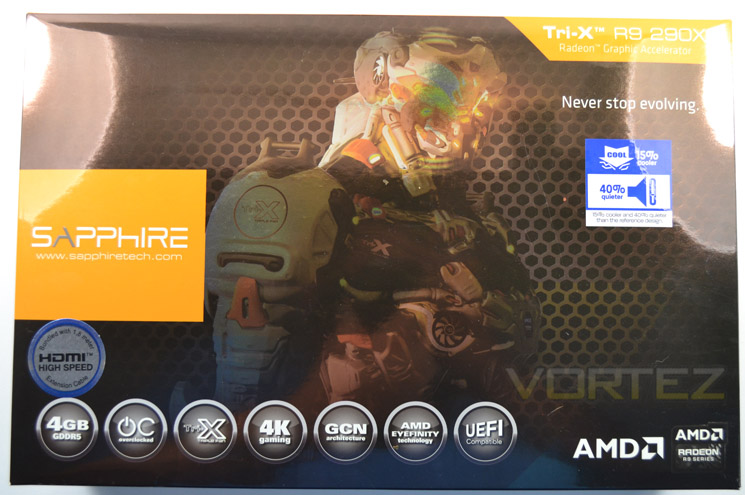
The glossy exterior packaging is a slight break from the traditional Sapphire branding which has traditionally featured ATI Ruby in all her ‘glory’. We quite like the new packaging however, thanks to the orange highlighting it could easily be mistaken for a ZOTAC product.
Perhaps the most interesting aspect for us was the claim that this card is 40% quieter and 15% cooler than the reference design!
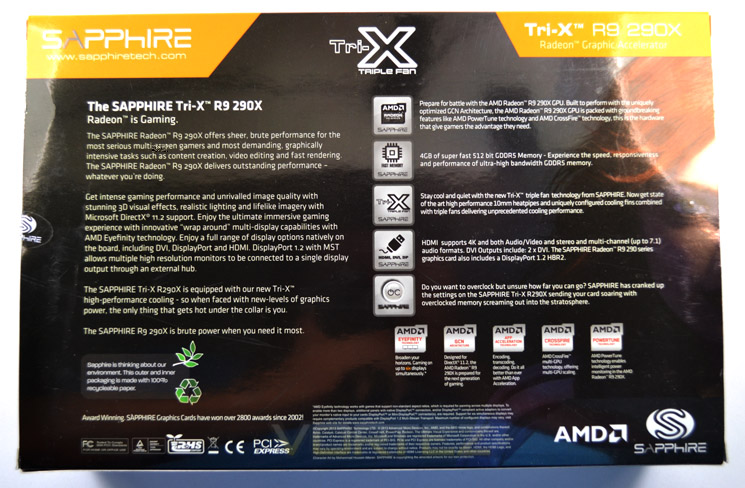
The rear of the package tells us firstly about the Radeon gaming ethos but also goes on to divulge some of the Sapphire features of the graphics card. A nice touch was that, despite all the raw power and electronics contained within, is that both the interior and exterior packaging is made with 100% recyclable paper.
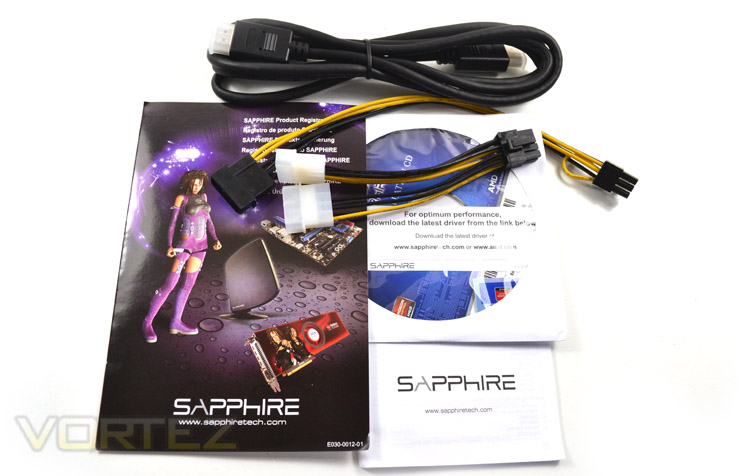
The interior packaging is made up of a bland, brown cardboard box. The accessories are contained inside a further box with the main GPU protected by a padded, antistatic bag itself held firm in a foam brace. This style of packaging has served Sapphire well over the years and has changed little so we see no reason to criticise it.
First Look
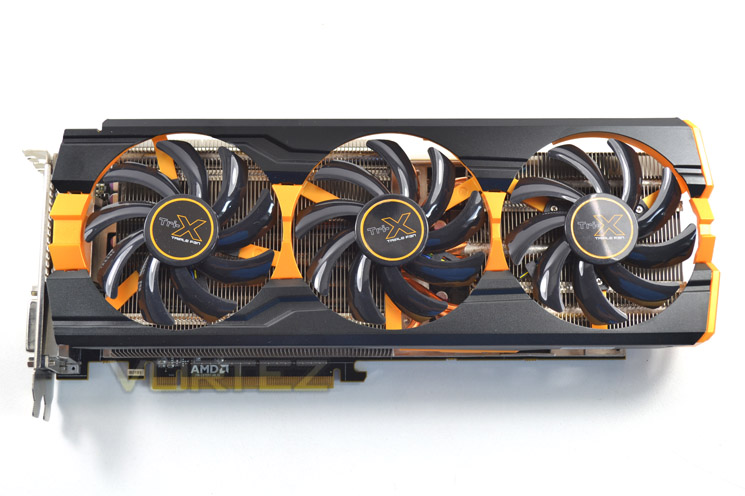
We really liked the look of this card when we first cast eyes on it but now we have it in hand we can safely say it looks even better in the flash. The matt black, louvered shroud contrasts well with the three glossy cooling fans. The orange highlighting rounds off a fantastic looking GPU.
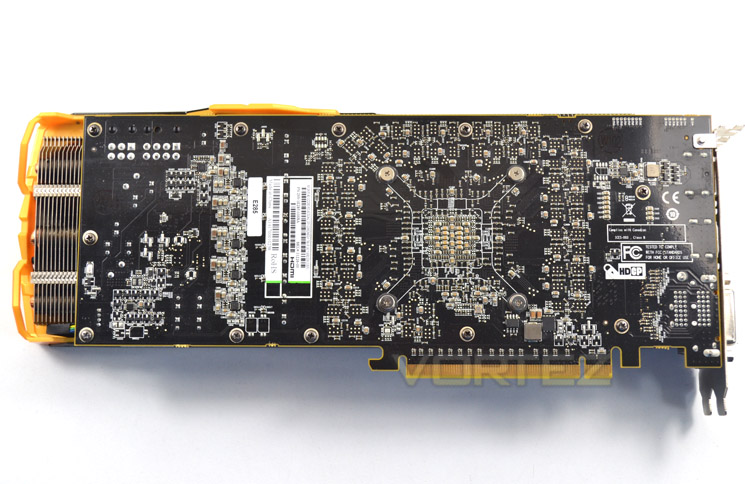
For a flagship, overclocked card we would have liked to have seen a backplate incorporated here perhaps with some more of that delicious orange highlighting. Instead, what we have is a bare PCB. Well, we say bare but it is actually a plethora of minute traces and sensitive components that are exposed to the elements. All the more reason for a backplate in our opinion!
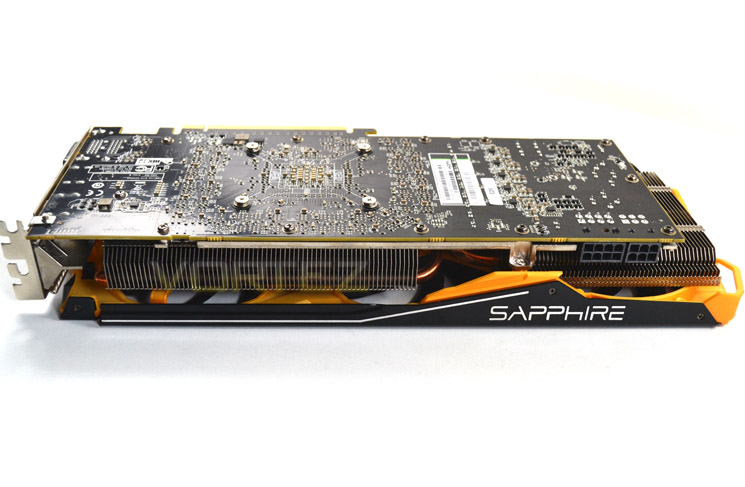
From the side we see an exposed heatsink hinting at the power beneath with the shroud acting as a highlight more than any form of serious protection. Nonetheless, it looks good when installed.
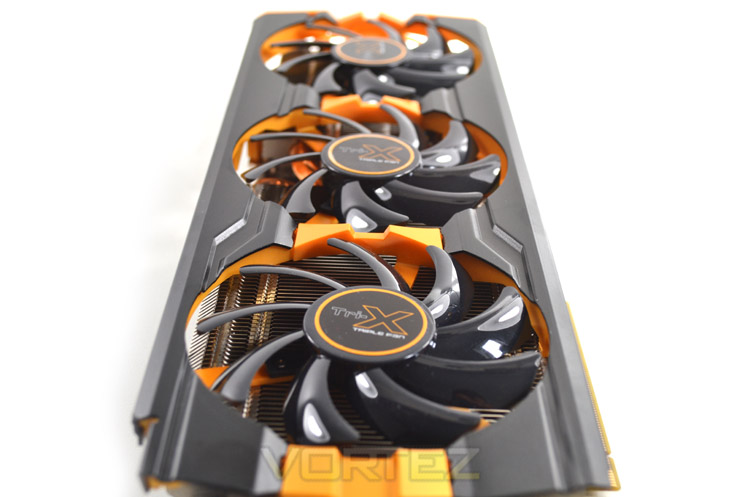
The card measures a little over 30cm in length (305mm) and is a dual slot design meaning it will take up two port spaces on your motherboard.
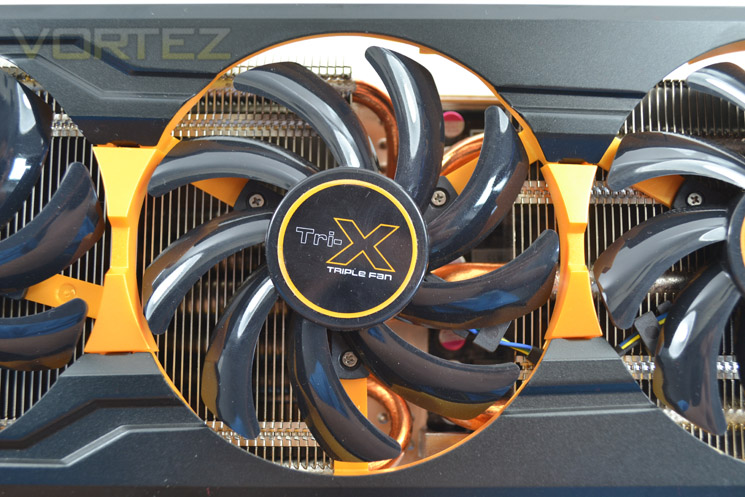
The cooling fans atop of the twin heatsink and heatpipe assembly make up part of the TRI-X cooling design. Air is sucked in through these fans and blown through the heatsink to be exhausted partly within the case and part outside.
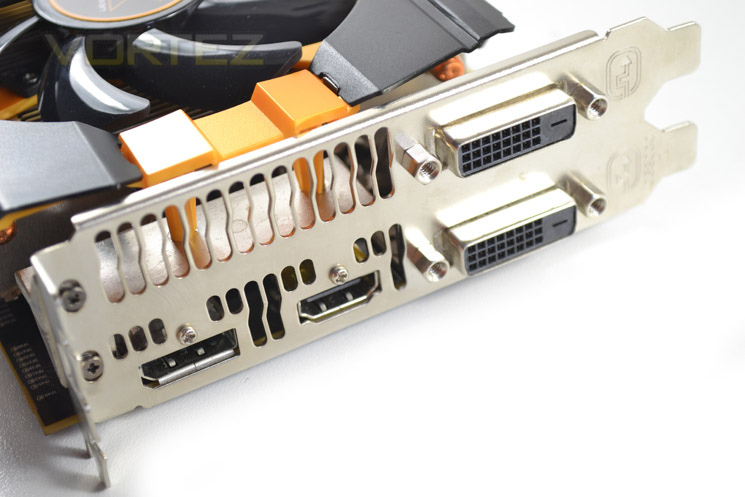
The I/O area is a standard affair with Twin Dual Link DVI-D ports. These are accompanied by both a DisplayPort 1.2 and HDMI port.
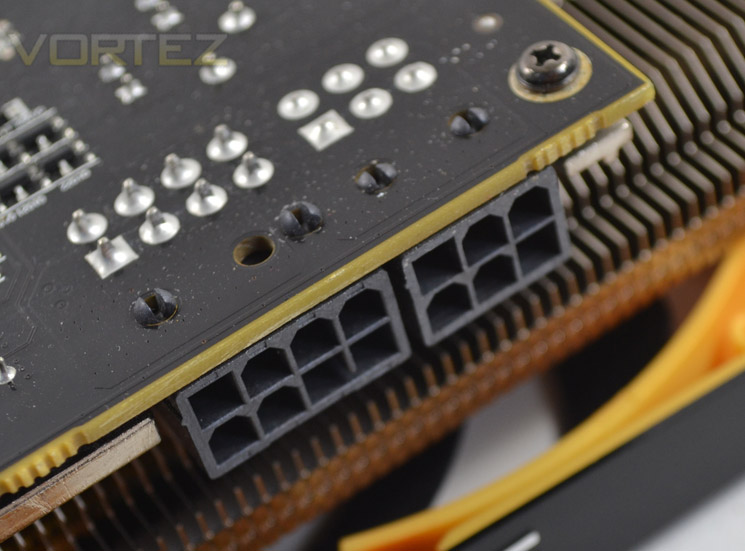
To power the card you will need a PSU rating of 750W with (ideally) an 8pin 150W PCIe and 6pin 75W PCIe power cables although Sapphire do provide adaptors for this purpose should your PSU not have these cables available.
Closer Look
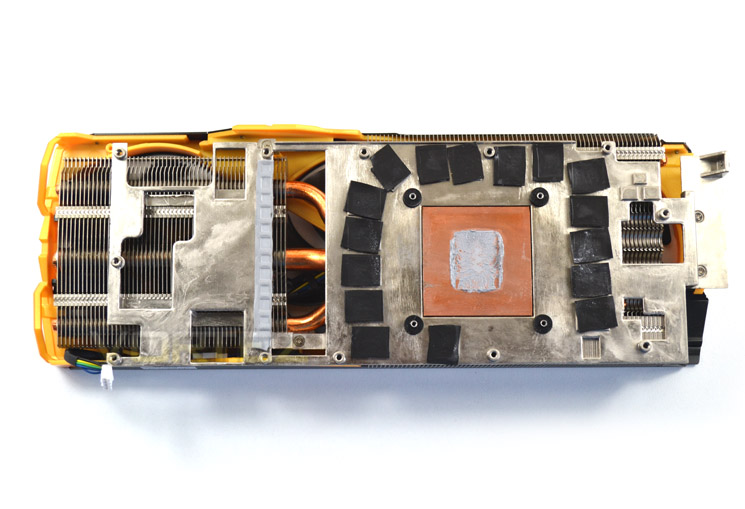
Removing the cooler was simple enough and we’re happy to report that there were no ‘warranty void’ stickers protecting the screw heads which makes a refreshing change of late. The VRM and memory received direct cooling via thermal pads with the main core having a thick paste serving as the thermal interface material.
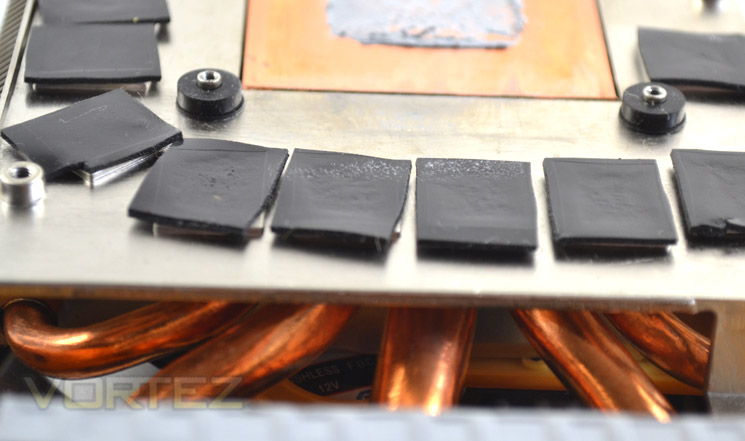
The physical aspects of the cooling consist of an aluminium sub-frame welded to which are 5 copper heatpipes, 3 of which serve to dissipate heat towards the main heatsink array while the remainder stretch to serve the smaller heatsink.
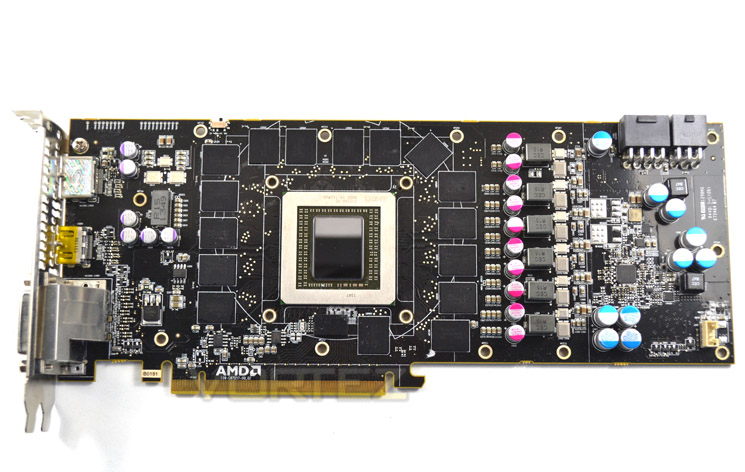
The huge bank of GDDR5 was the first thing to hit us with 4GB of the stuff made up by 16x256MB chips, which surround the main core. The PCB layout is a mirror image of the reference design, save for the different chokes in use on the Sapphire model.
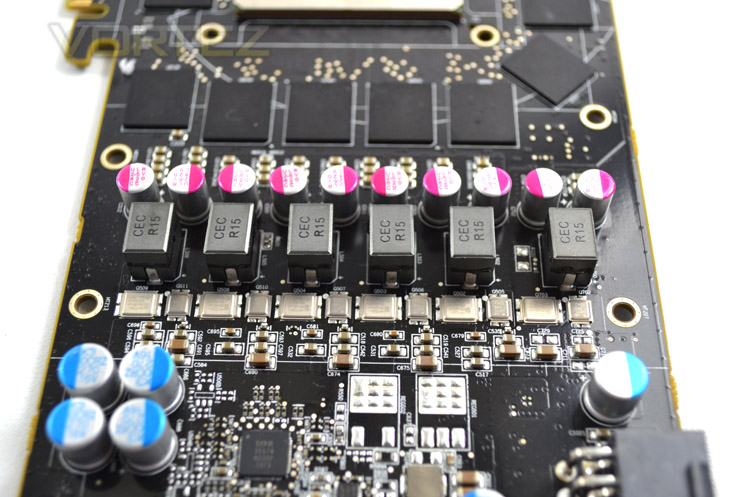
The VRM is a 6+1 power phase design, again mirroring the reference design, utilising both solid capacitors surface mount inductors.
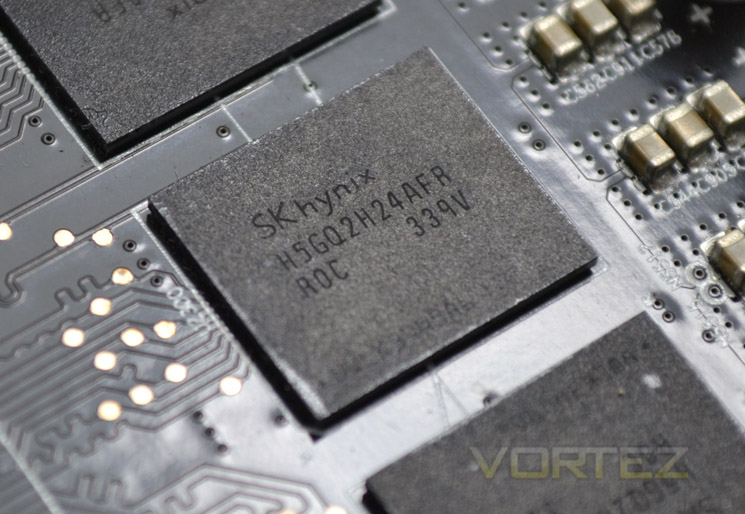
The 16x256mb GDDR5 memory modules come courtesy of Hynix and carry the product code of H5GQ2H24AFR R0C which is the same memory used on the outgoing models of HD7970 so are proven performers. The memory on the Sapphire card has been slightly tweaked to 5200MHz but we suspect there is much more freedom to overclock this memory.
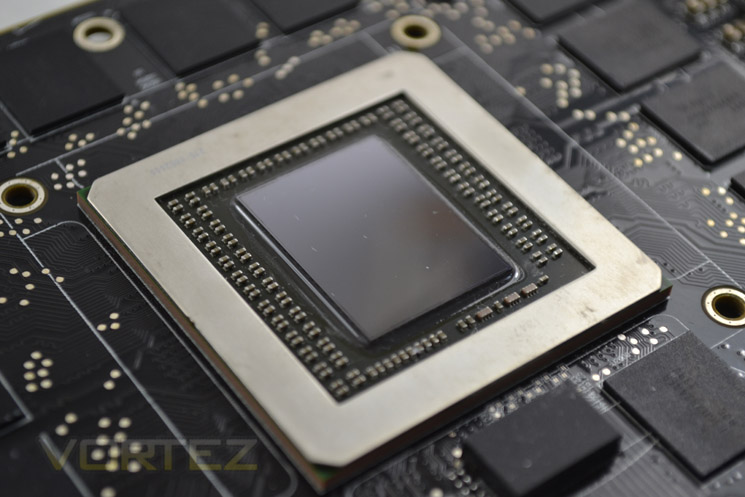
Finally we reach the heart of the R9-290X the Hawaii core. Featuring over 5 TFLOPS of compute performance with over 6 billion transistors along with supporting DirectX 11.2 we expect some blistering performance from this sliver of silicon. Again we see a mild overclock to 1040MHz on this sample but there will hopefully be a little overclocking headroom left to play with.
Test Setup & Methodology
How we test graphics cardsTesting a graphics card is an extremely lengthy process. We sometimes see reviews where a graphic card has been tested using out of date equipment, out of date games and out of date drivers. While the latter can be excused due to the sheer amount of driver updates making a thorough review impossible we will however notify the reader when we have used a different driver to the normal for example a pre-release driver. For the most part however we will always use the same hardware and where possible the same drivers unless a newer driver rectifies an issue we have encountered or significantly improves performance to such an extent that continuing with an outdated driver is not feasible.
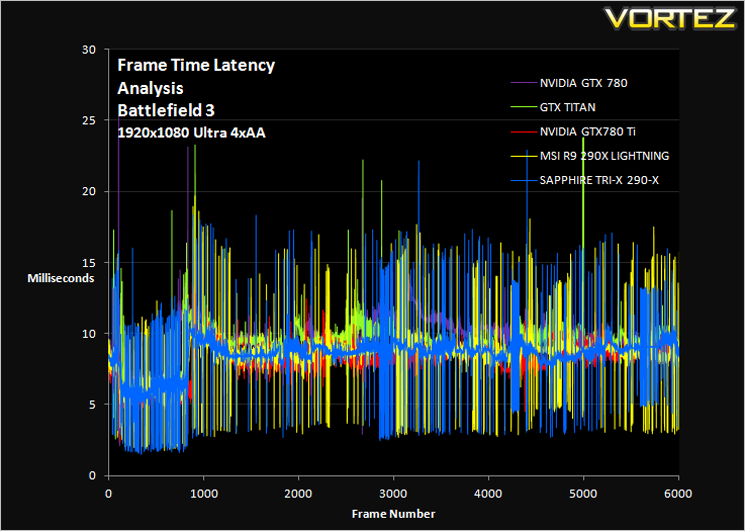
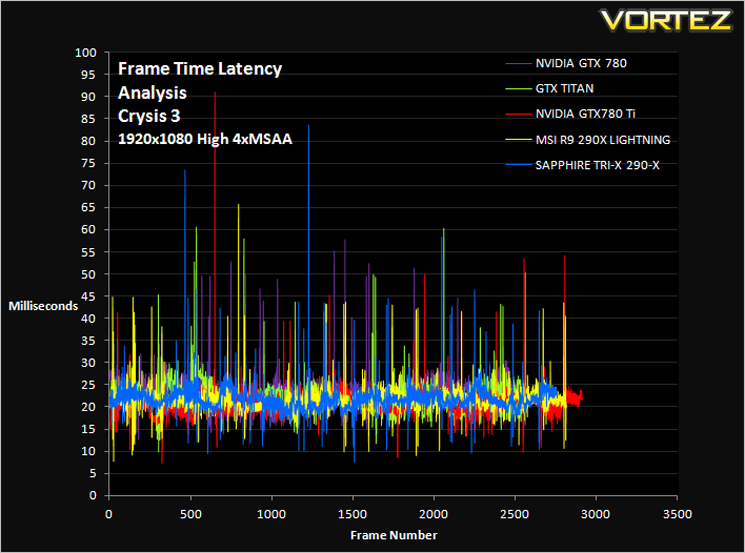
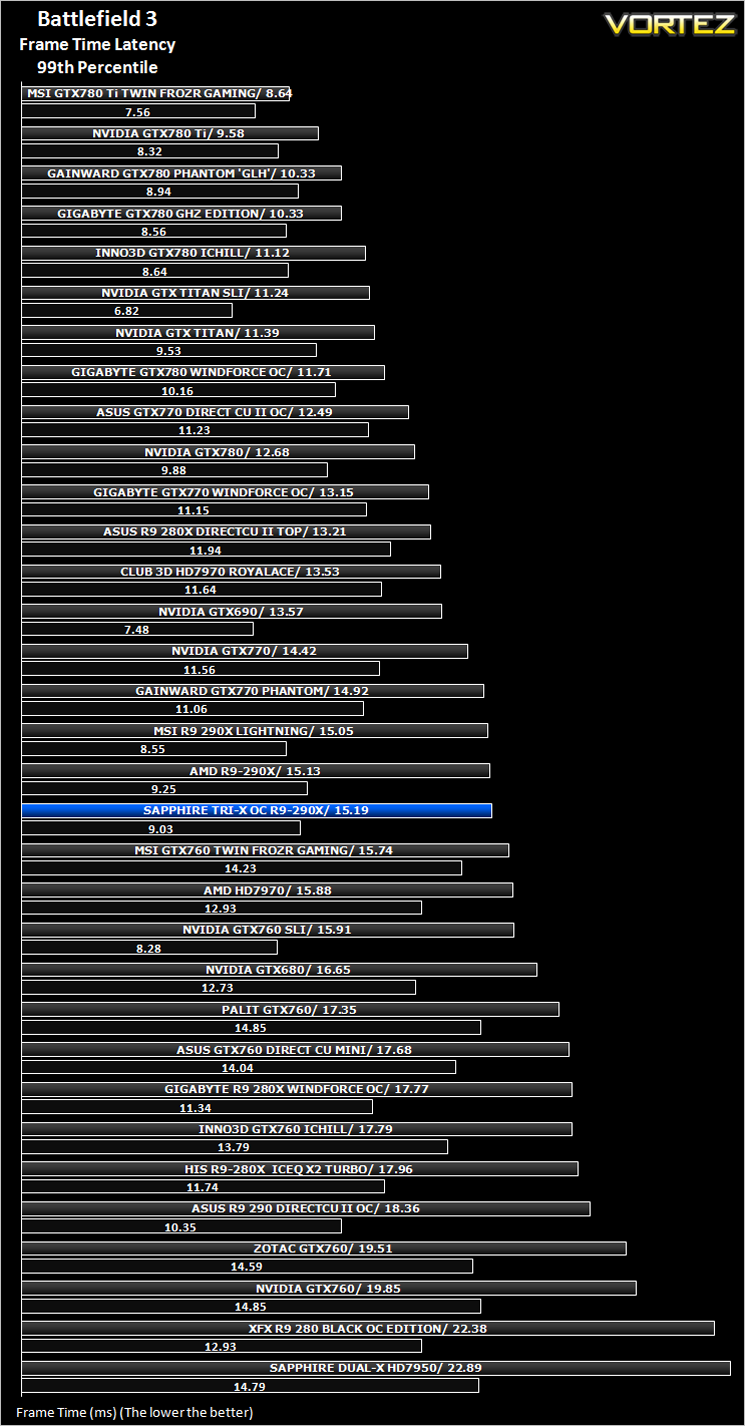
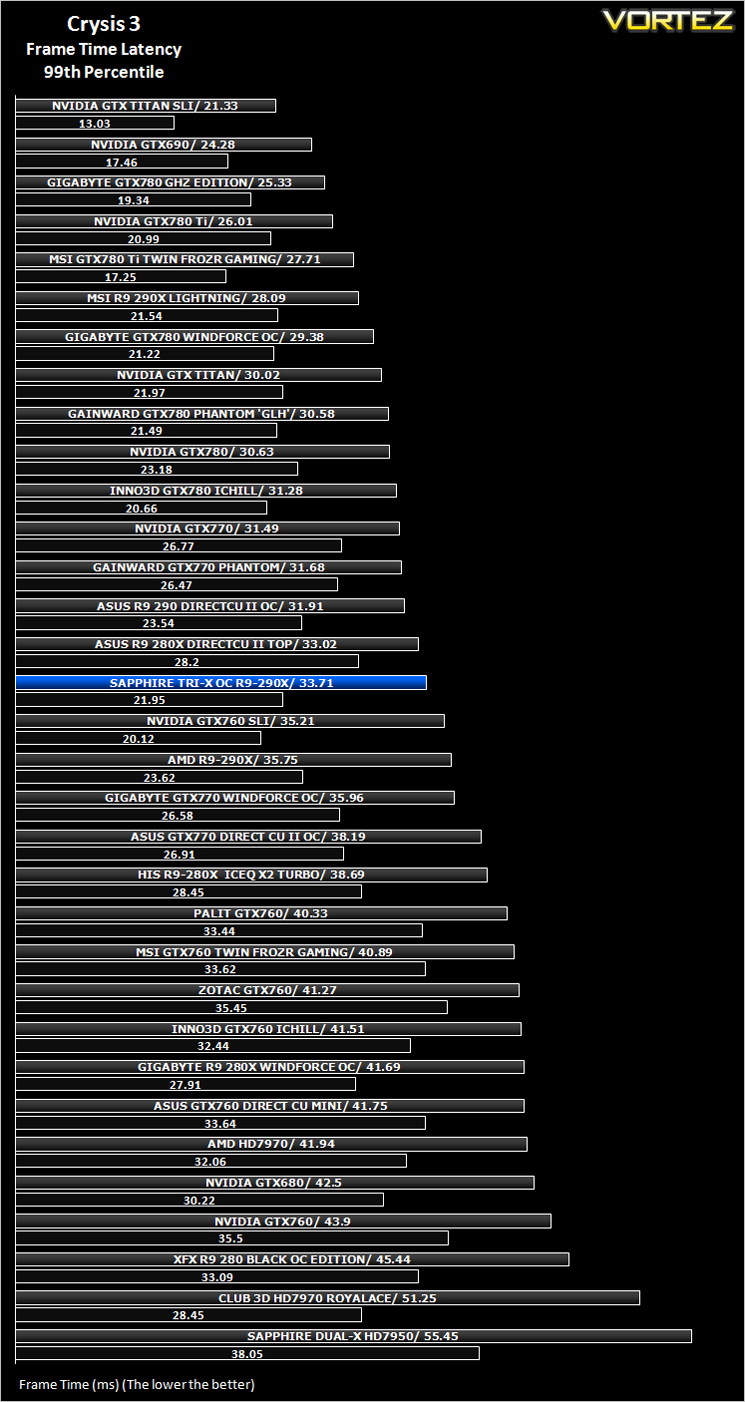
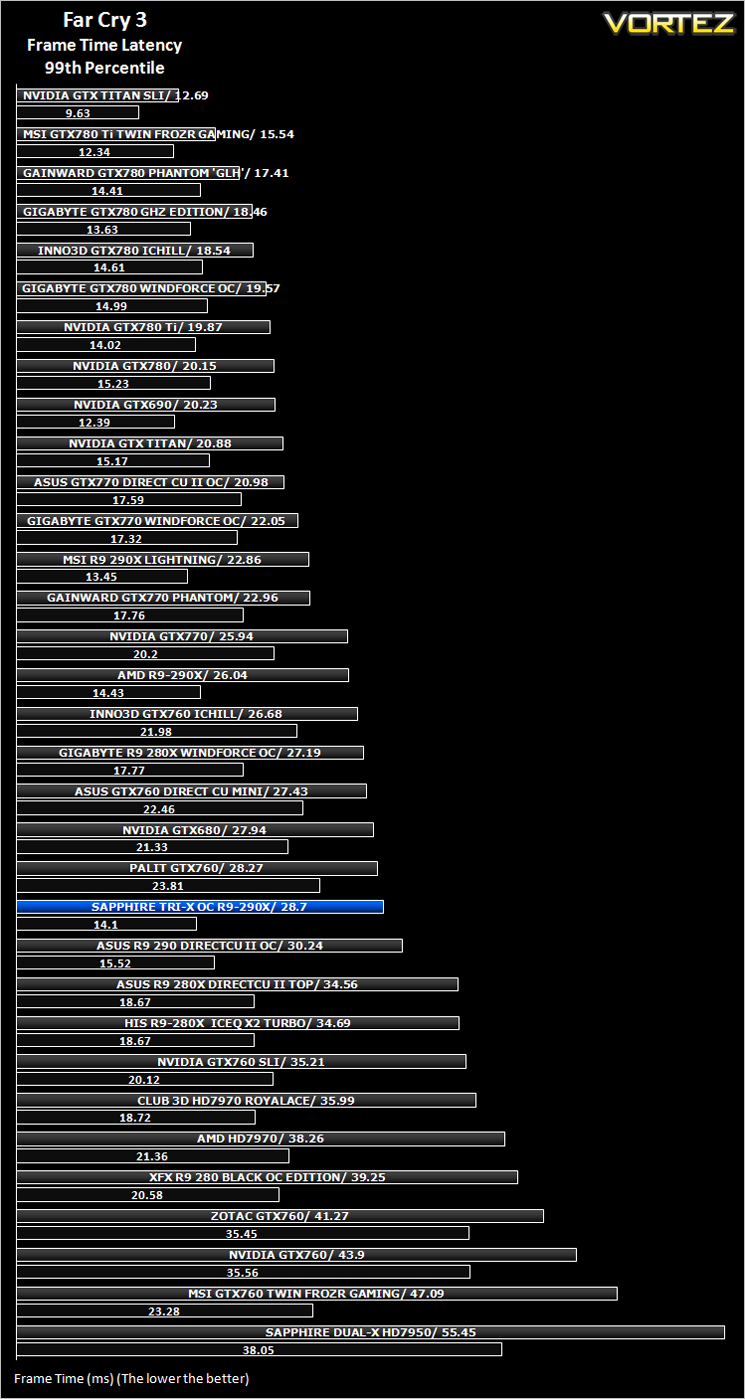
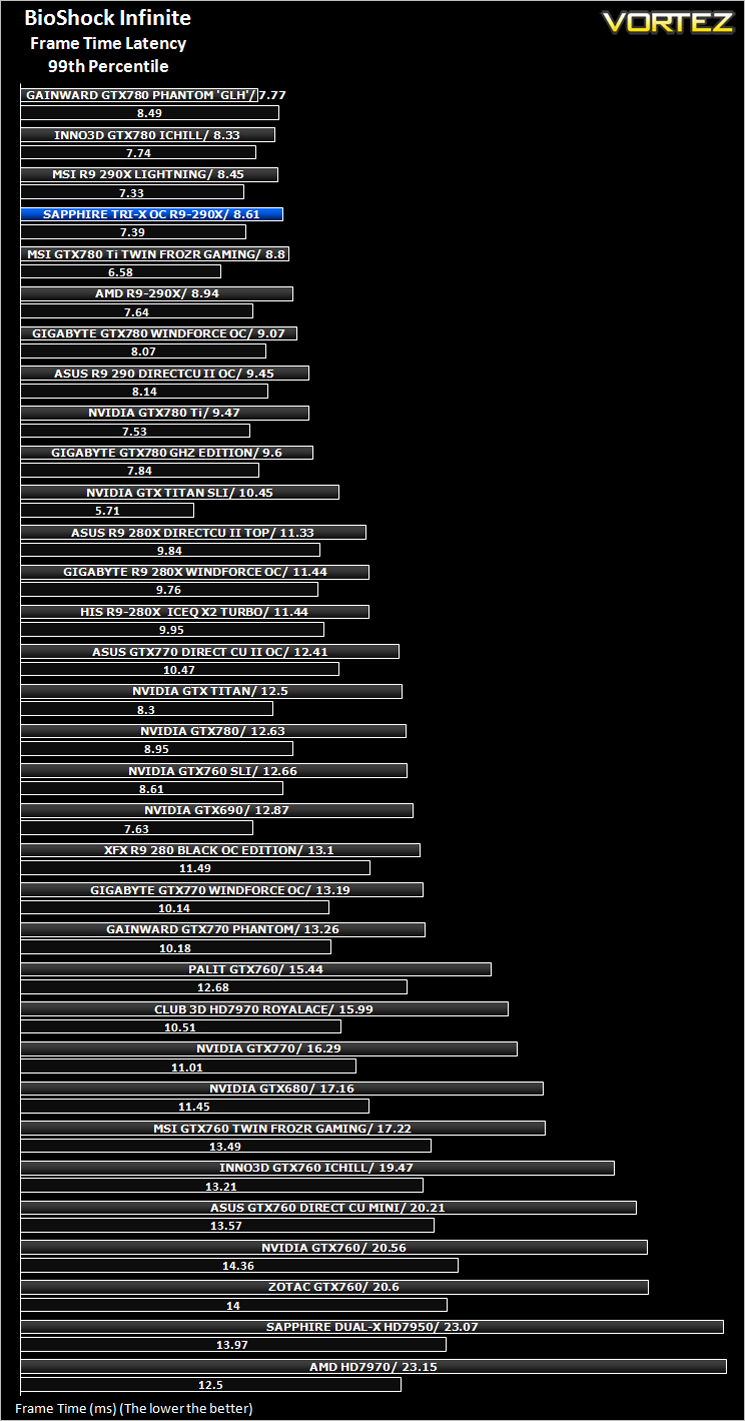
Frame Time Analysis
We have also seen the emergence of frame time analysis. We covered this in a separate article here: GPU Reviews: Why Frame Time Analysis is important so we won’t go into the reasoning again but to summarise, our testing comprises both FPS testing and perhaps arguably more importantly, frame time analysis. We also look at overall performance by equating averages across the games and finally before concluding our review we take a look at value for money.
HardwareWith the latest Intel chipset release we decided to update our ageing X58 setup to the new X79 chipset. Not only that but we will be using the flagship Core i7-3960X Extreme Edition processor clocked to 4.5GHz to ensure we have no CPU bottlenecks. With 16GB of ram on board there should be minimal paging so the benchmarks we run today will hopefully give a true reflection of the graphics card’s performance.
High End Graphics cards on test:
XFX R9-280 Black Edition OC 3GB GDDR5(Catalyst 14.6 BETA)
PALIT GTX 760GB 2GB GDDR5(Forceware 337.88)
MSI R9 290X LIGHTNING OC 4GB GDDR5[/COLOR](Catalyst 14.3 BETA)
ASUS R9 290 DIRECTCU II OC 4GB GDDR5(Catalyst 13.12)
MSI GTX 780 Ti Twin Frozr OC GAMING 3GB GDDR5(Forceware 331.70)
GIGABYTE GTX 780 GHz Edition 3GB GDDR5(Forceware 331.70)
HIS R9 280X ICEQ X2 TURBO 3GB GDDR5](CAT 13.11)
GIGABYTE R9 280X WINDFORCE 3X OC 3GB GDDR5(CAT 13.11)
AMD RADEON R9 290X 4GB GDDR5(CAT 13.11 Beta v5)
ASUS R9 280X DirectCU II 3GB GDDR5(CAT 13.11 Beta v1)
ASUS GTX760 DirectCU Mini OC 2GB GDDR5(Forceware 320.49)
Inno3D iChill GTX 780 HerculeZ X3 Ultra 3GB GDDR5(Forceware 320.49)
ASUS GTX770 DIRECT II CU OC 2GB GDDR5(Forceware 320.49)
MSI GTX760 Twin Frozr Gaming 2GB GDDR5(Forceware 320.49)
GIGABYTE GTX780 Windforce x3 OC 3GB GDDR5(Forceware 320.49)
GAINWARD GTX780 PHANTOM ‘GLH’ 3GB GDDR5(Forceware 320.49)
INNO3D GTX760 ICHILL HERCULEZ 2GB GDDR5(Forceware 320.49)
GIGABYTE GTX770 WINDFORCE 3X OC 2GB GDDR5(Forceware 320.49)
ZOTAC GTX760 2GB GDDR5(Forceware 320.39)
NVIDIA GTX760 2GB GDDR5(Forceware 320.39)
]NVIDIA GTX760 2GB GDDR5 SLI(Forceware 320.39)
SAPPHIRE DUAL-X HD7950 3GB GDDR5 (Catalyst 13.6 beta)
CLUB 3D HD7970 royalAce 3GB GDDR5 (Catalyst 13.6 beta)
GAINWARD PHANTOM GTX 770 2GB GDDR5 (Forceware 320.18)
NVIDIA GeForce GTX 770 2GB GDDR5 (Forceware 320.18)
NVIDIA GeForce GTX 780 3GB GDDR5 (Forceware 320.18)
NVIDIA GeForce GTX 690 4GB GDDR5 (Forceware 314.22)
NVIDIA GeForce GTX TITAN 6GB GDDR5 (Forceware 314.22)
NVIDIA GeForce GTX TITAN SLI 12GB(2x6GB) GDDR5 (Forceware 314.22)
NVIDIA GTX680 2GB GDDR5 (Forceware 314.22)
AMD HD7970 3GB GDDR5 (AMD CAT 13.3 beta)
CPU: Intel Core i7-3960X Extreme Edition @ 4.5GHz
RAM – 16GB (4x4GB) Corsair Vengeance (Red) DDR3 @ 1866MHz 9-10-9-27
Power Supply – Thortech Thunderbolt Plus 1200W
Hard Drive – Kingston HyperX 240GB
Cooler – Corsair H100
Benchmarks
If you are a regular reader of our reviews you will know we like to test the latest hardware with the latest games and benchmarks on the market. Here are the games we have chosen:
Crysis 3
Far Cry 3
BioShock Infinite
DiRT: Showdown
The Elder Scrolls: Skyrim
We also take into consideration the benchmarkers out there so have included 3 of the more popular synthetic benchmarks available:
Unigine: Heaven 4
Futuremark 3DMark Firestrike
Let’s see how today’s graphics card performed…
Overclocking
For overclocking today’s sample we will be using MSI’s Afterburner tool as this gives us all of the options we require included the additional voltage controls.
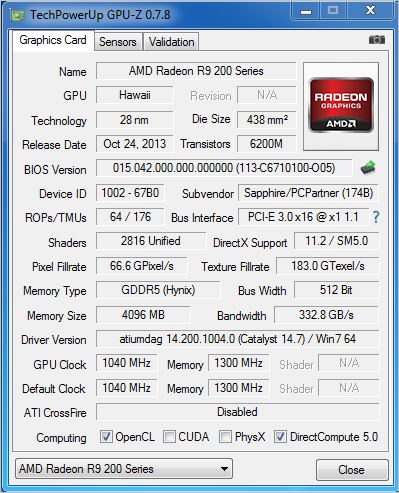
Above is a screenshot of GPU-Z showing the reference (factory overclocked) settings.
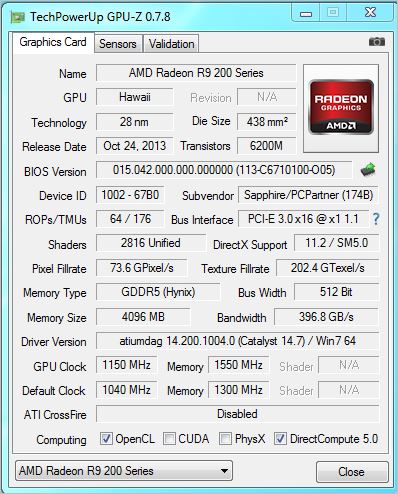
…and manually attained overclock speeds.
Overclocking the Sapphire Tri-X was made all the more easier because of the very good cooling available. Both Core and AUX voltages were available to adjust along with the usual power limit, core clock and memory overclock. By maxing out the voltages and power limit we attained a reasonable 1150MHz on the Core and 1550MHz (6200MHz effective GDDR5 speed) which was very good if a little under what we achieved with the MSI Lightning. That said, the Sapphire is also much cheaper so all things considered we were very impressed with the additional overclocking headroom available.
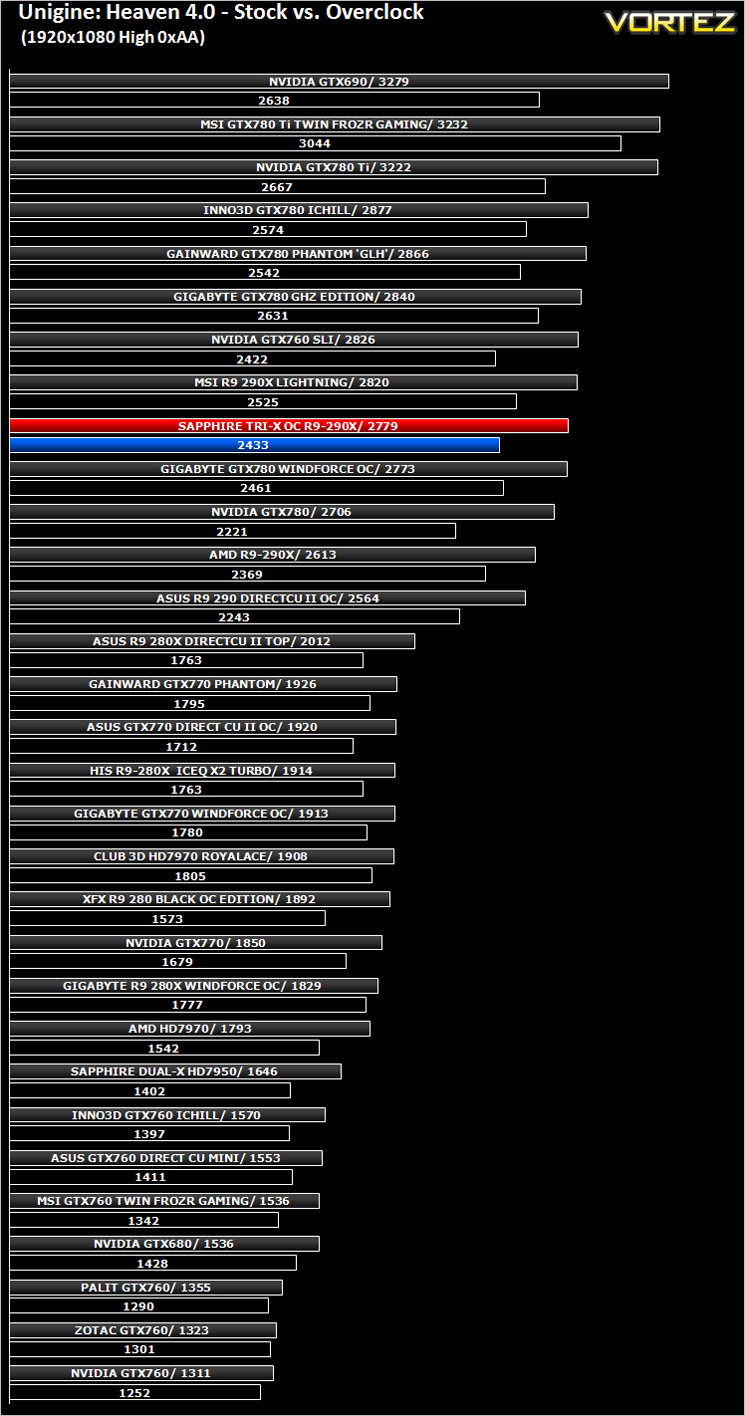
Above we can see the resulting performance increase of the overclock via Unigine Heaven 4.0.
Temperature, Acoustics and Power Consumption
Power Consumption
To test for power consumption we use the included iPower Meter found with our Thortech PSU. As system load figures obviously differ from idle it is extremely difficult to get an accurate figure of system draw and then simply take this figure away from the overall amount because each game will generate varying levels of CPU and hard drive activity. Dynamic power adjustments which fluctuate in game will also affect accurate power figures thus rendering any such power consumption calculations redundant at worst and approximate at best.
We will therefore take our system readings averaged over a benchmark run of Tessmark (100% load) and after 20 minutes of being idle in Windows 7. These can then be used as a comparison to other graphics cards to determine how much more or less power you can expect a GPU to consume.
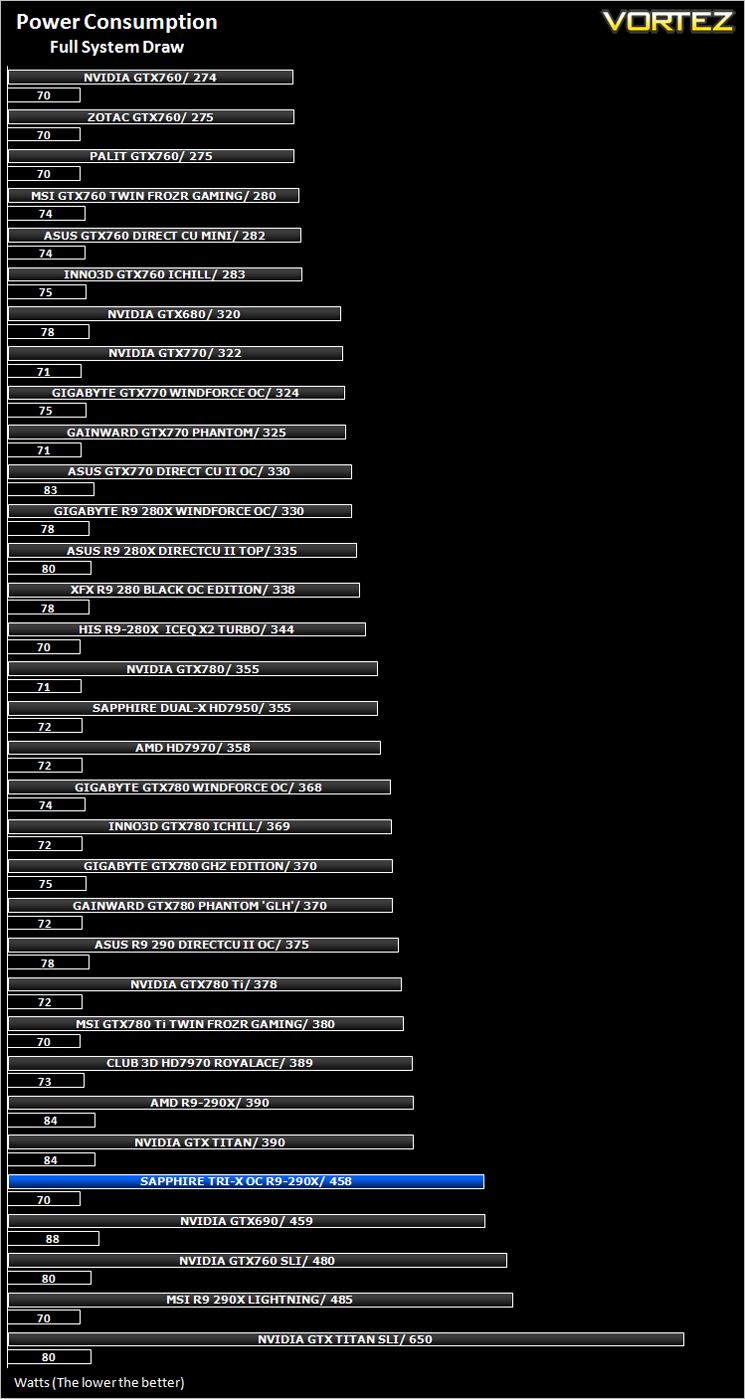
The Sapphire card is a hungry beast of that there can be no doubts. It consumed a little more than the reference design but less than the MSI lightning, most likely due to the overclocks applied.
Temperature
To test temperatures we measured idle temperatures after booting windows, letting all applications finish loading and ran a few benchmarks. Once the benchmarks were complete we left the card to reach a cooling plateau where we then took the idle temperatures. For the load tests, we would normally run Furmark for 20 minutes, taking the absolute maximum temperature attained however we found that this throttled the card and resulted in spurious results. So we set Heaven running continuously for 20 minutes and used this as a temperature result as the card did not throttle with this application.
The idle temps for the Tri-X R9-290X were very good. Under Furmark and the huge amount of stress this puts on the card we hit 78c. Please bear in mind that this is on a test bench and not a PC case so your results may differ but when compared to the competition it is neither astonishing nor disappointing. One thing is for sure it solves the temperature issues the reference design suffers from.
Acoustics
With three fans at its disposal, it is hardly surprising that the Sapphire card performed very well compared to the reference design. Strangely it couldn’t match the lightning card’s cooling despite the MSI example having a slightly higher overclock. What we can assure you, is that under normal load, you will struggle to hear the Sapphire. Of course when we manually adjusted the fans to 100% it was noisy but the likelihood of the fans spinning up to this revolution is extremely small under normal gaming conditions but it is nice to know you have this cooling overhead available should you need it.
Gaming Experience (Frame Time Analysis)
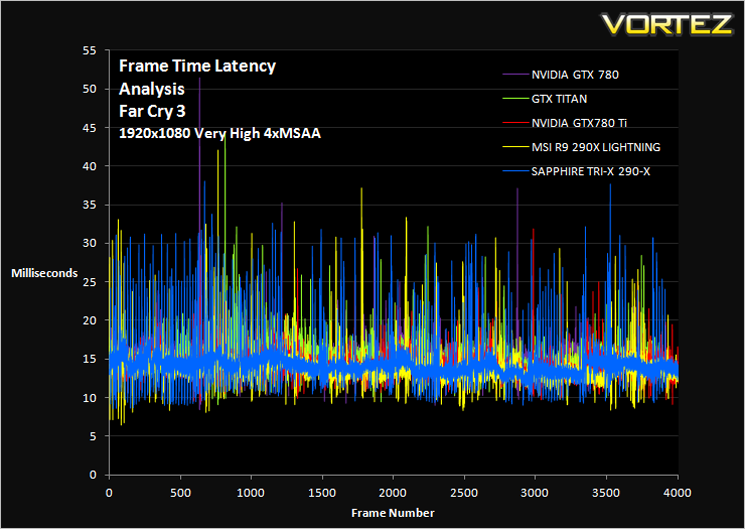
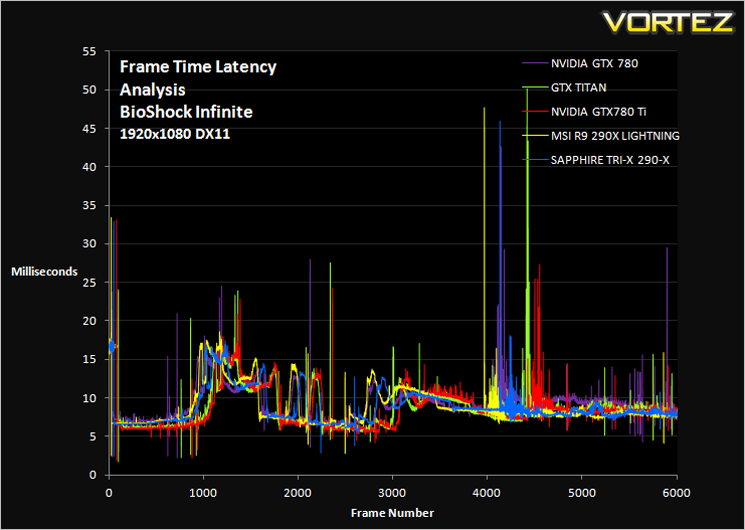
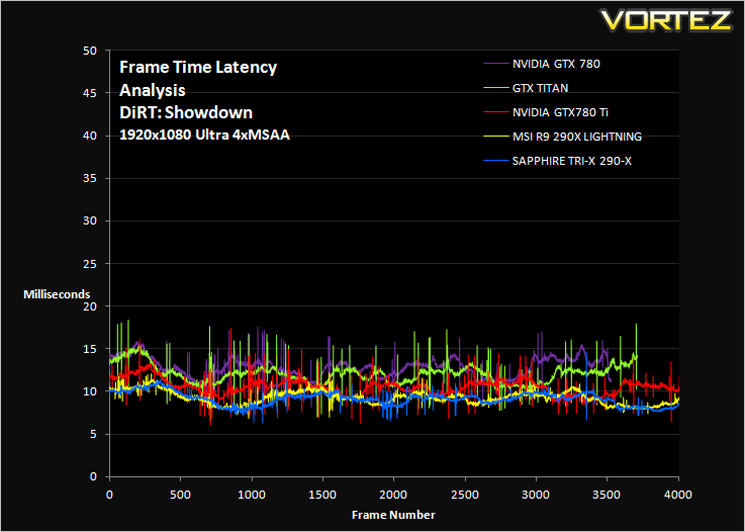
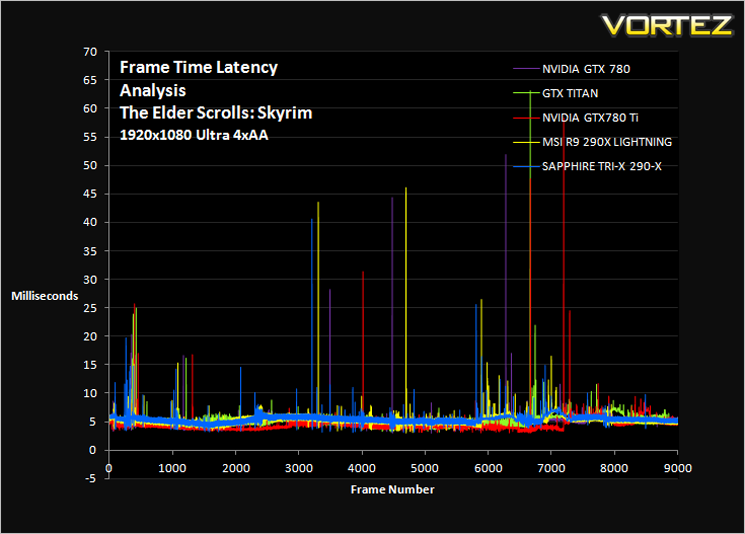
Comment
Average and 99th Percentile response times (Frame Time Analysis)
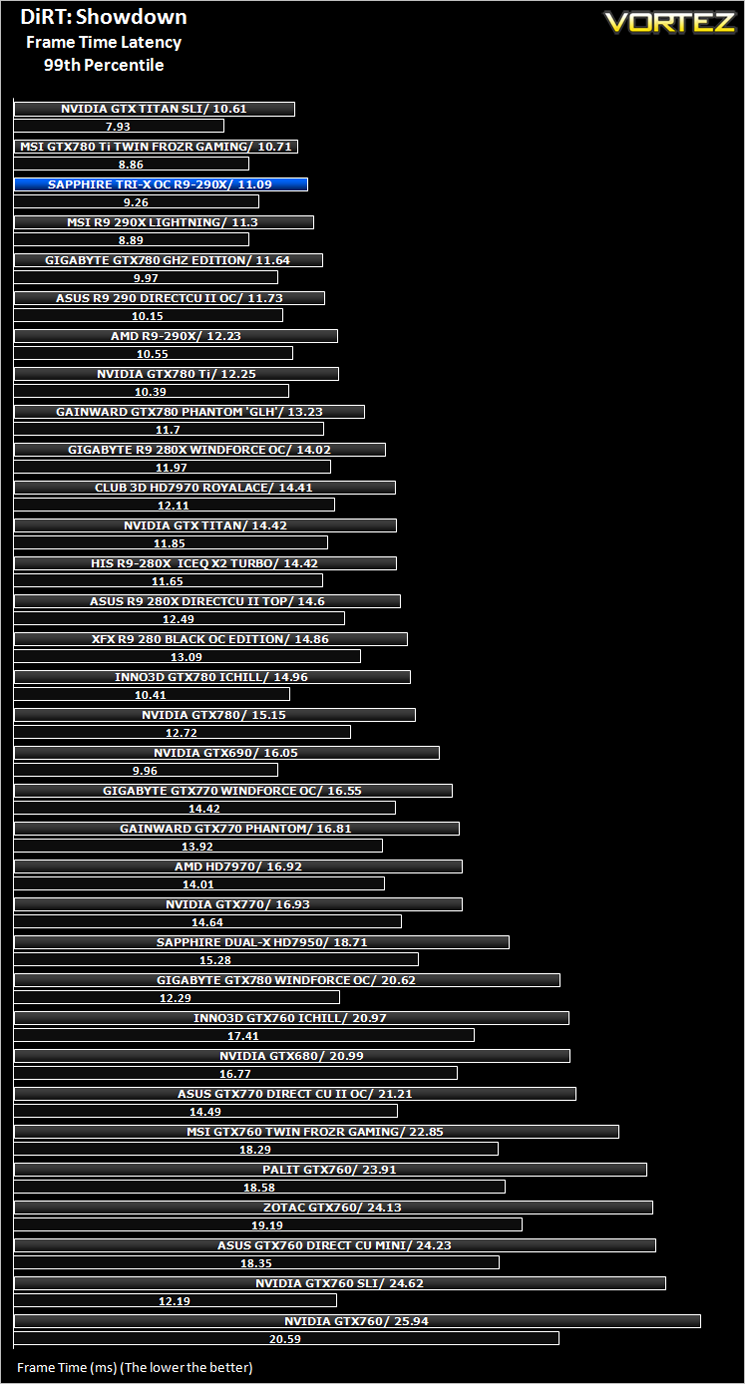
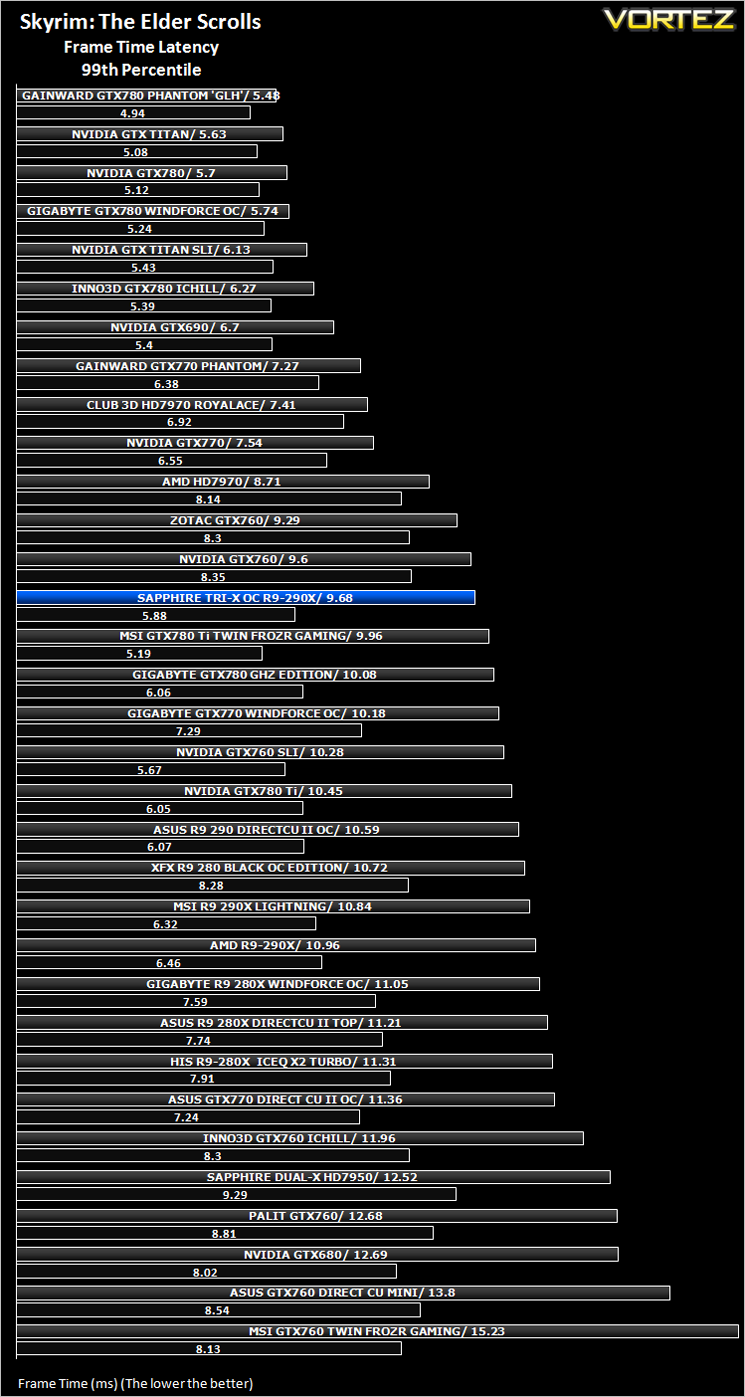
Futuremark 3DMark Fire Strike (Synthetic)
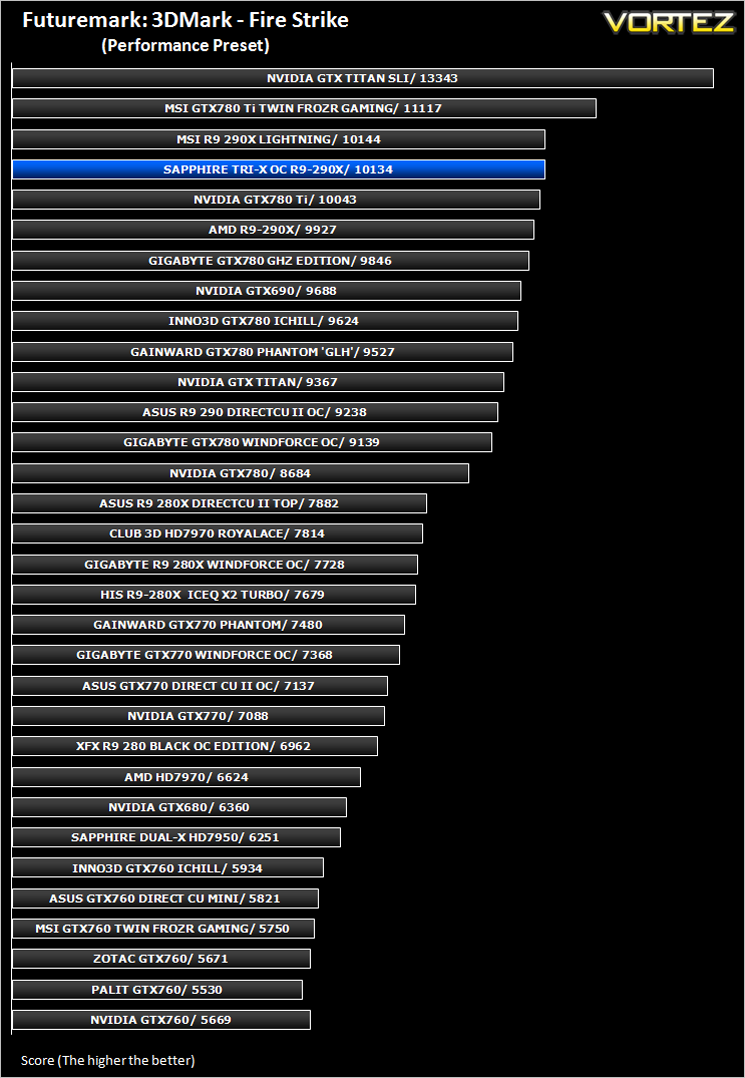
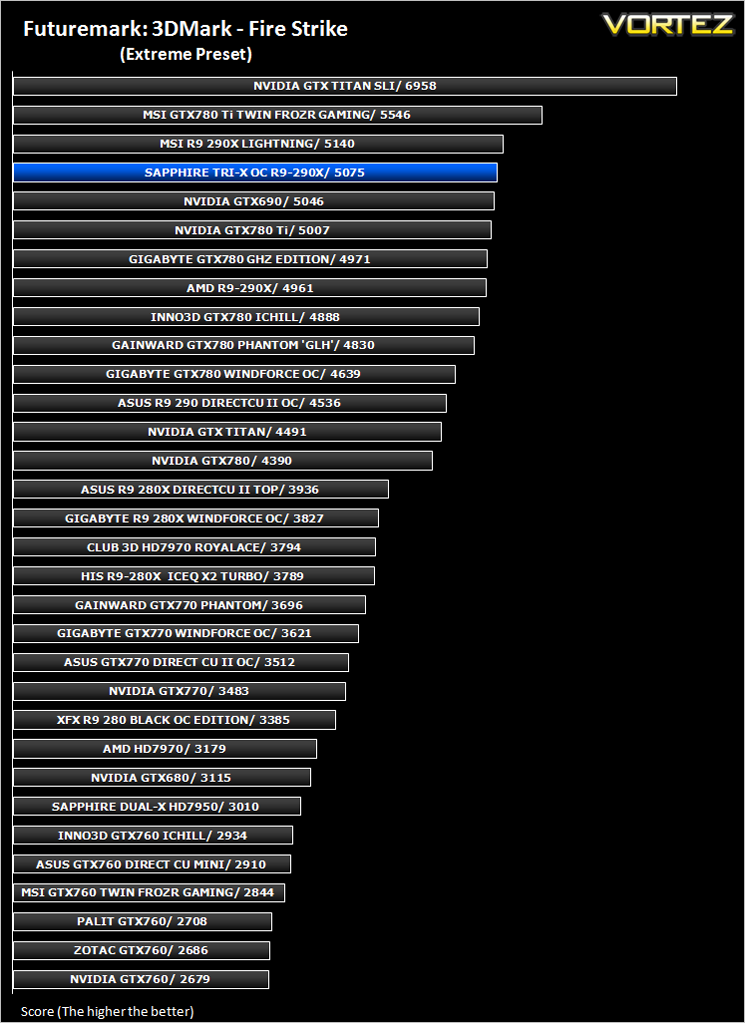
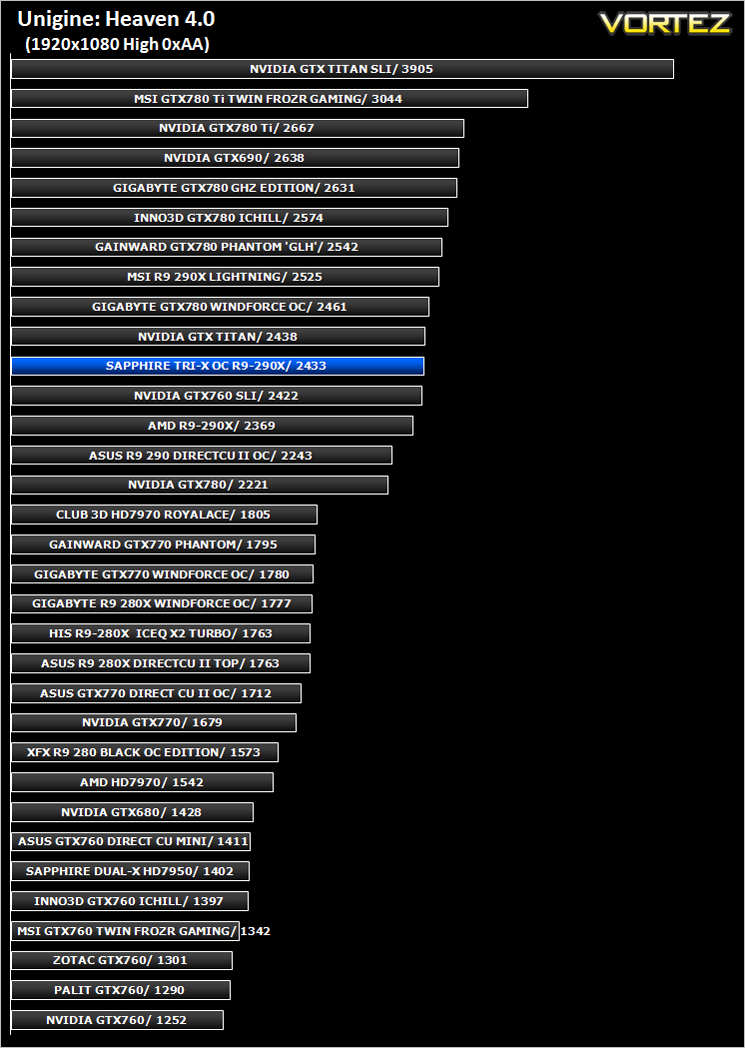
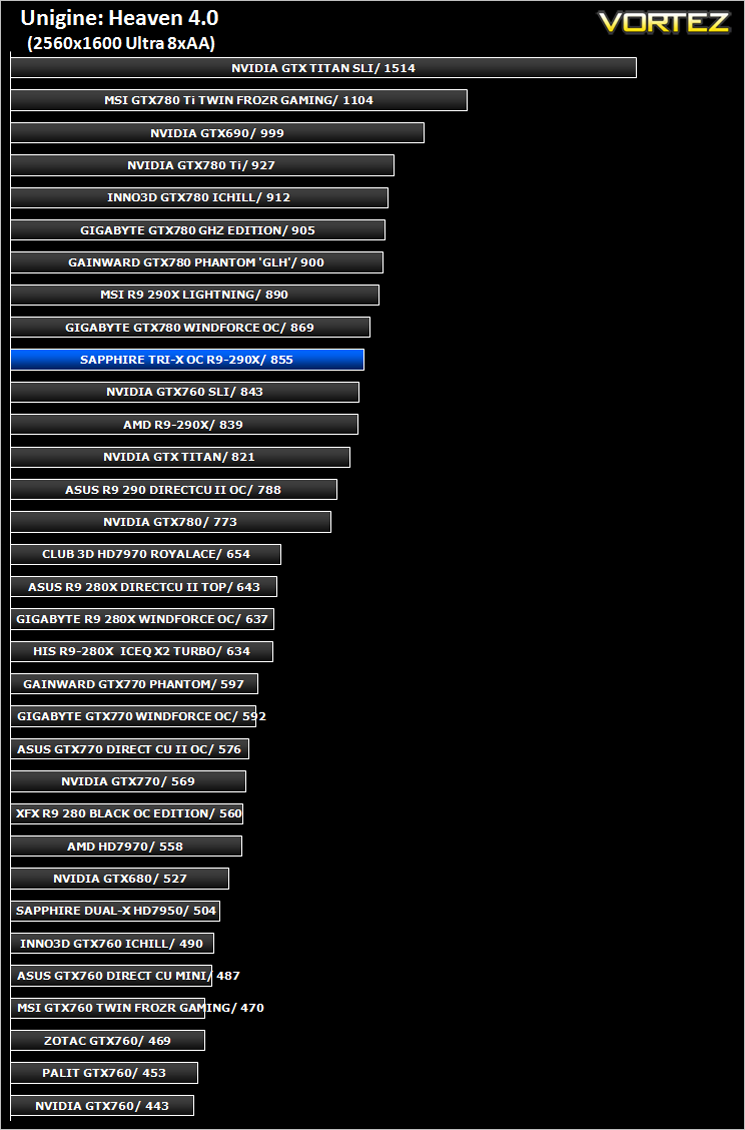
Unigine: Heaven 4 (Synthetic)
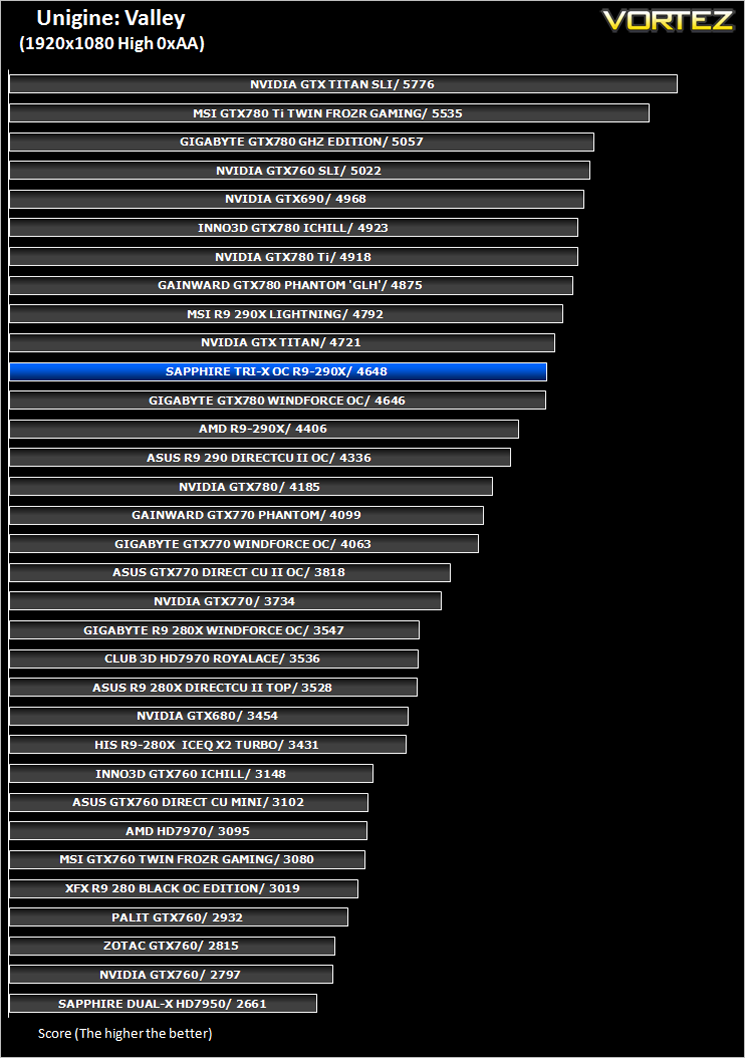
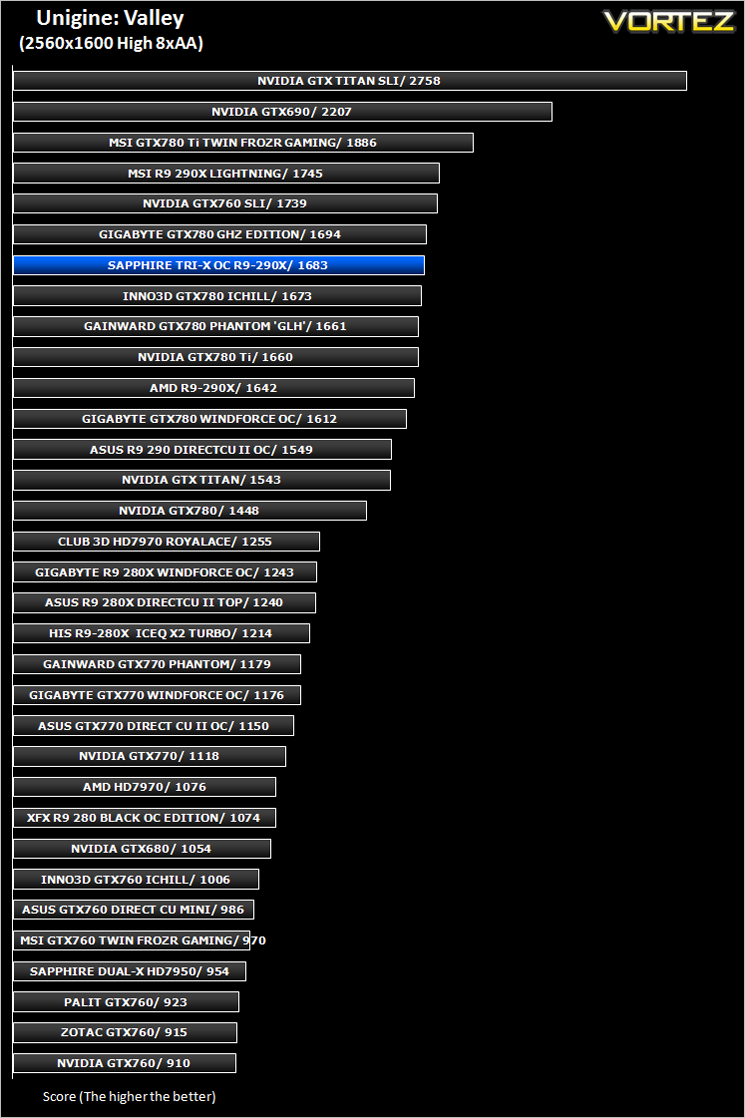
Unigine: Valley (Synthetic)
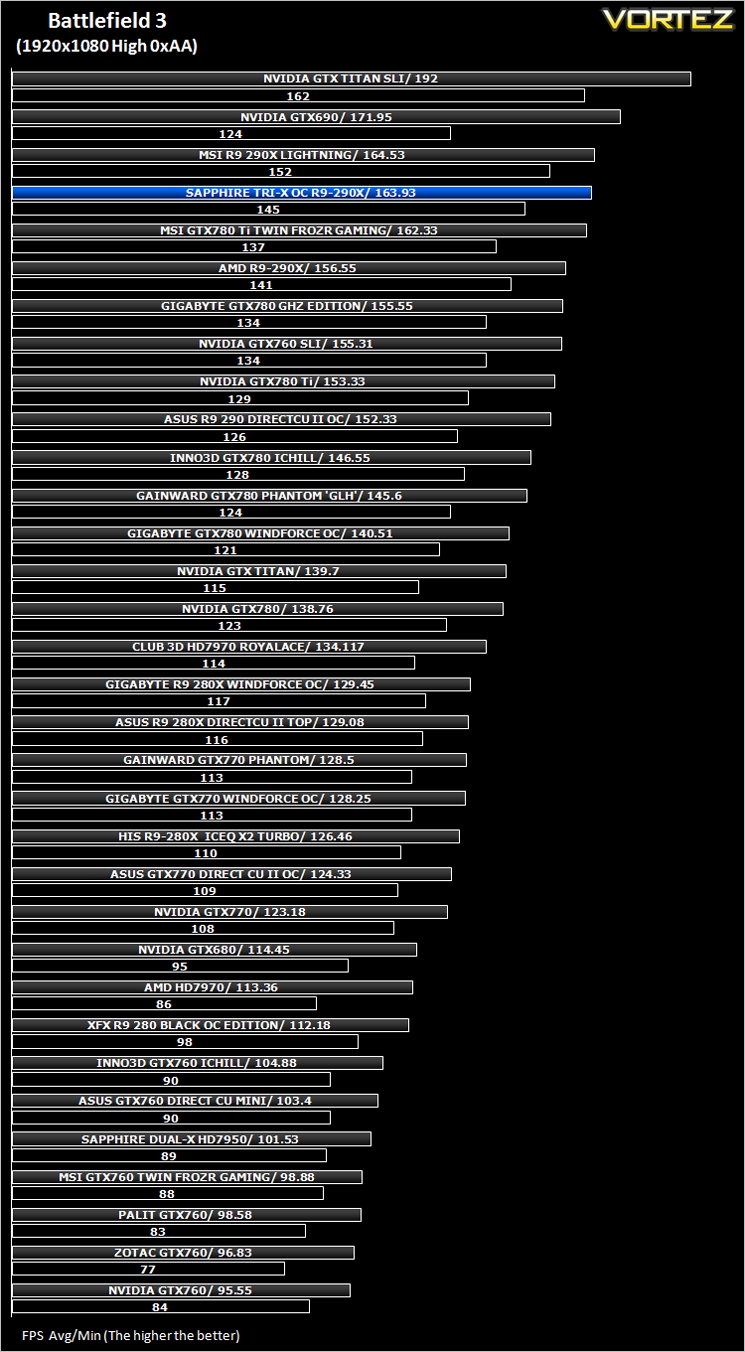
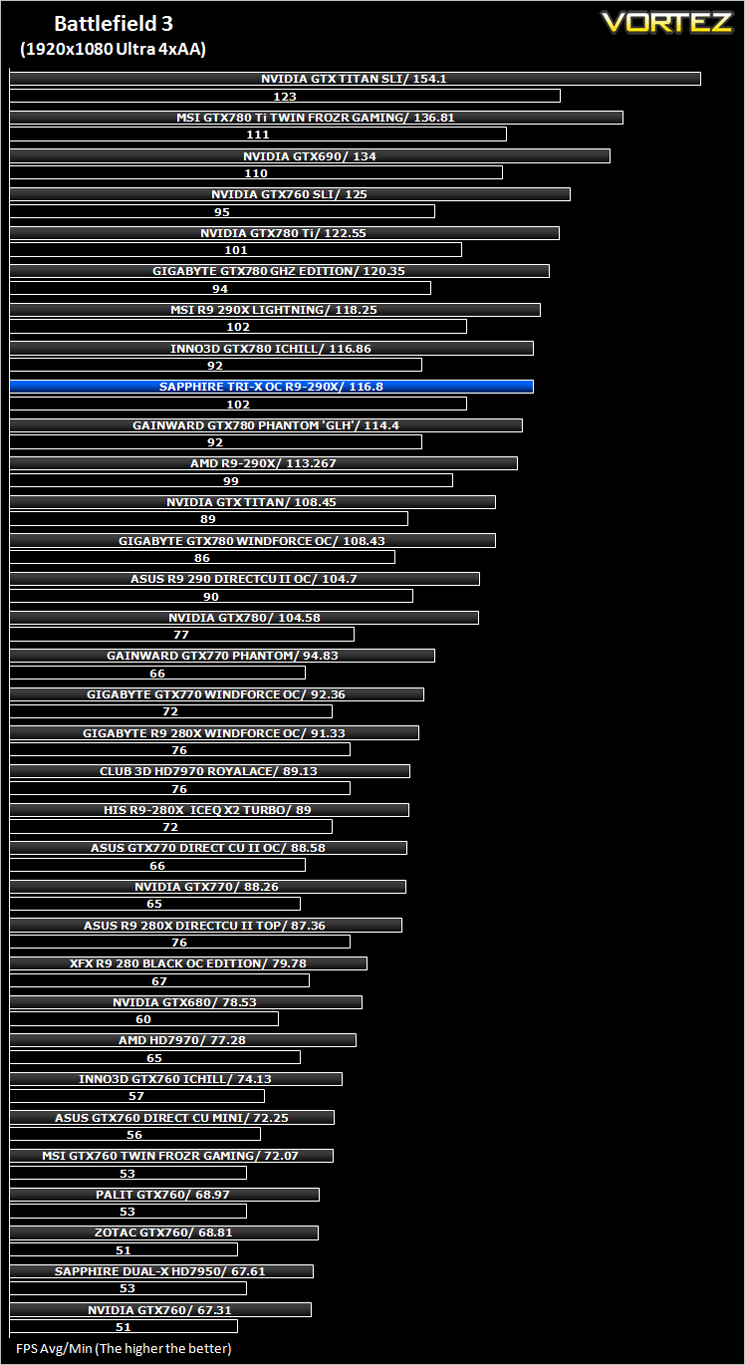
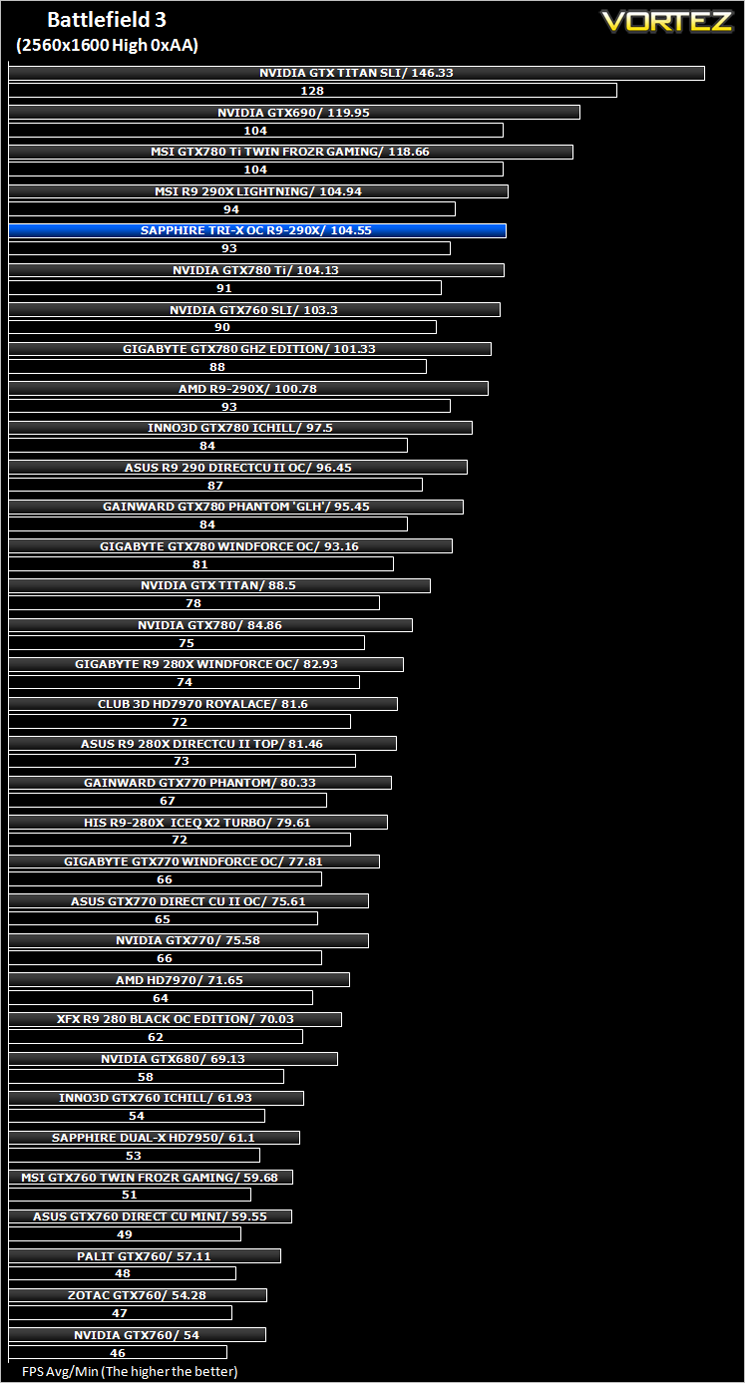
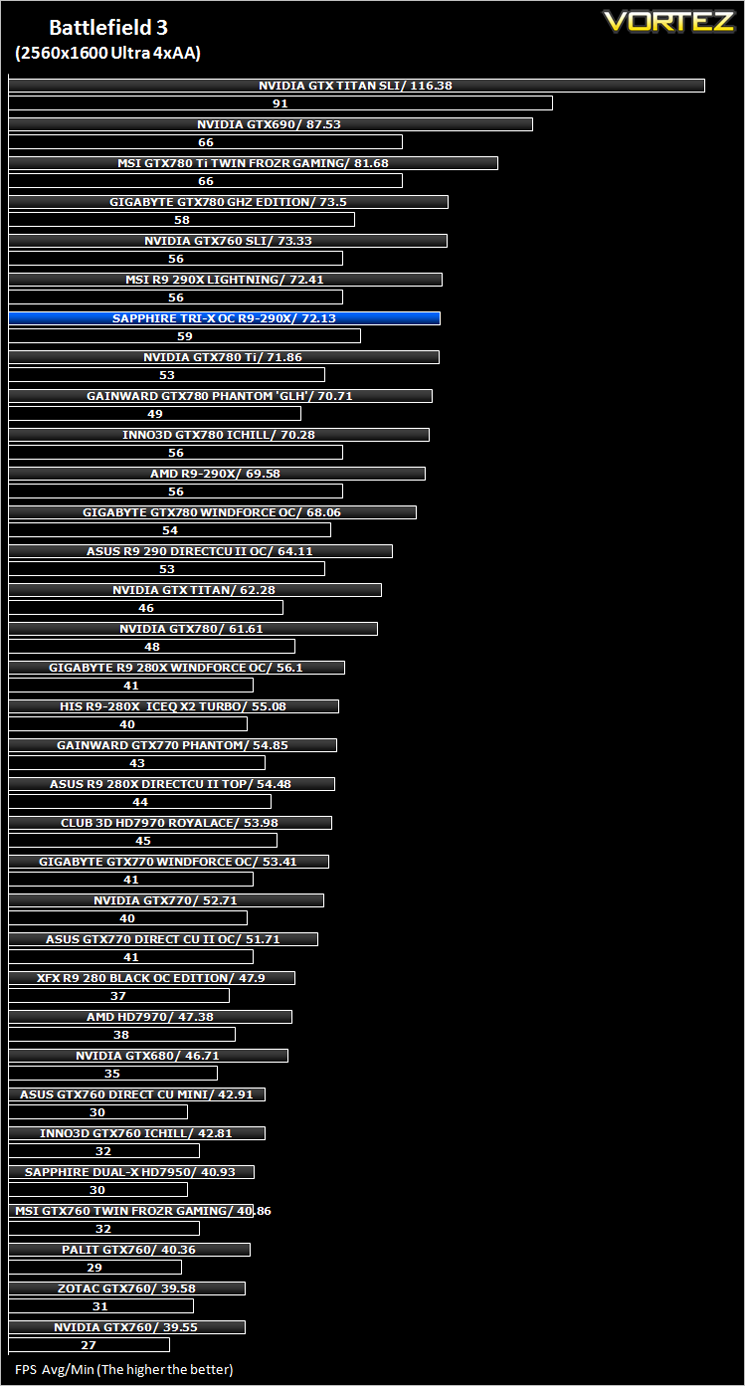
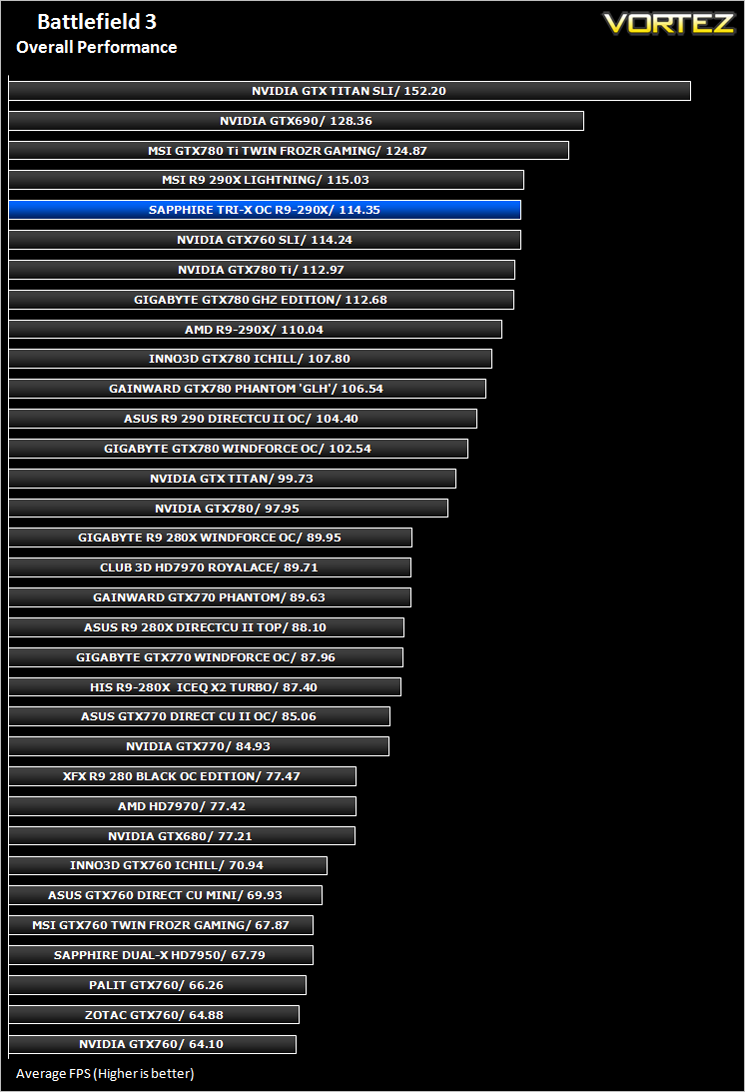
Battlefield 3 (FPS)
Average and minimum frames per second were measured using Fraps during the parking lot scene on Operation Sword Breaker. High and Ultra presets were loaded at both resolutions.
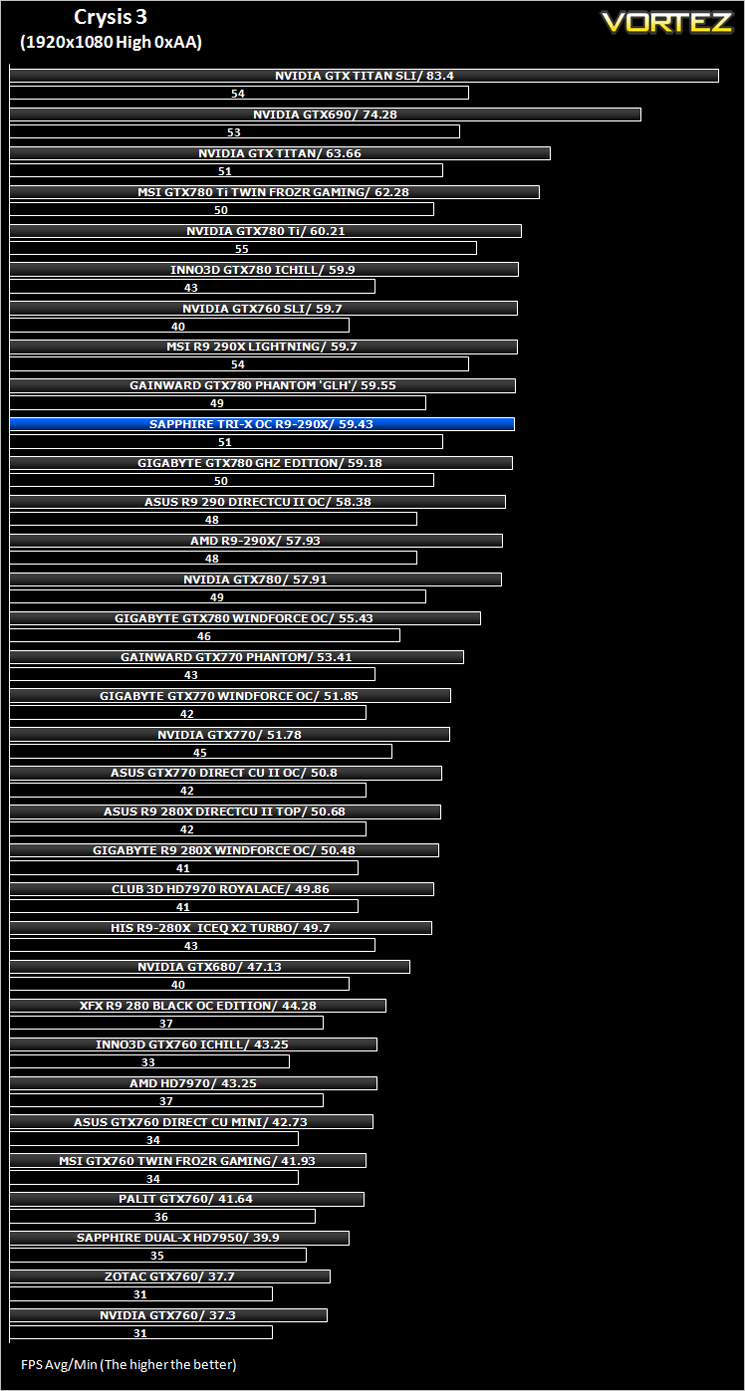
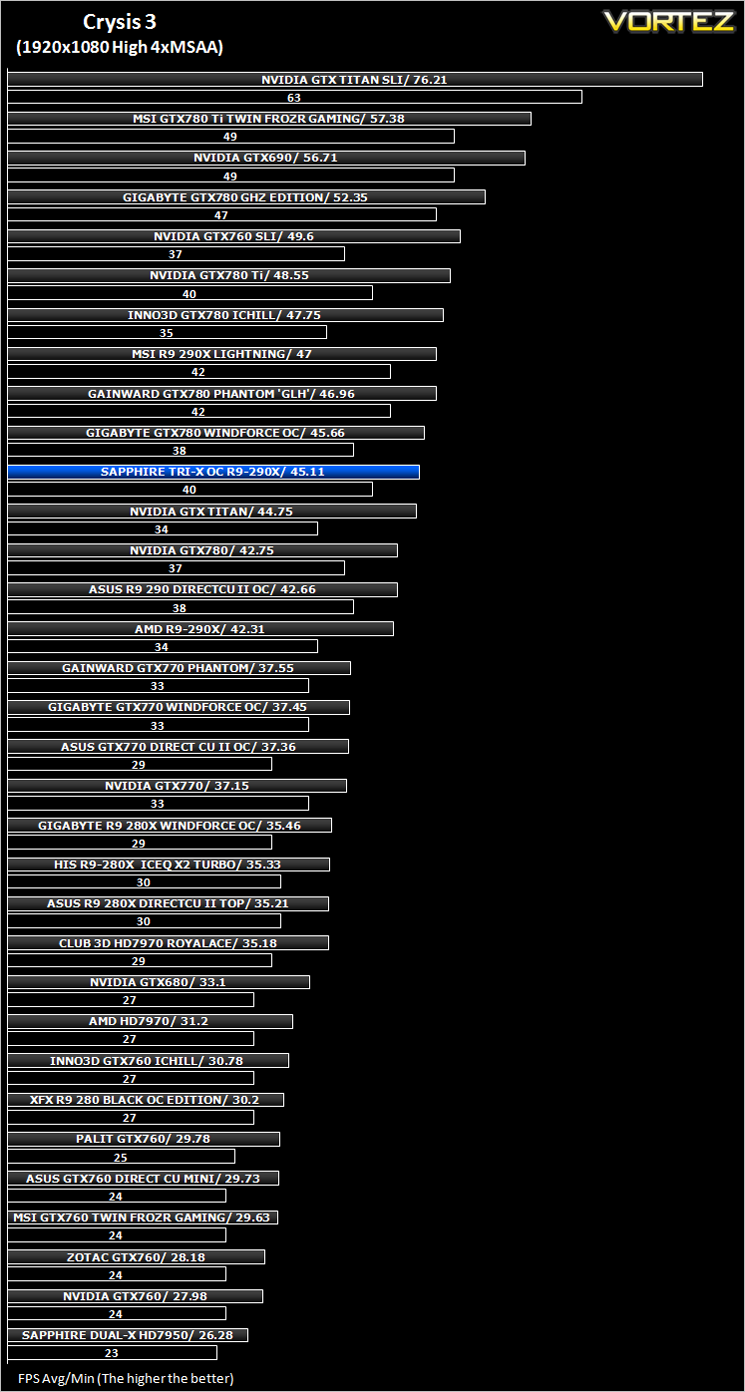
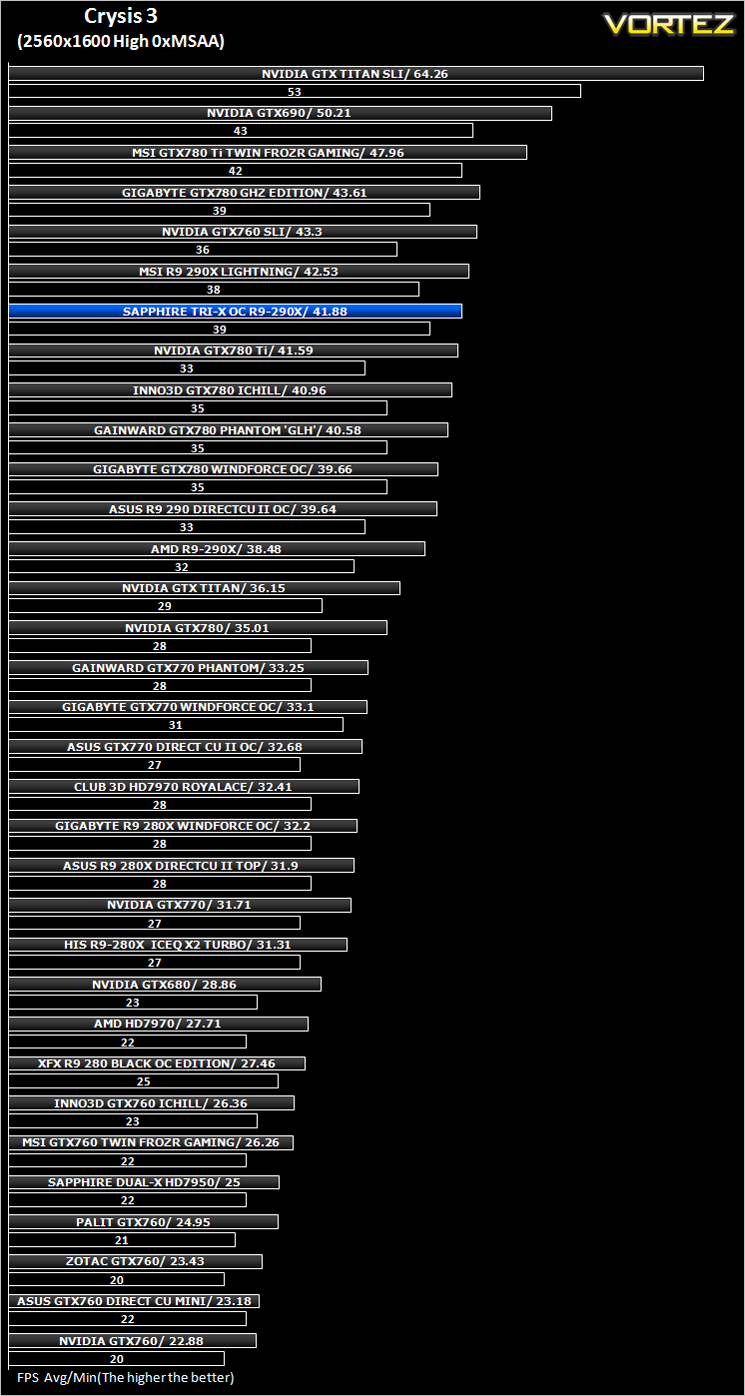
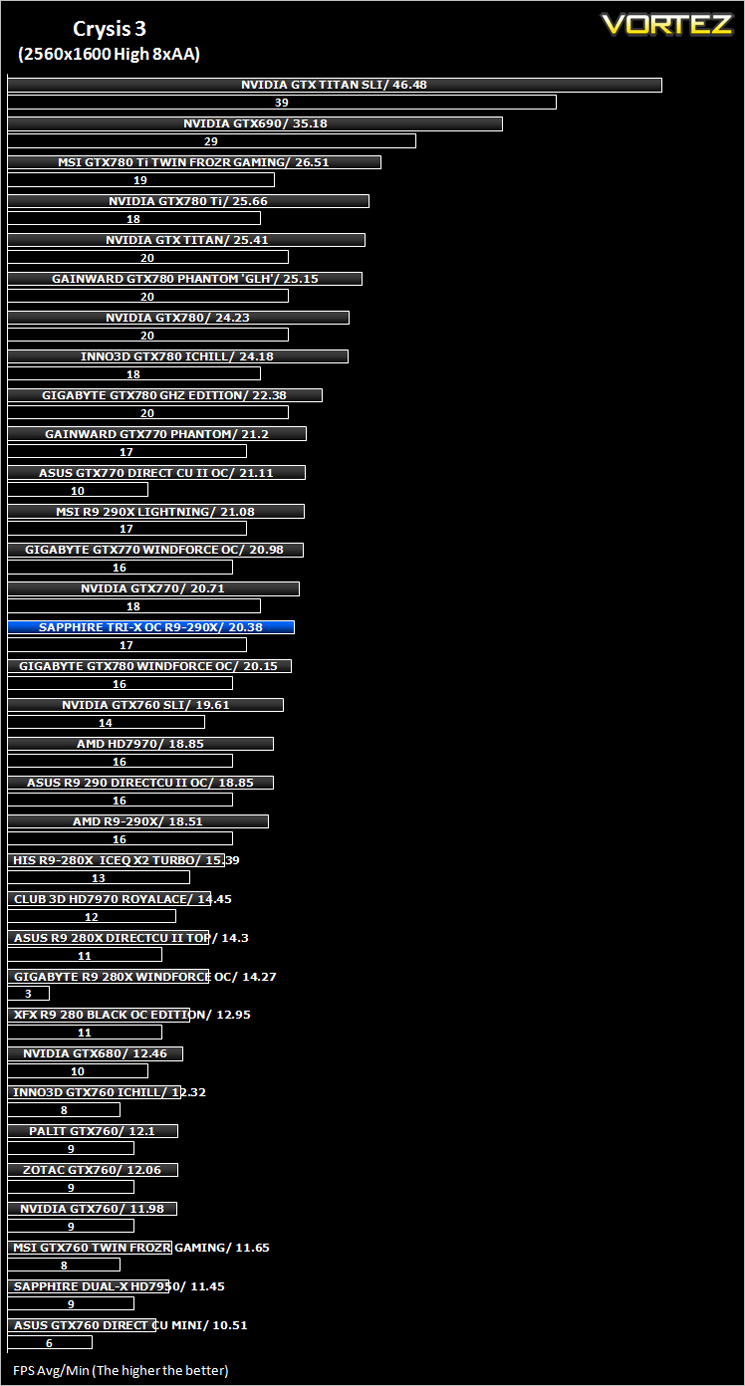
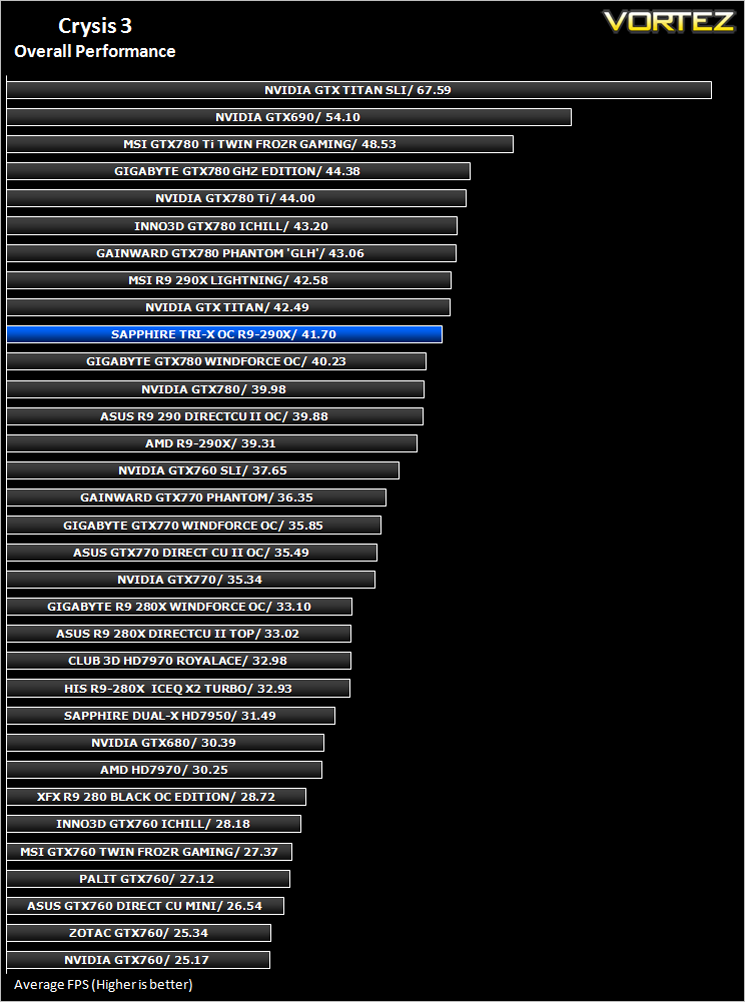
Crysis 3 (FPS)
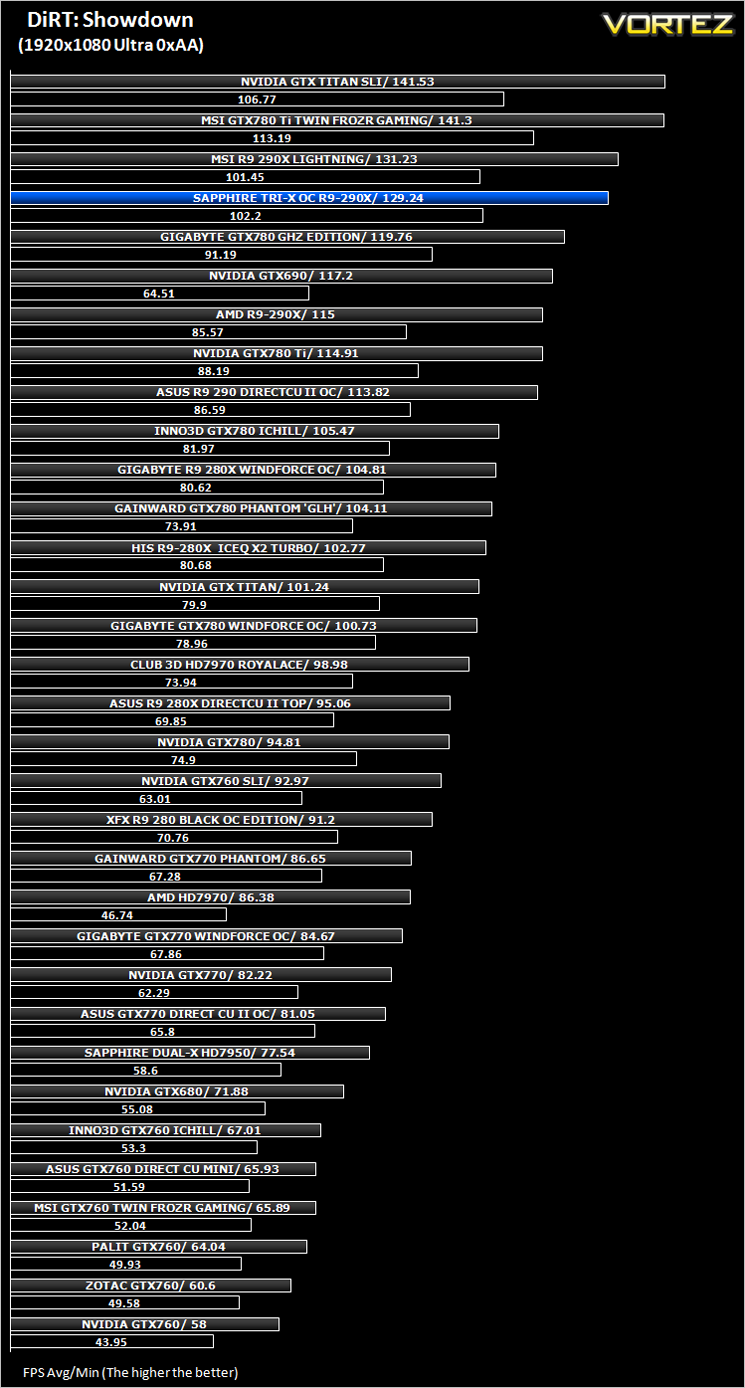
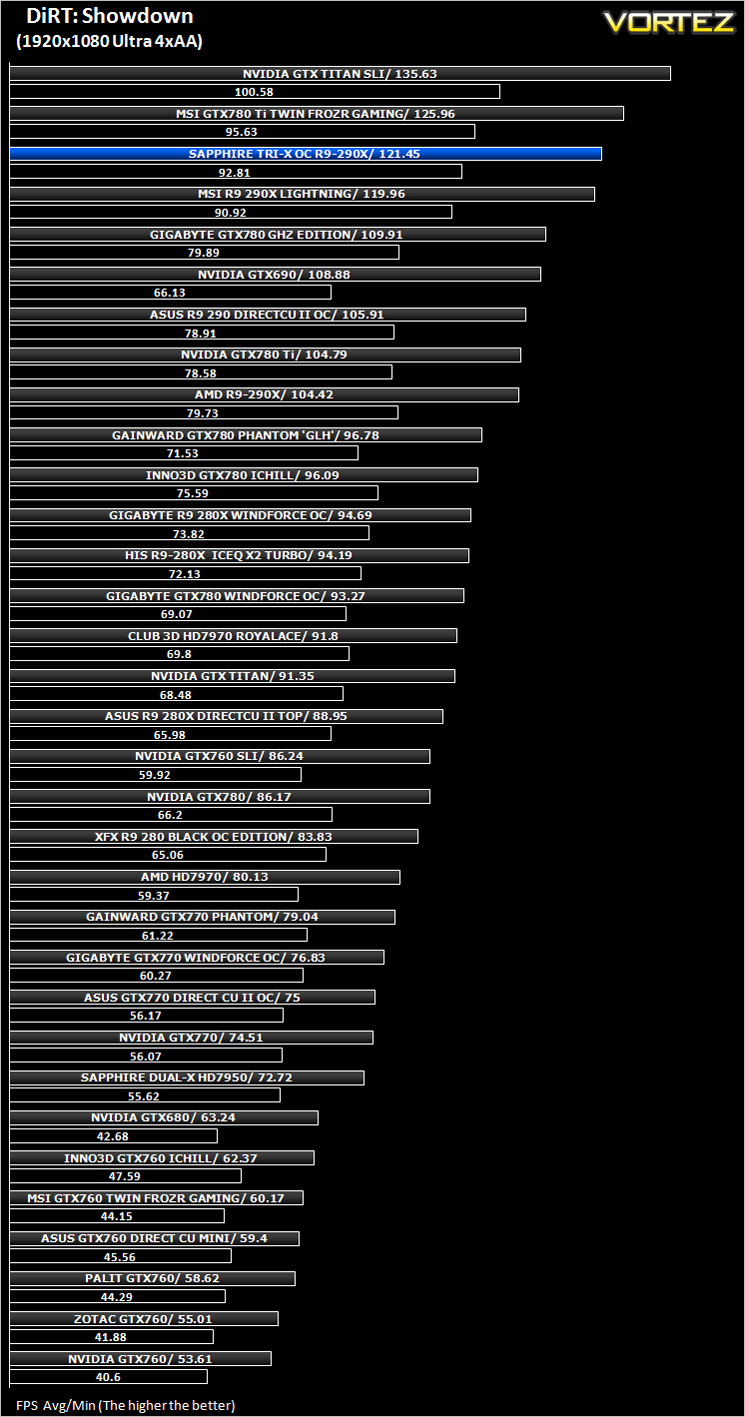
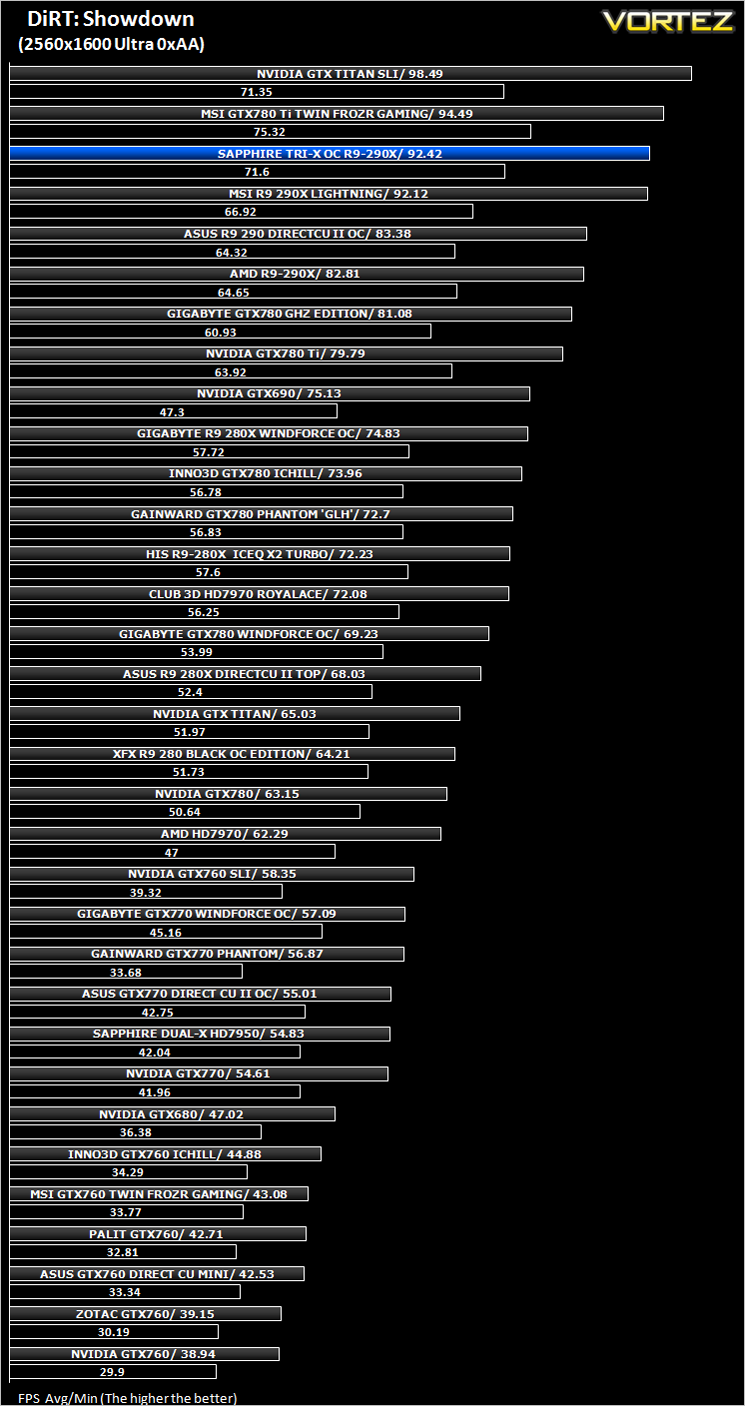
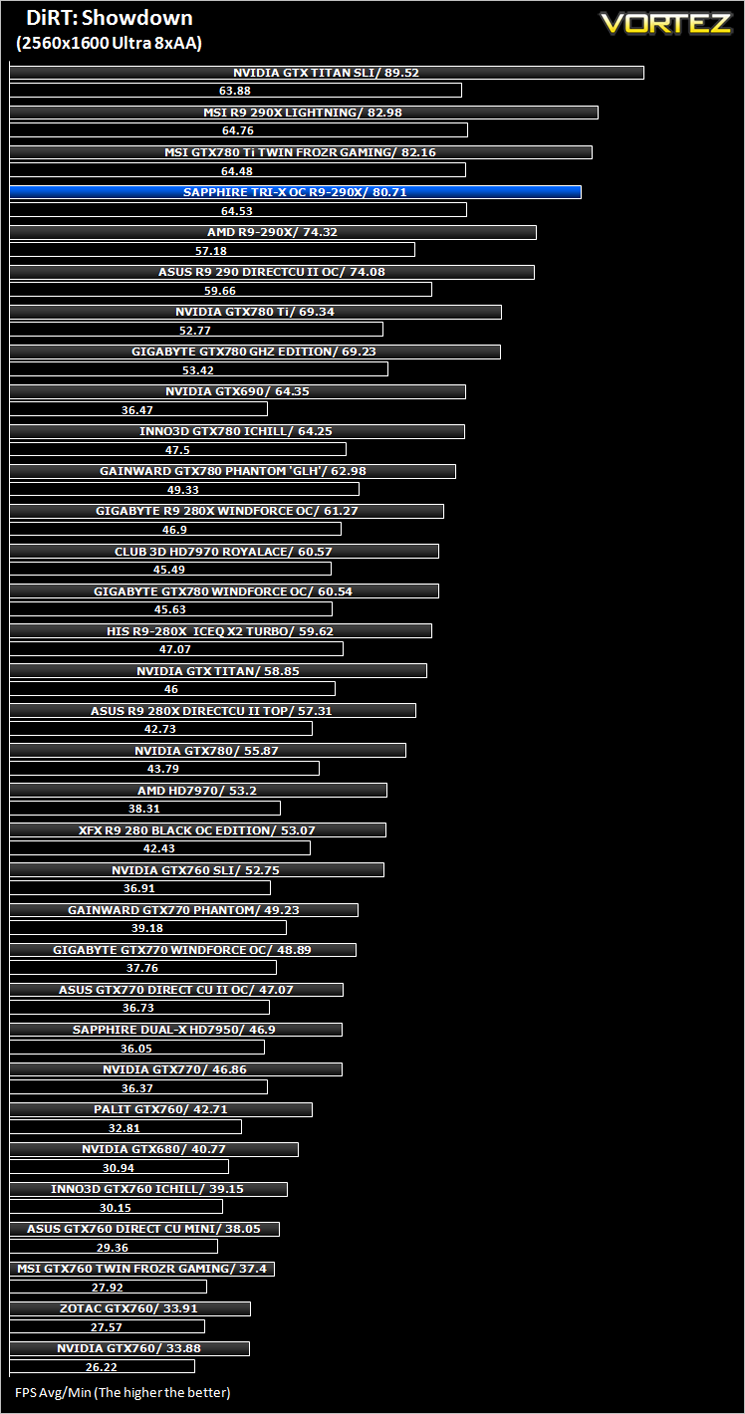
DiRT: Showdown (FPS)
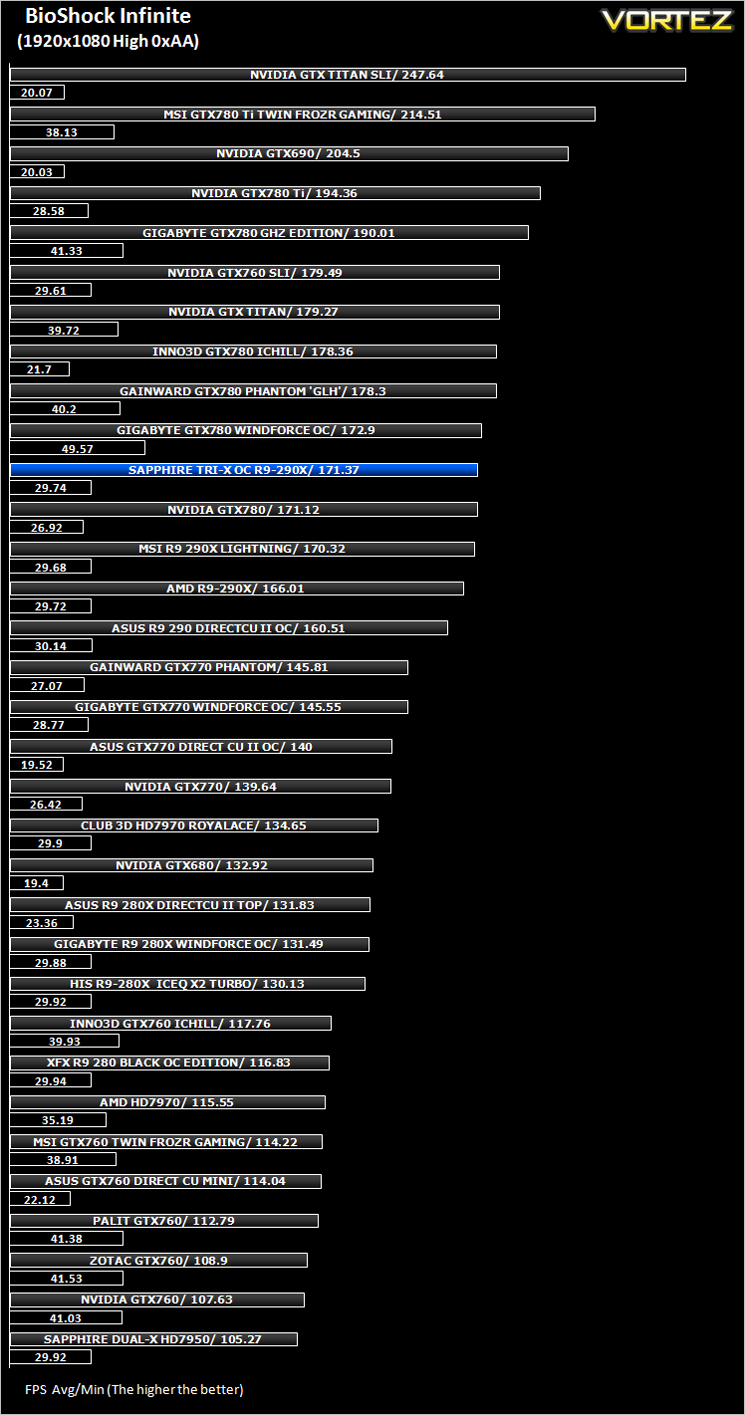
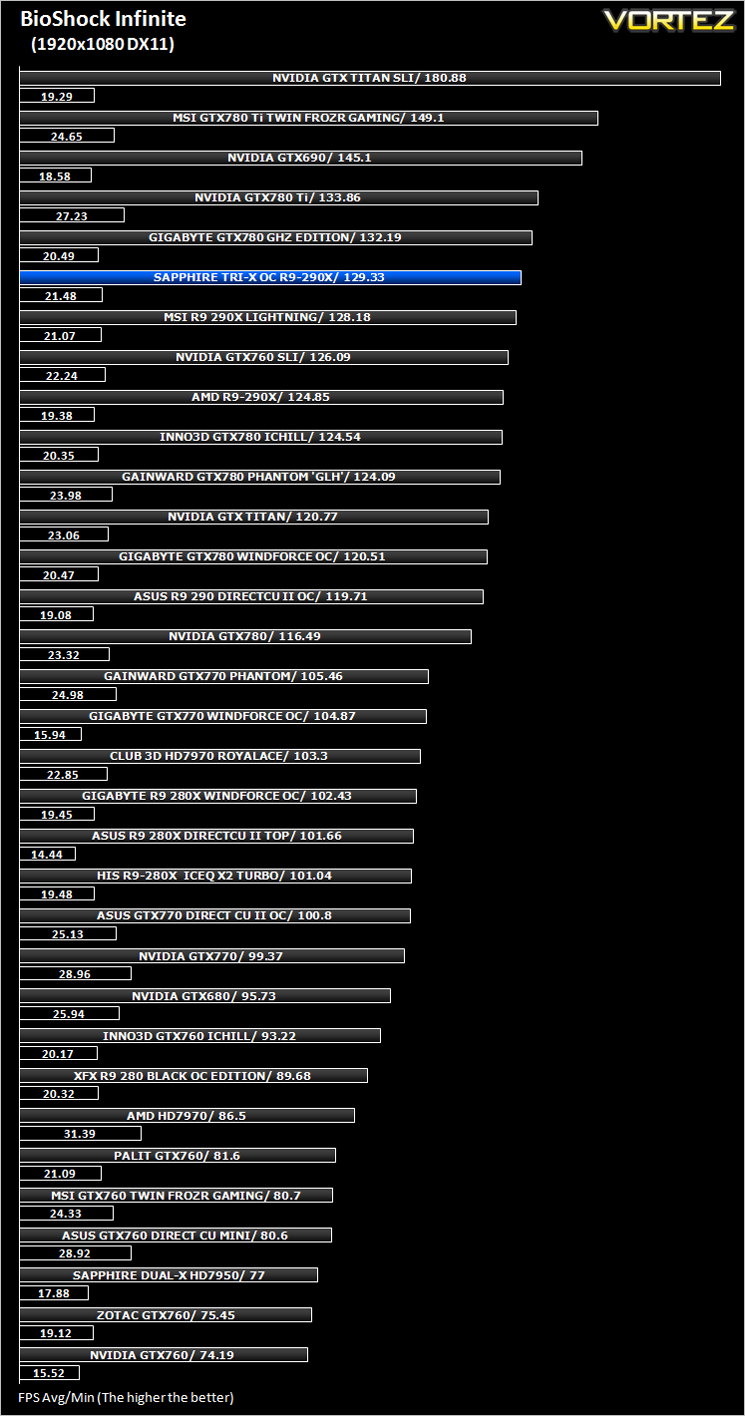
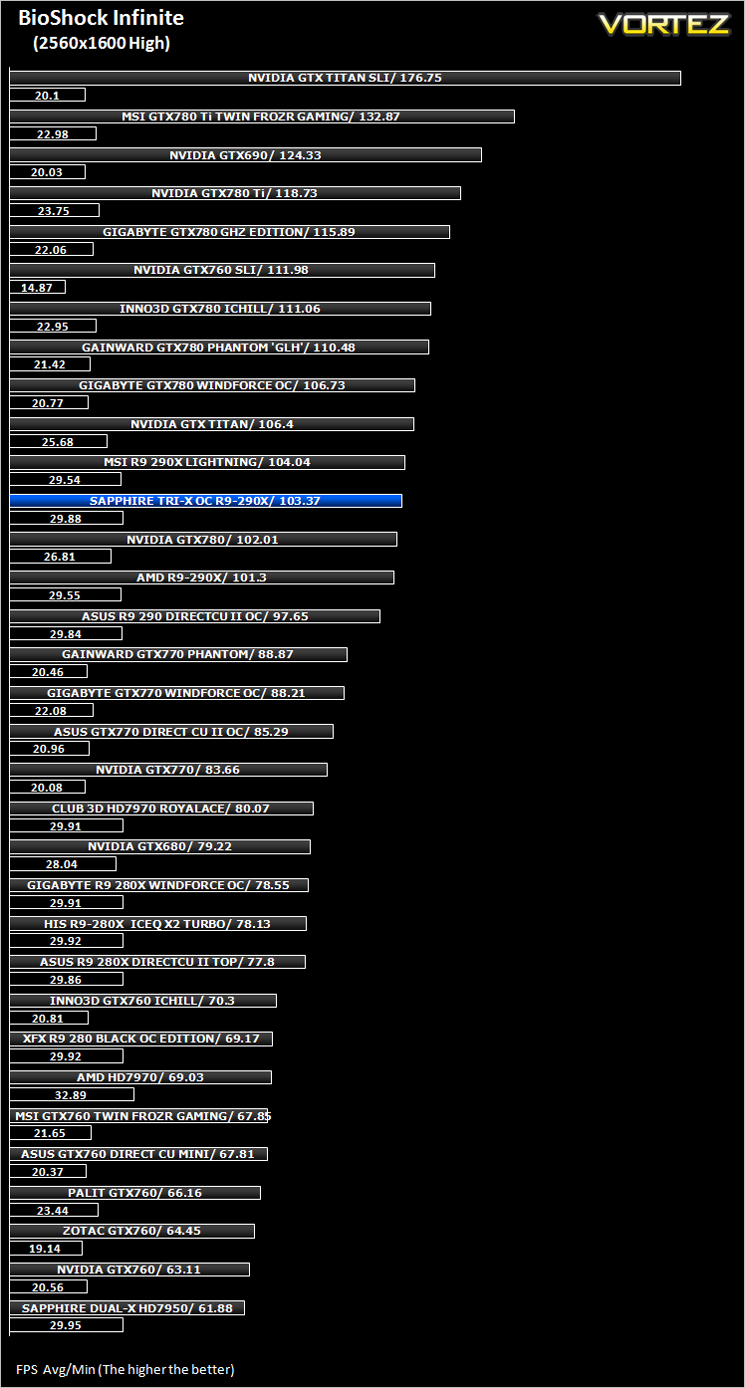
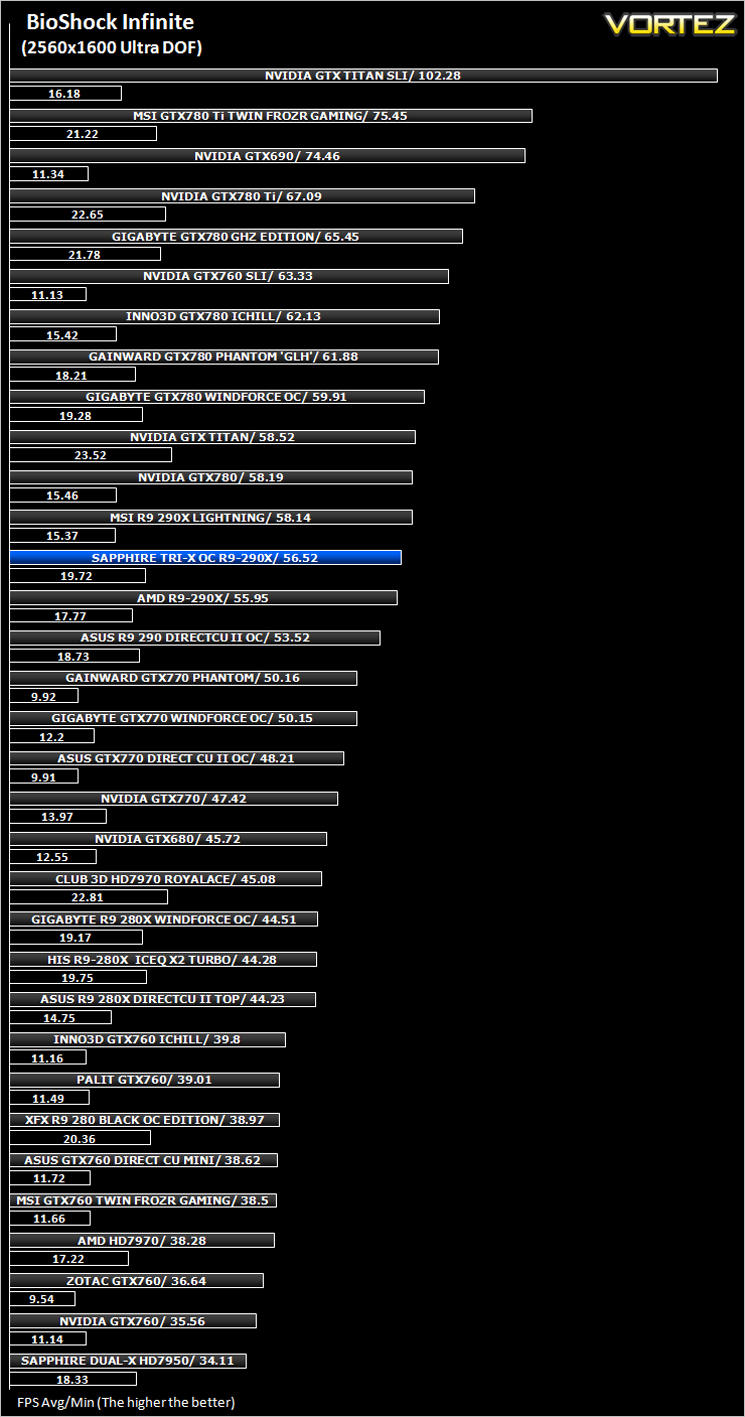
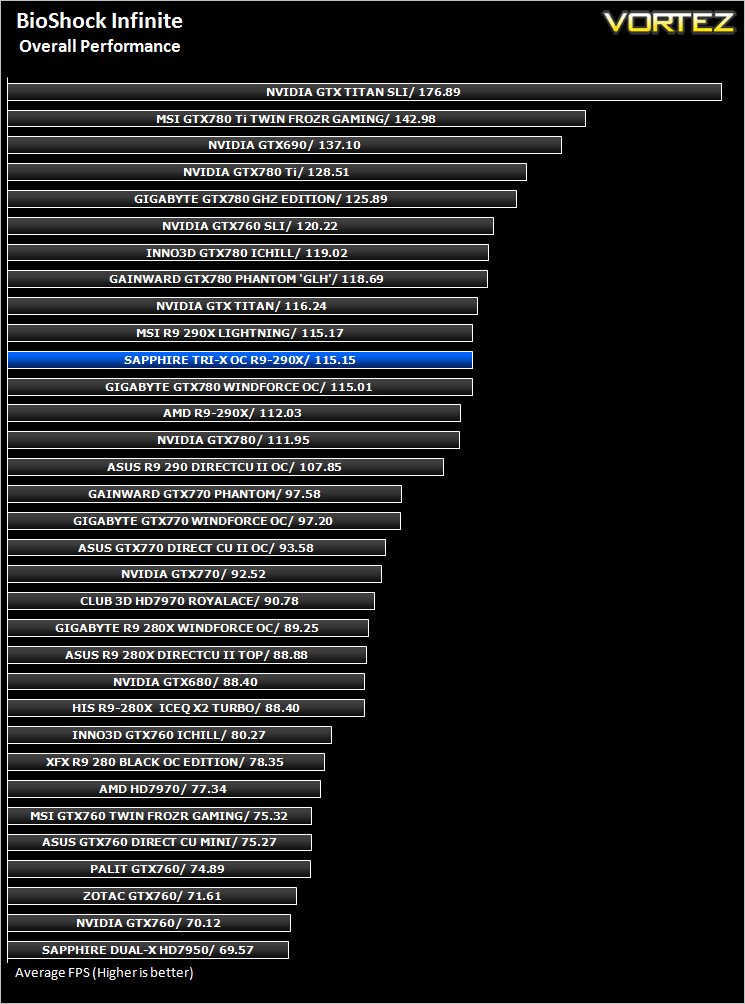
BioShock Infinite (FPS)
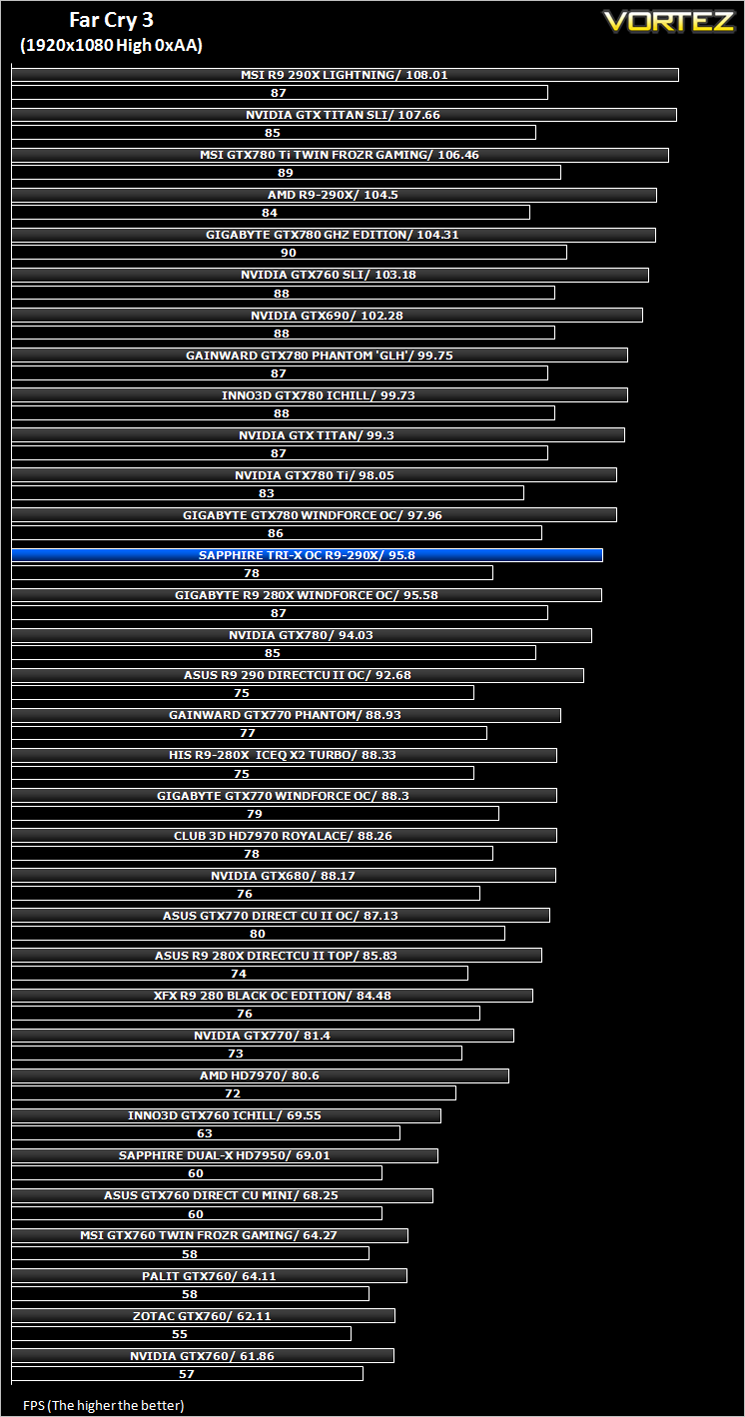
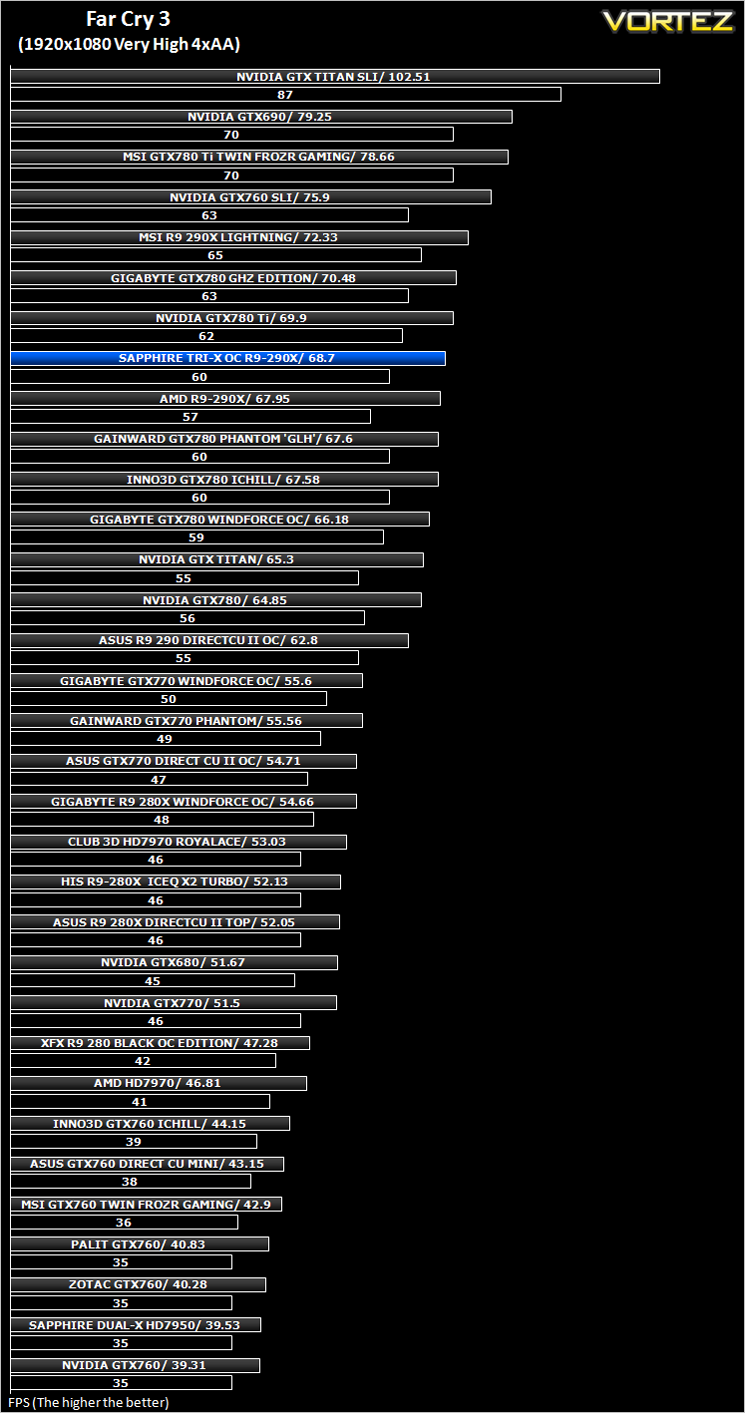
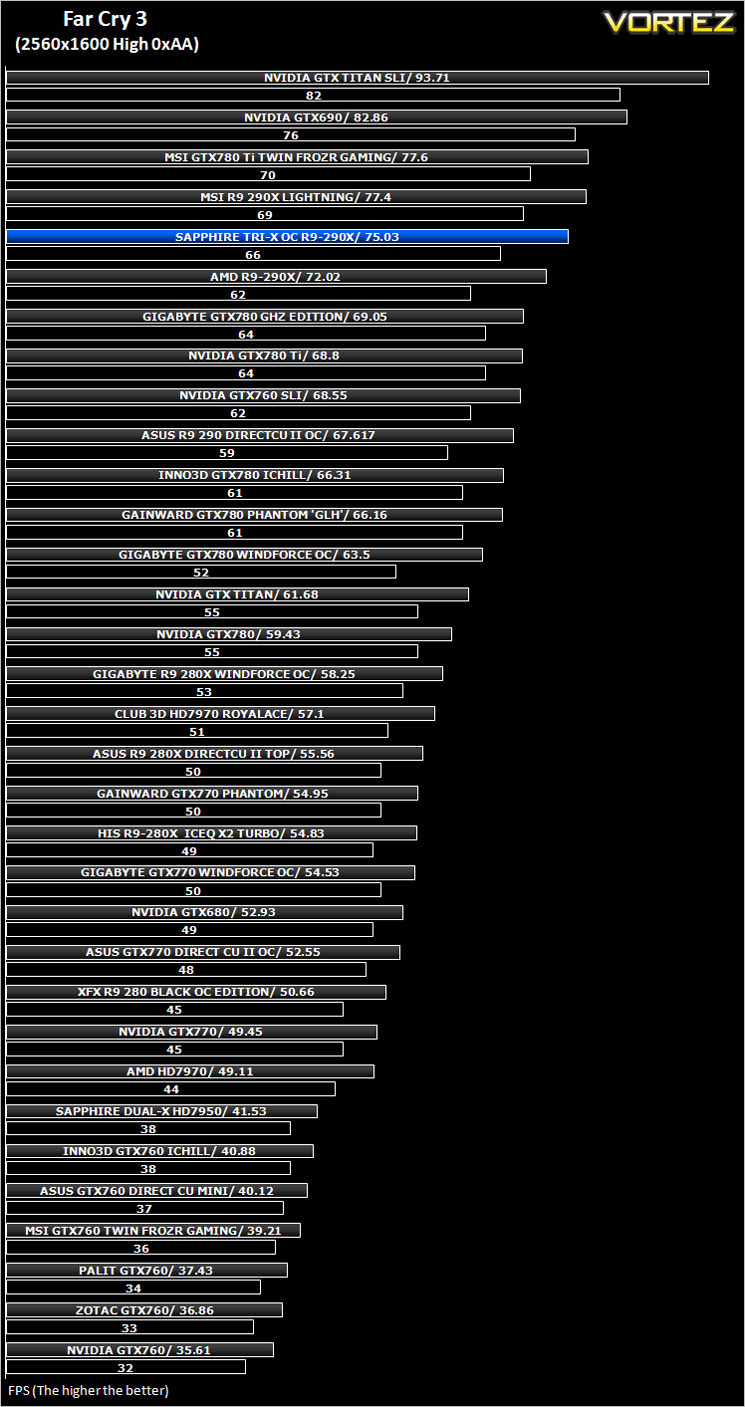
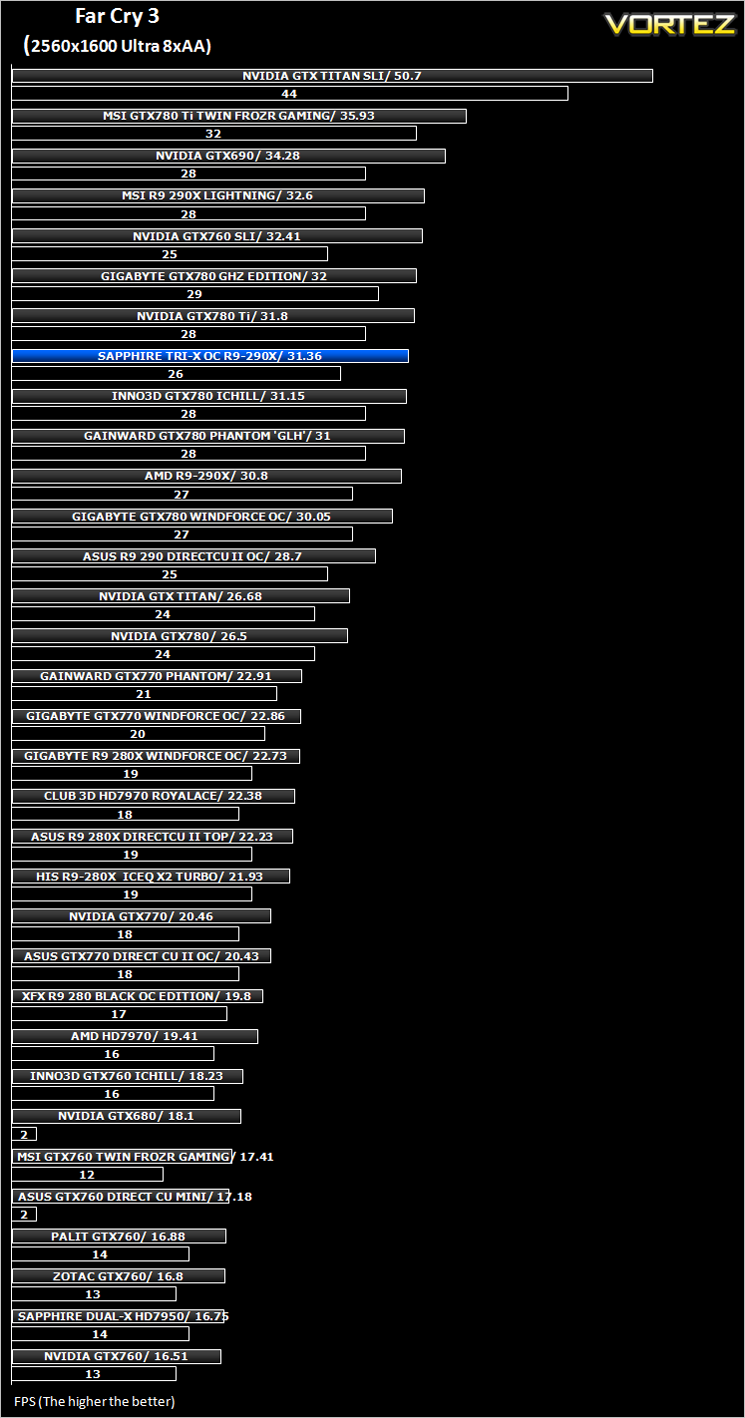
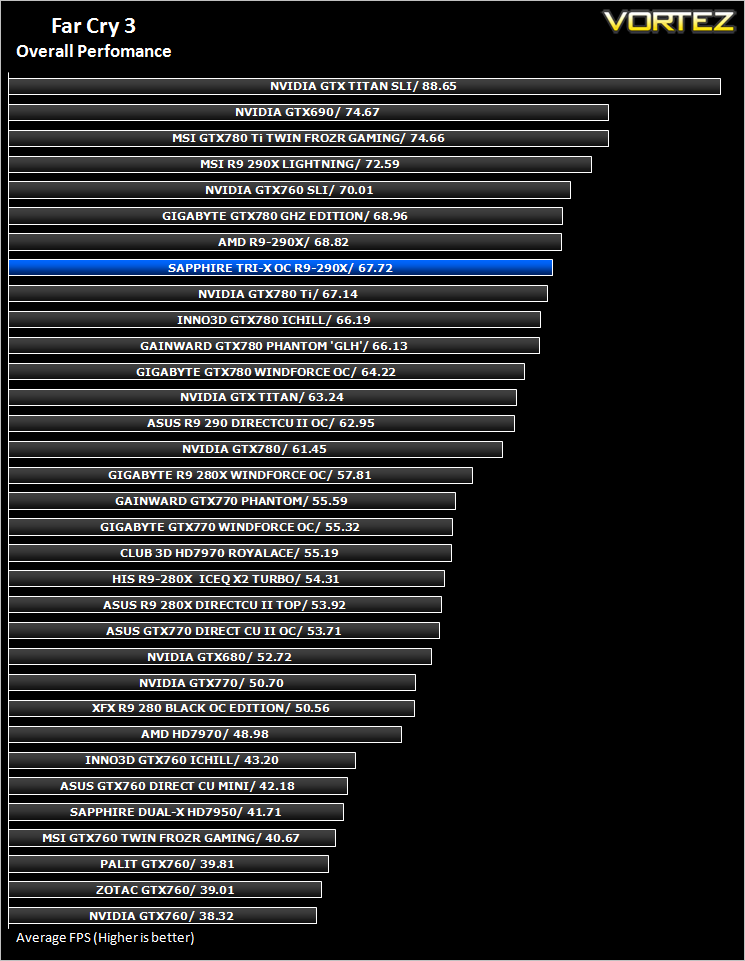
Far Cry 3 (FPS)
The Elder Scrolls: Skyrim (FPS)
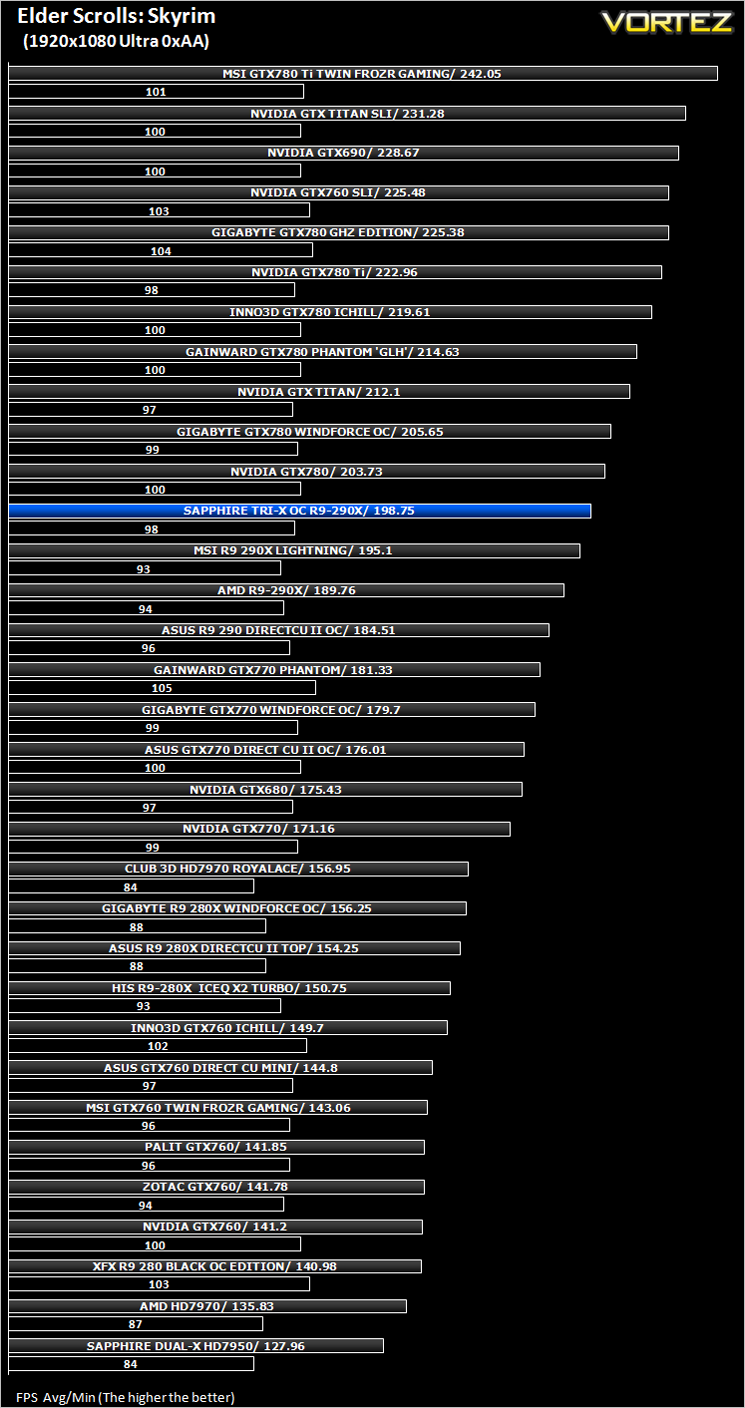
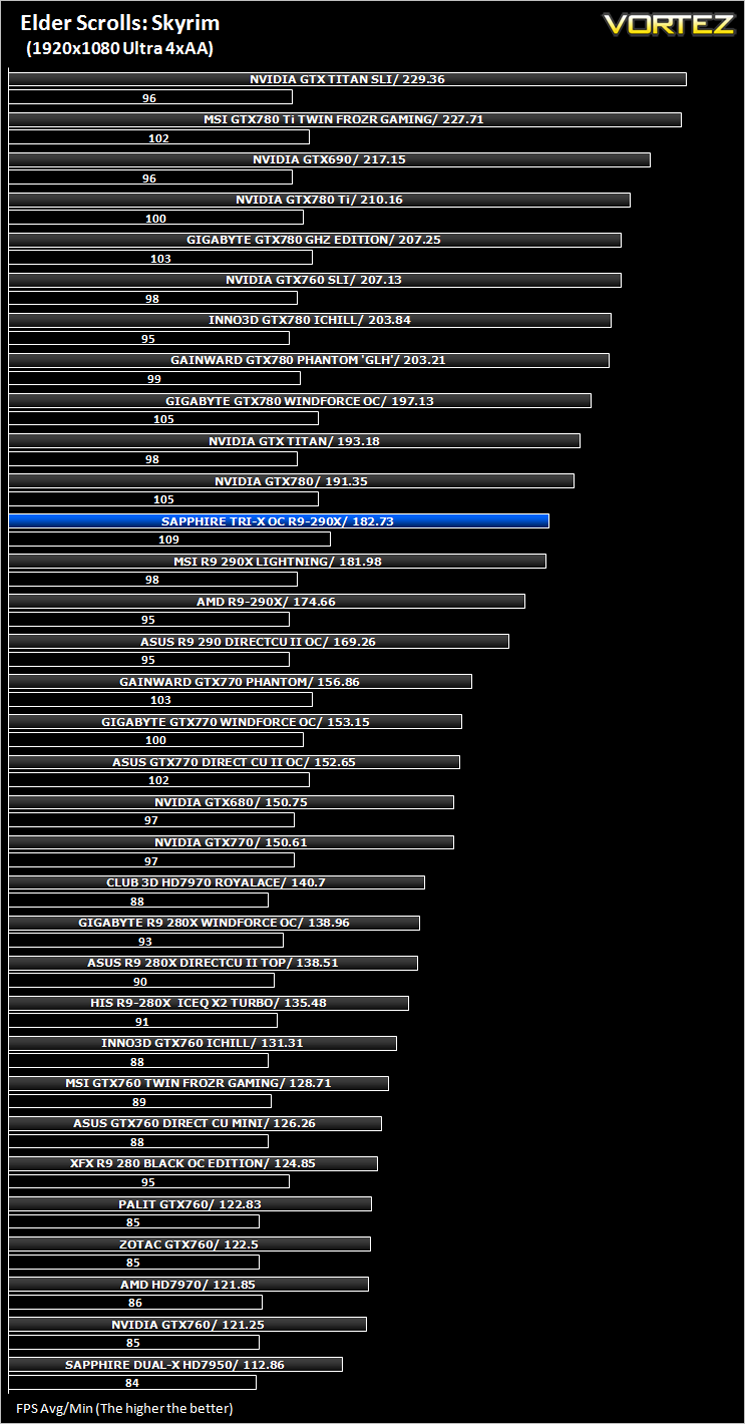
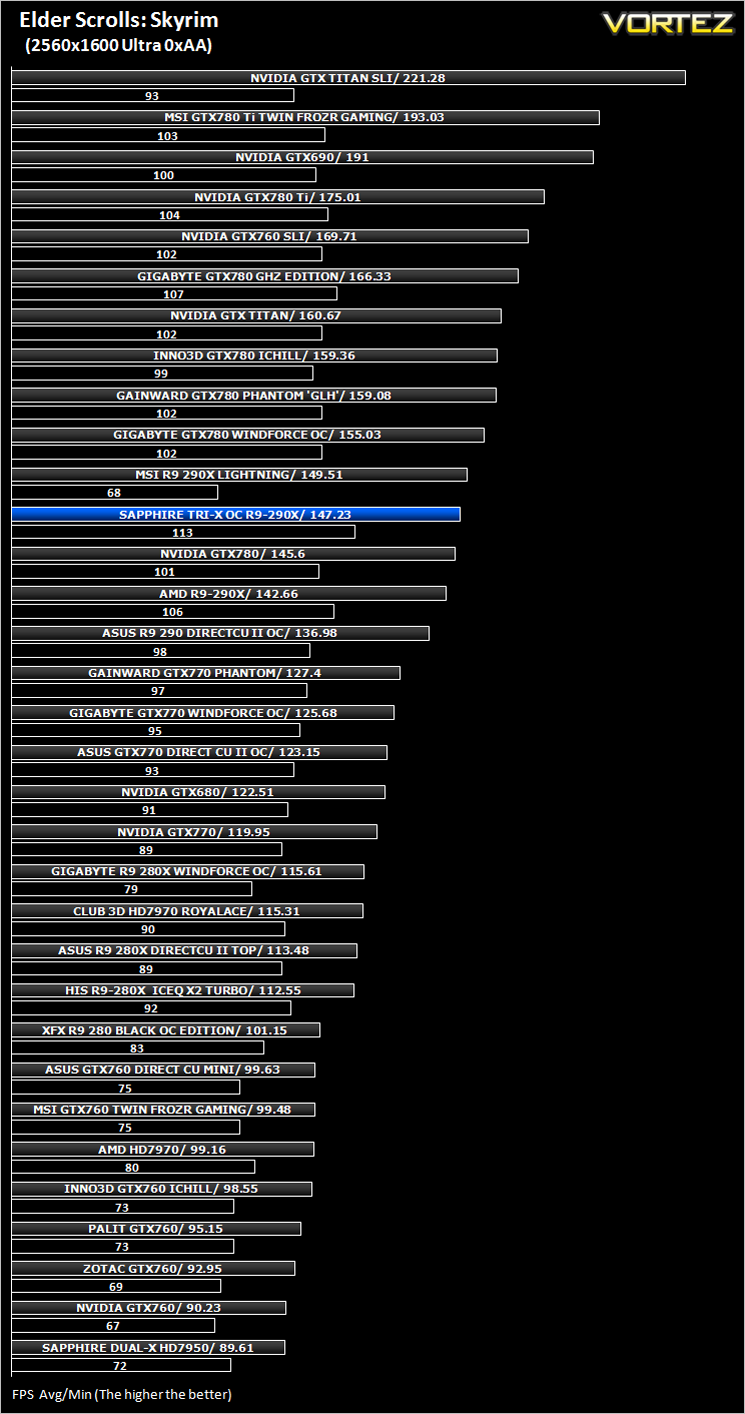
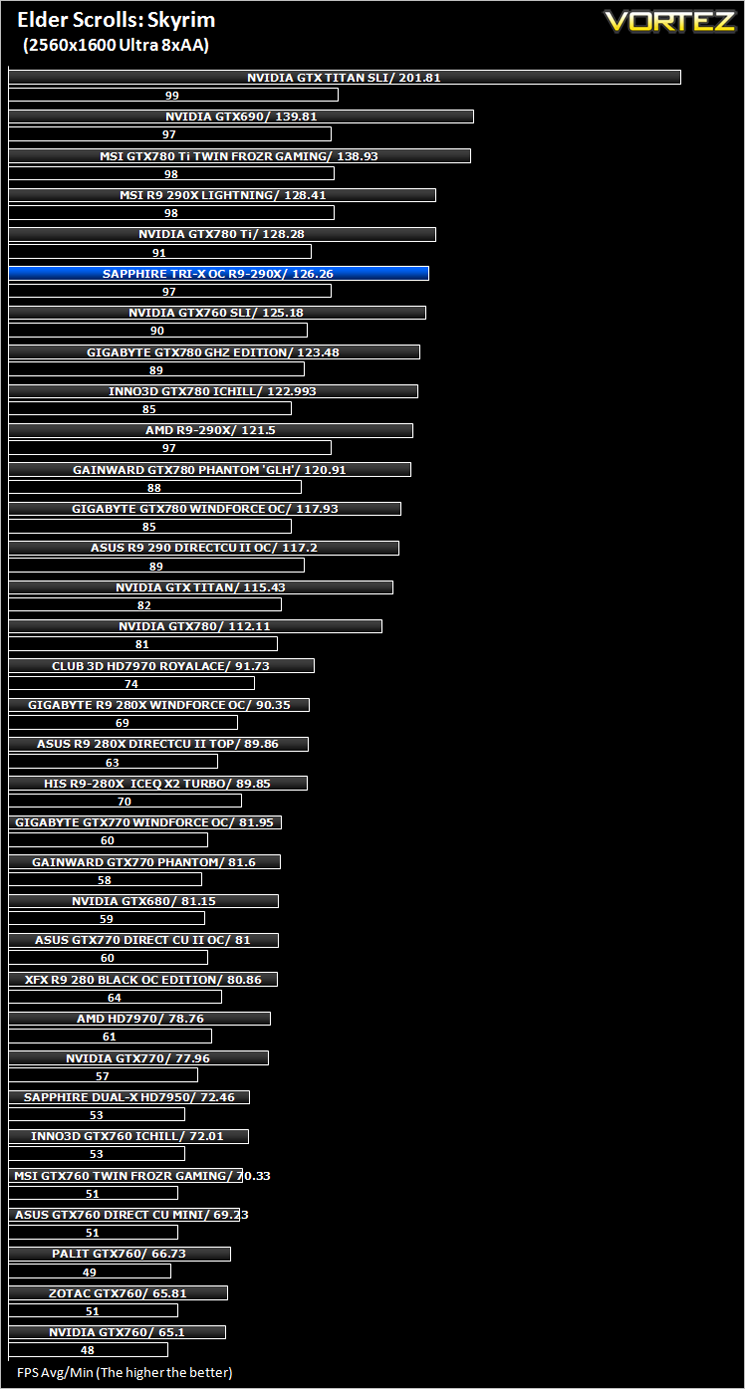
Average and minimum frames per second were measured using Fraps during the drop down passage to Riverwood. V-sync was disabled to allow fluctuating (higher the 60) FPS for these runs. It is however recommended that v-sync is left enabled during normal gameplay due to the games dynamics.
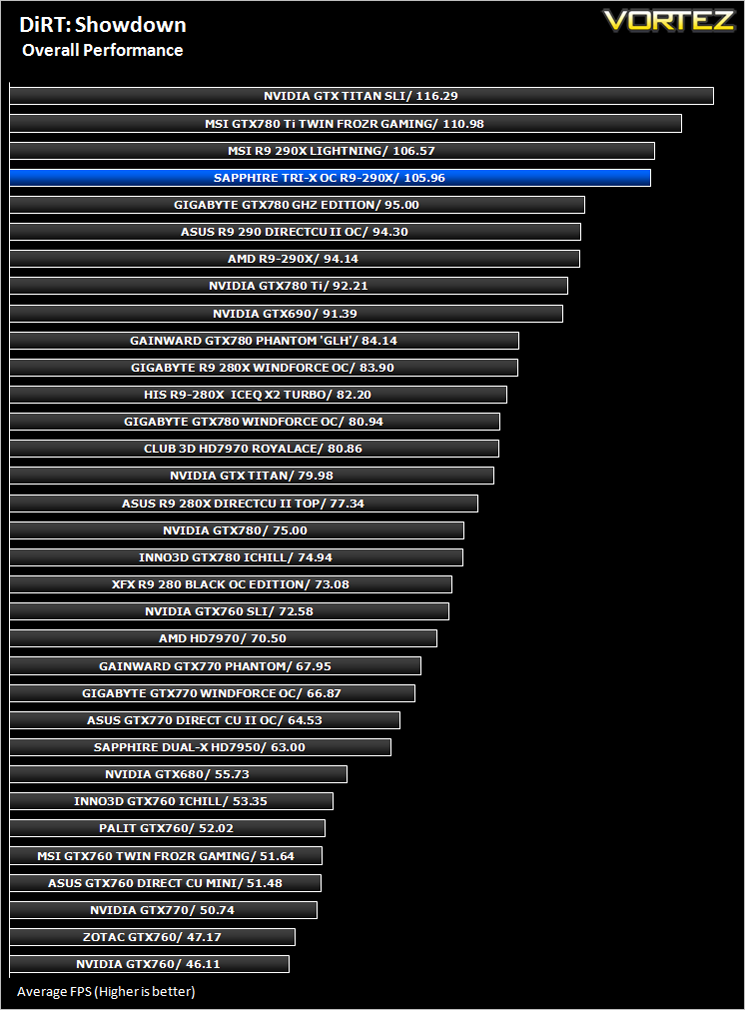
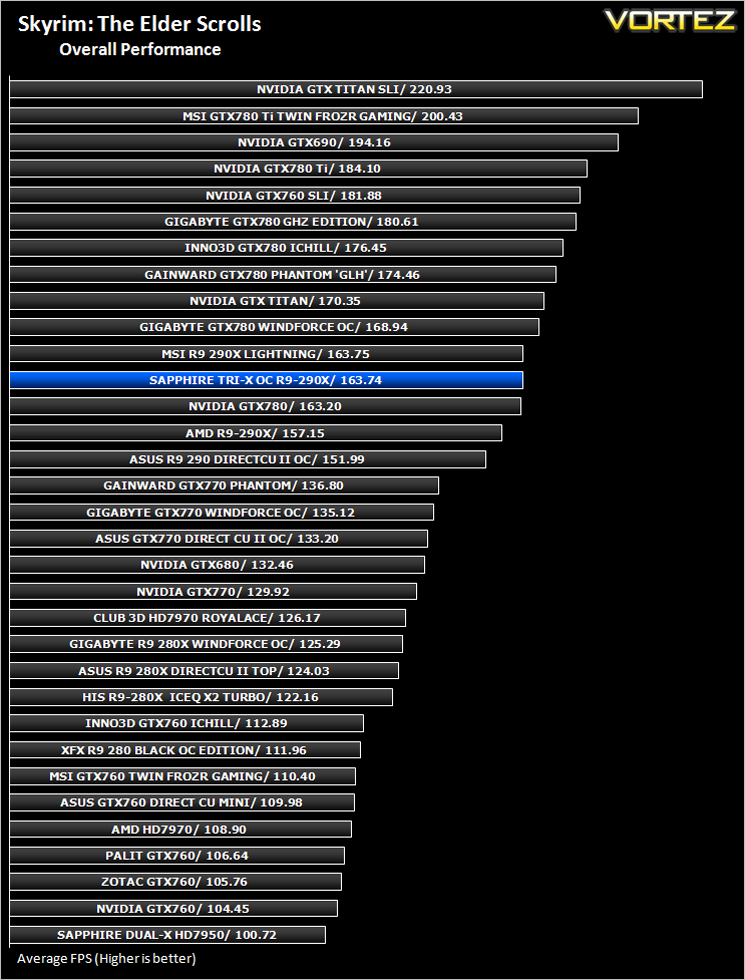
Overall Performance
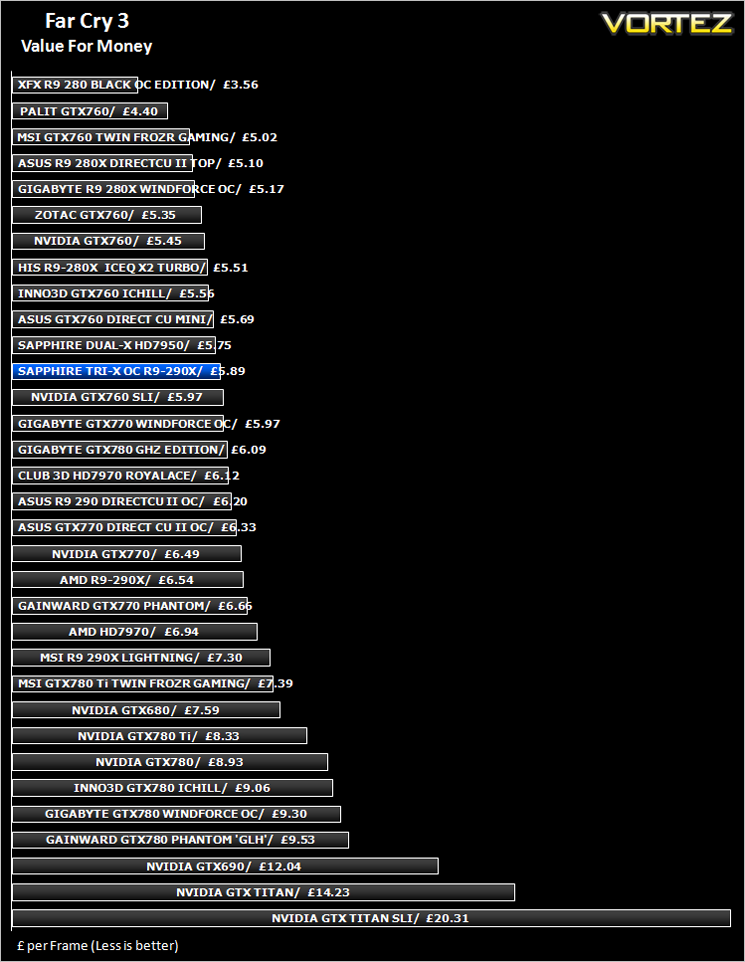
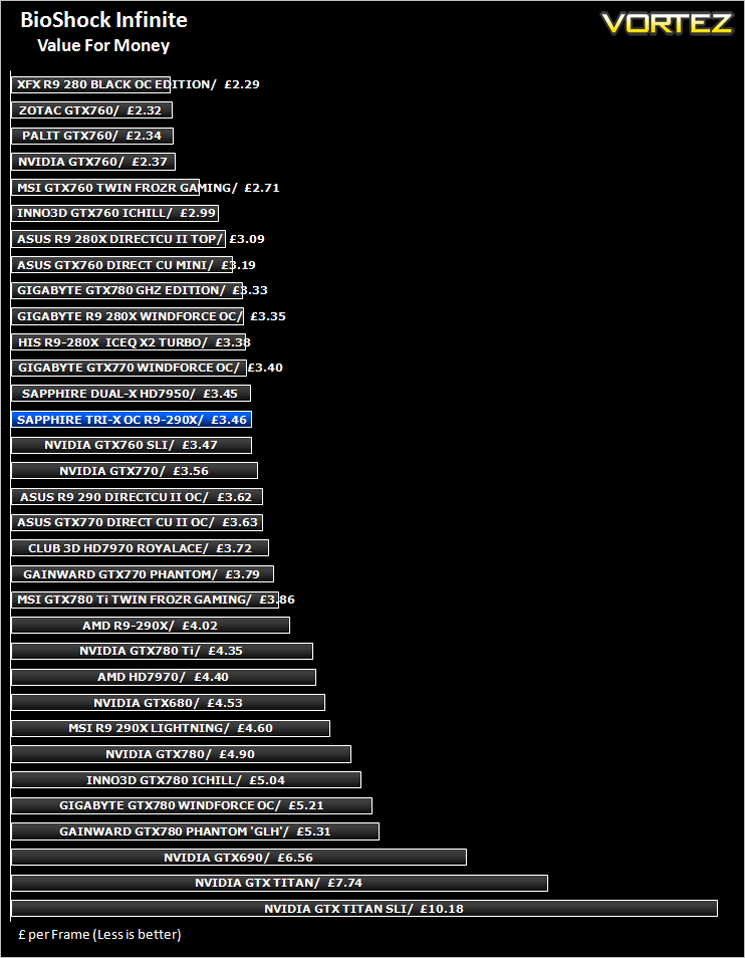
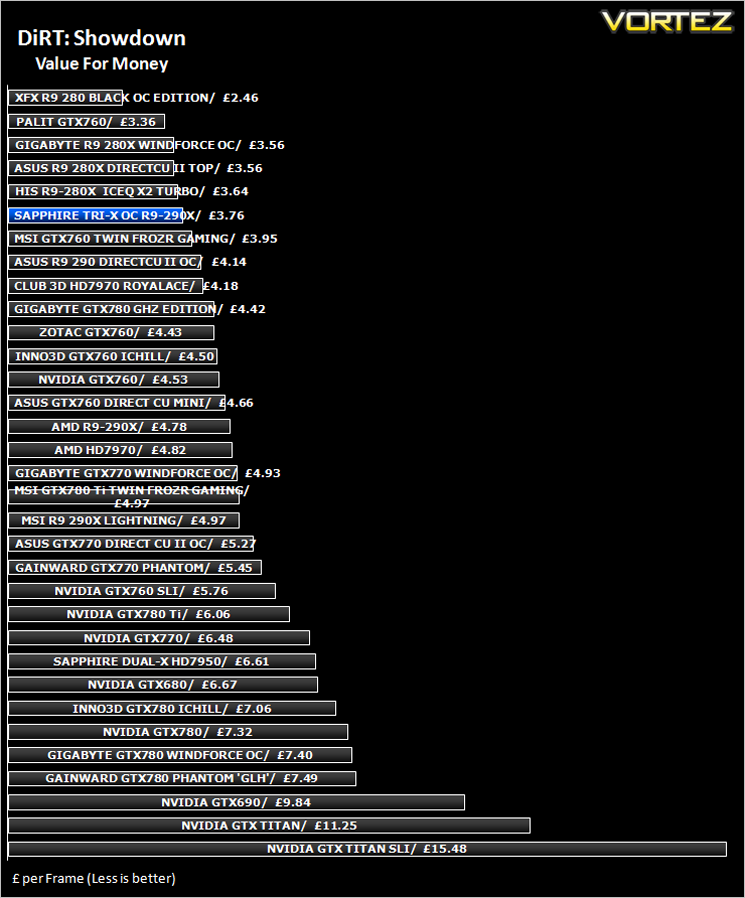
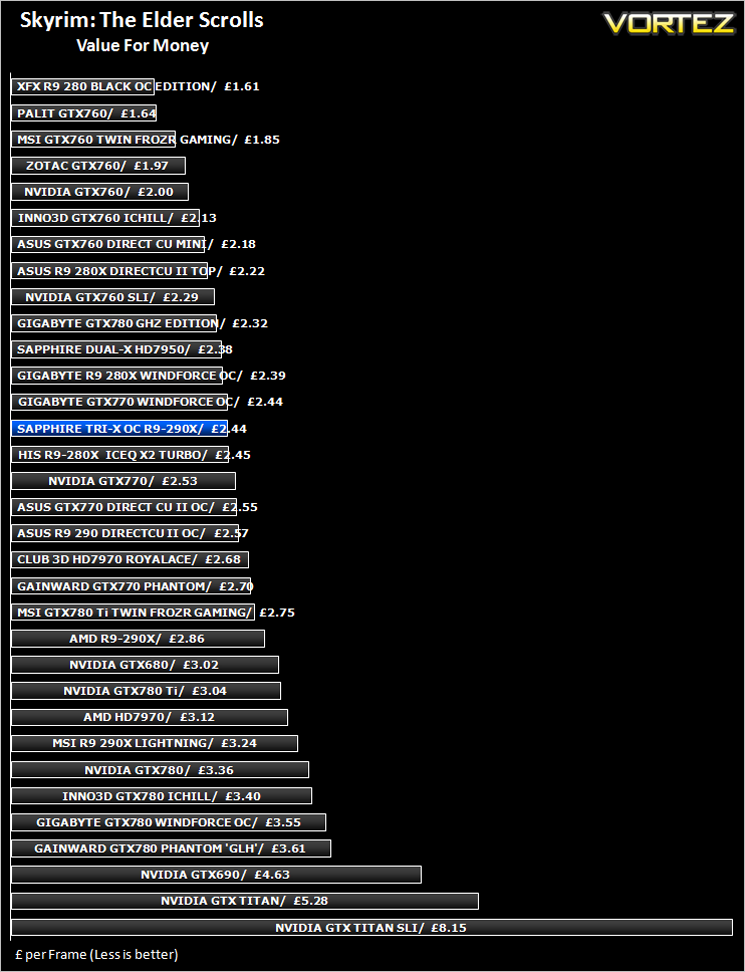
Value For Money
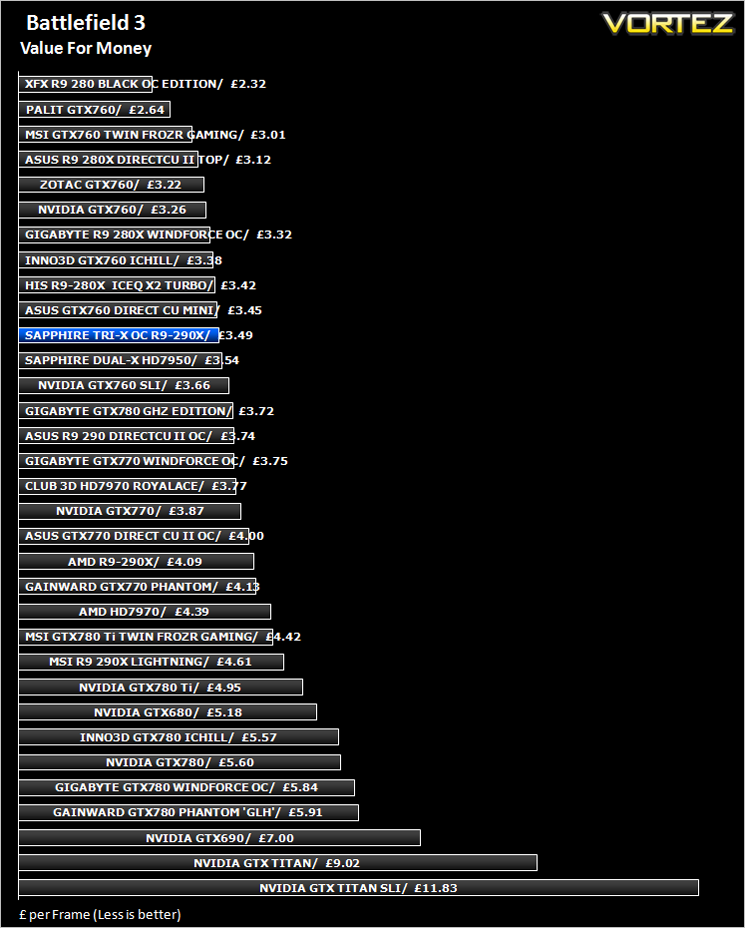
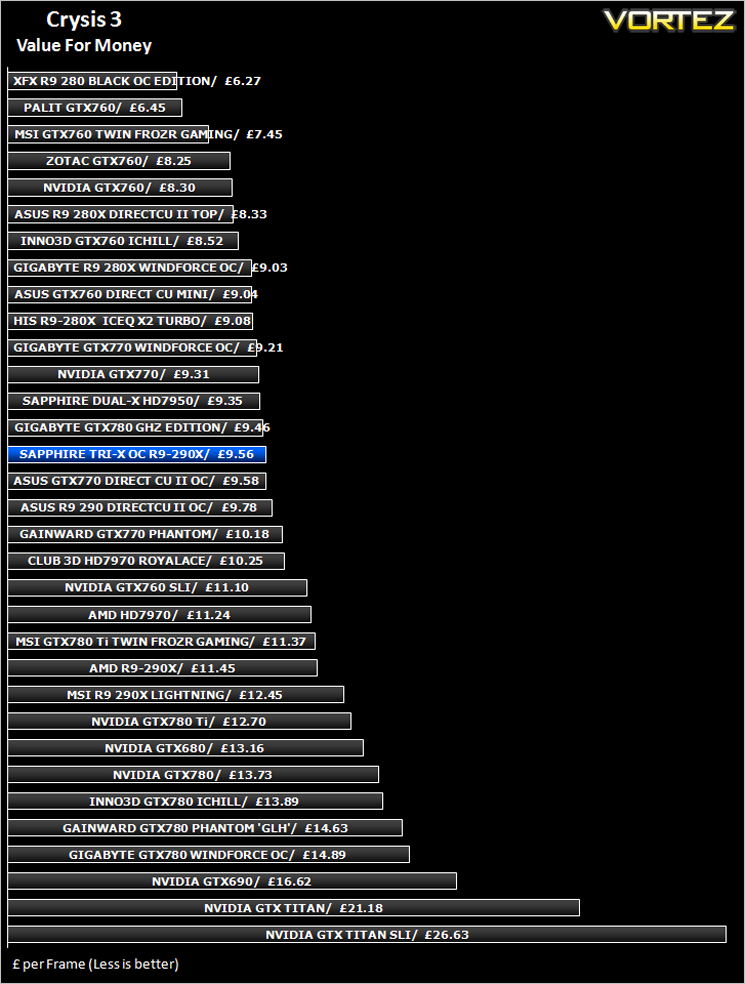
Conclusion
Let us set the record straight here by saying the AMD R9-290X is far from a bad graphics card. It is seriously powerful and will serve most gamers looking for a top-end graphics card very well. It does however have some serious flaws, highlighted in our review of the reference design, those being namely noise and heat. What Sapphire have done is resolved these issues by slapping an oversized yet aesthetically pleasing heatsink atop of the reference PCB. They didn’t stop there either as they tweaked both memory and core clockspeeds with this OC (overclocked) version. While it wasn’t quite enough to hit the top of our performance charts or indeed de-throne the GTX 780 Ti as the performance king, it made some very large strides in the right direction and for this reason it deserves credit.
At £400, it is a sizeable chunk cheaper than the NVidia alternative so when you consider a saving of around £150 for not a lot less performance, the Sapphire TRI-X R9-290X begins to make a lot of sense. It cannot be labelled as a cheap component by any stretch of the imagination but then it isn’t overpriced either. Your £400 investment will buy a lot of graphics power and a wealth of features. Couple this with near silent running and plenty of overclocking headroom to play with and the Sapphire card becomes a very attractive proposition indeed.
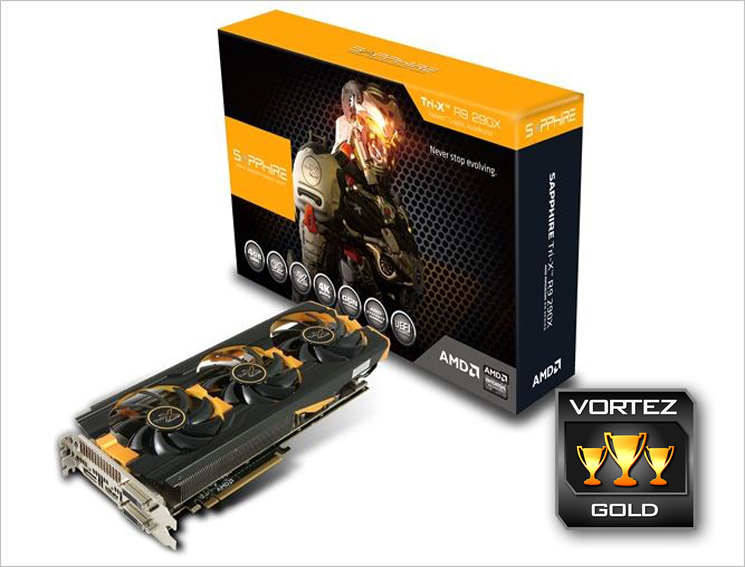
So then, it is fairly priced, has plenty of grunt on tap and is pleasing to the eye – what’s not to like? Well, unless you’re an avid fan of the green team not a lot in truth as we have struggled to find a single note worthy criticism of this card. For this reason we are awarding it our Gold award. While it isn’t the performance king we were hoping for, it is perhaps the best balanced card between high performance and price we have reviewed for some time and for this reason you would be foolish not to have it among your top picks when shopping for your next GPU upgrade.
To summarise:
A very fast, very quiet, very cool and very good looking product that thanks to Sapphire, would be at home in any high performance gaming PC.
+ Great Performance
+ Excellent cooling
+ Good factory overclock
+ Fair price
Cons
– Nothing significant


