







Looking for a unique system building experience – make way for the FT03 case taken from the Fortress Series. The paradigm for computer chassis.

Product on Review: Fortress FT03.
Manufacturer and Sponsor: SilverStone
MSRP: £95 inc.VAT (GBP)
Silverstone or SilverStoneTek as they are sometimes referred to have been around for almost a decade and came to prominence shortly after launching the TJ07 back in 2005. Since then they have had an onslaught of computer chassis that have rocked the enthusiast world and it is today that we reviewed our first SilverStone chassis taking from the Fortress Series – the FT03.
The FT03 redefines the way we look at case design. It has a unique layout that sets it apart from other brands with their traditional computer chassis and hopes to channel in to the imagination of the enthusiast by offering something diverse and exciting.
So let’s waste no further time and explore SilverStone’s Fortress FT03.
SilverStone’s own thoughts on FT03
As SilverStone engineers started working on the third model for the Fortress series, they had contemplated on the future of computer chassis and ways to improve it for home/office integration. So the Fortress FT03’s design goal was to simply give back as much user space as possible by reducing chassis depth to unprecedented level. The engineers also wanted to accomplish the change in design without compromises to the chassis’s ability in accommodating upper mainstream components. Traditional computer chassis designs take up desktop room by not only their physical footprint, but they also require additional space for cable connections. With the FT03, there are no such restrictions because its beautiful, 2.5mm thick, sand-blasted and anodized aluminum outer shells have no cable connectors to be found on all four sides, which frees up tremendous amount of desktop real estate for its users.
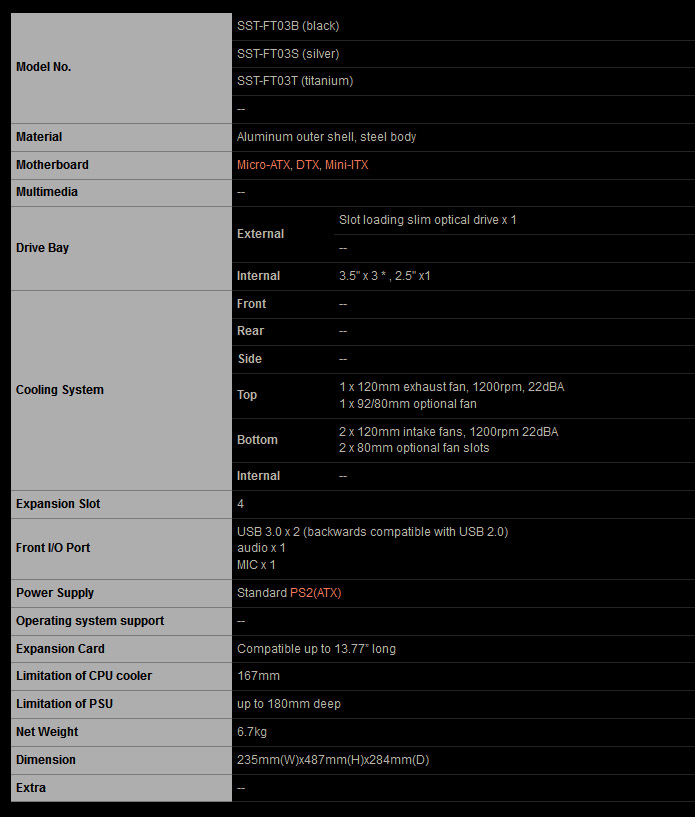
Technical Specifications
Packaging & Exterior
FT03 is presented in a tall attractive looking box. SilverStone have put two depictions of the chassis on the front and listed significant features. These two images of the FT03 show the case in black and white – our review sample is infact the “Titanium” version as signified by the text in the top right corner.
Inside, FT03 is covered in a clear plastic sheet and two polystyrene blocks sit at the top and bottom of the chassis to ensure its safe arrival whilst in transit.
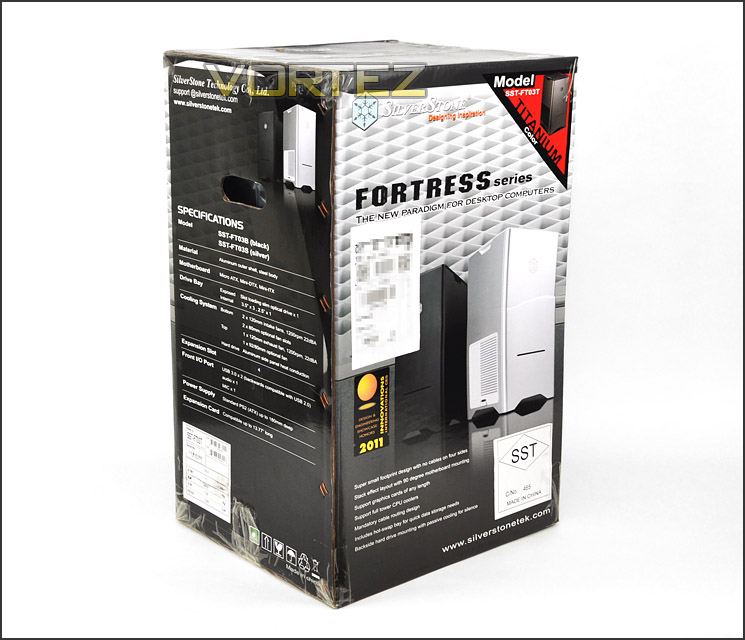
The packaging for FT03
With FT03 out of its packaging the first thing to note is its dimensions – this chassis is tall and thin when compared to the traditional computer chassis. We’ll see as we go into this review that the orientation of how hardware is arranged inside is completely different too.
All side panels on FT03 are aluminium and extremely sturdy. The front features a metallic SilverStone emblem. The front also has a horizontal incision – this feature allows a slot loaded slimline optical drive to be installed.
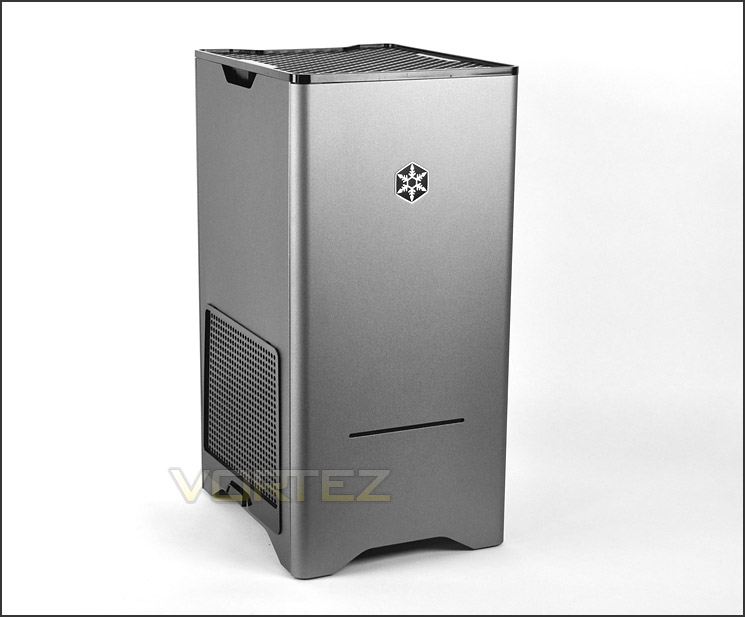
The front of FT03
FT03 looks very similar on all of its sides – the left side does offer some difference by way of a plastic ventilation panel though. This panel is glossy and plastic and it does cheapen the look and feel of the case somewhat.
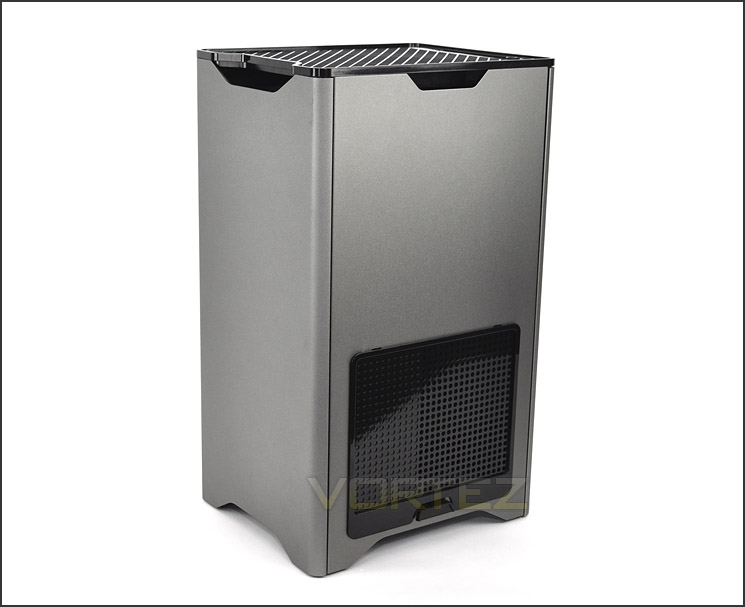
Ventilation panel on the side of FT03
Moving to the top of the FT03 there is a large glossy plastic panel – this has the front panel connectivity running along the edge. Included here are the power and reset buttons with LEDs, 2x USB 3.0 ports (via USB cable) and headphone and microphone jacks.
Although the inclusion of a USB 3.0 motherboard header cable is usually preferred nowadays and the USB cable is generally regarded as a hassle to root to the I/O on the motherboard back panel this is not so with FT03 because underneath this top grill is where the I/O resides so it is far easier to have these ports attached to a USB cable than a header – having a header would mean this would then need to be rooted inside the case and onto the motherboard.
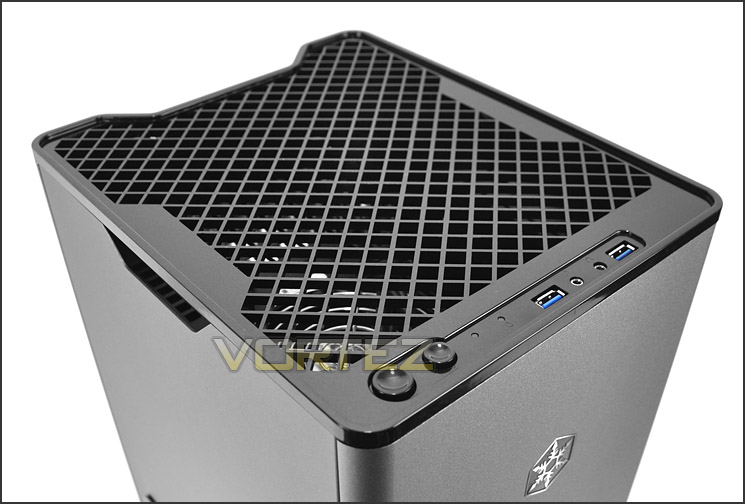
The front panel controls include USB 3.0
Finally onto the underside of FT03. There are 4x rubber feet on the edge which prevent the case from moving whilst on smooth surfaces and there is a large fan filter that covers two areas. This fan filter is held on via sticky tape – on first impressions this might look like SilverStone are cutting corners but this sticky tape is simply on to keep the filter attached to the case during transit. The fan filter has magnets and attaches to the PSU when it is installed!
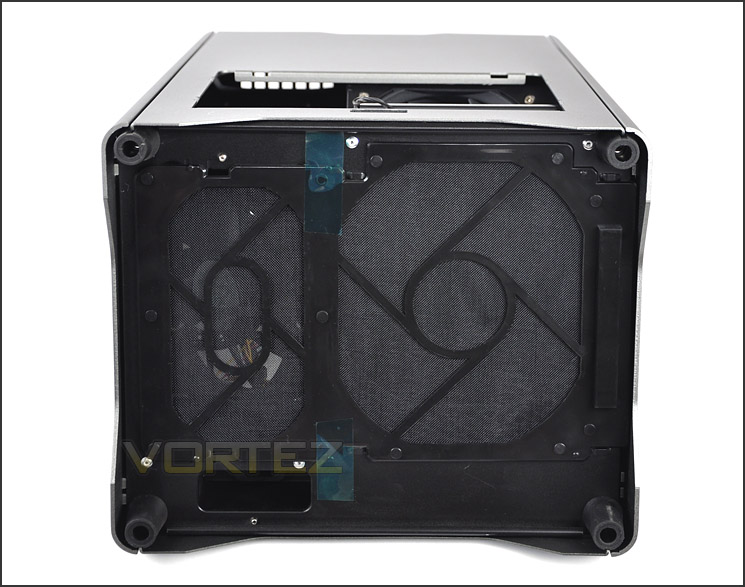
The underside of FT03 with dust filter
With the external inspection over, let’s move inside for a closer look at the interior.
Interior
The panels on FT03 are aluminium and are not secured in the typical manner with a thumbscrew. Two of the panels slide in and upwards motion for removal and the other two panels pop on and off with a firm push/pull.
With these panels removed we can observe what the inside has to offer. First of all we will take a look at the left side of FT03 – this is the side which will provide a view over the hardware of the system and would typically be the prominent side. FT03 can accommodate mATX as its biggest form factor, as you can see from the picture below space for hardware is very limiting.
Behind the motherboard tray on the alternate side there is space here to install HDDs in a variety of locations. There are three spaces for 3.5” drives and just one space for 2.5”. This section of the chassis will accommodate the cable management. Cables from the PSU and HDDs will need to be routed to and from this area – there are cut-outs on the motherboard tray to thread through to the motherboard.
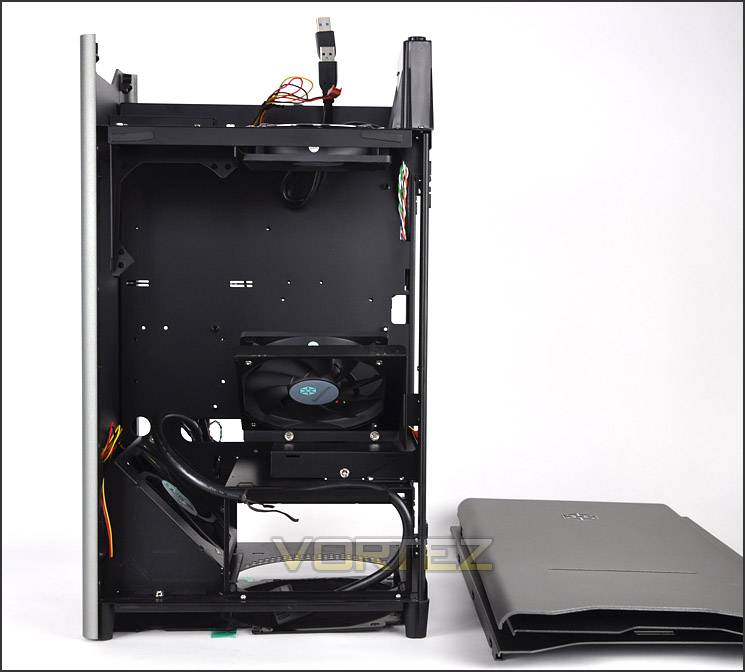
Prominent side panel removed
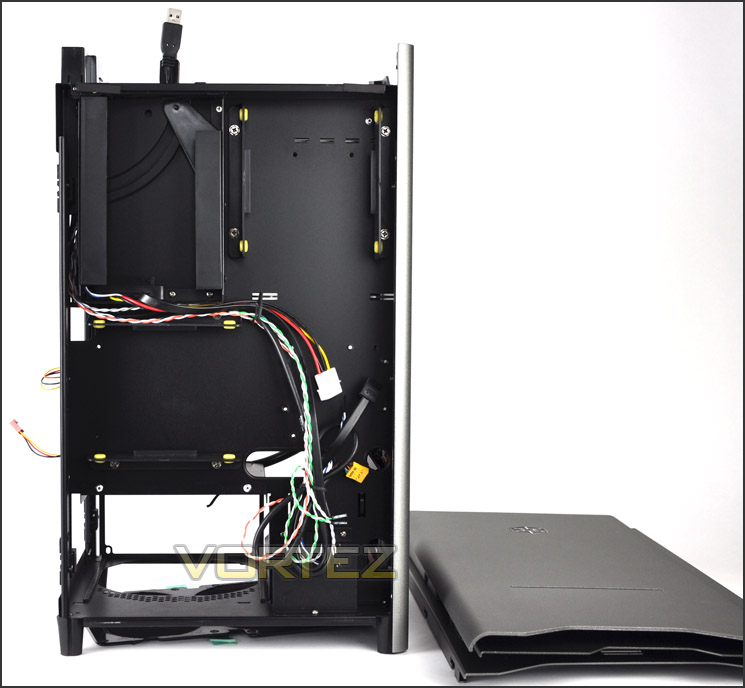
Behind the motherboard tray
The PSU area is located at the bottom of the chassis with dual rubber pads to cushion the seating. This section, as already mentioned features a removable dust filter that attaches via magnets to the underside of the PSU.
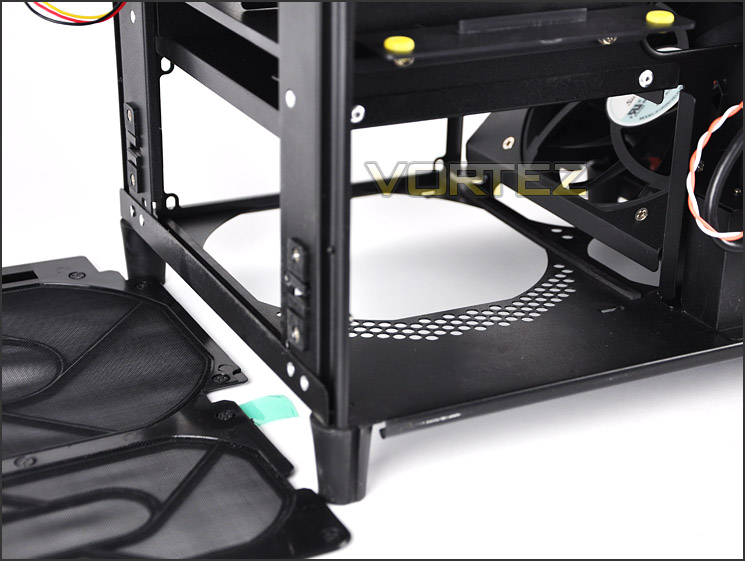
The PSU seating area
Inside FT03 there are a total of 3x 120mm cooling fans each rated at 1200RPM and 22dBA. The two that are pictured are positioned to be intakes and blowing air onto the components. The other fan is located at the top of FT03 and is an exhaust.
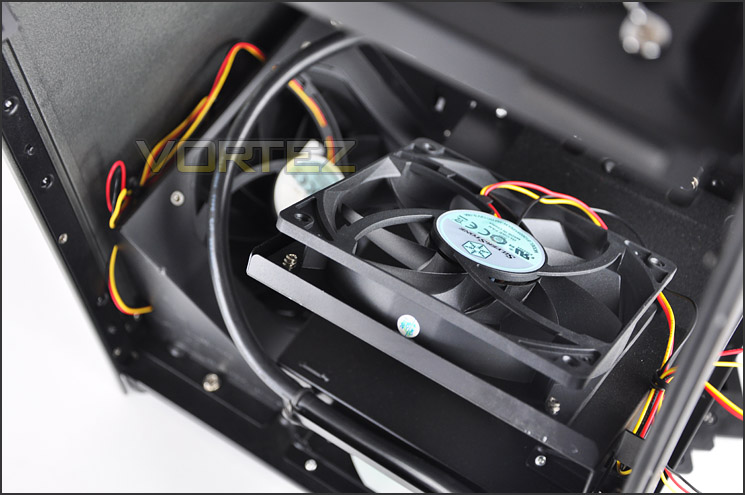
A total of 3x 120mm fans inside FT03
After removing the grille from the top of FT03 we can gain access to the PCI expansion slots and 120mm exhaust fan. This would typically be at the rear of the traditional case but as SilverStone have designed it, the airflow will be pushed up and out of the top. The design of FT03 is quite ingenious as we all know – heat rises!
This top panel has a total of 4x PCI expansion slot covers. Each come with ventilation cut-outs and are secured via the standard screw (not thumbscrew). The 120mm exhaust fan is as the other fans within FT03 – rated at 1200RPM and 22dBA.
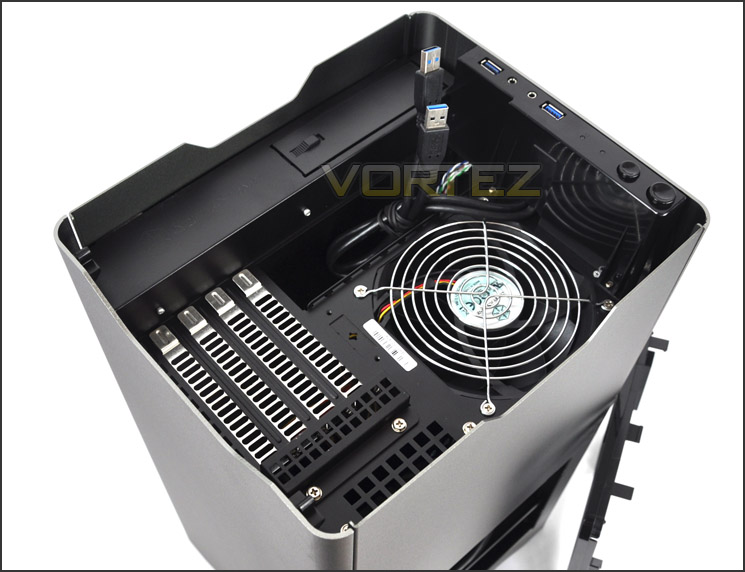
The top of FT03 with 120mm exhaust fan and 4x PCI expansion slots
On the next page we will install a mATX system inside FT03 and reveal how this case handles hardware installation.
Installation
Installing kit inside FT03 is very different to that of the common ATX computer chassis. Getting the mATX motherboard inside with the CPU cooler already attached did prove difficult – the top exhaust fan and a bracket needed removing and after some give and take the motherboard finally sat on the standoffs. Due to the compact size within FT03 it does take more time getting such cables and other items plugged in. Hardware must be installed in a certain order.
As you can see from behind the motherboard tray arranging cables inside FT03 is very easy and I really do like the idea of having the HDDs sat behind this area and tucked away.
The idea of having hardware installed in this orientation is fresh and it would be great to see more cases like this, especially entertaining a bigger form factor such as ATX and dare I say it – even XL-ATX.
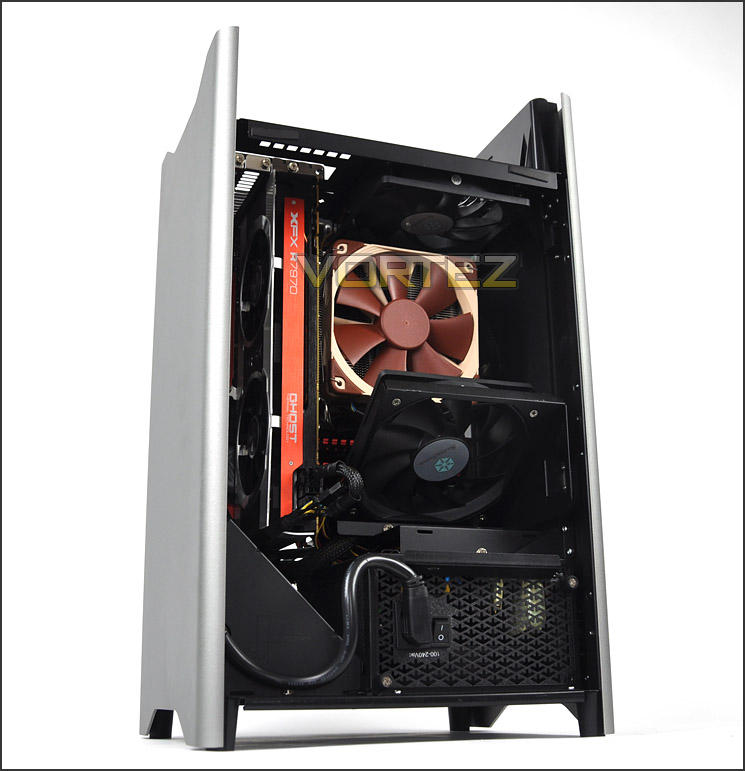
A fresh new approach to hardware orientation
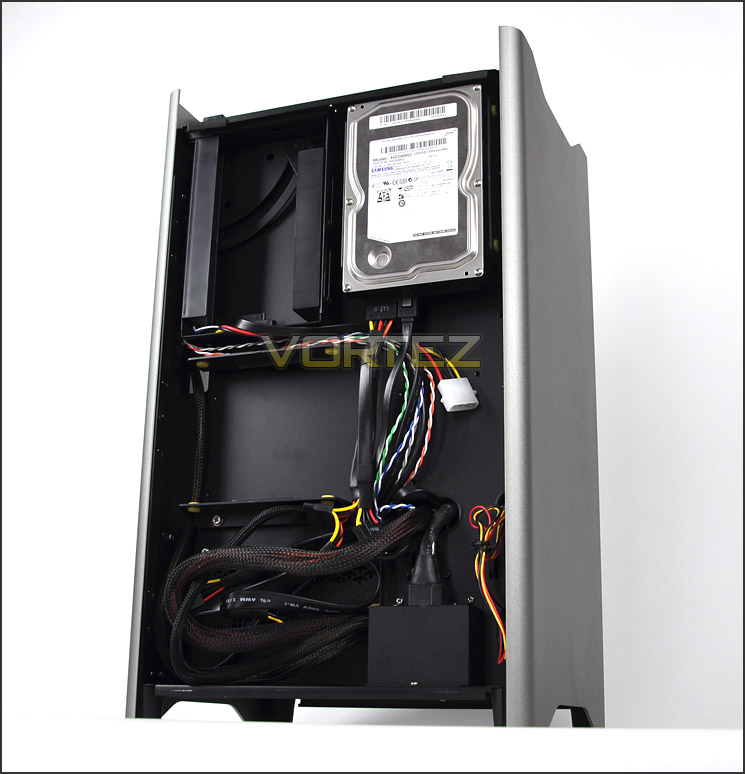
Behind the motherboard tray – cable management is taken care of
HDDs are installed in a variety of spots behind the motherboard tray. For the installation I have installed just one 3.5” drive. SilverStone have designed the FT03 very well – the cables for the HDD simply run straight down and the cut-out is right next to the SATA ports on the motherboard.
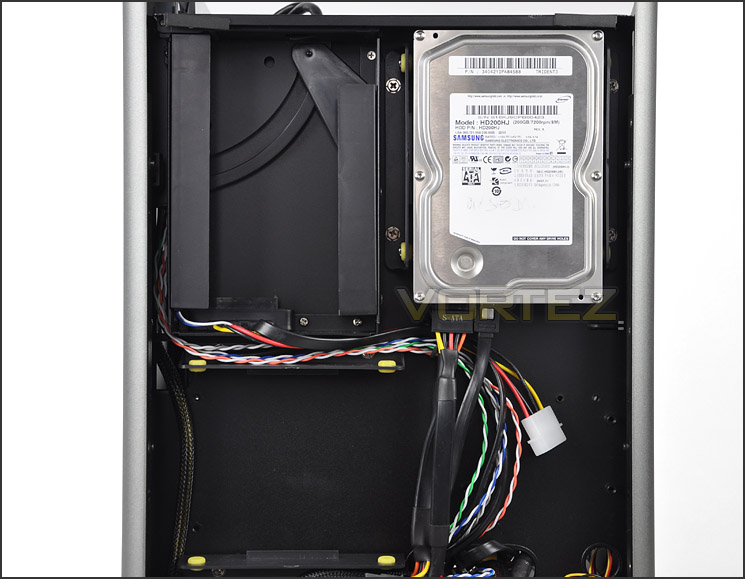
HDD installation and cable management is easy
Though space is fairly tight with a mATX system installed, memory with tall heatsinks will still fit without any problems. It’s recommended that the cables for the 120mm fan and 24-pin ATX motherboard cable are installed first behind the memory though as its quite difficult to get at with the modules plugged into the slots.
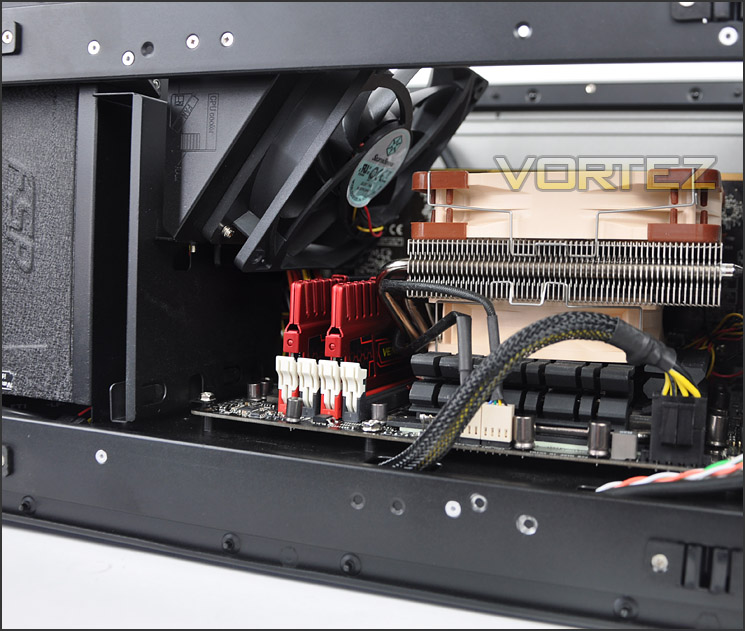
A view into the system from the front of FT03
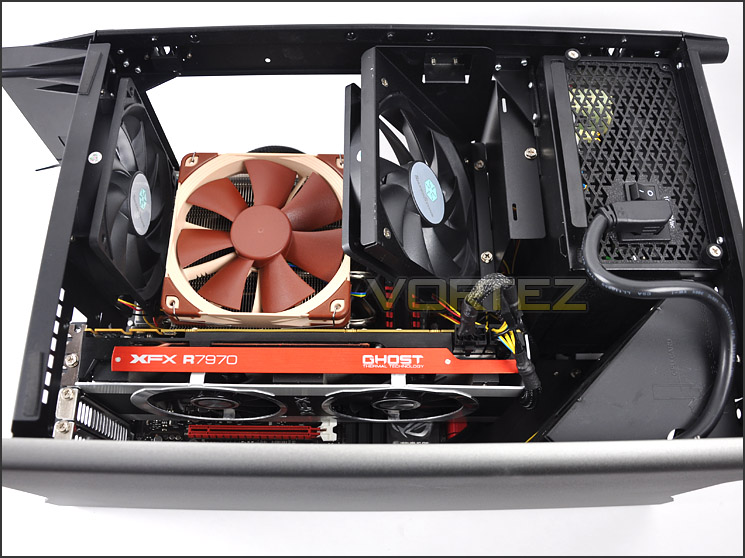
An overview of the system – very tidy
Clearance – CPU, GPU, Cable Management
Clearance inside a chassis is essential to enthusiasts and even more so with FT03 being so compact. In this section we will investigate how flexible this chassis really is.
First up is the CPU Cooler. SilverStone reference a maximum CPU cooler height of 167mm on their website and they aren’t wrong. FT03 will therefore accommodate the flagships – Noctua NH-D14 and Thermalright Silver Arrow (these are both 160mm). Installed within FT03 is the new Noctua NH-L12 CPU Cooler. This is of course low profile and ideal for HTPC/mATX usage.
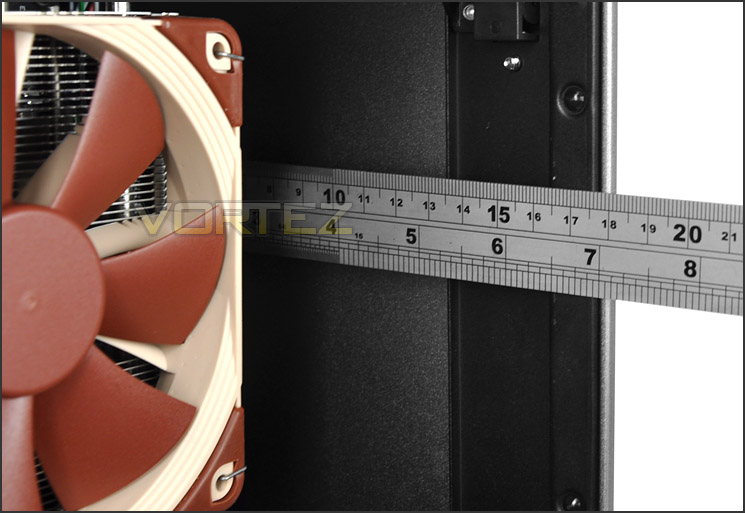
A maximum of 167mm for CPU coolers
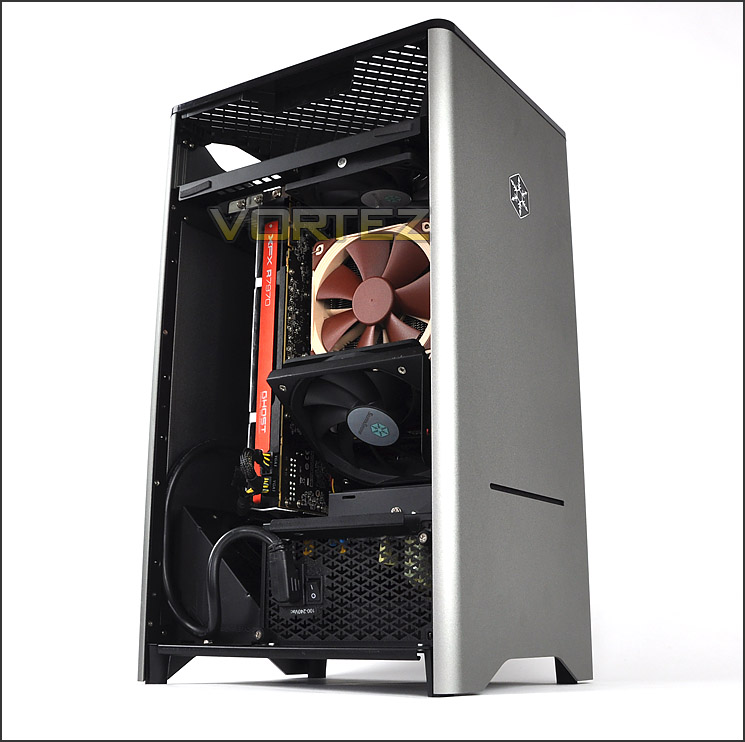
For the graphics card there is a bit of limitation with the 120mm fan bracket as it comes at stock. Shown in the picture below the XFX R7970 Black Edition had to reside in the top PCI-E lane else it would touch the bottom of the fan bracket. This card is under 11” in length. This fan bracket can be removed to accomodate long graphics cards and dual configurations though cooling will come at a sacrifice for clearance.
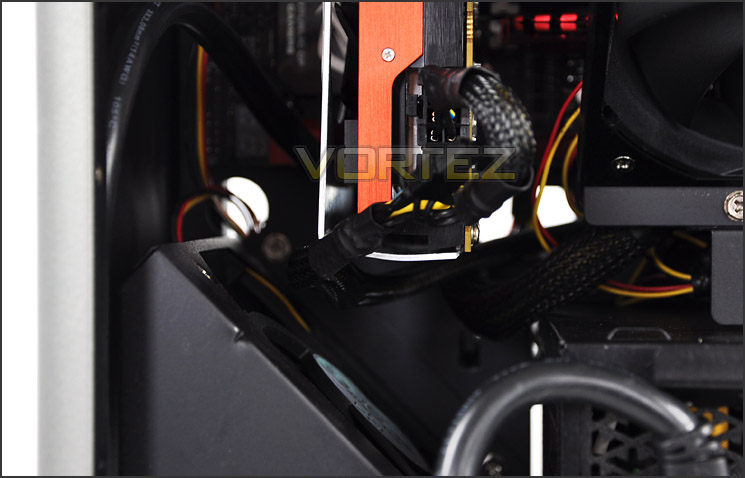
Graphics card clearance with bottom fan bracket still attached within FT03
Behind the motherboard tray there is lots of space. The fact that HDDs can installed on this panel should offer a small hint at what you can get away with but as per the picture below there is a total clearance of up to a whopping 4.5cm!
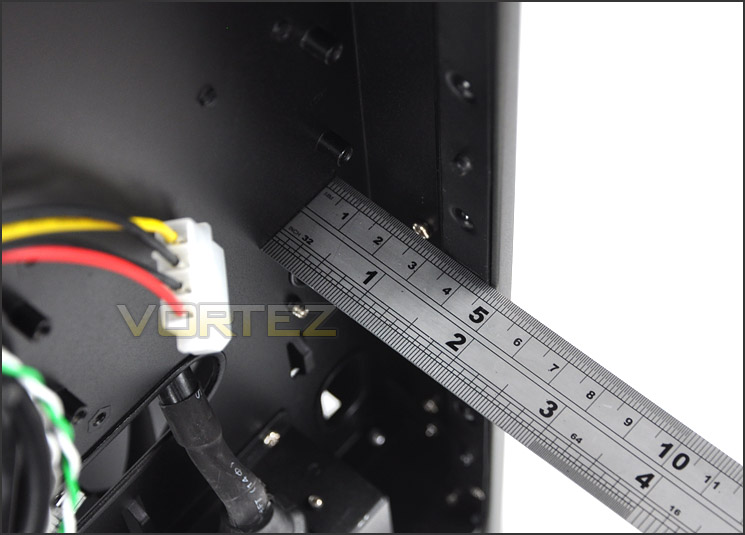
Clearance behind the motherboard tray is very generous
Thermal Performance Testing
Since FT03 is designed to cater for a maximum form factor of mATX a new system has been dropped into the case using the new Z77 chipset (ASUS Maximus V Gene). With no other cases to compare against the temperatures will have to be taken as they are. Inside FT03 there are 3 pre-installed fans. These fans are located at the top and bottom of FT03 and will push airflow up and out of the chassis. FT03 has been designed with heat dissipation in mind and it will be interesting to see whether this case will extract heat well.
To discover the thermal performance of the FT03 I will record idle temperatures after 20 minutes from a cold boot. I will then stress the system and temperatures will again be monitored after 30 minutes have elapsed.
For the purpose of accurate analysis the idle and load temperatures for CPU and GPU will be recorded and the range between idle and load will be calculated to determine how efficient cooling is.
NOTE: Ambient temperature is 20C
System Components
CPU Intel Core i5 2500K
Motherboard ASUS Maximus V Gene
Graphics XFX R7970 Black Edition
Memory 8GB Corsair Vengeance 2133MHz
HDD Samsung Spinpoint 500GB SATA-II
PSU FSP Aurum GOLD 650W
THERMAL PERFORMANCE WILL BE REVALED AFTER INTEL Z77 NDA HAS LIFTED
Conclusion
We first bumped into the SilverStone Fortress FT03 when reviewing the Scan 3XS FT03 ROG SLI and having observed it from a pre-built system perspective it was certainly a stunner.
It’s great to have finally been able to unbox the FT03, see how things look inside its empty chassis and build a system within. From start to finish this case is a delight to work with – it may take some time due to the compact interior and tight surroundings but if you are happy to take your time then the potential for creating an attractive looking system is certainly there.

What I like most of all about the FT03 is the way SilverStone have thought outside of the box with this chassis. They have dared to go where no-one else has and having hardware installed in the orientation we are presented with creates a fresh outlook. It would be great to see more cases like this on the market and it would be nice to see a bigger variant capable of sustaining ATX and even XL-ATX.
Priced at around the £90 mark, FT03 is a good value for money offering if you are looking to get a mATX system up and running in something that is a little bit quirky. It is our pleasure to award the FT03 with Vortez – Gold Award.
FT03 has excellent build quality and cable management design to suite. If you are on the hunt for a unique computer chassis for your mATX rig then look no further!
Pros
+ Unique layout/looks
+ Excellent build quality throughout
+ Great for cable management
+ Good thermal performance
+ Attractive pricing
+ Available in 3 different colours
+ Uses minimum space in office/workspace
Cons
– Installation takes longer
– mATX is maximum form factor
+ Unique layout/looks
+ Excellent build quality throughout
+ Great for cable management
+ Good thermal performance
+ Attractive pricing
+ Available in 3 different colours
+ Uses minimum space in office/workspace
Cons
– Installation takes longer
– mATX is maximum form factor

Click here for an explanation of our awards at Vortez.net.


