







The fifth instalment to the popular Fortress Series is here, featuring dual Air Penetrator 180mm cooling fans and numerous innovative features.

Product on Review: Fortress FT05
Manufacturer & Sponsor: SilverStone
Street Price: £138 GBP / $184 USD
Around this time of the year SilverStone release their next instalment to what have become two very popular product lines for them. One such product line is SilverStone’s highly revered Fortress Series which has captivated hardware advocates for a number of years now and today we have the pleasure of looking at the fifth rendition, namely FT05.
Just like previous generations, the Fortress FT05 adopts a similar internal design as the Raven RV05 but brings a touch of elegance to the table by being styled with minimalism as an integral feature. Inside, SilverStone has included some exciting features such as dual Air Penetrator 180mm fans, a rotated motherboard tray, quick-release side panel latches and much more! Join us as we explore this new computer chassis.
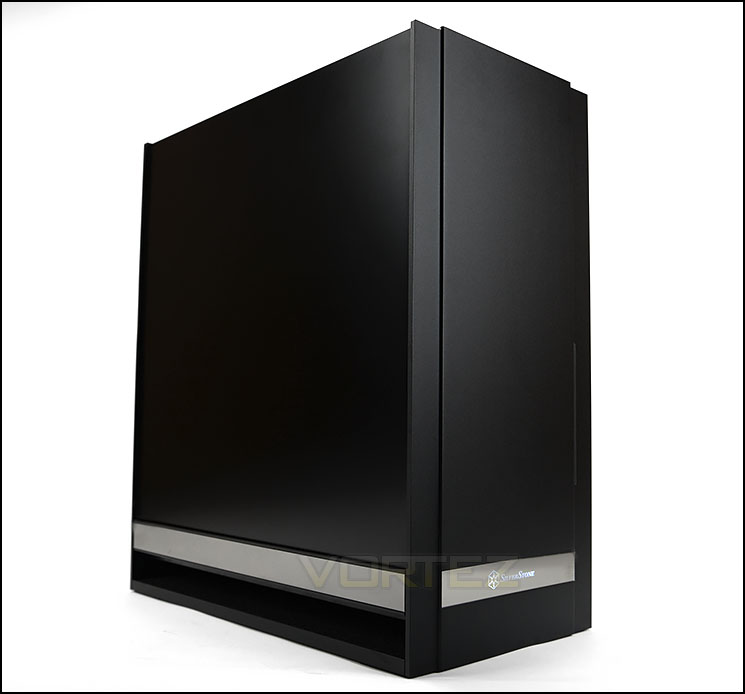
SilverStone on their Fortress FT05
The Fortress FT05 represent SilverStone’s continued dedication in improving and reinventing computer chassis design. Similar to the RAVEN RV05, it no longer has any 5.25” drive bay and utilizes SilverStone’s fame 90 degree rotated design. Previous full ATX SilverStone chassis with 90 degree layout often had to compromise on space efficiency due to fixed length of the motherboard in rotated orientation. So the elimination of 5.25” bays solves this issue naturally and enables FT05 to be not only more balanced in proportion but stunning in its design thanks to its thick wrap-around aluminum exterior.
Technical Specifications
Model No.
SST-FT05B (black)
SST-FT05S (silver)
SST-FT05B-W (black + window)
SST-FT05S-W (silver + window)
Material
Aluminum front, bottom, and rear panels, steel body
Motherboard
SSI-CEB, ATX, Micro-ATX
Drive Bay
External: Slim slot-loading optical x 1
Internal: 3.5″ x 2, 2.5” x 2
Cooling System
Top: 120mm fan slot x 1
Bottom: 180mm AP fan x 2, 600/900/1200rpm, 17/25/34dBA
Downward compatible with 120mm fan x 3, or 140mm fan x 2
Expansion Slot
7
Front I/O Port
USB 3.0 x 2
Audio x 1
MIC x 1
Power Supply
Optional PS2(ATX)
Expansion Card
Compatible with 12.3” long, width restriction – 6.57”
Limitation of CPU cooler
162mm
Net Weight
9.5kg
Dimension
221mm (W) x 483mm (H) x 427mm (D), 46 liters
SST-FT05B (black)
SST-FT05S (silver)
SST-FT05B-W (black + window)
SST-FT05S-W (silver + window)
Material
Aluminum front, bottom, and rear panels, steel body
Motherboard
SSI-CEB, ATX, Micro-ATX
Drive Bay
External: Slim slot-loading optical x 1
Internal: 3.5″ x 2, 2.5” x 2
Cooling System
Top: 120mm fan slot x 1
Bottom: 180mm AP fan x 2, 600/900/1200rpm, 17/25/34dBA
Downward compatible with 120mm fan x 3, or 140mm fan x 2
Expansion Slot
7
Front I/O Port
USB 3.0 x 2
Audio x 1
MIC x 1
Power Supply
Optional PS2(ATX)
Expansion Card
Compatible with 12.3” long, width restriction – 6.57”
Limitation of CPU cooler
162mm
Net Weight
9.5kg
Dimension
221mm (W) x 483mm (H) x 427mm (D), 46 liters
Packaging & First Look
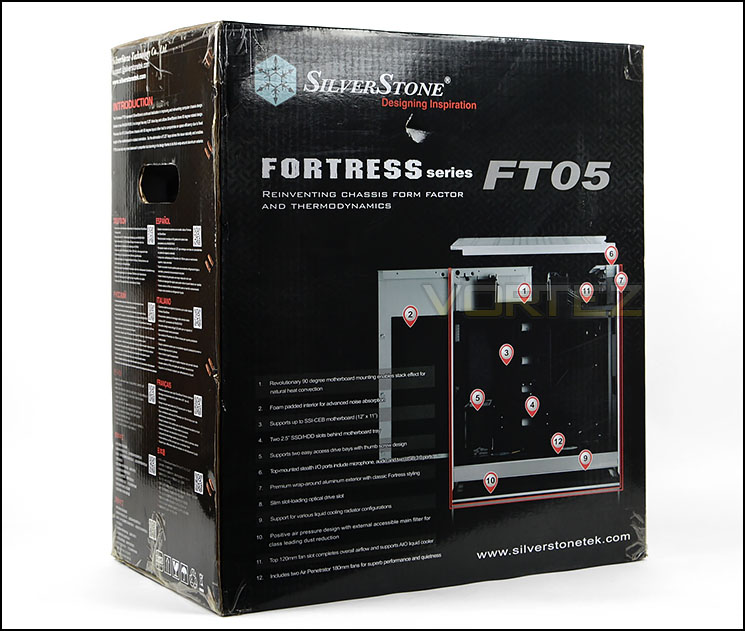
Packaging for Fortress FT05
Arriving in the usual SilverStone packaging, there is nothing unfamiliar about the FT05 box. The front displays a picture of the case and around the back there is a schematic diagram with significant features pinpointed. This box is double reinforced and inside, the case is concealed within a fabric sheet and held in place with dual polystyrene blocks to thoroughly protect FT05 during transit.
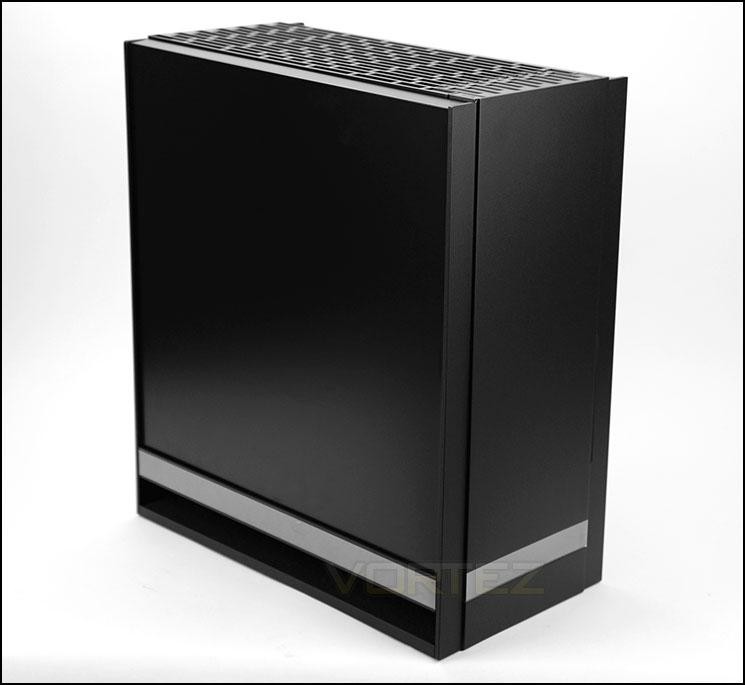
Minimalist styling akin to the Fortress Series
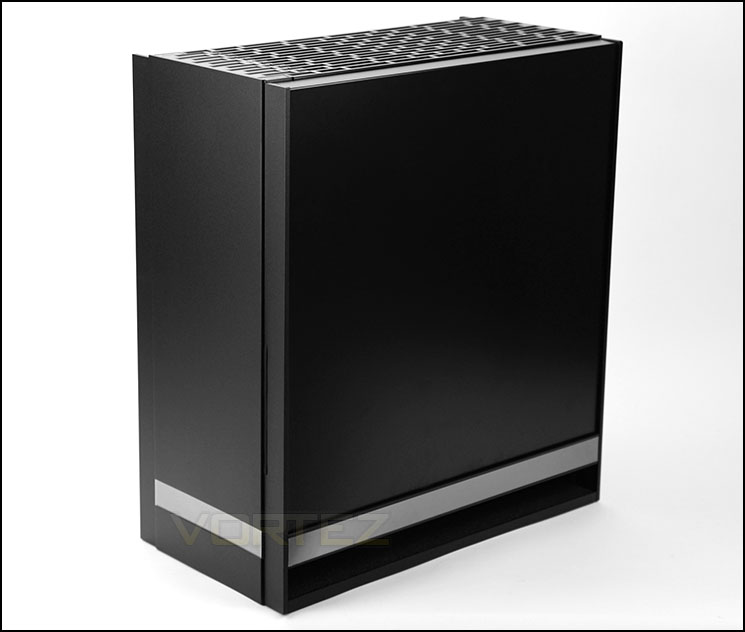
Identical design on both sides
In the past we’ve become accustomed to elegant cases within the Fortress Series and the FT05 continues this tradition. The external design and styling is minimalist but still retains a level of distinction, the front and sides are both completely closed off and in fact both side panels on FT05 remain identical in their appearance – the only distinguishing feature being the mirrored band which runs along the bottom edge.
There is also a hollowed out bottom section to aid the bottom mounted cooling fans with pulling air into the case – this region also has foam padding (which is present in many other areas too) to alleviate any vibration or electrical noise emitted from the system components.
Exterior
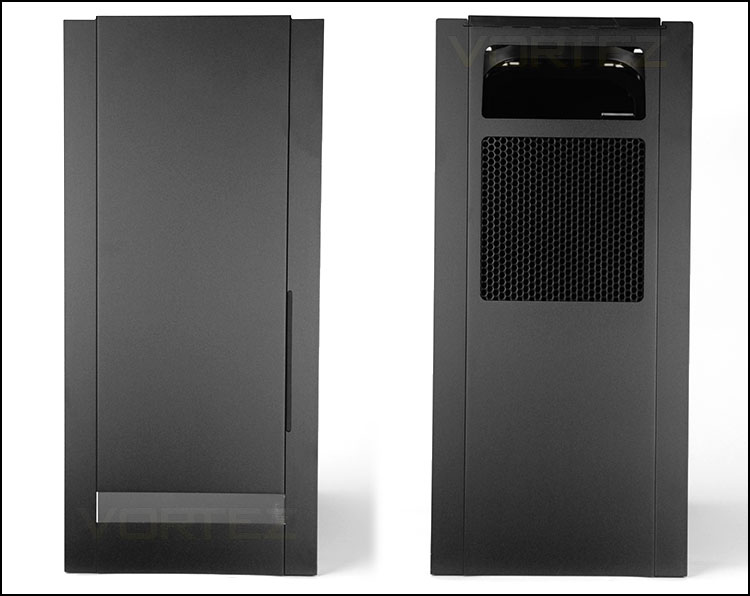
The front and back of FT05
At the front of FT05 we have a completely sealed, aluminium panel which, unlike other computer cases does not detach or feature any 5.25” drive bay covers. As we’ve already mentioned the only distinguishing feature is the reflective band which sits at the bottom of the case and has a faint impression of the SilverStone logo. To the right-side there is a thin incision which runs in a vertical direction – this gives the user the option to install a slim slot-loading optical drive. With most users choosing to use USB rather than optical nowadays, SilverStone decided to omit any full-sized (5.25”) support.
Around the back, again there is a stepping away from conventional computer chassis design. Since the rear IO is at the top of the case, the rear just has a perforated panel for the power supply and an opening for feeding all of the necessary cables to the rear IO panel.
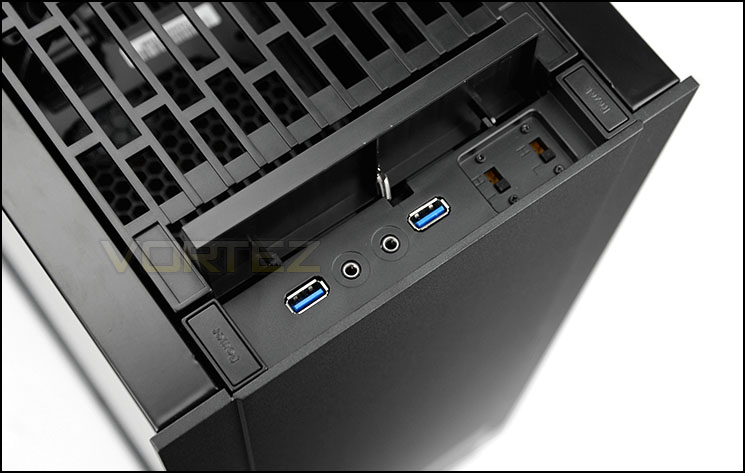
Spring-loaded cover and front panel controls
Turning our attention to the top of FT05 we discover a spring-loaded cover concealing the front panel connectivity with power and reset buttons to the immediate left and right. Underneath this cover there are two USB 3.0 ports, headphone and microphone jacks and switches to adjust the two cooling fans inside the case (600, 900, 1200RPM).
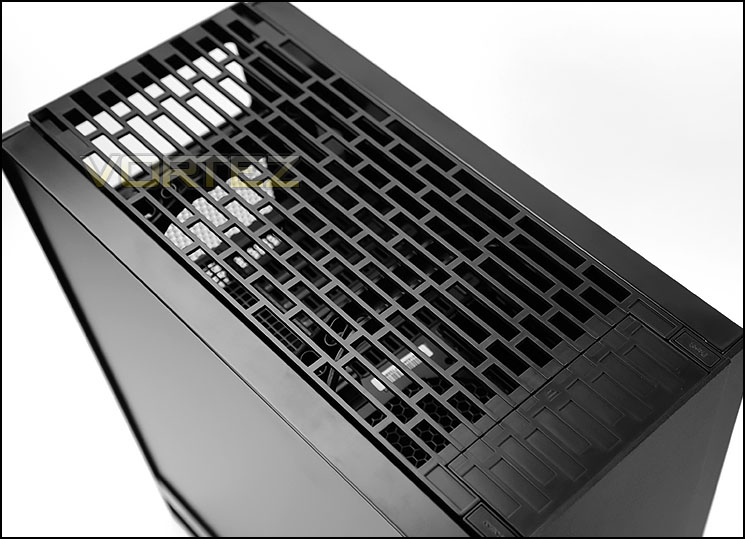
Highly ventilated panel at the top
Further back from the controls there is a large, plastic panel which is completely ventilated. This panel allows the heat to rise up and out of the case and is able to be detached.
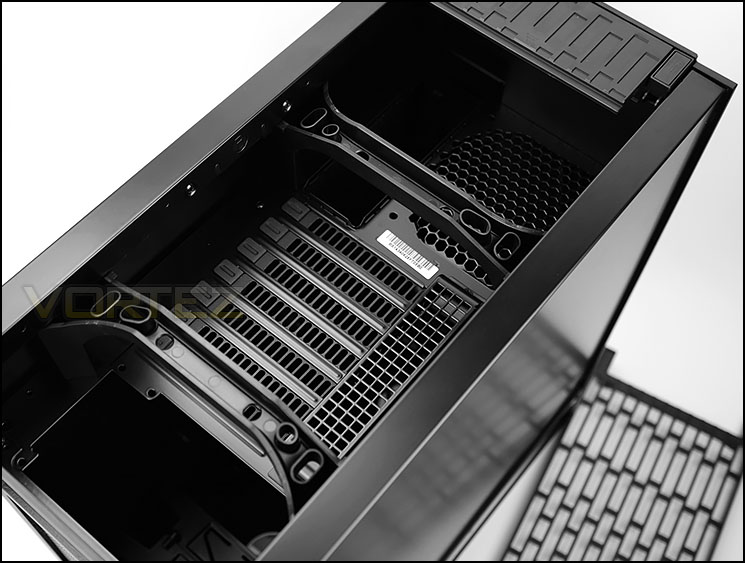
Top panel removed – rear IO options
After detaching the ventilated panel we can clearly see what would typically be the rear of the computer case. Here we have an opening for the PSU, seven PCI expansion slot covers (ventilated), a space for attaching a 120mm cooling fan and space for the rear IO of the motherboard.
The reason for this particular arrangement at the top of the chassis is because the motherboard has been rotated 90 degrees to support better thermal performance – as we all know, heat rises and by having positive air cooling from the two fans at the bottom of the chassis this is further compounded.
This section also has two handles to help transport/move the case around.
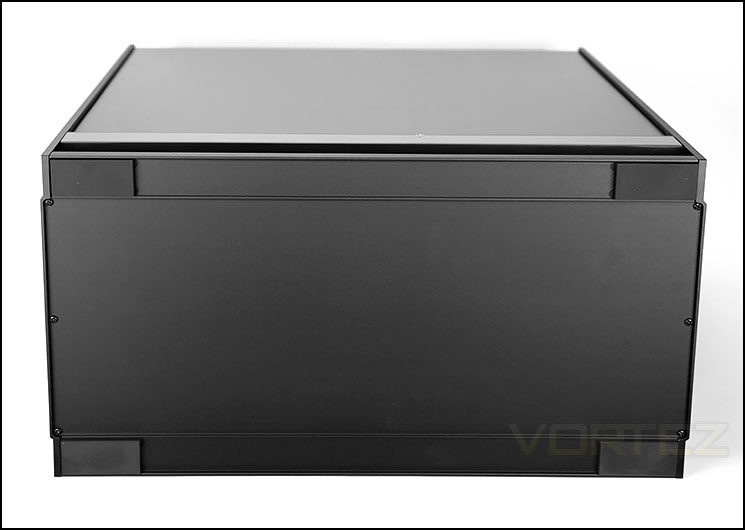
The underside of FT05
Since the power supply is not mounted at the bottom of the case the underside requires no substantial clearance for drawing in cool air. As such, the case has very little clearance between it and the floor. The only notable feature to point out in this area are the four rubber pads which help to prevent the case from slipping on smooth surfaces.
Interior
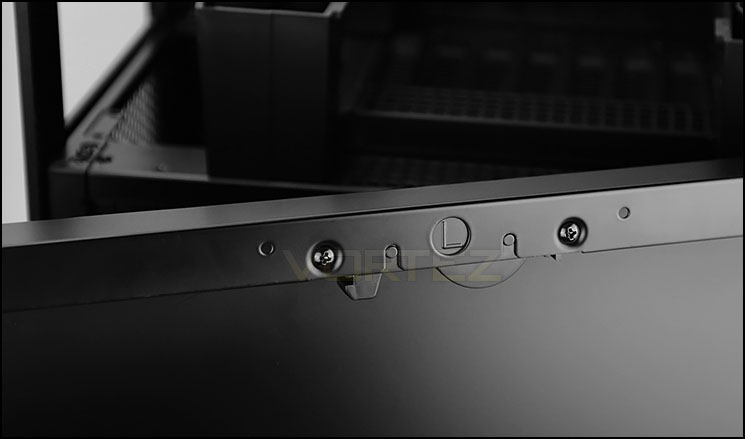
Easy to detach side panels
Not only is the actual design of the chassis vastly different from traditional computer cases but the side panel implementation is also slightly quirky too.
SilverStone has engineered the side panels to feature a hidden tool-free latch to remove the side panels from FT05. This doubles up as being hassle-free and offers a level of protection at LAN parties. To detach the panel the hidden latch just needs to be pressed in and the panel separates from the case after a firm lift.
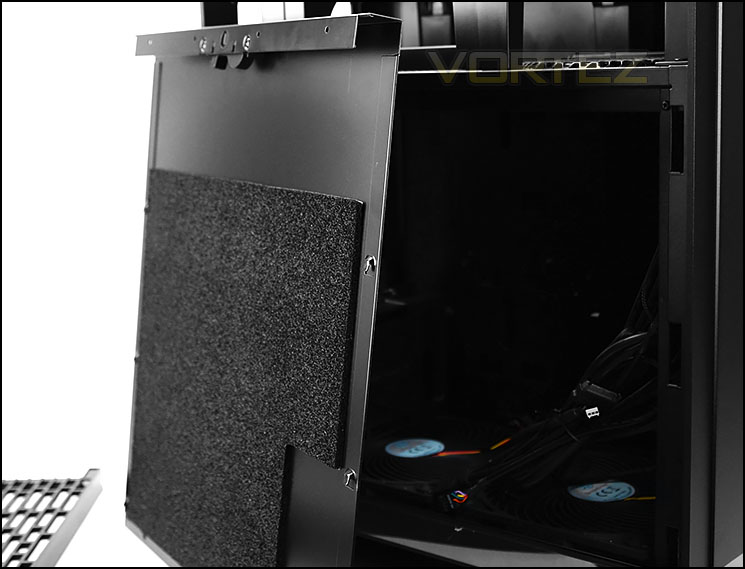
Foam padding for low-noise
As well as the hidden latch, the side panels also feature a generous inclusion of foam padding to keep the noise levels down to a minimum.
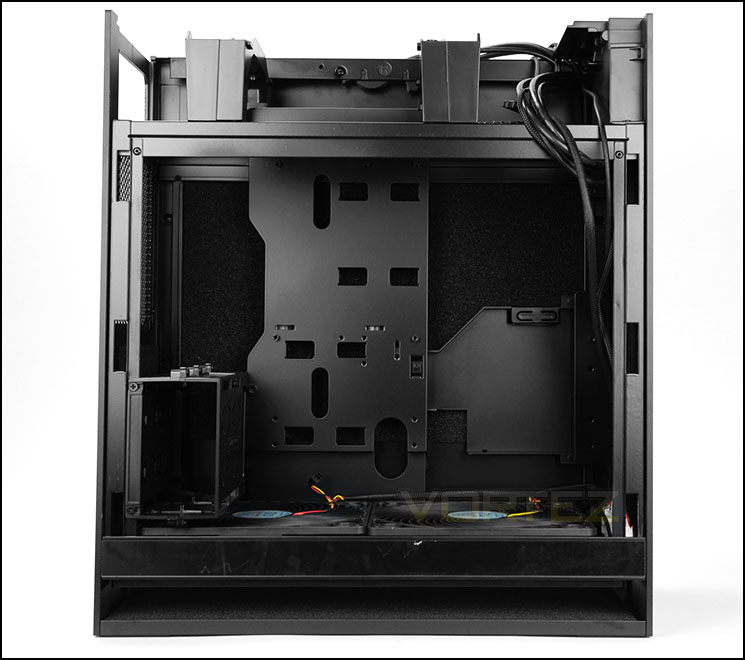
Motherboard tray at 90 degree angle
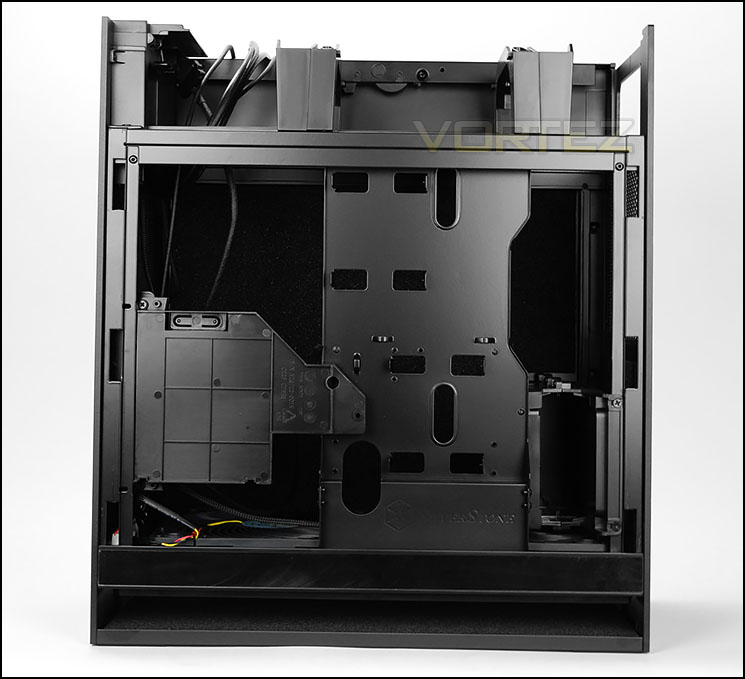
An all-black design
After detaching the side panels we can inspect the internal design which can accommodate up to ATX sized motherboards. All of the internals have been powder coated black and even the cables have been given black insulation so maintain a sleek and stealthy configuration.
The twist with FT05 is of course the rotated motherboard tray which sits at 90 degrees – the rear IO panel facing the top of the case rather than the rear. This break away from conventional design could present us with some challenges for the installation process – all will be revealed later in the review.
Interior (Continued)

Back panel faces the top of FT05
Up at the top of FT05 there is space for mounting the PSU. Units of up to 160mm can fit inside the case before they touch the HDD cage. There are also seven PCI expansion slot covers (ventilated) with standard screws – there are no thumbscrews in this region and there is allocation for adding in extra cooling with a 120mm fan.
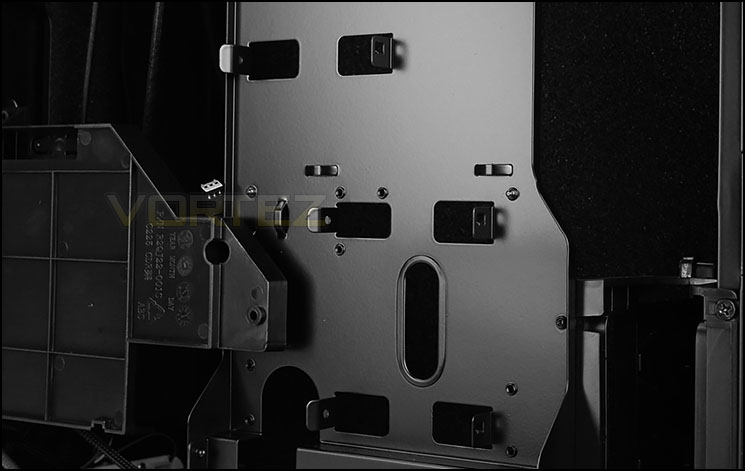
Support for SSD installation on back of motherboard tray
Behind the motherboard tray, SilverStone has cleverly integrated support for two SSDs. Drives simply clip into the supplied brackets and then users can attach screws for better fitment.
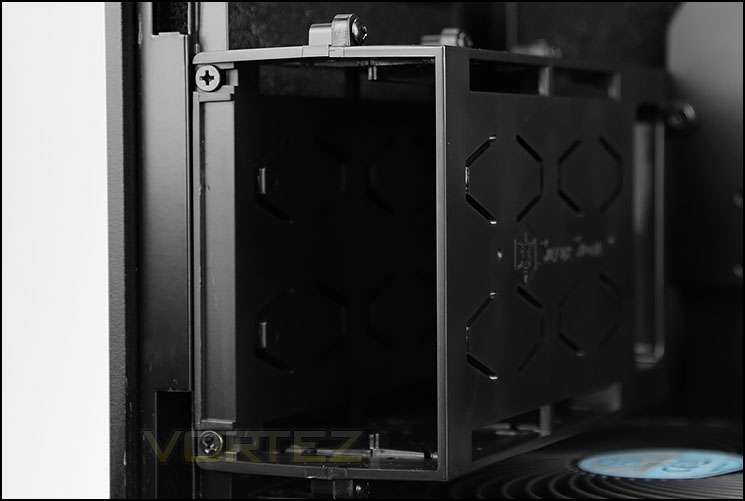
Dedicated 3.5” drive cage
There is also accommodation for 3.5” too. A 3.5” (plastic) caddy sits below the PSU area and allows up to two drives to be installed – just like the SSD allocation, this is also tool-free but it’s advisable to apply screws for extra strength.
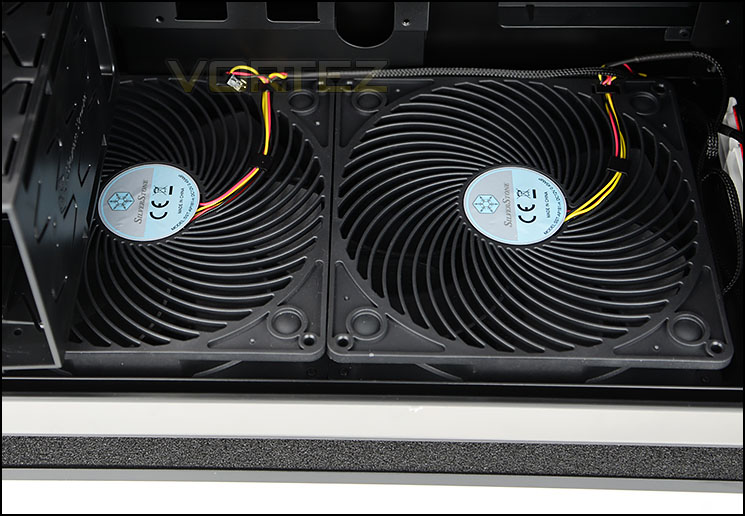
Two Air Penetrator 180mm fans
Located at the bottom of FT05 there are two Air Penetrator 180mm cooling fans which are configured to deliver positive pressure. Both fans can be plugged into the fan controller to allow them to operate at 600, 900 and 1200RPM. Air Penetrators are well-known for offering exceptional performance at low-noise and as such are ideal for pushing plenty of air across the system.

Magnetic dust filter can be easily removed
SilverStone provide a handy, detachable dust filter underneath these fans which has magnets to fix it into place.
Installation
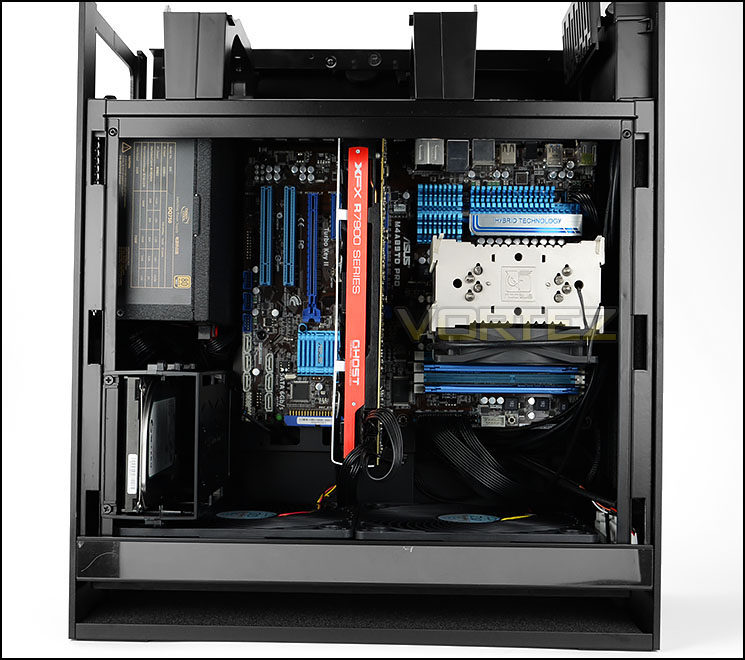
The installation is complete!
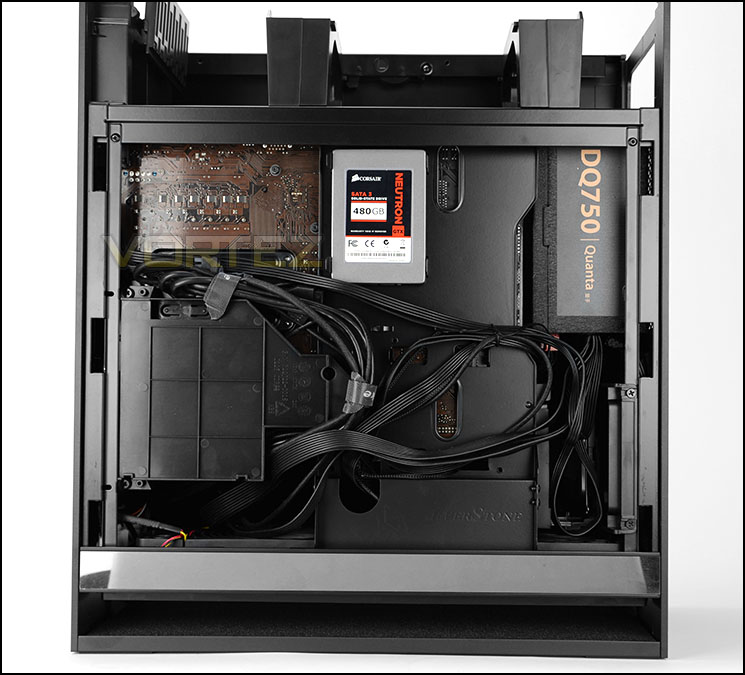
Cable management takes patience
Due to FT05’s unique internal (and external) design the installation process is somewhat different, but we have to confess, we encountered no major issues when installing all of our kit inside this case. Getting the PSU inside FT05 and all of the cables is something which was rather cumbersome but with a little patience the cable management can be arranged in an orderly fashion in next to no time.
As you can clearly see, FT05 handles a full-ATX configuration along with all of the high-end components such as long graphics cards and big CPU coolers.

3.5” drives slot into caddy

Installing SSDs is easy
Installing storage devices inside FT05 is very easy due to the tool-free allocation for both 3.5” and 2.5” drives. There are no rattling trays required to install drives, it’s as simple as just slotting the drive into the bracket/caddy.
Clearance – CPU Cooler, GPU, Cable Management
Fundamental to any successful case is the space it can supply for installing components. The clearance options inside a case are critical for system builders and as such, in this section we’ll be investigating the hardware limitations inside FT05.
CPU Cooler
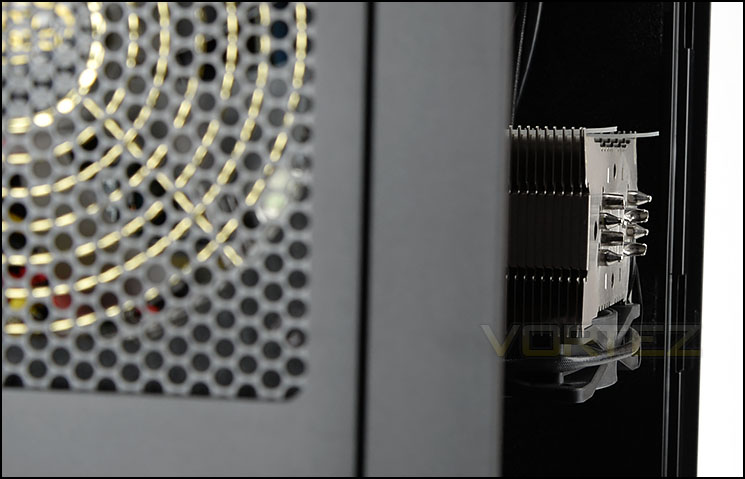
Enough space for big CPU coolers
FT05 has support for big CPU coolers – this case can house solutions which do not exceed 160mm in height. Pictured above is Noctua’s NH-U12P which is 158mm. Larger models such as the D14/Silver Arrow should just about fit – although it will be very tight.
Graphics Cards
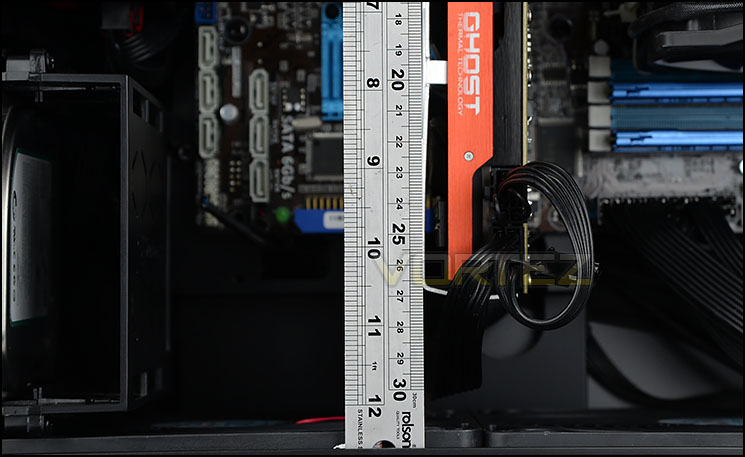
Long graphics cards are supported
In the graphics card department, FT05 can house graphics cards which have a maximum length of 300mm. This covers a wide selection of different offerings and thanks to the layout of FT05 there are no obstructions for those wanting to add in multiple graphics cards either.
Cable Management
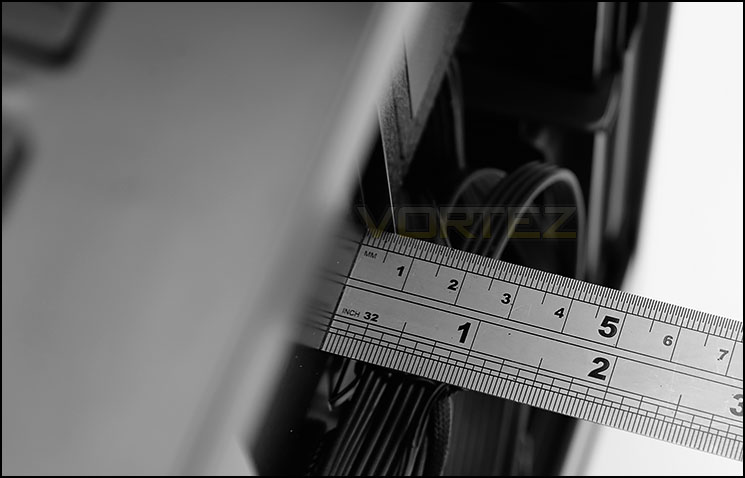
Limited space for cables
Since the area around the back of the motherboard tray has multiple indentations there are different measurements we can take but looking at the main area of the tray there is approximately 10-10.5mm. This can make cable management quite difficult to arrange – extra time and patience is required to ensure the cables do not prevent the side panel from fitting into place correctly.
Clearance – Water Cooling
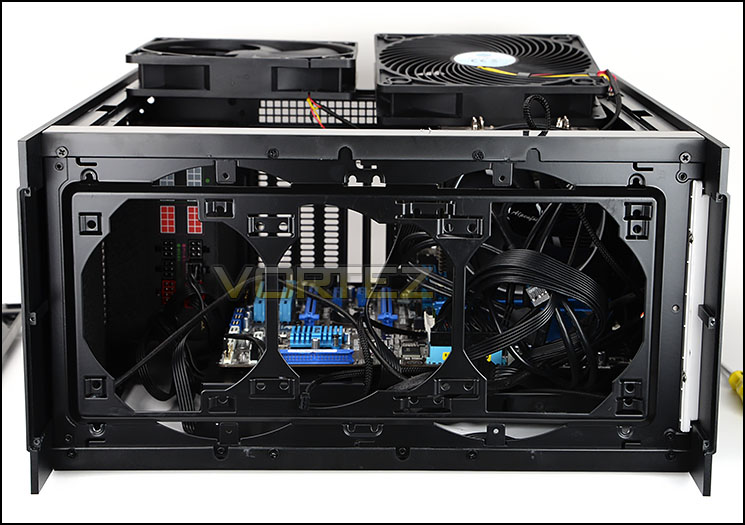
Support for different sized radiators at the bottom
FT05 has just one location allocated for water cooling and this is found at the very bottom of the case. To get access to this area the bottom plate must be removed from the chassis and then the two cooling fans detached.
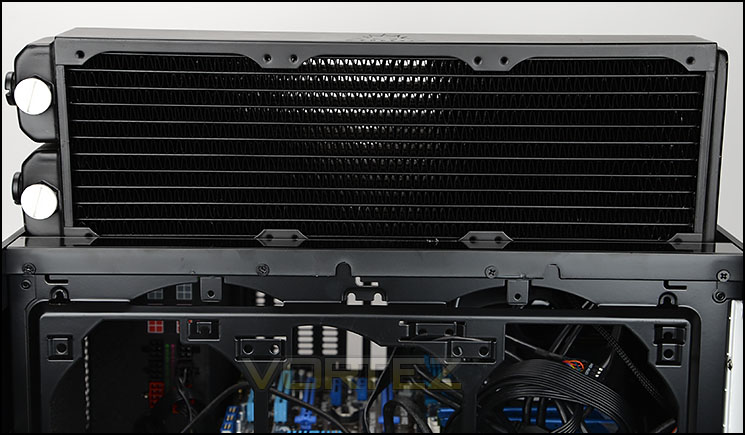
Bulky 360mm radiator does not fit
In this region, we can install 240, 280 and 360mm radiators due to the mounting holes supplied, but there are some limitations. As shown above, oversized and bulky (6cm) 360mm radiators will not fit inside the case because the ends simply do not fit.
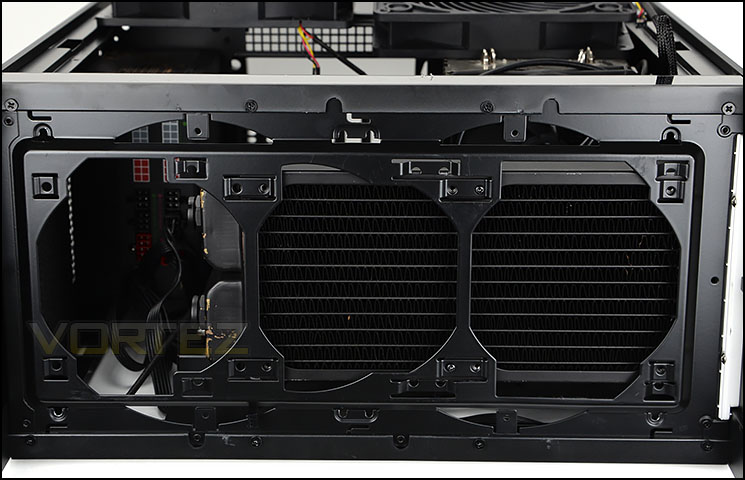
240mm radiators fit perfectly
Thicker 240mm radiators do fit however. This confirms that popular liquid coolers such as Corsair’s Hydro Series H100i, H105 etc will fit inside FT05 but this will be to the detriment of the system cooling provided by the two 180mm fans which come pre-installed.
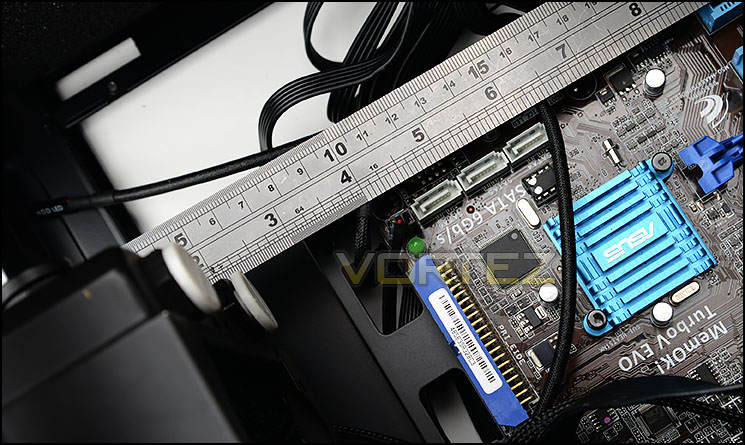
Space for radiator and fan combos
Thermal Performance Testing
Inside FT05 we have two cooling fans – two Air Penetrator 180mm fans configured as intakes at the bottom of the case. This design applies positive pressure inside and should yield great results since heat generally rises anyway.
To discover the thermal performance of FT05 we will record idle temperatures after 20 minutes from a cold boot. We will then stress the system and temperatures will again be monitored after 30 minutes have elapsed.
Fan controller will be set to maximum – 1200RPM
For the purpose of accurate analysis the idle and load temperatures for CPU and GPU will be recorded and the range between idle and load will be calculated to determine how efficient cooling is.
NOTE: Ambient temperature is 20C
System Components
CPU AMD Phenom II X6 1055T 2.8GHz
Motherboard ASUS M4A89TD PRO
Graphics NVIDIA GTX 480 (Different from card pictured)
Memory 4GB Kingston HyperX DDR3
HDD Samsung Spinpoint 500GB SATA-II
PSU DeepCool DQ750
Motherboard ASUS M4A89TD PRO
Graphics NVIDIA GTX 480 (Different from card pictured)
Memory 4GB Kingston HyperX DDR3
HDD Samsung Spinpoint 500GB SATA-II
PSU DeepCool DQ750
Noise
The aim with FT05 is to reduce as much noise emitted from the internal components as possible. All of the panels are closed off and have insulation padding to assist with achieving low-noise operation. With the fans set to 600 and 900RPM the noise levels are very low and it’s difficult to identify the fans – especially at 600RPM. But with the fans set to 1200RPM things change and the noise is prominent. The great thing about FT05 is that it can offer flexibility in this department – if you want to maintain low-noise then the 600RPM setting can be used, but if you prefer better performance (at the cost of noise) then 1200RPM can be selected.
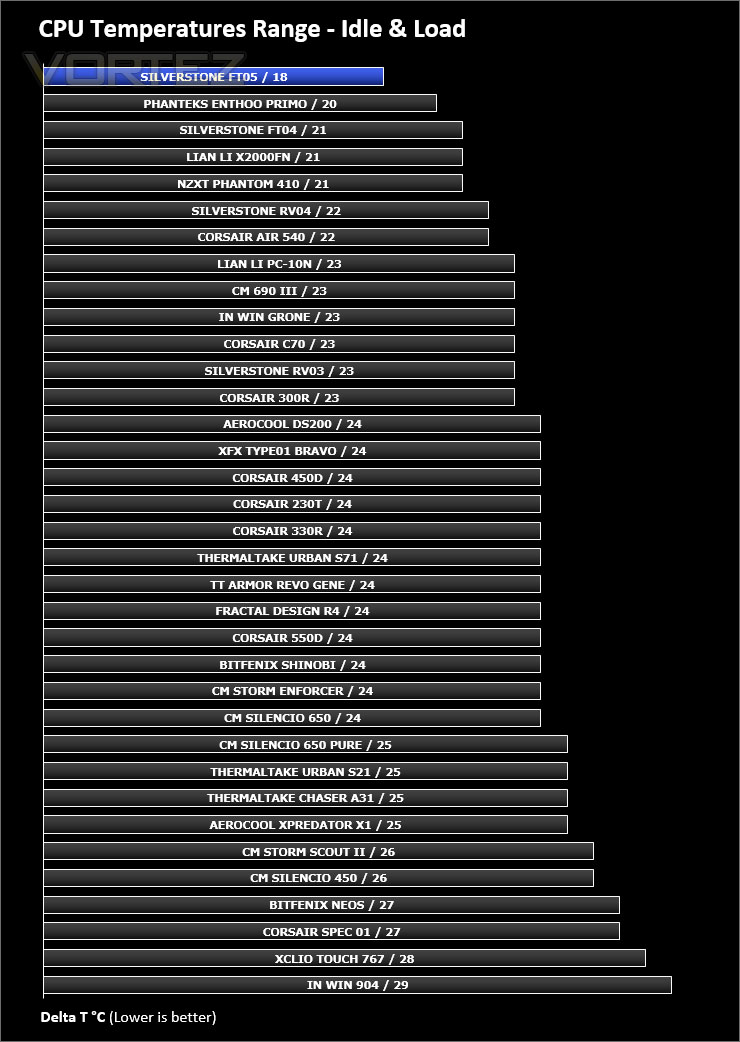
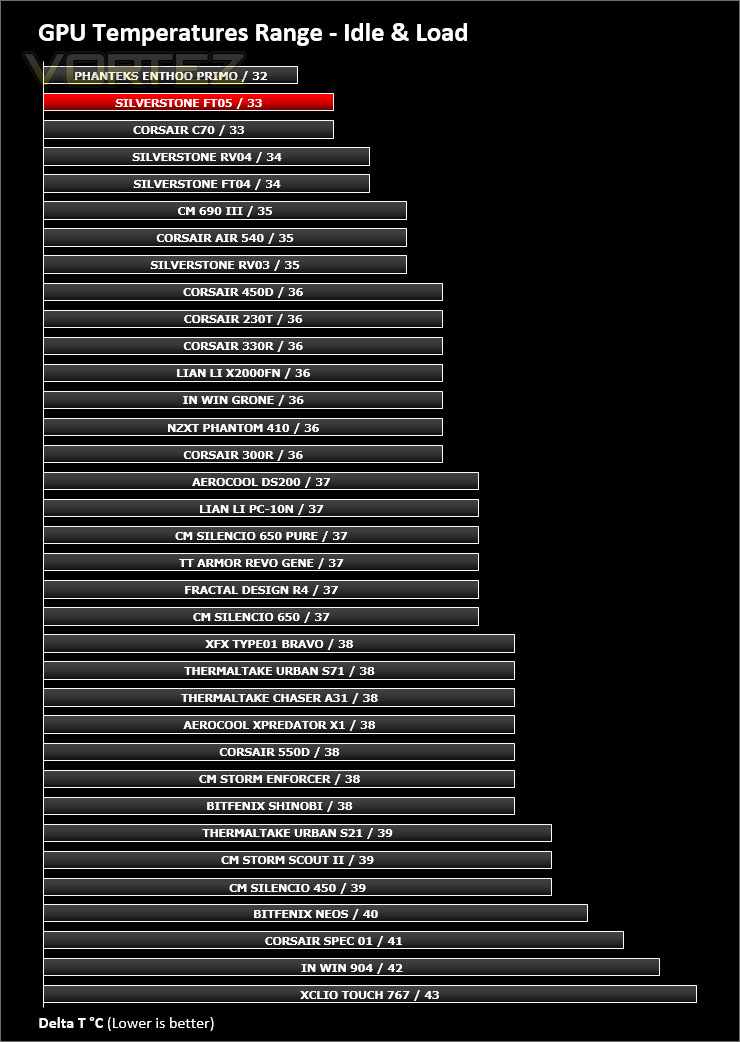
Conclusion
The Fortress Series has always been synonymous with quality and the FT05 is no exception to this.
Comparing the FT04 to FT05 there have been some major alterations to the design and SilverStone has significantly reduced the size of this new successor. By omitting the 5.25” drive bay the depth of this case has reduced substantially and yet we’re still able to house a full-sized ATX configuration with a lineup of high-end components.
Those who have seen the RAVEN 5 will identify some key similarities between it and the FT05. Both cases use the same chassis design but the FT05 adopts elegance as its forte.
Included with FT05 are two Air Penetrator 180mm fans which have been positioned at the bottom of the case to push cool air across the system. Combining these cooling fans, their position and the rotated motherboard tray results in excellent thermal performance. This design is further compounded by the inclusion of a three-speed fan controller to opt for lower noise or better temperatures.
SilverStone has designed FT05 to incorporate some interesting and innovative concepts which we really like. The quick-release latches on the side panels are one such feature which is very useful.
We’re pleased to see the next instalment to the Fortress Series see a decent price-drop in light of the reduction in size to its overall dimensions. FT05 can be picked up for £138 GBP / $184 USD – which is likely to be music to many an enthusiast’s ear.
Taking on an elegant and minimalist design the FT05 offers exceptional quality and a whole host of useful features. If low-noise and high-performance is your thing, this new Fortress case should be on the short-list.
VIDEO REVIEW – VORTEZ TV
Pros
+ Understated design
+ Exceptional quality
+ Quirky 90 degree layout
+ Two Air Penetrator 180mm fans included
+ Excellent thermal performance
+ Noise absorption foam throughout
+ Three-speed fan controller
+ Hidden quick-release latched side panels
+ Can house high-end kit
Cons
– Cable management is tricky
+ Understated design
+ Exceptional quality
+ Quirky 90 degree layout
+ Two Air Penetrator 180mm fans included
+ Excellent thermal performance
+ Noise absorption foam throughout
+ Three-speed fan controller
+ Hidden quick-release latched side panels
+ Can house high-end kit
Cons
– Cable management is tricky

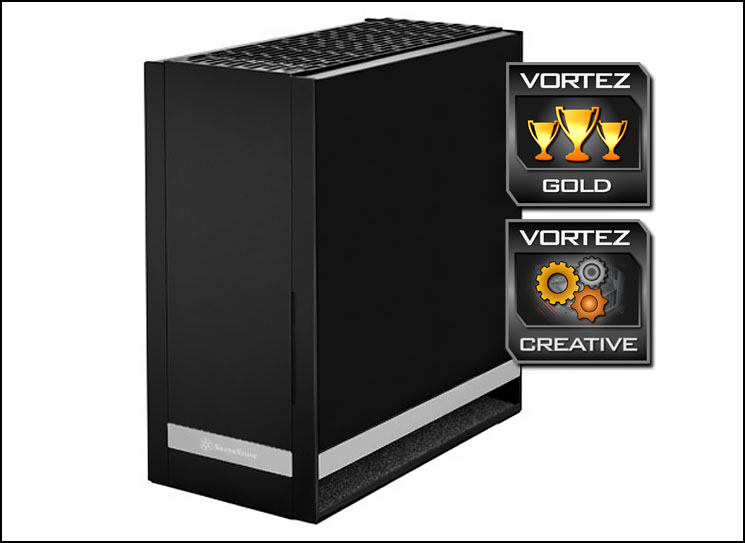
Click here for an explanation of our awards at Vortez.net.


