







Can the first of SilverStone’s Heligon Series SST-HE01 with its dual-radiator design offer up itself as a superior CPU cooler for Intel Sandybridge-E?

Product on Review: Heligon HE01
Manufacturer and Sponsor: SilverStone
Street Price: £55 (At time of review)
SilverStone’s strengths have been in the computer chassis sector and it’s fair to say that CPU coolers aren’t a particular forte of the brand. The CPU cooler market is an extremely competitive arena, unless a product is exceptionally good it will be left by the way-side.
Today we will be taking a look at the first product to join SilverStone’s Heligon Series. SST-HE01 aka Heligon HE01; a dual-radiator CPU cooler with a single 140mm PWM cooling fan that has a handy switch allowing the user to alter fan speed from a quiet mode to a performance mode. SilverStone hope to project themselves as a top-pick with the Heligon Series. Can they tackle the might of other rivals? It’s time to find out!
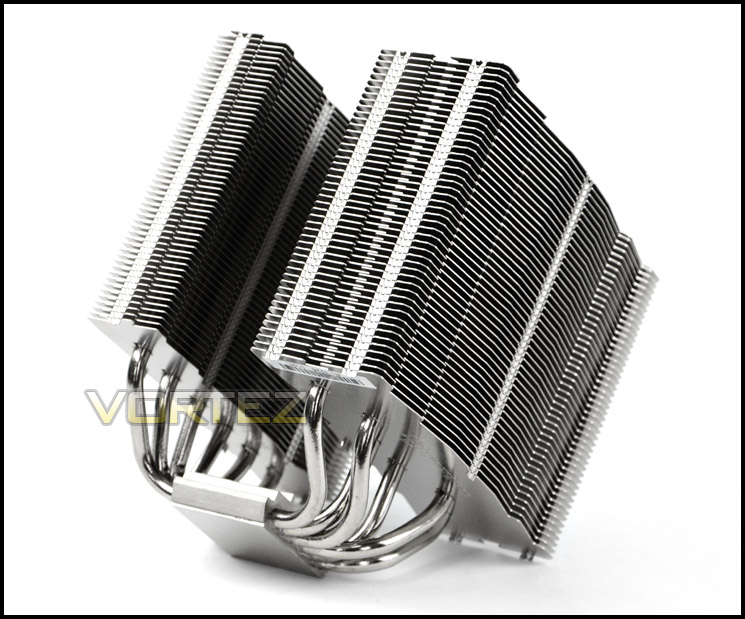
SilverStone on HE01
The all new Heligon HE01 CPU cooler is designed for both performance and quietness. The wide aluminum fin spacing are specially designed to minimize noise when air travel through its heatsink. The included 140mm fan offer exceptional cooling power, this low noise fan is also adjustable allowing you to decide the right amount of airflow for your CPU. With the include fan clips, up to three 140mm fans can be installed to enable HE01 to obtain cooling performance that rival the best air coolers on the market.
The Heligon HE01 is capable of safely cooling high-end CPUs such as the Intel Core i7 3960X. It has the ability to cool CPUs up to 300W. For those looking to obtain the highest cooling performance at the lowest noise possible, the SilverStone Heligon HE01 is an unbeatable solution.
The Heligon HE01 is capable of safely cooling high-end CPUs such as the Intel Core i7 3960X. It has the ability to cool CPUs up to 300W. For those looking to obtain the highest cooling performance at the lowest noise possible, the SilverStone Heligon HE01 is an unbeatable solution.
Technical Specifications
Model No.
SST-HE01
Material
Nickel-coated copper base, heat pipes with aluminum fins
Application
Intel Socket LGA775/1155/1156/1366/2011
AMD Socket AM2/AM3/FM1/FM2
Heat Pipe Type
Ø6mm-6pcs heat-pipe
Cooling System
140 x 140 x 38mm fan
Noise
18~41 dBA
Bearing
Dual Ball Bearing
Net Weight
926g(w/o Fan)
Voltage Rating (V)
12V
Start Voltage (V)
9V
Air Flow (CFM)
42.8~171CFM
Speed (R.P.M.)
Low : 500~1200RPM with PWM
High : 500~2000RPM with PWM
Life Expectance (hrs)
80,000 hrs
Dimensions
140 (W) x 119(D) x 160(H) mm (w/o Fan)
SST-HE01
Material
Nickel-coated copper base, heat pipes with aluminum fins
Application
Intel Socket LGA775/1155/1156/1366/2011
AMD Socket AM2/AM3/FM1/FM2
Heat Pipe Type
Ø6mm-6pcs heat-pipe
Cooling System
140 x 140 x 38mm fan
Noise
18~41 dBA
Bearing
Dual Ball Bearing
Net Weight
926g(w/o Fan)
Voltage Rating (V)
12V
Start Voltage (V)
9V
Air Flow (CFM)
42.8~171CFM
Speed (R.P.M.)
Low : 500~1200RPM with PWM
High : 500~2000RPM with PWM
Life Expectance (hrs)
80,000 hrs
Dimensions
140 (W) x 119(D) x 160(H) mm (w/o Fan)
Packaging, Bundle & Fan
HE01 arrives in small, nondescript box. Fundamental features can be found on the front whilst on the side the technical specifications are mapped out. SilverStone have opted for an eco-friendly approach to packaging so that it can be recycled.
Within the box all items are contained within their own box and given foam padding to ensure safe arrival during transit.
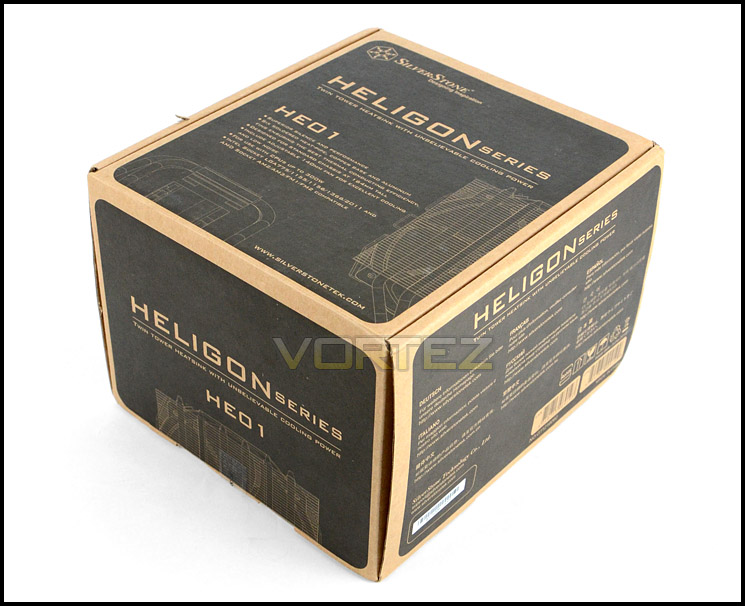
Heligon HE01 packaging
HE01 caters for a wide range of different socket types from both Intel and AMD. Due to this, there are a variety of different items required between each socket mounting kit. The sockets supported are: Intel Socket LGA775/1155/1156/1366/2011 – AMD Socket AM2/AM3/FM1/FM2. SilverStone include six fan clips for attaching up to three cooling fans to the heatsink, some rubber mounts for fans and an instructions manual detailing the installation procedure for various socket types.
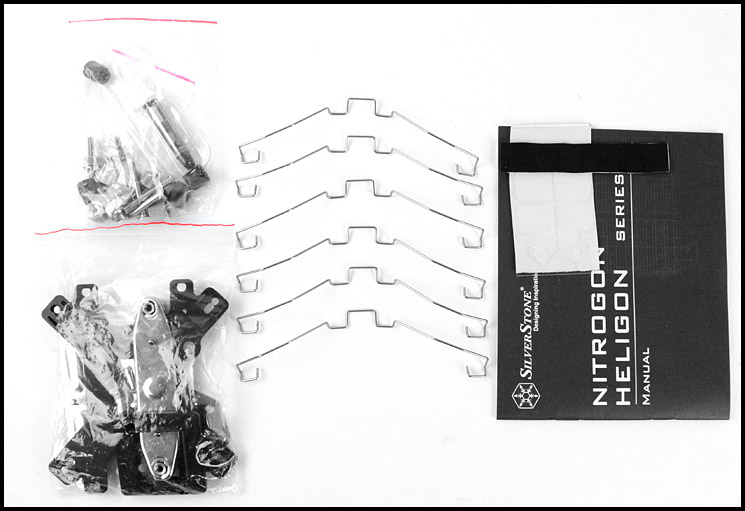
Bundle including mounting kits, fan clips, anti-vibration rubber and instructions manual
Included with HE01 is a large 140mm PWM cooling fan. The fans model name is SST-FHP141-H and is a 7-blade design. This fan has two different modes which users can switch between to control RPM. Q mode stands for quiet and allows for 500-1200RPM whilst P mode stands for performance and allows for 500-2000RPM. This switch is a handy implementation as it allows on-the-fly modification to fan speed and can be used at specific times when higher RPM is required. Being 38mm thick this cooling fan is designed to sit between both towers of the HE01 heatsink. The connection cable is 3-pin and also has y-cable for powering another fan.
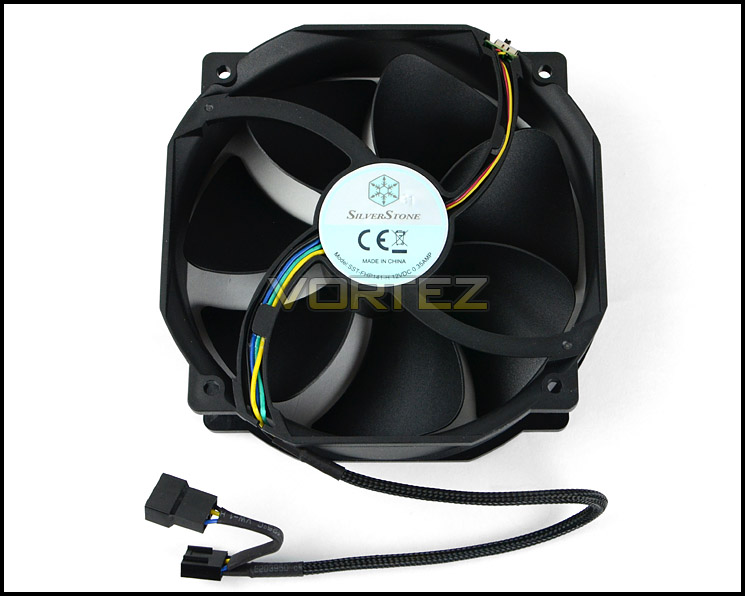
140mm PWM cooling fan
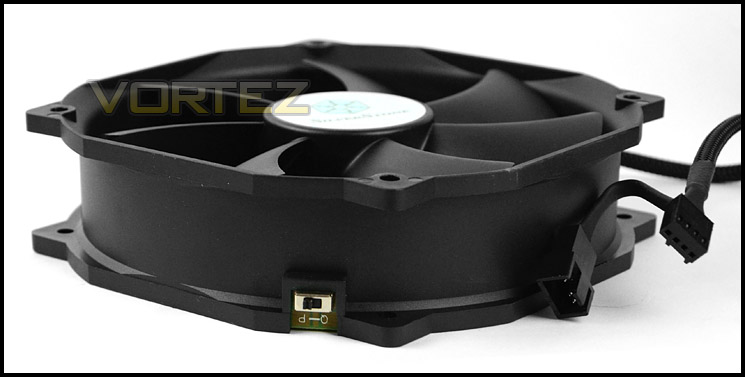
Fan speed switch for on-the-fly RPM modifications
Closer Look
HE01 heatsink follows a dual-radiator design with one of the stacks being significantly larger/thicker than the other. Its fins are aluminium, rather than following a jagged/sharp design the fins have a smooth contour. In keeping with other high-end air coolers HE01 is 160mm in height, allowing it to fit inside a vast majority of computer chassis.
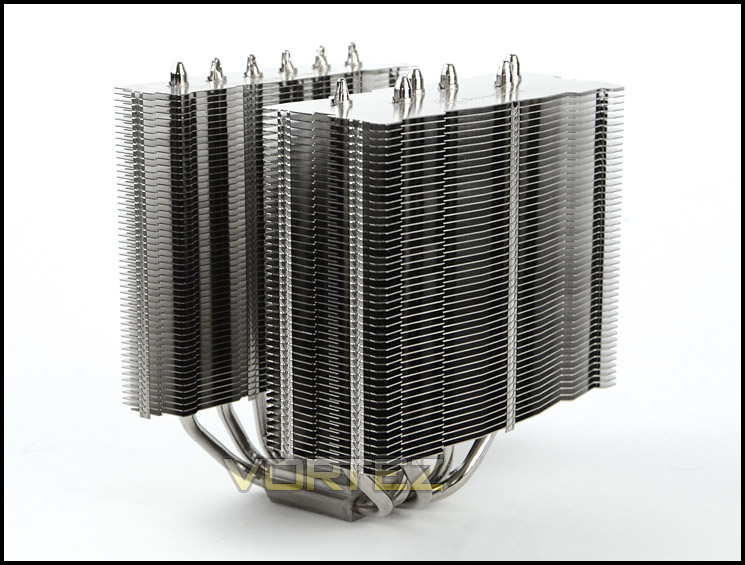
An overview of HE01
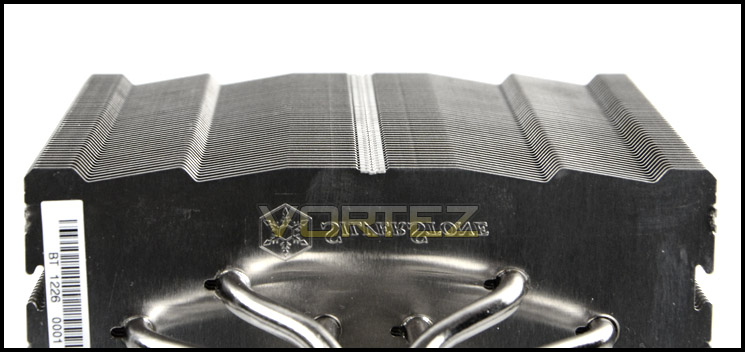
The contour of fin design
HE01 has 6x6mm copper heatpipes which distribute heat from the baseplate up and through the fin stack for dissipation.
HE01’s base is copper but with Nickel-coating and is partly reflective. SilverStone have given the underside a brushed metal texture, possibly to help prevent air pockets from occurring when thermal paste is applied.
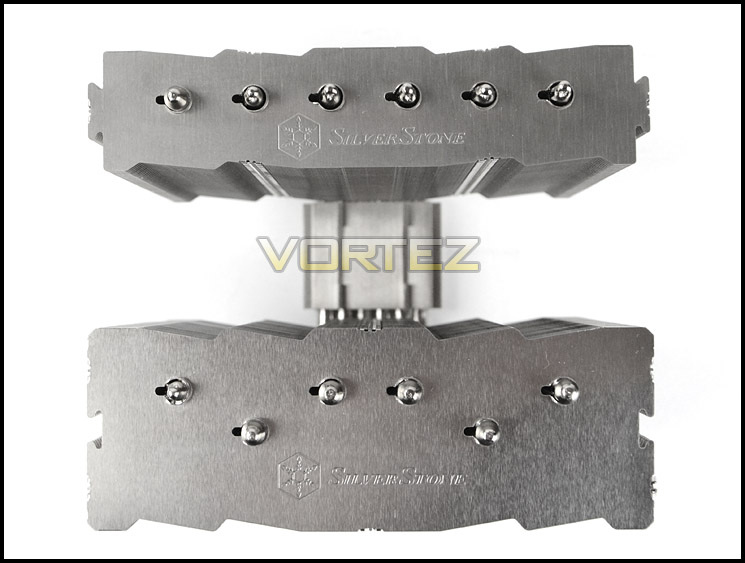
The top of HE01
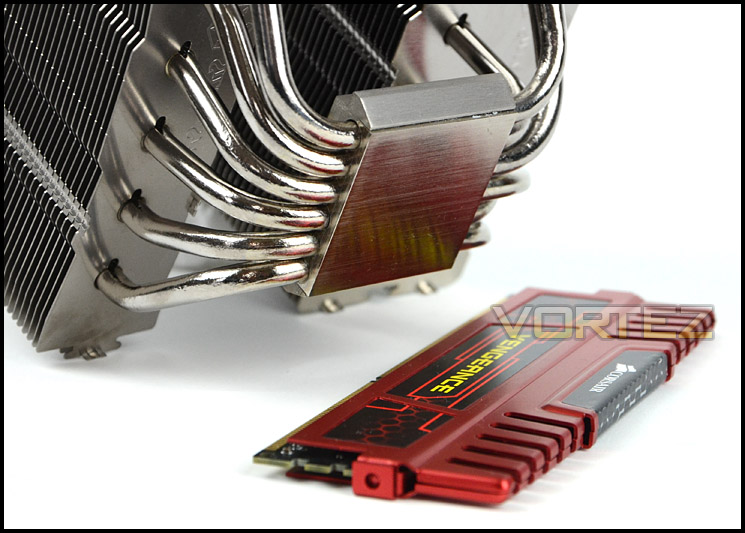
The base is nickel-coated
A particular aspect which we like about HE01 is the ease of fan installation. Bundled with the cooler are a series of fan clips which fit into the mounting holes on the fan and fix behind an indentation on the fin stack. Fan installation takes around 10 seconds – something which cannot be said for some CPU coolers.
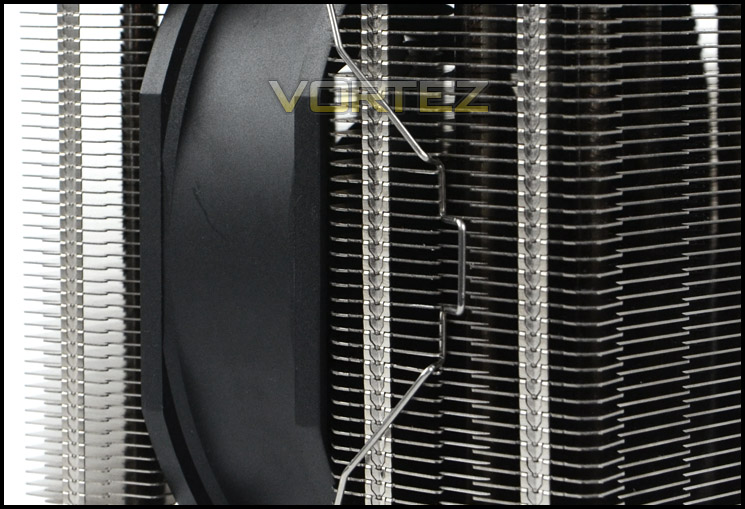
Fan installation is quick and easy
Installation Process
In order to demonstrate the installation process for HE01 we are installing the cooler on the Intel LGA2011 socket.
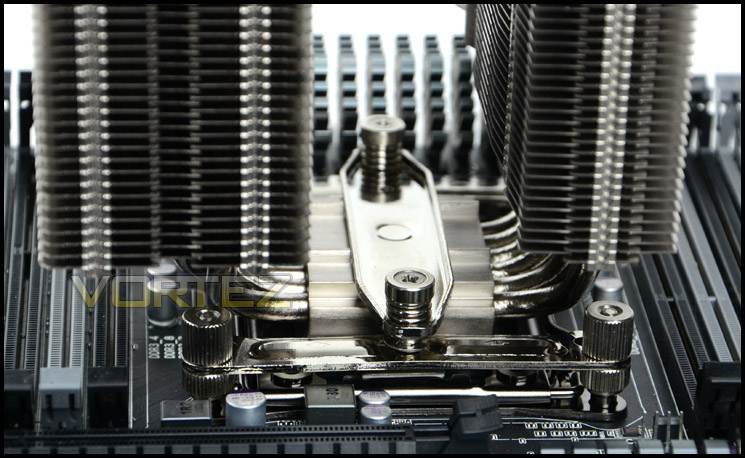
The first step is to apply four double sided screws into the mounting plate on LGA2011. Once these are attached firmly two brackets must be placed over the screws and four thumbscrews are used to fix them into place. It’s important to observe the orientation of the brackets, if you are looking to install HE01 in a traditional position so that the heatsink lines up to the rear exhaust fan inside a computer chassis then both brackets should be placed in horizontal positions as per picture below. The last step is to apply thermal paste to the CPU and then place the heatsink over the CPU with the bar placed through the centre. This bar has two pre-applied screws with tension springs – making the job of securely attaching the cooler with a screwdriver an absolute breeze.
Overall, we’re very happy with how easy the installation process is and the quality of mounting kit provided.
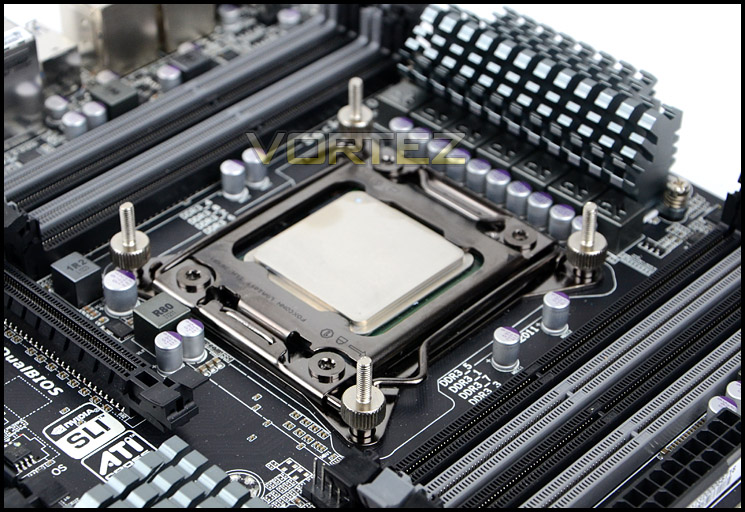
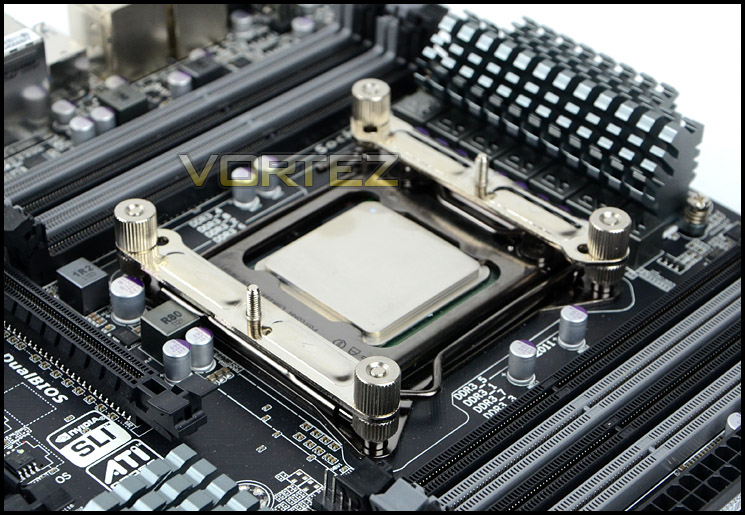
Installed – Memory Clearance
Memory clearance is something which many system builders and enthusiasts are eager to discover since this will ascertain whether a memory kit will be compatible with the CPU cooler or not. To demonstrate this a low profile memory kit is used.
HE01, with its thinner radiator tower is ideal for those with dual channel ready motherboards such as Intel Z77/LGA1155 since this provided even greater memory clearance.
With the heatsink attached its clear to see that this CPU cooler is substantial and judging by size and specification should offer up some great thermal performance.
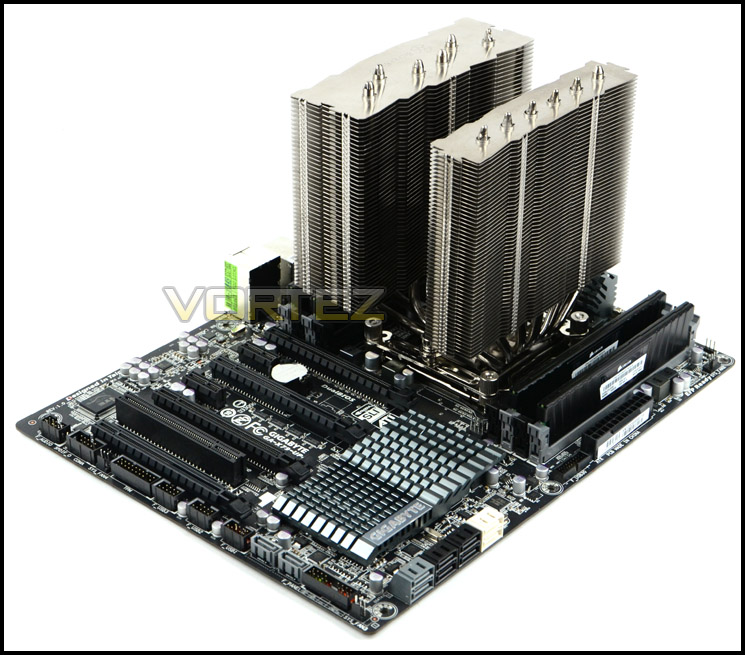
Installation complete – without cooling fan attached
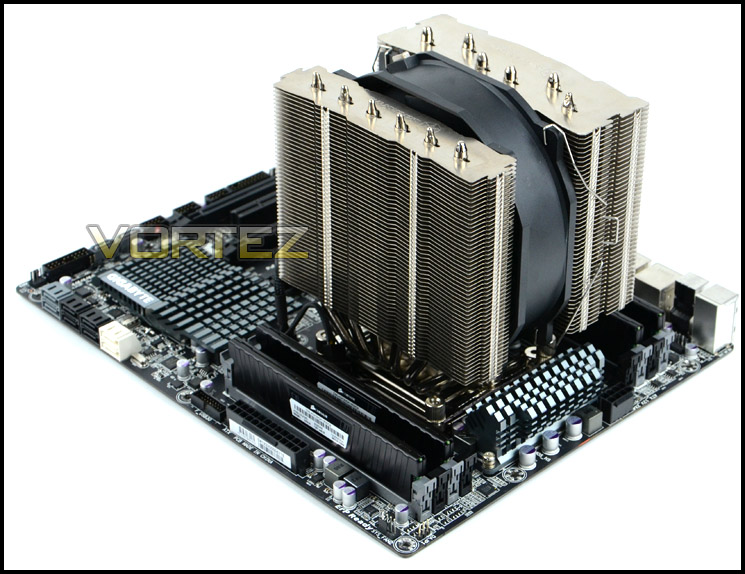
Installation complete – with cooling fan attached
Memory clearance on either side is not an issue with HE01 at all. As already mentioned there is additional clearance for motherboards with dual channel configurations. Directly underneath the heatsink there is approximately 4cm for the total height of memory modules – giving compatibility for a range of memory with taller heatsinks.
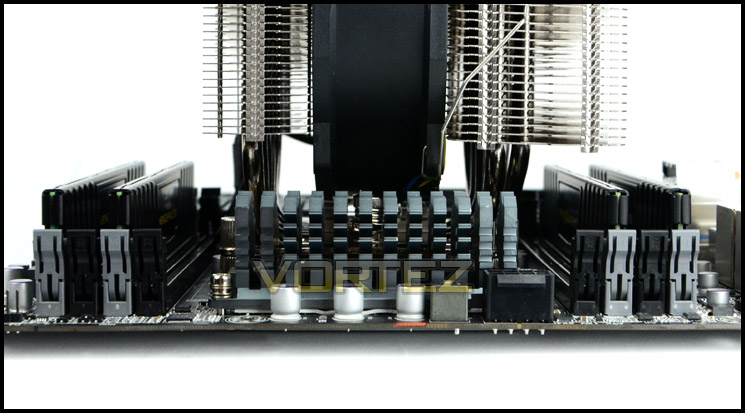
Good memory clearance on both sides
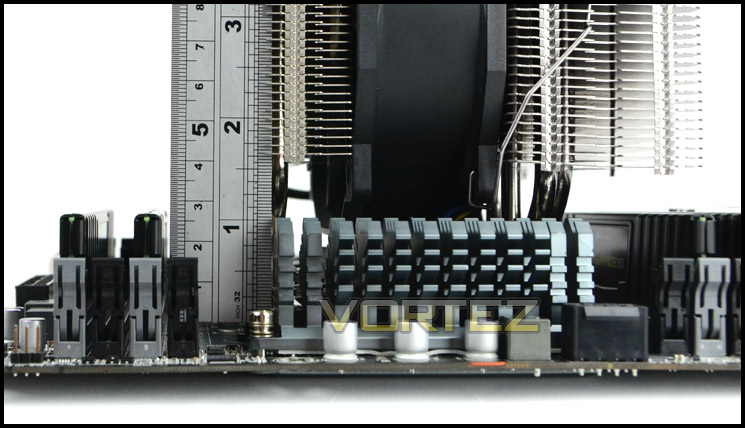
Up to 4cm for memory
Test Setup & Methodology
Test System
CPU – Intel Core i7-3930K (3.6GHz)
Motherboard – GIGABYTE X79-UP4
Memory – 8GB Corsair Vengeance LP 1600MHz CL9
Graphics – Sapphire Radeon HD 6850 1GB
PSU – NZXT Hale90 650W
Hard Drive – Kingston HyperX 240GB SATA III SSD
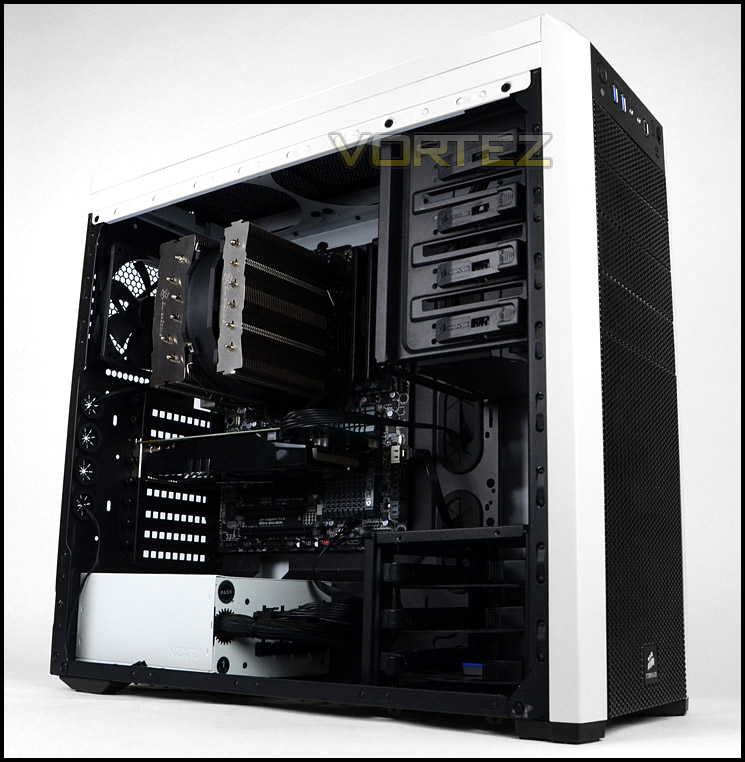
Case – Corsair Carbide 500R White
Motherboard – GIGABYTE X79-UP4
Memory – 8GB Corsair Vengeance LP 1600MHz CL9
Graphics – Sapphire Radeon HD 6850 1GB
PSU – NZXT Hale90 650W
Hard Drive – Kingston HyperX 240GB SATA III SSD
Case – Corsair Carbide 500R White
CPU Coolers
Alpenföhn Matterhorn Pure(120mm Wingboost: 300-1200RPM)
Alpenföhn K2 (120mm Wingboost: 500-1500RPM, 140mm Wingboost: 300-1100RPM)
Alpenföhn Gotthard (140mm Wingboost: 300-1100RPM)
Noctua NH-D14 (120mm NF-P12 PWM + 140mm NF-P14 PWM: up to 1200RPM)
Thermalright SilverArrow SB-E Extreme (Dual TY-143 fans – 600-2500RPM)
Corsair Hydro H100 (Dual 120mm fans – low: 1300RPM, mid: 2000RPM, high: 2600RPM)
SilverStone HE01 (140mm PWM fan – 500RPM-1200RPM – 500RPM-2000RPM)
Program Suite
Real Temp – Maximum temperature analysis
LinX 0.6.4 – Applies thorough stress test to CPU
CPU-Z – Confirmation of CPU frequency/voltage
AIDA64 Extreme Edition – Confirmation of temperatures/fan speeds
Testing methodology
Testing will be based on temperatures recorded by Real Temp after 20 passes of LinX stress test. The maximum absolute temperatures will be recorded after the test and averaged over the 6 cores. The delta is then calculated by subtracting the ambient temperature recorded near the intake fans from the average temperature calculated. Tests are conducted with the Intel i7 3930K at its default 3.6GHz stock speed and overclocked to 4.6GHz @ 1.42V. The tests are done inside the Corsair Carbide 500R chassis to simulate real world conditions. To keep the tests standardised we are using Noctua’s NT-H1 thermal paste on all coolers.
CPU coolers are reviewed as they come out of the box – with their factory cooling fans, as the manufacturer intended and as the consumer expects.
Additional tests include a passive test where the cooling fans are taken away from the heatsink and a comparison between the cooler used with stock thermal paste against our Noctua NT-H1 paste.
A kind thank you to Noctua for supplying us with NT-H1 thermal compound.
Results – Stock Performance
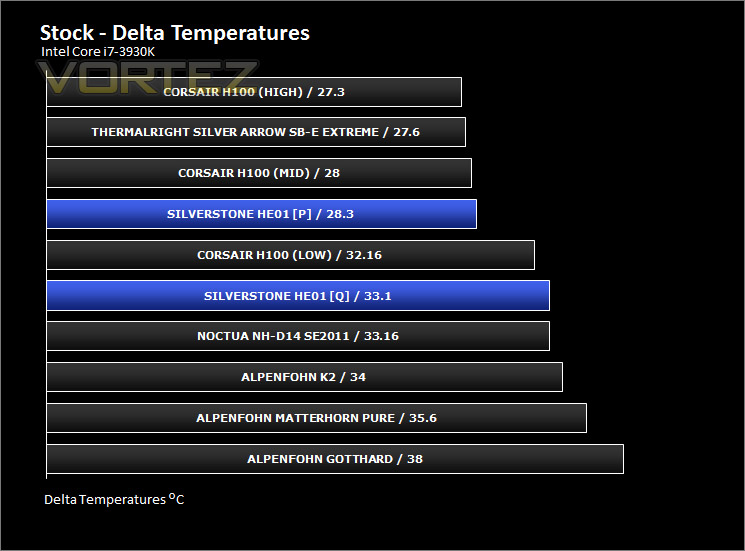
The HE01 was tested at both Q and P modes. At its low setting (Q) the HE01 realised a worthy contender against NH-D14 and K2. Throughout this test the 140mm cooling fan remained at 800RPM. With an increase in RPM up to 1600, even lower temperatures can be appreciated, pushing HE01 forward as a premium solution. The 140mm fan at 800RPM was very quiet indeed, barely even noticeable infact but with it ramped up to 1600RPM things changed – it began to be very noticeable.
Results – Overclocked Performance
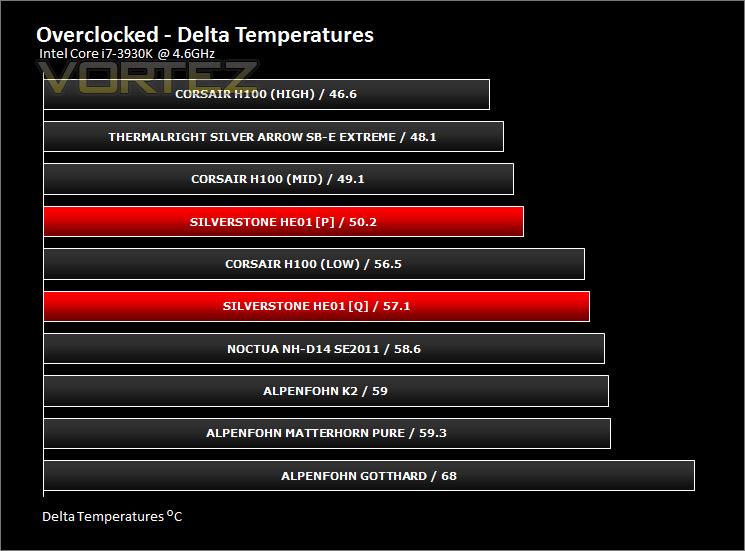
Again – the HE01 was tested in both Q and P modes throughout the overclocked testing too. During Q mode, the fan ran at 1200RPM whilst in P mode 2000RPM. Performance from this fan is exceptional, it manages to single-handedly repel unwanted heat – projected it above other popular rivals. Noise was an issue however, especially so at 2000RPM (100%). For testing purposes this is bearable but for general usage, some may want to fix fan speed to a lower setting.
Results – Passive Performance
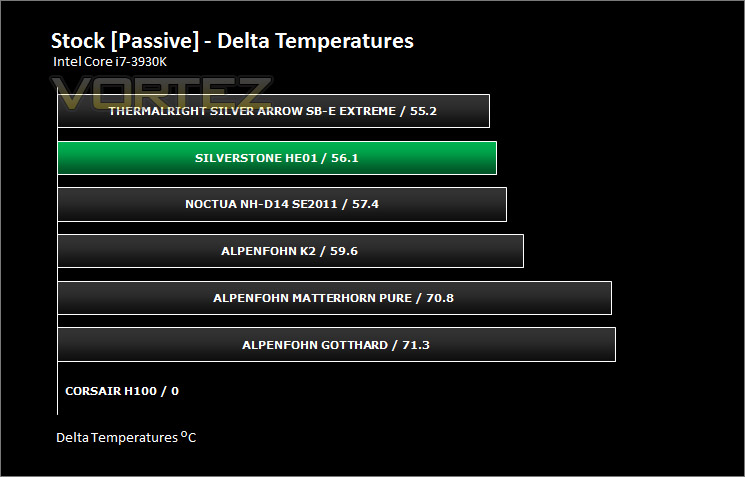
We’ve tested with the included 140mm fan to show the performance available out of the box but now it’s time to see how the heatsink design holds up to testing without the assistance of a cooling fan. This test relies purely on design and quality components. As you can see from the results, HE01 takes 2nd place showing that the heatsink design is very good. Combining the design with a good quality fan as SilverStone have makes it a recipe for success.
Results – Thermal Paste Comparison
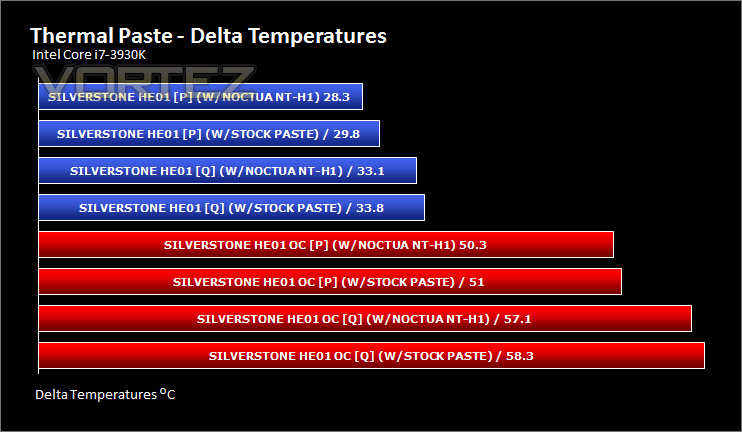
Most CPU coolers come accompanied with thermal paste provided by the manufacturer. For our CPU cooling tests we use Noctua’s NT-H1, so to offer up some interesting analysis we test the thermal paste given with the SilverStone HE01 against NT-H1 to see which gives the best results during stock and overclocked performance.
The Noctua paste narrowly beats the stock paste in both tests.
Conclusion
Although SilverStone don’t have extensive experience in the field of CPU coolers the first product to kick off the Heligon Series shows that they are not to be underestimated.
Installation of HE01 for LGA2011 is very easy thanks to the procedure that SilverStone have gone with. Not only is the process simple but the quality of the components are very good too. Stock, overclocked and passive performance are all excellent; a combination of a great thermal design, materials combined with a high-performance 140mm cooling fan projects this cooler into the territory others strive for. The cooling fan has a switch allowing its speed to be altered to quiet mode or performance mode, this switch is extremely useful as it can be modified on-the-fly.
Other things which are good to see is the memory compatibility and clearance. For LGA2011 – having memory on both sides isn’t an issue but those using LGA155 or other sockets which have dual channel memory only on one side have the added bonus of a thinner heatsink, thus allowing extended compatibility with taller modules.
The only niggle with this cooler is the noise of the PWM fan when overclocking takes place. Of course, this can be altered to suit the user’s needs but as PWM the fan boosts to 2000RPM and this creates a fair bit of noise.
Priced at £55, HE01 is a good choice for enthusiasts wanting the best performance they can get. The results on the preceding pages speak volumes for the strength of this cooler and we can therefore recommend this CPU cooler at Vortez.
Pros
+ Excellent thermal performance
+ Good build quality
+ Easy to install – good quality
+ Passive results are good
Cons
– Fan is loud at mid-maximum speeds
+ Excellent thermal performance
+ Good build quality
+ Easy to install – good quality
+ Passive results are good
Cons
– Fan is loud at mid-maximum speeds

Click here for an explanation of our awards at Vortez.net.


