







The 2nd installment to the Heligon Series is here; the HE02 CPU Cooler plans to strike a balance between silence and performance. Can this passive cooler climb to victory?

Product on Review: SST-HE02
Manufacturer and Sponsor: SilverStone
Street Price: £53 (At time of review)
The pursuit for silence is sought after by many enthusiasts and meeting different demands, manufacturers have developed product-lines to satisfy these needs. In the computer chassis category there are products designed specifically with silence in mind. Likewise, in the arena of cooling there are also products designed for those with a leaning towards low-noise solutions but in all these cases there is usually a compromise. Silent computer cases generally feature closed off panels and thus can suffer by struggling to generate adequate airflow, but for CPU coolers the compromise for silence is usually temperatures and today’s review sample seeks to find an excellent balance between the two.
Under the spotlight today is SilverStone’s newly released HE02 from the Heligon Series. HE02 is a large CPU cooler designed to be used passively inside a computer chassis. Although it doesn’t come with a cooling fan, it can entertain them, but the intention is to go without in a bid to achieve silence whilst delivering impressive temperature readings on a plethora of socket types. HE02 is even suitable for the demanding heights of Intel’s Sandy Bridge-E and this is something we will be taking a close look at today.
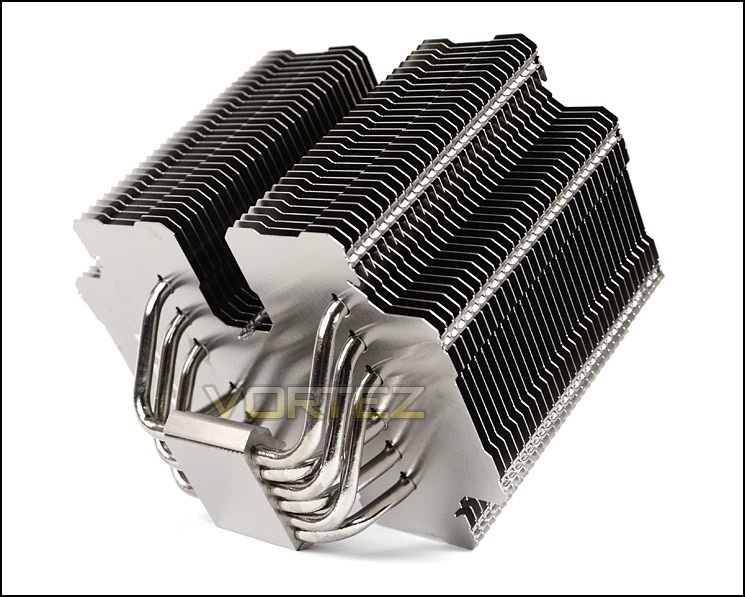
SilverStone’s take on SST-HE02
The all new Heligon HE02 CPU cooler is designed for both performance and quietness. The wide aluminum fins spacing are specially designed to minimize noise when air travel through its heatsink. The double cross shape of the cooler maximizes cooling surface and at the same time makes installation an ease on any motherboard. The corners of the crosses enable motherboard mounting even after the cooler has been installed while inner corners between the two crosses are to facilitate installation of the cooler’s bracket onto the motherboard. The entire cooler is asymmetrically designed so it can be installed optimally in different motherboard and chassis.
The Heligon HE02 is capable of safely cooling high-end CPUs such as the Intel Core i7 3960K without cooling fan directly attached. And using fans from the chassis it can also cool CPUs with TDP rating of up to 130W. Fan clips are included for optional 120mm fan mountings to enable HE02 to obtain cooling performance that rival the best air coolers on the market. For those looking to obtain the highest cooling performance at the lowest noise possible, the SilverStone Heligon HE02 is an unbeatable solution.
The Heligon HE02 is capable of safely cooling high-end CPUs such as the Intel Core i7 3960K without cooling fan directly attached. And using fans from the chassis it can also cool CPUs with TDP rating of up to 130W. Fan clips are included for optional 120mm fan mountings to enable HE02 to obtain cooling performance that rival the best air coolers on the market. For those looking to obtain the highest cooling performance at the lowest noise possible, the SilverStone Heligon HE02 is an unbeatable solution.
Technical Specifications
Model Name
SST-HE02
Material
Copper base, heat pipes with aluminum fins
Color
Silver
Application
Intel Socket LGA775/1155/1156/1366/2011
AMD Socket AM2/AM3/FM1/FM2
Heat Pipe Type
6mm thick powder heat pipe x 6
Cooling System
1 x 120mm fan (Optional)
CPU TDP
Fanless 95W (varies depending on chassis airflow)
Fanless with 120mm fan in case > 900rpm – 150W
1 x 120mm fan – over 150W
Net Weight
990g
Dimension
170mm(W) x 130mm(D) x 160mm (H)
SST-HE02
Material
Copper base, heat pipes with aluminum fins
Color
Silver
Application
Intel Socket LGA775/1155/1156/1366/2011
AMD Socket AM2/AM3/FM1/FM2
Heat Pipe Type
6mm thick powder heat pipe x 6
Cooling System
1 x 120mm fan (Optional)
CPU TDP
Fanless 95W (varies depending on chassis airflow)
Fanless with 120mm fan in case > 900rpm – 150W
1 x 120mm fan – over 150W
Net Weight
990g
Dimension
170mm(W) x 130mm(D) x 160mm (H)
Packaging & Bundle
HE02 is presented in identical packaging as HE01, the box is nondescript and intrigues as to what is inside since there are no graphics illustrating the cooler inside. There are some features and technical details found on the sides but even they remain elusive.
Inside, the cooler and its components are carefully packaged with foam padding to prevent damage during transit.
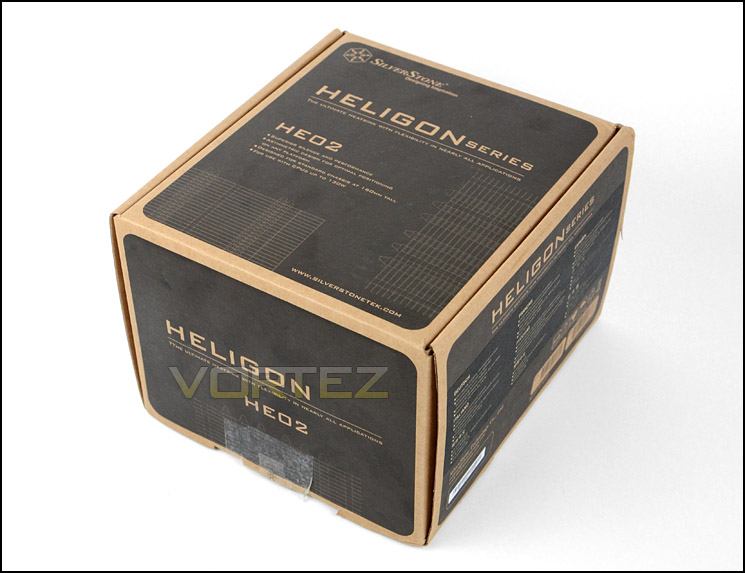
Packaging for HE02
HE02 has compatibility for a wide range of different socket types which include: Intel Socket LGA775/1155/1156/1366/2011 and AMD Socket AM2/AM3/FM1/FM2. Also included in the bundle is an instructions manual to assist with installation and fan clips to attach up to two cooling fans. HE02 is marketed as a passive CPU cooler and therefore has no cooling fan included.
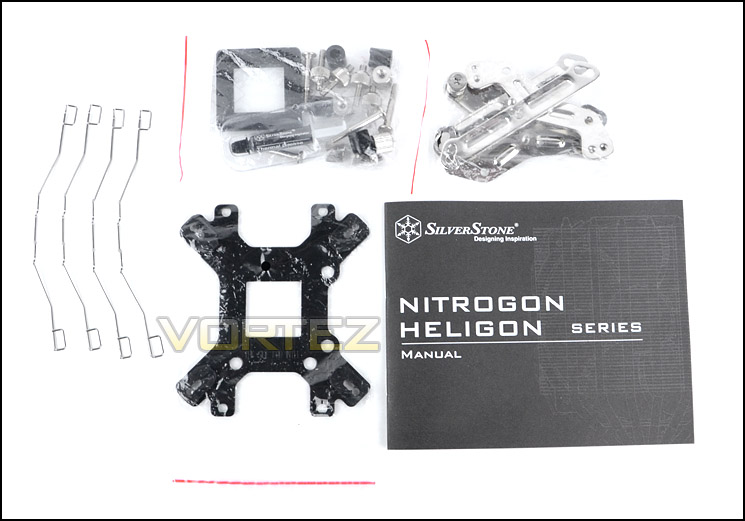
Bundle with fitting kits
Closer Look
It’s quite obvious that HE02 is not for the faint hearted, the size of this CPU cooler is gigantic. It features a dual-tower style but with a difference. The two towers are joined in the middle so technically this is a single-tower heatsink. The heatsink physical dimensions are 170mm x 130mm x 160mm (WxDxH).
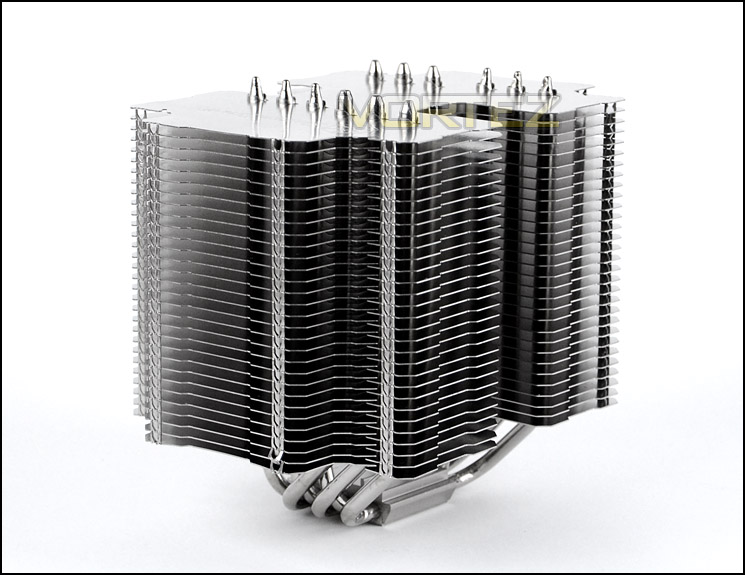
An overview of HE02
Observing the HE02 from an aerial view shows a jigsaw-piece shape. The heatsink features aluminium fins which are smooth and compared to other designs isn’t as condensed. Cooling fans are only able to be attached from two sides due to the fin design.
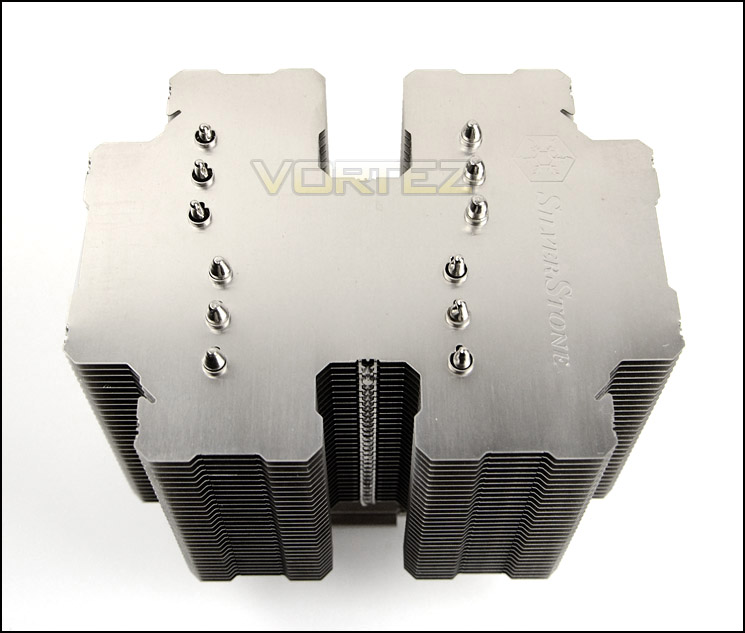
The top of HE02 with jigsaw-piece shape
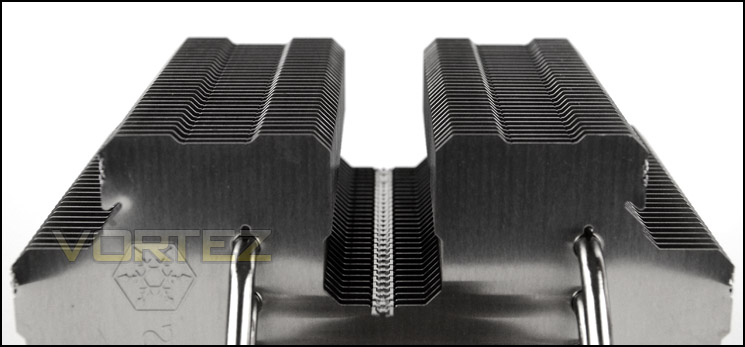
Profile of fins, great build quality
Turning our attention to the bottom section of HE02 we have 6x 6mm copper heatpipes which transfer heat away from the CPU. The heatpipes run through a copper baseplate which has a semi-transparent surface finish. The baseplate also has small indentations, these help to prevent any air pockets from appearing after thermal paste is applied.
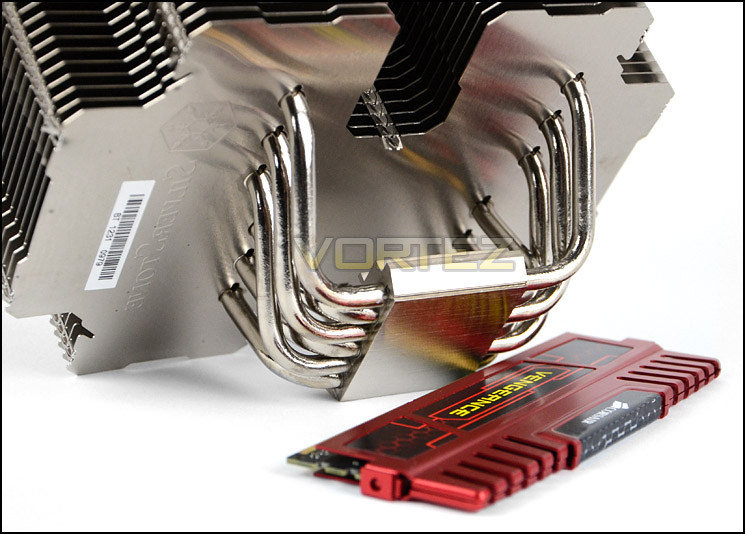
Copper baseplate and heatpipes
Although HE02 doesn’t come with a bundled cooling fans because the intention is for it to be predominantly passive, it does have some fan clips included for attaching them. These fan clips attach behind a groove on the fin stack and provide a secure fitment for a 120mm cooling fan.
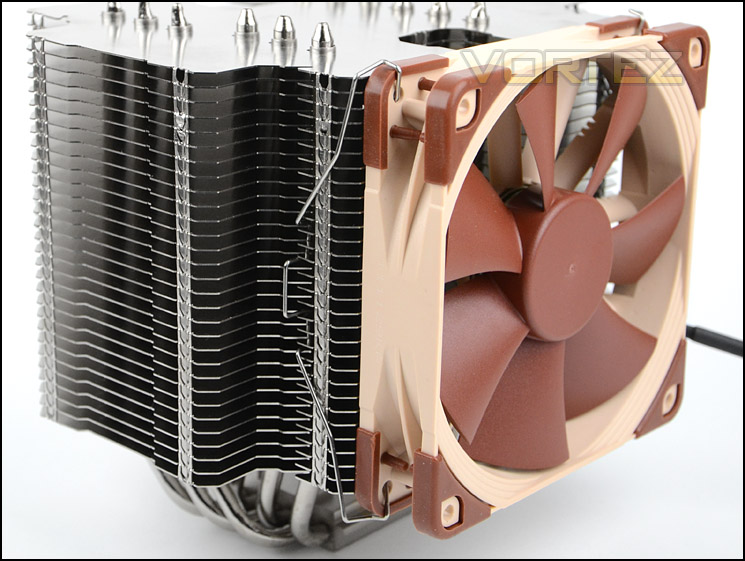
Clips for attaching 120mm cooling fans
Installation Process
In order to demonstrate the installation process for HE01 we are installing the cooler on the Intel LGA2011 socket.
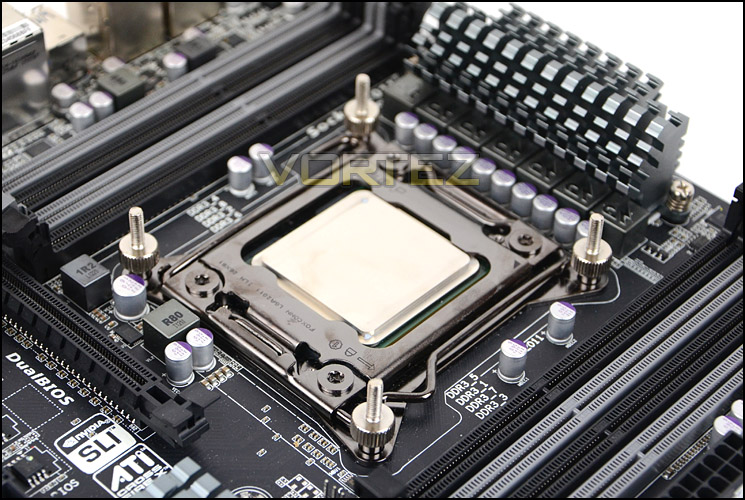
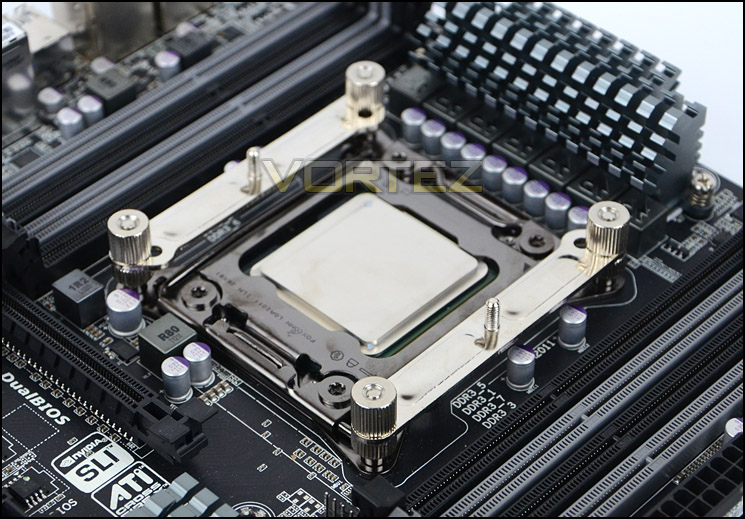
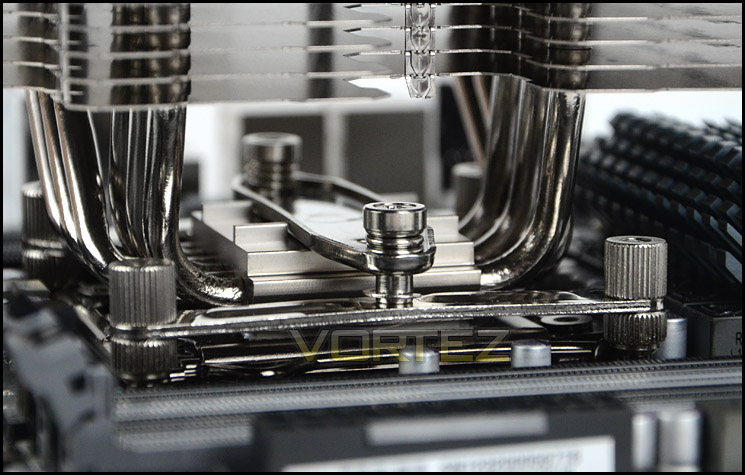
The first step is to apply four double sided screws into the mounting plate on LGA2011. Once these are attached, two brackets must be placed over the screws and four thumbscrews are used to fix them into place. It’s important to observe the orientation of the brackets, if you are planning to install a cooling fan to HE02 and want it to be in-line with the rear exhaust fan in your computer chassis then follow the same orientation we have used below. The last step is to apply thermal paste to the CPU and then place the heatsink over the CPU with the bar placed through the centre. This bar has two pre-applied screws with tension springs – making the job of securely attaching the cooler with a screwdriver an absolute breeze.
Overall, we’re very happy with how easy the installation process is and the quality of mounting kit provided.
Installed – Memory Clearance
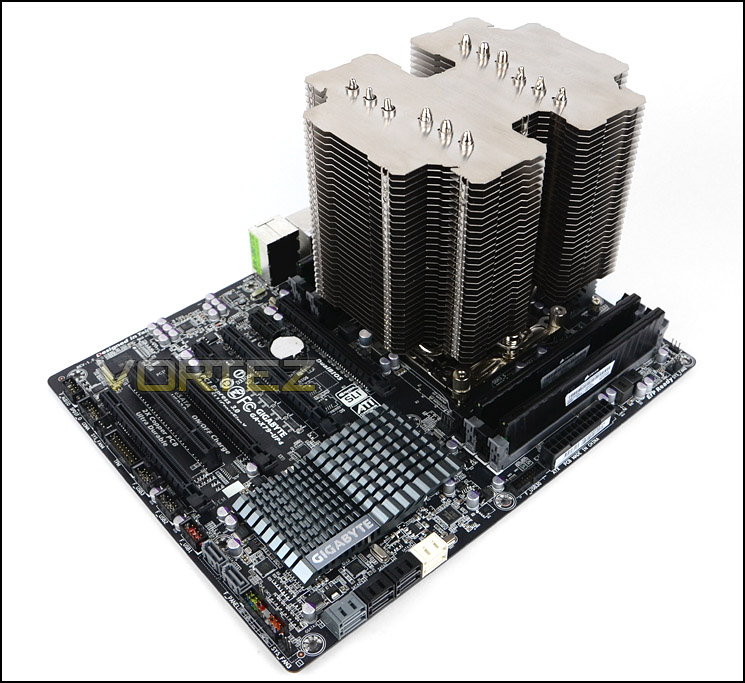
Memory clearance is something which many system builders and enthusiasts are eager to discover since this will ascertain whether a memory kit will be compatible with the CPU cooler or not. To demonstrate this a low profile memory kit is used.
With HE02 installed, this burly CPU cooler towers over the motherboard and looks rather impressive. If you are considering this cooler then be sure to check whether it fits inside your computer chassis, you will need 160mm of clearance for the width.
HE02 is rather burly
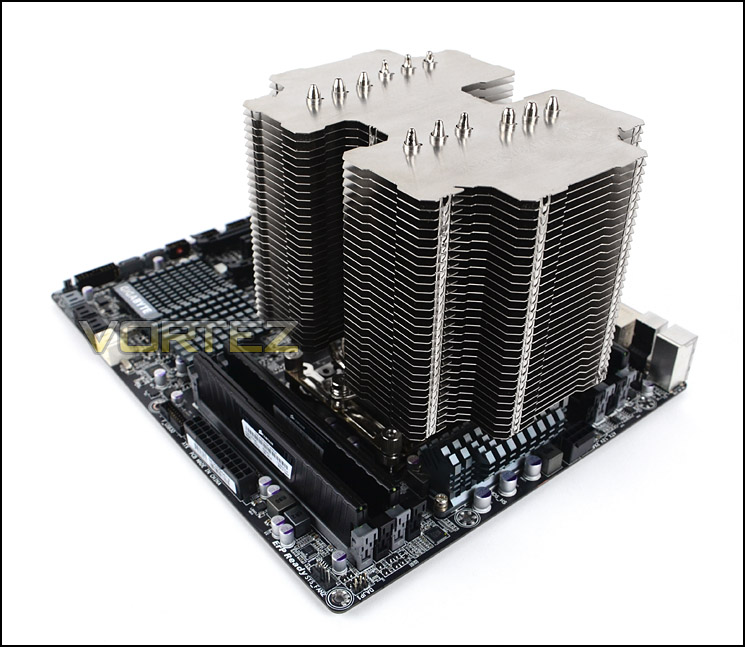
This vast CPU cooler covers the motherboard
Surprisingly, memory clearance with HE02 is actually quite forgiving. For LGA2011 the heatsink does overlap 2/4 slots on one side but there is 4cm of clearance which will favour most memory kits.
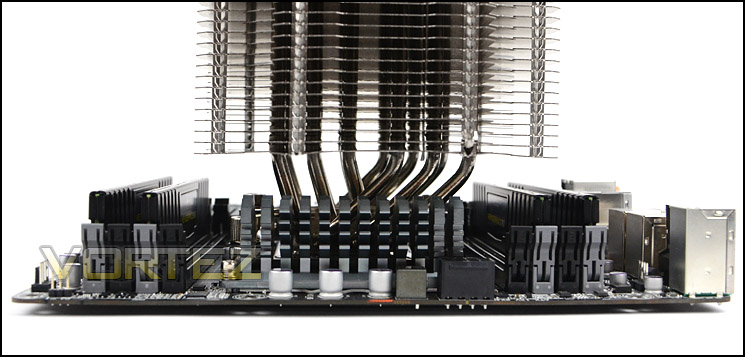
Pleasant amount of clearance for memory
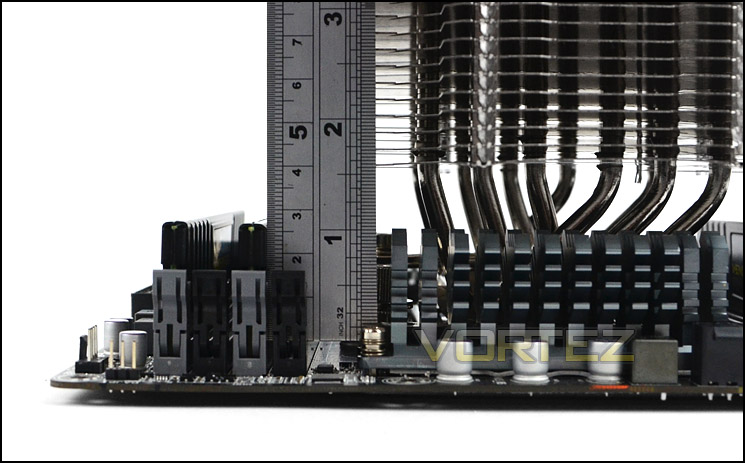
Up to 4cm directly underneath fins
Test Setup & Methodology
Test System
CPU – Intel Core i7-3930K (3.6GHz)
Motherboard – GIGABYTE X79-UP4
Memory – 8GB Corsair Vengeance LP 1600MHz CL9
Graphics – Sapphire Radeon HD 6850 1GB
PSU – NZXT Hale90 650W
Hard Drive – Kingston HyperX 240GB SATA III SSD
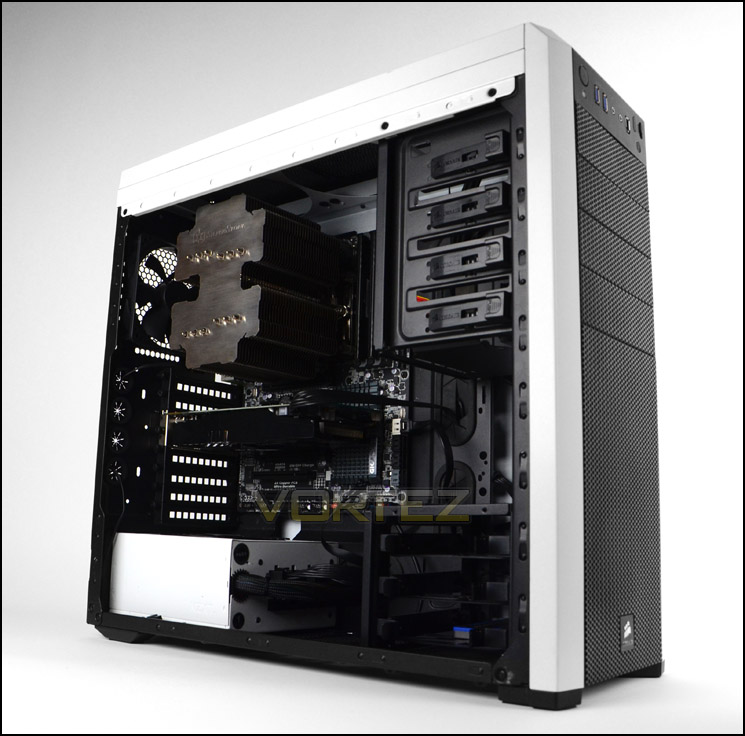
Case – Corsair Carbide 500R White
Motherboard – GIGABYTE X79-UP4
Memory – 8GB Corsair Vengeance LP 1600MHz CL9
Graphics – Sapphire Radeon HD 6850 1GB
PSU – NZXT Hale90 650W
Hard Drive – Kingston HyperX 240GB SATA III SSD
Case – Corsair Carbide 500R White
CPU Coolers
Alpenföhn Matterhorn Pure(120mm Wingboost: 300-1200RPM)
Alpenföhn K2 (120mm Wingboost: 500-1500RPM, 140mm Wingboost: 300-1100RPM)
Alpenföhn Gotthard (140mm Wingboost: 300-1100RPM)
Noctua NH-D14 (120mm NF-P12 PWM + 140mm NF-P14 PWM: up to 1200RPM)
Thermalright SilverArrow SB-E Extreme (Dual TY-143 fans – 600-2500RPM)
Corsair Hydro H100 (Dual 120mm fans – low: 1300RPM, mid: 2000RPM, high: 2600RPM Push Config)
SilverStone HE01 (140mm PWM fan – 500RPM-1200RPM – 500RPM-2000RPM)
be quiet! Dark Rock Pro 2 (135mm + 120mm PWM Fans – up to 1500RPM and 1700RPM)
Thermaltake Water 2.0 Pro (Dual 120mm PWM fans – up to 2000RPM)
Corsair Hydro Series H100i (Dual 120mm fans – up to 2700RPM Push Config)
Be Quiet! Shadow Rock TopFlow(1x 135mm PWM fan – up to 1500RPM)
SilverStone HE02 (Passive – optional fan used: Noctua NF-F12 120mm PWM)
Program Suite
Real Temp – Maximum temperature analysis
LinX 0.6.4 – Applies thorough stress test to CPU
CPU-Z – Confirmation of CPU frequency/voltage
AIDA64 Extreme Edition – Confirmation of temperatures/fan speeds
Testing methodology
Testing will be based on temperatures recorded by Real Temp after 20 passes of LinX stress test. The maximum absolute temperatures will be recorded after the test and averaged over the 6 cores. The delta is then calculated by subtracting the ambient temperature recorded near the intake fans from the average temperature calculated. Tests are conducted with the Intel i7 3930K at its default 3.6GHz stock speed and overclocked to 4.6GHz @ 1.42V. The tests are done inside the Corsair Carbide 500R chassis to simulate real world conditions. To keep the tests standardised we are using Noctua’s NT-H1 thermal paste on all coolers.
CPU coolers are reviewed as they come out of the box – with their factory cooling fans, as the manufacturer intended and as the consumer expects.
Additional tests include a passive test where the cooling fans are taken away from the heatsink and a comparison between the cooler used with stock thermal paste against our Noctua NT-H1 paste.
A kind thank you to Noctua for supplying us with NT-H1 thermal compound.
Results – Stock Performance
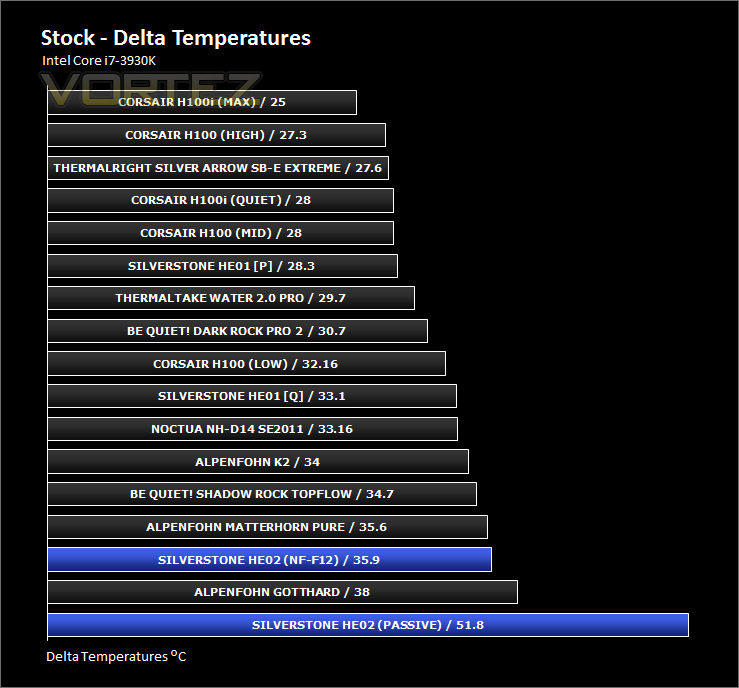
For this particular test we have kept the CPU at stock frequency but showing two different options. HE02 is designed to work passively so we have shown this compared to other coolers and in their out-of-the-box performance with the same settings. Also included is HE02 with Noctua NF-F12 attached to show the performance gains that can be expected from using a 120mm cooling fan.
The results for passive testing may show quite a jump in difference compared to the other coolers in the chart but all of these coolers have fans attached to them – the story is different if you look at the passive results page comparison.
With a Noctua NF-F12 running at 1350RPM the results are quite impressive.
Results – Overclocked Performance
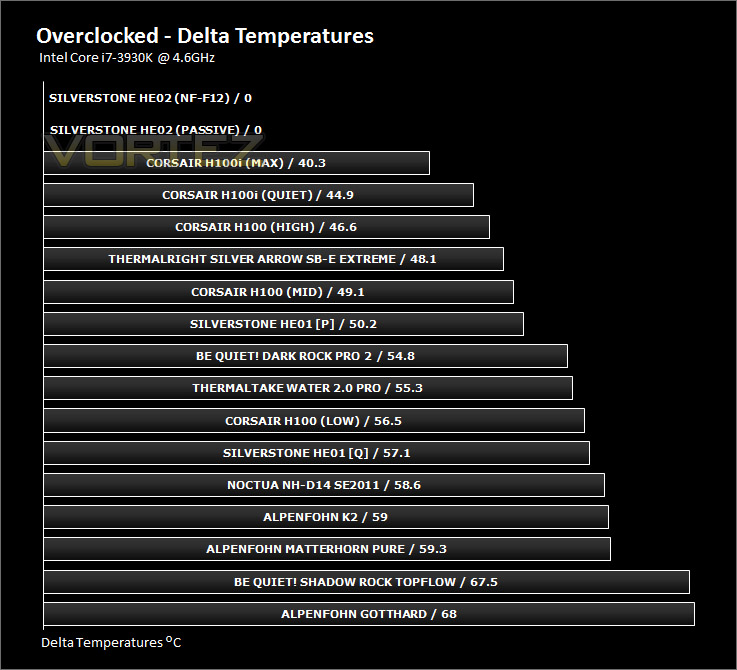
For the overclocked test, it is only possible to test with a cooling fan since the temperatures at passive are just far too high. Sadly, even with the F12 attached, overclocking pushed the temperature beyond what was stable. Under the duress of an overclock, the intense temperatures from the 3930K was too much for HE02, showing that this cooler is more suitable for stock settings than in an extreme setting.
Results – Passive Performance
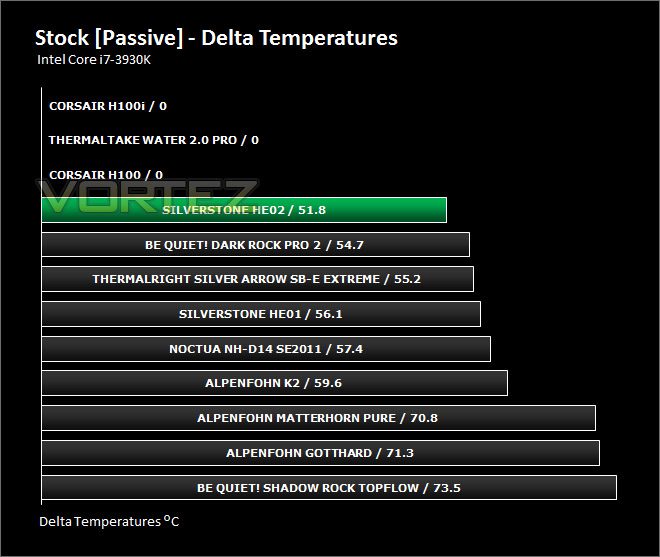
We have already shown the passive performance for HE02 but not compared to the other previous passive tests.
HE02 pushes well ahead and moves immediately up to the top of the leaderboard. Passively, this is the best CPU cooler we have tested. These results demonstrate the combination of materials and design deliver a significant improvement for SilverStone.
Results – Thermal Paste Comparison
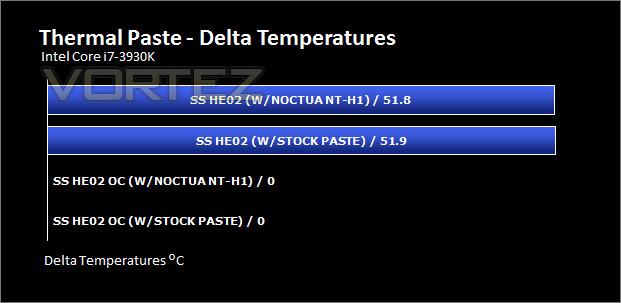
Most CPU coolers come accompanied with thermal paste provided by the manufacturer. For our CPU cooling tests we use Noctua’s NT-H1, so to offer up some interesting analysis we test the thermal paste given with the SilverStone HE02 against NT-H1 to see which gives the best results during stock and overclocked performance.
As the HE02 cannot offer any results under an overclock as per previous test we can only test stock performance for comparison. The difference is nominal and the Noctua/SilverStone paste offers similar performance.
Conclusion
So we’ve reached the end of our review, has the monolith HE02 given good thermal performance results or has it just achieved silence only?
As soon as you take the HE02 out of its packaging the sheer size of this CPU cooler is a talking point just on its own. Its physical design is unique and something which is clearly distinctive. Its design isn’t for the sole purpose of being different though, the shape, measurements and materials used all work together to help this cooler achieve fantastic results as a passive solution.
In our testing, HE02 climbed to the top of the passive leaderboard and confidently asserted itself as the new victor. The new record on our database wasn’t set by the breadth of a hair; the result was by almost three degrees which is especially significant.
Whilst benchmarking with a cooling fan isn’t ‘out-of-the-box’ testing we still included this within our testing to give a better picture of what you can expect from HE02 should you decide to attach a fan. The results were again good, but they weren’t as impressive as we anticipated. This could be due to two reasons; compared to the other coolers we have tested at the high-end – faster fans could be a requirement but more likely – HE02 may not be designed to work so proficiently with cooling fans, afterall its intended use is as a silent solution, passive. The passive results on the preceding pages demonstrate HE02 versus all the other coolers without their high-RPM cooling fans and it delivered a devastating blow and this really shows that its make-up is where the triumph lies.
Using HE02 on an Intel Core-i7 3930K with stock settings yields good results but when the CPU is overclocked things start to become unstable, HE02 is not designed to entertain Sandy Bridge-E in an overclocked environment.
Priced at £53, HE02 is middle of the road in terms of comparing against other CPU coolers. True enough it doesn’t come with cooling fans which other CPU coolers around this bracket come with, some would argue that fans usually bump the price up £10-15 but once again we draw your attention to the intended use and target audience – silence. Those who are wanting silence will probably not be interested in overclocking and therefore this cooler is ideal and based on its target audience its our pleasure to give SST-HE02 our prestigious gold award.
If you are on the pursuit for silence then HE02 is a master in its own class. To date, this is the best passive CPU cooler we have yet tested. SilverStone have both performance and silence covered, and if it’s these two factors you are seeking to achieve then we would certainly recommend you consider HE02.
Pros
+ Best passive cooler we have tested
+ Excellent build quality
+ Reliable fitting kit
+ Noiseless operation
Cons
– Large
– Not suited to substantial overclocking
+ Best passive cooler we have tested
+ Excellent build quality
+ Reliable fitting kit
+ Noiseless operation
Cons
– Large
– Not suited to substantial overclocking

Click here for an explanation of our awards at Vortez.net.


