To be top of your game you need the top gaming gear. Can SteelSeries make good on this statement with the 7G Pro Gaming Mechanical Keyboard?
Product on Review : SteelSeries 7G Pro Gaming KeyboardManufacturer and Sponsor : SteelSeries
Street Price: £104 inc. VAT (GBP)

SteelSeries are a company that have a single ambition: To make the highest quality peripherals that cater for needs of the world’s top professional gamers. They started out in their quest by creating some very unique and innovative mouse surfaces and have today evolved into a forerunner of gaming peripherals from headsets to high-end keyboards. SteelSeries however do not take full credit for the empiric rise to gaming fame, they humbly suggest that they simply digest much valued feedback from their huge gaming fraternity and develop products that the gamers wants. Listening to feedback from your key customer base is what makes for a successful company and SteelSeries are without doubt held in very high esteem by all pro gamers thanks to the products that have been designed by gamers, for gamers.
Not only do they take on-board what the gamers say about their product but they also feedback a substantial amount of their profits back into the gaming community to stimulate growth by co-hosting gaming tournaments such as Iron Lady and King of the Hill. It goes without saying that they also sponsor many top gaming teams such as Fnatic, Natus Vincere and SK gaming to name but a few. Thanks to these ventures, SteelSeries get invaluable advice from the very cream of pro gamers which enables them to design peripherals that are not only designed for the very best, but with this in mind, the products are clearly excellent for the for the rest of us.
The product we have on review today is one such item, the SteelSeries 7G Pro Gaming Keyboard. Unlike most of todays ‘gaming keyboards’, you will not find glow in the dark keys, LCD screens or indeed multiple media and macro keys on the 7G. SteelSeries believe that a gaming keyboard should be able to take abuse, lasting the test of time yet offer consistent and ultimate performance throughout its lifespan. SteelSeries refer to their keyboard as the ‘heavyweight of gaming keyboards’, I don’t know whether this is in reference to its weight or because it comes with few frills that would appeal to the kiddie gamers out there. The keyboard is sombre yet menacing with its low brow looks and unremarkable appearance.
So what is so great about this keyboard? No LCD, no backlit keys, no macro settings, it doesn’t even have a windows key! Some may scoff at this but hidden beneath the keyboard is where all the fun begins because the main attraction to the 7G Pro gaming keyboard is the mechanical Cherry MX black keys which are widely regarded as the best mechanical keys for the ultimate gaming experience.
About the 7G
As we began to design the 7G, we wanted to offer a keyboard that would do more than emulate the bridge console on the USS Enterprise NCC-1701 and instead, we focused on raw performance and durability.
We took a long look at the most extreme use scenarios for keyboards and designed a keyboard that would meet and (in most cases) exceed every one of them. That’s why we refer to the 7G as the “heavyweight of gaming keyboards”. It’s not the prettiest chick in the beauty pageant. It doesn’t glow or pulse. But it packs a punch. A serious one.
As we began to design the 7G, we wanted to offer a keyboard that would do more than emulate the bridge console on the USS Enterprise NCC-1701 and instead, we focused on raw performance and durability.
We took a long look at the most extreme use scenarios for keyboards and designed a keyboard that would meet and (in most cases) exceed every one of them. That’s why we refer to the 7G as the “heavyweight of gaming keyboards”. It’s not the prettiest chick in the beauty pageant. It doesn’t glow or pulse. But it packs a punch. A serious one.
Features
Despite its bland looks, the SteelSeries 7G has quite a raft of features. Here are just some of them:
Mechanical Switches
SteelSeries 7G is built with mechanical no-click switches. The users experience with mechanical switches is very different compared to using the “soft feel” keys found on conventional keyboards or even laptops.
Tactile Feedback
The rubber domes on a conventional keyboard will, over time, lose their tactile feeling due to rubber flexing. The keys you use the most will start to feel different. The physical construction of the mechanical switches used in the 7G, and the strict tolerance levels in which the switches are manufactured, is what allows the key presses on this keyboard to always feel consistent.
Travel Distance
It gets even better. With the 7G you don’t have to press the keys all the way down for them to register. Our mechanical switches will register key presses fast; the travel distance will be roughly 50% shorter than a conventional keyboard. You will type faster, with a consistent tactile feeling. Your Actions Per Minute (APM) can reach new heights with the 7G thanks to this feature.
Gold
SteelSeries mechanical switches are plated with gold to ensure durability and performance. Why gold you ask? It makes the switches more durable. Gold doesn’t corrode over time like other cheaper metals.
Acclimation
It will take a while to get used to a mechanical keyboard, most gamers or typists acclimate in approximately 1 to 2 weeks. Once you are properly acclimated you will appreciate better tactile feedback, superior response times and ultimately greater control. Simply put: You will become a better typist.
Anti-Ghosting
Ever tried pressing a few keys on your keyboard and getting a beep sound? It either happens when you press too many keys at the same time, or when you press too many keys within the same cluster at the same time (like the keys around WASD which often used for movements in games). If your keyboard exhibits this behaviour it will hinder your ability to perform certain actions, movement in a FPS games being one example. The industry has labelled this anti-ghosting. When using the PS/2 connection on the 7G, you can press as many keys as you want at the same time, all of the key presses will go through and be registered by your computer.
Audio Ports
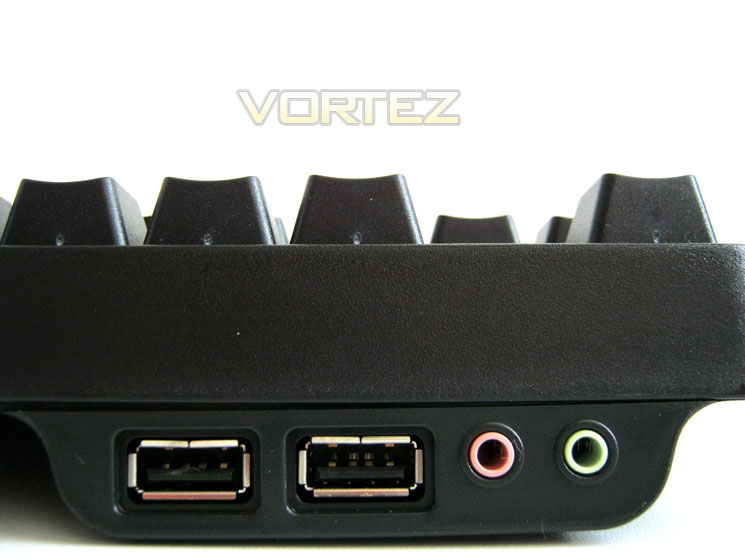
For convenience we have added two audio ports to the 7G, making it easier than ever to connect speakers or a headset to your setup. Headphone/speaker-out and microphone-in is built directly into the keyboard. This gives you easy access to your audio outlet, instead of having to move to the back of your computer, when changing or plugging in audio devices.
USB hub
And for even more convenience we also added a 2-port USB hub to the 7G. Plugging in your mouse, recharging your MP3-player or cell phone is closer and easier.
Braided Cord
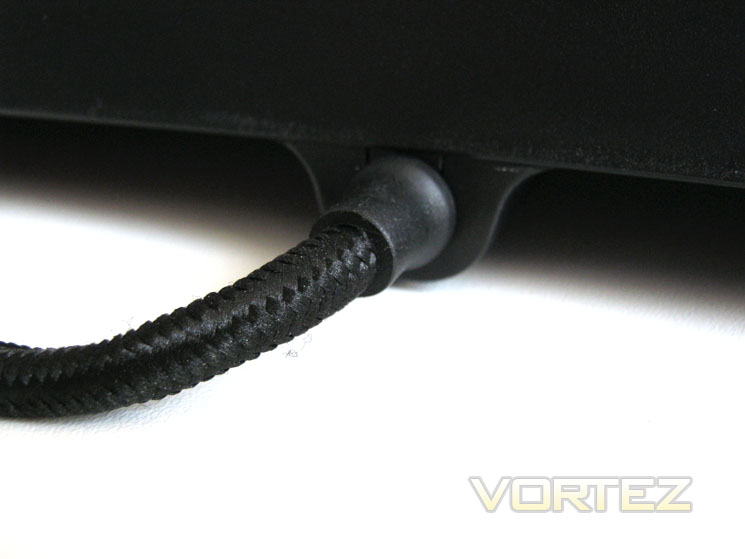
We have a lot of signals to transmit with the 7G, two audio signals, two USB ports, and the keyboard itself. That’s why our wiring is massive. Even more so because we use double braided nylon on everything, adding the final touch to a product that was built to be durable. Very durable.
No Windows Key
We like the Windows key for certain things and in certain situations. But not when we are in the middle of a gaming session. We have replaced it with a SteelSeries Key that won’t wreak havoc during a gaming by minimizing your game or by opening a menu. The SteelSeries Key serves a different purpose: it’s a function key for the Media Controls found on the 7G.
SteelSeries 7G is built with mechanical no-click switches. The users experience with mechanical switches is very different compared to using the “soft feel” keys found on conventional keyboards or even laptops.
Tactile Feedback
The rubber domes on a conventional keyboard will, over time, lose their tactile feeling due to rubber flexing. The keys you use the most will start to feel different. The physical construction of the mechanical switches used in the 7G, and the strict tolerance levels in which the switches are manufactured, is what allows the key presses on this keyboard to always feel consistent.
Travel Distance
It gets even better. With the 7G you don’t have to press the keys all the way down for them to register. Our mechanical switches will register key presses fast; the travel distance will be roughly 50% shorter than a conventional keyboard. You will type faster, with a consistent tactile feeling. Your Actions Per Minute (APM) can reach new heights with the 7G thanks to this feature.
Gold
SteelSeries mechanical switches are plated with gold to ensure durability and performance. Why gold you ask? It makes the switches more durable. Gold doesn’t corrode over time like other cheaper metals.
Acclimation
It will take a while to get used to a mechanical keyboard, most gamers or typists acclimate in approximately 1 to 2 weeks. Once you are properly acclimated you will appreciate better tactile feedback, superior response times and ultimately greater control. Simply put: You will become a better typist.
Anti-Ghosting
Ever tried pressing a few keys on your keyboard and getting a beep sound? It either happens when you press too many keys at the same time, or when you press too many keys within the same cluster at the same time (like the keys around WASD which often used for movements in games). If your keyboard exhibits this behaviour it will hinder your ability to perform certain actions, movement in a FPS games being one example. The industry has labelled this anti-ghosting. When using the PS/2 connection on the 7G, you can press as many keys as you want at the same time, all of the key presses will go through and be registered by your computer.
Audio Ports
For convenience we have added two audio ports to the 7G, making it easier than ever to connect speakers or a headset to your setup. Headphone/speaker-out and microphone-in is built directly into the keyboard. This gives you easy access to your audio outlet, instead of having to move to the back of your computer, when changing or plugging in audio devices.
USB hub
And for even more convenience we also added a 2-port USB hub to the 7G. Plugging in your mouse, recharging your MP3-player or cell phone is closer and easier.
Braided Cord
We have a lot of signals to transmit with the 7G, two audio signals, two USB ports, and the keyboard itself. That’s why our wiring is massive. Even more so because we use double braided nylon on everything, adding the final touch to a product that was built to be durable. Very durable.
No Windows Key
We like the Windows key for certain things and in certain situations. But not when we are in the middle of a gaming session. We have replaced it with a SteelSeries Key that won’t wreak havoc during a gaming by minimizing your game or by opening a menu. The SteelSeries Key serves a different purpose: it’s a function key for the Media Controls found on the 7G.
Let’s take a look at the product itself…
Packaging & First Look
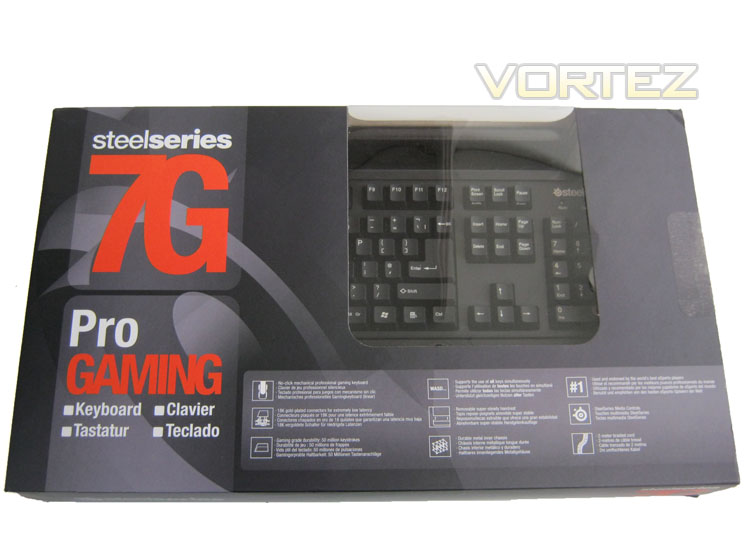
Box Front
The front of the box takes on the typical bland SteelSeries theme. Rather than plastering ‘gaming’ garb such as knights on horseback or dragons spewing fire, SteelSeries instead opt for the professional look with just the product title and key features. It works very well and promotes a sense of professionalism. There is also a large window for potential buyers to get a glimpse of the product they are purchasing.
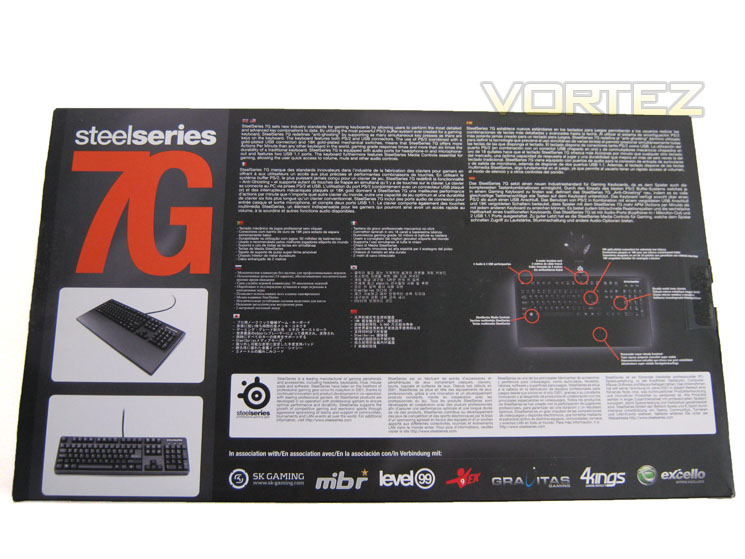
Box Rear
Flipping the box over we are greeted with a rundown of the main attractions of the 7G Pro gaming keyboard in multiple languages. I was amazed by the weight of the overall package as keyboards are rarely heavy by any means but this package lives up to its product description – heavyweight!
Accessories
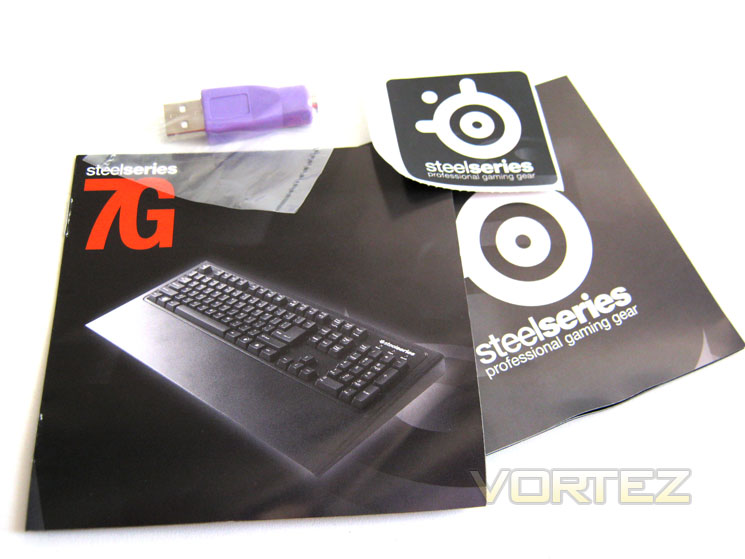
The included accessories are adequate if somewhat underwhelming. You get a product catalogue, user guide a SteelSeries logo sticker and a PS2 to USB adapter. Unlike the Ozone Strike, you do not get a ket replacement set which was a shame as the WSAD keys are sure to take a battering on a keyboard of this type and therefore would have been nice to have a back-up set to replace these jeys when they start to show signs of wear and tear.
Wrist rest
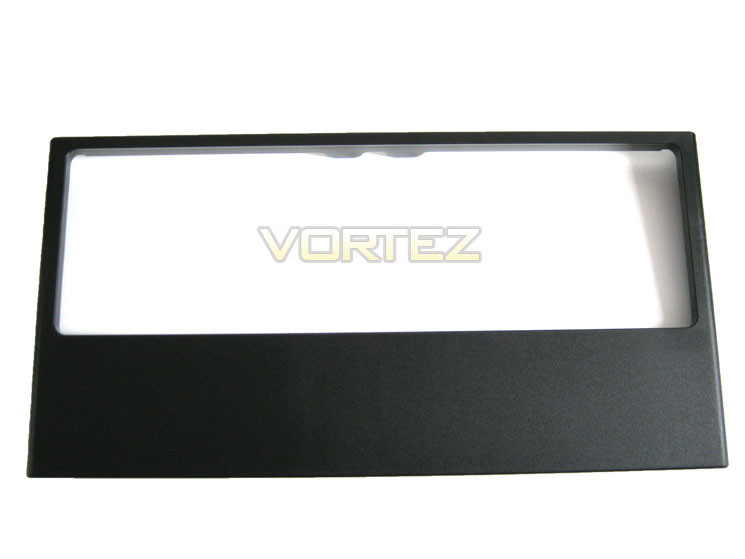
What the 7G lacks in accessories it more than makes up for in the wrist rest/keyboard frame. This thing is huge and will make the ergonomics of the keyboard so much better. One of my complaints with the Ozone Strike was that the wrist rest was too small; this more than makes up for that shortfall.
First Look
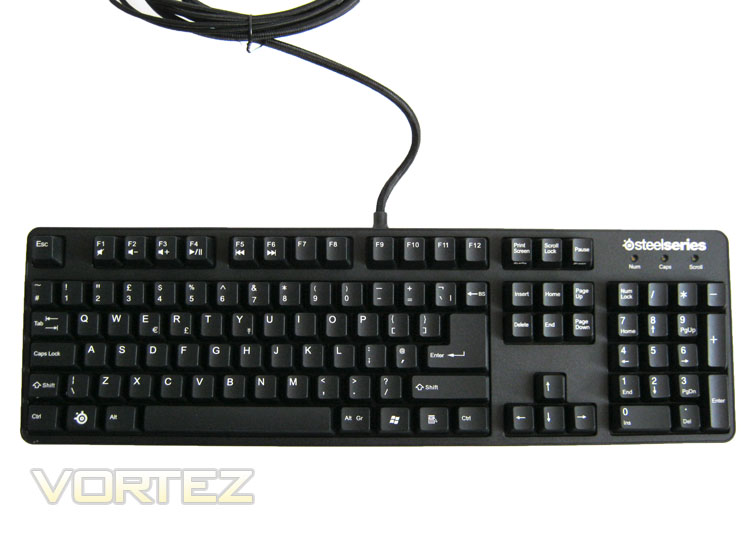
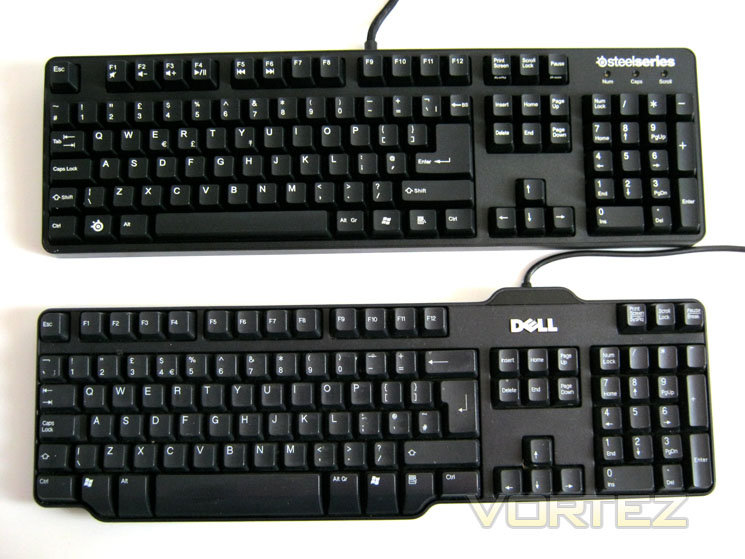
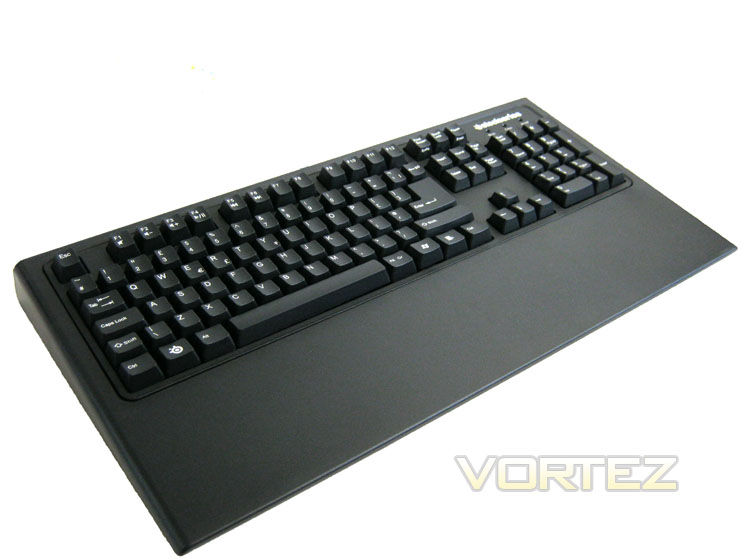
Here we get a first look of the SteelSeries 7G Mechanical Pro Gaming Keyboard. Pretty unremarkable huh? I must agree that aesthetically, the 7G is anything but exciting and as you will see overleaf, has a strong resemblance to a £5 Dell keyboard! That however is where the similarities end.
Let’s take a closer look at the keyboard…
Closer Look
Keyboard Comparison
As you can see, the SteelSeries 7G looks pretty unremarkable and is virtually the same size of a bog standard Dell keyboard. As mentioned previously though, the weight of the keyboard hints at the vast differences in these two keyboards where they couldn’t be placed further apart in terms of performance.
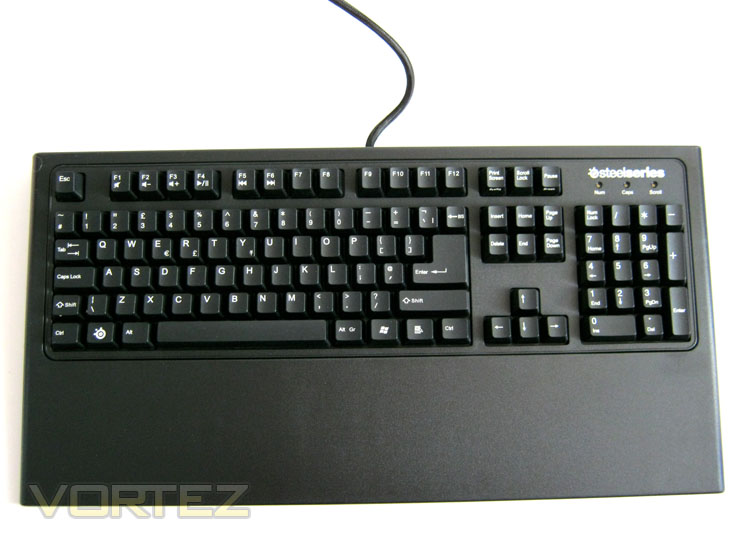
Keyboard Frame Attached
Attaching the frame is just a simple matter of dropping it over the top of the keyboard. It totally transforms the look and feel of the keyboard making it much more gamer-esque than was originally perceived. I would have liked the wrist rest to have some padding though as it is manufactured from rigid plastic and while it is tough, it is perhaps not as comfortable as it could have been.
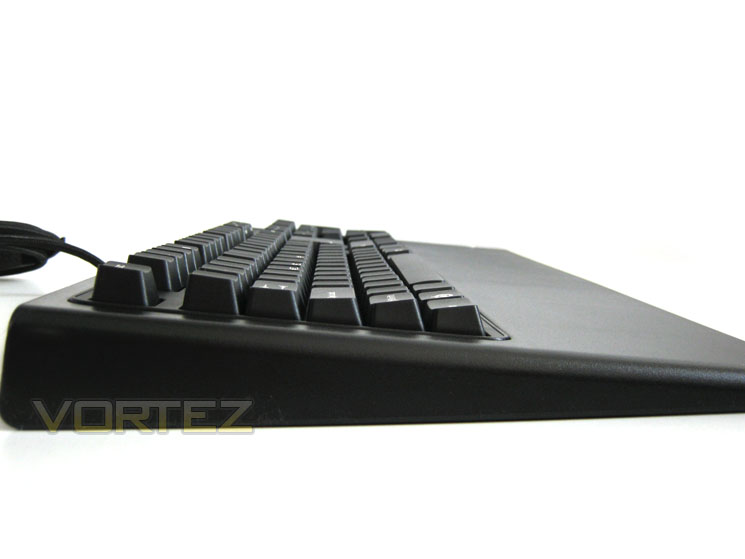
Keyboard Profile
Ergonomically, the keyboard is not perfect and would make some baulk at the wedge shape. While ergonomic wave designs may well be great for typing, they can be cumbersome for gaming so for this reason, SteelSeries have stuck to the tried and tested design which the majority of users, especially gamers prefer.
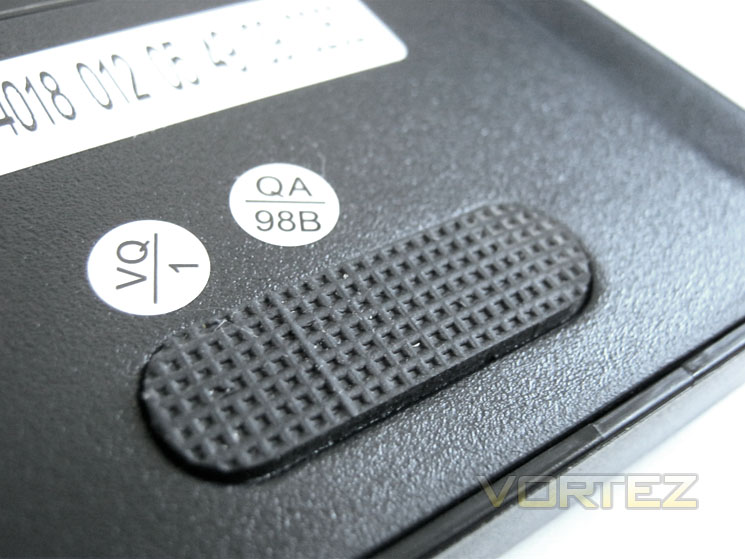
First impressions
With the wrist rest fitted it will take up a lot of desktop real estate but thankfully due to the rubber grips beneath the keyboard, everything stays precisely where it should.
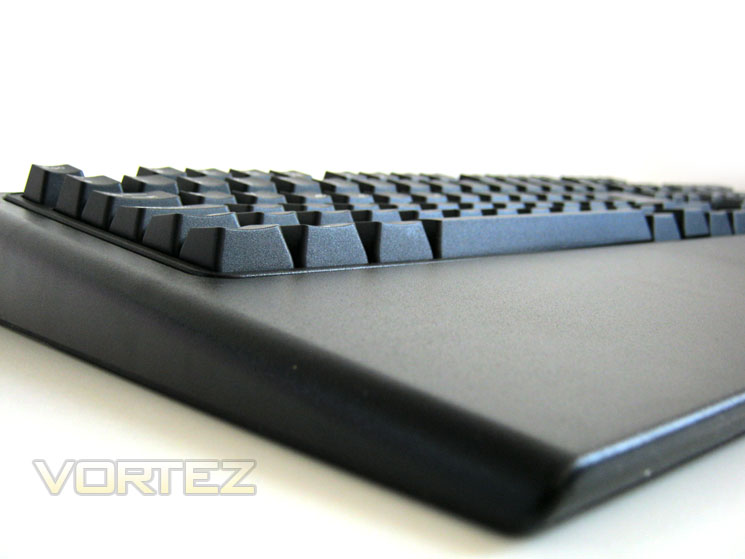
First impressions
Looking at the keyboard you would be forgiven for thinking that it is precisely the same as most other mechanical gaming keyboards and for the most part I would be inclined to agree. Aesthetically, save for the logo and wrist rest, the SteelSeries 7G looks to be identical to the Ozone Strike we reviewed previously. Both keyboards use the Cherry black MX switches and utilise the same layout so I am at a loss as to how to differentiate these keyboards at this point.
I think we should investigate things a little further before passing judgement…
Closer Look Pt.2
Gold Plating
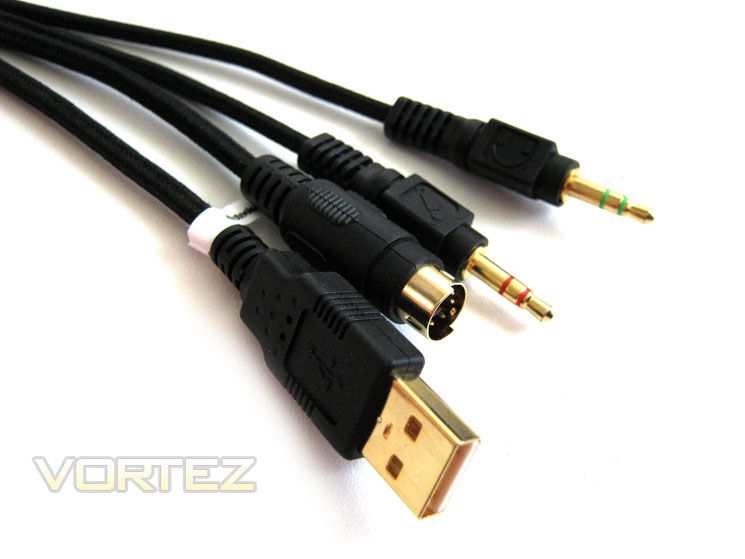
The USB, PS2, headphone and mic are all gold plated and it has to be said, to higher quality than the Ozone Strike keyboard. Gold is now commonly used in peripherals to enhance signal strength so while I can appreciate its use on the audio plugs, the PS2 and USB plugs seem to be for aesthetics only. I would however state that gold is a hard metal so it should also lengthen the life span of the connectors. Personally, I have never had an issue with normal USB plugs eroding, rusting or deteriorating to such an extent that I have noticed loss of signal but as everyone else seems to be using the same gold plating method, who are SteelSeries to buck that trend?
Key lock LEDs
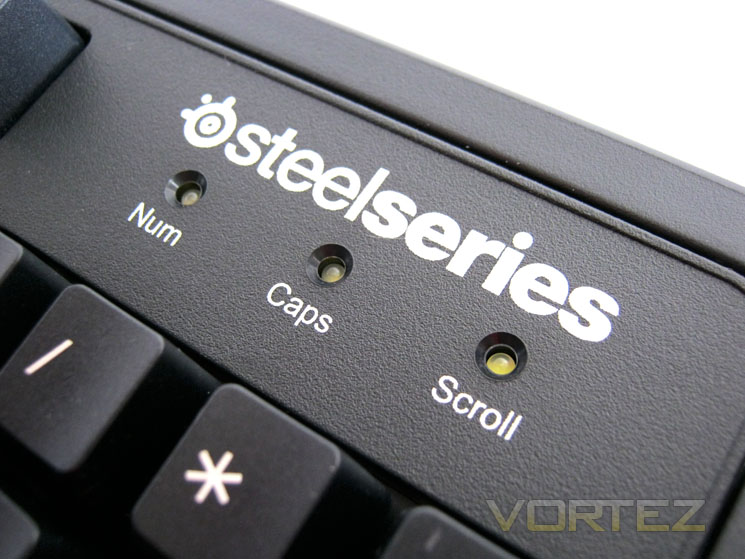
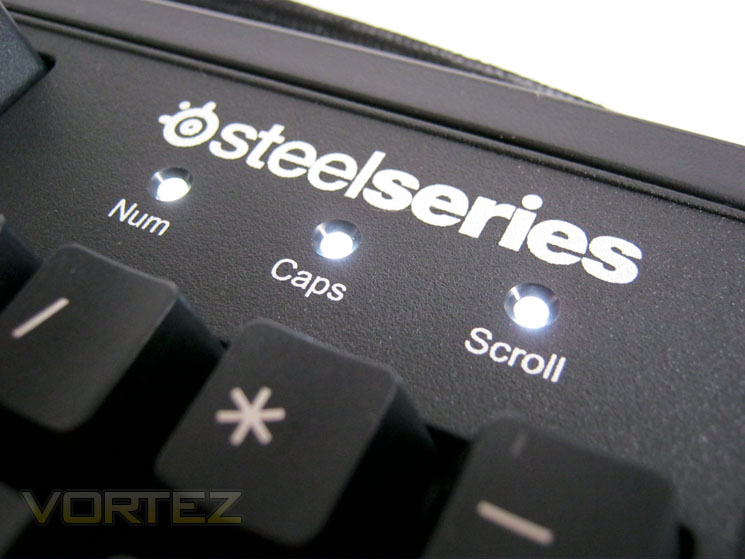
Unlike the Ozone Strikes Red LED’s, the SteelSeries 7G uses very bright white LED’s. From a side view, the LED’s are not too distracting but when you look directly at them SteelSeries would have done well to include a pair of sunglasses such is the intensity of light! Burn your retina they won’t but should you look directly at them, especially during dim conditions, you will be left with the afterglow of the LED’s in your vision. That said they do look more ‘pro’ in today’s age of multi coloured LED gaming peripherals.
No Windows Key
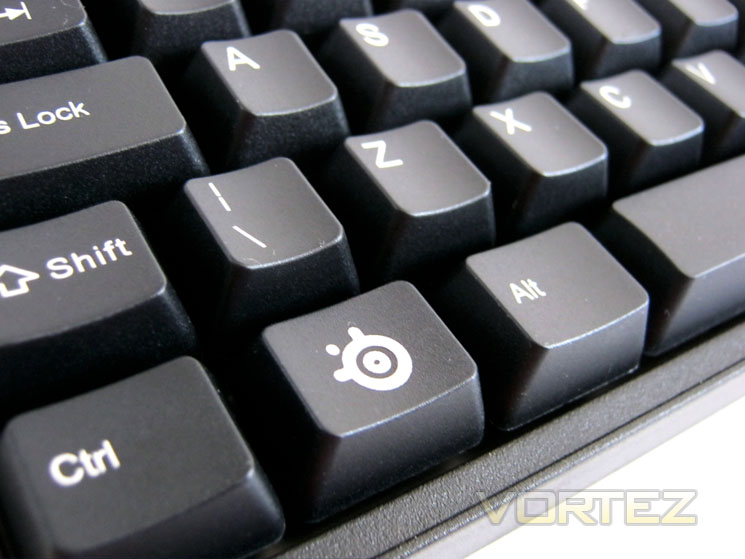
Again we see an identical feature of the Ozone Strike in the media key which has replaced the Windows Key. It’s a great feature that prevents gamers from inadvertently pressing the windows key during gameplay. I know I find that very frustrating so it is a welcome feature. It doubles up as a media key and works like a laptop f-key.
SteelSeries Media Keys
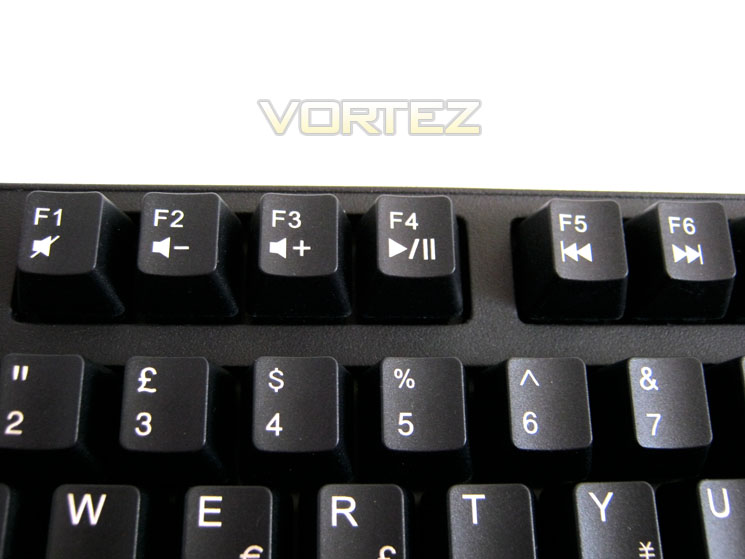
Pressing and holding the media key will allow the user to utilise the six basic media functions: Mute, Volume up/down, play/pause and next/previous. Not the most thorough of media controls but basic functionality is all a gamer needs. I would have preferred to see a dedicated mute button rather than having to press multiple keys but nevertheless, while basic, this function is welcomed.
Audio/USB ports
The SteelSeries features the same USB/Audio functionality of the Ozone Strike too. Headphone and microphone 3.5 analogue audio ports are twinned with a pair of USB 2.0 hubs to offer increased connectivity. I often find a little short changed when a keyboard doesn’t have at least one USB port as it is perhaps the most convenient place to stick in a USB pen drive or camera so to have a couple is a good feature to have.
Braided Cable
Yet again we see that SteelSeries and the Ozone Strike are similar in that both have employed a braided cable. The SteelSeries 7G cable is however much more pliable and easy to route despite having dense weave braid.
Cherry MX Black
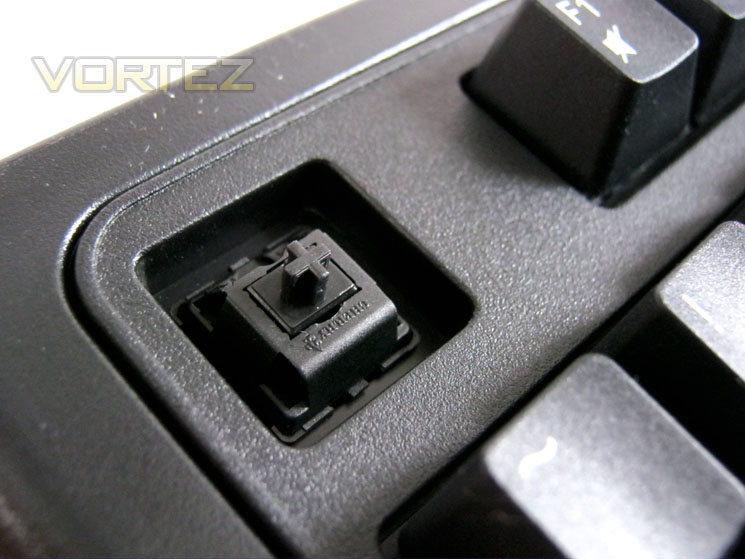
The SteelSeries 7G’s most important feature is that it is a mechanical keyboard. Mechanical keyboards are different from standard keyboards in that each key is individually operated as opposed to being part of a rubber membrane. The switches are linear and non-tactile. The key presses feel smooth and precise. The actuation force required to operate is between 40g and 80g which is significantly more than a rubber domed keyboard so the keys will appear to be stiffer than what you are used to if you have never used a mechanical keyboard before.
Overall, I am very impressed with the SteelSeries 7G, perhaps more than I was with the Ozone Strike with which it bares many similarities. The large frame is very well employed and while I have reservations because it doesn’t actually clip to the keyboard, in use it doesn’t budge and made gaming very comfortable, despite the hard plastic used.
Let’s move on to the testing of the keyboard…
Performance Testing
General Use
SteelSeries are happy to say that making the switch to a mechanical keyboard is not easy. For most people, there usual keyboard will be of the rubber dome variety which doesn’t afford much key travel and the keys tend to wobble and for want of a better word, feel ‘squidgy’. A mechanical keyboard on the other hand feels like it could take a hit with a 5lb lump hammer and still ask for more. It feels very robust, very precise and while the keys do primarily feel stiffer, the key action feels much more linear and natural.
Using the SteelSeries for typing was a pleasure. Sure, it takes a little getting used to but because it now feels ‘normal’ I actually think my typing skills have improved. There are certainly less errors in my touch typing and after going back to a rubber domed keyboard, it just felt weird and unresponsive.
Gaming
The mainstay of the SteelSeries 7G is gaming and this is where it truly shines. Each key press was very precise and accurate. The travel of the key is generally more than a rubber-domed type keyboard but because the actuation of the key is approximately halfway down, the key press is detected much quicker. The rubber membrane of a standard keyboard is such that the key needs to bottom out before the key press is detected. This bottoming out will eventually degrade the rubber beneath so sooner or later key presses will require more and more force until the key finally fails. The mechanical Cherry Black switches of the SteelSeries 7G ensure that every key press is detected and because they are warranted for 50,000,000 presses you can be assured of their reliability for many years to come. Each switch is also coated with gold which further re-enforces durability and therefore longetivity.
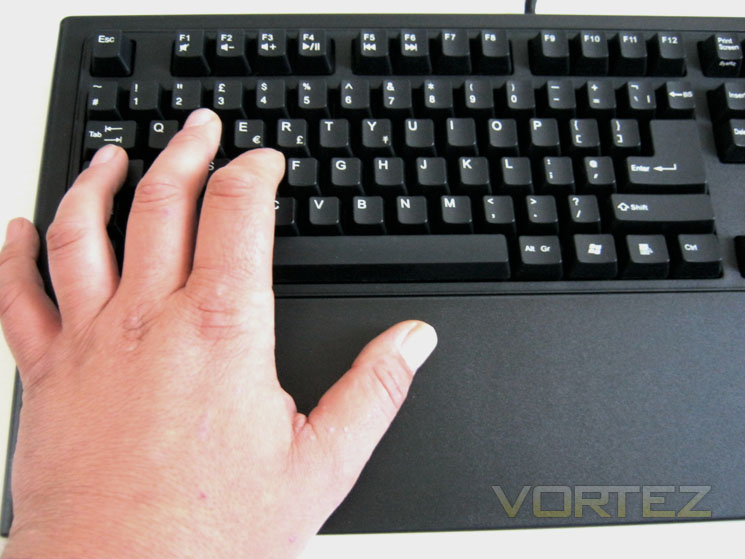
Thanks to the large wrist rest, my left hand was well supported throughout the gaming testing. The keyboard was a pleasure to use and felt ‘just right’. Strangely they keys, although being the same Cherry MX Blacks used in the Ozone Strike, felt a little less stiff. Perhaps this was just my imagination as I have no device to actually test the force needed to press a key but it did seem a little more ‘bedded in’ which was no bad thing.
Audio
As with the Ozone Strike, the audio signal was not great from using the keyboards audio port. Gaming was not too bad with the audio being pretty much indistinguishable from using the PC 3.5mm jack however it was when you played musing through the keyboards port that the lack of quality became apparent.
Multimedia Keys
As mentioned earlier in the review, the multimedia keys are a good addition but I would dearly have liked to have seen dedicated keys rather than using a combination of the media key and one of the f-keys to operate. A dial for volume is much easier and user friendly than using multiple keys but that said having some multimedia functionality is better than none at all and as this is specifically a gaming PC, it can be forgiven for this omission.
With my testing complete it’s time we rounded the review off with my concluding thoughts of the SteelSeries 7G Pro Gaming Keyboard…
Conclusion
The SteelSeries 7G is a gaming keyboard for those who look for functionality rather than form. It’s a grown-ups keyboard for those who place usability over flashing lights, dials and LCD screens. Its remit was to create a gaming keyboard that does exactly what it says on the tin. In that instance it has clearly succeeded because I simply could not find fault with the keyboard when gaming. As this was not the first mechanical keyboard we have tested here at Vortez I knew what to expect this time around and thus the robustness, precision and overall feel of the keyboard came as no surprise.
The use of Cheery MX Black switches, as with other mechanical keyboards makes the SteelSeries a serious competitor in the mechanical keyboard market and thus it should be worthy of consideration. Backed by the world’s most famous gaming clans, Dignitas, 4Kings et al means you should have no reservations that what you are getting here is a quality piece of hardware which is capable of performing at the very highest level.
Priced a smidge above the £100 mark at most outlets, it is a little more expensive than some other mechanical keyboards on the market. The problem SteelSeries have is that for the same price you can buy pretty much an identical keyboard in the Ozone Strike. What the SteelSeries offers that others fail to match however are years of gaming peripheral manufacturing experience. How much value you put in this, only you can decide. Think VW vs. Seat which for all intents and purposes are the same car these days hailing from the same Audi/VW group yet one costs significantly less than the other due to the name. Branding aside though I feel the wrist rest is worth the little extra you will pay as it makes the keyboards use that much more comfortable.
I do have some reservations with the SteelSeries 7G and that is the lack of functionality. You won’t find any macro capability here. While the keyboard does have full n-key rollover capability (PS2 use only), a small set of macro keys would be infinitely more useful as I only have ten digits on my hand so the chances of me pressing anywhere near the amount this keyboard is capable of is defunct. A few macro keys however would widen the keyboards appeal, especially to those MMORPG/MMO users who crave such features. Sadly then, it seems SteelSeries have restricted this keyboard primarily to FPS fans which is no bad thing if that’s all you desire as it performs this function exceptionally well.
While the wrist rest was very welcome, I would have preferred to have seen some form of cushioning here as long gaming periods can take their toll. Even a rubberised effect would have been better than the rigid plastic used. Herein lays my problem with the 7G and other mechanical keyboards on the market. The keyboard, while heavy has that rigid plastic feel which is out classed by the likes of the plush materials used by Logitech and Roccat. The mechanical keyboards on offer today look the same, feel the same and for the most part have very little to distinguish them from one another. I appreciate the keyboard is meant to be tough and durable, able to withstand years of gaming but it lacks visual appeal and individuality I’m afraid.
SteelSeries said from the outset though that they did not set out to produce a keyboard that resembled something from the Starship Enterprise and while I appreciate the notion, backlit keys are often a Godsend for those who prefer to game with the lights dimmed. Sure at LAN parties there is little need other than for aesthetics but how many gamers never actually go to LAN parties? I would wage a lot more than do attend. So Pro gaming keyboard it maybe (and it certainly does well in this area), I fear it will take a little more than mechanical switches to tempt the masses.
When all is said and done, SteelSeries have completed their mission to create one hell of a gaming keyboard. It performs perfectly from start to finish and while it may not be the prettiest peripheral in the gaming arena, it has it where it counts – by the bucket load.
Pros
+ Cherry MX Black Switches
+ Robust Keyset
+ Precise key strokes
+ USB & Audio Hub
+ Braided cable
+ Large wrist rest
+ Excellent packaging
Cons
– No backlight
– No macro capability
– Rigid plastics may not appeal to everybody
+ Cherry MX Black Switches
+ Robust Keyset
+ Precise key strokes
+ USB & Audio Hub
+ Braided cable
+ Large wrist rest
+ Excellent packaging
Cons
– No backlight
– No macro capability
– Rigid plastics may not appeal to everybody


Click here for an explanation of our awards at Vortez.net. Thanks to SteelSeries for providing todays review sample.