







A purer, more refined version of the latest keyboard range from SteelSeries which is based on a membrane design; can it hold out against the competition?

Product On Review: Apex [RAW]
Manufacturer and Sponsor: SteelSeries
Street Price: $69.99/€69.99/£56.99
SteelSeries were last seen in these parts treating Richard to an excellent aural experience with the Siberia V2 Limited Edition headsets, but it’s been over eighteen months since our most recent SteelSeries keyboard review. The mechanical 7G gained Silver and Approved awards, showing how accomplished they are in this arena and complementing the rest of their formidable peripheral range.
In the intervening period the Danish designers have iterated upon a number of already strong products, most notably the Sensei [RAW] gaming mouse of November last year, but the lack of new keyboards has been notable. For a time it seemed as if they were concentrating on the many licensed peripherals for the latest new games titles; a valuable proposition certainly, but somewhat lacking in innovation. Thankfully the Apex range was announced in early January and a version has made the long journey to the UK and into our tests. We present: the Apex[RAW].
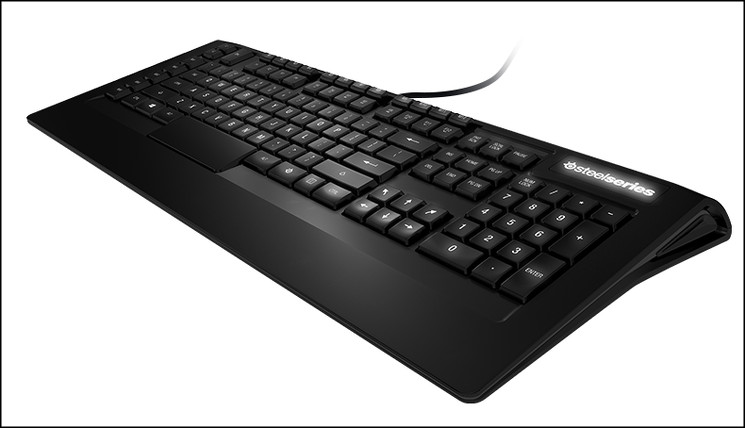
The core of the Apex design is a low-profile backlit membrane keyboard with a daunting number of macro keys. As with recent SteelSeries high-end gaming designs it comes in two flavours: a standard variant named simply the Apex and a core gamer variant denoted by the [RAW] SKU. Apex [RAW] is more affordable and limited in its functionality than the Apex, but still boasts seventeen (yes, 17!) macro keys and two layers of control.
About the SteelSeries Apex & Apex [RAW]
SteelSeries Apex is designed to give you everything you want and more. With sleek lines and style, the Apex leaves nothing to be desired. Enjoy 88 more ways to win with 22 macro keys each capable of up to 4 macro layers. SteelSeries ActiveZone lighting delivers 5 independent color zones, each capable of 16.8 millions colors for style and function. Set unique colors for each of your macro layers enabling you to not only recognize your current layer faster, but also locate groups of keys with ease. The Apex also includes a few extras like integrated USB hub, independent media keys, and a braided nylon cable.
SteelSeries Apex [RAW] follows in the footsteps of our other [RAW] products and delivers only the essentials for victory. Featuring brilliant white illumination with 8 levels of intensity, the Apex [RAW} has 17 macro keys that are each capable of up to 2 layers.
Both keyboards deliver features like raised macro keys for fast key combinations, tactile bumps on the W key to help you find WASD faster, swappable rubber feet for the most comfortable angle, and anti-ghosting of up to 6 simultaneous keypresses of 20 frequently used gaming keys. And of course, both keyboards are supported by our legendary software, SteelSeries Engine.
SteelSeries Apex is designed to give you everything you want and more. With sleek lines and style, the Apex leaves nothing to be desired. Enjoy 88 more ways to win with 22 macro keys each capable of up to 4 macro layers. SteelSeries ActiveZone lighting delivers 5 independent color zones, each capable of 16.8 millions colors for style and function. Set unique colors for each of your macro layers enabling you to not only recognize your current layer faster, but also locate groups of keys with ease. The Apex also includes a few extras like integrated USB hub, independent media keys, and a braided nylon cable.
SteelSeries Apex [RAW] follows in the footsteps of our other [RAW] products and delivers only the essentials for victory. Featuring brilliant white illumination with 8 levels of intensity, the Apex [RAW} has 17 macro keys that are each capable of up to 2 layers.
Both keyboards deliver features like raised macro keys for fast key combinations, tactile bumps on the W key to help you find WASD faster, swappable rubber feet for the most comfortable angle, and anti-ghosting of up to 6 simultaneous keypresses of 20 frequently used gaming keys. And of course, both keyboards are supported by our legendary software, SteelSeries Engine.
From a design perspective the Apex is a return to an ostensibly standard layout after the exotic Merc and Merc Stealth keyboards, but it’s not without its risks. SteelSeries are betting that the marketplace is ready for extreme levels of macro customisation at the mid-range as opposed to aesthetic design tweaks or a basic mechanical design. If there is a figure which the market deems to be ‘too many’ then SteelSeries may reach it with the Apex [RAW], and blow through that barrier with the Apex.
By the same token, the features of the Apex[RAW] are impressive and near unheard of in a keyboard in this price bracket. As with the Sensei[RAW] it could hold the balance of market interest, presupposing it can cater to the myriad requirements of the core gamer demographic.
Features And Specifications
Features
The SteelSeries Apex
Introducing the SteelSeries Apex [RAW], a gaming keyboard designed to enable users to react quickly, move effortlessly, and customize its performance for every game. Effortlessly navigate your way around the keyboard with raised macro keys, and a unique W-key with tactile bumps for improved WASD speed, along with the visual support of bright white illumination.
Superior Design
Apex [RAW] is made up of sleek lines and low-profile keys that bring together beautiful form and optimized function.
Faster Return to WASD
Small bumps on the W-key provides a faster return to WASD. When you quickly have to type a message or execute a command, we want to make sure that you find your way back to WASD as quickly as possible without having to look.
Raised Macro Keys
The macro keys above the F-keys feature a raised design that allow you to locate them without looking and execute devastatingly fast key combinations. Simply swipe your finger down from the macro key onto the F-key for quick key combinations.
34 More Ways to Win
The Apex [RAW] features 17 independent macros keys that are each capable of up to 2 layers. This equates to 34 potential macros.
Layer Select Buttons
Switch between macro layers quickly and easily thanks to 2 quick-access keys on the upper left corner that allow you to select your desired macro layer.
Light ‘em up
Find your way in the dark and locate your macros with brilliant white illumination featuring 8 levels of intensity.
Disable Windows Key
Simply hold down the SteelSeries key and tap the Windows key to disable it. This simple key combination will disable and enable the windows key without the need for software or complicated menus.
The SteelSeries Key
The special SteelSeries key on the right hand side of the key lard allows you to access special functions like disabling the Windows key.
With the Apex, we left the windows key on the left side of the keyboard for commands and shortcuts that are frequently used when not gaming.
EXTRA ARROWS
We added two arrow keys for a bit of extra directional convenience.
SUPERIOR ANTI-GHOSTING
The SteelSeries Apex and Apex [RAW] gaming keyboards support anti-ghosting for 20 keys located in the most-used gaming areas on the keyboard. Out of these 20 capable keys, users can press up to 6 of them simultaneously, allowing those key presses to register and without locking the keyboard.
SteelSeries has chosen 20 of the most commonly used keys in games in the anti-ghost key list:
– 1, 2, 3, 4, 5,
– Q, W, E, R, A, S, D, F,
– Left-Ctrl,
– Left Shift,
– Space bar
– 4 arrow keys
PLUG, PLAY, WIN
There’s no need to install software of any kind in order to use the Apex [RAW]. Without software many features will work including disabling of the windows key and more. However, for the full experience and for the gamers who want really advanced customization options, the Apex [RAW] is supported by SteelSeries Engine technology.
Swappable Feet
Swappable rubber feet allow you to find the most comfortable gaming angle for those long gaming sessions.
Introducing the SteelSeries Apex [RAW], a gaming keyboard designed to enable users to react quickly, move effortlessly, and customize its performance for every game. Effortlessly navigate your way around the keyboard with raised macro keys, and a unique W-key with tactile bumps for improved WASD speed, along with the visual support of bright white illumination.
Superior Design
Apex [RAW] is made up of sleek lines and low-profile keys that bring together beautiful form and optimized function.
Faster Return to WASD
Small bumps on the W-key provides a faster return to WASD. When you quickly have to type a message or execute a command, we want to make sure that you find your way back to WASD as quickly as possible without having to look.
Raised Macro Keys
The macro keys above the F-keys feature a raised design that allow you to locate them without looking and execute devastatingly fast key combinations. Simply swipe your finger down from the macro key onto the F-key for quick key combinations.
34 More Ways to Win
The Apex [RAW] features 17 independent macros keys that are each capable of up to 2 layers. This equates to 34 potential macros.
Layer Select Buttons
Switch between macro layers quickly and easily thanks to 2 quick-access keys on the upper left corner that allow you to select your desired macro layer.
Light ‘em up
Find your way in the dark and locate your macros with brilliant white illumination featuring 8 levels of intensity.
Disable Windows Key
Simply hold down the SteelSeries key and tap the Windows key to disable it. This simple key combination will disable and enable the windows key without the need for software or complicated menus.
The SteelSeries Key
The special SteelSeries key on the right hand side of the key lard allows you to access special functions like disabling the Windows key.
With the Apex, we left the windows key on the left side of the keyboard for commands and shortcuts that are frequently used when not gaming.
EXTRA ARROWS
We added two arrow keys for a bit of extra directional convenience.
SUPERIOR ANTI-GHOSTING
The SteelSeries Apex and Apex [RAW] gaming keyboards support anti-ghosting for 20 keys located in the most-used gaming areas on the keyboard. Out of these 20 capable keys, users can press up to 6 of them simultaneously, allowing those key presses to register and without locking the keyboard.
SteelSeries has chosen 20 of the most commonly used keys in games in the anti-ghost key list:
– 1, 2, 3, 4, 5,
– Q, W, E, R, A, S, D, F,
– Left-Ctrl,
– Left Shift,
– Space bar
– 4 arrow keys
PLUG, PLAY, WIN
There’s no need to install software of any kind in order to use the Apex [RAW]. Without software many features will work including disabling of the windows key and more. However, for the full experience and for the gamers who want really advanced customization options, the Apex [RAW] is supported by SteelSeries Engine technology.
Swappable Feet
Swappable rubber feet allow you to find the most comfortable gaming angle for those long gaming sessions.
Technical Specifications
Low profile keys:- Yes
Backlight colour:- Bright white at 8 levels
Surface material/treatment:- Textured/Glossy
Anti-ghosting:- 6 simultaneous keypresses of 20 antighosting capable gaming keys
Macro keys:- 17
Macro layers:- 2
W-key with tactile bump:- Yes
Media keys:- Yes, through modifier key
Adjustable keyboard tilt:- Two angles (7° & 10°)
SteelSeries Engine support*:- Yes
Rubber dome keys:- 5 mill. keystrokes
OS compatability:- Windows, OS X, & Linux**
Backlight colour:- Bright white at 8 levels
Surface material/treatment:- Textured/Glossy
Anti-ghosting:- 6 simultaneous keypresses of 20 antighosting capable gaming keys
Macro keys:- 17
Macro layers:- 2
W-key with tactile bump:- Yes
Media keys:- Yes, through modifier key
Adjustable keyboard tilt:- Two angles (7° & 10°)
SteelSeries Engine support*:- Yes
Rubber dome keys:- 5 mill. keystrokes
OS compatability:- Windows, OS X, & Linux**
Packaging And First Look
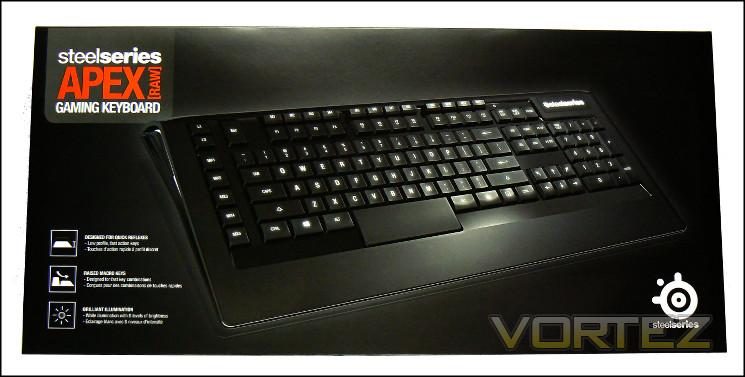
Unsurprisingly the front of the SteelSeries Apex [RAW] packaging is dominated by an angled shot of the keyboard itself, showing it off to its best advantage. By displaying it in this fashion you’re afforded a glimpse at the sides which describe the slight angle granted by the frame’s triangular cross-section. The keyboard shown, and indeed the sample we have received, has a US layout; hopefully non-US keyboards will be prominently identified as such. The layout is also indicated on the right-hand panel along with serial number and certification information.
Also highlighted on the front are three key features which can be inferred by the keyboard image but aren’t immediately obvious: low profile keys, raised macro keys and the white illumination. It’s worth noting that only the keys M1-M12 are raised, MX1-M5 on the left of the keyboard remain the same height of the majority of the keys.
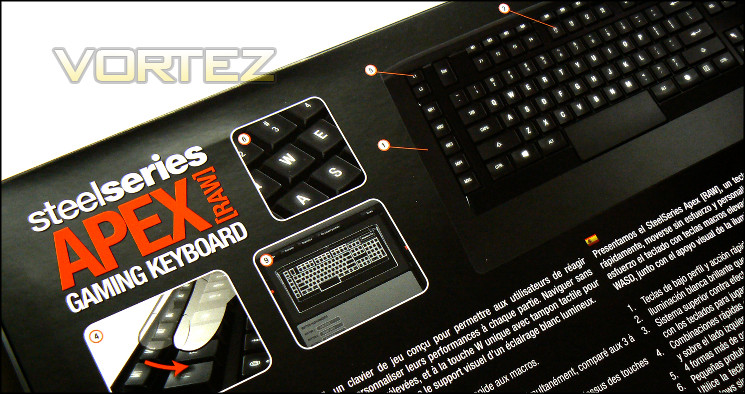
The rear is slightly more extensive in the included feature listing despite being hampered by repeating them in four different languages. A smaller image of the keyboard provides a location guide, whilst the nine part list will allow a little more understanding on fairly complex functionality for a keyboard in this price bracket. Here is also where the first mention is made of the dual-layer macro system and anti-ghosting, the latter of which claims up-to 20 simultaneous keypresses.
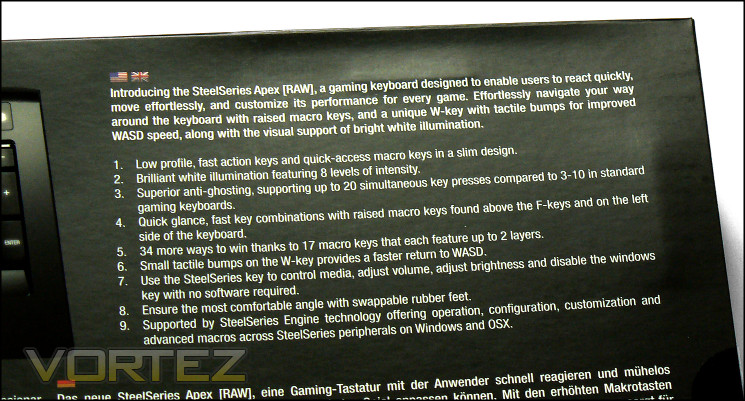
Interestingly SteelSeries include neither technical specifications nor system requirements on the outer packaging. Although much can be inferred from the feature list the APEX[RAW] is one of the first keyboards we’ve seen which eschews them entirely.
There is one other point we should note: the packaging claims “up to 20 simultaneous keypresses compared to 3-10 in standard keyboards”. This appears to contradict the website, which only claims “6 simultaneous keypresses.” With one claim being so clearly better than the norm and the other more generally in line with expectations if a little on the low-end) it’s a worrying development.
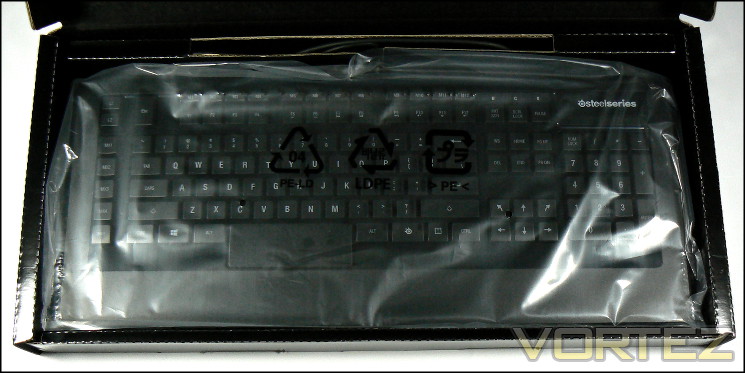
Sliding off the sleeve reveals a rigid reinforced box for the contents which should serve to protect them from the rigours of shipping.
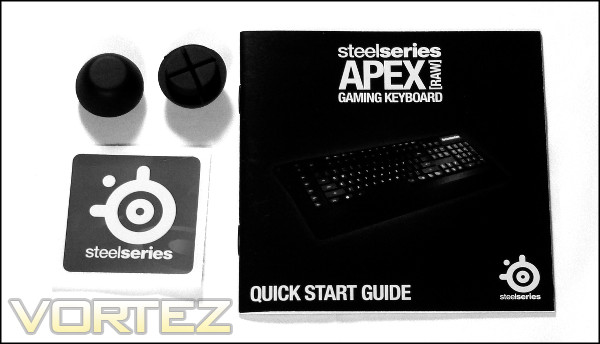
The package contents are as you would expect from a mid-tier membrane keyboard: the keyboard itself and a user guide. Sensibly SteelSeries direct you to the website to download the latest software rather than include it, thus improving their quality assurance processes and with little downside for most customers. The multi-lingual user guide provides installation directions and not much else; you’re going to need to get to grips with the software directly to really grasp the keyboard’s potential.
It’s noteworthy that much of the Apex[RAW]’s functionality doesn’t require additional drivers, including Windows key disabling and media key functionality. This will allow it to work right out the box during installation. The overall bundle matches the [RAW] nature of the product – cut down to reduce cost and unnecessary bloat. The only sop to extravagance are the replacement rubber feet designed to angle the keyboard higher if that is the users preference.
A Closer Look
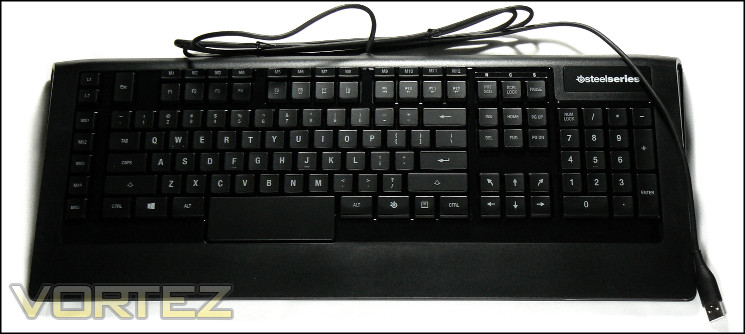
The SteelSeries Apex[RAW] is one of the more idiosyncratically shaped keyboards on the market right now. The main face of the keyboard is all one piece of rigid plastic, with textured black around the outer edges and a glossy black surrounding the keys themselves; part of the textured black area forms the keyboard’s small wrist-rest, measuring only a little over 4cm from bottom of space-bar to base. Towards the rear the keyboard curves downwards rather than introduce a harsh angle, whilst the sides are steeply angled into a triangular cross-section with white accenting. It leaves a great first impression of attention to detail and a near-unique design not common to keyboards in and around the price bracket.
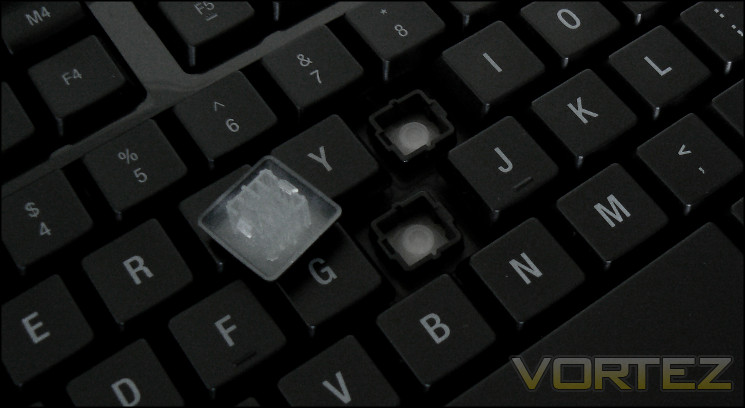
Moving to the keys themselves, they’re low profile in the main with a membrane switch mechanism. The black keycaps are slightly glossed with the character etched out of the surface resulting in very clear and bold print which should be clear even in conditions where lighting is poor. The layout shown is for the US standard, typified by the long shift keys and half-height space bar; the Apex[RAW] is also available in a variety of localisations.
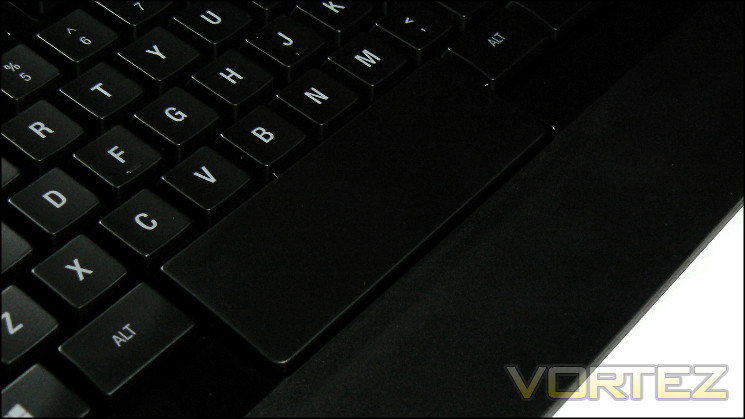
Whilst not strictly designed to be, and quite difficult to lever out thanks to the tightly packed layout, the keycaps can be removed with careful application of a keycap remover. This should be done sparring however – the clips holding the keycaps in place are relatively fragile and will wear quickly. Both keycap base and rubber dome switch are translucent, allowing light to pass through and illuminate the key character.
SteelSeries deviate from the layout norm in some key areas that provide the keyboard with its distinctive functionality. The most obvious is the double-height Space, increasing the surface area for striking two-fold and allowing a more flexible hand position when gaming. The Escape key gets similar treatment, in this respect it’s 50% taller than usual. These alterations begin the trend of specialisations made to the Apex family of keyboards, allowing them to stand out in a busy market.
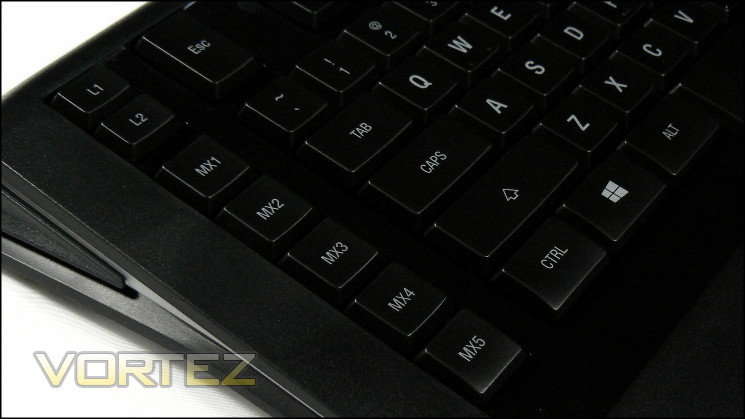
Ideally situated on the left and sharing the low-profile form of the main keyset are the macro keys MX1-MX5. Keeping them close to the WASD-zone reduces both response time and the adjustment needed to return your position to WASD, which conveniently also includes two pips on the W-key to help locating your hand without the need to take your eyes off the screen. It’s noteworthy that the non-[RAW] Apex doubles up on macro keys in this column.
L1 and L2 are layer toggles which swap between two sets of key assignments within a keyboard profile quickly. They’re well out the way but still close enough to WASD to make triggering them fast and fluid where necessary. Once again, the Apex doubles up on layers and adds two layer keys for four total.
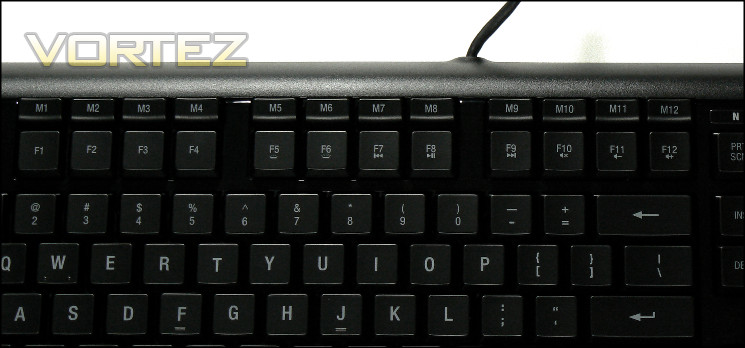
Aligned across the top of the Function keys are the remainder of the Apex[RAW]’s macro keys: M1-M12. They’re angled slightly forwards and are double the height of the keys directly below, a design quirk which makes them far easier to trigger without simultaneously pressing a Function key. They slightly stiffer than the other keys on the board, although not so far removed from the rest of the keyset nor difficult to deal with.
The Apex[RAW], unlike the Apex, doesn’t have dedicated media keys. Instead F7-F12 share duties are back, play/pause, forward, mute, volume down and volume up respectively. These secondary functions are activated when pressed simultaneously with the SteelSeries key between the Alt and App keys on the bottom row, which isn’t a bad compromise. Some will decry the lack of dedicated media keys, but in all honestly they’re not often used in wired setups.
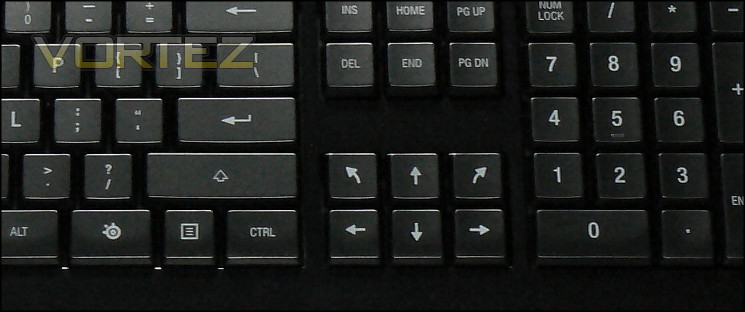
Finally, the bottom-right includes two additional arrow keys. With the software installed they are by default set to Up+Left and Up+Right, but can be reassigned as desired. Although not many games call for arrow keys these days, some console ports or emulated games could benefit from these additional keys.
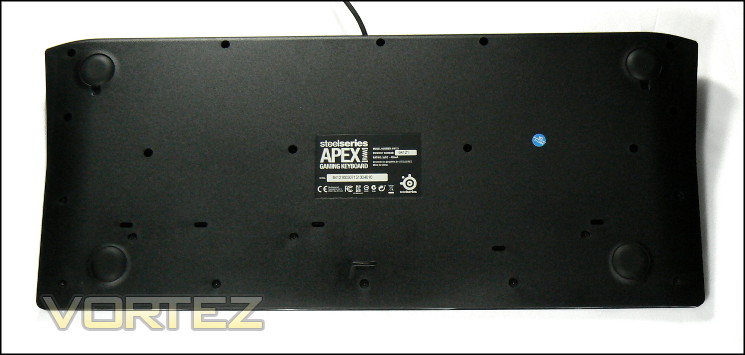
The rest of keyboard is really quite standard. The base of the keyboard is a flat plastic with four rubber feet keeping it stable on a desk. The rear USB cable uses a simple rubber sheathe rather than braided plastic fibre, the latter of which is reserved for the more pricey Apex. This choice could potentially have a few long-term durability ramifications, especially if threaded in such a way that wear is likely, but generally should be a aesthetic rather than quality failing.
Overall it’s looking pretty good. There’s certainly an excess of macro keys to take advantage of, and the first impressions of the membrane keyboard doesn’t seem too far off the ideal. Most importantly it’s stable and no part seems loose or unsecured – [RAW] this may be, but SteelSeries don’t seem to have skimped on the build quality.
Lighting and Customisation
As befits its name, the customisation options on the Apex[RAW] are very much on the modest side. The Apex[RAW]’s backlight design uses a distributed white LED system which diffuses the light through the keyboard membrane and keycaps. It’s arraigned in such a way as to provide consistent illumination under each key; the effect is one of a dim highlighting of keyboard characters rather than the bright light you often see on mechanical keyboards. The quality of etching on the keycaps has meant that each character is well designed, and SteelSeries haven’t committed the all too frequent error of insufficient lighting to the extremities.
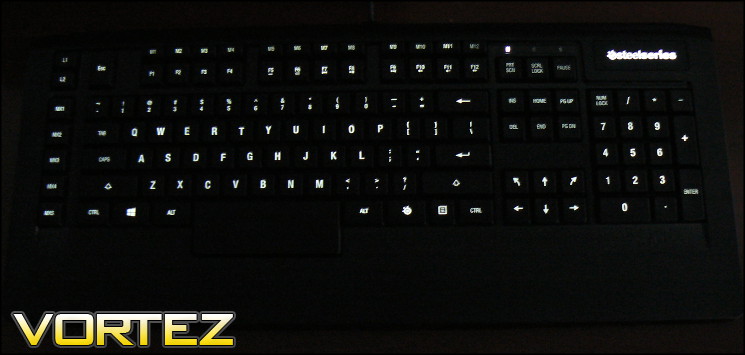
Apex[RAW] under low light conditions. Maximum brightness.
The keyboard has eight built in light levels which are stored on a per-profile basis. These light levels can be controlled in software or on board the keyboard itself. The ‘SteelSeries key’, when pushed in concert with either F5 or F6, will brighten or dim the backlight between eight intensity levels.
Another Apex[RAW] core gaming feature is disabling the Windows Key – almost a must when gaming. Simply pressing the SteelSeries and Windows keys at the same time will enable/disable it, and like the backlighting can be performed without the Engine software suite installed. Very handy for LANs which aren’t BYOC.
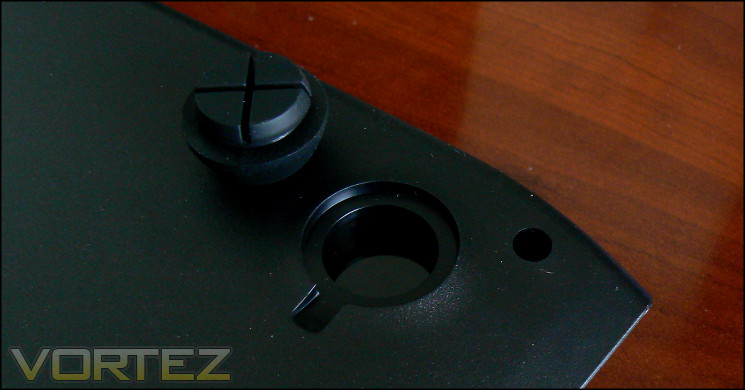
Finally, like most keyboards the angle of the Apex[RAW] can be raised. Two replacement feet can be used in place of the rear-most, raising the keyboard to ten degrees from the verticle versus seven. This methodology has a couple of interesting implications – fewer moving parts to get damaged, but the distinct possibility that the feet are lost.
Software
Rather than include a software CD in the keyboard bundle SteelSeries require the download of the latest suite from the official website, and also include a firmware update tool if desired. To facilitate this SteelSeries include links to the website both on official packaging and in the user guide. Although it can place an additional burden on novice users, this procedure is generally a good way to ensure that only the latest software is utilised by all users and that no drivers are shipped with the keyboard which could cause errors, easing the burden on QA.
For the purposes of testing we used firmware version 1.25.1.1 and SteelSeries Engine software revision 2.8.0018, both of which were the latest of their respective tools. The Engine suite appears to be moving towards a unified application for the configuration of all SteelSeries peripherals; its layout is virtually identical to that when the Sensei [RAW] is installed and is obviously designed to ‘train’ the user into a standard methodology.
When installed the SteelSeries Engine can be used to check for updates to both utility and firmware, which always a nice option to have; it can also be configured to perform this check automatically. Additional prompts for database updates indicates that SteelSeries may be planning to make comprehensive macro lists for certain partner titles available in the future.
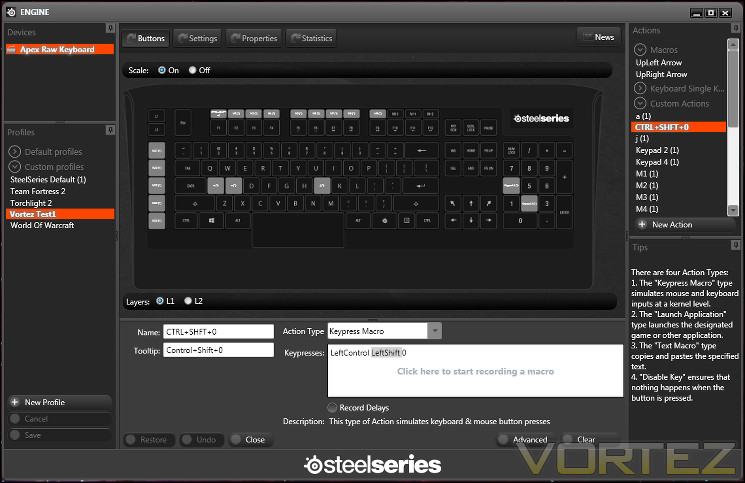
The main view – denoted by the Buttons selection on the upper-left corner – devotes the vast majority of window area to the keyboard itself, but not for irrelevant reasons. When bound to a macro or key reassignment any key becomes shaded and its label changed, making non-default assignments easy to spot and change where necessary. Macros can be created by clicking on the key you want to assign the macro to and editing it in the box below, or by right-clicking on the list to the right and selecting ‘New Action’.
When created a macro can also be bound to any key by means of dragging and dropping it to the desired key. Although there are seventeen designated macro keys, in reality almost any key on the keyboard can be re-bound in this fashion, making it one of the most comprehensive assignment customisation systems we have yet come across.
Just below the main image of the keyboard is the L1/L2 toggle, referring to Layer 1 and Layer 2. When a macro is first bound to a key it’s applicable to both layers, but each layer can then be configured independently thereafter such that the differences between the two are only what you explicitly configure them to be. These layers effectively double the number of possible assignments without changing profiles, but are still astoundingly easy to configure. The only oversight is a visible identifier of the active layer outside the application, either on the keyboard itself or via an On Screen Display.
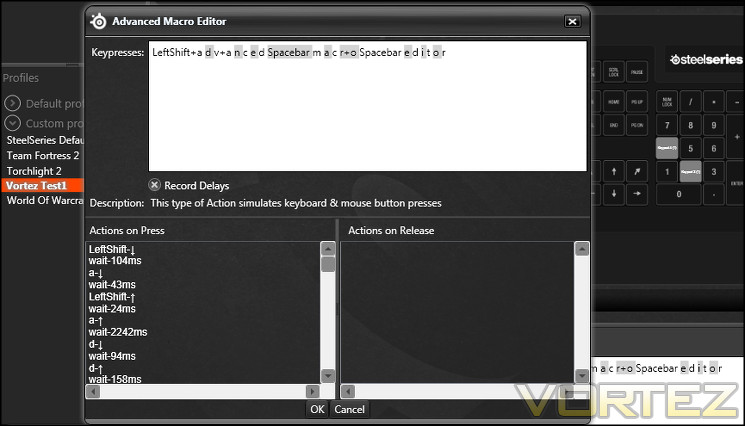
The system allows you to choose between four different types of actions for a key – Disable, Launch Application, Text Macro and Keypress Macro. Text macros – where text is pasted in at the current text prompt – can reach up to 100 characters in length and keypress macros far longer than that. Advanced keypress macros, including timings, are recorded by clicking ‘Advanced’. SteelSeries recognise that timings are an extremely niche component, but don’t overlook them.
On potential oversight appears to be saving individual macros for later migration to a different profile. Once again it’s niche functionality, but that and the ability to back up profiles would be a great help for transferring settings to a new PC or recovering after a reinstall.
The left hand side list in the SteelSeries Engine is specifically for Profiles – Default Profiles including the SteelSeries Default for the Apex[RAW], and Custom Profile created by the user. Creating a new profile is simple, and selecting easy one intuitive. It’s therefore very difficult to get lost in a sea of profiles and fail to recognise which one is currently being edited, but quickly switching between the active profile is difficult to do outside of the Engine software.
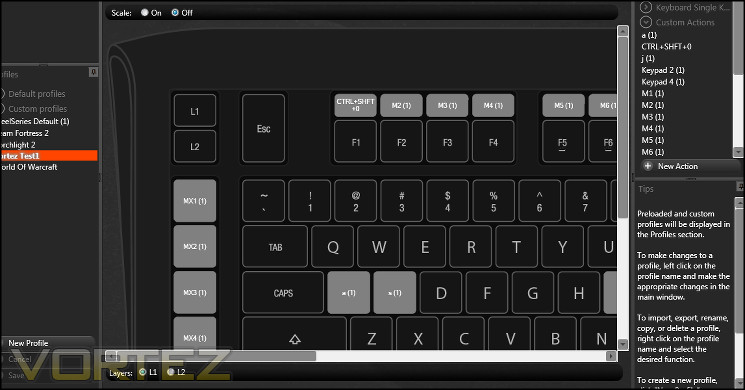
If your screen resolution is relatively low, or you want to devote a relatively small amount of area to the SteelSeries Engine utility itself, you can choose not to scale the image of the keyboard within the application. This also has the side-effect of making macro names and tooltips labels more clear.
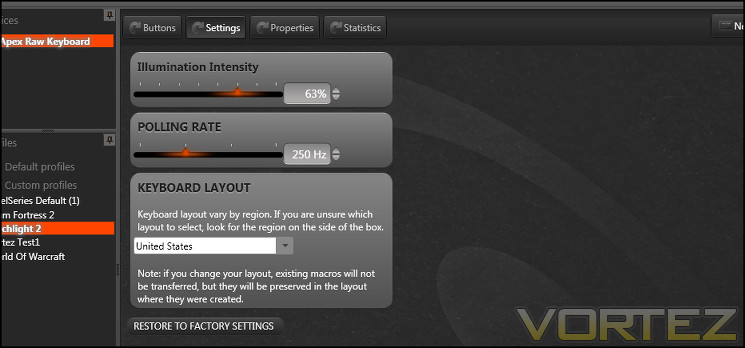
Moving to the Settings view, we’re able to control backlight intensity, polling rate and keyboard layout on a per-profile basis. Although as a white-only illumination backlight it’s not the best means of distinguishing between profiles, it can in theory be used to do just that; polling rate by comparison allows you to tailor the setting specifically to game titles and applications. Each of these are handy for the Apex[RAW], but as importantly shows the potential of the SteelSeries Engine when it comes to the more feature-filled Apex.
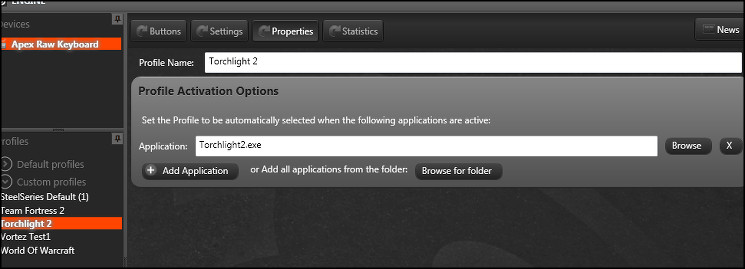
Properties is we believe intended to refer to the properties of each Profile, but isn’t the best descriptor. Even so it does allow you to bind a profile to launch when particular applications launch, which as we’ve mentioned in the past is a good way for keyboards to mitigate the lack of profile selector on the keyboard itself. Unlike some manufactures SteelSeries allows the binding of multiple applications to the same profile, allowing you to link by genre or app type. This feature is always a welcome addition to software.
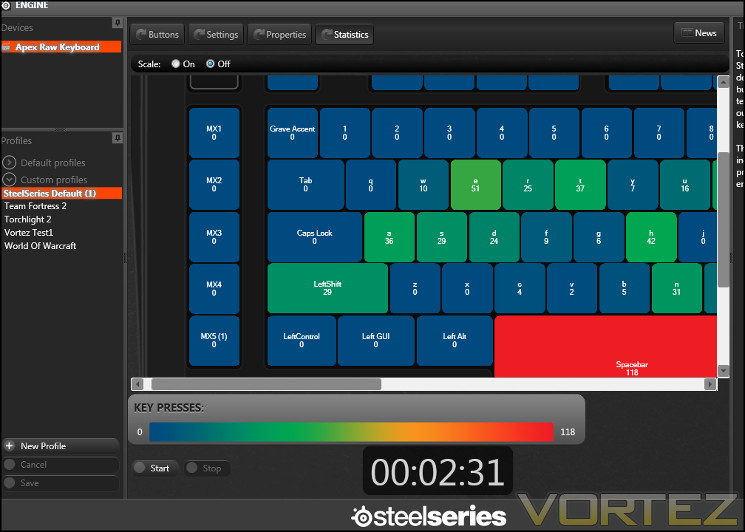
Finally we come to Statistics, which records the frequency of keystrokes across the keyboard. Although it may just seem like a bit of fun, these metrics can allow you to fine-tune your keybinds and macros in order to minimise movement across the keyboard and response time. Enabling it is simple, but it would be useful to be able to bind this to a macro key in order to activate/deactivate only during pertinent periods (such as during a raid in an MMO, or an FPS match etc.).
Overall the SteelSeries Engine has to be rated as exceptional for usability and functionality, genuinely appearing to get the most out of the keyboard but also presenting all information in a format which is both logical and consistent with other SteelSeries products. Even going so far as to including scaling for the keyboard display to allow use with a range of monitor resolutions – something not at all common with other software suites – it’s truly out of the top drawer. We can imagine that SteelSeries Engine will also unlock the potential of the Apex in even more of an impressive fashion.
Performance
The SteelSeries Apex[RAW] features membrane switches composed of firm rubber domes that buckle when pushed to provide firm resistance towards the point of actuation. The Apex[RAW]’s low profile design puts the actuation point consistently at a full stroke of the keys rather than the half-stroke of most full-height membrane and mechanical keyboards. Translucent domes and transparent or UV coated keycaps allow light to be projected upwards from the keyboard base and allow lighting across the whole of the keyboard rather than on a per-key basis, which in the case of the Apex[RAW] results in a not especially bright keyset ideal for low-light LAN conditions where you don’t want to dazzle yourself or the competitors beside you. It won’t win awards for aesthetics, but is adhering to the [RAW] credo as strictly functional.
A rigid backplate supports the keyboard, ensuring that there is minimal flex on striking the keys helped by the low-profile nature of the keys and their softer membrane style. If pushed with some force there is a little give in the front-middle of the frame, but not enough to worry about.
The wide keycaps of the Apex[RAW] lead to a consistent and accurate typing experience which is surpassed only by a mechanical switch type, although we should note that it seems a little bedding in was required whilst the keyboard was still ‘factory-fresh’. Word per minute rates will tend to suffer compared to mechanical switch types and only somewhat ameliorated by the low-profile key design, but on the other hand the softer membrane feel is preferred by some. Keystrokes are consistent in the main, the only slight exceptions being the space-bar and M1-M12 macro keys, the latter of which were a little firmer than expected.
The location of the macro keys, especially those on the left designated MX1-5, is absolutely ideal for both gaming and word precessing, reducing the time spent away from both WASD and your normal typing pattern. M1-12 are a little less ideal, but only a little, and unlike some keyboards don’t interfere with or indeed replace the Function keys. The addition of a tactile surface on W, as well as the standard tactile surfaces on F and J, mean than returning to the ideal hand position will rarely be simpler.
Depending on your typing style the amount of force you’ll be using when striking keys on the Apex[RAW] could be high. At times we found the keyboard wandering a little specifically when typing rapidly, but far less than recently reviewed keyboard which relied on bare plastic feet. The large large rubber feet SteelSeries have incorporated into the Apex design grip the desk well, even if they’re not the most convenient as far as adjusting them on a session-by-session basis goes.
When it comes to cleaning the keyboard will pose some difficulty. The keys themselves will tend to attract grime; although they can be cleaned relatively easily, dealing with the debris which collects under them will be more difficult than some keyboards and much more so then mechanical ones. Prising the keycaps off should really only be done sparingly; the mechanism they use to stay clipped in will wear away with repeated use.
Anti-Ghosting/ N-Key Rollover
Anti-ghosting assessment is where we found the most difficulty with the Apex[RAW]. As we have mentioned SteelSeries have two different claims for simultaneous key presses, one a modest 6 and the other a very ambitious 20. Both however restrict these claims to a zone encompassing the keys around WASD, four arrow keys, CTRL, SHFT and Space-bar. It’s noteworthy that the Apex[RAW] makes use of a USB connection, for which 6-key rollover is the standard.
A solid port of call is Aquakey, a small application which tracks the keypresses registered by the OS and displays them on a convenient UI; Microsoft offer a similar web-based service here. Testing all combinations simply isn’t feasible, but important ones such as around the standard gaming WASD keys are more than possible and often present themselves during gaming, especially MMO gaming.
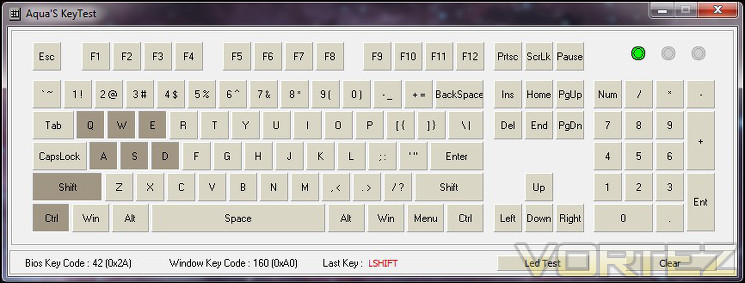
During testing the claims of 6-key rollover on {1,2,3,4,Q,W,E,R,A,S,D,F,SHFT,CTRL,Space} were upheld; however testing past this point is much more of a mixed – and in some cases negative – picture. Past six simultaneous keypresses in most cases no further keys would be registered unless they were specifically Left SHFT and/or CTRL, but also in many instances the 6 originally pressed no longer registered either. Furthermore the number of registered keys would often depend on the order in which they were pushed, particularly when SHFT and CTRL were held. When compared to other keyboards recently tested this is unexpected, as usually the worst that tends to happen is additional keys no longer being registered.
More concerning was the apparent phantom keys being registered with the MX1-5 keys, which are themselves glaring in their omission from the anti-ghosting zones. At times they would behave like a 7th simultaneous key pressed, but they would also uncommonly create a phantom F-key when bound to a simple keypress macro. Obviously this is especially troubling as F-keys tend to be used for Quick-load/save in games, and is even more problematic in MMOs where an ALT modifier would often be thrown in for good measure.
All-told, the anti-ghosting performance of the Apex[RAW] only just reaches our minimum expectations for a gaming keyboard, and is thrown up in stark relief due to the conflicting claims on packaging and website. When compared purely against the website claims the performance is fine with the exception of macro-keys ghosting; however it’s difficult to see how the packaging claim holds water. As other keyboards now provably demonstrate 8-key, 12-key and 20-key over USB or PS2 we have to put it in the lower-end compared to the competition.
General Performance
The Apex[RAW] is billed very much as a gaming keyboard, but gamers doing this to the exclusion of all else on their PC remain relatively rare. Some will double-up their PC as both gaming powerhouse and wordprocessing workhorse, and thankfully they should find a lot to appreciate if they do.
Macros are increasingly useful in the world of work, especially for any role which incorporates an appreciable amount of data entry or repetitious content. In that regard the Apex[RAW] has you covered thanks in large part to dedicated macro keys and hugely impressive software suite. Typing speed won’t be as high as possible due to the non-mechanical nature of the keyboard, but the short stroke distances and fairly springy keys make it reasonable for maintaining high typing speeds compared to many membrane keyboards.
One slight problem we had was the keyboard registering two spacebar keypresses when only pressed once. It would happen in about one of every fifty strokes, and did cause some problems especially when typing outside of a word processor that could indicate more than one space between words. While possible due to the testers typing style it’s still something to bear in mind.
With this one exception it’s a good membrane keyboard for office environments at the price point, and generally superior to similarly priced tenkeyless mechanical affairs. It also doesn’t suffer from the noise impact associated with mechanical keyboards, potentially making it more suitable in such an environment amongst co-workers. The membrane keyboard will suffer a little in terms of longevity, but a five million stroke MTBF rating on the keys should see a very long lifespan.
Gaming Performance
We took a look at common gaming titles representing distinct gaming types to see how well the keyboard was suited to gameplay and if any issues cropped up. The following is a summary of our conclusions.
Team Fortress 2
A free to play title than anyone can pick up and play, Team Fortress 2 can still reward precision and quick reflexes thanks to a relatively high skill ceiling.
Throughout precision on the Apex[RAW] was excellent, with a firmness to the keys being especially welcome for faster lift-off times and generally improved response compared to keyboards in the price range. Reaction speeds were also improved thanks to the low profile keyset in such a way as to lose only a small amount versus mechanical switch types. If you’re not a very high level gamer you should see very little performance difference between the Apex[RAW] and Cherry MX Red switches, although you will unconsciously feel the need to use a little more force due to the actuation point being at the bottom of the stroke.
On rare occasions we did find that holding down the left-shift was a problem, with the key sometimes prematurely disengaging. It’s not generally a problem in FPS gaming – in fact we mainly observed it when playing a racing game title – but it’s worth nothing given some titles use this key for sprinting. It’s likely a reflection of needing to hit the left-key pretty much dead-centre to hold it for any length of time, and will be far less pronounced on EU/UK models with a short left-shift.
World of Warcraft
To make use of the Apex[RAW]’s macro capabilities we again broke out a World of Warcraft account, playing a little Starcraft in the down time. Without doubt the macros came into their own in WoW, such that even the relatively straightforward game it as become since the early years was still made markedly easier by macro binds. MX1-MX5 are located optimally and require little learning curve to utilise to great effect, and macro recording was intuitive thanks to the excellent software.
Complementing the macro system was the Apex[RAW]’s two-layer switch. It meshed exceptionally well with spec-switching in WoW, allowing a quick switch between macro setups and button assignments as your play style changes. We would have liked a visual indicator, but generally telling the different is simple and the location of L1 and L2 on the keyboard make inadvertent switching very unlikely.
We only once hit a problem with the 6-key anti-ghosting limit, and that was more down to fat-fingering an overly complex in-game macro than the keyboard itself. Still, it did cause the character to stop moving for a fraction and would have caused great difficultly if dodging raid encounter mechanics. Consequently we have to come to the conclusion that it’s a relevant weakness to the keyboard.
A final neat tool provided by the Apex[RAW], or more precisely the SteelSeries Engine software suite, was the keypress statistics logging. It allowed us to narrow down particularly inefficient keybinds for re-allocation on the keyboard when previously they would get missed in the general melee of gameplay.
—
Obviously when playing multiple games a profile system will always be useful, but in the case of the Apex[RAW] it combines seamlessly with the dual-Layer system for macros. It does require some configuration as with most systems of this nature, but with a bit of time and a lot of effort it can become a powerful and flexible tool that puts it a large step above similar keyboards without an explicit profile selector.
All in all the Apex[RAW] is a powerful and easy to use keyboard let down by anti-ghosting performance and a misbehaving space-bar which didn’t meet our expectations from this high-quality brand.
Conclusion
Sorting through our opinions of the SteelSeries Apex[RAW] has proved to be a little more difficult than we were anticipating following a rather protracted testing period. Chiefly that’s been because it’s difficult to assess the SteelSeries in isolation without looking more widely at the state of PC gaming and how titles are changing, as these changes are crucial to the long-term viability of the keyboard.
The Apex[RAW] excels in circumstances where macro keys are of premium importance. Generally speaking this means MMORPGs, but there are certain other genres where gameplay systems neatly mesh with the Apex[RAW]’s feature set. The options presented by the keyboard can allow you to balance workloads between mouse and keyboard hand more optimally, cram in masses of extra functionality, or even automate some parts of your gameplay.
However this is only useful in this specific circumstances, and MMOs have recently been trending towards a more simplistic gameplay model. World of Warcraft is a case in point, but the same is also true of Guild Wars II and Star Wars: The Old Republic which have both moved towards less need for tens of hotkeys. Restrictions on in-game macro functionality, to increase difficulty or as a microtransaction enabler, work in the opposite direction somewhat, but the overall trend is clear.
First Person Shooter titles are infamously simplistic in terms of macro requirements. The major saving grace may well be the RTS genre, unless competition at every level bans OS-level macros as illegal automation.
It really is a catch-22 then, which is a major disappointment as SteelSeries have done some great things with the Apex[RAW]. The macro key location is excellent, and the thought put into M1-M12 keys shows a level of understanding beyond many competitors. The SteelSeries Engine too is excellent, showing how simple tools which are intuitive can lead to powerful outcomes. Furthermore the layer system, effectively doubling available keybinds, works tremendously well in games were the character tools can take advantage of it. Even going so far as understanding that most keybinds will be identical in both layers… it’s just so well thought out.
But then we must come to the major bugbear we have with the Apex[RAW]: we’re not sure if it’s a problem specific to our sample or the range as a whole, but anti-ghosting performance was not up to the standards we expect from a >£50 keyboard. The miss-match in messages between website and packaging didn’t help, but even measured against the website claims it was lacking and didn’t follow expectations built up from other products in the industry. Furthermore, the registering of ‘Phantom’ F-keys when hitting the simultaneous keystroke limit in conjunction with Macro keys speaks of a more serious flaw. Hopefully this can be rectified with a firmware update.
Other small niggles – most significantly a space-bar which seemed to irregularly register twice and left-shift that was relatively difficult to keep held – pale into comparison but are still areas which will be frustrating to many.
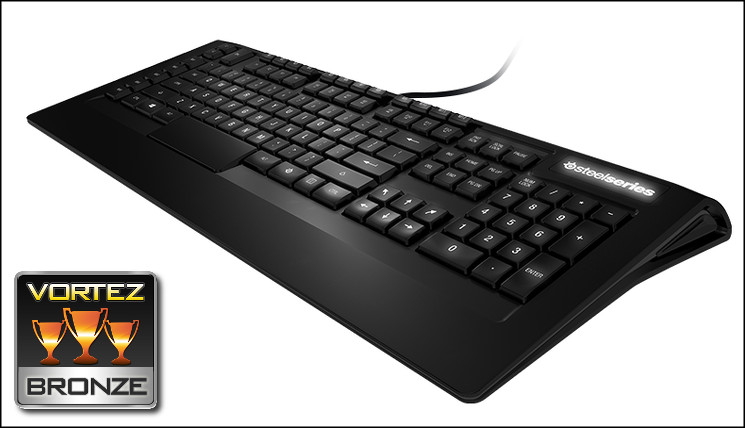
As with other SteelSeries [RAW] peripherals the Apex [RAW] is designed for the core gaming experience rather than heavily tailored towards the hardcore gamer. In this instance the core functionality exceeds that of many competitors, even those at a higher price point, making it appear to be exceptional for MMO gamers looking for high quality macro functionality without breaking the bank. However poor anti-ghosting performance will be a detractor in just the market which it appears to be targeting with laser-like precision. Even so, the software is excellent and leaves intriguing scope for synergy between SteelSeries devices in the future. Overall we award the SteelSeries Apex[RAW] the Vortez Bronze Award, with a specific note that if anti-ghosting can be improved it could potentially score much more highly due to value and features.
Pros
+ Seventeen Macro keys
+ Innovative Layer system
+ Backlight
+ Solid construction
+ Good price price for feature set
+ Excellent SteelSeries Engine software
Cons
– Only six simultaneous keypresses (eight including SHFT and CTRL)
– Phantom keypresses can appear in specific situations
– Some unintended repeat registering of keystrokes
+ Seventeen Macro keys
+ Innovative Layer system
+ Backlight
+ Solid construction
+ Good price price for feature set
+ Excellent SteelSeries Engine software
Cons
– Only six simultaneous keypresses (eight including SHFT and CTRL)
– Phantom keypresses can appear in specific situations
– Some unintended repeat registering of keystrokes

Click here for an explanation of our awards at Vortez.net. Our thanks go to SteelSeries for providing this review sample.


