The new PRIME series returns to the fundamentals by focusing and new sensor technology and optical switch technology while keeping the weight down. But does it live up to the SteelSeries pedigree?

Product on Review: PRIME & PRIME+ Gaming Mouse
Manufacturer: SteelSeries
MSRP:
– UK: £59.99 / £79.99 inc. V.A.T.
– US: $59.99 / $79.99 excl. tax
– EU: €69,99 / €89,99 inc. V.A.T.
SteelSeries have a long and storied pedigree in the gaming peripheral space and, unlike many manufacturers, maintained a laser-like focus on this market for well over a decade. One of our first ever peripheral reviews for brand were of the venerable Ikari, a mouse designed with input from professional esports teams; a relatively rarity at the time, gaining input from the pros is now almost standard practice. In this, as with many of their innovations, we’re shown just how they’ve been consistently ahead of the curve in many aspects of hardware design and production.
Technology moves on even in this increasingly mainstream segment, and that’s especially the case with the new PRIME series gaming mice. Rather than trumpeting affordability or aesthetics, SteelSeries are holding up the new range of nimble rodents as beacons of innovation in two core aspects: the switch, and the sensor. With PC gaming well into a Renaissance period (in part due to a year or more of lockdown) and a new spotlight on competitive gaming thanks to streaming and esports broadcasting, there is no better time to catch the imagination of amateurs and enthusiasts alike with some compelling new technology.
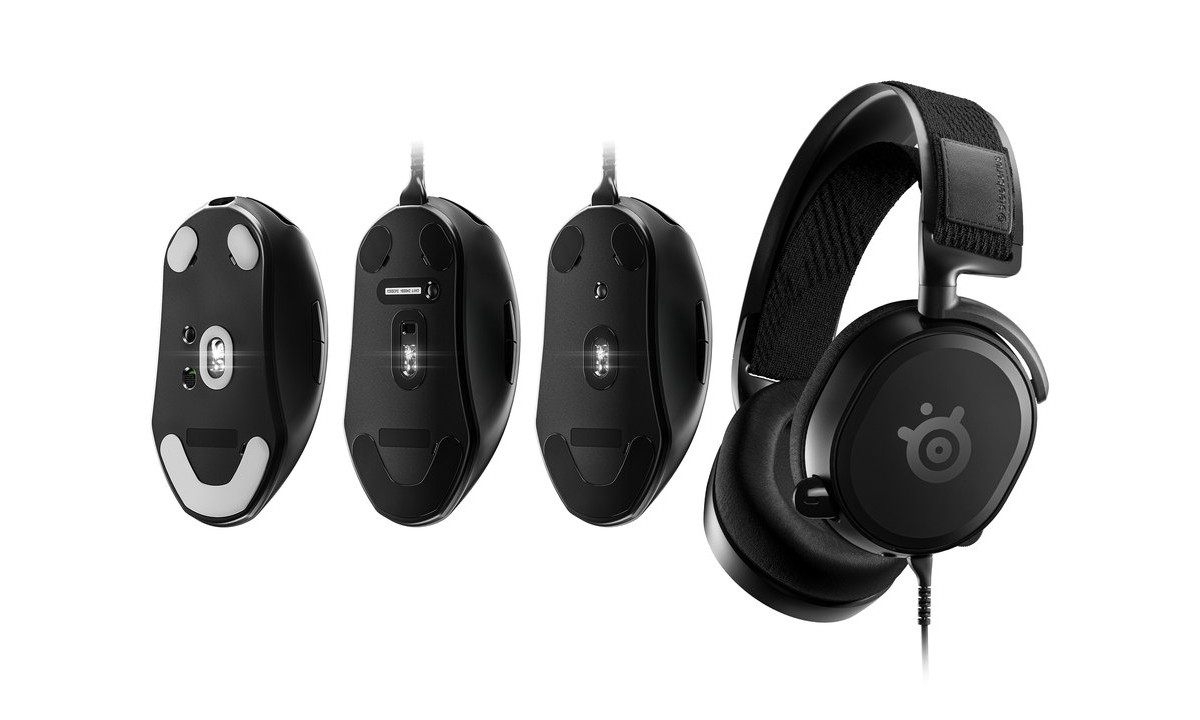
The SteelSeries PRIME series is currently made up of three mouse models – the PRIME, PRIME+ and PRIME WIRELESS – and is thematically joined by the Arctic Prime. All three mice are nearly identical in appearance and dimensions, but differ slightly in their feature set to cater to discrete user profiles. They start at an MSRP of £59.99 for the PRIME, reaching £129.99 for the WIRELESS model, putting them in the mid-range to enthusiast gaming segments amongst some exceptionally strong competition.
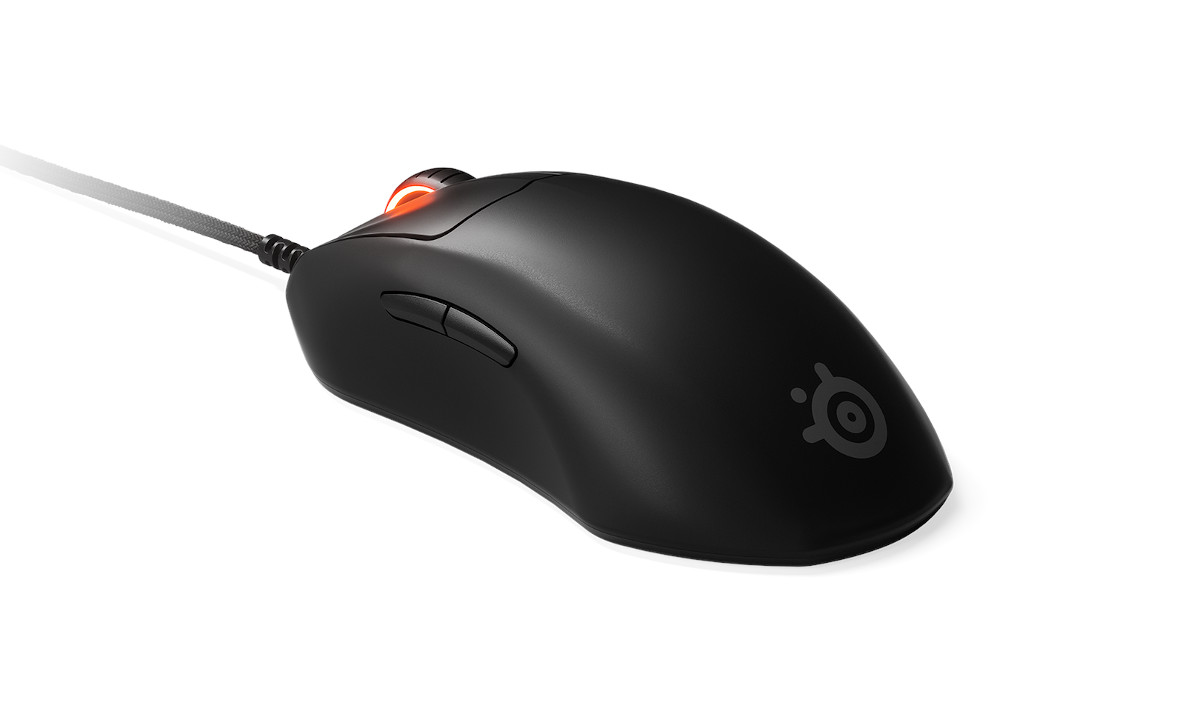
Two key attributes have been earmarked to set the designs apart from the mainstream. The first is “Prestige OM”, a brand new switch design which utilises an optical-mechanical approach. The second is the latest TrueMove optical sensors developed in partnership with PixArt, capable of 18000 CPI and one-to-one tracking at velocities up to 450 inches per second. Differences between the PRIME and PRIME+ – the two mice we’re reviewing today – are more subtle but no less important.
So, with an array of manufacturers seemingly fighting for the Ultralight crown, it’s up to SteelSeries to return some semblance of normality to the picture. Just not too much.
Technical Specifications
Model:- SteelSeries PRIME+
Back Cover Material:- Black Matte Finish
Core Construction:- ABS Plastic
Shape:- Ergonomic, Right-Handed
Grip Style:- Claw, Fingertip, or Palm
Number of Buttons:- 6
Input:- USB
Sensor:- SteelSeries TrueMove Pro+
Sensor Type:- Optical
CPI:- 18000 CPI
IPS:- 450 (validated on SteelSeries QcK surfaces)
Polling Rate:- 1000Hz / 1ms
Acceleration:- 50G
Hardware Acceleration:- None (Zero Hardware Acceleration)
Switch Type (Left, Right):- Prestige OM™ mechanical switches
Switch Durability:- 100 million clicks
Illumination:- 1-Zone RGB (mouse wheel)
Weight:- 71g (without cable)
Length:- 125.3 mm
Width:- 59 mm (front), 67.9 mm (back)
Height:- 23 mm (front), 42.4 mm (back)
Super Mesh Cable Length:- 2m (detachable), USB-A to USB-C
Model:- SteelSeries PRIME
As above, excepting
Sensor:- SteelSeries TrueMove Pro
Weight:- 69g
Back Cover Material:- Black Matte Finish
Core Construction:- ABS Plastic
Shape:- Ergonomic, Right-Handed
Grip Style:- Claw, Fingertip, or Palm
Number of Buttons:- 6
Input:- USB
Sensor:- SteelSeries TrueMove Pro+
Sensor Type:- Optical
CPI:- 18000 CPI
IPS:- 450 (validated on SteelSeries QcK surfaces)
Polling Rate:- 1000Hz / 1ms
Acceleration:- 50G
Hardware Acceleration:- None (Zero Hardware Acceleration)
Switch Type (Left, Right):- Prestige OM™ mechanical switches
Switch Durability:- 100 million clicks
Illumination:- 1-Zone RGB (mouse wheel)
Weight:- 71g (without cable)
Length:- 125.3 mm
Width:- 59 mm (front), 67.9 mm (back)
Height:- 23 mm (front), 42.4 mm (back)
Super Mesh Cable Length:- 2m (detachable), USB-A to USB-C
Model:- SteelSeries PRIME
As above, excepting
Sensor:- SteelSeries TrueMove Pro
Weight:- 69g
TrueMove Pro Sensor
SteelSeries’ PRIME debuts the latest generation of TrueMove optical sensors, the TrueMove Pro. A development made in collaboration with PixArt, the TrueMove Pro offers 1-to-1 tracking and a tilt tracking algorithm that eliminates unwanted vectors during angled drops, tilt slams, and quick flicks.
So what’s a tilt-slam? When swiftly moving the mouse across the mat in the thick of the action it’s not uncommon to start with the mouse at a slight angle from the surface. A tilt slam is when you quickly bring the mouse down level with the surface at the end of your left/right motion, and can cause the sensor to spin out (i.e. interpret the action as you moving up/down quickly), pointing you up or down in-game.
The importance of tilt-slam compensation is often debated in FPS communities but, so long as other sensor dynamics are on point, it’s a boon that most would welcome with open arms.
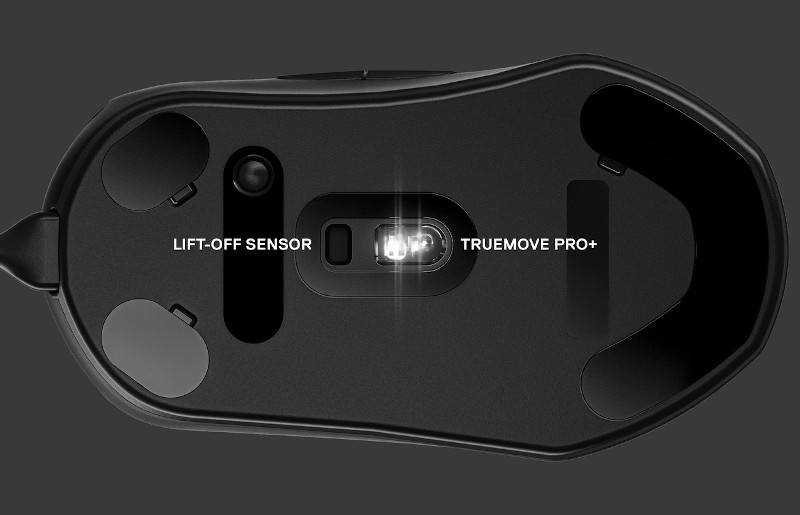
The Pro+ sensor variant is equipped with one additional feature: a dedicated lift-off sensor. It allows the user to adjust their lift-off distance from 0.5mm up to 2mm, based on their particular preferences. The sensor window is located just above the main sensor in the centre of the mouse base.
Prestige OM™ Switch
Just as with keyboards, mouse switches are a continuing source of evolutionary design. And just as with keyboards, mice manufacturers have begun to look to the potential afforded by optical sensors over purely mechanical types.
The PRIME series introduces Prestige OM™ switches, a hybrid optical-mechanical implementation intended to give greater long-term consistency and durability to the two main buttons well beyond the typical 50 million clicks.
As you can see, Prestige OM switches are considerably more complex than standard mechanical designs, but there is method to the madness. A long-lever spring would last considerably longer than the thin metal of a traditional microswitch, a magnetic resistive point shouldn’t degrade over time, and an optical break to determine actuation effectively eliminates the debouncing effect of electro-mechanical implementations. Prestige OM switches are rated at 100 million clicks, and the feel of each button-press should not change significantly over the mouse’s lifetime.
All three PRIME models are equipped with Prestige OM switches.
PRIME+ OLED Display
SteelSeries are no strangers to integrating OLED displays into their premium mice. This particular implementation harks back to the original Sensei which integrated a small LCD panel into the base for identification and on-board profile cycling, but adds quite a bit of functionality into the mix with a crisp monochrome OLED matrix.
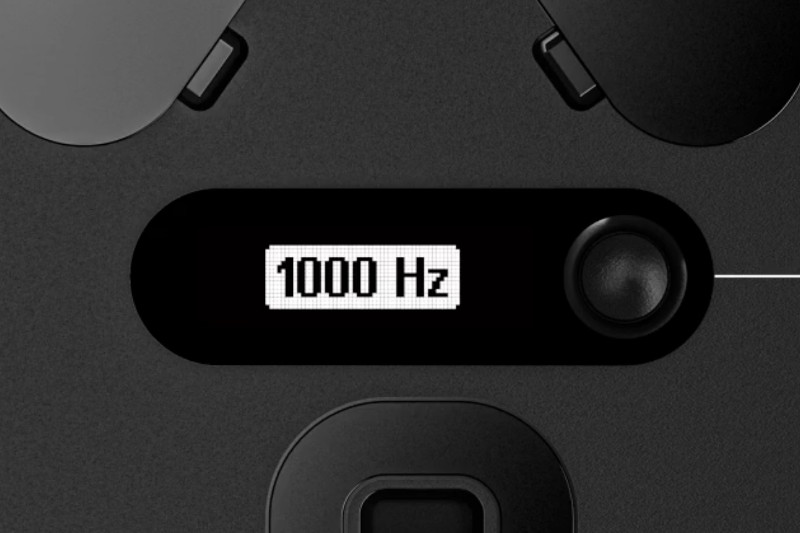
Key configuration settings – CPI, polling rate, lift-off distance – can all be configured through the display without the use of software. Menus can be navigated and settings edited by using the LMB, RMB and scroll wheel in a manner that’s pretty intuitive. This will be important under tournament conditions where proprietary mouse software may not be allowed.
Limited on-board configuration functionality is also available to the base PRIME and PRIME WIRELESS models. Regardless of model, settings are stored in a single on-board profile, while software can store many more.
And as a final little twist, it’s also possible to set up the default display of a particular image or logo as a wallpaper of sorts, personalising your PRIME+ in a few simple clicks.
First Look
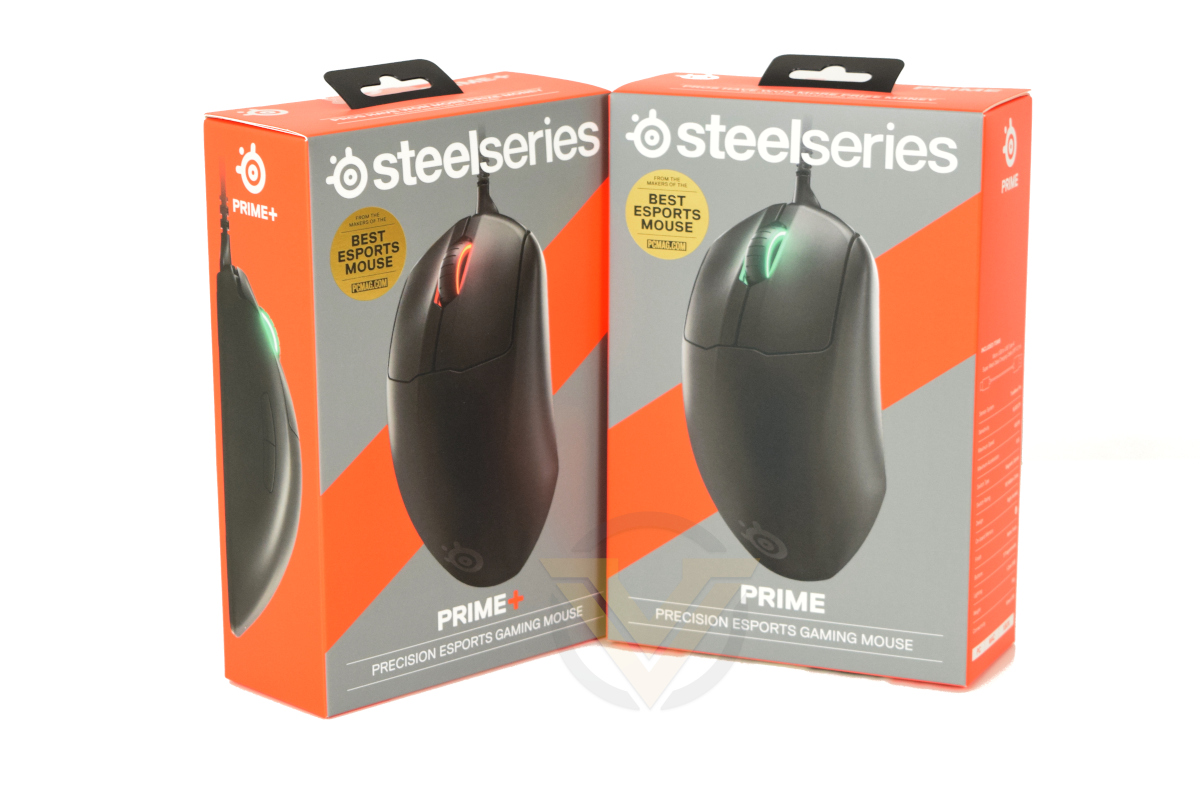
SteelSeries have carved out a grey and orange livery are their own for branding purposes, and so the PRIME series packaging will be striking on any store shelf (or discreetly positioned in the background of your webcam feed).
An angled top-down image highlights the streamlined nature of the PRIME series mice, showing just a touch of colour in the RGB mouse wheel.
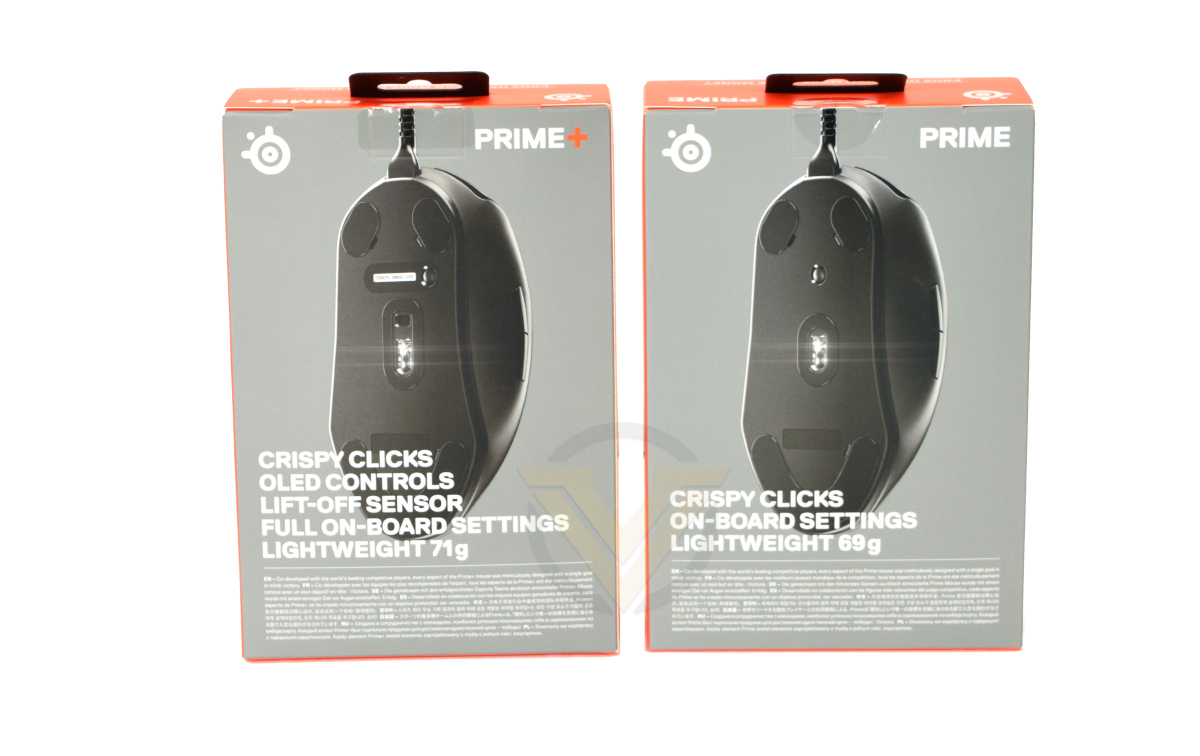
Switching to the rear, SteelSeries choose to highlight the advantage of each of the PRIME models, particularly the crisp clicks and low weight.
Detailed technical specifications can be found on the spine of each exterior sleeve, breaking down sensor specs, interface type, compatibility and physical aspects such as the weight and plastic finish. At a time when manufacturers are moving away from this level of detail on the packaging it’s refreshing to see SteelSeries buck the trend.
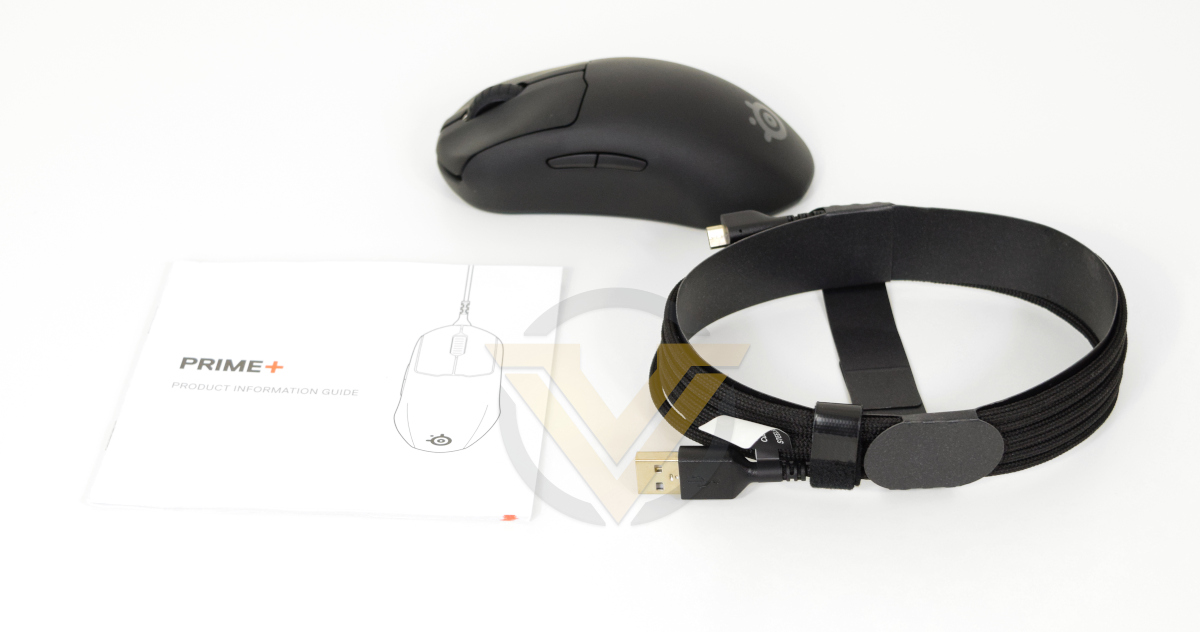
Contained in the packaging of both the PRIME and PRIME+ models is the mouse itself, a USB-A to USB-C cable (compatible with a keyed USB-C socket), and a quick-start guide. No frills here.
Closer Look
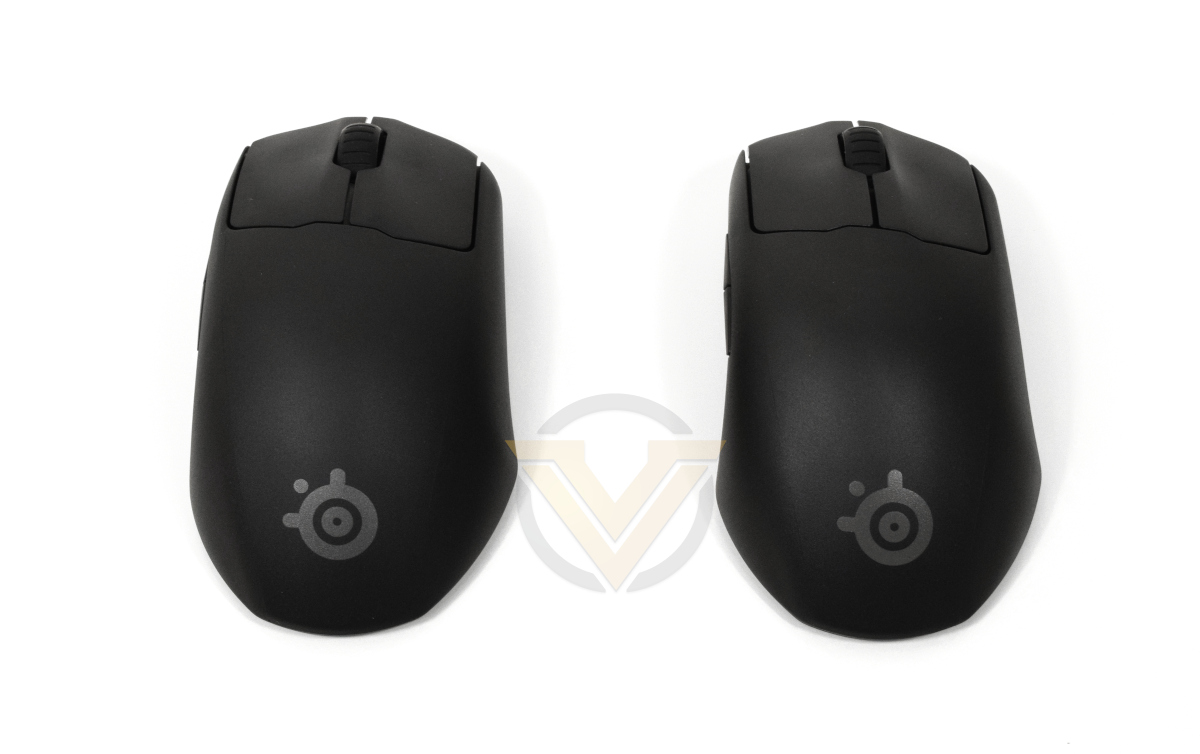
Side by side, you’d be hard pressed to tell the PRIME and the PRIME+ apart from this angle. They are effectively identical from the top and side, only differing when viewed from underneath; SteelSeries aren’t hedging their bets on the suitability mouses’ contours for the majority of users.
An ABS-polycarbonate shell is coated with a matte black surface that’s grippier than standard ABS plastic finishes. It will pick-up grime over time however, and the design of the mouse may make it relatively difficult to clean.
The PRIME chassis is asymmetric and contoured to a right hand. Its footprint is neither large nor small, but slightly more compact than the CORSAIR SABRE PRO we reviewed in April due to an aggressively tapered top and tail.
Both the PRIME and PRIME+ are closer to 75g than 70g when cable is included, but they’ve also appropriated the ‘ultralight’ label increasingly common to FPS gaming mice. They’re not heavyweights like the old Logitech MX518, but nor are they as svelte as their <60g competitors purpose-built for FPS gaming; we’ll let the market decide whether they feel the range should be included under the ultralight ecosystem as a whole.
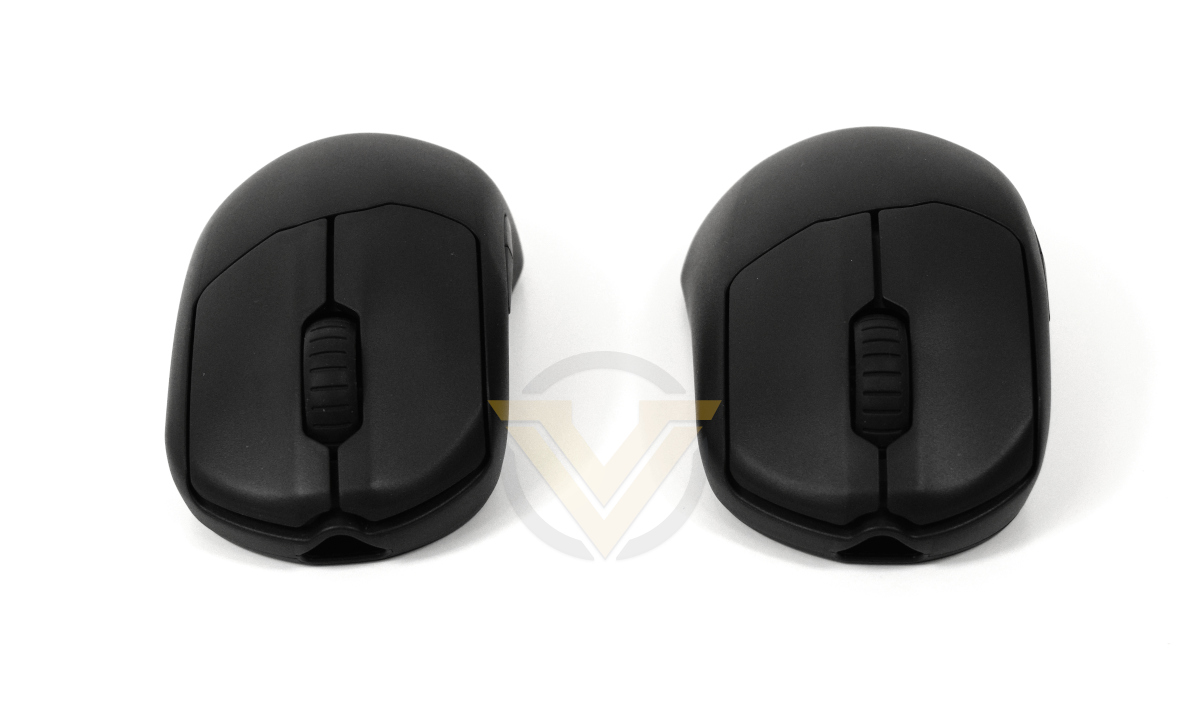
The PRIME and PRIME+ might have a 2g weight difference on-paper but there is no difference in feel between the two once in the hand.
Left and Right mouse buttons have a very slight saddle-shape to them, contouring your fingertip. The mouse wheel is centrally located, but additional buttons (often used as profile/DPI selectors) are absent.
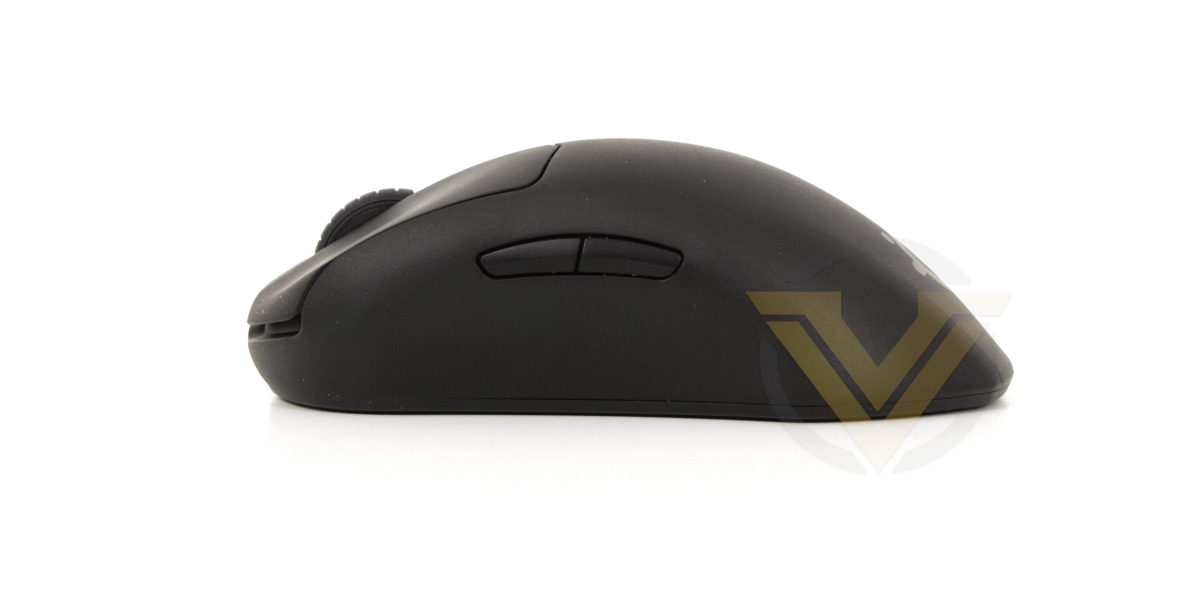
The horizontal cross-section of the PRIME chassis is worth discussing. It has a very pronounced arch, with a relatively steep gradient towards the front and rear, and the midpoint of the arch is only just behind the seam where the LMB meets the mouse body. That contrasts with many other mice that bias this arch towards the rear, more strongly supporting the palm and with a gentler slope down to the LMB and RMB. It has a distinctly unfamiliar feel at first, and may offer the impression that its larger in your hand than it is in reality.
Both thumb buttons are recessed into the mouse chassis, clearly with the understanding that they’ll be used relatively infrequently. A small curve is shaped out of the chassis on this side as a thumb rest and grip zone.
The opposite side offers only a slight indentation towards the base for little fingers, and it could potentially be harder to grip and lift the mouse without it pitching forward.
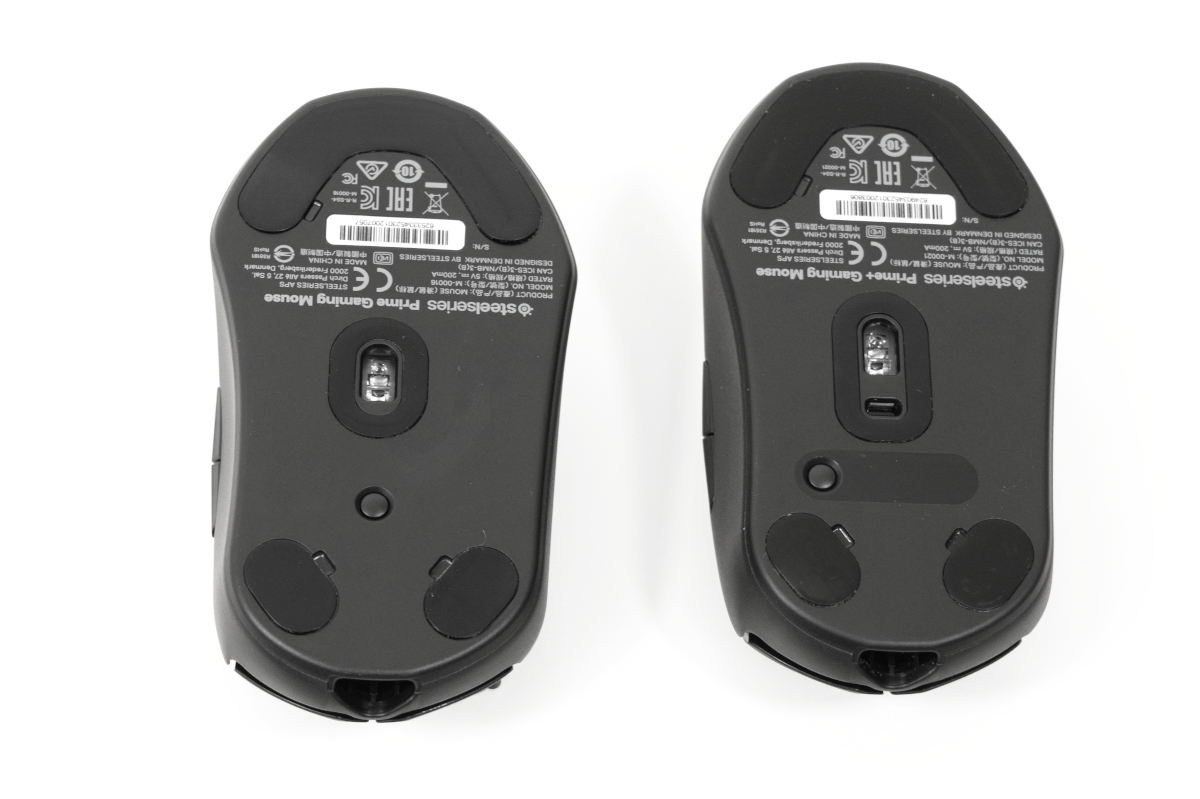
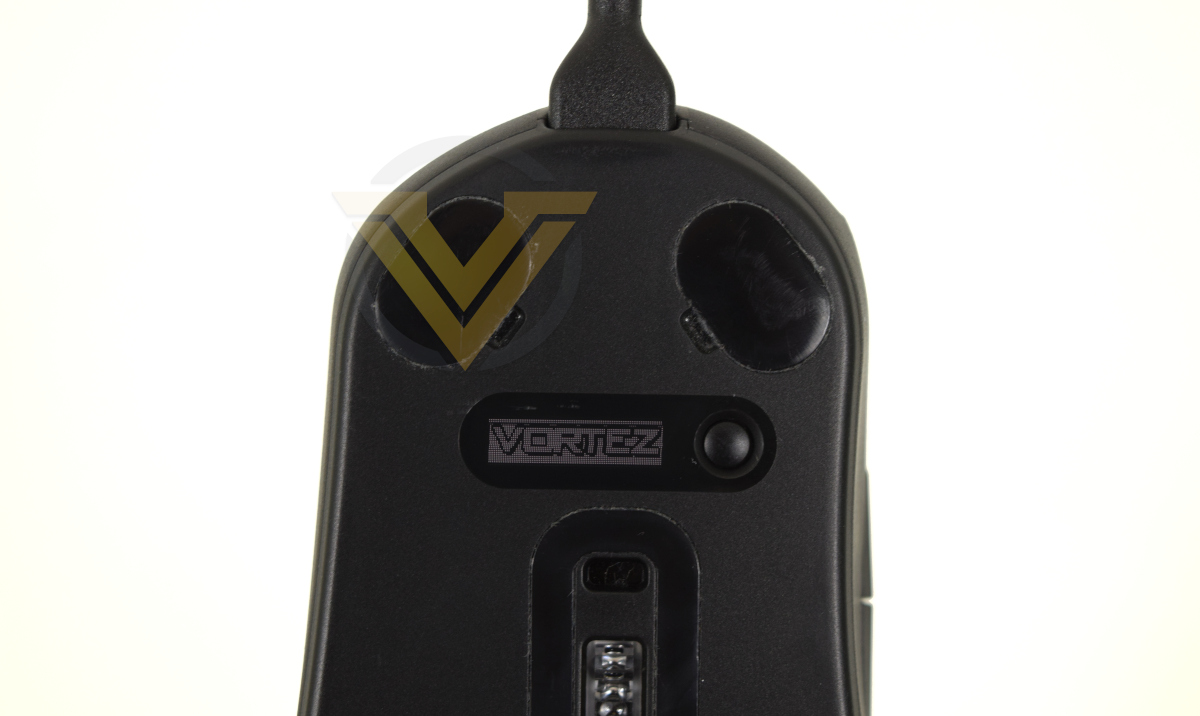
On the mouse base the real differences in the PRIME designs become apparent. Each has three low-friction pads to help it skate across the mousing surface, and a centrally located sensor with oval pad around it. The PRIME+ however has a small rectangle just above the main sensor – that’s the lift-off sensor – and a large black window just above them. This is the OLED display.
The button on both models interacts with on-board settings. By default on the PRIME it cycles through CPI levels and four USB polling rates options, but on the PRIME+ activates the mouse menu on the OLED display.
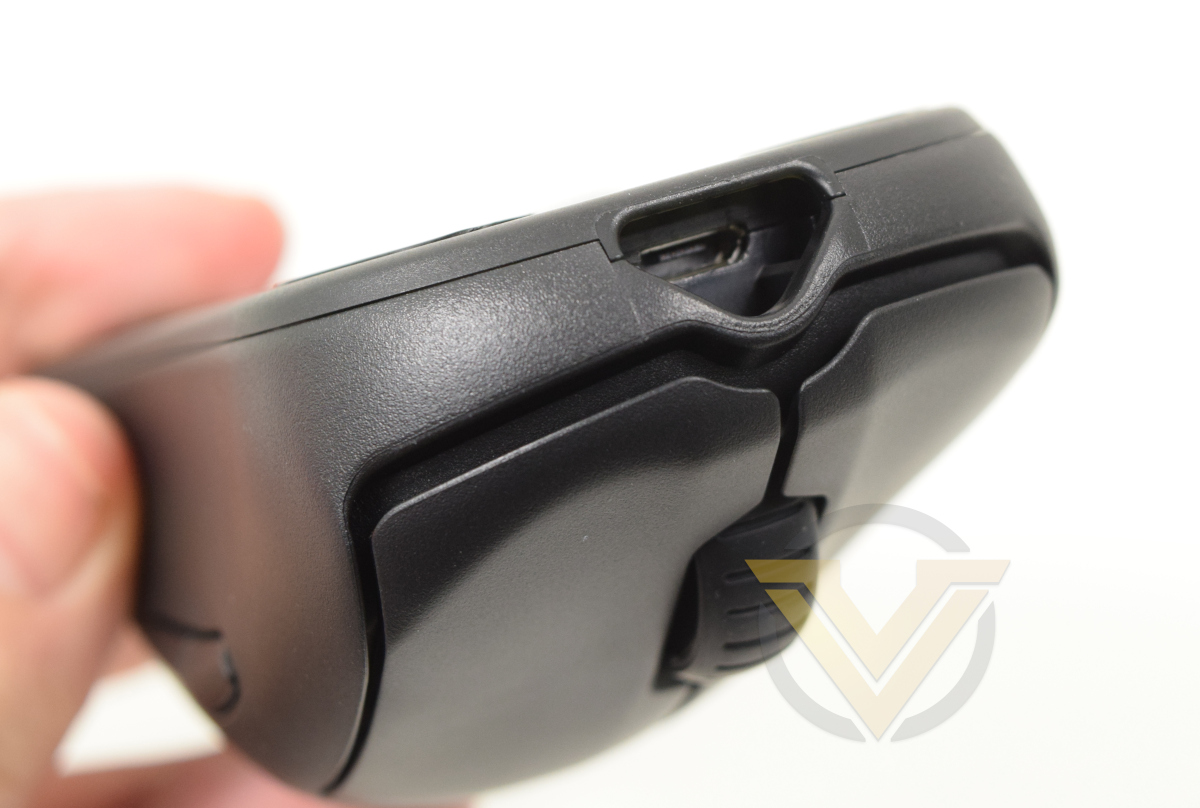
Finally we come to the front, where the USB cable is inserted. The triangular plug on the USB-C end is keyed to the socket on the mouse, helping to plug it in without damaging the USB-C socket. It does mean however that not just any UCB-C cable will do in the event of a cable failure, you will need one for this series of mice direct from SteelSeries.
Software and Lighting
The SteelSeries software utilities partnering their peripherals have long been the bread and butter of the manufacturer, going so far as to roll in exotic functionality where and when it made sense. In this instance however they’re keeping it nice and simple, while laying the foundation of an updated unified desktop application.
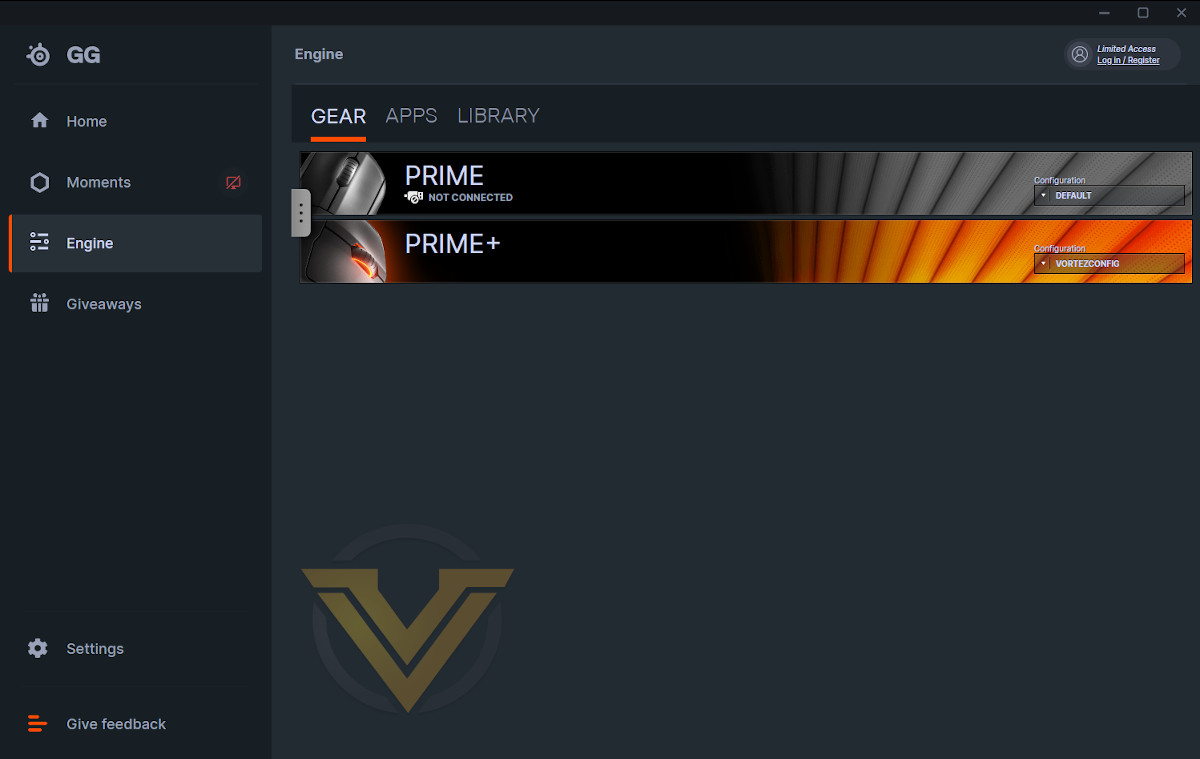
Dubbed SteelSeries GG*, the desktop app collects the functionality of their Engine peripheral configuration utility alongside a game settings optimiser and broader social features. Included among the latter banner is ‘Moments’, a simple gameplay capture and editing suite that enables you to share your highlights in seconds. Accessing social features requires a (free) SteelSeries account.
Upon selecting the Engine tab you’re presented with a list of Gear (i.e. SteelSeries products) connected to the PC, Apps that interact with these devices in some way through the Engine SDK (such as displaying Game State information or VOIP activity), and your library of games for pre-configured settings including suggested keybinds. Apps and the game Library aren’t particularly relevant for the PRIME mouse series, and will be much more rewarding in conjunction with feature-rich SteelSeries keyboards and devices with broader lighting functionality.
With an array of configured profiles set up you can quickly select the device profile in the drop-down menu. Clicking each device brings up a separate configuration window.
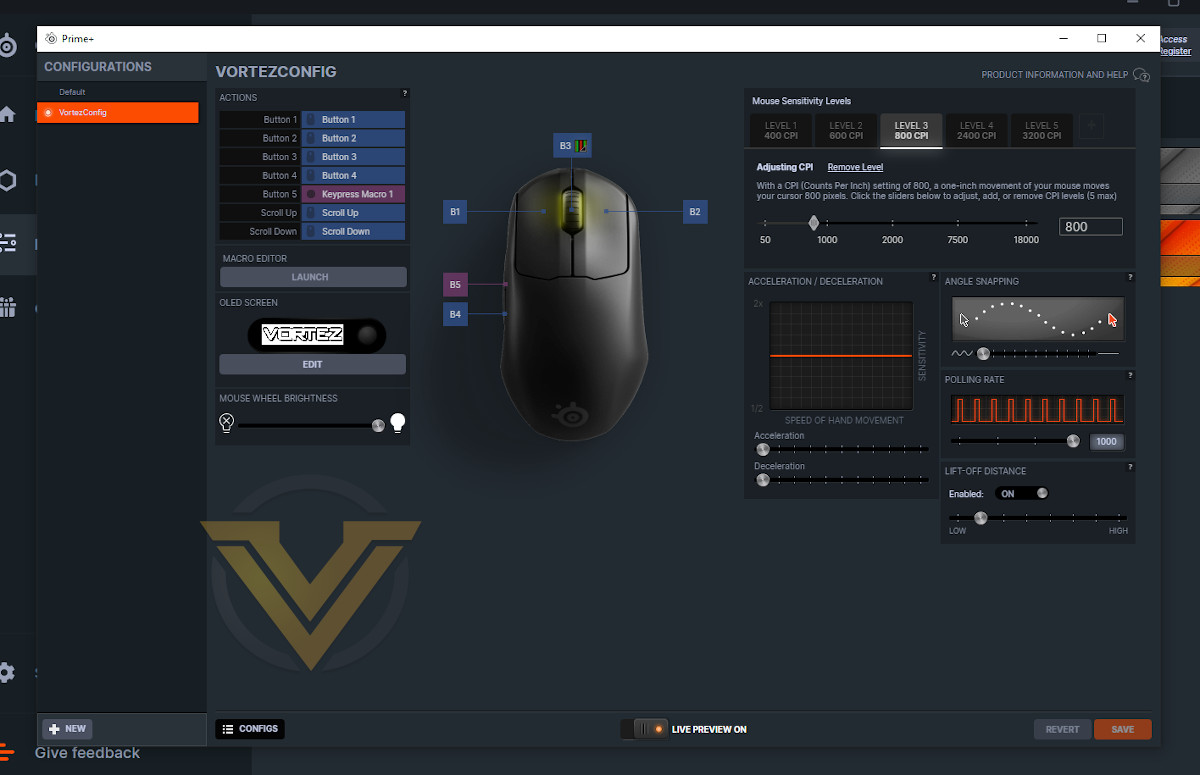
This is the PRIME+ configuration page. Some may call it streamlined but spartan might be another accurate descriptor; the page has only what it absolutely needs and nothing more.
A top-down view of the mouse is central to the window, with each button individually labelled to prevent any confusion. The small icon next to B3 indicates that the mouse wheel is illuminated; clicking on it brings up the lighting configuration window.
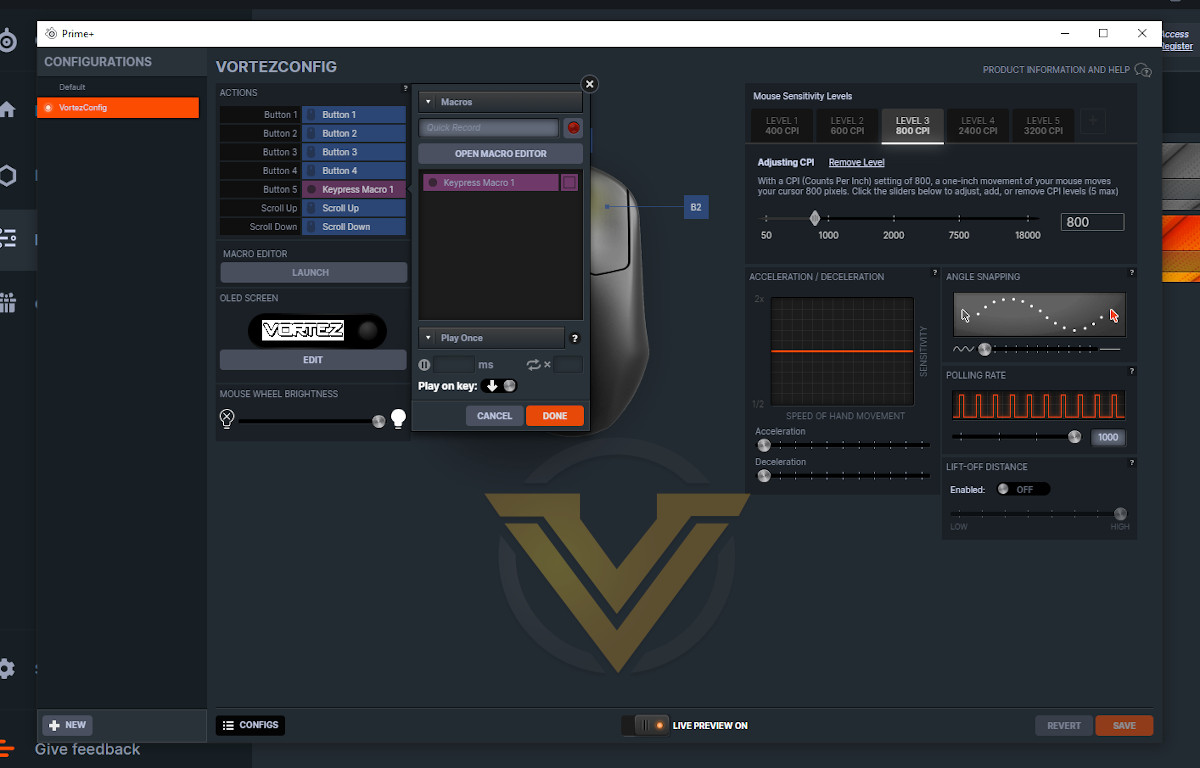
The Actions pane binds the buttons to a default function, keystroke, macro, or ancillary utility such as application launching. A quick macro recorder can get you started with more exotic keystroke combinations, but there’s nothing here that you wouldn’t expect to see on competing products.
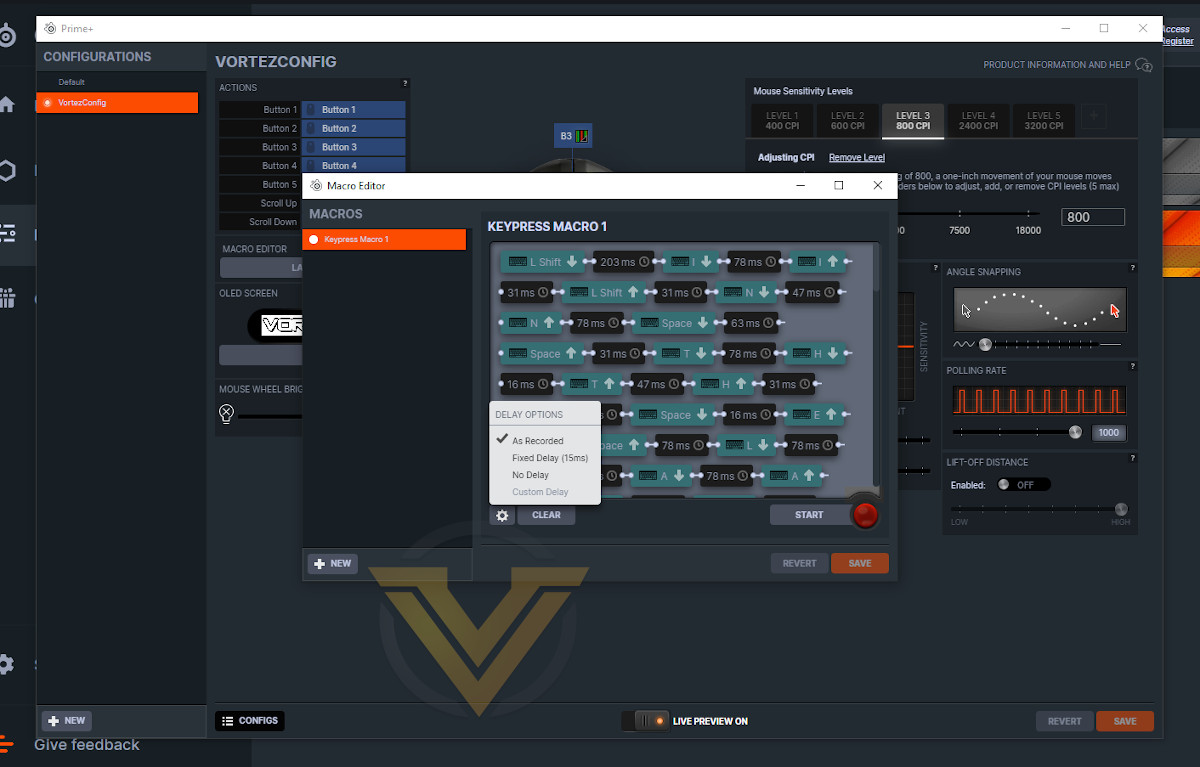
Just below Actions is a button to launch the Macro Editor. This tool (popping up as another separate window) lets you record a sequence of keypresses or create a string of text that will be parsed near instantaneously. Key Press, Lift and individual timings are all stored, and can be individually edited. Delays can also be set to a fixed duration rather than as typed. Once created, a Macro can be assigned to any button.
Next is the OLED screen default graphic, a feature that’s exclusive to the PRIME+. The graphic selected is displayed on the OLED as a sort of ‘home screen’, and can be edited as a monochrome 96px x 24px bitmap. An image in the correct size can be used instead if preferred, and the software will automatically convert it to monochrome (with dithering if desired). This is a really nice way of uniquely personalising your PRIME+ separate to the RGB mouse wheel, and is a nice call-back to classic SteelSeries mice of the past.
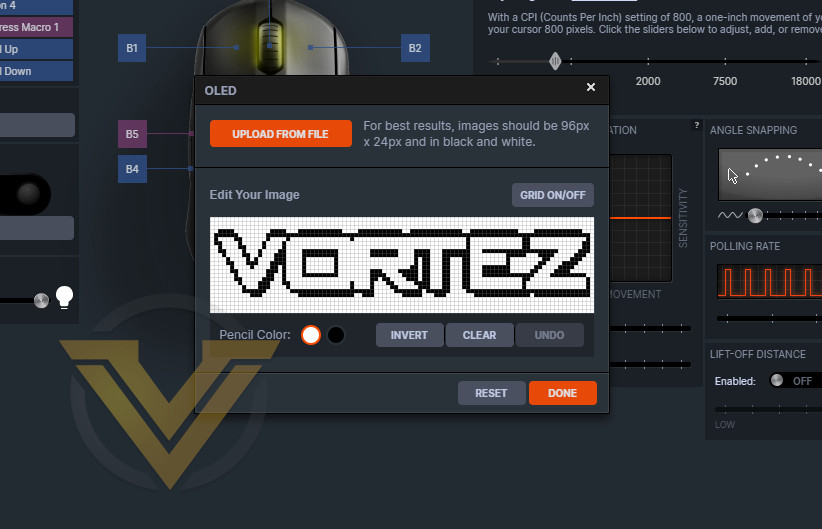
Just below that is the Mouse Wheel Brightness slider, and if you click on the small icon next to B3 on the mouse image you’ll bring up the Illumination configuration window. The single lighting zone doesn’t allow for any of the more extravagant lighting schemes you’ll be able to create with additional SteelSeries peripherals, but you can still create something fancy.
ColorShift cycles through customisable spectra bands defined by colour tags. Five different presets are joined by a selection of up to 4 other recently created bands, each of which can be selected.
Steady is a fixed RGB colour.
Multi Color Breathe cycles through multiple colours, pulsing on, then off, then on. Three presets are joined by four recently created effects. Multi-color Breathe effects can be recreated in Colorshift with a little more hoops jumped through.
Steady is a fixed RGB colour.
Multi Color Breathe cycles through multiple colours, pulsing on, then off, then on. Three presets are joined by four recently created effects. Multi-color Breathe effects can be recreated in Colorshift with a little more hoops jumped through.
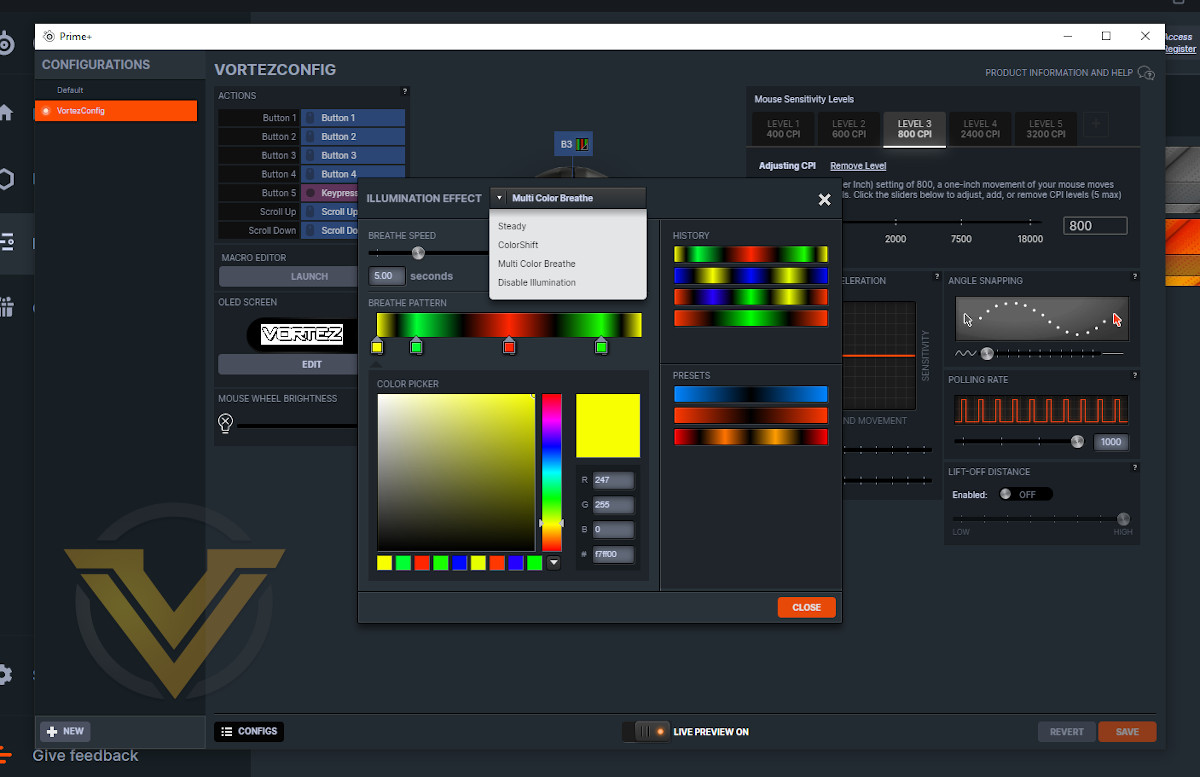
The tool is a little clunky because you can’t delete a colour tag once placed, but performs adequately. The image of the mouse doesn’t reflect the colour ‘Live’, just the first colour tag, and so it would be helpful if the tag next to B3 was larger and hence able to reflect the lighting effect more clearly.
To the right of the window is the mouse sensitivity level configuration pane. Up to five sensitivity levels can be defined in CPI and stored on the mouse, with CPI ranging from 50 to 18000. Note that CPI level can be selected via the software, a button assigned to the CPI Toggle function, or the button on the base of the PRIME and PRIME+. On the PRIME+ the OLED screen will display the current CPI level and raw value when this button is pushed, and then proceed to cycle through the levels on each subsequent press.
It is not, so far as we’re aware, possible to set X and Y axis CPI independently through Engine.
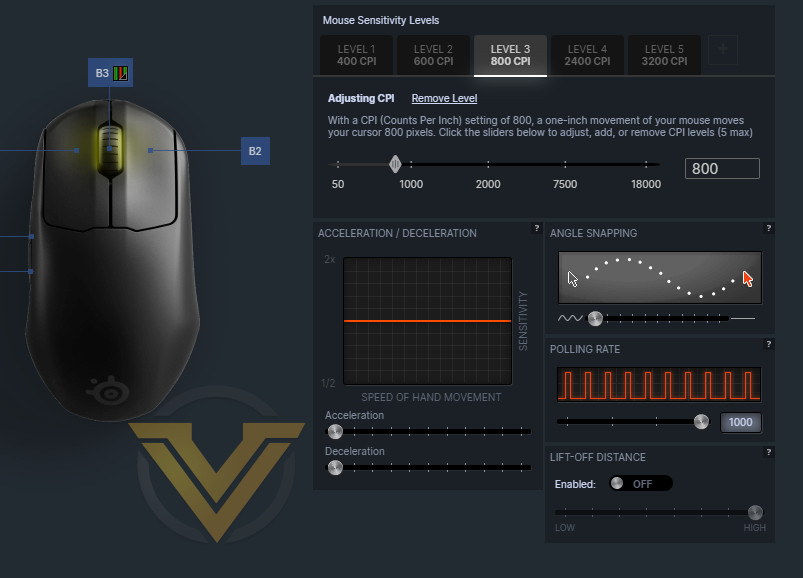
The Acceleration/Deceleration pane modifies the mouse pointer dynamics. It will only take effect when moving the mouse quickly or slowly, and serves to slow down or speed up the pointer respectively. It has no impact when the mouse is travelling in a standard speed band. As with all mouse acceleration it’s generally wisest to disable it entirely when gaming.
Angle Snapping is where the mouse sensor interprets slight deviations off horizontal and vertical as continuation along a straight line, which is very much against the ideal of 1-to-1 tracking. The PRIME series not only allows the user to selectively enable, but also determine how aggressive it will be. That’s very rare, particularly on a gaming mouse, and may be exceptionally useful in certain niche cases.
Polling Rate determines the USB polling rate, and can be handy for compatibility with older UEFI BIOSes.
Finally, the Lift-Off Distance pane is exclusive to the PRIME+ and lets you enable or disable the integrated lift-off sensor. Once enabled, a slider determines the height threshold below which the sensor will pick up movement across the mousing surface; once above that height all main sensor readings will be rejected.
Overall, the Engine configuration utility does what it needs to do and little more. It’s easy to parse, and trivial to set up Macros and other advanced features that would otherwise have users running for the FAQ webpage. By the same token the UI is a little unpolished, lacking some very straightforward visual indicators for configurable aspects such as the current lighting profile, and more generally could do with just increasing the font size and overall UI clarity.
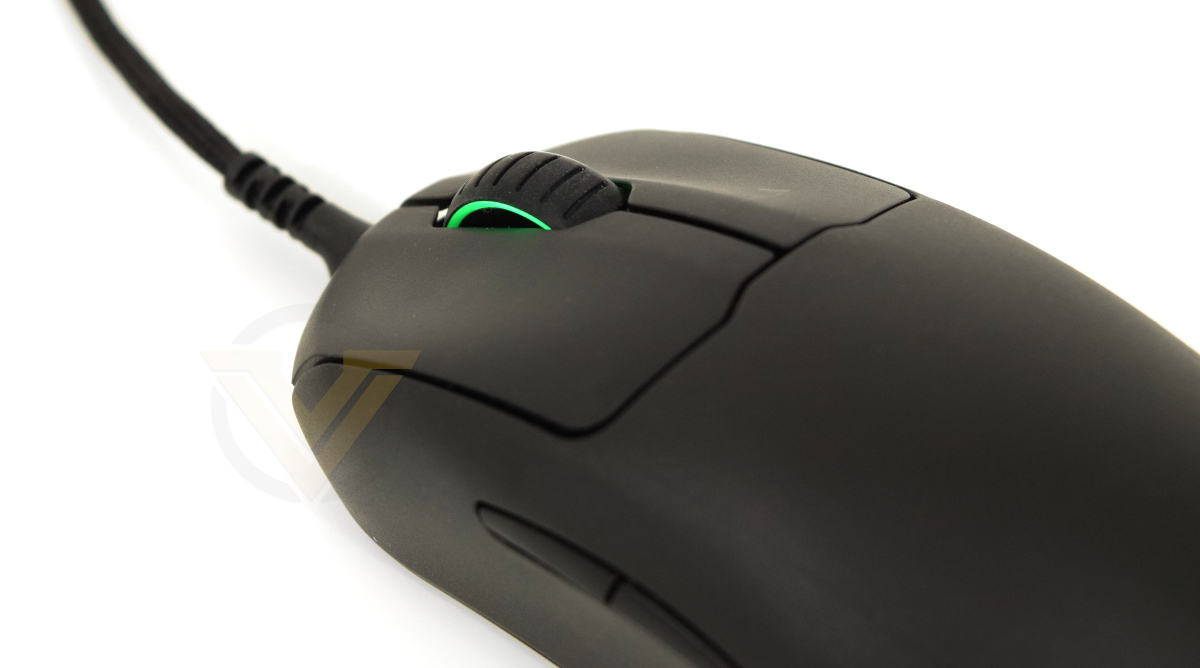
The RGB lighting on the PRIME and PRIME+ is vibrant in moderate and low late conditions, without being distracting under better office lighting. It has a decent set of configuration options despite being a single lighting zone, and can also double as an active profile indicator when the software is set up to switch profiles based on the currently active game. Functional, without being ostentatious.
*We used the latest version of SteelSeries GG during testing, v4.0.0
Performance
At first blush the PRIME chassis was uncomfortable in the hand, primarily due to the novel contours SteelSeries have shaped the mouse to. It provides relatively little support for the palm and more for just underneath the knuckle, which was a departure the mouse previously used on a daily basis, but also falls off steeply from left to right across the mouse. Any discomfort faded quickly, but it’s a testament to a need to push beyond mere first impressions.
The coating SteelSeries chose for the PRIME mice is slightly grippier than we were expecting, making lifting the mouse off the mousing surface easy despite not resorting to a heavily textured finish or acutely angled sides.
As a general office workhouse mouse the PRIME and PRIME+ were fine. Precision was good, and the scroll wheel was stable and reliable throughout. Both LMB and RMB were of course crisp at all times, but that should come as no surprise. Macro functionality was helpful and there were no obvious software incompatibilities to worry about.
TrueMove Pro+ Lift-Off Sensor Issues
It became apparent very early on that the PRIME+’s lift-off sensor was having difficulty operating properly on our preferred mousing surface, a CORSAIR MM350 PRO. Tracking failed when mousing over dark areas of the mat with the lift-off distance toggle enabled, visibly skipping and stopping on screen no matter the distance selected. We had similar issues with CORSAIR’s SABRE RGB PRO prior to a sensory calibration pass, so assumed it might just be the mat. Mousing with the toggle disabled was seemingly unaffected and so the mat was duly swapped. Our subsequent observations were stranger still.
On a CM Storm SPEED-RX S the mouse failed to track at all with the toggle enabled. The same was true on a FUNC Surface 1030 XL and AIVIA Krypton mouse mat (hard and fabric sides). A Creative Sound BlasterX AlphaPad had a similar issue as the MM350 PRO, with tracking failing over a particularly dark section. Surface wear for these mats varied from brand new to heavily used.
Even our wooden veneer desk wasn’t up to standard apparently, but a white sheet of paper was no problem. In fact, the only mat to hand that didn’t exhibit these issues was a well-worn ROCCAT TAITO. Furthermore, even on apparently compatible surfaces the effect of changing lift-off distances was almost imperceptible, making it very much a feature for only the most dialled-in gamer.
With no firmware updates available we were left scratching our heads. SteelSeries recommend a QcK mat for use with their mice and that might just be mandatory if you wish to use this feature on the PRIME+. White or brightly coloured mats should also do the job, but we believe that a predominantly black mat or one with very dark sections will often not be suitable. Worse still, if you the enable lift-off distance sensor and tracking fails you may be unable to turn it off in software, requiring that you resort to the on-board menu to disable it.
We can only assume that a firmware update to address this issue is being worked on because the errant behaviour is so egregious that it can’t have been overlooked. As it stands however, for our sample, this particular feature of the TrueMove Pro+ sensor on the PRIME+ doesn’t appear to be fit for purpose.
With some trepidation we continued our testing.
Apex Legends
The PRIME and PRIME+ are clearly intended as thoroughbred FPS mice given the focus on both sensor accuracy and mouse button consistency, so it will come as no surprise that our first port of call for serious gaming was 2019’s break-out FPS Battle Royale, Apex Legends. The aim was to test the mouse at lower sensitivities, as well as force the tilt-slam interaction that SteelSeries claim is ameliorated with the TrueMove Pro sensor. We’re not FPS experts by any stretch, but can still give this tool a thorough going over.
Perhaps the most significant quality we encountered with both PRIME models was great LMB and RMB consistency. Straight out of the box both were a little harsh perhaps, but that’s not unexpected for any mouse. Deep into testing however, even after battering both buttons with more aggressive usage patterns, both stayed very crisp and exhibited zero wobble either at rest or when fully depressed.
As a default marker assignment in APEX it’s very handy for the middle mouse button to have sensible actuation forces and stability. The mouse wheel on the PRIME series has that in spades – a not too gentle click, and well-separated scroll which means you don’t over-rotate. Perhaps not the best we’ve tested, but certainly up there when it comes to frequent in-game use.
We weren’t able to replicated the tilt-slam spin-out effect with either the PRIME or PRIME+ in APEX, despite being able to do so on less advanced mice. While we can’t guarantee that the effect isn’t present at higher extremes than we could test at, it did seem to us that SteelSeries’ new sensor had the problem licked.
A Tortuous Test – Path of Exile
Diablo 3 has made frequent appearances in our mouse tests, but this time around we took our subject out for a spin in GGG’s infamous ARPG between FPS sessions. While not being quite as ‘clicky’ as Blizzard’s best, mouse precision is rewarded to a greater degree. Plus… it still definitely gives that LMB and RMB a work-out you won’t find in an FPS.
Here both PRIME and PRIME+ once again performed admirably despite racking up the click-count, and proved their precision at high CPI settings. Fast-paced ‘click to move’ actions were accurately registered with no obvious double-clicking, and the button stayed actuated if held for long periods without ‘slipping off’ its actuation point.
An observation we made of the CORSAIR SABRE RGB PRO was that the mouse itself was almost unwieldy due to its size. The PRIME chassis isn’t that much smaller and weighs effectively the same, but still feels a touch easier to work with, particularly in extended play sessions (as are common with ARPGs)
World of Warcraft – Shadowlands
World of Warcraft remains the world’s most well-known MMO, and it gives us a great excuse to try other aspects of the mouse – particularly its macro capabilities and gauging the suitability of the thumb buttons.
First we come to the thumb buttons and unfortunately they’re not great. The back button is fine, but we frequently found the an attempted press of the forward button failed. To be clear it’s not a failure of the hardware or software, but rather a disparity between the feel of the back and forward buttons. The latter seems to require fractionally more movement to actuate, and that’s enough to throw you off. It may be that with sufficient muscle memory built up the issue diminishes, but it was still a factor after well over 10 hours of play.
As we mentioned, the mouse’s macro feature is trivially easy to use, either through the quick record section or the more comprehensive Macro Editor. Many MMOs and RPGs – WoW included – incorporate their own macro and individual keybinding system, but having a well appointed hardware or driver-level alternative is an excellent fall-back position if the game in question doesn’t allow it. Older titles, and potentially console ports, are prime examples.
When judged side-by-side, the PRIME and PRIME+ both performed very well in their given rolls, excelling as FPS-oriented tools beyond all else. The PRIME therefore is the preferred of the two – it’s slightly lighter and cheaper option that doesn’t include the feature the PRIME+ had difficulty in pulling off. Competitive gamers at tournaments might prefer the OLED-equipped PRIME+ due to on-board customisation capabilities, but most users won’t be in that elite class.
Conclusion
Sometimes we long for yesteryear, when the quality of mice was so variable that telling the good from the bad was easy. Today excellence is commonplace, requiring us to look at ever finer details to differentiate the great from the merely very good. If we seem harsh, it’s because our expectations are high.
SteelSeries almost exceeded these expectations, and we can certainly envision some gamers being blown away by the PRIME series mice. If you focus is FPS gaming then PRIME mice have a lot to offer – two excellent main mice buttons and a well contoured lightweight design in particular – but those with more rounded genre interests may wish to look further afield.
From our perspective the Prestige OM switch technology is a big win for the PRIME series. Reliable and consistent clicking should be a given within the abbreviated review period, but the lack of any sort of fall-off in feel in addition to rock-solid stability puts it at least on par with other premium switches we’ve tested, and probably better than most. If they can maintain this level of quality deep into the 10’s of millions of clicks then it’s difficult to see how they can be bettered.
As mousewheels go, the PRIME series is equipped with one that’s better than average. The button is precise and stable when pressed while not requiring too much force, while scrolling itself is light weight.
At a baseline the TrueMove Pro sensor is good, with a healthy configurable CPI range and reliable tracking across a range of surfaces. We were also unable to replicate the ‘tilt-slam’ effect on these mice thus indicating that the sensor was successful in its mitigations, the significance of which will depend on your personal mousing style.
But it’s not all roses and gumdrops unfortunately. TrueMove Pro+’s lift-off distance sensor appeared to fail on multiple mousing surfaces (5 of 6 tested), likely erroneously registering the mouse as above the max lift-off distance. Even when operating seemingly correctly the difference between low and high settings were imperceptible; disable it entirely in the Engine utility and the mouse tracks perfectly. Without a fairly major firmware update the feature is more of a hindrance than a help.
Without some of the Pro+ sensor’s claimed benefits the PRIME+ falls back on the OLED panel and on-board configuration capability as it’s selling point over the PRIME. It’s cute as gimmicks go, and really comes into its own in tournament settings where the Engine software may be unavailable, but may not realistically be worth the £20 extra.
The thumb buttons are also a general weak-point of the PRIME series. They’re not bad by any means, just not up to the same standards as the rest of the design in terms of consistency of response, but will be disappointing for gamers who leverage those buttons in general gaming. MMO, RPG and MOBA specialists may wish to look elsewhere.
Beyond the core mouse, SteelSeries have delivered with configuration software that’s appropriate for the streamlined design of the PRIME and PRIME+ with tools you’d expect for one of its caliber. The company also already offer replacement accessories for the PRIME series including skates and the keyed USB-A to USB-C cable, which was something we were concerned about when first unboxing.
Of the two wired models the standard PRIME would be our preference: it’s more affordable and gives up nothing in minute-by-minute gaming over its more decorated sibling. Even should the lift-off sensor teething issues be addressed (or you’re lucky enough to own a suitable mat already) the PRIME+ is really most applicable for LAN and competitive esports-tier tournament gaming. FPS players of that calibre however may be champing at the bit to get their hands on it.
So overall SteelSeries get a lot right with the PRIME wired mouse range. The series overall might seem expensive – there are plenty of great mice around the £45-55 mark – but we’d much rather invest in its exceptional new technology than a £30 core mouse with £15 of RGB lighting. Both PRIME series mice gain the Creative award primarily in recognition of the Prestige OM switches, while the PRIME model also garnered our Performance award
Pros
+ Promising new switch technology
+ Exceptional LMB and RMB
+ Lightweight design
+ Good customisation options
+ On-board configuration with OLED display (PRIME+ Only)
+ Well-contoured shape
+ Highly Portable
Cons
– Misfiring lift-off distance sensor (PRIME+ Only)
– Weak thumb buttons for MMO/RPG gameplay
– Relatively high price for features
– Configuration needs a little more polish
+ Promising new switch technology
+ Exceptional LMB and RMB
+ Lightweight design
+ Good customisation options
+ On-board configuration with OLED display (PRIME+ Only)
+ Well-contoured shape
+ Highly Portable
Cons
– Misfiring lift-off distance sensor (PRIME+ Only)
– Weak thumb buttons for MMO/RPG gameplay
– Relatively high price for features
– Configuration needs a little more polish
Click here for an explanation of our awards at Vortez.net.
Stay connected with the Vortez Social Media pages:
Join in with the discussions on Discord