Sporting an AMD Ryzen 5 CPU and NVIDIA’s latest RTX 2070 GPU, the Stormforce Crystal RTX 2070 (Ryzen 2600) certainly seems to offer great performance but is it worth the £1400 asking price? Let’s have a look, shall we?

Product on Review: Crystal RTX 2070 (Ryzen 2600)
Manufacturer: Stormforce
Street Price: £1,249.99
Stormforce are a system integrator located in the North of England, producing machines for all budgets and use-cases, ranging from office PCs for light use all the way to the bleeding edge gaming machines with multiple graphics cards. Whatever it is you’re after, Stormforce can accommodate you. Today we look at a mid-range machine which slides in just under the £1250 barrier.
Sporting an AMD Ryzen 2600 processor, rocking 6 cores and 12 threads at up to 3.9GHz, paired with an NVIDIA GeForce RTX 2070 from ASUS Republic of Gamers. Helping to bolster performance further is an AMD B450 chipset motherboard equipped with 16GB of DDR4 from HyperX, clocking in at 2666MHz.
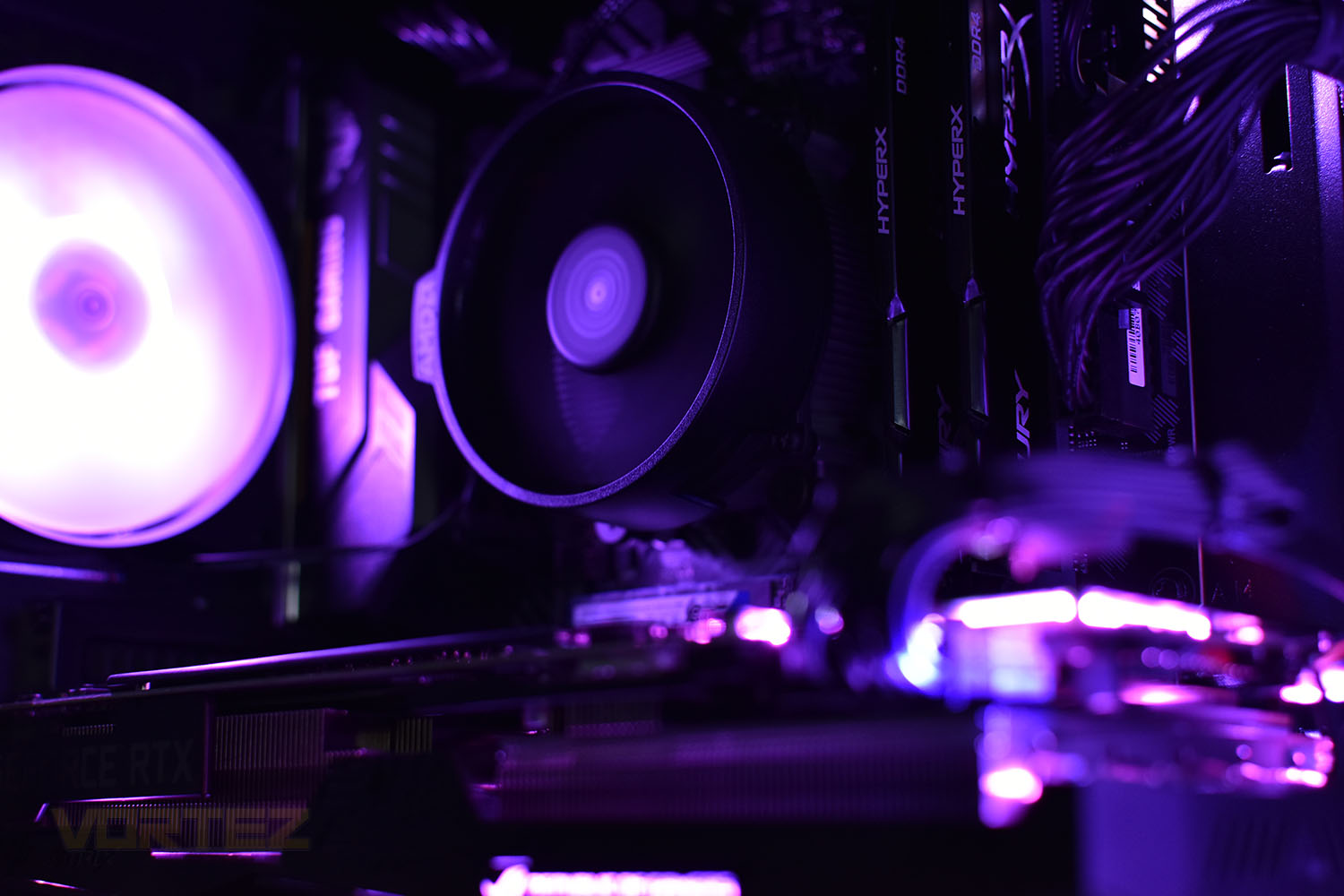
Storage totals 1.25TB with 250GB of that arriving as SSD storage for fast access; both provided by Western Digital. Ensuring everything looks sleek and stylish, Stormforce have opted for the Cooler Master MasterBox 5 Lite with RGB enabled front and rear fans and a transparent case side to show off your rig.
Thanks to a Ryzen processor, RTX graphics card and SSD storage, the Stormforce Crystal RTX 2070 (Ryzen 2600) promises solid performance but lets throw some tests at it and see how it copes.
Stormforce on the Crystal RTX 2070 (Ryzen 2600):
Introducing the “Crystal Ryzen 5 2600 RTX 2070” based on the very latest cutting edge AMD Zen architecture. Equipped with an AMD Ryzen 5 2600 running up to a lightning 3.90GHz, offering powerful hexa core performance combined with the mighty AMD B450 chipset. A huge 16GB of DDR4 RAM runs at a swift 2400MHZ, delivering blindingly quick multitasking performance.
Technical Specifications
PROCESSOR
Ryzen 5 2600 2nd generation CPU
3.4GHz, Boost to 3.9GHz
16MB Cache
MEMORY
Kingston HyperX Fury 16GB (2X8GB) DDR4 2400MHz
Supports up to 64GB
4x DIMM sockets (2x used)
HARD DRIVE
Western Digital M.2 2280 Blue 3D Nand SSD
1TB Western Digital HDD
OPTICAL DRIVE
None supplied
SOFTWARE
Windows 10 Home
30 day trial of Microsoft Office included
MOTHERBOARD
TUF B450-PLUS GAMING
DISPLAY
N/A
GRAPHICS
RTX 2070 8GB
1x USB Type-C Gen 1
2x HDMI 2.0
2x DisplayPort 1.4
AUDIO
High definition 8-channel audio
INPUT DEVICES
Keyboard & mouse not supplied
NETWORKING
300Mbps WiFi
POWER SUPPLY
500w PSU
DIMENSIONS
Height: 468mm
Width: 200mm
Depth: 455mm
MOTHERBOARD INTERFACES
1 x PS/2 keyboard/mouse combo port(s)
1 x DVI-D
1 x HDMI
1 x LAN (RJ45) port(s)
1 x USB 3.1 Gen 1 Type-C
2 x USB 3.1 Gen 2 Type-A
2 x USB 3.1 Gen 1 Type-A
2 x USB 2.0
3 x Audio jack(s)
EXPANSION
1x PCIe 3.0/2.0 x16 (used)
1x PCIe 3.0/2.0 x16 (max at x4 mode)
4x PCIe 3.0/2.0 x1 (1 used)
2x M.2 2280 (1 used)
2x 2.5”/3.5″ (1 used)
2x 2.5” bays
LEDS
Aura Sync RGB fans
CASE
Stormforce Crystal ATX Gaming Case
2x USB 3.0
2x audio jacks
WARRANTY/MISCELLANEOUS
3 Year Collect, Repair and Return Warranty
Ryzen 5 2600 2nd generation CPU
3.4GHz, Boost to 3.9GHz
16MB Cache
MEMORY
Kingston HyperX Fury 16GB (2X8GB) DDR4 2400MHz
Supports up to 64GB
4x DIMM sockets (2x used)
HARD DRIVE
Western Digital M.2 2280 Blue 3D Nand SSD
1TB Western Digital HDD
OPTICAL DRIVE
None supplied
SOFTWARE
Windows 10 Home
30 day trial of Microsoft Office included
MOTHERBOARD
TUF B450-PLUS GAMING
DISPLAY
N/A
GRAPHICS
RTX 2070 8GB
1x USB Type-C Gen 1
2x HDMI 2.0
2x DisplayPort 1.4
AUDIO
High definition 8-channel audio
INPUT DEVICES
Keyboard & mouse not supplied
NETWORKING
300Mbps WiFi
POWER SUPPLY
500w PSU
DIMENSIONS
Height: 468mm
Width: 200mm
Depth: 455mm
MOTHERBOARD INTERFACES
1 x PS/2 keyboard/mouse combo port(s)
1 x DVI-D
1 x HDMI
1 x LAN (RJ45) port(s)
1 x USB 3.1 Gen 1 Type-C
2 x USB 3.1 Gen 2 Type-A
2 x USB 3.1 Gen 1 Type-A
2 x USB 2.0
3 x Audio jack(s)
EXPANSION
1x PCIe 3.0/2.0 x16 (used)
1x PCIe 3.0/2.0 x16 (max at x4 mode)
4x PCIe 3.0/2.0 x1 (1 used)
2x M.2 2280 (1 used)
2x 2.5”/3.5″ (1 used)
2x 2.5” bays
LEDS
Aura Sync RGB fans
CASE
Stormforce Crystal ATX Gaming Case
2x USB 3.0
2x audio jacks
WARRANTY/MISCELLANEOUS
3 Year Collect, Repair and Return Warranty
Packaging & Bundle
The packaging doesn’t need to serve any purpose other than preventing damage in transit. It’s unlikely that you’re going to box up your PC after every use and because all of their systems are dispatched from a warehouse via their online store, you’re not going to need to refer to it for specifications. Anyway, the long and short of it is that the packaging Stormforce uses is fine, it arrived completely intact with solid carry handles to aid carrying it through the house.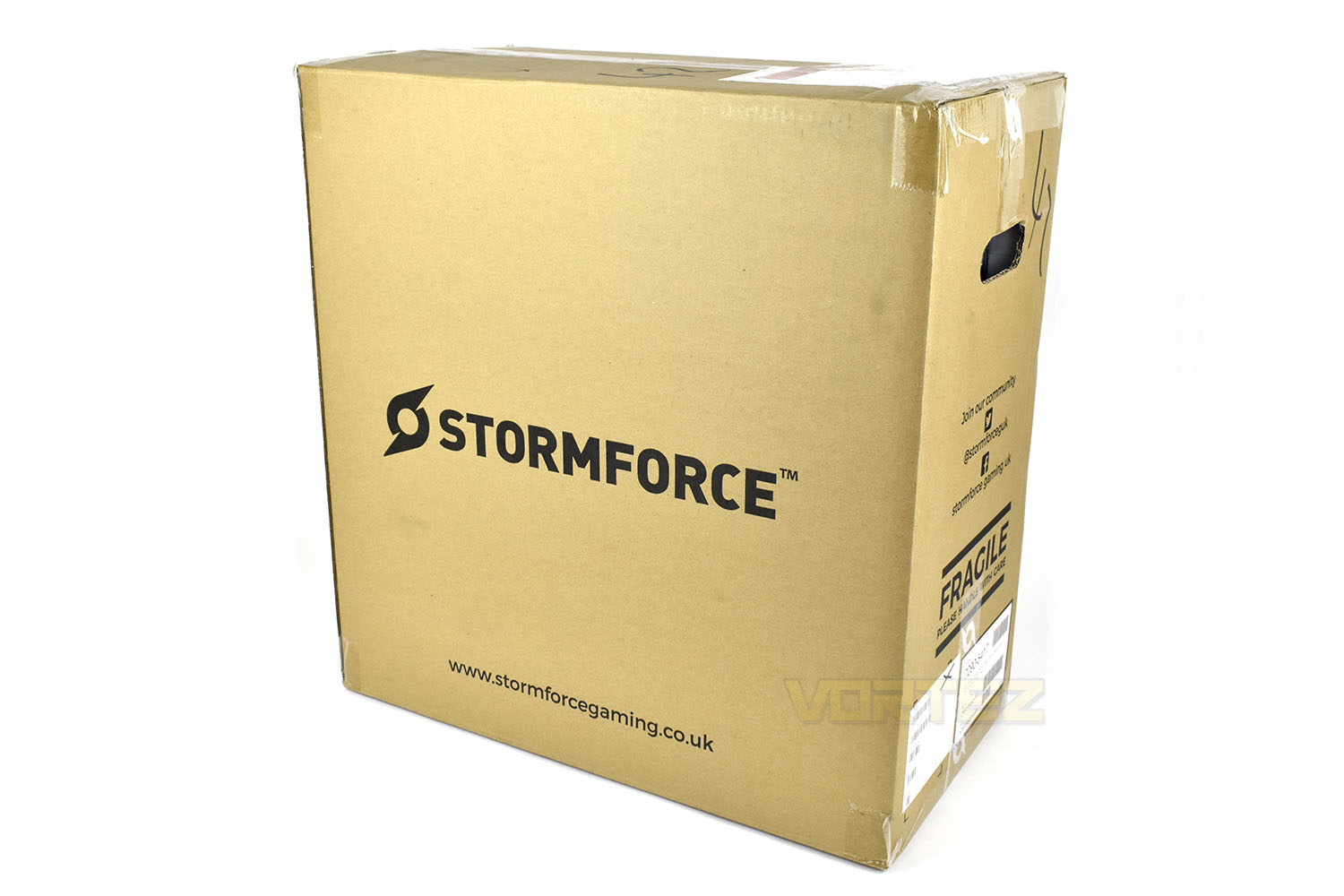
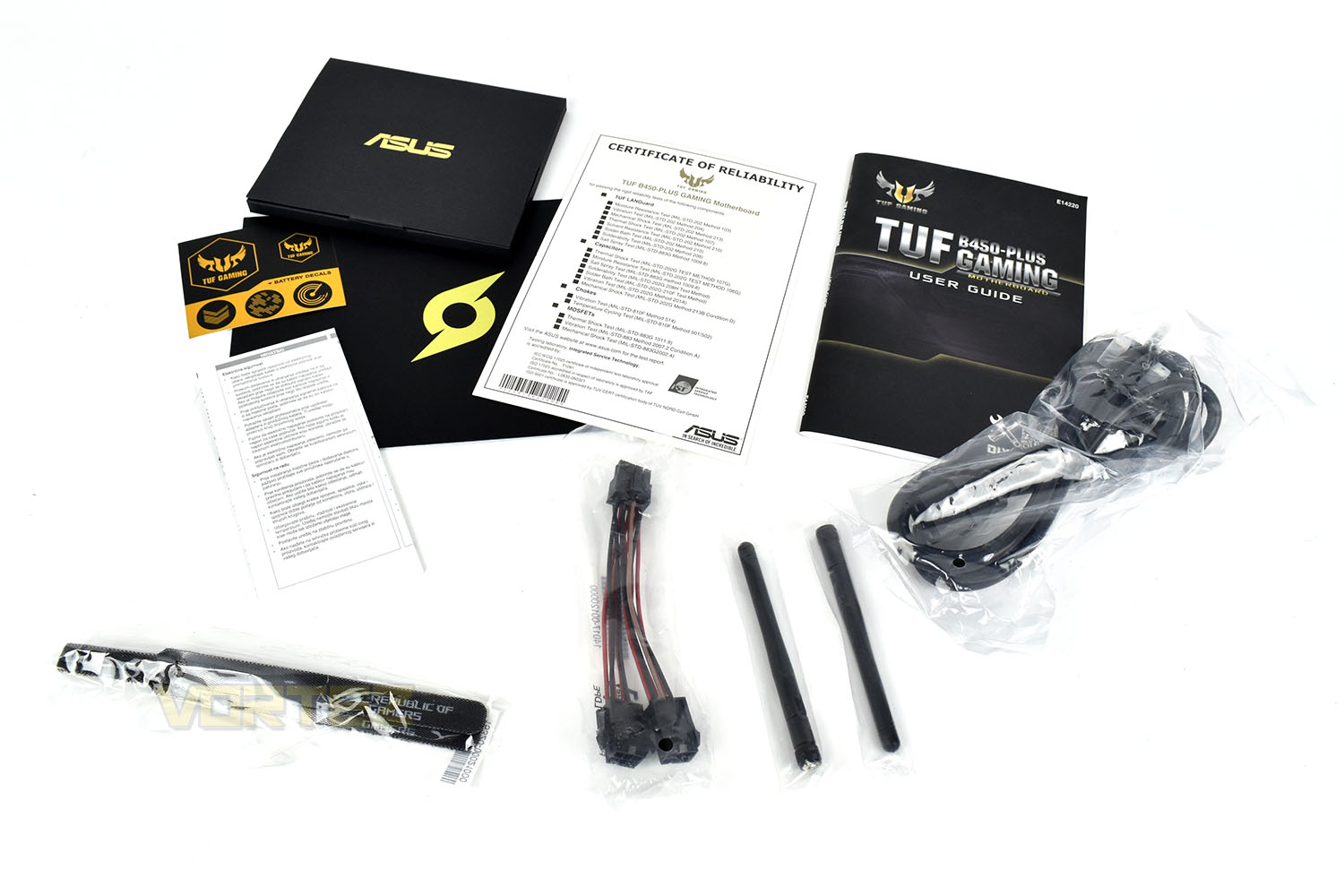
Thrown loosely into the outer box is the bundle, comprising of your motherboard and GPU manual, some TUF Gaming stickers, a pair of WiFi antennas, UK power plug, a 2x 6-pin PCI-E to 1x 8-pin PCI-E power adaptor and a couple of ASUS ROG branded Velcro cable tidies. We’d like to see these at least bagged together or placed into a small box to stop them rattling about around our new £1400 machine.
Closer Look
The Cooler Master MasterBox 5 Lite measures in at 455mm tall, 200mm wide and 470mm deep. The front is made from a thin tinted plastic, allowing the front fans to be seen, while the side is a piece of smoked Perspex, held in place by large thumbscrews. Due to the associated static build up when handling Perspex, it would be advised that you ensure your case is grounded via plugging the PSU into the wall (the power can be on or off.)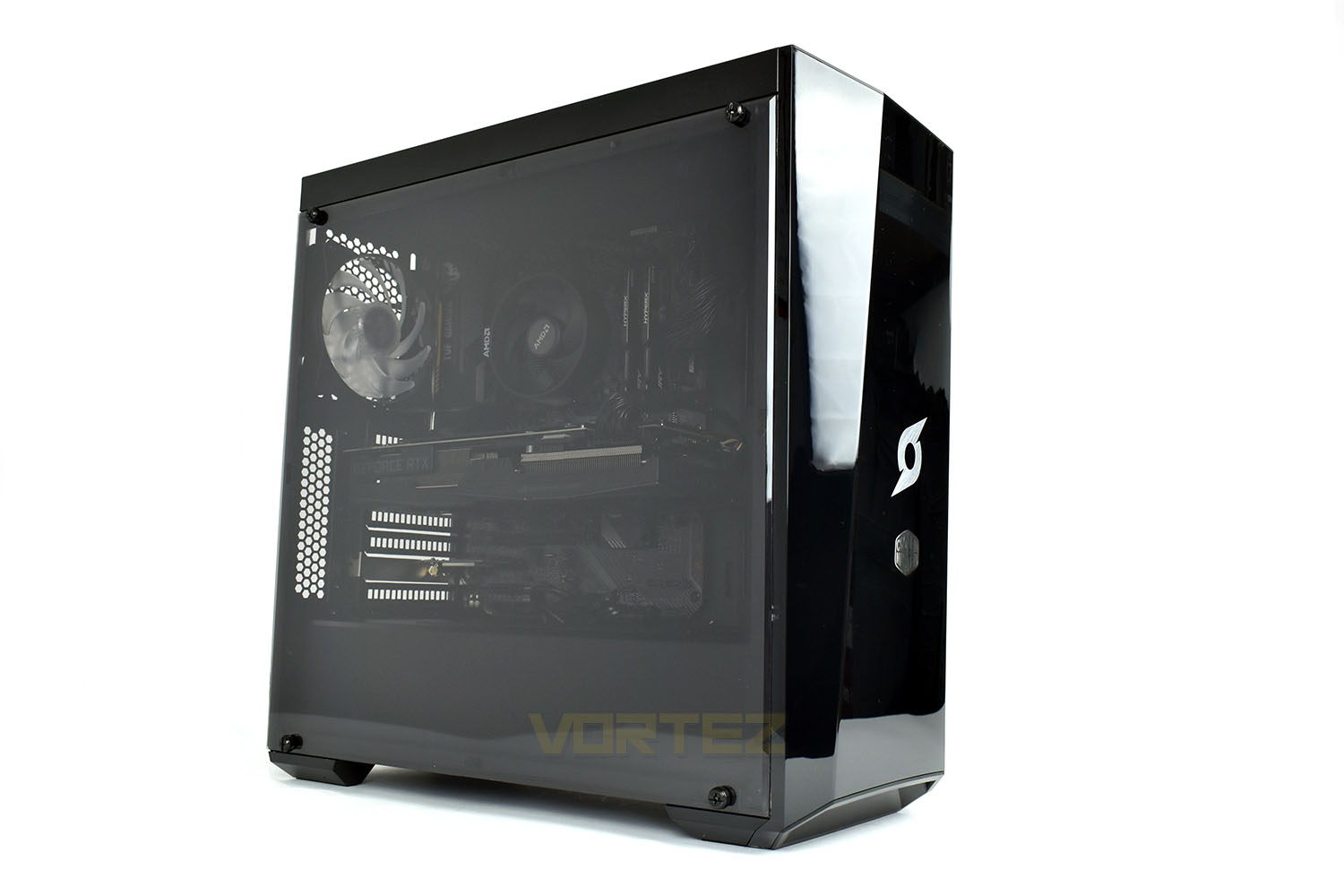
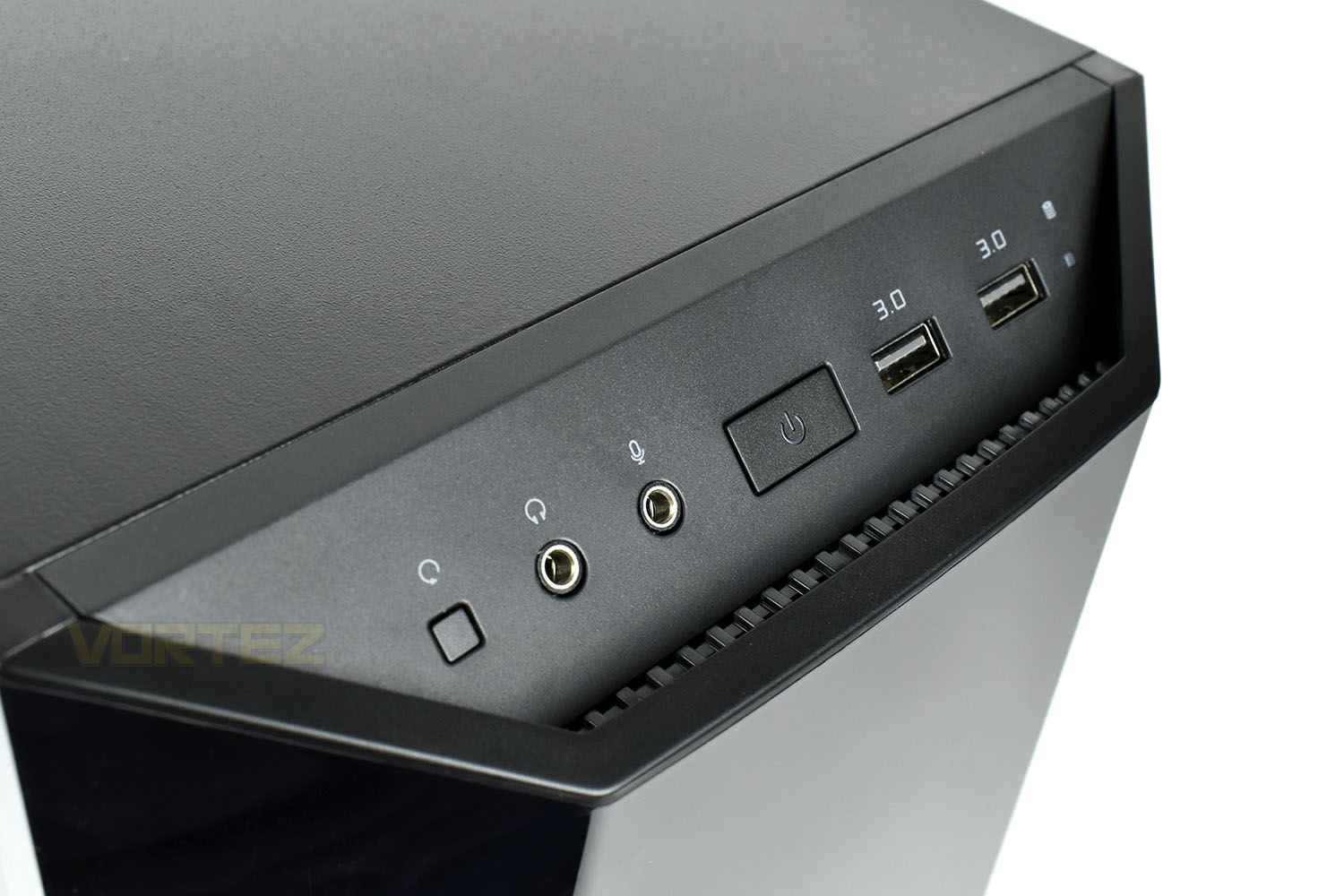
Top and centre we find the front IO section. Starting on the left is a reset switch, made small enough to avoid accidentally pressing it but big enough that you can actually depress the button. Then there’s a pair of 3.5mm audio jacks for headphones and a microphone. The power button is in the centre then a couple of USB 3.0 Type A ports.
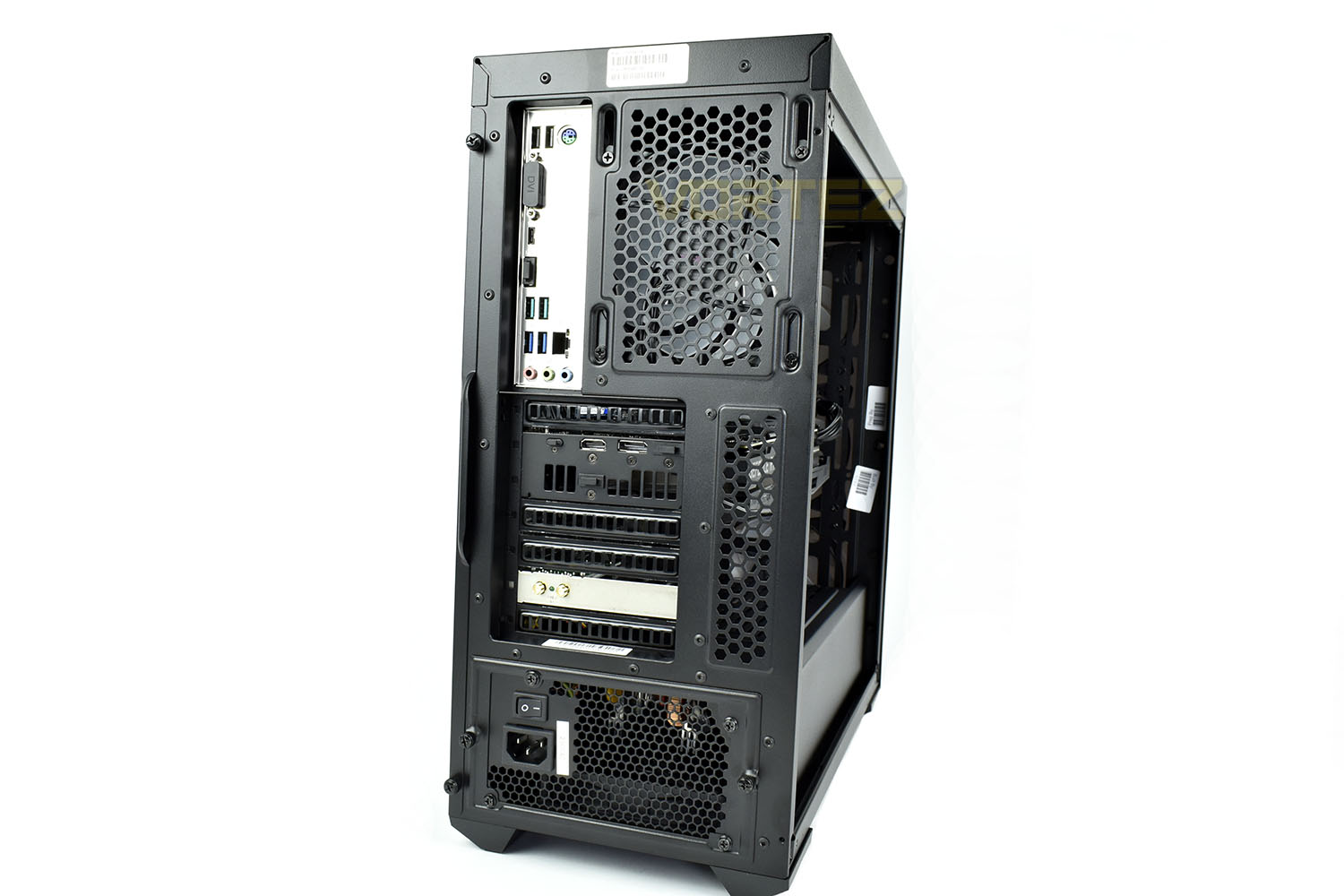
Spinning the entire system around, the rear IO is reasonably well spec’d. The motherboard’s IO, starting at the top is as follows:
2x USB 2.0
1x PS/2 mouse and keyboard port
1x DVI
1x USB 3.1 Type-C
1x HDMI
2x USB 3.1
2x USB 3.0
1x Gigabit RJ45
3x 3.5mm Audio jacks
Then moving onto the GPU, the ASUS ROG NVIDIA GeForce RTX 2070 features a duo of HDMI and DisplayPorts and a USB Type C VirtualLink for high-end VR solutions.
Closer Look (Internals)
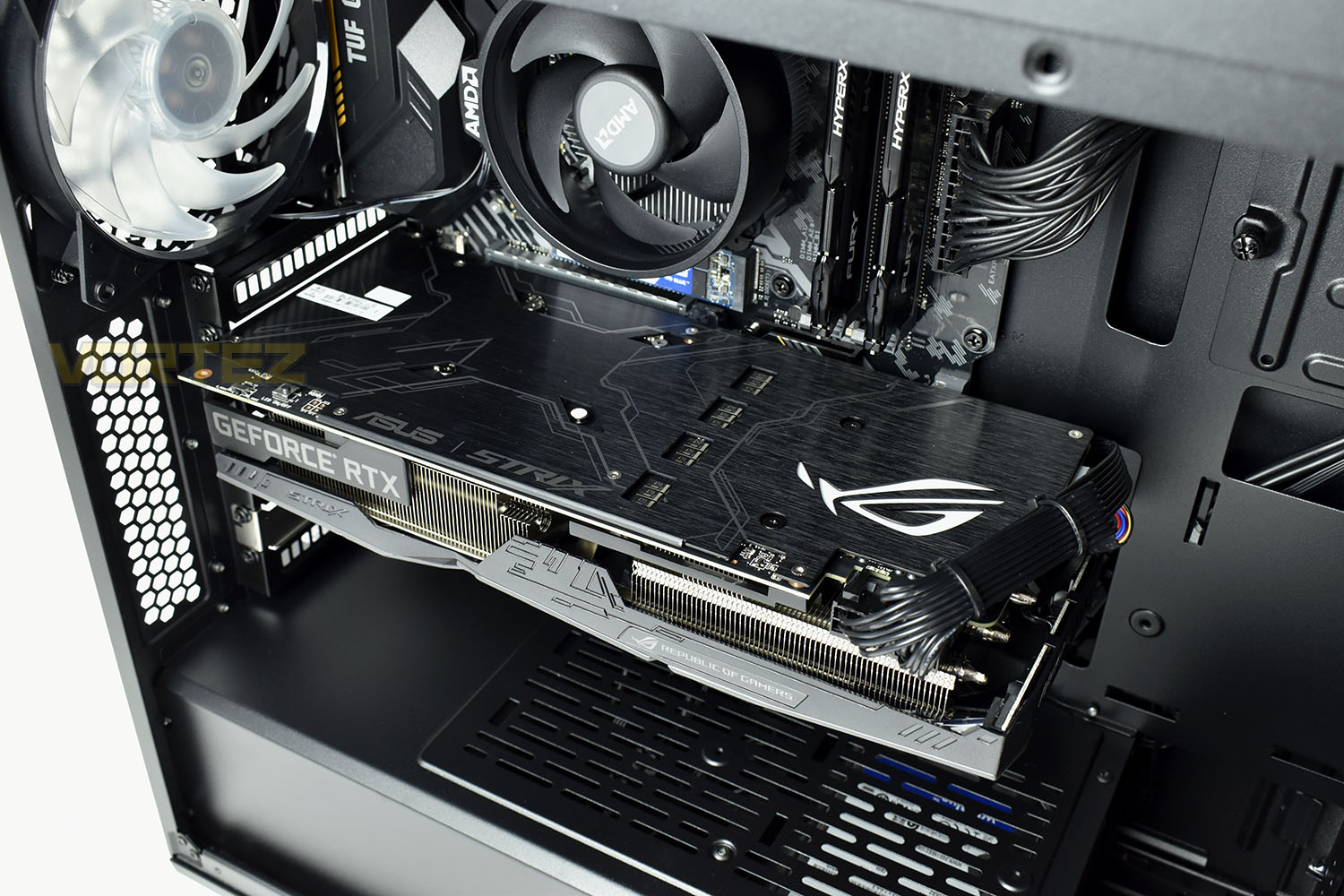
Moving our attention to the internals, the first thing to catch your eye is the striking ASUS ROG GeForce RTX 2070 OG8 graphics card; this thing dominates the PC with its 2.5 slot, three-fan heatsink and enormous length.Under the shroud at the bottom of the case resides a 500w 80+ Bronze rated power supply and a 1TB Western Digital Blue 7200RPM HDD, handy for storing those large games or a few movies, if you’re not into the film streaming yet.
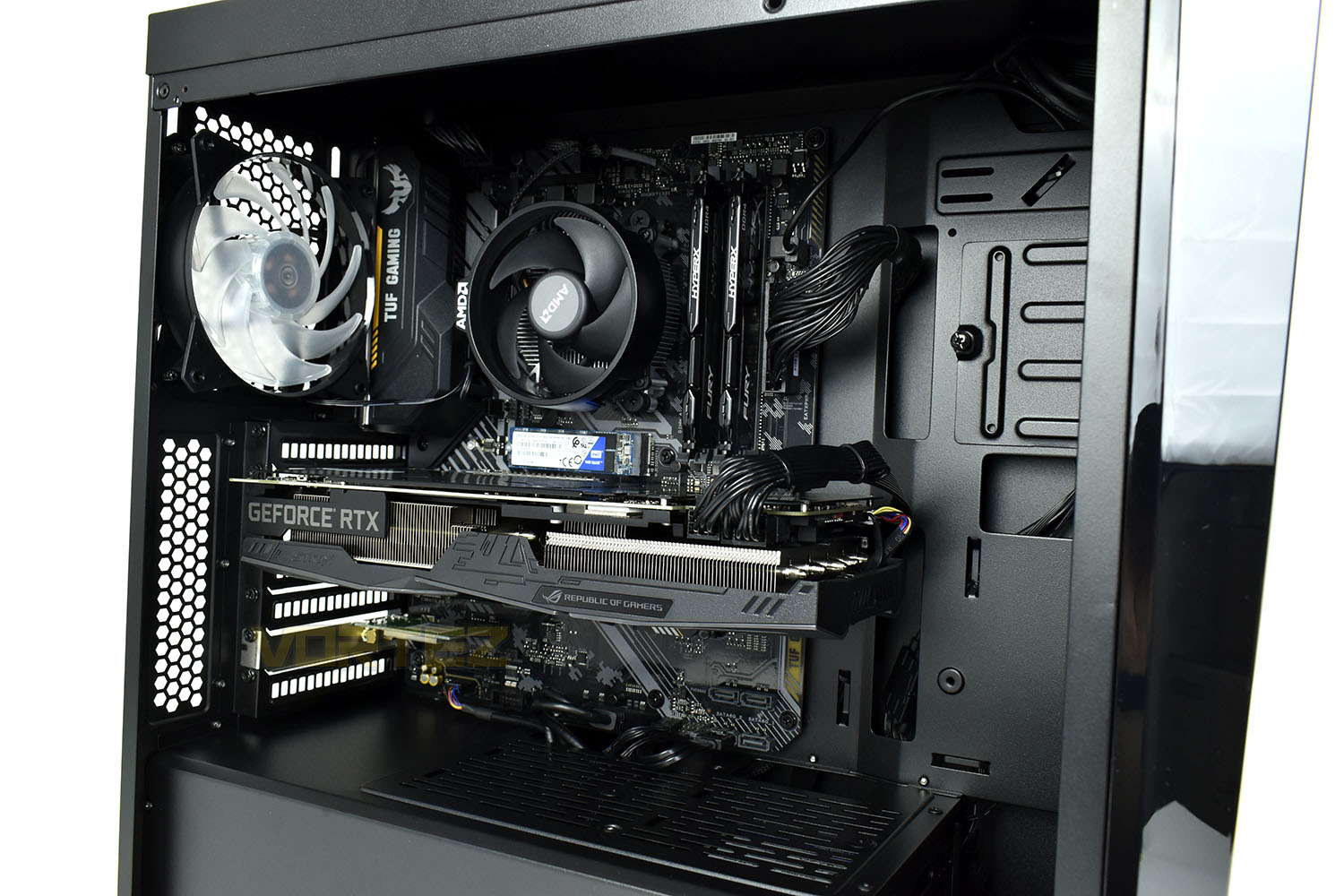
The brushed metal backplate on the GPU looks fantastic but just wait until it’s lit up in its full RGB glory.
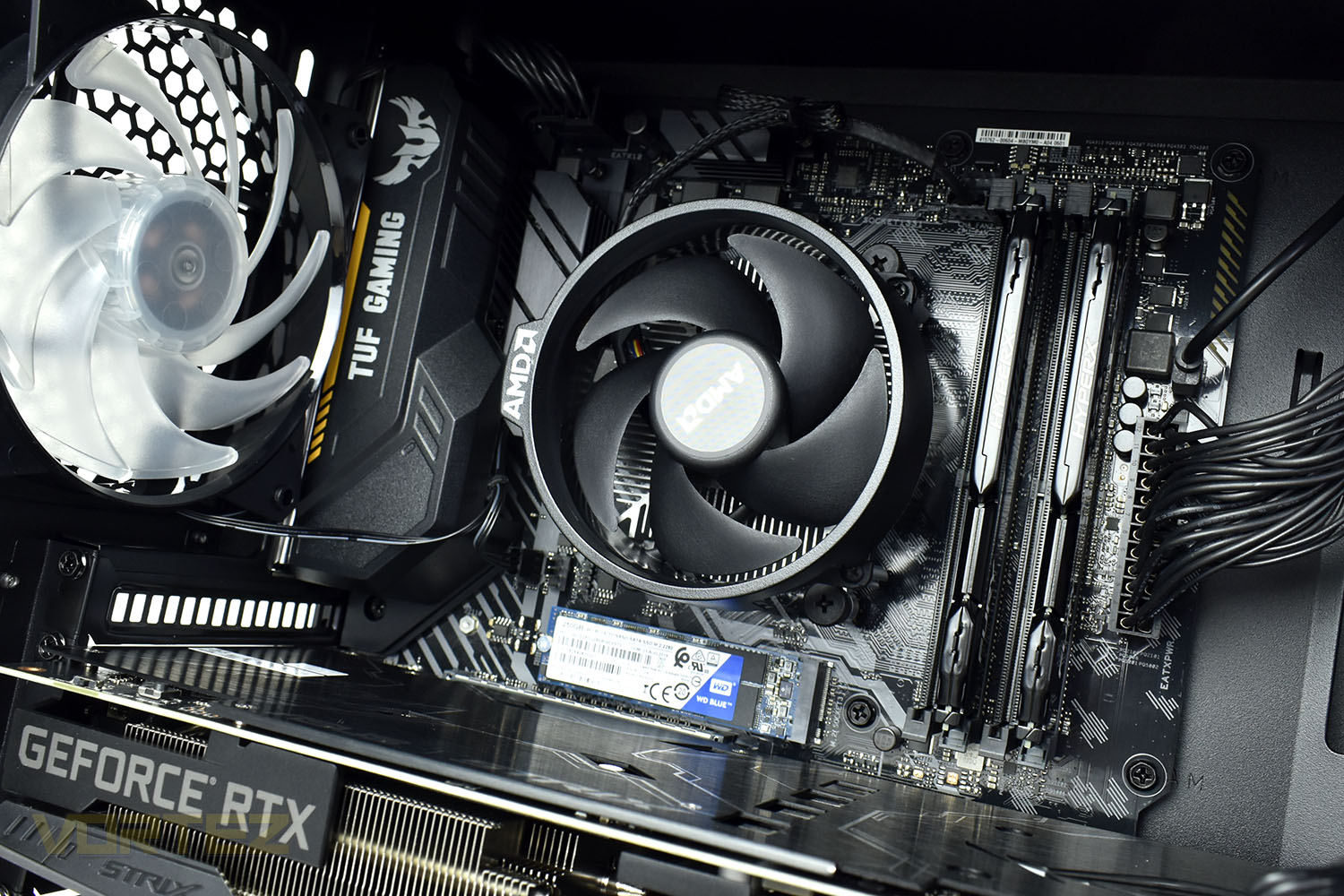
Stormforce have done a good job of ensuring a dark theme throughout, using a black TUF Gaming B450-PLUS GAMING motherboard, black HyperX Fury DDR4 and, as luck would have it, the Wraith cooler on the AMD CPU is also black.
Sadly though, that Western Digital Blue 3D NAND SATA M.2 drive stands out like a sore thumb. Obviously, there’s very little Stormforce can do about Western Digital’s choice of PCB colour but it would’ve been nice to see a black PCB here, or even some kind of black heatsink applied.
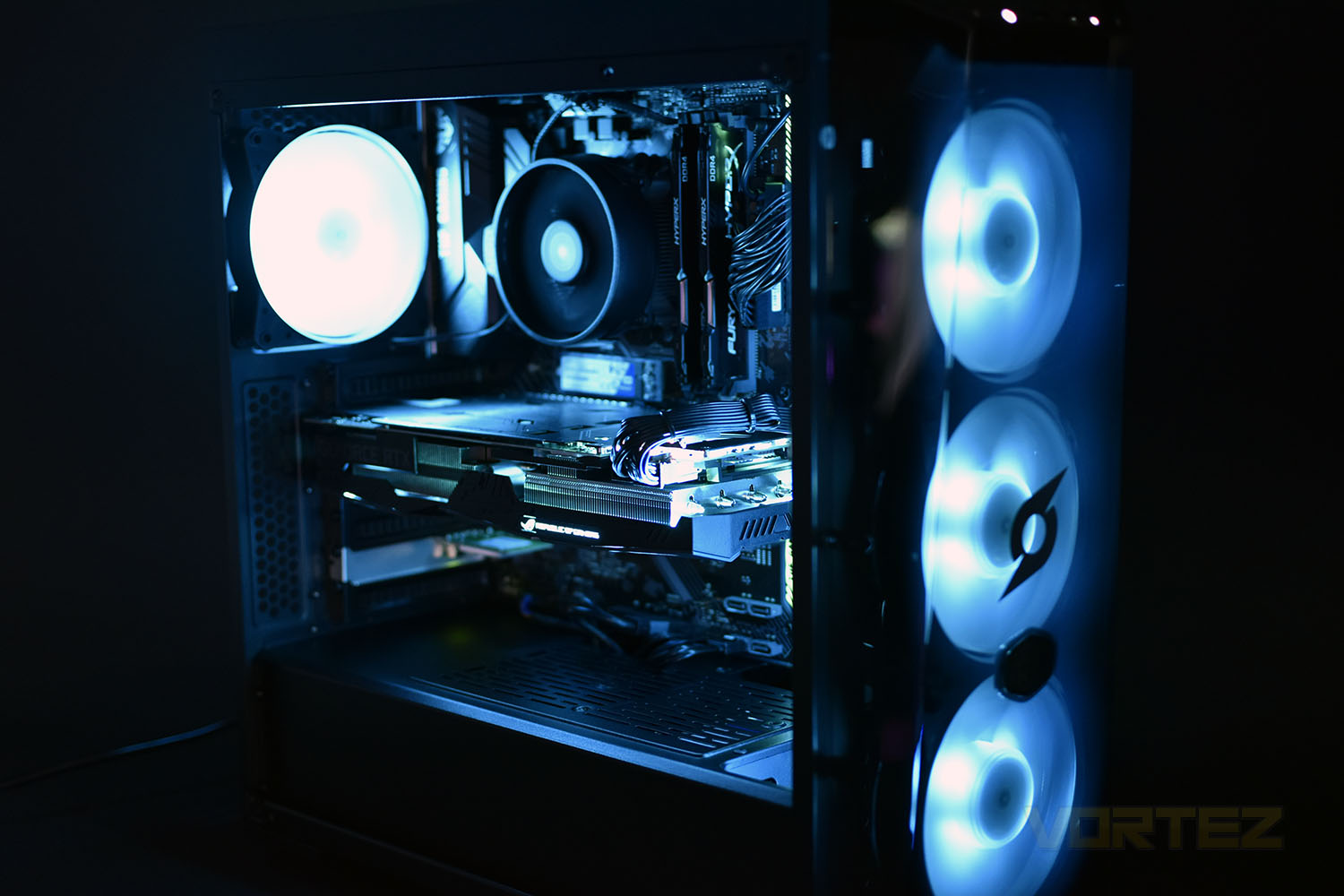
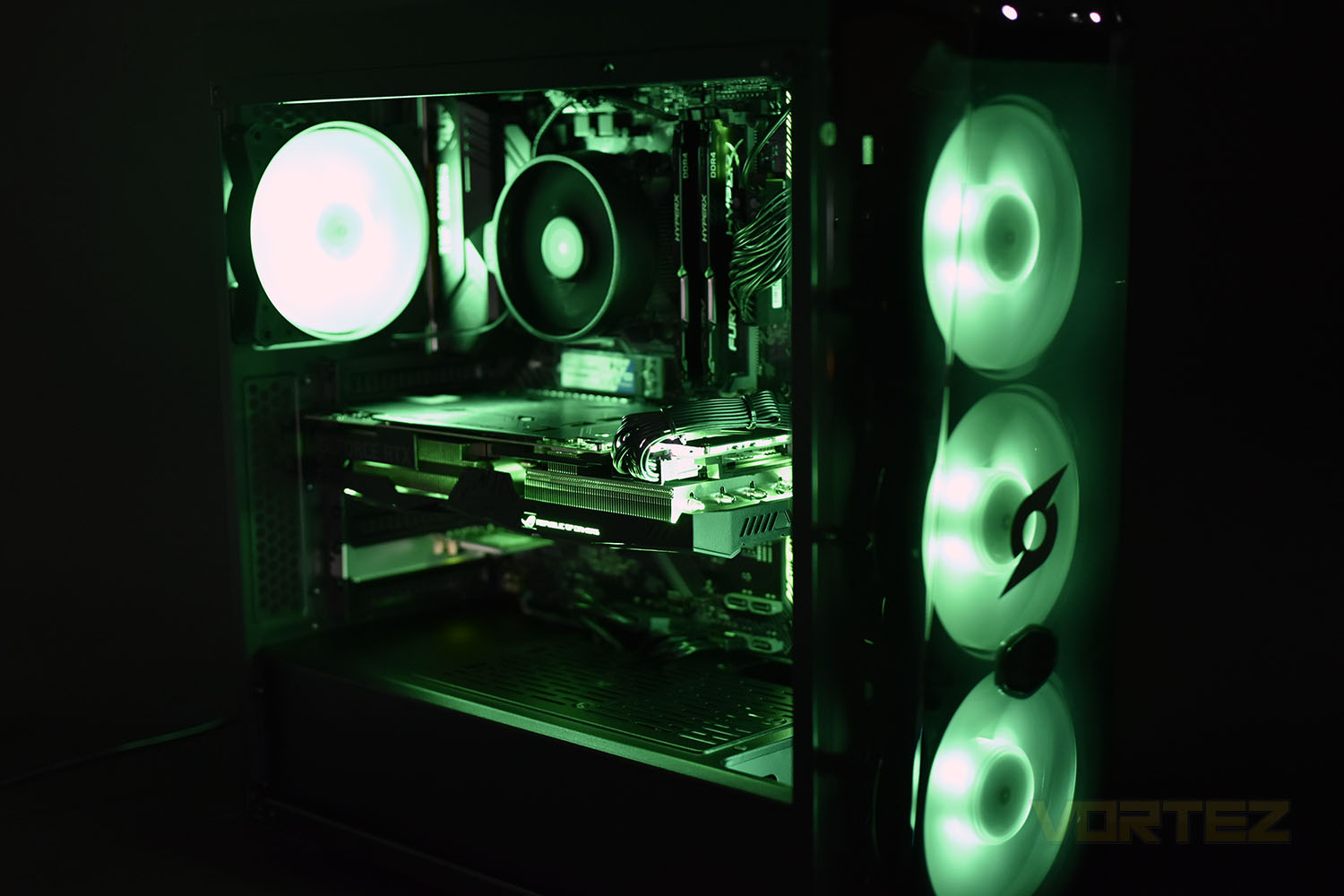
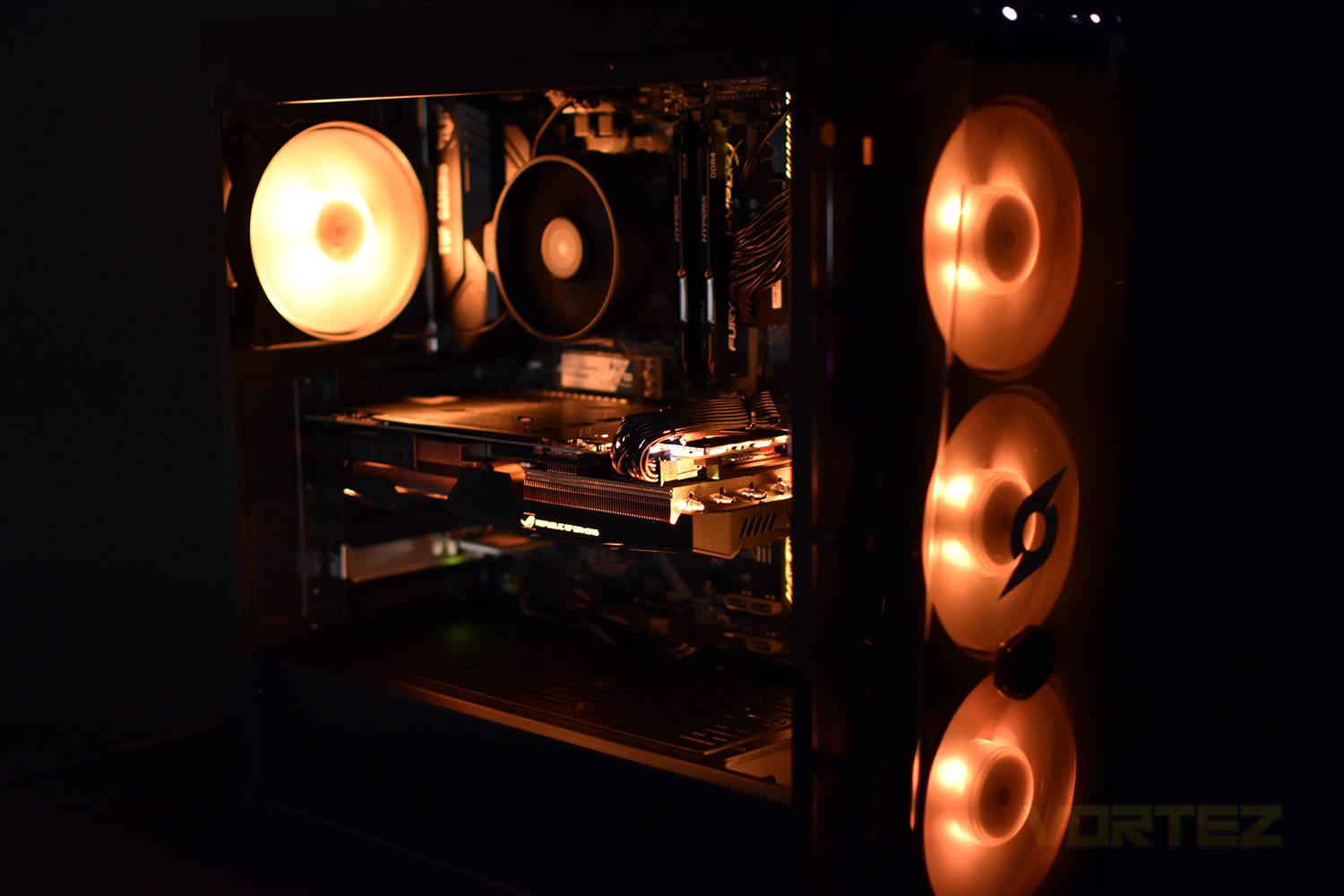
RGB Lighting
Benchmarks: Temperatures & Boot Time
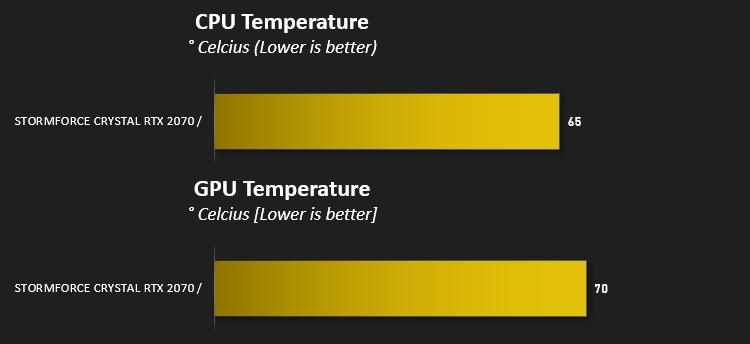
For our first benchmark test we observe the max. CPU/GPU temperatures of the system while allowing Unigine Heaven 4.0 to run on a 30-minute loop. To report back on the temperatures we use RealTemp and GPU-Z which provide the peak figures.
In this test we observe how fast the boot into Windows 10 is by using a digital stopwatch.

Benchmarks: Cinebench R20 & Handbrake
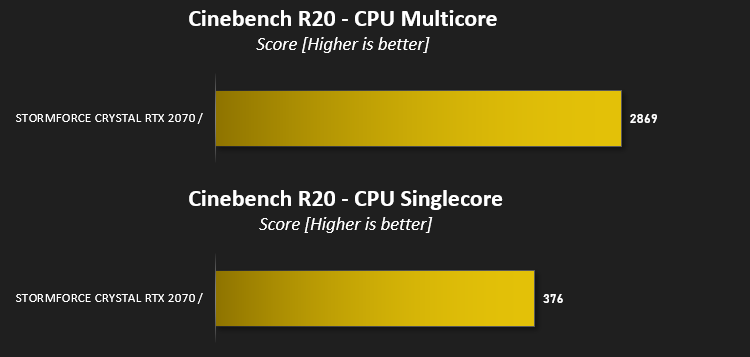
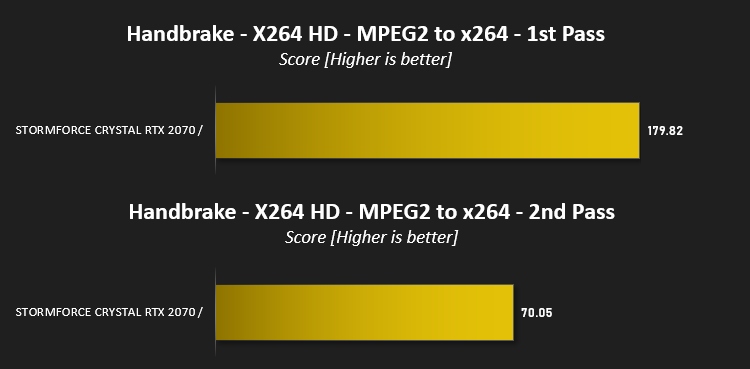
Cinebench is a real-world cross-platform test suite that evaluates your computer’s hardware capabilities. Improvements to Cinebench Release 20 reflect the overall advancements to CPU and rendering technology in recent years, providing a more accurate measurement of Cinema 4D’s ability to take advantage of multiple CPU cores and modern processor features available to the average user. Best of all: It’s free.
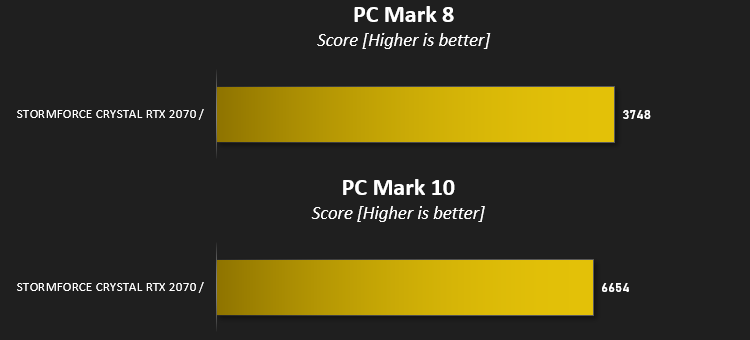
Benchmarks: PCMark 8 & 10
PCMark 10 combines performance benchmarking with battery life measurement and includes tests based on popular Adobe and Microsoft applications. Whether you are looking for long battery life, or maximum power, PCMark 10 will help you find the devices that offer the perfect combination of efficiency and performance for your needs. It’s the complete PC performance benchmark for home and business.
Benchmarks: 3DMark, Heaven 4.0 & 3DMark Port Royal
Time Spy is a DirectX 12 benchmark test for gaming PCs running Windows 10. With its pure DirectX 12 engine, built from the ground up to support new API features like asynchronous compute, explicit multi-adapter, and multi-threading, Time Spy is the ideal benchmark for testing the DirectX 12 performance of the latest graphics cards.

At the end of 2018, we got our first taste of real-time ray-tracing with NVIDIAs RTX range of GPUs, with that 3D Mark released the Port Royal ray tracing benchmark which we’ll use to compare compatible hardware. 3DMark Port Royal is the world’s first real-time ray tracing benchmark for gamers. It shows you how well your PC handles ray tracing effects in real-time, a taste of what to expect from games in 2019.

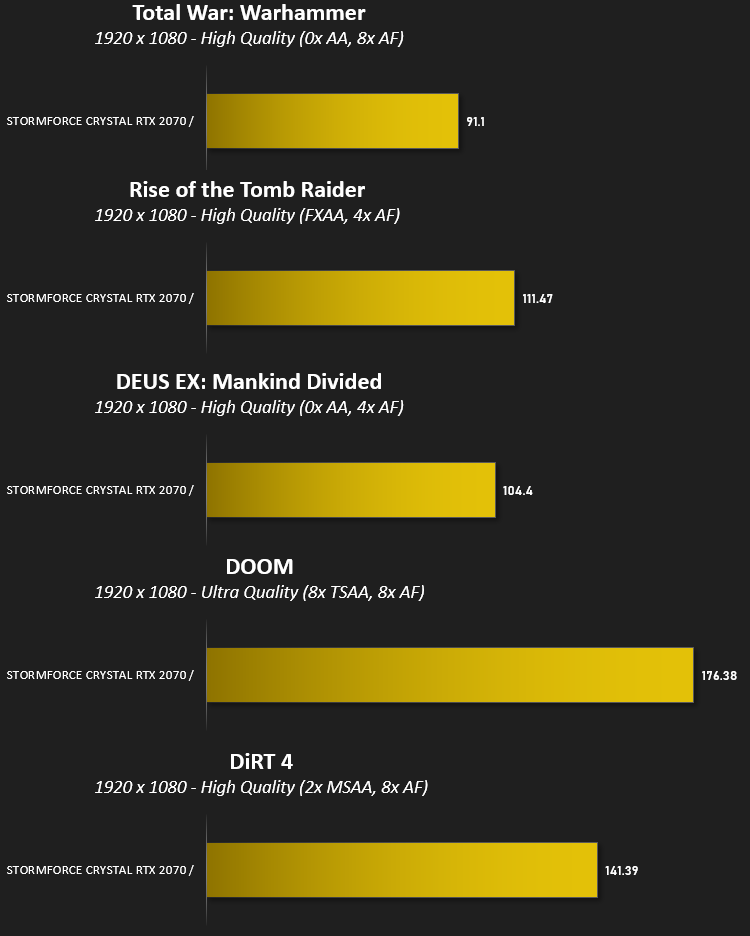
Benchmarks: Gaming (1080p)
The Crystal uses the NVIDIA GeForce RTX 2070 for graphics delivery, in this section we test the latest gaming titles to see how effective the 3D capabilities are. We report on the average framerate using FRAPS.
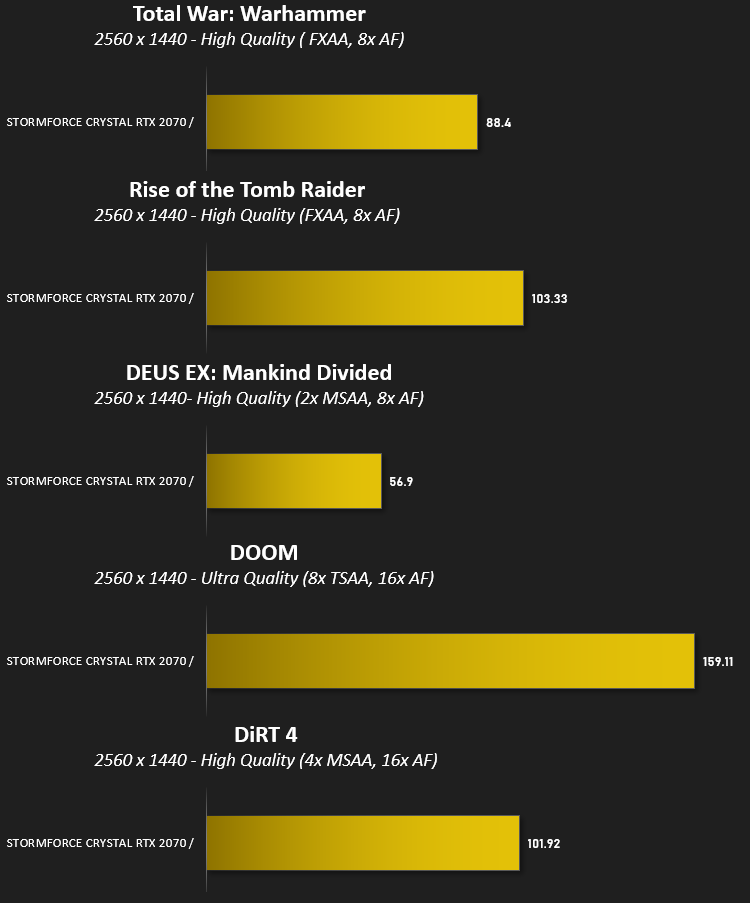
Benchmarks: Gaming (1440p)
The Crystal uses the NVIDIA GeForce RTX 2070 for graphics delivery, in this section we test the latest gaming titles to see how effective the 3D capabilities are. We report on the average framerate using FRAPS.
Conclusion
We’re no stranger to a Stormforce system here at Vortez, having looked at several over the last few years. One area they typically find a good balance is cost:performance and we’re happy to say we feel this most recent review sample fits that bill rather well.First off, appearance. With first impressions, they matter, and thanks to the shiny black plastics (with two large areas of protective film to peel off, who doesn’t love peeling those off?) and dark paintwork, the case boasts a stealthy look, but unfortunately, as is usually the case with shiny plastics, they’re a dust and fingerprint magnet. If you like to keep your machine clean and tidy, you’ll be forever attacking the front with a cloth. However, having said that, with the machine booted up, allowing the ASUS Aura Sync to do its thing, the front and rear RGB fans with the GPU’s “ROG eye” look excellent, particularly in a dark room. You could certainly give this pride of place on your desk. If we were to find faults with the presentation, first and foremost would be the WD Blue M.2 SSD. The blue PCB stands out against the all-black internals, and to a lesser extent, as does the green PCB on the PCI-E WiFi expansion card.
Moving onto performance, which for a lot of people is far more important than aesthetics. It’s no secret that AMD have pulled it out of the bag in the last couple of years with their Ryzen CPUs and the Ryzen 5 2600, with its 3.9GHz boost clock, is no exception. We saw a Cinebench score of 2869 and very respectable results in PC Mark 8 and 10, largely also thanks to the 16GB of HyperX memory.
Gaming performance, as you’d expect with an NVIDIA GeForce RTX 2070, particularly a model with such a beefy (and fantastic looking) triple-fan heatsink, to help ensure that the GPU can prolong its boost clocks for as long as possible, is incredible. We tested at 1080p and 1440p, as we feel 2160p is a bit of a stretch. All tested games, aside from DEUS EX: Mankind Divided, which pushes systems very hard, saw framerates way in excess of 60 at 1440p and 90 to 180FPS at 1080p. Plenty of grunt, then, for high-end competitive gaming.
Temperatures were kept under control in our tests, particularly on the GPU, but acoustics do suffer somewhat due to the AMD stock heatsink, the Wraith. The case fans both look great and move a decent amount of air so we’re happy with Stormforce’s choice on that front.
And finally, onto storage. For a machine over £1000, we expect the M.2 slot to be populated by an NVMe drive of some kind. The speed differences when compared to a SATA solution can be order of magnitudes faster, and they often arrive with a black PCB. Ignoring the colour of the drive, upgrading from Western Digital’s Blue SATA M.2 to Western Digital’s Blue SN500 NVMe drive is a matter of £20 but due to the significant difference between NVMe and SATA, particularly in IO speeds, they’re particularly well-suited to being an OS drive. Also, 250GB? We need more than 250GB for our £1250. That’s barely enough for an Operating System and one AAA title these days.
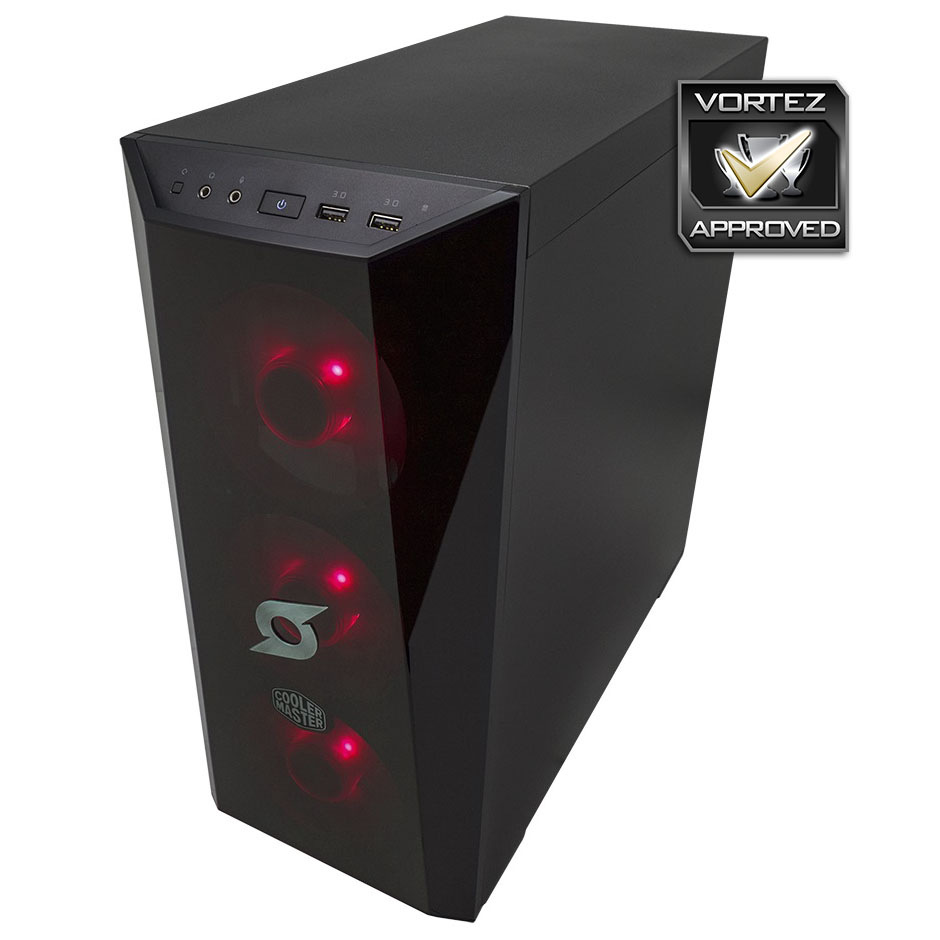
The Stormforce Crystal with its beautiful RGB lighting and excellent gaming performance will serve you well but some further colour coordination and an NVMe drive wouldn’t go a miss.
Pros
+ Great multitasking performance with 12 threads and 16GB of RAM
+ Gorgeous RGB synchronisation
+ Effective temperature control
+ Excellent showing from the RTX 2070.
+ Decent cable management
Cons
– Case exterior is a dust-magnet
– Loud under load (CPU)
– Only a SATA M.2 drive
– Included extras not secured in the packaging
– 250GB SSD
+ Great multitasking performance with 12 threads and 16GB of RAM
+ Gorgeous RGB synchronisation
+ Effective temperature control
+ Excellent showing from the RTX 2070.
+ Decent cable management
Cons
– Case exterior is a dust-magnet
– Loud under load (CPU)
– Only a SATA M.2 drive
– Included extras not secured in the packaging
– 250GB SSD
Click here for an explanation of our awards at Vortez.net.
Stay connected with the Vortez Social Media pages:
Join in with the discussions on Discord