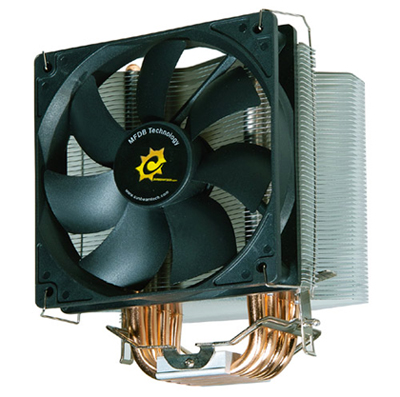
"The Sunbeam Core-Contact Freezer, is a fairly standard looking cooler but with subtle design differences."
Up for review today is the Sunbeam Core-Contact Freezer, a fairly standard looking cooler but with subtle design differences. Find out more in this review.
Sunbeamtech aren’t perhaps a name that you’ve heard of much in the CPU cooling market yet as they are more noted for their cases. However as Tuniq is a subsidiary company of theirs this is an area that they have considerable expertise in and a solid reputation for products such as the Tuniq Tower.
Below is how Sunbeamtech describe the features of their product:
1. The Best CPU Cooler.
2. Core-Contact Technology
3. TX-2 Thermal Grease Included
4. 4 pcs High Performance 8mm U-shaped Heatpipes
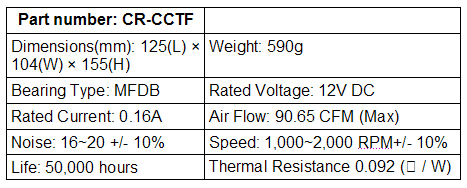
5. Light Weight .(590g without the Fan)
6. Fan Controller Included
7. Easy Installation
8. Bent Fins Design Helps to Cool the Components on the Motherboard
9. Universal Clip Design
MFDB Fan Features:
1. Silent 120mm Fan MFDB ( Magnetic Fluid Dynamic Bearing)
2. Ultra-Silent Low-Noise Level (16db)
3. Outstanding Long Life of 50,000 Hours
Website: www.Sunbeamtech.com
Price: £28-35
Packaging and Closer Look
The packaging is glossy with multiple pictures of the cooler itself from different angles but no cutaways so that you can actually see the product itself before you buy. However I’ve always been of the opinion that how it performs is more important than what the outside looks like in such matters.

The more eagle-eyed amongst you might notice that the box looks a little bit bashed up which doesn’t bode particularly well if the internal packaging is not strong.


And here we can see some of the results, oddly the internal packaging was relatively undamaged but some of the fins are clearly bent, because the packaging seems largely ok I’m unsure as to whether this was caused in transit or if it is something that happened at the factory. Fortunately the softness of the fins means that they are quite easy to bend back with even finger strength but failing that a pair of needle-nosed pliers or similar would be sufficient.
The bottom of the heatsink clearly shows the heatpipes in the base and the finish is good so that the bottom is clearly flat and smooth to make solid contact with the CPU. Because of what Sunbeamtech describe as the unique design of the base they recommend that you use double the normal amount of Thermal Interface Material (TIM) on the CPU, this is no problem as they kindly supply you with a full tube of TX-2 so you have plenty of chances to get it right if you are unhappy with how you’ve seated it the first time. TX-2 is one of the best TIMs on the market for my money as it ‘cures’ under heat to create a better bond and aid transfer of heat away from the CPU, since it retails for £4-6 on its own the inclusion of a full tube makes the cooler even more of a bargain and is a far cry from the stingy approach taken by some manufacturers who will only supply a single sachet of paste. Below are a few pictures of the included components apart from the heatsink itself, you’ve got an Intel mounting post, the TX-2, a fan controller and the screws necessary for the mounting post and an additional screw for the fan controller mounting bracket.


And for a size comparison to the stock heatsink it replaces:

Installation
Installation was pleasingly simple, the clamp has a solid action and should be easy to operate for anyone who has a reasonable amount of strength in their fingers. I would however recommend that you leave space around the cooler during installation if at all possible because although it is relatively lightweight it isn’t particularly small. I found that the lead for the pass-through to the fan cooler was only just large enough to stretch from the back of my case (where the mounting bracket for the dial is) to the CPU header although somewhat curiously the lead from the fan itself is very lengthy.Happily I maintained my 100% record for cutting myself at every single point I’ve tried to install any PC component but I can’t blame the Core-Contact Freezer for that, it really was very simple to install, care should be taken that you don’t bend the fins further on installation though as although it isn’t hard to install there is a bit of pressure required to do so.


As you can see there is no problem fitting the cooler into the system even with the size difference compared to the stock AMD cooler, either orientation would be acceptable in terms of size although obviously with the fan pushing cool air over the fins and into the case you would normally want the fan to face the back of the case.
At this point I should also mention that when the supplied fan controller was used it functioned perfectly but the motherboard picked up that there was a problem with the CPU fan. This could however be a problem specific to the motherboard which is rather old and significantly less than useful for any form of overclocking.
The fan has a nominal range of rpm between 1000rpm and 2000rpm +-10%, when testing I found that with the dial wound right down I could get as low as 980rpm and opened up as far as it would go as high as 1850rpm. Interestingly when using the fan without the controller it averaged out at about 1900rpm but it doesn’t appear to be thermostatically controlled so will stick at that speed throughout.
Results and Conclusion
The system used to test the Core-Contact Freezer is as below:A64 3400+
1GB DDR RAM
Asus K8V SE Deluxe
X-Pro 400w
Chieftec Dragon Midi Tower
As this motherboard cannot overclock due to non-working PCI locks I tested both idle and load temperatures of the CPU. The idle temperatures were taken after 10 minutes in Windows and the load temperatures were taken after 10 minutes of gaming and then a run-through of PCMark05 to give an approximation of some loads that the PC could expect to face.
For the Core-Contract Freezer I used the fan controller set to approx 1500rpm as an acceptable balance of noise and performance. The stock AMD cooler with its much smaller fan was around 3400rpm throughout.
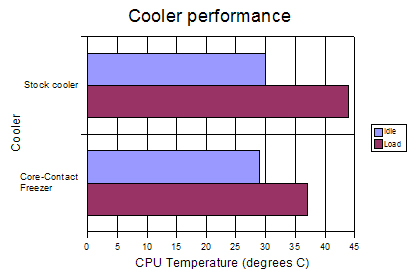
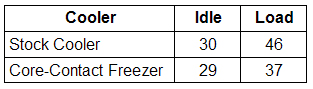
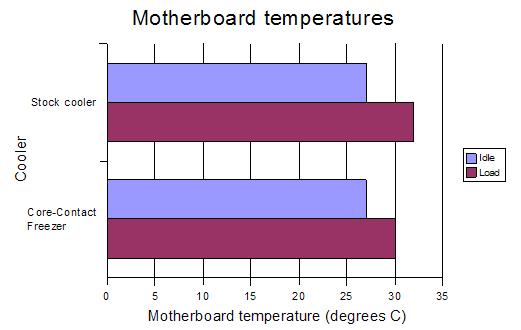
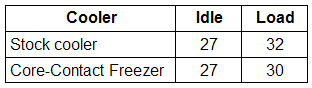
Impressive performance from the Core-Contact Freezer, the temperature only rises 8C when loaded which is half that of the stock cooler and it returns to idle temperatures much quicker. This should perhaps be no great surprise given the much greater surface area and larger fan but the performance is still laudable. What is also worth noting is that the motherboard temperature is also slightly lower under load so it would appear that the downward facing fins are not simply a gimmick.
Conclusion
Although I couldn’t test the Core-Contact Freezer as thoroughly as it deserved due to the limitations of my system it impressed me with its quality and performance which hint that it will perform well under more rigorous uses. It isn’t a hugely innovative design in itself but it is a refinement on existing designs to it works and works well.
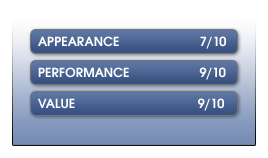
For the money it is a vast improvement on stock cooling and comes as a fully featured package with everything you could require. My only real concern is the flimsiness of the fins as this is the second example that has been sent to Vortez for reviewing and in both instances some of the fins have been bent, however due to the ease with which this can be sorted it would not be fair to mark too harshly on this basis, parcels can get damaged in transit all too easily.
Overall, a worthy product and one that I’d be happy to recommend as a solution to offering a good balance of price versus performance. A Big thanks to Sunbeam for supplying this cooler to test.