RGB lighting meets the TUF Gaming Alliance on this set of DDR4 RAM, but how does it perform, and perhaps more importantly, how does it look?

Product on Review: TEAMGROUP T-FORCE DELTA TUF Gaming RGB DDR4
Manufacturer: TEAMGROUP
Street Price: (Tested kit: 16GB @ 3200MHz) GBP £139.99 / USD $149.99 / AU $229.99
As we approach the end of 2018, we’ve seen an enormous influx of RGB lighting being attached to any product you can think of, and the motion doesn’t seem to show any signs of slowing down just yet. TEAMGROUP are no stranger to the RGB LEDs, strapping them to RGB SSDs as well as most of their DDR4 RAM offerings.
Today we look at a kit that’s actually been around for a small while, which we reviewed here but this time around, under the ASUS TUF Gaming guise.
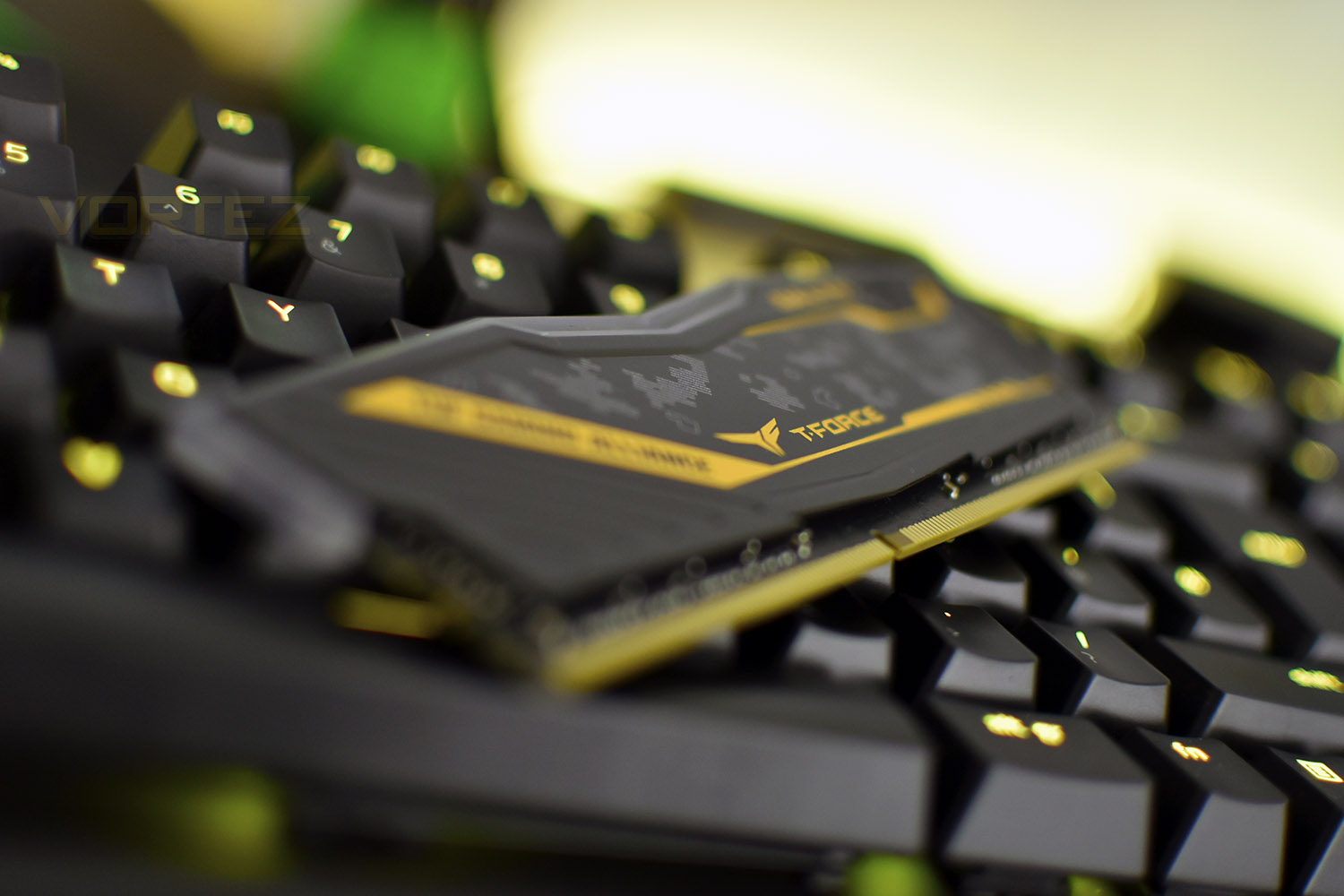
The RGB lighting extends across the entire top edge of the DIMMs, with only a small section used to advertise the T-FORCE branding. The lighting offers 120° of visibility and can be synced with ASUS Aura motherboards for beautiful effects; the DIMMs are also compatible with MSI Mystic Light, ASRock Polychrome and GIGABYTE RGB Fusion but this must be controlled via the TEAMGROUP Blitz application in Windows.
The DELTA TUF Gaming RGB are available in 2400MHz, 2666MHz, 2933MHz and 3200MHz, all equipped with aluminium heat-spreaders and advertised compatibility with AMD and Intel motherboards. TEAMGROUP have provided us with their top-spec 3200MHz, 16GB kit, across a pair of DIMMs, boasting CAS timings of 16-18-18-38. Our previous encounter with the T-FORCE DELTA RGB was tested on an X370 machine, so our tests will demonstrate the ability of the DDR4 kit using the X470 chipset.
TEAMGROUP on the T-FORCE DELTA TUF Gaming RGB:
TEAMGROUP T-FORCE once again joins forces with motherboard leader ASUS and releases the T-FORCE DELTA TUF Gaming RGB overclocking memory which is certified and strictly tested by TUF Gaming Alliance. The appearance is designed with TUF Gaming Alliance’s unique military camouflage pattern. T-FORCE DELTA TUF Gaming RGB overclocking memory is definitely your best and bravest comrade!
Technical Specifications
Series: DELTA TUF Gaming RGB
Module Type: DDR4 288 pin Non-ECC Unbuffered DIMM
Capacity: 8GB / 16GB / 8GBx2 / 16GBx2
Frequency: 2400/2666/2933/3200
Data Transfer Bandwidth:
19,200 MB/s (PC4 19200)
21,300 MB/s (PC4 21300)
23,464 MB/s (PC4 23400)
25,600 MB/s (PC4 25600)
Latency:
CL16-16-16-39
CL18-18-18-43
CL16-18-18-38
CL16-18-18-38
Voltage: 1.2V – 1.35V
Dimensions: 146.8(L)x7(W)x49(H)
Heat Spreader: Aluminum heat spreader
Warranty: Lifetime warranty
Module Type: DDR4 288 pin Non-ECC Unbuffered DIMM
Capacity: 8GB / 16GB / 8GBx2 / 16GBx2
Frequency: 2400/2666/2933/3200
Data Transfer Bandwidth:
19,200 MB/s (PC4 19200)
21,300 MB/s (PC4 21300)
23,464 MB/s (PC4 23400)
25,600 MB/s (PC4 25600)
Latency:
CL16-16-16-39
CL18-18-18-43
CL16-18-18-38
CL16-18-18-38
Voltage: 1.2V – 1.35V
Dimensions: 146.8(L)x7(W)x49(H)
Heat Spreader: Aluminum heat spreader
Warranty: Lifetime warranty
Packaging & Product
There’s nothing fancy about the packaging really, just clear plastic with the RAM held in place inside. It does provide an unobtrusive view of the memory, though, which is better than any image on the front. It also seems to be identical to the standard DELTA RGB packaging, with a small TUF Gaming Alliance sticker added.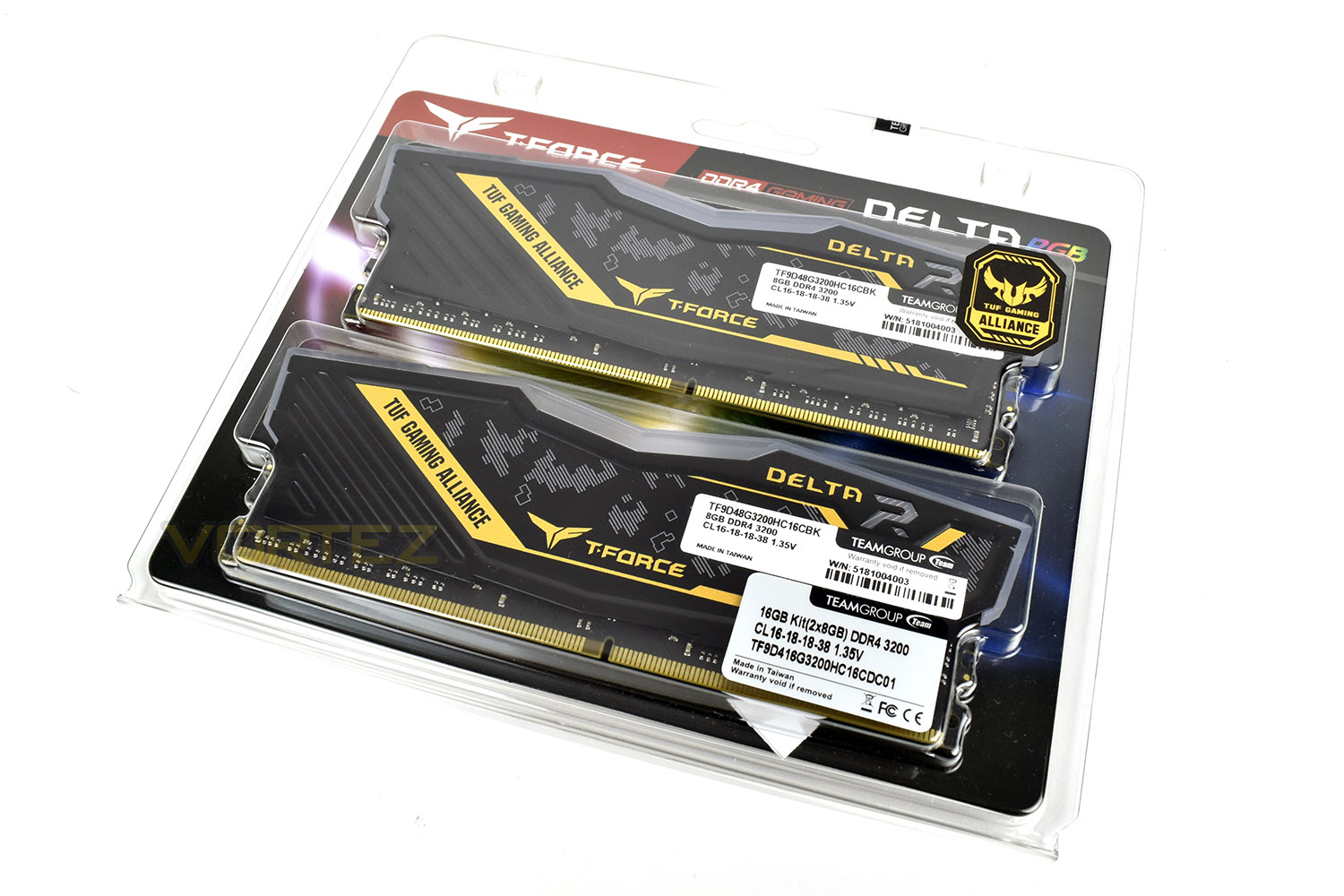
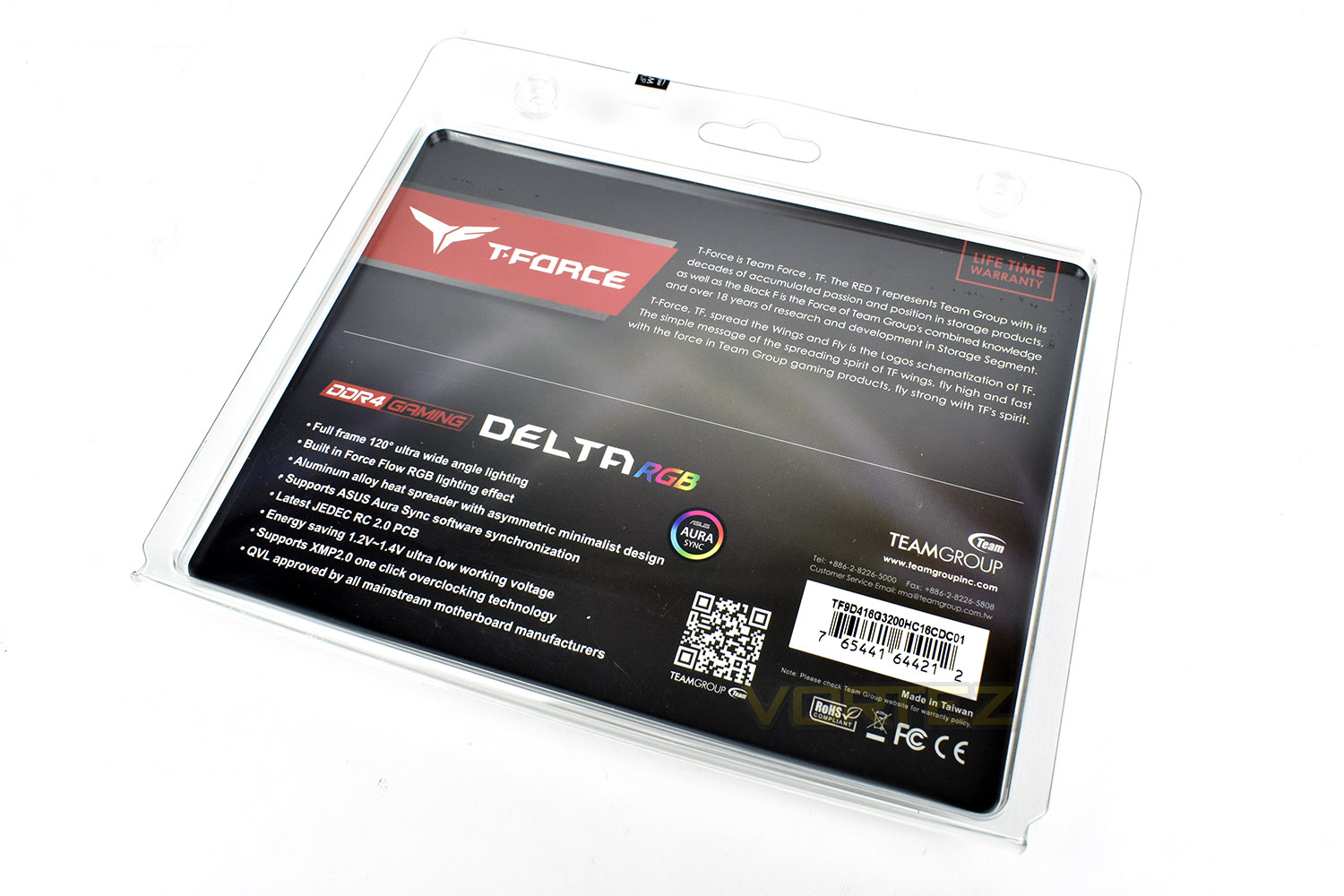
The reverse side gives some detailed specifications and information about the RGB lighting.
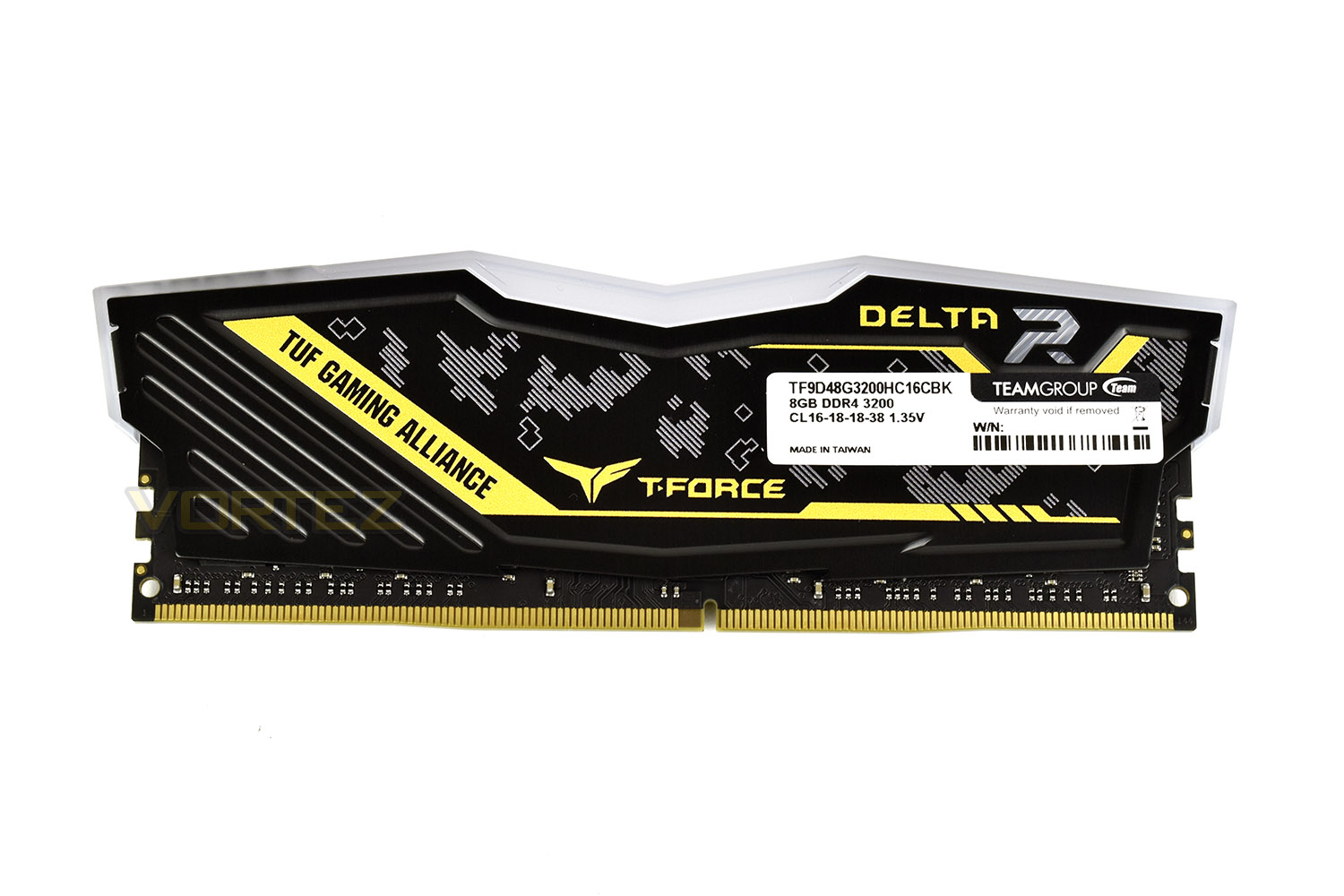
Front and rear of the DELTA RGB DIMMs are the same, with one side containing an ugly sticker with warranty information.
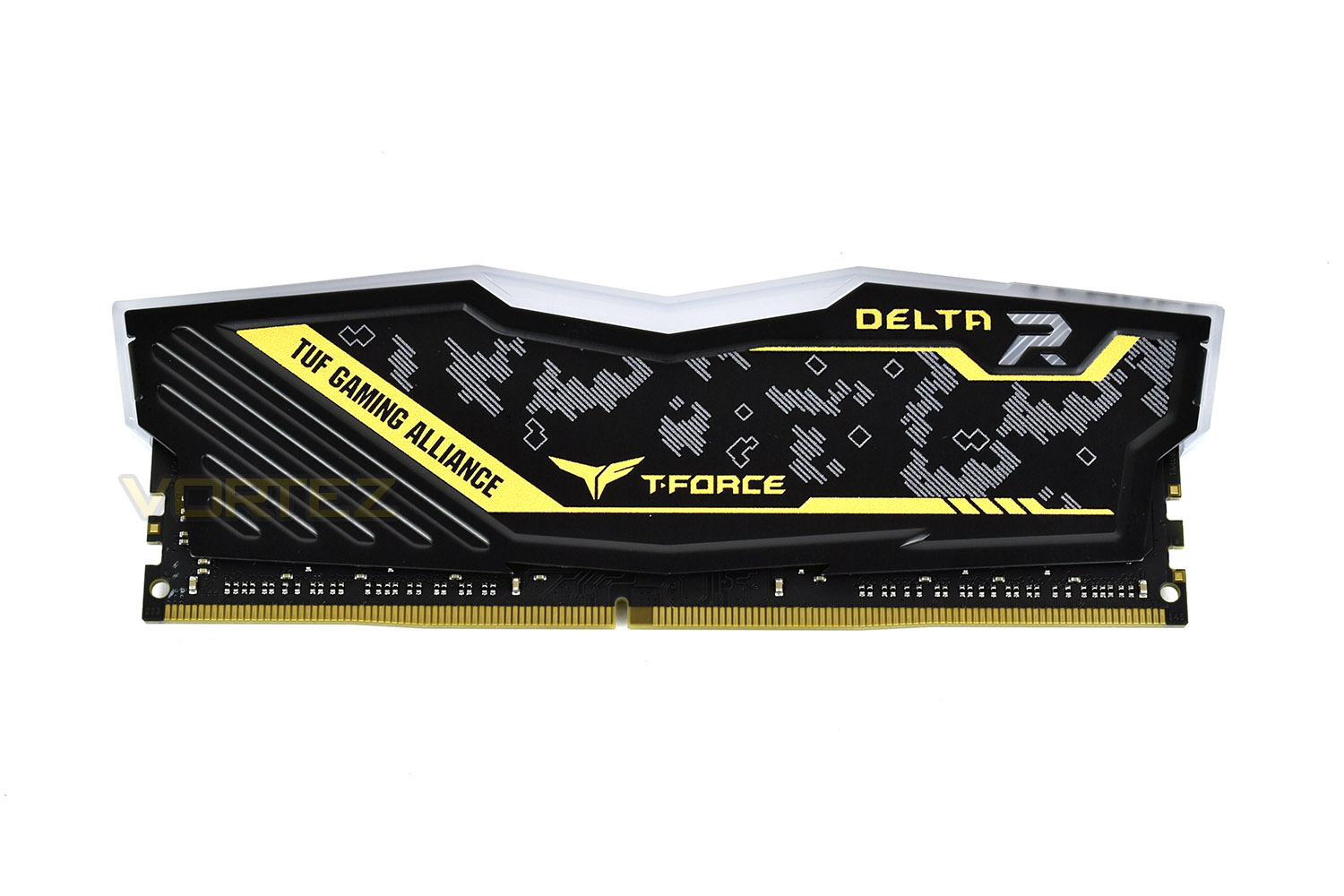
The TUF Gaming Alliance uses a futuristic style of camouflage with a contrasting yellow theme, we’ve seen motherboards, CPU coolers, and peripherals also using the same designs, so if you’re into matching your style, this could be the perfect set.
Test Setup & Methodology
Memory Configurations
TEAMGROUP T-FORCE DELTA TUF GAMING RGB
3200MHz @ 16-18-18-18-38-74-1T – XMP 2.0
3466MHz @ 16-18-18-18-38-74-1T @ 1.4v
Test Setup
Cooling Corsair H150i Pro RGB
Processor Ryzen 7 2700X
MotherboardMSI X470 Gaming M7 AC
Graphics Radeon RX 480 8GB
Storage Samsung 970 EVO 1TB
PSU Corsair RM 750X 80 Plus Gold Certified PSU
Compared against
Corsair Vengeance LPX 3000MHz (2x 8GB)
Crucial Ballistix Tactical Tracer RGB 3000MHz (4x 8GB)
G.SKILL Sniper X 3400MHz (2x 8GB)
XPG Spectrix D41 RGB 2400MHz (4x 8GB)
TEAMGROUP T-FORCE DELTA TUF GAMING RGB
3200MHz @ 16-18-18-18-38-74-1T – XMP 2.0
3466MHz @ 16-18-18-18-38-74-1T @ 1.4v
Test Setup
Cooling Corsair H150i Pro RGB
Processor Ryzen 7 2700X
MotherboardMSI X470 Gaming M7 AC
Graphics Radeon RX 480 8GB
Storage Samsung 970 EVO 1TB
PSU Corsair RM 750X 80 Plus Gold Certified PSU
Compared against
Corsair Vengeance LPX 3000MHz (2x 8GB)
Crucial Ballistix Tactical Tracer RGB 3000MHz (4x 8GB)
G.SKILL Sniper X 3400MHz (2x 8GB)
XPG Spectrix D41 RGB 2400MHz (4x 8GB)
Benchmarks
Cinebench R15 – CPU
SiSoftware SANDRA – Memory bandwidth
AIDA64 – Memory Benchmarks
PCMark 8 – Photoshop
Games – Dawn of War III
SiSoftware SANDRA – Memory bandwidth
AIDA64 – Memory Benchmarks
PCMark 8 – Photoshop
Games – Dawn of War III
Overclocking & Lighting
LightingRGB lighting is obviously one of the main attractions of the DELTA TUF Gaming RGB. If you own an ASUS motherboard with ASUS Aura Sync capability, the RAM lighting effects can be synchronised, otherwise, you will have to download the TEAMGROUP Blitz software.
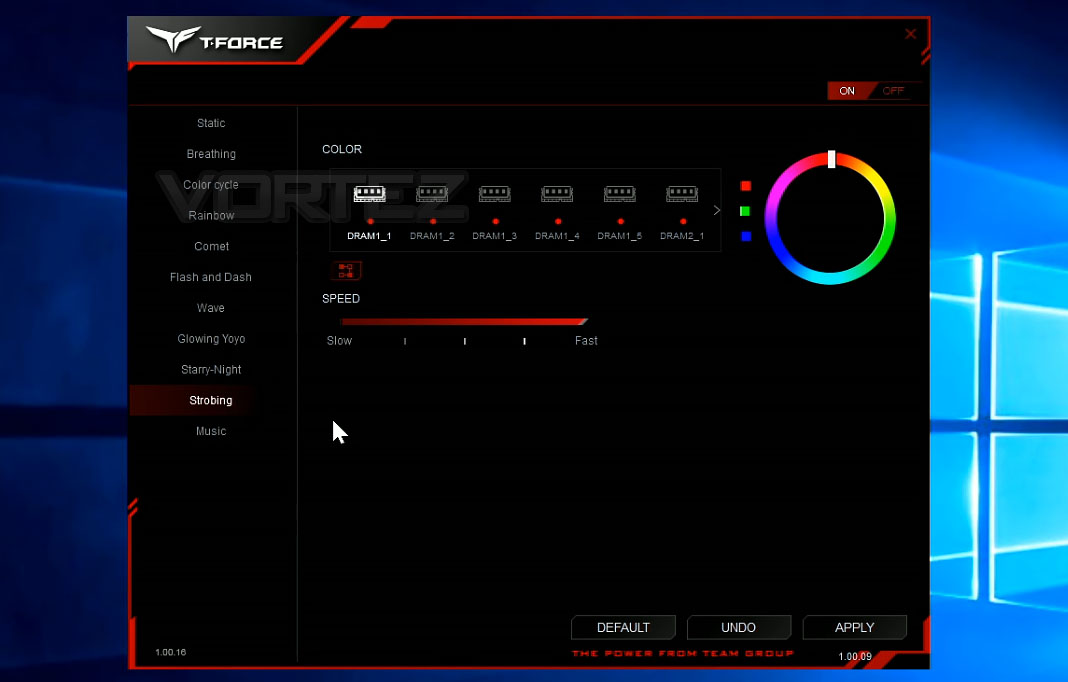
Below is a 2 minute clip of the lighting effects installed into an MSI X470 Gaming M7 AC motherboard.
Overclocking
Despite the 3200MHz speed already being a technical overclock from the JEDEC standard of 2133MHz, some users tend to try and eek out every last drop of performance from their system, which includes overclocking the memory.
Just like any kind of overclocking, there’s a degree of skill and luck involved, usually in equal parts, so what we may achieve with this exact configuration may well not be the case for you, but here’s our results.
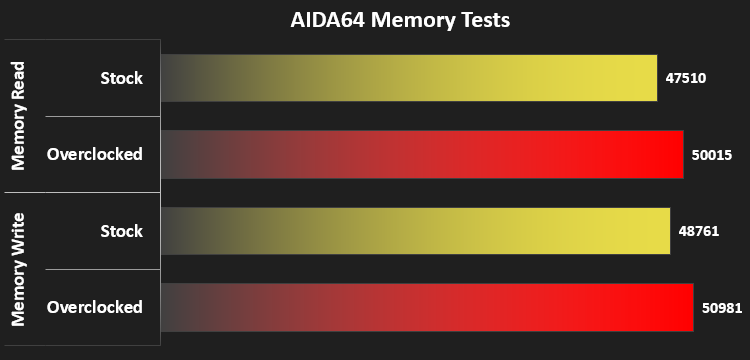
Our testing topped out at 3466MHz stable, with 1.4v instead of the standard 1.35v. We managed to hang onto the standard timings too. These results resulted in the following:
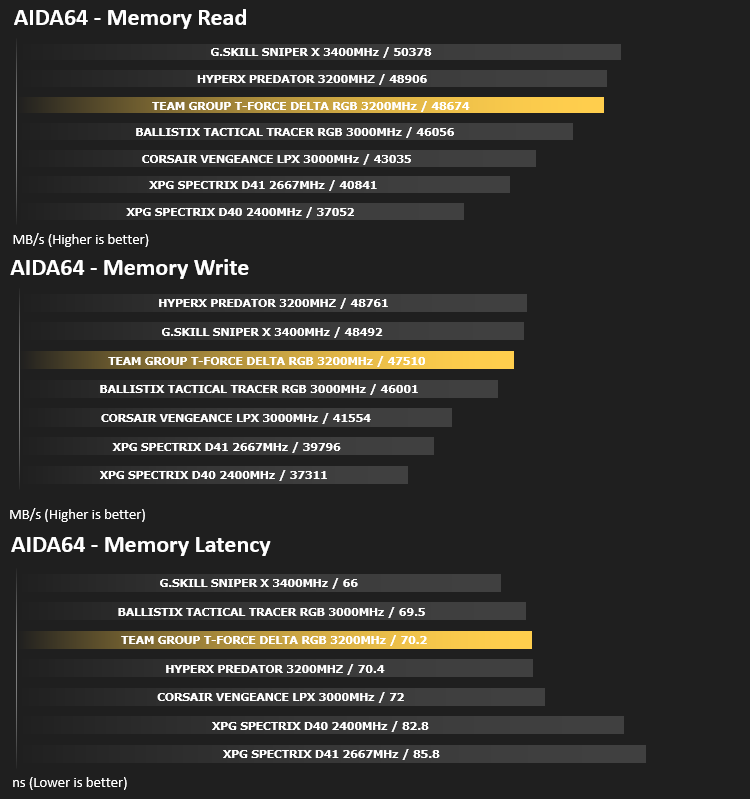
Memory Transfer Performance – AIDA64
AIDA64 Product PageMemory bandwidth benchmarks (Memory Read, Memory Write, Memory Copy) measure the maximum achiveable memory data transfer bandwidth. The code behind these benchmark methods are written in Assembly and they are extremely optimized for every popular AMD, Intel and VIA processor core variants by utilizing the appropriate x86/x64, x87, MMX, MMX+, 3DNow!, SSE, SSE2, SSE4.1, AVX, and AVX2 instruction set extension.
The Memory Latency benchmark measures the typical delay when the CPU reads data from system memory. Memory latency time means the penalty measured from the issuing of the read command until the data arrives to the integer registers of the CPU.
The Memory Latency benchmark measures the typical delay when the CPU reads data from system memory. Memory latency time means the penalty measured from the issuing of the read command until the data arrives to the integer registers of the CPU.
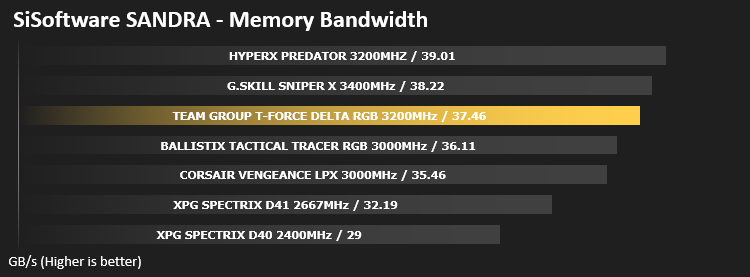
Bandwidth Performance – SiSoftware SANDRA
SANDRA isn’t always a benchmark that is included in hardware reviews but I believe it shouldn’t be ignored. SANDRA provides a vigorous package that tests your system in a rather large array of benchmarks. There are many aspects of benchmark that can be executed.
Processing Power Performance – Cinebench R15
CINEBENCH can measure systems with up to 64 processor threads. This test scene contains approximately 2,000 objects which in turn contain more than 300,000 polygons in total, and uses sharp and blurred reflections, area lights, shadows, procedural shaders, antialiasing, and much more. The result is displayed in points (pts). The higher the number, the faster your processor.
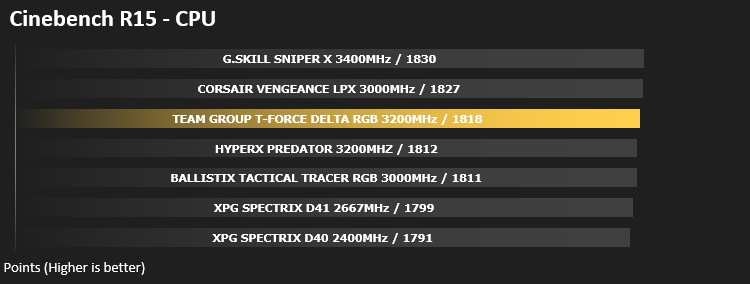
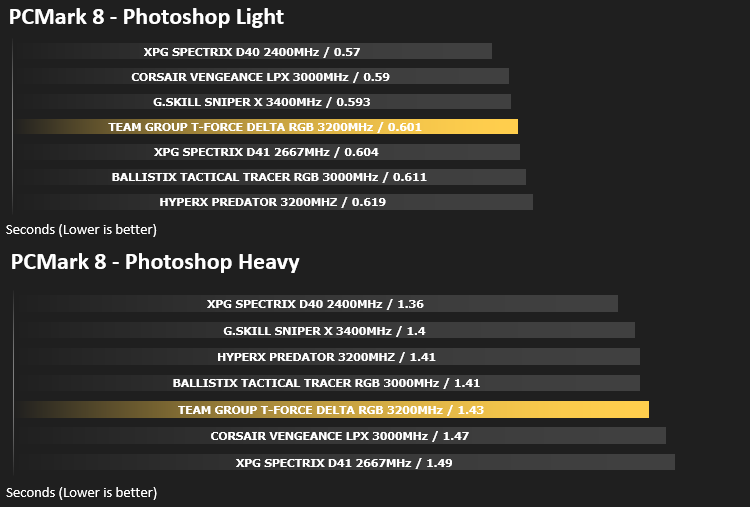
Image Editing Performance – PC Mark 8 Photoshop
PCMark 8 Product Page Developed in partnership with Benchmark Development Program members Acer, AMD, Condusiv Technologies, Dell, HGST, HP, Intel, Microsoft, NVIDIA, Samsung, SanDisk, Seagate and Western Digital, PCMark 8 is the latest version in FutureMark’s popular series of PC benchmarking tools. Improving on previous releases, PCMark 8 includes new tests using popular applications from Adobe and Microsoft.
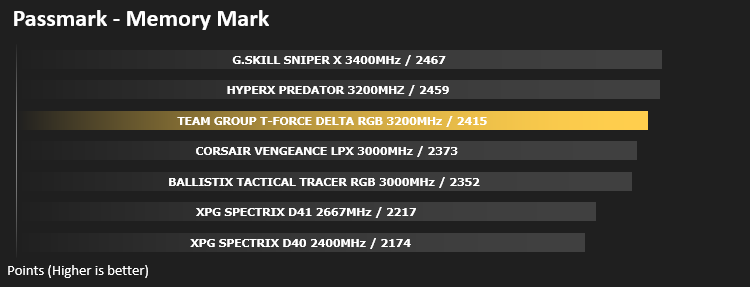
PassMark – Memory Mark
PassMark Performance Test. Fast, easy to use, PC speed testing and benchmarking. PassMark PerformanceTest allows you to objectively benchmark a PC using a variety of different speed tests and compare the results to other computers.
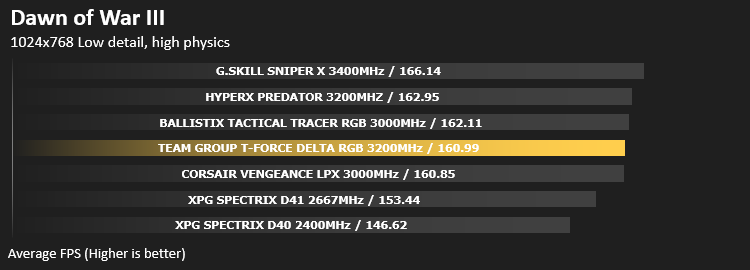
Gaming Performance – Dawn of War III
To test out the benefit of faster memory in a real world scenario, we have taken a recent game and created a CPU limited scenario by reducing the resolution and graphics settings to minimum, while setting the CPU dependent settings at their highest.
Conclusion
TEAMGROUP are certainly pushing the RGB bandwagon hard, releasing products at an incredible pace, catering for any RGB lighting fan’s needs. Though, we don’t necessarily believe this to be a bad thing, with there still being ample DRAM kits available without the lighting, so whether you love or hate RGB lighting, you’ve still got plenty of options.We found the RGB lighting to be good, but not great. The diffusion on top could be more uniform, instead of generation hot-spots directly above the LEDs, where the colour seemed a little washed out and too bright, but, on the other hand, the effects were excellent and the software worked well.
Performance on memory is fairly predictable, especially when comparing different kits on the same motherboard, so the results came as no surprise. If you want faster, buy the kit with the highest MHz rating and lowest CAS timings you can find. The TEAMGROUP DELTA RGB performance was more than enough for any modest system, with a little headroom for more performance. That headroom came in the form of a 266MHz overclock, with a slight 0.05v increase in voltage, totalling 3466MHz, while retaining its XMP 2.0 CAS timings at 16-18-18-38.
Pricing, as of the time of writing, which is subject to change at any moment, is very good, at £139.99 in the UK, you’ll struggle to find a 3200MHz RGB kit.
Overall, the DELTA TUG Gaming RGB offers good performance, has a stylish heat-spreader and RGB lighting which can be synced to ASUS motherboards, but the LEDs could be better placed to diffuse light across the top in a more uniform fashion.
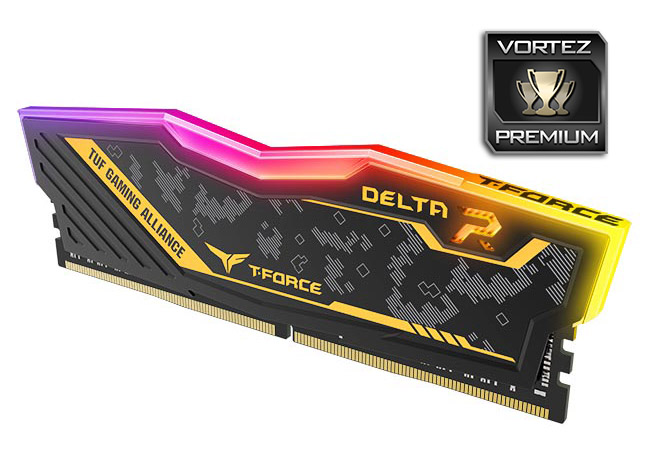
RGB lighting, TUF Gaming, 3200MHz speeds; the DELTA TUF Gaming RGB seems to offer it all at a decent price.
Pros
+ Good performance
+ Fancy heat-spreader design
+ 266MHz overclock
+ Lifetime warranty
+ Blitz software is decent
Cons
– RGB lighting could be better
+ Good performance
+ Fancy heat-spreader design
+ 266MHz overclock
+ Lifetime warranty
+ Blitz software is decent
Cons
– RGB lighting could be better
Click here for an explanation of our awards at Vortez.net.
Stay connected with the Vortez Social Media pages: