







A professional laser gaming mouse with up to 8200 DPI available along with numerous features such as polling rate adjustment and LED customisation.
Product on Review: Gandiva Laser Gaming Mouse
Manufacturer & Sponsor: Tesoro
Street Price: £45 GBP / $60 USD
The gaming mouse arena is an extremely fierce market. Once upon a time there were only a handful of key players in this department but the 21st Century has given rise to numerous companies moving into peripheral production and now a ferocious battle has ensued and one such brand to join the onslaught is a company called Tesoro Technology – today we’ll be taking a look at a mouse which features within their portfolio of products.
Gandiva is a laser gaming mouse offering a maximum DPI of 8200. Additional to the obligatory programmable buttons, advanced customisation is available which includes polling rate adjustment, DPI increment, macro functionality and LED lighting.
Tesoro on their Gandiva gaming mouse
Flashy & aggressive style laser gaming mouse! This modern design gaming mouse features full color programmable illumination effect. Through its programmable software UI, users can define up to 5 sets of mouse mapping, 40 macro keys, game script setting and illumination effect control. With the superbly precise laser sensor, enable customized resolution between 800/1800/4000/6400/8200 DPI. Adjustable. GANDIVA H1L, sleek and comfort. The preferred gaming mouse for gamers.
Technical Specifications
TECHNICAL SPECIFICATION
• 5 Mapping/40 Macros/Game Script Setting
• 128KB Memory
• 8200 dpi
• Full Colors LED Illumination
• 1000Hz Polling Rate
DIMENSIONS & WEIGHT
11.6x 7.2 x 4.4 cm
Net weight: 0.135 Kg
FEATURES
. 8200 DPI Gaming Laser Sensor with high speed motion detection and
. acceleration
. 8 independent programmable buttons
. Adjustable 5 levels dpi control. 800/1800(Default)/4000/6400/8200
. Adjustable polling rate control from user AP up to 1000Hz ultra-polling rate
. Adjustable liftoff distance tracking technology
. User friendly UI for easy setup
. 5 programmable mapping sets, with full color LED indication
. 40 macro keys, up to 1600 actions recordable
. 128Kb onboard memory
. Human ergonomic design with tuning weight-in system
. Adjustable full color LED control
. PP. braided cable with gold-plated USB connector
. Compatible with Windows® XP/Vista/7/8
• 5 Mapping/40 Macros/Game Script Setting
• 128KB Memory
• 8200 dpi
• Full Colors LED Illumination
• 1000Hz Polling Rate
DIMENSIONS & WEIGHT
11.6x 7.2 x 4.4 cm
Net weight: 0.135 Kg
FEATURES
. 8200 DPI Gaming Laser Sensor with high speed motion detection and
. acceleration
. 8 independent programmable buttons
. Adjustable 5 levels dpi control. 800/1800(Default)/4000/6400/8200
. Adjustable polling rate control from user AP up to 1000Hz ultra-polling rate
. Adjustable liftoff distance tracking technology
. User friendly UI for easy setup
. 5 programmable mapping sets, with full color LED indication
. 40 macro keys, up to 1600 actions recordable
. 128Kb onboard memory
. Human ergonomic design with tuning weight-in system
. Adjustable full color LED control
. PP. braided cable with gold-plated USB connector
. Compatible with Windows® XP/Vista/7/8
Packaging & Bundle
Packaging for Gandiva
Box opens to reveal preview
Gandiva arrives in a nicely designed box which features an illustration of the mouse on the front. The reverse contains technical details in a range of different languages.
Tesoro has designed the packaging to have a folding cover – flipping this over reveals a sneak preview of the mouse inside its packaging. The inside of the cover also contains a list of the fundamental features.
A number of included items
Unpacking the box there are an assortment of different items included to make up the bundle. The following is included:
• Quick Start Guide
• Software CD
• Tesoro Product Guide
• Glide Pads
Closer Look
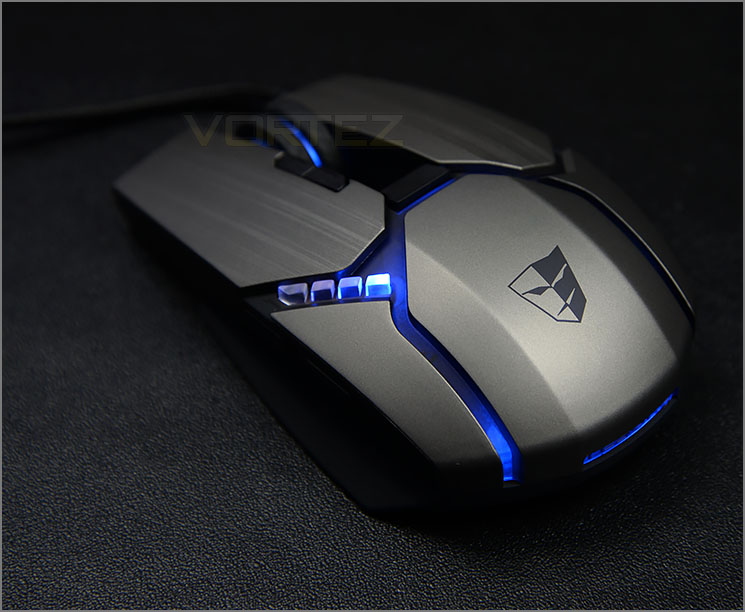
Gandiva appeals to the eye
Brushed metal appearance
There is no denying Tesoro has done an excellent job on the visual appearance of this mouse. Gandiva oozes style with a number of plastic plates which sit on the top-side of the mouse. These plates have been given a brushed metal appearance.
Additional buttons on the left side
While the right-side lacks customisable buttons (apart from the obligatory right mouse button), the left side features numerous buttons to take advantage of. On both sides a matt plastic material has been used in the grip area, oddly there is no rubber here. In reach of the thumb, Tesoro include a forwards and backwards button for navigation – these buttons can of course be modified to a specific command or macro. Above these buttons there are four DPI/profile LEDs. Running down the inside edge of the left mouse button there are two buttons which allow the user to modify the DPI setting by decreasing/increasing the value. The eagle eyed among you will notice the left mouse button extends beyond the length of the right button.
A front view of Gandiva
Looking at the mouse from a front view, the extended right mouse button is much more evident from this angle. The cable on Gandiva feeds into the mouse just underneath the right button. Gandiva features a large scrolling wheel – this wheel has an LED, rubberised grip and loose increments to each step. We’d have preferred stiffer increments as accidental movement can occur quite easily.
Above the scrolling wheel, beyond the cavity there is a button which allows the profile to be adjusted.
The underside – sensor and pads
Flipping Gandiva over, there are four glide pads located in significant areas – at the back and front of the mouse. Towards the left side, Tesoro has placed the sensor which is an 8200 DPI Gaming Laser Sensor. Gandiva is capable of up to 1000Hz polling rate and by default provides DPI setting from 800 – 8200. These options can be adjusted via the software which works in conjunction with 128KB onboard memory.
Gold plated USB connector
We’re pleased to see that Tesoro has given Gandiva a good quality braided cable with a customised USB connector to help distinguish it from other connectors at the back of the computer. This USB connection has been gold-plated for improved connectivity.
Software & Performance
To get the most out of Gandiva, Tesoro supply software which allows the user to tweak the settings on the mouse and apply commands/macros.
There are different profiles which can be set and up to eight buttons can have their commands altered. Windows functions, multi media operations can be applied, as well as other options such as launching specific applications.
Such options as LED lighting, precise DPI settings and polling rate are not obviously available in the software. It actually took us a while to discover these settings – after clicking “Macro” under the dropdown list on one of the buttons a side panel slides out to reveal additional customisation.
Not only was this unintuitive but the LED lighting could not be adjusted on its own. Another setting needed to be altered such as polling rate in order for the colour to be changed.
Performance
Gandiva isn’t locked down to a specific genre of game and is better suited to large hands and a palm grip. We fully tested Gandiva in a range of different games and in the Windows environment and we have to say, we found it tricky to get used to.
The geometry/width and extension of the left mouse button means it can be difficult for those with small-medium sized hands to successfully click the button. The loose scrolling wheel also presented accidental weapon selection in FPS games – the incremental steps are too easy to move to, we feel they should be tighter.
The overall ergonomics and button placement are good. The thumb navigator buttons and DPI increase/decrease are in useful locations for quick and easy access.
Response from the 8200 DPI laser sensor is very good. Movement is precise and accurate and whether you opt to use the Gandiva on a soft cloth pad or a hardened surface with texture, the performance is still great. We experienced no friction or glide issues during our testing.
Conclusion
This is only our second Tesoro product review but once again we are greeted by an aesthetic masterpiece. If it’s one thing they are good at, it’s definitely the styling and finesse.
Gandiva is attractive to the eye and although it uses plastic construction, the brushed metal appearance is very much welcomed. Tesoro has given this mouse a multitude of buttons to customise and they are all placed and in decent locations for quick and easy access.
In all our testing we found this gaming mouse to be very accurate, regardless of the environment. We experienced no issues with traction and glide on a number of different surface textures and the option to tweak the DPI on-the-fly with a value of up to 8200 is very handy.
As we found with the Lobera Supreme, the software for tweaking Gandiva is unintuitive and cumbersome to use. Finding the advanced settings for example isn’t straight forward and we actually stumbled across them through frustration. Altering the LED lighting cannot be done exclusively on its own either, instead, another setting has to be changed in order for the colour to actually adjust.
Also, as we mentioned previously in the review, for small-medium size hands the left mouse button appears to be difficult to press at times because of the size and the angle it sits at. The scrolling wheel on Gandiva cycles through its increments far too easy – the wheel feels loose and we would like to see sharper, tighter increments so that this isn’t accidentally used.
Gandiva is priced at £45 GBP / $60 USD has some fierce competition in this particular price-range but Tesoro need to improve their software if they want to be in with a chance of taking the top spot.
Tesoro’s Gandiva gaming mouse is one of the best looking solutions we’ve seen. This mouse oozes style and has all the features you would expect from a solid gaming peripheral but it isn’t without weakness – the software needs improving and a few modifications to the design would be a worthwhile consideration.
Pros
+ Visually stunning
+ Good button placement
+ Traction/Glide works very well
+ Lots of buttons to customise
+ Up to 8200 DPI
Cons
– Software isn’t intuitive
– Difficult to use for smaller hands
– Scrolling wheel increments too loose
+ Visually stunning
+ Good button placement
+ Traction/Glide works very well
+ Lots of buttons to customise
+ Up to 8200 DPI
Cons
– Software isn’t intuitive
– Difficult to use for smaller hands
– Scrolling wheel increments too loose

Click here for an explanation of our awards at Vortez.net.


