







The Thecus N2310 looks set to be the ideal network server for those on a budget and seeking a ‘no frills’ NAS package for use as a home or small office storage solution.
Product on Review: N2310 NAS
Manufacturer & Sponsor: Thecus
Street Price: £117.77
With so many NAS boxes out there it is hard to find one that is right for you. You will soon drown in the ocean of choices available, so best put ‘pen to paper’ and write down what you need from a NAS (Network Attached Storage) server; pros vs. cons style. If you find cost is high on your list of pros with a quick installation along with a fair amount of apps then the Thecus N2310 could be the NAS server for you.
Not especially built for people new to Networking but clearly of some appeal to them, the Thecus N2310 on the face of it has a lot of appeal. It is well specified for a unit of this cost and being a Thecus it is backed up by a host of smart apps for the end user to configure and have a play around with depending on how the server is planned to be utilised. Media centre? Not an issue. Bitorrent download station. You got it! Whether you are looking to stream to your 60″ LED Smart TV screen or your smart phone, Thecus N2310 looks to be a great choice for the budget conscious too because at a little over £110 it appears to offer great value for money.
Thecus on their N2310
Just in time for Christmas, Thecus® is announcing the release of its latest home and SOHO NAS, the N2310. Equipped with an Advanced Micro Circuits Corporation (AMCC) 800MHz SoC processor and 512MB of DDR3 RAM, this latest 2-bay device is a great choice for those seeking solid storage solutions on a budget.
Features
5 Minute Complete Installation
The N2310 is designed with ease in mind; it is easy enough for anyone to set up. Overlook the several steps which usually are associated with setting up NAS appliances. Simply plug the power supply, insert the Ethernet cable, boot up the N2310 and set up will be completed within 5 minutes. This breakthrough feature truly makes this a plug-and-play NAS.
Self-RAID Creation
All Thecus NAS include an innovative Self-RAID Creation tool that analyzes installed drives and, once the user has selected their preferred balance of performance and protection, automatically builds their customized RAID volume.
T-OnTheGo™ Mobile App
We’re a mobile society, and our NAS solutions are keeping up! Incorporated into the N2310 is support for Thecus’s® T-OnTheGo™ smartphone app. Now supporting both iOS and Android, this NAS management software enables users to access, copy, stream, and edit any data between their NAS and mobile device. Your own personal cloud, from anywhere with internet access.
DDNS
Have easy access to your NAS via Dynamic DNS (DDNS), this allows users to allocate and access their NAS files via the internet remotely. Since IP digits are often difficult to remember, domain names are utilized to make NAS management much more convenient. When the IP address is changed, the DDNS server will automatically adjust the IP address to make sure that remote access is always available. In short, DDNS provides convenient remote internet access to your Thecus® N2310 by utilizing domain names instead of IP digits.
PLEX Media Center
The Plex Media Server is both the heart and brains for any digital media system. The free server is a module available on the Thecus® App Center that allows you to set up and manage your media. With the Plex Media Server installed on your Thecus® NAS, various devices on your network (such as your Xbox 360 and mobile devices) can connect to and stream your local and online media.
Native BitTorrent Support
Included in ThecusOS™ 6 is Transmission, a powerful BitTorrent client. Easily add torrent seed files to Transmission and sit back and relax as your NAS does the rest, independent of your computer. Once downloaded, your files will be automatically stored in your NAS P2P folder where you’ll be able to access them across your network or through the internet. Set and forget torrenting that’s accessible anywhere, that’s the N2310’s native BitTorrent support.
Data Guard
Data Guard backup solution is the ultimate software as it provides both local and remote parts. Currently, data is backed up across RAID volumes, external USB drives, and eSATA. In addition, Data Guard uses innovative technology to sync data across the network to other NAS and servers. More importantly, Thecus® Data Guard is the total backup solution which makes managing NAS user-friendly and convenient.
Data Burn
NAS data can now be burned directly to CD, DVD, and Blu-ray discs with Data Burn, this hassle-free module makes burning data to a disk effortless. In addition, burning ISO image file is also supported. Whether you’re managing audio, media or essential files; Data Burn copies information fast while significantly reducing waiting time. The process of burning file to disk is now easy and smooth with Data Burn module.
USB 3.0 Connectivity
The next generation of connectivity is here with speeds 10x faster than USB 2.0. Whether connecting digital cameras and smart phones, backing up large external hard drives, or extending the capacity of your NAS, USB 3.0 will make sure it’s done in no time at up to 5 Gbit/s. Backwards compatibility adds the connectivity of a world full of USB 2.0 and USB 1.1 devices to get the best combination of speed and universal access.
User Quota
Divide the massive storage of a Thecus NAS among multiple users. Whether there are two users or 100, User Quota make it easy to divvy up and manage disk space.
The N2310 is designed with ease in mind; it is easy enough for anyone to set up. Overlook the several steps which usually are associated with setting up NAS appliances. Simply plug the power supply, insert the Ethernet cable, boot up the N2310 and set up will be completed within 5 minutes. This breakthrough feature truly makes this a plug-and-play NAS.
Self-RAID Creation
All Thecus NAS include an innovative Self-RAID Creation tool that analyzes installed drives and, once the user has selected their preferred balance of performance and protection, automatically builds their customized RAID volume.
T-OnTheGo™ Mobile App
We’re a mobile society, and our NAS solutions are keeping up! Incorporated into the N2310 is support for Thecus’s® T-OnTheGo™ smartphone app. Now supporting both iOS and Android, this NAS management software enables users to access, copy, stream, and edit any data between their NAS and mobile device. Your own personal cloud, from anywhere with internet access.
DDNS
Have easy access to your NAS via Dynamic DNS (DDNS), this allows users to allocate and access their NAS files via the internet remotely. Since IP digits are often difficult to remember, domain names are utilized to make NAS management much more convenient. When the IP address is changed, the DDNS server will automatically adjust the IP address to make sure that remote access is always available. In short, DDNS provides convenient remote internet access to your Thecus® N2310 by utilizing domain names instead of IP digits.
PLEX Media Center
The Plex Media Server is both the heart and brains for any digital media system. The free server is a module available on the Thecus® App Center that allows you to set up and manage your media. With the Plex Media Server installed on your Thecus® NAS, various devices on your network (such as your Xbox 360 and mobile devices) can connect to and stream your local and online media.
Native BitTorrent Support
Included in ThecusOS™ 6 is Transmission, a powerful BitTorrent client. Easily add torrent seed files to Transmission and sit back and relax as your NAS does the rest, independent of your computer. Once downloaded, your files will be automatically stored in your NAS P2P folder where you’ll be able to access them across your network or through the internet. Set and forget torrenting that’s accessible anywhere, that’s the N2310’s native BitTorrent support.
Data Guard
Data Guard backup solution is the ultimate software as it provides both local and remote parts. Currently, data is backed up across RAID volumes, external USB drives, and eSATA. In addition, Data Guard uses innovative technology to sync data across the network to other NAS and servers. More importantly, Thecus® Data Guard is the total backup solution which makes managing NAS user-friendly and convenient.
Data Burn
NAS data can now be burned directly to CD, DVD, and Blu-ray discs with Data Burn, this hassle-free module makes burning data to a disk effortless. In addition, burning ISO image file is also supported. Whether you’re managing audio, media or essential files; Data Burn copies information fast while significantly reducing waiting time. The process of burning file to disk is now easy and smooth with Data Burn module.
USB 3.0 Connectivity
The next generation of connectivity is here with speeds 10x faster than USB 2.0. Whether connecting digital cameras and smart phones, backing up large external hard drives, or extending the capacity of your NAS, USB 3.0 will make sure it’s done in no time at up to 5 Gbit/s. Backwards compatibility adds the connectivity of a world full of USB 2.0 and USB 1.1 devices to get the best combination of speed and universal access.
User Quota
Divide the massive storage of a Thecus NAS among multiple users. Whether there are two users or 100, User Quota make it easy to divvy up and manage disk space.
Specification
HardwareProcessor AMCC APM 86491 800Mhz
System Memory 512MB DDR3
LAN Interface (PCI-e) RJ-45×1: 10/100/1000 BASE-TX Auto MDI/MDI-X
USB Interface USB 2.0 host port x1 (back x1)
USB 3.0 host port x1 (back x1)
Disk Interface 2 x SATA for internal
Power Supply 40W external power adaptor
Buttons Power button
USB copy button
Reset button
Environment Temperature: 5°C to 40°C
Humidity: 0 ~ 80 % R.H. (Non-condensing)
Chassis 2bays Tower
Dimensions (HxWxD) 135 x 97 x 207 (mm)/5.33 x 3.83 x 8.14 (in)
Weight 0.8(Kgs) / 1.8(lb)(NAS only)
Certificates CE/FCC/C-Tick/VCCI/BSMI
RoHS
WEEE
System Memory 512MB DDR3
LAN Interface (PCI-e) RJ-45×1: 10/100/1000 BASE-TX Auto MDI/MDI-X
USB Interface USB 2.0 host port x1 (back x1)
USB 3.0 host port x1 (back x1)
Disk Interface 2 x SATA for internal
Power Supply 40W external power adaptor
Buttons Power button
USB copy button
Reset button
Environment Temperature: 5°C to 40°C
Humidity: 0 ~ 80 % R.H. (Non-condensing)
Chassis 2bays Tower
Dimensions (HxWxD) 135 x 97 x 207 (mm)/5.33 x 3.83 x 8.14 (in)
Weight 0.8(Kgs) / 1.8(lb)(NAS only)
Certificates CE/FCC/C-Tick/VCCI/BSMI
RoHS
WEEE
Software
RAID
RAID Modes RAID 0, 1 and JBOD
Auto-rebuild Supported
Hot-swap Supported
Disk
Bad Block Scanning Supported
SMART Info Supported
SMART Test Supported
Disk Roaming Supports volume-based roaming to other N2310
Network
Configuration Fixed IP address, dynamic IP address
Transport Protocols TCP/IP, AppleTalk
File Protocols SMB/CIFS, HTTP/HTTPS, FTP, AFP, NFS
TCP/IP IPV6 & IPV4
System status
Syslog Management Send syslog to assigned location
Act as syslog server to receive log info from other systems
Data Access
Client OS Support Windows XP and after
Windows Server 2003 and after
Mac OS X
Linux
FTP Built-in FTP server with bandwidth control
Secure FTP Built-in secure FTP server with bandwidth control
Download Manager BT Transmission
Printer Server (IPP) Supports USB printers
Supports a wide range of IPP printers
Client can manage print tasks (list/delete) via web user interface
Data Backup
Client Incremental Data Backup Thecus Backup Utility
Data Burn Create files to ISO image and burn to optical disc
Create files to ISO image
Read ISO image from optical disc and write to NAS
Mac OS X Time Machine Supported
Data Guard Remote Backup/Local Backup
Power Management
Scheduled Power On/Off Supported
Volume Management
File System EXT4
Multimedia Support
iTunes Server Supports AAC, MP3 w/ID3 tag and WAV
Piczza!™ Photo Server (via module) Supports GIF, JPG (JPEG), BMP and PNG
Supports EXIF display
Supports slide shows
Media Server Supports uPnP AV streaming protocol
User Authentication
Local User Supports built-in user accounts
Local Group Supports built-in user groups
File System
Type Journaling File System
Language Support Unicode Support
Authorization (ACL) “Read”, “write”, or “deny” privileges to individual users or groups in folders and sub-folders
User Quota Supported
Administration
User Interface Web-based user interface supports English, Traditional Chinese, Simplified Chinese, Japanese, Korean, French, German, Italian, Spanish, Russian, Polish and Portuguese.
Utility Program (Intelligent NAS) MS Windows Setup Wizard
Supports Windows XP and after
Windows Server 2003 and after
Mac OS X Setup Wizard
Email Notifications Sends system messages via email to the system administrator
DDNS** Support one free DDNS registration (ex. xxx.thecuslink.com) (How-to)
UPnP and Port forwarding Support auto setting in Intranet environment
Intelligent NAS Go through defined URL for auto install (install.thecus.com)
Mobile Applications (iOS/Android)
T-Dashboard™ Mobile monitoring and administration
T-OnTheGo™ Upload, download and stream multimedia
Others
Recycle Bin Supported
Web Disk Supported
RAID Modes RAID 0, 1 and JBOD
Auto-rebuild Supported
Hot-swap Supported
Disk
Bad Block Scanning Supported
SMART Info Supported
SMART Test Supported
Disk Roaming Supports volume-based roaming to other N2310
Network
Configuration Fixed IP address, dynamic IP address
Transport Protocols TCP/IP, AppleTalk
File Protocols SMB/CIFS, HTTP/HTTPS, FTP, AFP, NFS
TCP/IP IPV6 & IPV4
System status
Syslog Management Send syslog to assigned location
Act as syslog server to receive log info from other systems
Data Access
Client OS Support Windows XP and after
Windows Server 2003 and after
Mac OS X
Linux
FTP Built-in FTP server with bandwidth control
Secure FTP Built-in secure FTP server with bandwidth control
Download Manager BT Transmission
Printer Server (IPP) Supports USB printers
Supports a wide range of IPP printers
Client can manage print tasks (list/delete) via web user interface
Data Backup
Client Incremental Data Backup Thecus Backup Utility
Data Burn Create files to ISO image and burn to optical disc
Create files to ISO image
Read ISO image from optical disc and write to NAS
Mac OS X Time Machine Supported
Data Guard Remote Backup/Local Backup
Power Management
Scheduled Power On/Off Supported
Volume Management
File System EXT4
Multimedia Support
iTunes Server Supports AAC, MP3 w/ID3 tag and WAV
Piczza!™ Photo Server (via module) Supports GIF, JPG (JPEG), BMP and PNG
Supports EXIF display
Supports slide shows
Media Server Supports uPnP AV streaming protocol
User Authentication
Local User Supports built-in user accounts
Local Group Supports built-in user groups
File System
Type Journaling File System
Language Support Unicode Support
Authorization (ACL) “Read”, “write”, or “deny” privileges to individual users or groups in folders and sub-folders
User Quota Supported
Administration
User Interface Web-based user interface supports English, Traditional Chinese, Simplified Chinese, Japanese, Korean, French, German, Italian, Spanish, Russian, Polish and Portuguese.
Utility Program (Intelligent NAS) MS Windows Setup Wizard
Supports Windows XP and after
Windows Server 2003 and after
Mac OS X Setup Wizard
Email Notifications Sends system messages via email to the system administrator
DDNS** Support one free DDNS registration (ex. xxx.thecuslink.com) (How-to)
UPnP and Port forwarding Support auto setting in Intranet environment
Intelligent NAS Go through defined URL for auto install (install.thecus.com)
Mobile Applications (iOS/Android)
T-Dashboard™ Mobile monitoring and administration
T-OnTheGo™ Upload, download and stream multimedia
Others
Recycle Bin Supported
Web Disk Supported
Packaging & Accessories
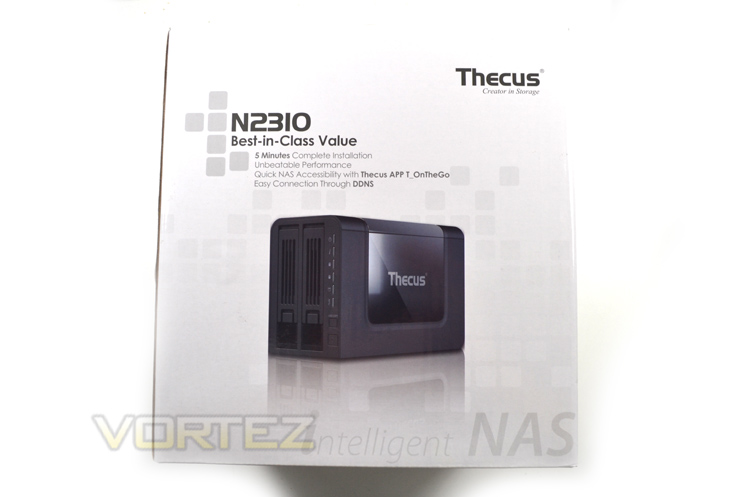
The outer packaging of the product was appealing and well laid out with the main product featured on the front of the package which was a mirror of the rear along with specifications to the sides. A handy carry handle is also provided for the purchaser.
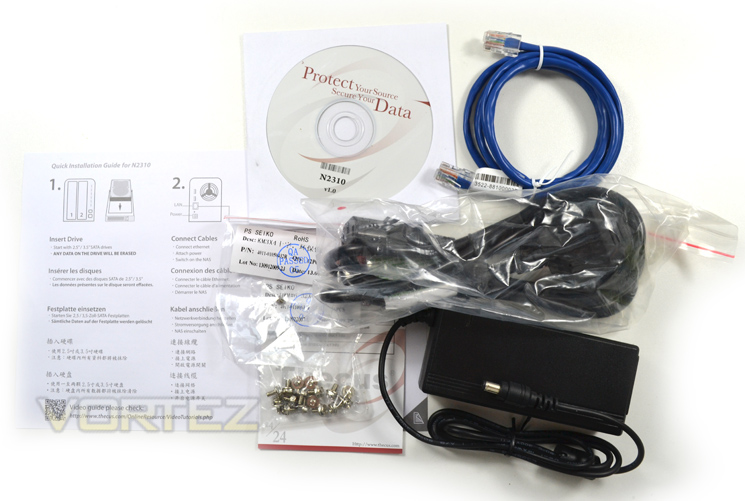
The internals are very well packed with thick foam braces holding the NAS and accessories in place. Speaking of accessories you get just enough to get you started including 2 sets of screws for installing 2 hard drives, 2m Cat 5e network cable, installation CD and instructions along with a power pack and kettle lead.
Perhaps our main criticism here is the instructions. The single side instruction leaflet is basic in the extreme whether this was Thecus’ intent or not remains to be seen but if you are not tech savvy instructions like ‘install drive’ may leave those who have never done this before a little confused. Thecus assume the user is experienced enough that they will know how to install a hard drive. I’m sure many people reading this will nod their heads in agreement thinking of how many time family members have asked them to install a new hard drive in their PC.
The instructions go on to tell you to install cables – again, it is not rocket science to those familiar with installing a PC and such like but again, those who are not my be left scratching their heads despite the simple diagrams on the leaflet.
It is all very well providing a video guide and online instructions but if your router is situated away from your PC/Laptop, it becomes a chore going to and fro so we would like to have seen a better, more in-depth guide included rather than just a brief ‘quick installation guide’.
Closer Look
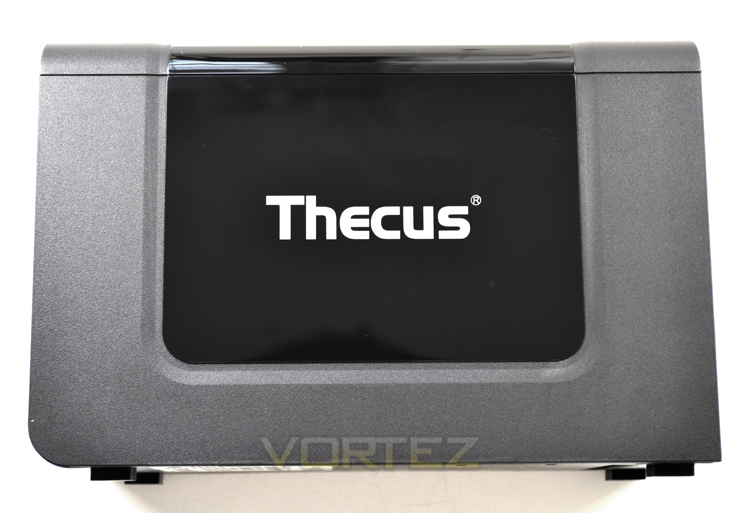
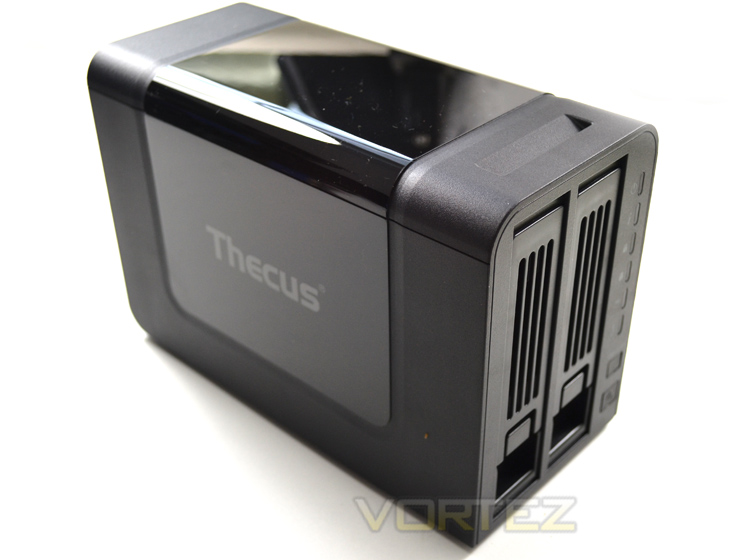
The unit arrives with a protective sliver of plastic sheeting which peels away to reveal a gloss finish to the unit. This, due to the static is also a dust magnet but once polished up looks great with the contrasting matt black plastic surround. The plastic however does feel a little ‘cheap’ and betrays the NAS unit’s low price point.
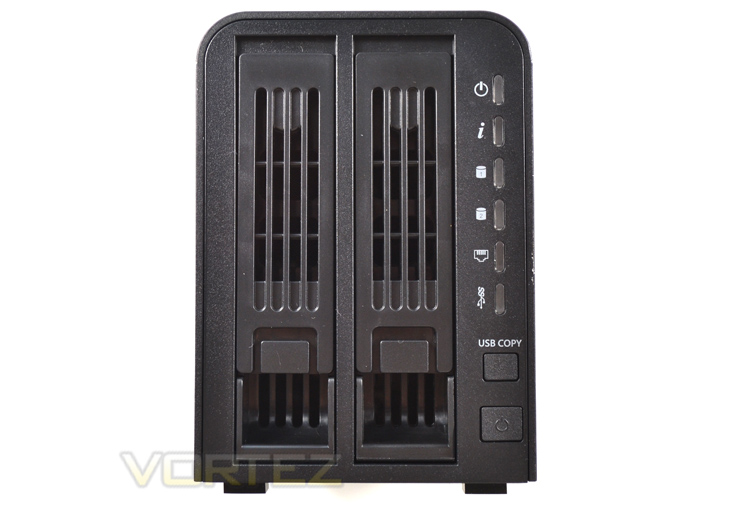
The front of the unit features twin drive doors which are simple plastic brackets with clasps that will hold both 3.5″ and 2.5″ drives. To the right of the drive bays are multiple LED’s giving you information on what the NAS unit is doing at any one time. Below these LEDs are two buttons, a handy ‘USB Copy’ button and main power button which are flush with the main frame so to prevent accident presses.
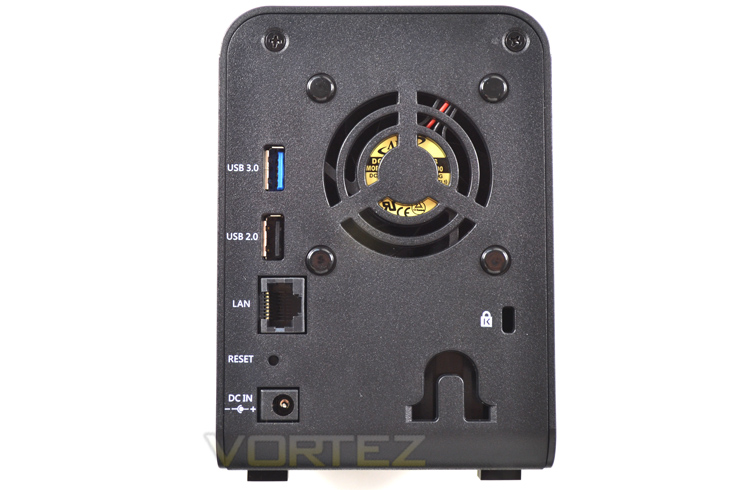
The rear of the product we find 2 USB ports, a USB 3.0 (blue) and USB 2.0 (black). Below these ports we see the Ethernet port, reset button (recessed) and DC power input point. To the far right there is a Kensington lock point however considering the drives are likely to cost more than this unit and have no locking points there would be little point in locking the drive up as a thief’s main target would be the drives, not the NAS!
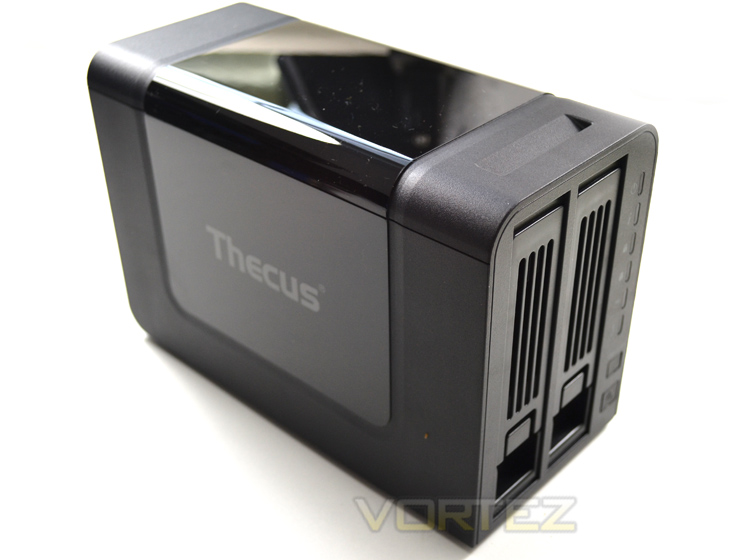
Overall, from a distance the NAS looks like a quality, if somewhat compact unit. Things start to deteriorate when you look a little closer though because the plastic used feels a little cheap. The glossy finish is aesthetically pleasing but will easily scratch over time so unless this drive is positioned and not moved often we can see the unit becoming grubby in the future.
HDD Installation
Installing storage drives to N2310 is a relatively simple process of removing the drive bay trays which a locked in place by flexible plastic tabs and the drive trays themselves.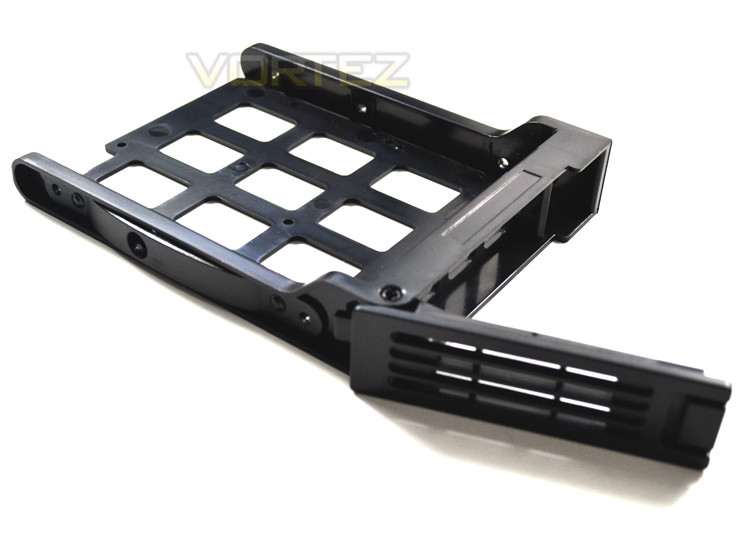
There are two sets of screws included, one set for large 3.5″ drives and one for smaller 2.5″ drives, including SSD’s. While obvious to some it should be stated that no hard drives are included with this product.
The hard drives can be clipped into place and once married up to the screw holes are then held firmly, ready for the drive tray to be slid back into position.
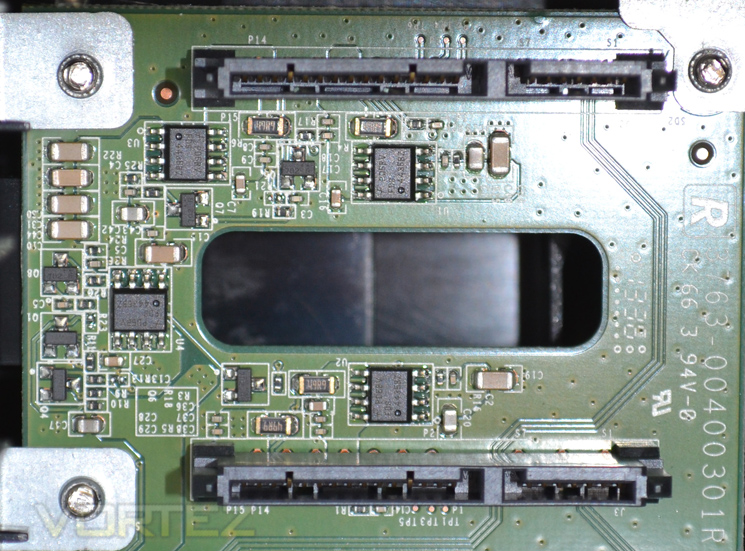
Get the orientation wrong and the drive won’t ‘click’ soundly in place. Yes, the drive bays can be slid in either orientation which could result in broken components. Thankfully we took note of the correct orientation before installing the drives and they married up perfectly with the SATA data and power ports.
ThecusOS 6
Thankfully, installing the NAS into your network is extremely simple. You basically have two choices. Run the software form the included CD or visithttp://install.thecus.com which will automatically initiate the installation for Mac, Linux and Windows users.
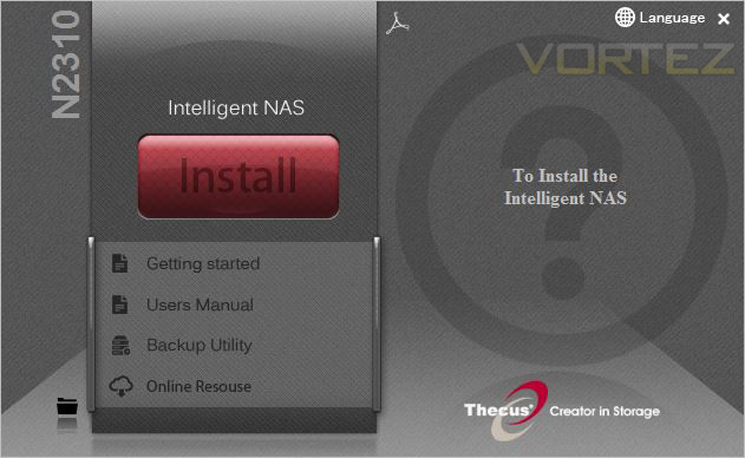
The installation process takes less than 5 minutes to complete and moves between various stages to configure user access and general settings.
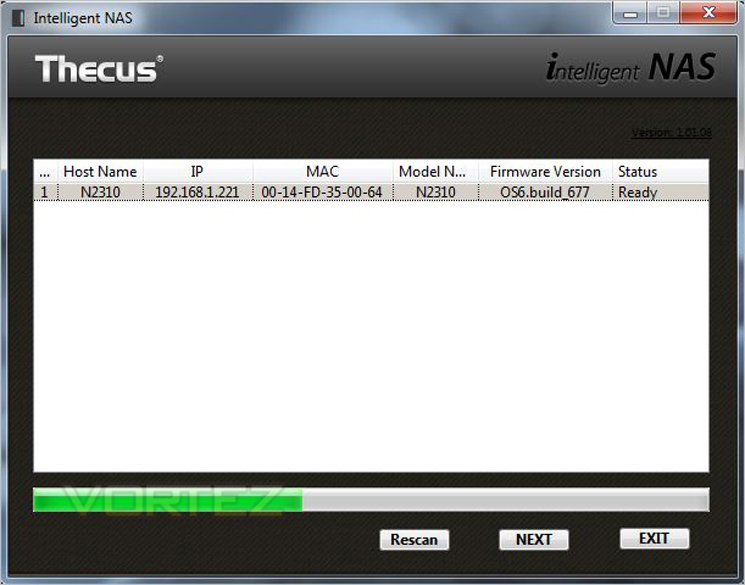
With the software installed on the NAS, the network will be scanned to pick up the unit you wish to connect to (in this case the N2310).
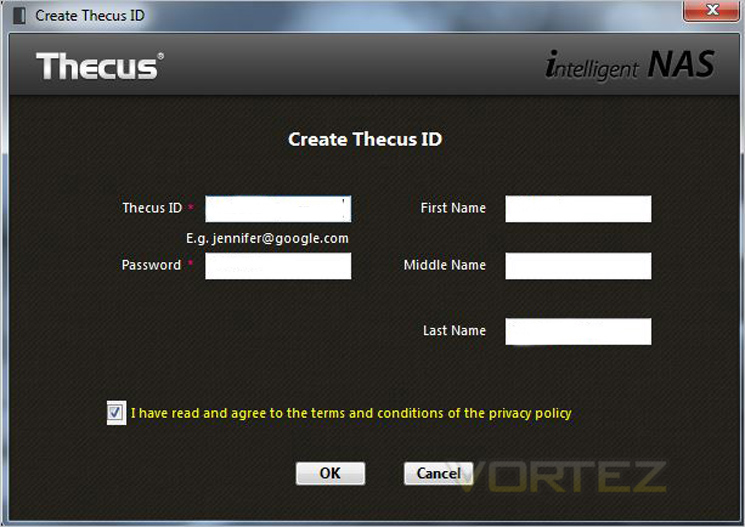
You will then be asked to enter your email address as a username along with a password. Thecus need this info to create a free DDNS address for you which will allow you to connect remotely from anywhere in the world with internet access.
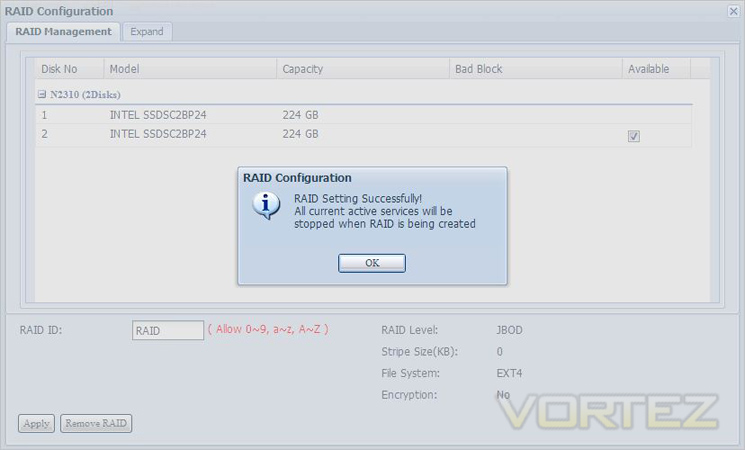
Up to 2 drives can be added and as you can see here we used 2 x SSDs in RAID but drives can also be added to make a JBOD RAID (multiple disks used together to make one big disk or in the usual RAID 0 or RAID 1 setups.
Below we have produced a video which demonstrates some of the options and features which can be used when ThecusOS 6 is installed.
Although there are plenty of options inside the OS the feedback and overall design feels somewhat rough around the edges compared to rival NAS software. We think Thecus need to improve the interface by making it more user friendly and by making use of newer programming technologies.
T-OnTheGo – Smartphone Functionality
There are plenty of uses for a Thecus NAS but one particular feature which is touted as fundamental to ThecusOS is T-OnTheGo.T-OnThego is a cloud management solution that allows interface between a smartphone/tablet and the Thecus NAS. All types of files can be managed between both devices and users can even upload directly to specific folders. In order to use T-OnTheGo, WebDAV needs to be enabled server-side and by default this is already enabled so its just a case of downloading the T-OnTheGo app for your mobile device.
Below shows a demonstration of how T-OnTheGo works with the N2560 but the principle of the N2310 is the same. As you can see, files and folders can be read quite easily. Videos can be streamed directly to mobile devices and files such as pictures can be uploaded to folders for backup/storage purposes.
Performance
We have looked at some of the features that ThecusOS 6 brings with N2310 but how does this affect performance? What are typical transfer rates like over a Gigabit network? Is power consumption reasonable? These are all questions that you might be asking and we are here to answer them.Motherboard: ASUS P9X79 Pro
CPU: Intel Core i7-3960X Extreme Edition @ 4.5GHz
RAM – 16GB (4x4GB) Corsair Vengeance (Red) DDR3 @ 1866MHz 9-10-9-27
Power Supply – Thortech Thunderbolt Plus 1200W
Hard Drive – Kingston HyperX 240GB
Cooler – Corsair H100
CPU: Intel Core i7-3960X Extreme Edition @ 4.5GHz
RAM – 16GB (4x4GB) Corsair Vengeance (Red) DDR3 @ 1866MHz 9-10-9-27
Power Supply – Thortech Thunderbolt Plus 1200W
Hard Drive – Kingston HyperX 240GB
Cooler – Corsair H100
To test for real world speed, we take a 4GB file and upload it to the NAS drive (which has a 2TB Western Digital Black Edition installed). We then test the download speed by grabbing the file from the NAS and copying to our desktop.
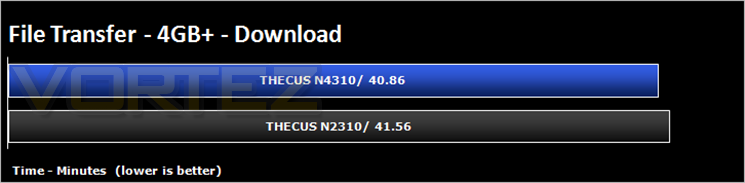
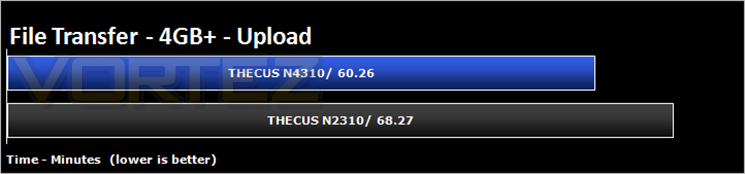

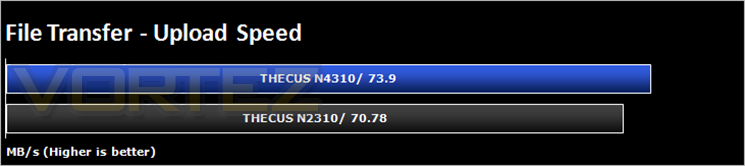
It has to be said that for a ‘basic’ unit, the speeds put out by the Thecus are impressive. Further real world tests were carried out by using the drive to stream media, a mixture of SD and HD content to a Samsung Smart TV using the PLEX software. I am happy to report that there were no buffering issues.
There were some performance issues worth mentioning though and that is when files are being uploaded, PLEX seemed to crash when files were being streamed. Whether this is a fault of the software or the hardware we are not entirely sure however we can only assume it is the former as the NAS would happily upstream and downstream files when PLEX was not in use.
Conclusion
The Thecus N2310 promises much for a budget NAS solution and for the most part it delivers. The biggest attraction of this unit is of course the price and here is where the Thecus scores big. At a little over £110 it is very aggressively priced. It wasn’t so long ago that hard drive enclosures costs close to this so to have a NAS made by an established company such as Thecus is quite an achievement. The low cost of the unit does however bring with it some consequences which we will explain below.
First the aesthetics of the unit: While this is no biggie, we do feel that the unit feel a little ‘lightweight’. Now for £100 we were not expecting a flash, brushed aluminium enclosure but the product does feel a little cheap and the HD trays especially fell cheap. We didn’t suffer any breakages during installation but we expect that over time the plastics may start to wear after repeated use.
The included instructions are also very basic and while Thecus do provide online and .pdf manuals, unless you are close to a PC at the time of the install these are of little use. Even when you do get the unit physically installed, the online manuals are generic or refer to other models in the range which are not entirely representative of the N2310 which will lead to yet more confusion for the newbie. Couple this with the delay of assigning a DDNS via verification of email and you will soon start to see where those extra pennies were saved.
The operating system is quite easily navigated if somewhat basic but we liked the option of adding additional apps which are growing all the time however to get some of these apps to work with other hardware e.g PLEX, a fee will need to be paid to install this on your Smartphone.
Overall, this is a cheap and cheerful NAS solution which offers features above its price point and is a good attempt at luring those looking for a basic NAS solution to the world of Thecus. If you have patience and little technical knowledge it can be easily setup but if you have neither then you may find the product a little frustrating initially and will wish you spent a little more on a more refined product.
Cheap, feature-packed and relatively easy to setup once you understand the basics, the N2310 hits the spot for the budget conscious NAS consumer.
Pros
+ Great Value
+ Flexible feature-set
+ USB 3.0 Hard Copy
+ Free DDNS
+ Good Transfer speeds
Cons
– Confusing setup for the novice
– Operating system requires work
+ Great Value
+ Flexible feature-set
+ USB 3.0 Hard Copy
+ Free DDNS
+ Good Transfer speeds
Cons
– Confusing setup for the novice
– Operating system requires work

Click here for an explanation of our awards at Vortez.net.


