







Thermalright, a name revered by many, have sent us their new flagship cooler for review, the Venomous X. Let’s see how it stacks up in this ever growing competitive market.
Product on Review: Thermalright Venomous XManufacturer and Sponsor:Thermalright
MSRP: Not mentioned on site
Street Price: £46.87/ US$59.99
Thermalright needs no introduction in the cooling segment but since they are a new arrival on Vortez, it is important to look at what made Thermalright such a significant player when it comes to cooling performance and why they were/are considered the Kings of this competitive market. Thermalright can be considered pioneers in developing large tower coolers, dating back to the 2002, when they entered the business, as CPUs became progressively more powerful and generating more heat. Thermalright’s solutions were the answers to the growing need of performance coolers. It wasn’t long before they struck a chord in the enthusiast market, delivering outstanding cooling performance using innovative heat pipes and large heatsink designs.
The Ultima 90, which was soon succeeded by the Thermalright Ultra Extreme marked the brand’s dominance and lead over alternative solutions. Many tried to imitate them but most failed, hence why we still see the Thermalright Ultra Extreme being such a popular choice even to this day. Did I mention it was released three years ago? However, this was no reason for Thermalright to rest on its laurels, with brands such as Noctua, Tuniq, Prolimatech etc developing new and more efficient heatsinks. So today we have with us the next iteration of Thermalright’s flagship CPU cooler, the Venomous X. As the name instigates, we better be prepared for some striking results.

A few words from Thermalright:
| Thermalright is an elite design house that manufactures cooling products for computer components for the best quality and performance your money can buy. In 2002, AMD released its first generation Thunderbird CPU and since then we have been there every step of the way to counter high voltage and high heat with innovative design and highly acclaimed cooling solutions not only for AMD but for Intel as well. One of early well known solutions was the SK-6. With many positive and rave reviews under its belt Thermalright bolted to the top as the heat sink manufacturer mostly preferred by overclockers and enthusiasts around the World. To this day, innovation never left our vocabulary as we keep coming up with leading edge designs staying ahead of the competition. |
As keen enthusiasts here at Vortez, we are very intrigued to see how the Venomous X will cope with sustained heat levels. It certainly has a tough fight on its hands if it wants to go up against the like of the Noctua NH-D14, our current performance King. The changes made to the Venomous X are very subtle compared to the Ultra Extreme Rev C but hopefully those small changes will improve an already proven design and translate to better overall performance.
Right, let’s get down to business and see those results for ourselves.
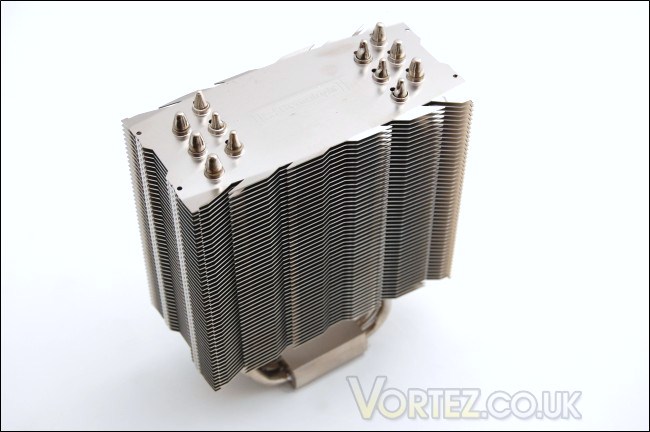
Features and Specifications
Features
•All new patented multiple support pressure vault bracket system, allow users adding pressure to the bracket system (40~70 lbs.), and have a more efficient and secure mounting.(1366 / 1156 / 775).
•Mirrored copper base increasingly upgrades the quality and the performance of the heatsink.
•Special bent winglet design, allows hot air to pass the heatsink more rapidly.
•Heatsink are all nickel plated to ensure the best quality and performance and could last for years.
•Soldered heatpipes, copper base and fins, to ensure the best thermal conducting efficiency.
•Six sintered heatpipe design, all heatpipes are nickel plated. To slow the oxidation deterioration to the heatpipe, to ensure longer usage and performance of the heatsink for the CPU.
•Including 2 sets of 120 x 25mm fan clips and Chill factor II thermal paste.
•Convex copper base design, to ensure the Highest thermal conducting thermal efficiency between the CPU and the heatsink.
Specifications
Physical Specifications
•Dimensions: 127 x 63 x 160 mm (L x W x H)
•Weight: 755 g (Excluding fan and bracket system)
•Heat pipe: 6mm sintered heat pipe x 6 units
•Heatsink material: C1100 pure nickel plated copper base, with ultra-shine mirror finish
In terms of width and length, the Venomous X is actually a few mms smaller than the Thermolab Baram and unlike most of the coolers we have tested here, it does not come with AMD socket support. A separate AMD socket AM2/AM3 Bolt Thru-Kit is required for such systems. Thermalright employs a lot of the features that make tower heatsinks very effective, as they have shown with the Ultra Extreme many times before, so the 6x6mm heat pipes, nickel plating, and copper base are still present. However, the fins are specially designed at an angle to increase airflow efficiency.
One of the features accustomed to Thermalright heatsinks makes a comeback and that’s the convex base that is meant to accommodate the slight unevenness found on CPUs. This is actually a complaint that many enthusiasts have against Thermalright, hence why lapping has become so popular over the years. In my own opinion, they use the specially designed base for a good reason and we will see how it translates to increased cooling potential later in our results. The 2 sets of fan clips is a change from the previous plastic bracket system Thermalright employed to hold fans and it’s a welcomed moved.
Packaging and Content
The Thermalright Venomous X box
Thermalright uses their traditional solid stable cardboard box design to package their bundle. However, they have departed from the standard minimalistic brown they tend to use for their other products and the result is a very attractive package that epitomizes professionalism and taste. On the top we see smooth wavy lines running across, almost depicting a laminar flow system, reflecting the efficiency we expect from the Venomous X. While most packaging tend to use wild graphics to show what their cooler can cope with, Thermalright uses a simple design to mask the beast within. A reflective Venomous X graphics is used on the top cover while on the front, we can see the shape of fins.
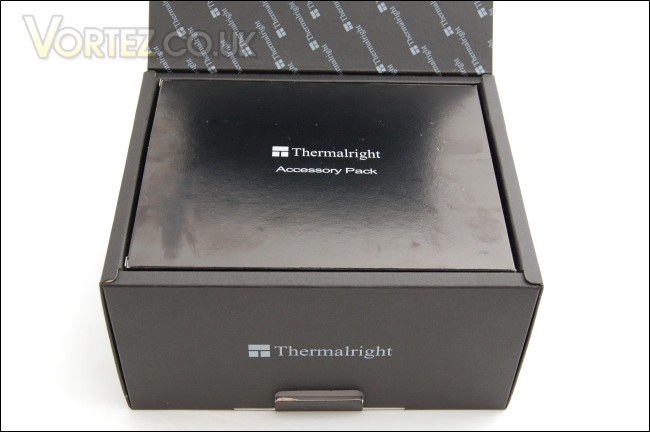
Inside the box
Another remark about the box is the lack of specifications and features lists we are normally accustomed to with other packaging. This is not necessarily a problem as people will know what to expect from this product. In most cases, specifications do not always translate to performance, hence why Thermalright relies on reviews such as this one rather than lists of what the cooler can do. Upon opening the top flap, we are greeted with the accessory pack, which houses the bundle and covers the heatsink underneath.
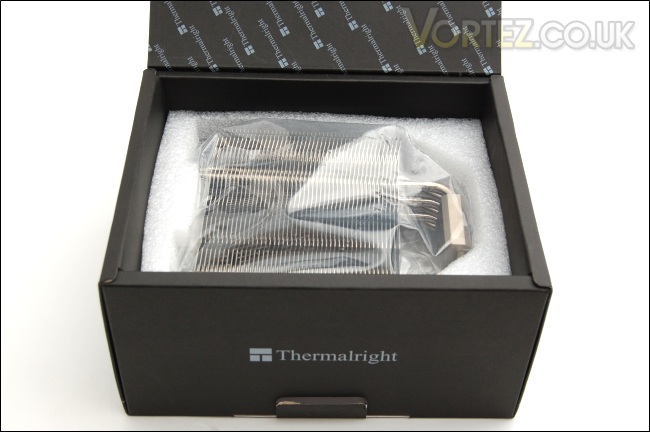
The Venomous X
The cooler is neatly tucked in a foam enclosure and wrapped in a plastic bag. It goes to show that you don’t need big packages to ensure safety in transit.
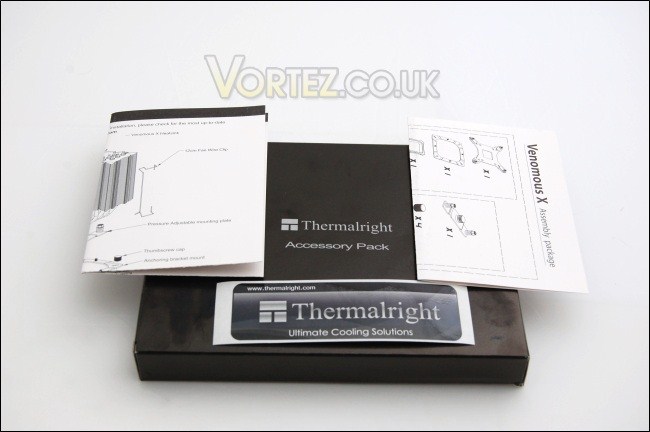
The accessory pack
Along with the accessory pack, Thermalright include a sticker, a contents leaflet and a small installation guide. Installation is a fairly easy and intuitive process anyway, as we will see later on.
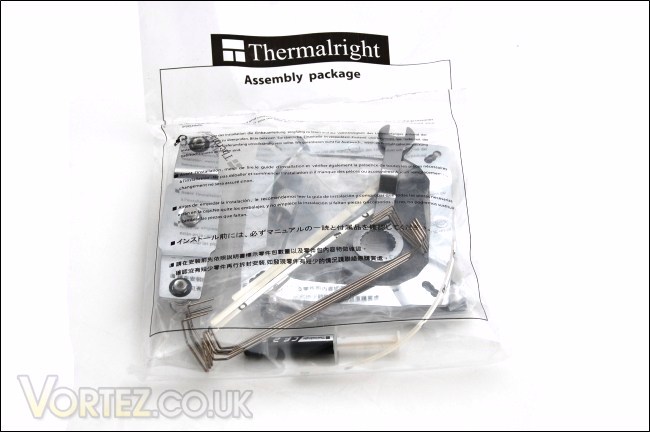
The installation kit
Inside the accessory pack, the installation kit is packaged in a plastic bag that can easily be torn open, rather than requiring sharp weapons…
Closer Look
The heatsink
The Venomous X can only be described by one word, and that’s “Beastly”. It is quite distinctive in design from the Ultra Extreme in that the Venomous X uses a different fin design and the arrangement of the heat pipes is more linear at the top rather than in a circular pattern. As mentioned earlier, it is a few mms narrower than the Thermolab Baram but the extra heat pipe should give it the advantage. The whole heatsink is nickel plated to protect against corrosion, enabling a much longer life span. The construction is a combination of copper for the base and aluminium for the fins, ensuring the best heat conductivity without adding on too much weight. TRUE copper anyone?
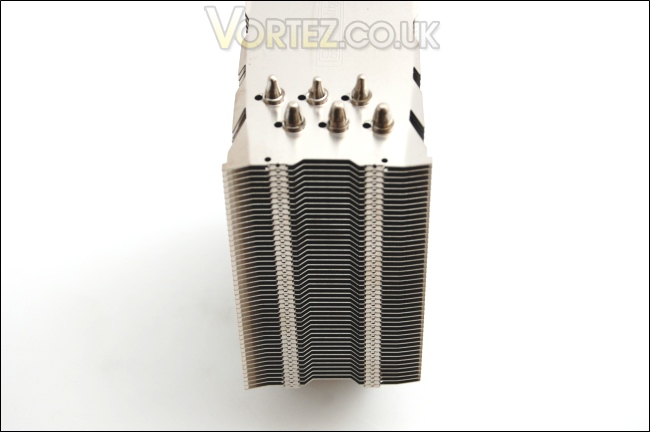
Side view of the heatsink
Looking at the sides, we can get a better idea of its width. Being quite thick, it does mean that there may be issues with RAM in adjacent slots. With two fans attached, I had no issues on an X58 platform but for further information, please check this guide for compatibility. If your RAM doesn’t use large heat spreaders (taller than 43mm), then there should be no problem filling in all the slots without worrying about the size of the heatsink and fan. At the top, there are also two small holes on either side of the heatsink which are where the fan wire clips are installed. This is a better method than needing to place wire clips in notches on the side of the cooler, where they can slip easily. As a result, fan installation is easy and painless.
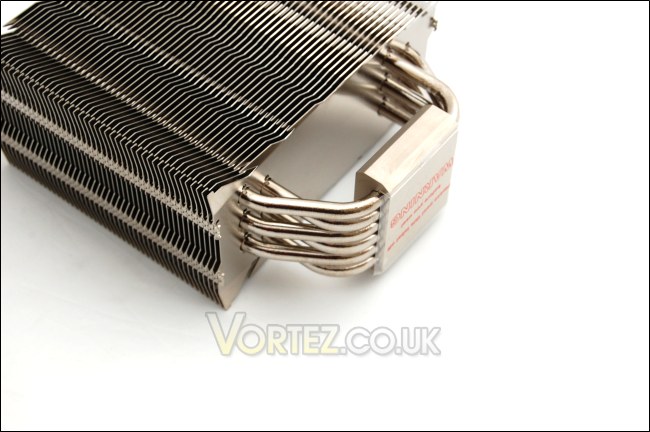
The heat pipes
The Venomous X makes use of 6x6mm heat pipes that all spread out from the base. They are in direct contact with the copper base to ensure that heat is dissipated quickly and effectively. On each side, the heat pipes spread out to form two linear rows.
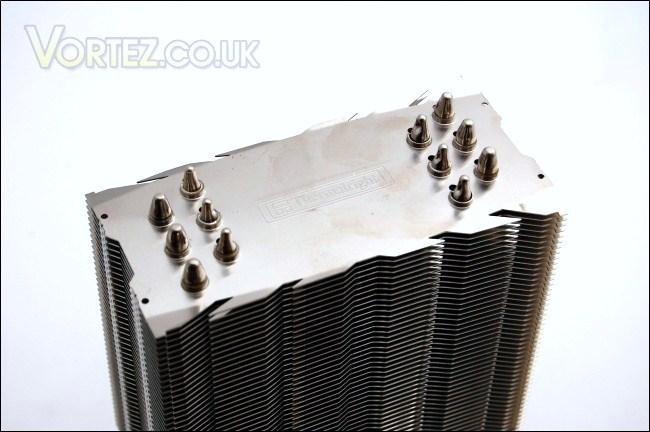
Looking at the top of the heat pipes
At the top, we can see the configurations of the heat pipes. On each side, there are three rounded tops and three slightly grooved ends. The Thermalright brand is engraved at the top for a neat finish. The edges of the fins have a very distinctive blade-like pattern which are bent upwards on one half and downwards on the other half of the face. Thankfully they aren’t sharp enough to hurt anyone.
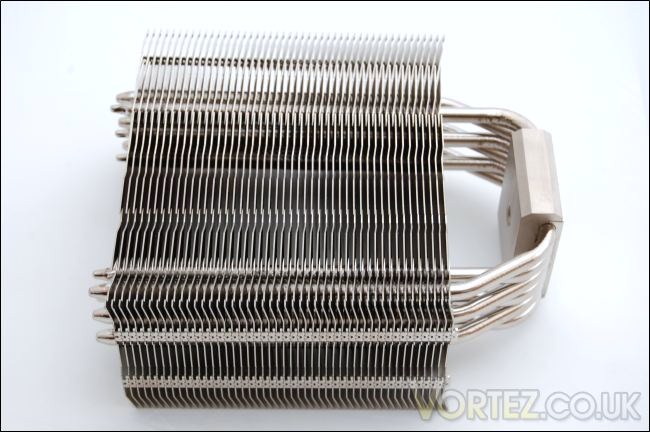
The fin array
A closer look at the fins and we can see that all the plates are angled slightly. On either side of the heatsink face, the fins bend either upwards on downwards as mentioned above. This bent winglet design ensures that hot air gets transported more quickly across the fins to cover a greater surface area per time. The large fins provide a greater surface area for heat dissipation.
Closer Look (Continued)
The base of the heatsink
The base of the heatsink is very smooth and has a fairly large surface area to match the likes of i7 CPUs. The heat pipes are in direct contact with the copper block and this is in turn housed in another outer block.
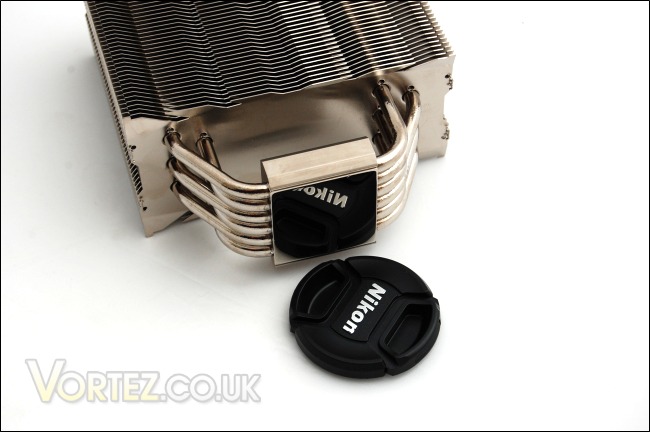
A very attractive mirror finish
Like all Thermalright CPU heatsinks, the base is convex for maximum contact with CPU chips, which never tend to be flat either. It also has perfectly flat and reflective mirror finish so that no air gaps are present once installed. Ensuring maximum contact with the CPU means that heat can dissipate more efficiently through the base to the 6 heat pipes.
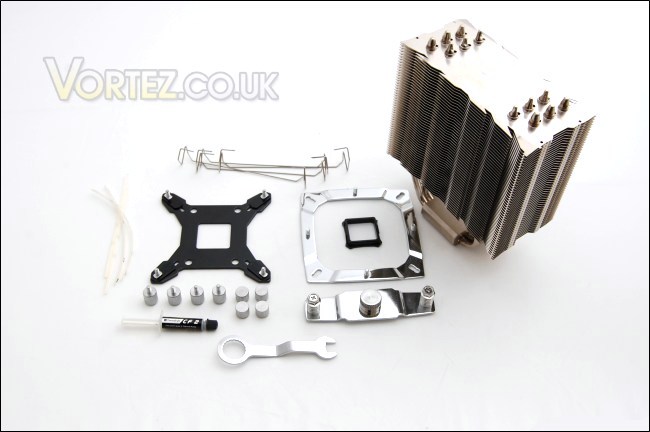
The bundle
The bundle is comprised of the multiple support backplate for LGA775/1156/1366, the anchoring bracket on to which the heatsink is installed with the help of the pressure adjustable mounting plate. There are also 4 screw pillars and thumbscrews for installation and an angled wrench to help the process. The wrench also works in conjunction with the pressure adjustable mounting plate as we will see later on. For LGA775 platforms, there is an extra backplate cap. For fan installation, 2 sets of wire clips are provided so 2 fans can be accommodated for a push/pull setup and finally there is a tube of the Chill Factor 2 thermal paste.
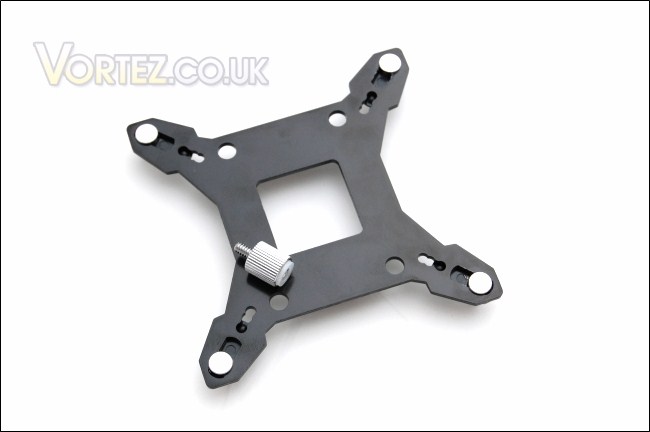
The backplate
The backplate uses a unique system to change its compatibility for different sockets. On each corner are three notches and depending on your motherboard, all that is required is to simply slide the screws into the appropriate notches. The inner notches are for LGA775 motherboards, with the next ones being for LGA1156 and the outer most notches for LGA1366 sockets. Once installed at the back of the motherboard, the screw pillars, shown in the picture above, have to be screwed on the other side.
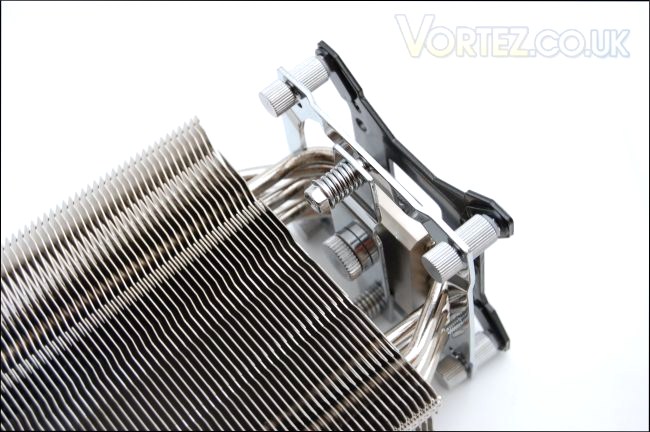
The mounting kit
When fully installed, the Venomous X should be very well secured with adequate pressure on the CPU. More on the installation process later on.
Test Setup
CPU – Intel Core i7 920 – 4.0ghz
RAM – 6GB (3x2GB) OCZ platinum DDR3 1333mhz
Motherboard – Biostar T-Power x58
Graphics card – Gainward Geforce GTX260 216 896MB
Power Supply – Enermax Revolution 85+ 850W
Hard Drive – Samsung F1 320GB
Western Digital Caviar WD3200AAKS 320GB
Drivers – Nvidia Forceware 196.34
CPU Coolers:
Thermalright Venomous X using 2 Noctua NF-P12s and 2 SWiF2-120Ps
Coolink Corator DS including tests with dual fan setups
Tuniq Propeller 120(High speed fan)
Noctua NH-C12P SE14
Prolimatech Megahalem
Noctua NH-D14 (U.L.N.A and default speed)
Noctua NH-U12P SE1366
Thermolab Baram (with 2 Noctua NF-P12 fans)
CoolIT Domino A.L.C
Sunbeam Core Contact Freezer
Coolermaster Hyper 212 Plus including test with 2 Noctua NF-P12 fans
Alpenföhn Nordwand including test with 2 Noctua NF-P12 fans
Tuniq Tower 120 Extreme (Low/med/high speed)
Program Suite:
Core Temp 0.99.5
LinX stress Test
PC Wizard
How I tested:
Testing will be based on temperatures recorded by Coretemp and PC wizard after 20 passes of LinX stress test. The absolute temperatures recorded in the tables are averages of the 4 cores and the delta value provided for a fair comparison, taking into account ambient temperatures. The test will be run at stock speed and at an overclocked speed of 4ghz.
Installation
The installation method is very easy but it’s a shame that the provided bundle only caters to Intel users, especially when other coolers have built in support for all recent sockets from both Intel and AMD. The Ultimate CPU Cooling Solutions! USA can be purchased separately. More information about the installation and the contents can be found on Thermalright’s website for both Intel and AMD setups.Installation
1.
Installation is a very straight forward process. Firstly, set the notch to the appropriate socket type. The inner most notch is for LGA775 sockets and going progressively outwards, there is the LGA1156 notch and then the LGA1366 one. A simple slide is all that’s required.
2.
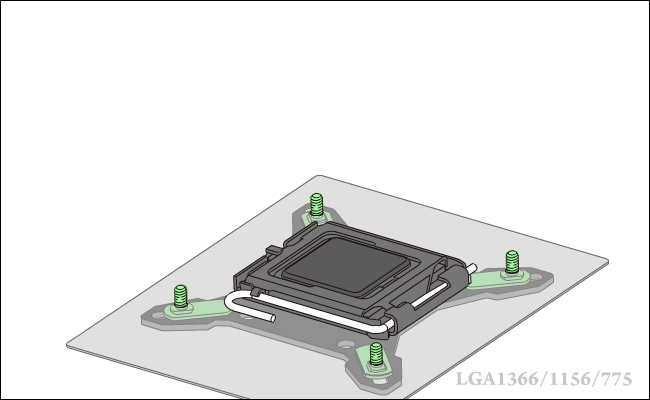
Place the backplate below the motherboard and if you have a LGA775 motherboard, don’t foget to install the backplate cap first.
3.
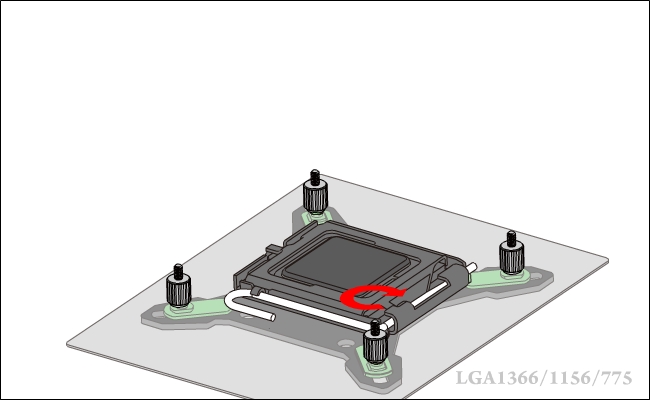
Install the screw pillars so that the backplate is fixed.
4.
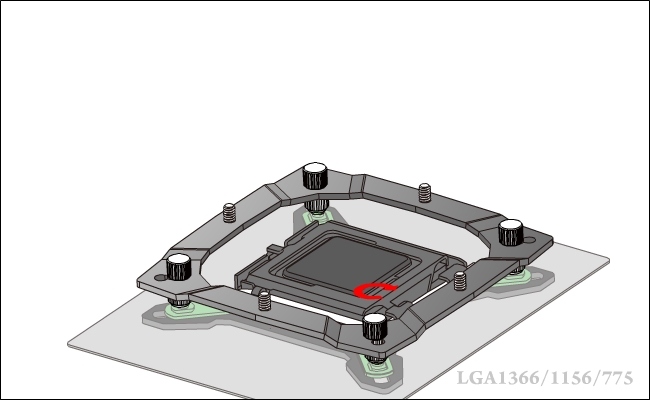
Place the anchoring mounting bracket on top and use the thumbscrews to tighten it down.
5.
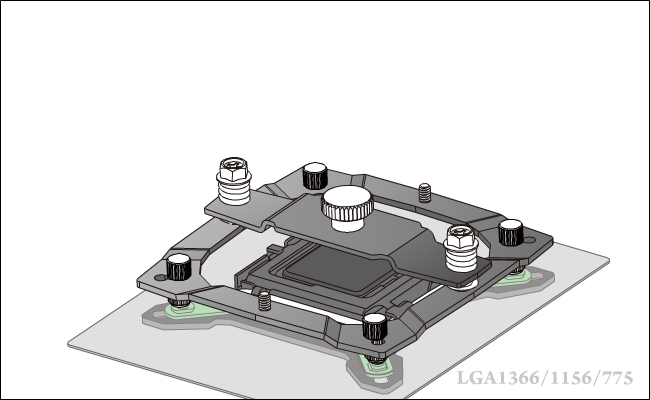
Place the heatsink in the desired orientation and use the pressure adjustable mounting plate to keep it secure. Only tighten the two screws until they naturally stop. The wrench can be used for this process but a screwdriver will work more effectively if you’re installing it inside a case. To tighten the bracket system, you can add pressure through the middle screw. It is set to 40lbs at default but turning it clockwise applies more pressure. This system may prove useful for people who end up lapping the base without needing washers, since the new mounting system can no longer make use of them to fill in gaps.
Results
2.66GHzThe results show the Thermalright Venomous X getting off to a brilliant start. Idle temperatures are outstanding with a mere 11 degrees delta over ambient, only topped by the Noctua NH-D14. Once we get to the load temperatures, it really breaks away from its main competitors such as the Tuniq and the Prolimatech Megahalem. There is a slight improvement when the Venomous X is coupled with some high Coolink RPM fans instead of the Noctua ones. Its biggest achievement is being able to get right on the heels of the Noctua NH-D14, not an easy feat considering the size difference. Its main rivals based on design alone are the Thermolab Baram and the Prolimatech Megahalem, which it managed to beat easily with a similar Noctua push/pull configuration.
Result (Overclocked)
4GHzThe results show us why the Thermalright brand has been so revered over the years, with a cult like following in the enthusiasts’ world. Despite its smaller dimensions, compared to the Noctua NH-D14, the Venomous X manages to break into top of the charts, where we previously had Noctua sitting comfortably. With a 2xNF-P12 configuration, it only lags behind the stock NH-D14 by a mere 2 degrees. Performance increases when the Venomous X is coupled with some higher RPM fans, demonstrating the coolers ability to cope with any fans with its improved fin design. While many believe that some heatsinks are optimised for different fans, Thermalright have created a product that rewards faster rotating fans while still delivering excellent performance with slower fans. So depending on the type of cooler you want, whether it be for sheer performance, or a quieter solution, the Venomous X is flexible enough to allow both. In fact, the Noctua NH-D14 had to be coupled with the faster Coolink SWiF2-120P fans as well to beat the Venomous X, which no one in the right mind would do considering the price of the former cooler and 2 extra fans.
If we now compare it to its closest rival, the Prolimatech Megahalem, we get a better understanding of its advantages over other cooling solutions. The Venomous X holds an impressive 6 degrees lead, reflecting its efficient and well thought out design.
Conclusion
Thermalright had been quiet for a while but their new foray on the expanding CPU cooler market has left us with the fearsome Venomous X. Performance wise, it delivers exactly what we expect from Thermalright. The only cooler that manages to outperform it is the Noctua NH-D14 but once we start considering the size advantage of the Venomous X and its price, the lead Noctua has, can be disregarded in favour for Thermalright\’s offering. The tremendous gap the Venomous X develops over its other competitors definitely warrants its price. Its design is testament to Thermalright\’s attention to detail, from the packaging to the fin arrangement. The mounting system is also an improvement over its predecessors and the adjustable pressure mounting bracket is an innovative way to maximise contact between the heatsink and the CPU.The Venomous X does have one or two minor issues though. While it may seems very reasonably priced, it lacks a fan. The problem is not that it ends up a lot more expensive than its competitors because it doesn\’t. With 2 additional fans, it still outperforms the similarly priced Prolimatech Megahalem and although the Thermolab Baram may be cheaper, the Venomous X has a clear enough lead to justify its price. The problem lies in the fact that the older Ultra Extreme can be purchased for £10-£15 less. Then again, without having one to test, it is hard to compare the new Venomous X with its older brother both price and performance wise. Those with socket 1156 might also have compatibility problems with the cooler if their ram exceed 43mm in height but at least it does not end up covering the majority of the RAM slots like the Noctua NH-D14. So what we have here is an alternative to the Noctua that not only allows you to use any fan you want, but one that does not take up half of your motherboard\’s real estate. Would I recommend one to consumers? Without a shadow of doubt, YES.
Pros
[+]Class leading performance and efficiency
[+]Compatible with all Intel sockets
[+]Very easy to install
[+]Attractive finish
[+]Excellent packaging
Cons
[-]Size may be an issue for tall RAM installation on socket LGA1156
[-]No fans provided
It should come as no surprise that today the Venomous X earns the Vortez Hardware Gold Award today!


