







The new Thermalright HR-02 has been designed for low noise and passive operation so let’s see how it performs.
Product on Review : Thermalright HR-02
Manufacturer and Sponsor : Thermalright
MSRP : Not mentioned on site
Street Price : £52.62
Thermalright have championed the high end CPU cooler market for many years now with products such as the Thermalright Ultra 120 Extreme and more recently, the Thermalright Venomous X. Most recently, Thermalright have expanded their line up with two new coolers that represent evolutions of past successes, the Silver Arrow and the HR-02. A few weeks ago, we had a look at the new Thermalright Silver Arrow, an update on the innovative IFX-14 design the company had previously developed, and we were left impressed by not only its sheer cooling performance but also its ultra quiet operation and low price. The second offering, the HR-02, uses a very different design concept to try and achieve similar results. The cooler itself is the spiritual successor to the HR-01, a cooler revered for its excellent performance at cooling demanding server based CPUs.

Thermalright’s HR-02 aims to bring performance without the inherent drawback of noise. It comes as no surprise that chips nowadays dissipate a lot of heat with Intel’s flagship i7 CPUs sporting a 130W TDP. Furthermore, the growing emphasis on overclocking and subsequently overvolting increases the amount of heat dramatically. Thermalright market the HR-02 as a solution that can tame such power dissipation under passive operation or with low RPM fans. That’s right, passively! Of course, good case airflow is highly recommended but this promise breaks away from the current trend of manufacturers simply bundling their heatsinks with noisy high RPM fans. To meet such a demanding task, the HR-02 exploits many design ideas from the HR-01 such as patented fins with punched holes to increase the surface area, and widely spaced fins for unrestricted airflow. We will look more closely at those over the next few pages.
A few words from Thermalright
Thermalright have certainly started another revolution in CPU cooler performance and from what we’ve seen previously from the Silver Arrow, the HR-02 shouldn’t disappoint.
Features and Specifications
Features
| •Patented multiple support pressure vault bracket system allows users to add pressure to the mounting bracket system (40 -70 lbs), and to have a more efficient and secure mounting. (1366/1156/775). •Fanless design for low-noise operation •Proprietary through holes on fins for efficient ventilation •Heatsink is all nickel plated to ensure the best quality and performance that can last for years. •Soldered heatpipes, copper base and fins, to ensure the best thermal conducting efficiency. •Six sintered heat pipe design that are all nickel plated to slow the oxidation deterioration to the heat pipes, and to ensure longer usage and better heatsink performance. •Includes 120x25mm fan clips & 140x25mm fan clips and Chill factor III thermal paste. •Convex copper base design ensures the highest thermal conducting efficiency between the CPU and the heatsink. |
Specifications
| •Cooler dimensions: 110x 140x160mm (LxWxH) •Cooler weight: 860g (excluding mounting bracket and fan) •Heat pipe: 6mm Sintered Heat pipes x6 units •Cooler base material: C1100 Pure Copper with Nickel plating |
A lot of the features that the HR-02 holds are typical of Thermalright’s design. The use of sintered heat pipes, aluminium fin construction, all copper base and nickel plating can be found across their whole range of heatsinks to increase performance, improve aesthetics and for longevity. The HR-02 has 6x 6mm heat pipes instead of 4x 8mm ones as found on the Silver Arrow so heat transfer from the base to the fins should be fairly similar. The main difference in this case being the method in which the heat is dissipated away from the sinks. The cooler also uses a tower design but its innovation comes from its asymmetrical design to cater for tall RAM heat spreaders, and the proprietary punched holes to increase ventilation efficiency. Size-wise, the 860g behemoth is much deeper than the Venomous X and wider to increase surface area due to fewer fins.
Packaging and Content
The front of the box
Thermalright’s packaging is always very understated and this is no different to the norm. The box is a standard cardboard packaging with a plain brown look and the Thermalright logo printed on the front. There is little other information printed so we can assume that the reason is for cost cutting measures. My only complaint is the lack of a specifications table or feature list for potential buyers, but given that most sales would be online, it is understandable. The box is smaller than the Silver Arrow’s.
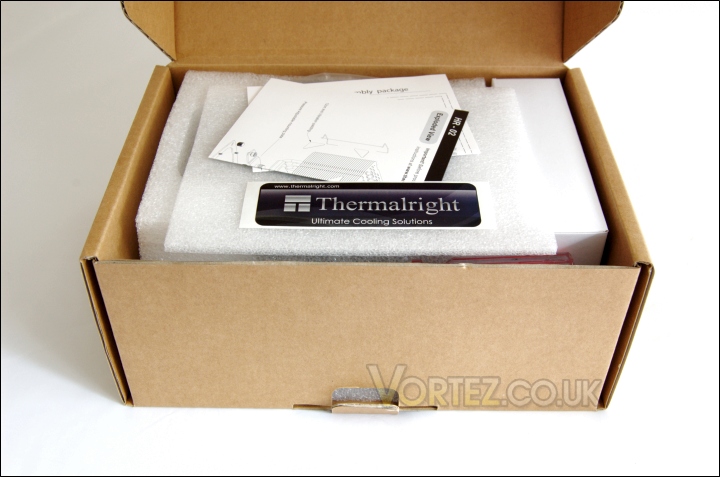
Opening the box
Just like with the Silver Arrow, upon opening the box, we are greeted with a few leaflets detailing the bundled content and installation procedure for Intel systems, and a Thermalright sticker. The top of the cooler is protected by a thin foam patch.
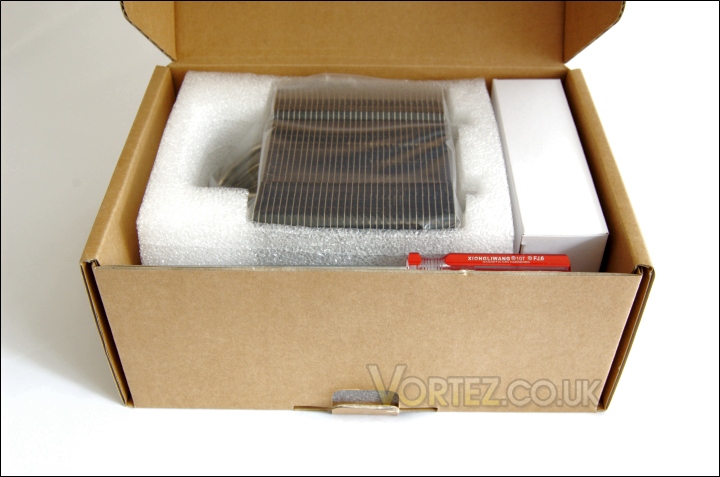
The interior packaging
Inside, the cooler is neatly wrapped in a plastic bag enclosed thickly by foam for extra security during transit. The box containing all the installation kit is situated on the side and at the near side of the box is a free screwdriver to help during installation.
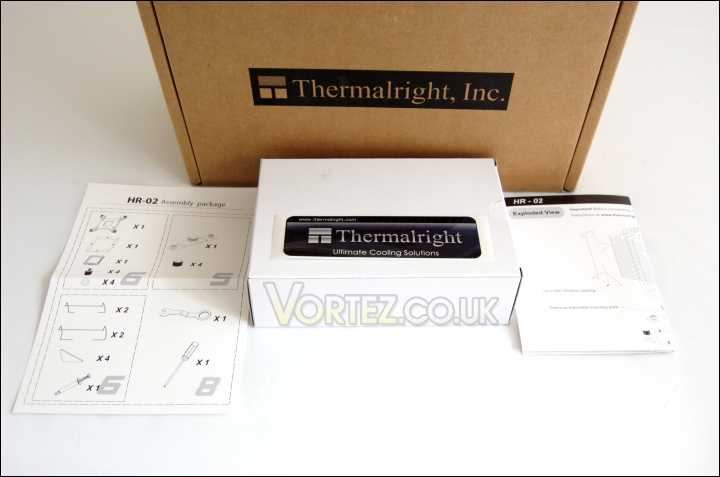
The bundle packaging and documentation
Apart from the cooler itself, the package holds the installation manual and assembly kit list, a white box with the mounting kit and a Thermalright sticker. The installation guide is only for Intel due to the lack of support for AMD without an extra mounting bracket.
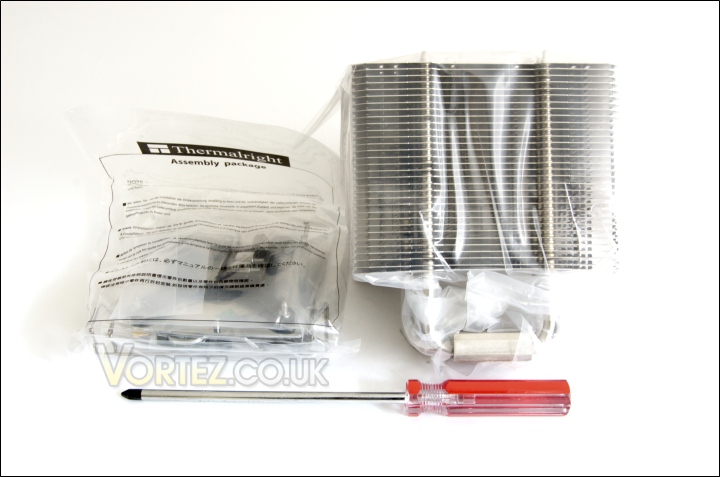
The cooler and bundle
The heatsink is nicely packaged inside a plastic cover for extra protection against damage. The assembly package retains all the installation kit including 4 fan clips, two designed for 120mm fans and another two for 140mm fans. Only 25mm thick fans are supported, not surprising considering the heatsink is designed for low RPM fans. A complimentary screwdriver is also provided due to the unique installation method associated with the heatsink. The screwdriver is constructed by “Xiongliwang” and is advertised with a magnetic tip. It’s effectiveness was questionable throughout my time using it but the screwdriver is a tremendous addition.
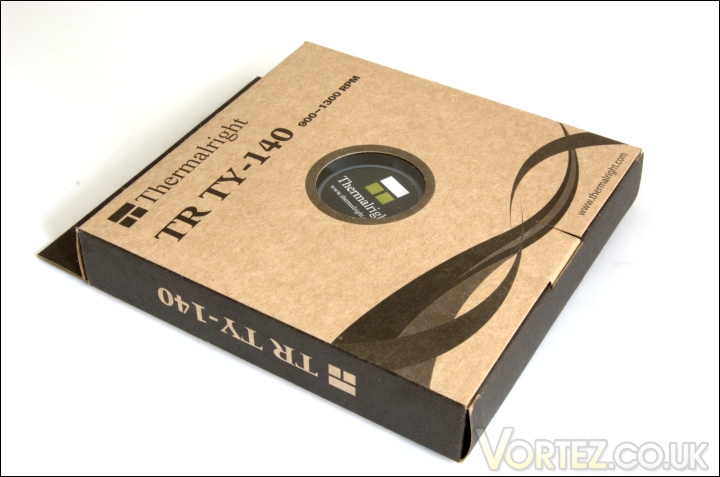
The fan packaging
Unlike the Silver Arrow, the HR-02 isn’t bundled with its own fan but the Thermalright TR TY-140 is highly recommended. The fan comes boxed in a typical brown package and nothing else is bundled with the 140mm PWM fan. At least the back of the box does contain information on its features and specifications. The box itself does appear to be recycled material so it’s good to see Thermalright being environmentally conscious.
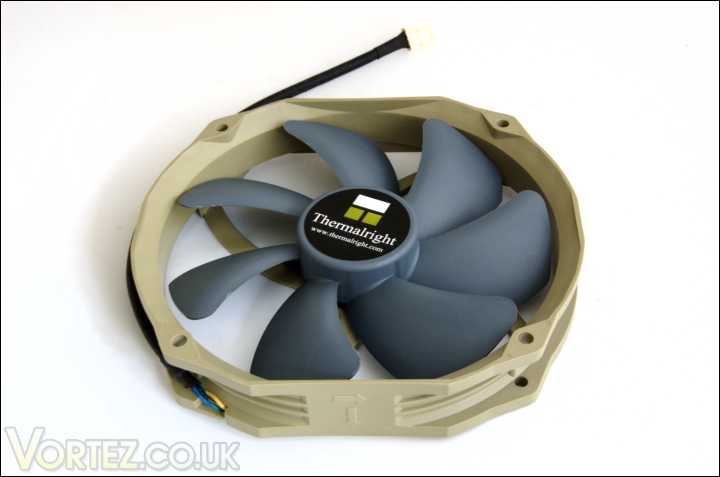
The TR TY-140 fan and specifications
The TR TY-140 is a very unique fan both in form factor and aesthetics. Its military green and blue colour scheme is not something that will appeal to many due to it not matching any other component out there. But for those searching for performance, the fan boasts impressive features and specifications. The design uses an irregular shape that doesn’t adhere to the more common square or circular shapes most fans are regularly found in. Instead it has a 160x140mm dimension whereby two opposite sides are straight and the other two are semi-circular. The fan fittings are the same as 120mm fans to ensure compatibility with other coolers or cases, although the shape has to be taken into account prior to installation. The seven bladed fan uses a propeller design to maximise airflow whilst reducing noise levels. Thanks to PWM functionality, they can operate between 900 and 1300RPM. The braided cable is an excellent finishing touch that adds class to the product. It would have been welcoming to see some brackets for 140mm fan fittings.
| TR TY-140 Fan Specifications •Fan dimension: Length 160x140x26.5mm (LxHxW) •Fan weight: 140g •Fan speed: 900-1300RPM (PWM) •Fan noise level: 19-21dBA •Fan Airflow: 56-73CFM |
Closer Look
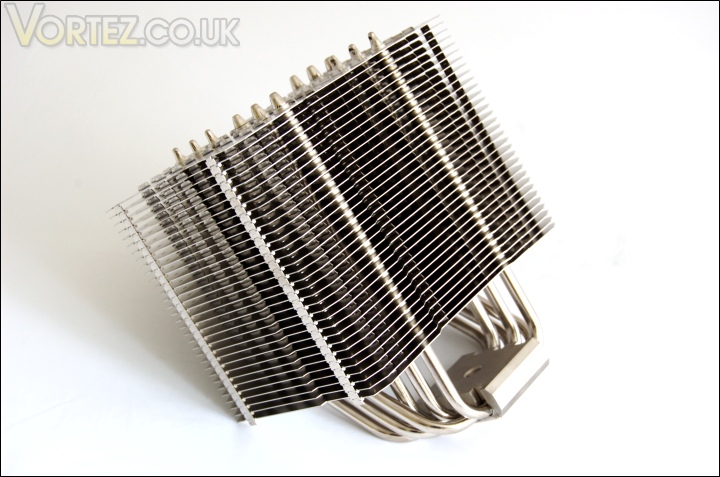
The Thermalright HR-02
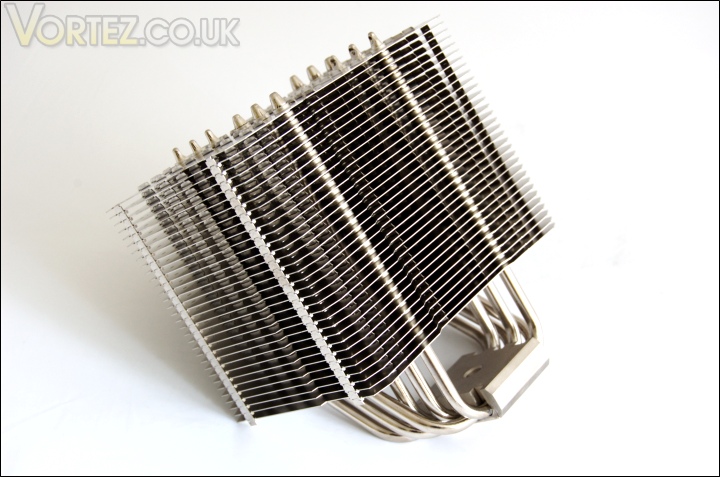
The Thermalright HR-02 has a very striking look. Its nickel plated finish shouts quality to make it an aesthetically pleasing cooler. Thanks to the adequate packaging, there were no bent fins or damage to be found. It’s also clear that Thermalright have gone back to the traditional single tower concept and the HR-02 is fairly sizeable in that respect.
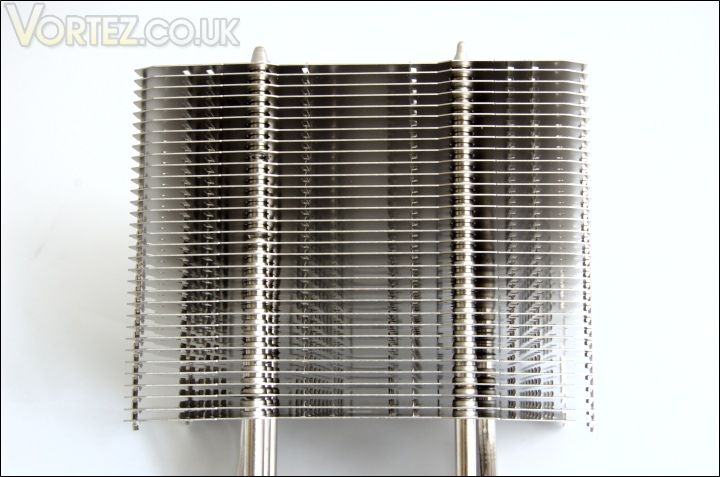
The fin array
The fin array is one of the most distinctive features of the HR-02 for its unique planar shape and punched holes. There are a total of 32 fins spaced approximately 4mm apart to give a total surface area of 492800mm2, slightly less than the Silver Arrow’s. We can immediately see that the less dense spacing allows for better ventilation and the large area maximises contact surface area for more efficient heat dissipation. The various notches that can be seen across each fin are aimed at directing airflow through the heatsink. Because of the fin density, a low RPM fan is more suited to the cooler’s purpose.
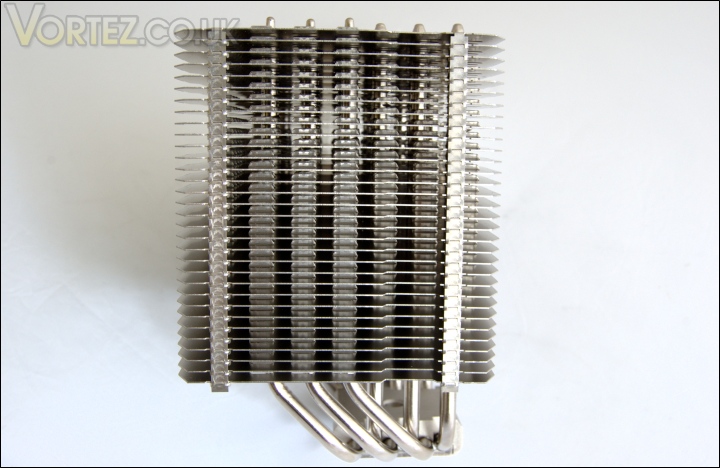
The side profile
The side profile reveals more of the assymmetrical design of the HR-02. The base of the heatsink is situated below the front side of the tower such that when it’s installed on the CPU, there is plenty of clearance between itself and memory modules. The overhanging part faces the back of the case towards the exhaust fan and its proximity ensures that the fan can act as an effective “pull” fan. The design may have issues with motherboards featuring large MOSFET heatsinks but no conflicting problems appeared with the Rampage III Extreme. For a full list of compatible motherboards, check Thermalright’s page.On each side we can also see two narrow columns of closed fin structures which interconnect each plate for support. Between each fin are the punched notches and this time we can see that the orientation helps direct airflow through.
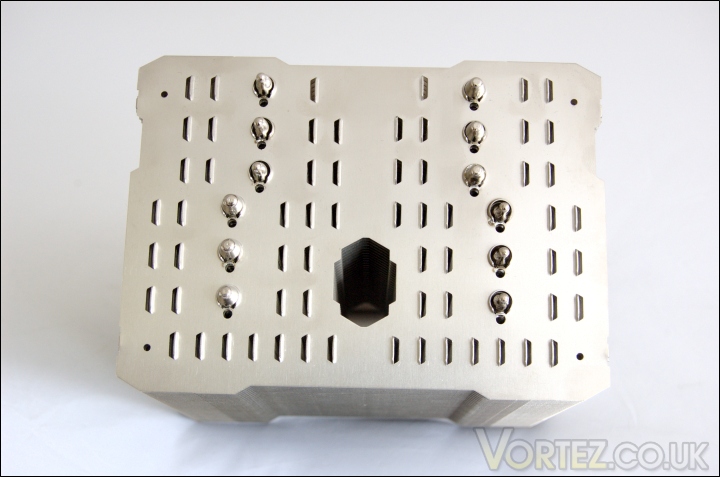
The top of the heatsink
From above, we can see the surface expression of the notches and punched holes. Those are numerous and extend as a strip from the front to the back of the heatsink to improve ventilation. It’s the same concept used on the original HR-01 and unique to Thermalright. The four holes in each corner are for a total of 4 fan clips to be installed meaning that 2 fans can be placed onto the heatsink for a “push-pull” configuration. Thermalright claim that this should allow the HR-02 to perform as well as the Venomous X which is a strong claim based on the latter’s remarkable performance.
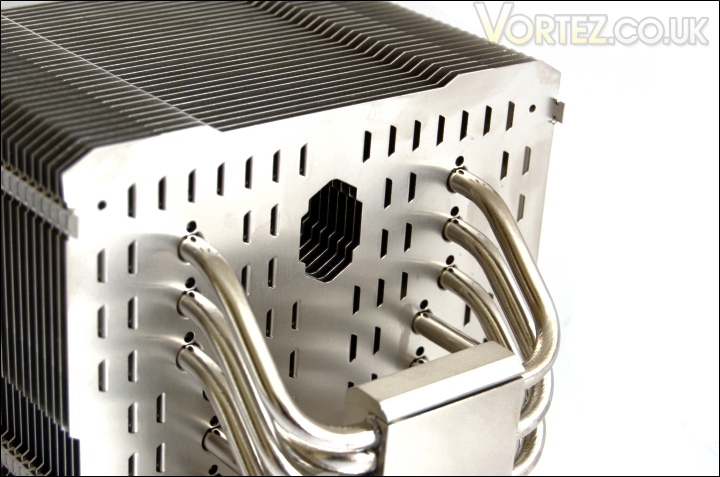
The bottom of the heatsink
And from beneath, the same holes can be seen. The pattern is repeated on all the fins and it’s all clear that the holes have been punched upwards hence the notches.
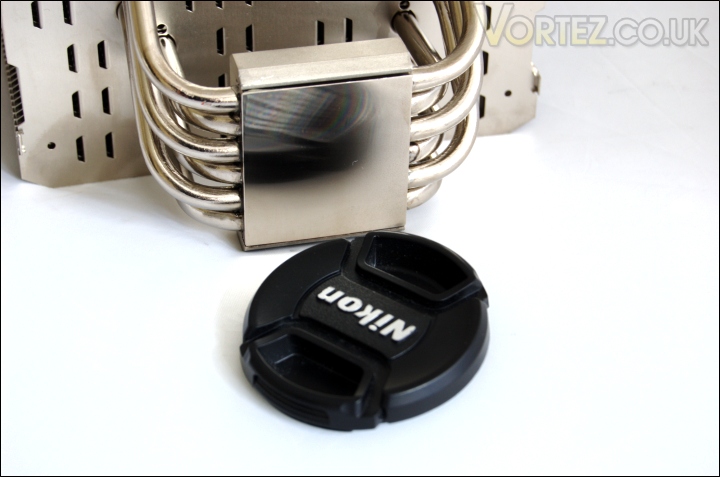
The base of the heatsink
Moving on to the base, the HR-02 has a copper one that is fairly flat and smooth but lacks a perfect mirror finish like the Venomous X had. In true Thermalright fashion, the base is slightly convex to match the shape of CPU integrated heat spreaders. After installing the cooler, I noticed that it did an excellent job of spreading the thermal paste evenly by simply applying pressure on top of a rice size amount of compound. There are no doubt some will claim this statement to be false but the above test demonstrates perfectly how effective the convex shape is.
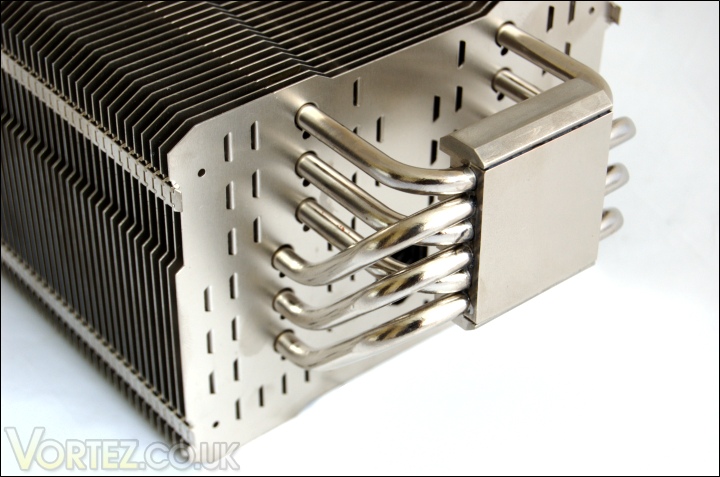
The 6 sintered 6mm heat pipes
The HR-02 has six 6mm thick sintered U-shaped heat pipes. They all connect to the base where a copper plate is in direct contact with the CPU for excellent heat transfer. The heat pipes spread out in two groups of three albeit in an alternative pattern. Three of the heat pipes spread further outwards into the heatsink and towards the back so that heat carried by them can be dissipated over a greater surface area.
Closer Look (Continued)
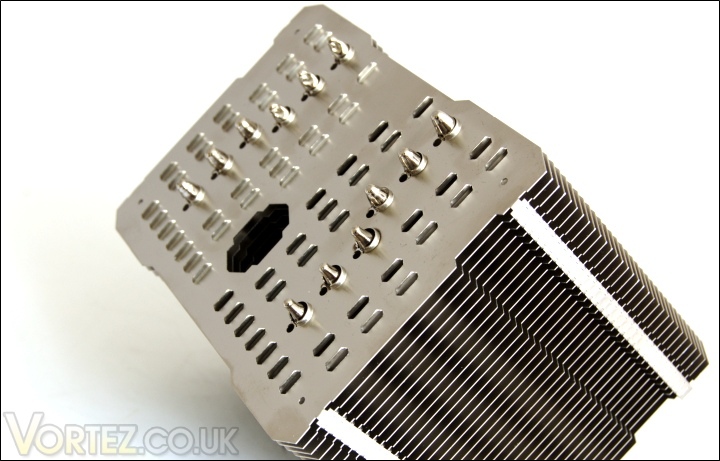
The top of the heat pipes
The top of the heat pipes lack the capped ends found on the Silver Arrow and instead they have the more common rounded/grooved ends. The large hole in the centre is to aid in installation which we will cover down the page.
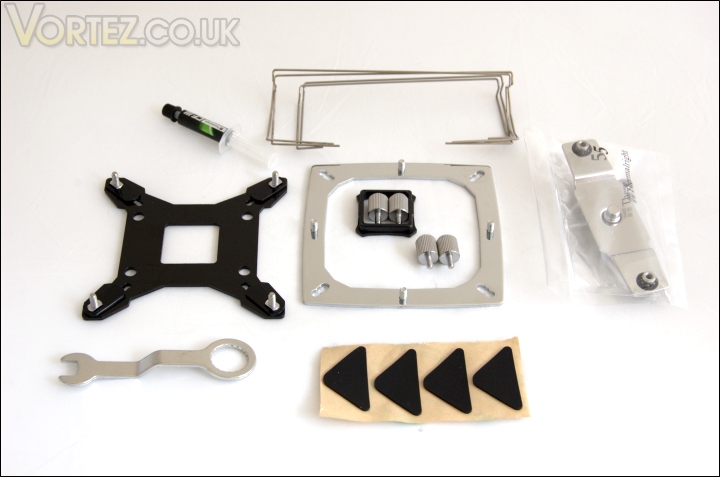
The installation kit
The heatsink is currently only compatible on Intel socket LGA 775/1156/1366 so the installation kit is limited compared to that of the Silver Arrow. Included are the.
– multiple support backplate for Intel (Intel)
– anchoring mount (Intel)
– fan clips x4 (2x 120mm & 2x 140mm)
– pressure vault mounting plate (Intel)
– Insulated washers x4 (Intel)
– backplate cap for Socket 775 (Intel)
– screw pillars x4 (Intel)
– thumbscrews x4 (Intel)
– anti vibration padding x4
– angled wrench
– Thermalright Chill Factor III Thermal paste
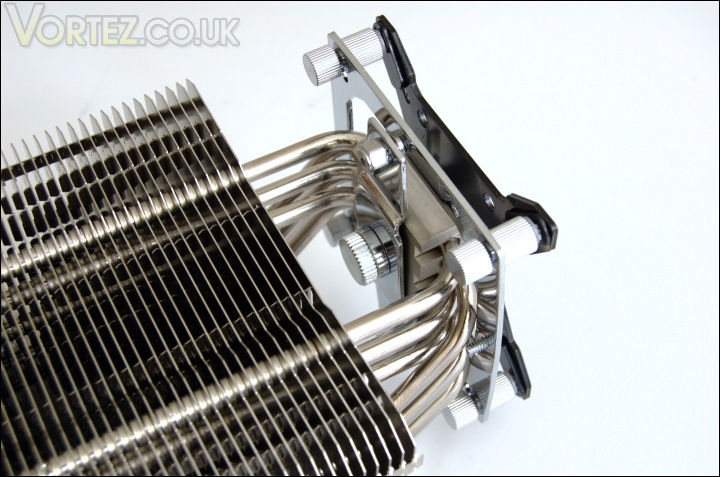
The mounting brackets installed
Installation of the HR-02 is a very simple task and the mounting bracket is amongst the most secure out there. Thermalright uses a unique backplate system that is universal for all the latest Intel sockets (LGA775/1156/1366). To change compatibility, the notches in each corner have to slide into the appropriate hole, the outer one being for LGA 1366 and the most inner one for LGA 775. Once placed behind the motherboard, the pillar screws have to be placed on top to secure the backplate and theanchoring mount on top of that. Using the pressure vault mounting, the heatsink can then be finally installed. For more information on the installation, visit Thermalright’s page or our own illustrated page. Note that AMD compatibility will be coming soon.
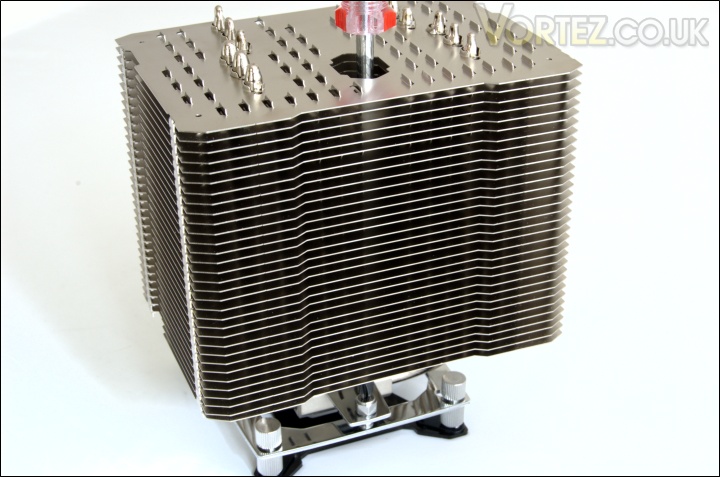
Using the screwdriver
The screwdriver is to ease installation since one of the pressure vault bracket screws cannot be accessed by hand. It also becomes clear why the large hole is present in the heatsink. The main problem with this method is that it can be hard to judge where the screwdriver ends up so make sure to carry out the installation in a well lit area.
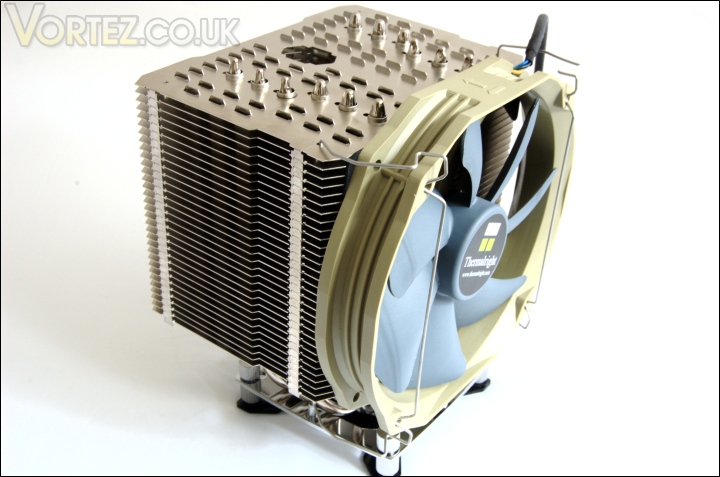
The TR TY-140 fan installed
And with the fan installed, the HR-02 looks massive. here, the Silver Arrow fan clips were used rather than the ones bundled with the HR-02. The provided fan clips also do a good job but tend to be more fiddly to use. Often the ends going into the heatsink holes would pop out when trying to clip the fan into place. It would have been better to see Thermalright bundling the Silver Arrow fan clips instead as those work with both 120 and 140mm fans.
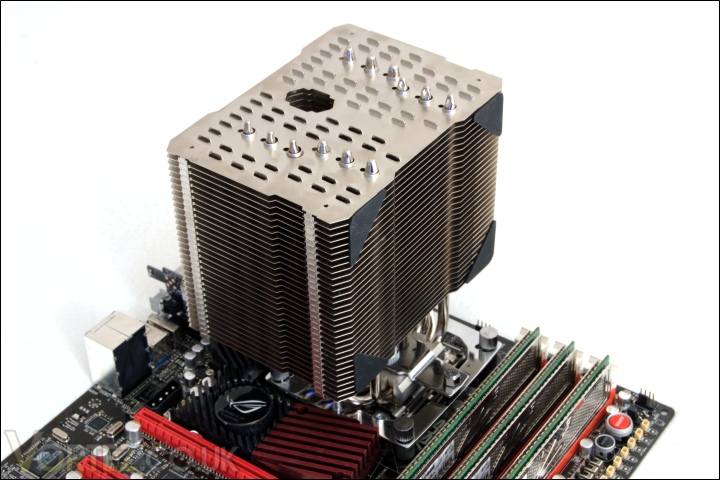
Installed passively on the motherboard
When installed on the motherboard, there is plenty of space between the heatsink and the memory modules so users shouldn’t have to worry about the size of their memory heat spreaders. It’s important that the cooler is oriented in this way to compliment the case airflow and for the rear end to be closer to the back exhaust fan.
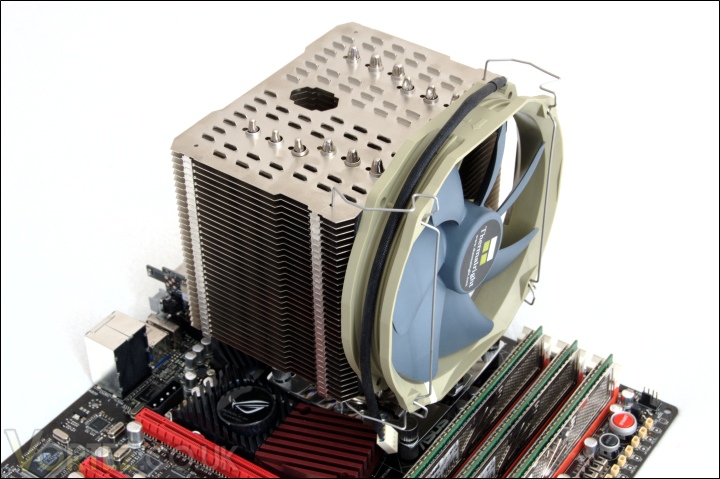
Installed with the fan on the motherboard
Even with a fan installed, there is space between the cooler and the RAM section of the motherboard. The size of the heatsink can cause it to come into conflict with the motherboard’s chipset cooling so check the compatibility guide before purchasing.
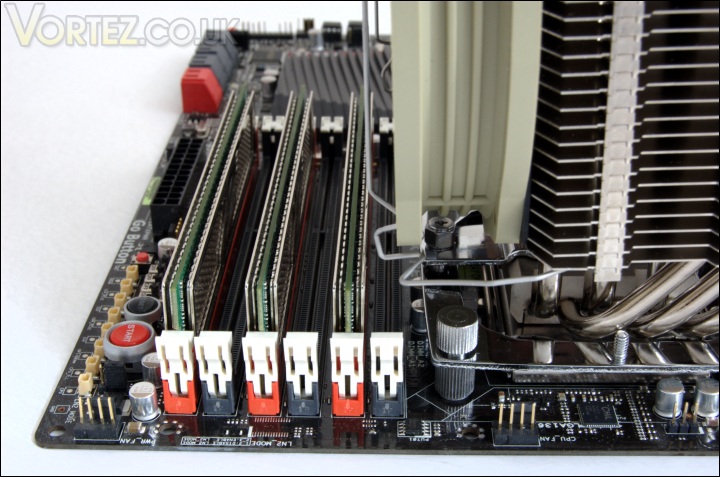
Memory compatibility
Looking closer, it becomes apparent that all six slots can be populated with modules without any problem. However, the closest slot to the heatsink may not be able to house modules with tall heatsinks due to the fan clip getting in the way.
Comparison Shots
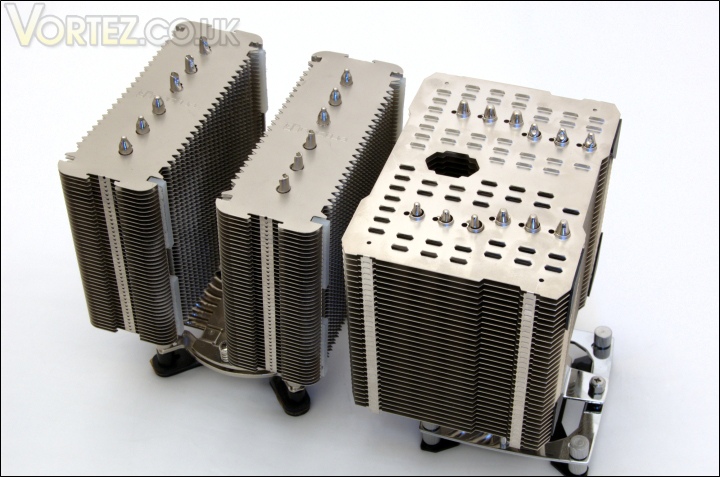
Noctua NH-D14 VS Thermalright HR-02
The HR-02 and the Noctua NH-D14 are both the same width at 140mm.

Thermalright Silver Arrow VS Noctua NH-D14 VS Thermalright HR-02
In terms of depth, the two towers of the NH-D14 equates to the thickness of the HR-02. The main advantage of the single tower design is more clearance for memory modules but it is yet to be seen if performance will be the same.

Installed inside a case
All the tests conducted at Vortez are done inside a case to simulate real world conditions so this is how the HR-02 would look in a typical mid-tower system.
Test Setup
CPU – Intel Core i7 920 – 2.66/4.0GHz
RAM – 6GB (3x2GB) OCZ platinum DDR3 1333MHz
Motherboard – ASUS Rampage III Extreme
Graphics card – XFX HD5870 1024MB
Power Supply – Enermax Revolution 85+ 850W
Hard Drive – Samsung F1 320GB
Western Digital Caviar WD3200AAKS 320GB
Drivers – ATI Catalyst 10.5
CPU Coolers:
Thermalright HR-02 including passive and tests using Noctua NF-12/NF-P14s and Thermalright TR TY-140
Thermalright Silver Arrow including passive and tests using 2 Noctua NF-P12s and 2 SWiF2-120Ps
Thermaltake Frio (Low/med/high speed) including tests using 2 Noctua NF-P12s
Corsair H50 including tests using 2 Noctua NF-P12s and 2 SWiF2-120Ps
CoolIT ECO A.L.C including tests using 2 Noctua NF-P12s and 2 SWiF2-120Ps
Thermalright Venomous X using 2 Noctua NF-P12s and 2 SWiF2-120Ps
Coolink Corator DS including tests with dual fan setups
Tuniq Propeller 120(High speed fan)
Noctua NH-C12P SE14
Prolimatech Megahalem
Noctua NH-D14 (U.L.N.A and default speed)
Noctua NH-U12P SE1366
Thermolab Baram (with 2 Noctua NF-P12 fans)
CoolIT Domino A.L.C
Sunbeam Core Contact Freezer
Coolermaster Hyper 212 Plus including test with 2 Noctua NF-P12 fans
Alpenföhn Nordwand including test with 2 Noctua NF-P12 fans
Tuniq Tower 120 Extreme (Low/med/high speed)
Program Suite:
Core Temp 0.99.5
LinX stress Test
PC Wizard
CPUID HWMonitor
How I tested:
Testing will be based on temperatures recorded by Coretemp and PC wizard after 20 passes of LinX stress test. The absolute temperatures recorded in the tables are averages of the 4 cores and the delta value provided for a fair comparison, taking into account ambient temperatures. The test will be run at stock speed and at an overclocked speed of 4GHz.
Results
Stock
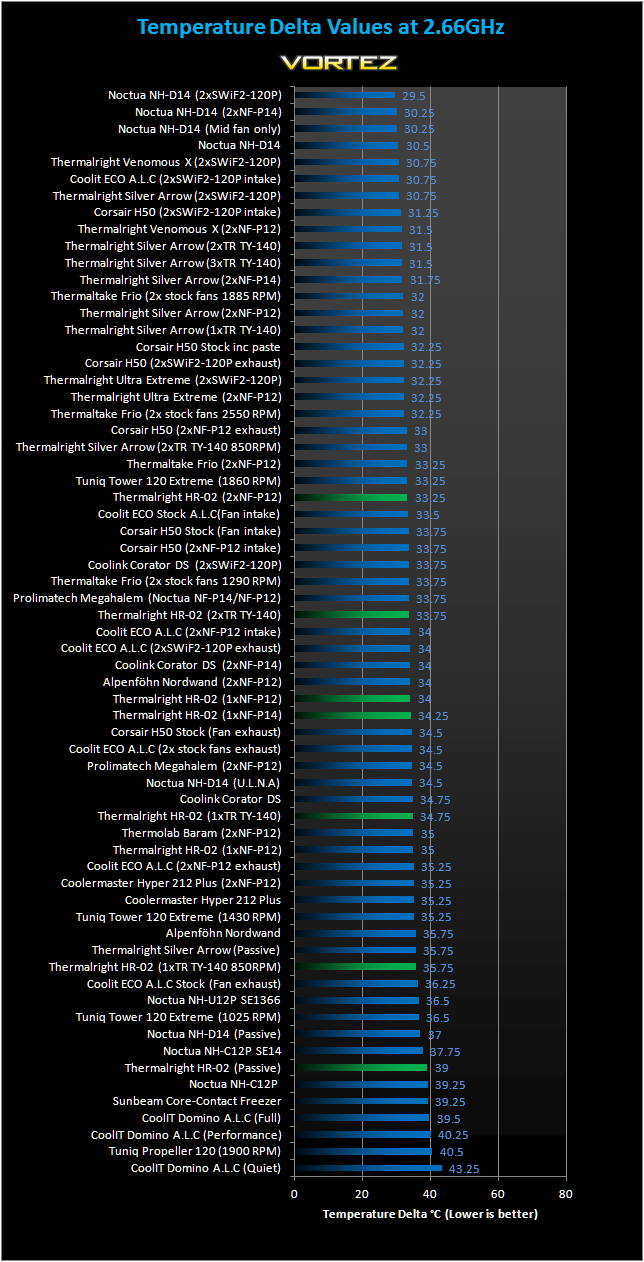
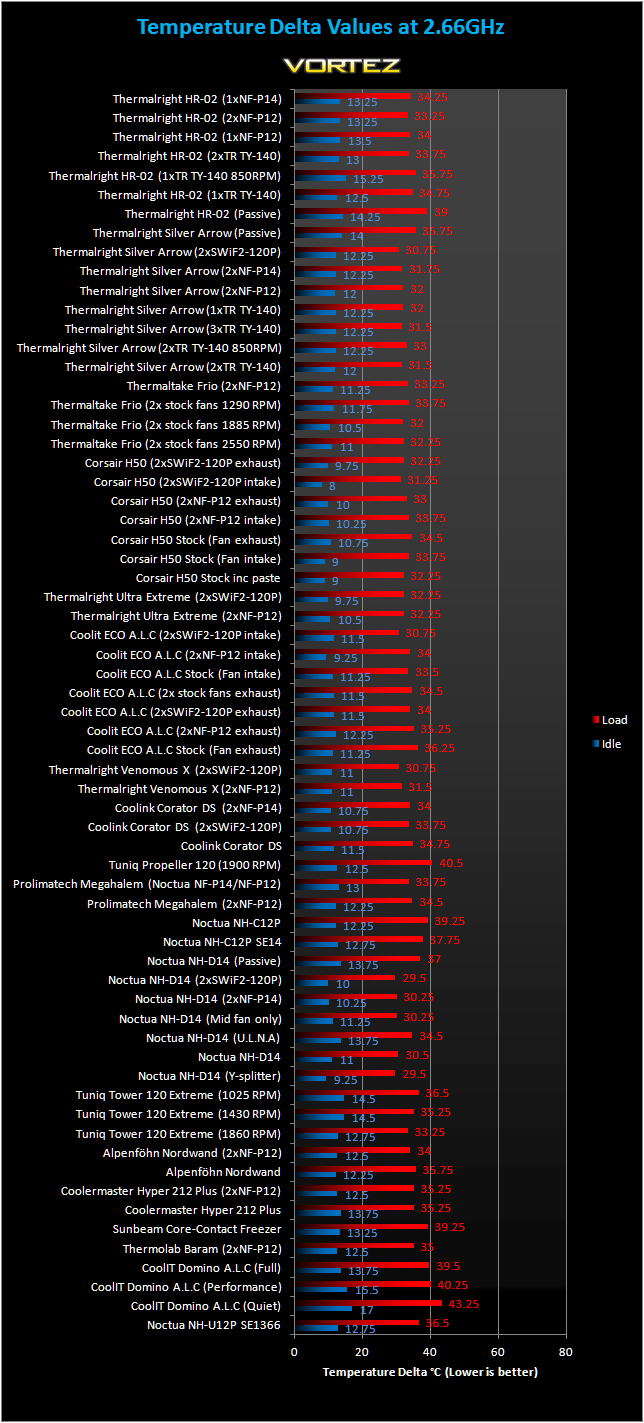
Raw result with idle and load delta temperatures
First off, we will look at the stock speed results. The HR-02 doesn’t get off to a bad start. Passively, it copes with the i7 very well yielding better results than the Noctua NH-C12P and CoolIT Domino, impressive feats considering its silent operation. With the fan installed and running at 850RPM, the HR-02 competes with the likes of the Alpenföhn Nordwand and even creeps ahead of the Noctua NH-U12P SE1366, which uses two fans! This goes to show how CPU coolers have come a long way over the past year. Using more brute cooling force, performance gets even better. With a single TR TY140 at full speed, it tops our old favourite, the Thermolab Baram and it even jumps ahead of the CoolIT ECO in a dual fan configuration. Changing to a Noctua NF-14 fan yields a 0.5C drop in temperatures and another 0.25C with the faster NF-12. The performance is on par with the CoolIT ECO running two SWiF2-120P fans without the compromise of noise. It certainly impresses on that front. Using two fans improves performance further, allowing the HR-02 to outperform many high end coolers such as the Corsair H50 and the Prolimatech Megahalem.
Despite that, the Thermalright HR-02 fails to break into the top end cooler category which is populated by other Thermalright heatsinks, the Thermaltake Frio and the Noctua NH-D14. Coupled with two Noctua NF-P12 fans, it doesn’t manage to match up with Venomous X as originally claimed by them. Instead it lags behind by 1.75C. Idle temperatures are also quite high on the HR-02. No tests were conducted using the Coolink SWiF2-120P fans due to the nature of the high RPM fan not fitting the purpose of the heatsink. Let’s see how it fares with an overclocked i7.
Results (Overclocked)
4GHz
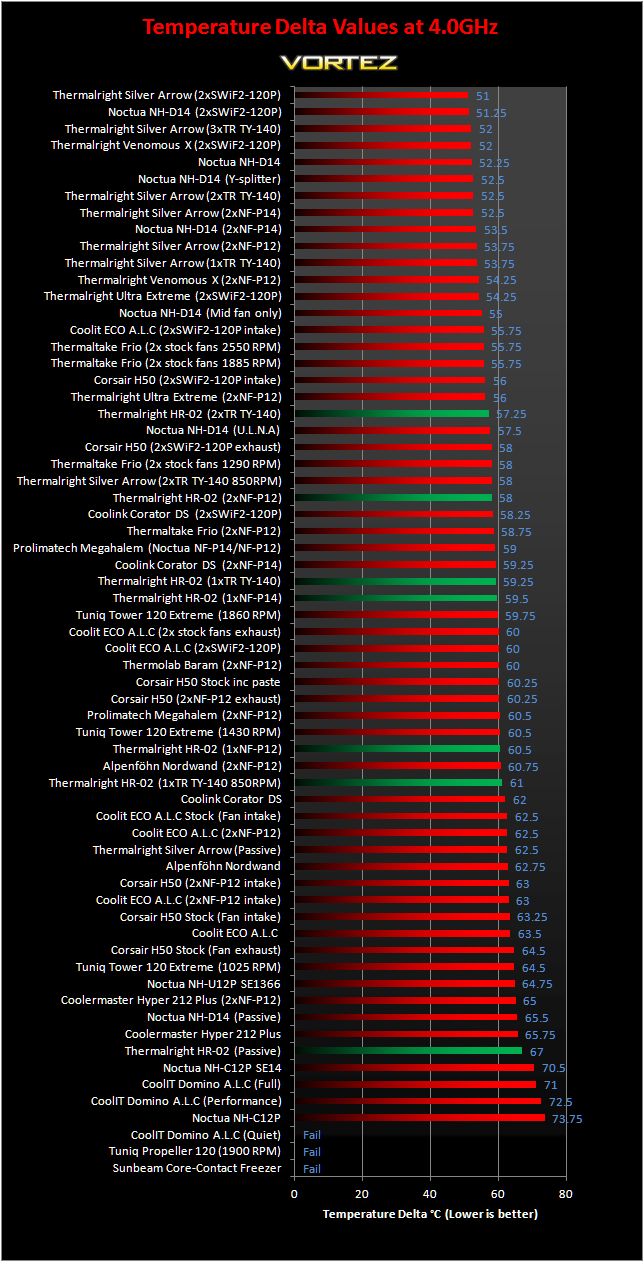
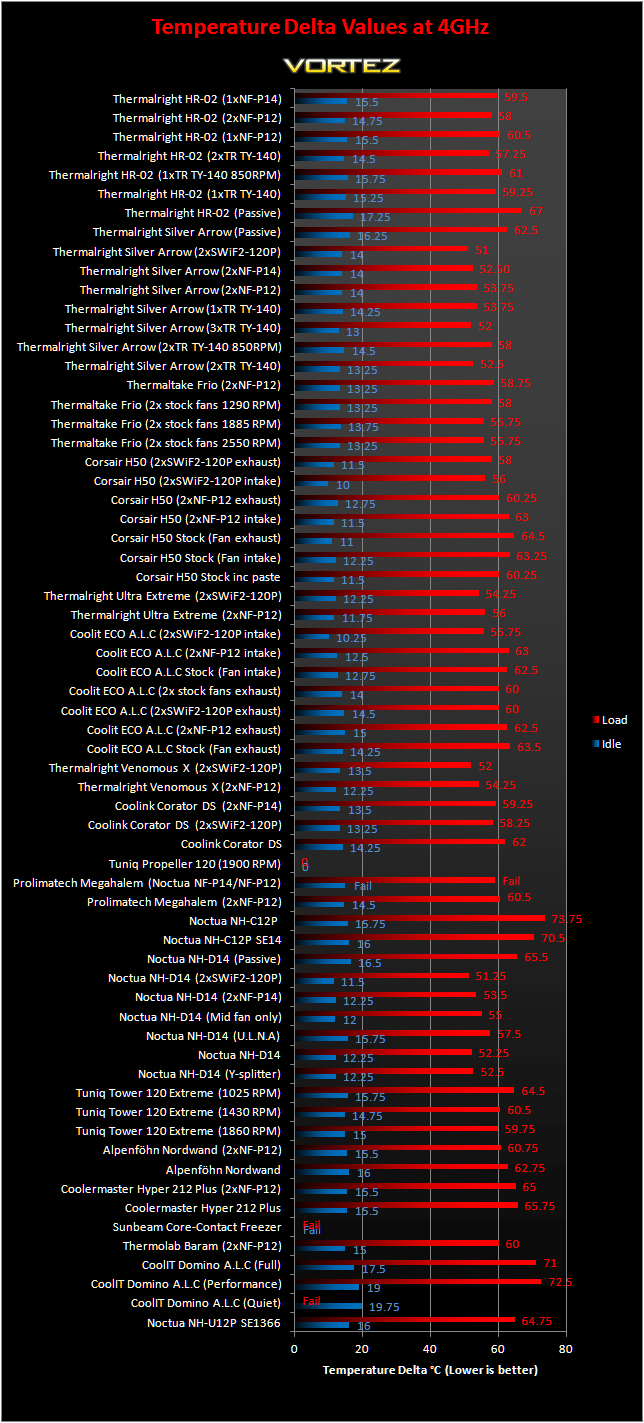
Raw result with idle and load delta temperatures
Dealing with an overclocked i7 is certainly a challenging prospect for many coolers and doing so passively is unimaginable, but Thermalright are adamant that it is possible. The results here show that they were right. Passively, the HR-02 pulls ahead of the Noctua NH-C12P SE14 by a 3.5C margin! It fails to match other tower heatsinks but for a passive cooler, it’s a very impressive result. Adding a fan improves performance significantly. Even with a low RPM TR TY-140 attached, it outperforms many top end air coolers from last year such as the Noctua NH-U12P, Corsair H50 in its many low RPM configuration and the Coolink Corator DS. The best performing HR-02 setup is with two TR TY-140 fans attached. In that situation, it outperforms the likes of the Prolimatech Megahalem and falls just short of the all liquid coolers with two high RPM SWiF2-120P fans. Unfortunately, this wasn’t enough for it meet the standards set by the Silver Arrow, Venomous X and Noctua NH-D14.
Fan comparison
A number of fans were used on the HR-02 from Noctua and Thermalright themselves. Comparing Thermalright’s TR TY-140 to Noctua’s NF-P14, the former takes a slight lead of 0.25C. Both perform very similarly despite the TR TY-140 being marginally faster at maximum speed. Both fans were also very quiet during operation. The NF-P12 fell behind by around 1C, demonstrating the benefits of 140mm fans nowadays. Similarly, two TR TY-140 outperformed two NF-P12s by a marginal 0.75C.
HR-02 VS Venomous X
Based on internal tests, Thermalright claim that the HR-02 can match the performance of their Venomous X with a low RPM fan installed. Unfortunately, we no longer had the Venomous X to test so for a fair comparison of heatsink efficiency, we can look at both using two NF-P12 fans. The result is that the Venomous X leads by 3.75C. On the same note, only the Ultra Extreme 120, Venomous X, Silver Arrow and Noctua NH-D14 can beat the HR-02 on efficiency.
Other Observations
Thermal paste comparison
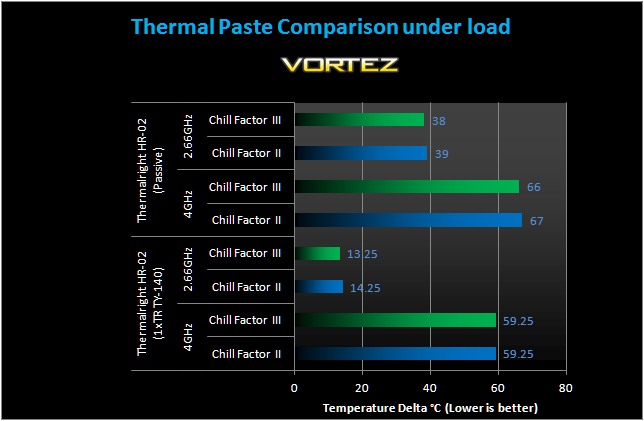
All the tests on the previous page were done using Thermalright’s Chillfactor II thermal paste for consistency and to give a better idea of actual heatsink efficiency. Since the HR-02 is bundled with Thermalright’s latest iteration of the thermal paste, I thought it would be a good idea to see how it compares, should it give the heatsink a greater advantage over its competition. The Chillfactor III thermal paste performs 1C better in almost all scenarios.
Passive Result – 2.66GHz
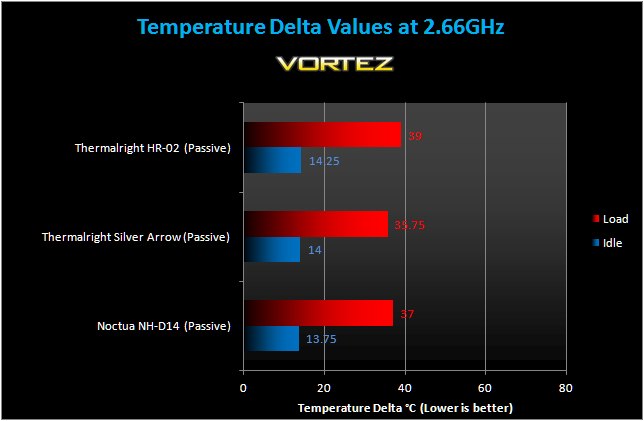
Passively, it’s disappointing that the HR-02 didn’t perform as well as the Noctua NH-D14 or the Thermalright Silver Arrow. Nonetheless, it coped with the i7 sufficiently that no instability was found after prolonged stress tests and gaming. One thing we have to note is that the Noctua comes with inferior thermal paste and the HR-02 was only tested using Chillfactor II thermal paste, so straight out of the box the HR-02 has the potential to perform better. As we saw at the top, the Chillfactor III thermal paste shaves off 1C.
Passive Result – 4GHz
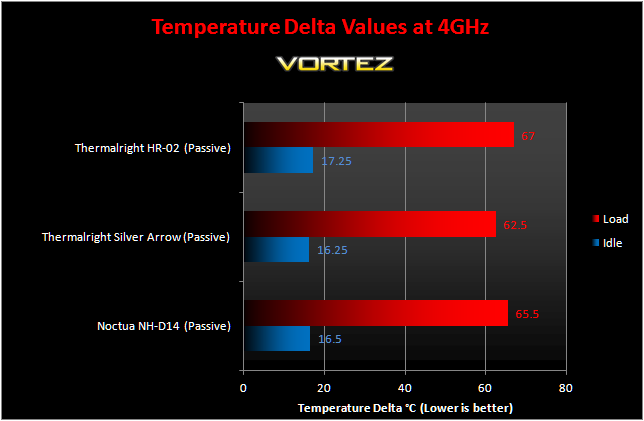
The story is very much the same at 4GHz. The HR-02 does a terrific job keeping the i7 cool but fails to match up to the Noctua and more so the Silver Arrow. The test highlights the effectiveness of the Silver Arrow as a passive cooler despite not being designed to do so. Again, I have to iterate that out of the box, the HR-02 will perform better than the Noctua thanks to superior thermal paste. Note that a good airflow was required during the test and limiting this caused the temperatures to rise beyond acceptable levels (up to 100C in absolute values).
Noise
The HR-02 doesn’t come with any fans bundled and was designed to run passively so as you can imagine, it was silent. Their recommended fan is the Thermalright TR TY-140 at low RPM. The fan remained very quiet at low speeds and even at its maximum 1300RPM, it was inaudible over the case fans.
Conclusion
Normally when manufacturers send me their latest coolers, I get a sense of excitement that exceeds that of a new graphics card and motherboard. And when the said companies are Noctua or Thermalright, I know to expect a new leader on our charts. The NH-D14 and the Silver Arrow demonstrated that point clearly. With the HR-02, I knew that it couldn’t deliver the same promise seeing as how it was aimed for low noise or even passive operation. After all, if it had been the new champion, it would have made the Silver Arrow somewhat useless. Consequently, my expectations were different and I was unsure as to where it would slot in amongst the vast selection of coolers I had tested. Thermalright themselves were comparing it to the Venomous X and based on our own review, the HR-02 undoubtedly had a tough task at hand!

In short, it failed to meet those particular claims. That doesn’t mean that I wasn’t impressed with the heatsink because it beat most of the competition. The Thermalright HR-02 is an excellent passive cooler, both at stock speed and under an overclocked environment. Its design not only helps the aesthetics but every small touch caters towards better performance, whether it be the punched holes and notches, or the widely spaced fins to help ventilation. The asymmetrical shape also solves the growing issue of memory compatibility with ever bigger heatsinks. Ultra low noise performance was also very good with the TR TY-140 attached and running at 850RPM. In fact, it was comparable to many other solutions using two fans or high RPM ones such as the Coolink Corator DS or the stock all liquid cooling units. It is definitely a cooler worthy of the high end status.
Its main downfall comes twofold. Firstly it was outclassed by the other Thermalright coolers and Noctua NH-D14 by a large margin when concentrating solely of heatsink efficiency and when looking at the passive results, the Silver Arrow somehow ended up being the better alternative. Secondly is its price. At around £55, it is slightly more expensive than the Silver Arrow or Venomous X and yet lacks a fan.
On the whole the HR-02 is a unique cooler that will definitely appeal to people for its design features.
+ Good performance
+ Memory compatibility
+ Very easy to install
+ Attractive finish
+ Excellent packaging
+ Bundled Thermalright Chill Factor III
-No AMD support (although support is coming soon)
-Doesn’t compete with top coolers
-Price
The Thermalright HR-02 deserves the Vortez Silver Award.
