







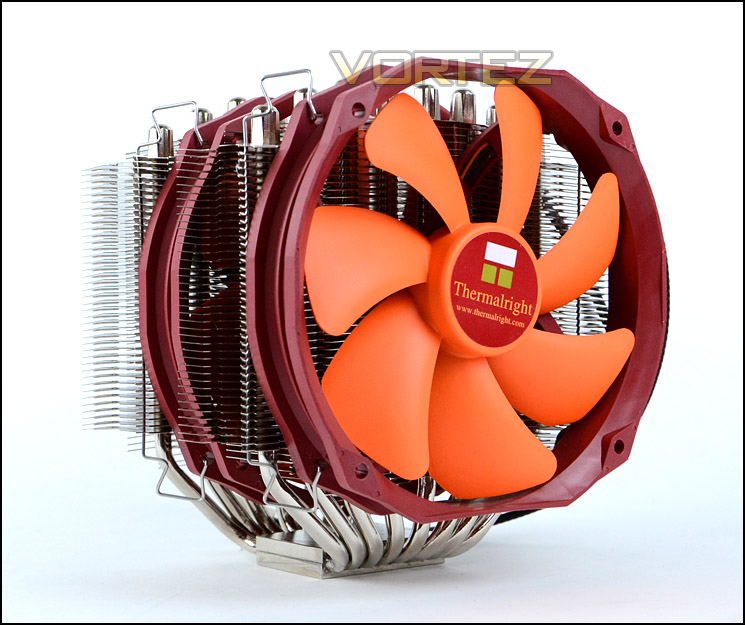
Thermalright are back with their SilverArrow SB-E Extreme CPU Cooler – featuring eight heatpipes and dual TY-143 cooling fans.
Product on Review : SilverArrow SB-E Extreme

Manufacturer and Sponsor : Thermalright
Street Price: £50
Thermalright’s Silver Arrow was originally the arch rival to Noctua’s NH-D14 for a considerable time until other brands brought to the table their own idea of how a dual-radiator CPU cooler should be. It’s safe to say that between SilverArrow and D14 there was very little by way of performance yet the question of ‘which is the best?’ still poses on many a computer hardware forum. Off the back of Silver Arrow’s success Thermalright are back with what they hope will be a step-up from the original cooler, offering even better thermal performance.
Today we will be taking a look at Thermalright’s Silver Arrow SB-E Extreme. As its name implies, this cooler is designed to tackle the might of Intel’s high-end platform – Sandy Bridge-E and LGA2011. Furthermore this cooler is the Extreme version of Silver Arrow SB-E, the significant difference being the inclusion of TY-143s – dual 140mm PWM fans capable of a staggering 2500RPM.
The original Silver Arrow impressed us and has left behind a legacy; can SB-E Extreme improve on an already excellent product? Let’s find out!
About Thermalright
Thermalright is an elite design house that manufactures cooling products for computer components for the best quality and performance your money can buy. In 2002, AMD released its first generation Thunderbird CPU and since then we have been there every step of the way to counter high voltage and high heat with innovative design and highly acclaimed cooling solutions not only for AMD but for Intel as well. One of early well known solutions was the SK-6. With many positive and rave reviews under its belt Thermalright bolted to the top as the heat sink manufacturer mostly preferred by Overclockers and enthusiasts around the World. To this day, innovation never left our vocabulary as we keep coming up with leading edge designs staying ahead of the competition
Technical Specifications
Cooler Dimension
Without Fans:Length 155mm x 105mm x 165mm (L x W x H)
With Fans: 155mm x 130mm x 165mm (L x W x H)
Cooler weight
1114g (including two fans, without mounting brackets)
Heat-pipe
6mm Sintered Heat-pipe*8 units
Cooler Base Material
C1100 Pure Copper with Nickel Plating.
Fan Specifications
TY-143 Length 151mm x Width 26.5mm x Height 141mm
TY-143 Fan Speed: 600~2500 RPM (PWM)
TY-143 Fan noise level: 21~45dBA
Fan Airflow: 31-130CFM
Supported Sockets
Socket 2011/1366/1155/1156/775 Platform, and AM2/AM2+/AM3/AM3+/FM1
Without Fans:Length 155mm x 105mm x 165mm (L x W x H)
With Fans: 155mm x 130mm x 165mm (L x W x H)
Cooler weight
1114g (including two fans, without mounting brackets)
Heat-pipe
6mm Sintered Heat-pipe*8 units
Cooler Base Material
C1100 Pure Copper with Nickel Plating.
Fan Specifications
TY-143 Length 151mm x Width 26.5mm x Height 141mm
TY-143 Fan Speed: 600~2500 RPM (PWM)
TY-143 Fan noise level: 21~45dBA
Fan Airflow: 31-130CFM
Supported Sockets
Socket 2011/1366/1155/1156/775 Platform, and AM2/AM2+/AM3/AM3+/FM1
Packaging, Bundle & Fans
Thermalright have two versions of Silver Arrow SB-E. Extreme and Non-Extreme. The difference between these models are simply the cooling fans included, the Non-Extreme comes with TY-140s whilst the Extreme comes with TY-143s. At time of shipping Thermalright only had SB-E in stock but they also had some standalone TY-143s in stock too so the product we are reviewing is realistically Silver Arrow SB-E Extreme.
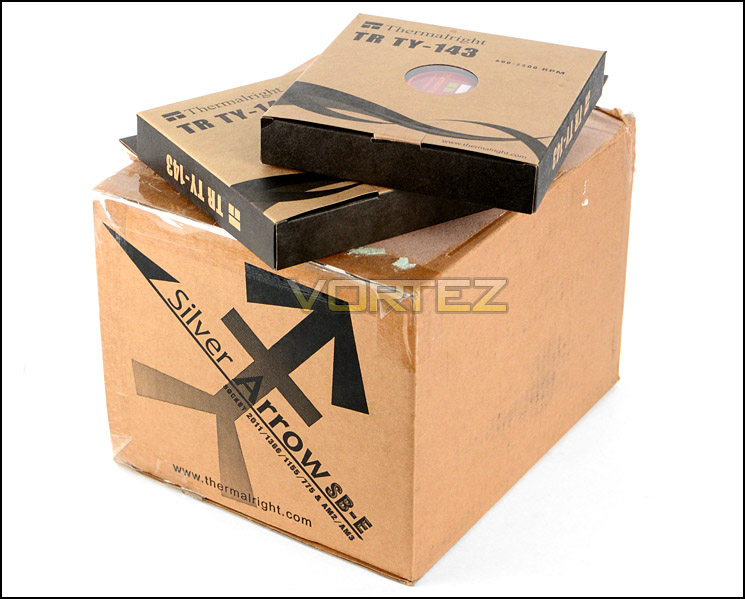
Silver Arrow SB-E Extreme arrives in a nondescript, eco-friendly box. There are some details on the packaging but there are no illustrations of what might be inside.
Inside, the heatsink and parts are protected with foam padding to ensure the package arrives at its destination safely.
Packaging for Silver Arrow SB-E Extreme
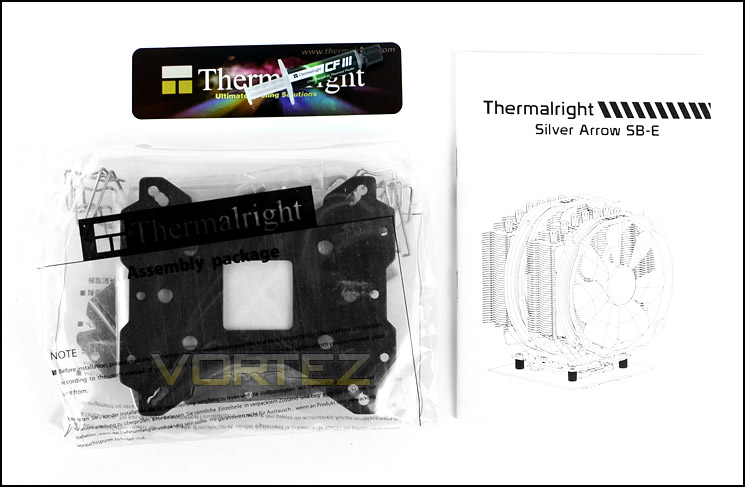
Although its name suggests exclusivity to LGA2011 the SB-E Extreme has support for a range of different sockets including: Socket 2011/1366/1155/1156/775 Platform, and AM2/AM2+/AM3/AM3+/FM1. Additional to the mounting kit, Thermalright also include an instructions manual, sticker and tube of CF3 thermal paste.
Bundle – with mounting kit, manual, sticker and CF3
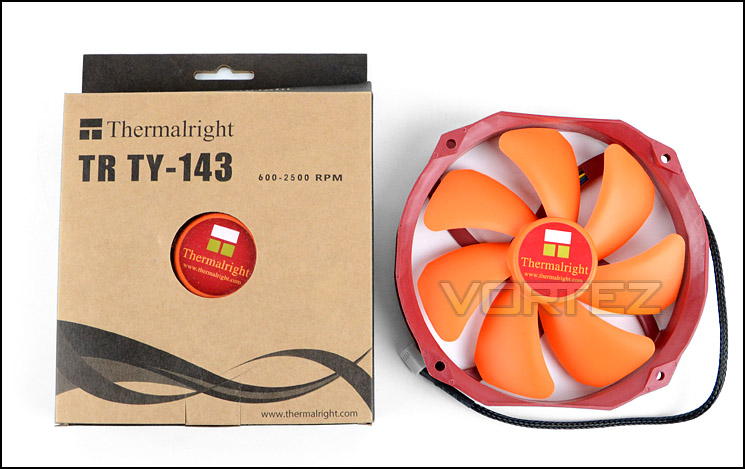
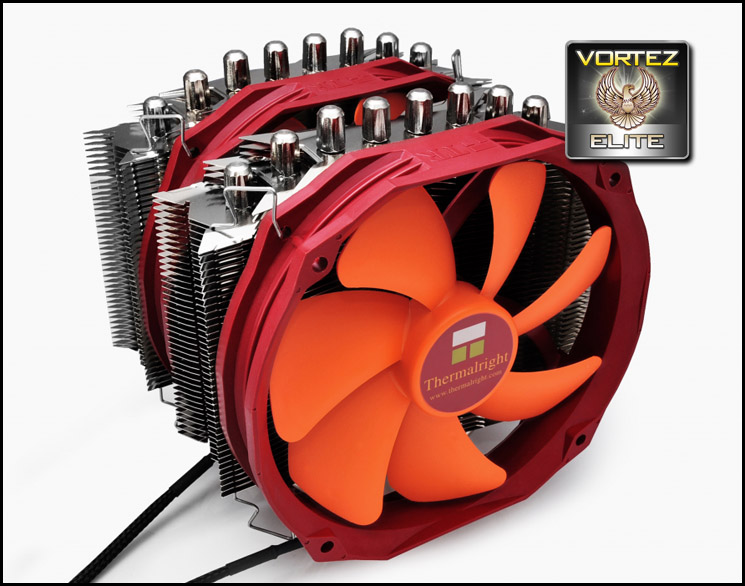
Silver Arrow SB-E Extreme comes with 2x TY-143 fans which are Thermalright’s premium PWM cooling fans. These fans are capable of 600-2500RPM – 21-45dBA and feature a 7-blade design. Some have the opinion that TY-140 is quite a dull and putrid looking fan but the total opposite can be said of TY-143, this fan is vibrant, striking and very eye-catching. The outer frame is crimson red whilst the blades are luminous orange.
Dual TY143s
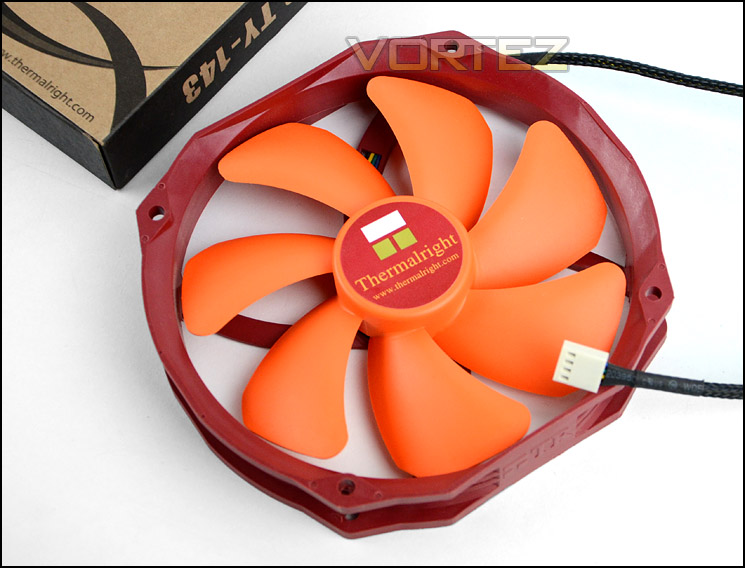
7 blade design capable of up to 2500RPM
Closer Look
Silver Arrow SB-E Extreme is gargantuan even without its cooling fans. Casting a first look over the heatsink reveals a cooler unlike any seen before. It features a stacked double-fin design. The fins follow an arrow design which in turn allows cool air to pass through the heatsink and draw heat away from the unit effectively.
Silver Arrow SB-E Extreme has the ability to accommodate 140/150mm cooling fans and there are enough fan clips to fit three such cooling fans.
Below you can see the profile of the fins and how they stack next to one another.
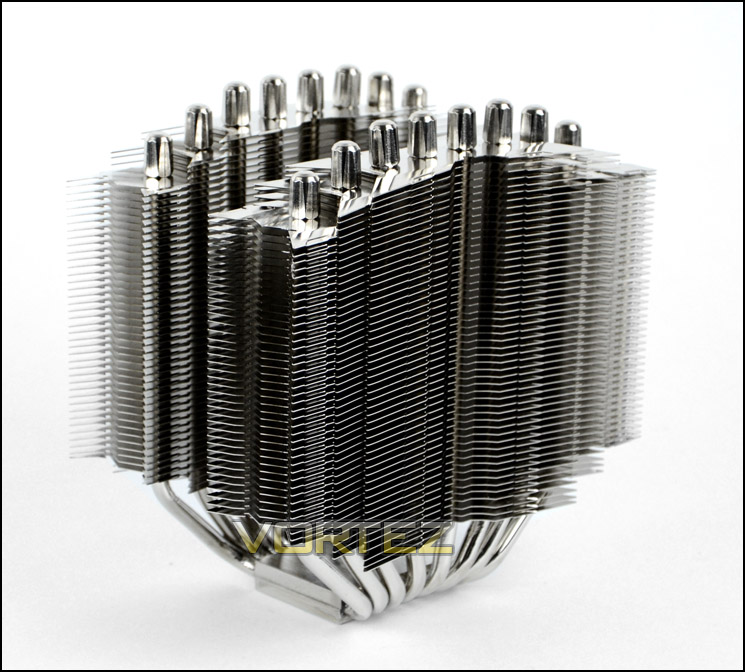
An overview of Silver Arrow SB-E Extreme heatsink
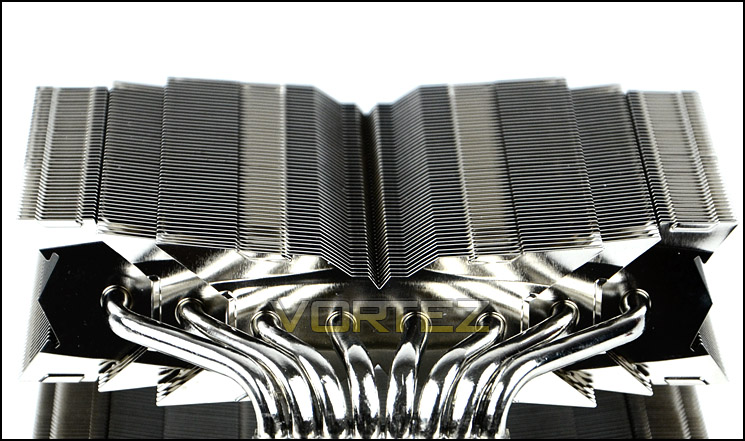
Profile of arrow fins
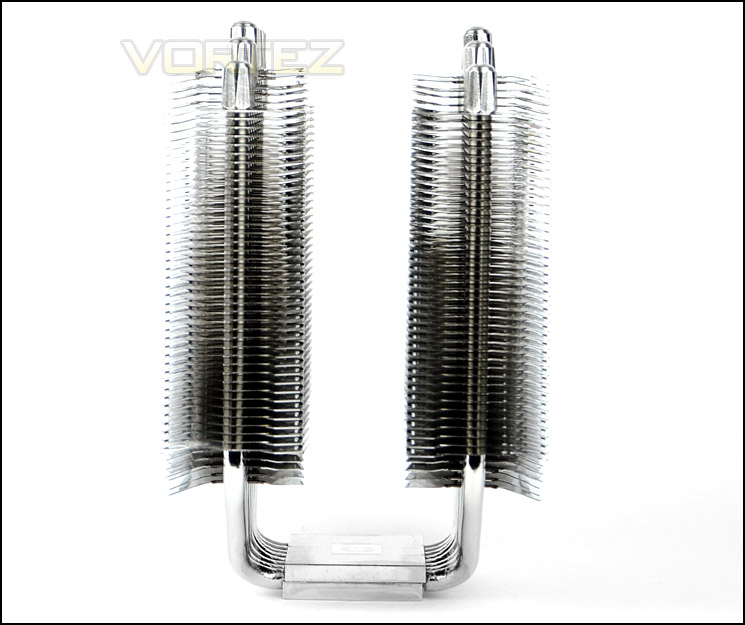
A side view of the heatsink
In keeping with other high-end CPU coolers the Silver Arrow SB-E Extreme uses 8 x heatpipes. These 8x heatpipes are 6mm thick and are nickel plated.
At the top of the heatsink these heatpipes have thick metal caps which finish the product off very nicely – something which was present on the original Silver Arrow too.
The baseplate on the heatink is pure copper with nickel plating. The top is completely flat with a dull finish whilst the underside which comes into direct contact with the CPU has a mirror-finish and reflects anything in front of it.
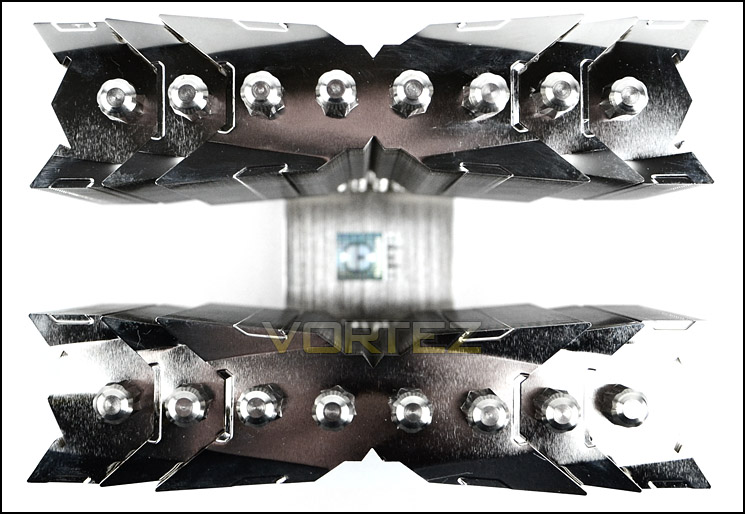
An aerial view of Silver Arrow SB-E Extreme
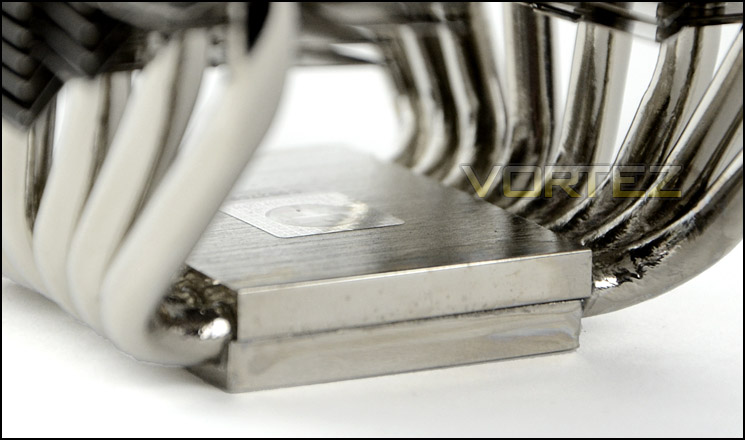
The top of the baseplate
8 heatpipes and a pure copper, nickel plated, reflective baseplate
In order to attach the cooling fans the provided fan clips must be attached. Attaching the clips to fan/heatsink is a tricky procedure and one that requires lots of patience and carefulness.
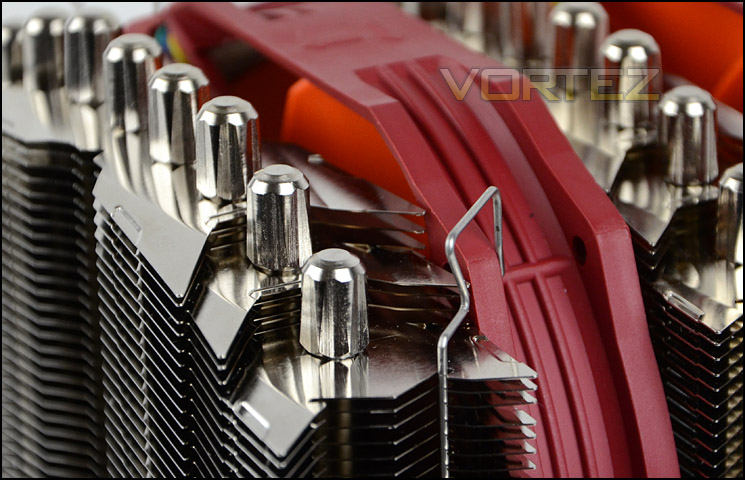
Attaching cooling fans can be tedious
Installation Process
In order to demonstrate the installation process for Silver Arrow SB-E Extreme we are installing the cooler on the Intel LGA2011 socket.
The first step is to apply 4x thumbscrews to the mounting holes on the front of the LGA2011 mounting plate. Once these screws are attached the large bracket must be placed over the top of these screws. This bracket acts as a stabilising platform and allows the cooler to be attached in a variety of different orientations. The thumbscrews installed during the first step have a thread on the topside and this is how the bracket securely attaches itself – a further 4x screws need to be applied. Lastly thermal paste should be applied to the CPU and the heatsink placed on top – to secure the heatsink down a plate slides over the top of the heatsink and 2x screws need to be applied. Getting this plate to stay in its correct position and screw each side down is extremely tedious. It’s recommended to have assistance if possible and to tighten one screw slightly whilst tightening the other in order to apply even tension. Pre-applied screws with retention coils would have been a much better method for this application.
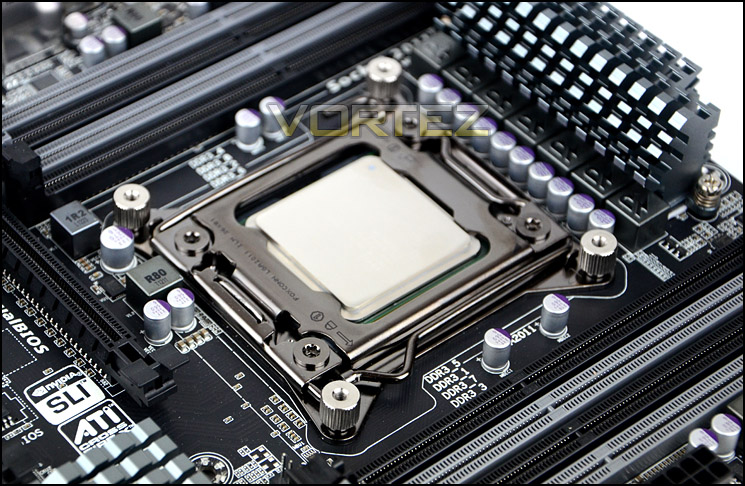
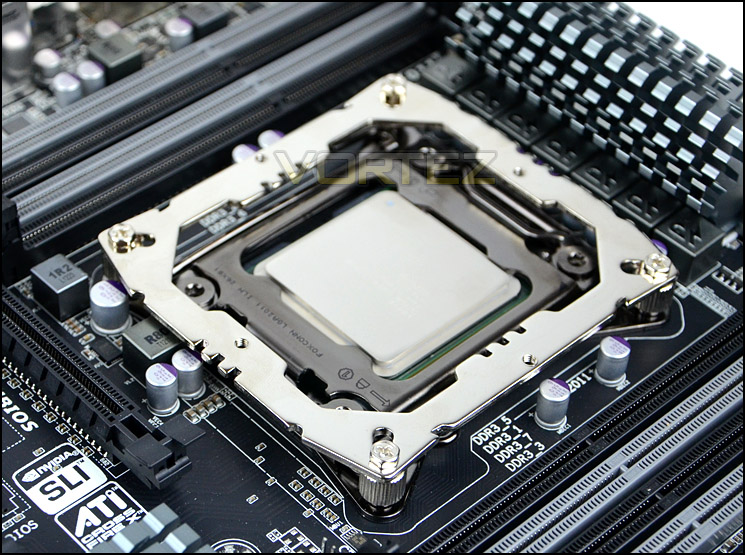
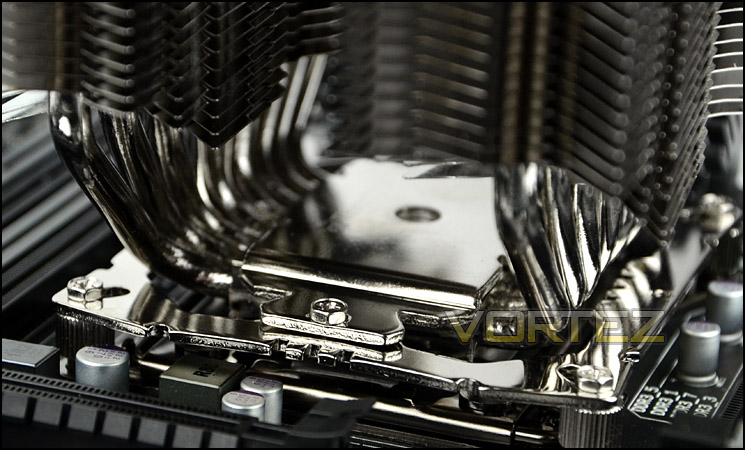
Installed – Memory Clearance
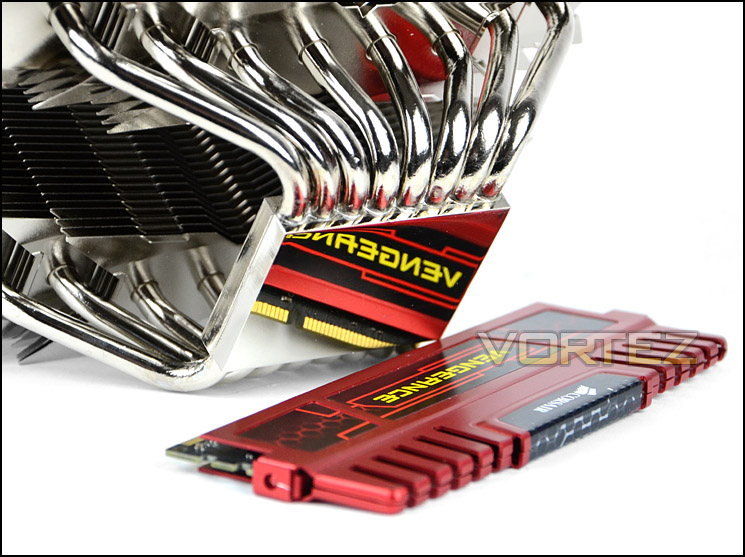
Memory clearance is something which many system builders and enthusiasts are eager to discover since this will ascertain whether a memory kit will be compatible with the CPU cooler or not. To demonstrate this a low profile memory kit is used.
Silver Arrow SB-E Extreme dwarfs the Intel X79 motherboard to which its attached and almost gives the illusion of it being a M-ATX motherboard.
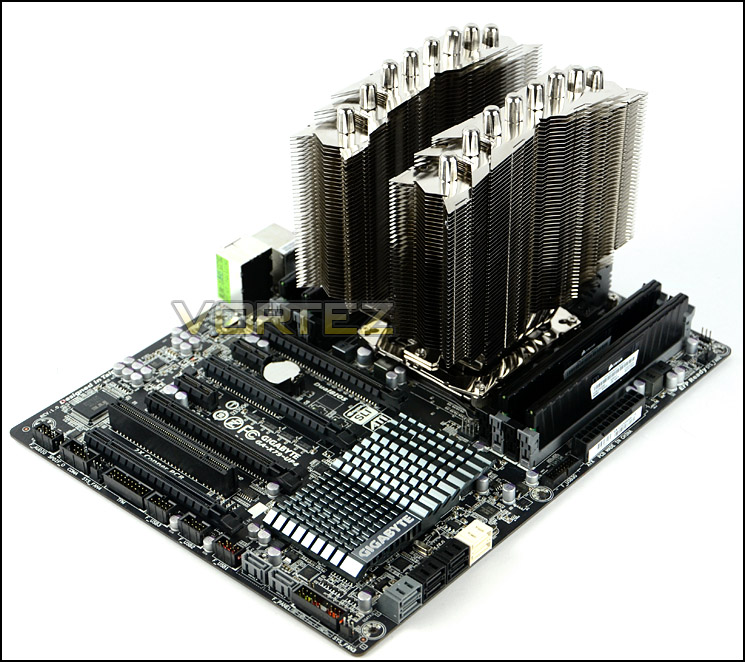
Installation complete – without cooling fans
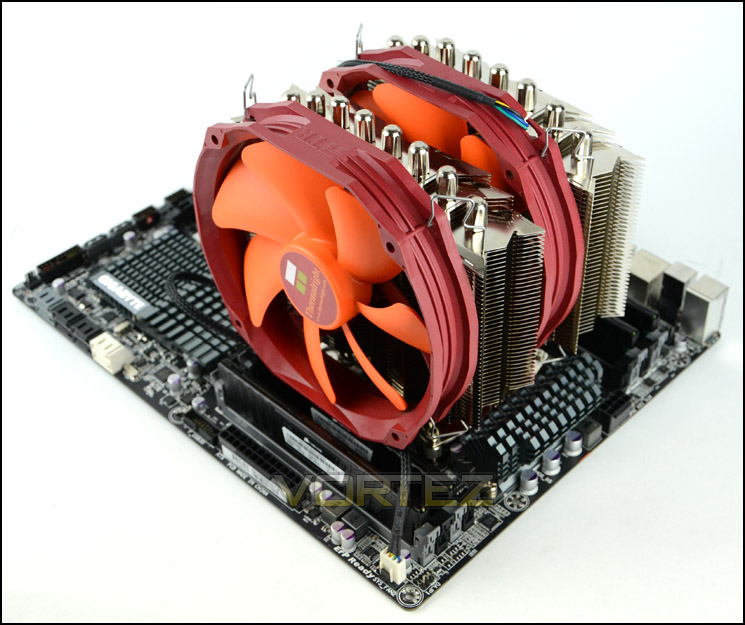
Installation complete – with TY143s attached
The large heatsink has no problems with the accompanied low-profile memory. Though adding memory with taller heatsinks could prove problematic if they are installed on the nearest slots. Memory modules which are over 3cm in total height will have trouble fitting underneath the cooler.
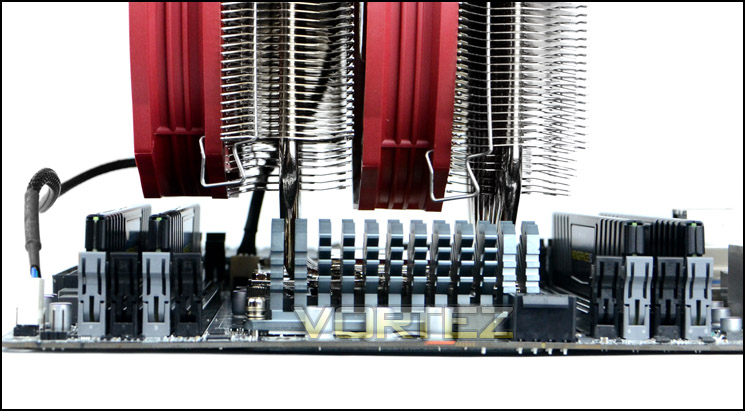
Memory is free from obstruction
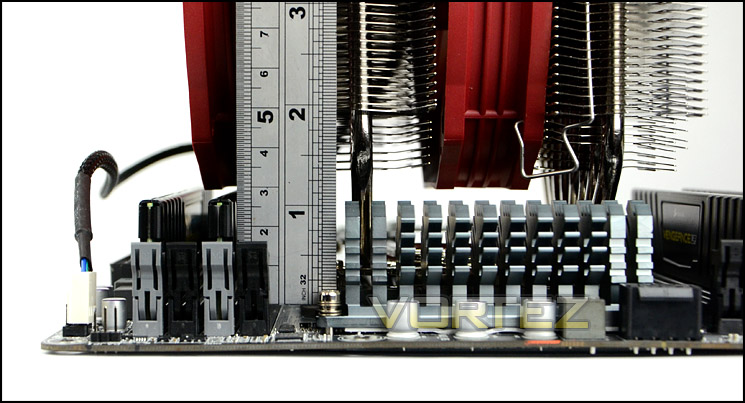
Up to 3cm approx. clearance for memory
Test Setup & Methodology
Test System
CPU – Intel Core i7-3930K (3.6GHz)
Motherboard – GIGABYTE X79-UP4
Memory – 8GB Corsair Vengeance LP 1600MHz CL9
Graphics – Sapphire Radeon HD 6850 1GB
PSU – NZXT Hale90 650W
Hard Drive – Kingston HyperX 240GB SATA III SSD
Case – Corsair Carbide 500R White
Motherboard – GIGABYTE X79-UP4
Memory – 8GB Corsair Vengeance LP 1600MHz CL9
Graphics – Sapphire Radeon HD 6850 1GB
PSU – NZXT Hale90 650W
Hard Drive – Kingston HyperX 240GB SATA III SSD
Case – Corsair Carbide 500R White
CPU Coolers
Alpenföhn Matterhorn Pure(120mm Wingboost: 300-1200RPM)
Alpenföhn K2 (120mm Wingboost: 500-1500RPM, 140mm Wingboost: 300-1100RPM)
Alpenföhn Gotthard (140mm Wingboost: 300-1100RPM)
Noctua NH-D14 (120mm NF-P12 PWM + 140mm NF-P14 PWM: up to 1200RPM)
Thermalright SilverArrow SB-E Extreme (Dual TY-143 fans – 600-2500RPM)
Corsair Hydro H100 (Dual 120mm fans – low: 1300RPM, mid: 2000RPM, high: 2600RPM)
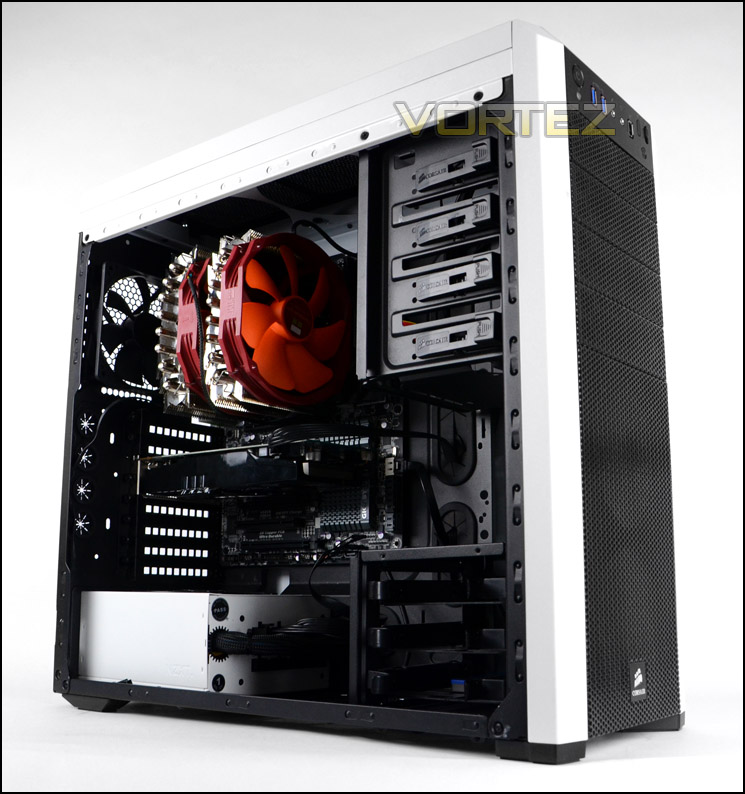
Program Suite
Real Temp – Maximum temperature analysis
LinX 0.6.4 – Applies thorough stress test to CPU
CPU-Z – Confirmation of CPU frequency/voltage
AIDA64 Extreme Edition – Confirmation of temperatures/fan speeds
Testing methodology
Testing will be based on temperatures recorded by Real Temp after 20 passes of LinX stress test. The maximum absolute temperatures will be recorded after the test and averaged over the 6 cores. The delta is then calculated by subtracting the ambient temperature recorded near the intake fans from the average temperature calculated. Tests are conducted with the Intel i7 3930K at its default 3.6GHz stock speed and overclocked to 4.6GHz @ 1.42V. The tests are done inside the Corsair Carbide 500R chassis to simulate real world conditions. To keep the tests standardised we are using Noctua’s NT-H1 thermal paste on all coolers.
CPU coolers are reviewed as they come out of the box – with their factory cooling fans, as the manufacturer intended and as the consumer expects.
Additional tests include a passive test where the cooling fans are taken away from the heatsink and a comparison between the cooler used with stock thermal paste against our Noctua NT-H1 paste.
A kind thank you to Noctua for supplying us with NT-H1 thermal compound.
Results – Stock Performance
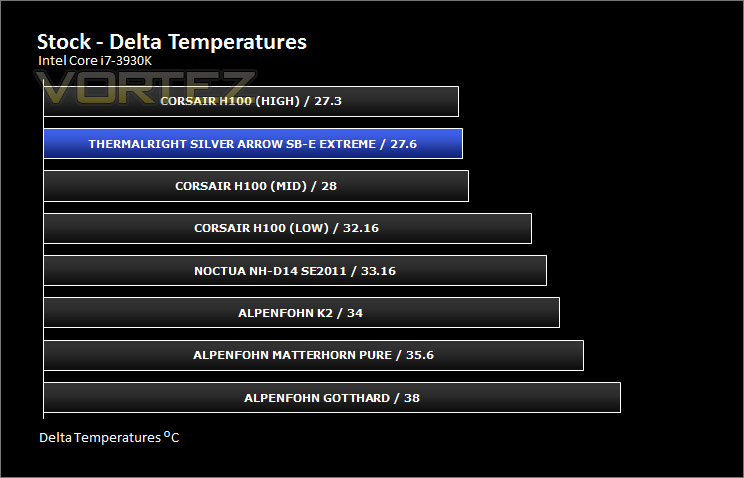
Silver Arrow SB-E Extreme stands as the best air cooling we have tested thus far. As is usual cooling fans are left to PWM option and this has a huge effect on the results since the fans are running at 1929RPM and 1278RPM whilst the CPU is left at its default settings. With the fans approaching 2000RPM noise starts to be very noticeable.
Results – Overclocked Performance
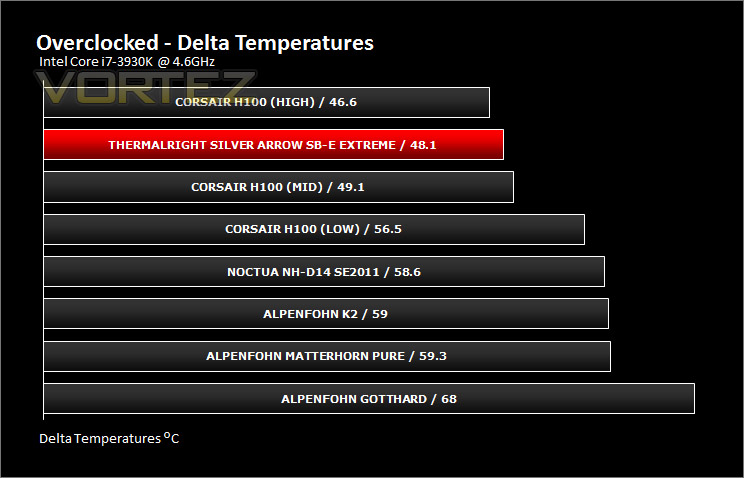
Again in similar fashion to the stock performance, with the CPU overclocked the Silver Arrow SB-E Extreme maintains the top air cooling position – almost matching Corsair H100 at high setting. Between our cooler and the next best air cooler Noctua NH-D14 there is almost 10C, the reason for this even better efficiency in this stage of testing is because the TY-143s ramp up even higher to dissipate heat. The fans reported 2473RPM and 1291RPM. At almost 2500RPM the noise begins to be disruptive and rather noisy.
Results – Passive Performance
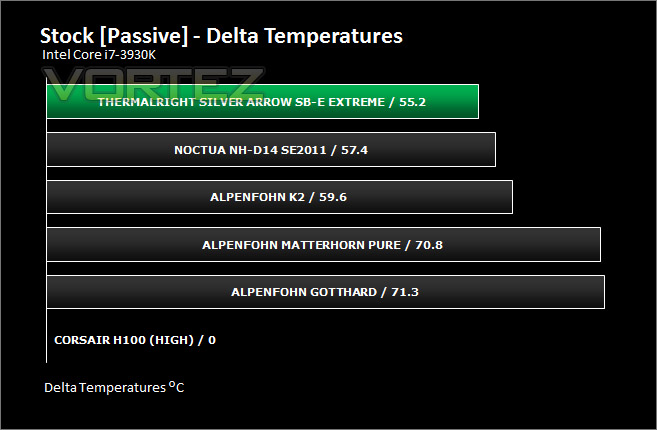
The passive test helps to identify how effective the heatsink design can dissipate heat without the use of cooling fans. In this test we are relying solely on the thermal design and options Thermalright have opted for. As you can see from the results, the gap has now reduced between Silver Arrow SB-E Extreme but it still remains at the top of our list. It’s materials, fin design and heatpipes help to maintain top performance. Regardless of the cooling fans, Silver Arrow SB-E Extreme is proven to have an effective cooling design.
Results – Thermal Paste Comparison
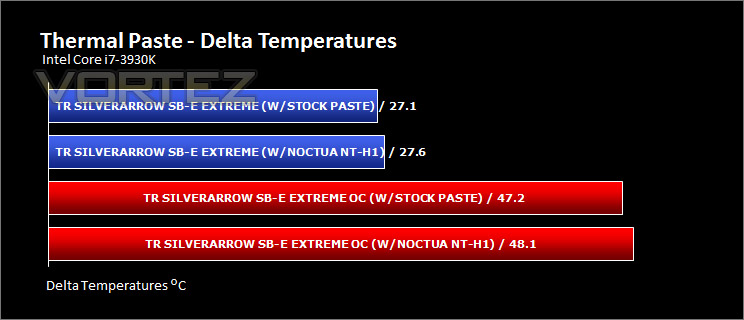
Most CPU coolers come accompanied with thermal paste provided by the manufacturer. For our CPU cooling tests we use Noctua’s NT-H1, so to offer up some interesting analysis we test the thermal paste given with the Silver Arrow SB-E Extreme – Chill Factor 3, against NT-H1 to see which gives the best results during stock and overclocked performance.
Conclusion
The original Silver Arrow pushed the boundaries for thermal performance; does the SB-E Extreme version continue this trait?
The results on the preceding pages demonstrate a superior product in the Silver Arrow SB-E Extreme. Throughout all tests our cooler showed its worth by consistently being the best air cooler we have tested so far. It’s fair to say that a significant chunk of the advantage exists because of the TY-143 PWM fans which can operate up to 2500RPM, but our passive testing revealed this cooler to have superior performance too so the heatsink design certainly holds up to the pressure.
Build quality and aesthetics are very good which is as to be expected by Thermalright. We have reviewed their products before and really like them for this very reason. Silver Arrow SB-E Extreme may be gargantuan in size, but it still has style and finesse. It will look great in any computer system.
Although the quality and performance have their boxes ticked there are some areas which could be impressed or should be noted. TY-143s are highly regarded within hardware circles and they are a very good cooling fan but when left using PWM the fans can reach 2500RPM and as such generate quite a lot of noise which can be disruptive. The other niggle is the installation process, the last stage requires a plate to be placed on top of the baseplate whilst standard screws are applied – this task is tedious and can be troublesome as can the installation of the cooling fans.
Silver Arrow SB-E Extreme can be picked up for £50 which makes it quite an affordable buy. Other high-end coolers are at least £10 more expensive than this cooler plus you get dual TY-143s and a tube of Chill Factor 3 – making this quite an attractive package.
Pros
+ Excellent thermal performance
+ Great build quality, aesthetics
+ Works well passively
+ Affordable
Cons
– TY-143s are loud when used as PWM
– Tedious to install
– Restricted memory clearance
+ Excellent thermal performance
+ Great build quality, aesthetics
+ Works well passively
+ Affordable
Cons
– TY-143s are loud when used as PWM
– Tedious to install
– Restricted memory clearance

Click here for an explanation of our awards at Vortez.net.


