







A mid-tower from the Armor Series is in the spotlight. GENE Snow Edition comes with three cooling fans, USB 3.0 and much more.

Product on Review: ARMOR REVO GENE Snow Edition
Manufacturer and Sponsor: Thermaltake
Street Price: £120-130 (At time of review)
Thermaltake are no stranger to the computer chassis market. Having numerous series under their belt, their portfolio is now rather vast and it continues to grow. Already this year we have seen A number of additions but today we shall be taking a look at a case which was released at the tail end of last year.
In the spotlight today is the Armor Revo GENE Snow Edition. This is the GENE version of the Revo case and “Snow” denotes the white variant. This mid-tower boasts an interesting array of features along with three pre-installed cooling fans which promise to aid low-temperatures and low-noise.
About Thermaltake
The beginning of every myth and legend is about dreams and desire: the challenging, creative and combative features of Thermaltake Group create an exciting and fascinating user experience to share with everyone, while allowing users to enter a selfless state in terms of function and potential.
Thermaltake Group’s 3 main brands: Thermaltake, Tt eSPORTS and LUXA2 have been merchandising throughout the world, and have successfully established 6 business footholds in areas such as Europe, America, Oceania, Japan and China, with 95 regional distributors and over 4000 premium retailers. All product planning is orientated by observation of global PC peripheral market and understanding of consumer demands. Thermaltake creates direct contact opportunities with resellers and consumers by participating major global ICT exhibitions and trade shows every year, and develop innovative marketing strategies for the promotions of new products. Meanwhile, Thermaltake incorporates the composite marketing system by making branch offices and regional distributors both the distribution channel and technical support or service center to provide instant support; by maintaining close contact with end users, we manage to strengthen corporate competitiveness and create the momentum for the growth of accomplishments.
With its outstanding wisdom and strength, Thermaltake Group is recruiting creative talents to build a cultural brand for the enjoyment of entertainment, e-Sports, technology and lifestyle!
Thermaltake Group’s 3 main brands: Thermaltake, Tt eSPORTS and LUXA2 have been merchandising throughout the world, and have successfully established 6 business footholds in areas such as Europe, America, Oceania, Japan and China, with 95 regional distributors and over 4000 premium retailers. All product planning is orientated by observation of global PC peripheral market and understanding of consumer demands. Thermaltake creates direct contact opportunities with resellers and consumers by participating major global ICT exhibitions and trade shows every year, and develop innovative marketing strategies for the promotions of new products. Meanwhile, Thermaltake incorporates the composite marketing system by making branch offices and regional distributors both the distribution channel and technical support or service center to provide instant support; by maintaining close contact with end users, we manage to strengthen corporate competitiveness and create the momentum for the growth of accomplishments.
With its outstanding wisdom and strength, Thermaltake Group is recruiting creative talents to build a cultural brand for the enjoyment of entertainment, e-Sports, technology and lifestyle!
Technical Specifications
Case Type Mid Tower
Material SECC
Front Bezel Material Combination of plastic and high air flow mesh
Color Interior: Black
Exterior: White
Side Panel Swivel Door with Tranparent Window
Motherboard Support
9.6” x 9.6” (Micro ATX)
12” x 9.6” (ATX)
5.25″ Drive Bay 4
Ext. 3.5″ Drive Bay 1
Int. 3.5″ Drive Bay 5
Expansion Slots 7
Front I/O Ports
USB 3.0 x 2
USB 2.0 x 2
MIC & Speaker (support AC’97 & HD Audio)
Cooling System
• Front (Intake) :
• 200 x 200 x 30 mm Blue LED fan x 1 (600~800rpm,13~15dBA)
• Rear (Exhaust) :
• 140 x 140 x 25 mm TurboFan, 1000rpm, 16dBA or 120 x 120 x 25 mm x 1 (optional)
• Top (Exhaust) :
• 200 x 200 x 30 mm fan x 1 (600~800rpm, 13~15dBA) or 140 x 140 x 25 mm x 2 (optional) or 120 x 120 x 25 mm x 2 (optional)
• Bottom (Intake) :
• 120 x 120 x 25 mm x 1 (optional)
• Side (Intake) :
• 200 x 200 x 30 mm x 1 (optional)
Liquid Cooling Capable Yes
Liquid Cooling Embedded No
Power Supply Supported Standard ATX PSII Power Supply
Power Supply Included No
Dimension (H*W*D)
510 x 252.0 x 550 mm
20 x 9.9 x 21.6 inch
Net Weight
7.8 kg
17.2lb
Security Lock Kensington lock port
Application Suitable for gaming, enthusiast, DIY and modding
Warranty 3 Years
Material SECC
Front Bezel Material Combination of plastic and high air flow mesh
Color Interior: Black
Exterior: White
Side Panel Swivel Door with Tranparent Window
Motherboard Support
9.6” x 9.6” (Micro ATX)
12” x 9.6” (ATX)
5.25″ Drive Bay 4
Ext. 3.5″ Drive Bay 1
Int. 3.5″ Drive Bay 5
Expansion Slots 7
Front I/O Ports
USB 3.0 x 2
USB 2.0 x 2
MIC & Speaker (support AC’97 & HD Audio)
Cooling System
• Front (Intake) :
• 200 x 200 x 30 mm Blue LED fan x 1 (600~800rpm,13~15dBA)
• Rear (Exhaust) :
• 140 x 140 x 25 mm TurboFan, 1000rpm, 16dBA or 120 x 120 x 25 mm x 1 (optional)
• Top (Exhaust) :
• 200 x 200 x 30 mm fan x 1 (600~800rpm, 13~15dBA) or 140 x 140 x 25 mm x 2 (optional) or 120 x 120 x 25 mm x 2 (optional)
• Bottom (Intake) :
• 120 x 120 x 25 mm x 1 (optional)
• Side (Intake) :
• 200 x 200 x 30 mm x 1 (optional)
Liquid Cooling Capable Yes
Liquid Cooling Embedded No
Power Supply Supported Standard ATX PSII Power Supply
Power Supply Included No
Dimension (H*W*D)
510 x 252.0 x 550 mm
20 x 9.9 x 21.6 inch
Net Weight
7.8 kg
17.2lb
Security Lock Kensington lock port
Application Suitable for gaming, enthusiast, DIY and modding
Warranty 3 Years
Packaging & First Look
GENE is presented in a rather lively looking box. There is no doubting the packaging will capture the imagination, there is a picture of the case itself on the front and the sides and back go into a little more detail regarding feature-set.
Inside, GENE is covered with a black fabric sheet and held in place via dual Styrofoam pillars to protect the case during transit.
Packaging for GENE catches the eye
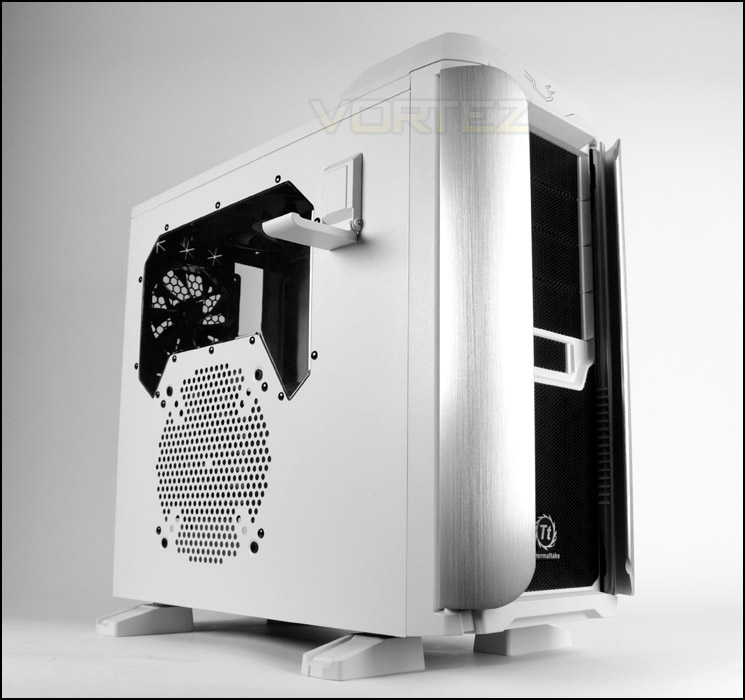
Being the Snow Edition of GENE our case today is powder coated white on the outside. The styling is not that dissimilar to that of the Chaser MK-1 or Overseer RX-I– other Thermaltake cases. The prominent side panel has a handy headset hanger, Perspex window for a view inside the chassis and a perforated mesh area allowing a 200mm cooling fan to be attached.
On the alternate side the panel is solid with a convex groove to assist with more clearance for cable management. Both side panels have thumbscrews to secure them onto the case.
Prominent side panel with numerous features
Snow Edition featuring white powder coat
In the next section we will take a closer look at the external elements of GENE.
Exterior
Thermaltake have done a great job with the visual appearance on GENE, the two-tone black/white works very well. Due to this case being part of the Armor series there are two aluminium wing objects running down either side of the front of GENE – it’s unclear what purpose these wings serve, we’re led to believe they are purely for cosmetic usage though they do move in a backwards and forwards motion. In the lower region there is a large perforated mesh area which gives ventilation for a front 200mm intake cooling fan. Above there is a 3.5” cover and then four 5.25” drive bay covers which can be removed from the outside of the case.
Around the back GENE has an opening at the bottom for mounting the PSU and a series of seven ventilated PCI expansion slot covers. Above this there is a 140mm rear exhaust fan and triple rubber grommets for liquid cooling/cables.
The front and back of GENE
Turning our attention to the front panel controls, at the top of GENE there are quite a number of options available. Over on the left there is a large power button and respective activity LED and reset button. Headphone and mic jacks are also included. Over on the right side there are dual USB 3.0 ports (via internal motherboard header) and dual USB 2.0 ports, giving plenty of flexibility for access to devices. The centre also assists with supplying more easy access to data – Thermaltake have included a 2.5”/3.5” docking station which allows you to plug a drive in directly to gain access. A very handy feature to have, it saves having to take side panels off, install the drive and connect cables.
Front panel connectivity supplies many options
Further back from the front panel connectivity is a large perforated mesh section which gives ventilation for the top mounted 200mm exhaust cooling fan. There are also mounting holes for using 2x 140 or 2x 120mm fans instead.
The top of GENE – ventilation mesh
Finally, the underside has four adjustable feet which can be rotated to point in any direction desired. This helps to keep the chassis off the ground and provide better airflow for the PSU (if you have the fan facing downwards). The middle is a large dust filter which can be removed from the rear of the case whilst it is still standing.
The underside of GENE with adjustable feet
With the external inspection now complete, we will delve inside for a close look at the internal features.
Interior
The side panels are fixed via dual thumbscrews on either side. Rather than go completely white, Thermaltake have powder coated the internals black which is generally better co-ordinated with most hardware nowadays. A brief overview of GENE reveals a generous array of tool-free features accompanied by cable management grommets and cut-outs. GENE can accommodate both ATX and M-ATX motherboard form factors.
Around the back, behind the motherboard tray identifies more clearance for cable management though there are no hooks or objects for cable tidies to attach themselves too which is a rather odd omission.
An initial look at the inside of GENE
Behind the motherboard tray
At the bottom of GENE resides the area for mounting the PSU. There is a large air filter which can be removed should you wish to have the fan for the PSU facing downwards, but there is unfortunately no rubber pads for the PSU to sit on. Having reviewed a fair few of Thermaltake’s cases now, and having highlighted this we are baffled as to why this isn’t an included feature – it almost comes as standard with other cases. Having padding here will avoid scratching and prevent vibrations from the PSU.
GENE has the ability to house a 120mm cooling fan at the bottom, next to the PSU – the filter also covers this spot.
The PSU area at the bottom of GENE
On the next page we will continue our look at the inside of GENE.
Interior (Continued)
Above the PSU area are seven PCI expansion slot covers which are ventilated and have thumbscrews for easy removal. All of the covers are protected by a PCI guard which needs removing before anything can be added/removed.
Ventilated PCI expansion slot covers with PCI guard
Positioned at the back and top of GENE are two exhaust fans, the rear exhaust is a 140mm cooling fan which operates at 1000RPM whilst the top exhaust is a 200mm which operates at 600-800RPM. Both fans have motherboard header connectors.
The 200mm cooling fan can be removed for dual 120 or dual 140mm cooling fans instead and there is sufficient space for mounting liquid cooling radiators at the top too – they just need to be the slim type (3mm).
Exhaust cooling fans of different sizes
Over on the other side of the case there are four 5.25” drive bays, each of them have tool-free mechanisms for easily getting devices in and out. The blue sliders are used to clamp the drive in place.
Tool-free design mechanisms for optical drives
At the front of GENE are four HDD trays which can accommodate 2.5” and 3.5” drives. This HDD cage benefits from having another 200mm intake cooling fan which brings in cool air. This fan operates at 600-800RPM and is LED ready, when powered up it emits a cool blue glow.
In the next section we will show HDD installation in more detail.
Four options for HDD storage
Installation
Although GENE is quite a case (mid-tower) it still handles a full sized ATX system with ease. There is plenty of space around the motherboard and all of the components for our ATX system fitted without any hassle.
The only real gripe with GENE is the lack of cable hooks behind the motherboard tray, it just makes cable management more challenging – though it isn’t impossible to create a clean, tidy setup.
All in all, GENE is a good case to work with when installing components which are high-end.
Installation is a breeze, a nice clean system
Cable management behind the motherboard tray
In order to install HDDs inside GENE it is necessary to drop the drive into one of the available trays. The trays can accommodate 2.5” and 3.5” drives – screws simply need to be attached on the sides for 3.5” or on the underside for 2.5”. The trays are robust and do not flex easily.
HDDs are installed within tray
Clearance – CPU Cooler, GPU, Cable Management
Clearance is an important aspect of case design for the enthusiast as it establishes whether key components will be compatible with a chassis or not.
GENE had no problems housing our Noctua NH-U12P which is 158mm in height and there is sufficient clearance for it to allow for bigger CPU coolers such as Noctua NH-D14 and Thermalright Silver Arrow which are both 160mm in height.
Support for large CPU coolers
The HDD cage isn’t removable inside GENE but nevertheless we can still accommodate long graphics cards. Pictured is XFX 7970 DD which is 10.5” in length, it may be difficult to fit anything bigger than this due to the obstruction the HDD cage creates.
Support for up to approximately 10.5” graphics cards
Behind the motherboard tray there is over 2cm of clearance which is more than generous. The side panel is also convex, so cable management is easy to maintain thanks to both these attributes.
Clearance behind the motherboard tray is very good
Thermal Performance Testing
Placed inside GENE are three cooling fans. A single 200mm intake fan at the front, a 140mm rear exhaust fan at the back of the case and a 200mm exhaust at the top. Both 200mm fans operated between 800-1000RPM whilst the rear exhaust operates at 1000RPM.
To discover the thermal performance of GENE we will record idle temperatures after 20 minutes from a cold boot. We will then stress the system and temperatures will again be monitored after 30 minutes have elapsed.
For the purpose of accurate analysis the idle and load temperatures for CPU and GPU will be recorded and the range between idle and load will be calculated to determine how efficient cooling is.
NOTE: Ambient temperature is 20C
System Components
CPU AMD Phenom II X6 1055T 2.8GHz
Motherboard ASUS M4A89TD PRO
Graphics NVIDIA GTX 480 (Different from card pictured)
Memory 4GB Mushkin EM3-10666 DDR3
HDD Samsung Spinpoint 500GB SATA-II
PSU FSP AURUM GOLD 650M
Motherboard ASUS M4A89TD PRO
Graphics NVIDIA GTX 480 (Different from card pictured)
Memory 4GB Mushkin EM3-10666 DDR3
HDD Samsung Spinpoint 500GB SATA-II
PSU FSP AURUM GOLD 650M
Noise
We were actually quite pleasantly surprised by the noise levels emitted from GENE during usage. The fans are barely even noticeable when the system is powered up and present no disturbance at all – even with three bundled.
Conclusion
Thermaltake have furnished the computer chassis market with many different series, expanding the options available and showing great versatility. Today we have been looking at a case from the Armor series, which already has a plethora of products within the portfolio.
GENE is a mid-tower with quite an impressive array of features. Its physical appearance may not be to everyone’s taste but we can still appreciate the style and finesse this case brings to the table. Although there are some typical Thermaltake traits in being able to see similarities with other cases, GENE still maintains a unique front panel with premium aluminium wings.
On the inside and outside GENE boasts good quality construction accompanied by numerous tool-free mechanisms for installing devices. There are also some additional features which come in handy, such as a headset hanger on the prominent side panel and docking station for fast access to HDD storage.
In terms of thermal performance GENE offers good results. Featuring three cooling fans is a rewarding thing nowadays and this helps deliver not only decent results with temperatures but also low-noise too. In our experience the cooling fans were hardly even noticeable when powered up, Thermaltake have hit the balance between good results and low noise.
The price of GENE is the aspect that most will struggle to come to terms with. Priced at £120-130, this mid-tower is of the more pricey cases of its calibre. Spending this amount on a mid-tower you would expect more aluminium and features which aren’t included such as a fan controller and simple things like anti-vibration for the PSU to sit on. There are actually a number of aluminium chassis available in GENE’s size for this price-point and even some competitive full-towers too so this case could struggle to get off the shelves.
GENE is quintessentially a great computer chassis. It looks good and offers up lots of useful features along with pleasing thermal performance. If low-noise is of important to you then GENE is a good option to go with.
Pros
+ Pleasing to the eye
+ Good build quality
+ Tool-free throughout
+ Low-noise cooling fans
+ Docking station for HDDs
+ Good thermal performance
Cons
– Price
– No fan control
– No anti-vibration rubber for PSU
+ Pleasing to the eye
+ Good build quality
+ Tool-free throughout
+ Low-noise cooling fans
+ Docking station for HDDs
+ Good thermal performance
Cons
– Price
– No fan control
– No anti-vibration rubber for PSU

Click here for an explanation of our awards at Vortez.net.


