







We take a look at Thermaltake’s new NiC range with the C5 – a CPU cooler which promises to give total memory clearance along with great thermal results too.

Product on Review: NiC C5
Manufacturer and Sponsor: Thermaltake
Street Price: £50 At time of review)
The push for bigger and better CPU coolers and the pursuit for faster memory kits have both worked against each other in recent times since all of these wants cause one major problem – clearance. Big CPU coolers have typically dominated memory slots on the motherboard causing certain, taller memory kits to be unusable. This particular aspect of system building is a concern for many enthusiasts, component compatibility is of utmost importance – especially with no prior knowledge/experience of certain hardware. Today we look to a product which hopes to solve this problem but will a compromise on size drastically affect performance?
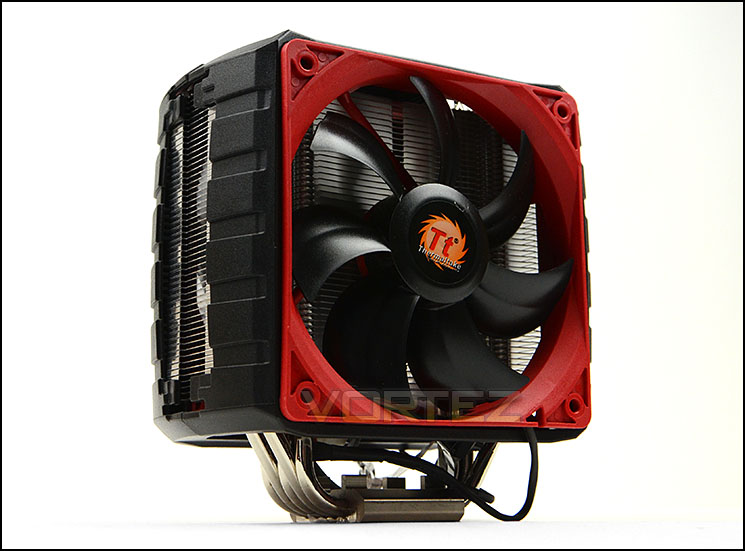
Today we will be taking a close look at Thermaltake’s new NiC C5 CPU cooler which is a large CPU cooler avoiding the problems caused by tall memory interference. Covered in an eye-catching shroud, the C5 also comes with a handy fan speed controller knob to help manage noise and performance in a bid to give the end user the choice between better thermals or lower noise.
Thermaltake on their NiC C5
Incorporating the proprietary technology, all new Thermaltake NiC series ( lineup consists of the F3, F4, C4, and C5 ), the new CPU cooler series with non-interference cooling space for the ram and motherboard area, the advancement towards silence, performance and compatibility. Fully compatible with RAM of all kinds, ideally for power users to fill their RAM slots with high-end overclocked RAM.
Technical Specifications
Taken directly from Thermaltake:
P/N
CLP0608
Compatibility
Intel LGA
2011/1366/1155/1156/1150/1150/775
AMD
FM2/FM1/AM3+/AM3/AM2+/AM2
Heatsink Dimension
160H * 140W * 50L mm
Heatsink Material
Aluminum Fins
cu base
Copper Heatpipes
Heatpipe
Φ6mm x 5 pcs
Fan Dimension
120 x 120 x 25 mm(L xW x H)
Fan quantity
2 pcs
Fan Speed
1000-2000RPM
Rated Voltage
12V
Start Voltage
9V
Rated Current
0.32A
Power Input
3.84W
Air Flow
99.1 CFM
Air Pressure
2.99 MM-H2O
Noise
20 ~39.9 dBA
Life time/Fan Life time
40000 hr
Fan control
VR
pin connect
3 pin
Cooling Power
230W
Weight
811 g
CLP0608
Compatibility
Intel LGA
2011/1366/1155/1156/1150/1150/775
AMD
FM2/FM1/AM3+/AM3/AM2+/AM2
Heatsink Dimension
160H * 140W * 50L mm
Heatsink Material
Aluminum Fins
cu base
Copper Heatpipes
Heatpipe
Φ6mm x 5 pcs
Fan Dimension
120 x 120 x 25 mm(L xW x H)
Fan quantity
2 pcs
Fan Speed
1000-2000RPM
Rated Voltage
12V
Start Voltage
9V
Rated Current
0.32A
Power Input
3.84W
Air Flow
99.1 CFM
Air Pressure
2.99 MM-H2O
Noise
20 ~39.9 dBA
Life time/Fan Life time
40000 hr
Fan control
VR
pin connect
3 pin
Cooling Power
230W
Weight
811 g
Packaging, Bundle & Fans
C5 arrives in an attractive little box which contains the fundamental features on the front along with an image of the cooler itself. Around the back there are more details concerning these features and the technical specification can be found on the side.
Inside the cooler is protected with polystyrene whilst the bundled accessories are stored within a small cardboard box. Thermaltake have ensured that everything arrives in good condition which is good to see.
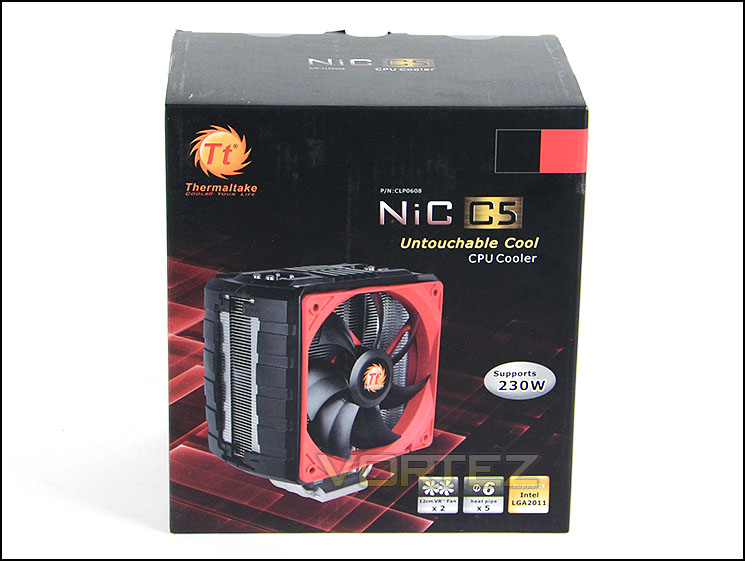
Packaging for C5
C5 comes with a range of different components for the installation process and since this cooler can accommodate a wide array of different sockets there are respective manuals for each to guide the user through. The C5 cooler can accommodate Intel LGA 2011/1366/1155/1156/1150/1150/775 and AMD FM2/FM1/AM3+/AM3/AM2+/AM2. Thermaltake also provide a small tube of thermal paste.
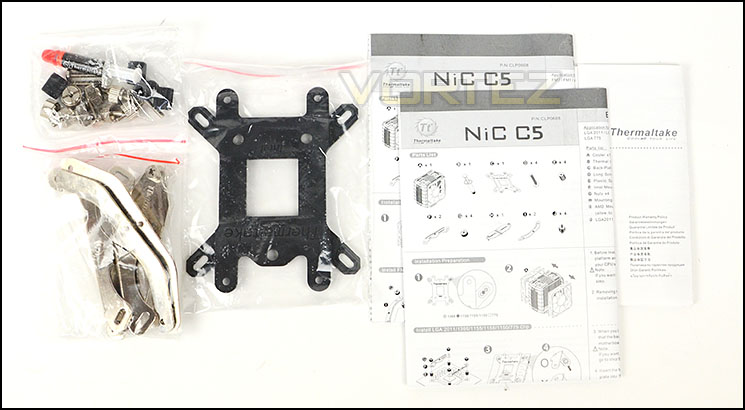
The accessories bundle catering for multiple socket types
Accompanying the heatsink are two cooling fans which are 120mm in specification. These fans can operate between 1000 and 2000RPM and come with a handy speed controller which helps to manage between low and high speeds.
The fans which have been used on C5 are TT-1225 which are a seven-blade design with red outer frame. Thermaltake provide a y-cable for both fans which simply plugs into the CPU fan header on the motherboard, this helps keep other headers free and maintains similar fan speed for both cooling fans.
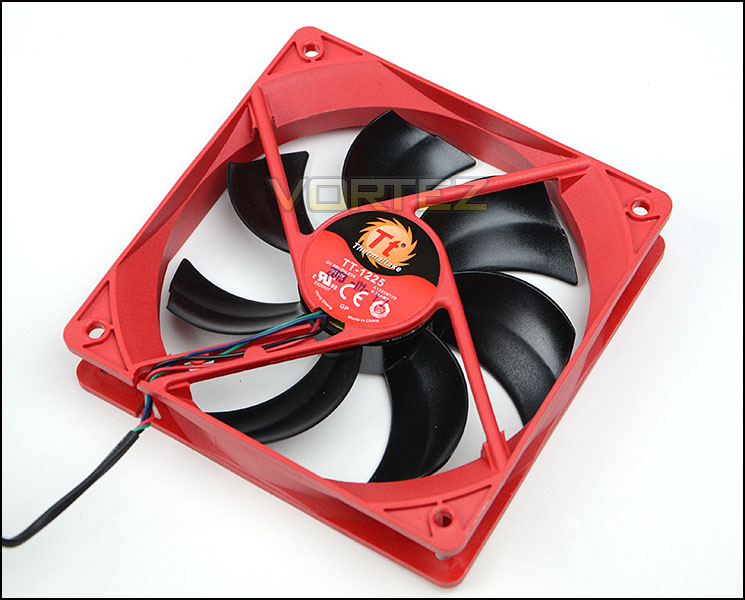
C5 uses two 120mm cooling fans
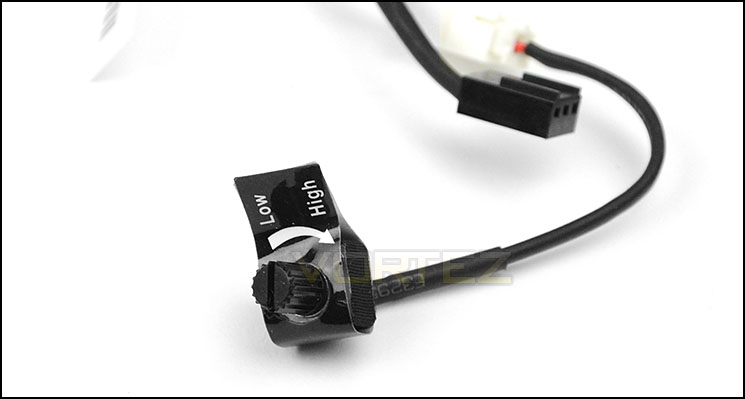
A fan control knob for managing speeds
Closer Look
Upon initial impressions the C5 is a rather eye-catching piece. Its design and colour-scheme is sure to capture the imagination. Thermaltake have given the heatsink a two-piece plastic shroud which assists with the cooling fan attachment. In order to remove this, either side simply needs to be pulled apart – the cooling fans can also be taken out to leave the shrouds intact.
Removing the shroud reveals the true nature of C5. Its heatsink incorporates aluminium fins which follow a curved direction. These fins are 0.4mm thick. The overall design and craftsmanship is good from this unit.
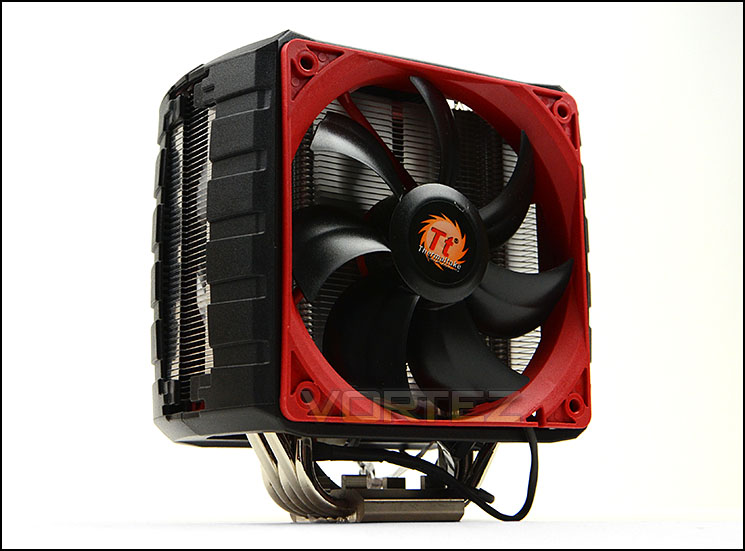
C5 standing tall and catching the eye with dual shroud design
Shroud off to reveal the exposed heatsink underneath
At the top of C5, from an aerial view we can see the five heatpipes. These heatpipes are copper and Φ6mm.
An aerial view of C5
For the baseplate, Thermaltake have used Nickel-plated copper which has a mirror finish. As you can see from the picture below, a full reflection can be seen. All five of the copper heatpipes pass through this baseplate to push heat away from the CPU and out through the fins.
A nickel-plated copper baseplate gives highly reflective finish
Installed – Memory Clearance
Memory clearance is something which many system builders and enthusiasts are eager to discover since this will ascertain whether a memory kit will be compatible with the CPU cooler or not. To demonstrate this a low profile memory kit is used.
As you can see from the finished pictures, the C5 sits well on our GIGABYTE motherboard. Although it has high-end features and specifications we are pleased to see it doesn’t take up too much space on the motherboard.
Observing the cooler from the side we can clearly see that it doesn’t overhang any of the memory slots on the motherboard which means that even tall memory kits can be used in conjunction with this CPU cooler. Having such great memory clearance is a rarity nowadays and it brings with it more flexibility and choice over different hardware selection.
Test Setup & Methodology
Test System
CPU – Intel Core i7-3930K (3.6GHz)
Motherboard – GIGABYTE X79-UP4
Memory – 8GB Corsair Vengeance LP 1600MHz CL9
Graphics – Sapphire Radeon HD 6850 1GB
PSU – NZXT Hale90 650W
Hard Drive – Kingston HyperX 240GB SATA III SSD
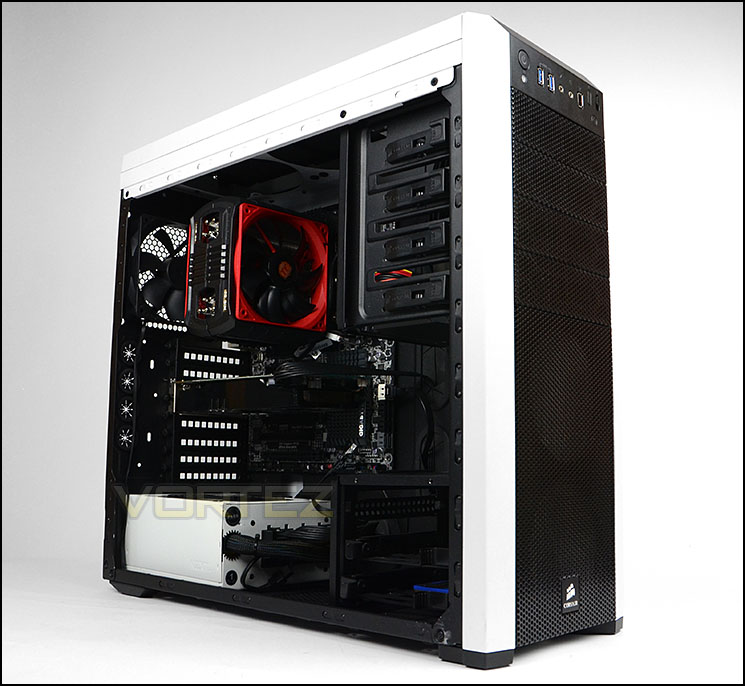
Case – Corsair Carbide 500R White
Motherboard – GIGABYTE X79-UP4
Memory – 8GB Corsair Vengeance LP 1600MHz CL9
Graphics – Sapphire Radeon HD 6850 1GB
PSU – NZXT Hale90 650W
Hard Drive – Kingston HyperX 240GB SATA III SSD
Case – Corsair Carbide 500R White
CPU Coolers
Alpenföhn Matterhorn Pure(120mm Wingboost: 300-1200RPM)
Alpenföhn K2 (120mm Wingboost: 500-1500RPM, 140mm Wingboost: 300-1100RPM)
Alpenföhn Gotthard (140mm Wingboost: 300-1100RPM)
Noctua NH-D14 (120mm NF-P12 PWM + 140mm NF-P14 PWM: up to 1200RPM)
Thermalright SilverArrow SB-E Extreme (Dual TY-143 fans – 600-2500RPM)
Corsair Hydro H100 (Dual 120mm fans – low: 1300RPM, mid: 2000RPM, high: 2600RPM Push Config)
SilverStone HE01 (140mm PWM fan – 500RPM-1200RPM – 500RPM-2000RPM)
be quiet! Dark Rock Pro 2 (135mm + 120mm PWM Fans – up to 1500RPM and 1700RPM)
Thermaltake Water 2.0 Pro (Dual 120mm PWM fans – up to 2000RPM)
Corsair Hydro Series H100i (Dual 120mm fans – up to 2700RPM Push Config)
Be Quiet! Shadow Rock TopFlow(1x 135mm PWM fan – up to 1500RPM)
SilverStone HE02 (Passive – optional fan used: Noctua NF-F12 120mm PWM)
Corsair H55 (Single 120mm fan – 1700RPM Exhaust Push)
Cooler Master Seidon 120M (Single 120mm fan – Up to 2500RPM Exhaust Push)
Zalman CNPS11X Extreme (Single 120mm fan – Up to 1950RPM)
Phanteks PH-TC12DX (Dual 120mm fans – 600-1800RPM)
Noctua NH-U14S (Single 140mm cooling fan – 300-1500RPM)
SilverStone TD03 (Dual 120mm fans – 1500-2500RPM)
Thermaltake]Thermaltake NiC C5 (Dual 120mm fans – 1000RPM – 2000RPM)
Program Suite
Real Temp – Maximum temperature analysis
LinX 0.6.4 – Applies thorough stress test to CPU
CPU-Z – Confirmation of CPU frequency/voltage
AIDA64 Extreme Edition – Confirmation of temperatures/fan speeds
Testing methodology
Testing will be based on temperatures recorded by Real Temp after 20 passes of LinX stress test. The maximum absolute temperatures will be recorded after the test and averaged over the 6 cores. The delta is then calculated by subtracting the ambient temperature recorded near the intake fans from the average temperature calculated. Tests are conducted with the Intel i7 3930K at its default 3.6GHz stock speed and overclocked to 4.6GHz @ 1.42V. The tests are done inside the Corsair Carbide 500R chassis to simulate real world conditions. To keep the tests standardised we are using Noctua’s NT-H1 thermal paste on all coolers.
CPU coolers are reviewed as they come out of the box – with their factory cooling fans, as the manufacturer intended and as the consumer expects.
Additional tests include a passive test where the cooling fans are taken away from the heatsink and a comparison between the cooler used with stock thermal paste against our Noctua NT-H1 paste.
A kind thank you to Noctua for supplying us with NT-H1 thermal compound.
Results – Stock Performance
Thermaltake’s NiC C5 does well in the stock performance tests – the results during low fan speeds aren’t especially impressive but since the knob on the fan controller is variable and not a switch the performance against noise can be adjusted to move closer to the “high” setting. During high settings the results are good but the noise levels are rather disruptive.
Fan Speeds:
Low – 1000RPM during stock testing
High – 1700RPM during stock testing
Results – Overclocked Performance
Applying a significant overclock to the Intel 3930K, the NiC C5 handles it quite well indeed. At low fan speeds the cooler unfortunately slips into close territory to top-flow coolers which are known for struggling with overclocked states but with the fan speeds set to high NiC C5 beats the popular Noctua NH-D14 and Alpenfohn K2. Again, because the fan speed knob is variable results in between low and high can be established – getting a better noise to performance ratio. Noise levels are concerning at high during the overclock state but low settings reveal quiet operation.
Fan Speeds:
Low – 1000RPM during overclock testing
High – 2000RPM during overclock testing
Results – Passive Performance
Passive performance results for NiC C5 aren’t especially good since the temperature rose to concerning levels. Even so, our cooler managed to beat three other previously test CPU coolers which is an achievement in itself.
Results – Thermal Paste Comparison
Most CPU coolers come accompanied with thermal paste provided by the manufacturer. For our CPU cooling tests we use Noctua’s NT-H1, so to offer up some interesting analysis we test the thermal paste given with the SilverStone TD03 against NT-H1 to see which gives the best results during stock and overclocked performance and the results really aren’t that much different, the Noctua is only slightly better.
Conclusion
The CPU cooler sector is a very competitive one indeed but there are a group of coolers which have gained prominence in the last 18 months – has Thermaltake done enough to steal some of the spotlight?
Thermaltake have addressed a key issue which many enthusiasts are concerned with – memory clearance. The new NiC C5 does not overhang any of the memory slots on the motherboard and as a result means that a memory kit of any height can be used in conjunction with this cooler. This is great, because it removes any such limitations – low profile memory kits are mandatory for many other CPU coolers which overhang the slots.
In all our performance tests we found the NiC C5 to be a great CPU cooler. We tested both extremes of low and high settings on the fan controller but since this controller has a variable knob and not a two-switch state, we are able to tweak the fan speed accordingly, finding the balance between noise and performance. In between the low and high results on the preceding pages are some well-established rivals, so C5 is certainly a capable offering.
The only niggle with C5 is noise levels. With the fans running at high, pushing to 2000RPM, the noise levels are somewhat disruptive. Though this can be altered as previous mentioned since the knob is variable.
Priced at around the £50 mark, the NiC C5 is a good value for money choice for anyone wanting a decent CPU cooler which has flexibility for fan speed and total memory clearance.
Thermaltake’s NiC C5 performed well in all our tests, rivalling even some of the better known CPU coolers many rely upon, furthermore key features like the variable fan controller and complete memory clearance will be certain to help Thermaltake steal the spotlight. We are pleased to award the C5 our silver award.
Pros
+ Good thermal performance results
+ Great build quality
+ Fan control with variable knob
+ No memory clearance problems
+ Easy to install
+ Good mounting system
Cons
– Fans are noisy with “high” setting
+ Good thermal performance results
+ Great build quality
+ Fan control with variable knob
+ No memory clearance problems
+ Easy to install
+ Good mounting system
Cons
– Fans are noisy with “high” setting

Click here for an explanation of our awards at Vortez.net.


