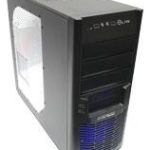
We explore the VN700M1W2N aka Overseer. A full tower gaming chassis with big cooling fans, USB 3.0 and HDD docking station and many more features to offer.

Product on Review: Overseer RX-I VN700M1W2N
Manufacturer and Sponsor: Thermaltake
Street Price: £110 inc. VAT (At time of review)
Thermaltake have been designing cases since 1999 and have provided the market with some interesting products over the years. Their chassis series range alludes to this. Their most recent eSports release is named Overseer RX-I and is a full tower with lots of features that will have the gamer’s needs as its highest priority.
The Overseer RX-I supports E-ATX motherboards, utilizes steel construction and is equipped with three fans – 2x 200mm blue LED fans and 1x 120mm rear exhaust. USB 3.0 is accessible via the front panel as is a HDD docking station. Overseer RX-I promises to be an exciting new release and we are looking forward to exploring its innermost parts, so let’s waste no further time and begin our analysis of this new gaming chassis.
About Thermaltake
Thermaltake Group’s 3 main brands: Thermaltake, Tt eSPORTS and LUXA2 have been merchandising throughout the world, and have successfully established 6 business footholds in areas such as Europe, America, Oceania, Japan and China, with 95 regional distributors and over 4000 premium retailers. All product planning is orientated by observation of global PC peripheral market and understanding of consumer demands. Thermaltake creates direct contact opportunities with resellers and consumers by participating major global ICT exhibitions and trade shows every year, and develop innovative marketing strategies for the promotions of new products. Meanwhile, Thermaltake incorporates the composite marketing system by making branch offices and regional distributors both the distribution channel and technical support or service center to provide instant support; by maintaining close contact with end users, we manage to strengthen corporate competitiveness and create the momentum for the growth of accomplishments.
With its outstanding wisdom and strength, Thermaltake Group is recruiting creative talents to build a cultural brand for the enjoyment of entertainment, e-Sports, technology and lifestyle!
Technical Specifications
P/N: VN700M1W2N
Case Type: Full Tower
Dimensions (H x W x D) 535 x 220 x 580 mm (21.1x 8.7x 22.8 inch)
Net Weight 10.3 Kg / 22.7 lb
Side Panel Window
Color Exterior & Interior : Black
Material SECC
Cooling System
Front (intake): 200 x 200 x 30 mm Blue LED fan (600~800rpm, 13~15dBA)
Rear (exhaust): 120 x 120 x 25 mm Turbo Fan (1000rpm,16dBA)
Top (exhaust): 200 x 200 x 30 mm Blue LED fan (600~800rpm, 13~15dBA) 200 x 200 x 30 mm fan (Optional)
Side (intake): Optional 200 x 200 x 30 mm fan
Bottom (intake): Optional 120 x 120 x 25 mm fan
Drive Bays
– Accessible: 3 x 5.25’’, 1 x 3.5’’
– Hidden: 5 x 3.5’’ or 2.5’’
– HDD Docking: 1 x 3.5’’ or 2.5’’
Expansion Slots: 8
Motherboards: 9.6” x 9.6” (Micro ATX), 12” x 9.6” (ATX) , 12” x 13” (Extend ATX)
I/O Ports: USB 3.0 x 2, USB 2.0 x 2, HD Audio x 1
PSU: Standard PS2 PSU
LCS Upgradable: Supports 1/2”、3/8”、1/4” water tube
CPU cooler height limitation: 177mm
VGA length limitation: 344mm
Packaging & First Look
The Overseer RX-I is presented in a large box that has an attractive design of artwork. Being an eSports chassis we have the associated design with robotic character. The rear of the box has further details, showing the features of Overseer RX-I. Inside the case is covered in a clear plastic sheet and held in place via polystyrene pillars.
Overseer RX-I packaging
Inside, we have a small accessories bundle that consists of the following items:
• Instructions manual
• CPU PSU extension cable
• Molex to 3-pin conversion cables
• Speaker
• Various screws with cable tidies
I’m pleased to see that Thermaltake have included the extension cable for CPU E-ATX power. This is something that is often overlooked but with it we can ensure good cable management by routing cables behind the motherboard tray. The cable that feeds from the PSU is usually either too short to reach behind the motherboard tray or is extremely tight but thanks to this we can arrange things with ease.
Accessories bundle with CPU PSU extension cable
Removing the Overseeer RX-I from its packaging we are met with looks that are reminiscent of the Chaser MK-1 albeit in a smaller shell and with slightly different aesthetics.
The prominent side panel features a Perspex window with a perforated mesh area marked out for attaching a 200mm fan; this area has a removable fan filter.
On the other side the panel is entirely solid but has a similar convex to the alternate side – allowing more clearance. With Overseer RX-I adopting a rather rugged approach to case design its visuals will satisfy those who prefer the gamer style of case with LEDs and in your face aesthetics.
Prominent side panel with Perspex window
Rugged visual appearance with convex side panels
Over the page we will take a look at the exterior aspects of Overseer RX-I.
Exterior
Moving in for a closer look at the externals, we can see the front features a great deal of mesh. The Thermaltake emblem can be found at the bottom of the case and is metallic. In the lower region, behind the mesh is a 200mm LED fan that acts as an intake, this has a fan filter. Above this are 4x 5.25” drive bay covers, these also have dust filters.
Around the back of the case there is an opening at the bottom for the PSU and a small handle for removal of the dust filter. Above this section there are 8x PCI expansion slot covers, each with ventilation holes for better airflow within. To the side of this there are 2x circular rubber grommets for water cooling tubes. Further up there is a mesh panel, behind it sits a 120mm rear exhaust fan. At the very top of the rear of Overseer RX-I is a bracket for keyboard and mouse security.
The front and back of Overseer RX-I
At the top of Overseer RX-I is the front panel connectivity. On this panel there are a variety of ports and buttons, they consist of:
• HDD docking station (2.5/3.5”)
• 2x USB 3.0 ports (Motherboard header connector)
• 2x USB 2.0 ports
• 1x E-SATA port
• Headphone and microphone jack
• Power/Reset buttons
• Large glowing LED
Quite a plethora of controls, the HDD docking station is a welcome addition. The icon in the centre glows and pulsates when the Molex connection inside is connected to the PSU.
Front panel controls with USB 3.0 and HDD docking station
Further back, the top of Overseer RX-I is covered in a mesh fascia. This panel is removable via the handles at the very back of the case. This panel is comprised of metal and plastic.
Underneath this panel there is a large 200mm LED fan and space next to this for another 200mm fan. The 200mm fan here has the following specification 600~800rpm, 13~15dBA and is set up as an exhaust.
The top of Overseer RX-I
Top panel is removable – 200mm LED fan
The underside of Overseer RX-I has 4x rubberised feet. These feet have heightened stands to provide more clearance if this case is placed on the floor. In the middle is the large dust filter that covers a large portion of the bottom of the case for the PSU and optional fan. This filter can be removed very easily from the outside of the case.
The underside of Overseer RX-I with dust filter
Over the page we will take a look at the internal layout of Overseer RX-I.
Interior
The side panels on Overseer RX-I are removable after extraction of 2x thumbscrews on either side. The prominent side panel was actually quite difficult to remove; it took lots of wriggling and pulling to remove it. With the panels removed we can explore the internal layout of Overseer RX-I. From an initial look, the case has plenty of cable management grommets and tool-less installation methods.
All fan cables have black insulation and the general layout is roomy with good features. Let’s move in for a closer look at each aspect.
A roomy interior with tool-less design
Cable management grommets and black insulation for cables
Sadly, the PSU area has no anti-vibration pads to provide a soft surface. Without any padding here there is likely to be scratching due to metal-on-metal. However, on the underside there is a removable filter as we have seen in the previous section and there is a space next to the PSU section for mounting a 120mm fan at the bottom of the case.
The PSU area lacks anti-vibration padding
Moving up, there are 8x PCI expansion slot covers each with ventilation holes for better airflow and each with thumbscrews for easy removal. To the side of these PCI expansion slot covers are 2x circular rubber grommets for water-cooling tubes.
8x PCI expansion slot covers
Over the page we will continue the tour.
Interior (Continued)
In terms of cooling – at the rear of the case there is a 120mm rear exhaust fan (1000rpm,16dBA) and a top mounted 200mm LED exhaust fan (600~800rpm, 13~15dBA). To the side of the 200mm fan there is space to mount another 200mm fan for even greater airflow.
120mm rear exhaust and 200mm top exhaust fans
Over on the other side 3 of the 4 5.25” drive bays have tool-less design mechanisms for attaching drives whilst the lower bay has a 3.5” adapter for installing smaller drives.
Tool-less design mechanisms for 5.25” drives
Beneath the optical drive bays is the HDD storage cage. Inside this cage are 5 brackets – 2.5” and 3.5” drives can be attached; we will look at this in more detail later.
Behind this cage is a 200mm LED fan (600~800rpm, 13~15dBA) that sits at the front of the Overseer RX-I and acts as an intake fan.
HDD storage with 200mm LED intake fan
In the next section we will install the components inside Overseer RX-I.
Installation
Getting everything into Overseer RX-I is very easy thanks to the tool-less design mechanisms, space inside for components and cable management grommets. Thermaltake provide an extension cable for CPU power (E-ATX), allowing plenty of slack for getting the cable routed behind the motherboard tray.
Installation complete
All cables can route behind the motherboard tray
Installing HDDs inside Overseer RX-I is simple. 2.5” or 3.5” drives can be attached to the tray/bracket provided. For 3.5” screws have to be attached to the side of the drive whilst for 2.5” the screws have to be attached from the underside.
Installing HDDs into Overseer RX-I is easy
Over the page we will explore the clearance for various aspects throughout the installation process.
Installation (Continued)
Thermaltake claim that Overseer RX-I can accommodate CPU coolers with a height of up to 177mm. So this covers all the flagships including – Noctua NH-D14, Thermalright Silver Arrow (160mm) and Thermalright Archon (170mm). Installed inside Overseer RX-I is the Noctua NH-U12P that has a maximum height of 158mm. It may not look like there is much clearance from the photo below but remember the side panel is convex so we have some added clearance.
Plenty of space for high-end CPU coolers
Moving to the graphics card clearance there is plenty of space here for long graphics cards. Installed inside Overseer RX-I is the NVIDIA GTX 480 which is 11” in length. There is space for bigger cards like the HD6990 and up to 13” if clearance.
More than adequate space for high-end graphics cards
In terms of water-cooling compatibility there is space at the top of Overseer RX-I on the inside for a Phobya G-Charger 240 Radiator. In the picture below the radiator is sat on the exterior of the case but it would actually fit inside because the top fascia doesn’t fix down due to the thickness.
Phobya G-Charger 240 radiator fits at the top – inside
Finally, behind the motherboard tray is just 1.3cm of clearance. This isn’t very generous – but remember the side panel is convex so we have an additional 3-4mm.
Approx. 1.6cm of clearance behind the motherboard tray
Over the page we will take a look at the visual splendour from the LED fans.
Lighting (LED Fans)
With the Overseer RX-I being an eSports chassis – we have an abundance of dazzle. The case has a 2x 200mm LED fans at the front and top. These fans emit a cool blue glow – as does the emblem on the front of the Overseer RX-I, this actually pulsates.
Thermal Performance Testing
Inside Overseer RX-I there are 2x 200mm fans and 1x 120mm rear exhaust fan. Airflow follows traditional methods and with a considerable force of air being pushed by these 3 fan we should, in theory get good results from Overseer RX-I.
To discover the thermal performance of the Overseer RX-I I will record idle temperatures after 20 minutes from a cold boot. I will then stress the system and temperatures will again be monitored after 30 minutes have elapsed.
System Components
CPU AMD Phenom II X6 1055T 2.8GHz
Motherboard ASUS M4A89TD PRO
Graphics ZOTAC NVIDIA GTX 480 AMP
Memory 4GB Mushkin EM3-10666 DDR3
HDD Samsung Spinpoint 500GB SATA-II
PSU Enermax Revolution 85+ 850W
Conclusion
Thermaltake are keen eSports ambassadors, delve into any of their product lines and you will be met with product after product for the avid gamer. Will their recent chassis release the Overseer RX-I meet up to expectations though?
Initial impressions of the Overseer RX-I are good. It’s fair to say that the gaudy exterior won’t be for everyone but those who prefer the rough styling with LED lights will find it a good looker.
Turning to the features we have access to a plethora of options, be it connectivity, cable management or installation. The front panel controls comprise of a variety of USB ports including USB 3.0 via the motherboard header cable and we even have a HDD docking station for getting quick access to 2.5” or 3.5” drives. Inside, we can house long graphics cards – up to 13” in length and big CPU coolers – up to 177mm in height.
Thanks to the convex side panels and roomy interior we have plenty of space to create a good workspace – cable management is easy to maintain and with this we can keep things tidy and looking professional.
Lastly, we come to the subject of pricing. The Overseer RX-I is priced at £110inc. VAT. For this price we are given plenty of features and a solid enclosure to house high-end kit. Those who have a little more to spend would do well to also check out the Chaser MK-1 it provides a few extra features such as fan control and more customisation and is roughly £20 more.
The bottom line is Overseer RX-I is a good gaming chassis with well executed features. It’s rugged exterior might not suit all user’s taste but cable management, thermal performance and ease of installation will have every user impressed.
+ Aggressive styling for the gamer
+ Cable management
+ Good thermal performance
+ Docking station
+ Good build quality
Cons
– Lack of anti-vibration padding for PSU
– Price


Click here for an explanation of our awards at Vortez.net.